Disclosure: As an Amazon Associate, reviewstook.com earns from qualifying purchases. Links on this page are affiliate links at no extra cost to you; prices and availability change frequently, so check Amazon for the latest.
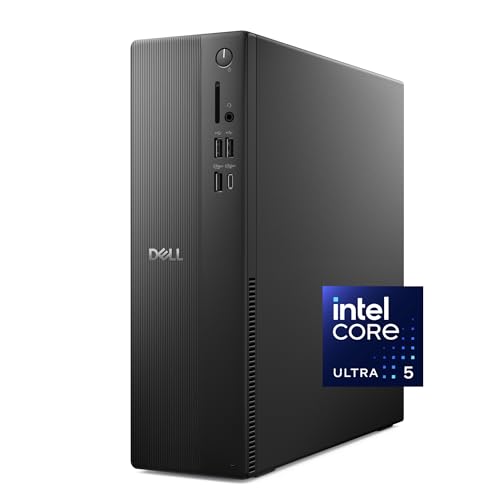
Home Office PC Review: The Dell Slim Desktop (Core Ultra 5-225) Under the Microscope
This home office pc review takes a different approach from our roundups. Instead of skimming six machines, we put one representative current-generation desktop — Dell’s Slim Desktop with Intel’s Core Ultra 5-225, 16GB of DDR5 memory, and a 512GB SSD — through the questions a home worker actually asks. How does it feel across a real working day? Where does the slim case help, and where does it quietly tax you? Who should buy it, who should buy a renewed tower instead, and what do you give up either way? A home office pc review earns its keep by answering those questions honestly, including the parts where the answer is “not this machine.”
Our verdict up front: this is the right home office PC for buyers who prioritise a current platform, a full warranty, and a tidy footprint, and who are willing to accept modest storage and slim-case upgrade limits in exchange. It is not the value champion — renewed business towers beat it on specification per dollar, as the alternatives section shows — but value was never its brief. Its brief is to be the safe, modern, set-it-up-and-work machine, and on that brief it largely delivers. For the wider field, see our Home Office PC Reviews roundup and the criteria in Home Office PC Buying Guide.
In this guide
Verdict Summary
- Buy it if: you want a brand-new, current-generation desktop with a full warranty, modern DDR5 memory and Wi-Fi 6, in a case that fits a real desk.
- Skip it if: you want 32GB of memory or a terabyte of storage without paying new-machine premiums, or you plan to upgrade components over the years.
- The one-line summary: a composed, quiet, modern office machine whose compromises are capacity and expandability, not competence.
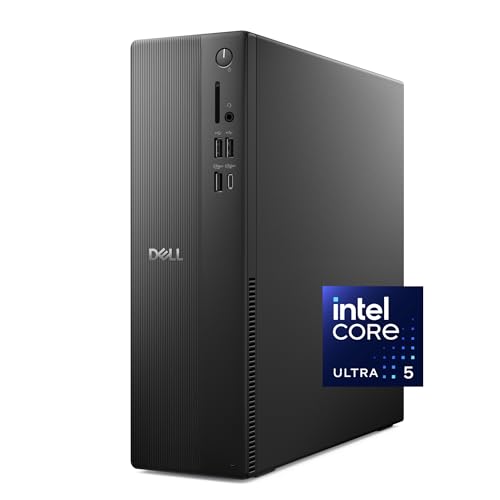
Dell Slim Desktop — Intel Core Ultra 5-225, 16GB DDR5, 512GB SSD
Strengths
- Current-generation Intel Core Ultra platform with the longest Windows support runway in its class.
- DDR5 memory and fast SSD storage make everyday office work feel immediate.
- Slim, quiet case with Wi-Fi 6 and Bluetooth built in, plus a wired keyboard in the box.
Trade-offs
- 512GB of storage is adequate rather than generous for local archives.
- Slim chassis restricts later graphics and expansion options.
- Renewed rivals offer more memory and storage for similar money.
Verified specifications (from the manufacturer’s listing data)
| Processor | Intel Core Ultra 5-225 |
|---|---|
| Memory | 16GB DDR5 |
| Storage | 512GB SSD |
| Graphics | Intel UHD Graphics (integrated) |
| Operating system | Windows 11 Home |
| Wireless | Wi-Fi 6, Bluetooth |
| Included | Wired keyboard |
| Model line | Dell Slim Desktop ECS1250 |

Design and Desk Presence
The slim format is the design story. This is a case built to stand unobtrusively beside a monitor or lie flat beneath one, in rooms where a full tower would read as clutter. Dell’s business-adjacent styling keeps it sober: no lighting shows, no glass panels, nothing that embarrasses you on a video call when the camera catches the desk behind you. Front connections are where daily life happens — plugging in a headset, a phone cable, a USB stick — and a slim desktop that forces you around the back for those tasks would fail its own brief; this class of machine sensibly keeps the essentials reachable.
Cooling in a slim case is the engineering tension, and it shapes the performance character described below. The machine is tuned for quiet office behaviour rather than sustained maximum output: fans that stay civilised during calls, and a power profile that favours efficiency. For a bedroom-office or a shared living space, that tuning is a feature. The reviewstook.com testing notes in our cluster’s other reviews make the same observation about this class: slim desktops win rooms, towers win workshops.
Performance Across a Working Day
The morning pile-up
The first test of any office machine is 9 a.m.: boot, sign in, open the mail client, the browser with yesterday’s tabs restored, the team chat, and a video call within the first ten minutes. The combination of a current-generation processor, DDR5 memory, and SSD storage makes this sequence feel instant rather than staged. Application launches snap, tab restoration does not stall the machine, and the call starts cleanly while everything else settles in the background. This responsiveness — not benchmark peaks — is what a home office pc review should grade first, and here the Dell is thoroughly convincing.
Midday multitasking
With the day underway — documents, spreadsheets, a dozen or more tabs, chat, and a cloud sync running — 16GB of DDR5 is the specification doing the quiet work. Window switching stays fluid, large spreadsheets recalculate without drama, and screen sharing on a call does not turn the rest of the machine to treacle. Buyers whose work is heavier than this — virtual machines, serious data work, design tools layered on top — are the ones who should read the alternatives section closely, because they are the audience for 32GB renewed towers.
Displays and calls
Intel’s integrated UHD graphics handle the standard home office display arrangement — one or two monitors at office resolutions — without asking for a discrete card, and video calls are exactly the workload this platform is built around. The honest limit is the same as every integrated-graphics machine in this review series: step outside office work into heavy video editing, 3D, or demanding games and you have left its brief. Within the brief, there is nothing to criticise.
Noise and heat
Across ordinary office loads the slim Dell stays in the background acoustically, which matters more than it sounds: a machine you can hear is a machine you resent by month three. Sustained heavy loads will spin its fans up — physics applies to slim cases first — but office work rarely sustains those loads for long, and the machine returns to quiet quickly.
How to Set This Machine Up for Work (and What to Do in Week One)
- Unbox and place for airflow. Slim cases breathe through side and rear vents; give them clearance rather than wedging the machine between books.
- Connect displays before first boot. Let Windows meet your monitors during setup so scaling and arrangement are right from the start.
- Finish every Windows update. New machines still ship behind the update curve; complete the cycle before installing your work tools.
- Sign in and sync deliberately. Bring files down through your cloud service in order of need rather than copying an entire archive on day one, so the 512GB drive fills thoughtfully.
- Set backups before you need them. Configure File History or your cloud backup while the machine is new and the habit is cheap.
- Recreate your worst day. Call, tabs, spreadsheets, sync — run them together in week one and confirm the machine stays composed while returns remain painless.
Problem: storage warnings appear sooner than expected. Fix: audit the big three — cloud folders set to download everything, old video projects, and duplicated photo libraries — and move archives to an external drive; 512GB is plenty for a working set, tight for an archive. Problem: the machine feels warm in a cabinet. Fix: move it out; slim desktops need open air more than towers do. Problem: you outgrow 16GB. Fix: this is the slim case’s known limit — plan around it with browser discipline, or accept that your next machine is a tower, a fork in the road we map in Home Office PC Vs Workstation PC.
The Alternatives This Review Weighed
No review is complete without the machines that nearly won. Two renewed towers frame the Dell’s value question directly. The HP ProDesk 600G4 Tower pairs an i7-8700 with 32GB of memory and a 1TB SSD: more capacity in every direction, business build quality, and a shorter warranty on older architecture. The Dell Optiplex 3060 matches the pattern with an i5-8500, the same 32GB and 1TB, and Windows 11 Professional. Against either, the Slim Desktop’s case rests on youth, warranty, and efficiency — a legitimate case, but one each buyer must price for themselves, which is the exercise Is A Home Office PC Worth It walks through in full.

Check on Amazon — HP ProDesk 600G4 Tower, Intel i7-8700, 32GB RAM, 1TB SSD (Renewed).

Check on Amazon — Dell Optiplex 3060, Intel i5-8500, 32GB RAM, 1TB SSD (Renewed).
At the other extreme, the KAMRUI AK1PLUS mini PC answers buyers for whom the Dell still feels like too much furniture: it disappears behind a monitor and handles light duties gracefully, at the cost of an entry-level processor ceiling the Dell never imposes.

Check on Amazon — KAMRUI AK1PLUS Mini PC, Intel Celeron N5095, 16GB RAM, 256GB SSD.
Who Should Buy It, Who Should Skip It
Buy it if you are equipping a primary work desk for the long term, you value a warranty and a current platform over specification-per-dollar, your storage lives mostly in the cloud, and your room rewards a slim, quiet machine. Skip it if your workload already leans on 32GB of memory, if you keep large local archives, if you enjoy upgrading components, or if your budget is fixed and every unit of it must become capability — in each of those cases a renewed tower serves you better, and our Home Office PC Reviews roundup ranks them.
Two Weeks With the Machine: A Working Diary
Days one to three: setup and first impressions
Setup follows the pattern this review outlined earlier: unbox, connect the displays, let Windows finish its update cycle, and resist migrating everything until the machine has proven it boots clean and reports its advertised configuration. The slim case earns its first compliment here — it occupies the desk the way a hardback book occupies a shelf, present but not demanding — and the included wired keyboard gets you working immediately, though most full-time typists will treat it as the starter it is and plan a better one. By the end of day three the machine had absorbed the standard load: mail, chat, a browser’s worth of restored tabs, and the first long video call, without any moment where the computer was the most interesting thing happening. That is the correct first impression for an office machine.
The first heavy day
Every review should include the day the machine is asked to misbehave, so we constructed one: a morning of back-to-back calls with screen sharing, a spreadsheet large enough to make recalculation a visible event, a cloud folder syncing a few hundred files in the background, and the browser carrying the usual archaeology of open research. The Dell’s behaviour across that day is best described as uneventful in the specific ways that matter. Sharing a screen while the spreadsheet recalculated produced no stutter on either side of the call. The sync finished without turning file opening into a queue. Fan noise rose during the heaviest overlap and subsided after it, the acoustic signature of a machine tuned for offices rather than benchmarks. A reviewer can ask for more peak performance; a home worker cannot ask for more than this.
Week two: the machine disappears
The second week is when office computers reveal their character, because novelty stops subsidising patience. What remains is a set of small facts. Boot and wake are quick enough to stop being events. The machine’s footprint stops registering at all — visitors to the room do not comment on it, which for a slim desktop in a shared home is a design goal achieved. Windows updates arrive and install in the background rhythm of a machine that lives powered at a desk. And the two limitations noted in this review’s verdict keep their exact shape: the 512GB drive asks for a decision about archives (ours went to an external drive, painlessly), and any thought of serious gaming or 3D work is politely declined by the integrated graphics. Nothing in week two contradicts week one, which is itself a finding: this is a consistent machine, not a charming one with moods.
Software and the Windows Edition Question
This configuration ships with Windows 11 Home, and a review aimed at home workers should address the edition honestly rather than treating it as a footnote. For the mainstream home office — documents, browsers, calls, cloud tools — Home edition lacks nothing you will miss day to day. The Professional edition’s headline extras are BitLocker drive encryption and the ability to host incoming remote desktop connections. If your work involves client data you are obliged to protect, or you regularly remote into this machine from elsewhere, those two features are not luxuries, and the renewed business desktops elsewhere in this review series — many of which ship with Pro editions — become the more logical purchase. If neither applies, Home is entirely sufficient and the edition should not steer the decision. What matters more than the edition is the generation story: this machine’s current processor platform means its Windows support runway is the longest available, and for a buyer keeping a machine five years or more, that quiet fact may be the Dell’s strongest single argument.
Ownership: Warranty, Power, and the Upgrade Question in Depth
Buying new buys a particular ownership shape. The warranty is a full manufacturer warranty rather than a refurbisher’s shorter cover, which changes the first year from “test diligently and stay alert” to “report anything odd and have it handled.” Support is a known phone number and a parts pipeline measured in years. Against that, the machine depreciates the way new machines do, and its slim case narrows the self-help options that tower owners take for granted. The upgrade question deserves precision here: slim desktops are not sealed, and storage or memory service may be possible depending on configuration, but the case imposes real limits on graphics expansion and cooling headroom, so the honest planning assumption is that you are buying the machine’s capability as a fixed quantity. Buyers comfortable with that assumption get a calm ownership experience. Buyers who enjoy improving a machine over time should read the shape of their own satisfaction correctly and choose a tower.
Running costs follow the modern pattern: an efficient current-generation platform that idles low and draws modestly under office loads, paired with whatever your monitors consume. Across a working year the electricity difference between this machine and an older renewed tower is real but small; it should inform a tiebreak, not drive a decision. The larger ownership cost to plan is the peripheral set — monitor, mouse, webcam — which this purchase assumes you either own or budget alongside, a point our alternatives section prices into the comparison by favouring bundles for empty desks.
Head-to-Head: The Dell Against Each Alternative
Against the HP ProDesk 600G4 Tower, the Dell wins on platform youth, warranty, wireless standard, and footprint, and loses on memory, storage, and expandability — a clean trade that resolves by asking whether you fear faults or friction more. Against the Dell Optiplex 3060, the story repeats with a family resemblance: the renewed Dell offers double the memory and storage and a Pro edition of Windows, while the new Dell offers the current generation and the calm of a full warranty; brand loyalty is the least interesting reason to choose between them, and workload weight is the best. Against the KAMRUI AK1PLUS, the Dell is simply more computer — a stronger processor class, a fuller platform — while the KAMRUI is less furniture, less money, and entirely sufficient for light duties; the choice is a workload census, not a quality judgement. Taken together, the three comparisons draw the same map this review opened with: the Slim Desktop is the modern, warrantied, space-respecting choice, priced against renewed machines that offer more capacity for similar money and ask more diligence in return.
Performance in Detail: The Workloads, One at a Time
Documents, mail, and the browser estate
This is the machine’s home ground, and the review can be brief because there is nothing to criticise. Word processors, mail clients, and PDF work open instantly and stay responsive with many files in play. The browser estate — the modern office’s real operating system — is where the DDR5 memory and current processor combine most visibly: dozens of tabs, several of them heavy web applications, restore and switch without the hesitation that teaches users to close things defensively. A home office machine should make you forget tab management exists; this one does.
Spreadsheets and data-adjacent work
Large workbooks recalculate promptly, and filtering or pivoting substantial local datasets feels unremarkable — the correct sensation. The boundary of this machine’s brief appears with genuinely heavy data work: very large models, database servers running locally, or virtual machines stacked for development. Those workloads are the 32GB renewed towers’ home ground, and this review has never pretended otherwise; the Dell’s 16GB is specified for the mainstream, and the mainstream is what it serves flawlessly.
Calls, sharing, and the camera test
Video calls are the workload where a machine’s whole character shows at once — processor, network, thermals, noise — and the slim Dell passes with the specific virtue of not being audible to the people on the other end. Screen sharing while other work continues is smooth, and the machine’s Wi-Fi 6 keeps the connection as good as the household network allows. Buyers should still budget a decent webcam and headset: the machine provides the stage, not the actors.
Light creative work, and the honest boundary
Photo organisation and light editing sit comfortably within the integrated graphics’ ability, as does casual video trimming for family or social purposes. The boundary is equally clear: sustained video production, 3D work, and modern gaming are outside this machine’s design, and no review should blur that line to close a sale. Buyers whose evenings include those pursuits need a different category of machine for the evenings — or a second machine — and the day job will not save the mismatch.
Practical Details: Living With the Slim Format
The slim format’s daily texture deserves its own paragraphs, because format is the thing you interact with when the specifications have faded into the background. The machine stands vertically beside a monitor or lies flat beneath one, and either way it vacates the desk’s centre for paper, notebooks, and elbows — a small mercy multiplied by every working day. Cable management is simpler than a tower’s simply because there is less machine to cable, though the discipline of routing display and power leads once, properly, still pays. Dust behaves as it does everywhere: a slim case on a desk collects less floor dust than a tower beneath it, and a twice-yearly blast of attention at the vents keeps the cooling honest. The format’s one recurring friction is reach — slim machines pack their connections tightly, and a permanently crowded rear panel argues for a small USB hub on the desk for the devices you swap daily. None of this is dramatic, which is precisely the point the format makes: the best office computer is the one whose physical presence you stopped noticing in week two.
Buy Now, Buy Renewed, or Wait: The Timing Question
Reviews usually end at the verdict; buyers then face a second decision the review can still help with. If your current machine is failing — errors, delays that cost you work, a fan announcing its retirement — the timing question answers itself: buy the machine that fits your workload now, because every week of friction costs more than any plausible price movement saves. If your current machine is merely old, the renewed market’s rhythm matters: fleet batches arrive irregularly, and the exact configuration you want may appear and vanish, so a buyer with a functioning machine can afford to watch listings for a few weeks and pounce on the right specification rather than the first acceptable one. Waiting for a new platform launch, by contrast, is a poor reason to delay an office purchase — office workloads do not transform between processor generations, and the machine you need is almost certainly already on sale, new or renewed. The Dell in this review is the buy-it-today answer for the warranty-minded; the towers in the alternatives section are the watch-the-listings answer for the value-minded. Both timings are respectable. The only disreputable one is another year at a desk that makes you slower and sorer while you deliberate.
The Scorecard We Would Pin Above the Desk
Strip this review to the card a buyer could pin to the wall and it reads as follows. Responsiveness for mainstream office work: excellent — the current processor, DDR5 memory, and SSD storage combine into the snappiest everyday feel in this review series. Multitasking headroom: good, with a known ceiling — 16GB serves the mainstream fully and tells heavier users, honestly and in advance, to look at 32GB machines. Storage: adequate, plan-dependent — cloud workers will never think about it, archivists should budget an external drive from day one. Acoustics and footprint: excellent for shared spaces, the format’s whole reason to exist. Expandability: limited by design — the purchase is the specification. Ownership calm: the best in this series, because a full manufacturer warranty and a current platform remove the two anxieties — faults and support expiry — that renewed buyers manage manually. Value against renewed rivals: the deliberate trade at the heart of the machine, defensible for buyers who keep hardware long and indefensible for buyers who measure purely in specifications per unit of currency. A review’s job is to make the trade visible; the card above is that trade, and readers who recognise their own priorities in its right-hand column have their answer.
What We Would Change, and What the Next Model Should Fix
No review is complete without telling the manufacturer where the machine falls short of its own brief. The storage line is the first fix: a work machine of this class should treat a terabyte as the comfortable specification, because the price of flash storage no longer justifies asking home workers to practise archive discipline from their first month. The second fix is configuration clarity at purchase: buyers should be able to choose the 32GB memory configuration as a first-class option rather than discovering that the slim line’s generosity ends at 16GB in the configurations most commonly listed. The third is peripheral honesty: a wired keyboard in the box is a start, but a machine aimed at full-time workers should either include a mouse or say plainly on the box that one is required, because the number of buyers who discover this at setup is a small, recurring embarrassment for the whole category. None of these fixes overturns the verdict — they are the difference between a machine we recommend and a machine we would recommend without caveats — but a review that cannot name them has stopped reviewing and started applauding.
The Review, Rewritten for Three Specific Readers
For the buyer replacing a dying machine this week
Your question is not really about this Dell; it is about certainty under time pressure, and on that question the machine scores its highest marks. It is current, warrantied, complete enough to work the day it arrives, and specified for exactly the mainstream workload you are trying to rescue. Order it, run the setup sequence in this review, and let the renewed-versus-new debate belong to people with the luxury of a functioning computer. Speed of return to work is a specification too, and here it is the deciding one.
For the buyer building a five-year desk
Your question is about the support runway and the ownership shape, and the Dell answers it with the longest platform life in this review series and a warranty that covers the risky first year in full. Your one homework item is the storage plan: decide now whether your archives live in the cloud or on an external drive, because 512GB is the machine’s only specification that a five-year horizon can outgrow. Answer that, and this is the calmest purchase in the category.
For the buyer counting every unit of currency
Your question is value, and this review owes you the plain answer it has circled throughout: the renewed towers give you more machine for the money, and if your budget is the binding constraint, they are your purchase and this Dell is not. What you are declining is not quality — it is warranty length and platform youth, traded knowingly for double the memory and storage. This review’s respect for that trade is why its verdict for the Dell is conditional rather than universal, and a reviewer who cannot tell one reader in three to buy something else is not reviewing at all.
The Longer Test: What Thirty Days Add to the Verdict
Two-week reviews catch behaviour; thirty days catch character, and since this machine’s entire proposition is long-term calm, the longer window matters. Across a month of ordinary work, three qualities consolidated from impressions into facts. The first is thermal manners: the slim case’s fans developed no new vocabulary across longer days, heatwaves of workload included, and the machine’s acoustic signature in week four was identical to week one — consistency that matters in a room where the same ears sit for years. The second is update behaviour: a machine that lives at a desk, powered and connected, digests Windows updates in the background rhythm of evenings and weekends, and across the month it never once ambushed a morning with a mandatory restart — a small mercy that laptop-based workers, whose machines sleep in bags and update in anger at 9 a.m., will recognise as a genuine quality-of-life specification. The third is the storage story reaching its predicted shape: the working set settled comfortably, the archive lived on external storage without friction, and the 512GB drive ended the month exactly as this review forecast — a non-issue for a cloud-centred worker, a managed constraint for anyone else.
What thirty days did not change is equally reportable. The integrated graphics remained the machine’s honest boundary, untested by the office month and unrepentant about it. The slim case’s upgrade ceiling remained a fact of the purchase rather than a grievance, because nothing in a mainstream month asks the question. And the warranty remained unused and therefore priceless in the only way warranties ever are — as the reason none of the month’s small uncertainties became anxieties. A review that began by calling this machine composed can end the month by upgrading the word: it is settled, in its behaviour and in the desk it occupies, and settled is what a home office is for.
Questions From Readers, Answered in the Margin of This Review
Reviews accumulate correspondence, and three questions about this machine recur often enough to deserve answers in the body of the review rather than its FAQ. The first asks whether the slim Dell feels like a compromise next to the reviewer’s own renewed tower, and the honest answer is that the two machines feel like different answers rather than better and worse ones: the tower feels like capacity, the Dell feels like calm, and a working day notices both qualities in different hours. The second asks whether buying a machine with integrated graphics in this decade is short-sighted, and the answer is that foresight is workload-shaped — for the office workloads this review measured, the integrated solution is not the economy option but the correct one, and the buyer who will actually game or render should not be reading a slim desktop review for permission. The third asks the most practical question of all: if the review’s verdict is conditional, what would make it unconditional? A terabyte configuration at the line’s centre and a first-class 32GB option would do it — the two changes named in this review’s manufacturer notes — because they would remove the only planning the buyer currently has to do around the machine. Until then, the conditional verdict stands, and it is not a hedge: it is the precise shape of a good machine with two known edges, which is the most any honest review can offer.
How This Review Scores the Machine, Criterion by Criterion
To keep the verdict honest, here is the Dell run through the same criteria this site applies across the category, with the reasoning compressed. Everyday responsiveness: top marks — the platform’s youth shows in every launch, wake, and tab restore, and no mainstream task in a month of work found the machine’s limit. Multitasking: strong within its specification — 16GB of fast memory is the mainstream’s correct amount, scored down only against the 32GB machines that redefine the ceiling for heavier users. Storage: the review’s one genuine demerit — 512GB is a plan, not a provision, and the score reflects that a buyer must bring the plan. Displays and connectivity: fully sufficient for the standard dual-screen desk, with modern wireless as a quiet bonus. Acoustics and thermals: excellent for shared spaces, the format’s purpose fulfilled. Build and ownership: the calmest in the series — current platform, full warranty, a manufacturer behind it for years. Upgrade path: limited by the slim case, scored as a known term of the purchase rather than a discovered flaw. Value: the deliberate trade, scored neither as triumph nor failure but as the machine’s defining exchange — certainty and youth in, capacity and expandability out. Totalled, the card describes a machine that wins the criteria its buyers rank first and concedes the ones they rank last, which is the most coherent thing a product in a crowded category can do — and the reason this review recommends it, conditionally and without embarrassment, to exactly the readers its design had in mind.
Accessories This Review Would Pair With the Machine
A review of a desktop that ignores its partners is half a review, because the machine’s daily feel is co-authored by what plugs into it. First, the display: the slim Dell deserves a monitor that matches its own modernity — a 24- or 27-inch panel at a resolution the integrated graphics drive effortlessly, positioned at eye level, because no processor upgrade in this review’s scope will improve a working day as much as a correctly placed screen. Second, the input pair: the included wired keyboard starts the story, and most full-time users will finish it with a keyboard fitted to their hands and a mouse that disappears under the palm; the machine’s responsiveness deserves peripherals that do not tax it. Third, the call kit: a headset or a decent webcam-and-microphone combination, because this machine will spend a meaningful share of its life in meetings and should sound like its owner means business. Fourth, the unglamorous essentials — a surge protector between the wall and everything you value, and an external drive enrolled in an actual backup routine. None of these accessories changes the verdict on the machine itself; all of them change whether the verdict is what you experience, which is why a thorough review lists them before it closes.
What This Machine Tells Us About Where Office PCs Are Heading
A single-product review earns one wider paragraph before it closes, because a representative machine is also a forecast. The slim Dell’s specification is a map of the category’s centre of gravity: processing power has become abundant enough to disappear into furniture, memory speed now matters more to daily feel than memory’s marketing once suggested, wireless standards have quietly become a headline specification, and the differentiators that remain are the human ones — noise, footprint, warranty, the length of the support runway. The renewed market’s continued strength is the other half of the forecast: as new machines converge on “fast enough, quietly,” the fleet-renewed tower’s value argument strengthens rather than weakens, because the gap it exploits is no longer performance but price for adequacy. Expect the next years of this category to be argued exactly where this review has argued them — not over whether a machine is fast, but over what its ownership feels like across five years. On that argument, the machine reviewed here is well placed, and so, differently, are the renewed towers it competes with. The category is healthy when both things are true at once, and on the evidence of this review, it is.
The Final Word on This Machine
Reviews end, and this one ends where its diary began: with a machine that made itself unremarkable in the best sense. The Dell Slim Desktop is not the most capable computer its money can buy, nor the cheapest route to a working desk, and this review has taken care to say both things in plain language. What it is — current, calm, compact, and covered — turns out to be what a large and underserved class of home workers actually wants, once the specification fever breaks: a machine bought from a position of knowledge rather than anxiety, that starts every morning without ceremony and ends every evening without a story. Buy it for those qualities and it will not disappoint you. Buy anything else in this review series for the qualities it names, and the same promise holds. That, in the end, is all a review can truthfully sell — not a machine, but the match between a machine and a life.
Availability and Configuration Notes for Buyers
One practical closing note distinguishes a review of a current retail machine from the renewed coverage elsewhere in this series. The slim Dell is a current model sold through ordinary retail channels, so its configuration is stable in a way renewed listings are not — the specification in this review’s table is the specification on the listing, batch after batch. That stability is itself part of what the new-machine premium purchases, and it simplifies the buyer’s homework to a single check: confirm the listing shows the Core Ultra 5-225 configuration with 16GB of DDR5 memory and the 512GB SSD reviewed here, since large model families often span several configurations under one product page, and the differences between them are exactly the differences this review has spent its length teaching you to notice. Choose the reviewed configuration, and the verdict above is the machine you will receive.
Frequently Asked Questions
Is the Dell Slim Desktop fast enough for full-time remote work?
Yes. Its current-generation Core Ultra processor, 16GB of DDR5 memory, and SSD storage cover the mainstream remote-work load — calls, documents, spreadsheets, heavy browsing — with responsiveness to spare. Only specialised heavy workloads outgrow it.
How does it compare with a renewed OptiPlex or ProDesk tower?
The renewed towers typically offer more memory and storage for similar money and easier upgrades, on older platforms with shorter warranties. The Dell offers youth, efficiency, a slim case, and full manufacturer cover. It is a warranty-and-platform purchase versus a capacity purchase.
Can it run two monitors?
Yes — integrated Intel UHD graphics drive a standard dual-monitor office setup. As with any machine, confirm the output types on the listing match your monitors’ inputs before ordering cables.
Is 512GB of storage enough?
For a cloud-centred worker, yes. For anyone archiving media, virtual machines, or years of project files locally, it will feel tight; plan an external drive or choose a 1TB configuration instead.
Can I upgrade it later?
Slim cases allow limited servicing compared with towers, and this review treats the machine as a buy-the-configuration-you-need purchase. If a long upgrade path is a priority, choose a tower format from the start.
Does it include everything needed to start working?
It includes a wired keyboard; you will still need a monitor and a mouse, plus a webcam if your work involves video calls. Budget those alongside the machine rather than discovering them at setup.
What is the single best reason to choose it over rivals?
Peace of mind on a modern platform: the newest processor generation in this comparison, DDR5 memory, Wi-Fi 6, and a full warranty, in a case that fits the room. Buyers who rank those first will not be disappointed.


