Disclosure: As an Amazon Associate, reviewstook.com earns from qualifying purchases. Links on this page are affiliate links at no extra cost to you; prices and availability change frequently, so check Amazon for the latest.
Is a Home Office PC Worth It? The Honest Cost-and-Comfort Answer
Is a home office pc worth it? For a person who works from home full-time, the answer is usually yes — but “usually” is doing heavy lifting in that sentence, and this article exists to find out whether it applies to you. Worth is not a specification; it is a ratio between what a machine costs you over its whole life and what it returns in comfort, reliability, and hours that feel easy instead of grinding. We will build that ratio piece by piece: what you actually pay, what you actually get, how the answer changes between renewed and new machines, and the specific situations where the honest answer flips to no.
Two companion pieces frame the edges of this question. The balance sheet in Home Office PC Pros And Cons lists the advantages and disadvantages without pricing them, and Home Office PC Vs Workstation PC handles the separate question of whether professional-grade hardware is the better spend. This article stays on worth: money, time, and comfort, in that order.
In this guide
The Short Answer, With Its Conditions Attached
A dedicated home office PC is worth it when three conditions hold: you work at a desk at home most days, your current setup imposes daily friction — slowness, noise, a laptop screen hunch, a fan that joins your calls — and you buy at the category’s value centre rather than its extremes. It is not worth it when your work is genuinely mobile, when your employer’s laptop already serves you well at a proper desk setup, or when the purchase would be a bottom-tier machine whose limitations recreate the friction you were trying to escape. Each condition gets its evidence below.
What You Actually Pay: Total Cost, Not Sticker Cost
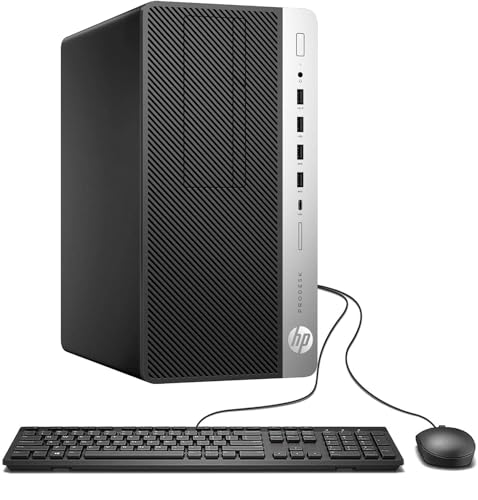
The sticker is the smallest part of the analysis, and the renewed market warps it in your favour. Business desktops retired from corporate fleets return to sale with fresh solid-state drives and generous memory at prices that make new entry machines look embarrassed. A renewed tower such as the HP ProDesk 600G4 — six-core i7-8700, 32GB of memory, a terabyte of SSD — delivers a specification that new machines reach only at a substantially higher tier of spend. That gap is the engine of the worth-it case: the capability that removes daily friction is available at the price of a compromise machine bought new.

Check on Amazon — the renewed ProDesk 600G4 Tower (i7-8700, 32GB, 1TB SSD).
Against the sticker, honestly add the rest of the ledger. Peripherals: a bare tower needs monitors, keyboard, and mouse, though bundles and all-in-ones fold some in. Electricity: a desktop and its screens draw more than a laptop, a modest ongoing difference rather than a dramatic one. Time: renewed buying costs you an hour of listing-reading and an afternoon of arrival testing — real costs, priced in attention rather than money. And risk: a shorter warranty means a small chance of funding a repair or replacement earlier than a new machine would demand. Even with every line added, the renewed value centre survives the audit comfortably for a full-time desk worker, which is why reviewstook.com returns to it across this cluster’s roundups.
What You Actually Get: The Returns, Itemised
Return 1: hours that stop leaking
Slow machines tax you in seconds that feel too small to count and too constant to ignore: the boot you wait on, the tab restore that stalls, the spreadsheet that thinks before it calculates, the call that starts with an apology for your fan. Multiply a few lost minutes a day across a working year and the machine has consumed a working week. A competent desktop — SSD storage, 16GB of memory or more, a supported processor — reduces that tax to nearly nothing. This is the largest single return in the analysis, and it is why the specification floor matters more than the badge on the case.
Return 2: a body that ends the day intact
The ergonomic return is the one buyers undervalue most before purchase and praise most after it. Screens at eye level, a keyboard where your elbows want it, a mouse that fits your hand, a chair doing its share — a desktop is the only computer format that lets every element sit in its proper place. If your current setup is a laptop on a kitchen table, the worth calculation is not close: you are not buying a computer, you are buying back your neck and shoulders.
Return 3: a machine that adapts instead of expiring
Desktops, towers especially, accept the upgrades that postpone replacement: more memory when applications grow, a larger SSD when archives swell, a replacement fan instead of a replacement computer. The Dell Optiplex 3060 configuration in our reviews — i5-8500 with 32GB of memory and a 1TB SSD already fitted — shows the end state of that logic: a renewed machine specified so generously at purchase that the upgrade question may never arise.

Check on Amazon — the renewed Optiplex 3060 with i5-8500, 32GB RAM, 1TB SSD.
Return 4: separation between work and everything else
A dedicated machine draws a boundary a laptop blurs: work lives at the desk, on the work computer, and the rest of the house stays the rest of the house. For some households that boundary is worth the purchase alone. It also simplifies security and backups — one machine, one routine, no family downloads beside the client files.
Where the Worth Case Collapses: The Not-Worth-It Machines
The category has a floor, and below it the answer flips. Consider the shape of the trap: a legacy bundle built around a quad-core processor of an old generation, 8GB of older memory, and — the disqualifying detail — a mechanical hard drive as the system disk, with a small monitor included to make the package photograph well. Such a machine is cheap in the way a leaking boat is cheap. It recreates every friction the purchase was meant to cure, adds an unsupported platform’s expiry date, and teaches the buyer the false lesson that desktops are slow. The lesson of this section is precise: “is a home office pc worth it” has no answer independent of which home office pc. Above the floor — SSD, 16GB, supported processor — yes. Below it, you have bought the friction a second time.
A second collapse case is the overbuy. A top-tier new machine with capacity your workload will never touch converts the surplus into nothing; it is not more worth it for costing more. The worth curve rises steeply to the value centre and then flattens, which is why our reviews keep steering readers to the same middle: renewed business towers with generous memory, or sensibly specified new machines like Dell’s Slim Desktop, whose current platform and warranty justify their premium for buyers who keep machines a long time.
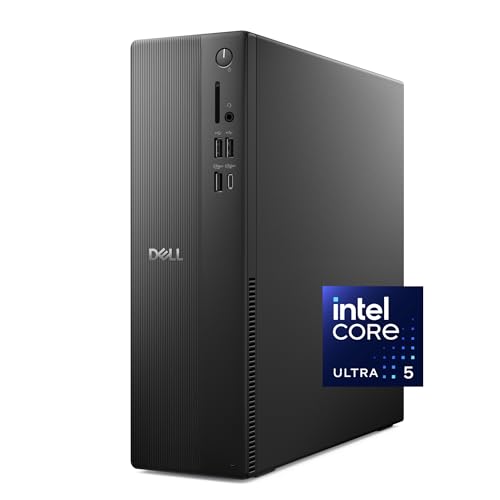
Check on Amazon — Dell’s Slim Desktop: Core Ultra 5-225, 16GB DDR5, 512GB SSD.
The Middle Path: Small Machines and Bundles, Priced Honestly
Two formats test the worth question in interesting ways. The mini PC — the KAMRUI AK1PLUS is this cluster’s example, with 16GB of memory and dual 4K support in a box that mounts behind a monitor — offers the lowest total cost of a genuinely pleasant setup for light work: tiny power draw, no desk footprint, and enough capability for the browser-centred day. Its worth collapses only when the workload outgrows its processor, which is a knowable fact about your job before you buy. The bundle — HP’s EliteDesk 800 G3 package with a 21.5-inch monitor, keyboard, and mouse included — prices convenience: one order, one delivery, a working desk. Its worth depends entirely on whether you needed the included screen, which is again knowable in advance. Both formats reward buyers who have done the workload homework in How To Choose A Home Office PC and punish guessers symmetrically.

Check on Amazon — KAMRUI’s AK1PLUS mini PC (N5095, 16GB RAM, 256GB SSD).

Check on Amazon — the renewed EliteDesk 800 G3 bundle with 21.5-inch monitor. Note this bundle’s 8GB memory and older processor place it at the cautious end of the worth scale — buy it for a light-duty seat, not a heavy primary workload.
How to Run the Numbers for Your Own Desk
- Count your desk days. Fewer than two a week weakens the case; four or five makes it strong. Worth scales with use.
- Price your friction. List the three most annoying daily delays in your current setup and estimate their minutes honestly. That is the return the new machine must beat.
- Set the floor before the budget. SSD storage, 16GB of memory, a Windows-supported processor. Any candidate below the floor is excluded regardless of price — it cannot deliver the return.
- Compare total setups, not boxes. Tower plus monitors versus bundle versus all-in-one versus your current laptop plus a dock and screen. Compare like with like, peripherals included.
- Divide by years, not by payday. A machine kept four years costs its total divided by four annually; renewed value-centre machines make this arithmetic almost unfairly favourable.
- Keep the return window sacred. Whatever you buy, test it against your worst working day in week one. Worth-it is a hypothesis until your own workload confirms it.
The Verdict
For the full-time or near-full-time home worker, a sensibly bought home office PC is one of the clearest worth-it purchases in the whole home: it returns time daily, comfort hourly, and it does so for years from a single decision, with the renewed business market compressing the cost side of the ratio to a fraction of the new-machine alternative. The purchase fails only at the extremes — the below-floor bargain that re-sells you your old frustrations, the over-specified flagship whose surplus you will never use, and the mobile working life that no deskbound machine can serve. Stay off those three edges, buy the value centre, and the question answers itself by the end of the first working week. Readers ready to act on the verdict will find the current shortlist in Home Office PC Reviews and fixed-budget versions in roundups like Best Home Office PC Under $1200.
Three Households, Three Ledgers
The full-time remote employee
She works five days a week from a spare room, on a company-issued laptop that is adequate and a kitchen chair that is not. Her ledger: a renewed value-centre tower, one good monitor to join the one she owns, and a chair bought with the renewed saving. The returns arrive in the order this article promised — the morning boot tax vanishes, the screen-share stutter goes with it, and her shoulders file the loudest testimony by the end of week two. Over a conservative four-year life, the setup’s cost per working day is small enough to be embarrassing next to her coffee spend. Verdict: the clearest yes in this article, and the reader this category was built for.
The hybrid consultant
He is home two days a week, at client sites for three, and his laptop is genuinely good. His honest ledger is thinner: the desktop’s returns are real but sampled at forty percent, and the machine must share its desk with the laptop’s dock rather than replace it. His verdict lands on a smaller yes — a modest mini PC or a mid renewed desktop as the home base, files in the cloud, no premium spent. The worth framework’s value to him is not the yes; it is the permission to stop at modest, because his desk days cannot amortise more.
The household that shares
Their machine is not one worker’s tool but a family’s infrastructure: bills, schoolwork, photo archives, video calls with grandparents, a parent’s evening course. No single user’s hours justify the purchase, but the sum does, and the desktop’s fixed place and shared accounts make it the house’s filing cabinet and front desk in one. Their verdict favours the tidy formats — an all-in-one or a bundle — and their worth is measured in errands completed without negotiation over whose laptop is charged. Categories like this one survive because households like theirs keep buying them, which is market evidence worth more than any single review.
The Laptop-Plus-Dock Alternative, Priced Honestly
The strongest counter-argument to this entire article deserves its strongest form. A good laptop, a docking station, two monitors, and proper peripherals deliver most of the desktop’s ergonomic return while keeping the machine portable — and for workers who already own the laptop, the incremental spend can undercut a desktop purchase. Concede all of that, and then look at what the comparison leaves out. The docked laptop still throttles sooner under sustained load, still funnels every connection through one cable and one port’s bandwidth, still takes its fan noise to the desk surface beside your keyboard, and still represents a single point of failure whose repair removes your travel machine and your desk machine simultaneously. Its battery also ages in the dock, living at full charge on permanent power.
None of those points is fatal, and for the hybrid worker above they are outweighed by portability. But they explain why the desktop persists as the desk’s native format rather than a legacy habit: a machine designed for one place, plugged into everything directly, cooled without compromise, and repaired with standard parts is not an old-fashioned answer to the desk question — it is the direct one. Price the docked alternative honestly, including the dock and the second power supply you will want for travel, and the desktop’s worth case usually survives the fairest fight its critics can stage.
Running Costs and Second Lives: The Tail of the Ledger
Worth calculations usually end at purchase, but a desktop’s ledger has a long tail. Running costs are the smallest part: a modern desktop and its monitors draw modest power across office hours, and sleep discipline matters more than model choice. Maintenance is the next line, and here the desktop’s standard-parts nature pays quietly for years — a fan, a drive, a memory stick are all inexpensive, widely available, and replaceable with a screwdriver and a video tutorial, where a sealed device turns the same failures into service bills or replacements. Software costs are identical to any Windows machine’s and belong to neither side of this argument.
The tail’s final entry is the second life. A business desktop that finishes its years as your primary machine rarely becomes worthless: it demotes gracefully to a household’s second seat, a child’s schoolwork machine, a media server, a relative’s first computer. That cascade is worth real money in households that would otherwise buy a second machine, and it is a structural advantage of standard, repairable hardware — the machine keeps being useful because it can be opened, upgraded, and re-roled. Buyers who count the second life honestly often find the worth question was not close at all; buyers who ignore it are simply leaving the last page of the ledger unread.
How an Employer Would Run This Same Calculation
It is instructive that companies — the least sentimental buyers in this market — keep purchasing business desktops for fixed desks even in the laptop era, and keep replacing them on planned cycles. Their arithmetic is this article’s arithmetic with the sentiment removed: cost per seat per year, downtime priced by the hour, standardisation that makes every machine serviceable by any technician, and peripherals shared across whoever sits down. The home worker who adopts the same frame — cost per working day, friction priced honestly, serviceability valued — usually reaches the employer’s conclusion: for a fixed desk, the desktop is not the traditional choice but the economical one. The renewed market then lets the household buy the employer’s exact hardware at the employer’s discarded price, which is as close as consumer economics gets to an arbitrage. Worth-it, in the end, is not a feeling about a product. It is the answer this calculation returns, and for the desk-bound worker it returns yes with unusual consistency.
The Regret Files: Three Purchases That Failed the Worth Test
Worth is easiest to see in its failures, so here are the three regret patterns this category produces, anonymised composites of the stories readers tell. The first is the bargain that was not: a buyer chose the cheapest complete bundle on the marketplace — old processor, minimal memory, a spinning hard drive — and spent a year being annoyed by the exact slowness the purchase was meant to cure, before buying properly the second time. The first machine’s price was not low; it was a deposit on the second. The second regret is the flagship that idled: a buyer, anxious to buy “the best,” spent at the top of the new market for capacity their document-and-browser workload never touched, and now owns a machine whose surplus they meet with guilt rather than gratitude. The hardware is blameless; the sizing was the error. The third regret is subtler — the right machine in the wrong room: a capable tower bought for a desk that turned out to be the family’s dining table, resented nightly and eventually exiled, where a mini PC or all-in-one of half the capability would have been welcomed and kept. Three different failures, one common structure: each buyer skipped a question this article asks — the floor, the workload, the room — and the machine faithfully embodied the skipped question for years.
The Opportunity Cost Question: What Else Could the Money Do?
A rigorous worth analysis must let the money speak for its alternatives. The same budget could buy a better chair and leave the old computer wheezing — a trade some backs would vote for. It could fund a course, a certification, a quieter room, a second monitor alone. The desktop’s claim against those rivals is that it is the platform the other purchases plug into: the course is studied on it, the monitor connects to it, the chair faces it. But the challenge disciplines the purchase in one important way — it forbids the lazy version, where the whole budget becomes the computer and the desk around it stays broken. The worth-maximising pattern this article has recommended from several directions now — value-centre machine, surplus redirected to screens and seating — is precisely the answer that survives opportunity-cost scrutiny, because it refuses to let any single component eat the whole improvement. If your budget forces a choice between the machine and everything else, buy the machine at the floor specification and stage the rest; if it forces a choice between a flagship machine and a balanced setup, choose the setup every time.
A Five-Minute Formula for Your Own Verdict
Close the article with arithmetic you can do on paper. Line one: your desk days per week, multiplied by fifty weeks — your annual uses. Line two: the minutes of friction your current setup costs you on a typical day, estimated ungenerously. Multiply them: that is the annual time the purchase must repay, and for most full-time workers it lands between one and three working weeks — a figure that usually ends the argument by itself. Line three: the total setup cost, machine plus the peripherals you genuinely lack. Line four: the years you will keep it, four being the honest default. Divide line three by line four and then by line one, and you have the cost per working day of a faster, quieter, better-postured working life. Compare that figure with anything else you buy daily without thinking. The formula will not make the decision for an edge case — the mobile worker, the employer-laptop household — but for the desk-bound majority it converts a vague question about worth into a number small enough to be its own answer.
Worth It at Each Stage of a Working Life
The answer also moves with the buyer’s season, and a complete analysis should track it. For the new remote worker in their first year, the worth case is at its most urgent and its most fragile: urgent because the desk is being built now and every habit will form around it, fragile because the budget is thinnest exactly when the need is newest — which is why the renewed value centre matters so much to this buyer, converting a flagship’s price into a whole working desk. For the established professional in mid-career, the calculation tilts toward time and body: the machine is cheap relative to the salary it supports, the ergonomic returns compound across the longest remaining horizon, and the correct purchase is usually the comfortable one rather than the clever one — a strong machine, bought once, thought about never. For the worker approaching retirement or a planned step down to part-time, the horizon shortens and the honest advice inverts: buy modestly, favour the tidy formats, and let the machine’s second life — grandchildren’s homework, household administration — carry the tail of its value. None of these stages changes the specification floor; all of them change how far above it the worth curve justifies climbing, and a buyer who knows their season buys the right height the first time.
The One Case We Have Not Priced: Your Health
This article has priced time, money, electricity, and depreciation, and deliberately left one return unquantified, because it resists arithmetic: the difference between ending a working day with a body that aches and one that does not. The desktop is the enabling purchase for the ergonomic desk — screens at eye level, input devices where your arms fall, a chair chosen for the purpose — and while no honest writer will promise medical outcomes from a computer purchase, the direction of the effect is not in serious dispute among anyone who has worked a year hunched over a laptop and a year at a proper desk. Treat this return the way actuaries treat uninsurable things: not as a number in the formula, but as the reason the formula’s small daily figure understates the case. If the five-minute calculation earlier in this article lands anywhere near the borderline, this is the consideration that should tip it — because the borderline was computed without the largest return the machine pays.
The Question Behind the Question: What Are You Really Buying?
Strip the analysis to its root and a home office pc purchase is never really about the computer. It is about the working day you intend to have for the next several years: whether it starts instantly or apologetically, whether your body is arranged by furniture or by accident, whether the tools sit quietly under the work or keep interrupting it to ask for attention. Buyers sense this, which is why the decision feels larger than its price — the machine is a commitment to a daily experience, renewed every morning. Framed that way, the worth question almost answers itself for the desk-bound worker, because the alternatives are not other products but other days: the hunch, the wait, the fan on the call, the laptop carried from room to room like a tray. The desktop’s worth is the difference between those days and better ones, multiplied by every working day of its life — and against that multiplication, even the new machines in this article are inexpensive, and the renewed ones approach the absurd. The buyers for whom the answer stays no are those whose best days genuinely happen away from a desk, and this article’s respect for their answer is the same respect, applied in the other direction: buy the life, then the machine that serves it.
If You Decide Yes: Spending the Money in the Right Order
A yes deserves a sequence, because the order of purchases inside a setup changes the value of each. First the machine, at or above the floor this article has defended — it is the platform everything else attaches to. Second, the primary display, or the second one if a first exists: screen space is the upgrade every knowledge worker feels hourly. Third, the chair, whose service life will outlast the computer and whose returns are paid to your spine. Fourth, the input devices, keyboard before mouse, fitted to your hands rather than to a bundle’s average. Fifth, the small infrastructure of a serious desk — a headset that makes calls effortless, a backup drive that makes failure boring, cables routed once and forgotten. Buyers who follow this order find that each step makes the previous one feel more worth it, which is the signature of a system purchased in the right sequence. Buyers who reverse it — peripherals first, machine whenever — end up with beautiful accessories attached to the same old friction, wondering why the setup still disappoints. The worth was never in any single box; it is in the order, and the order is free.
Worth, One Year On: The Retrospective Test
The fairest judgement of any purchase is the one made a year later, when novelty has stopped lobbying and the machine has become furniture. Run the retrospective on the value-centre purchase this article recommends and a pattern emerges that no specification sheet predicts: owners almost never cite the processor, rarely cite the storage, and invariably cite the mornings — the boot that stopped being a ritual, the call that stopped featuring a fan, the spreadsheet that stopped being an event. The worth compounded in the places the purchase was actually aimed: time and posture and quiet. The retrospective on the below-floor bargain runs in mirror image: a year of small abrasions, each too minor to justify replacement, summing to the particular regret of a problem re-purchased rather than solved. And the retrospective on the overbuy is the strangest of the three — a fine machine, a fair outcome, and a lingering sense of money asleep in specifications that never woke. Three retrospectives, one lesson: worth is decided at the floor and the fit, not at the flagship — and a buyer reading this article before purchase has the rare advantage of being able to run the retrospective in advance, while it can still change the order.
The Counterfactual Desk: A Year With Each Choice
End the analysis with the experiment no buyer can run — the same year, lived three ways. In the first version, you buy the value-centre renewed tower this article keeps recommending. The year contains one vigilant first week, fifty ordinary weeks in which the machine is not a topic, and a small, real chance of a fault that the return window or a cheap standard part absorbs; it ends with a desk that feels like infrastructure and a bank balance that funded the chair and the second screen as well. In the second version, you buy the below-floor bargain. The year contains no vigilance, because nothing was verified, and no catastrophe either — just the daily tax, levied in boot waits and tab stalls and a fan’s commentary, compounding silently into the most expensive cheap computer you have owned. In the third version, you buy nothing, and the year is the second version with an older machine and one more year of postponement added. Set side by side, the counterfactuals expose what the worth question was always asking: not whether a computer is worth its price, but which year you would rather have lived. For the desk-bound worker, the first year wins that comparison so consistently that the remaining work — choosing the specific machine, at the floor, for the room — is almost clerical. Almost, because the floor and the fit still have to be honoured, and the articles this one links to exist to honour them.
What Changes the Answer: Five Events That Flip the Verdict
Worth is not a permanent property, and a complete analysis should name the events that reverse it, so a buyer can recognise their own future in the list. A move to fully remote work flips the hybrid worker’s maybe into the full-timer’s yes, because desk days are the multiplier in every formula in this article. A job change toward heavier tools — data, design, development — flips the specification, if not the category, and rewards the buyer who chose the tower with headroom. A household change — a child needing the desk, a room repurposed — flips the format verdict toward the tidy machines and can strand a tower in the wrong life, which is the strongest argument for honesty about the room at purchase. A failure of the current machine flips the timing rather than the verdict, converting a deliberation into a decision this week. And a change in the employer’s policy — a stipend appearing, equipment issued — flips the payer, and with the payer, the whole ledger’s weighting, as the stipend section of this article described. None of these events is rare; most households meet two of them within a machine’s life. The purchase that survives them is the one made at the value centre with the floor honoured, because that machine has the headroom — in specification, in format tolerance, in money left over — to absorb a changed answer without becoming a wrong one.
The Sentence to Remember When the Listings Start Shouting
Every buyer in this category eventually stands in front of a screen of listings, each engineered to make its own case in adjectives, and feels the analysis in articles like this one start to blur. When that moment comes, one sentence from this page is worth keeping in focus: buy the floor, fit the room, and let the surplus go to the desk. The floor — solid-state storage, sixteen gigabytes of memory, a processor inside the support window — is what makes the machine worth it at all. The room — its size, its sharing, its hours — is what makes this machine rather than another the worth-it one. And the surplus, the money the renewed market hands back to the careful buyer, earns its highest return not inside the computer but around it: the screen, the chair, the keyboard, the quiet infrastructure of a working day that no longer fights back. A buyer who holds that sentence through the checkout noise will make the purchase this article has been describing from six directions — and will recognise it, a year later, in the retrospective that matters: the mornings that stopped being a topic, on a desk that finally feels like it was designed by the person who works there. Because it was.
The Answer, Delivered to Four More Doorsteps
Generality has carried this article as far as it can; let four last, specific situations receive their verdicts directly, because most readers are secretly waiting to hear their own address called. To the teacher working from a bedroom desk between a wardrobe and a wall: yes, worth it — in the all-in-one or mini format, because your room is also a room, and the machine that respects that will be forgiven its modest specifications every single day. To the analyst whose employer counts every stipend unit twice: yes, in the renewed tower, because your workload is the one the value centre was built for and your employer’s arithmetic and yours finally agree. To the couple converting the dining room nightly: a qualified yes to the machine that sets up and puts away fastest — which in practice means the tidy formats again, and an honest acceptance that a contested room caps how much desk anyone should build. To the freelancer whose income doubled this year and whose laptop now sounds like weather: yes, urgently, and at the comfortable end of the range, because your machine has started billing you in the currency this article priced first — time, taken daily, at the exact hours your clients are watching. Four doorsteps, four yeses of different shapes, and the pattern is the article: worth is a ratio, and for people whose work lives at a desk, the returns keep outrunning the costs by a margin that only the edge cases — mobility, the issued laptop, the below-floor bargain — can overturn.
One Last Calibration: Worth It Compared to What?
Every verdict in this article has silently carried a comparison, and making it explicit is the right way to close. Worth it compared to the laptop straining at the same desk — yes, for the settled worker, on ergonomics and calm alone. Worth it compared to the workstation — yes, for everyone whose software never asked for certification, because the surplus buys the rest of the desk. Worth it compared to waiting another year — yes, whenever the current setup charges its daily tax, because the year’s friction costs more than any plausible saving the wait could find. Worth it compared to the money kept — that is the only comparison that is truly personal, and this article has given it a formula rather than an answer, deliberately. Run the five-minute arithmetic, name your season, check the floor, and the verdict you reach will be the right one — because it will be yours, computed from your desk days and your delays, rather than borrowed from a page that has never seen your room.
Frequently Asked Questions
Is a home office PC worth it if I already have a decent laptop?
Often, yes — if the laptop lives at a desk. A desktop gives you the ergonomic setup, the larger screens, and the sustained quiet a laptop at a desk still compromises on, and the laptop remains your travel machine. If the laptop already sits in a good docked setup with proper screens, the marginal gain shrinks and the honest answer may be no.
How long does a home office PC take to pay for itself?
In time terms, quickly: a few saved minutes and a noticeably better working posture every day compound across a year into the equivalent of days of recovered time and comfort. In cash terms it never literally pays you back — it is a tool, not an investment — but its cost per working day over a four-to-six-year life is small next to any other item on your desk.
Is a renewed PC really worth the risk over a new one?
For most buyers, the arithmetic favours renewed: business-grade hardware, modernised storage and memory, and a price that leaves room in the budget for the monitors and chair that complete the setup. The risk is managed by buying graded listings and testing in the return window. Buy new when warranty length and platform youth are worth more to you than specification per dollar.
What is the cheapest point at which a home office PC becomes worth it?
The floor is specification-based, not price-based: an SSD as the system drive, 16GB of memory, and a processor inside Windows 11 support. Machines meeting that floor exist at the bottom of the renewed market; machines below that floor are not worth it at any price, because they cannot remove the friction that justifies the purchase.
Does a home office PC hold any resale value?
Business desktops hold modest value because their parts are standard and their buyers are many, and a machine bought renewed has already taken its steepest depreciation in its fleet life. Treat any resale as a small bonus at replacement time, not a pillar of the worth case.
Is a mini PC or all-in-one ever the more worth-it choice?
Yes, when space is the binding constraint. A mini PC behind a monitor or an all-in-one on a shared-room desk can be worth more than a theoretically better tower that makes the room worse to live in. Worth is measured against your actual life, not against a benchmark table.
What single mistake most often turns a worth-it purchase into a regret?
Buying below the specification floor to save a small amount — 8GB of memory, a spinning system drive, an unsupported processor. The saving is one-time; the friction is daily. Every regret story in this category starts there.


