Disclosure: As an Amazon Associate, reviewstook.com earns from qualifying purchases. Links on this page are affiliate links; they cost you nothing extra. Prices and availability change often, so check the current Amazon listing before you buy.
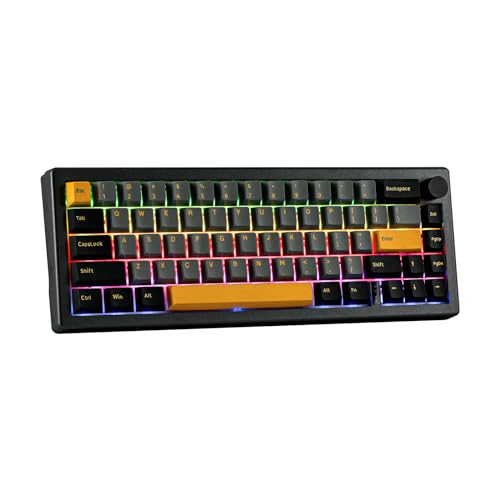
This epomaker ek68 review examines a keyboard that sits at the exact crossroads where the hobby’s two tribes meet. On one side, the enthusiasts who care about gasket mounts, factory-tuned stabilisers and the sound a spacebar makes at midnight. On the other, the buyers who want a good 65% board with a knob, wireless that works, and no homework. The EK68 — 66 keys plus a metal knob, gasket-mounted, tri-mode, with Gateron Pro Yellow switches and a 3000mAh battery in its verified listing — is Epomaker’s attempt to serve both tribes from one small box. It is reviewed here, fairly, against the two boards its buyers cross-shop: Keychron’s V3, the establishment’s wired value answer from the other great budget-hobby brand, and Royal Kludge’s RK84, the larger wireless all-rounder that tempts EK68 shoppers who quietly suspect they may need still more keys every day.
The comparison is therefore a small philosophy seminar disguised as a shopping decision. The EK68 argues that feel and finish are worth paying for in the keyboard you touch all day. The V3 argues that a keyboard is a tool, that wired reliability and Keychron’s polish beat gasket romance, and that the money saved buys the switches and keycaps that actually personalise a board. The RK84 argues that layout is destiny: that the buyer tempted by 65% charm will, within a month, miss the function row and the arrows’ breathing room, and should buy the bigger board now. All three arguments are right for somebody. The sections below exist to find out which somebody is you.
One verification note, of the kind this site insists on: the EK68 exists in the wild in more than one configuration across its life, so the board reviewed here is the one in the verified listing — gasket structure, Gateron Pro Yellow switches, 3000mAh battery, knob included. Confirm those four items on the listing in front of you before ordering, because a review is only as portable as its configuration, and Epomaker’s catalogue rewards readers who check.
The 65% format itself deserves thirty seconds of plain description for the reader arriving from a full-size board. Sixty-six keys means the letters, numbers and punctuation you expect, a compressed navigation presence, dedicated arrow keys — the feature that separates 65% from the smaller 60% and the one most typists refuse to surrender — and everything else, function row included, living on a second layer reached through the Fn key. It is the smallest layout that still feels like a complete keyboard to most hands, which is precisely why it has become the hobby’s favourite canvas: small enough to be a statement, large enough to be a tool.
Key takeaways
Four properties separate these boards: the gasket feel and factory tuning, the knob’s usefulness and remapping, wireless latency in real use, and the stock switches and keycaps each ships with. The detailed sections take them in turn.
- Gasket mount sense and factory tuning
- Knob usefulness and remapping
- Wireless latency for casual gaming
- Stock keycap and switch quality
In this guide
Brief verdict for Epomaker Ek68 Review
The shortlist in one view: the gasket hobby board, the wired establishment value, and the bigger wireless all-rounder. Detailed reviews follow, and the handbook after them turns each difference into an evening’s test.
| Product | Best for | Entry |
|---|---|---|
| Epomaker EK68 | Top pick | Check cost on Amazon |
| Keychron V3 | Best for specialists | Verify cost on Amazon |
| Royal Kludge RK84 | Best for lengthy sittings | Check price on Amazon |
How the lineup was chosen
The lineup was built from the EK68’s actual cross-shopping, which runs in two directions. Downward in price and upward in respectability sits the Keychron V3 — a different layout, strictly, since the V3 is a tenkeyless board, but the same buyer reaches for it: the person who wants a reputable mechanical keyboard without hobby pricing, and who is deciding whether Epomaker’s feel-first formula beats Keychron’s tool-first one. Sideways in size sits the RK84, the board for the buyer whose cursor hovers over the EK68 while their spreadsheet quietly votes for more keys. Between the three, every hesitation an EK68 shopper actually has is represented by a product that resolves it in a different direction.
Criteria were drawn from the 65% hobby board’s daily reality. Gasket feel and factory tuning, because that is the EK68’s headline claim and it is testable in an evening. The knob — its physical quality, its default job, and how far it can be remapped — because a knob that only does volume is jewellery and a knob that can be taught is an instrument. Wireless latency as experienced in typing and play, because tri-mode is now expected and its quality is in the implementation. And stock switch and keycap quality, because the hobby board’s promise is that the box contains a finished instrument rather than a starter kit for further spending. Each board was verified against its live listing before inclusion, with switch type, battery and layout taken from the makers’ own pages.
Detailed reviews

Epomaker EK68
Best for feel-first buyers who want a gasket 65% with a knob and tri-mode wireless out of the box
| Unit | Epomaker EK68 |
|---|---|
| Range | Mechanical Keyboards |
| What its listing leads with | Bluetooth connectivity, hot-swappable switches, RGB lighting |
| Page tag | Check price on Amazon |
The EK68’s first impression is made by the hand, and it is a good one: the gasket mount gives the board the soft, cushioned bottom-out that defines the current hobby generation — keystrokes land on a structure with give in it, rather than on the rigid tray of an older budget board — and the factory tuning carries the impression through. The stabilisers, the parts budget boards most often disgrace themselves with, arrive without the rattle that sends new owners shopping for lubricant and tutorials; the spacebar sounds like a key, not like a maraca. The Gateron Pro Yellow switches suit the design’s intent: smooth linears with a weight that reads as deliberate rather than heavy, pre-lubed from the factory, and friendly to both typing and play. This is a board that has been finished, and the finishing is the product.
The knob earns its corner. It is metal, it turns with a detented precision that cheap knobs do not have, and while its factory job is volume — the job most owners keep — the board’s software lets it be reassigned, which converts it from a convenience into a small instrument: zoom in the editor, brush size in the drawing program, timeline scrub in the cutting room. The tri-mode connection covers the modern desk completely — wired for the desk’s anchor, 2.4 GHz for the low-latency wireless life, Bluetooth for the laptop-and-tablet rotation — and the 3000mAh battery gives the wireless modes a stamina that suits the board’s size: a small board should not demand a weekly charging ritual, and this one, with lighting used sensibly, does not.
The honest debits are the layout’s and the brand’s. Sixty-five percent means the function row lives behind a modifier, and the buyer whose work is function-key fluent — the spreadsheet professional, the developer in a legacy environment — will feel the tax hourly; no knob compensates for a missing F2 in a renaming life. Epomaker’s software, while capable, is the hobby tier’s software: functional, occasionally unpolished, and a step behind Keychron’s ecosystem in refinement. And the board’s sound and feel, while tuned, are tuned to a taste — the soft, quiet, cushioned school — that the lover of a crisp, clacky board will respect without sharing. Within its school, though, the EK68 is the complete article: the hobby board for people who want the hobby’s results without the hobby’s homework.
The school itself is worth one more sentence of positioning, because buyers cross-shop across it. The soft, deep, quiet tuning the EK68 represents is the current mainstream of hobby taste — the direction group buys, sound tests and desk setups have converged on — and a buyer joining the hobby now will find more switches, keycaps and community knowledge written for this school than for any other. Buying into the mainstream of a hobby is not conformity; it is liquidity. Every future experiment you run will have parts and advice available, which is a practical virtue that outlasts any single board.
Strengths
- Gasket-mounted typing feel with factory-tuned, rattle-free stabilisers
- Metal knob that remaps beyond volume into a genuine control
- Tri-mode connection and a battery sized for weeks, not days
Trade-offs
- No physical function row; F-keys live behind a modifier
- Software is capable but less polished than Keychron’s ecosystem
- The soft, quiet tuning is a taste not every typist shares
Best for: the feel-first typist, the compact-desk gamer, the hobby-curious buyer who wants the finished article. Not suited for: function-key professionals, or the typist who wants a loud, crisp board. Check price on Amazon
A setup note specific to this board: spend the first evening on the layers. A 65% board’s second layer is its hidden second keyboard — media, function keys, the navigation cluster — and the EK68’s is sensibly arranged, but it only becomes yours when you have taught your fingers where F5 and Delete went to live. Owners who drill the layer for one evening type on a complete keyboard by Friday. Owners who never do keep a vague sense of missing keys for the board’s whole life, and blame the layout for a lesson they skipped.

Keychron V3
Best for tool-first buyers who want tenkeyless completeness, wired reliability and an ecosystem
| Variant | Keychron V3 |
|---|---|
| Class | Mechanical Keyboards |
| Headline functions from its page | hot-swappable switches, QMK software support |
| Cost | Confirm expense on Amazon |
The V3 is what happens when a mature brand builds a keyboard as an appliance: everything works, everything is documented, and the excitement is deliberately rationed. It is a tenkeyless board — the function row and the navigation cluster present in full, the numpad alone surrendered — wired-only, and built around Keychron’s software support, which brings proper remapping and macros to a price tier that usually settles for a driver download and a prayer. The typing feel is the honest, tray-mounted firmness of a well-made tool: no gasket cushion, no tuned acoustics campaign, just a solid board that sounds like a keyboard and will type like one for years. For a large population of buyers, that is not a compromise. It is the entire requirement, met at a price that leaves room in the budget for the switches and keycaps that make a board personal.
Against the EK68 its case is completeness and trust. No layer archaeology for the function keys. No battery to manage, no wireless mode to troubleshoot, no connection lottery at a new desk. And the Keychron ecosystem behind it — the documentation, the community knowledge, the resale value of a known quantity — is the deepest in this comparison. What it cannot offer is the EK68’s two headline pleasures: the cushioned feel and the knob. The buyer who has typed on a good gasket board and felt the difference in their fingers will not be argued out of it by reliability; the buyer who has not will wonder what the fuss and the premium are for. Both are right, and the V3 exists for the second.
Strengths
- Full tenkeyless layout with no layer compromises
- Proper remapping software and the deepest support ecosystem here
- Wired simplicity: no battery, no pairing, no wireless variables
Trade-offs
- Wired only, which the multi-device desk will feel immediately
- Firm tray-mounted feel without the gasket board’s cushion
- No knob, and a larger footprint than the 65% boards
Best for: the office professional, the function-key fluent, the buyer who values an ecosystem. Not suited for: the wireless desk, the feel-first hobbyist, or the small surface. Check expense on Amazon
If the V3 is your answer, its customisation path is the pleasure to plan: the board is a platform, and its owners’ happiest spending is the switch set and keycaps that arrive in month two, once the stock board has taught them their own taste. Budget for that second act when you buy — a V3 plus a considered switch set is a genuinely personal instrument at a total the EK68’s buyer spends on the board alone, and neither route is the extravagant one. They are simply different orders of the same dinner.
Royal Kludge RK84
Best for buyers who want wireless freedom with more keys than a 65% allows
| Spot | Royal Kludge RK84 |
|---|---|
| Class | Mechanical Keyboards |
| Headline extras from its entry | wireless operation, hot-swappable switches, RGB lighting |
| Page cost | Check price on Amazon |
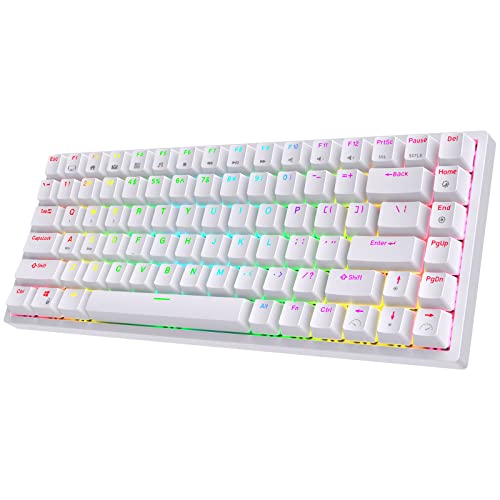
The RK84 is the layout argument made plastic: an 84-key board that keeps the function row, keeps the arrows in their own territory, and still sits compactly enough for a normal desk — with tri-mode wireless aboard, so it concedes nothing to the EK68 on connection. Its proposition to the wavering EK68 shopper is blunt: the charm of 65% fades, but the F-row is forever. For the buyer whose work mixes writing with spreadsheets, data entry or any function-key dialect, the RK84’s extra row is not a luxury; it is the difference between a keyboard that fits the job and a keyboard the job must fit around. Royal Kludge’s execution is the value tier’s honest standard — hot-swappable, backlit, with a battery that serves the wireless life respectably.
Where it yields to the EK68 is in the finishing school. The RK84’s feel is the previous generation’s: a firmer mount, stabilisers that may ask for the hobby’s basic kindnesses, an acoustic character that is present rather than tuned. It is a good board that has not been fussed over, next to a board whose entire identity is the fussing. The buyer must therefore choose which currency they spend in: keys or finish. This review’s guidance is to let the work decide — count your function-key usage for one honest day, and if the count is high, the RK84’s row will pay you back hourly, in a currency no gasket can mint.
Strengths
- Function row and full navigation in a still-compact footprint
- Tri-mode wireless matching the EK68’s connection freedom
- Hot-swappable platform at a value-tier price
Trade-offs
- Stock feel and stabilisers lack the EK68’s factory finishing
- Larger on the desk than the 65% it tempts you away from
- Software and polish sit a tier below both rivals
Best for: the spreadsheet-and-writing mixed worker, the layout-first buyer. Not suited for: the smallest desks, or the feel-first buyer who will hear the stabilisers. Check price on Amazon
RK84 owners get the most from one early investment of an hour: the basic stabiliser kindnesses — a check for rattle, a touch of lubricant where the wire meets the housing — that lift the board’s one unfinished area to the standard of the rest. It is the smallest homework assignment in this comparison, and the board’s value case assumes you will do it. If even that hour sounds like a tax, the EK68’s factory finishing is what its premium buys, and you have learned something decisive about which tribe you belong to.
Buying handbook: what genuinely determines Epomaker Ek68 Review
Gasket experience and factory tuning
The gasket mount deserves an explanation free of incense. In a tray-mounted board, the plate is screwed rigidly to the case, and every keystroke’s energy ends in the case’s hardness. In a gasket board, the plate sits cushioned between soft strips, and the structure flexes microscopically under the fingers — which the typist perceives as softness at the bottom of each stroke and hears as a deeper, quieter sound. The difference is not mystical and it is not enormous; it is the difference between a desk’s knock and a cushion’s thud, multiplied by ten thousand strokes a day, which is why typists who feel it tend to keep it. Factory tuning is the mount’s partner: stabilisers lubricated and balanced at assembly, switches pre-lubed, foam layers fitted to manage the case’s resonance. A board can have a gasket and no tuning — the mount alone does not silence a rattling spacebar — which is why this criterion judges the pair together, on the board in your hands, in the first evening’s typing test.
The test itself is simple and this page recommends it for any board in the category: type a paragraph at your working speed, then press the spacebar, the enter key and the shifts slowly, one at a time, and listen. Stabilised keys should sound like their neighbours — a key, not a mechanism. Then type at speed for ten minutes and ask your fingers, not your ears, whether the board gives. Those two examinations, honestly performed, grade the EK68’s headline claim better than any review’s adjectives, including this one’s.
Knob use and remapping
A knob’s value is the product of three factors, and buyers should grade all three. The hardware: a metal knob with clean detents feels like an instrument; a plastic one with vague steps feels like a toy that will be ignored by month two. The default assignment: volume is the correct factory choice because it is the one every owner uses, and a board whose knob arrives doing something cleverer is usually a board whose knob gets reset within the week. And the remapping ceiling: whether the software lets the knob become zoom, scrub, scroll or brush control in the applications where your other hand is busy. The EK68 grades well on all three, which is rarer than the catalogue’s knob count suggests. The general lesson travels: when comparing knobbed boards, ask not whether there is a knob but what the knob can be taught, because an unteachable knob is a volume control with delusions of furniture.
One more knob habit separates satisfied owners from indifferent ones: assign the knob’s press as well as its turn. Most knobs click, and the click is a free button at the exact place your hand already visits — mute for the volume configuration, play-pause for the media one, the confirm for the editing one. Owners who program the press own a two-function instrument; owners who do not own a dial and a rumour. It takes ninety seconds in the software, and it is the highest-value ninety seconds in the EK68’s entire configuration.
Wireless latency in regular gaming and typing
Wireless latency on a modern tri-mode board should be discussed in the past tense for typing — the 2.4 GHz mode’s delay is below the threshold where fingers can find it — and in the present tense only for one audience: competitive players in fast games, whose standards are measured in milliseconds and whose wired preference is a professional tool choice rather than a verdict on wireless. For everyone else, the wireless questions that actually decide satisfaction are elsewhere: connection stability through a working day, wake-from-sleep behaviour, the grace of switching between the dongle machine and the Bluetooth one, and battery stamina honest enough to forget. Judge a tri-mode board on those four and you are judging its wireless life as you will live it. Judge it on a latency figure and you are judging a number your hands cannot perceive, while the wake-up hiccup that will annoy you daily goes unexamined.
The EK68’s implementation serves the real four competently, and the RK84’s matches it; the V3 declines the examination entirely by being wired, which remains the most reliable wireless performance ever shipped. The buyer’s task is to know which of the four variables their desk stresses — the multi-device switcher should weight switching grace, the gamer the dongle’s stability under load — and to test that variable in the trial week rather than discovering it in month two.
Stock keycap and switch quality
The stock equipment question is where hobby boards justify or forfeit their premium, because the alternative — the V3 route — is to buy the platform cheaply and the personality separately. Judge stock switches on smoothness through the whole stroke, spring consistency across the board, and the absence of the scratch and ping that factory lubrication exists to prevent; the EK68’s Gateron Pro Yellows are a known, well-regarded quantity that passes those tests as shipped. Judge stock keycaps on their material’s feel, their legends’ durability, and their profile’s fit with your typing — the sculpted profiles that ship on hobby boards suit most hands, and a set you keep is a set you did not have to buy. The accounting that matters is total: the EK68’s price includes its finishing, the V3’s excludes its future personality, and comparing sticker to sticker without that adjustment is how buyers deceive themselves in both directions.
Hot-swap sockets, present across this comparison, soften the whole question in a way worth stating: no stock switch set is a life sentence. The board you buy is the board you can re-voice in twenty minutes with a switch puller and a decision. That fact should lower the stakes of the stock-equipment criterion to its proper level — a first impression and a starting point, not a destiny — and raise the importance of the things that cannot be swapped: the mount, the case, the layout, the knob. Buy the unchangeable things carefully; the changeable ones will follow your taste as it develops.
Epomaker Ek68 Review in concrete habits
Situation: a compact desk where the keyboard shares space with a drawing tablet
The illustrator’s desk is a negotiation between the tablet’s territory and the keyboard’s, and the 65% board is the negotiator’s friend: it slides aside for drawing, returns for shortcuts and naming layers, and its knob — reassigned to brush size or canvas zoom — earns its keep in the exact application where one hand is holding a pen and cannot reach a slider. The EK68 fits this desk as if briefed for it, wireless so the sliding never fights a cable. The RK84’s extra row is dead territory here, and the V3’s cable and footprint both argue against it. Small creative desks are the 65% format’s home turf, and this scenario is the one where the review’s headline board is not merely preferable but obviously correct.
Scene: a hybrid worker rotating between laptop and desktop
The rotation worker’s keyboard must be a citizen of two machines, and the tri-mode boards here were built for the citizenship: the desktop on the dongle, the laptop on Bluetooth, the switch between them a keystroke rather than a cable’s relocation. The EK68 and RK84 both serve; the choice between them returns to the worker’s function-key dialect, which office work usually speaks fluently — and that tilts this scenario, for most hybrid workers, toward the RK84’s row unless the desk is small or the feel is paramount. The V3, wired and single-machine, simply does not hold this passport, and its owner rotates keyboards instead of connections, which some tidy souls genuinely prefer. Know which citizen you are before the purchase, because the rotation punishes the wrong choice twice a day.
Scenario: a gamer who types essays between matches
The student gamer’s keyboard leads a double life: ranked matches in the evening, essays against deadlines at night, and a desk in a room where space and budget are both rationed. The EK68 serves the double life well — the dongle’s latency for the matches, the cushioned typing for the essays, the footprint for the room — and its linear switches are the right factory choice for the hybrid hand. The V3’s wired reliability tempts the gamer and abandons the desk’s other uses; the RK84 serves both lives with less grace in each. This scenario’s buyer should also hear the review’s one gaming honesty: at the competitive level where equipment is blamed, the keyboard is rarely the defendant — the player’s settings and habits are — and a board that serves both halves of the day beats a board that serves the matches alone.
Configuration and initially-seven days how-to
The first week with a hobby board decides whether its features become habits. These steps sequence the settling-in.
Step 1 for Epomaker Ek68 Review: neat or maintain the piece once past prior to deciding it is settled
Before declaring the setup settled, perform the board’s settle-check: seat every keycap firmly with a press around the board, confirm the knob’s detents are clean through a full rotation, check the cable and dongle connections, and type the stabiliser test from the buying handbook — spacebar, enter, both shifts, slowly. A board’s first evening can include a keycap seated at ninety percent or a stabiliser that travelled badly, and both imitate product flaws until the thirty-second check acquits them. Establish the clean baseline first; every later judgement about feel and sound assumes it.
Step 2 for Epomaker Ek68 Review: unbox at an easy pace, and retain all the accessories until the arrangement has survived one full week
Keep the box, the cable, the dongle, the spare switches and the puller together until the arrangement has survived a full week. The spares are the board’s first-aid kit — a switch that misbehaves in month two is a thirty-second swap if the puller and the spares are findable, and a small tragedy if they were tidied into oblivion. The box also preserves the return position while the layer-drilling and the knob experiments decide the board’s fate, and in a category where taste is the verdict, the trial deserves its full week before the packaging is pensioned off.
Move 3 for Epomaker Ek68 Review: connect or match the unit only as its guidebook describes ahead of changing any setting
Connect all three modes exactly as documented before remapping anything: wired first for the firmware and software handshake, then the dongle, then Bluetooth to each device in turn. Tri-mode boards reward the documented order because the software’s picture of the board — its firmware version, its profile — is established through the wired connection, and owners who begin by pairing everything wirelessly sometimes configure a board the software cannot properly see. With the connections proven, the default layout gets its day of typing before the knob is taught its tricks and the layer is personalised.
Move 4 for Epomaker Ek68 Review: save or photograph the configuration that finally functions
When the knob assignments, the layer changes and the lighting settle, export or photograph the whole configuration. A hobby board’s personality is software-held, and a driver reinstall, a new computer or an ambitious reset can return it to a stranger’s defaults without asking. The record — the knob’s jobs per application, the layer map, the switch positions if you have begun swapping — turns that restoration into minutes. Keep it with the box, and update it at the first switch change, because a configuration record that lags the board is a history book rather than a manual.
Stage 5 for Epomaker Ek68 Review: schedule a two-week review to catch annoyances that solely repetition reveals
Calendar the verdict for day fourteen. The EK68’s late truths are specific: whether the 65% layer has become reflex or remains a lookup, whether the knob’s second job survived contact with your real applications, whether the wireless stamina matches your lighting habits. Bring the first evening’s stabiliser notes, repeat the listening test, and let the comparison confirm the tuning or expose its drift. Make the call while the return is still a formality — the box, kept complete on purpose, is what keeps it one.
Common mistakes with Epomaker Ek68 Review
Buying it for a minor worktop it physically dominates
The size mistake runs in reverse for a 65% board: the EK68 will not dominate any desk — but its buyer sometimes dominates it, crowding the small board into a setup whose other elements deserved the space the layout saved. The subtler form of the error is buying small for a job that is not: the function-key professional who falls for the compact charm and spends a year reaching through a modifier for F2. Measure the work before the desk. If the day’s honest count of function-row and navigation use is high, the small board’s charm is a tax collected hourly, and the RK84’s extra keys or the V3’s full tenkeyless layout is the purchase your workload was describing.
Rushing the two-spell adjustment period
Two adjustments run concurrently on a first 65% board — the layer’s geography and the gasket feel’s difference from the board you came from — and both need the same fortnight. Owners who verdict at day three are judging their own unfamiliarity: the Delete key still hides, the cushioned bottom-out still feels like softness rather than home. Serve the fortnight with the layer drilled deliberately and the old board in a drawer, and let the second week’s typing speed and error rate cast the vote. The hobby’s converts are made in week two; its returns are written in week one.
Leaving the ball dusty until tracking turns gritty
The keyboard translation of the maintenance mistake: the board that is never cleaned until its switches feel scratchy and its case sounds hollow with accumulated dust. A mechanical board’s enemies are crumbs, dust and the slow migration of debris into switch housings, and the defences are dull and total — a brush kept in the desk drawer, a keycap pull and clean each season, a no-food rule that survives contact with deadlines. Owners who keep the small rituals never meet the gritty phase; owners who wait for symptoms are cleaning a season’s neglect in an afternoon and wondering why the board feels old. Thirty seconds a week is the whole insurance premium.
Head-to-head: separating the lineup
EK68 against V3 is feel against trust. Choose the EK68 if your fingers are the constituency — if the cushioned mount, the tuned stabilisers and the knob will be exercised ten thousand times a day and their quality compounds. Choose the V3 if your work is the constituency — the full layout, the wired certainty, the ecosystem’s depth — and let its savings fund the switches that personalise it. Neither verdict is a compromise; they are two different definitions of a good keyboard, and the comparison’s job was to make you choose your definition knowingly rather than discover it expensively.
EK68 against RK84 is finish against keys. The day’s function-key count decides it, and this review has now told you three times to count, because the count is the one piece of evidence buyers skip in favour of photographs. If the count is low and the desk is small, the EK68’s finishing school wins. If the count is high, no amount of gasket romance repays an hourly modifier tax, and the RK84 — its stabilisers given their one hour of kindness — is the honest board for your work. Layout is the one specification that cannot be upgraded later; choose it as if you knew that, because now you do.
Living with the choice: upkeep and longevity
A hobby board’s longevity is a pleasant subject because the format was designed for maintenance: switches swap in seconds, keycaps lift for cleaning, the battery is the only true consumable and it ages on a years-long schedule if the lighting is kept sane. Keep the brush ritual, rotate a spare switch into any position that begins to chatter before condemning it, and store the board’s configuration record with its box. The EK68’s gasket and foams will outlast several sets of switches, which is the correct order of things — the chassis is the instrument, the switches are its strings, and strings are meant to be changed.
Expect your taste to evolve across the board’s life, and let the board evolve with it: a switch weight for the essay season, a keycap profile for the gaming one, the knob’s assignment following your applications as they change. The owners who get a decade from a hobby board are the ones who treat it as a platform with a personality rather than a product with a warranty. The EK68 was built for exactly that ownership, and its longevity in your hands will be the measure of whether you bought a keyboard or adopted one.
Final recommendation
Choose the EK68 if feel, finish and compactness lead your brief — it is the most complete small board in this comparison and the one its owner will enjoy touching most. Choose the V3 if the layout, the ecosystem and wired certainty lead, and spend its savings on the personality it politely declines to impose. Choose the RK84 if the function row’s honest count leads, and give its stabilisers their hour. All three verdicts assume the layer is drilled, the knob is taught, and the fortnight is served before any of them is final.
The EK68’s real achievement is that it makes the hobby’s values — feel, sound, finish — available without the hobby’s apprenticeship. If that sentence describes the keyboard you have been waiting for, the waiting is over; if it describes a foreign country, the V3 and RK84 are excellent reasons not to emigrate. Either way, count the function keys first.
Frequently asked questions
What counts most when choosing for epomaker ek68 review?
The layout, because it is the one choice that cannot be revised later. Switches swap, knobs remap, keycaps change — but the 65% geography is the board’s permanent constitution, and a buyer whose work speaks function-key fluently will be taxed by it daily. After the layout, the mount and tuning decide between the EK68 and the field, and the connection set decides between the EK68 and the V3. Buyers who order their criteria that way — constitution, feel, connection — choose once. Buyers who start from the knob buy twice.
How much should a beginner spend for epomaker ek68 review?
A new buyer should aim at the EK68’s level if they already know they type all day and care how it feels — the finishing is cheapest bought once, in the box — and at the V3’s level if they are still discovering whether mechanical keyboards are their country at all. The false economy in this category is the unbranded board below both, whose rattling stabilisers teach the beginner that the whole category is hype. Spend enough that the board can make the category’s honest case; the EK68 and the V3 both clear that bar from opposite directions.
Which error do buyers of epomaker ek68 review regret most?
Buying the layout from a photograph. The 65% board is photogenic — compact, knobbed, glowing — and its portrait conceals the modifier key standing between the buyer and their function row. The regret is entirely preventable by the one-day count this review keeps recommending, and it is the reason the RK84 is in the comparison at all. The second regret is skipping the layer drill and living with a permanent sense of missing keys that an evening’s practice would have dissolved. Both regrets are about homework, not hardware.
How much adjustment time does a new EK68 keyboard need?
About a fortnight: the layer becomes reflex in the first week if drilled, the gasket feel stops registering as novelty and starts registering as home in the second, and the knob’s assignments are habits by the month’s end. Gamers adjust fastest, because their hands learn boards under pressure; function-key professionals adjust slowest, because their old fluency fights the new geography longest — which is diagnostic information about whether the layout was right for them at all. If the fortnight ends with the layer still a lookup, believe it, and let the RK84’s row have the next trial.
When is the premium alternative in epomaker ek68 review really worth it?
When the premium buys finishing you will feel ten thousand times a day. The EK68’s premium over the value tier is exactly that — the mount, the tuning, the knob’s hardware — and for the all-day typist it amortises to nothing within the first month of wrists and ears. It is not worth it when the board is a second desk’s occasional tool, when the buyer’s work is function-key bound, or when the premium would consume the budget that a needed switch set or a wrist rest was earmarked for. Premium feel is a subscription your fingers pay daily; subscribe only if they are heavy users.
What should I confirm initially if my epomaker ek68 review purchase disappoints?
Confirm the stabilisers, the configuration and the connection, in that order. Run the slow-press listening test to separate a travelling stabiliser from a tuning verdict; restore the default layout and knob map for a day to separate your remapping experiments from the board’s own behaviour; and test the wired connection to separate the wireless variables from the keyboard itself. Those three confirmations acquit most disappointing units. If the board still disappoints with clean stabilisers and defaults, the disappointment is taste — the soft school is not yours — and the V3’s firm honesty is the comparison’s built-in remedy.
Related guides
- Epomaker Glyph Review
- Epomaker IFA
- Epomaker Th80 V2 Pro Review
- Best Keyboard And Mouse slowly Combos for Office
- Best Wireless Gaming Keyboards just for FPS
- Best Wireless Gaming truly Keyboards Under 100
Companion reading for the keyboard shelf: the Epomaker family coverage including the IFA report, the switch and keycap guides, and the wider desk setup section.
One more angle: gasket feel and factory tuning, revisited
Re-run the listening test each season, because a board’s tuning is a living thing: stabiliser lubricant migrates and thins, foams settle, and the spacebar that was silent in spring may develop a tick by autumn that ten minutes with a brush and a drop of lube will cure. Owners who re-test seasonally keep the board at its factory standard indefinitely; owners who never re-test experience the slow drift as the product ageing, when it is only the maintenance lapsing. The test that chose the board is the test that keeps it.
One more angle: knob usefulness and remapping, revisited
Audit the knob whenever your main application changes, because a knob assignment is a portrait of your workflow at a moment in time — and workflows move. The editor who becomes a colourist, the writer who becomes a podcaster: each transition orphans the knob’s old job and offers it a better one. Ninety seconds in the software per transition keeps the instrument matched to the musician. A knob left on its first assignment for the board’s whole life is a knob that was configured once and furniture ever after.
One more angle: wireless latency, revisited
Keep a note of which mode serves which machine, and revisit it when the desk changes — a new monitor’s hub, a moved tower, a dock that arrived at Christmas can each rearrange the radio geography the dongle depends on. The note takes a line in the configuration record and prevents the classic month-three mystery, where a connection that was flawless becomes flaky for reasons located entirely in a piece of furniture. Wireless reliability is geography, and geography is worth writing down.
One more angle: stock switch and keycap quality, revisited
When the switch-swapping season arrives — and on a hot-swap board it always arrives — change one variable at a time and type on it for a week before judging. The hobby’s beginners swap switches, keycaps and stabiliser tuning in a single enthusiastic weekend and then cannot say which change they love, which they hate, or what the board sounded like before. The disciplined experiment is slower and vastly more informative, and it converts the board into an education in your own taste, which is the hobby’s actual product.
One more angle: the 65 percent layout after a season
Interview yourself at the season’s turn about the layout, honestly: how many times this week did the modifier reach annoy you, and how many times did the small footprint delight you? The ratio is the layout’s report card, and it changes as work changes — the spreadsheet quarter and the writing quarter grade the same board differently. Owners who keep the ratio in mind know when to promote the EK68 to the travel role and give the desk to a bigger board, without rancour in either direction. Layout loyalty should be earned quarterly, never sworn permanently.
One more angle: battery habits for tri-mode boards, revisited
Treat the battery as a rhythm rather than an emergency: pick the charge day, use the wired mode as the charging mode at the desk, and keep the lighting at the level your eyes actually need rather than the level the photographs used. Owners who run that rhythm report the battery as a non-topic, which is the highest praise a power system can earn. Owners who run the board at full glow and charge at empty meet the battery as a personality — needy, ill-timed, memorable — and the difference is entirely in the habits, not the cells.
One more angle: what the knob says about the category, revisited
The knob’s spread across the category is a small lesson in how features mature: first a flagship flourish, then a differentiator, then an expectation — and at each stage, the implementation separates into the instruments and the ornaments. The EK68 sits on the instrument side of that line, which is why this review spent a criterion on a single control. When you shop the next board, grade its knob by the teachability standard set here, and you will find the standard generalises embarrassingly well to every other feature on the box: what matters is never that it exists, but what it can be taught to do.