Disclosure: As an Amazon Associate, reviewstook.com earns from qualifying purchases. Links on this page are affiliate links; they cost you nothing extra. Prices and availability change often, so check the current Amazon listing before you buy.
This drop alt review exists because the ALT occupies a strange position in the keyboard hobby: it is one of the boards that taught a generation of buyers what a machined aluminium case feels like, yet it now competes with cheaper, softer, feature-richer boards that learned from it. Judging it fairly means holding both truths at once. The aluminium high-profile case, the hot-swap sockets, the doubleshot PBT keycaps and the QMK programmability are all real, and they are all wrapped in a design philosophy — tray-mounted, wired-only, unapologetically dense — that the market has partly moved away from. Whether that philosophy is a flaw or the entire point depends on what you want a keyboard to be.
So this review is structured as an argument rather than a verdict by acclamation. The ALT gets the full treatment first: what the case does to sound and feel, what the firmware lets you rebuild, where the stock hardware genuinely needs help. Then two alternatives frame the decision — a 75% board with modern conveniences for less, and a 60% board from the other great minimalist tradition — because the ALT’s real competition is not a specification sheet but a question about your desk. The buying guide, scenarios and mistakes sections after the reviews are written for readers still deciding which side of that question they live on.
All three boards were checked against their current listings before this review was written, and the links follow through to those listings. Keyboard variants matter enormously — switch type alone changes an ALT from a tactile board to a linear one — so confirm the exact configuration in front of you before ordering.
Key takeaways
Four properties decide whether the ALT is the right board for a particular desk. They are the spine of this review, and the alternatives were chosen to challenge each one.
- Case machining and typing acoustics
- QMK and VIA remapping depth
- Stock stabiliser tuning
- Per-key RGB and the halo light ring
In this guide
Swift picks for Drop Alt Review
The compressed version: one board for the aluminium purist, one for the value-minded customiser, one for the minimalist gamer. The reviews below unpack each claim.
| Model | Best for | Listing |
|---|---|---|
| Drop ALT | Best upgrade stage | Check price on Amazon |
| Keychron V1 | Best for travellers | Check cost on Amazon |
| Ducky One 3 Mini | Best for muted spaces | Check price on Amazon |
How the lineup was chosen
A review of the ALT needs alternatives that isolate its decisions, so the two companions were picked as controlled comparisons rather than as random rivals. The Keychron V1 shares the customisable, QMK-driven philosophy but delivers it in a lighter 75% package with an extra row of function keys, testing whether the ALT’s 65% density is worth its price. The Ducky One 3 Mini shares the minimalist footprint instinct but goes smaller, to 60%, with a gamer’s priorities, testing whether the ALT’s arrow keys and build materials justify staying at 65%. Between them they bracket the ALT on size, price and intent, which lets the review make claims about the ALT itself rather than about keyboards in general.
The criteria used to judge all three are the ones in the key takeaways: case construction and acoustics, firmware depth, stabiliser quality out of the box, and lighting implementation. Typing feel is treated as a consequence of those four rather than as a separate mystery, because in practice a board’s sound and satisfaction can be traced back to its case, its mounting, its stabilisers and its stock switches with very little left over. Every product named was verified against its live listing, with the switch variant noted, since a review of a hot-swap board is partly a review of the configuration the listing actually sells.
Detailed reviews

Drop ALT
Best for buyers who want a machined aluminium board that feels like an object, not an appliance
| Piece | Drop ALT |
|---|---|
| Category | Mechanical Keyboards |
| Extras named on its listing | hot-swappable switches, RGB lighting, USB-C connection |
| Entry tag | Check price on Amazon |
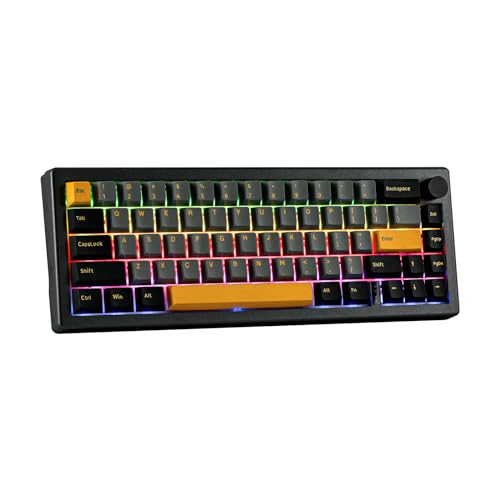
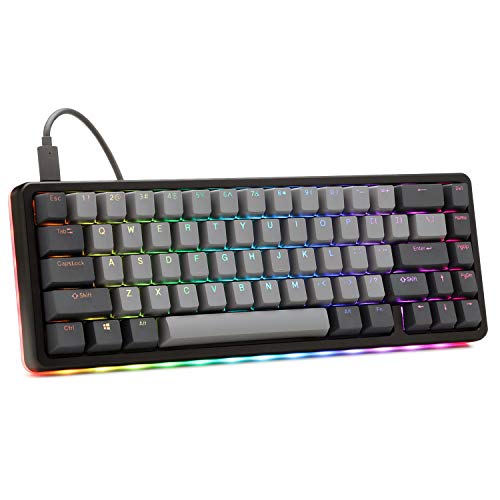
Pick the ALT up and the review has effectively started: the high-profile aluminium frame gives it a density that plastic boards cannot imitate, and that density is the product. The case does not flex, does not creak, and does not move when you type hard; it sits where you put it with the finality of a tool rather than a peripheral. The high-profile design hides the switches entirely, which gives the board its clean, floating-keycap-free silhouette and slightly deepens the sound by enclosing the switch tops. This listing’s configuration pairs the case with Cherry MX Brown switches — a light tactile bump that suits mixed typing and gaming — and doubleshot PBT keycaps that will outlast the legends on any printed set by years.
The sound follows from the construction. A tray-mounted plate in a solid aluminium case produces a firm, relatively high-pitched, very consistent typing note — precise is the kind word, unforgiving is the honest one. There is no gasket softness here, no flex cut theatre; the ALT sounds like what it is, a rigid assembly, and owners either love the clarity or spend money on foam and films chasing a softness the design never promised. Hot-swap sockets soften that verdict in practice, because the board invites experimentation: swap in a heavier linear, lube the stabilisers, and the ALT becomes a platform whose character you tune rather than a verdict you accept. QMK and VIA support complete the platform story, with per-key remapping, layers and macros available to anyone willing to spend an evening in the configurator.
The honest limitations are a short list but a real one. The ALT is wired-only in a market that increasingly treats a cable as optional, and there is no model with a radio waiting in the range to upgrade to. The stock stabilisers, on the spacebar especially, have historically been the board’s weakest component — functional, occasionally rattly, and the first thing most owners tune or replace. And the price sits in a band where gasket-mounted rivals now offer a softer stock experience with wireless included. The ALT’s answer is that none of those rivals feel like this in the hand, and for its buyers that answer is sufficient. This review’s judgement is narrower: the ALT is excellent at being the thing it is, and you should only buy it if that thing is what you want.
Strengths
- Machined high-profile aluminium case with a solidity and finish plastic boards cannot match
- Hot-swap sockets, doubleshot PBT keycaps and full QMK/VIA programmability make it a genuine platform
- Per-key RGB with the signature halo light ring gives it a desk presence few boards equal
Trade-offs
- Wired-only, with no wireless variant in the range
- Stock stabilisers are the weak point and most owners will tune or replace them
- Tray-mount firmness will disappoint anyone expecting modern gasket softness
Best for: the buyer who values materials and permanence, plans to tune the board over time, and keeps a wired desk. Not suited for: wireless devotees, gasket-softness seekers, or anyone who wants the best stock experience with zero tinkering. Confirm cost on Amazon
One ownership note that separates happy ALT buyers from frustrated ones: budget your first mod before you budget the board. A set of replacement stabilisers and an hour with lubricant transforms the ALT’s weakest trait into a non-issue, and owners who plan that evening in advance experience the board as a platform from day one. Owners who expected perfection out of the box experience the same rattle as a betrayal. The board has not changed between those two stories; the expectation has.
Keychron V1
Best for customisers who want QMK freedom in a friendlier 75% package
| Item | Keychron V1 |
|---|---|
| Class | Mechanical Keyboards |
| Features named on its entry | hot-swappable switches, QMK code support |
| Tag | Confirm cost on Amazon |
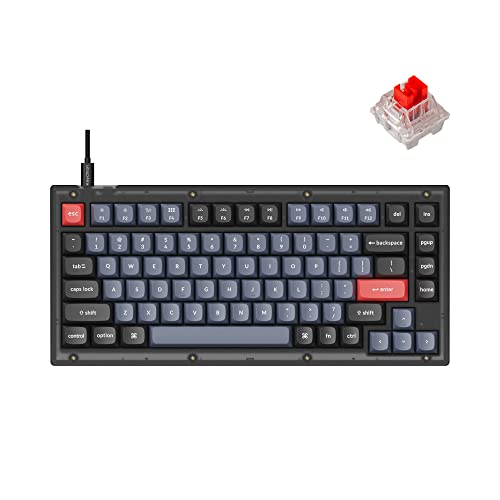
The V1 is the pragmatic counter-argument to the ALT. It keeps the features the hobby actually uses — QMK and VIA remapping, hot-swap sockets, a layout with a function row — and delivers them in a lighter 75% board with Mac and Windows keycaps in the box and a frosted translucent case that glows more playfully than the ALT’s machined sobriety. This listing ships with Keychron’s K Pro Red switches, smooth linears that make it the quiet, easy-going option of the three for shared spaces and long typing days.
What you give up against the ALT is material and presence: the V1 feels like a well-made plastic keyboard, because it is one, and its sound is lighter and hollower in the way of its class. What you gain is forgiveness — a function row for work, a friendlier price, and a board you can carry between rooms without thinking of it as furniture. For a programmer whose remapping ambitions are serious but whose desk is not a shrine, the V1 is frequently the correct answer, and this review lists it without embarrassment as the value pick of the three.
Strengths
- Full QMK/VIA support and hot-swap sockets at a friendlier price than the ALT
- 75% layout keeps the function row that the ALT’s 65% layout gives up
- Mac and Windows support with the right keycaps included in the box
Trade-offs
- Plastic case cannot match the ALT’s density, finish or acoustic solidity
- Stock sound is comparatively hollow and benefits from the same modding attention
- Wired as well, so it does not answer the wireless question either
Best for: the value-minded customiser who wants firmware freedom and a function row. Not suited for: the buyer whose whole point is the aluminium object, or a wireless user. Confirm cost on Amazon
The V1 also makes a quietly excellent first custom board, because its price leaves budget for the switches and keycaps that teach a new hobbyist what they actually like. Many ALT owners started exactly here, learned their preferences on a forgiving platform, and upgraded with knowledge instead of hope — a path this review recommends to anyone hesitating at the ALT’s price.
The V1’s frosted case deserves one honest sentence of its own: in a dark room it is genuinely lovely, diffusing the per-key lighting into a soft block of colour that makes the ALT’s halo look almost stern. Buyers choosing between these boards on evening appearance alone may find the cheaper board wins the night shift. It is a reminder that “premium feel” has a daylight definition and a darkness definition, and they do not always crown the same keyboard.

Ducky One 3 Mini
Best for minimalists who want the smallest footprint and a gamer’s tuning
| Label | Ducky One 3 Mini |
|---|---|
| Range | Mechanical Keyboards |
| Headline features from its listing | hot-swappable switches, RGB lighting |
| Listing cost | Check price on Amazon |
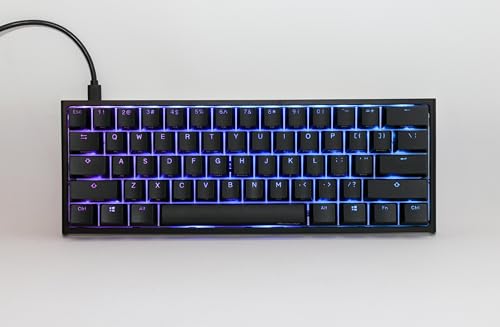
The One 3 Mini answers a different question: how small can a serious board go? At 60% there are no dedicated arrows and no function row, and Ducky’s bet is that layers, well implemented, make those losses painless for players who want maximum mouse room and a desk that looks like a cockpit. This listing’s Cherry MX Blue switches are the characterful choice — clicky, tactile, unapologetic — which makes this particular configuration a board for a private room and a player who enjoys audible feedback, and a poor roommate for anyone within earshot.
Against the ALT, the Ducky trades materials and layout for agility and price. Its case is plastic, its stabilisers in the One 3 generation are a genuine step forward for the brand, and its hot-swap sockets mean the clicky Blues are a starting point rather than a life sentence. What it cannot offer is the ALT’s object-quality or its arrow keys, and for a writer or programmer those arrows are not a luxury. Read it as the gaming-leaning pole of this comparison: if your desk time is mostly play and your mouse hand wants the room, the Mini is the honest pick; if your desk time is mostly work, its layers will tax you daily.
Strengths
- True 60% footprint frees maximum space for the mouse hand
- Hot-swap sockets and improved stabilisers for the brand’s mini line
- Cherry MX Blue configuration gives unmistakable tactile and audible feedback
Trade-offs
- No arrow keys or function row except through layers
- Clicky switches are a household decision, not just a personal one
- Plastic build sits a class below the ALT’s aluminium in hand feel
Best for: the space-first gamer with a private room and a love of click. Not suited for: arrow-key-dependent work, shared quiet spaces, or aluminium seekers. Check price on Amazon
If the Mini tempts you, trial the layer life before committing: spend a day driving your current board’s arrows only through a function layer, in real work, and notice how often you reach for the dedicated keys. That small experiment predicts your happiness with any 60% board more accurately than any review, including this one.
There is a middle path worth naming for the space-curious: run the Mini as a dedicated gaming board and keep a full-size board for work, swapping at the desk edge. Players who do this get the 60% life exactly where it shines and never pay its tax during a spreadsheet afternoon. It is a two-board answer in a one-board review, but desks are allowed to contain multitudes, and the Mini’s price makes the pairing cheaper than one flagship board that compromises at both jobs.
Buying handbook: what truly settles Drop Alt Review
Case machining and typing acoustics
A keyboard case is an instrument body: it decides what the switches’ sound becomes on its way to your ears. The ALT’s machined aluminium, high-profile walls and tray mount produce a firm, focused, relatively bright note with very little case noise — no ping in a well-made unit, no hollow resonance, just the switch and the keycap speaking clearly. Plastic cases like the V1’s and the Mini’s add their own voice, a lighter resonance that many find pleasant and some find cheap. Judge with recordings of the actual boards if you cannot handle them, but listen for the case, not the switch: switches are swappable in all three boards here, while the case is forever. A buyer who loves the ALT’s case can fix almost everything else about it; a buyer who dislikes its fundamental note should not buy it at any switch configuration.
Desk and room complete the instrument. A hard desk amplifies any board’s lower notes and transmits vibration to the microphone; a desk mat softens both, and many “this board sounds harsh” verdicts are actually desk verdicts. Before condemning or praising a board’s acoustics, hear it on the surface it will live on, with the mat you will use, in the room where it will sit. The ALT in particular rewards a mat: its density plus a soft surface gives the clean, muted thock-adjacent sound that owners describe, while the same board on bare laminate sounds sterner than it is.
QMK and VIA remapping depth
Firmware is where a 65% board earns back the keys it gave up. QMK lets you build layers — a function layer that restores arrows and F-keys under your fingers, a media layer, a macro layer for your editor or game — and VIA lets you change those assignments from a friendly interface without reflashing. The ALT and the V1 both offer this depth, which is why their smaller layouts are honest propositions rather than amputations. The practical test of firmware is not the feature list but the evening you spend in it: can you put arrows where your fingers expect, set a layer toggle you will not trigger accidentally, and save it so the board remembers without software running? All three boards here pass at different levels of friendliness, with VIA support making the ALT and V1 the easiest to live with long-term.
Buyers new to layers should plan a deliberately small first configuration: one layer, arrows and a few media keys, nothing else. Live with it for a week, and let your fingers file their complaints before adding more. Layer systems fail socially, not technically — they fail when a board accumulates five ingenious layers its owner cannot remember under pressure. The boards in this review can all hold far more cleverness than you should ask of them; restraint is the skill that makes firmware depth an asset rather than a hobby inside the hobby.
Stock stabiliser tuning
Stabilisers decide the sound of the keys you hit hardest — spacebar, enter, shift, backspace — and they are the least glamorous, most consequential hardware in any of these boards. A well-tuned stabiliser returns a solid, single note; a poor one rattles, ticks or feels mushy, and because the spacebar sounds on nearly every sentence, its stabiliser is effectively the board’s signature. The ALT’s stock units have historically needed the most help of the three boards here, the One 3 Mini’s represent a real improvement for its brand, and the V1’s sit between. The saving grace is that stabilisers are the cheapest, best-documented mod in the hobby: an hour with lubricant and patience transforms any of these boards, and the skill transfers to every keyboard you will ever own.
When you evaluate a board in its first week, type one paragraph using only your ears. Ignore feel entirely and listen to the four big keys. If the spacebar’s note matches the letters around it, the stabilisers are fine and the internet’s complaints do not apply to your unit. If it clatters like a loose fitting, you have found your first project — and on a hot-swap, enthusiast board like the ALT, that project is part of the intended ownership experience rather than a defect to rage about.
Per-key RGB and the halo light ring
The ALT’s lighting has a signature the other two boards cannot copy: beyond per-key RGB, a light ring around the case throws a halo onto the desk, turning the board into ambient furniture after dark. It is easy to dismiss as decoration and wrong to do so entirely, because for the desk-as-display buyer the halo is the feature they see most — more than the case finish at noon, more than any switch. Per-key lighting also does quiet practical work: layer indicators, highlighted clusters for a game or an editor, a dim red night mode that saves your eyes at 1 a.m. The V1’s translucent case glows more diffusely and playfully; the Mini keeps its lighting in the keys where it belongs for a gaming board. None of this affects typing, and all of it affects whether the desk makes you happy to sit at, which is a legitimate axis of the decision.
Two lighting cautions apply across all three. Brightness discipline matters more than colour choice: a board at full blast in a dark room fatigues eyes and washes out keycap legends, so the best-looking setup is usually at half brightness with a single colour family. And shine-through legends versus plain doubleshot caps is a real fork — the ALT’s doubleshot PBT prioritises durability and feel over light transmission, so its per-key glow is more underlight than legend-light. Buyers who want glowing characters should know that before the first evening, not after it.
Drop Alt Review in actual habits
Scene: a desk configuration where the board is too a display whole
Some desks are workstations and some are exhibitions, and the second kind is where the ALT stops needing to justify itself. Under a monitor arm, beside a machined desk toy or a good lamp, its aluminium case and halo ring complete a composition in a way a plastic board simply cannot — the V1 glows charmingly but reads as a gadget, and the Mini reads as equipment. If your desk is photographed, streamed or simply arranged for your own pleasure, the ALT’s materials are not vanity; they are the function. This scenario is also where its wired-only nature stops mattering, because a display desk is a settled desk, and settled desks have cable channels.
Situation: a programmer remapping layers for shortcuts
The programmer’s day is a thousand small navigations: arrows, home and end, a function row’s worth of debugger keys, brackets in pairs. On the ALT, that day is rebuilt in QMK — arrows under the right hand on a held layer, the function row across the number row, a macro for the test command — until the 65% layout stops being a compromise and becomes a personal instrument that keeps both hands near the home row. The V1 offers the same firmware with the training wheels of a physical function row, which many programmers honestly prefer. The Mini can do it too, but its deeper layer dependence makes it the choice of the already-converted. The scenario’s lesson: for this buyer, firmware depth outranks case material, and the ALT and V1 should be compared on layout before they are compared on aluminium.
Scene: an upgrader moving from a plastic gaming board
The upgrader’s first evening with the ALT is a study in recalibration. The board is heavier than expected, firmer than expected, quieter in the case and louder in the keys than the marketing suggested, and the arrows are simply there, which after years of gaming boards feels like a luxury. By the end of the first week the old board feels like a toy in the hand — that is the upgrade the money bought, and it is real. The risk in this scenario is expecting the wrong upgrades: the ALT will not make you faster, will not soften your typing, and will not connect wirelessly to anything. Buyers who upgrade for materials and permanence stay happy; buyers who upgrade for features end up reading the V1’s listing at midnight.
The upgrader should also prepare for a subtler adjustment: key feel memory. Years on a membrane or a light plastic board train the fingers to bottom out with a certain force, and the ALT’s firmer, denser response makes that force feel excessive for the first days — typing feels like knocking. The correction is not to type harder but to let the board’s feedback teach a lighter strike, which most upgraders report as an unexpected dividend: less finger fatigue at the end of long days, once the lighter habit forms. Give it the full two weeks before deciding the board is “too firm”; you may simply be meeting your own habits, amplified.
Arrangement and at the outset-spell how-to
A keyboard reveals itself over days of real work, not in an unboxing. These five steps pace the first week so your verdict on the ALT — or either alternative — rests on evidence.
Stage 1 for Drop Alt Review: run one unremarkable bout at default controls frankly and write down what bothers you
Type on the board exactly as it arrives for one full, ordinary day — your real work, your real games — and keep a running list of irritations as they occur: the spacebar’s rattle, the layer key your finger cannot find, the switch that feels scratchy. Do not mod, lube or remap anything yet. This baseline list becomes your project plan for the week and your evidence at the end of it, because a board judged against its own written first impressions cannot be reimagined by nostalgia or by buyer’s remorse.
Stage 2 for Drop Alt Review: change one variable at a period
Work your list one item at a time, a day apart where you can bear it: stabilisers first, then the layer layout, then switches if you are swapping. Keyboards are systems in which every change alters the sound and feel of every other part — new switches change what the stabilisers need to be, foam changes what the switches sound like — and changing everything at once leaves you with a board you cannot diagnose and a hobby that feels like guesswork. One variable, one day, one note in the list.
Stage 3 for Drop Alt Review: compare next to the old gear one nearly final period ahead of selling it
Near the end of the first week, put the old board back for one working session. The comparison will be clarifying in both directions: the old board’s virtues you had forgotten will be obvious, and so will the reasons you replaced it. Only after that session should the old board be sold, stored or gifted. Keyboards are unusually emotional purchases — you touch them all day — and the final comparison is what converts a honeymoon into a decision you will not re-litigate at 2 a.m. in a marketplace listing.
Stage 4 for Drop Alt Review: tidy or maintain the product following prior to deciding it is settled
Before you declare the setup finished, do the maintenance once: brush out the case, seat any keycaps you swapped, wipe the board down, coil the cable the way it will live. A board evaluated mid-mess is being judged partly on the mess — dust changes sound, a half-seated spacebar changes feel — and the small ritual of putting it in order is also the moment you notice the loose stabiliser wire or the crooked cap that has been quietly colouring your opinion. Settle the board physically, then settle your verdict.
Move 5 for Drop Alt Review: save or photograph plainly the configuration that finally operates
When the board finally feels right, document it before you forget: export the VIA or QMK configuration, note the switch and stabiliser changes, photograph the cable routing. Keyboards drift — a firmware reset, a borrowed board, a new PC — and the photographed, exported configuration is the difference between a five-minute restoration and a week of re-deriving your own preferences. Store it with the board’s box, alongside the spare switches and the stock parts you replaced.
Common mistakes with Drop Alt Review
Expecting modern gasket softness from a tray-mount layout
This is the ALT’s signature disappointment, and it is entirely predictable from the product page: a rigid plate screwed into a rigid case gives a rigid typing feel, and no switch choice changes the mounting. Buyers arriving from gasket-mounted boards often read the firmness as cheapness or harshness for a week before understanding it as a different philosophy — consistency and clarity over cushion. If softness is your priority, the honest move is to buy a gasket board rather than to buy the ALT and mod it toward softness with foam and flex cuts; you will spend the difference and arrive at a worse version of both designs. The ALT rewards buyers who want what it is.
Paying for switches you plan to replace immediately
Prebuilt configurations price their switches into the board, and a buyer who orders a premium switch variant with a bag of replacements already in the drawer has paid for the same component twice. On a hot-swap board, the rational order is the switch you can tolerate, or the barebones-adjacent configuration where it exists, and your real switch budget spent on the set you researched. The exception proves the rule: if the stock switch is one you might keep — the Browns on this ALT listing suit many mixed-use buyers — then it is not waste but a spare set in waiting. Just make the decision on purpose, with the drawer open, before checkout.
Forgetting the ALT has no wireless radio at all
It sounds too basic to list, and it returns boards every month: the ALT is wired, entirely, with no Bluetooth, no 2.4 GHz, no wireless sibling. Buyers skim past the connection line, imagine the modern default, and discover the cable when the parcel opens. If your desk rotates between machines, travels, or simply hates cables, that discovery is a return. If your desk is settled, the cable is a non-event — arguably a virtue, since the board never sleeps, never pairs and never dies mid-sentence. Read the connection line of any listing as carefully as the switch line; in this category they matter equally.
Head-to-head: separating the shortlist
ALT against V1 is the review’s central contest, and it resolves into a single question: how much is the object worth to you? On firmware, layout logic and customisability they are peers, with the V1 ahead on layout forgiveness and price, the ALT ahead on materials, sound solidity and presence. A buyer who types eight hours a day and treats the keyboard as the desk’s centrepiece can defend the ALT’s premium without blushing. A buyer who wants the custom hobby’s substance at a sane price, with a function row included, should take the V1 and spend the difference on switches they will actually enjoy. Neither answer is a compromise; they are answers for different desks.
The One 3 Mini enters from the flank: it beats both on footprint and price and loses to both on layout completeness and case material. It is the right head-to-head winner exactly when the mouse hand’s territory is the scarce resource — competitive play on a small desk — and the wrong one when the board must serve a working day. Notice that all three verdicts are about the buyer’s life rather than the boards’ quality, which is the mark of a mature category: at this level, keyboards are fitted like shoes, and the review’s job is to describe the lasts honestly.
If you remain torn between the ALT and the V1 after all of this, decide by the second year. Picture both boards after twenty-four months of your actual life: the ALT, its case unmarked, its configuration deepened, its stabilisers due their second tune; the V1, lighter in every sense, perhaps joined by a switch collection bought with the money it saved. Whichever picture feels like your desk is the answer. Keyboards are long relationships, and the two-year test cuts through the first-week impressions that dominate most buying decisions.
Living with the pick: mind and longevity
An enthusiast board is a maintained object. Dust and hair migrate under keycaps and into switches; a monthly brush-out and a quarterly cap-off clean keep the sound consistent and the switches honest. PBT keycaps like the ALT’s will shine very slowly at the spacebar over years — that polish is patina, not damage, and it can be slowed by rotating a spare spacebar if it bothers you. Stabiliser lubricant dries and migrates over a year or two of heavy use, so the spacebar’s note is your maintenance gauge: when it starts to tick again, the board is asking for its hour of attention.
Keep the parts ecosystem alive. The stock switches you replaced, the original stabilisers, the box and the cable belong in one labelled place, because the board’s next configuration — or its next owner — will want them. Hot-swap sockets are durable but not immortal: swap switches with the board unplugged, support the socket from behind on stubborn pins, and a bent pin straightened once with tweezers is a save, not a tragedy. Treated this way, an aluminium board like the ALT is realistically a decade-long object, which reframes its price more honestly than any per-feature comparison.
Finally, insure the board against your own future curiosity. Keep a small kit with the board’s spares — a switch puller, a keycap puller, lubricant, a few spare switches of the set you settled on — because the difference between a five-minute experiment and a postponed one is usually a missing two-euro tool. Enthusiast boards reward owners who can act on an idea the evening it occurs to them, and the kit is what keeps the ALT a living project instead of a sealed verdict.
Final recommendation
Buy the Drop ALT if your desk is settled, your taste runs to materials, and you are willing to spend one evening tuning stabilisers to unlock what the case promises. It remains one of the most satisfying objects in its class, and its firmware depth means the board grows with your preferences instead of being replaced by them. Buy the Keychron V1 if the ALT’s pitch appeals but its price or its missing function row does not; it is the same hobby with the stakes lowered. Buy the Ducky One 3 Mini if space is your scarcest resource and your hours are mostly play.
Whichever arrives, run the first-week steps before you judge it, and judge it against your written baseline rather than against the board you imagined. Keyboards are bought by the imagination and lived with by the fingers, and the fingers’ verdict, given a fair week, is the one that predicts year two.
If a single sentence must carry this review, it is this: the ALT is a board from the hobby’s first principles — metal, firmware, patience — sold into a market that has added softness and wireless since, and it is best bought by someone who has tried the newer recipe and found it wanting. That buyer exists in large numbers, which is why the ALT endures. Everyone else now knows exactly which of its rivals to choose instead, and why.
Frequently asked questions
What signifies most when choosing for drop alt review?
The case, because it is the one component you can never change. Switches swap in minutes, keycaps in seconds, stabilisers in an hour — the case’s material, mounting and acoustic character are permanent, and they set the ceiling on everything else. Decide whether you want the ALT’s machined, tray-mounted solidity or a softer modern mounting first, and let that decision, rather than switch fashion or lighting, drive the purchase. Every other difference between the boards in this review can be tuned; that one cannot.
How much should a beginner spend for drop alt review?
A beginner should usually start at the V1’s tier and treat the ALT as the informed second board. The reasoning is educational: the cheaper board teaches you your switch preference, your layout needs and your appetite for modding, at a price that forgives mistakes, and it remains useful forever as a second machine’s board. Jumping straight to the ALT is defensible only if you already know you love aluminium and tray-mount firmness — knowledge most beginners are still honestly acquiring.
Which error do customers of drop alt review regret most?
Expecting the ALT to be a softer, more modern board than it is. The regret arrives as a week of trying to mod away the board’s essential character — its firmness, its cable, its density — before admitting the purchase was aimed at a different product. The fix is reading the design honestly before ordering: the ALT is a deliberate, somewhat old-school instrument, and its owners’ satisfaction is sky-high precisely among buyers who wanted exactly that.
How long does it take to get used to a new drop alt review arrangement?
The layout takes most typists two to four days if they have used a 65% board before, and a week or two if the layer-based arrows and function row are new. The sound and firmness take longer to stop noticing — about a fortnight of ordinary work — because your ears keep comparing against the previous board until the new note becomes the baseline. Judge the board at the end of week two, not at the end of day two, and use the written baseline from your first session to keep the judgement honest.
When is the premium option in drop alt review actually worth it?
When the premium buys permanence you will touch daily: a machined case that will outlast several switch sets, doubleshot caps whose legends cannot fade, firmware that removes the need for running software. It is not worth it when the same money buys only novelty — a colourway, a collaboration badge, a switch variant you plan to replace. In this review the ALT’s premium is the honest kind for the right buyer, which is precisely why the review spends so long establishing who the right buyer is.
What should I verify initially if my drop alt review purchase disappoints?
Verify the stabilisers and the surface before the board. Type the paragraph test from this guide and listen to the spacebar; check whether the disappointment is the famous rattle, which an hour of tuning fixes, and try the board on a desk mat if you have been judging it on bare wood or laminate. Then check your layer configuration — a mis-set toggle key can poison an entire layout’s feel. If the board still disappoints after the fixable causes are eliminated, believe the verdict and use the return window while it is open.
Associated guides
- Are the Drop Alt Or Drop Ctrl Worth It
- Drop Olkb Planck Review
- Best Keyboard And truly Mouse Combos for Office
- Best Wireless Gaming deliberately Keyboards for FPS
- Best Wireless Gaming truly Keyboards Under 100
- Gaming Keyboard Black Friday Deals
Related reading for the rest of the keyboard decision: the Planck’s ortholinear experiment, the worth-it question for Drop’s boards, and the wider keyboard roundups.
One more angle: QMK and VIA remapping depth, revisited
The layer most ALT owners underbuild is the navigation cluster, and it is worth designing deliberately rather than accumulating. Put arrows in a diamond under your right hand’s resting fingers, home and end above them, and page keys where the pinky can reach without stretching — then stop. A navigation layer you can operate without looking, while your left hand stays on the mouse or the home row, quietly repays its setup evening every single working day. Resist adding a second navigation scheme for variety; one map, deeply learned, beats two maps half-remembered under deadline pressure.
One more angle: case machining and typing acoustics, revisited
Listen to your board the way your microphone does. If you take calls, stream, or record at your desk, the board’s sound is not a private pleasure — it is broadcast content, and a bright, firm board like the ALT reads as crisp professionalism at low volume and as clatter at high gain. Record a minute of ordinary typing through your actual call setup and listen back before deciding the acoustics are settled. Many owners discover their only real problem is microphone placement, and the board they were about to mod into softness was innocent all along.
One more angle: per-key RGB and the halo light ring, revisited
Use the lighting as information once, and you will never treat it as mere decoration again. Set your active layer to shift the board’s colour family — one hue for the base layer, another for navigation, a third for media — and your peripheral vision learns the board’s state without a glance down. The halo ring makes an ideal ambient version of the same trick, washing the desk edge in the layer’s colour. It takes ten minutes in the configurator, it survives every firmware update if you save the profile, and it converts the ALT’s signature glow from a party trick into the most honest status light on your desk.
One more angle: stock stabiliser tuning, revisited
If you tune only one stabiliser, tune the spacebar, and tune it properly: remove it, clean the factory lubricant out completely, apply fresh lubricant sparingly to the wire contact points, and clip and bandage the feet if your units allow it. Half-measures — a dab of grease through the gap without disassembly — buy a fortnight of quiet and then relapse, teaching you to distrust the process. Done fully, the job holds for a year or more and the spacebar’s note drops into line with the rest of the board. It is the highest-value hour in the entire keyboard hobby, and the ALT is where many owners first learn it.
One more angle: firmware depth as long-term value, revisited
Five years from now, the ALT’s switches may be unfashionable and its lighting dated, but a QMK configuration you built yourself will still be doing exactly what your hands expect. That is the underappreciated side of firmware depth: it decouples the board’s usefulness from the market’s fashion cycle. Boards that depend on a vendor’s running software age with the vendor’s priorities; boards that carry their logic onboard age with yours. When you weigh the ALT against cheaper rivals, price that independence in — it is the feature most likely to still matter when everything else about the purchase has been forgotten.
One more angle: the wired question, revisited honestly
The cable deserves a fair hearing rather than a reflexive apology. A wired board wakes instantly, never interferes with a crowded wireless desk, never needs a battery decision at year five, and can be diagnosed with a single cable swap when anything misbehaves. Its costs are visible and fixed: one cable to route, one desk it belongs to. For a settled workstation — which is the ALT’s natural habitat — those costs are paid once and the benefits are collected daily. Judge the cable by your desk’s actual life, not by the category’s current fashion, and the ALT’s oldest-fashioned trait may turn out to be its most sensible one.
One more angle: who should skip the ALT entirely, revisited
Honesty requires a paragraph for the readers this board is not for, because they are numerous and the marketing will not warn them. Skip the ALT if you rotate between a desk and a sofa, if your work happens in shared quiet where a firm board’s note will carry, if you know from experience that you prefer a cushioned typing feel, or if your budget would be consumed entirely by the board, leaving nothing for the stabiliser tune and switch experiments that complete it. Every one of those readers is better served elsewhere in this review — and a review that cannot say so is not a review but an advertisement.