Disclosure: As an Amazon Associate, reviewstook.com earns from qualifying purchases. Links on this page are affiliate links; they cost you nothing extra. Prices and availability change often, so check the current Amazon listing before you buy.
This drop olkb planck review has to begin with an honest disclosure about availability, because it shapes everything that follows: the Planck keyboard kit itself — the little 40% ortholinear board that Drop and OLKB made famous — does not currently have a listing we could verify, so the Planck is covered here in prose, from its design and its well-documented behaviour, while the linked products are the parts of the Planck ecosystem that can actually be bought today: its official Acute keycap set, and the two Drop boards that Planck-curious buyers most often cross-shop. That is not a consolation structure. For most readers the real question is not “which listing” but “should I enter the ortholinear 40% world at all, and if the kit is elusive, what is the sensible way in?” This review answers that question directly.
A word about how to read the product sections, then. The three linked products are reviewed on their own merits, as purchases you can make today, but each is also doing duty as a signpost: the keycaps point toward the committed build, the ALT toward the adjacent customiser’s path, the CTRL toward the honourable decision to keep a full layout. Skim-readers can take the signposts alone and leave with a decision. Readers who stay for the buying guide will leave with something rarer — a clear picture of what a fortnight on a grid actually feels like, which is the knowledge every Planck purchase should be made with.
The Planck idea, briefly, for readers meeting it here first: forty-some keys in a strict grid — no staggered rows, no number row, no arrows — with everything missing restored through layers you hold or toggle, all driven by QMK firmware you configure yourself. It is the most opinionated keyboard design ever sold in volume, and its owners divide into converts who cannot type on anything else and sellers who list theirs within the month. There is almost no middle reaction, which is precisely why a review of it must be a review of the learning curve and the lifestyle, not of a specification sheet.
What follows therefore spends its length where the decision actually lives: the grid, the layers, the build, and the three kinds of people who attempt it. The linked Drop boards and the Acute keycaps get full reviews of their own along the way, because for many readers they are the practical purchase — the keycaps complete a Planck build sourced elsewhere, and the ALT and CTRL are where the Planck-curious land when they decide they want Drop’s ecosystem without the 40% leap.
Key takeaways
Four questions decide every Planck purchase, and they are worth reading before any of the product sections, because they determine whether the products are even relevant to you. Answer them honestly and the rest of the page becomes a formality.
- Ortholinear learning curve and layer layout
- Build-it-yourself kit completeness
- QMK software give
- Case options and switch plate seem
In this guide
Quick picks for Drop Olkb Planck Review
The buyable shortlist, compressed: the keycap set that finishes a Planck, and the two staggered Drop boards that bracket the decision. The Planck kit itself, again, is discussed in prose throughout because no verified listing exists for it at the time of writing.
| Piece | Best for | Entry |
|---|---|---|
| Drop ALT | Best for modest desks | Verify cost on Amazon |
| Drop CTRL High-Profile | Best upgrade stage | Confirm cost on Amazon |
| Drop Planck Acute Keycaps | Best for travellers | Check cost on Amazon |
How the lineup was chosen
The selection logic here is ecosystem logic. A Planck review that only linked a kit nobody can currently buy would be a museum piece, so the lineup was built from the three purchases real readers face. First, the Acute keycaps: the official Planck keycap set, the finishing component of any build and the one part whose legends are designed for a grid layout rather than adapted to it. Second and third, the Drop ALT and CTRL High-Profile: the same maker’s staggered boards in 65% and tenkeyless, which serve as the control group for the whole experiment — same case philosophy, same firmware family, none of the ortholinear risk. A reader who finishes this review should be able to choose among building, accessorizing, or sensibly abstaining, with a verified product attached to each path.
Every linked product was verified against its current listing, and the Planck’s absence from that verified set is stated openly rather than papered over with a substitute link. Where this review describes the Planck’s hardware — its grid, its case options, its kit contents as historically sold — it describes the design as documented by its makers and its large owner community, and it avoids pretending to a listing, a price or a stock status that cannot be confirmed today.
Detailed reviews

Drop ALT
Best for Planck-curious buyers who want Drop’s world without the grid
| Item | Drop ALT |
|---|---|
| Range | Mechanical Keyboards |
| Extras named on its page | hot-swappable switches, RGB lighting, USB-C connection |
| Expense | Confirm cost on Amazon |
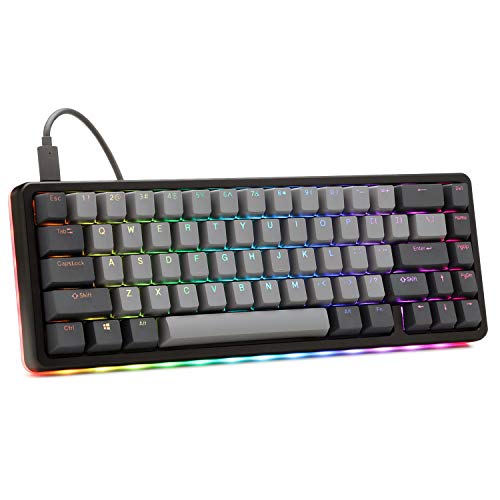
The ALT appears in this review as the road not taken, and it is a genuinely good road: a 65% board with a machined high-profile aluminium case, hot-swap sockets, doubleshot PBT keycaps and full QMK programmability, in this listing with Cherry MX Brown switches. Everything the Planck promises about firmware freedom, the ALT also delivers — layers, macros, per-key remapping — while keeping a staggered layout your fingers already know and dedicated arrow keys the Planck makes you earn through layers. For a buyer whose real interest is customisation rather than ortholinearity, the ALT is not the compromise; it is the answer.
Its presence also clarifies the Planck decision by contrast. Put the two side by side in your mind: the ALT asks an evening of configuration and repays it for years; the Planck asks a month of retraining and repays it — its converts insist — more deeply. The ALT’s tray-mounted firmness, wired-only connection and occasionally needy stabilisers are documented in this site’s full ALT review; here it is enough to say that as a staggered flagship it lacks nothing the Planck offers except the grid itself, which is either the whole point or entirely beside it, depending on the reader.
Strengths
- Full QMK layer and macro power on a familiar staggered layout
- Machined aluminium case and doubleshot PBT keycaps built for a decade of use
- Dedicated arrow keys and a 65% footprint that suits work as well as play
Trade-offs
- It cannot answer the ortholinear question; it can only postpone it
- Wired-only, with the tray-mount firmness its design is known for
- Stock stabilisers benefit from the usual enthusiast tuning
Best for: the customiser who wants Drop’s ecosystem and firmware without retraining their hands. Not suited for: the reader whose curiosity is specifically about the grid — buy the real experiment or none. Check cost on Amazon
A practical note for the torn reader: the ALT and a Planck are not mutually exclusive over a lifetime, and the order matters. Starting staggered teaches you QMK, layers and your switch preferences with training wheels on, and everything learned transfers to a later Planck build. Starting with the Planck teaches the same lessons at a steeper tuition. Unless the grid itself is the itch, walk before you grid.
The ALT also serves as the Planck project’s insurance policy in a way worth stating plainly: if the grid experiment fails, the ALT is not a consolation prize but a destination, and the switches, keycaps and firmware knowledge from the experiment all remain useful on it. Few experiments in this hobby de-risk themselves so completely. A reader who buys the ALT first and a Planck second has spent more in total and regretted less in aggregate than the reader who gambled everything on the grid in a single order.
Drop CTRL High-Profile
Best for: anyone after the full tenkeyless layout in Drop’s aluminium style
| Item | Drop CTRL High-Profile |
|---|---|
| Class | Mechanical Keyboards |
| What its entry leads with | hot-swappable switches, RGB lighting, USB-C connection |
| Listing cost | Verify cost on Amazon |
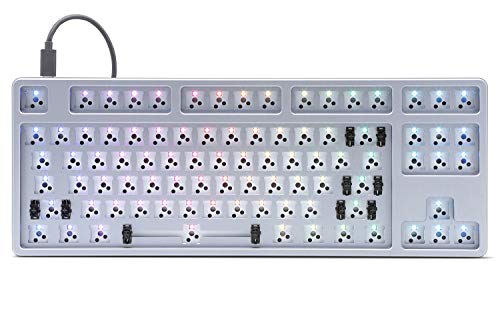
The CTRL High-Profile is the conservative flagship of the same family: tenkeyless, 87 keys, the same machined high-profile aluminium treatment as the ALT with a function row and navigation cluster intact, hot-swap sockets and QMK throughout. This listing is the barebones configuration in gray — no switches, no keycaps — which suits this review’s audience precisely, because a barebones CTRL is a build project with the risk removed: you choose switches and caps, assemble in an afternoon, and never touch a soldering iron or a layer map unless you want to.
In the Planck conversation the CTRL plays the role of the full stop. It is what you buy when you have examined the 40% idea, admired it, and concluded that your working life — spreadsheets, IDE shortcuts, a function row used hourly — is worth more than minimalism. There is no shame in that conclusion; this review suspects it is the correct one for the majority of readers. The CTRL’s cost of entry is real, and a barebones kit means switches and keycaps are additional purchases to plan, but the result is a board with no asterisks: every key present, every habit preserved, built from materials that justify keeping it for a decade.
Strengths
- Complete tenkeyless layout with function row and navigation cluster in aluminium
- Barebones format lets you choose switches and keycaps from the start
- QMK programmability for the customisation-minded, with zero obligation to use it
Trade-offs
- Barebones means the true cost includes switches and a keycap set
- The largest footprint here, which ends the minimalism conversation by winning it for space
- Wired-only and tray-mounted, like the rest of the family
Best for: the professional who wants Drop build quality with a complete, familiar layout. Not suited for: minimalists, travellers, or anyone whose curiosity about small boards is still alive. Confirm expense on Amazon
If you choose the CTRL path, buy switches and keycaps in the same week as the board; a barebones kit waiting on parts has a way of becoming a shelf ornament, and the hobby’s marketplaces are full of them. A modest switch set you can hold in your hand beats a dream set on a waiting list, every time.
There is one more CTRL virtue that belongs in a Planck review: it is the board other people can use. A partner, a colleague, a guest at your desk can sit down at a CTRL and type. At a Planck they can only admire it and reach for their phone. Households and shared desks feel this difference weekly, and it has ended more small-board experiments than any learning curve — a fact worth weighing if your desk is not exclusively yours.

Drop Planck Acute Keycaps
Best for Planck builders who want legends designed for a grid, not adapted to one
| Unit | Drop Planck Acute Keycaps |
|---|---|
| Range | Mechanical Keyboards |
| Headline features from its entry | its core extra set |
| Cost | Check price on Amazon |
Keycaps are where ortholinear builds usually compromise, because almost every keycap set ever made assumes a staggered board with a number row. The Acute set exists to end that compromise: it is Drop’s official Planck keycap set, PBT with dye-sublimated legends in OEM profile, laid out for the Planck’s compact ortholinear form — the layer legends, the compact space arrangements and the grid’s particular vocabulary are printed where a Planck owner’s fingers expect them. Dye-sublimation means the legends are in the plastic rather than on it, so they will not fade through years of the heavy use a 40% board’s home row absorbs.
The honest context is that keycaps are the finishing purchase, not the starting one: they presuppose a Planck beneath them, sourced from the used market, a group buy, or a compatible grid board, since the kit itself has no verified listing at the time of writing. Within that context the Acute set is the correct default — the set the board’s own ecosystem designed for it — and its existence is also a small signal worth reading: the Planck’s accessories remain in production because the installed base of builders remains active. A dead platform does not get fresh keycap runs.
Strengths
- Legends and layout designed specifically for the Planck’s grid and layers
- PBT with dye-sublimated legends that will not wear smooth or fade
- The official ecosystem set, so compatibility with the board’s layout is assured
Trade-offs
- Useful only with a Planck or compatible ortholinear board beneath it
- OEM profile is a specific sculpt; profile purists may prefer uniform rows
- It completes a build rather than starting one, so plan the board first
Best for: the builder with a Planck in hand or on the way who wants the intended finishing set. Not suited for: staggered boards, or anyone still deciding whether the grid is for them. Check price on Amazon
One buying discipline for the whole Planck project hides in this keycap set: acquire components in build order, not in excitement order. Board first, switches second, keycaps last — because each stage’s choices constrain the next, and the hobby’s saddest shelf is the one holding beautiful keycaps for a board that was never sourced. The Acute set will wait patiently at the end of the plan; let it.
It is also worth understanding what the Acute set says about typing feel, because keycap profile is not cosmetic on a grid board. OEM profile’s sculpted rows give each column a subtle topography your fingers use as landmarks — on a board where every key is the same size in the same grid, that topography is information, and many owners find it eases the first fortnight. Uniform profiles look cleaner and photograph better, and some veterans prefer them, but for a first build the sculpted set is the kinder teacher. Choose the teacher before the photograph.
Buying guide: what actually settles Drop Olkb Planck Review
Ortholinear learning curve and layer layout
The grid is the whole wager. On a staggered board your fingers travel diagonally by inherited habit; on the Planck every key sits in a column, so each finger owns a vertical strip and lateral movement nearly disappears. Converts describe the result as typing becoming smaller — less travel, less reaching, everything under the fingers that own it. The cost is the first fortnight: speeds commonly fall by half or worse, the bottom row’s shifted positions produce a week of specific, repeatable errors, and keys you never thought about — where is C, where is B — must be consciously relearned because their columns moved. Touch typists adapt fastest because their finger assignments are already disciplined; hunt-and-peck typists sometimes adapt faster still, having less to unlearn.
Layers are the second half of the wager, and they are a design task, not a setting. With no number row, your Planck’s layer map is its true layout: one held key raises a layer of numbers and symbols, another lowers a layer of arrows, function keys and media. Good layer design follows two rules — the layer keys live where thumbs or strong fingers rest, and the raised layer mirrors the base layer’s geography so numbers sit above their letters in a learnable pattern. The Planck’s default map is a sane starting draft, not a destination; every long-term owner has edited theirs, and the editing, done in QMK with your own hands, is where the board becomes personal in a way no staggered board ever quite does.
Build-it-yourself kit completeness
The Planck was sold as a kit, and kit literacy is part of the purchase: case, plate, PCB, switches and keycaps, with assembly ranging from simple socketing to soldering depending on the generation and the options chosen. Before sourcing one — from the used market or any future run — establish exactly what a given offering contains, because “Planck for sale” can mean anything from a complete board to a bare PCB wearing the name. The historically complete kit’s virtue was coherence: parts designed for each other, a case machined for the PCB, a plate cut for the grid. A build assembled from strangers can equal it, but only with research the kit was designed to spare you.
Budget the invisible components too. A build needs a cable, possibly a soldering setup if your PCB generation requires it, switch films or lubricant if you are that way inclined, and the keycaps — where the Acute set in this review is the ecosystem’s own answer. Kit completeness is ultimately a budgeting question disguised as a parts question, and the buyers who enjoy the Planck most are the ones who priced the whole instrument before the first component charmed them into starting.
QMK code adaptability
QMK is the Planck’s operating philosophy made literal: open firmware, compiled or configured by the owner, in which any key can be any thing — a letter, a layer toggle, a macro, a tap-dance that sends one character tapped and another held. On a 47-key board this is not a luxury feature; it is the load-bearing structure, and its depth is why the Planck remains the reference 40% years after its debut. The practical gradient is friendly at the shallow end — VIA or a web configurator handles layer maps without code — and bottomless at the deep end, where owners write functions the original designers never imagined.
The honest caution is that firmware depth transfers effort from the manufacturer to you. A staggered board’s layout is decided; a Planck’s layout is decided by its owner, repeatedly, until it settles. Some buyers discover they love this — the board as an ongoing text they keep revising. Others discover they wanted a keyboard, not a project, and the distinction is the single best predictor of Planck happiness this review can offer. The scenarios below are organised around exactly that distinction.
Case options and switch plate sense
The Planck’s small footprint makes its case choices unusually audible: in a board this compact, the case is a large fraction of the total mass and sound. The ecosystem’s machined aluminium cases give the grid a dense, quiet authority; lighter options keep the travel-board dream alive, since a Planck in a light case is one of the smallest serious keyboards that exists. The switch plate — the frame the switches mount through — contributes stiffness and note: a rigid plate makes the tiny board feel like a single machined block, which most owners prefer, because flex in a 40% reads as flimsiness rather than as the cushioning it provides in larger boards.
Choose the case by the board’s intended life. A desk Planck earns its aluminium; a travel Planck earns its lightness; and a first Planck, bought as an experiment, earns whichever option the used market offers at a sane price, because the experiment is about the grid and the layers, not the metallurgy. Owners who stay with the platform tend to own both lives eventually — the small board invites a second build the way few peripherals do.
Drop Olkb Planck Review in actual schedules
Situation: a touch typist curious regarding dropping to 40 percent
The touch typist is the Planck’s best-case adopter: finger discipline already installed, home row already home. Their first week is still humbling — expect the speed to halve and the bottom-row errors to cluster exactly where the grid moved the letters — but the recovery curve is the friendliest of any adopter type, and by the third week most report the peculiar pleasure the design promises: the hands barely move, and typing feels like thinking at the keys rather than travelling to them. The typist’s specific risk is impatience at day four, when the old board sits nearby being effortlessly fast. The converts’ universal advice is to remove the old board from the desk entirely for the first fortnight; fluency follows commitment, not comparison.
Situation: a programmer building a travel board for a laptop kit bag
For the travelling programmer the Planck is nearly a designed answer: it is smaller than the laptop’s own keyboard footprint in some configurations, it carries its layout in firmware so every machine it meets behaves identically, and its layer system puts symbols — the programmer’s true alphabet — under a held thumb rather than across a missing number row. The build decisions follow the mission: a light case, quiet-leaning switches for shared spaces and trains, and a layer map rehearsed at home before it is needed in an airport. The failure mode of this scenario is building the travel board and never travelling with it because the home board is more comfortable — which is why this buyer should build the Planck as their main board for the first month, so the travel investment is in a fluency they actually own.
Scenario: a hobbyist who treats the build on its own as the project
For the hobbyist, the Planck is not a purchase but a syllabus: sourcing teaches the market, assembly teaches the hardware, firmware teaches the software, and the finished board is the certificate. This buyer should lean into the project’s full length — choose the generation of PCB that involves the skills they want, budget for the tools, document the build — because the value is in the doing, and a shortcut kit would cheat them of the point. The hobbyist is also the reader for whom the current kit scarcity matters least: the hunt for components is content, not obstacle. Their risk is different — finishing the build and immediately planning the next one, which is not a risk so much as the hobby correctly identifying its newest member.
The hobbyist scenario has a budget corollary the others do not: the project’s costs arrive in a long tail of small, delightful purchases — a better cable, a second plate, a switch tester, a desk mat sized for the tiny board — each trivial, the sum not. Set the project’s total budget at the start, in writing, and let the tail spend against it visibly. The hobby stays joyful exactly as long as its costs stay chosen, and the Planck, more than most projects, generates occasions to spend by the dozen.
Arrangement and first-seven days how-to
Whether you build a Planck or buy one of the staggered alternatives, the first week decides the outcome. These steps are written for the Planck path, and they adapt to the ALT and CTRL with the retraining elements removed.
Step 1 for Drop Olkb Planck Review: schedule a two-week review really to catch annoyances that only repetition reveals
Put the verdict date in your calendar before the board touches your desk: two weeks out, non-negotiable. A Planck judged at day three is judged at its worst — speed halved, errors peaking — and a Planck judged at day fourteen is judged near its plateau. The scheduled review protects the experiment from your own worst day, and it gives the adaptation a deadline to work toward, which the brain, like any trainee, responds to. Bring data to the review: a typing test score from day one and from day fourteen tells the story more honestly than feelings do.
Step 2 for Drop Olkb Planck Review: test the unit on your worst typical day
Somewhere in the second week, deliberately use the board through your hardest ordinary workload — the deadline day, the code-heavy day, the day of a thousand short messages. A layout that survives your worst day at acceptable speed has passed the only examination that matters, because ordinary days will never test it harder. Note exactly which sequences still fail under pressure: those specific chords and layer transitions are your practice list for week three, and they are nearly always fewer than you feared.
Step 3 for Drop Olkb Planck Review: tidy or maintain the item after prior to deciding it is settled
Before the review date, put the build in order: reseat the keycaps, coil the cable as it will live, clean the case, save the current firmware configuration somewhere safe. A build judged amid its own construction mess is being blamed for the mess — a crooked cap, a half-seated switch, a draft layer map. The tidying ritual also surfaces the small defects worth fixing while your attention is on them, and it marks the psychological transition from project to tool, which is the moment a Planck either becomes your keyboard or becomes your souvenir.
Step 4 for Drop Olkb Planck Review: re-confirm ease after past an session of utilise
After one full working session, audit the physical side honestly: finger strain, wrist angle, the reach to the layer keys. Ortholinear layouts reduce lateral finger travel but concentrate work in the columns, and a layout whose layer keys sit under weak fingers will tax them by the hour. The fix is almost always in the map, not the hardware — move the layer hold to a thumb, split the duty between two keys — and it can only be prescribed from a full session’s evidence, not from the first excited hour.
Step 5 for Drop Olkb Planck Review: write the return clearly deadline on the box largely the morning it arrives
For the components that come from retailers — the keycaps, the staggered alternatives, any new parts — mark the return deadline on the packaging the day it lands. Planck projects run long, and a part can sit unopened past its window while the board it belongs to is still being sourced. The written date converts each component into a decision with a deadline: test it against the build plan when it arrives, keep it or return it consciously, and never let a project’s slow timetable quietly strand you with parts you cannot send back.
Common mistakes with Drop Olkb Planck Review
Ordering minus a plan for number-row layers
The number row is the Planck’s first ambush: buyers rehearse the letters, adapt within days, and then meet a password, a spreadsheet, a game that wants F-keys, standing on a layer they never designed. The mistake is treating the raised layer as an afterthought when it is half the keyboard. Design it before the board arrives — numbers in a row above their letters or in a numpad cluster under the right hand, symbols placed by your own frequency of use, function keys where your applications expect them — and print the map for the first week. A Planck with a planned number layer feels complete from day three; a Planck without one feels like a riddle that interrupts you hourly.
Assuming ortholinear repairs posture by on its own
The grid reduces finger travel; it does not raise your monitor, set your chair, or move your elbows to their proper angles, and marketing that implies otherwise does the design a disservice. Owners who buy a Planck as an ergonomic intervention and change nothing else reliably report that their wrists feel exactly as they did, now with a learning curve added. Treat the Planck as one component of an ergonomic setup — desk height, screen position, breaks, and a board your fingers travel less on — and it contributes honestly. Ask it to be the whole intervention and it will be blamed for the chair’s sins.
Skipping the mid-build software flash test
Every experienced builder has a story about a fully assembled board that would not flash, diagnosed only by disassembling it. The discipline that prevents the story is boring: flash the firmware and test the matrix at the halfway point, with switches socketed but the case open, before a single keycap goes on. Ten minutes of mid-build verification converts the worst build failure — a dead PCB discovered at the end — into a minor mid-course correction. On a kit as historically variable as the Planck’s, where generations and revisions mix in the used market, the mid-build test also confirms that the board you sourced is the board you think it is.
Head-to-head: separating the lineup
The three products resolve into three postures toward the same hobby. The Acute keycaps are for the committed: they assume a Planck exists or is coming, and they finish it properly. The ALT is for the adjacent: all of the firmware culture, none of the retraining, in the family’s most balanced footprint. The CTRL is for the settled: the complete layout in the same materials, an end to experimentation purchased honestly. Notice that none of them is the Planck itself, and that this review regards that as information rather than embarrassment — the Planck in 2026 is a project you source, not a product you click, and a buyer who understands that before spending is a buyer the platform’s community will recognise as one of its own.
If the decision must be forced today: build the Planck if the grid is the itch and the fortnight of humility sounds like fun; buy the ALT if the itch is customisation and the grid is merely interesting; buy the CTRL if reading this review has felt like a pleasant museum tour of other people’s hobbies. All three are defensible, and the only indefensible purchase is the Planck bought by the CTRL reader in a moment of midnight bravado.
There is a financial footnote to the comparison that favours the ecosystem route more than readers expect. A Planck project’s true cost, honestly totalled across board, switches, caps, cable and tools, commonly lands in the same territory as the CTRL’s complete build — the small board is not the cheap board, merely the concentrated one. Readers choosing the grid for economy should re-run their arithmetic with the full parts list open. Readers choosing it for love can ignore this paragraph entirely; the heart’s budgeting is its own discipline, and this review respects it.
Living with the pick: upkeep and longevity
A Planck’s upkeep is inseparable from its nature as a configured object. Your layer map will keep evolving for the first months — a key moved after every annoyance — and then, one day, it will stop changing, and that frozen configuration becomes one of your most personal digital possessions. Back it up like one: keep the firmware file or VIA export with your documents, because losing the map of a 40% board is losing the keyboard itself in a way no staggered owner can understand. The hardware asks for little by comparison: clean the compact case often, since a small board shows dust quickly, and treat the USB connector gently, because a travel board’s port lives a harder life than a desk board’s.
The platform’s longevity is its community. Designs, plates, cases and firmware forks circulate among owners long after any retail run ends, which is why a board with no current listing can still be a living platform — and why sourcing one rewards patience and forum literacy. If you join that community, contribute the thing it values most: document your build and your final layer map, because the next reader deciding whether the grid is for them will learn more from your fortnight of honest notes than from any review, including this one.
One longevity point is specific to small boards: a Planck concentrates a full keyboard’s worth of daily wear onto forty-some switches, so its home row ages faster than a big board’s. Quality switches and an occasional rotation of the most-used positions — a QMK-era luxury the hot-swap generations allow — keep the feel even across years. Owners who ignore it notice a soft, inconsistent patch developing exactly under their strongest fingers, and mistake it for their own technique changing. It is the board, asking for ten minutes and a switch puller.
Final recommendation
The Planck is recommended — as an experiment with a known cost, undertaken for known reasons. If you are a touch typist who loves economy of motion, a programmer who travels, or a hobbyist who wants the build itself, the grid repays its fortnight. Enter it properly: plan the number layer before the board arrives, source components in build order, flash-test mid-build, remove the old keyboard from the desk, and hold your verdict until the scheduled two-week review. Entered that way, the Planck has the highest owner-satisfaction ceiling of anything in this review. Entered casually, it has the lowest floor, and the marketplace listings of barely-used Plancks are the evidence.
And if the review has talked you out of the grid, let it talk you into the ecosystem instead: the ALT for the customiser, the CTRL for the professional, the Acute keycaps waiting for the day the curiosity returns. It usually does.
A closing word on timing, since the Planck’s availability shapes it: because the kit is sourced rather than simply ordered, the project rewards readers who start before they need it. Begin the hunt when the curiosity is warm, not when the old board dies, and the sourcing becomes part of the pleasure instead of a delay under pressure. The grid will still be there when the parts align — that is the advantage of a platform kept alive by its owners rather than by a product cycle.
Frequently asked prompts
What counts most when choosing for drop olkb planck review?
Your reason for wanting it. The Planck rewards specific motivations — economy of finger motion, a travel build, the project itself — and punishes vague ones like novelty or a photograph seen online. If you can state your reason in one sentence and it still sounds good after imagining two weeks of halved typing speed, the board is a sound purchase. If the sentence dissolves under that imagination, the ALT or CTRL in this review will make you happier, and there is no hierarchy of virtue between the choices.
How much should a beginner budget for drop olkb planck review?
Budget for the whole instrument, not the headline component: board or kit, switches, keycaps, cable and any tools you do not own, plus the patience line-item nobody prices — a fortnight of slower work. Beginners consistently underbudget the Planck by pricing the PCB and discovering the rest in instalments, which sours the project. Price the complete build on one page before the first purchase; if the total argues against the experiment, the staggered boards here deliver most of the hobby at a single, honest figure.
Which slip do customers of drop olkb planck review regret most?
Quitting at day four and calling the verdict final. The Planck’s adaptation curve is famous precisely because the worst point arrives early and feels permanent: speed halved, errors clustered, the old board radiating competence from the drawer. Nearly every regret listing in the used market is a day-four verdict wearing a for-sale post. The scheduled two-week review in this guide exists to outlaw that judgement — not to trap anyone into keeping a board they hate, but to ensure the hatred is of the finished experience, not of the middle of the learning curve.
How long does it take to get used to a new drop olkb planck review configuration?
Plan on two weeks to competence and a month to forgetfulness. Letters settle within days for touch typists; the number and symbol layers take longer because they are used less often per hour, and they are rehearsed only in real work. Speed typically returns to baseline around the end of week two and exceeds it for some owners by week four, as the reduced travel compounds. If your layers still feel like a foreign country at one month, redesign them without sentimentality — the map, not your hands, is usually the remaining problem.
When is the premium pick in drop olkb planck review really worth it?
When it buys the machined case and the official keycaps for a board you intend to keep for years. The Planck’s small size makes its materials a large share of its daily feel, and the Acute set’s purpose-built legends remove a daily friction that adapted keycap sets never quite do. The premium is not worth it for a first experiment bought to test the grid — test cheaply, commit expensively, in that order — which is why this review steers experimenters to the used market and reservers of premium money to the already-converted.
What should I confirm first if my drop olkb planck review purchase disappoints?
Confirm where you are on the calendar before you confirm anything about the board. If fewer than fourteen days have passed, the disappointment is scheduled, expected, and shared by every convert who ever stayed — suspend the verdict and continue. If the fortnight has passed, check the layer map next, because a badly placed number layer poisons the whole experience while masquerading as a hardware flaw. Only after the calendar and the map are cleared should the board itself stand trial, and by then the trial is usually short.
Linked guides
- Drop Alt Review
- Are the Drop Alt Or Drop Ctrl Worth It
- Best Keyboard And Mouse really Combos for Office
- Best Wireless Gaming simply Keyboards for FPS
- Best Wireless Gaming simply Keyboards Under 100
- Gaming Keyboard Black Friday Deals
Further reading around the Drop ecosystem: the full ALT review, the worth-it analysis of Drop’s two flagships, and the wider keyboard roundups for readers still choosing a direction.
One more angle: build-it-yourself kit completeness, revisited
Keep a build log, even a scruffy one. Photograph the PCB before assembly, note the firmware version you flashed, record which switches went in and when the stabilisers were tuned. Six months later, when something changes — a key goes intermittent, a layer misbehaves — the log converts a mystery into a timeline, and timelines are how intermittent faults get caught. The log has a second life, too: if you sell the board, a documented build commands trust and a fair price in a market where undocumented boards are priced as lottery tickets.
One more angle: ortholinear learning curve and layer design, revisited
Practice the layers deliberately, not just the letters. Ten minutes a day with a typing tutor set to numbers and symbols does more for a Planck owner’s second week than hours of ordinary work, because ordinary work avoids the layer keys precisely when they are weakest — you reach for the familiar instead. Structured practice removes the avoidance. By the end of the fortnight the raised layer should feel like a room you know in the dark, and the day it does, the board’s whole argument — everything within reach, nothing travelled to — finally becomes your own experience rather than the community’s claim.
One more angle: case options and switch plate sense, revisited
A small board travels between contexts in a way big boards do not, and the case choice echoes in each: the aluminium Planck on a glass desk in a quiet office is a metronome of authority; the same board in a shared flat at midnight is a noise complaint with excellent firmware. Match the build to the noisiest context it will actually face — choose switches and case mass for the midnight version of your life — and the board will be welcome everywhere. Owners who build for the showroom version of their life end up with a second, quieter board, which the community will tell you is not a failure but the natural Planck life cycle.
One more angle: QMK software adaptability, revisited
The deepest QMK habit worth stealing from long-term owners is versioning your layout like code: keep dated copies of each configuration, with a one-line note of what changed and why. Layouts evolve by small experiments, and experiments occasionally make things worse in ways that are only obvious a week later; a versioned history lets you retreat to the last good map in minutes instead of reconstructing it from memory. It also turns your Planck into a document of your own working life — the layer you built for one job, the macro that survived three — which is a strange and satisfying thing for a keyboard to be.
One more angle: the second Planck problem, revisited
Prepare yourself for the platform’s most predictable outcome: one Planck becomes two. The desk build wants a travel twin; the travel build wants a silent variant for the shared flat; the first build’s compromises demand a second build done properly. This is not consumerism but the arithmetic of a small, buildable, configurable object — each build is cheap in money compared to its cost in curiosity. Budget-holders should know it in advance, and partners should be told it is a known phenomenon with a name, so it can be negotiated as a hobby rather than discovered as a habit.
One more angle: when the staggered boards are the right answer, revisited
End with the counter-case, because a review that only converts is a sales pitch. If your work involves other people’s keyboards — hot desks, client machines, a shared family computer — the Planck’s fluency does not travel with you, and every hour on a staggered board becomes a small re-adaptation. Dual fluency is achievable, and many owners maintain it, but it is a real ongoing cost that belongs in the decision. The ALT and CTRL ask for no such tax. For the reader whose life is multi-keyboard by obligation, that tax, honestly weighed, may be the whole decision — and choosing the staggered board for that reason is not a failure of nerve but a correct reading of your own circumstances.