Disclosure: As an Amazon Associate, reviewstook.com earns from qualifying purchases. Links on this page are affiliate links at no extra cost to you; prices and availability change frequently, so check Amazon for the latest.
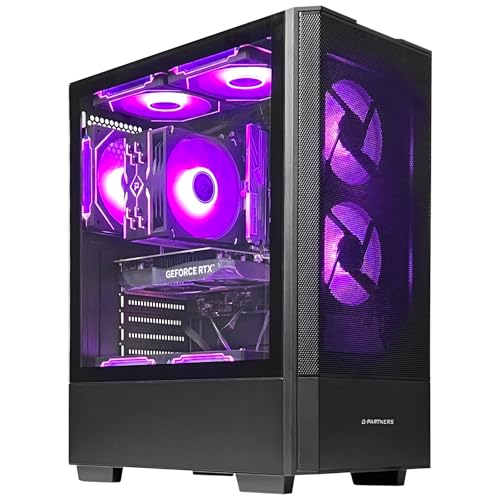
Budget Gaming PC Buying Guide: How to Spend Less Without Buying Regret
This budget gaming pc buying guide exists because the cheapest gaming PC on a listing page and the cheapest gaming PC that actually plays your games well are two very different machines. At the budget end of the market, every dollar is a trade: money spent on RGB fans is money not spent on graphics memory, and a tower that looks fast in photos can hide integrated graphics, a single stick of slow memory, or a power supply with no headroom for the one upgrade you will inevitably want. This guide walks through what genuinely matters, what is marketing decoration, and which verified machines on our pick sheet earn a recommendation for which kind of player.
Everything recommended here was cross-checked against Amazon’s own catalog data through the Creators API on 2026-11-20, so the configurations described are the configurations actually listed — not last year’s model wearing this year’s name. Where a machine’s compromises are real, we say so plainly. A budget gaming PC bought with open eyes can be a great machine; a budget gaming PC bought on headline specs alone is how people end up paying twice.
Where to Buy
The safest place to buy a budget gaming PC is a listing you can verify line by line, which is why every machine in this guide links to its Amazon listing: ZYNEEX Prebuilt Gaming Desktop (RTX 3050) (our balanced pick), CyberPowerPC Gamer Master (RX 6500 XT) (the entry discrete-graphics option), YAWYORE Gaming PC (Ryzen 5 5600GT) (the strong integrated-graphics tower), Volt X3 V1.2 Gaming PC (GTX 1070) (the older-GPU value play), OKAMUS Pre-Built PC (the ultra-budget floor), and CyberPowerPC Gamer Master (RTX 5060 Ti) (the stretch pick). Amazon listings show the exact configuration, current stock, and return terms before you commit, and reviewstook.com only links configurations we verified against the catalog data above. Whatever you buy, screenshot the full spec list at checkout — at this end of the market, the configuration in your order confirmation is the only promise that matters.
In this guide
Start With Your Games, Not With a Budget Number
The single most useful question in this entire guide is: which games, at what resolution, at what frame rate? A player whose library is League of Legends, Valorant, Minecraft, Rocket League, and older indie titles needs a fraction of the graphics power of a player who wants modern AAA releases at high settings. Esports titles are deliberately built to run on modest hardware — they are the budget PC’s home turf. Modern open-world and shooter releases are the opposite: they assume a discrete graphics card with generous video memory and punish anything less with stutter, blurry upscaling, and settings menus that feel like negotiations.
Be honest about the split in your own library. If eighty percent of your hours go to esports and older games, buy for those and accept reduced settings in the occasional big release. If the big releases are the point, the graphics card stops being negotiable and the budget has to bend around it. Players also planning their desk setup should think about the mouse at the same time — our roundup of the Best Budget Gaming Mice covers the tier where a cheap mouse stops holding a cheap PC back.
The Graphics Card Decides Almost Everything
In a gaming PC, the graphics hardware does most of the work that you actually see, and at budget prices the gap between graphics tiers is enormous — far larger than the gap between any two CPUs in this guide. There are three tiers on our pick sheet, and understanding them is most of the buying decision.
Integrated graphics only. Machines like the OKAMUS and the YAWYORE render games using graphics built into the CPU. Modern integrated graphics — particularly AMD’s — are genuinely capable at 1080p low-to-medium settings in esports titles and older games, and they sip power. But there is no upgrade shortcut: when integrated graphics run out of ability, the only fix is adding a discrete card later, which requires power supply headroom the cheapest towers often lack.
Entry discrete cards. The RX 6500 XT 4GB in the CyberPowerPC Gamer Master and the RX 560 4GB in the Qehi are real graphics cards, and a real card — even an entry one — transforms modern-game playability versus integrated graphics. The constraint is 4GB of video memory: fine at 1080p with sensible settings, a hard ceiling in the newest releases that want more.
Mid-range discrete cards. The RTX 3050 6GB in the ZYNEEX and the GTX 1070 8GB in the Volt X3 sit a clear step above: more memory, more headroom, and in the RTX 3050’s case, modern features like DLSS upscaling that stretch a budget card further than raw power suggests. The stretch tier — the RTX 5060 and RTX 5060 Ti machines — is where “budget” ends and “mid-range” begins, and this guide treats them as the ceiling you stretch to, not the floor you start from.
How Much RAM and Storage Do You Actually Need?
Sixteen gigabytes of RAM is the comfortable standard for gaming in this era: enough for the game, Discord, a browser, and the operating system to coexist without the stutter that comes from a system swapping to disk. Eight gigabytes — found in the OKAMUS and the entry CyberPowerPC — runs esports titles fine but multitasks poorly, and it is the first upgrade most owners of those machines should plan. One important detail: a single 8GB stick runs memory in single-channel mode, which particularly hurts integrated graphics, since they borrow system memory for rendering. If you buy an 8GB machine, budget for a matching second stick early.
Storage follows a similar pattern. A 256GB SSD fills alarmingly fast once Windows, two or three modern games, and a launcher library move in — several current titles individually exceed 100GB. Five hundred gigabytes is workable with discipline; 1TB, as in the ZYNEEX and YAWYORE, is the size that stops being a weekly management chore. All the machines in this guide use SSD storage, which matters more than capacity for day-to-day feel: load times and system responsiveness on any SSD embarrass even the largest spinning drive.
The Power Supply Is the Spec Nobody Lists Honestly
Ask any experienced builder what separates a budget PC you can upgrade from one you cannot, and the answer is the power supply. A 400W unit like the OKAMUS’s is adequate for the machine as shipped — integrated graphics draw little — but it leaves almost no room to add a discrete graphics card later, which is precisely the upgrade integrated-graphics owners eventually want. The YAWYORE’s 550W 80PLUS unit is the quiet hero of this guide’s pick sheet: it is the reason that tower, despite shipping without a discrete card, is a genuinely good platform — the power and the 16GB of RAM are already there when a graphics card joins it.
When comparing listings, treat an unspecified power supply as a red flag and a named wattage with an 80PLUS rating as a good sign. You are not paying for watts you use today; you are paying for the machine’s second and third year.
The Picks: Six Verified Budget Gaming PCs Compared
These six machines span the realistic budget range from the floor to the stretch ceiling. Each was verified against catalog data on 2026-11-20; check the latest price on Amazon before deciding, because budget-tier pricing moves constantly and a machine’s value case can flip on a single discount.

Best Balanced Budget Pick — ZYNEEX Prebuilt Gaming Desktop, RTX 3050 6GB
The ZYNEEX Prebuilt Gaming Desktop (RTX 3050) is what we would hand most budget buyers: a Ryzen 5 5500 paired with an RTX 3050 6GB, 16GB of DDR4, and a 1TB NVMe SSD. Nothing in that list is the cheapest version of itself, and that is the point — this is the configuration with no urgent upgrade attached. The RTX 3050’s DLSS support matters more at this tier than raw benchmarks suggest, because upscaling is how budget cards stay playable in new releases. Check on Amazon
| CPU | AMD Ryzen 5 5500 |
|---|---|
| Graphics | GeForce RTX 3050 6GB |
| RAM | 16GB DDR4 3200MHz |
| Storage | 1TB NVMe SSD |
| Cooling | ARGB air cooling |
| Wireless | Wi-Fi |
| OS | Windows (see listing) |

Best Entry Discrete-Graphics Pick — CyberPowerPC Gamer Master, RX 6500 XT
The CyberPowerPC Gamer Master (RX 6500 XT) is the least expensive route on this sheet to a real graphics card from a major prebuilt brand, with the support and warranty structure that comes with it. The honest limitations are 8GB of RAM and 4GB of video memory: plan the RAM upgrade, keep settings sensible at 1080p, and it is a sound esports-plus machine. Check on Amazon
| CPU | AMD Ryzen 5 5500 |
|---|---|
| Graphics | Radeon RX 6500 XT 4GB |
| RAM | 8GB DDR4 |
| Storage | 500GB PCIe 4.0 SSD |
| Wireless | WiFi ready |
| OS | Windows 11 Home |

Best Integrated-Graphics Platform — YAWYORE Gaming PC, Ryzen 5 5600GT
The YAWYORE Gaming PC (Ryzen 5 5600GT) bets on the strongest integrated graphics in this guide plus the platform around them: 16GB of dual-channel-friendly DDR4 3200MHz, a 1TB NVMe drive, and that 550W 80PLUS power supply. Today it plays esports and older titles well at 1080p; the day you add a mid-range graphics card, it becomes a genuinely strong machine with no other bottlenecks waiting. Check on Amazon
| CPU | AMD Ryzen 5 5600GT (integrated graphics) |
|---|---|
| RAM | 16GB DDR4 3200MHz |
| Storage | 1TB M.2 NVMe PCIe SSD |
| PSU | 550W 80PLUS |
| Wireless | WiFi + Bluetooth |
| OS | See listing |

Best Older-GPU Value — Volt X3 V1.2, GTX 1070 8GB
The Volt X3 V1.2 Gaming PC (GTX 1070) pairs an older Ryzen 5 2600 with a GTX 1070 carrying 8GB of video memory — more VRAM than the newer entry cards here, which shows in texture-heavy games. The trade is platform age: the CPU and chipset are generations old, driver support for the GPU is in its legacy phase, and upgrade paths are narrower. As a play-it-now machine rather than a grow-it-later platform, it earns its place. Check on Amazon
| CPU | AMD Ryzen 5 2600, up to 3.9GHz |
|---|---|
| Graphics | NVIDIA GTX 1070 8GB |
| RAM | 16GB DDR4 |
| Storage | 512GB NVMe SSD |
| Wireless | WiFi + Bluetooth |
| OS | Windows 11 Pro 64-bit |

The Ultra-Budget Floor — OKAMUS Pre-Built PC, Integrated Graphics
The OKAMUS Pre-Built PC is the floor of the market: an i5 with integrated graphics only, 8GB of RAM, a 256GB SSD, and a 400W power supply. It is a legitimate machine for esports at low settings, older games, schoolwork, and media — and it is not a machine for modern AAA gaming, whatever the listing photos imply. Buy it knowing exactly that, and it is honest value; buy it expecting more, and it is a disappointment with RGB fans. Check on Amazon
| CPU | Intel Core i5, up to 3.6GHz |
|---|---|
| Graphics | Integrated graphics only (no discrete GPU) |
| RAM | 8GB |
| Storage | 256GB M.2 SSD |
| PSU | 400W |
| Wireless | WiFi 6 + Bluetooth 5.3 |
| OS | Windows 11 Home |

The Stretch Pick — CyberPowerPC Gamer Master, RTX 5060 Ti
The CyberPowerPC Gamer Master (RTX 5060 Ti) is the machine you buy when the budget can stretch and you would rather not think about upgrades for years: Ryzen 7 8700F, RTX 5060 Ti 8GB, 16GB of DDR5, and a 1TB SSD on a current platform. It is the ceiling of this guide, included so you can see exactly what the extra money buys — roughly, one full graphics tier and a newer platform generation. Check on Amazon
| CPU | AMD Ryzen 7 8700F |
|---|---|
| Graphics | GeForce RTX 5060 Ti 8GB |
| RAM | 16GB DDR5 |
| Storage | 1TB PCIe 4.0 SSD |
| Wireless | WiFi ready |
| OS | Windows 11 Home |
Prebuilt or Build Your Own at This Budget?
Building your own PC has traditionally been the budget advice, and at mid-range prices it still often wins on paper. At the true budget end, the math has shifted: prebuilts bundle Windows, warranty coverage on the whole system, and parts pricing that individual buyers cannot always match, and they arrive as a working machine rather than a weekend of troubleshooting. The prebuilt tax at this tier is usually paid in component quality you cannot see — power supplies, motherboards, memory configuration — which is why this guide keeps returning to those unglamorous specs.
Build your own if you enjoy it, have a knowledgeable friend, or already own parts worth reusing. Buy prebuilt if your goal is playing games this week with a warranty behind the whole box. Neither answer is wrong; the wrong answer is a prebuilt bought without reading its full spec sheet, which is the failure mode this guide is designed to prevent. Our companion piece, How To Choose A Budget Gaming PC, turns these criteria into a step-by-step selection process.
What About Laptops and Consoles?
Honest guides should name the alternatives. A console delivers more gaming performance per dollar than any budget PC, full stop — if your gaming is purely gaming, on a TV, with a controller, the console is the rational buy. The budget PC’s case is everything around the games: it is also the homework machine, the streaming and editing machine, the modding platform, the home of decades of cheap PC game sales and free-to-play titles with no subscription required for online play, and the only one of the three you can upgrade in pieces. A budget gaming laptop, meanwhile, trades the desktop’s upgradability for portability at a higher price for the same performance. Buy the PC when the PC-ness is part of the value — for most readers of this guide, it is.
How to Set Up a Budget Gaming PC for Best Performance
The cheapest performance in gaming is the performance already inside your machine, locked behind default settings. Work through these steps in the first hour with any PC in this guide — the full walkthrough lives in How To Set Up Budget Gaming PC.
- Update everything once. Windows Update, then the graphics driver directly from AMD or NVIDIA — the driver a budget PC ships with is rarely current, and driver updates at this tier regularly contain real performance fixes for new games.
- Enable the memory profile. In the BIOS, turn on XMP or EXPO/DOCP so your RAM runs at its rated speed. Integrated graphics especially gain from this — memory speed is graphics speed when the GPU shares system RAM. Pair the session with the right mouse settings using Best Windows Mouse Settings For Gaming.
- Set the Windows power plan to High Performance and, in the graphics settings, assign your games to the high-performance GPU — essential on integrated-graphics machines where Windows occasionally guesses wrong.
- Turn on your monitor’s full refresh rate in Windows display settings. A surprising number of budget setups run a high-refresh monitor at 60Hz for months because nobody flipped this.
- Use upscaling. In supported games, DLSS (on the RTX 3050 and RTX 5060 machines) or FSR (on everything) at Quality mode is close to free performance at 1080p.
- Cap background apps. Close the browser’s twenty tabs while gaming, and pause cloud sync — on an 8GB machine, this is the difference between smooth and stuttery.
Problem: a new game stutters despite meeting its listed requirements. -> Fix: check, in order, whether the game is using the right GPU, whether RAM is nearly full, and whether the memory profile is enabled; one of those three explains most budget-PC stutter. Problem: fans are loud under load. -> Fix: confirm the tower has clearance on all sides — budget cases suffocate against walls and inside enclosed desk cabinets.
Common Mistakes Budget PC Buyers Make
Buying the headline, not the spec sheet. “i5 gaming PC” can mean integrated graphics and 8GB of RAM. The OKAMUS is an honest version of that machine; plenty of listings are not. Read every line.
Spending on looks. RGB fans, tempered glass, and aggressive case styling cost money that buys zero frames. At this budget, every decorative dollar is a performance dollar lost.
Ignoring the power supply. A cheap PSU forecloses the graphics-card upgrade that is the natural second step for integrated-graphics machines. Wattage and rating belong in your comparison, always.
Buying 8GB of RAM as a final answer. Eight gigabytes is a starting point with a planned upgrade, not a destination — and on integrated-graphics systems, single-channel memory quietly taxes every game.
Forgetting the monitor and peripherals. The tower is not the whole purchase. A budget for the desk — display, keyboard, mouse — belongs in the plan from the start, which is why pairing guides like Best Gaming Keyboard And Mouse Combos exist.
Expecting ultra settings. A budget PC that plays everything at sensible settings is a success. Judging it against a flagship’s settings menu is how a good machine gets an unfair reputation — see Budget Gaming PC Pros And Cons for the honest balance sheet.
Final Recommendation
For most readers, the ZYNEEX Prebuilt Gaming Desktop (RTX 3050) is the buy: no urgent compromises, a modern graphics card with upscaling, and storage and memory sized for real libraries. If the budget is firm and lower, the YAWYORE Gaming PC (Ryzen 5 5600GT) is the smart floor — the strongest integrated graphics here on a platform built to accept a graphics card later. The CyberPowerPC Gamer Master (RX 6500 XT) suits buyers who want a major brand’s warranty behind an entry discrete card today. And if the stretch is possible, the CyberPowerPC Gamer Master (RTX 5060 Ti) buys years of not thinking about this decision again. Still weighing whether the whole category makes sense for you? Read Is A Budget Gaming PC Worth It next, and for head-to-head framing, Budget Gaming PC Vs Entry Level Gaming PC.
Understanding CPU Generations Without a Computer Science Degree
The processor names in budget listings span a decade of products wearing similar badges, and a five-minute mental model will protect you from the most common overpayment in this market: yesterday’s flagship-priced architecture at today’s money. The model is simple. Within a brand, the family name (Ryzen 5, Core i5) tells you the tier within its generation; the first digit or digits of the model number tell you the generation; and generation matters more than tier once you cross a few years. A current-generation Ryzen 5 5500 or 5600-class chip is a thoroughly modern six-core that will not bottleneck any graphics card in this guide. A Ryzen 5 2600 — found in the Volt X3 — is the same family name from years earlier: still a capable six-core, but on an older platform with slower memory support and a lower upgrade ceiling, which is exactly why that machine’s value case rests on its graphics card rather than its processor. Intel’s naming works similarly, and the OKAMUS’s unspecified-generation i5 is a useful reminder: when a listing will not tell you the generation, assume it is not the current one, and price the machine accordingly.
What does the CPU actually decide in a budget gaming PC? Three things: the minimum frame rate in busy scenes (the dips you feel, more than the averages you read), the machine’s competence at simultaneous work — streaming, recording, voice chat, a browser’s worth of tabs — and its longevity as graphics cards around it get faster. For pure 1080p gaming on the graphics tiers in this guide, any modern six-core suffices; the CPU becomes the wrong place to spend once that bar is cleared, which is why this guide keeps redirecting budget toward graphics, memory configuration, and the power supply. The one exception is the aspiring streamer: encoding a broadcast while playing is the budget workload that most rewards extra cores, and buyers with serious streaming plans should weight the CPU — and the RTX machines’ dedicated encoding hardware — accordingly.
Reading a Listing Like a Reviewer: A Worked Example
Take the foggiest sentence in budget retail — “Gaming PC, i7, 16GB RAM, 1TB, RGB” — and interrogate it the way this guide’s verification process does. i7 from which generation, and paired with what graphics? If no graphics card is named, the answer is integrated graphics, and the machine belongs to the floor tier whatever its price claims. Sixteen gigabytes of RAM: in one stick or two, and at what speed? On an integrated-graphics machine that detail is worth real frames. One terabyte of what — NVMe SSD, SATA SSD, or a spinning drive with an SSD cache wearing the headline? The difference is the machine’s entire responsiveness. RGB describes the fans. Now compare that fog with a verified listing from our sheet: “AMD Ryzen 5 5500, GeForce RTX 3050 6GB, 16GB DDR4 3200MHz RAM, 1TB NVMe SSD” — every claim checkable, every component classed, nothing hiding. The distance between those two listings is the distance this guide exists to close. You do not need our API access to close most of it: the questions above, asked of any listing, will cause the honest ones to answer and the foggy ones to disqualify themselves.
Two more reviewer habits are worth stealing. First, search the exact model number, not the marketing name: prebuilt model codes map to specific configurations, and a code that resolves to three different spec sheets across sellers is a code to avoid. Second, read the listing’s own questions-and-answers and critical reviews for configuration complaints specifically — “arrived with different RAM than listed” is the budget tier’s signature grievance, and it clusters on exactly the sellers the verification step would have filtered. Five minutes of this is worth more than an hour of benchmark videos about machines you are not buying.
Where the Money Goes: Allocating a Budget Across the Whole Setup
Most buying guides cost the tower and stop; your bank account experiences the whole desk. A realistic budget setup allocates across five buckets: the tower itself; the display (a 1080p monitor, ideally high-refresh, since budget graphics and 1080p are made for each other); input (keyboard and mouse — modest money here buys disproportionate feel, as the picks in our peripherals coverage show); audio (any honest headset beats monitor speakers for both games and calls); and a small reserve — call it the second-stick fund — for the first planned upgrade if you bought an 8GB or small-storage configuration. Buyers who plan all five buckets buy once. Buyers who plan only the tower discover the other four buckets at retail prices, in a hurry, one irritation at a time.
Within the tower’s bucket, the allocation logic of this guide can be stated as a priority order: graphics tier appropriate to your games first; 16GB of properly configured memory second; SSD capacity for your real library third; power supply headroom fourth; CPU beyond the modern-six-core bar fifth; and case aesthetics with whatever remains, which should be nothing. Notice what that order does to the market’s favorite listings — the ones leading with processor badges and lighting — and you have understood both the market and this guide.
Warranties, Returns, and Support at This Tier
The final buying criterion is the one you hope never to use. A whole-system warranty from an established maker — CyberPowerPC is the field’s example — means one accountable party for every component, which for first-time buyers is a feature with real cash value the first time anything misbehaves. Smaller-brand machines route support through the seller; that support can be perfectly good, but its quality is a research item, not an assumption — read the seller’s recent feedback with that specific question in mind. Whatever you buy, the return window is your verification period: in the first days, confirm the delivered configuration matches the listing line by line (Settings and any free system-information tool will show CPU, RAM, storage, and graphics plainly), run your most demanding game, and listen to the machine under load. A discrepancy found in week one is a return; the same discrepancy found in month three is an argument. The verified-listing discipline of this guide reduces the odds; the first-week check eliminates most of the remainder.
Seasonal Timing: When Budget PCs Get Cheaper
Because this guide prints no prices, it owes you the next best thing: the calendar. Budget PC pricing follows the retail year — the deepest discounts cluster around the major sale seasons (mid-year events, the Black Friday period, and the January clearance that follows it), with a secondary pattern worth knowing: when a new graphics generation launches, the previous generation’s prebuilts — often the best value in this entire market — are discounted to clear, and they remain excellent machines for years after their marketing moment passes. The ZYNEEX-class configuration of one season becomes the clearance bargain of the next without becoming a worse computer. The countervailing advice matters too: a needed PC bought months late to chase a discount has its own cost, measured in unplayed games and a household still sharing one machine. The right posture is opportunistic, not obsessive — know your target configuration from the criteria above, know its fair price band from a few weeks of casual watching, and buy when a verified listing lands in the band rather than when the calendar says to.
Refurbished, Open-Box, and Used: The Third Option
Between new prebuilts and building your own sits an option this guide should address honestly: manufacturer-refurbished and open-box machines from reputable sellers. The value can be excellent — a tier up for the same money is a common outcome — and manufacturer refurbishment with a real warranty is a genuinely different proposition from a stranger’s used tower. The risks concentrate where this guide’s verification habits protect you: confirm the exact configuration in writing (refurbished lines are notorious for spec drift under one model name), confirm the warranty’s length and holder, and treat any listing that cannot answer those two questions as a private used sale regardless of its branding. Truly used machines from individuals are a hobbyist’s market: the savings are real, and so is the absence of recourse, and a first-time buyer learning the category and the hardware simultaneously is stacking two learning curves. Our recommendation stands: new and verified for a first machine; the refurbished channel becomes attractive exactly when you know enough to verify it — which, after this guide, you largely do.
A Final Word on Future-Proofing
Every budget buyer eventually asks some version of “but will it last?” — and the honest answer reframes the question. No PC is future-proof; there are only machines whose decline is graceful and machines whose decline is a cliff. Graceful decline looks like the ZYNEEX or a card-upgraded YAWYORE in year three: settings drift from high to medium, upscaling does more work, the library’s newest entries ask for patience — and the machine remains, recognizably, itself. The cliff looks like a sealed floor machine meeting the first game it cannot run: nothing to adjust, nothing to add, a replacement decision arriving all at once. You cannot buy your way out of decline at this budget, but you can choose its shape, and the choosing is cheap: it costs exactly the attention this guide has asked for — graphics tier matched to real games, memory configured properly, a power supply with a future in it. Buy the graceful version of decline and a budget gaming PC stops being a compromise you defend and becomes what it should have been all along: simply the right machine, at the right price, for the games you actually play.
What a Budget Gaming PC Means for Different Rooms in the House
Buying guides usually imagine a single desk in a single room, but budget PCs disproportionately live shared lives, and the room changes the right answer in ways worth a section. In a teenager’s bedroom, the machine is a world: prioritize the platform that can grow with its owner, keep noise in mind for the household’s sake, and remember the desk budget competes with everything else in a young life. In a dorm, space and noise rule — the integrated machines’ small appetites for both are features, and a tower that doubles as the room’s media center earns its footprint twice. In a living room, the PC becomes furniture and family infrastructure: storage for the household’s photos and the kids’ projects, a screen for video calls, and games negotiated among several people’s tastes, which pushes the recommendation toward the balanced 1TB machines and toward cases whose looks the room’s other occupants can live with. In a home office that games after hours, the calculus tilts again — reliability, quiet, and a professional appearance at the desk matter, and the machine’s work competence (memory, storage, a calm fan curve) outranks its last few frames. None of these rooms changes the criteria in this guide; all of them change the weights, and naming the room before running the criteria is the cheapest optimization available to a household buyer.
The Ethics and Economics of the Cheapest Possible PC
A word about the absolute floor of this market, below even the OKAMUS’s honest tier, because buyers will encounter it: listings built from decade-old office hardware, unspecified everything, and prices that seem to defy arithmetic. Some of these machines are legitimate recycling — old workstations given a second life — and in knowledgeable hands they can be charming projects. But as a first gaming PC bought on trust, the sub-floor market fails this guide’s verification standard almost by definition: configurations cannot be confirmed, support does not exist, and the failure mode is not a slower game but a dead machine and a lesson purchased at full price. The budget tier this guide covers exists precisely to be the trustworthy floor: named components, a warranty, a return window, and performance claims that survive checking. If the honest floor is beyond the money available today, the better purchase is usually no purchase yet — a few more weeks of saving buys the verifiable machine, while the unverifiable one risks buying the lesson and the machine both. Value in this market is not the lowest number on a listing; it is the lowest number attached to a machine you can verify, return, and rely on — and that distinction is the entire philosophy of the pick sheet this guide is built on.
Dissecting the Pick Sheet: Why These Six and Not Others
Readers deserve to see the guide’s own homework, so here is why the verified field looks the way it does. The sheet was built by searching the catalog for the configurations this guide’s criteria describe, then verifying each candidate’s full specification against the returned data. Machines were excluded for the reasons the criteria predict: unnamed graphics hardware (the largest category of exclusion, and the market’s largest honesty problem), memory configurations that could not be confirmed, storage described too vaguely to class, and model names whose configurations contradicted themselves between listings. What survived is deliberately unglamorous: six machines whose every claim can be checked, spanning the floor (an integrated machine that admits it), the platform play (integrated graphics on a serious base), the brand-backed entry (a real card, a real warranty, an honest RAM limitation), the older-GPU value (VRAM over youth), the balanced sweet spot (no asterisks), and the stretch ceiling (the tier above, included as a measuring stick). A pick sheet built any other way — by headline price, by listing photography, by CPU badge — would recommend a different and worse set of machines, and the difference between the two sheets is, in miniature, the difference between this guide and the market it is written against.
The Glossary Every Budget Buyer Should Own
Close the guide with the vocabulary its criteria assume, defined in buyer’s terms. Integrated graphics: rendering hardware built into the CPU, sharing system memory; the budget tier’s foundation. Discrete graphics card (GPU): a separate component with its own memory (VRAM); the entry tier’s defining feature. VRAM: the card’s dedicated memory; governs texture quality ceilings, and the spec behind the 4GB-versus-8GB distinction throughout this guide. Upscaling (DLSS/FSR): rendering at a lower resolution and reconstructing the image, trading a little sharpness for a lot of frames; the budget tier’s favorite technology. Single- versus dual-channel memory: one RAM stick versus two working in parallel; dual-channel materially speeds integrated graphics. XMP/EXPO: the BIOS profile that runs memory at its advertised speed. 80PLUS: a power-supply efficiency certification that doubles, at this tier, as a rough quality signal. NVMe: the fast storage interface every machine in this guide uses. Bottleneck: the component currently limiting performance; in a well-bought budget PC, it should be the graphics — the part you chose as the limit — and nothing else. Own these nine terms and no listing in this market can fog you again.
One Last Check Before Checkout
Everything in this guide converges on a sixty-second ritual worth performing with the cart open. Read the selected machine’s spec block one final time, top to bottom, and say each component class aloud: graphics by model name, memory by capacity and configuration, storage by technology and size, power supply by wattage. Confirm the configuration in the cart is the configuration you verified — model codes drift between a product page’s variants, and the variant selector is the last place a right decision becomes a wrong delivery. Confirm the return window in days, not in vibes. Then buy it, screenshot the confirmation, and stop shopping: the post-purchase research spiral, in which a bought machine is compared against every alternative for a week, is the budget market’s final tax on its customers, and it is entirely voluntary. You ran the criteria; the criteria chose; go set the machine up and play something. That discipline — decide once, decide well, then stop — is the buying guide’s last and most transferable lesson.
Frequently Asked Questions
How much should I spend on a budget gaming PC?
Spend to the tier your games require: integrated-graphics towers at the floor for esports and older titles, an entry discrete card for broader 1080p play, and a mid-range card like the RTX 3050 class for modern releases at comfortable settings. Prices move constantly at this tier, so compare configurations, not just totals — check the latest price on Amazon for each candidate before deciding.
Is integrated graphics enough for gaming?
For esports titles, older games, and indie libraries at 1080p with modest settings, yes — modern AMD integrated graphics in machines like the YAWYORE are genuinely capable. For current AAA releases, integrated graphics are a compromise you will feel in every session; a discrete card is the fix.
Should I buy 8GB or 16GB of RAM?
Sixteen, if the budget allows any flexibility at all. Eight gigabytes runs esports fine but multitasks poorly and, in single-channel form, slows integrated graphics. If you buy 8GB, make the second stick your first planned upgrade.
Can I upgrade a budget gaming PC later?
Usually, yes — that is the platform’s great advantage — but the power supply decides how far. Machines with 500W-plus rated units can accept a mid-range graphics card later; 400W integrated-graphics towers are largely what they are. Check the PSU before assuming an upgrade path exists.
Is a budget gaming PC or a console better value?
For pure gaming performance per dollar, the console wins. The PC wins on everything else: no subscription for online play, cheaper games, mods, upgrades, and a machine that also does school, work, streaming, and editing. Most buyers choosing a PC are buying that versatility deliberately.
What monitor should I pair with a budget gaming PC?
A 1080p monitor is the right match — budget graphics hardware is built for that resolution, and a higher-resolution display would demand settings cuts everywhere. High refresh at 1080p is a better spend than higher resolution at 60Hz for the fast games budget PCs play best.
How long will a budget gaming PC last?
Expect three to five years of comfortable play in the titles it handles well today, longer for esports. Discrete-card machines age more gracefully than integrated ones, and a mid-life RAM or graphics upgrade — where the power supply allows — extends the story considerably. Our budget gaming pc review coverage tracks how the current picks hold up.


