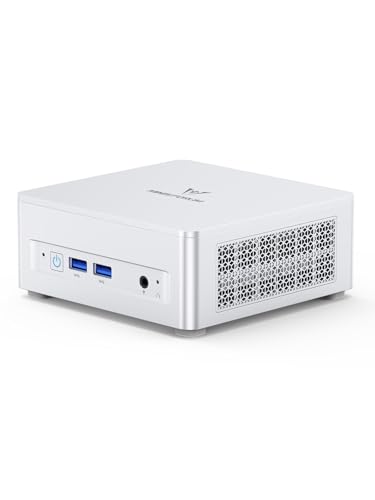
Where to buy
Check the latest price, availability and delivery on Amazon. Orders are placed on Amazon. We may earn a commission from qualifying purchases.
- Best overall for work plus 1440p gaming under $800: Minisforum UM870 Slim, Ryzen 7 8745H, Radeon 780M, 32GB RAM, 1TB SSD — Check on Amazon
- Beelink SER8, Ryzen 7 8745HS, Radeon 780M, 32GB RAM, 1TB SSD — Check on Amazon
- GMKtec NucBox K8 Plus, Ryzen 7 8845HS, Radeon 780M, 32GB RAM, 1TB SSD, OCuLink — Check on Amazon
- Minisforum UM890 Pro Barebone, Ryzen 9 8945HS, Radeon 780M, no RAM/SSD/OS — Check on Amazon
See 2 more Amazon options
- GMKtec NucBox M6 Ultra, Ryzen 5 7640HS, Radeon 760M, 32GB RAM, 512GB SSD — Check on Amazon
- Apple Mac mini, M4, 16GB unified memory, 256GB SSD — Check on Amazon
Read the full guide ↓
Disclosure: As an Amazon Associate, reviewstook.com earns from qualifying purchases. Links to Amazon on this page are affiliate links; they cost you nothing extra. Listing details such as price and availability change often, so check the current Amazon listing before you buy.
This keyword describes a double life. All day, the machine has to be a workstation: compiling, editing, holding a dozen applications open without complaint. In the evening, the same box gets judged by a completely different standard — can it put a game on a 2560×1440 monitor and make that monitor feel worth its price? Plenty of guides answer that second question with a screenshot of a display setting. This one starts with the distinction those guides blur, because at this budget it decides whether you feel cheated or well served: driving a 1440p display is not the same thing as rendering a game at 1440p. Every machine below can do the first. None of them — not one — renders demanding modern games natively at 1440p, and this guide will not pretend otherwise in a single review.
Here is what the six picks honestly are. All six are mini PCs built around integrated graphics: four carry AMD’s Radeon 780M, one carries the one-rung-down Radeon 760M, and one is Apple’s M4. Integrated graphics of this class are genuinely good at the working day — GPU-accelerated photo editing, smooth 4K timeline scrubbing, three monitors of desktop — and genuinely capable of an evening’s gaming, provided the gaming is graded truthfully. Light, older and esports-style titles can be rendered at 1440p itself, at modest settings. Heavier modern games are rendered at 1080p or below and upscaled to fill the panel, which looks far better than it sounds and is how this entire class of hardware is meant to be used. What none of them has is a discrete graphics card, and the guide names that absence wherever it matters. If your evenings matter more than your workdays, a tower with a real graphics card exists at this money and is discussed in its own section below; if the work comes first and the gaming is a serious but secondary pleasure, the minis are the right shape of tool, and this guide grades each one on both halves of its life.
The workstation honesty from our main guide carries over unchanged. “Workstation” has a formal meaning — ISV certification for professional applications, usually ECC memory — and no machine under $800 offers either, so none is claimed here. What these machines offer is workstation-shaped capability: eight-core sustained performance, 32GB of memory in upgradeable slots on every Windows pick, fast storage and quiet cooling. The gaming grading is layered on top, pick by pick, with a printed 1440p verdict in every review so nobody has to guess what “good for gaming” meant.
Rendering at 1440p Is Not Displaying 1440p
Everything in this guide hangs on one piece of arithmetic, so it gets its own section. A 1440p frame contains 2560 × 1440 pixels — about 3.69 million of them. A 1080p frame contains 1920 × 1080 — about 2.07 million. Rendering natively at 1440p therefore asks the graphics hardware for roughly 78 percent more work on every single frame than rendering at 1080p, before settings, effects or frame rate enter the discussion. A monitor, meanwhile, asks for none of that work: displaying a desktop, a spreadsheet or a video at 1440p is trivial for any modern integrated GPU, which is why every pick in this guide can light up a 1440p panel — most can light up three or four displays at once — without that fact saying anything about games.
The bridge between the two is upscaling. The game renders internally at a lower resolution — 1080p is the honest working point for this hardware class — and a scaling algorithm reconstructs a 1440p image for the panel. Done well, the result is visibly sharper than a plain 1080p feed stretched across the same screen, and it is the difference between a 1440p monitor feeling like an upgrade and feeling like a mistake on integrated graphics. The upscaler that matters for these six machines is AMD’s FSR on the five Windows picks: it runs on Radeon integrated graphics, it is the tool their drivers and games offer, and this guide credits it generically — as a real, useful reconstruction step — without attaching internal-resolution figures to it, because the base research documents none and invented precision is how readers get misled.
One upscaler is absent, and its absence is stated plainly so nobody shops for it: DLSS cannot run on any of the six picks. DLSS requires NVIDIA Tensor cores. The Radeon 780M and 760M are AMD integrated graphics with no Tensor cores; Apple’s M4 GPU is not NVIDIA hardware either. Any listing, bundle page or marketplace description that attaches DLSS to one of these machines is wrong, and any guide that grades them as if DLSS were available is grading a machine that does not exist. Where DLSS legitimately appears in this article, it is attached to the one piece of hardware here that has Tensor cores — the desktop RTX 4060 in the tower discussed below — and there its published figures are the correct ones: DLSS Quality at a 1440p output renders at roughly 1707×960 internally, Balanced at roughly 1485×836, Performance at roughly 1280×720 — a 720p-class render wearing a 1440p frame.
So the verdicts in this guide use three honest grades. Native means the pick renders the game at 1440p itself — credited here only to lighter, older and esports-style titles, never to demanding modern releases. Upscaled means the pick renders below 1440p — 1080p is the realistic internal target — and reconstructs the panel’s resolution, the normal, respectable mode for this hardware. Display only would mean a machine that can light the panel but not game on it credibly; no pick is graded that low, because the 780M class genuinely plays — it just plays on the render side of the line. Read every review below with those definitions in hand and none of them will surprise you.
In this guide
Quick Picks
Short on time? Each row names the buyer, the machine, and its honest 1440p verdict — the grade the full review defends.
| Buyer type | Pick | 1440p verdict | Link |
|---|---|---|---|
| Best overall | Minisforum UM870 Slim | Upscaled — 780M renders at 1080p and reconstructs to the panel; lighter titles native at low settings | Check on Amazon |
| Best for quiet rooms | Beelink SER8 | Upscaled — the same 780M class, in the quietest chassis here (~32 dBA measured under load) | Check on Amazon |
| Best upgrade path | GMKtec NucBox K8 Plus | Upscaled today — OCuLink is the one route here to a real discrete GPU later | Check on Amazon |
| Best for builders | Minisforum UM890 Pro Barebone | Upscaled — the strongest chip here feeding the same 780M ceiling; you complete the machine | Check on Amazon |
| Best value | GMKtec NucBox M6 Ultra | Upscaled, one rung down — the 760M renders at 1080p for lighter fare and below it for heavier games | Check on Amazon |
| Best for macOS | Apple Mac mini (M4) | Upscaled class — capable integrated graphics inside a much smaller Mac game library | Check on Amazon |
How These Picks Were Chosen
The six machines are the workstation set from our main under-$800 guide, re-graded for the gaming half of their lives. The workstation filters came first and were not relaxed: a complete, working machine at or regularly within $800 in the United States; 32GB of RAM fitted on every Windows pick, in upgradeable slots on all five; storage and core counts that make the working day genuinely fast; and the certification honesty that runs through the whole batch — no pick is described as ISV-certified and none is credited with ECC memory, because no verified source establishes either for any of them.
The gaming grading then applied three tests, in order. The first was the display test, taken only from documented outputs: the UM870 Slim’s HDMI 2.1 and DisplayPort 1.4 cover up to three displays; the SER8’s USB4, HDMI 2.1 and DisplayPort do the same; the K8 Plus and the UM890 Pro reach four displays per their listing families; the M6 Ultra drives three 4K monitors; the Mac mini supports up to three displays, including 6K panels over Thunderbolt per Apple’s specifications. A 1440p gaming monitor sits comfortably inside every one of those envelopes — which, per the explainer above, proves eligibility for this guide and nothing about rendering. The second test was the render test, graded by graphics class rather than by hope: the Radeon 780M is the strongest integrated graphics in the set and earns the upscaled grade with a native allowance for lighter titles; the 760M sits one rung below it and is graded one rung below; the M4’s integrated GPU is graded in the same class, with its platform caveat stated in its review. The third test was memory: integrated graphics borrow their frame buffer and bandwidth from system RAM, so the dual-channel DDR5 configurations these machines ship with — and the headroom to grow them — are part of the gaming grade. A machine with 32GB in two slots feeds its iGPU properly and still holds your working day open behind the game; that is why the memory filter and the gaming grade point at the same six machines.
Pricing in this category moves often, so check price on Amazon for each pick before you buy. Where a listing is volatile, compare its live price against the budget for this guide and wait if it has moved above that budget — two picks here are volatile enough that this check is the headline.
The 6 Best Workstation PCs for 1440p Gaming Under $800
Minisforum UM870 Slim — Ryzen 7 8745H, Radeon 780M, 32GB RAM, 1TB SSD
Who it suits: The professional whose evenings are real gaming sessions — modern titles included — and who wants the strongest all-round version of this class without paying a premium for quiet or expansion they will not use.
1440p verdict: Upscaled. The UM870 Slim pairs the tier-defining Radeon 780M with the memory configuration integrated graphics actually want: 32GB of DDR5-5600 across two SO-DIMM slots, in dual channel, expandable to 96GB. That matters more for gaming than the clock speeds on the box. The 780M has no memory of its own; it carves its frame buffer out of system RAM and reads textures across the same bus your applications use, so dual-channel DDR5-5600 and 32GB of headroom are the difference between the iGPU running at its documented class and the same silicon starved. On that footing, the honest gaming picture is the class picture at its best: lighter and older titles, and esports-style games at modest settings, render at 1440p itself; demanding modern releases render at 1080p and reach the panel through FSR upscaling, which on a 1440p monitor is a genuinely good-looking result — visibly cleaner than feeding the panel a raw 1080p signal. DLSS is not part of this picture and never will be on this hardware: there are no Tensor cores in a Radeon iGPU, and any seller implying otherwise is selling fiction.
The working day that justifies the purchase is fully intact. The eight-core, sixteen-thread Ryzen 7 8745H boosting to 4.9GHz, the 1TB PCIe 4.0 SSD with a second M.2 slot waiting empty, the rear USB4 port carrying data, video and power delivery for one-cable docking, HDMI 2.1 and DisplayPort 1.4 for up to three displays, 2.5GbE networking and Windows 11 Pro — that is the complete tier specification, in a box of about 130 × 127 × 50mm that mounts behind the very 1440p monitor it games on, using the VESA bracket in the box. Two caveats travel with it from the base guide. The maker’s claim of noise below 35dB in performance mode is a maker figure, not a measurement — treat the number as marketing until a review measures your unit. And the fitted Wi-Fi is a MediaTek module, painless on Windows and historically extra driver work under Linux; wired players should use the 2.5GbE port anyway. On price, check price on Amazon before you buy — listings in this category move often with memory supply. Judge the live price against this guide’s budget: within budget it is the balanced pick it reads as above; well above budget you are paying a shortage premium the hardware does not justify.
- The full 780M gaming class with the memory it needs: 32GB dual-channel DDR5-5600, socketed to 96GB.
- Three-display output and USB4 docking — the 1440p gaming panel plus your work monitors, from one box.
- VESA mount in the box: the PC disappears behind the monitor it feeds.
Honest limitation: Demanding modern games are rendered at 1080p and upscaled — no integrated graphics at this price renders them natively at 1440p, and the sub-35dB noise figure is a maker claim rather than a measurement.
Choose it if you want the best-balanced double life at this budget. Skip it if native 1440p rendering in heavy games is the actual requirement — that requirement is named, and answered, in the tower section below.

Beelink SER8 — Ryzen 7 8745HS, Radeon 780M, 32GB RAM, 1TB SSD
Who it suits: The worker-gamer in a quiet room — a shared home office, a studio flat, a household where a fan winding up at midnight is a domestic incident — who refuses to trade silence for either half of the machine’s life.
1440p verdict: Upscaled. The graphics silicon is the same Radeon 780M class as the pick above, fed by the same 32GB of socketed DDR5 (here expandable to 64GB) and a 1TB PCIe 4.0 SSD with a second M.2 slot, so the gaming grade is the class grade: lighter titles rendered natively at 1440p at modest settings, heavier modern games rendered at 1080p and reconstructed to the panel through FSR. What separates the SER8 is not the grade but the conditions under which it is earned. Its vapor-chamber cooling has been measured by independent reviewers at around 32 dBA under load at typical desk distance — the level of a quiet room’s ambient sound — and that measurement covers the worst case a machine like this faces: a long compile and a long gaming session both pin the processor for extended stretches, and the SER8 does both without announcing itself. For gaming, sustained quiet is a performance feature in disguise: cooling that stays composed under an hour of load is not throttling the chip to survive it. USB4, HDMI 2.1 and DisplayPort give it the same three-display envelope as the UM870 Slim, so the 1440p gaming monitor joins a work setup without compromise, and 2.5GbE plus Windows 11 Pro complete the workstation side.
The limitation is price discipline, and it is not softened here. Pricing for the SER8 is volatile, so check price on Amazon before you buy. This is a buy-within-budget pick: bought within this guide’s budget, ideally well under it, it is arguably the most pleasant machine in this guide to live with; above that budget, the UM870 Slim does the same work and plays the same games, and the premium buys impatience rather than hardware. Confirm you are looking at the 32GB/1TB configuration rather than the 24GB variant before paying — the smaller configuration is a different purchase wearing the same name.
- Measured around 32 dBA under load — sustained gaming and sustained work, both in near-silence.
- The full 780M / 32GB / 1TB specification, socketed RAM and a second SSD slot.
- Triple-display output and USB4, so the gaming panel docks into the work desk cleanly.
Honest limitation: Its live price often sits above this guide’s budget; the pick only makes sense bought within that budget — check price on Amazon — and its 1440p grade is the integrated class grade — upscaled for demanding games.
Choose it if silence is worth waiting for the price to fall. Skip it if you need the machine this week at whatever it costs — the UM870 Slim plays the same library at the same grade without the premium.

GMKtec NucBox K8 Plus — Ryzen 7 8845HS, Radeon 780M, 32GB RAM, 1TB SSD
Who it suits: The buyer who suspects — honestly, not hopefully — that integrated graphics may not be enough in a year or two, and wants the one machine here with a documented door to a real graphics card.
1440p verdict: Upscaled today, with the set’s only exit. As shipped, the grade is the 780M class grade: the Ryzen 7 8845HS — eight cores to 5.1GHz, the fastest sustained clocks of the complete machines here — feeds the same Radeon 780M, backed by 32GB of DDR5-5600 in two slots and a 1TB PCIe 4.0 SSD with a second M.2 slot. Lighter titles render at 1440p at modest settings; demanding games render at 1080p and upscale through FSR. What no other pick can say is what happens next. The K8 Plus carries an OCuLink port, the one credible route by which a mini PC connects an external GPU dock — which means the day a workload or a game genuinely outgrows integrated graphics, this machine grows a discrete card instead of being replaced. Dual USB4 ports, dual 2.5GbE networking and display outputs for up to four monitors per the listing family make it equally plausible as today’s docked workstation and tomorrow’s eGPU host. That option is not free performance — a dock and card are a second purchase — but as a hedge it is unique in this guide, and buyers whose gaming is drifting heavier should weigh it accordingly.
The catch is the most volatile pricing in the set, printed up front as the base guide prints it. Pricing for this listing is the most volatile in the set, swinging sharply when the memory shortage repriced everything in the category. The hardware did not improve during those spikes; only the market moved. So the discipline is absolute: buy only within this guide’s budget — check price on Amazon — and treat a shortage premium as a reason to close the tab, because patience is the better purchase. One configuration check matters at checkout: GMKtec also sells this chassis as a barebone under a lookalike listing, and the kit price must not be mistaken for this complete 32GB/1TB machine’s price.
- OCuLink expansion — the only pick here that can grow a discrete GPU later instead of being replaced.
- Fastest CPU clocks of the complete machines, with the full 780M / 32GB / 1TB specification today.
- Dual USB4, dual 2.5GbE and up to four displays: workstation, dock host and homelab in one box.
Honest limitation: Pricing is the most volatile in the guide, so the pick is conditional on buying within this guide’s budget — check price on Amazon; and the eGPU route is a future purchase, not performance in the box.
Choose it if the upgrade path matters more than buying convenience. Skip it if the live listing is wearing its shortage price, or if you already know you need a discrete GPU now — buy the tower and skip the intermediate step.

Minisforum UM890 Pro Barebone — Ryzen 9 8945HS, Radeon 780M, No RAM/SSD/OS
Who it suits: The builder who already owns a Windows licence or runs Linux, would rather choose their own memory and storage, and wants the strongest processor in this guide pushing the integrated graphics.
1440p verdict: Upscaled — the strongest chip here, the same graphics ceiling. Take the listing title literally: barebone means what arrives is a processor, a motherboard and a cooler — no memory, no storage, no operating system installed. Completed honestly, it is one of the strongest machines in this set. The Ryzen 9 8945HS is the most powerful CPU here — eight cores to 5.2GHz — driving the Radeon 780M at its full clock, in a chassis with two DDR5 SO-DIMM slots (to 96GB), two PCIe 4.0 M.2 slots, dual USB4 with power-delivery input, dual 2.5GbE and four-display output. For gaming, the stronger CPU does not raise the graphics grade — the 780M is the 780M, and its honest 1440p mode for demanding games is a 1080p render upscaled through FSR, with lighter titles native at modest settings. What the chip and your own parts choices do buy is consistency: you pick the dual-channel memory kit the iGPU feeds on and the fast drive your library lives on, rather than accepting a factory’s choices. Check price on Amazon for the kit before you buy, and price the memory and storage you plan to add at the same time: completed with 32GB of DDR5-5600 and a 1TB PCIe 4.0 SSD, it can sit within budget, with every component chosen by you.
The honesty the headline price hides is carried over at full strength. The operating system is not inside the hardware total at all: price a Windows licence on top and the build can pass this guide’s budget, whereas a Linux install adds nothing and keeps the whole saving. This chassis’s OCuLink runs through an included M.2 adapter plate, which consumes one of the two M.2 slots — fit an external GPU later and you are down to a single SSD bay, a real trade for a gaming library. Review measurements of the platform also put it around 43dB in performance mode, making it the loudest pick here under full load; in a small room, an evening of gaming will be audible in a way the SER8’s never is. And the whole proposition rides on parts prices: if memory and storage prices spike further, the factory UM870 Slim becomes the safer arithmetic.
- The guide’s most powerful CPU, built out to 32GB/1TB with parts you choose.
- You choose the memory kit and SSD — the two components integrated graphics and game loading feel most.
- Dual USB4, dual 2.5GbE, four displays, RAM to 96GB, and an OCuLink path via the included adapter.
Honest limitation: The kit price excludes RAM, SSD and the operating system; completed with a paid Windows licence it can exceed this guide’s budget, its OCuLink adapter consumes an M.2 slot, and ~43dB under load is the loudest manners here.
Choose it if Linux or a spare licence covers the software side and speccing your own build appeals. Skip it if you need a PC that works — and plays — the evening it arrives; every complete pick above this one does.
GMKtec NucBox M6 Ultra — Ryzen 5 7640HS, Radeon 760M, 32GB RAM, 512GB SSD
Who it suits: The value-minded professional whose gaming is real but lighter — older favorites, esports titles, indie libraries — and who would rather keep part of the budget unspent than buy graphics headroom their library will not use.
1440p verdict: Upscaled, one rung down. The M6 Ultra asks what your workload and your game library actually need and declines to sell you the rest. Its Ryzen 5 7640HS is a six-core, twelve-thread chip to 5.0GHz — two cores fewer than the picks above, a difference felt in heavy compiles and long exports — paired with the Radeon 760M, one rung below the 780M. Graded honestly, that rung shows in games before it shows anywhere else: the lightest titles can still be rendered at 1440p itself at low settings, ordinary gaming renders at 1080p and upscales to the panel through FSR, and heavier modern releases may ask for a render resolution below 1080p to stay smooth — a step the 780M picks take less often. None of that makes it a bad gaming machine; it makes it a correctly labeled one. What it does not skimp on is the skeleton around the graphics: the full 32GB of DDR5 in two socketed slots feeding the iGPU in dual channel, USB4 for one-cable docking, display outputs for three 4K monitors, dual 2.5GbE networking and Windows 11 Pro. Check price on Amazon before you buy — as a mid-range value pick it is the one here most likely to leave room in the budget for the 1440p monitor itself, a backup drive, or the games.
The honest limitation is storage, and for a gaming library it bites twice. What is fitted is a 512GB drive of the PCIe 3.0 generation — half the room the tier standard offers, and a step behind it in throughput as well. Modern game installs are large; 512GB is a small shelf, and it is shared with your working files. The chassis does provide further M.2 expansion per the maker’s documentation, so the fix is a second drive rather than a new PC — but budget for it knowingly, and treat it as part of this pick’s real price if your library is big. A 1TB version of this same machine is sold under a separate listing; near price parity it is the smarter purchase, while this 512GB build priced as if it were the 1TB one is a walk-away.
- Check price on Amazon — the full workstation skeleton, and money left over for the monitor.
- Socketed 32GB RAM feeding the iGPU in dual channel, USB4 docking, triple-display output, dual 2.5GbE.
- Six fast cores cover the majority of professional workloads and lighter gaming without waste.
Honest limitation: The 760M is a genuine rung below the 780M in games, and the fitted 512GB PCIe 3.0 SSD is half the tier’s standard capacity — a working games library will want the second drive sooner than later.
Choose it if your work is CPU-and-memory work and your gaming is lighter fare. Skip it if current heavy releases are your evening staple — the 780M picks earn their premium there, and the tower answers the rest.

Apple Mac mini (M4) — 16GB Unified Memory, 256GB SSD
Who it suits: The professional whose work lives in Apple’s ecosystem — iOS and macOS development, Apple-first creative tools — and whose gaming is a secondary pleasure they are happy to take on the platform’s own terms.
1440p verdict: Upscaled class, inside a smaller library. The M4’s integrated GPU — a 10-core unit sharing the chip with a 10-core CPU — is a genuinely capable piece of silicon, and on raw graphics class it belongs in the same conversation as the Radeon picks: titles that run on it render lighter games at the panel’s resolution and reconstruct heavier ones from below it, the same honest pattern as the rest of this guide. Two platform facts, though, matter more than the silicon. The first is the library: macOS simply does not carry the Windows game catalogue. Many major releases never arrive, others arrive late, and a buyer whose evening is a specific current title should check that title’s Mac availability before checking anything about this machine. The second is that the DLSS question answers itself here as it does on the Radeon picks: there is no NVIDIA hardware in this box, so DLSS is absent by definition, and the upscaling story is the platform’s own. What the Mac mini unquestionably delivers is the working day: single-core responsiveness that embarrasses everything else here, near-silent manners under load, and three-display support — up to two 6K panels over Thunderbolt, per Apple’s specifications — from a box that sips power. Check price on Amazon before you buy — on sale it can undercut the other complete picks here, so compare its live price against them.
The limitations are structural, and they intersect with gaming in one specific way. Both memory and storage are soldered in at the factory with no upgrade path afterwards: the configuration’s 16GB and 256GB are permanent, for the machine’s whole life. For work, 16GB is workable for lighter professional loads but leaves less headroom than the 32GB every Windows pick fits. For games, 256GB is the sharper edge — a handful of large installs fills it, external storage becomes a way of life, and stepping up Apple’s ladder fixes it at Apple’s prices, which leave this budget behind quickly. Windows, meanwhile, is simply not part of the machine: for Windows-only professional software this is not a cheaper workstation but a change of platform. Buy it on Amazon’s own offer — check price on Amazon; third-party sellers have been recorded asking well above the usual price on this listing, and a markup buys nothing.
- The strongest single-core performance and quietest manners in the guide, for the working day.
- The sole sub-$800 door into macOS and Xcode — check price on Amazon.
- Three-display support including 6K panels — the 1440p gaming monitor is the least of its display ambitions.
Honest limitation: The macOS game library is a fraction of the Windows catalogue, and 16GB of memory with 256GB of storage are soldered and unchangeable — the storage in particular is small for a games library, forever.
Choose it if your work lives in Apple’s ecosystem and your gaming fits its library. Skip it if a specific Windows title is your evening, or if you need 32GB of RAM and a terabyte of local storage — every Windows pick here fits both.

Comparison Table
| Product | Processor / Graphics | Memory / Storage | 1440p verdict | Link |
|---|---|---|---|---|
| Minisforum UM870 Slim | Ryzen 7 8745H / Radeon 780M | 32GB socketed (to 96GB) / 1TB + spare slot | Upscaled; lighter titles native at low settings | Check on Amazon |
| Beelink SER8 | Ryzen 7 8745HS / Radeon 780M | 32GB socketed (to 64GB) / 1TB + spare slot | Upscaled; quietest chassis here (~32 dBA measured) | Check on Amazon |
| GMKtec NucBox K8 Plus | Ryzen 7 8845HS / Radeon 780M | 32GB socketed / 1TB + spare slot | Upscaled today; OCuLink eGPU path for later | Check on Amazon |
| Minisforum UM890 Pro Barebone | Ryzen 9 8945HS / Radeon 780M | None fitted (slots to 96GB / dual M.2) | Upscaled; strongest CPU, you complete it | Check on Amazon |
| GMKtec NucBox M6 Ultra | Ryzen 5 7640HS / Radeon 760M | 32GB socketed / 512GB PCIe 3.0 | Upscaled, one rung down; lightest titles native at low | Check on Amazon |
| Apple Mac mini (M4) | Apple M4 10-core / 10-core GPU | 16GB soldered / 256GB soldered | Upscaled class; much smaller game library | Check on Amazon |
How to Choose a Workstation PC for 1440p Gaming Under $800
- Grade the render, not the display. Every pick here drives a 1440p monitor without effort; that is the display test, and it is the easy one. The question that decides your evenings is what resolution the game is rendered at internally. On this hardware class the honest answer for demanding titles is 1080p, upscaled — plan around that truth and you will be pleased; shop against it and you will not.
- Buy the 1440p monitor anyway. The pairing logic runs the other way from what most buyers assume: a 1440p panel is right for these machines precisely because display and render are separate decisions. Your desktop, code and timelines get the full 3.69 million pixels all day, text is visibly sharper than on a 1080p screen, and games upscale into the panel far more cleanly than they stretch across a lower-resolution one. Connect it through the machine’s documented outputs — HDMI 2.1 or DisplayPort on the Windows picks, Thunderbolt or HDMI on the Mac mini — and treat render resolution as a per-game setting.
- Do not buy a 4K gaming monitor for these machines. A 4K panel asks the upscaler to reconstruct roughly four times a 1080p render’s pixels, which is where integrated graphics stop looking clever. 1440p is the sweet spot this class was made for; 4K monitors belong to the discrete-GPU budget above this one.
- Treat memory as a graphics specification. Integrated GPUs borrow system RAM and bandwidth. The 32GB dual-channel configurations in the Windows picks are part of why their 780M and 760M grades hold up; if you complete the barebone, buy a matched dual-channel kit rather than a single large stick, and on any pick, leave memory headroom free — a game competing with a dozen work applications for RAM is a game that stutters for reasons that have nothing to do with its graphics settings.
- Match the pick to the library, not the benchmark. Lighter, older and esports-style libraries play at or near native 1440p on the 780M picks and feel genuinely good. A library built on current heavy releases lives at a 1080p render on every pick here — fine with FSR, but if that sentence bothers you, your requirement is a discrete GPU and the tower section below is your section.
- Price the noise for both halves of the day. The SER8’s measured ~32 dBA under load is a feature in a quiet office and in a late-night gaming room alike; the barebone’s ~43dB performance mode is a real cost in both. Sustained load is sustained load, whether it is an export or a boss fight.
- Complete the barebone arithmetic before admiring it. The real price is the kit plus memory plus storage plus an operating system. Price the kit, memory, storage and licence together before you commit — excellent arithmetic for Linux users and licence holders, and a mirage for anyone who skips the final term.
- Do not buy the spike. Memory shortages can swing this category’s prices violently. Check price on Amazon for each pick and compare it with this guide’s budget; the same machine bought calmly within budget plays the same games as the one bought in a panic at a premium.
- Keep the workstation honesty in view. No pick here is ISV-certified and none carries ECC memory. If your employer, client or regulator requires either, this entire tier is the wrong shelf — and no amount of gaming performance changes that.
When the Honest Answer Is a Tower
One comparison deserves its own section, because for a specific reader it overrides everything above. If native 1440p rendering in demanding modern games is the requirement — not a preference, a requirement — then no integrated GPU at this budget meets it, and the correct purchase is the one piece of hardware in this price conversation with a discrete card: a CyberPowerPC Gamer Xtreme tower with a desktop RTX 4060 is available on Amazon as a higher-tier alternative within reach of this budget. That card changes the terms completely. It renders modern games at 1440p itself, and where upscaling is wanted it offers the real DLSS — the RTX 4060 has Tensor cores, which is the entire point. Its published figures are the correct ones, stated here so they are never confused with the integrated picks: DLSS Quality at a 1440p output renders at roughly 1707×960 internally; Balanced renders at roughly 1485×836; Performance renders at roughly 1280×720. At a 4K output, DLSS Quality renders at roughly 2560×1440 and Performance at roughly 1920×1080. A buyer comparing those DLSS numbers against an upscaled grade on a 780M is comparing two different machines doing two different jobs, and this guide’s refusal to blur them is deliberate.
The tower trades away everything the minis are for: it is large, draws far more power, is louder, and gives up the desk manners this guide values. It is also the option to consider when it sits inside this budget. So the decision is clean. Work first, gaming a serious second life, upscaled 1440p accepted with eyes open: buy a mini from the six above. Gaming first, native 1440p non-negotiable: buy the tower, and read our dedicated gaming coverage at Best Gaming PC For 1440p Gaming Under $800 for the full field at this price. What you should not do is buy a mini while believing a tower’s graphics live inside it — that belief, and only that belief, is what this guide exists to prevent.
Common Buying Mistakes
- Reading “supports 1440p” or “drives three 4K displays” as a gaming claim. Those are display specifications. Rendering is a different number, and at this budget it is 1080p for demanding games on every integrated pick.
- Believing a DLSS claim attached to a Radeon or Apple machine. DLSS needs NVIDIA Tensor cores; none of the six picks has any. A listing that says otherwise is telling you how much to trust the rest of the listing.
- Setting a barebone kit price beside complete machines as if they were comparable. A kit is a beginning, not a computer; finish the sum — memory, storage, operating system — before calling it the bargain.
- Starving the integrated GPU with a single memory stick. iGPU performance rides on dual-channel bandwidth; a matched pair is not a nicety on these machines, it is the graphics configuration.
- Paying a spiked listing. Shortage pricing can push listings well above their usual level; check price on Amazon, compare against this guide’s budget and let an inflated price pass.
- Trusting the listing photo to be the configuration. Barebone and complete builds, 24GB and 32GB variants, 512GB and 1TB variants all circulate under lookalike listings in this category; verify the exact build sitting in the cart before you pay.
- Pairing these machines with a 4K gaming monitor. The upscaler’s reconstruction distance gets too long and the picture gives the game away. 1440p is this class’s panel.
- Buying the Mac mini for a specific Windows game. Check the title’s Mac availability first; the catalogue gap is the one specification no benchmark chart prints.
Final Recommendation
- Most worker-gamers: Minisforum UM870 Slim.
- Quiet rooms, day and night: Beelink SER8 — bought within this guide’s budget; check price on Amazon.
- An eye on a future discrete GPU: GMKtec NucBox K8 Plus — bought within budget, never at a shortage spike; check price on Amazon.
- Builders and Linux users: Minisforum UM890 Pro Barebone, finished with parts you choose.
- Lighter libraries, tighter budgets: GMKtec NucBox M6 Ultra.
- Apple-ecosystem work: Apple Mac mini (M4), on Amazon’s own offer; check price on Amazon.
Our top two for most readers are the UM870 Slim, because it assembles the entire tier specification — 780M graphics fed by socketed dual-channel 32GB, a 1TB drive, USB4, three displays — as the tier’s best-balanced value, and the SER8, because its measured quiet under sustained load serves the compile and the gaming session with the same silence. The K8 Plus is the hedge for anyone whose games may outgrow integration; the barebone UM890 Pro is the strongest machine here for anyone licensed and willing to finish it; the M6 Ultra proves the skeleton survives as the value pick; and the Mac mini remains the only door into macOS. Readers who want the workstation grading without the gaming layer should see Best Workstation PC Under $800, those shopping a smaller spend should see Best Workstation PC For 1440p Gaming Under $700, and those ready to step up should see Best Workstation PC For 1440p Gaming Under $1200. Whichever you choose, confirm the exact configuration in the cart, check price on Amazon for the pick you choose, and hold onto the one distinction this guide is built on: these machines display 1440p beautifully and render honestly below it — and judged on those true terms, they are very good at both halves of their double life.
Frequently Asked Questions
Can a Radeon 780M really game at 1440p?
Yes — with the render-versus-display distinction kept straight. It displays 1440p trivially and renders lighter, older and esports-style games at 1440p itself at modest settings. Demanding modern games it renders at 1080p and upscales to the panel through FSR, which looks substantially better than a plain 1080p feed on the same monitor. What it cannot do is render those demanding games natively at 1440p; no integrated graphics under $800 can, and this guide grades every pick on that basis.
Why is there no DLSS on any of these machines?
Because DLSS is NVIDIA technology that runs on Tensor cores, and none of the six picks contains NVIDIA hardware. Five use AMD Radeon integrated graphics and one uses Apple’s M4 GPU. The upscaler available to the Windows picks is AMD’s FSR, which this guide credits as the reconstruction tool it is — without borrowing DLSS’s name or its figures. DLSS appears in this article only where it physically exists: on the RTX 4060 in the tower alternative.
Does upscaling mean the picture is fake 1440p?
It means the frame is reconstructed to 1440p from a lower internal render rather than drawn pixel-for-pixel at 1440p. The practical result on a 1440p monitor is an image visibly sharper and more stable than a native 1080p signal stretched to fill the screen, and softer than a true native 1440p render from a discrete card. For this hardware class it is not a compromise to apologize for; it is the designed operating mode, and the honest comparison is against what the same money buys in a tower.
Should I buy a 1440p or a 1080p monitor for one of these PCs?
A 1440p monitor, for the reasons in the How to Choose section: your desktop and applications use every pixel all day, games upscale into it cleanly, and the panel will outlive this PC into a future discrete-GPU machine. A 1080p monitor makes native rendering easier for the games and worse for everything else you do. Buy the panel for the whole double life, not just the evening.
Which pick is best if my games keep getting heavier?
The GMKtec NucBox K8 Plus, bought within this guide’s budget — check price on Amazon. Its integrated grade today is the same 780M class as the other full-spec picks, but its OCuLink port is the only documented route in this guide to adding a discrete GPU later without replacing the machine. If the heaviness is already here rather than coming, skip the intermediate step and buy the tower discussed above.
Is the barebone UM890 Pro really cheaper than the complete machines?
On hardware alone, yes: check price on Amazon for the kit, then add the cost of the memory and storage you choose to build it out around the most powerful CPU in this guide. A full-price Windows licence can erase the advantage entirely, and the build costs you an evening of assembly plus your own warranty legwork on separate parts. Licence holders and Linux users keep the entire saving; everyone else should total their own version before deciding.
Can the Mac mini game at 1440p?
Its integrated GPU is in the same class as the Radeon picks — lighter titles at the panel’s resolution, heavier ones reconstructed from below it. The binding constraint is not the silicon but the catalogue: the macOS game library is far smaller than the Windows one, and many current releases are absent. If your games are confirmed available on macOS, the mini plays them creditably; if your evening is a specific Windows-only title, no Mac at any price in this guide is the answer.
Why do prices for the same machine vary so much?
Repeated repricing during the late-2026 memory and SSD shortage is the main cause, with marketplace sellers layering their own spread over the top. The K8 Plus is the clearest example, with live prices swinging widely. That is why each review here tells you to check price on Amazon and compare against this guide’s budget — and why a price floating far above a pick’s usual level should read as a signal to wait or switch, never as a new normal.
- Best Workstation PC Under $800
- Best Workstation PC For 1440p Gaming Under $700
- Best Workstation PC For 1440p Gaming Under $1200
- Best Workstation PC For Beginners Under $800
- Best Workstation PC For Small Spaces Under $800
- Best Workstation PC For Streaming Under $800
- Best Gaming PC For 1440p Gaming Under $800
- Best 1440p Gaming PC Under $800
- Best Mini PC Under $800


