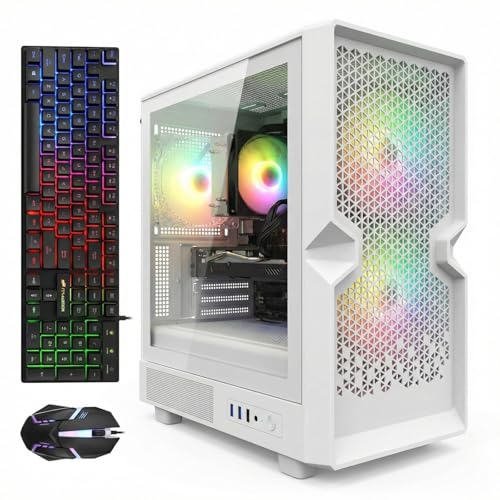
Where to Buy the White Gaming PCs in This Guide
All six picks are Amazon listings. Pricing churns weekly, and two picks below carry strict buy-only rules set out in their reviews — check the current price on Amazon before you commit.
- Best white tower that streams today, in budget under $500: STGAubron Gaming PC Desktop, White (Core i7, RX 580 8GB, 32GB RAM, 512GB SSD)
- Best streaming hardware, deal-watch pick: suevery Desktop Computer, White (Core i5-12400F, RTX 3050 6GB, 32GB RAM, 1TB SSD)
- Best-looking white case, lightest stream duty: LXZ Gaming PC Desktop, Sea View Room White (Ryzen 5 5600GT, 16GB RAM, 1TB SSD)
- Strongest software-encoding CPU in a white tower: LXZ Desktop PC, White (Ryzen 7 5700G, 16GB RAM, 512GB SSD)
- Best streaming value (not white): Beelink SER5 MAX Mini PC (Ryzen 7 7735HS, Radeon 680M, 24GB RAM, 1TB SSD)
- Cheapest credible streamer (not white): GMKtec M6 Mini PC (Ryzen 5 6600H, Radeon 680M, 32GB RAM, 1TB SSD)
Affiliate disclosure: reviewstook.com is reader-supported. Purchases made through links on this page may earn us an Amazon commission, at no added cost to you, and that support funds the research behind guides like this. It plays no part in selection: each system below was chosen on verified specifications — and two picks sit in a white-PC guide precisely because honesty about the black alternatives matters more to us than the headline.
The Job Comes First: What Streaming Actually Asks of a PC
Define the work before you judge the machines, because streaming grades a PC by a spec sheet most gaming guides never open. One machine has to do three things at once, for hours: run the game, run the broadcast software — OBS or similar, compositing scenes, webcam, alerts and chat — and encode — compressing the gameplay into the video your audience actually watches. The third job is the one this guide puts first, because at $500 it is the one that separates the picks.
The target is concrete. Twitch’s mainstream broadcast runs at roughly 6,000 kbps, constant bitrate (CBR), keyframes every two seconds; your encoder must fill that pipe smoothly without stealing frames from the game. YouTube allows higher bitrates, 1440p ingest and the first AV1 live — but here is the fact shaping this whole guide: not one machine in this set can encode AV1. Encoder silicon under $500 predates AV1 encoding across every brand, so each stream below leaves as H.264 — no tragedy, since Twitch is built on H.264 and YouTube accepts it happily, but any listing at this price hinting at AV1 streaming advertises hardware it does not contain.
What remains is a ladder with three honest rungs. At the top, a dedicated NVIDIA encoder — NVENC — the hardware Twitch picture quality is calibrated against. One rung down, the modern AMD encoder block inside RDNA 2 integrated graphics does capable H.264 work. At the bottom sit the older AMD families, Polaris and Vega, alongside the fallback every machine shares: x264 software encoding, which performs exactly as well as the spare CPU cores you feed it. Every review below names its pick’s rung before it discusses anything else.
Then the keyword’s other word: white. The color brief survives intact — four white towers, graded for whiteness exactly as our plain white-PC guide grades them, followed by two black mini PCs carried as honest escape hatches and scored zero for color. Hold the two halves of the brief together and the guide’s whole argument fits in one line: paint adds no frames, and it adds no bitrate either. A white case does not encode. Adding “for streaming” changes which machine wins, because the encoder ladder and the color ladder rank this set differently.
Prices change constantly on listings like these, so this guide does not print a fixed price for any pick — check price on Amazon for the live figure. Two picks earn their place only under a buy-only rule, because they can sit above the $500 budget or move around within it. Each review prints its rule in plain view — shop by the rule, not the headline.
In this guide
Quick Picks: The Six Systems at a Glance
Best white tower that streams today — STGAubron White, Core i7 / RX 580 8GB / 32GB / 512GB. Check price on Amazon — it is the sole white tower here pairing a discrete graphics card with a position inside the under-$500 tier. The RX 580 brings genuine hardware H.264 encoding, so gaming and broadcasting happen at once, properly. The caveats ride along: that encoder is 2017 Polaris silicon, the softest dedicated block in the set, and the listing never pins down which Core i7 is inside — leaving its software-encoding fallback a mystery until delivery.
Best streaming hardware, if the price behaves — suevery White, Core i5-12400F / RTX 3050 6GB / 32GB / 1TB. The RTX 3050’s Ampere NVENC is the only NVIDIA encoder in the guide and the strongest broadcast hardware here, full stop. Its live price can sit over the line, though, so the rule is strict: check the current price on Amazon, and buy only at $500 or under, or leave it. The 12400F’s F suffix also means no Quick Sync safety net; the card’s encoder carries the whole stream alone. Fortunately, it can.
Best-looking white build, lightest stream duty — LXZ Sea View Room White, Ryzen 5 5600GT / 16GB / 1TB. A panoramic white glass case turning seven addressable RGB fans to the room — check price on Amazon. For a streamer whose PC sits inside the camera frame, it doubles as set design. Its Vega 7 graphics, however, belong to the oldest encoder family in the guide, capping it at light esports broadcasts — a beautiful, upgradable platform whose streaming today is the weakest of the towers.
Strongest software-encoding route in white — LXZ White, Ryzen 7 5700G / 16GB / 512GB. Eight Zen 3 cores make it the best x264 software-encoding CPU in any white tower here; its Vega 8 leads the white field’s integrated graphics. For this exact configuration, check the current price on Amazon — a higher-spec 1TB sibling sits in a higher tier and has sold out — so it carries the same hard rule: only at $500 or under.
Best streaming value, wrong color — Beelink SER5 MAX, Ryzen 7 7735HS / Radeon 680M / 24GB / 1TB. Check price on Amazon. Its 680M encoder hardware runs a generation ahead of the blocks inside the white towers, and the eight-core CPU backs it with a credible software route. Whiteness: none — it is a dark mini PC. Ranked as a pure streamer, it out-grades most of the white field.
Cheapest credible streamer, wrong color — GMKtec M6, Ryzen 5 6600H / Radeon 680M / 32GB / 1TB. Identical 680M encoder hardware to the Beelink, positioned lower in the tier. Matte black, palm-sized — and uniquely here, it is the pick most likely to leave headroom in the $500 budget for the microphone and lighting that lift a stream further than any encoder difference in this guide.
How We Chose These Six (and What We Rejected)
The starting pool matches our plain white-PC guide: every white or white-listed gaming desktop findable on Amazon at or near $500, each one checked against its live listing — the color field in the spec block and the configuration in the title. This guide then applies a second filter before color is even scored: what, exactly, encodes the stream? A pick survived only with a named, defensible answer — an identifiable hardware encoder block in its documented silicon, or enough documented CPU cores to make software encoding a genuine route. Listings supporting neither were cut, whatever their paint.
The encoder ladder, stated once and applied throughout. As pure streaming hardware, the set ranks like this. First, the suevery’s RTX 3050: Ampere-generation NVENC, the guide’s only NVIDIA encoder and the benchmark for clean H.264 at Twitch bitrates — with the firm footnote that Ampere NVENC does not encode AV1, whatever a listing implies. Second, the mini PCs’ Radeon 680M: RDNA 2 VCN hardware encoding H.264 and HEVC a clear generation beyond the older AMD blocks, decoding AV1 while remaining unable to encode it. Third, the STGAubron’s RX 580: a real discrete hardware encoder, but Polaris-generation — the oldest, softest dedicated block here, riding legacy driver support. Fourth, the LXZ towers’ Vega 7 and Vega 8: the guide’s oldest encoder family, integrated and fit for light H.264 duty only. Beneath all four runs x264 software encoding, scored per pick by documented cores: eight cores is a plan, six is a compromise, and an unspecified CPU is a question mark.
Whiteness is still graded, on three layers. Case first — white according to the listing’s own spec block, not its photography. Card shroud second, where a discrete card exists: no tower here documents a white card, so assume dark shrouds throughout. Peripherals third: what the box includes, and whether it continues the theme. A pick may top the encoder ladder and fail the color grade, or the reverse; the reviews keep the two verdicts separate, because blending them is how a handsome case with a feeble encoder gets sold as a streaming PC.
Rejected on streaming grounds. The white towers our plain guide cut for price stay cut: STGAubron’s white GTX 1660 Ti tower; its white RTX 3050 tower; the white ZER-LON RTX 4060 tower; ViprTech’s white Stryker 1.0; and LXZ’s white 5700G in 1TB trim, sold out — all positioned above this budget. Pause on that list, because it maps the market honestly: modern NVENC and AV1 encoding in white towers live in a higher tier above this ceiling. Also still rejected: white in name only (STGAubron’s i5/RX 550 tower, ASIN B0BRL5PF1L, whose spec block reads Color: Black), and a white HP all-in-one built on an Intel N100 with 8GB of RAM — a decent kitchen computer with neither a gaming story nor an encoder story worth the name.
The Detailed Reviews
1. STGAubron White (Core i7, RX 580 8GB, 32GB RAM, 512GB SSD) — Best White Tower That Streams Today
Who it suits: the streamer who wants the whole brief at once — white tower, discrete graphics, a position inside the under-$500 budget — and whose broadcast is esports and older titles aimed at a starting audience. This machine streams today, no deal to wait for and no upgrade required first — though it is not a five-year platform, in gaming or in encoding.
The streaming story. Inside the RX 580 sits Polaris encoder hardware: genuine dedicated H.264 silicon that compresses the broadcast on the card while the CPU minds the game. That division of labor is the definition of a streaming PC. Now the honest grading: Polaris is the oldest dedicated encoder in the guide, and at Twitch’s roughly 6,000 kbps its H.264 softens visibly in fast motion where the suevery’s NVENC and the minis’ RDNA 2 hardware hold their detail. AV1 encode does not exist here — Polaris predates the format’s hardware era — and RX 500-series drivers now move on a legacy cadence. The fallback is where this pick turns genuinely awkward. Software encoding rides on the CPU, and the listing will not tell you which Core i7 that is: the headline promises up to 3.9GHz, while one spec field reads “Core i7 4th,” pointing at a 2014 Haswell platform. A newer i7 would make x264 a respectable understudy; a 4th-gen chip makes it a burden shared with the game. Nobody can resolve that from the listing, so plan around the encoder whose identity is certain — the card’s.
Whiteness grade: case yes, card undocumented, peripherals yes. Color: White, per the spec block, in a tower lit by three RGB fans, with an RGB keyboard and mouse in the box — the guide’s best peripheral follow-through. The RX 580’s shroud goes undocumented, and at this price those cards wear dark shrouds: picture a white shell housing a two-tone interior, carried by the fan lighting.
The rest of the machine. Verified configuration: Core i7 to 3.9GHz, RX 580 8GB, 32GB RAM, 512GB SSD, WiFi 6, Bluetooth 5.0, Windows 11 Home, sold by STG USA — check price on Amazon for the live figure. Gaming expectations, per independent coverage: esports at 1080p medium-to-high, recent AAA titles at low settings or below, no ray tracing, no modern frame generation. For streaming, the 32GB of RAM quietly matters — game, OBS, browser dashboards and chat tooling coexist without the memory negotiation 16GB systems endure. Two standing cautions: buyer reports across STGAubron’s related models mention Wi-Fi instability, shutdowns and early failures, so treat Amazon’s return window as your testing lab — broadcast hard inside it — and run wired if you can, for reasons the OBS section makes plain. Before ordering, confirm the listing shows the 32GB configuration; 16GB siblings exist.
- Pros: the only discrete-GPU white tower positioned under $500 in this set; dedicated hardware H.264 encoding — game and broadcast at once; 32GB RAM where 16GB is the tier’s norm; keyboard and mouse included
- Cons: Polaris is the softest dedicated encoder here, with no AV1 and legacy drivers; the CPU’s generation is ambiguous, possibly 2014-era, leaving the software fallback unverifiable; 512GB fills quickly under a recording habit; the brand’s reliability reports are mixed
Choose it if white is non-negotiable, your library and your stream live in esports and the back catalog, and you will verify the configuration and stress-test through real broadcasts on arrival. Skip it if picture quality per bitrate is your priority — softness under motion is the STGAubron white tower‘s known trade, and the suevery below is built for you, price permitting.

2. suevery Desktop, White (Core i5-12400F, RTX 3050 6GB, 32GB RAM, 1TB SSD) — Best Streaming Hardware, Deal-Watch Only
Who it suits: the patient streamer. Strike when the listing dips and this is the only white tower near $500 whose encoder belongs to the current era — a difference your audience can literally see. Every other pick asks you to accept encoder silicon from 2017 to 2021; this one asks you to accept that its live price can sit over the line.
The streaming story. The RTX 3050’s Ampere-generation NVENC block is this guide’s best broadcast hardware, and the margin is not subtle. NVENC is fixed-function silicon: it compresses the stream without touching the game’s rendering or the CPU’s cores, and its H.264 holds detail in motion at Twitch bitrates in a way the older AMD blocks in this set do not match. Two disciplines, printed plainly. First, Ampere NVENC does not encode AV1 — that arrives a full NVIDIA generation later — so every stream from this machine is H.264 on every platform, whatever the listing copy suggests. Second, the Core i5-12400F is an F-suffix chip: no integrated graphics, hence no Intel Quick Sync encoder waiting in reserve. NVENC is the encoder, the entire encoder — fortunately a strong one — but buyers who like a backup plan should know there is none. What the 12400F contributes instead is six modern cores for OBS and everything orbiting the encode, plus DLSS upscaling for the game itself, a lever the RX 580 simply does not have.
Whiteness grade: the guide’s strongest claim, partly on trust. The listing (series SUV9W3) declares Color: white, promotes a pure white theme end to end, and mounts five RGB fans behind WiFi 6. What it never does is document the RTX 3050’s shroud color separately, so read “pure white” as the seller’s framing and inspect the listing photos for the card.
The honest limitation: price, and only price. Check the current price on Amazon before judging it — it can sit beyond this guide’s budget, and enthusiasm for NVENC does not amend arithmetic. Pricing for this listing family is volatile in both directions. The rule, therefore: buy the suevery white tower only when its live price reads $500 or under. Above the line it is a fine PC breaking this guide’s promise; at or under the line it wins the guide outright — modern platform, 1TB NVMe (double the STGAubron’s storage), 32GB DDR4, and the encoder your viewers will notice. Track it, and let the dip come to you.
- Pros: the guide’s only NVENC — cleanest H.264 at Twitch bitrates at zero CPU cost; the only modern platform here (12th-gen i5); DLSS for the game side; 32GB RAM and 1TB NVMe standard; the strongest white presentation of any tower in the set
- Cons: check price on Amazon — it can sit over budget; pricing swings both ways; no AV1 encode and no Quick Sync reserve — NVENC or nothing; card shroud color undocumented; a young brand with a thin record
Choose it if you can wait out a dip and want the white tower whose stream quality stays current longest. Skip it if you are buying today and want a pick positioned under $500 — that is the STGAubron above, or the LXZ below when the panoramic look outranks the encoder.

3. LXZ Gaming PC, Sea View Room White (Ryzen 5 5600GT, 16GB RAM, 1TB SSD) — The On-Camera Look, Bought as a Platform
Who it suits: the streamer whose tower performs double duty as scenery. If the PC sits in frame and the white panoramic aesthetic is part of your channel’s look, this is the pick — bought clear-eyed about today’s streaming ceiling and about the graphics card that raises it tomorrow.
The streaming story. The 5600GT’s integrated Vega 7 carries a Vega-generation encoder block, the oldest family in this guide, shared with the 5700G tower below. It encodes H.264 in hardware and handles a light esports broadcast at modest settings — with a structural catch: the same integrated silicon renders the game, so gameplay and broadcast draw from one small pool, and busy scenes tax both at once. The software alternative, x264 on six Zen 3 cores, works for gentle streams, but those cores are simultaneously running the game and OBS, and the contention surfaces precisely when the action peaks. Verdict, without varnish: the lightest streaming duty among the towers. The redemption is the empty PCIe slot — the day a discrete card lands in it, this machine inherits that card’s encoder wholesale, and its streaming identity is rewritten by an upgrade instead of a replacement.
Whiteness grade: the best in the guide. The Sea View Room is a white panoramic case — glass arranged to display the interior — fitted, per the seller’s listing copy, with seven addressable RGB fans. Under white lighting it delivers the exact image people picture when they search this keyword, and on camera the contest is not close. No discrete card means no dark shroud interrupting the theme; the visible interior is board, cooler and fans. Peripherals are on you, though — the theme ends at the case.
The rest of the machine. A six-core Zen 3 APU, 16GB of DDR4 with listing-noted headroom to 64GB, a 1TB NVMe SSD, and Vega 7 graphics. As shipped, gaming means esports and indie titles at 1080p low or 720p, older games at modest settings — happily, the same catalog its encoder can keep pace with on air. Owner feedback echoes that shape: praise for the machine, plain acknowledgment that integrated graphics cap gaming until a card arrives. Power delivery in this tower class runs to roughly 400W, which also bounds how ambitious the eventual GPU can be without a PSU swap — check the listing’s stated wattage before planning, remembering that the card you pick is simultaneously the encoder you pick.
The honest limitation: among the towers, this is the weakest streamer and sits high in the tier. What you pay for here is case, platform and the guide’s oldest encoder, while the STGAubron above delivers a discrete card, a dedicated encoder and twice the RAM. Buy it with the upgrade genuinely planned and funded, or not at all.
- Pros: the guide’s best white presentation — panoramic glass, seven ARGB fans, a true on-camera set piece; positioned in budget — check price on Amazon; 1TB NVMe; AM4 platform whose empty GPU slot upgrades graphics and encoder together
- Cons: Vega-generation encoding — the towers’ lightest stream duty, on silicon shared with the game; integrated graphics only as shipped; the upgrade bill still lies ahead; modest power supply bounds GPU choices; no theme-carrying peripherals included
Choose it if the showpiece look belongs to your stream’s presentation and a GPU upgrade within the year is truly budgeted. Skip it if day-one streaming strength is the requirement — as shipped, every other pick here out-broadcasts it.

4. LXZ Desktop, White (Ryzen 7 5700G, 16GB RAM, 512GB SSD) — The Software-Encoding Route in a White Tower
Who it suits: the streamer playing esports, indie and back-catalog titles who wants CPU strength for everything surrounding the broadcast — multitasking, trimming clips and VODs, a desk of production software — inside a white tower. The 5700G defined its APU generation, and this is that chip in white.
The streaming story. This pick’s case rests on its processor. The Vega 8’s hardware encoder belongs to the same Vega generation as the 5600GT’s — the guide’s oldest family, H.264 only, no AV1 — and alone it would earn the same grade. What transforms the picture is eight Zen 3 cores with sixteen threads: x264 software encoding on genuinely spare cores becomes a legitimate primary route here rather than a fallback, and at Twitch bitrates a well-fed software encode can preserve detail the older hardware blocks smear. Balance still needs managing — the integrated graphics render the game from the same package, and new AAA titles remain a low-settings negotiation whether broadcast or not — but among white towers, this is the one machine whose stream does not hinge on a single ageing hardware block. And when a discrete card eventually fills its empty slot, the encoder upgrades with it.
Whiteness grade: case yes, interior standard. For this LXZ-R7pro configuration the spec block reads Color: White, in a glass-presented white case. With no discrete card fitted, no dark shroud breaks the theme — though the presentation is the conventional tower kind, not its sibling’s panoramic theatre. No peripherals are documented for this configuration; the case carries the theme alone.
The rest of the machine. Eight Zen 3 cores, Vega 8 integrated graphics — a step beyond the 5600GT’s Vega 7 and the strongest integrated graphics in any tower here — 16GB of DDR4, a 512GB NVMe SSD, and a 400W power supply. The Vega 8 takes the esports catalog at 1080p low-to-medium more comfortably than its sibling, and the core count makes this the white field’s best productivity machine. The ceiling stays the ceiling: integrated graphics, no ray tracing, no DLSS.
The honest limitation: price — specifically, how uncertain its position in the tier is. Check the current price on Amazon for this exact 512GB configuration, and treat the surrounding evidence with caution: the same model wearing 1TB and a 650W supply sits in a higher tier and has sold out. Sibling configurations drift independently, so a position under $500 is possible — but possibility is not a guarantee. Buy this tower only when its live price reads $500 or under. Above the line, the sibling’s higher-tier positioning reveals the model’s center of gravity, and the STGAubron’s discrete card wins outright.
- Pros: eight Zen 3 cores — the white field’s strongest x264 route and its best multitasking; the strongest integrated graphics in a white tower (Vega 8); a real GPU upgrade path; case color confirmed in the spec block
- Cons: check the current price on Amazon — the buy-only-at-$500 rule governs; the hardware encoder is the same oldest-family Vega block as its sibling; 512GB is the tier’s floor and recordings will crowd it; the 400W PSU caps upgrades
Choose it if your games suit an APU, the eight-core CPU serves your production work, and the live price sits at or under the line when you check. Skip it if the price is over $500 that day — the suevery’s RTX 3050 on a dip is then the better white buy, and the minis below are the better streaming buy in this tier.

5. Beelink SER5 MAX (Ryzen 7 7735HS, Radeon 680M, 24GB RAM, 1TB SSD) — The Streaming Escape Hatch
Who it suits: the reader who arrived wanting white, worked through four tower reviews, and concluded the broadcast itself matters more. This is the resident Radeon 680M machine from our plain under-$500 guide, carried here on purpose — check price on Amazon.
The streaming story. The 680M encodes through RDNA 2-generation VCN hardware — H.264 and HEVC on dedicated silicon a full generation beyond the Polaris and Vega blocks in the towers above, holding detail in motion at Twitch bitrates in a way neither older family manages. It also decodes AV1, the only AV1 capability anywhere in this guide, and the distinction is worth stating precisely: playback only. No stream leaves this machine encoded as AV1. Behind the hardware block, the Ryzen 7 7735HS’s eight cores supply the same credible x264 route the LXZ 5700G offers — here as understudy rather than lead. Add 24GB of RAM for the game-OBS-browser stack and 1TB of storage with room to record, and the verdict is plain: judged purely as a streamer, this black box out-grades every white tower except the price-dependent suevery.
Whiteness grade: zero. A dark mini PC, unapologetically. It will clash with a white desk and yield to no lighting trick. A streamer’s consolation: it is small enough to mount behind a monitor or vanish from the camera frame altogether — the nearest thing to a white setup a black mini can offer is no visible PC at all.
The rest of the machine. A Ryzen 7 7735HS driving Radeon 680M graphics — twelve RDNA 2 compute units outrunning every Vega system here by a wide margin — with 24GB of LPDDR5 RAM and a 1TB SSD, sipping power next to the towers. For gaming it is the guide’s strongest integrated option: esports at 1080p with real headroom, mainstream titles at settings the Vega machines cannot attempt. Still integrated, still no ray tracing — and no upgrade path: the 680M is the beginning and end of its graphics and encoding alike.
The honest limitation: it fails the brief’s first word. A guide that concealed the strongest streaming performance in this budget tier, over a question of color, would be serving its headline instead of its reader — so it is here, labeled plainly. If white is the point, skip it in good conscience; picks one through four are yours. If the broadcast is the point, this is the pick.
- Pros: RDNA 2 hardware encoding a generation past every white tower except the suevery; an eight-core software-encoding understudy; the guide’s strongest integrated graphics; 24GB RAM and 1TB SSD; check price on Amazon; small enough to leave the frame entirely
- Cons: not white — it fails the brief outright; AV1 decode only, never encode; no graphics or encoder upgrade path, ever; 24GB memory is soldered, never expandable; a laptop-class CPU among desktops; no included peripherals
Choose it if the stream outranks the color scheme and you want the strongest broadcasting at this budget. Skip it if the white setup is the actual goal — the STGAubron answers with a discrete card, the suevery with a deal worth waiting for.

6. GMKtec M6 (Ryzen 5 6600H, Radeon 680M, 32GB RAM, 1TB SSD) — The Value Anchor With Budget Left for the Kit
Who it suits: the buyer who wants 680M-class streaming at the lowest possible spend and holds the white requirement as a preference, not a rule. Also the honest beginner doing full-setup maths — the kit section below argues the leftover budget matters more than any encoder gap here.
The streaming story. Same Radeon 680M as the Beelink — therefore the same RDNA 2 VCN encoder hardware: H.264 and HEVC on dedicated silicon a generation ahead of the towers’ Polaris and Vega blocks, AV1 confined to decode, the guide-wide no-AV1-encode ceiling applying here too. The divergence is the processor behind it. The Ryzen 5 6600H surrenders two cores to the 7735HS, narrowing the x264 understudy to light duty: six cores can carry a gentle software encode beside a gentle game, but the sensible plan on this machine is the hardware encoder, with software held in reserve. For the esports-and-indie broadcasting this budget honestly serves, that suffices — the encoder your audience sees is identical to pick five’s.
Whiteness grade: zero, and not close. Matte black, in the words of the independent reviews that describe its finish; no white variant exists. Its aesthetic strategy matches the Beelink’s: occupy less desk than the keyboard in front of it, and exit the camera frame just as readily.
The rest of the machine. A Ryzen 5 6600H, the same 680M graphics as the SER5 MAX, 32GB of RAM and a 1TB SSD — check price on Amazon. Since games and the hardware encoder feel the graphics silicon — identical here — the M6 is the guide’s value story: pick five’s streaming class positioned lower in the tier. That lower positioning can leave room for a proper microphone, the lighting that lets a white setup read as white on camera, and most of a starter kit, arranged around a black box the size of a paperback.
The honest limitation: the Beelink’s, squared. Not white, no upgrade path beyond storage and memory service, and the weaker software-encoding fallback of the two minis. Its pricing is also the guide’s most volatile, so the value case lives or dies on where it sits in the tier when you check. Positioned low in the tier, it is the shrewdest purchase on this page for anyone whose white commitment bends.
- Pros: RDNA 2 hardware encoding at the guide’s lowest tier position — check price on Amazon; 32GB RAM and 1TB SSD; leaves real headroom for the microphone and lighting that matter more; encoder hardware identical to pick five
- Cons: matte black — the brief’s opposite; six cores narrow the software-encoding fallback to light duty; no GPU or encoder upgrade path; the value case depends on where it sits in the tier when you check
Choose it if maximum streaming value is the goal and the white theme can be built around the desk rather than inside the case. Skip it if the PC itself must be white — that is precisely what picks one through four are for.

Setting Up OBS on Any of These Machines
Buy any pick here and the same setup discipline follows — at this budget it outweighs the hardware gaps. Set the encoder per machine, never per habit. Suevery: NVENC, unconditionally — the guide’s best encoder, costing the game nothing. Both minis: the 680M’s AMD hardware encoder, for the same reason. STGAubron: the RX 580’s hardware block; its software route stays unjudged until the shipped CPU identifies itself. LXZ 5700G: a genuine choice — the Vega block for simplicity, or x264 across its eight cores when your games are light. LXZ 5600GT: the Vega hardware encoder, ambitions matched to it. Everywhere: CBR rate control, bitrate at or near Twitch’s roughly 6,000 kbps ceiling (lower when your upload cannot hold it — see below), and a two-second keyframe interval, which platforms expect.
Three counters, three different diseases. OBS reports three distinct failures new streamers routinely mistake for one another. Rendering lag means the graphics hardware failed to composite your scene in time — game and OBS contesting the same GPU, the standing condition of every integrated pick here. Treat it by lightening the game’s load and elevating OBS: cap the in-game frame rate, drop settings a notch, run OBS as administrator so compositing schedules first. Encoding lag means the chosen encoder itself fell behind and skipped frames. Treat it by shrinking that encoder’s burden: switch from software to the hardware block, step a software preset faster, or drop output to 720p. Network dropped frames are not your PC’s failure at all; they are the path to the ingest server failing to carry your bitrate. No encoder setting touches them. The remedies are a lower bitrate, a different ingest server — and, above all, a cable.
Stream wired. The cheapest quality upgrade in this guide, and it is not close. A broadcast is a constant hours-long upload, and Wi-Fi — the WiFi 6 in the STGAubron and suevery towers included — fluctuates with walls, neighbours and appliances in ways a live stream feels instantly and a speed test conceals. Ethernet simply does not. One discipline from our side: the base research documents no wired port speed for any pick in this set, so this guide claims none. Check the live listing for your chosen machine’s port — then use it. If your desk truly cannot reach the router, weigh that before buying, not after your third evening of dropped frames.
The Rest of the Kit, in the Right Order (and Deliberately Unpriced)
A streaming PC is one line item in a streaming setup. The order for the rest of the kit, though, is advice we stand behind. Microphone first. Audiences forgive a soft picture for hours and abandon bad audio in minutes; every encoder gap in this guide is smaller than the gap between a headset mic and a proper one. If the GMKtec M6 leaves headroom under the $500 line, that headroom goes here. Lighting second — where the white brief quietly earns its keep, since a white setup reads as white on camera only when lit, and even light does more for perceived production value than any case window. A capture card is not on the list for anything in this guide: capture cards import a console’s or second PC’s picture into the streaming machine, and every pick here is a single-PC setup that needs no such thing. The day a console joins the desk is the day it enters the budget. Spend in that sequence and a $500 rig presents above its tier; spend out of sequence and it will not.
Comparison Table: All Six Picks Side by Side
| Pick | CPU | Graphics | Stream encoder | RAM / Storage | Whiteness grade | Price |
|---|---|---|---|---|---|---|
| STGAubron White | Core i7, up to 3.9GHz (generation not cleanly stated; one spec field reads “Core i7 4th”) | RX 580 8GB (discrete) | Polaris hardware H.264 — oldest dedicated encoder in the guide; no AV1; software fallback unverifiable (CPU unspecified) | 32GB / 512GB SSD | White case + included RGB keyboard & mouse; GPU shroud undocumented | Check price on Amazon |
| suevery White | Core i5-12400F | RTX 3050 6GB (discrete) | Ampere NVENC — best encoder in the guide; no AV1 encode; no Quick Sync (F-suffix CPU) | 32GB DDR4 / 1TB NVMe | “Pure white theme” per listing; GPU shroud not separately documented | Check the current price on Amazon — buy only at $500 or under |
| LXZ Sea View Room White | Ryzen 5 5600GT | Radeon Vega 7 (integrated) | Vega-generation hardware H.264 — oldest family, shares silicon with the game; no AV1 | 16GB DDR4 / 1TB NVMe | Best in guide: white panoramic glass case, 7 ARGB fans | Check price on Amazon |
| LXZ 5700G White | Ryzen 7 5700G | Radeon Vega 8 (integrated) | Vega-generation hardware H.264, plus the white field’s best x264 software route (8 cores); no AV1 | 16GB DDR4 / 512GB NVMe | White case per spec block; no discrete card to break the theme | Check the current price on Amazon — buy only at $500 or under (higher-spec 1TB sibling sits in a higher tier, sold out) |
| Beelink SER5 MAX | Ryzen 7 7735HS | Radeon 680M (integrated) | RDNA 2 VCN hardware H.264/HEVC; AV1 decode only, no encode; 8-core software backup | 24GB / 1TB SSD | Zero — dark mini PC | Check price on Amazon |
| GMKtec M6 | Ryzen 5 6600H | Radeon 680M (integrated) | RDNA 2 VCN hardware H.264/HEVC; AV1 decode only, no encode; 6-core software fallback | 32GB / 1TB SSD | Zero — matte black mini PC | Check price on Amazon — positioned lower in the tier |
How to Choose a White Gaming PC for Streaming Under $500
Grade the encoder before the case. This guide’s streaming ladder is strict, and it crosses the color ladder at an angle: the suevery’s NVENC leads; the minis’ RDNA 2 blocks sit a generation beyond the white towers’ encoders; the STGAubron’s Polaris block is old yet dedicated; the LXZ pair’s Vega blocks are the oldest family, on silicon shared with the game. Paint moves no machine between rungs — a Vega tower streams identically in white or black. Pick your rung first; then take the whitest machine standing on it.
Know which “white” you are buying. Three standards hide inside one search term: a white case (four picks qualify); a white build with pale internals and cabling (effectively unavailable at $500 — white cards and boards are premium parts); and a white setup, where for a streamer the variant that matters is the one inside the camera frame. Listings sell you the first while photographing like the second — decide your standard first.
Match the stream to the silicon, honestly. Every pick broadcasts the tier it games: esports and the back catalog, comfortably. A plan built on new AAA releases fails at this budget in every color — the encoder ladder shows where that ambition actually lives, in white RTX 4060-class towers in a higher tier above this budget. Buy for the library you own, and let the channel grow into the next tier.
Plan the second purchase — in a tower, it can be the encoder itself. Each tower’s next step is known, and for the LXZ pair it is unusually powerful: a graphics card swap replaces the encoder wholesale, converting the guide’s weakest broadcasters into whatever the new card carries. The STGAubron’s next step is storage; the suevery’s is merely time. The minis offer no second purchase — simplicity to some, a dead end to others. Choose the starting point whose next step you can fund.
Expect configuration drift; document against it. Budget listings swap components beneath a stable title: the STGAubron headline ships with 16GB in some listings and 32GB in others, and LXZ sells the 5700G at 512GB with a 400W supply and at 1TB with 650W under a single model name. Before ordering, read the live spec block — RAM, storage, color — and screenshot it. Should the delivered machine differ, the screenshot becomes your return case.
Common Mistakes When Buying a White PC for Streaming
Trusting the hero image. White-PC photography is lit brightly, and interiors are frequently rendered rather than photographed; a glowing “white build” may be a white case wrapped around standard dark components. The spec block’s color field certifies the case alone. And no photograph certifies anything about an encoder.
Reading a fresh listing as a modern encoder. The encoder ladder ignores product photography entirely: the prettiest machine here carries the oldest encoder family, and the plainest black box carries a near-newest. Encoder quality belongs to the graphics silicon’s generation — check that generation, and remember that no generation on offer under $500 encodes AV1, marketing implications notwithstanding.
Buying the capture card first. A single-PC setup captures its own gameplay in software; a capture card contributes nothing to any pick here. It joins the budget when a console or second PC does. Buy one early and microphone money has become a paperweight.
Skipping the stream test. Variable quality control is part of how small-brand towers reach these prices, and STGAubron-family buyer reports include early failures. So actually broadcast — game, OBS, chat, full load — inside the return window.
Final Recommendation
Buying a white gaming PC for streaming under $500 today? Buy the STGAubron White. It alone satisfies every word of the brief simultaneously — white case, discrete graphics on a dedicated hardware encoder, peripherals in the box — check price on Amazon — and its flaws — the softest dedicated encoder here, a CPU of ambiguous, possibly 2014 vintage — are the brief’s honest price at this budget. Confirm the 32GB configuration, test it through real broadcasts on arrival, run it wired, and it will carry a white-desk esports stream exactly as advertised.
Able to wait for a dip? Wait for the suevery: its NVENC is the finest streaming hardware here by a margin viewers can see, and when its live price settles at $500 or under, it takes the guide outright. If the in-frame look is paramount and a GPU upgrade is already funded, the LXZ Sea View Room White is your set piece, purchased as a platform with clear eyes. And should this guide have clarified that the broadcast outranks the color scheme, the Beelink SER5 MAX and the lower-positioned GMKtec M6 wait in black, a generation ahead on encoder hardware. Paint adds no frames and no bitrate; spend on it deliberately, at the value your desk and your camera frame put on it, and not beyond.
Frequently Asked Questions
Can a white gaming PC under $500 actually stream? Yes, within the tier this budget honestly covers. Each pick here pairs either a hardware encoder or a CPU with a genuine software route, and each broadcasts esports, indie and older titles at Twitch’s standard settings. Two limits bind them all: new AAA releases sit beyond their comfortable reach, and none encodes AV1. Inside those limits, the white towers stream from day one.
Which pick has the best encoder? The suevery’s RTX 3050, decisively: its Ampere NVENC is the guide’s only NVIDIA encoder, producing the cleanest H.264 at Twitch bitrates while costing the game and CPU nothing. Its price rule is the catch — check the current price on Amazon; it leads only on days the listing reads $500 or under. Among in-budget picks the minis’ RDNA 2 hardware leads; among white towers, the STGAubron’s dedicated Polaris block beats the LXZ pair’s integrated Vega encoders on consistency, if not sharpness.
Can any of these PCs stream in AV1? None. AV1 encoding is simply absent at this budget: Ampere NVENC predates it, Polaris predates it further, the Vega blocks never carried it, and the 680M’s RDNA 2 hardware decodes AV1 without encoding it. Every stream from every pick is H.264 — the format Twitch is built on and YouTube accepts without complaint. AV1 live encoding is among the real things the next tier up buys.
Is integrated graphics enough for streaming in a white tower? For light duty, with managed expectations, yes. The 5700G’s eight cores make software encoding a real route and its Vega 8 covers the esports catalog; the 5600GT tells the same story one notch down. The standing caveat is contention — game, compositing and encoding all draw on one package, so when frames drop, the first remedy is lightening the game’s load. A discrete card, whether the STGAubron today or a later upgrade in an LXZ tower, moves those jobs onto separate silicon.
Do I need a capture card with any of these PCs? No. Capture cards import video from an external source — a console, a camera rig, a second PC — and every pick here is a single-PC setup capturing its own gameplay inside OBS for free. Microphone first, lighting second, capture card on the day a console joins the desk.
Keep Reading
- Best White Gaming PC Under $500 — the base white guide this one branches from, graded on gaming alone
- Best Streaming PC Under $500 — the plain streaming tier with no color filter applied
- Best Streaming PC For Streaming Under $500 — the streaming brief graded purely on broadcast hardware
- Best White Gaming PC For Beginners Under $500 — the white tier explained for first-time buyers
- Best White Gaming PC For Small Spaces Under $500 — white PCs graded on footprint and placement
- Best White Gaming PC Under $400 — the white brief on a tighter budget
- Best White Gaming PC Under $700 — where white towers with stronger encoders begin
- Best Gaming PC Under $500 — every route at this budget, towers and minis together
- Best Mini Gaming PC Under $500 — the 680M mini PC field in full
- Best Prebuilt Gaming PC Under $500 — every prebuilt route at this budget
- Best Budget Gaming PC Under $500 — the strictest value cut of the same market
- Best 1080p Gaming PC Under $500 — ranked purely by 1080p gaming capability


