
Where to buy
Check the latest price, availability and delivery on Amazon. Orders are placed on Amazon. We may earn a commission from qualifying purchases.
- Best overall streaming small form factor gaming PC: GMKtec NucBox K8 Plus, Ryzen 7 8845HS, Radeon 780M, 32GB, 1TB, OCuLink — Check on Amazon
- Beelink SER8, Ryzen 7 8745HS, Radeon 780M, 32GB, 1TB — Check on Amazon
- GMKtec NucBox K11, Ryzen 9 8945HS, Radeon 780M, 32GB, 1TB, OCuLink — Check on Amazon
- AOOSTAR GEM12+ PRO Barebone, Ryzen 7 PRO 8845HS, Radeon 780M, OCuLink — Check on Amazon
- Minisforum UM890 Pro Barebone, Ryzen 9 8945HS, Radeon 780M — Check on Amazon
See 1 more Amazon option
- Minisforum UM880 Plus Barebone, Ryzen 7 8845HS, Radeon 780M — Check on Amazon
Read the full guide ↓
Disclosure: As an Amazon Associate, reviewstook.com earns from qualifying purchases. Links to Amazon on this page are affiliate links; they cost you nothing extra. Listing details such as price and availability change often, so check the current Amazon listing before you buy.
Streaming from one small PC means asking a single box to do three jobs at once: run the game, encode the video in OBS, and keep chat, alerts and a browser source alive in the background. On a tower those jobs spread across a big processor and a separate graphics card. On the machines in this guide — all between roughly 0.8 and 1.1 liters — they share one AMD APU, and that single fact shapes everything below. This guide grades encoder-first: what hardware encodes your stream, how much headroom the chip has left beside the game render, how loud the fan will be next to your microphone, and whether the wired networking a stable stream depends on is fitted.
Here is the honest headline, stated before any pick is named. All six machines carry the same graphics silicon, AMD’s Radeon 780M, and with it the same encoder: the RDNA3-generation video engine built into that chip, which hardware-encodes H.264, HEVC and AV1 and appears in OBS as the AMD AMF encoder. That is a genuinely capable streaming block. For Twitch, where H.264 at around 6,000 kbps with constant bitrate is the working standard, every pick here can encode a clean 1080p60 stream without handing the job to the CPU cores your game needs. For YouTube, which accepts higher bitrates and newer codecs, the same encoder can send AV1 or HEVC — something older integrated graphics cannot do. What no pick escapes is the shared-chip tax: game and stream draw on the same power budget and the same memory, so settings discipline matters more than it does on a tower, and a full-size RTX 4060 tower — seen on Amazon on sale inside this budget — remains the stronger streaming machine outright, with a dedicated card rendering the game and its own NVENC block encoding it. It is named in its own section below. The six picks here are for streamers whose room, desk or living space rules the tower out, and they are graded on the streaming details that separate them: the tune of the chip, the noise beside your microphone, the Ethernet port, the memory configuration, and whether an OCuLink port leaves a path to a desktop card — and a second, dedicated encoder — later.
In this guide
Quick Picks
Short on time, or comparing several options at once? Each row below names a streamer type and the machine that suits it, with the streaming trait that decides it and a link to the listing.
| Streamer type | Pick | Volume | Why it stands out for streaming | Link |
|---|---|---|---|---|
| Best overall one-box streamer | GMKtec NucBox K8 Plus (complete, 32GB/1TB) | ~0.98 L | Native OCuLink for a future NVENC dock, dual 2.5GbE — check price on Amazon | Check on Amazon |
| Quietest beside a microphone | Beelink SER8 (8745HS, 32GB/1TB) | ~0.81 L | Measured around 32 dBA under load — the only pick your mic will barely hear | Check on Amazon |
| Most game-plus-stream headroom (buy on sale) | GMKtec NucBox K11 (8945HS, 32GB/1TB) | ~0.98 L | Reviewers measured its 780M up to 15% faster than rival systems; a sale-watch pick — check price on Amazon | Check on Amazon |
| Best barebone for a future encoder dock | AOOSTAR GEM12+ PRO Barebone | ~1.01 L | Native OCuLink on its own channel — a dock never costs you an SSD slot | Check on Amazon |
| Most expandable streaming platform | Minisforum UM890 Pro Barebone | ~1.10 L | RAM to 96GB, dual 2.5GbE, quad displays for game, chat and OBS; completes inside the budget | Check on Amazon |
| Cheapest start for parts owners | Minisforum UM880 Plus Barebone | ~0.83 L | The lowest-cost kit here; wins when you already own DDR5 and an SSD — check price on Amazon | Check on Amazon |
How These Picks Were Chosen
The first filter was the encoder, because on a one-box stream the encoder is not a feature — it is half the product. Every pick had to hardware-encode in the chip that also renders the game, so OBS never falls back on software x264 encoding eating the processor cores the game needs. All six picks clear that bar with the same block: the video engine inside AMD’s Radeon 780M, an RDNA3-generation encoder with H.264, HEVC and AV1 encode support, driven in OBS through AMD’s AMF encoder option. H.264 covers Twitch today; AV1 and HEVC cover YouTube’s higher-bitrate, higher-resolution ingest and give recordings a modern codec. Older integrated graphics and previous-generation budget silicon were excluded on this filter alone: an encoder without AV1, or a chip that leaves encoding to the CPU, is the wrong foundation for a streaming PC at any size.
The second filter was headroom, because sharing is the tax this category pays. The game renders on the 780M’s shaders while the stream encodes on its video block; those are separate units, but they share one power budget and one pool of system memory. So every complete pick carries 32GB of dual-channel memory — the configuration that lets the graphics run at full pace while Windows, the game, OBS and a browser full of chat all hold their share — and the barebone reviews grade the memory kit you are told to fit, because a single-stick or 16GB completion quietly taxes both the game and the stream. Within the shared silicon, the tune is the real differentiator, and one pick’s harder power budget was measured by reviewers at up to 15% more graphics performance than its same-chip rivals; that margin is streaming headroom, and the reviews treat it as such.
The third filter was the room the stream happens in. A tower hides under a desk; a one-liter PC sits beside your monitor, inside microphone range, for the whole broadcast. Reviewer-measured noise figures graded these picks the way a streamer experiences them: roughly 32 dBA under load is a machine your microphone mostly ignores, while a figure in the low 40s is a fan your audience will hear in every quiet moment unless you gate and position carefully. Networking graded the same way — every pick carries at least one 2.5-gigabit Ethernet port, because a stream is only as stable as its upload, and the one pick with reviewer-reported Wi-Fi dropouts is flagged for mandatory wired use rather than excused.
The fourth filter was honest totals and an honest exit. Three picks are complete PCs; three are barebones with no memory, no storage and no operating system, and their reviews total the completion honestly, using a completion kit of 32GB of DDR5-5600 SO-DIMM memory and a 1TB PCIe 4.0 SSD, at current shortage-market prices — check the current price on Amazon before you judge any barebone total. And because a streamer’s ambitions grow, the guide costs the one real upgrade path in the open: an OCuLink dock with a desktop card adds a dedicated GPU and a second hardware encoder — NVIDIA’s NVENC — for a substantial sum beyond the machine itself, itemized in its own section below. That cost never hides inside the $800 headline. We did not use these PCs ourselves; we read maker listings, manuals and reviewer measurements, and make no per-game frame-rate claims. Prices here move constantly — check the current price on Amazon before you buy; several picks carry an explicit buy-at rule tied to this budget.
The 6 Best Small Form Factor Gaming PCs for Streaming Under $800
GMKtec NucBox K8 Plus (Complete, 32GB/1TB) — Best Overall One-Box Streamer
Who it suits: The streamer who wants one finished, quiet-enough box that handles game, OBS and chat today, with the strongest documented route to a dedicated encoder later.
The K8 Plus earns the top spot for streaming on the completeness of its platform rather than any single headline. Its Ryzen 7 8845HS pairs the 780M — and therefore the RDNA3 encoder block this whole guide is built on — with 32GB of dual-channel DDR5 in two SO-DIMM slots, a 1TB PCIe 4.0 SSD with a second M.2 slot free for recordings and VOD storage, and Windows 11 Pro installed, so the machine streams the evening it arrives. Networking is the best in the guide alongside its GMKtec sibling: dual 2.5GbE ports mean a wired connection for the stream with a second port free for a second machine or a NAS of clips. Dual USB4, HDMI 2.1 and DisplayPort 2.1 cover a game monitor plus a chat-and-OBS display without adapters.
Its decisive streaming asset is the native OCuLink port on the back panel. Today it changes nothing about your broadcast — the 780M’s own encoder does the work. Its value is what it makes possible in year two: an OCuLink dock with a desktop graphics card gives the game its own silicon and gives OBS a second, dedicated hardware encoder in the card’s NVENC block, ending the shared-chip compromise entirely, at the three-part invoice broken down in its own section below. GMKtec states the port is not hot-pluggable, so the dock connects with the machine off — a footnote for a streamer, not an obstacle. On price, this listing swings hard with the shortage, from genuine sale territory to spikes well above this budget — check the current price on Amazon before you judge it. At $800 or less it is the strongest streaming foundation in this guide; above that, wait for the dip its own history promises.
- Full streaming platform out of the box: RDNA3 AV1-capable encoder, 32GB dual-channel, dual 2.5GbE.
- Native OCuLink — the only clean path here to a future desktop card and a dedicated NVENC encoder.
- Second M.2 slot free for recordings; nothing about the machine is sealed.
Honest limitation: The price swings hard with the shortage, and the listing can sit well above this budget. Only buy it at $800 or less — check the current price on Amazon first — and remember the OCuLink port connects with the machine powered off.
Choose it if you want the complete streamer that can grow into a two-encoder setup. Skip it if the listing is sitting at its spike price, or you will never dock it and would rather pay less for the same encoder in the SER8.

Beelink SER8 (Ryzen 7 8745HS, 32GB/1TB) — Quietest Beside a Microphone
Who it suits: The streamer whose PC shares a room — and a microphone’s pickup pattern — with the broadcast: bedroom streamers, living-room setups, anyone whose audience would hear a loud fan.
Every other pick in this guide asks your microphone to forgive something. The SER8 is the one that does not. Reviewers measured roughly 32 dBA at about 18 inches under sustained load — around a quiet room’s noise floor — and one respected reviewer called its fan noise the best of any mini PC they had tried. For a streamer this is not a comfort spec; it is an audio-quality spec. A fan running in the mid-30s or low-40s dBA sits inside your noise gate’s threshold decisions all night, forcing a harsher gate that clips quiet speech or a suppression filter that eats vocal detail. At roughly 32 dBA, the SER8 mostly stays out of that negotiation, and its flat 134.87 × 134.87 × 44.7 mm body — about 0.81 liters, the smallest complete machine here — tucks under a monitor stand or into a media console, close to the desk but acoustically negligible.
The streaming hardware is the tier standard done cleanly: Ryzen 7 8745HS, the same 780M encoder block as every pick here, 32GB of DDR5 upgradeable to 64GB, a 1TB PCIe 4.0 SSD with a second M.2 slot, USB4, HDMI 2.1, DisplayPort 1.4 and Windows 11 Pro. Two honest debits matter specifically to streamers. First, there is no OCuLink port, so the 780M’s encoder is this machine’s permanent ceiling — there is no dock path to a dedicated card, ever, and streamers who expect to outgrow one-box streaming should take the K8 Plus. Second, reviewers have reported Wi-Fi dropouts traced to its internal antenna arrangement inside the metal case, for which Beelink has offered updated antennas; treat its fitted 2.5GbE port as mandatory rather than optional, because a Wi-Fi dropout on air is a dropped-frames spike. On price it needs the same discipline: recent listings have put the 32GB/1TB configuration above this budget, with the 24GB configuration the one that fits it. Check the current price on Amazon, and buy only a configuration showing at $800 or less — within budget, it is the most broadcast-friendly machine in this guide.
- Measured around 32 dBA under load: the pick your microphone will barely hear.
- Smallest complete pick at about 0.81 L, flat enough for a monitor stand or media shelf.
- Same AV1-capable RDNA3 encoder and 32GB dual-channel memory as the guide’s best.
Honest limitation: No OCuLink, so no future dock or second encoder; Wi-Fi dropout reports make its wired Ethernet port compulsory for streaming, and recent 32GB listings have run above budget.
Choose it if clean audio in a shared room is the priority and one-box streaming is your settled format. Skip it if you want an upgrade path to a desktop card, or the live price is above $800 — wait, or take the K8 Plus on its next dip.

GMKtec NucBox K11 (Ryzen 9 8945HS, 32GB/1TB) — Most Game-Plus-Stream Headroom, Buy on Sale
Who it suits: The streamer playing demanding games on the same box that encodes them, who wants the largest measured headroom this silicon offers and will watch a listing to get it at the right price.
On a shared chip, headroom is the whole game. The K11 shares its chassis with the K8 Plus — the same roughly 0.98 liters — and fills it with the stronger Ryzen 9 8945HS run at a higher power budget. Reviewers measured its 780M running up to 15% faster than rival systems carrying the identical GPU. Read that figure the way a streamer should: the encoder block is the same RDNA3 unit as everywhere in this guide, but the game rendering beside it has measurably more room, which is the margin that decides whether a demanding title holds its frame rate while OBS composites scenes, runs browser sources and encodes at 6,000 kbps. When a one-box stream stutters, it is almost never the encoder that gives up first — it is the render queue — and the K11 has the most render margin here. The rest of the platform matches its sibling: 32GB of dual-channel DDR5 to 96GB, a 1TB SSD plus a second M.2 slot, a front-mounted native OCuLink port for the future dock, dual USB4, dual 2.5GbE for a wired stream, HDMI 2.1 and DisplayPort 2.1, Wi-Fi 6 and Windows 11 Pro.
The trades are acoustic and financial, and both are stated plainly. The power budget that buys the headroom buys fan noise with it: measured noise runs about 36 to 39 dB(A) under load against the SER8’s roughly 32, so a microphone in the same room will need a firmer gate or a little more distance — manageable, but a real cost the SER8 does not charge. The RGB ring on top cannot be turned off, which matters to bedroom streamers who share the room after hours, and there is no VESA mount. The price is the sharpest warning in this guide: this listing swings from genuine time-limited sale territory to a verified spike well above this budget within days. On a real sale it is arguably the best streaming value here; at a spiked listing it is the worst. Check the current price on Amazon, buy the dip at $800 or less, and never chase the spike.
- Fastest 780M implementation here — up to 15% over same-GPU rivals is render headroom beside your encode.
- Front native OCuLink, dual 2.5GbE and dual USB4: the fullest port set in the guide.
- A true sale-watch pick — when a genuine discount appears, nothing here matches its value.
Honest limitation: Its listing swings from genuine sale territory to well above this budget — a sale-watch pick only — and it runs audibly louder than the SER8 under load, with RGB that cannot be switched off.
Choose it if your games are demanding, your stream is non-negotiable, and you will genuinely wait for the sale price. Skip it if you must buy today at the showing price — the K8 Plus is the answer instead.
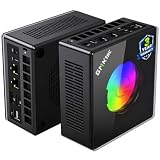
AOOSTAR GEM12+ PRO Barebone — Best Barebone for a Future Encoder Dock
Who it suits: The builder-streamer who knows a desktop card is in their future and wants the one small chassis whose dock connection never has to steal anything to work.
One machine in this guide makes no OCuLink compromise at all. On the GEM12+ PRO — about 1.01 liters in an aluminum body — the port runs on its own independent channel: it occupies no M.2 slot and shares no lane with your storage, so both of its two M.2 2280 PCIe 4.0 slots stay free whether or not a dock is attached. For a streamer, that architecture has a specific payoff. The dock path is how this machine eventually gains a desktop GPU and a dedicated NVENC encoder; on the GEM12+ PRO, taking that path costs nothing in recording storage, while on adapter-based rivals it costs exactly the slot your VOD archive wanted. The platform underneath is equally deliberate: a Ryzen 7 PRO 8845HS carrying the same 780M and RDNA3 encoder, two DDR5-5600 SO-DIMM slots, dual USB4, dual Intel 2.5GbE, HDMI 2.1 and DisplayPort output, Wi-Fi 6, and BIOS power modes up to 70W for buyers who want the harder tune.
It is a barebone, so the completion maths comes first: the kit sits at the lower end of this guide’s barebone band — check the current price on Amazon — and completing it with a kit of 32GB DDR5 and a 1TB SSD still lands comfortably inside the budget, plus an operating system if you do not already own a Windows licence, which the completed total does not include and a streamer cannot skip. Even so, it finishes as one of the cheapest routes in this guide to a native-OCuLink streaming machine with 32GB of memory. The honest debits are about polish, and polish matters on a machine your broadcast depends on nightly: the 2.68-inch status screen’s control software draws complaints from owners, the driver bundle is disorganized — set aside an evening to get drivers and OBS settled rather than an hour — and at least one Amazon buyer in reviewer roundups reported receiving a previously opened unit sold as new, so check your seals on delivery. None of that changes the architecture, and for a streamer planning the dock, the architecture is the recommendation.
- Native OCuLink on an independent channel — a future NVENC dock never costs you an SSD slot.
- Among the cheapest completed native-OCuLink streamers here, all-in before an OS.
- Dual Intel 2.5GbE, 70W BIOS modes, status screen and fingerprint reader for tinkerers.
Honest limitation: It is a barebone — the headline figure includes no memory, no SSD and no Windows — and owners’ complaints cluster on the screen software and the untidy driver bundle.
Choose it if the dock is a plan rather than a daydream and you are comfortable fitting memory and storage. Skip it if you want to stream the evening the box arrives — that is the K8 Plus.

Minisforum UM890 Pro Barebone — Most Expandable Streaming Platform
Who it suits: The streamer running a multi-display desk — game on one screen, OBS and chat on others — who treats a small PC as a platform for memory, storage and screens, and who reads fine print before celebrating ports.
The UM890 Pro is the largest pick here at about 1.10 liters, and it spends that height on the things a streaming desk accumulates. Its Ryzen 9 8945HS drives the 780M — the same RDNA3 encoder as every pick — at the top of the class’s clock range; its two SO-DIMM slots take DDR5 to 96GB, headroom that suits a machine holding a game, OBS, chat, a DAW or voice tools and a browser at once; its two M.2 PCIe 4.0 slots take serious recording storage; and its port set — dual USB4 with power delivery in, dual 2.5GbE, quad-display output, Wi-Fi 6E — is the most complete in the guide. As a barebone its kit sits in the upper part of this guide’s barebone band — check the current price on Amazon; add the memory-and-storage kit and the finished machine still lands inside the budget, with an operating system still to buy if you need one. Against the complete factory version of the same machine, which typically sits above this budget, the barebone is close to the only route into this platform under $800.
Now the two debits, one architectural and one acoustic. Its OCuLink connection runs through an included M.2-to-OCuLink adapter plate, and fitting it consumes one of the two M.2 slots — so the future dock that would add a dedicated encoder costs half this machine’s internal storage expansion, the tax the GEM12+ PRO above does not charge, and the reason that machine, not this one, is the dock pick. And reviewer measurements put its fan at roughly 43 dB in performance mode, the loudest figure in this guide: on a desk within microphone range, that is a noise floor your gate and suppression will fight every broadcast, and it pushes this machine toward a treated room, a distant placement or a headset-first audio setup. Neither debit makes it a bad buy; together they make it a specific one — the streamer’s platform for screens and capacity, bought with eyes open about the microphone.
- Highest ceilings here: RAM to 96GB, two PCIe 4.0 M.2 slots, quad-display output for a full streaming desk.
- Dual 2.5GbE and dual USB4 with PD-in; completes inside the budget, while the complete version typically sits above it.
- Same AV1-capable RDNA3 encoder, on the joint-strongest processor in the guide.
Honest limitation: OCuLink arrives via an M.2 adapter that consumes one of the two SSD slots, and performance mode is the loudest here at roughly 43 dB measured — a real cost beside a microphone.
Choose it if your stream runs multiple displays and heavy background apps, and your audio setup can handle a louder box. Skip it if the dock is your main growth plan — the GEM12+ PRO’s native port is the better foundation.
Minisforum UM880 Plus Barebone — Smallest Barebone, for Parts Owners
Who it suits: The streamer with DDR5 SO-DIMMs and an NVMe drive already in a drawer — spares from a laptop upgrade or a previous mini — who wants the smallest possible chassis to stream from.
At about 0.83 liters and roughly two-thirds of a kilogram, the UM880 Plus is nearly as small as the SER8 while remaining fully socketed: Ryzen 7 8845HS, the 780M with its RDNA3 H.264/HEVC/AV1 encoder, two DDR5 SO-DIMM slots to 96GB, two M.2 2280 PCIe 4.0 slots, USB4, 2.5GbE for the wired stream and Wi-Fi 6E. The kit itself is by a wide margin the lowest entry point in this guide — check the current price on Amazon. For the parts owner, the completed streaming machine costs the kit plus an evening’s assembly, and the dual-channel memory requirement that this guide keeps repeating is satisfied free if the sticks in the drawer are a matched pair. Nothing else here touches that value.
For everyone else, this review carries the guide’s most useful warning, and this is the machine that proves it. An Amazon pricing survey built this exact barebone out two ways and found that the kit, plus the then-current prices of a new 32GB DDR5 kit and a 1TB NVMe drive, totaled more than the complete version of the same machine — a real penalty for assembling it yourself, in a market where even a single memory stick carried a shortage premium. A streamer pricing a from-scratch build at shortage prices can end up paying tower money for integrated graphics and a shared encoder, which is the worst trade in this guide. The same caution applies to its OCuLink, provided through an adapter board rather than a native port — workable as a future dock route, but not the equal of the GEM12+ PRO’s implementation. Bought for the right reason — parts already on hand, or parts caught on a genuine dip — it is the smallest bargain here. Buy it assuming barebone always means cheaper, in this market, and it can be the most expensive pick in the guide.
- At about 0.83 L it is the smallest socketed machine here, with the lowest-cost kit in the guide.
- Full streaming platform despite the size: AV1-capable encoder, RAM to 96GB, two M.2 slots, wired 2.5GbE.
- Nothing touches its value when the memory and SSD are already yours.
Honest limitation: Completed with new parts at shortage prices, a pricing survey found this kit cost more all-in than the complete version of the same machine — and its OCuLink arrives through an adapter board rather than a native port.
Choose it if the parts are already yours, or you can catch them on a real dip. Skip it if your build starts from an empty drawer at today’s memory prices — a complete machine is the smarter buy.

Comparison Table
| Product | Encoder | As sold | Streaming note | OCuLink | Price | Link |
|---|---|---|---|---|---|---|
| GMKtec NucBox K8 Plus | 780M RDNA3: H.264/HEVC/AV1 | Complete, 32GB/1TB | Dual 2.5GbE; best all-round platform | Native | Check price on Amazon | Check on Amazon |
| Beelink SER8 | 780M RDNA3: H.264/HEVC/AV1 | Complete, 32GB/1TB | ~32 dBA — quietest beside a mic; wire it, Wi-Fi reports | None | Check price on Amazon | Check on Amazon |
| GMKtec NucBox K11 | 780M RDNA3: H.264/HEVC/AV1 | Complete, 32GB/1TB | Fastest tune = most render headroom; 36–39 dB(A) | Native, front | Check price on Amazon | Check on Amazon |
| AOOSTAR GEM12+ PRO | 780M RDNA3: H.264/HEVC/AV1 | Barebone — add memory, SSD and OS | Dock path costs no SSD slot; dual 2.5GbE | Native, own channel | Check price on Amazon | Check on Amazon |
| Minisforum UM890 Pro | 780M RDNA3: H.264/HEVC/AV1 | Barebone — add memory, SSD and OS | Quad displays, RAM to 96GB; ~43 dB loudest | Via M.2 adapter (uses a slot) | Check price on Amazon | Check on Amazon |
| Minisforum UM880 Plus | 780M RDNA3: H.264/HEVC/AV1 | Barebone — kit + your parts | Cheapest start for parts owners | Via adapter board | Check price on Amazon | Check on Amazon |
Setting Up OBS on a Shared-Chip Streamer
The settings below are the same starting point for every pick, because every pick carries the same encoder — the differences between machines show up in the render headroom behind these settings, not in the settings. In OBS, choose the AMD AMF hardware encoder for your platform: H.264 for Twitch, where around 6,000 kbps at constant bitrate (CBR) with a 2-second keyframe interval is the working standard the platform is built around; for YouTube, which accepts higher bitrates and newer codecs, the same hardware offers HEVC and AV1, and AV1 at a 1440p canvas is this encoder generation’s party trick — your game still renders at the 1080p-class settings the 780M handles, but the stream itself can leave the machine at a higher resolution and codec than Twitch’s H.264 ceiling allows. Keep the encoder on a balanced or quality preset rather than the fastest one; the dedicated video block has the room, and preset quality is free quality on a hardware encoder. Never select the x264 software encoder on these machines: it spends the same CPU cores your game is using, and on an eight-core APU already running a game, chat and a browser, that trade shows up on air within minutes.
When a stream stutters, OBS tells you which of three different problems you have, and each has a different fix — learn to read them before your first live session, in the stats window rather than by feel. Dropped frames are a network counter: your upload could not carry the bitrate. The fix is a cable, not a setting — every pick here has a 2.5GbE port, so plug it in, because no Wi-Fi radio, including the SER8’s dropout-reported one, is a streaming uplink; if dropped frames persist on a wired connection, lower the bitrate until they stop. Skipped frames are a rendering counter: the GPU could not composite OBS’s scenes in time, which on a shared chip means the game is taking the whole power budget. Cap the game’s frame rate, lower its settings a notch, and simplify heavy browser sources — the K11’s extra tune buys the most slack here, and every other pick simply has less of it. Missed frames are an encoding counter: the encoder itself fell behind, which on healthy hardware settings usually means the preset or resolution is beyond the block — step the preset down one level or drop the output resolution before touching anything else. Treating a network problem with encoder settings, or a render problem with a new microphone, is how streamers lose weekends; the counters exist so you do not have to guess.
Two habits protect every broadcast on this hardware. First, wire the machine and leave it wired: run the stream on the Ethernet interface and treat Wi-Fi as a backup for chat, never for the feed. Second, record locally while you stream, to the second M.2 slot where one is free — a local recording is your VOD insurance when the network has a bad night, and the encoder can run recording and stream as separate encodes without troubling the game.
What Else a Stream Needs: The Kit, Costed Honestly
This section deliberately contains no prices. Kit prices swing as wildly as the component market this guide keeps citing, and a streaming setup is bought in an order, not all at once — so what follows is the order, and what each item decides. Buy the microphone first. Audiences forgive a soft picture for hours and a bad microphone for about a minute; a decent USB microphone, positioned close, with the PC’s fan noise — graded per pick in the reviews above — kept out of its pickup pattern, is the single largest quality jump a new streamer can make, and it is why the SER8’s roughly 32 dBA matters more than any port on its back panel. Headphones come with it, so your game audio never reaches the mic through speakers.
Second, light and camera, in that order: a modest light pointed at your face improves a basic webcam more than a better camera in a dim room does, and both matter only once the audio is right. A second display — for chat, OBS and alerts, keeping the game screen clean — is the quality-of-life purchase most one-box streamers make next, and it is where the UM890 Pro’s quad-display output earns its keep. A capture card is not on this list, and that is deliberate: a capture card exists to bring an external source — a games console, a camera, a second PC — into OBS. A one-box PC streamer is already inside the machine; OBS captures the game directly, with no card and no extra latency. Buy a capture card the day you decide to stream a console, and not before.
The Dock Invoice: Buying a Second Encoder Later
Three picks carry OCuLink natively and two more offer it through adapters, so the dock question deserves its own arithmetic rather than a footnote — and for a streamer it has a second meaning it does not have for a pure gamer: the port renders and encodes nothing. Turning one of these machines into a desktop-graphics PC takes three more purchases: an OCuLink dock — Minisforum’s DEG1 is the reference unit; a power supply the dock does not ship with; and the card itself, a new desktop RTX 4060. Together they add up to a substantial sum beyond the mini PC — check the current price on Amazon for each part — and that total never appears in this guide’s headline.
What the invoice buys a streamer is separation. The desktop card renders the game on its own silicon, and its NVENC encoder block — a dedicated unit with AV1 encode on that card generation — takes the stream off the APU entirely, so the shared-chip negotiation this whole guide manages simply ends. Assessed honestly: as a day-one purchase it makes no sense, because the same total buys a stronger complete tower, as the next section shows. As a year-two upgrade it is the most rational route in this category, because the machine you own gains a second encoder and a desktop GPU without being replaced, and the card and dock carry forward to whatever you buy next. What matters at purchase time is only that the path exists in the right form: native OCuLink on the K8 Plus and K11, native on its own channel on the GEM12+ PRO, adapter-based — with a storage slot or a board as the toll — on the two Minisforum barebones, and no path at all on the SER8, whose silence is what it offers instead.
The Tower You Are Not Buying
Every small-form-factor streaming guide owes its reader one plain paragraph, and this is it. A full-size CyberPowerPC tower with a desktop RTX 4060 — the Gamer Xtreme GXiVR8060A24, with a Core i5-13400F, 16GB of DDR5 and a 1TB SSD — has been seen on Amazon on sale inside this budget, and for streaming specifically it is not close: the desktop card renders the game while its NVENC block encodes the stream, two jobs on two pieces of silicon, with no shared power budget, no shared memory and a case that keeps its fan noise under a desk instead of beside your microphone. If your space allows a tower and frames-plus-stream is your first priority, stop reading and buy the tower; our guides to the Best Gaming PC Under $800 and the Best Budget Gaming PC Under $800 cover that field properly, and the Best Streaming PC Under $800 guide grades towers on exactly this encoder-first basis.
What the liters buy, for the reader still here, is a streaming PC that fits the rooms towers cannot enter: behind a monitor, inside a TV stand, on a dorm desk, in a carry-on between venues. The trade is explicit — you are paying tower money for a tenth of the tower’s volume and accepting a shared encoder as the price, in exchange for a broadcast setup that disappears into the furniture. This guide exists for streamers who have measured their space and made that trade with open eyes — not for anyone told a mini PC is a tower in disguise. It is not, and at $800 nothing is.
How to Choose a Small Form Factor Gaming PC for Streaming Under $800
- Start with the encoder, then check what shares its chip. Every pick here encodes on the 780M’s RDNA3 block — H.264 for Twitch, AV1 and HEVC for YouTube — so choose on what surrounds it: tune, memory, noise and ports. A streamer choosing between these six is choosing headroom and acoustics, not codecs.
- Match the tune to your games. Esports and indie titles leave every pick comfortable headroom beside a 6,000 kbps encode. Demanding recent games at low-to-medium settings are where the K11’s measured up-to-15% tune margin stops being a spec and starts being the difference between a smooth stream and skipped frames.
- Grade noise against your microphone, not your ears. Roughly 32 dBA (SER8) sits below most gates; the mid-to-high 30s (K11) need positioning and a firmer gate; roughly 43 dB (UM890 Pro in performance mode) needs a treated setup. Decide with your audio chain in mind, because the fan is part of your broadcast.
- Wire it, whatever you buy. Every pick has at least a 2.5GbE port; use it. A stream’s dropped frames are a network statistic, and Wi-Fi — above all the SER8’s dropout-reported radio — is not an uplink.
- Complete or barebone: total it before you decide. Add a 32GB dual-channel DDR5 kit, a 1TB SSD and an operating system to any barebone headline — dual-channel matters doubly here, because the same memory feeds the game and the stream’s compositor. In the current shortage that sum can exceed a complete machine’s price; a surveyed UM880 Plus completion cost more than the complete machine.
- If a second encoder is in your future, buy the port in its best form now. Native OCuLink (K8 Plus, K11) is good; native running on an independent channel (GEM12+ PRO) is best; the adapter routes (UM890 Pro, UM880 Plus) work but take a slot or a board as their toll. The SER8 has no path — buy it only if one-box streaming is the whole plan.
- Reserve the second SSD slot for recordings. Local recording is a streamer’s insurance against a bad network night. Picks with a free second M.2 slot — all six, until an adapter takes one — let recordings live apart from the game library.
- Apply the budget rule, not the list price. Prices in this category move sharply with the component shortage, so check the current price on Amazon before you judge any pick. A pick whose listing currently sits above the $800 budget is not a worse streamer; it is a streamer to buy when the listing comes back inside it.
Common Buying Mistakes
- Selecting the x264 software encoder in OBS on a shared-chip machine. It spends the CPU cores the game needs; the hardware AMF encoder exists precisely so you never have to, and it is one dropdown away.
- Streaming over Wi-Fi because the desk looks cleaner. Dropped frames are a network counter, every pick here ships a 2.5GbE port, and the SER8’s Wi-Fi has dropout reports — the cable is a streaming component, not an accessory.
- Buying a capture card to stream PC games from the same PC. OBS captures the game directly; a capture card is for consoles and external sources, and buying one for a one-box setup spends the microphone budget on nothing.
- Comparing a barebone’s kit price against complete PCs. The kit has no memory, no storage and no operating system; completed honestly — with the dual-channel kit streaming needs — it can cost more than the finished machine in a shortage market.
- Counting an OCuLink port as an encoder upgrade. The port starts a three-part invoice — dock, power supply and card — and a budget that leaves it out is fiction.
- Assuming all OCuLink is equal. The UM890 Pro’s runs through an M.2 adapter and takes the slot with it; the GEM12+ PRO’s runs on a channel of its own. For a streamer, that distinction decides whether the dock costs you your recording drive.
- Ignoring noise because the PC is small. Small fans sit within microphone range; the measured gap between roughly 32 dBA (SER8) and roughly 43 dB (UM890 Pro in performance mode) is the difference between a quiet room on air and a fan in every pause.
- Paying the spike. Within a single season the K8 Plus and the K11 have each swung from genuine sale territory to well above this budget. In this category, timing is a specification.
Final Recommendation
- Best overall one-box streamer: GMKtec NucBox K8 Plus.
- Quietest beside a microphone: Beelink SER8.
- Most headroom, on sale only: GMKtec NucBox K11.
- Best dock foundation: AOOSTAR GEM12+ PRO Barebone.
- Most expandable streaming desk: Minisforum UM890 Pro Barebone.
- Best for parts owners: Minisforum UM880 Plus Barebone.
Our top two for most small-space streamers are the K8 Plus and the SER8, because they answer the two honest shapes this search takes. The K8 Plus is the grower’s streamer: complete today, wired twice over, with a native OCuLink port keeping the dedicated-encoder door open. The SER8 is the broadcaster’s quiet room: the smallest and quietest finished PC here, bought by streamers who know one-box AV1-capable encoding is their format and are content for it to stay that way. Builders should start from the dock question — GEM12+ PRO if a dock is planned, UM890 Pro if displays and memory are the plan, UM880 Plus if the parts are already in a drawer. Readers whose space allows a tower should weigh the Best Compact Gaming PC Under $800 and Best Mini Gaming PC Under $800 guides alongside this one, step down to the Best Small Form Factor Gaming PC For Streaming Under $500 tier if the budget tightens, or step up to the Best Small Form Factor Gaming PC For Streaming Under $1200 tier, where discrete graphics — and a second encoder in the box from day one — begins. Wire the machine, buy the microphone first, respect the budget, and check the live listing before you order.
Frequently Asked Questions
Can a mini PC with integrated graphics really stream and game at once?
Yes, within stated limits, because the work splits across two units in the same chip: the game renders on the 780M’s graphics shaders while the stream encodes on its separate RDNA3 video block, which OBS drives through the AMD AMF hardware encoder. Twitch at 1080p60 and around 6,000 kbps CBR is well inside that block’s ability on every pick here. The limits are real: the two jobs share one power budget and one pool of memory, so demanding games need reduced settings and a frame-rate cap to leave the compositor room, and software x264 encoding — which spends game CPU cores — is never the right choice on this hardware.
What makes the encoder in these machines different from older integrated graphics?
Codec support. The 780M’s encoder is an RDNA3-generation block with H.264, HEVC and AV1 hardware encode. H.264 is what Twitch runs on today; AV1 and HEVC are what YouTube’s higher-bitrate and higher-resolution ingest accepts, and what modern recording workflows prefer. The previous integrated generation’s encoder has no AV1 encode at all, which is why this guide’s first filter was the encoder generation rather than the processor’s headline speed: for a streaming PC bought in late 2026, AV1 is the difference between current hardware and last cycle’s.
Do I need a capture card to stream from one of these PCs?
No — not for games running on the PC itself. OBS captures the game directly on the machine, which is the entire premise of a one-box setup. A capture card becomes necessary only when the source is external: a games console, a separate gaming PC, or a camera you want to feed in as a video source. Streamers planning console nights alongside PC streams should budget for one then; streamers who are PC-only should spend that money on the microphone instead, which is why this guide’s kit section puts the card last and the mic first.
Which pick is best for a bedroom or living-room stream?
The Beelink SER8, bought at $800 or less. It is the smallest complete machine here at about 0.81 liters, it was measured at roughly 32 dBA under load — the quietest figure in this guide and the one your microphone will notice least — and its flat shape fits the shelves and TV stands that define shared-room computing. Wire it with an Ethernet cable rather than trusting its dropout-reported Wi-Fi, and it is the most room-friendly streamer here. The K11 is the one to think twice about for a bedroom: its RGB ring cannot be turned off and its performance tune is audibly busier.
- Best Small Form Factor Gaming PC Under $800
- Best Small Form Factor Gaming PC Under $700
- Best Small Form Factor Gaming PC Under $1200
- Best Small Form Factor Gaming PC For Small Spaces Under $800
- Best Small Form Factor Gaming PC For Beginners Under $800
- Best Small Form Factor Gaming PC For Streaming Under $700
- Best Small Form Factor Gaming PC For 1440p Gaming Under $800


