Where to buy
Check the latest price, availability and delivery on Amazon. Orders are placed on Amazon. We may earn a commission from qualifying purchases.
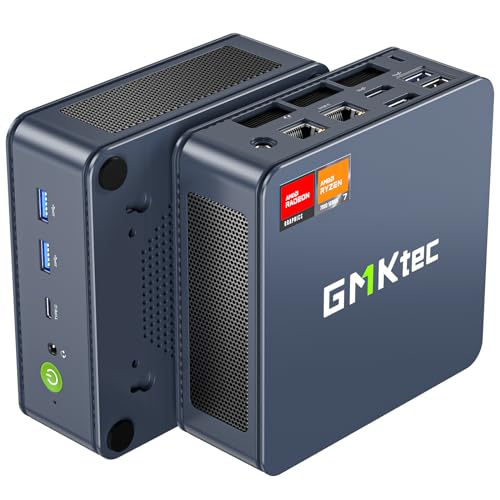
- Best small form factor streaming PC under $500, on deal: GMKtec NucBox K6, Ryzen 7 7840HS, Radeon 780M, 32GB DDR5, 1TB SSD — Check on Amazon
- Best AV1 encoder at an everyday price: GMKtec NucBox M6 Ultra, Ryzen 5 7640HS, Radeon 760M, 16GB DDR5, 512GB SSD — Check on Amazon
- Best Twitch machine in the guide: Beelink SER5 MAX Mini PC, Ryzen 7 7735HS, Radeon 680M, 24GB RAM, 500GB SSD — Check on Amazon
- ACEMAGIC Mini Gaming PC, Ryzen 7 7735HS, Radeon 680M, 24GB RAM, 512GB SSD — Check on Amazon
See 2 more Amazon options
- GMKtec NucBox M6, Ryzen 5 6600H, Radeon 660M, 16GB DDR5, 512GB SSD — Check on Amazon
- GMKtec M5 Plus, Ryzen 7 5825U, 32GB RAM, 1TB SSD — Check on Amazon
Read the full guide ↓
Disclosure: As an Amazon Associate, reviewstook.com earns from qualifying purchases. Links to Amazon on this page are affiliate links; they cost you nothing extra. Listing details such as price and availability change often, so check the current Amazon listing before you buy.
A streaming PC has a harder job than a gaming PC, and it is worth saying exactly what that job is before any product names appear, because this guide grades every machine against it. On a stream night, one small box has to do four things at once: run the game, run OBS and composite your scenes, keep a browser with chat and alerts alive, and compress the whole picture into an upload your connection can sustain — for hours, without the game stuttering. The specification that decides whether that works is not the one on the box in the biggest type. It is the encoder: the small, fixed block of silicon whose only job is turning rendered frames into streamable video. Every pick in this guide is a sub-litre mini PC built around an AMD laptop processor with integrated graphics, which means every pick encodes through AMD’s hardware encoder, and the generation of that encoder — not the core count, not the clock speed — is the first thing this guide grades.
There is no NVIDIA graphics card anywhere in this guide, so there is no NVENC — the encoder most streaming advice assumes — and there is no Intel processor, so there is no Quick Sync either. What there is, is three distinct generations of AMD encoder, and they do not do the same things. The two newest machines, built on AMD’s RDNA3 graphics, carry an encoder that handles H.264, HEVC and AV1. The three machines a generation older, on RDNA2 graphics, encode H.264 and HEVC only — AV1 is decode-only for them, useful for watching, useless for sending. The oldest machine here encodes through a Vega-era block that is the softest and least capable in the guide. Whether that ladder matters to you depends on where you stream. Twitch is an H.264 service with a practical ceiling of about 6,000 kbps using constant bitrate: every pick here can feed Twitch through its hardware encoder, and AV1 buys a Twitch streamer nothing today. YouTube is the opposite case — it accepts far higher bitrates than Twitch and accepts AV1 uploads, so the two RDNA3 machines can send YouTube a visibly cleaner picture from the same scene. Two different verdicts depending on the platform — that is the shape of this whole guide, starting with the GMKtec NucBox K6 on deal for the strongest all-round streaming silicon here, or the GMKtec NucBox M6 Ultra for the same encoder generation at a price that needs no deal.
In this guide
Quick Picks
Short on time, or comparing several options at once? Each row below names a streamer type and the product that suits it, with a link to the listing. The encoder column is the one to read first — it decides what your stream can be.
| Streamer type | Pick | Encoder | Why it stands out | Link |
|---|---|---|---|---|
| Best overall, on deal | GMKtec NucBox K6, Ryzen 7 7840HS, Radeon 780M | AV1 + HEVC + H.264 | The strongest encoder and the strongest game rendering here — check price on Amazon and buy only when it sits inside the budget | Check on Amazon |
| Best for YouTube | GMKtec NucBox M6 Ultra, Ryzen 5 7640HS, Radeon 760M | AV1 + HEVC + H.264 | The same AV1 encoder generation as the K6, at an everyday price inside the budget — check price on Amazon | Check on Amazon |
| Best for Twitch | Beelink SER5 MAX, Ryzen 7 7735HS, Radeon 680M | H.264 + HEVC | The full 680M gaming class in the smallest box here — Twitch needs nothing more | Check on Amazon |
| Best multi-screen desk | ACEMAGIC Mini Gaming PC, Ryzen 7 7735HS, Radeon 680M | H.264 + HEVC | Same encoder and graphics as the Beelink, with triple 4K displays for game, chat and OBS | Check on Amazon |
| Best budget stream box | GMKtec NucBox M6, Ryzen 5 6600H, Radeon 660M | H.264 + HEVC | The same encoder generation as the 680M picks for far less money, with socketed memory | Check on Amazon |
| Best for light games, heavy multitasking | GMKtec M5 Plus, Ryzen 7 5825U, 32GB RAM, 1TB SSD | H.264 + HEVC (oldest here) | Eight cores and 32GB for OBS, chat and everything else — with the weakest graphics in the guide | Check on Amazon |
How These Picks Were Chosen
The budget was applied the same way as in the base guide this one descends from: a complete machine, at or regularly within the budget in the United States, with memory, storage and Windows installed — no barebones kits whose sticker price hides the parts still to buy. Every product below is one of the six verified picks from that research, with the same ASINs and the same deal rules, re-graded here for streaming. What changed is the order of the questions. For a streaming guide, the first question is what the encoder can send, the second is how much rendering headroom is left over once the game and the stream are both running, and only then do the usual questions — memory, storage, ports, price — get their turn.
The encoder ladder, stated once and applied in every review below, is this. The GMKtec NucBox K6 (Radeon 780M) and NucBox M6 Ultra (Radeon 760M) sit on AMD’s RDNA3 graphics, whose encoder handles AV1 alongside H.264 and HEVC — the only two AV1 encoders in this guide, and the reason both machines are graded as YouTube-ready in a way the others are not. The Beelink SER5 MAX and ACEMAGIC (Radeon 680M) and the GMKtec NucBox M6 (Radeon 660M) sit on RDNA2, whose encoder covers H.264 and HEVC and decodes AV1 without encoding it — a complete Twitch toolkit and a capped YouTube one. The GMKtec M5 Plus’s Vega-class graphics carry the oldest encoder here, H.264 and HEVC through a block from an earlier era: functional, and graded as the weakest sender in the guide. Two platform facts then cut across the whole ladder. On Twitch, which takes H.264 at roughly 6,000 kbps constant bitrate, the ladder compresses — the 680M machines give up nothing that Twitch can accept. On YouTube, which takes much higher bitrates and AV1, the ladder stretches — the RDNA3 pair pull away. A streamer who knows their platform already knows which half of this guide is theirs.
The second judgement is headroom, because encoding is not free even when it is hardware. A dedicated encoder block does the compression without borrowing the graphics cores that render the game — but on an integrated-graphics machine the encoder, the game, OBS’s scene rendering, your chat browser and your alerts all drink from the same memory and the same small power budget. That is why memory capacity and game weight run through the streaming grades below: 32GB machines shrug off the stream-night multitasking load, 16GB machines feel it, and a pick whose graphics are already straining at the game itself has nothing left to lend the stream. We did not use these products ourselves; the grades are built from the verified listings, maker specifications and price records behind the base guide, with encoder capabilities read from each machine’s documented silicon — and nothing claimed that a pick’s processor generation cannot do.
The 6 Best Small Form Factor Gaming PCs for Streaming Under $500
GMKtec NucBox K6 — Ryzen 7 7840HS, Radeon 780M, 32GB DDR5, 1TB SSD
Who it suits: The streamer who wants one small box to do the whole job at the highest level this budget allows — and who is willing to let a price tracker choose their buying day.
On streaming criteria the K6 is the complete machine in this guide, and it is not close. Its Radeon 780M is the strongest integrated graphics here for the game itself, and its RDNA3 encoder is the joint-newest here for the stream: H.264 for Twitch at the standard 6,000 kbps constant bitrate, HEVC when a platform wants it, and AV1 for YouTube — the one codec in this guide that lets a streamer send a modern, efficient picture at the higher bitrates YouTube accepts. Around that silicon sits the specification a stream night actually stresses: 32GB of DDR5 in two socketed sticks, so the game, OBS, a chat browser, alerts and a music app can all be open without the machine swapping; a 1TB SSD, so the game library and the recordings folder are not fighting over the same few hundred gigabytes; and dual 2.5-gigabit Ethernet, so the stream rides a cable with a spare port for whatever the setup grows into. The case measures 128.8 × 127 × 47.8 mm by the maker’s figures — about 0.78 litres — small enough to mount behind the monitor that shows your chat.
Two disciplines define this pick, and both are carried over from the base research at full strength. The first is price discipline: check price on Amazon before you buy — this pick belongs here only when its live price sits inside the budget, and at everyday pricing above the budget the recommendation lapses and the M6 Ultra below becomes the AV1 answer. The second is noise. The K6 asks more of its cooling than the 680M machines ask of theirs, and under a sustained game-plus-encode load its fans are a presence in a quiet room — which, for a streamer, is not just an ambience issue but a microphone issue. It is manageable — the box is small enough to place across the desk or behind the monitor, and the kit section below covers microphone placement — but a streamer recording in a silent bedroom at midnight should buy it knowing the trade is real.
- RDNA3 encoder with AV1 — the strongest stream sender in this guide, for YouTube as well as Twitch.
- Radeon 780M graphics: the most game-rendering headroom here once the stream is running.
- 32GB of socketed DDR5, a 1TB SSD and dual 2.5-gigabit Ethernet — the fullest stream-night specification here.
Honest limitation: It is a deal-only pick — check price on Amazon and only buy when it sits inside the budget; above the budget this guide’s recommendation lapses; its cooling is also the hardest-working here, which a microphone will hear if the box sits beside it.
Choose it if checking the price on Amazon shows it inside the budget and you stream to YouTube, stream demanding games, or simply want the ceiling of this category. Skip it if its live price sits above the budget today — the M6 Ultra sends the same codecs and is the easier buy; check price on Amazon.

GMKtec NucBox M6 Ultra — Ryzen 5 7640HS, Radeon 760M, 16GB DDR5, 512GB SSD
Who it suits: The YouTube streamer on a firm budget — someone who needs the modern encoder more than they need the strongest game rendering, and who wants to buy at an ordinary price on an ordinary day.
The M6 Ultra is the streaming bargain of this guide, and the reason is a distinction streaming shoppers are rarely offered: the encoder and the game renderer are different hardware, and they do not age at the same rate. This machine’s Radeon 760M graphics are a half-step behind the 680M machines for rendering games — esports and indie titles stream comfortably, older AAA plays at 1080p with settings chosen sensibly, and the newest releases sit in low-settings territory. But its encoder is RDNA3, the same generation as the K6’s: H.264 for Twitch, and AV1 plus HEVC for YouTube at the bitrates YouTube rewards. For a streamer whose games are the lighter classes — and that describes a large share of what is actually streamed — the M6 Ultra sends a picture every bit as modern as the guide’s top pick, from a machine whose 16GB/512GB configuration sits inside the budget at its everyday price — check price on Amazon — with no tracker, no coupon and no patience required. Dual 2.5-gigabit Ethernet, Wi-Fi 6E, USB4 and a second M.2 slot round out a platform that is, port for port, the most current here; the case is the same published 128.8 × 127 × 47.8 mm as its K6 sibling, about 0.78 litres, with a VESA bracket in the box.
The cautions are the base guide’s, unchanged. Sixteen gigabytes of memory is the honest floor for a machine that must run a game, OBS and a chat browser at once — workable, and the first thing to plan around. And this listing family also sells a 32GB variant that sits well above the budget: the in-budget claim belongs to the 16GB/512GB configuration only, and the variant in the cart is the purchase. Judge it as what it is — the current-generation encoder at an honest price, with game rendering a deliberate step down — and it is the easiest recommendation in this guide to act on today.
- RDNA3 encoder with AV1 — the same codec set as the K6, including YouTube-ready AV1.
- Inside the budget at its everyday price for this configuration — check price on Amazon for the modern encoder without a deal.
- Dual 2.5-gigabit Ethernet, USB4 and two M.2 slots in about 0.78 litres.
Honest limitation: The Radeon 760M renders games a half-step behind the 680M picks, 16GB of memory is the floor for game-plus-stream multitasking rather than a comfort, and the same listing’s 32GB variant sits above the budget — confirm the configuration in the cart.
Choose it if you stream lighter games to YouTube, or want AV1 in reserve, at a price that needs no deal. Skip it if your games are newer AAA titles — the K6 on deal or the 680M picks will serve the game itself better.

Beelink SER5 MAX Mini PC — Ryzen 7 7735HS, Radeon 680M, 24GB RAM, 500GB SSD
Who it suits: The Twitch streamer — someone whose platform is H.264 anyway, who wants the strongest game rendering available within the budget, in the smallest box in this guide.
Grade this machine against Twitch’s actual rules and it gives up almost nothing to the picks above it. Twitch takes H.264 at about 6,000 kbps constant bitrate, and the SER5 MAX’s RDNA2 encoder produces exactly that, in hardware, while its Radeon 680M — the strongest integrated graphics class that sells within the budget without a deal — renders the game. Esports and indie titles are its home ground, older AAA runs well at 1080p medium, and the newest releases ask for low settings and upscaling; that is the game side of the stream, and on Twitch it is the side that matters, because the encoder side is already fully served. The AV1 it cannot send is a codec Twitch does not accept; the HEVC it can encode covers the platforms that take it. Where the RDNA2 generation does cap this machine is YouTube: no AV1 upload, so a YouTube streamer sends H.264 and lets the platform’s processing do what it can. That is a real ceiling, stated plainly — and for a Twitch-first streamer it costs nothing at all.
The machine around the silicon suits a streaming desk unusually well. At 126 × 113 × 42 mm — about 0.6 litres, the smallest case here, with a VESA mount in the box — it can be screwed to the back of the streaming monitor and removed from the desk entirely, which also removes its fan noise from the microphone’s neighborhood as far as any pick in this guide manages. Its 24GB of memory is a sensible stream-night allotment, more than the 16GB floor, though it is LPDDR5 soldered to the board — what arrives is what you keep for the machine’s whole life — and 500GB of storage fills quickly once recordings join the game library. Check price on Amazon before you buy — it lives right at the ceiling of this budget, so confirming the live price before you order is worth the moment it takes here.
- Radeon 680M graphics — the strongest game rendering within the budget, which is what a Twitch stream is made of.
- Smallest case in the guide at about 0.6 litres, VESA mount included — mount it behind a monitor, away from the microphone.
- 24GB of memory: a workable stream-night allotment for game, OBS and chat together.
Honest limitation: No AV1 encoding — a Twitch non-issue but a genuine ceiling for YouTube streamers; and the 24GB of memory is soldered and final, with 500GB of storage that recordings will pressure.
Choose it if Twitch is your platform and you want the best game picture this budget renders, in the smallest box. Skip it if YouTube is your platform — the two RDNA3 picks above send it a better picture.

ACEMAGIC Mini Gaming PC — Ryzen 7 7735HS, Radeon 680M, 24GB RAM, 512GB SSD
Who it suits: The multi-screen Twitch streamer — someone who wants the same silicon as the Beelink, arranged around a desk where the game, the chat and the OBS preview each get their own display.
Two machines can share a processor and still be different streaming purchases, and this is the proof. The ACEMAGIC runs the same Ryzen 7 7735HS and Radeon 680M as the SER5 MAX, so its streaming grade is the same grade: a hardware H.264 encoder that fully serves Twitch’s 6,000 kbps constant-bitrate world, HEVC alongside it, no AV1 encode for YouTube, and game rendering in the strongest class this budget sells without a deal — esports and indie titles at home, older AAA well at 1080p medium, the newest releases at low settings with upscaling. Where it earns its own place in a streaming guide is the desk around the stream. It supports triple 4K displays, which for a streamer is not a specification-sheet flourish but the working layout itself: game on the main screen, chat and alerts on the second, OBS and its stats on the third. Its 2.5-gigabit Ethernet port keeps the upload on a cable, Wi-Fi 6 covers the rest of the desk, and Windows 11 Pro is installed. The case measures 5.04 × 5.04 × 1.61 inches — about 0.67 litres — a touch larger than the Beelink’s, still small enough to vanish under a TV or behind a monitor.
Check price on Amazon before you buy: this pick sits inside the budget for the full 680M class today, with no need to wait for a deal. Two cautions ride along, both about configuration discipline rather than the machine. This listing family sells more than one configuration under a single title, so confirm the 7735HS build with 24GB and 512GB in the cart before you pay; a cheaper sibling in the same listing is a different, weaker PC. And where the verified sources do not establish whether its 24GB of memory is soldered or socketed, this guide makes no claim either way — if documented upgradeability decides your purchase, the GMKtec machines here are the ones with that evidence. Judged on what is verified — chip, encoder, displays, networking, price — it is the most straightforward way to buy a Twitch-ready 680M stream box today.
- Same Ryzen 7 7735HS, Radeon 680M and RDNA2 encoder as the guide’s Twitch pick.
- Triple 4K display support — the game, chat and OBS layout a streamer actually uses.
- 2.5-gigabit Ethernet for the upload — check price on Amazon, inside the budget today.
Honest limitation: No AV1 encoding, like every RDNA2 pick here — Twitch is fully served, YouTube is capped at H.264; and its memory construction is not established in the verified sources, so no upgrade promise can be made for it.
Choose it if you stream to Twitch across multiple screens and want the 680M class at a price that is inside the budget today. Skip it if documented memory upgradeability matters to you, or YouTube is your platform.

GMKtec NucBox M6 — Ryzen 5 6600H, Radeon 660M, 16GB DDR5, 512GB SSD
Who it suits: The streamer starting out — a firm budget, lighter games, and a machine whose memory and storage can grow after the channel does.
The M6 is the pleasant surprise of the encoder-first grading, because its encoder is better than its price suggests. Its Ryzen 5 6600H sits on the same RDNA2 generation as the 680M machines, so its hardware encoder covers H.264 and HEVC with the same capabilities as the Beelink’s and the ACEMAGIC’s — Twitch’s 6,000 kbps constant-bitrate stream is fully within its powers, and AV1 is decode-only here exactly as it is there. What is a step down is the game rendering: the Radeon 660M is roughly two-thirds of the idea of a 680M, a machine for esports, indie games and the back catalogue at 1080p with settings chosen sensibly. For the large share of streaming that is exactly those games, the M6 sends the same stream as machines costing far more, from a budget-tier box in the 16GB configuration — check price on Amazon — the most affordable complete entry in this guide by a wide margin. The case is about 5 by 5 by 2 inches — the maker’s manual gives 12.8 × 12.7 × 4.8 cm, roughly 0.78 litres — with dual 2.5-gigabit Ethernet, Wi-Fi 6E and USB4.
Its construction is the streaming-relevant part. The 16GB of DDR5 sits in SO-DIMM sockets and can be doubled when the stream-night load outgrows it — and on a 16GB machine running a game, OBS and a browser, that day is foreseeable, which is why the socket matters. Two SSD slots let storage grow by addition as recordings accumulate. Two disciplines apply. A secondary fan makes this, on the evidence of the maker’s own model documentation, the most audible mini PC in this guide under heavy load — plan its placement with the microphone in mind. And this model is also sold in barebones form on related listings: the price that looks too good is usually the kit with no memory, no SSD and no Windows, and the complete 16GB configuration is the one this guide is describing.
- The same RDNA2 encoder generation as the 680M picks — Twitch is fully served for far less money.
- Socketed DDR5 memory and dual SSD slots: the stream box that grows with the channel.
- Lowest-cost complete way in: budget-tier pricing — check price on Amazon.
Honest limitation: The Radeon 660M is the second-weakest game rendering here — a back-catalogue and esports streamer, not a new-release one — its secondary fan makes it the most audible pick under load, and barebones versions of this model circulate on related listings.
Choose it if your games are light, your budget is firm, and you want an encoder equal to the mid-guide picks with room to grow. Skip it if you stream newer, heavier games — the 680M picks render them properly and this one does not.

GMKtec M5 Plus — Ryzen 7 5825U, 32GB RAM, 1TB SSD
Who it suits: The multitasker who streams light games — someone whose stream night involves the game plus a crowd of other work, and who values cores, memory and storage over graphics.
This review leads with its limitation, because on streaming criteria it is the sharpest in the guide. The M5 Plus’s Vega-class integrated graphics carry the oldest encoder here: H.264 and HEVC through a block from an earlier era than the RDNA2 and RDNA3 machines around it, with no AV1 in either direction that matters for sending. It is also the weakest game renderer in the guide by a clear margin — esports and older games at sensible settings, anything recent and demanding only with settings and expectations lowered together. A streamer whose show is this year’s big release should stop reading here and buy the SER5 MAX or the K6 on deal. What the M5 Plus offers instead is the working half of streaming that the other picks skimp on: an eight-core processor and 32GB of memory — double the memory of the 16GB picks — which is the combination that keeps OBS, a chat browser, alerts, a voice app and a dozen tabs smooth while the game runs; and 1TB of storage for the recordings folder, at a budget-tier position — check price on Amazon — with headroom left in the budget for the rest of the setup.
The 32GB of DDR4 sits in sockets and can grow to 64GB; a second M.2 slot waits for more storage; dual 2.5-gigabit Ethernet and triple 4K displays make it a natural media and home-server box when its streaming years wind down; and at 128 × 127 × 52 mm it is the largest case here, about 0.85 litres, still under a litre. Ranked last in a streaming guide because the encoder and the graphics are the guide’s subject — and honestly labelled as the pick for the streamer whose games are light and whose desktop is heavy.
- Eight cores and 32GB of socketed memory — the smoothest stream-night multitasking here.
- 1TB SSD and dual 2.5-gigabit Ethernet at a budget-tier position — check price on Amazon.
- About 0.85 litres from published dimensions of 128 × 127 × 52 mm, with a real second career as a home server.
Honest limitation: The oldest encoder in the guide and the weakest graphics — it caps out at esports, older titles and lowered settings, and sends nothing the newer machines cannot send better.
Choose it if your streamed games are light and your stream-night workload is everything else. Skip it if gaming or stream picture quality is the point — every pick above it does both better.

Comparison Table
| Product | Encoder | Graphics | Memory | Best streaming use | Link |
|---|---|---|---|---|---|
| GMKtec NucBox K6 | AV1 + HEVC + H.264 (RDNA3) | Radeon 780M | 32GB DDR5, socketed | Strongest all-round stream box — on deal only | Check on Amazon |
| GMKtec NucBox M6 Ultra | AV1 + HEVC + H.264 (RDNA3) | Radeon 760M | 16GB DDR5 | YouTube and AV1 at an everyday price | Check on Amazon |
| Beelink SER5 MAX | H.264 + HEVC (RDNA2) | Radeon 680M | 24GB, soldered | Twitch, in the smallest box here | Check on Amazon |
| ACEMAGIC Mini Gaming PC | H.264 + HEVC (RDNA2) | Radeon 680M | 24GB | Multi-screen Twitch desks | Check on Amazon |
| GMKtec NucBox M6 | H.264 + HEVC (RDNA2) | Radeon 660M | 16GB DDR5, socketed | Budget Twitch box that can grow | Check on Amazon |
| GMKtec M5 Plus | H.264 + HEVC (Vega-era) | Radeon Vega-class | 32GB DDR4, socketed | Light games, heavy multitasking | Check on Amazon |
Setting Up OBS on a Mini PC: Encoders, Bitrates and the Three Lag Counters
Whichever pick you buy, the same setup logic applies. In OBS, choose the AMD hardware encoder — never the software x264 encoder on these machines, because x264 spends the processor cores your game and your chat applications are already using, while the hardware block does the same job without borrowing the game’s rendering cores. For Twitch, set the rate control to constant bitrate at about 6,000 kbps and the keyframe interval to 2 seconds: that pairing is what Twitch’s ingest expects, and the 2-second keyframe is not optional decoration — it is how viewers’ players join and recover your stream. Every pick in this guide, down to the M5 Plus, can produce that stream in hardware. For YouTube, the two RDNA3 picks — the K6 and the M6 Ultra — can select the AV1 hardware encoder and push a substantially higher bitrate than Twitch allows, which is where their cleaner picture comes from; the RDNA2 and Vega picks select H.264 at a higher bitrate than Twitch’s ceiling, which YouTube accepts without AV1’s efficiency. Set your output resolution honestly: these machines render games at 1080p, so a native 1080p stream canvas is the sharp, sustainable choice — upscaling the canvas to 1440p spends headroom none of these boxes has.
When a stream goes wrong, OBS’s stats window tells you which of three different failures you are looking at, and each has a different fix — confusing them is the most common troubleshooting mistake new streamers make. The first counter is frames missed due to rendering lag: OBS itself could not composite your scene in time. On an integrated-graphics machine this is the counter that climbs first, because OBS’s scene rendering shares the same graphics silicon as the game. Fixes: cap the game’s frame rate, trim heavy browser sources and animated overlays, and lower the game’s settings a notch. The second counter is frames skipped due to encoding lag: the encoder could not keep up. On the hardware encoder this is rare and usually means the settings are wrong — or x264 selected by accident, with a preset the processor cannot sustain alongside a game. Fixes: confirm the AMD hardware encoder is selected, step the encoder preset toward speed rather than quality, and drop the output to 1080p or 720p before lowering the bitrate. The third counter is dropped frames, and it is not the computer at all — it is the network. Fixes, in order: run an Ethernet cable from the machine to the router and never stream over Wi-Fi (the upload is the one traffic class that cannot afford wireless retries, and the picks in this guide carry 2.5-gigabit-class wired ports precisely so the cable is never the bottleneck), confirm your internet plan’s upload speed sits comfortably above your bitrate rather than merely at it, and only then consider lowering the bitrate. A stream that drops frames on a cable, with the first two counters clean, is an internet-plan conversation, not a PC conversation.
What Else a Stream Setup Needs — and What It Does Not
The PC is the largest purchase in a streaming setup, but it is not the one your audience notices first, so this section costs out the rest of the kit in priority order, deliberately without prices: the right order matters more than any figure, and figures change faster than the order does. First, the microphone. Viewers forgive a soft picture for hours; they leave a bad-sounding stream in minutes, and a stream sounds cheap before it looks cheap. Whatever microphone budget exists goes here first, together with the free parts of sounding good: the microphone close to your mouth and turned down, rather than across the desk and turned up — which, with the small fans in these mini PCs working under load, also keeps the K6’s and M6’s cooling out of your recording. Second, headphones, so the game’s audio reaches your audience through the stream mix and not through your microphone. Third, light for the camera you already own: a lit inexpensive camera looks better than a dark expensive one, and a desk lamp pointed at a wall and bounced back is a legitimate first rig. Fourth, and only then, a better camera.
The item this section deliberately demotes is the capture card. For a single-PC setup — game and OBS on the same box — a capture card does nothing at all; there is no external signal to capture. A capture card earns its place in exactly one situation: when the game runs on a console and the PC’s job is to encode and upload the console’s picture. Console streamers should budget for one and treat the dual-Ethernet, high-memory picks in this guide — the K6 above all — as natural encode boxes; PC-game streamers should spend that money on the microphone instead. Everything else is genuinely optional at this level: a second monitor is a quality-of-life upgrade the ACEMAGIC’s triple-display support is ready for, and none of it changes what your audience sees and hears as much as the order above does.
How to Choose a Small Form Factor Gaming PC for Streaming Under $500
- Name your platform first, because it picks your encoder. Twitch takes H.264 at about 6,000 kbps — every pick here serves it fully. YouTube takes higher bitrates and AV1 — only the two RDNA3 picks, the K6 and the M6 Ultra, send AV1. The platform decision is the whole shortlist.
- Then grade the game rendering, because the stream shows the game. 780M, then 680M, then 760M, 660M and Vega in descending order of what the audience actually watches. An encoder cannot improve a game the graphics are struggling to render.
- Use the hardware encoder, always. On integrated graphics, software x264 encoding spends the processor your game needs. The AMD hardware encoder is the correct OBS setting on every pick in this guide.
- Count memory as a streaming specification. Game plus OBS plus chat plus alerts is a multitasking load: 32GB is comfortable, 24GB is workable, 16GB is the floor — and on the 16GB picks, socketed memory you can double later is worth real money.
- Apply the walk-away rule to the deal pick. The K6 earns its place here only when its live price sits inside the budget. If the deal is not live, check price on Amazon on the M6 Ultra, which sends the same codecs at its everyday in-budget price.
- Plan for the recordings, not just the stream. Local recordings and a growing game library pressure storage hard; choose a 1TB pick, or a machine with a second M.2 slot, and treat the future SSD as part of the purchase.
- Put the upload on a cable. Streaming over Wi-Fi is the most common avoidable cause of dropped frames. Every setup in this guide should run wired, with upload headroom above the chosen bitrate.
- Confirm the exact variant in the cart. One title in these families can hide several configurations, barebones kits among them. What sits in the cart — processor, memory, storage — is the machine you get; the listing title decides nothing.
Common Buying Mistakes
- Buying for AV1 when you stream to Twitch. Twitch is an H.264 service at about 6,000 kbps; AV1 buys a Twitch streamer nothing today, and the 680M machines give up nothing Twitch can accept.
- Assuming every AMD encoder is the same. Three encoder generations sit inside this one guide — RDNA3 with AV1, RDNA2 without it, and an older Vega-era block — and the listing titles will not tell you which you bought.
- Selecting x264 in OBS on an integrated-graphics machine, then blaming the PC. Software encoding spends game cores; the hardware encoder exists precisely so you do not.
- Streaming over Wi-Fi and troubleshooting the computer. Dropped frames are a network counter; the fix is a cable, not a setting.
- Paying over the budget for the K6 because a guide mentioned it. At above-budget pricing it belongs to a higher budget’s guide; here it earns its place only when a deal brings it inside the budget, under the walk-away rule.
- Buying a capture card for a single-PC setup. With the game and OBS on the same machine there is nothing external to capture; the card only earns its place with a console.
- Spending on a camera before a microphone. Audiences leave bad audio faster than soft video; the microphone is the first kit purchase, not the third.
- Choosing the cheaper variant inside a listing family without noticing — the 16GB version of a machine reviewed at 32GB is a different PC wearing the same title, and the difference lands on stream night.
- Ignoring memory construction. Soldered RAM in a machine whose stream setup will grow is a ceiling you agreed to on day one; know which construction you bought.
Final Recommendation
- Best stream box overall, if the deal is live: GMKtec NucBox K6 — check price on Amazon; buy only when it sits inside the budget, and walk away above it.
- YouTube streamers, no deal needed: GMKtec NucBox M6 Ultra — the AV1 encoder at an everyday in-budget price; check price on Amazon.
- Twitch streamers: Beelink SER5 MAX — the full 680M class, and Twitch asks for nothing it lacks.
- Multi-screen Twitch desks: ACEMAGIC Mini Gaming PC.
- Starting out on a firm budget: GMKtec NucBox M6.
- Light games, heavy multitasking: GMKtec M5 Plus.
Our top two for this search are the GMKtec NucBox K6, which — when a deal brings it inside the budget — pairs the strongest encoder and the strongest game rendering in this guide in one 0.78-litre case, and the GMKtec NucBox M6 Ultra, which sends the same modern codec set at an everyday price that needs no deal — check price on Amazon. Between them they cover the two shapes this search takes: wait for the deal and buy the ceiling, or buy the encoder today and play lighter games. Twitch-first readers are equally well served a step down, by the Beelink SER5 MAX in Best Small Form Factor Gaming PC Under $500‘s smallest case, and readers comparing the wider streaming shelf should see Best Streaming PC Under $500 and Best Gaming PC For Streaming Under $500. First-time buyers have a dedicated walkthrough in Best Small Form Factor Gaming PC For Beginners Under $500, and anyone whose room is the real constraint should measure it against Best Small Form Factor Gaming PC For Small Spaces Under $500. Name your platform, pick your encoder generation, confirm the variant in the cart, and check the live price before you order.
Frequently Asked Questions
Can a mini PC under $500 really run a stream and a game at the same time?
Yes — for the game classes these machines honestly play. The hardware encoder block compresses the stream without borrowing the graphics cores that render the game, which is what makes single-PC streaming on integrated graphics workable at all. Esports and indie titles stream comfortably on every pick here; older AAA games stream well on the 680M and 780M machines; the newest releases, at low settings, leave the least headroom and expose the 16GB picks first. What none of these boxes does is stream a ray-traced showcase title — that is a discrete-graphics budget, not a settings problem.
Do I need AV1 to stream?
Only if you stream to YouTube and want its most efficient modern upload. Twitch does not take AV1 — it is an H.264 service with a practical ceiling around 6,000 kbps — so for Twitch, AV1 is worth nothing today and the RDNA2 picks in this guide give up nothing. On YouTube, which accepts AV1 and much higher bitrates, the two RDNA3 picks — the K6 and the M6 Ultra — send a cleaner picture from the same scene. AV1 is a platform question, not a quality label.
Why is there no NVENC in this guide?
Because there is no NVIDIA hardware in it. NVENC is NVIDIA’s encoder, and within this budget there is no new small form factor PC with a discrete NVIDIA card — every honest pick at this budget is integrated graphics, and every integrated graphic here is AMD’s. The AMD encoder fully serves Twitch and, in its RDNA3 generation, sends AV1 to YouTube; what it is not is NVENC, and any listing implying otherwise deserves a slow read of the spec table.
Should I use x264 or the hardware encoder in OBS?
The hardware encoder, on every pick in this guide. Software x264 encoding runs on the processor cores that your game, OBS’s own work and your chat applications are already sharing; on an integrated-graphics mini PC it is the fastest route to the encoding-lag and rendering-lag counters climbing together. The AMD hardware encoder does the compression on dedicated silicon and leaves the machine to run the stream night.
My stream drops frames. Is the PC too weak?
Probably not — dropped frames are the network counter, not the performance counter. Run an Ethernet cable instead of Wi-Fi and confirm your upload speed sits comfortably above your bitrate. If OBS’s rendering-lag and encoding-lag counters are clean while frames drop, the PC is innocent and the connection is the conversation; the performance failures show up as missed or skipped frames instead, with fixes in the OBS section above.
Do I need a capture card with one of these PCs?
Only if the game runs on something else. With the game and OBS on the same mini PC — the setup this guide is built around — there is no external signal to capture and a capture card adds nothing. If you stream a console, the console’s picture does need capturing, and a high-memory pick like the K6 makes a natural encode box for it. Spend the money on a microphone first either way; see also Best Mini PC For Streaming Under $500 for neighboring encode-box options.
- Best Small Form Factor Gaming PC Under $500
- Best Small Form Factor Gaming PC Under $400
- Best Small Form Factor Gaming PC Under $700
- Best Small Form Factor Gaming PC For Streaming Under $400
- Best Small Form Factor Gaming PC For Beginners Under $500
- Best Small Form Factor Gaming PC For Small Spaces Under $500
- Best Small Form Factor Gaming PC For 1440p Gaming Under $500
- Best Mini Gaming PC Under $500
- Best Compact Gaming PC Under $500
- Best Budget Gaming PC Under $500


