Where to buy
Prices, availability and delivery are shown live on Amazon; orders are placed there, and we may earn a commission from qualifying purchases.
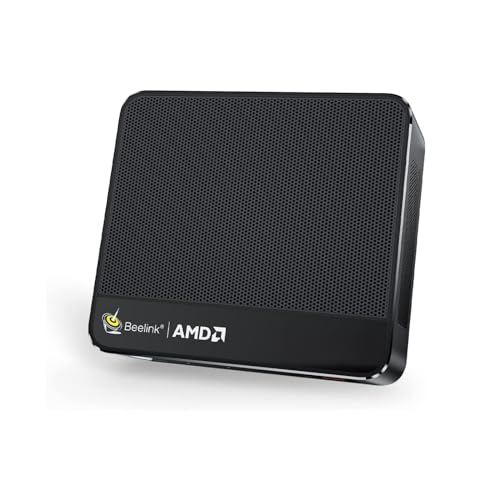
- Best for small spaces overall: Beelink SER5 MAX Mini PC, Ryzen 7 7735HS, Radeon 680M, 24GB RAM, 500GB SSD — Check on Amazon
- Strongest graphics in this guide, on deal only: GMKtec NucBox K6, Ryzen 7 7840HS, Radeon 780M, 32GB DDR5, 1TB SSD — Check on Amazon
- Best fit for a TV shelf: ACEMAGIC Mini Gaming PC, Ryzen 7 7735HS, Radeon 680M, 24GB RAM, 512GB SSD — Check on Amazon
- Best for a monitor-arm desk: GMKtec NucBox M6 Ultra, Ryzen 5 7640HS, Radeon 760M, 16GB DDR5, 512GB SSD — Check on Amazon
- Cheapest entry that can grow later: GMKtec NucBox M6, Ryzen 5 6600H, Radeon 660M, 16GB DDR5, 512GB SSD — Check on Amazon
- Most memory and storage in this guide: GMKtec M5 Plus, Ryzen 7 5825U, 32GB RAM, 1TB SSD — Check on Amazon
Read the full guide ↓
Disclosure: As an Amazon Associate, reviewstook.com earns from qualifying purchases. Links to Amazon on this page are affiliate links; they cost you nothing extra. Listing details such as price and availability change often, so check the current Amazon listing before you buy.
Most “small” gaming PCs are small the way a hatchback is small: smaller than the alternative, still very much a car. This guide’s category is the genuine exception, and it is worth saying so plainly before anything else. Every machine below is under one litre in volume, computed from the dimensions its maker publishes — book-sized boxes that can be screwed to the back of a monitor, laid flat on a media shelf, or tucked into the corner of a desk that already holds too much. If you searched this keyword because your room, not your budget, is the binding constraint, you are in the one corner of PC gaming where the products actually match the promise.
But a small box is not the same thing as a small installation, and that gap is what this guide grades. A sub-litre PC still arrives with an external power brick that needs a home. It still needs cables — power in, one or more displays out, ideally a wired network run — and those cables have to fall somewhere. It still breathes through mesh panels and moves its heat into your room with small, fast fans. And it still has one absolute rule, stated here so nobody learns it from a shutdown: none of these machines belongs inside a sealed cabinet. A closed media-unit door turns any of them into an oven within the hour. The picks are therefore ranked on installation first — where each one can physically live, where its brick goes, how its cables drop, how its heat behaves — and on gaming second, because in a small space the install is the product.
The gaming honesty note is the same one this budget always carries. No new machine in this budget has a discrete graphics card; every pick here games on integrated Radeon graphics built into an AMD laptop-class processor. The resident class is the Radeon 680M — esports and indie titles are its home ground, older AAA games run well at 1080p on medium settings, the newest releases want low settings and upscaling — and the stronger 780M appears exactly once, in a machine that only belongs here when its current price on Amazon sits within this budget. If what you actually want is a real graphics card that happens to fit a small room, that is a different shelf of the store: see Best Compact Gaming PC Under $500 and Best Gaming PC Under $500. If you want a PC that disappears, read on.
In this guide
Quick Picks
In a hurry, or weighing several spots at once? Each row below names a room or a spot and the machine that fits it, with a link to the listing. Volumes are computed from the makers’ published dimensions.
| Spot / buyer type | Pick | Why it fits there | Link |
|---|---|---|---|
| Behind a monitor | Beelink SER5 MAX, Ryzen 7 7735HS, Radeon 680M | Smallest box here at about 0.6 litres, VESA mount in the box — it vanishes entirely | Check on Amazon |
| Open desk corner, best graphics | GMKtec NucBox K6, Ryzen 7 7840HS, Radeon 780M | Strongest integrated graphics in the guide — check price on Amazon and buy only when it sits within this budget | Check on Amazon |
| On a TV shelf | ACEMAGIC Mini Gaming PC, Ryzen 7 7735HS, Radeon 680M | Thin flat slab, triple 4K display support, wired 2.5G LAN for the living room | Check on Amazon |
| Monitor-arm or standing desk | GMKtec NucBox M6 Ultra, Ryzen 5 7640HS, Radeon 760M | VESA bracket included per the maker’s model pages, newest platform here | Check on Amazon |
| Dorm desk, tightest budget | GMKtec NucBox M6, Ryzen 5 6600H, Radeon 660M | Cheapest complete entry, socketed RAM and two SSD slots for later | Check on Amazon |
| Work-and-play corner | GMKtec M5 Plus, Ryzen 7 5825U, 32GB RAM, 1TB SSD | Largest here at about 0.85 litres, but double the memory and storage of rivals | Check on Amazon |
How These Picks Were Chosen
The budget was applied to complete machines only: every pick ships with memory, storage and Windows installed and can be unboxed and played on the same evening. Barebones kits — a case and a processor, with the expensive parts still to buy — were excluded however small they look on a listing, because in a small-spaces guide a kit that arrives unfinished is an installation problem as well as a budget one. Check the current price on Amazon before you buy, since listings change often, and the one pick that fits this budget only on deal is fenced with an explicit walk-away rule in its review.
Size was graded from documents, not impressions. Each pick’s volume is arithmetic on the dimensions its maker publishes — in a manual, on a specification page, or in the listing itself — and those are the only dimension and volume figures printed anywhere in this guide. Nothing has been estimated, borrowed from a sibling model, or rounded into existence. All six picks land between roughly 0.6 and 0.85 litres, which also drew the category line: the ten-to-twenty-litre “compact towers” that wear small-form-factor language in their titles were excluded, because a machine that takes up a tower’s footprint has not solved a small-space problem, whatever its listing says.
Within that size class, four installation questions decided the ranking. Where can it mount or sit — is a VESA mount or bracket documented, and is the slab thin enough for a shallow media shelf? Where does the power brick live, since every pick here runs from an external laptop-style adapter that is part of the real footprint? How do the cables drop — how many displays can it drive, and is there a wired Ethernet port for a fixed installation? And how does it breathe — which faces are vented, and how hard do its fans work under a sustained gaming load? We did not use these products ourselves; we read the maker listings, manuals and specification pages and compared dimensions, processors, integrated graphics, memory construction, ports and listing configurations, favouring listings that print their numbers in full.
Where a Sub-Litre PC Can Actually Live
There are four realistic homes for a machine this size, and each pick below is graded against them. The first is behind the monitor. Two picks document the hardware for it: the Beelink SER5 MAX includes a VESA mount in the box, and the GMKtec M6 Ultra includes a VESA bracket per the maker’s model pages. A behind-monitor install is the only one that takes the PC’s desk footprint to exactly zero — but it is not a zero-planning install. Your monitor needs free VESA holes (some stands occupy them), the cables fall straight down behind the desk and need enough length to reach a power strip and your peripherals, the brick still sits on the desk or floor behind the screen, and the monitor’s own warmth rises into the same air the PC breathes. Leave the PC’s vented faces unobstructed; do not sandwich it flat against a wall.
The second home is the TV shelf. A flat slab like the ACEMAGIC — about 1.61 inches tall — slides into shallow media shelving that would never accept a tower, and its triple 4K display support and wired LAN suit a box that drives a television and stays put. The governing rule of this home is the sealed-cabinet refusal, and it is not negotiable: a media cabinet with a closed door is a heat trap, and every machine in this guide will throttle or shut down inside one. Open shelf, open-backed cabinet, or door-open-while-playing are the only acceptable versions of this install. If your furniture offers nothing but a closed box, the honest answer is to change the furniture plan, not to hope the PC tolerates it.
The third home is the desk itself — a corner, the space beside a monitor stand, the end of a dorm desk. Every pick qualifies by size; the deciding factors become cable tidiness and noise at arm’s length. Small cases cool with small fans, and under sustained load all six are audible in a silent room to some degree; the GMKtec M6, whose own model documentation credits a secondary fan with improving cooling at the cost of noise, is the most audible of the set under heavy load. At living-room distance that same machine fades into the room; at a bedroom desk at midnight, placement — as far from the chair and the bed as the cables allow — is a real part of the purchase.
The fourth home, a wall shelf or the top of a bookcase, suits the socketed machines with a second career in mind — the M5 Plus with its dual wired Ethernet ports is a natural media or home-server box when its gaming years wind down — provided the shelf is open, the brick has its own space beside the box rather than dangling by its cord, and nothing warm (a console, an AV receiver, a router stack) shares the shelf. Heat rises and accumulates at the top of a small room; give the topmost shelf the most air, not the least.
Measure Before You Buy: The Five-Step Checklist
- Measure the spot. Take the actual width, depth and height of the shelf, niche or behind-monitor gap you intend to use, and compare them against the published dimensions in the comparison table below — height included. The tallest slab here is only a few millimetres prouder than its siblings, but a fixed-height niche does not care about “only.”
- Check the ventilation clearance. Identify which faces of your chosen machine are mesh or vented, and plan open air on those faces — a hand’s width of breathing room is a sensible working rule, and no vented face should sit flush against a wall, a book or another device. If the only available spot is a sealed cabinet, stop here: that install is refused for every pick in this guide.
- Give the brick an address. Every pick runs from an external power adapter. Decide before ordering where it will live — floor behind the desk, shelf beside the box, power strip within cord reach — with air around it and no weight hanging from its cable. The box is 0.6 litres; the installation includes the brick, and pretending otherwise is how tidy desks become cable nests.
- Plan the cable drop. Count the runs: power in, display out (one cable for a desk monitor, up to three displays on the multi-screen picks), wired Ethernet if the spot allows it — recommended for any fixed install — and USB for keyboard, mouse and controller receivers. Behind a monitor, cables should fall vertically to the desk, not stretch diagonally; measure that drop and buy cable length accordingly.
- Then order — and confirm what is in the cart. These listing families sell several configurations, and in one case barebones kits, under a single title. The processor, memory and storage shown in the cart are the PC you are buying. Check the price on Amazon at the same moment, and apply the deal rule where a pick carries one: the K6 rule applies in full — only buy it when its current price sits within this guide’s budget.
The 6 Best Small Form Factor Gaming PCs for Small Spaces Under $500
Beelink SER5 MAX Mini PC — Ryzen 7 7735HS, Radeon 680M, 24GB RAM, 500GB SSD
Who it suits: The buyer whose desk has no spare surface at all — this is the machine that stops occupying the desk entirely.
Installation is this pick’s whole argument, so start with the measurement. Beelink’s manual and model listings put the SER5 MAX at 126 × 113 × 42 mm, which works out to about 0.6 litres — the smallest case in this guide — at under two pounds, and a VESA mount is included in the box. Screwed to the back of a monitor, it is the only pick here whose footprint is literally nothing: no shelf, no corner, no visible box, just a power cord and a display cable dropping behind the desk. Its dual-fan cooling breathes through mesh sides, which mount vertically behind a screen without obstruction as long as you do not press the unit flat against a wall — the one placement error this install invites, and an easy one to avoid.
The machine inside the disappearing act is the strongest honest specification genuinely inside this budget in this guide. The Ryzen 7 7735HS is an eight-core processor whose integrated Radeon 680M is the resident graphics class of this budget: esports and indie games are its home ground, older AAA titles play well at 1080p on medium settings, and the newest releases ask for low settings and upscaling. It will not ray-trace a modern showcase or render demanding games natively at 1440p — no pick here will — and its “drives a 4K display” ability is about desktop and video output, not 4K gaming. Check the price on Amazon before you buy: this pick sits near the ceiling of the budget, so confirm the current listing still fits before you order.
- Smallest installation in the guide: about 0.6 litres from published dimensions of 126 × 113 × 42 mm, with a VESA mount included.
- Radeon 680M graphics — the strongest integrated class available genuinely inside this budget without deal-hunting.
- Behind-monitor mounting removes the PC from the room’s sightlines entirely; only the cable drop needs planning.
Honest limitation: The 24GB of memory is LPDDR5 soldered to the board — it can never be upgraded, so the specification you unbox is the final one — and 500GB of storage fills faster than game libraries shrink.
Choose it if your monitor has free VESA holes and you want the full 680M class with zero desk footprint. Skip it if you plan to grow the machine over many years — the socketed picks below have longer futures.

GMKtec NucBox K6 — Ryzen 7 7840HS, Radeon 780M, 32GB DDR5, 1TB SSD
Who it suits: The patient buyer with an open desk corner or shelf — someone who wants the strongest integrated graphics in this class and can give the hardest-working cooling here the airiest spot.
Price discipline comes before placement, because this pick’s place in this guide is conditional. Check the price on Amazon for exactly this 32GB/1TB configuration before you consider it: this is a deal-only pick that belongs here only when its current price sits within this guide’s budget. When it does, it offers the strongest graphics in the guide. When its current price sits above this budget, it belongs to a different guide — do not buy it from this one. The case measures 128.8 × 127 × 47.8 mm by the maker’s figures — about 0.78 litres, roughly 520 grams — fractionally larger than the Beelink above and still far under a litre.
What the deal buys is the Radeon 780M, a clear step above the 680M machines around it, showing its advantage exactly where integrated graphics are weakest: newer, heavier games at 1080p, where it holds settings and smoothness that ask the 680M to compromise. Around the chip sits the fullest specification here — 32GB of DDR5 in two socketed sticks, replaceable or expandable to 64GB, a 1TB PCIe 4.0 SSD, USB4 and dual 2.5-gigabit Ethernet for a wired fixed install. The installation caveat is thermal honesty: the strongest chip in the smallest class of box asks the most of its cooling, and under sustained load its fans are a presence in a quiet room. Grade it as the pick that most needs the checklist’s step two — give it the open corner, not the cramped niche — and it rewards the space with the most performance any sub-litre machine at this budget can offer.
- Radeon 780M graphics that stand a full class clear of every other chip in this guide.
- Socketed 32GB DDR5 beside a 1TB SSD — the richest spec sheet here, and one you can open up and change later.
- About 0.78 litres from published dimensions of 128.8 × 127 × 47.8 mm; dual wired Ethernet suits a permanent install.
Honest limitation: It is a deal-only pick, and whenever its current price on Amazon sits above this guide’s budget this guide’s recommendation lapses — check the price on Amazon before you buy; its stronger chip also makes it the most placement-sensitive cooling here.
Choose it if the current price on Amazon sits within this guide’s budget on the day you buy and you can give it open air. Skip it if you are buying today at whatever it costs, or your only spot is a tight niche — outside this budget, the SER5 MAX is this guide’s answer.

ACEMAGIC Mini Gaming PC — Ryzen 7 7735HS, Radeon 680M, 24GB RAM, 512GB SSD
Who it suits: The living-room buyer whose media shelf is shallow and open — the flattest machine here, shaped for the space under a television.
Two machines can share a processor and suit different rooms, and this is the proof. The ACEMAGIC runs the same Ryzen 7 7735HS and Radeon 680M as the SER5 MAX, so the gaming story is identical and told the same honest way: esports and indie titles at home, older AAA well at 1080p medium, the newest games at low settings with upscaling, and no ray tracing or native 1440p on the menu. What differs is the shape. Its case measures 5.04 × 5.04 × 1.61 inches — about 0.67 litres, at 2.65 pounds — and that 1.61-inch height is the thinnest profile in this guide: a slab that slides onto a media shelf or under a TV stand lip where the chunkier picks would not fit. Triple 4K display support, a 2.5-gigabit LAN port, Wi-Fi 6 and Windows 11 Pro complete a specification aimed at a fixed, wired, multi-screen install.
The shelf rule from the checklist applies with full force: this machine’s natural home is also the category’s classic trap. It belongs on an open shelf or in an open-backed unit, vents breathing; behind a closed cabinet door it will cook, like every pick here. Check the price on Amazon before you buy — this pick offers the full 680M class inside this budget with no deal-waiting required. Two disciplines ride along. Listings in this family carry several variants under one title, so confirm the 7735HS with 24GB and 512GB in the cart before paying; a cheaper variant is a different, weaker PC. And the verified sources do not establish whether this machine’s memory is soldered or socketed, so this guide makes no upgrade claim for it either way — if documented memory upgradeability decides your purchase, the GMKtec picks below carry that evidence.
- Thinnest profile here at 1.61 inches tall — fits shallow media shelving the other slabs cannot.
- Same Ryzen 7 7735HS and Radeon 680M as the guide’s top pick: the full resident graphics class.
- Triple 4K display support and 2.5-gigabit Ethernet suit a wired TV-shelf installation; about 0.67 litres from published dimensions.
Honest limitation: Its memory construction is not established in the verified sources, so no upgrade promise can be made for it; and its ideal habitat, the media unit, is exactly where the sealed-cabinet mistake happens.
Choose it if your open TV shelf is the spot and you want 680M performance there inside this budget today. Skip it if your media furniture is a closed cabinet, or documented memory upgradeability matters to you.

GMKtec NucBox M6 Ultra — Ryzen 5 7640HS, Radeon 760M, 16GB DDR5, 512GB SSD
Who it suits: The monitor-arm and standing-desk buyer — someone who wants a current-generation machine that mounts out of the way, inside this budget.
The M6 Ultra is the second behind-monitor option in this guide: the maker’s model pages include a VESA bracket in the box, and the case is the same published 128.8 × 127 × 47.8 mm as its K6 sibling — about 0.78 litres at barely over a pound — so it rides on the back of a screen as happily as it sits on a desk. What it trades for that convenience is a half-step of graphics. Its Ryzen 5 7640HS is the newest-generation processor here, but its Radeon 760M sits a half-step behind the 680M: the same game classes apply with settings nudged down a notch — esports and indie titles comfortable, older AAA at 1080p medium-to-low, the newest games firmly in low-plus-upscaling territory. In exchange, the platform around the chip is the most modern in the guide: USB4, dual M.2 slots so storage can grow by addition, dual 2.5-gigabit Ethernet and Wi-Fi 6E.
Check the price on Amazon before you buy: this configuration sits inside this budget at its ordinary positioning, with no deal-waiting required. The one warning that matters is configuration discipline. The same listing family carries a 32GB variant positioned well above this budget. The in-budget claim belongs to the 16GB/512GB configuration only, and the variant in the cart is the purchase, because the product title will not check it for you. Sixteen gigabytes is also the honest floor for a gaming machine in this class rather than a comfortable allotment; treat it as the specification you are buying, with the second M.2 slot as the planned growth path. Judged as a mountable, current-platform machine that sits inside this budget without a deal, it earns its place; judged as a 680M rival, it is not one, and this guide will not pretend otherwise.
- VESA bracket included per the maker’s model pages — the second true behind-monitor install here.
- Newest processor generation in the guide, with USB4 and two M.2 slots for storage growth.
- This configuration sits inside this budget without waiting for a sale — check price on Amazon; about 0.78 litres from published dimensions.
Honest limitation: The 760M trails the 680M picks by a half-step, 16GB is a floor rather than a comfort, and the 32GB sibling in the same listing family sits well above this budget — the configuration sitting in your cart is the whole decision.
Choose it if you want a current platform mounted behind a screen inside this budget, and your games are esports, indie and older titles. Skip it if newer AAA games are your library — for you, the 680M machines above are the stronger picks.

GMKtec NucBox M6 — Ryzen 5 6600H, Radeon 660M, 16GB DDR5, 512GB SSD
Who it suits: The dorm-desk buyer with the firmest budget — cheapest honest entry here, with slots and sockets for later, placed where its fan noise bothers nobody.
Start with the placement grading, because it decides this pick’s room. The case is about 5 by 5 by 2 inches — the maker’s manual gives 12.8 × 12.7 × 4.8 cm, roughly 0.78 litres — small enough for any desk corner or shelf. But the maker’s own model documentation credits this machine’s secondary fan with improving cooling at the cost of noise under heavy load, which makes it, on that evidence, the most audible mini PC in this guide when games push it. On a living-room shelf at viewing distance that is nothing; on a dorm desk a metre from a bed, it argues for the far corner of the desk and a pair of headphones. Placement is part of the specification, and this is the pick where it matters most.
The specification it places is modest today and open-ended tomorrow. The Ryzen 5 6600H’s Radeon 660M is roughly two-thirds of the idea of a 680M — esports, indie games and the back catalogue at 1080p with sensible settings, not this year’s heaviest releases. It is positioned as the budget-tier complete entry here by a wide margin — check the price on Amazon for the 16GB configuration before you buy. The future is written in its construction — the 16GB of DDR5 sits in SO-DIMM sockets and can be doubled, two SSD slots let storage grow by addition, and USB4 leaves the door open to fast external storage. Two disciplines apply. This model is also sold in barebones form on related listings, and the listing that looks too good usually is the kit with no memory, no SSD and no Windows; the complete 16GB configuration is the one described here. And buy it as the platform it is: if your games are new and heavy today, its graphics will disappoint you today, and no memory upgrade changes that.
- Memory in sockets and two SSD slots make this the one machine here built to be opened and grown.
- The budget-tier way in — check price on Amazon for the complete configuration.
- About 0.78 litres from the maker’s published 12.8 × 12.7 × 4.8 cm — fits any corner it is given.
Honest limitation: The Radeon 660M is the second-weakest graphics here, its secondary fan makes it the most audible pick under load, and barebones versions of this model circulate on related listings — confirm you are buying the complete PC.
Choose it if your budget is firm, your games are light, and you can place it away from where you sleep. Skip it if you want the strongest gaming you can get today — that is the SER5 MAX, or the K6 on deal.

GMKtec M5 Plus — Ryzen 7 5825U, 32GB RAM, 1TB SSD
Who it suits: The buyer furnishing a work-and-play corner or a utility shelf — the most computer in this guide, for a spot with a wired network drop and a second career in its future.
The measurement first, because this pick teaches why step one of the checklist exists. Published dimensions of 128 × 127 × 52 mm work out to about 0.85 litres — the largest case in this guide, and its extra height over its 47.8 mm siblings is exactly the sort of difference a fixed-height niche refuses to forgive. Measure the shelf; if it clears, what the space gets is the capacity bargain of the guide: 32GB of memory and a 1TB SSD — double the memory and storage of several machines here — so check the price on Amazon before you buy. The 32GB of DDR4 sits in sockets and can grow to 64GB, a second M.2 slot waits for more storage, and dual 2.5-gigabit Ethernet ports plus triple 4K display support make it a natural home server or media box when its gaming years wind down.
The limitation leads the gaming discussion, as it should: the Ryzen 7 5825U carries older Vega-class integrated graphics, the weakest in this guide by a clear margin. Esports and older games at sensible settings, yes; anything recent and demanding only with settings and expectations lowered together. If gaming is the whole purpose of the purchase, buy the SER5 MAX instead. But judged as a small computer that also games — for a corner desk that works all day, or a shelf that will end its life as the household’s server — its arithmetic is hard to argue with, and it closes this list because it answers a slightly different search better than anything else here: a lot of small computer, honestly labelled games, inside this budget.
- A 1TB SSD and 32GB of socketed memory in this budget tier — nobody else in this guide doubles up like that.
- Twin 2.5-gigabit Ethernet ports and a spare SSD slot set it up for an honest second life as a home server.
- About 0.85 litres from published dimensions of 128 × 127 × 52 mm — still under a litre, still shelf-sized.
Honest limitation: The weakest graphics in this guide — older Vega-class integrated graphics that cap it at esports, older titles and lowered settings in anything newer — and the tallest slab here, so its niche must be measured, not assumed.
Choose it if the machine’s weekday workload counts for as much as its gaming and your game library is a light one. Skip it if gaming is the point of the purchase — all five picks above it are better at it.

Comparison Table
| Product | Published dimensions | Volume | Mounting | Graphics | Best spot | Link |
|---|---|---|---|---|---|---|
| Beelink SER5 MAX | 126 × 113 × 42 mm | ≈ 0.6 L | VESA mount included | Radeon 680M | Behind a monitor | Check on Amazon |
| GMKtec NucBox K6 | 128.8 × 127 × 47.8 mm | ≈ 0.78 L | Desk or shelf | Radeon 780M | Open desk corner — deal only | Check on Amazon |
| ACEMAGIC Mini Gaming PC | 5.04 × 5.04 × 1.61 in | ≈ 0.67 L | Flat slab | Radeon 680M | Open TV shelf | Check on Amazon |
| GMKtec NucBox M6 Ultra | 128.8 × 127 × 47.8 mm | ≈ 0.78 L | VESA bracket included | Radeon 760M | Behind a monitor | Check on Amazon |
| GMKtec NucBox M6 | 12.8 × 12.7 × 4.8 cm | ≈ 0.78 L | Desk or shelf | Radeon 660M | Far corner of the desk | Check on Amazon |
| GMKtec M5 Plus | 128 × 127 × 52 mm | ≈ 0.85 L | Desk or shelf | Radeon Vega-class | Work corner or utility shelf | Check on Amazon |
How to Choose a Small Form Factor Gaming PC for a Small Space
- Measure the spot before the machine. Width, depth and height of the actual shelf, niche or behind-monitor gap, compared against the published dimensions in the table above. In this category a few millimetres of height is the difference between fits and does not.
- Decide the home first: mount, shelf or desk. Behind a monitor means the SER5 MAX or the M6 Ultra and a screen with free VESA holes. A TV shelf means the flat ACEMAGIC and an open front. A desk corner means any pick — graded by noise at arm’s length.
- Refuse the sealed cabinet outright. No pick in this guide survives a closed door. If the furniture is sealed, change the furniture plan or the room, not the PC’s chances.
- Choose the graphics class knowing it cannot change. The ladder runs 780M (deal only), then 680M, 760M, 660M and finally Vega — because in a machine with integrated graphics the processor you pick is the graphics you keep for its whole life, and that outranks every other line on the specification sheet.
- Apply the walk-away rule to the deal pick. The K6 earns its place here only while its current price on Amazon sits within this guide’s budget — above that, it is simply out. Check the price on Amazon before you buy; if it sits above this budget, buy the SER5 MAX instead.
- Plan the brick and the cable drop as part of the installation. Every pick needs an external adapter with air around it and cables long enough to fall, not stretch. A longer display cable and a power strip bought now are cheaper than a re-install later.
- Match the machine to the room’s ears and air. Small fans are audible under load in a silent bedroom and invisible at living-room distance; heat accumulates at the top of small rooms and inside shared shelves. Where it will live is a specification too.
- Confirm the exact variant in the cart. One title in these families can hide several configurations, barebones kits among them. What the cart shows — processor, memory, storage — is the PC arriving at your door; the listing title promises nothing.
Common Buying Mistakes
- Sealing a sub-litre PC inside a closed media cabinet. Small cases live on airflow; the fans will announce the mistake first, and a thermal shutdown will finish the sentence.
- Measuring the box and forgetting the brick. The PC is 0.6 litres; the installation is the box plus its external adapter plus the cables, and all three need somewhere to be.
- Assuming every slab fits every niche. The tallest pick here stands about 4 mm prouder than its siblings — nothing, until a fixed shelf height makes it everything.
- Pushing a mesh-sided case flush against a wall, a row of books or another warm device. Vented faces blocked are vents removed; leave the breathing room the checklist asks for.
- Stacking a mini PC on top of a games console or AV receiver. Shared shelves pool heat, and the machine on top drinks the machine below’s exhaust.
- Buying the K6 above this budget because a guide listed it. Its place here depends on its current price on Amazon sitting within this guide’s budget, with a walk-away rule; above this budget it belongs to a different guide.
- Buying a barebones kit by mistake. A listing that looks far cheaper than the field usually means no memory, no SSD and no Windows, and the cost of completing it lands on you in the parts market least friendly to buyers right now.
- Reading “4K” in a mini PC title as gaming performance. A 4K desktop and 4K video are easy for these machines; a demanding game still renders at 1080p-class settings chosen for integrated graphics.
Final Recommendation
- Most small-space buyers: Beelink SER5 MAX — the full 680M class, mounted behind the monitor, footprint zero.
- Best graphics, if the deal is live: GMKtec NucBox K6 — check price on Amazon, buy only when it sits within this budget, walk away above it, and give it open air.
- Open TV shelf: ACEMAGIC Mini Gaming PC — the thinnest slab here, wired and multi-screen ready.
- Monitor-arm desks, no deal needed: GMKtec NucBox M6 Ultra.
- Tightest budget, longest future: GMKtec NucBox M6 — placed away from the bed.
- Capacity and second careers: GMKtec M5 Plus.
Our top two for this search are the Beelink SER5 MAX, because it solves the small-space problem completely — strongest honest graphics class at this budget, in the smallest box here, with the mount included to make it disappear — and the GMKtec NucBox K6, which, when its current price on Amazon sits within this budget, is the most graphics this budget has held in a box this size, provided the current price is the one that earned it this place and the spot you give it breathes. Between them they cover the two shapes this search takes: mount it and forget it, or wait for the deal and buy the ceiling. First-time buyers working through the same rooms have a dedicated guide in Best Small Form Factor Gaming PC For Beginners Under $500, anyone whose budget stretches further will find the category widen at Best Small Form Factor Gaming PC Under $700, and tighter budgets and smaller spots are covered by Best Small Form Factor Gaming PC For Small Spaces Under $400. Measure the spot, check the clearance, give the brick an address, plan the cable drop — then order.
Frequently Asked Questions
Can I put one of these PCs inside a TV cabinet?
Only if the cabinet is open-backed or the door stays open while you play. Inside a sealed cabinet, no — and this guide refuses that install for every pick, without exception. Sub-litre cases move heat with small fans and mesh panels; a closed door traps that heat around the machine until it throttles or shuts down. An open shelf, a shelf with the back panel removed, or a behind-monitor mount are the honest alternatives.
Which pick actually disappears?
The Beelink SER5 MAX. It is the smallest box here — about 0.6 litres from published dimensions of 126 × 113 × 42 mm — and its VESA mount is included, so it screws to the back of a monitor and leaves only a power cord and a display cable dropping behind the desk. The GMKtec M6 Ultra is the other documented mount: its maker includes a VESA bracket per its model pages. For both, confirm your monitor’s VESA holes are free; some stands occupy them.
Where does the power brick go?
Every pick in this guide runs from an external, laptop-style power adapter, so the brick is part of the installation whether the product photos show it or not. Give it a deliberate home — the floor behind the desk, the shelf beside the box, a power strip within comfortable cord reach — with air around it and no weight hanging from its cable. Do not bury it in a cable nest or under carpet; adapters warm up in normal use and need to breathe like the PCs they feed.
Will a mini PC heat up a small room?
Less than any tower would. These machines draw laptop-class power — tens of watts in ordinary use — so the heat they add to a room is modest. Under a sustained gaming load it is real, though: a small, closed bedroom will warm over a long session, and heat pools at the top of the room and inside shared shelves. Position the exhaust away from where you sit or sleep, keep the vented faces clear, and do not stack the PC on other warm electronics.
How much clearance do the vents need?
No maker in this guide publishes a formal clearance figure, so treat this as placement guidance rather than a specification: keep every mesh or vented face unobstructed, with roughly a hand’s width of open air where the layout allows, and never press a vented face flush against a wall or furniture. Behind a monitor, that means the unit mounts on its bracket with its sides breathing — not sandwiched between the screen and a wall.
Can these machines run games on a 4K TV?
They can drive the TV — the ACEMAGIC and the M5 Plus each support three 4K displays — but driving a display and rendering a game are different jobs. Desktops, video and interfaces run at 4K happily; games render at 1080p-class settings matched to integrated graphics and the TV upscales the picture. That distinction is exactly why the living-room picks here are graded on their display support and their shape, not on a “4K gaming” headline.
Will one of these work as a streaming box in a small setup?
Yes, within the same honest limits: the 680M and 780M machines handle game-plus-stream duties in the lighter game classes they are already graded for, and their tiny footprint is a genuine asset in a cramped streaming corner. The dedicated treatment, including encoder choices per pick, is at Best Small Form Factor Gaming PC For Streaming Under $500, and neighbouring shelves for the same rooms are at Best Mini Gaming PC Under $500.
- Best Small Form Factor Gaming PC Under $500
- Best Small Form Factor Gaming PC Under $400
- Best Small Form Factor Gaming PC Under $700
- Best Small Form Factor Gaming PC For Small Spaces Under $700
- Best Small Form Factor Gaming PC For Beginners Under $500
- Best Small Form Factor Gaming PC For Streaming Under $500
- Best Small Form Factor Gaming PC For 1440p Gaming Under $500
- Best Mini Gaming PC Under $500
- Best Mini PC Under $500
- Best Budget Gaming PC Under $500


