
Where to buy
Check the latest price, availability and delivery on Amazon. Orders are placed on Amazon. We may earn a commission from qualifying purchases.
- Best overall small form factor gaming PC for a 1440p desk: GMKtec NucBox K8 Plus, Ryzen 7 8845HS, Radeon 780M, 32GB, 1TB, native OCuLink — Check on Amazon
- Beelink SER8, Ryzen 7 8745HS, Radeon 780M, 32GB, 1TB — Check on Amazon
- GMKtec NucBox K11, Ryzen 9 8945HS, Radeon 780M, 32GB, 1TB, front OCuLink — Check on Amazon
- AOOSTAR GEM12+ PRO Barebone, Ryzen 7 PRO 8845HS, Radeon 780M, native OCuLink — Check on Amazon
- Minisforum UM890 Pro Barebone, Ryzen 9 8945HS, Radeon 780M — Check on Amazon
See 1 more Amazon option
- Minisforum UM880 Plus Barebone, Ryzen 7 8845HS, Radeon 780M — Check on Amazon
Read the full guide ↓
Disclosure: As an Amazon Associate, reviewstook.com earns from qualifying purchases. Links to Amazon on this page are affiliate links; they cost you nothing extra. Listing details such as price and availability change often, so check the current Amazon listing before you buy.
Start with the sentence this whole guide hangs on: every PC below can put a picture on a 1440p monitor, and not one of them renders demanding modern games at 1440p. Those are two different jobs, and listings blur them on purpose. Displaying 2560×1440 means the machine can drive the panel — all six picks do that easily, over HDMI or DisplayPort, and will run a crisp 1440p desktop all day. Rendering a game at 2560×1440 means computing roughly 3.7 million pixels per frame instead of 1080p’s roughly 2.1 million — about 78% more work on every frame — and the integrated graphics inside every machine here, AMD’s Radeon 780M, is a 1080p-class renderer. What these PCs honestly deliver on a 1440p screen is a 1080p-class render, cleaned up and scaled to fill the panel by AMD’s FSR upscaling. In esports titles, indie games and older releases that looks genuinely good. In a heavy new release it is a compromise to choose knowingly, not discover after checkout.
So why does this guide exist? Because there are two honest ways to shop this search. The first is to accept the upscaled picture, in exchange for a gaming PC between 0.81 and 1.10 liters that hides behind the very monitor it feeds — for many rooms, the right trade. The second is to buy a pick with a proper OCuLink port as stage one of a two-stage purchase: mini PC now, desktop card on a dock later, at a substantial extra cost set out in the open and never folded into the $800 headline. What this guide will not do is call the first option native 1440p, or let the second option’s port pose as a graphics card. A full-size tower with a desktop RTX 4060 — a card that does render at 1440p — has appeared on Amazon inside this budget — check the current price on Amazon — and is named in its own section below.
In this guide
Quick Picks
Short on time, or comparing several options at once? Each row below names a buyer type and the machine that suits it, with this angle’s grading in plain terms: what the pick actually does with a 1440p screen.
| Buyer type | Pick | Honest 1440p verdict | Why it stands out | Link |
|---|---|---|---|---|
| Best overall | GMKtec NucBox K8 Plus (complete, 32GB/1TB) | Renders at 1080p class, FSR-upscaled to the panel; dock route to real 1440p later | Native OCuLink, socketed RAM to 96GB — check price on Amazon | Check on Amazon |
| Quietest upscaled-1440p setup | Beelink SER8 (8745HS, 32GB/1TB) | Renders at 1080p class, upscaled — and that is its permanent ceiling | Measured around 32 dBA under load; the smallest complete box here | Check on Amazon |
| Strongest 780M render (buy on sale) | GMKtec NucBox K11 (8945HS, 32GB/1TB) | Fastest tune of the same GPU; still an upscaled picture in heavy games | Reviewers measured its 780M up to 15% faster than rival systems — check the current price on Amazon | Check on Amazon |
| Best foundation for real 1440p later | AOOSTAR GEM12+ PRO Barebone | Upscaled today; the cleanest dock foundation when you add a desktop card | Native OCuLink on its own channel — it never costs you an SSD slot | Check on Amazon |
| Most expandable barebone | Minisforum UM890 Pro Barebone | Upscaled today; dock route exists but charges one M.2 slot | Two M.2 slots, dual USB4, RAM to 96GB; completes at the upper end of this budget once parts are added | Check on Amazon |
| Smallest barebone | Minisforum UM880 Plus Barebone | Upscaled today; dock route runs through an adapter board | Low kit positioning in this tier; wins when you already own DDR5 and an SSD | Check on Amazon |
How These Picks Were Chosen
The first filter was the tape measure, because “small form factor” is a claim about volume. Every pick’s size was computed from its maker’s published dimensions, and the surviving field sits between about 0.81 and 1.10 liters. That arithmetic excluded some famous names: the current ZOTAC MEK line measures roughly 38 liters despite its compact styling, and console-sized discrete-GPU machines such as MSI’s Trident series and ASUS’s ROG G22CH could not be verified on Amazon at or under $800. The one discrete-GPU mini with a verified Amazon presence, Minisforum’s AtomMan G7 Pt (mobile Radeon RX 7600M XT, roughly 2.7 liters), sits above this budget — it belongs to the $1,200 guides. A new mini-ITX build is equally out of reach: memory and SSD prices have risen sharply in the shortage, and a new RTX 4060 alone takes a large share of this budget.
The second filter was this angle’s grading rule, applied without exceptions: a pick earns a native-1440p claim only where its silicon honestly renders there. All six picks carry the same graphics — AMD’s Radeon 780M integrated GPU on Ryzen 8000-series processors, fed by 32GB of dual-channel memory in the complete machines. Shared memory matters here: the 780M’s texture space is carved out of system RAM, and upscaling cannot rebuild texture detail the memory budget never held. Reviewer consensus for this GPU class is consistent, and this guide adopts it as its ceiling: strong native rendering at 1080p in esports and lighter titles, native 1440p only in the lightest and oldest games at reduced settings, demanding modern titles rendered at 1080p class or below and upscaled. We make no per-game frame-rate claims, because we did not test them.
Two upscaler rules follow from the hardware. The 780M is Radeon silicon with no Tensor cores, so NVIDIA’s DLSS is not available on any pick here — not as a setting, not as a fallback — and any listing implying otherwise describes a different machine. The upscaler these PCs use is AMD’s FSR, credited in general terms only: the base research documents no FSR internal-resolution figures for this set, so none are printed, and no figure belonging to another upscaler is attached to it. Where DLSS figures appear later, they belong to the desktop RTX 4060 in the dock and tower sections — hardware that genuinely carries Tensor cores — and are labelled as that card’s, never these picks’.
The third filter was honest totals. Three of the picks arrive complete — memory, storage and Windows in the box. Three are barebones — chassis, board and processor only — and their reviews describe a completed build using a completion kit of 32GB of DDR5-5600 SO-DIMM memory and a 1TB PCIe 4.0 SSD. That completion cost is the most volatile part of any total in this guide: memory pricing in the current shortage can move sharply, and a single DDR5 SO-DIMM stick can cost far more than buyers expect. Several picks also carry an explicit buy-at rule, because prices here swing weekly with the shortage — check price on Amazon before judging any of them. We did not use these PCs ourselves; we worked from maker listings, specification pages, manuals and reviewer measurements.
The 6 Best Small Form Factor Gaming PCs for a 1440p Monitor Under $800
GMKtec NucBox K8 Plus (Complete, 32GB/1TB) — Best Overall
Who it suits: The buyer with a 1440p monitor and a small desk who wants a finished machine today and the strongest documented route to genuine 1440p rendering tomorrow.
Grade the K8 Plus on this angle in two halves. As it ships, it is the complete version of the tier’s standard specification: a Ryzen 7 8845HS with Radeon 780M graphics, 32GB of DDR5 in two SO-DIMM slots (upgradeable to 96GB), a 1TB PCIe 4.0 SSD with a second M.2 slot free, dual 2.5GbE, dual USB4, HDMI 2.1 and DisplayPort 2.1, Wi-Fi 6 and Windows 11 Pro, in a body of 132.08 × 127 × 58.42 mm — about 0.98 liters. On a 1440p panel that means the honest tier verdict: esports and lighter games rendered natively or near it, demanding games rendered at 1080p class and presented through FSR upscaling, with the 32GB dual-channel memory giving the shared-memory GPU its full working room. The second half is the port on the back: OCuLink, fitted natively — a real PCIe connection to an external graphics dock, and the reason this is the only complete pick that can later borrow a desktop card and render at 1440p the native way. GMKtec states the port is not hot-pluggable, so the dock connects with the machine off; the full cost of that route is set out in its own section below.
On price, this listing has lived a double life in the shortage market, swinging between the middle of this budget and well above it. Check the current price on Amazon, and apply the rule at full strength — when it sits inside the under-$800 budget, buy it; above that, wait for the dip its own history says will come.
- Native OCuLink — the only complete pick with a real path to native-1440p rendering later.
- 32GB socketed DDR5 (to 96GB) feeding the shared-memory GPU, plus a free second M.2 slot.
- HDMI 2.1 and DisplayPort 2.1 outputs documented — it drives a 1440p panel without adapters or guesswork.
Honest limitation: As shipped, it upscales to 1440p rather than rendering there in demanding games, and its price is volatile, with sharp spikes above this budget recorded against much lower positioning inside it. The dock route that fixes the first point costs substantially more.
Choose it if you want the finished machine now and the dock option kept open, with its extra cost understood up front. Skip it if the listing is sitting at its spike, or if native 1440p rendering is a day-one requirement — that requirement points at the tower section below.

Beelink SER8 (Ryzen 7 8745HS, 32GB/1TB) — Quietest Upscaled-1440p Setup
Who it suits: The living-room or shared-room buyer whose 1440p screen is a television or a desk monitor in a quiet house, and who accepts the upscaled picture as the final arrangement rather than a stage.
The SER8 is the smallest complete machine here — 134.87 × 134.87 × 44.7 mm, about 0.81 liters, a flat slab that slides into a TV stand shelf or under a monitor riser — and the quietest: reviewers measured roughly 32 dBA at about 18 inches under sustained load, with one respected roundup recording its fan noise called the best of any mini PC the tester had tried. For this angle that acoustic profile is not a footnote: an upscaled-1440p setup is settled, long-session gaming, and the SER8 is engineered to be forgotten while it works. Its outputs are documented and sufficient: HDMI 2.1, DisplayPort 1.4 and USB4 will all drive a 1440p panel, and every socket is driven by the same integrated graphics, so there is no wrong-port trap of the kind tower owners meet — whichever cable you plug in, the 780M is behind it.
The specification is the tier standard done cleanly: Ryzen 7 8745HS, Radeon 780M, 32GB of DDR5 upgradeable to 64GB, a 1TB PCIe 4.0 SSD with a second M.2 slot, 2.5GbE and Windows 11 Pro. Its 1440p grade matches every other pick’s — render at 1080p class, upscale with FSR, native rendering only in light titles — with one structural difference that decides this review: no OCuLink port means no dock route, and the 780M is this machine’s graphics for life. It also has no VESA mount in the box, and reviewers have reported Wi-Fi dropouts traced to the internal antenna arrangement inside the metal case, for which Beelink has offered updated antennas. Price needs the same discipline: the 32GB/1TB configuration has often sat above this budget, while the 24GB configuration has sat closer to its top. Check price on Amazon and buy only a configuration showing inside the under-$800 budget — and note the 24GB version leaves the shared-memory GPU less total room than the 32GB machines, which matters more, not less, when upscaling is the plan.
- Smallest complete pick at about 0.81 L, and measured around 32 dBA — the living-room-quiet option.
- Documented HDMI 2.1 and DisplayPort 1.4 outputs; every port is iGPU-driven, so cabling cannot go wrong.
- Full tier-standard specification with nothing sealed: RAM to 64GB, second M.2 slot.
Honest limitation: No OCuLink means no route past the 780M, ever — its upscaled 1440p is a ceiling, not a stage. The 32GB configuration has often sat above budget: a buy-only-inside-the-under-$800-budget pick — check the current price on Amazon.
Choose it if silence, size and a settled upscaled picture are the whole brief. Skip it if you can already see yourself wanting a dock, or the only configuration inside the budget is the 24GB one and your games are texture-heavy.

GMKtec NucBox K11 (Ryzen 9 8945HS, 32GB/1TB) — Strongest 780M Render, Buy on Sale
Who it suits: The patient bargain-hunter who wants every frame integrated graphics can honestly produce on the way to a 1440p panel, and who will watch a listing until it dips.
The K11 shares its chassis with the K8 Plus — the same 132.08 × 127 × 58.42 mm, about 0.98 liters — and fills it with a Ryzen 9 8945HS run at a higher power budget. That budget is this angle’s one genuine rendering variable: reviewers measured the K11’s 780M running up to 15% faster than rival systems carrying the identical GPU. Fifteen percent is worth having — headroom that holds an upscaled picture steadier where upscaling struggles — but graded honestly, a 15% faster 1080p-class renderer is still a 1080p-class renderer; it converts no demanding game from upscaled to native at 1440p. What it buys is the best version of this tier’s standard picture, plus a front-mounted OCuLink port keeping the K8 Plus’s dock route, alongside dual USB4, dual 2.5GbE, HDMI 2.1 and DisplayPort 2.1, Wi-Fi 6 and Windows 11 Pro. Memory and storage match the class standard: 32GB of dual-channel DDR5 to 96GB, a 1TB PCIe 4.0 SSD and a second M.2 slot.
The trades are the ones the base guide documents, and they bite harder in a long-session setup. The power budget that buys the tune buys noise with it — measured fan noise runs about 36 to 39 dB(A) under load against the SER8’s roughly 32 — and owners have reported high temperatures in the 65W performance mode on factory thermal paste. The RGB lighting ring cannot be turned off, which rules it out of some bedrooms outright, and there is no VESA mount. Then the price, which is why the warning sits in this pick’s title: its positioning swings widely, from an attractive sale position inside this budget to well above it. Check the current price on Amazon. When it dips, it is arguably the best value in this guide; when it sits well above the budget, it is the worst purchase here. Buy the dip inside the under-$800 budget, never well above it.
- The hardest-running 780M here — reviewers measured up to 15% over rival systems carrying the same GPU.
- Front OCuLink plus dual USB4 and dual 2.5GbE: the fullest port set in the guide.
- Strongest rendering value in this tier when its price dips — check price on Amazon.
Honest limitation: The faster tune does not change its class — demanding games still reach the 1440p panel upscaled. Its price has swung from an attractive sale position to well above this budget, it runs audibly louder than the SER8, and its RGB ring cannot be switched off.
Choose it if you will genuinely wait for the sale and want maximum pace from integrated graphics. Skip it if you need to buy today at whatever price is showing — check the current price on Amazon first, and note the K8 Plus is the same route without the vigil.
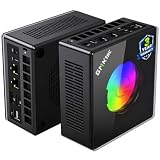
AOOSTAR GEM12+ PRO Barebone — Best Foundation for Real 1440p Later
Who it suits: The builder whose actual goal is native-class 1440p rendering from a sub-liter desk footprint, and who understands that goal is reached in two purchases, not one.
On this angle, the GEM12+ PRO’s architecture is the story. The machine itself — 130 × 130 × 60 mm, about 1.01 liters, aluminum body — ships as a barebone around a Ryzen 7 PRO 8845HS: the same Radeon 780M as every other pick, so its day-one 1440p grade is the tier standard, a 1080p-class render upscaled through FSR. What separates it is how its OCuLink port is wired: on its own independent channel. It does not occupy an M.2 slot, shares no lane with storage, and both of the machine’s two M.2 2280 PCIe 4.0 slots stay free for SSDs with a dock attached or not. When the second purchase happens — the dock and desktop card covered in the invoice section below — this is the foundation that asks for no compromises in return. The rest of the platform supports the plan: two DDR5-5600 SO-DIMM slots, dual USB4, dual Intel 2.5GbE, HDMI 2.1 and DisplayPort output, Wi-Fi 6, and BIOS power modes up to 70W for buyers who want the harder tune in the meantime.
The arithmetic comes first, because it is a barebone: the kit sits at the lower end of this tier on Amazon — check price on Amazon — and completing it with 32GB of DDR5 and a 1TB SSD still lands comfortably inside this budget, plus an operating system if you do not already own a Windows licence, which that total excludes. Even completed, it is among the most affordable native-OCuLink machines here. The honest debits are about polish rather than platform: the 2.68-inch status screen’s control software draws complaints from owners, the driver bundle is disorganized, and at least one Amazon buyer in reviewer roundups reported receiving a previously opened unit sold as new — check the seals on delivery and use the return window if they are broken.
- OCuLink wired to its own independent channel — a dock never takes one of the two M.2 slots.
- Among the most affordable completed routes here to the dock foundation, before an OS.
- A status screen and fingerprint reader up top, plus BIOS power modes to 70W for buyers who tinker.
Honest limitation: Barebone — the kit price buys no RAM, no SSD and no operating system, and until the dock arrives its 1440p picture is the same upscaled one as every pick here. The screen software and driver bundle are the rough edges owners report.
Choose it if the dock is a plan with a date on it, not a daydream. Skip it if you want a machine that games the evening it arrives — that is the K8 Plus — or if the dock might never happen, in which case its one structural advantage never gets used.

Minisforum UM890 Pro Barebone — Most Expandable Barebone
Who it suits: The upgrader whose small PC is a platform — maximum memory, two fast SSDs, four displays on the desk — and who reads the fine print on the dock route before celebrating it.
The UM890 Pro is the largest pick here at roughly 130 × 127 × 66.6 mm, about 1.10 liters, and it spends the extra height on headroom. Its Ryzen 9 8945HS drives the 780M at the top of the class’s clock range; its two SO-DIMM slots take DDR5 to 96GB; its two M.2 PCIe 4.0 slots take serious storage; and its output set — dual USB4 with power delivery in, dual 2.5GbE, quad-display output, Wi-Fi 6E — is the most complete in the guide. That gives it a genuine distinction on this angle: a multi-monitor desk where the 1440p panel is the gaming screen and the others carry everything else, all driven by the one integrated GPU. Its gaming grade at that panel is the tier standard — 1080p-class rendering, FSR upscaling, native only in light titles — because the silicon is the same 780M as everywhere else here. The barebone sits in the middle of this budget — check price on Amazon; add a memory-and-storage kit and it completes near the top of this budget, plus an operating system if you need one. The factory-complete version of the same machine generally sits over this budget, which makes the barebone close to the only way into this platform under $800.
The fine print is the guide’s most important one. This machine’s OCuLink connection runs through an included M.2-to-OCuLink adapter plate, and fitting it consumes one of the two M.2 slots — the dock path costs half the internal storage expansion, a real architectural tax the GEM12+ PRO does not charge, and the reason that machine, not this one, is the dock pick despite this one’s stronger sheet elsewhere. Reviewer measurements also put its fan at roughly 43 dB in performance mode, the loudest figure here, which matters for a machine sitting within arm’s reach of the screen it feeds.
- The most headroom in the guide: memory to 96GB, twin PCIe 4.0 M.2 slots, dual USB4 with power delivery in.
- Quad-display output — a real multi-monitor desk around the 1440p gaming panel.
- Completes near the top of this budget, under a complete version that generally sits above it.
Honest limitation: OCuLink arrives via an M.2 adapter that consumes one of the two SSD slots, performance mode is the loudest here at roughly 43 dB measured, and its 1440p gaming grade is the same upscaled standard as every pick — the expansion is in everything except the GPU.
Choose it if your expansion plans are memory, storage and monitors. Skip it if expansion means a dock — the GEM12+ PRO’s native port is the sounder foundation.
Minisforum UM880 Plus Barebone — Smallest Barebone, for Parts Owners
Who it suits: The buyer with DDR5 SO-DIMMs and an NVMe drive already in a drawer — spares from a laptop upgrade or a previous mini — who wants the smallest possible chassis to put them in behind a 1440p monitor.
At 130 × 126.5 × 50.4 mm, about 0.83 liters and roughly two-thirds of a kilogram, the UM880 Plus is nearly as small as the SER8 while remaining fully socketed: Ryzen 7 8845HS, 780M graphics, two DDR5 SO-DIMM slots to 96GB, two M.2 2280 PCIe 4.0 slots, USB4, 2.5GbE and Wi-Fi 6E. Behind a monitor it effectively disappears, and its 1440p grade is — the sentence writes itself by now — the tier standard: the 780M renders at 1080p class, FSR presents it on the panel, light titles render higher. The kit sits at the low end of this tier — check the current price on Amazon — the cheapest entry ticket here by a wide margin. For the parts owner, the completed machine costs the kit plus an evening’s assembly, and nothing touches that value.
For everyone else, this review carries the guide’s most useful warning, and market surveys of this exact barebone supply the proof: completing the kit with a new 32GB DDR5 kit and a 1TB NVMe drive at shortage prices has totalled well above this budget — and above the complete version of the same machine — a clear penalty for building it yourself, in a market where even a single memory stick can be strikingly expensive. A kit price is not a computer price, and shortage markets can turn the comparison upside down. Its OCuLink carries the same caution in miniature: it arrives through an adapter board rather than a native port — workable, but not the equal of the GEM12+ PRO’s implementation, and on this angle that matters because the dock is the only road from this chassis to native-class 1440p rendering. Bought for the right reason — parts already in the drawer, or parts caught on a genuine sale — it is the smallest bargain here. Bought on the assumption that barebone always means cheaper, it can end up the most expensive pick in the guide.
- The smallest fully socketed box in the guide at about 0.83 L; the kit sits at the low end of this tier.
- Nothing essential was cut for the size: memory to 96GB, two M.2 slots, USB4, Wi-Fi 6E.
- Nothing here matches its value when the memory and SSD are already yours.
Honest limitation: With new parts at shortage prices, a surveyed completion of this kit totalled well above the complete machine — and its OCuLink runs through an adapter board, not a native port, so even its road to real 1440p rendering is second-best.
Choose it if the parts are already yours, or you can catch them on a genuine dip. Skip it if your build starts from an empty drawer at today’s memory prices — a complete machine is the better buy.

Comparison Table
| Product | Graphics | As sold | Honest 1440p verdict | OCuLink | Pricing | Link |
|---|---|---|---|---|---|---|
| GMKtec NucBox K8 Plus | Radeon 780M | Complete, 32GB/1TB | 1080p-class render, FSR-upscaled; dock route open | Native | Check price on Amazon — volatile, mid-budget to above budget | Check on Amazon |
| Beelink SER8 | Radeon 780M | Complete, 32GB/1TB | 1080p-class render, FSR-upscaled; no dock route | None | Check price on Amazon — 32GB often above budget | Check on Amazon |
| GMKtec NucBox K11 | Radeon 780M, fastest tune | Complete, 32GB/1TB | 1080p-class render, FSR-upscaled; dock route open | Native, front | Check price on Amazon — buy on a dip inside the budget | Check on Amazon |
| AOOSTAR GEM12+ PRO | Radeon 780M | Barebone — completes inside the budget + OS | 1080p-class render, FSR-upscaled; best dock foundation | Native, own channel | Check price on Amazon — lower end of this tier | Check on Amazon |
| Minisforum UM890 Pro | Radeon 780M | Barebone — completes near the top of the budget + OS | 1080p-class render, FSR-upscaled; dock costs an M.2 slot | Via M.2 adapter (uses a slot) | Check price on Amazon — middle of this budget | Check on Amazon |
| Minisforum UM880 Plus | Radeon 780M | Barebone — kit + your parts | 1080p-class render, FSR-upscaled; dock via adapter board | Via adapter board | Check price on Amazon — low end of this tier | Check on Amazon |
Displaying 1440p Is Not Rendering at 1440p
This distinction is the whole angle, so it gets its own section. A monitor is a grid of pixels — at 1440p, 2560 across by 1440 down, roughly 3.7 million of them. Two separate components decide what lands on that grid. The display output decides whether the machine can address the grid at all: every pick here can, over the HDMI and DisplayPort outputs documented in its review, which is why each will also run a beautifully sharp 1440p desktop, browser and video. The graphics processor decides how much of the grid the game itself is computed on. A game rendered at 1080p computes roughly 2.1 million pixels per frame; shown on a 1440p panel, those pixels stretch across a grid with about 78% more of them, and the unaided result is softness. Upscaling is the aid: the game renders lower, and software reconstructs a 1440p-sized frame from it, recovering much of the perceived sharpness at a fraction of the rendering cost.
On these six machines the upscaler is AMD’s FSR, because the graphics are AMD’s: FSR runs on Radeon hardware, and it is the mechanism behind every “1440p” experience this guide describes for the picks themselves. NVIDIA’s DLSS is not part of that picture — it requires Tensor cores, the 780M has none, and no setting or driver changes that. Where DLSS appears in the next section, it belongs to the desktop RTX card in the dock, a different piece of hardware with its own figures. Two further honesties belong here. First, upscaling works on the image, not the assets: texture detail is bounded by memory, and because the 780M shares system memory, the 32GB dual-channel configurations are part of the 1440p story, not a luxury — they are the texture budget upscaling cannot rebuild. Second, native rendering is not banned from this guide’s vocabulary; it is rationed — esports titles, indie games and older releases genuinely render at or near 1440p on this GPU class at reduced settings. The demanding modern release, the one in the advertisement, is where the render drops to 1080p class and the upscaler does the presenting.
The OCuLink Invoice, in Full
Three picks carry OCuLink natively and two more offer it through adapters, so the dock question deserves a full accounting rather than a footnote — the dock is the only route by which any machine here renders at 1440p the native way in demanding games. An OCuLink port by itself renders nothing. Using one takes three further purchases: an OCuLink dock — Minisforum’s DEG1 is the reference unit; a power supply for the dock, which ships without one — a basic 500W unit; and the graphics card itself, where a new desktop RTX 4060 takes the largest share. Check the current price on Amazon for each part. The total is a substantial extra well beyond the mini PC itself, and well beyond this guide’s headline budget all-in. That extra never appears in this guide’s headline, and any guide quoting an “$800 eGPU gaming PC” by adding a port to a price is hiding most of the invoice.
What the invoice buys, stated with the same precision: a desktop RTX 4060 is a genuine 1440p-class card — native rendering at 1440p in lighter and older titles, and in heavier ones, DLSS upscaling, which that card’s Tensor cores provide. DLSS’s published internal resolutions at 1440p output are roughly 1707×960 in Quality mode, 1485×836 in Balanced and 1280×720 in Performance — note the last is a 720p-class render wearing a 1440p frame, which is why this guide treats every “1440p” claim, including NVIDIA’s, as a question about the render rather than the panel. Even docked, 4K gaming stays upscaled in demanding titles: DLSS Quality at 4K output renders roughly 2560×1440 internally. Is the path worth it at the all-in cost? As a day-one purchase, honestly, no — the next section’s tower does the rendering job for less. As a year-two upgrade it is the most rational route in this category, because the machine you already own borrows desktop rendering without being replaced, and the card and dock carry forward. What matters at purchase time is only that the port exists in its best form — native on its own channel on the GEM12+ PRO, native on the K8 Plus and K11, adapter-based on the two Minisforum barebones. The SER8 opts out of the path entirely, by design; what it sells instead is silence.
The Tower You Are Not Buying
Every guide on this angle owes its reader one plain paragraph, and this is it. A full-size CyberPowerPC tower with a desktop RTX 4060 — the Gamer Xtreme GXiVR8060A24, with a Core i5-13400F, 16GB of DDR5 and a 1TB SSD — has appeared on Amazon inside this budget — check the current price on Amazon — and on the specific job this keyword names it is not close: the desktop card renders games at 1440p natively in lighter titles and DLSS-upscales in heavier ones, while every pick above upscales from a 1080p-class render with no DLSS available to it. If native 1440p rendering value is your first priority, stop reading and buy the tower; our guides to the Best Gaming PC Under $800 and the Best Budget Gaming PC Under $800 cover that field properly.
What the liters buy, for the reader still here, is the room around the monitor. A 0.81 to 1.10 liter machine mounts behind the very panel it feeds, shelves inside a TV stand, travels in a backpack and — in the SER8’s case — plays at roughly 32 dBA. The trade is explicit: tower money, a tenth of the tower’s volume, an upscaled picture in heavy games as the price — with a dock route back to native rendering whose extra cost is set out above for the five picks that carry the port.
How to Choose a Small Form Factor Gaming PC for 1440p Gaming Under $800
- Settle the render question first. Decide whether your 1440p life is the upscaled picture now, or native rendering via a dock later. That decision sorts this guide: SER8 for the settled setup, K8 Plus or GEM12+ PRO for the two-stage plan, the tower guides if native rendering is required on day one.
- Read every “1440p” claim as a display claim until proven otherwise. A listing that says a mini PC “supports 4K” or “drives 1440p” is describing its video outputs; the rendering question — what resolution the game is computed at — is answered by the graphics hardware, and here that hardware is a 1080p-class integrated GPU. The same skepticism covers upscalers: DLSS needs NVIDIA Tensor cores, every pick here is Radeon integrated graphics, and the upscaler in your life is FSR — capable, and the honest basis of these machines’ 1440p presentation, but a different technology from the one in desktop-card advertisements.
- Grade the 780M as the tier it is, not a stepping stone. All six picks share the same graphics class, so choose on the dock port, noise, memory and price discipline — not on promises that one 780M is a different GPU from another. Reviewer measurements credit the K11’s harder tune with up to about 15%; no tune here is worth double.
- Keep the memory at 32GB and dual-channel. The 780M’s texture space is carved from system RAM, and upscaling cannot invent texture detail. A cheaper 24GB or single-channel configuration taxes exactly the budget a 1440p presentation draws on — rarely a saving once counted as machine plus fix.
- If a dock figures in your future, buy the port in its best form today. Native OCuLink on its own channel (GEM12+ PRO) is best; native (K8 Plus, K11) is good; adapter implementations (UM890 Pro, UM880 Plus) work but charge a slot or a board. The port is the platform decision and cannot be retrofitted.
- Complete or barebone — total it up first. Before comparing any barebone headline, add the price of a 32GB DDR5 kit, a 1TB SSD and an operating system to it. In the current shortage that sum can pass a complete machine’s price — one surveyed UM880 Plus completion totalled well above its complete version. Barebone is the right buy with parts already owned or caught on sale; as a default reflex, it loses.
- Pair the monitor to the plan, not the hope. Buy the 1440p panel for desktop sharpness today and native rendering after the dock — or save with a good 1080p panel matching what these machines render natively. Use only the outputs documented in each review — HDMI 2.1 and DisplayPort on the GMKtec and AOOSTAR picks, HDMI 2.1 and DisplayPort 1.4 on the SER8 — and confirm exact ports on the live listing before assuming a cable plan.
- Apply the buy-at rule, not the list price. Prices in this category move sharply as the component shortage shifts — check price on Amazon for every pick. Every review in this guide describes the position inside this budget at which its machine makes sense. A machine sitting above that position has not become a worse computer; it has become next month’s purchase.
Common Buying Mistakes
- Reading “supports 1440p” or “4K output” in a listing as a rendering claim. Those phrases describe the video ports; the GPU does the rendering, and at this budget it renders at 1080p class.
- Expecting DLSS on a Radeon integrated GPU. There are no Tensor cores in a 780M; the upscaler available to these machines is FSR, and any buying decision based on DLSS features is based on hardware that is not in the box.
- Trusting the word “mini” or “compact” in a listing title instead of computing the volume from published dimensions — the current ZOTAC MEK line is a roughly 38-liter tower in compact clothing.
- Comparing a barebone’s kit price against complete PCs. A kit arrives without memory, storage or an operating system; total it honestly and it can pass the finished machine’s price in a shortage market.
- Counting an OCuLink port as a graphics upgrade. The port starts a substantial extra invoice — dock, power supply, card — and a budget that leaves it out is fiction.
- Assuming all OCuLink is equal. The UM890 Pro’s dock connection eats an M.2 slot through its adapter; the GEM12+ PRO’s runs on a channel of its own. The distinction decides your storage future.
- Buying the SER8 for a future dock build. It has no OCuLink port and never will; its virtues are silence and size, and the two-stage 1440p plan belongs to the GMKtec and AOOSTAR picks.
- Paying the spike. Within one season, the K8 Plus and the K11 have each swung from inside this budget to well above it. In this category, timing is a specification.
Final Recommendation
- Best overall: GMKtec NucBox K8 Plus.
- Quietest settled setup: Beelink SER8.
- Strongest render, on sale only: GMKtec NucBox K11.
- Best dock foundation: AOOSTAR GEM12+ PRO Barebone.
- Most expandable platform: Minisforum UM890 Pro Barebone.
- Best for parts owners: Minisforum UM880 Plus Barebone.
Our top two for this angle are the K8 Plus and the GEM12+ PRO — the two picks whose relationship with 1440p is a plan rather than a posture. The K8 Plus is the finished machine: complete today, socketed everywhere, upscaling honestly to your panel tonight, its native OCuLink port keeping the road to native 1440p rendering open, with the extra cost understood up front. The GEM12+ PRO is the same road from the builder’s side — the cheapest completed foundation here, with the one OCuLink implementation that never charges a storage slot for the dock it was bought for. The SER8 remains the pick for buyers at peace with the upscaled picture who value silence over futures; the K11 is the strongest version of that picture when its sale appears. Readers who conclude the rendering matters more than the liters should weigh the Best Gaming PC For 1440p Gaming Under $800, Best Compact Gaming PC For 1440p Gaming Under $800 and Best Mini Gaming PC For 1440p Gaming Under $800 guides, step down to the Best Small Form Factor Gaming PC Under $500 tier if the budget tightens, or step up to the Best Small Form Factor Gaming PC Under $1200 tier, where discrete graphics in genuinely small bodies begins. Measure your shelf, separate the render from the display, respect the buy-at positions described above, and check the current price on Amazon before you order.
Frequently Asked Questions
Can any PC in this guide actually render games at 1440p?
At native 2560×1440, only the lightest part of a library: esports titles, indie games and older releases at reduced settings, where the 780M’s rendering genuinely reaches the panel’s resolution. Demanding modern games are rendered at 1080p class or below and upscaled with FSR on every pick here. Native rendering in heavy games at this budget lives in desktop cards — in the tower named in this guide, or on an OCuLink dock added to one of the five picks that carry the port.
Can these PCs use DLSS?
No. DLSS is NVIDIA technology and requires Tensor cores, which exist in NVIDIA’s RTX graphics cards and nowhere in this guide’s picks — all six run AMD’s integrated Radeon 780M, and the upscaler available to them is AMD’s FSR. DLSS enters this guide only in the dock and tower sections, attached to the desktop RTX 4060 that actually carries the hardware for it.
Why buy a 1440p monitor for a PC that renders at 1080p class?
Three honest reasons. The desktop itself — text, browsing, video, work — is rendered at the panel’s full resolution and is visibly sharper for it. The upscaled gaming picture, while not native, still looks better on the panel it was reconstructed for than a stretched image on a mismatched screen. And if your pick carries OCuLink, the monitor outlives the compromise: the day the dock arrives, the same panel becomes a native-1440p display. If none of those move you, a good 1080p monitor is the honest — and cheaper — match for these machines as shipped.
What does the dock route to native 1440p really cost?
A substantial extra beyond the PC: an OCuLink dock such as Minisforum’s DEG1, a separate power supply, and a desktop card such as an RTX 4060 — check the current price on Amazon for each part, because together they take the all-in total well beyond this budget. That buys genuine native-1440p rendering in lighter titles and DLSS upscaling in heavier ones — a sensible year-two upgrade, not an $800 gaming PC, and never presented as one here.
Why is there no RTX 4060 tower in the picks if one can sit inside this budget?
Because the tower is not a small form factor PC at all — it is a full-size mid-tower that merely shares the budget. It is named in this guide, in its own section, as the native-rendering winner, because honesty requires it. But a buyer searching this keyword has a space constraint the tower cannot meet, and filling the picks with it would answer a question nobody here asked. The tower field for this angle is covered in our Best Gaming PC For 1440p Gaming Under $800 guide.
- Best Small Form Factor Gaming PC Under $800
- Best Small Form Factor Gaming PC Under $700
- Best Small Form Factor Gaming PC Under $1200
- Best Small Form Factor Gaming PC For Small Spaces Under $800
- Best Small Form Factor Gaming PC For Beginners Under $800
- Best Small Form Factor Gaming PC For Streaming Under $800


