Where to buy
Check the latest price, availability and delivery on Amazon. Orders are placed on Amazon. We may earn a commission from qualifying purchases.
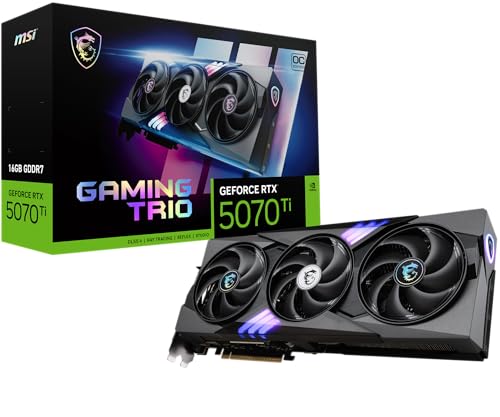
- The 1440p build: MSI Gaming RTX 5070 Ti 16G Gaming Trio OC, 16GB GDDR7 — Check on Amazon
- 1440p with nothing left to negotiate: ZOTAC Gaming GeForce RTX 5080 Solid OC, 16GB GDDR7 — Check on Amazon
- Prebuilt with a published power supply: Skytech King 95, Ryzen 7 9800X3D, RTX 5070 Ti, 32GB, 1TB — Check on Amazon
- Prebuilt that undercuts the parts: CLX Set Gaming PC, Ryzen 7 9800X3D, RTX 5080, 32GB, 2TB — Check on Amazon
- Build for gaming and creation: AMD Ryzen 9 9950X, 16-Core, 32-Thread Desktop Processor — Check on Amazon
- Cheapest route to this GPU tier: iBUYPOWER Y40 PRO, Ryzen 9 7900X, RTX 5070 Ti, 32GB, 2TB — Check on Amazon
Read the full guide ↓
Disclosure: As an Amazon Associate, reviewstook.com earns from qualifying purchases. Links to Amazon on this page are affiliate links; they cost you nothing extra. Listing details such as price and availability change often, so check the current Amazon listing before you buy.
Start with the distinction this entire guide hangs on, because most “1440p gaming PC” advice quietly blurs it: there is the resolution your monitor displays, and there is the resolution your graphics card actually renders, and they are only the same number when the machine is strong enough to make them the same. A 1440p panel shows 2560 × 1440 pixels — about 3.7 million of them — no matter what feeds it. A weak PC can send that panel a game rendered at 1080p, or lower, and stretched or upscaled to fill the screen; the box still says 1440p, the desktop still looks sharp, and the game is not being rendered at 1440p at all. At lower budgets that gap is where the honest guides live. At $3,000 it closes. Every graphics card in this guide — the RTX 5080 and the RTX 5070 Ti, in parts builds and prebuilts alike — renders modern games natively at 2560 × 1440 as its normal mode of work. Upscaling still appears below, but in its proper place at this tier: as headroom you can spend on higher refresh rates or heavier settings, not as the crutch that makes the resolution claim true.
The second thing to know is what $3,000 means in November 2026, because it is not what it meant at these cards’ launches. Graphics cards in this class now sit well above their launch positioning, memory kits cost far more than they did in early 2025, and fast NVMe storage has moved up with them. That is why every path below is judged as a complete machine — processor, card, board, memory, storage, power supply, case, cooler and a retail Windows 11 license, nothing left out — and why several come with a conclusion build guides are not supposed to reach: a well-bought prebuilt can undercut the identical machine built from parts, because prebuilt makers bought their card and memory inventory earlier and in bulk. For every linked pick, check price on Amazon before you decide which side wins the week you are buying in.
What this budget does not buy is an RTX 5090, at any point in that card’s life: complete 5090 systems sit in a tier well above this guide, and the card alone belongs to that same higher tier before another component joins it. A section below works through a 5090 build line by line in qualitative terms, so the exclusion is a matter of positioning, not editorializing. If your $3,000 is firm and your target is a 1440p screen, the six paths below are the ones that respect both: three parts lists anchored on verified listings, and three prebuilts that can beat the cost of building their equivalents.
In this guide
Quick Picks
Short on time, or comparing several options at once? Each row below names a player type and the path that suits it, with a link to the anchor listing.
| Player type | Pick | Why it stands out | Link |
|---|---|---|---|
| The 1440p build | RTX 5070 Ti + Ryzen 7 9800X3D parts build | Native 1440p is this card’s home resolution; the parts build can fit the budget when the card sits at the lower end of its range — check the current price on Amazon | Check on Amazon |
| 1440p, nothing negotiated | RTX 5080 + Ryzen 7 9800X3D parts build | The fastest card the budget can hold, for ultra settings and high refresh at native 1440p — a stretch that only fits the budget in its lower pricing periods | Check on Amazon |
| Prebuilt, spec sheet in the open | Skytech King 95, 9800X3D + RTX 5070 Ti | Published 850W Gold ATX 3 power supply; positioned below the cost of building the same heart from parts — check price on Amazon | Check on Amazon |
| Prebuilt that beats building | CLX Set, 9800X3D + RTX 5080 | The 5080 build’s exact specification, assembled — at its lower pricing it undercuts the parts build; check the current price on Amazon | Check on Amazon |
| Gaming plus creation | RTX 5080 + Ryzen 9 9950X parts build | Sixteen cores for rendering and compiling; honestly over budget as specified — its 5070 Ti configuration is the one that fits the budget | Check on Amazon |
| Cheapest route to the tier | iBUYPOWER Y40 PRO, 7900X + RTX 5070 Ti | The lowest-positioned route to this GPU tier in the guide — leaves real money for the 1440p monitor itself; check price on Amazon | Check on Amazon |
How These Picks Were Chosen
Every path in this guide is a complete machine, judged the way a machine actually gets bought. Each parts list carries a processor, a graphics card, a motherboard, 32GB of DDR5-6000 memory, NVMe storage, an 850W Gold power supply, a case, a cooler and a retail Windows 11 license — including the lines that make forum build lists look cheaper than they are. Where a path only fits the budget when a part sits at the lower end of its range, the review says so plainly and turns the condition into a buy rule rather than printing a total that may already have moved. Prices change too often in this market for a printed figure to stay honest, so linked picks are handled the durable way: check price on Amazon, check the current price on Amazon again before you order, and compare the prebuilt and parts routes against each other on the same day.
The anchor parts — the cards, processors and complete systems the links point to — were verified listing by listing, with model numbers, memory sizes and core counts taken from the listings and manufacturer specification sheets rather than search headlines. The supporting parts are named real products, cited inside each build’s list. We did not assemble these machines ourselves: the judgments here are specification and positioning judgments, not research dressed up as hands-on testing.
Three filters shaped the six. First, the whole-machine filter: any path whose honest complete-machine positioning could not reach the $3,000 budget under any realistic pricing was excluded, or — the creator build — included with its over-budget positioning printed and a configuration that does fit shown next to it. Second, the platform filter: everything here sits on AMD’s AM5 socket with DDR5, because a $3,000 machine bought in late 2026 should not be on a socket whose upgrade path ends with the current generation. Third, the 1440p filter, this variant’s reason to exist: a pick earns its place by what it does at 2560 × 1440 — native rendering first, video memory second (textures load at the resolution you intend to display, whatever the render scale), upscaling as spare capacity rather than the plan. Where a prebuilt matched a build’s specification for less, the prebuilt took the slot and the guide says why: prebuilt makers bought their card and memory inventory earlier and in bulk, and in November 2026 that shows up in the only place it matters.
Rendering at 1440p vs Displaying 1440p
The numbers first. A 1080p frame is 1920 × 1080, about 2.1 million pixels. A 1440p frame is 2560 × 1440, about 3.7 million — roughly 78 percent more work for the graphics card, every frame, before any setting is touched. That is the honest size of the step: not a doubling, but close enough that a card which cruises at 1080p can be made to negotiate at 1440p, and it is why smaller-budget guides spend so much of their length on upscaling. When a game “runs at 1440p” on a weaker machine, what usually runs at 1440p is only the output. The render underneath might be 1080p — a non-integer 1.33× stretch per axis to reach the panel, which is where the softness comes from — or lower still. Even 720p upscaled to 1440p has one accidental virtue: an exact 2×2 integer scale, each rendered pixel a clean block of four. None of that machinery is a lie, exactly; it is a trade, sharpness for frames. But a buyer reading a headline deserves to know which side of the trade a machine lives on.
DLSS belongs in this section because it is the disciplined version of that trade, and because its settings are widely misunderstood. DLSS renders internally at a fraction of the output resolution and reconstructs the rest. At a 1440p output, DLSS Quality renders at roughly 1707 × 960 internally; DLSS Performance renders at roughly 1280 × 720 — which is to say, a 720p-class render wearing a 1440p output. On the cards in this guide DLSS is genuinely good technology, and at 1440p its Quality mode is a sensible way to buy refresh rate. But notice what it means for this budget specifically: you do not need it to reach the resolution on the box. Both the RTX 5080 and the RTX 5070 Ti render 1440p natively as their ordinary working mode, so here DLSS is a throttle you open for high-refresh panels, ray tracing, or the most demanding titles at maximum settings — headroom, deliberately spent — rather than the mechanism that makes the guide’s title true.
One more consequence of the same arithmetic, looking the other direction: DLSS Quality into a 4K output renders internally at roughly 2560 × 1440 — this guide’s resolution, exactly — while DLSS Performance at 4K renders at roughly 1920 × 1080. That is the honest frame for the 4K question these machines always raise. The RTX 5080 is a genuine native-4K card and the 5070 Ti reaches 4K credibly through DLSS, but a buyer whose screen is 1440p loses nothing to either fact — and a buyer choosing a screen should read the monitor section below before spending the headroom on pixels instead of frames.
The 6 Best Gaming PC Builds for 1440p Gaming Under $3,000
Build 1 — RTX 5070 Ti + Ryzen 7 9800X3D: The 1440p Build
Who it suits: The builder whose screen is a 1440p panel — or is about to be — and who wants the machine that treats that resolution as home ground: native rendering at high settings, high refresh in competitive titles, and a total that can actually fit the budget.
Why this build leads a 1440p guide, ahead of the faster card below: the RTX 5070 Ti is the tier where 1440p stops being an aspiration. Its 16GB of GDDR7 matters as much as its rendering muscle at this resolution, because textures load at the resolution you intend to display even when a render scale is lowered — video memory is the specification that decides whether a 1440p machine ages gracefully, and 16GB is the comfortable side of that line. Around the card sits the platform every parts build here shares: an MSI MAG B650 Tomahawk WiFi board; 32GB (2×16GB) of DDR5-6000, specified as the cheapest reputable Amazon-sold kit you can find at that speed; a WD Black SN850X 2TB; a Corsair RM850e (2025) 850W Gold ATX 3.1 power supply; a Lian Li Lancool 216 case, with 392mm of graphics card clearance; a Thermalright Phantom Spirit 120 SE dual-tower air cooler; and a retail Windows 11 Home license. Seller variance on the board and the other platform lines is real, so treat the platform as the stable foundation of the build and the card as the line that decides the week. The processor is the Ryzen 7 9800X3D — eight cores with 3D V-Cache — and at 1440p it earns its place in a way it cannot at 4K: the higher the frame rate a card can sustain, the more often the processor becomes the limit, and high-refresh 1440p is exactly the regime where this chip’s stacked cache is the fastest gaming silicon in the guide.
The graphics card is the MSI Gaming RTX 5070 Ti 16G Gaming Trio OC — check price on Amazon, because the spread between models is the story: a plainer MSI Shadow 3X version of the same GPU sits lower in the tier, while other 5070 Ti models sit higher, and the card’s launch positioning is now a historical document. So this build carries one honest rule instead of a fixed total: the build fits under $3,000 whenever the 5070 Ti in your cart sits at the lower end of its current range, territory the card returns to in its lower pricing periods, with the 2TB drive fitted. What the finished machine does at 1440p is the point of the guide: native rendering at high settings as the default, DLSS Quality held in reserve for the titles and refresh rates that ask for it, and meaningful headroom left over — against the build below — toward the panel that makes it visible.
Honest limitation: No line in this guide moves like the 5070 Ti’s pricing — it can climb sharply over a short stretch — so read this build’s positioning as a range governed by the card’s current price, never as a fixed figure. Catch it in the wrong week and you have paid 5080-build money for 5070 Ti rendering.
Choose it if 1440p is your resolution and you would rather keep meaningful money for the desk around the machine. Skip it if you intend to move to a 4K panel soon and render natively on it — that is the next build’s card, or nobody’s at this budget.
Build 2 — RTX 5080 + Ryzen 7 9800X3D: 1440p With Nothing Left to Negotiate
Who it suits: The builder who plays at 1440p and refuses the settings-menu negotiation entirely — ultra presets, ray tracing switched on, high-refresh panel fed properly — and who accepts that this build’s relationship with the $3,000 line is a lower-pricing-window one.
Here is the full list, every line a named, verified part — check the current price on Amazon for the linked card and processor before you total anything:
- Graphics card: ZOTAC Gaming GeForce RTX 5080 Solid OC, 16GB GDDR7. The wider market is the context: RTX 5080 models span a broad range from plainer variants at the lower end to premium models sold by Amazon itself at the higher end, so this single line is the build’s swing factor.
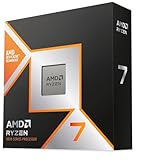
- Processor: AMD Ryzen 7 9800X3D, 8 cores with 3D V-Cache.
- Motherboard: MSI MAG B650 Tomahawk WiFi, AM5.
- Memory: 32GB (2×16GB) DDR5-6000 — take the cheapest reputable Amazon-sold kit at this speed; a Corsair Vengeance CL30 kit sold and shipped by Amazon is the reference point in this class.
- Storage: WD Black SN850X 2TB NVMe.
- Power supply: Corsair RM850e (2025), 850W Gold, ATX 3.1.
- Case: Lian Li Lancool 216 RGB; its 392mm of graphics card clearance is what a card of the 5080’s length requires.
- Cooler: Thermalright Phantom Spirit 120 SE; a dual-tower air cooler handles this processor under gaming loads without the cost or the pump of a liquid loop.
- Operating system: Microsoft Windows 11 Home (USB retail).
As specified, this build sits above the headline budget on an ordinary week, and this guide will not round that away. It crosses under $3,000 only when its most volatile lines sit at the lower end of their ranges at once: the smaller-capacity SN850X instead of the 2TB drive, the cheapest reputable memory kit instead of a premium one, and the board and processor at the lower end of their positioning. Treat $3,000 as this build’s lower-pricing-window target and its everyday positioning as a stretch above the line, and set the walk-away rule before you shop: if the card in your cart pushes the complete total over the budget, the prebuilt version of this exact specification — pick 4 below — is the better purchase that week. What the money buys at 1440p is surplus, deliberately: native rendering with the settings ceiling still above it, ray tracing left on rather than sampled, DLSS as a refresh-rate tool instead of a resolution tool, and native 4K in reserve if the panel changes later. This build removes the graphics card from the list of things you think about.
Honest limitation: On an ordinary week this build breaks the budget in its own title: above the line is its real positioning, and $3,000 is a lower-pricing-window visitor. Some of the premium also buys rendering headroom a 1440p screen cannot display today, and the memory line — far above its early-2025 positioning — makes sure you feel it.
Choose it if you want 1440p at maximum settings and high refresh with the card question permanently settled, and you can buy the card and memory in their lower pricing periods. Skip it if your $3,000 is a hard ceiling today — build 1 or pick 4 gives you this guide’s resolution with money left over.
Pick 3 — Skytech King 95 (9800X3D + RTX 5070 Ti): Build 1’s Heart, Assembled
Who it suits: The buyer who wants build 1’s exact performance heart — the flagship gaming processor, the 1440p card, the 16GB of video memory — without the week of parts hunting, and who reads specification sheets closely enough to care about the line most listings leave blank.
The King 95 (model ST-KING95-1671-W-AM) pairs the Ryzen 7 9800X3D with an RTX 5070 Ti 16GB and 32GB of DDR5-5600, then does something most prebuilt listings refuse to do: it publishes its power supply, an 850W Gold ATX 3 unit, alongside its 360mm liquid cooler. It is positioned on Amazon below build 1’s parts cost at the card’s ordinary positioning, and roughly level even at the card’s lower positioning, before counting your assembly time and a single warranty — check price on Amazon to confirm which side of that comparison holds today. At 1440p the prebuilt route costs you no frames: the same processor and card class render the same native 1440p picture, and the published supply makes the machine’s one future card swap a known quantity rather than a discovery. The trades, plainly: storage is 1TB where our parts list fits 2TB, in a market where the second terabyte is a meaningful extra line inside a parts build; and the card’s brand may vary within the 5070 Ti specification, as the listing discloses, so its exact cooler design and clock profile are the maker’s choice. The King 95 name covers more than this one machine: sibling listings wear it at higher positioning. Buy the model number — ST-KING95-1671-W-AM — not the name.
Honest limitation: The 1TB drive is the real compromise — modern game libraries fill it quickly, and adding the second drive later costs more than it would have inside the parts build. The brand-may-vary card also means the quietest or coolest 5070 Ti variant is not yours to pick.
Choose it if you want build 1’s 1440p performance with the building already done and the power supply a matter of record. Skip it if your library needs 2TB on day one and you enjoy the build itself — build 1 fits the bigger drive for similar money when the card sits at the lower end of its range.

Pick 4 — CLX Set Gaming PC (9800X3D + RTX 5080): The Prebuilt That Beats Building
Who it suits: The reader who priced build 2, watched it land above the budget, and would like the identical specification — same processor, same card class, same memory capacity — assembled, warranted as one machine, and cheaper.
Inside the CLX Set (model TGMSETRTU5105BM) sits build 2’s shopping list already bought: a Ryzen 7 9800X3D, an RTX 5080 16GB, 32GB of DDR5 and a 2TB NVMe drive, cooled by a 360mm liquid loop and powered by an 850W Gold unit whose rating the manufacturer’s specification sheet for this model confirms. At its lower pricing it sits below build 2’s parts positioning for the same specification, with the assembly, the single warranty and the Windows license already inside the number — check the current price on Amazon, because that relationship is the whole pick. That is November 2026’s prebuilt inversion in one listing: CLX bought its inventory on a schedule no home builder can replicate, and the saving can survive to the shelf. For a 1440p buyer the consequence is direct — the strongest native-1440p specification in this guide, the one that also renders native 4K, arrives as a finished machine for less than its own parts. The condition deserves the same size type as the recommendation. This configuration has also sat at a much higher positioning during high-price stretches — a level at which the parts list wins clearly, and not narrowly. The pick is the lower pricing, not the machine’s permanent positioning — buy it when its current price undercuts building the same specification, walk away when it sits above the parts route, and let build 2’s parts list be the leverage that tells you which week you are in.
Honest limitation: The pricing is the most volatile in this guide — a wide spread between its lower and higher positioning — and CLX’s listings carry the industry-standard note that component brands may vary, so the exact card model inside is the maker’s choice within the 5080 specification.
Choose it if you catch it at its lower pricing and want build 2’s specification without build 2’s week of parts hunting. Skip it if the live price has drifted into its high band, where it becomes the costliest route in this guide to this exact specification.

Build 5 — RTX 5080 + Ryzen 9 9950X: The Gaming-and-Creation Build
Who it suits: The builder whose PC works two shifts — games in the evening, rendering, compiling, video editing or heavy multitasking in the day — and who is weighing cores against cache with real hours on one side of the scale.
The processor argument first, because at 1440p it cuts differently than at 4K. The 9800X3D in builds 1 and 2 is an 8-core chip whose stacked cache makes it the fastest gaming processor in this guide; the Ryzen 9 9950X — 16 cores, 32 threads, check price on Amazon — roughly doubles the capacity for work that uses every core at once: long renders, big compiles, timeline exports, a game running beside an encode. It sits above the 9800X3D in the processor tier, as a flagship work chip should. In graphics-limited games the two chips finish in a near-tie and the card decides; in processor-limited games the X3D pulls ahead — and processor-limited moments are more common at 1440p than at 4K, because the card finishes each frame sooner and hands the work back. So the 1440p version of the rule is stricter, not looser: buy the 9950X if your non-gaming work is measured in hours per week, and the 9800X3D if it is measured in minutes. There is also a both-worlds chip, the 9950X3D, positioned at a premium above both; it is the correct answer for a wealthier guide, because at this budget its premium is exactly what pushes the total out of reach.
The rest of the list follows build 2: the ZOTAC RTX 5080 Solid OC, the B650 Tomahawk platform, the SN850X 2TB and the same memory, power supply, case, cooler and Windows lines. With 32GB the build sits over budget, printed here rather than hidden. Fit the 64GB that serious creation work actually wants and the picture worsens: a 64GB DDR5-6000 kit sits in a far higher memory tier, which carries the total further still — another guide’s budget entirely. The configuration of this build that fits under $3,000 today swaps the card to the 5070 Ti at the lower end of its range: a machine that creates at full speed and renders native 1440p one card tier lower. Or wait for a lower pricing window on the 5080 version: the card near the lower end of its range plus a smaller drive can bring it under the line after all. The as-specified version, though, gets no such courtesy here — it is this guide’s declared stretch pick, and it is labeled as one rather than rounded into the budget.
Honest limitation: In its specified form — 5080, 32GB — no realistic pricing brings this build under budget, and the 64GB version creators actually want overshoots by a wide margin. Every configuration of it that fits does so by swapping in the 5070 Ti or by waiting for a lower pricing window.
Choose it if your work genuinely uses sixteen cores and you accept the stretch — or if the 5070 Ti configuration’s balance is the machine you actually wanted. Skip it if the creation talk is aspirational; a pure gamer pays the 9950X’s premium for cores that sit idle, and at 1440p build 2 is the faster games machine for less.

Pick 6 — iBUYPOWER Y40 PRO (7900X + RTX 5070 Ti): The Cheapest Route, Monitor Money Intact
Who it suits: The buyer who wants RTX 5070 Ti gaming at 1440p and would rather the machine sit well below the top of the budget than press against it — because the difference, spent on the 1440p panel itself, is worth more than any specification gap in this guide.
The Y40 PRO (model Y40BA9N57T01) is built around a Ryzen 9 7900X — twelve cores from the previous generation, still a genuinely strong threaded-work chip and no slouch at games — alongside an RTX 5070 Ti 16GB, 32GB of DDR5 and a 2TB NVMe SSD, keyboard and mouse in the box. Its positioning is the most striking in the guide: it sits at the lowest end of this set, well below the parts builds above — check price on Amazon to see how wide the gap is on the day you buy. Set that against build 1’s positioning for a 5070 Ti machine and the conclusion writes itself — at its lower pricing this prebuilt is substantially cheaper than building its near-equivalent, and that difference is precisely a good 27-inch 1440p high-refresh monitor, the component a tower-only budget forgets. The 7900X gives up the 9800X3D’s cache advantage in processor-bound games, the honest performance cost; at 1440p on a 5070 Ti the card is the limit in most titles, and the gap narrows to something most players never see outside a benchmark chart. One caution is structural rather than incidental: the listing material we verified never headlines a power supply wattage, so the live listing has to answer that question before you order — do not assume it. And buy carefully: a different Y40 PRO built around a 7800X3D exists under a separate listing, and this review covers only the 7900X machine.
Honest limitation: Two honest debits: a power supply wattage nobody publishes, which you must run down before purchase, and a previous-generation processor that trails the 9800X3D wherever the processor is the limit. The positioning gap is the compensation for both — and at its lower pricing it is generous.
Choose it if the whole setup — machine plus screen — is what your $3,000 has to cover; it is the best value in this guide by a wide margin. Skip it if your games are processor-bound competitive or simulation titles chased at very high refresh rates — that is the one arena where the 9800X3D machines justify every part of their premium.

Comparison Table
| Path | Key specification | Position within the budget | Link |
|---|---|---|---|
| Build 1 — RTX 5070 Ti + 9800X3D | 5070 Ti 16GB, 3D V-Cache gaming CPU, 32GB, 2TB — native 1440p at high settings | Fits the budget when the card sits at the lower end of its range — check the current price on Amazon | Check on Amazon |
| Build 2 — RTX 5080 + 9800X3D | 5080 16GB, 3D V-Cache gaming CPU, 32GB, 2TB — native 1440p at ultra, native 4K in reach | A stretch above the budget as specified; only reaches the line in a lower pricing window with every volatile line at its low end | Check on Amazon |
| Skytech King 95 prebuilt | 5070 Ti 16GB, 9800X3D, 32GB, 1TB, published 850W Gold ATX 3 | Positioned below the parts build for the same heart — check price on Amazon | Check on Amazon |
| CLX Set prebuilt | 5080 16GB, 9800X3D, 32GB, 2TB, 850W Gold | Undercuts building at its lower pricing and sits well above it at its higher positioning — buy the positioning, not the name | Check on Amazon |
| Build 5 — RTX 5080 + 9950X | 5080 16GB, 16-core creator CPU, 32GB, 2TB | Over budget as specified; the 5070 Ti configuration is the one that fits the budget | Check on Amazon |
| iBUYPOWER Y40 PRO prebuilt | 5070 Ti 16GB, Ryzen 9 7900X, 32GB, 2TB | The lowest-positioned route in the guide, well below the top of the budget — check price on Amazon | Check on Amazon |
Pairing the Monitor: Where 1440p Actually Happens
A build guide that stops at the tower has done half the job for this keyword, because 1440p is a property of the pairing, not of the PC alone. The sweet spot for every machine in this guide is a 27-inch 1440p panel: at that size 2560 × 1440 works out to roughly 109 pixels per inch, sharp enough that individual pixels disappear at a normal desk distance, and the panel sizes these cards were born to feed. Go to 32 inches at the same resolution and density falls to roughly 93 pixels per inch — about what a 24-inch 1080p screen gives you — which suits immersive single-player games from a little further back and shows its softness in text and fine detail up close. Neither is wrong; they are different desks. What would be wrong is pairing any of these six machines with a 1080p monitor and calling the result a 1440p setup: the render target is set by the display, and a 1080p panel caps every build here at the resolution the cheaper guides struggle to leave.
Refresh rate deserves the same honesty as resolution. These are high-refresh 1440p machines, and a 165Hz-class panel is the natural partner, with faster panels making sense for competitive players whose titles are light enough to fill them. Two setup facts matter more than any panel specification. First, set the monitor’s real refresh rate in Windows on day one: panels routinely default to 60Hz out of the box, and a high-refresh setup left at 60Hz is the most common way this budget gets silently wasted. Second, connect with DisplayPort where the panel offers it, and plug the cable into the graphics card’s ports, not the motherboard’s — an integrated GPU will happily show a picture while quietly bypassing the card you paid for.
And the 4K question, answered for this guide rather than in general. The RTX 5080 paths render native 4K credibly, and the 5070 Ti paths reach 4K through DLSS — remembering that DLSS Quality at a 4K output renders internally at 1440p, the very resolution this guide is built around. If you already own a good 4K panel, nothing above is wasted on it. But if the screen is part of this purchase, the 1440p high-refresh panel is the better spend: it converts these machines’ surplus into smoothness you can feel in every title, instead of pixels that consume the headroom the moment a demanding game arrives. Buy the tower and the 27-inch 1440p panel as one decision — pick 6 exists precisely because, at its lower positioning, it lets you do exactly that.
How to Choose a Gaming PC Build for 1440p Under $3,000
- Total the whole machine before you compare anything. A parts list missing its Windows license, cooler and case has not produced a price yet. Ours include all three, which is why they sit above forum lists built on the same headline parts — the difference is the rest of the computer.
- Decide the processor by workload — and remember 1440p sharpens the question. For pure gaming the 9800X3D is both faster at games and lower in the processor tier than the 16-core 9950X, and this resolution widens its case: a card that finishes frames sooner hands work back to the processor sooner, so processor-limited moments arrive more often at 1440p than at 4K. The sixteen cores earn their premium in exactly one place — hours of weekly rendering, compiling or exporting stacked on top of the gaming.
- Give the graphics card a range and a rule, not a price. Neither card in this guide holds a stable position for long: the RTX 5080 spans a broad range across its models, and the 5070 Ti spans a broad range of its own. So fix your rule before you open a single listing — the 5080 build only fits when the card sits at the lower end of its range, and the 5070 Ti build fits more readily at the lower end of its — and let the prebuilt positioning arbitrate the weeks when building stops making sense. For every linked card, check the current price on Amazon on the day you buy.
- Refuse the latency premium on memory. Capacity is the only memory specification worth money right now: DDR5-6000 is the AM5 sweet spot, and past that the premium buys nothing a game can show you. With 32GB kits sitting far above their early-2025 positioning, take the cheapest two-stick kit from a maker you recognize at 6000 MT/s and send the savings to the card or the panel.
- Size storage for the library you actually have. The step from 1TB to 2TB is a meaningful extra line in a parts build, and it is the safest line to trim when a total must fit: a second drive installs in minutes later, while a graphics card bought one tier too low stays bought.
- Specify the power supply like a component that matters — it does. The floor for 5080 and 5070 Ti builds is an 850W Gold ATX 3.1 unit with a native 12V-2×6 cable — the Corsair RM850e class. On the prebuilt side, treat a published rating as a feature with real value (the King 95 and the CLX both publish 850W Gold) and an unpublished one — the Y40 PRO’s — as homework that belongs before checkout, never after delivery.
- Budget the desk, not just the tower. A $3,000 tower feeding a 1080p screen is a 1080p setup with expensive internals. If the panel is part of the purchase, pick 6 at its lower positioning plus a good 27-inch 1440p high-refresh monitor can cost less than build 2’s tower alone — and shows you more of what you paid for.
The RTX 5090 Build, Priced Honestly
Every $3,000 guide meets the reader who asks why the flagship is not in it, so here is the flagship, worked through in positioning rather than figures. The card alone sits in a flagship tier far above this guide: top-tier 5090 models occupy the highest end of the consumer card market, plainer listings sit lower within that same tier, and even the most favorable route to the card alone belongs to a budget class well beyond this one — before a single other part. The platform a 5090 requires is not build 2’s platform either: a 16-core-class processor, a large-capacity memory kit in the highest memory tier, the 2TB drive and a supporting cast of a higher-wattage-class power supply, a larger case, 360mm cooling, a higher-end board and Windows amount to a substantial build in their own right. Add the cast to the card and the total lands in a completely different project class — and even the fantasy version fails: at the card’s launch positioning, a figure it has effectively never been buyable at, the same platform still totals well above this budget, and the cheapest complete 5090 systems confirm it from the prebuilt side. For a 1440p buyer the point lands harder still: every machine in this guide already renders the resolution natively, so the 5090’s premium would buy surplus over a target already met. It is a magnificent machine and a flagship-tier project; what it is not is a $3,000 build with the settings turned down.
Common Buying Mistakes
- Budgeting from launch prices. Planning a $3,000 build around the 5070 Ti’s and the 5080’s launch positioning — figures from another era of this market — is how a cart quietly ends up in a higher tier than the one you budgeted for.
- Calling a setup “1440p” because the monitor is. If the render underneath is 1080p stretched to fill the panel, the resolution on the box is the display’s, not the game’s — at this budget you are paying for both to be the same number.
- Leaving the monitor at its out-of-box 60Hz. High-refresh 1440p panels routinely default to 60Hz in Windows; the most expensive frames in this guide are the ones a settings menu quietly throws away.
- Reaching for DLSS Performance at 1440p out of habit. On these cards that is a 720p-class internal render; if a title needs it, the settings preset — not the resolution — is the first thing that should move.
- Judging a build cheaper than a prebuilt by comparing a partial parts list — no Windows, no cooler, no case — against the prebuilt’s complete price. The saving is exactly the lines that were left out.
- Buying the 16-core processor for a pure gaming machine — or the gaming-cache processor for a workstation — because a league table said it was “the best CPU.” Best is a workload, not a ranking, and at 1440p the workload answer favors the cache more often than at 4K.
- Chasing the RTX 5090 at this budget — or its quieter cousin, buying a “5090-ready” platform today with a placeholder card in it, on the theory that flagship prices will fall to meet you. Buy the complete machine that fits now.
- Taking an unpublished prebuilt power supply on faith. The wattage you never checked has a way of introducing itself later, on the day you open the case to upgrade.
- Buying a lookalike variant. The King 95 and Y40 PRO names each stretch across several configurations on separate listings; the model number is the machine, the name is only the family.
Final Recommendation
- The default 1440p build: Build 1, the RTX 5070 Ti and 9800X3D parts build, bought when the card sits at the lower end of its range — native 1440p, the flagship gaming processor, and money left for the panel.
- 1440p with the ceiling removed: Build 2, the RTX 5080 and 9800X3D build, for ultra settings, ray tracing left on, and a native-4K option later.
- Build 1’s performance without building: Pick 3, the Skytech King 95 — published power supply, positioned below the parts route.
- Build 2’s specification, assembled for less: Pick 4, the CLX Set at its lower pricing.
- Creators who game: Build 5 — the 5070 Ti configuration to fit the budget today, the 5080 configuration as a declared stretch.
- Anyone whose $3,000 must cover the whole desk: Pick 6, the Y40 PRO at its lower positioning, and a 27-inch 1440p high-refresh monitor with what is left.
Our top two paths are build 1 and the King 95 — the same 1440p heart reached two ways: in parts when the card sits at the lower end of its range, or assembled at a positioning below the parts route on an ordinary week. Which is “the build” depends on the week you are standing in, so check both on Amazon before committing to either. Builders set on assembling their own should also see Best Gaming PC Build Under $2500, where the parts positioning currently behaves better, and anyone speccing machine and screen together should start from Best 1440p Gaming PC Under $3000. Fix your walk-away rule before you open a cart — the 5080 build only when its card sits at the lower end of its range, the 5070 Ti build at the lower end of its, the CLX only when it undercuts building — and verify each against the live listings: in November 2026’s market, that ten minutes of homework is routinely worth a great deal.
Frequently Asked Questions
Is DLSS Quality at 1440p actually rendering at 1440p?
No — and on the machines in this guide it does not need to pretend. DLSS Quality at a 1440p output renders internally at roughly 1707 × 960 and reconstructs the rest; Performance renders at roughly 1280 × 720. Both the RTX 5080 and the RTX 5070 Ti render 1440p natively as their normal mode, so DLSS here is an optional trade of internal resolution for refresh rate or heavier settings — a throttle, not the mechanism that makes the resolution claim true.
Do I need an RTX 5080 for 1440p gaming?
No. The RTX 5070 Ti is the tier where native 1440p at high settings becomes a card’s ordinary work, and build 1 and pick 3 are this guide’s default answer for a 1440p screen. The 5080 earns its premium in the surplus: ultra presets with ray tracing left on, the highest-refresh panels, and a credible native-4K path if the monitor changes. Buy it for those, not for 1440p itself.
9800X3D or 9950X — which processor should a 1440p build use?
It depends on what the machine does all day, and 1440p tilts the answer toward the cache. The 9800X3D is the faster gaming processor thanks to its stacked cache, and it sits lower in the processor tier; because a 1440p card finishes frames sooner than a 4K card, processor-limited moments arrive more often at this resolution, which is where that cache pays. The 9950X answers with twice the cores and decisive wins at rendering, compiling and exporting, while tying the X3D in most graphics-limited games, and it sits at a premium above the X3D for that work capacity. Pure gaming: X3D. Gaming plus real weekly production work: 9950X. And the 9950X3D splits the difference on paper — and prices itself out of this guide in doing so.
Is it cheaper to build or buy prebuilt right now?
In the current market: prebuilt, narrowly and conditionally. The equivalent-specification prebuilts above can undercut their parts-built counterparts by a meaningful margin, for one unglamorous reason — their makers bought graphics and memory inventory before the retail spike. Building keeps its own honest advantages: your choice of every component, full transparency, upgrade control. And it wins outright the moment a prebuilt’s price wanders into its high band, as the CLX Set’s higher positioning proves. The only durable rule is to price both, every time — check price on Amazon for the linked prebuilt and total the parts route on the same day.
What should I do if every total in this guide has moved by the time I read it?
Expect movement, and do not let it strand you: this is the most volatile component market in years, and the guide was structured to survive it. The platform lines drift slowly; the volatility lives in the card and memory lines; and the buy rules — the 5080 build only when its card sits at the lower end of its range, the 5070 Ti build at the lower end of its, the CLX only when it undercuts building — tell you which side, build or buy, wins the week you happen to be standing in. Re-total from live prices, hold your walk-away lines, and the answer re-computes itself.
- Best Gaming PC Build Under $3000
- Best Gaming PC Build Under $2500
- Best Gaming PC Build For 1440p Gaming Under $2500
- Best Gaming PC Under $3000
- Best Prebuilt Gaming PC Under $3000
- Best Gaming PC Build For Beginners Under $3000
- Best Gaming PC Build For Streaming Under $3000
- Best Gaming PC Build For Small Spaces Under $3000
- Best Gaming PC For 1440p Gaming Under $3000
- Best High End Gaming PC Under $3000


