Where to buy
Check the latest price, availability and delivery on Amazon. Orders are placed on Amazon. We may earn a commission from qualifying purchases.
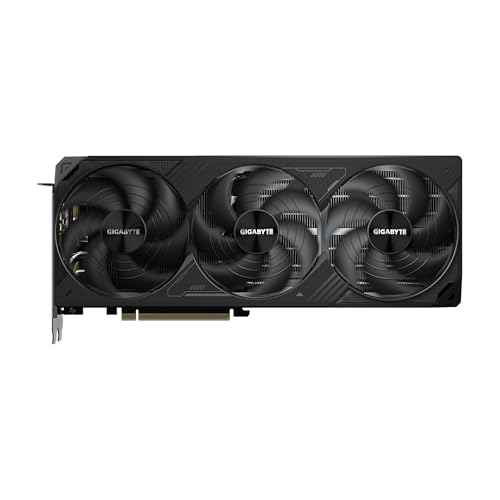
- Best build for native 1440p: GIGABYTE GeForce RTX 5070 Ti WINDFORCE SFF 16G — Check on Amazon
- The flagship spec, already assembled: Skytech King 95, Ryzen 7 9800X3D, RTX 5070 Ti — Check on Amazon
- Prebuilt that beats building: iBUYPOWER Y40 PRO, Ryzen 9 7900X, RTX 5070 Ti — Check on Amazon
- Cheapest parts route to a 5070 Ti: AMD Ryzen 9 9900X, 12-Core — Check on Amazon
See 2 more Amazon options
- Best build with money left for the monitor: GIGABYTE GeForce RTX 5070 WINDFORCE OC SFF 12G — Check on Amazon
- The 4K card, with the reasoning shown: GIGABYTE GeForce RTX 5080 WINDFORCE OC SFF 16G — Check on Amazon
Read the full guide ↓
Disclosure: As an Amazon Associate, reviewstook.com earns from qualifying purchases. Links to Amazon on this page are affiliate links; they cost you nothing extra. Listing details such as price and availability change often, so check the current Amazon listing before you buy.
A 1440p monitor and a 1440p render are two separate purchases, and mixing them up is the most expensive misunderstanding in PC gaming. The display resolution is what your panel shows: 2560 × 1440, about 3.7 million pixels. The render resolution is what your graphics card draws before the image is scaled to fill those pixels — and modern upscaling exists precisely to let the second number be smaller than the first. A card can feed a 1440p screen beautifully while rendering far fewer pixels internally — a legitimate technique, and a dishonest specification when it is sold as native. This guide keeps the two numbers separate throughout. The good news at $2,500 is that the distinction is about headroom rather than survival: every card in the six paths below — RTX 5070, 5070 Ti and 5080 — can honestly draw the full 3.7 million pixels natively in most games. What separates the picks is the margin they keep when a heavy title arrives, their memory for textures that load at full 1440p intent regardless of render scale, and whether the honest step beyond 1440p — native 4K — is within reach at all. For linked picks, check price on Amazon before you decide, because the current listing is the only price that matters on the day you order.
The bad news is the calendar. November 2026 is a component price-spike market, and it distorts every buying decision in this guide. Memory capacity has been diverted to AI accelerators, so DDR5 kits sit far above their historical norm; flagship SSDs have climbed well above where they used to sit; and the RTX 5070 Ti, in particular, is often listed far above the level its launch positioning suggested. The silicon did not get worse. The prices around it did — which is exactly why this guide no longer prints fixed product prices at all, and why every linked pick below simply asks you to check the current price on Amazon.
So the guide does its reasoning in public, in qualitative terms. Each of the six paths is considered as a complete PC — CPU, graphics card, motherboard, memory, storage, power supply, the cooler none of these processors ships with, a case, and a Windows licence. Two paths are prebuilt machines, because system builders buy graphics cards in a different world from retail and can undercut the equivalent parts lists, licence included. One path is an RTX 5080 build that does not fit the budget; it is included with its reasoning shown, because at 1440p money it is the question every reader is asking. And the 1440p grading is strict: a pick earns “native” only where its silicon renders the full frame, and upscaling is described by the resolution it renders, never by the resolution on the box.
In this guide
Quick Picks
Short on time, or comparing several options at once? Each row names the buyer a path suits and its 1440p verdict. For every linked pick, check the current price on Amazon; full reasoning is in each review.
| Buyer type | Pick | 1440p verdict | Link |
|---|---|---|---|
| Best native-1440p build | Ryzen 7 9800X3D + RTX 5070 Ti build | Native 1440p at high settings with high-refresh headroom; check price on Amazon for the card before committing | Check on Amazon |
| The flagship spec, assembled | Skytech King 95 | The same 9800X3D + 5070 Ti pairing, built and licensed; check the current price on Amazon — it only belongs here when its listing sits inside this budget | Check on Amazon |
| Prebuilt that beats building | iBUYPOWER Y40 PRO | 5070 Ti native 1440p with Windows included, often positioned below the equivalent parts route; check price on Amazon | Check on Amazon |
| Cheapest 5070 Ti parts list | Ryzen 9 9900X + RTX 5070 Ti build | Identical card, identical native 1440p; the CPU surplus goes unseen in GPU-bound play; positioned as the lowest-cost parts route to this card in the guide | Check on Amazon |
| Best build with money left over | Ryzen 7 7800X3D + RTX 5070 build | Native 1440p is this card’s designed tier; the complete build leaves room in the budget toward the panel itself | Check on Amazon |
| The 4K question | RTX 5080 corner-cut build | The only native-4K route here — and positioned above this budget, so it does not fit; the review shows the reasoning | Check on Amazon |
How These Picks Were Chosen
Every path is judged the way you will actually pay for it: as a finished PC, not as a pair of exciting components with the rest left as an exercise. That means counting the lines build guides prefer to forget — a cooler (none of the three processors used here includes one in the box), a case, and a Windows 11 Home licence. Where a path only fits with the licence deferred, the review says so in plain words. Windows will install and run unactivated behind a watermark — a fair way to spread cost, but not the same as the licence being free, and no path here treats it as free in silence.
Four of the DIY paths share one platform, identical line by line so that each CPU and GPU choice shows its true effect: an MSI B650 Gaming Plus WiFi board, a 32GB Patriot Viper Venom DDR5-6000 CL30 kit, a 2TB Samsung 990 Pro, MSI’s MAG A850GL 850W Gold ATX 3.1 power supply with the native 12V-2×6 cable current cards expect, a Thermalright Peerless Assassin 120 SE, and a Fractal Design North case. The graphics card is the largest variable in any build in this tier this year, which is why no fixed card price is printed anywhere in this guide: for each linked card, check the current price on Amazon on the day you order, and judge the build by that live figure against the $2,500 budget.
The 1440p grading then applies three tests. First, native rendering: can the documented card draw the full 2560 × 1440 frame at high settings, with upscaling held in reserve for the heaviest ray-traced titles rather than spent as the default? Second, memory: textures are loaded for the output resolution you intend, not the internal resolution you render, so a card’s VRAM is graded against full 1440p texture loads — which is why this guide holds a 16GB floor for a machine bought to keep for years, and names the one 12GB pick’s compromise instead of hiding it. Third, the CPU ceiling: at 1440p the graphics card limits most games, but high-refresh play reintroduces the processor, so cache-rich chips earn their place here for a stated reason rather than by leaderboard habit. We did not build these machines ourselves; part selection follows the documented consensus specification for the tier — AM5, DDR5-6000 CL30, a Gen4 NVMe drive, an 850W ATX 3.x supply — and performance characterizations come from published independent testing, cited where used. What we did ourselves is the comparison, in the open, without locking it to prices that will have moved by the time you read it.
Rendering Resolution vs Display Resolution: The Distinction This Guide Runs On
Your monitor will display 2560 × 1440 — roughly 3.7 million pixels — no matter what any setting says. That is the display resolution, and it is fixed by the panel you buy. The render resolution is chosen per game, per setting, and it is the number that decides how hard the graphics card works. At native rendering the two numbers match: the card draws all 3.7 million pixels, about 78% more work per frame than 1080p’s 2.1 million, and the panel shows exactly what was drawn. That baseline is genuinely available at this budget — it is the default verdict for the 5070 Ti and 5080 paths and the designed operating point of the 5070 path.
Upscaling changes the render number while leaving the display number untouched, and it should always be quoted by the number it renders. DLSS Quality at a 1440p output renders approximately 1707 × 960 internally — about two-thirds of the width and height — and reconstructs the rest. That is a good image and a real performance lever, but it is not native 1440p, and any guide that calls it native is grading a reconstruction as if it were the frame. DLSS Balanced at 1440p output renders roughly 1485 × 836; DLSS Performance renders 1280 × 720, which is a 720p-class render wearing a 1440p output, and at that point the honest description of the machine is “renders at 720p and upscales well.” The same arithmetic explains this tier’s 4K story: at a 4K output, DLSS Quality renders approximately 2560 × 1440 — a 1440p render, reconstructed upward — and DLSS Performance renders approximately 1920 × 1080. A 5070 Ti “doing 4K” is doing exactly that, which can look fine and is sometimes the right choice, but it is a different product from the 5080’s native 4K.
Two corollaries matter for the picks below. Textures do not upscale. A game told to present at 1440p loads its texture data for 1440p intent regardless of the internal render scale, so dropping the render resolution relieves the card’s shading work without relieving its memory — the reason VRAM is graded separately in every review here, and the reason the 12GB pick’s ceiling shows up in heavy-texture titles first. And the cheap alternative to upscaling — sending the panel a 1080p signal — scales by a non-integer 1.33× per axis, which softens everything uniformly. Keep the output native at 2560 × 1440 and scale the render inside the game if you scale anything; the display should never be the thing that gives.
The 6 Best Gaming PC Builds for 1440p Gaming Under $2,500
1. The Native-1440p Flagship — Ryzen 7 9800X3D + RTX 5070 Ti
Who it suits: Builders who want this budget’s strongest honest 1440p specification — the fastest gaming CPU AMD sells behind the tier’s resident card — and who are willing to check the current price on Amazon and wait for a sensible listing instead of paying whatever the card happens to cost on a bad day.
The RTX 5070 Ti is a native-1440p card in the full sense: it renders the complete 2560 × 1440 frame at high settings across the current catalogue, with DLSS held back as headroom for the heaviest ray-traced titles rather than consumed as the entry fee. Its 16GB of GDDR7 is the other half of the verdict, because textures load at full 1440p intent — this card’s memory is sized for the output, not for a reconstruction. Behind it, the Ryzen 7 9800X3D carries 96MB of L3 cache through its second-generation 3D V-Cache; at 1440p the graphics card limits most games, but with a high-refresh panel the processor sets the ceiling in CPU-bound titles, and this chip raises it furthest. The platform around them is shared with picks 4 and 6: the B650 board (pricier chipsets add lanes this build never uses), the 32GB DDR5-6000 CL30 kit, the 2TB 990 Pro, the 850W Gold ATX 3.1 supply, the Peerless Assassin dual-tower cooler, and the Fractal North, whose 355mm of graphics card clearance swallows any 5070 Ti made.
Whether this build fits the $2,500 budget depends almost entirely on the card’s live listing, because the memory spike has already consumed the slack elsewhere in the list. Read the pick as two purchases: a platform that is fairly positioned today, and a card you buy on a day when its price behaves — check price on Amazon before ordering — or route around through picks 2 and 3, where system builders have won this fight with the GPU market.
- Native 1440p at high settings as the default mode, with upscaling kept as reserve rather than requirement.
- 16GB of VRAM matched to full 1440p texture loads — the specification that decides how the machine ages.
- The fastest gaming CPU available, earning its place at high refresh rates.
Honest limitation: The parts route only fits this budget when the card’s live price is favourable. A retail Windows licence pushes the finished machine higher still, and when the card is listed at the top of its range the parts alone run well past the budget. Fitting $2,500 with the licence paid may mean deferring activation or trimming the case — stated here rather than smoothed over.
Choose it if you can wait for a sensibly priced 5070 Ti, or have already found one — check the current price on Amazon to confirm. Skip it if every part must be ordered this week at whatever the listings say — that version of this build blows the budget, and picks 2 and 3 exist for exactly that buyer.
2. The Flagship Spec, Assembled — Skytech King 95
Who it suits: Buyers who want pick 1’s pairing — 9800X3D and 5070 Ti, no substitutions — delivered working, and who have noticed Skytech will sell it assembled, often for less than the parts cost when retail card prices are elevated.
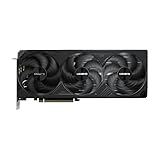
The configuration verified for this guide is the flagship pairing itself: a Ryzen 7 9800X3D, an RTX 5070 Ti with 16GB, 32GB of DDR5-5600, a 1TB Gen4 NVMe drive, a published 850W Gold ATX 3 power supply, a 360mm liquid cooler, Wi-Fi and Windows 11. Its 1440p verdict is pick 1’s verdict — native rendering at high settings, 16GB of texture headroom, the cache-rich CPU ready for a high-refresh panel — arrived at without a GPU-price hunt. Beside it, the DIY comparison: the same specification as a parts list, with the card at the top of its retail range, totals well above this budget before the licence. The King 95 is that machine — liquid-cooled, carrying a named power supply of the class a builder would specify, licence included — typically for meaningfully less than that parts route, and broadly comparable to pick 1’s best case once the licence and the assembly labour are counted. In a normal market this paragraph embarrasses the prebuilt; this month it is the guide’s most important comparison. Check the current price on Amazon, because the pick only belongs in this guide when its live listing sits inside the budget.
The disciplines are the usual ones. The pick qualifies only when its live price fits: at the top of its range it is over this guide’s ceiling and belongs to the under-$3,000 conversation. The 1TB drive is the configuration’s smallest line — half of pick 1’s 2TB — and on a machine of this class a second drive is a near-term purchase to budget for rather than a surprise. Skytech notes the graphics card brand may vary, which is normal for system builders and worth knowing before you fall for a specific cooler design in the photographs. And the King 95 name covers a family of configurations, including a 2TB, DDR5-6000 variant positioned higher — verify the delivered specification against the one above, model number first, before this review’s verdict means anything.
- The exact flagship pairing, assembled and licensed, often well under the same parts when retail card prices are elevated.
- A published 850W Gold ATX 3 power supply — the upgrade headroom a builder would choose, stated rather than hidden.
- 360mm liquid cooling fitted, where the DIY flagship asks you to mount a dual-tower air cooler yourself.
Honest limitation: It qualifies only when its live listing fits the budget; at the top of its range it is over budget. Storage is 1TB where the DIY flagship carries 2TB, and the graphics card brand may vary by production run.
Choose it if you want the flagship’s 1440p performance this month without the card-price hunt — check price on Amazon first. Skip it if the live listing sits above the budget, or if 2TB of storage on day one matters more to you than the CPU.

3. The Prebuilt That Beats Building — iBUYPOWER Y40 PRO
Who it suits: Buyers who priced pick 1 when card prices were elevated, watched the total sail past the budget, and would like a finished machine instead — plus anyone who values one warranty and a PC that works on delivery day.
The Y40 PRO pairs a Ryzen 9 7900X with an RTX 5070 Ti and its 16GB of memory, 32GB of DDR5, a 2TB NVMe SSD and Windows 11 Home. Check the current price on Amazon: it is generally positioned below the equivalent DIY route, and on strong deal days it has been the cheapest route in this guide to this card. For the 1440p question, what matters is that the card is the tier’s card — native rendering at high settings with the full texture budget. The CPU difference mostly dissolves at this resolution: 1440p play is graphics-bound in the great majority of titles, so the 7900X’s deficit against the 3D V-Cache chips, real at 1080p and in esports at very high refresh, shrinks to a minor line here. Then the price comparison lands in qualitative terms: the DIY flagship is the more expensive route whenever the card’s retail listing is elevated, with a licence still to buy either way. This prebuilt — assembled, licensed, warrantied as one machine — can undercut it. That is not a verdict on building; it is a verdict on a month in which system builders source cards through channels that never met the retail spike.
The compromises are specific rather than fatal. The memory is DDR5-5200 rather than the 6000 CL30 kit a builder picks — a small, real step behind best practice, felt in the same CPU-bound corners where the 7900X already trails. And iBUYPOWER’s listing material does not publish the power supply’s wattage, so the upgrade headroom a builder would have specified at 850W Gold is a question to settle live before ordering, not a figure this guide will invent. None of it outweighs a substantial saving and a machine that works on arrival — but the pick’s logic is its price, and if the saving has evaporated when you check, the recommendation evaporates with it and pick 1 takes over again.
- Generally positioned below the equivalent DIY parts total, with Windows included — check price on Amazon to confirm on the day.
- On strong deal days it becomes the cheapest route to native-1440p 5070 Ti performance here.
- 2TB of storage fitted as standard, where the King 95 asks you to plan a second drive.
Honest limitation: The CPU leans creator rather than gaming-flagship, the memory runs DDR5-5200 instead of 6000, and the power supply wattage is unpublished in the listing material — confirm it live before counting on upgrade headroom.
Choose it if you want this tier’s card this month at the lowest total cost — check the current price on Amazon first. Skip it if its live price has climbed back toward its parts value, or if choosing your own board and power supply is the point of the exercise.

4. The Cheapest 5070 Ti Parts List — Ryzen 9 9900X + RTX 5070 Ti
Who it suits: Builders who want pick 1’s graphics card and native-1440p verdict for the lowest parts total in this guide — and streamers, editors and compilers who will use twelve cores between gaming sessions.
The surprise in this tier’s CPU positioning is that AMD’s twelve-core Ryzen 9 9900X is generally positioned below the eight-core 9800X3D, the gaming flagship — check price on Amazon for both before you order. On the identical shared platform, with the same WINDFORCE SFF RTX 5070 Ti, this is the cheapest route here to a 5070 Ti machine with no weak line in it. For 1440p purposes the graphics verdict is pick 1’s, unchanged: the card renders the full frame natively at high settings, its 16GB absorbs full-intent texture loads, and DLSS stays in reserve. What changes is behind the card. At 1440p the workload is graphics-bound in most titles, so the 9900X’s missing 3D V-Cache costs less here than it would at 1080p — the gap concentrates in CPU-bound and very-high-refresh play, where pick 1’s cache still wins. Meanwhile the twelve Zen 5 cores, boosting to 5.6GHz, absorb everything a streaming or editing machine does around the game.
The trade should still be chosen knowingly. If the machine is purely for playing on a high-refresh 1440p panel, those cores will spend their lives idle while the cache you declined sets your ceiling in exactly the titles you bought the panel for — that buyer belongs in pick 1. The second limitation is memory: 32GB is the right gaming specification and a workable creator one, but the 64GB configuration this CPU class invites means a second kit at current elevated memory prices, which takes the build out of this guide’s budget. Buy the 32GB now, let the board’s free slots wait, and add the second kit when the memory market calms. And the standing condition applies: this build’s fit against the budget inherits pick 1’s dependence on catching the card at a favourable live price, labelled here as it is there.
- The lowest parts total of any 5070 Ti path in the guide, with no line weakened to reach it.
- At GPU-bound 1440p, the CPU trade costs little; in mixed work, the twelve cores pay for themselves.
- The natural streaming build of the six: core headroom behind the card’s hardware encoder.
Honest limitation: It trails the X3D chips in cache-sensitive, high-refresh play, and the 64GB memory configuration creators eventually want does not fit this budget at current memory prices — it is a planned second purchase, not a checkbox.
Choose it if your PC renders, encodes, compiles or streams alongside its gaming. Skip it if the machine is purely for playing at high refresh — pick 1’s cache is worth more to you than cores you will not use.

5. The Build That Leaves Money for the Monitor — Ryzen 7 7800X3D + RTX 5070
Who it suits: Builders whose $2,500 has to cover the setup rather than the tower alone — above all, anyone gaming on an old 1080p panel, for whom the screen upgrade is worth more than a card tier.
Every other DIY path here fits the budget only by catching a card at a favourable price or deferring the Windows licence. This one simply fits, and what it buys with the difference is the other half of the keyword. The Ryzen 7 7800X3D — the previous generation’s gaming champion, carrying the same 96MB of stacked cache — is positioned below its successor; check price on Amazon. GIGABYTE’s WINDFORCE OC SFF RTX 5070 sits a clear tier below the Ti card in positioning. On the shared platform, the complete, finished machine — licence paid — still leaves room in the budget toward the panel. The card’s 1440p credentials are genuine: 1440p is the RTX 5070’s designed tier, and it renders the full frame natively at high settings across most of the catalogue. The platform around it deliberately outclasses it — the AM5 board, the 850W supply and the case are all specified for the next card, not this one — so the machine’s future version is a GPU swap rather than a rebuild.
The compromise is memory capacity, and it deserves precision here. The 5070’s 12GB is the specification that will age first in this build, because texture loads are set by the 1440p output you intend and do not shrink when the render scale does; heavy ray tracing with ultra textures at 1440p is where the Ti’s 16GB earns its premium soonest. The 7800X3D likewise sits a step behind its successor in CPU-bound titles, though beside a 5070 at 1440p the card is the limit in nearly everything and the gap mostly goes unseen. Weigh that against what the saving buys: a 5070 in front of a new 1440p high-refresh panel is a better gaming setup than a 5070 Ti in front of the 1080p screen already on your desk, and this is the only pick that lets the $2,500 buy the whole setup instead of assuming the panel already exists.
- The only DIY path that fits comfortably with the Windows licence paid, with room left toward the panel.
- Native 1440p from the card designed for the tier, on a platform specified to outlive it.
- The 7800X3D remains one of the strongest gaming CPUs for its tier.
Honest limitation: The 12GB of VRAM is the first specification in this build that will age out at 1440p texture loads, and the card’s live price is volatile too — when its listing climbs, the saving that justifies the pick erodes.
Choose it if the budget must also buy the screen, or if you would rather bank the difference toward a future card. Skip it if you already own a good 1440p monitor and plan to keep this card for four-plus years — that buyer wants the Ti’s 16GB.

6. The RTX 5080 Build — the 4K Door, Shown With Its Reasoning
Who it suits: Nobody, at this budget, this month — and the review exists so that verdict is a calculation rather than an opinion. If you arrived determined to build around an RTX 5080 for $2,500, this section explains why that determination does not survive contact with the parts list.
Give the build every advantage. GIGABYTE’s WINDFORCE OC SFF is the cheapest RTX 5080 line we could verify, and even that card is positioned firmly in the flagship tier above this budget — check the current price on Amazon and the gap is obvious. Pair the card with the cheapest strong gaming CPU here, the 7800X3D, since at 1440p and above the graphics card is the limit. Add the shared platform, already the disciplined version of a parts list — board, memory kit, SSD, power supply, cooler, case. The total still lands well above this budget. Now cut corners the way the forum posts suggest: delete the case entirely, build in a cardboard box — and the build is still over budget, with no case bought and no Windows licence paid. Run the reasoning backwards and it states the truth directly: for this platform and CPU to fit $2,500, the RTX 5080 itself would have to be positioned far below its flagship tier, a long way under any verified listing.
What the money would buy, if spent, is the one capability no other pick honestly offers. In published comparative testing the 5080 led the 5070 Ti by roughly 15% at 4K, and it is the card that makes native 4K rendering a plan rather than a reconstruction — at 1440p it is simply overqualified, rendering the full frame with headroom to spare. But notice what the corner-cut version sacrifices to chase it: storage, memory headroom, case airflow, power-supply margin — the platform around the card, which is precisely backwards. A 5070 Ti in a balanced machine is still a good PC in four years; a 5080 fed by a bargain power supply and a small drive is a flagship with a support act that lets it down daily. If the 5080 is the point of the build, the honest budget for it is about $3,000, and Best Gaming PC Build Under $3000 is where this parts list belongs — the same silicon is also the top end of Best Gaming PC Build For 1440p Gaming Under $3000. If $2,500 is the point, the 5070 Ti paths above are not a consolation prize; they are the tier working as intended.
- The strongest renderer in the guide and the only native-4K route — positioned well above this budget, with every advantage given.
- Removing the case entirely still leaves the build over budget, before any Windows licence.
- The card would need to drop far below its flagship positioning for the build to exist at $2,500.
Honest limitation: This pick does not meet the budget, by design and by arithmetic. It is published so the gap is documented rather than rumoured; treat its link as the price to watch — check price on Amazon — not a recommendation to buy at $2,500.
Choose it if your real ceiling is about $3,000 and native 4K is non-negotiable. Skip it if $2,500 is a hard limit — it is, mathematically, not a $2,500 build at any current verified positioning.

Comparison Table
| Pick | Type | Budget position | 1440p verdict | Link |
|---|---|---|---|---|
| 9800X3D + RTX 5070 Ti build | DIY parts list | Fits when the card’s live price is favourable — check price on Amazon | Native 1440p, high settings, high-refresh headroom | Check on Amazon |
| Skytech King 95 | Prebuilt | Fits when its live listing sits inside the budget — check price on Amazon | The flagship pairing, assembled; native 1440p | — |
| iBUYPOWER Y40 PRO | Prebuilt | Generally the lowest-cost route to this tier — check price on Amazon | Native 1440p; the tier’s lowest-cost route | Check on Amazon |
| 9900X + RTX 5070 Ti build | DIY parts list | The cheapest 5070 Ti parts route in the guide | Native 1440p; twelve cores for the work around the game | — |
| 7800X3D + RTX 5070 build | DIY parts list | Fits comfortably with the licence paid, with room toward the panel | Native 1440p; 12GB of VRAM is the aging line | Check on Amazon |
| RTX 5080 corner-cut build | DIY parts list | Above this budget at its current positioning — over budget | Native 1440p with ease; the only native-4K route | — |
How to Choose a Gaming PC Build for 1440p Gaming Under $2,500
- Price the whole machine, not the exciting parts. CPU and graphics card are roughly half an honest total at this tier. The cooler, board, memory, storage, power supply, case and licence make up the rest of every DIY path here — a parts list that omits them is not a $2,500 build, it is a $2,500 down payment.
- Check the card’s live price, not its launch positioning. The RTX 5070 Ti’s live listings have ranged far above the level it launched at. Check the current price on Amazon for any build you copy, because the card moves the total more than every other line combined.
- Buy native rendering; spend upscaling as headroom. At this budget every card renders 1440p natively. Treat DLSS as the reserve for the heaviest ray-traced titles, and whenever a specification quotes upscaled performance, ask for the internal render resolution before you credit it: Quality at 1440p output is a ~1707 × 960 render, Performance is a ~1280 × 720 one.
- Hold the 16GB VRAM floor for a keeper. Textures load for the 1440p output you intend, not the render scale you choose, so memory ages on output terms. The one 12GB pick here is justified by a named purchase — the monitor — not by pretending the limit is not there.
- Match the CPU to your refresh target. At 1440p and moderate refresh rates the graphics card decides everything, and the 9900X and 7800X3D paths lose little. Chasing high-refresh panels reintroduces the processor, which is where the 9800X3D’s cache premium pays for itself.
- Treat memory as a priced component again. DDR5 kits currently sit far above their historical norm. A build total that assumes last year’s RAM price is wrong before you start — check the current price on Amazon for the kit as well.
- Buy the power supply for your next card, not this one. An 850W Gold ATX 3.x unit with the native 12V-2×6 cable is cheap insurance that turns your next upgrade into a card swap instead of a card-plus-supply swap. Never cut this line to rescue a GPU upgrade; pick 6 shows where that road ends.
- Compare against prebuilts before you order parts. Two verified prebuilts here can undercut their equivalent parts lists, licence included. That flips back when retail card prices normalise — check on the day, not from habit: building’s price advantage is a market condition, not a law of nature.
Pairing the Monitor: The Other Half of “1440p Gaming”
The keyword names a resolution, and a resolution is a panel before it is a frame rate. The sweet spot is a 27-inch 1440p monitor: 2560 × 1440 spread across 27 inches works out to roughly 109 pixels per inch, sharp enough that individual pixels disappear at a normal desk distance while the panel stays affordable and the pixel count stays in reach. A 32-inch 1440p panel shows the same 3.7 million pixels spread thinner — more immersion, no more sharpness — a legitimate preference if chosen knowingly. What none of the 5070 or 5070 Ti paths should be paired with is a 4K monitor bought on a grow-into-it theory. It will not work: 4K is 2.25 times the pixels of 1440p, and driving one from these cards means living permanently in upscaled rendering — DLSS Quality at 4K output is a 1440p-class render — when the same money buys a native experience at 1440p today. Native 4K belongs to pick 6’s card and a budget of about $3,000; at $2,500 it is a promise the hardware in this guide does not make.
Refresh rate deserves the same honesty. These cards suit high-refresh 1440p panels: lighter and esports titles render natively at the rates such panels display, and heavier titles reach them with DLSS spent as headroom. What no pick here does is render the heaviest current games natively at the top rate of the fastest panels, so buy the panel for the mix you actually play rather than for the largest number on its box. One day-one discipline completes the pairing: set the monitor’s real refresh rate in Windows on the first evening, because panels routinely default below the rate they were bought for. And if your current screen is 1080p, reread pick 5 before pick 1: at this budget the setup is the product, and the path that funds the panel out of the tower’s savings will look better on your desk than the flagship card feeding a decade-old display. Tighter ceilings get the same render-versus-display grading at Best Gaming PC Build For 1440p Gaming Under $1500.
Build or Buy in November 2026: Why This Guide Contains Prebuilts
A build guide recommending prebuilt PCs owes you its reasoning, and the reasoning is one verified comparison. The specification at the top of this guide — 9800X3D, RTX 5070 Ti, 32GB, 2TB — is an expensive parts list at current retail positioning, plus a licence on top: a finished DIY machine that runs well past this budget when the card’s listing is elevated. The Skytech King 95, carrying the same CPU and card with a published 850W Gold supply and the licence included, is positioned far more favourably — check the current price on Amazon. The iBUYPOWER Y40 PRO, a shelf below in CPU choice, is positioned lower still, especially on deal days. System builders buy graphics cards through supply channels whose prices never met the retail spike, while the retail card a builder can actually place in a cart sits far above its launch positioning — and an elevated memory market accounts for most of the rest.
None of this repeals the reasons to build. A parts list remains the only way to guarantee every line — the named power supply, the exact memory kit and case — and the only way to carry a platform forward across a decade of swaps, which is why pick 5’s over-specified platform may be the smartest long-term purchase despite its weaker card. What has changed is that the saving building used to promise automatically cannot be assumed, and a guide that pretended otherwise would send you to overspend believing it was $2,500. When the retail 5070 Ti returns to its launch positioning, pick 1’s arithmetic — quality in every line, inside the budget — becomes simply true again, and the prebuilts return to being the convenience option. Until then, price both, every time, and let the day’s numbers decide. Readers whose real budget matches that higher total will find the same analysis in Best Gaming PC Build Under $3000.
Common Buying Mistakes
- Reading “1440p” on a specification as native rendering when the fine print is an upscaled render — ask for the internal resolution; DLSS Performance at 1440p output renders at roughly 720p class.
- Copying a parts list priced at a graphics card’s launch positioning and ordering it when live listings are far higher — a major error on the 5070 Ti alone this year.
- Buying a 4K monitor for a 5070 Ti build and spending the machine’s life below native, when the same money buys a native 1440p setup outright.
- Budgeting memory and storage from memory. DDR5 and NVMe prices ran far above their historical norms in late 2026; a total that assumes old RAM pricing is fiction.
- Forgetting the cooler and the licence. No processor here ships with a cooler, and a retail Windows licence is a real line in the budget — together they account for a familiar chunk of mystery overrun in most failed budgets.
- Cutting the power supply, case or storage to squeeze an RTX 5080 into a $2,500 total. Pick 6 does that reasoning in full: even with the case deleted it does not fit, and what remains is a worse PC than the balanced 5070 Ti paths.
- Assuming a prebuilt’s specification from its name. The King 95 is a family of configurations and the Y40 PRO’s power supply wattage is unpublished; verify the model and key lines live.
- Buying the flagship tower and keeping the old 1080p panel. Pick 5 exists because the setup is the product: a tier down in the tower and a tier up in the screen is the better gaming purchase.
Final Recommendation
- Most builders: the flagship 9800X3D + RTX 5070 Ti build — when its card’s live price is favourable; check price on Amazon.
- Buying this week, at the price on the page: the Skytech King 95 when its listing fits the budget, or the iBUYPOWER Y40 PRO.
- Creators and streamers: the Ryzen 9 9900X + RTX 5070 Ti build — the same native 1440p, with cores for the work around it.
- Buying a whole setup: the Ryzen 7 7800X3D + RTX 5070 build, and spend the leftover on the 1440p panel.
- Set on native 4K: raise the budget to about $3,000; the reasoning in pick 6 is not negotiable.
Our top two are the flagship DIY build and the King 95, and the choice between them is about the calendar rather than the hardware: they are the same 1440p specification, one priced as parts in a spiked retail market and one priced as a finished machine by a builder who never paid the spike. If you can hunt the card to a favourable price, build — you will know every line in the machine, and the platform will serve you for a decade. If you are ordering now, the King 95 — when its live listing fits this budget — delivers the identical pairing with the licence included and a substantial saving against the parts route when retail card prices are elevated, while the Y40 PRO’s deal positioning makes it the value pick on the days it appears. Builders on a tighter ceiling should see Best Gaming PC Build Under $1500; first-time builders, Best Gaming PC Build For Beginners Under $2500; streamers, Best Gaming PC Build For Streaming Under $2500; tight spaces, Best Gaming PC Build For Small Spaces Under $2500. Price every line on the day — graphics card first, memory second, everything else after — check the current price on Amazon for each linked pick, and the $2,500 will buy the native 1440p it is supposed to buy.
Frequently Asked Questions
Can these builds really run native 1440p, or is that upscaling doing the work?
Native, with one honest footnote. The RTX 5070 Ti and RTX 5080 render the full 2560 × 1440 frame at high settings across the current catalogue, and the RTX 5070 does the same in most titles. Upscaling enters as headroom for the heaviest ray-traced games, not as the entry fee. The footnote is price, not performance: the DIY 5070 Ti routes depend on catching the card at a favourable live price — check price on Amazon — and the 5080 path does not fit the budget at its current positioning, as pick 6 shows.
Is DLSS Quality the same as native 1440p?
No. DLSS Quality at a 1440p output renders approximately 1707 × 960 internally and reconstructs the remaining detail; the result is a good image and a genuine performance lever, but the rendered frame is not a 1440p frame. DLSS Performance goes further, rendering at roughly 1280 × 720. One asymmetry matters: textures are loaded for the 1440p output regardless of the render scale, so upscaling relieves the card’s shading work without relieving its memory — one reason this guide grades VRAM separately from rendering power.
Why not pair the 5070 Ti with a 4K monitor and upscale?
You can — but know what you are buying. A 4K panel asks for 2.25 times the pixels of 1440p, so a 5070 Ti driving one lives in upscaled rendering: DLSS Quality at 4K output renders at approximately 2560 × 1440 internally, and DLSS Performance at approximately 1920 × 1080. That is a reconstructed 4K image built from a 1440p-class render, where the same money buys native rendering on a 1440p panel. Native 4K is the RTX 5080’s territory, and at current positioning that territory starts at about a $3,000 build.
Is it cheaper to build or buy a gaming PC right now?
Right now, buying — at current positioning the flagship specification costs substantially more as a finished DIY machine when retail part prices are elevated, while the King 95 sells the same specification, licensed and assembled, positioned inside this budget on favourable listings; check the current price on Amazon for both routes. The cause is temporary: retail card and memory prices have spiked far beyond system builders’ channel prices. When the retail 5070 Ti returns to its launch positioning, pick 1’s parts route is what normal looks like, and building retakes the lead.
Which CPU should I choose: 9800X3D, 9900X or 7800X3D?
Choose by work and refresh target, not by rank. The 9800X3D is the fastest gaming CPU here and the pick for high-refresh 1440p, where the processor sets the ceiling in CPU-bound titles. The 9900X trades some cache-driven gaming performance for twelve cores — the right trade if the machine also streams, renders or compiles, and currently the cheapest route to the tier’s card. The 7800X3D is the value gaming chip: a step behind its successor, and the enabler of the only build here that fits with its licence paid and money left for the monitor. Check price on Amazon for each chip, since their relative positioning is what makes the trade work.
What should I upgrade first in a year or two?
In this order: the graphics card, which every platform here was specified to accept — 850W power supplies, roomy cases, current boards; storage, especially in the 1TB prebuilt configuration; and memory to 64GB on the creator path, once DDR5 prices retreat from their current elevated level. The processors and boards are the longest-lived lines in these builds — that longevity is what the AM5 platform money bought.


