Disclosure: As an Amazon Associate, reviewstook.com earns from qualifying purchases. Links to Amazon on this page are affiliate links; they cost you nothing extra.
$1500 is the sweet spot for gaming laptops, with RTX 4050 to RTX 5070 cards.
Each laptop below is listed on Amazon.com — check price on Amazon for the current price. This guide is built from product listings, not our own testing, so configurations change often, so confirm the exact GPU, RAM and storage on the product page.
By the Reviewstook Editorial Team. Last updated: October 31, 2026.
In this guide
Quick Picks
| Product | Type | Best for |
|---|---|---|
| HP Victus 15.6-inch (RTX 3050) | Entry gaming laptop | RTX 3050, 144Hz, 16GB RAM |
| Lenovo LOQ 15.6-inch (RTX 4050) | Entry gaming laptop | Ryzen 5 7235HS and RTX 4050 |
| HP Victus 15 (RTX 4050) | Entry gaming laptop | Ryzen 7 7445HS and RTX 4050 |
| 16-inch 2.5K 165Hz Gaming Laptop (RTX 4060) | Mid-range gaming laptop | RTX 4060, 2.5K 165Hz |
| ASUS TUF Gaming F16 (2025) | 16-inch gaming laptop | Core i5-13450HX, 165Hz |
| GIGABYTE Gaming A16 (RTX 5060) | 16-inch gaming laptop | Core i7-13620H and RTX 5060 |
| MSI Cyborg A15 AI (RTX 5060) | 15.6-inch gaming laptop | Ryzen 9 270 and RTX 5060 |
Our Picks

Top pickBest for budget 1080p gaming
1. HP Victus 15.6-inch (RTX 3050)
A 15.6-inch FHD 144Hz Victus with an Intel Core i5-12450H, NVIDIA GeForce RTX 3050, 16GB of RAM and a 512GB SSD, per the listing. Check price on Amazon for the current price.
Good for: budget 1080p gaming. Strengths: a dedicated GPU in an entry-level package. Weaknesses: older RTX 30-series GPU. Skip it if you want the latest GPU.


Best for value gaming from a known brand
2. Lenovo LOQ 15.6-inch (RTX 4050)
A 15.6-inch FHD Lenovo LOQ with an AMD Ryzen 5 7235HS, 16GB of memory, an NVIDIA GeForce RTX 4050 and a 512GB SSD, per the listing. Check price on Amazon for the current price.
Good for: value gaming from a known brand. Strengths: RTX 4050 and Lenovo brand. Weaknesses: sits mid-tier in this group. Skip it if you want RTX 50-series.


Best for a step up from RTX 3050
3. HP Victus 15 (RTX 4050)
A 15.6-inch FHD 144Hz Victus 15 with an NVIDIA RTX 4050 6GB, an AMD Ryzen 7 7445HS, 16GB DDR5 and a 512GB SSD, per the listing. Check price on Amazon for the current price.
Good for: a step up from RTX 3050. Strengths: RTX 4050 and DDR5 memory. Weaknesses: sits mid-tier in this group. Skip it if you want RTX 50-series.

Best for a higher-resolution screen with RTX 4060
4. 16-inch 2.5K 165Hz Gaming Laptop (RTX 4060)
A 16-inch 2.5K 165Hz gaming laptop with a Core i7-11370H, RTX 4060 8GB, 16GB DDR4 and a 1TB SSD, per the listing. Check price on Amazon for the current price.
Good for: a higher-resolution screen with RTX 4060. Strengths: 2.5K 165Hz screen and 1TB SSD. Weaknesses: lesser-known brand and an older CPU. Skip it if you want a known brand.
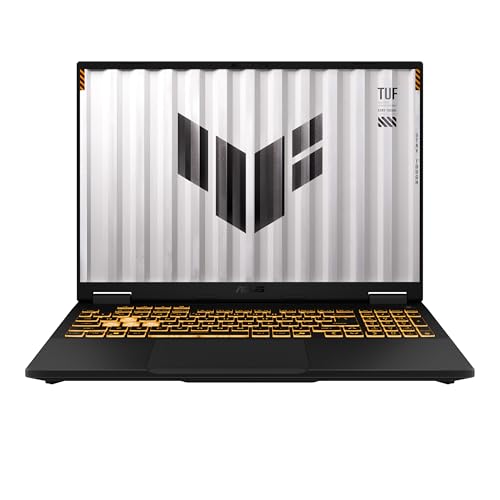
Best for a durable 16-inch gaming laptop
5. ASUS TUF Gaming F16 (2025)
A 16-inch FHD+ 165Hz 16:10 TUF Gaming F16 (2025) with an Intel Core i5 13450HX and NVIDIA GeForce graphics (check the exact GPU on the page), per the listing. Check price on Amazon for the current price.
Good for: a durable 16-inch gaming laptop. Strengths: 165Hz 16:10 screen and ASUS brand. Weaknesses: sits toward the upper tier in this group. Skip it if you want RTX 50-series.

Best for rTX 50-series gaming on a mid budget
6. GIGABYTE Gaming A16 (RTX 5060)
A 16-inch GIGABYTE Gaming A16 with an Intel Core i7-13620H and a GeForce RTX 5060, per the listing. Check price on Amazon for the current price.
Good for: RTX 50-series gaming on a mid budget. Strengths: RTX 5060 at a mid price. Weaknesses: sits toward the upper tier in this group. Skip it if you want a premium build.

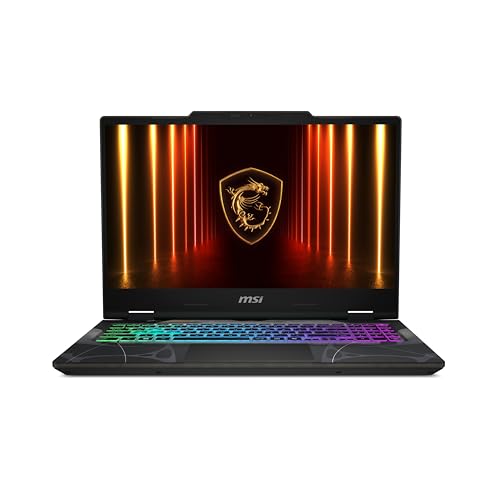
Best for aMD CPU with RTX 5060
7. MSI Cyborg A15 AI (RTX 5060)
A 15.6-inch FHD 144Hz Cyborg A15 AI with an AMD Ryzen 9 270, 16GB and 1TB storage with an RTX 5060, per the listing. Check price on Amazon for the current price.
Good for: AMD CPU with RTX 5060. Strengths: Ryzen 9 and RTX 5060. Weaknesses: sits toward the upper tier in this group. Skip it if you want a thin laptop.

Best Picks by Category
These labels summarize listing data and are not hands-on test results.
- Highest listed rating (limited feedback): 16-inch 2.5K 165Hz Gaming Laptop (RTX 4060). This is not an independent product-quality award.
- Most reviewed: ASUS TUF Gaming F16 (2025).
- Lowest price: Lenovo LOQ 15.6-inch (RTX 4050) — check price on Amazon for the current price.
- Premium option: GIGABYTE Gaming A16 (RTX 5060) — check price on Amazon for the current price.
Price, Rating and Review Comparison
The table lists the picks with their price tier. Prices change often, so check price on Amazon and confirm the current price before you buy.
| Product | Price | Rating | Ratings | Price tier |
|---|---|---|---|---|
| Lenovo LOQ 15.6-inch (RTX 4050) | Check price on Amazon | See listing | See listing | Mid-range |
| HP Victus 15.6-inch (RTX 3050) | Check price on Amazon | See listing | See listing | Mid-range |
| HP Victus 15 (RTX 4050) | Check price on Amazon | See listing | See listing | Mid-range |
| 16-inch 2.5K 165Hz Gaming Laptop (RTX 4060) | Check price on Amazon | See listing | See listing | Mid-range |
| ASUS TUF Gaming F16 (2025) | Check price on Amazon | See listing | See listing | Mid-range |
| MSI Cyborg A15 AI (RTX 5060) | Check price on Amazon | n/a | n/a | Mid-range |
| GIGABYTE Gaming A16 (RTX 5060) | Check price on Amazon | See listing | See listing | Mid-range |
How Much Feedback Backs Each Rating
A high average from a handful of ratings is weaker evidence than a slightly lower average from thousands.
- MSI Cyborg A15 AI (RTX 5060): Amazon did not show a rating count.
How to Choose
GPU tier
RTX 4050 handles 1080p; RTX 5060 and up gives more headroom. See our buying guide.
Screen
144Hz or higher suits fast games.
Cooling
Add a cooling pad if temperatures run high.
How We Chose These Products
We start from products sold on Amazon with a full product name and clear specifications, and we skip results that show only a brand name or a vague title. We then read the listing and any manufacturer information for each one and note the features that matter for laptops and laptop accessories: processor and memory, display, battery and ports. We do not run our own lab tests, and this guide contains no hands-on measurements. Use it to build a shortlist, then check current prices, dimensions and return terms on the Amazon page before you buy.
Buying Guide: What to Check Before You Choose
Graphics, cooling and refresh rate
Gaming laptops depend on the graphics chip and how well the cooling lets it run. Check the graphics model, power limit, display refresh rate and the cooling design. Thin models often run slower than thick ones with the same chip. Battery life during gaming is short, so plan on staying plugged in.
What changes with price
At lower prices, check memory (aim for at least 8 GB for general use), storage type (an SSD is much faster than a hard drive) and the display resolution. Avoid models with obsolete chips or very small storage.
What students and creators need
Prioritize battery life, weight, keyboard comfort and a reliable display. For art or engineering, check screen accuracy and processing power; for writing, comfort and battery. Check the warranty and what the school requires.
Quick Reference: Which Pick Suits Whom
- HP Victus 15.6-inch (RTX 3050): suits budget 1080p gaming
- Lenovo LOQ 15.6-inch (RTX 4050): suits value gaming from a known brand
- HP Victus 15 (RTX 4050): suits a step up from RTX 3050
- 16-inch 2.5K 165Hz Gaming Laptop (RTX 4060): suits a higher-resolution screen with RTX 4060
- ASUS TUF Gaming F16 (2025): suits a durable 16-inch gaming laptop
- GIGABYTE Gaming A16 (RTX 5060): suits RTX 50-series gaming on a mid budget
- MSI Cyborg A15 AI (RTX 5060): suits AMD CPU with RTX 5060
Common Mistakes to Avoid
- Buying on processor name alone without checking memory and storage.
- Ignoring display brightness and resolution.
- Overlooking weight and battery for mobile use.
- Skipping the warranty.
- Forgetting the ports you need.
Setup and Care
- Install system updates before first use.
- Check battery health settings.
- Back up important files.
- Keep vents clear to avoid heat.
Which gaming laptop should you buy?
Pick the laptop that matches the GPU tier and screen you care about most, because every pick here trades something for its strengths. Use these matches as a starting point, then confirm the exact configuration on the listing.
- If you want an entry-level way into 1080p gaming with a dedicated graphics card, go for the HP Victus 15.6-inch (RTX 3050), knowing it uses an older GPU generation.
- If you want a known brand with an RTX 4050 for value, choose the Lenovo LOQ 15.6-inch (RTX 4050).
- If you want an RTX 4050 with DDR5 memory and a Ryzen 7, the HP Victus 15 (RTX 4050) is the step up.
- If a sharper screen matters more than the brand, look at the 16-inch 2.5K 165Hz Gaming Laptop (RTX 4060), and read the warranty details closely because the brand is less known.
- If you want a durable 16-inch machine with a 16:10 screen, the ASUS TUF Gaming F16 (2025) fits, but check the exact graphics chip on the page.
- If you want RTX 50-series graphics on a mid budget, choose the GIGABYTE Gaming A16 (RTX 5060) for a 16-inch screen.
- If you prefer an AMD processor with an RTX 5060, the MSI Cyborg A15 AI (RTX 5060) is the match.
No single laptop wins for everyone. Decide first whether graphics power, screen quality or brand support matters most, then let that choice narrow the list to two or three candidates.
RTX 3050 vs RTX 4050 vs RTX 4060 vs RTX 5060: how much GPU do you need?
For 1080p gaming, an RTX 4050 is a capable starting point, while an RTX 5060 gives more headroom for newer games and higher settings. The right tier depends on the games you play and how long you want the laptop to stay useful.
The RTX 3050 is an older generation and sits at the entry end. It can run many popular games at 1080p, but you may need to lower settings in demanding titles. The RTX 4050 steps up and suits most players who stay at 1080p. The RTX 4060 adds more room, which helps on a higher-resolution panel such as the 2.5K screen in this guide. The RTX 5060 is the newest generation here and is the better pick if you want the longest useful life.
Remember that a laptop GPU is not the same as the desktop card with a similar name. Power limits and cooling change real-world speed, so the same model name can perform differently across laptops. Look at the listing for the power or wattage detail, and compare more than the model number.
- Esports and older games: a lower tier is often enough.
- Newer single-player games: favor the newer GPU generation.
- Higher resolution screens: a stronger GPU helps keep frame rates smooth.
- Video memory: check the listing, since some games like more of it.
Do not pay for graphics power you will not use, but do not buy the weakest tier if you plan to keep the laptop for several years.
What to check before you buy a gaming laptop
Before you buy, confirm the exact graphics chip, memory, storage, screen and warranty on the live listing. Gaming laptop configurations change often, and a small difference in the listing can change the machine you receive.
- Exact GPU and CPU: match them to the listing text, not to the title alone.
- RAM: sixteen gigabytes is a common starting point, so check the amount and whether it is DDR4 or DDR5.
- Storage: look at the SSD size and whether a second drive slot exists for later expansion.
- Screen: check resolution, refresh rate and panel type, plus brightness if you play near windows.
- Ports: make sure you have what you need for a mouse, headset, external monitor and charger.
- Charger and weight: a gaming laptop with its power brick is heavy, so think about carrying it.
- Operating system: confirm what comes installed and whether setup steps are needed.
- Warranty and returns: read the terms on the page, and find out who handles repairs.
It also helps to check how many people rated the product and what they say about heat, fan noise and build quality. A product with very few ratings tells you little, so treat a high average from a small sample with caution.
How do you choose screen size and refresh rate for a gaming laptop?
For most buyers, a 15.6-inch or 16-inch screen with a refresh rate of 144Hz or higher is a balanced choice. Higher refresh rates look smoother in fast games, but only if the GPU can supply enough frames.
The 15.6-inch laptops in this guide are a little more compact and easier to carry. The 16-inch models give you slightly more screen, and some use a 16:10 shape that shows more vertical space for work and browsing. If you move your laptop between rooms or classes, size and weight matter more than a few extra inches.
Resolution is the other half. Full HD is easier on the GPU and gives higher frame rates in demanding games. A 2.5K panel looks sharper but asks more of the graphics chip, which is why it pairs best with a stronger GPU tier. If you also plan to connect an external monitor, check the ports for the video output you need.
- Fast shooters and esports: prioritize refresh rate and response time.
- Story games and creative work: consider a sharper, more accurate panel.
- Bright rooms: check the brightness detail on the listing.
Do not assume every 144Hz panel looks the same, because panel quality varies by model.
Gaming laptop heat, fan noise and battery: what should you expect?
Expect a gaming laptop to run warm and loud under load and to last a short time on battery while gaming. This is normal for the category and is the main trade-off for portable performance.
Fans spin up when the CPU and GPU work hard. Keep the vents clear and use the laptop on a hard, flat surface instead of a bed or blanket. A cooling pad can help some machines, though results vary by laptop. Dust builds up over time, so occasional cleaning of the vents with compressed air, following the maker’s guidance, helps keep temperatures reasonable.
Power settings change both speed and noise. Many laptops offer quieter and higher performance modes through their own software. For battery life, plan on plugging in for serious gaming, and use a balanced mode for browsing and schoolwork.
- Use the supplied charger for best performance.
- Update graphics drivers and system updates periodically.
- Close background apps before long sessions.
- Use headphones if fan noise bothers you.
Is a gaming laptop worth it, and who should skip it?
A gaming laptop is worth it if you want one machine for gaming, school or work that you can move. It is a weaker choice if you never leave your desk and want the most performance for the money.
The honest downsides are clear. Laptops cost more than a desktop with similar speed, they are harder to upgrade, and they run hotter in a small body. Battery life while gaming is short. Higher tiers add speed but also weight and fan noise, and paying more only helps if your games and screen can use the power.
Who should skip it? Buyers who only play light games may do well with a normal laptop. People who always game at a desk may prefer a desktop, which is easier to upgrade and cool. Anyone who needs a thin, quiet, all-day-battery machine should look at other laptop types.
If a gaming laptop still fits, the main choice is how much to spend on the GPU tier, the screen and the brand support. Compare the picks above, check the current listing for the exact configuration and what is included, then choose the one that fits how you will play.
Reading This Price Band Like a Player, Not a Shopper
Where the money goes inside these machines
In this band, your money divides between four things: the graphics chip, the screen, the processor, and everything else, meaning build, keyboard, battery and ports. The picks here distribute that budget differently, and understanding the distribution is the whole skill of shopping in this range. A machine that pours its budget into graphics gives you settings headroom and longevity in new releases. One that balances graphics with a sharper, faster screen gives you a better minute-to-minute experience in the games you already own. Neither distribution is wrong; they serve different players, and this guide’s reviews describe each machine’s distribution so you can spend in the direction of your own library.
The everything-else category is where regret hides. A laptop with strong internals and a dim screen, a cramped keyboard or a tiny battery is a machine you will praise in benchmarks and tolerate in life. At this level, the differences in those everyday qualities between picks are real, and they are why this guide covers each laptop as a whole product. When two picks perform similarly in games, and several here do, choose on the screen, keyboard and build, because those are the parts you will interact with for every hour you own the machine, gaming or not.
Resolution and refresh: matching the screen to the graphics
Several picks here pair strong graphics with high-resolution, high-refresh screens, which is the right combination only when both halves are used. A high-resolution panel makes games look superb and gives desktop work lovely clarity, but it asks the graphics chip to work much harder than a standard-resolution panel at the same settings. Players of demanding single-player titles may prefer the sharper screen and accept moderate settings, while competitive players usually prefer the opposite trade. The reviews note each machine’s pairing; read them as pairings, not as separate scores, and match them to the titles at the top of your play list.
Ownership: Heat, Noise and the Room You Play In
Machines in this band are powerful enough that their cooling is a lifestyle factor. Under full load they are audible, and in a shared bedroom, a dorm room or a quiet flat that audibility is part of the purchase. A headset solves the player’s side of the problem; the roommate’s side is solved by where and when you play, and by using the quieter performance modes for older or lighter titles that do not need full power. Several picks here offer genuinely usable lower-power modes, which is an underrated feature for anyone whose gaming happens after other people sleep.
Heat management is also a placement habit. These laptops want a hard, flat surface, clear space behind their exhausts, and a room that is not already hot. A stand that lifts the rear helps many designs breathe, and keeping the vents dust-free keeps the cooling at its designed capacity. None of this is specialised knowledge; it is the same care you would give any hard-working machine, applied to one that works harder than most. Owners who build these habits early find their machines hold their performance for years, which at this price is the difference between a good purchase and a great one.
Battery and travel, honestly framed
Treat these as transportable rather than portable. They travel between desks, homes and LAN sessions happily, and they work unplugged for everyday tasks, but gaming on battery is a short, reduced experience on any machine in this guide, because the hardware is deliberately restrained away from the wall. Pack the charger as part of the laptop, because it effectively is. If your life genuinely mixes all-day mobility with evening gaming, weight the slimmer picks and accept their trade-offs knowingly; if the machine lives on one desk, enjoy the larger, cooler designs without apology.
A Shortlist Method for This Exact List
Name your three most-played titles and the settings you expect in each. That one act sorts this list faster than any other, because the entry picks cover popular and competitive titles beautifully, the middle picks add headroom for demanding releases at strong settings, and the top picks exist for players who refuse to compromise in the newest games. Next, name your screen preference between sharpness and speed, and your tolerance for size and noise. With those three answers written down, the individual reviews above will usually point to one machine, occasionally two, and the tiebreaker should be the everyday qualities: keyboard, build and battery behaviour.
Resist the final upsell reflex. The step from the middle of this list to the top buys real performance, but only in the titles and settings that can use it, and the money saved by choosing the middle funds games, a good headset, a stand and extra storage, all of which you will notice weekly. The players who enjoy this price band most are the ones who bought for their library as it is, not as they imagine it becoming. This guide is written for that reader, and every pick in it rewards being chosen that way.
A Last Word on This Price Band
This band is where gaming laptops grow up: powerful enough for real libraries, priced where judgement still matters, and varied enough that fit decides more than force. The seven picks here will all make their owners happy, provided the owner and the machine were matched by library, room and routine rather than by the fear of missing out. That matching, done with the audit and the shortlist method in this guide, takes twenty minutes and pays out for years.
Buy the machine, finish the setup, and then do the thing the whole purchase was for: play, at the settings you tuned, in the room you arranged, with the library you audited. The laptop has no further opinions to offer, and that silence, from a machine this capable, is the sound of a decision made well.
Genres Revisited: The Library Audit in Practice
Perform the library audit concretely before you order. List the ten games you have actually launched in the last three months, not the ten you own. Beside each, write whether it made your current machine struggle, and how much you cared. That list, which takes four minutes, is the most predictive document in gaming laptop shopping, because it measures your taste rather than the industry’s marketing calendar. In this guide’s terms, a list full of smooth experiences and mild caring points to the entry picks with money left for games; a list full of struggling and caring points up the ladder, one rung per pattern of pain.
Include the social games separately, because they obey different rules. The title your group plays weekly sets a floor the machine must clear comfortably for years, since groups change games slowly and a laptop that cannot join the group’s game is a laptop that misses the point of the group. Competitive staples are kind to hardware, which is good news: the floor they set is usually the entry tier, and everything above it is for your solo library’s ambitions.
Finally, audit the future honestly: the two or three announced games you are genuinely waiting for, not the genre’s whole release calendar. If they are continuations of series your current machine handles, your next machine’s tier is a comfort decision. If they are a generational leap you have been anticipating for years, they are the rare legitimate reason to buy at the top of this band. Either way, the audit ends the argument between your wallet and your imagination with evidence, which is where this guide came in.
Playing the Long Game: Titles, Backlogs and Taste
Your backlog is a specification
Most players own more games than they have finished, and that backlog is a better buying guide than any launch calendar. If your unfinished shelf is rich with demanding recent titles, the upper picks here will be exercised weekly and earn their price. If it is rich with classics, indies and competitive staples, the entry and middle picks will run all of it beautifully and the flagship money is buying capability your own shelf cannot use. Read your library the way this guide reads laptops, by what it actually contains, and the tier decision becomes almost clerical.
Taste evolves, and the machine should have a little slack for the evolution: the strategy player who discovers flight simulation, the shooter player who falls for vast role-playing worlds. That slack is the sane version of future-proofing, one tier of headroom rather than three, bought because your curiosity is a known quantity even when its direction is not. The picks in the middle of this list are where that slack lives most cheaply, which is why so many experienced players, who could buy the top, deliberately buy the middle.
Comfort peripherals for long sessions
At this level, the hours are long enough that comfort equipment stops being a luxury. A chair or cushion that supports a whole evening, a headset that does not clamp by the second hour, a screen height that does not tax the neck: these decide whether the laptop’s performance is enjoyed or endured. Budget for them alongside the machine rather than after it, because a powerful laptop used uncomfortably delivers a fraction of its value. The order in this guide’s advice is deliberate: machine, then the seat and sound around it, then everything else the hobby shops for.
The First Month With a Machine in This Band
The first month decides whether a gaming laptop in this band becomes a long-term favourite. Week one is for setup and honesty: install your real library’s core titles, tune each one’s settings deliberately, and note which performance mode you actually use, because that note tells you whether you bought the right tier. If every game needs compromises you resent, the returns window is open and the tier above exists for a reason. If everything runs as hoped, close the shopping tabs; the machine is right, and further comparison only manufactures doubt.
Weeks two to four are for the ownership habits that protect the purchase: the desk position that keeps vents clear, the cleaning rhythm for intakes, the storage discipline that keeps the drive from filling with titles you finished months ago, and the update routine that happens on your schedule rather than mid-match. None of this is glamorous, and all of it is the difference between a laptop that performs in year three as it did in month one and one that slowly suffocates. Players in this band spend serious money; these habits are how the money keeps its value.
Playing away from home: friends, family and events
Machines in this band travel to other people’s houses more than most laptops, and a little preparation makes those sessions smooth. Coil the power adapter as part of the laptop, because a gaming laptop without it is a countdown timer. Carry a compact mouse and a headset rather than borrowing, and know your machine’s quick settings for a television or a spare monitor, since away-from-home play usually involves a different screen. The mid-size picks here are the natural travellers; the larger ones can go, but they travel like equipment rather than like a laptop, and their owners should pack accordingly.
Resale and Handing Down a Gaming Laptop
Gaming laptops hold a second life unusually well, because yesterday’s strong machine is still a fine machine for lighter players, students and creators. If you expect to upgrade in a few years, keep the box and the original adapter, maintain the machine kindly, and your old pick becomes a gift or a sale that genuinely serves its next owner. That lifecycle is another argument for the balanced picks in this list: a machine with a good screen, keyboard and build hands down gracefully, while one that was only ever a graphics chip in a box has less to offer its second life.
How the Picks Compare With Each Other
These seven machines climb from entry graphics to current-generation performance in even steps. The notes below restate each pick’s role in this guide, in the order they appear, so you can find the rung your library actually needs.
HP Victus 15.6-inch (RTX 3050) — the entry gaming laptop in this line-up, highlighted in this guide for an RTX 3050 graphics chip, a high-refresh screen and 16GB of memory. The starting rung, covering popular and competitive titles at sensible settings for the least money in the list.
Lenovo LOQ 15.6-inch (RTX 4050) — the entry gaming laptop in this line-up, highlighted in this guide for a Ryzen 5 7235HS processor and RTX 4050 graphics. The step into the newer graphics generation at an entry price, a strong first serious gaming laptop.
HP Victus 15 (RTX 4050) — the entry gaming laptop in this line-up, highlighted in this guide for a Ryzen 7 7445HS processor and RTX 4050 graphics. The alternative entry pick with the stronger processor story, for players who also run demanding everyday workloads.
16-inch 2.5K 165Hz Gaming Laptop (RTX 4060) — the mid-range gaming laptop in this line-up, highlighted in this guide for RTX 4060 graphics with a sharp, fast sixteen-inch screen. The screen-led mid-range pick, pairing a step up in graphics with the display quality to show it.
ASUS TUF Gaming F16 (2025) — the 16-inch gaming laptop in this line-up, highlighted in this guide for a Core i5-13450HX processor and a fast sixteen-inch display. The durable all-rounder of the band, built to be carried and used hard as well as played on.
GIGABYTE Gaming A16 (RTX 5060) — the 16-inch gaming laptop in this line-up, highlighted in this guide for a Core i7-13620H processor and RTX 5060 graphics. The current-generation performance pick, for players who want the newest graphics features in this band.
MSI Cyborg A15 AI (RTX 5060) — the 15.6-inch gaming laptop in this line-up, highlighted in this guide for a Ryzen 9 270 processor and RTX 5060 graphics. The alternative current-generation option, pairing strong processing with the same class of graphics in a mid-size body.

Frequently Asked Questions
What is the best gaming laptop under $1500?
The RTX 5060 models give the most GPU for the money by their specs.
Is RTX 4050 enough?
For 1080p gaming, yes.
Do I need 32GB RAM?
16GB is fine for most games.
How much memory do I need in a laptop?
For general use, 8 GB is a sensible minimum. For multitasking or heavier work, 16 GB gives more room.
SSD or hard drive?
An SSD is much faster and more reliable for daily use.
How long should a laptop battery last?
Claims vary with use. Check reviews and the listed hours, which are usually best-case.
Is an RTX 5060 laptop worth it over an RTX 4050?
It can be if you want more headroom for newer games and plan to keep the laptop for several years. An RTX 4050 is still a capable 1080p choice. Compare the full configuration, since cooling, power limits and the screen also affect results.
Is a 144Hz screen enough for gaming?
Yes, 144Hz is smooth for most players. Higher refresh rates only help if your graphics chip can supply enough frames. Check that the GPU suits your games before paying for a faster panel.
Can I upgrade the RAM or storage on a gaming laptop?
Many gaming laptops allow RAM or storage upgrades, but it varies by model. Check the listing and the manual for slot details. Be aware that opening the case may affect warranty terms, so read them first.
Do I need a cooling pad for a gaming laptop?
Not always, but it can help on models that run hot. Good airflow, clear vents and a hard surface matter more. A cooling pad is a low-cost extra to try if temperatures climb.
Is a gaming laptop good for school and work too?
Yes, it can handle schoolwork and office tasks well. The trade-offs are weight, a bulky charger and shorter battery life. If you carry it daily, think about size before buying.
How long does a gaming laptop last?
It depends on the hardware tier, how you use it and how you care for it. Newer GPU generations and enough memory tend to stay useful for longer. Keeping vents clean and drivers updated also helps.
Should I buy a laptop with a lesser-known brand?
You can, but check the warranty, support terms and how many people have rated the product. A lesser-known brand may offer strong specs for the money. Make sure you know who handles repairs before you buy.
Is the newest graphics generation worth it in this band?
It brings current features and better efficiency, and it will stay relevant longer as games adopt those features. The previous generation in the middle of this list remains excellent value for the games most people play today. Decide by your library: if you play the newest releases at launch and keep machines for years, the newer picks justify themselves; if your library is established favourites, the mid-list picks serve you just as happily for less.
How much do screen differences matter at this level?
A great deal, because the screen is where the performance becomes visible. A sharper panel rewards stronger graphics in detailed games, while a faster panel rewards them in competitive ones. A dim or dull screen undermines either. When two picks here perform alike, and several do, the screen is the most honest tiebreaker, ahead of small processor differences you will never feel.
Can these laptops handle streaming while playing?
The stronger picks can, because streaming divides work between the graphics hardware and the processor, and the mid-to-top machines here have headroom in both. Entry picks can stream lighter titles with sensible settings. If streaming is a serious intention rather than an experiment, choose from the upper half of the list and learn the encoder settings your platform provides, because using the graphics encoder well matters as much as the hardware itself.
Should I buy extra storage at the same time?
Game libraries grow faster than buyers expect, and the largest titles in this band’s world are substantial. Check whether the pick you choose allows adding or replacing a drive later; if it does, buy the machine now and expand when the library demands it. If storage is fixed, be generous at purchase. Running any gaming laptop with a nearly full drive degrades everything, including the updates your games require.
What settings should I expect in demanding games?
On the entry picks, sensible medium settings at standard resolution with modern upscaling helping; on the middle picks, high settings in most titles; on the top picks, high settings with headroom and the sharp screens properly fed. Exact results vary by title more than by machine, which is why this guide frames expectations by tier rather than promising numbers no honest review can guarantee across every game.
Should I buy a cooling stand with a laptop in this band?
It is the most useful single addition for desk-based players, because it helps airflow and screen height together, and this band’s machines run hard enough to appreciate both. Choose a stand that leaves the rear exhausts clear and holds the machine steady during play. It is not compulsory, and a hard, clear desk surface already does half the job, but owners who play long sessions at one desk rarely regret it.
How important is the keyboard on a gaming laptop?
More than players expect before their first long session. Gaming keyboards are used for everything the machine does, including the work and study that fill most of its hours, and a board that fatigues your hands will be resented daily. Travel, spacing and backlighting that can be dimmed for films are the qualities to weigh. The per-pick notes in this guide cover keyboards for exactly this reason.
Can I use a laptop in this band for school or work all day?
Yes, with the practical caveats this guide has repeated: carry the charger, expect the weight, and use the quieter modes in shared rooms. The performance is far beyond what documents and calls require, so the machine will never be the bottleneck in a classroom or an office. Students in particular should weigh the carrying honestly, because the laptop that stays in your room helps nobody.
Should I undervolt or tune a gaming laptop in this band?
Most owners should not. Modern machines manage their power and thermals competently, and the gains from manual tuning are small compared with the time and the risk of instability for anyone who is not already an enthusiast. Spend the same attention on placement, clean vents and sensible in-game settings, which return more performance more safely. If tuning is your hobby, enjoy it as a hobby, on the understanding that the machine did not need it.
Bottom Line
For an entry-level pick, the HP Victus (RTX 3050). For value, the Lenovo LOQ (RTX 4050). For RTX 5060, the GIGABYTE A16 or MSI Cyborg A15.
Related Reading
- Laptop Buying Guide: RAM, CPU, Storage, Screen
- 6 Best Laptops: Windows, Touch and Copilot+ Picks
- 6 Best Business Laptops: Lenovo, Acer, Samsung
- 6 Best Business Laptops Under $1000: Office-Ready Picks
- 6 Best External DVD Drives for Laptops: USB 3.0 and Type-C
More Gaming Laptop Guides
- Best Gaming Laptops
- Best Gaming Laptops Under $2000
- Best RTX 50-Series Gaming Laptops
- Best High-End Gaming Laptops
- Best Entry-Level Gaming Laptops
- Best ASUS Gaming Laptops
- Best MSI Gaming Laptops
- Best Compact Gaming Laptops
- Best Cooling Pads for Gaming Laptops
- Gaming Laptop Buying Guide
- Gaming Laptop vs Gaming Desktop
- All laptop guides


