Disclosure: As an Amazon Associate, reviewstook.com earns from qualifying purchases. Links to Amazon on this page are affiliate links; they cost you nothing extra.
Business laptops focus on ports, security and durability.
This guide is built from product listings, not our own testing, so configurations change often, so confirm the exact processor, RAM and storage on the product page.
By the Reviewstook Editorial Team. Last updated: October 31, 2026.

In this guide
Quick Picks
| Product | Type | Best for |
|---|---|---|
| Lenovo V15 Gen 4 Business Laptop | 15.6-inch business laptop | Core i5-13420H with RJ45 and HDMI |
| Acer TravelMate P2 14 | 14-inch business laptop | Core 5 120U, 16GB, 512GB |
| Acer Aspire 14 AI Copilot+ PC | Thin 14-inch Copilot+ laptop | Core Ultra 7 256V and a WUXGA display |
| Microsoft Surface Laptop 13-inch | 13-inch touchscreen laptop | Snapdragon X Plus, Copilot+ PC |
| Samsung Galaxy Book5 Pro 360 (16-inch) | 16-inch 2-in-1 laptop | Core Ultra 7 256V, 2-in-1 |
| Samsung Galaxy Book6 Enterprise Edition | 14-inch enterprise laptop | Core Ultra 5 325 |
Our Picks
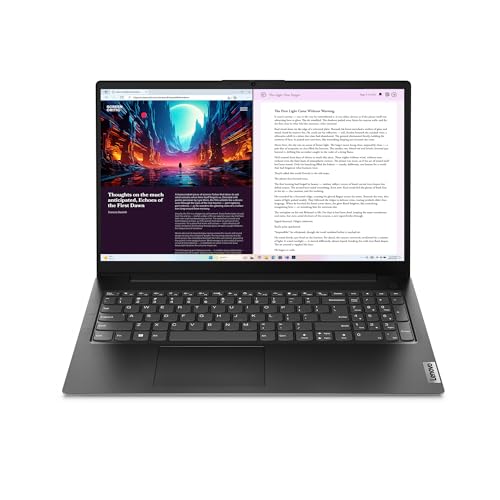
Top pickBest for office work that needs a wired network port
1. Lenovo V15 Gen 4 Business Laptop
A 15.6-inch FHD business laptop with an Intel Core i5-13420H, HDMI, RJ45 and a webcam, per the listing. Check price on Amazon for the current price.
Good for: office work that needs a wired network port. Strengths: Ethernet and HDMI ports. Weaknesses: mid-range pricing. Skip it if you want a thin premium design.


Best for business use with 16GB RAM
2. Acer TravelMate P2 14
A 14-inch WUXGA TravelMate P2 with an Intel Core 5 120U, 16GB of RAM and a 512GB SSD, per the listing. Check price on Amazon for the current price.
Good for: business use with 16GB RAM. Strengths: 16GB RAM and business design. Weaknesses: mid-range pricing. Skip it if you want a gaming laptop.

Best for everyday work and study on a mid-range budget
3. Acer Aspire 14 AI Copilot+ PC
A 14-inch WUXGA Copilot+ PC with an Intel Core Ultra 7 256V processor and an NPU rated up to 47 TOPS, per the listing. Check price on Amazon for the current price.
Good for: everyday work and study on a mid-range budget. Strengths: modern Intel Core Ultra chip and Copilot+ features. Weaknesses: mid-range pricing. Skip it if you want a gaming laptop.
Best for portable work with a premium build
4. Microsoft Surface Laptop 13-inch
A 13-inch Surface Laptop (2025) Copilot+ PC with a touchscreen and a Snapdragon X Plus 8-core processor, per the listing. Check price on Amazon for the current price.
Good for: portable work with a premium build. Strengths: touchscreen and Microsoft design. Weaknesses: higher price. Skip it if you need maximum app compatibility with older software.
Best for a premium large-screen convertible
5. Samsung Galaxy Book5 Pro 360 (16-inch)
A 16-inch Samsung Galaxy Book5 Pro 360 with an Intel Core Ultra 7 256V, per the listing. Check price on Amazon for the current price.
Good for: a premium large-screen convertible. Strengths: premium design and Core Ultra 7. Weaknesses: high price. Skip it if you want a budget laptop.
Best for corporate deployments
6. Samsung Galaxy Book6 Enterprise Edition
A 14-inch Samsung Galaxy Book6 Enterprise Edition with an Intel Core Ultra 5 325, per the listing. Check price on Amazon for the current price.
Good for: corporate deployments. Strengths: enterprise edition. Weaknesses: high price. Skip it if you want a budget laptop.
Best Picks by Category
They summarize listing data and are not hands-on test results.
- Highest listed rating (limited feedback): Samsung Galaxy Book5 Pro 360 (16-inch) — check price on Amazon. This is not an independent product-quality award.
- Most reviewed: Lenovo V15 Gen 4 Business Laptop.
- Lowest price: Acer TravelMate P2 14 — check price on Amazon.
- Premium option: Samsung Galaxy Book5 Pro 360 (16-inch) — check price on Amazon.
Price, Rating and Review Comparison
Prices change often, so confirm the current price on Amazon.
| Product | Price | Rating | Ratings | Price tier |
|---|---|---|---|---|
| Acer TravelMate P2 14 | Check price on Amazon | n/a | n/a | Budget |
| Acer Aspire 14 AI Copilot+ PC | Check price on Amazon | n/a | n/a | Budget |
| Microsoft Surface Laptop 13-inch | Check price on Amazon | n/a | n/a | Mid-range |
| Samsung Galaxy Book6 Enterprise Edition | Check price on Amazon | n/a | n/a | Mid-range |
| Samsung Galaxy Book5 Pro 360 (16-inch) | Check price on Amazon | n/a | n/a | Mid-range |
| Lenovo V15 Gen 4 Business Laptop | Check price on Amazon | n/a | n/a | n/a |
How Much Feedback Backs Each Rating
A high average from a handful of ratings is weaker evidence than a slightly lower average from thousands. Here is how the sample size looks for each pick.
- Acer TravelMate P2 14: Amazon did not show a rating count.
How to Choose
Ports
Ethernet and HDMI help in offices.
Security
Check Windows Pro and security features.
Warranty
Business models often have better support.
How We Chose These Products
We start from products sold on Amazon with a full product name and clear specifications, and we skip results that show only a brand name or a vague title. We then read the listing and any manufacturer information for each one and note the features that matter for laptops and laptop accessories: processor and memory, display, battery and ports. We do not run our own lab tests, and this guide contains no hands-on measurements. Use it to build a shortlist, then check current prices, dimensions and return terms on the Amazon page before you buy.
Buying Guide: What to Check Before You Choose
Business and professional use
Look for a good keyboard, a durable build, security features, ports for docks and a reliable warranty. For heavy work, check processor, memory and cooling.
Graphics, cooling and refresh rate
Gaming laptops depend on the graphics chip and how well the cooling lets it run. Check the graphics model, power limit, display refresh rate and the cooling design. Thin models often run slower than thick ones with the same chip. Battery life during gaming is short, so plan on staying plugged in.
What students and creators need
Prioritize battery life, weight, keyboard comfort and a reliable display. For art or engineering, check screen accuracy and processing power; for writing, comfort and battery. Check the warranty and what the school requires.
Quick Reference: Which Pick Suits Whom
- Lenovo V15 Gen 4 Business Laptop: suits office work that needs a wired network port
- Acer TravelMate P2 14: suits business use with 16GB RAM
- Acer Aspire 14 AI Copilot+ PC: suits everyday work and study on a mid-range budget
- Microsoft Surface Laptop 13-inch: suits portable work with a premium build
- Samsung Galaxy Book5 Pro 360 (16-inch): suits a premium large-screen convertible
- Samsung Galaxy Book6 Enterprise Edition: suits corporate deployments
Common Mistakes to Avoid
- Buying on processor name alone without checking memory and storage.
- Ignoring display brightness and resolution.
- Overlooking weight and battery for mobile use.
- Skipping the warranty.
- Forgetting the ports you need.
Setup and Care
- Install system updates before first use.
- Check battery health settings.
- Back up important files.
- Keep vents clear to avoid heat.
What to Check Before You Buy
- Look for a comfortable keyboard and a good webcam.
- Check ports such as USB-C, HDMI and a headphone jack.
- Compare weight if you travel.
- Look for security features like a fingerprint reader.
- Check the warranty and support options.
What Separates a Business Laptop From a Consumer One
Business laptops are not simply consumer laptops with a different label. The differences are practical, and they show up in the years after purchase rather than on day one. Knowing them helps you decide whether the extra cost is worth it.
The first difference is build and serviceability. Business lines are often designed for repeated travel, with sturdier hinges, reinforced corners and keyboards that tolerate heavy typing. Some are easier to open for repair or upgrade, which lowers the cost of replacing a battery or storage drive later. Consumer models tend to prioritize thin profiles and low price.
The second difference is management and security. Business laptops may include a fingerprint reader, a privacy shutter for the webcam, a trusted platform module for encryption, and support for tools that IT departments use to manage fleets. These features matter if you handle client data or need to meet your employer’s policy. Windows Pro adds domain join, disk encryption and remote management features that Windows Home lacks, which is why the existing FAQ points to it.
The third difference is support. Business lines often come with longer warranties and faster service options, sometimes with on-site repair for an added fee. For someone who cannot afford a week without a computer, that coverage may be worth more than a faster processor.
The fourth difference is stability. Business models tend to receive steadier driver and firmware support, and the configuration stays consistent over a product cycle. That consistency is helpful if you buy several for a team.
None of this makes consumer laptops unsuitable. A freelancer who writes, sends invoices and attends video calls can do fine with a mid-range consumer machine. The question is how costly downtime or a data loss would be.
Matching a Laptop to Your Working Life
The desk-based office worker
If the laptop sits on a desk with a monitor, keyboard and dock, portability matters less than ports and comfort. A model with Ethernet and HDMI, like the Lenovo V15 Gen 4 described in this guide, reduces the need for adapters. A larger screen is easier on the eyes during long days.
The frequent traveler
Weight, battery life and a durable chassis take priority. A 13 or 14-inch laptop is easier to carry on trains and planes. Look for fast charging over USB-C, which lets you top up from a power bank or a shared charger. The Microsoft Surface Laptop 13-inch and the 14-inch Acer and Samsung models fit this style.
The video-call-heavy professional
If meetings fill your day, the webcam, microphones and speakers matter more than a processor upgrade. Look for a 1080p webcam, noise-reducing microphones and a privacy shutter. Wi-Fi quality also matters, so check that the laptop supports a recent standard.
The small-business owner
Reliability, price and warranty lead. A mid-range model with 16GB of memory, like the Acer TravelMate P2 14, runs spreadsheets, accounting software and many browser tabs at once. Back up files regularly, since a small business cannot afford lost records.
The remote or hybrid employee
Check whether your employer issues a laptop or allows personal ones. Many companies require specific security software, and some forbid personal devices on their networks. Confirm the requirement before spending your own money.
Specs That Matter for Work
- Memory. 8GB can handle basic office use, but 16GB is more comfortable with many browser tabs, video calls and spreadsheets open together. Check whether memory is soldered, since soldered memory cannot be upgraded later.
- Storage. A 256GB solid-state drive fits light use. 512GB gives space for documents, presentations and local archives. Cloud storage can fill the gap, but not every workplace allows it.
- Processor. Recent mid-range chips are fine for office work. Higher-end chips help with data analysis, video editing or virtual machines. Efficient chips extend battery life.
- Display. Full HD is the baseline. A taller 16:10 screen shows more of a document. Brightness around 300 nits or more helps in bright rooms, and a matte finish cuts glare.
- Keyboard and trackpad. You will touch these all day. Try them in a store if you can, or read comments about key travel and layout.
- Ports and wireless. USB-C with charging and display output, HDMI, and a headphone jack cover most needs. Wi-Fi 6 or newer, and Bluetooth, are standard on recent models.
- Battery. Listed hours are usually best-case. Real use, with video calls and brightness up, is shorter.
Copilot+ PCs, such as the Acer Aspire 14 AI and the Surface Laptop 13-inch, include a neural processing unit for on-device AI features. Whether that matters depends on whether you use those features. It should not be the reason alone to pay extra.
Security and Compliance Basics Before You Deploy
A laptop that holds client or employee data is a liability if it is lost. A few steps reduce the risk, and most are free.
- Turn on full-disk encryption. Windows Pro includes BitLocker, and many business models support device encryption.
- Use a strong sign-in method. A fingerprint reader or a PIN protected by hardware is easier than long passwords and still secure.
- Keep the system and apps updated. Most breaches use known flaws that updates fix.
- Enable a find-my-device feature and set a remote lock or wipe option.
- Use a password manager and two-step verification for work accounts.
- Separate personal and work accounts, ideally with separate user profiles.
- Back up regularly, and test that you can restore a file.
If your business falls under industry rules about privacy or financial data, check with a qualified professional about what the laptop must support. This guide cannot say which rules apply to you.
Warranty, Support and the True Cost of Ownership
The sticker price is one piece of the cost. Add the warranty, any protection plan, accessories such as a dock or monitor, and the cost of downtime. A cheaper laptop with a one-year warranty may cost more than a pricier one with three years if it fails in the second year.
Read what the warranty covers. Standard coverage handles manufacturing defects, while accidental damage such as drops and spills often requires an upgrade. Check how you send the laptop in: mail-in repair can take days, while on-site service is faster. Look at the maker’s support reputation and whether replacement parts are available.
Think about the lifespan, too. A business laptop used daily often lasts three to five years. Buy enough memory and storage now, because upgrading later may not be possible. When the machine retires, wipe the drive securely and recycle or resell it through a reputable program.
Common Mistakes When Buying for Work
Work purchases fail in predictable ways. Avoid these and you will save both money and time.
Paying for power you will not use
A top-tier processor and a discrete graphics chip are wasted on email, documents and meetings. Put that money toward memory, storage, the warranty or a better display. Match the hardware to the heaviest task you actually do.
Ignoring the keyboard and screen
You will spend thousands of hours looking at the screen and typing on the keyboard. A cramped layout, shallow keys or a dim panel causes discomfort that no processor can fix. Read comments on typing feel, and check brightness and resolution.
Forgetting the dock and monitor
If you use an external display, check that the laptop’s USB-C or HDMI output supports your monitor’s resolution and refresh rate. Confirm how many displays the laptop can drive, and whether it charges through the dock.
Skipping the software check
Some business programs run only on specific Windows versions or processor types. Laptops with Snapdragon chips, such as the Surface Laptop 13-inch in this guide, run Windows on an Arm design. Most common apps work, but older or specialized programs, drivers and some peripherals may not. Test your key tools or ask the vendor before you buy.
Overlooking the return and tax rules
If the laptop is for a business, ask your accountant how to treat the purchase. Keep invoices and serial numbers, and note the warranty start date.
Neglecting setup and backup
A new laptop is the best time to set up encryption, backups and account recovery. Create a recovery key, store it somewhere safe, and test a restore. Delaying this step leaves your work exposed.
Choosing on screen size alone
A 16-inch laptop such as the Galaxy Book5 Pro 360 offers more space but adds weight and a larger bag. A 13 or 14-inch model travels better. Decide whether you work at a desk or on the move before picking a size.
Sit down with this list and a notepad before you buy. If you can answer each point with a reason, you are ready to choose with confidence.
Deploying Laptops Across a Small Team
Standardising models, images and accessories
Businesses that buy laptops one at a time, in whatever is on offer that month, pay for the variety later in support time. A standard model, or a short approved list like the one in this guide, means one set of drivers, one charger type to stock, one dock that works at every desk and a spare machine that can replace any failure without relearning. Even a very small team feels the difference the first time a laptop fails before a deadline and the spare simply works. When you choose from these picks for a team, favour the model you can buy repeatedly and support easily over a marginally better machine you can only get once.
Accessories deserve the same standardisation. One dock model, one monitor size and one bag or sleeve across the team keeps desks interchangeable, which matters as people move, share spaces or work hybrid patterns. Keep a small stock of the consumables that actually stop work when missing: chargers, cables and a spare mouse or two. These unglamorous preparations are what separate businesses that lose a morning to a hardware hiccup from those that lose ten minutes.
Accounts, security settings and handover
Set each machine up the same way before it reaches its user: business accounts rather than personal ones for work data, disk encryption on, automatic updates on, and a standard set of security tools installed. Document the setup once and follow the document every time. When someone leaves, a standard build makes handover and wiping straightforward and auditable, which protects both the business and the departing employee. The laptops in this guide all support the fundamentals; the discipline around them is the part only you can supply.
The True Cost of a Business Laptop
Purchase price versus cost per year of service
A business laptop’s real price is its cost divided by the years it serves, plus the support time it consumes. A cheaper machine replaced sooner, or one that generates regular help requests, can cost more than a better pick kept longer. This is why this guide includes machines with stronger builds and business support options alongside the value picks: for a sole trader, the value pick may be exactly right, while for a firm whose staff bill by the hour, downtime is the expensive line item and support quality is worth paying for. Run the arithmetic for your own situation rather than copying anyone else’s.
Warranty choices belong in the same calculation. Extending cover or adding accidental damage protection is worthwhile when the machine travels, when its user cannot work without it, or when the business has no spare. It is poor value for a desk-bound spare. Decide per role, not per order: the travelling consultant and the office-bound administrator in the same company should not automatically receive the same machine or the same cover, and the picks in this guide let you differentiate sensibly.
Managing refresh cycles without drama
Replacing every laptop in the same month creates a support spike and a cash spike. A steadier pattern replaces a fraction of the fleet each year, moving the newest machines to the most demanding users and cascading the older ones to lighter roles. Laptops bought with memory and storage headroom cascade gracefully; minimal machines have nowhere to cascade to. Planning purchases this way also smooths the learning curve, because the team absorbs a few new machines at a time and the experienced users help the next group. The guide’s all-rounders are picked with exactly this kind of second life in mind.
Matching Machines to Roles in the Business
Start from roles rather than people. The travelling role needs portability, battery behaviour and a machine that presents well in front of clients. The desk role needs connections, comfort and easy docking more than thinness. The specialist role, whether finance with huge spreadsheets or a founder doing everything at once, needs headroom. The picks here map onto those roles: compact modern machines for the road, the wired desk-friendly option for fixed workstations, and the larger convertible for people who present and annotate with clients. Buying by role also makes replacement simple, because the role’s requirements outlive any individual holder of the job.
One more role is often forgotten: the spare. A business that cannot work when a laptop fails should own its solution in advance, even if that is the previous generation’s machine kept updated and ready. The cost is small compared with a day of lost work, and a standardised fleet makes the spare genuinely interchangeable. If this guide helps you choose a fleet standard, let the outgoing machines become the spares rather than selling them for little; their value as insurance is higher than their resale price.
A Last Word on Buying for a Business
A business’s laptops are a portrait of the business: standardised or improvised, maintained or neglected, planned or perpetually surprising. Clients rarely see the fleet, but they experience its consequences in every deadline met, every call that sounds professional, every document that arrives when promised. The picks in this guide, bought by role, set up uniformly, recorded properly and replaced on a calendar, turn a necessary expense into a quiet competitive advantage that never appears in a brochure.
Start small if you must: one standard, one asset record, one spare. The system matters more than its size, and it scales with the business in a way that improvisation never does. The next laptop your business buys can be the first one bought properly, and from that purchase the whole fleet’s story changes.
The Owner’s Own Laptop: A Special Case
In most small businesses one laptop is unlike the others: the owner’s. It holds the banking, the payroll, the contracts and the plans, and it is used at hours and in places the fleet never sees. That machine deserves the fleet’s most deliberate purchase: the strongest warranty the business can justify, backups that are tested rather than assumed, and a level of security setup, encryption, strong sign-in, a password manager, that sets the standard everyone else is asked to meet. The premium compact and convertible picks in this guide suit the role’s travel and presentation load; the all-rounders suit it when the owner’s business is desk-shaped. What does not suit it is being whatever was left over.
The owner’s machine also sets the replacement tempo. When it is replaced on a plan, the old one cascades into the fleet as a high-quality spare or a new starter’s machine, and the business’s average equipment age stays healthy without drama. When it is replaced in a crisis, the crisis is never only about a laptop. Put its purchase date and warranty in the asset record with everyone else’s, and let the calendar, not a failure, start the conversation about its successor.
Finally, the owner’s laptop is where the business’s data habits are modelled. If its files are organised, its accounts are business accounts and its backups run, the team absorbs the standard by osmosis. If it is a brave chaos of desktop files and personal logins, no policy document will out-argue the example. Fleet management, in a small business, is mostly leadership performed on a keyboard.
Insurance, Theft and the Lost-Laptop Hour
Laptops are stolen from cars, cafes and trains with a regularity that makes planning a duty rather than a worry. The preparation is entirely procedural: encryption on every machine so the data is not part of the loss, device-finding and remote-wipe set up before issue, serial numbers in the asset record for the police and the insurer, and a staff habit of reporting loss immediately rather than after a hopeful afternoon of searching. A business with those four things loses hardware when a laptop is stolen. A business without them loses data, time and possibly its clients’ trust, which are worth more than any machine in this guide.
The Meeting Test and the Travel Test
How the fleet behaves in front of clients
A business laptop is judged twice: once by its user, daily, and once by everyone who sees it across a table. In client settings the machine is part of the firm’s presentation, and the picks here divide accordingly. The premium compact and the convertible make a polished impression and open conversations; the fleet workhorses look like what they are, dependable tools, which suits firms whose brand is dependability. Neither impression is wrong, but it should be chosen rather than accidental, especially for staff whose laptops appear in pitches, site visits and boardrooms.
The travel test is the other half. A laptop that flies weekly needs a charger that is not a brick, a battery that covers the journey’s working hours, and a build that tolerates being slid into overhead lockers and security trays daily. The fourteen-inch picks in this guide exist for that life. A laptop that travels twice a year can be almost anything; a laptop that travels twice a week should be bought by someone who has weighed their own bag on a bad day and believed the result.
Software the Business Actually Runs
Before standardising, inventory the software the business truly depends on, including the awkward items: the accounts package, the industry tool, the label printer’s driver, the director’s ancient spreadsheet with its macros. That inventory, not a brochure, decides platform requirements, editions and sometimes the machine itself. The exercise takes an afternoon and prevents the classic small-business disaster of a fleet that runs everything except the one program the business cannot live without. Repeat it whenever a key system changes, because fleets should follow software, not the other way round.
Cloud migration changes the inventory over time, usually in the business’s favour: browser-based tools care little about the machine beneath them, which widens the choice in guides like this one and lengthens the useful life of each laptop. If your inventory is now mostly web-shaped, buy for the human qualities, screen, keyboard, battery, support, because the software has stopped constraining you. That is a genuinely modern position for a small business to be in, and the picks here reward it.
When Something Breaks: A Calm Protocol
Write the protocol before it is needed. First, the user saves work and reports the problem with what they were doing when it appeared. Second, the spare machine comes out and the user keeps working. Third, the faulty machine is diagnosed without an audience: charger and cable swapped, updates checked, the maker’s support contacted with the serial number from the asset record. Businesses with those three steps rehearsed lose an hour to a hardware failure; businesses improvising lose days and tempers. The protocol costs nothing but the decision to have one.
Afterwards, record what failed and what fixed it in the same asset record. Patterns emerge over years: a model whose batteries fade early, a charger design that frays, a user whose role is harder on machines than the role description admits. Those patterns should steer the next fleet purchase more than any review, including this one, because they describe your business’s own experience. Reviews shortlist; your records decide.
Remote and Hybrid Work: The Business Laptop’s Second Job
Video presence and the home-office reality
A business laptop now spends much of its life as a broadcast studio. Camera, microphones and speakers decide how its owner comes across to clients and colleagues, and those qualities vary between the picks here more than processor speed does. For staff whose days are calls, weigh the meeting experience as a purchasing criterion in its own right, and pair the laptop with decent lighting and, where the role justifies it, a separate headset. The machine that makes your people look and sound competent is doing marketing work every day, which rarely appears in a specification comparison but always appears in how a business is perceived.
Home working also changes the support picture. A laptop that fails in an office borrows a neighbour’s desk; a laptop that fails at home stops the day. That argues for the standardisation and spare-machine discipline described earlier in this guide, and for choosing picks whose warranty service works by post or courier rather than requiring a trip. Businesses that adopted hybrid work without adjusting their hardware habits learned this expensively; the picks and practices in this guide are how to learn it cheaply.
Data protection duties that follow the laptop home
When laptops leave the office, the business’s obligations travel with them. Encryption, strong sign-in, automatic locking and the ability to wipe a lost machine remotely are baseline practices, not enterprise luxuries, and every pick here supports them. What the business must supply is the policy and the setup: machines configured before issue, staff who know to report a loss immediately, and backups that mean a stolen laptop is an insurance claim rather than a data disaster. Regulators and clients increasingly ask how these things are handled; a small business with documented answers looks larger than it is, in the good way.
Buying for Growth: Headcount, Roles and the Next Two Years
Choose a fleet standard you can keep buying as the business grows, because the second ten laptops should match the first five. That favours established business lines like the ones in this guide over one-off bargains, and it favours configurations with headroom, because tomorrow’s hire in a heavier role can take today’s standard machine without complaint. Keep a simple asset record from the first purchase: model, configuration, date, warranty end and who holds it. That single spreadsheet, maintained in minutes, is the difference between a business that manages its technology and one that is surprised by it.
Growth also means the occasional specialist: the hire who needs the convertible for client signatures, the analyst who needs the big screen, the founder who needs the premium compact for constant travel. A short approved list, like the six roles mapped in this guide, absorbs those needs without breaking standardisation. The goal is a fleet that looks deliberate from the outside and feels personal to each user, and that balance is achievable at exactly the scale this guide addresses.
How the Picks Compare With Each Other
Only two of these six picks carry the buying links in this guide’s data, but all six are reviewed above, and the comparison below restates each machine’s role so a business can shortlist by job type rather than by specification order.
Lenovo V15 Gen 4 Business Laptop — the 15.6-inch business laptop in this line-up, highlighted in this guide for a Core i5-13420H processor with wired networking and full-size video output among its connections. The desk-fleet workhorse: the natural standard for fixed workstations where wired connections and a larger screen matter more than portability.
Acer TravelMate P2 14 — the 14-inch business laptop in this line-up, highlighted in this guide for a Core 5 120U processor with 16GB of memory and 512GB of storage. The travelling employee’s option, sized for bags and meeting rooms while keeping a work-ready configuration.
Acer Aspire 14 AI Copilot+ PC — the thin 14-inch Copilot+ laptop in this line-up, highlighted in this guide for a Core Ultra 7 256V processor and a WUXGA display. The modern, efficient portable for staff who live in calls and documents and value battery behaviour between offices.
Microsoft Surface Laptop 13-inch — the 13-inch touchscreen laptop in this line-up, highlighted in this guide for a Snapdragon X Plus platform in a compact Copilot+ design. The client-facing compact, presenting a polished image in meetings; confirm your business software is comfortable on its platform first.
Samsung Galaxy Book5 Pro 360 (16-inch) — the 16-inch 2-in-1 laptop in this line-up, highlighted in this guide for a Core Ultra 7 256V processor in a convertible design. The presenter and reviewer in the fleet, folding flat for annotation, signatures and one-to-one client work.
Samsung Galaxy Book6 Enterprise Edition — the 14-inch enterprise laptop in this line-up, highlighted in this guide for a Core Ultra 5 325 platform in an enterprise edition. The enterprise-managed option, aimed at organisations that prioritise managed deployment and fleet consistency.
Frequently Asked Questions
What makes a laptop business-class?
Durability, ports and support.
Which is best?
See Quick Picks.
Do I need Windows Pro?
For domain and security features, yes.
How much memory do I need in a laptop?
For general use, 8 GB is a sensible minimum. For multitasking or heavier work, 16 GB gives more room.
SSD or hard drive?
An SSD is much faster and more reliable for daily use.
How long should a laptop battery last?
Claims vary with use. Check reviews and the listed hours, which are usually best-case.
Do I need a business-class laptop?
Not always, but these models often have better keyboards and support.
How much RAM for office work?
8 GB is often enough; 16 GB is better for many tabs and video calls.
Is Windows Pro necessary for a business laptop?
Not for everyone. Pro adds features like disk encryption management, domain join and remote desktop hosting. A freelancer may do well with Home, while a company that manages many devices usually needs Pro. Check your employer’s IT policy before choosing.
How much RAM does a business laptop need in 2026?
16GB is a comfortable choice for many browser tabs, video calls and spreadsheets together. 8GB works for light tasks but can feel limiting over a multi-year lifespan. Check whether memory is soldered, because soldered memory cannot be upgraded later.
What is a Copilot+ PC and do I need one?
A Copilot+ PC includes a neural processing unit that runs certain AI features on the device. It is useful only if you use those features. For ordinary office work such as email, documents and meetings, a non-AI laptop is usually enough.
Should I buy a business laptop with a fingerprint reader?
It is a convenience and a security help. A fingerprint reader signs you in quickly without typing a password, and it works with Windows Hello. It matters most if you travel or work in shared spaces. Check that it is listed on the product page.
How long does a business laptop last?
Many last three to five years with ordinary use, depending on build quality, battery wear and software demands. Buying more memory and storage than you need today extends useful life. Replacing the battery late in its life can add more years.
Should a small business buy identical laptops for everyone?
Identical models simplify support, spares and accessories, and for similar roles that simplicity is worth more than small specification differences. Where roles genuinely differ, such as a travelling salesperson versus a desk-based analyst, a short approved list of two or three models keeps most of the benefit. What you should avoid is a different machine for every purchase, which multiplies chargers, docks and support knowledge without helping anyone.
Is Windows Pro necessary for a business laptop?
It depends on how the machines are managed. Businesses that need central management, domain joining or specific security policies generally require the Pro edition, while sole traders and very small teams often work happily without it. Check the exact features you use, such as remote management or encryption policy, before deciding, and prefer buying the edition you need at purchase rather than upgrading a fleet later.
How long should a business keep a laptop before replacing it?
Plan around the warranty and support horizon rather than waiting for failure. Many businesses refresh when cover ends or when the machine no longer handles the role’s software comfortably, cascading it to lighter duties first. A planned replacement, migrated calmly, is far cheaper in staff time than an emergency one, so keep a simple record of purchase dates and review the fleet once a year.
What should be set up before handing a laptop to an employee?
Business accounts, disk encryption, automatic updates, security tools and the standard applications for the role, plus a documented handover of passwords and recovery options held by the business rather than only the individual. Confirm backups run from the first day. That preparation protects the company if the machine is lost and protects the employee from being blamed for gaps that were never their responsibility.
Are extended warranties worth it for business laptops?
They are worth it when the user’s work stops without the machine, when the laptop travels constantly, or when the business has no spare and no IT support. They are poor value for desk-bound machines with a ready spare. Decide by role and by the cost of a day without that laptop, not by a blanket policy, and revisit the decision whenever the fleet changes.
How should a business handle laptops for short-term or contract staff?
Keep a small pool of standard machines, set up with limited accounts and the standard build, that can be issued in an hour and wiped on return. Contractors should work in business accounts and business storage so nothing leaves with them. The pool costs little, because yesterday’s fleet machines cascade into it naturally, and it prevents the two bad alternatives: lending a machine full of someone else’s work, or letting business data live on a stranger’s personal laptop.
Should the business provide a bag and accessories, or let staff choose?
Provide the standard kit, bag, charger and mouse, so every machine travels protected and every desk works the same way, and let staff personalise beyond that at their own expense if they wish. Standard provision is cheaper in bulk, kinder to the machines, and removes the quiet inequality of staff whose personal bags were never designed for a laptop. The kit is part of the fleet, and it should be recorded and maintained like the fleet.
Should employees be allowed to use business laptops for personal tasks?
Policies differ, and either answer can work if it is clear and consistent. Many small businesses allow light personal use, which staff value and which costs little, provided work data stays in business accounts and the machine’s security setup is not altered. Whatever the policy, write it down, apply it to everyone including the owners, and separate accounts so a handover never becomes an excavation of someone’s private life.
Bottom Line
For value, the Lenovo V15. For 16GB RAM, the TravelMate P2. For premium, the Surface Laptop 13 or Galaxy Book6 Enterprise.
Related Reading
- Laptop Buying Guide: RAM, CPU, Storage, Screen
- 6 Best Business Laptops Under $1000: Office-Ready Picks
- 5 Best Lightweight Business Laptops for Travel
- 6 Best Premium Business Laptops: ThinkPad, Surface
- 5 Best ASUS Gaming Laptops: TUF, ROG Strix and Zephyrus
More Laptop Guides
- Best Laptops
- Best Laptops Under $500
- Best Laptops Under $1000
- Best Chromebooks
- Best Gaming Laptops
- Best Laptops for Students
- Best Laptops for Programming
- Best Workstation Laptops
- Best Touchscreen and 2-in-1 Laptops
- Best Laptop Cooling Pads
- All laptop guides


