
Where to buy
Check the latest price, availability and delivery on Amazon. Orders are placed on Amazon. We may earn a commission from qualifying purchases.
- Best small-space gaming pick: Beelink SER5 MAX Mini PC, Ryzen 7 5800H, 16GB RAM, 500GB SSD — Check on Amazon
- KAMRUI E3B Mini Gaming PC, Ryzen 5 7430U, 32GB RAM, 512GB SSD — Check on Amazon
- GMKtec M5 Plus Gaming Mini PC, Ryzen 7 5825U, 32GB RAM, 1TB SSD — Check on Amazon
- BOSGAME P4 Light Gaming Mini PC, Ryzen 7 5700U, 32GB RAM, 1TB SSD — Check on Amazon
See 2 more Amazon options
- Dell OptiPlex 9020 SFF Desktop, Core i7-4770, 32GB RAM, 1TB SSD (Renewed) — Check on Amazon
- Dell RGB Gaming Tower, Core i7 6th Gen, GTX 1050 Ti 4GB, 16GB RAM, 512GB SSD (Renewed) — Check on Amazon
Read the full guide ↓
Disclosure: As an Amazon Associate, reviewstook.com earns from qualifying purchases. Links to Amazon on this page are affiliate links; they cost you nothing extra. Listing details such as price and availability change often, so check the current Amazon listing before you buy.
A small room changes what a good gaming desktop is. In a big room, the machine is a box you buy and a corner you give it; in a small one, the machine is a negotiation — with the desk that is also a dining table, with the shelf that already holds the books, with the roommate who never agreed to a tower breathing warm air beside the bed. So this guide grades the installation. Not just how fast each machine plays, but where it goes, how much air it needs around it, where its power supply lives, how far its cables reach and drop, and what happens to the room’s heat while it works. A gaming PC that wins on specifications and loses the only shelf you have is not a good purchase. It is furniture you resent.
Two honest facts frame everything below. The first is about the budget: there is no new gaming desktop with a real graphics card under $400, from any brand, and the new towers that do appear at this price are office machines wearing gaming clothes. What $400 buys is the renewed business fleet — Dell towers and small-form-factor machines retired from office desks and sold through Amazon Renewed — plus the machine that quietly won this price tier: the Ryzen mini PC, a box the size of a paperback whose integrated graphics play the same games on a modern processor with a warranty. The second fact is about the room: at this budget, smallness is not a compromise you accept in exchange for gaming. It is close to the whole point. Four of the six picks are mini PCs that can vanish behind a monitor. The two genuine desktops are graded just as honestly — one a small-form-factor chassis that slides into places a tower cannot, one a full tower that tops the gaming chart and bottoms the space chart, included because some readers have a floor corner and a plan, and deserve the real desktop with its real size stated plainly.
Every review below answers two sets of questions. The gaming set: what plays, at what settings, and what can ever be upgraded. The installation set: what class of space the machine needs, what clearance its vents demand, where the power comes from, and which placements are refused outright. One refusal applies to all six picks and will not be softened anywhere on this page: no gaming machine in this guide belongs inside a sealed cabinet, a closed TV unit or a drawer. Gaming loads make heat continuously, and a closed box of air is an oven with a door. If the only spot you have is sealed, the correct purchase is a different spot — an open shelf, a wall mount, the back of the monitor — not a different machine.
In this guide
Quick Picks
Short on time, or comparing several options at once? Each row below names a space and a buyer type, with the machine that suits it and a link to the listing.
| Space / buyer type | Pick | Why it stands out | Link |
|---|---|---|---|
| Best for most small rooms | Beelink SER5 MAX Mini PC, Ryzen 7 5800H | The strongest gaming here in a documented 4.96 × 4.44 × 1.65 in box that mounts behind a monitor — check price on Amazon | Check on Amazon |
| Best zero-footprint start | KAMRUI E3B Mini PC, Ryzen 5 7430U | VESA plate included in the box, 32GB dual-channel memory — check price on Amazon | Check on Amazon |
| Best full-spec mini | GMKtec M5 Plus Mini PC, Ryzen 7 5825U | 32GB RAM and 1TB SSD in a mini-PC footprint, dual 2.5GbE LAN | Check on Amazon |
| Best mini with a second career | BOSGAME P4 Mini PC, Ryzen 7 5700U | 32GB/1TB and dual LAN — games now, serves files later; check price on Amazon | Check on Amazon |
| Smallest real desktop chassis | Dell OptiPlex 9020 SFF (Renewed) | A genuine small-form-factor desktop with a PCIe slot — check price on Amazon; graphics card is a second purchase | Check on Amazon |
| Best if you have a floor corner | Dell RGB Gaming Tower, GTX 1050 Ti (Renewed) | The only real graphics card in a real tower — and the largest installation here; buy only at $400 or under | Check on Amazon |
How These Picks Were Chosen
The budget was applied as a ceiling, not a target: every machine below is a real Amazon listing in this budget tier in the United States, and pricing drifts — renewed stock drifts constantly — so check price on Amazon before you buy. One pick, the renewed Dell gaming tower, can drift above the budget line; it is included with a hard rule attached — buy it only when it sits within budget — because it is the only genuine discrete-graphics desktop in this tier.
We did not use these machines ourselves. We read the maker and refurbisher listings, Amazon’s product records and independent price histories, and compared two ledgers for each machine. The gaming ledger: processor, graphics, memory configuration, storage, and the physical upgrade path — whether the case opens, whether a graphics slot exists, what physically fits in it, and whether the power supply leaves headroom to feed a card. The installation ledger, which decides the order of this guide: form-factor class, the dimensions and mounting options actually documented for that exact model, whether the power supply is internal or an external adapter needing its own address, how the cables leave the machine, and how much clearance the cooling needs on the sides that breathe. Where a listing or maker page documents a figure, we print it. Where it does not, we grade by class — mini PC, small form factor, full tower — and say so, because an invented dimension is worse than no dimension.
Two honesty filters sat on top. The graphics filter: performance claims in this guide are stated in settings, not invented frame rates — esports titles and older AAA games at 1080p low-to-medium settings is what this entire tier does, and no pick is described as doing more. The condition filter: two of the six picks are Amazon Renewed, named as renewed everywhere they appear, with the 90-day return window treated as what it is — a testing deadline, not a warranty. New machines with a modern platform and a sealed design were judged against renewed machines with an old platform and an open design, because at $400 that trade is the whole decision — and in a small room, the size of the box is part of the trade.
The Space You Cannot See on the Spec Sheet
A spec sheet lists a processor, a graphics chip, memory and storage — not the four things that decide whether a gaming PC fits your room. Those get a section of their own.
The air around the box is part of the machine. Every pick here cools itself by moving room air in one face and out another. Block the intake and it breathes its own exhaust; block the exhaust and the heat stays inside. As a working rule, a gaming machine wants a hand’s width of open air on the sides that vent and nothing stacked on top — and that clearance belongs to the footprint just as much as the case does. A tower pushed flush against a wall on its exhaust side has not been installed, it has been stored. That is why the sealed-cabinet refusal is absolute: a closed unit gives a gaming load nowhere to put its heat, and the machine throttles, roars or cooks itself slowly. Open-backed shelving, an open shelf, a desk surface, the back of a monitor — those are installations. A door that closes is not.
The power supply has an address too. The four mini PCs run from external power adapters, and the adapter is a second object your room must house: a spot on the floor, the desk or a power strip, its cable reaching the machine, its modest warmth kept out of bedding and paper. Treat it as part of the footprint when you measure. The two Dells carry their power supplies inside the case, which tidies the floor but moves the consideration: an internal supply exhausts its heat through the case’s rear vent, so the tower’s back clearance matters more, not less, and the renewed OptiPlex’s proprietary low-wattage supply is also the reason its future graphics card must be a slot-powered one. Either way, where the power lives and where its heat goes is a question with a physical answer in your room.
The cable drop is the real depth. A machine’s installed depth is its case depth plus the bend radius of everything plugged into its back: display cable, power lead, Ethernet if you wire it, USB for peripherals. Stiff display cables need several centimetres before they can turn, so measure your spot with the cables in mind — a shelf that fits the box with two centimetres to spare does not fit the box and its cables. The minis soften this one way: mounted behind a monitor, their cable drop hides inside the monitor’s own — the closest thing to a free installation this guide offers. The dual-LAN minis cut the other way — two Ethernet cables are two more drops to route.
Heat leaves the machine and enters the room. In a small room, the PC is also a small heater. None of this is a reason not to buy — it is a reason to place the machine where its exhaust is not aimed at the bed, the sofa or your legs, and to keep it out of the curtained corner, which is a heat trap. Placement is the cheapest cooling upgrade there is, and in a small room it is usually the only one available.
The 6 Best Gaming Desktops for Small Spaces Under $400
Beelink SER5 MAX Mini PC, Ryzen 7 5800H, 16GB RAM, 500GB SSD
Who it suits: Small-room buyers who want the most gaming this budget can play and a machine that can disappear — behind the monitor, on a shallow shelf, in the corner of a desk that has other jobs.
Start with the installation, because it is this pick’s headline. The SER5 MAX is the one machine in this guide whose maker documents its size: 4.96 × 4.44 × 1.65 inches — roughly five inches square and under two inches tall — and it is built to mount behind a monitor, the single best installation available to a small room. Behind the screen, the box occupies no desk surface, its cable drop merges with the monitor’s own cables, and its power adapter can live on the floor or the strip beside the monitor’s. On an open desk or shelf it is nearly as easy, with one condition its performance imposes. The 5800H runs at a 54W power level — unusually generous for a mini PC, and the reason it games as well as it does — which makes this the strictest placement in the mini group: open desk or behind the monitor, air on the vented sides, never a sealed cabinet. Give it air and it is silent, cool-running furniture; starve it and you have bought the fastest chip in the guide and throttled it with a cupboard.
The gaming is why it leads the guide despite that condition. The 5800H is an eight-core laptop-class processor with Radeon Vega 8 integrated graphics, 16GB of DDR4 and a 500GB SSD, and it covers the tier’s honest ground — esports titles comfortably at 1080p, older AAA at low-to-medium settings, modern AAA only at low settings with resolution scaling — while arriving new, with Windows 11 Pro and a manufacturer’s warranty — check price on Amazon for the current listing. Its triple display output (HDMI, DisplayPort, USB-C) and WiFi 6 suit small-room reality: one machine can drive the desk monitor and the room’s TV without a second box. The upgrade ledger is the mini-PC standard: RAM to 64GB and an SSD swap to 2TB are the complete list. The graphics are part of the processor and the processor is soldered down; when this machine stops playing what you want, it retires to office, media or server duty rather than accepting a card. In a small room that finality cuts both ways — the box will never grow, but it will never need a bigger home either.
- The only documented dimensions in the guide: 4.96 × 4.44 × 1.65 in, and it mounts behind a monitor — zero desk footprint.
- Ryzen 7 5800H at 54W — the strongest gaming processor here, mini or tower.
- New with a manufacturer’s warranty — check price on Amazon.
Honest limitation: The 54W chip makes its placement rule the strictest of the minis — open air only, never a sealed cabinet — and the graphics can never be upgraded; RAM and storage are the only doors that open.
Choose it if you have a monitor to hide it behind or an open shelf, and gaming performance matters more than a future graphics swap. Skip it if the only available spot is enclosed — buy the spot first — or if your plan was always to add a graphics card next year.

KAMRUI E3B Mini PC, Ryzen 5 7430U, 32GB RAM, 512GB SSD
Who it suits: Buyers whose room has no shelf to spare at all — the installation here is a mounting plate and the back of a screen — and whose total budget also has to stretch to the screen itself.
The E3B’s small-space credential is the simplest in the guide: a VESA plate is included in the box. That sounds like a footnote until you price the alternative — a mini PC that can only sit on a surface owns a piece of it forever, while a mounted machine owns none of it. Bolt the E3B behind the monitor and the PC’s entire desk footprint is the monitor’s own stand; the adapter drops to the floor or the strip, the display cable run is a few centimetres, and the desk returns to being a desk. If mounting is not an option, the box is still mini-PC class — a small slab graded by class rather than by a documented figure, since the maker’s dimensions are not part of the verified record — and it asks the standard mini conditions: open air on the vented sides, the adapter given an address that is not a pile of laundry, and no sealed furniture. Its low-power U-series processor is also the gentlest heat source here — the most forgiving pick for a bedroom where the machine works a few feet from where someone sleeps.
The value case is the other half of its argument. As a budget-tier mini PC — check price on Amazon — it is one of the most accessible credible starts in the guide, and one that can leave headroom in the budget for the monitor a small-room setup usually also needs. What the money buys is chosen well: a six-core Ryzen 5 7430U, Radeon Vega 7 graphics, and 32GB of memory fitted as two 16GB sticks, so the integrated graphics get the dual-channel bandwidth they depend on instead of limping on a single stick. Storage is a 512GB M.2 SSD, with WiFi 6 and triple-display output, and memory (to 64GB) and storage (to 2TB) can both grow later. Position the gaming honestly: the Vega 7 sits one tier below the Vega 8 in the Beelink and GMKtec — esports and indie games at 1080p, older AAA at low settings, modern AAA only with resolution scaling and patience — and the graphics are final, as on every mini here.
- VESA plate included — the zero-footprint installation is available out of the box.
- One of the most accessible credible new gaming machines here — check price on Amazon.
- 32GB installed as a matched pair, so the integrated graphics run dual-channel as they should.
Honest limitation: Vega 7 graphics are the weakest of the mini PCs here, and the maker’s exact case dimensions are not in the verified record — measure the live listing’s figures before committing to a tight mount.
Choose it if the monitor’s back is your shelf and the budget must also cover the screen. Skip it if older AAA games are the main diet — the Beelink’s stronger chip is the better choice.
GMKtec M5 Plus Gaming Mini PC, Ryzen 7 5825U, 32GB RAM, 1TB SSD
Who it suits: Small-room buyers who want the mini-PC route with a full-size specification — no memory arithmetic, no storage rationing — and a port layout that can anchor a whole desk from one small box.
As an installation, the M5 Plus is mini-PC class in the standard sense: a compact slab for a desk corner or a shelf, asking for open air around its vents and an address for its external adapter. Its maker’s exact dimensions are not part of the verified record, so it is graded by class rather than by a figure — before ordering for a genuinely tight spot, take the measurements from the live listing and run them through the checklist below. What is documented, and what matters in a small room, is what the box consolidates. Dual 2.5GbE LAN ports, triple 4K display outputs and WiFi 6E mean one small machine can be the desk’s computer, its wired network anchor and its media source at once — every function absorbed by the box on the shelf is a second box that does not need a shelf. The counterweight is cable count: two Ethernet leads, display cables and power make this the fullest cable drop among the minis, and that bundle wants a deliberate route — down the back of the desk, not across it.
The specification is the fullest in the guide. A Ryzen 7 5825U with 32GB of DDR4 fitted as two sticks — the dual-channel configuration integrated Radeon graphics depend on — a 1TB NVMe SSD in a dual-slot board that can grow to 4TB, and memory expandable to 64GB. Check price on Amazon for the current listing and any available coupon. The honest asterisk is power class: the 5825U is a U-series chip at a much lower power level than the Beelink’s 54W H-series part, and although both carry Vega 8-class graphics with the same paper figures, the GMKtec’s graphics share a smaller power budget with the CPU, so in long sessions the Beelink pulls ahead. What the M5 Plus buys instead is headroom everywhere else: games install without arithmetic, multitasking never brushes the memory ceiling, and the second SSD slot means storage grows without replacing anything. The upgrade ledger is the mini standard — RAM and storage yes, graphics never — but this is the sealed box least likely to make you wish you had bought the bigger configuration, because you already did.
- The fullest specification here: 32GB of dual-channel RAM and a 1TB SSD fitted as standard.
- Dual 2.5GbE LAN, triple 4K outputs, WiFi 6E — one small box anchors the whole desk.
- A full specification in this budget tier — check price on Amazon for current pricing and any coupon.
Honest limitation: The U-series processor’s low power budget means its Vega graphics sustain less than the Beelink’s same-named GPU — and the exact case dimensions are not in the verified record, so a tight installation must be measured from the live listing.
Choose it if you want one small purchase with nothing left to upgrade but the games list. Skip it if gaming performance is the only measure you care about — that contest belongs to the SER5 MAX.

BOSGAME P4 Light Gaming Mini PC, Ryzen 7 5700U, 32GB RAM, 1TB SSD
Who it suits: Buyers who think in whole lifecycles — a capable gaming mini today that is already dressed for its second job as the room’s home server tomorrow, so it never becomes a box looking for a home.
The P4 installs like the other minis in class terms: a compact box for a desk corner or open shelf, an external adapter to house, and the standard refusal of sealed furniture. Two details are specific to it. The first is a warning rather than a claim: VESA mounting is not documented for this model in the verified record, so do not plan a behind-the-monitor installation around this pick — if the monitor’s back is your only spot, the Beelink and the KAMRUI are the picks whose mounting is documented, and this one is a sits-on-a-surface machine. The second is its cable plan. Dual 2.5GbE LAN ports are this machine’s signature and its second-career ticket, but two Ethernet cables are the widest cable drop in the mini group; that bundle wants a deliberate route — along the wall to the router, not draped across the desk. Graded by class and cabled deliberately, it is an easy machine to live with; assumed mountable and cabled carelessly, it is the one mini here that can disappoint.
The specification explains its following: a Ryzen 7 5700U, 32GB of RAM, a 1TB SSD, Windows 11 Pro, triple 4K display output over HDMI, DisplayPort and USB-C, WiFi 6E and those dual LAN ports. Check price on Amazon through BOSGAME’s storefront listing — this is a 32GB/1TB machine in a budget tier where many brands offer less memory and storage. The gaming is the familiar Vega-class story: esports titles and older AAA at 1080p low-to-medium settings, with the generous memory and storage meaning nothing about the machine gets in the way. The cautions are two. The standard mini clause: graphics are integrated and final, RAM and storage are the only upgrades, and when the graphics fall behind your library the machine changes jobs rather than parts — a job change this hardware is unusually well dressed for. And a listing-family warning stated rather than hidden: this model has also been sold in a 5825U variant under near-identical titles, so confirm the exact configuration on the live listing before ordering; the 5700U specification above is the one tied to this listing in the verified records.
- A big specification for this tier: 32GB of RAM and 1TB of storage — check price on Amazon.
- Triple 4K outputs plus dual 2.5GbE LAN — hardware dressed for a second career as a home server.
- A full-size specification in a budget-tier mini PC — check price on Amazon.
Honest limitation: VESA mounting is not documented for this model — plan it as a surface machine — and the listing family mixes processor variants under similar titles, so the live configuration must be checked before buying.
Choose it if you want gaming now and a home server later from the same small box. Skip it if your only spot is the back of a monitor, or you will never use the second LAN port — the Beelink games harder.

Dell OptiPlex 9020 SFF Desktop, Core i7-4770, 32GB RAM, 1TB SSD (Renewed)
Who it suits: Buyers who want a real, openable desktop but whose room cannot take a tower — the small-form-factor chassis is the desktop that slides under a monitor stand, stands beside a screen like a book, or lies flat in an open TV unit shelf.
The OptiPlex 9020 is a small-form-factor business desktop: a slim chassis a full class below a tower in every direction, the kind of box designed to live on space-starved office desks. Dell’s exact figures are not part of the verified record, so it is graded by class — but the class is the point. An SFF machine fits the places a tower cannot: flat under a raised monitor, upright at the back of a shallow desk, on an open shelf of a TV unit. Its power supply is internal and proprietary, so there is no adapter to house — the floor stays clear — but the vents still need their clearance, the rear exhaust still needs somewhere to go, and the sealed-cabinet refusal applies exactly as to the minis: an SFF box in a closed unit is a slow oven with a Dell badge. Its cable drop is a desktop’s, without a tower’s depth behind it.
Now the honesty this pick always needs, because out of the box it is barely a gaming machine at all. The specification is a Core i7-4770, Intel HD Graphics 4600, a generous 32GB of DDR3 and a 1TB SSD, with Windows 11 Pro, WiFi and Bluetooth, sold through Amazon Renewed. Renewed pricing is volatile — check price on Amazon — and this listing has moved well above this tier before. The HD 4600 is a 2013 integrated GPU, the weakest graphics here by a distance: genuinely old games and the lightest esports at reduced resolution, and not much else. Buying it to play games on delivery day is buying the wrong machine. It earns its place as a budget-tier honest desktop chassis with the expensive boring parts already done — memory maxed, a terabyte of SSD fitted, the Windows licence installed — leaving one purchase that turns it into a gaming desktop: a low-profile graphics card. The SFF case and low-wattage proprietary supply limit that card to bus-powered, half-height models, the GTX 1650 low-profile and RX 6400 class; even with that second purchase factored in, it remains a budget-tier route with a desktop’s upgrade story intact. The platform caveats: the i7-4770 is a 2013 chip on a finished socket, its DDR3 is two generations old, and it runs Windows 11 outside Microsoft’s official CPU support list. The 90-day Renewed window is your testing deadline — use the first week hard.
- A genuine desktop chassis in the small-form-factor class — fits where no tower fits.
- 32GB RAM and 1TB SSD already fitted — check price on Amazon for the current Renewed listing.
- Internal power supply — no adapter to house — with a PCIe slot waiting for a low-profile card.
Honest limitation: As delivered it is not a gaming PC — the HD 4600 is the weakest graphics here — and the SFF case plus proprietary supply restrict the future GPU to low-profile, slot-powered cards only.
Choose it if you want a real desktop’s slot and serviceability in the smallest chassis that offers them, and you will actually buy the card. Skip it if you want to play games the day it arrives — every mini above does that better, in less space.
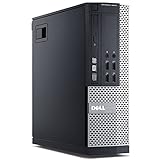
Dell RGB Gaming Tower Computer, Core i7 6th Gen, GTX 1050 Ti 4GB, 16GB RAM, 512GB SSD (Renewed)
Who it suits: Buyers who meant it when they typed “desktop,” whose small room still has one honest floor corner or a space beside the desk — and who will give the tower the open air on its intake and exhaust sides that a gaming load requires.
This machine tops the gaming chart and bottoms the space chart, and a small-spaces guide owes you both facts in the same breath. As a gaming desktop it is the real thing: a standard tower case, a discrete GeForce GTX 1050 Ti with 4GB of its own memory, a Core i7 processor, 16GB of RAM and a 512GB SSD, refurbished and sold through Amazon Renewed by STG USA in Refurbished – Excellent condition with the program’s 90-day backing, with RGB lighting, built-in WiFi and Windows 11 Pro added by the refurbisher. The 1050 Ti is a 2016 card that draws all its power from the slot, and it plays the esports catalogue and the pre-2020 AAA library at 1080p low-to-medium settings with a steadiness integrated graphics cannot match. The upgrade ledger is the best here: open the side panel and the graphics card can be replaced — staying in the modest power class until you verify the refurbished power supply, whose wattage the listing does not publish, so treat any swap as slot-powered until you have read the label inside the case — while the RAM grows and a second drive goes in the normal way. What cannot change is the platform: a 6th-generation chip on a socket with one generation of headroom, DDR4 as its final memory standard, and a processor outside Microsoft’s official Windows 11 support list even though Windows 11 Pro ships installed.
As an installation, it is a full tower, planned like furniture. It needs a floor corner or a wide, sturdy desk area, open air at its intake and exhaust faces, a rear cable drop with room for stiff display cables to bend, and an exhaust path that does not aim at the bed or the sofa — under load it also puts the most heat of any pick here into a small room. What it must never get is the treatment small rooms tempt: it does not go inside a TV unit, it does not go in a cupboard, and a tower wedged between a wall and a wardrobe has not been placed, it has been hidden, at the price of its cooling. Then there is the price: Renewed pricing for this tower moves in and out of this budget tier, so check price on Amazon before you decide. The rule is absolute: buy it on a day it sits at or under $400, and walk away on the days it does not. If your room genuinely has the corner and your heart is set on a tower with a future, this is the pick. If the corner does not exist, no discount makes the tower smaller — the minis above are the correct answer to the room you actually have.
- A genuine discrete card, the GTX 1050 Ti 4GB, inside a standard tower case you can open.
- The sole pick here whose graphics card can be swapped later; memory and storage grow the ordinary desktop way too.
- Sold by STG USA through Amazon Renewed in Refurbished – Excellent condition, backed by the 90-day refund-or-replacement window.
Honest limitation: The largest installation in the guide by a wide margin — a full tower that needs a floor corner and open air on two sides — and its price drifts in and out of this budget tier; the refurbished power supply’s wattage is unpublished, which caps GPU swaps until verified.
Choose it if a desktop means a tower with a future graphics swap, you have the corner for it, and you will price-watch it under the $400 line. Skip it if space is the actual problem — that is what the four minis and the SFF Dell are for.

Comparison Table
| Product | Form factor | Installation notes | Graphics | Link |
|---|---|---|---|---|
| Beelink SER5 MAX | Mini PC | Documented 4.96 × 4.44 × 1.65 in; mounts behind a monitor; open air required (54W chip) | Radeon Vega 8, integrated | Check on Amazon |
| KAMRUI E3B | Mini PC | VESA plate included — zero desk footprint behind the screen | Radeon Vega 7, integrated | Check on Amazon |
| GMKtec M5 Plus | Mini PC | Mini class, graded by class; fullest cable drop of the minis (dual LAN) | Radeon Vega 8-class, integrated (low-power chip) | Check on Amazon |
| BOSGAME P4 | Mini PC | Surface machine — VESA not documented; dual Ethernet cables to route | Radeon Vega-class, integrated | Check on Amazon |
| Dell OptiPlex 9020 SFF (Renewed) | SFF desktop | Smallest real desktop chassis; internal PSU; one low-profile GPU slot to fill | Intel HD 4600, integrated | Check on Amazon |
| Dell RGB Gaming Tower (Renewed) | Full tower desktop | Largest installation here; needs a floor corner and open air on two sides | GTX 1050 Ti 4GB, discrete | Check on Amazon |
How to Choose: Measure Before You Buy
Small-room purchases fail in a predictable order: the machine is chosen by specifications, ordered by price, and only then introduced to the room. Reverse it. The five steps below take ten minutes with a tape measure and decide which of the six picks your room can keep.
- Step 1 — Measure the spot. Measure the exact place the machine will live: shelf width, depth and height; the desk corner’s footprint; the clearance behind the monitor, and write the numbers down. Compare them against what is documented — the Beelink’s 4.96 × 4.44 × 1.65 inches is a figure you can measure against; for the picks graded by class, take the dimensions from the live listing and measure those. If the spot is the back of a monitor, confirm the mounting is documented for the pick you want: the KAMRUI’s VESA plate is in the box, the Beelink is built to mount behind a screen, and the BOSGAME’s mounting is not documented — plan it as a surface machine.
- Step 2 — Reserve ventilation clearance. Add a hand’s width of open air on the sides that vent, and nothing stacked on top. Then make the sealed-space decision honestly: if the measured spot is inside a cabinet, a closed TV unit or a drawer, it is not a spot. Gaming loads produce heat for hours, and every pick here — mini, SFF or tower — is refused a sealed home. Find an open shelf, an open-backed unit, the monitor’s back or a floor corner before you order, not after the first thermal shutdown.
- Step 3 — Give the power supply an address. The four minis run from external adapters: decide where the adapter lives (floor, power strip, the back of the desk), confirm its cable reaches the machine’s spot without crossing a walkway, and keep it out of bedding and paper. The two Dells carry internal supplies, which clears the floor but makes the rear vent’s clearance the address that matters.
- Step 4 — Walk the cable drop. From the machine’s spot, trace every cable to its destination: display to the screen, power to the wall, Ethernet to the router if you wire it, USB to where your hands are. Add the bend radius of stiff display cables to the machine’s depth — installed depth is case plus cables, not case alone. Mounted minis win this step by hiding inside the monitor’s own drop; the dual-LAN minis and the tower need the most deliberate routing.
- Step 5 — Then order, and verify on arrival. Only now does the specification choice happen: the Beelink for the strongest gaming in a documented tiny box, the KAMRUI for the included mount and its budget-tier positioning, the GMKtec for the full specification, the BOSGAME for the second career, the OptiPlex if you want a real desktop’s slot in the smallest chassis, the tower if the corner exists and the price is at or under $400 that day. When the box arrives, verify before the return window starts closing: confirm the delivered configuration against the model number and the listing — the BOSGAME family sells a 5825U variant under near-identical titles, and renewed Dells should be checked against their stated specification on day one — then run the machine hard in its real spot for the first week: long sessions, a hand near the exhaust, a listen for fans working harder than they should. An installation that survives a deliberate stress week in its actual home is finished.
Common Buying Mistakes
- Measuring the case and forgetting the installation. The real footprint is case plus ventilation clearance plus cable bend plus power adapter. A shelf that fits the box with two centimetres to spare fits none of those.
- Putting a gaming PC inside a sealed cabinet or closed TV unit. Every pick here refuses it: gaming heat has nowhere to go, and the result is throttling, noise and a shortened life. Open-backed or open air, or a different spot.
- Assuming every mini PC mounts behind a monitor. Mounting must be documented for the model: the KAMRUI includes a VESA plate and the Beelink is built to mount; the BOSGAME’s mounting is not documented, so planning a mount around it is planning on a guess.
- Believing a new “gaming desktop” exists at this price. If a new tower under $400 claims gaming graphics, read the listing until you find the integrated GPU or the decade-old card hiding behind the RGB.
- Buying the full tower for a room with no corner. The renewed Dell tower is the best gaming desktop here and the worst small-space one; its price rule (buy only at $400 or under) cannot shrink it.
- Buying the OptiPlex project box and never buying the graphics card. As delivered its HD 4600 is the weakest graphics here; the project only works if the second purchase happens.
- Judged by badge instead of generation. A renewed listing’s “Core i7” can be a decade-old nameplate; a 4th- or 6th-generation chip was respectable in its day and is slow in this one, so the generation number — not the badge — is the figure that tells the truth.
- Skipping the stress test on a renewed machine. The 90-day window is the warranty you get; use the first week in the machine’s real spot, under real gaming load, and return anything that complains while the window is open.
- Leaving nothing in the budget for the screen. A more affordable machine paired with a decent 1080p monitor makes a better small-room setup than stretching the whole budget on the machine alone and borrowing a television — the KAMRUI and BOSGAME picks exist partly to leave that headroom.
Final Recommendation
- Most small rooms: Beelink SER5 MAX — the strongest gaming here, in the only fully documented tiny box, behind the monitor.
- Zero desk footprint, tightest budget: KAMRUI E3B — VESA plate in the box, money left for the screen.
- Full specification, small box: GMKtec M5 Plus.
- Gaming now, home server later: BOSGAME P4.
- A real desktop in the smallest chassis: Dell OptiPlex 9020 SFF (Renewed), plus a low-profile card when ready.
- A real tower, if the corner exists: Dell RGB Gaming Tower (Renewed) — on a day it sits at or under $400.
Our top two both disappear, which in a small room is the highest compliment a gaming PC can earn. The Beelink SER5 MAX is the best purchase on the page: the strongest processor here, a documented 4.96 × 4.44 × 1.65 inch box that mounts behind the monitor, a warranty, and money left over — provided its home has open air, because its 54W chip has earned that condition. The KAMRUI E3B is the gentler installation and the gentler budget choice: the mount is in the box, the heat is the least here, and the headroom it leaves can help cover the monitor. The desktops serve the readers the minis cannot: the OptiPlex if a slot and a serviceable chassis matter more than day-one gaming, the tower if the room has a corner and the hobby has a future. Readers whose space problem is solved and whose budget can grow should see Best Gaming Desktop Under $500 and Best Gaming Desktop Under $700, where new towers with modern graphics cards begin; readers comparing the smallest categories can continue with Best Compact Gaming PC Under $400 and Best Small Form Factor Gaming PC Under $400. Whatever you choose, measure first, order second, and check the live price and exact configuration before you buy — in a small room, that order of operations is the whole game.
Frequently Asked Questions
Can I put a gaming PC inside a TV cabinet or entertainment unit?
Not a closed one — and that answer applies to every pick in this guide, mini PCs included. Gaming produces heat continuously, and a sealed cabinet traps it until the machine throttles or worse. An open-backed unit, an open shelf, the back of the monitor or a floor corner are all good installations. If the cabinet door closes, the PC does not go in it.
Which of these takes the least space?
The mounted minis. The KAMRUI E3B includes a VESA plate and the Beelink SER5 MAX is built to mount behind a monitor — the Beelink is also the only pick with maker-documented dimensions, 4.96 × 4.44 × 1.65 inches. Mounted, either machine’s desk footprint is zero. The BOSGAME P4, despite being a mini, should be planned as a surface machine — its mounting is not documented in the verified record.
Is there a real gaming desktop for under $400?
Only a renewed one. No manufacturer sells a new desktop with a discrete graphics card at this price. The genuine desktops under $400 are Amazon Renewed business machines: the full tower in this guide with a GTX 1050 Ti fitted by the refurbisher, and the small-form-factor OptiPlex, which is a real desktop chassis whose graphics card is a second purchase. Everything else at the price is an office machine, an all-in-one, or a mini PC.
Tower or mini PC — which actually games better at $400?
Roughly a draw today, opposite answers tomorrow. The renewed tower’s GTX 1050 Ti and the mini PCs’ Vega graphics cover the same ground — esports and older AAA at 1080p low-to-medium settings. The tower can be made faster later with a card swap; the mini never can, but it starts with a far newer processor, a warranty, and a fraction of the footprint. In a small room, the footprint is usually the deciding line.
Is the Dell OptiPlex 9020 a gaming PC?
No — and this guide says so in the review itself, not buried in small print. The HD 4600 integrated graphics are the weakest in this lineup by a distance. It earns its place as the smallest real desktop chassis with 32GB of RAM and a 1TB SSD already fitted — a base that becomes a credible esports desktop when a low-profile, slot-powered graphics card goes into its PCIe slot. If you will not make that second purchase, buy a mini PC instead.
Is Amazon Renewed a safe way to buy a desktop?
Treat it as a managed risk rather than a guarantee. Every Renewed machine is inspected before sale and carries a 90-day refund-or-replacement window; both Dell picks in this guide are graded Refurbished – Excellent. Manage it actively: stress-test the machine hard in its first week, in its real spot — long gaming sessions, memory and drive checks, fan noise, exhaust heat — and return anything that complains while the window is open. What it never becomes is a multi-year warranty — if that protection matters more than a tower’s upgrade path, one of the new mini PCs is the safer buy.
Should I just save up for a $500 or $700 desktop instead?
If your room has space for a tower and you want a new one with a modern graphics card, yes — that market begins just above this budget and gets good around $700. Stay at $400 if the room is the real constraint: a bigger budget buys a bigger box, and the machines in this guide were chosen because they fit the rooms bigger boxes cannot. The worst outcome is spending $400 on a new “gaming” tower that is neither — no card worth the name and no slot worth filling.
- Best Gaming Desktop Under $500
- Best Gaming Desktop Under $700
- Best Gaming Desktop For Beginners Under $400
- Best Gaming Desktop For Streaming Under $400
- Best Gaming Desktop For 1440p Gaming Under $400
- Best Mini Gaming PC Under $400
- Best Compact Gaming PC Under $400
- Best Small Form Factor Gaming PC Under $400

