Where to buy
Check the latest price, availability and delivery on Amazon. Orders are placed on Amazon. We may earn a commission from qualifying purchases.
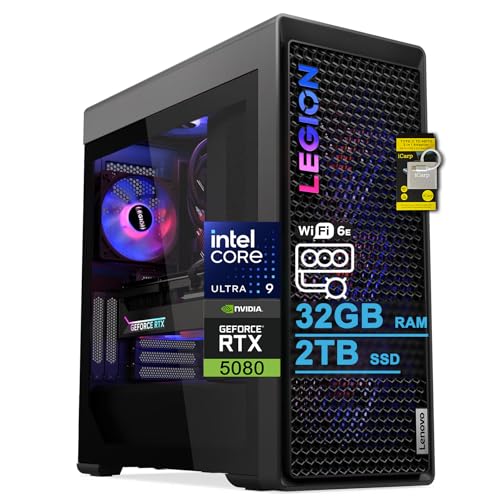
- Best overall for streaming: Lenovo Legion Tower 7i Gen 10, Core Ultra 9 285K, RTX 5080, 32GB, 2TB — Check on Amazon
- iBUYPOWER Y40 PRO, Ryzen 9 7900X, RTX 5070 Ti, 32GB, 2TB — Check on Amazon
- Alienware Aurora ACT1250, Core Ultra 9 285, RTX 5080, 32GB, 1TB — Check on Amazon
- CLX Set, Ryzen 7 9800X3D, RTX 5080, 32GB, 2TB — Check on Amazon
See 2 more Amazon options
- Skytech King 95, Ryzen 7 9800X3D, RTX 5070 Ti, 32GB, 1TB — Check on Amazon
- ZOTAC MEK, Ryzen 7 9700X, RTX 5070 Ti, 32GB, 1TB — Check on Amazon
Read the full guide ↓
Disclosure: As an Amazon Associate, reviewstook.com earns from qualifying purchases. Links to Amazon on this page are affiliate links; they cost you nothing extra. Listing details such as price and availability change often, so check the current Amazon listing before you buy.
Start with the label, because at this budget it misleads twice. “Entry level” and “$3,000” do not belong in the same sentence for gaming, and they do not belong together for streaming either. Three thousand dollars is flagship money. What it buys a streamer is not a first rung on a ladder — it is the tier where the hardest problem in one-PC streaming simply stops existing. On a cheaper machine, playing a game and encoding a live broadcast compete for the same hardware, and every buying decision is a negotiation between the two. At this tier, every graphics card in this guide carries a pair of dedicated hardware encoders, so the game renders on the GPU’s gaming silicon while the broadcast is produced by silicon the game never touches. That is what “entry” honestly means here: entry to streaming without compromise arithmetic — one machine that plays at 1080p or 1440p, broadcasts at full quality, and records locally at the same time, with headroom left over.
So let us define the workflow this guide grades against, before any product names. One PC does three jobs at once: it plays the game, it runs OBS with your scenes, alerts and browser sources, and it holds your chat, dashboard and music in a browser that never stops eating memory. The broadcast itself goes out at the settings the platforms actually accept. On Twitch, the working standard is roughly 6,000 kbps with constant bitrate and a two-second keyframe interval, at 1080p60. YouTube takes higher bitrates, accepts 1440p streams, and accepts AV1 live encoding, which produces a cleaner picture at the same bitrate. Twitch’s route to AV1 runs through its Enhanced Broadcasting programme rather than the standard ingest every streamer gets. And 4K streaming, which buyers at this budget often ask about, is limited by the platforms, not by these PCs — the hardware in this guide could encode a 4K stream long before the mainstream platforms routinely accept and deliver one. Judge every pick below against that workload: encoder first, then processor headroom for the simultaneous load, then storage for local recordings, then everything else.
Two more facts belong up front. There is no RTX 5090 system anywhere near $3,000 — complete 5090 prebuilts sit well above this budget — so the realistic ceiling here is an RTX 5080 or an RTX 5070 Ti. Conveniently, for streaming that distinction matters less than gamers assume: the 5080 and the 5070 Ti carry the same dual-encoder hardware, so the cheaper card is not a streaming downgrade. If your budget is really a streaming-first budget at a lower rung, Best Entry Level Gaming PC For Streaming Under $1500 and Best Entry Level Gaming PC For Streaming Under $2500 cover the tiers where the encoder negotiation is still real. This guide is for the buyer who wants it finished.
In this guide
Quick Picks
Short on time, or comparing several options at once? Each row below names a streamer type and the PC that suits it, with a link to the listing.
| Streamer type | Pick | Why it stands out | Link |
|---|---|---|---|
| Best overall for streaming | Lenovo Legion Tower 7i Gen 10 | Dual NVENC RTX 5080, a 24-core processor, 2TB for recordings and documented 2.5Gb Ethernet — check price on Amazon | Check on Amazon |
| Best value — stream seriously, spend less | iBUYPOWER Y40 PRO | The same dual-encoder hardware on an RTX 5070 Ti, 2TB fitted, positioned well below the top of this tier — check price on Amazon | Check on Amazon |
| Flagship card from a major brand | Alienware Aurora ACT1250 | RTX 5080 encoding with a 1000W Platinum PSU — check the current price on Amazon | Check on Amazon |
| Maximum game performance on stream | CLX Set | 9800X3D plus RTX 5080 and 2TB — the strongest gaming processor here — check price on Amazon | Check on Amazon |
| High-refresh play, mid-tier position | Skytech King 95 | 9800X3D, dual-encoder 5070 Ti and a published 850W Gold ATX 3 PSU — check price on Amazon | Check on Amazon |
| Documented spec, work-ready | ZOTAC MEK | DDR5-6000, a named 750W Gold PSU and Windows 11 Pro — check price on Amazon | Check on Amazon |
How These Picks Were Chosen
The budget was treated as a ceiling, not a target — and for a streaming guide that matters, because the encoder hardware that decides stream quality is identical across a wide span of this tier. Every PC below is a real Amazon listing positioned at or below $3,000 in the United States, several of them well below — check price on Amazon for the current price on each listing, because prices move. Three of the six picks carry RTX 5080 cards; each review describes how that pick sits within this tier and what to check on the live listing before you buy.
The grading order is the streaming order, and it is not the gaming order. First, the encoder: a pick belongs here only if its graphics card carries the current dual-encoder hardware — two NVENC encoder blocks with AV1 support — because that is what lets one encoder run the live broadcast while the second records a clean local copy at higher quality, neither of them taxing the game’s rendering. All six picks pass that test; it is the tier’s entry ticket, and it is why no last-generation card appears however cheap its system looks. Second, simultaneous-load headroom: the processor and memory have to hold a game, OBS, a browser full of chat and dashboards, and recording writes at the same time, so core counts and the 32GB of memory fitted across this guide were weighed as streaming specifications, not gaming garnish. Third, recording storage: a streamer who records locally — and you should, because the local copy is your editing source and your insurance against a dropped broadcast — consumes drive space at a rate gamers never see, so 2TB picks were credited and 1TB picks were marked down for it.
We did not use these PCs ourselves. We read the maker listings and specification pages, and compared encoders, processors, memory, storage, power supplies and connectivity. One warning type recurs at this tier and appears in several reviews: lookalike variants. The same product name often covers several configurations under different listings, so match the model number in each review to the listing at checkout — the difference between two near-identical names can be a substantial amount of hardware.
The Encoder Decides the Stream
New streamers shop for a graphics card; experienced ones shop for an encoder. The encoder is the piece of hardware that turns your gameplay into the compressed video your viewers watch, and it — not the game’s frame rate — sets the ceiling on how clean that picture looks at the bitrates the platforms allow. Every card in this guide, RTX 5080 and RTX 5070 Ti alike, carries NVIDIA’s current NVENC hardware in its strongest form: two independent encoder blocks, with AV1 encoding alongside the H.264 and HEVC support older cards offer. Two blocks is the detail that matters. One block runs your live broadcast. The other is free to record a local copy at a much higher bitrate than any platform accepts — the file you will edit highlights from — and neither job slows the game, because encoding happens on dedicated silicon rather than on the shaders rendering your frames.
AV1 is the second detail, and it needs honest placement. AV1 encoding produces a visibly cleaner picture than H.264 at the same bitrate, which is exactly what a bitrate-capped broadcast wants. But a codec only helps where the platform takes it. YouTube accepts AV1 for live streams today, and pairs it with higher bitrate allowances and 1440p ingest, so a YouTube streamer on any pick in this guide can use the best encoder path these cards have. Twitch’s standard ingest is still H.264 at around 6,000 kbps; its AV1 route runs through the Enhanced Broadcasting programme, which is not the default every channel gets. So the practical Twitch setup on all six picks is NVENC H.264 done properly — constant bitrate, two-second keyframes — and the practical YouTube setup adds the AV1 option on top. Neither platform’s standard path involves streaming at 4K: the constraint there is platform policy and viewer delivery, not your hardware, and any PC seller implying otherwise is selling you a specification the platforms will not use.
What this means for choosing between the six is liberating: the stream itself is a tie. The Y40 PRO, positioned lower in this tier, encodes the same broadcast as the Legion near the top of it, because the encoder hardware is the same. What moving up the tier buys is everything around the encoder — processor cores for the simultaneous load, storage for the recordings, memory headroom, network hardware, and the freedom to buy on your schedule. The reviews grade exactly those things.
The 6 Best Entry Level Gaming PCs for Streaming Under $3,000
Lenovo Legion Tower 7i Gen 10 — Core Ultra 9 285K, RTX 5080, 32GB, 2TB
Who it suits: The streamer who also creates — clips, edits, thumbnails, uploads — and wants the one machine in this guide whose platform was clearly specified with that second job in mind.
For streaming, the Legion is the most complete package here, and the reasons are the unglamorous ones. The RTX 5080 supplies the dual NVENC encoders with AV1, so broadcast and local recording run side by side without touching the game. The Core Ultra 9 285K — listed at 24 cores with boost up to 5.6 GHz — is the kind of processor that treats the simultaneous load as a rounding error: game, OBS, browser sources, chat dashboard and an export rendering in the background can coexist. The 2TB drive means local recordings accumulate for weeks rather than days before you have to manage them. And the connectivity is documented where it matters for a broadcast: 2.5Gb Ethernet for the wired connection a serious stream should always use, Wi-Fi 6E when you need it, and Thunderbolt 4 for fast external drives and docks. Check price on Amazon for the current price; comparable 285K and 5080 configurations sold through Lenovo’s own store sit in a higher tier — and configurations in this family vary, so match the exact specification at checkout rather than the product name.
One line in the listing deserves more attention than streamers usually give it: it states a maximum memory capacity of 32GB — the amount fitted. For the broadcast itself that is no limitation; 32GB runs the streaming load comfortably. The ceiling bites the creator half of this pick’s audience. Editing timelines, motion graphics and large project files are the workloads that grow into 64GB over a machine’s life, and a tower bought partly for that work cannot grow past the memory it shipped with. If your projects live happily in 32GB, nothing else in this guide assembles the full streaming-and-creating platform as completely. If they already strain it, read the Y40 PRO’s review twice — it sits lower in this tier and leaves more of the budget unspent, which buys a lot of editing hardware.
- Dual NVENC with AV1 on the RTX 5080: one encoder for the broadcast, one for the high-bitrate local recording.
- 24-core 285K — the strongest simultaneous-load headroom in the guide.
- 2TB storage and documented 2.5Gb Ethernet: recording room and the wired connection streaming demands.
- Check price on Amazon; comparable configurations through Lenovo’s own store sit in a higher tier.
Honest limitation: The listing states a 32GB maximum memory capacity — fine for streaming, a real ceiling for memory-hungry creative work over the machine’s life.
Choose it if you stream and create on one machine and 32GB is enough for your projects. Skip it if your editing already needs more memory, or if you only stream gameplay — the same encoders sit in much cheaper picks below.

iBUYPOWER Y40 PRO — Ryzen 9 7900X, RTX 5070 Ti, 32GB, 2TB
Who it suits: The streamer who has understood the encoder tie and refuses to pay a flagship premium for hardware that produces an identical broadcast.
This is the pick the whole guide’s logic points at. The RTX 5070 Ti carries the same dual NVENC encoder hardware with AV1 as the 5080 picks, so the stream this machine produces is the stream the Legion produces — same Twitch H.264 path, same YouTube AV1 option, same free second encoder for local recording. Around that encoder, iBUYPOWER fitted the specification a streamer would choose: a twelve-core Ryzen 9 7900X with genuine multitasking headroom for the game-plus-OBS-plus-browser load, 32GB of DDR5, and a 2TB NVMe drive — double the storage of three other picks here, in the guide where storage is a streaming specification. Keyboard and mouse are in the box. Check the current price on Amazon: positioned well below the top of this tier, it enters the dual-encoder tier while leaving a meaningful share of this guide’s budget for the microphone, lighting and monitor your stream actually needs — the subject of a later section.
Two cautions are specific to this listing, and both are checks rather than flaws. The power supply wattage is not headlined in the listing material we verified; on a 5070 Ti system that number matters for future upgrades, so confirm it on the live listing before ordering rather than assuming. And the Y40 PRO name covers more than one configuration — a different processor pairing exists under another listing — so match model Y40BA9N57T01 at checkout. Do those two checks and this is the machine we would hand to most streamers who arrived via this search: the flagship broadcast, without paying a flagship premium.
- Dual NVENC with AV1 — the identical encoder hardware to the RTX 5080 picks, positioned well below them in this tier — check price on Amazon.
- Twelve-core Ryzen 9 and 2TB storage: simultaneous-load headroom and recording room, fitted as standard.
- Leaves a meaningful share of the budget for the microphone, lighting and display that viewers actually perceive.
Honest limitation: The verified listing material never publishes a PSU wattage — confirm it before buying — and a different configuration sells under the same Y40 PRO name on a separate listing.
Choose it if you want the flagship streaming hardware with budget left for the rest of the setup. Skip it if the current price on Amazon has climbed close to the top of this tier, where the King 95 argues better with its published PSU and gaming processor.

Alienware Aurora ACT1250 — Core Ultra 9 285, RTX 5080, 32GB, 1TB
Who it suits: The streamer who has decided, deliberately, to buy the flagship card and the biggest name — for deliberate flagship reasons rather than on impulse.
Nothing about the Aurora’s streaming hardware is in doubt. The RTX 5080 brings the dual NVENC encoders with AV1; the Core Ultra 9 285 — which Intel specifies at 24 cores, eight performance and sixteen efficiency — gives the simultaneous load more processor than this guide’s workflow can use; the 1000W Platinum-rated power supply and liquid cooling are specified like a flagship rather than trimmed like a value build. Check the current price on Amazon; comparable configurations sold through Dell’s own store sit in a higher tier. For a streamer, though, the honest question is what the premium buys over the Y40 PRO — and the truthful answer is game performance and brand, not broadcast quality. The encoders are the same.
Two limitations are specific to this pick. The first is storage: 1TB is the tightest fit in this guide for a machine expected to hold a game library and a growing archive of local recordings, so budget for a second SSD from the start and treat it as part of the real cost of the setup. The second is the listing itself. Amazon’s product information describes the processor as 20-core in one place, where Intel specifies 24, and describes the liquid cooling as both fitted and “optional” in different sections. Neither contradiction changes what is in the box, but both mean you confirm the configuration on the listing — and with the seller if anything looks off — before ordering. Bought with the storage plan in place and after checking the current price on Amazon, the Aurora is a flagship that streams flawlessly. Bought without that check, it risks becoming the same broadcast as the Y40 PRO at a much higher position in this tier.
- RTX 5080 dual NVENC with AV1, backed by a 24-core processor and a 1000W Platinum PSU.
- Sold and shipped by Amazon — check price on Amazon; comparable configurations through Dell’s own store sit in a higher tier.
- Liquid cooling and flagship supporting hardware throughout — nothing trimmed.
Honest limitation: Only 1TB of storage for a recording workflow, and the Amazon listing contradicts itself on core count and cooling — verify the configuration before ordering.
Choose it if the flagship tier from a major brand is the goal and you have checked the current price on Amazon and it sits comfortably within this budget. Skip it if its current position in the tier no longer justifies the premium — at that point you are paying flagship money for an identical stream.

CLX Set — Ryzen 7 9800X3D, RTX 5080, 32GB, 2TB
Who it suits: The streamer whose channel is built on high-level play — competitive titles, speedruns, ranked ladders — where the game’s performance is the content and the broadcast must never be the bottleneck.
On gaming specification this is the strongest machine in the guide. The Ryzen 7 9800X3D is the processor the gaming market treats as its reference point, and here it sits beside the RTX 5080 with its dual NVENC encoders and AV1, 32GB of DDR5, a 2TB NVMe drive and a 360mm liquid cooler. For streaming, the division of labour is exactly right: the X3D chip devotes itself to the game, the encoder silicon devotes itself to the broadcast and the local recording, and the two never negotiate. Check the current price on Amazon before judging this pick. If the review ended on specification alone, this would rival the Legion for the top spot. It does not end there, because the same configuration has also been recorded well above this budget in later coverage after component prices rose — a substantial swing on one listing family, and the clearest case study in this guide of how top-tier pricing behaves.
So this review is really a rule. While it sits within the $3,000 budget, the CLX Set is a legitimate way to stream on the strongest gaming platform here. Above that budget it is not a pick in this guide at all, and no streaming schedule justifies chasing it there — your viewers cannot see the difference between this broadcast and the Y40 PRO’s, because the encoders are equivalent, and the 5070 Ti machines sit at more stable positions in this tier. One grading note for balance: the 9800X3D is a gaming-first processor, and the twelve- and 24-core picks in this guide hold more headroom for heavy background multitasking; with the encoding on the GPU, that rarely matters in practice, but a streamer who also renders video on the same machine during streams should weigh it. CLX is a smaller builder than Dell or Lenovo, which cuts both ways — a more gaming-focused specification for this tier, and a smaller company’s support behind it. Buy it while its position within the budget makes sense, not for the badge.
- 9800X3D plus RTX 5080: the strongest pure-gaming pairing in the guide, with dual NVENC and AV1 for the broadcast.
- 2TB storage and a 360mm liquid cooler fitted as standard — recording room from day one.
- Positioned near the top of this tier when within budget — check price on Amazon.
Honest limitation: No pick in this guide has a position that swings like this one — the identical configuration has also been recorded well above this budget — so the pick only exists while the current price on Amazon stays within it.
Choose it if the current price on Amazon sits within the $3,000 budget and your gameplay itself is the show. Skip it if it has climbed above that budget; do not chase this listing upward for a broadcast your viewers cannot distinguish from a lower-positioned pick’s.

Skytech King 95 — Ryzen 7 9800X3D, RTX 5070 Ti, 32GB, 1TB
Who it suits: The high-refresh streamer — 1440p at 240Hz, competitive titles where the audience watches the play as much as the player — who wants flagship streaming hardware without relying on a short-lived deal.
The King 95 makes the more stable version of the CLX’s bet. It keeps the 9800X3D, the processor that matters most when the goal is maximum frame rates at 1440p, and pairs it with the RTX 5070 Ti — which, for streaming purposes, is not a compromise at all: the 5070 Ti carries the same dual NVENC encoders with AV1 as the 5080, so the broadcast and the local recording are fully flagship while the game renders a step below the flagship card, a step high-refresh 1440p play barely notices. Everything else is published in full, which at this tier counts as a feature in itself: DDR5-5600 memory at 32GB, a 360mm ARGB liquid cooler, and an 850W Gold ATX 3 power supply with the standard printed next to the wattage. It sits meaningfully under the top of this budget — check price on Amazon — not only during deal events, which buys this pick a scheduling freedom the 5080 machines cannot offer a streamer planning a purchase around a channel calendar.
Two disclosures belong in the review. Skytech’s listing states that the graphics card brand may vary — the 5070 Ti chipset is guaranteed, the specific card manufacturer is not — which is common practice among system builders and does not change the encoder hardware, but is worth knowing before you picture a particular card. And storage is 1TB, the same recording constraint as the Aurora: a streamer recording locally at high bitrate will fill it, so plan the second drive into the real total. One last family warning: other listings sell near-identical King 95 variants for more money, so the model to match is ST-KING95-1671-W-AM. With those noted, this is the pick for the player whose monitor is a 240Hz 1440p panel and whose stream sells skill — flagship broadcast, reference gaming processor, no deal-watching required.
- 9800X3D for the game, dual NVENC with AV1 for the stream — each job on its own silicon.
- The 850W Gold ATX 3 power supply is named outright, standard and all — no mystery components anywhere in the build.
- Positioned in the middle of this tier — check price on Amazon; no deal event required to make the case.
Honest limitation: The listing notes the GPU brand may vary, storage is 1TB for a recording workflow, and lookalike King 95 variants positioned higher in the tier exist under other listings.
Choose it if high-refresh 1440p is your content and you value buying on your own schedule. Skip it if native 4K gaming matters more than frame rate — that is what the 5080 picks are for.

ZOTAC MEK — Ryzen 7 9700X, RTX 5070 Ti, 32GB, 1TB
Who it suits: The streamer who also works on the machine — and the specification reader who wants every number published before money moves.
ZOTAC is a graphics card manufacturer that also builds PCs, and this machine reads like it. The card is ZOTAC’s own RTX 5070 Ti, which means the dual NVENC encoders with AV1 come from the company that built the whole system; the memory is DDR5-6000, the fastest published speed in this guide; the power supply is a named 750W 80+ Gold unit; and the output and connectivity list runs to HDMI 2.1b, three DisplayPort 2.1b outputs, Wi-Fi 6E and Bluetooth 5.3. The processor is the Ryzen 7 9700X, an efficient eight-core that suits the compact MEK format — enough for the game-plus-OBS load with the encoding on the GPU, though multitaskers running heavy background work mid-stream should note the twelve- and 24-core picks hold more headroom. Windows 11 Pro is fitted, which suits buyers whose PC doubles as a work machine. Check the current price on Amazon — it is positioned in the lower half of this tier among the guide’s non-iBUYPOWER picks, for a fully documented dual-encoder system.
The limitations are worth stating plainly. Storage is 1TB again; a recording streamer should plan the second drive from the start. One secondary source flagged inconsistencies in ZOTAC’s supporting documentation — the Windows edition and outputs as described there — so the Amazon listing’s headline specification, which is what this review cites, is the version to trust and to confirm. And while the 9700X is a fine gaming processor, streamers whose content is maximum frame rates should note the King 95’s 9800X3D is the stronger gaming chip at a similar position in this tier. What the MEK offers instead is integration and documentation: the cleanest paper trail in the guide, from the company that made the card — and a broadcast identical to every other pick here, because the encoder is the same.
- The fastest published memory here (DDR5-6000) and a 750W Gold PSU named outright — no other pick documents itself this completely.
- ZOTAC’s own RTX 5070 Ti: dual NVENC with AV1 from the card’s own maker.
- Windows 11 Pro fitted, for streamers whose PC also does serious work.
Honest limitation: 1TB of storage for a recording workflow, a secondary-documentation inconsistency flagged by one source (trust the listing’s headline spec), and a processor a step below the 9800X3D for pure frame-rate chasing.
Choose it if a fully documented, single-maker build is worth more to you than spec-sheet bragging rights elsewhere. Skip it if chasing maximum frame rates matters most — the King 95’s brief — or if 2TB has to be fitted from day one.

Comparison Table
| Product | Encoder | Storage | Best use | Link |
|---|---|---|---|---|
| Lenovo Legion Tower 7i Gen 10 | Dual NVENC + AV1 (RTX 5080) | 2TB | Streaming plus creating on one complete platform | Check on Amazon |
| iBUYPOWER Y40 PRO | Dual NVENC + AV1 (RTX 5070 Ti) | 2TB | The flagship broadcast without a flagship premium | Check on Amazon |
| Alienware Aurora ACT1250 | Dual NVENC + AV1 (RTX 5080) | 1TB | Flagship entry from the biggest name | Check on Amazon |
| CLX Set | Dual NVENC + AV1 (RTX 5080) | 2TB | Maximum game performance on stream — when it sits within budget | Check on Amazon |
| Skytech King 95 | Dual NVENC + AV1 (RTX 5070 Ti) | 1TB | High-refresh 1440p streaming | Check on Amazon |
| ZOTAC MEK | Dual NVENC + AV1 (RTX 5070 Ti) | 1TB | Fully documented spec from the card’s own maker | Check on Amazon |
Set Up OBS Once, Correctly
Every pick in this guide uses the same encoder family, so the setup below applies to all six; the per-pick notes call out the differences that matter. In OBS, set the encoder to the NVIDIA NVENC option for your stream — never the software x264 encoder, which would hand the broadcast to the processor for no benefit on machines whose GPUs carry dedicated silicon. On Twitch, use constant bitrate at around 6,000 kbps with a two-second keyframe interval, at 1080p60 output. On YouTube, you can raise the bitrate, send a 1440p stream, and select the AV1 encoder these cards provide for a cleaner picture at the same bitrate. Then use the second encoder: assign local recording to NVENC as well, at a far higher bitrate than the stream, so every broadcast leaves you an edit-quality local file without costing the game a frame. Record to the internal NVMe drive, and on the three 1TB picks — the Aurora, the King 95 and the MEK — set a weekly habit of moving finished recordings off the machine, because a game library and a recording archive cannot share a terabyte for long.
When a stream misbehaves, OBS tells you which of three counters is responsible, and each has a different fix. Rendering lag means the GPU is saturated by the game and OBS cannot draw its preview and scenes in time; the fix is to cap the game’s frame rate or lower its heaviest settings, because the encoder is not the problem — the render queue is. Encoding lag means the encoder itself is overloaded, which on this guide’s dual-encoder hardware usually means the recording and the stream are fighting over settings rather than silicon; lower the recording’s resolution or the stream’s output scale before touching anything else, and keep the two jobs on sensible presets. Dropped frames (network) are neither of those: they are your connection failing to sustain the bitrate, and no setting on the PC fixes them except a lower bitrate. Which leads to the rule that outranks every setting in this section: stream on a wired Ethernet connection. Wi-Fi is a convenience for every other job these machines do; for the one job that cannot retransmit a lost moment, plug in the cable. The Legion’s documented 2.5Gb Ethernet makes it the best-equipped pick here, but the rule applies to all six — a broadcast is only as stable as its uplink.
What the PC Budget Does Not Include
A streaming setup is not finished when the tower arrives, and the remaining items should be costed honestly — as additions to the PC’s price, never folded into it, and in this order. First, a microphone: viewers forgive ordinary video far sooner than ordinary audio, and the microphone is the single purchase that most changes how professional a stream sounds, so it outranks everything else on this list. Second, lighting: a simple, decent light makes any camera look like a better camera, and it costs less than the camera upgrade it replaces. Third, a webcam, once the light exists to serve it. Fourth — and only for console players — a capture card, which is how a console’s picture reaches OBS on the PC; a PC gamer needs no capture card at all, because the game and OBS already live on the same machine. Notice what this ordering does to the guide’s arithmetic: the streamer who buys the Y40 PRO, positioned lower in this tier, keeps enough of the $3,000 budget to fund this entire list properly, while the streamer who spends the whole budget on the tower streams through a headset microphone under a ceiling light. Your audience experiences the first setup as the expensive one. It is not; it is just the one where the money went where viewers can perceive it.
How to Choose an “Entry Level” Gaming PC for Streaming Under $3,000
- Translate the keyword before you shop. At $3,000, “entry level” can only honestly mean entry to no-compromise one-PC streaming: dual hardware encoders, flagship game performance, and headroom for everything else. If your stream is still a hobby finding its feet, the honest entry tiers are Best Entry Level Gaming PC For Streaming Under $1500 and the guides between there and here.
- Buy the encoder first — then stop paying for it. Dual NVENC with AV1 is the specification that decides your broadcast, and it is identical on the RTX 5070 Ti and the RTX 5080. Once a pick has it, extra money should be justified by processor, storage or platform — never by the stream, which will not improve.
- Match the processor to the simultaneous load. The game is only one of three jobs. Twelve- and 24-core processors — the Y40 PRO’s 7900X, the Legion’s and Aurora’s Intel flagships — hold the most headroom for OBS, browser sources and background work; the gaming-first X3D picks trade some of that headroom for frame rates. Know which trade your channel needs.
- Grade storage as a streaming specification. Local recordings at edit quality consume space at a rate a game library never matches. The 2TB picks hold weeks of broadcasts; the 1TB picks need a second drive or a disciplined archiving habit, counted in the real total.
- Check the memory ceiling, not just the memory. 32GB runs the streaming load comfortably on every pick here. A stated 32GB maximum, as on the Legion listing, matters only if your editing work grows — but it cannot be fixed later, so decide now.
- Plan the wired connection before the first stream. Dropped frames are a network diagnosis, not a PC specification. Whichever pick you buy, its home is within cable reach of the router — and the Legion’s documented 2.5Gb Ethernet is the strongest built-in answer in this guide.
- Read the power supply line before the lighting line. A named wattage and certification — 1000W Platinum, 850W Gold ATX 3, 750W Gold — is upgrade insurance. Where a listing keeps its PSU wattage to itself, as the Y40 PRO’s does, treat that as homework: confirm the number before checkout.
- Match the model number, not the product name. The Aurora, Legion, King 95 and Y40 line-ups all hide different hardware behind near-identical names. In each review the model number is the product — the name is merely the family it belongs to.
- Set a walk-away point for every volatile pick. Each 5080 machine here is a pick while it sits within the $3,000 budget and stops being one above it. Fix your ceiling before you open the listing, and check the current price on Amazon on the day you buy.
- Leave the RTX 5090 out of this budget entirely. Verified complete 5090 systems sit well above this budget. A listing that hints at 5090 performance for under $3,000 is selling something else — keep reading until the real card names itself.
Common Buying Mistakes
- Paying a flagship premium for a better stream. The broadcast is made by the encoder, and the encoder is the same on the lower-positioned Y40 PRO and on the Legion near the top of this tier. The premium buys game performance and platform — buy it for those reasons or not at all.
- Encoding with the CPU. Selecting x264 in OBS on a machine with dual NVENC hardware hands the hardest job to the wrong silicon and taxes the processor your game and browser need. The hardware encoder is the entire point of this tier.
- Streaming over Wi-Fi because the desk is already set up. Dropped frames are the most common stream fault and the least fixable by hardware upgrades; the cable is the upgrade.
- Recording everything to a 1TB drive and discovering the archive full mid-stream. Three of these six machines ship with 1TB; the recording plan belongs in the purchase, not in the first emergency.
- Expecting a 4K stream because the PC games at 4K. The platforms, not the hardware, set that limit — the mainstream streaming workflow is 1080p60 on Twitch and up to 1440p on YouTube, whatever your tower cost.
- Chasing a volatile listing upward. One listing family has been recorded both within this budget and well above it. A volatile pick you have set a ceiling for is a strategy; without one it is just optimism.
- Ordering by product name instead of model number, and unboxing the family’s lower configuration while expecting the flagship one.
- Spending the whole $3,000 on the tower and streaming through a headset mic in the dark. The kit section above exists because viewers judge audio and light long before they judge your encoder.
Final Recommendation
- Streaming plus creating, the complete platform: Lenovo Legion Tower 7i Gen 10.
- The flagship broadcast without a flagship premium: iBUYPOWER Y40 PRO.
- Flagship card, big name: Alienware Aurora ACT1250.
- Gameplay as the content, when within budget: CLX Set.
- High-refresh streaming: Skytech King 95.
- Documented spec, maker’s own card: ZOTAC MEK.
Our top two for streamers who arrived by this search are the Lenovo Legion Tower 7i Gen 10, because it assembles the whole streaming-and-creating platform — dual encoders, a 24-core processor, 2TB of recording room and documented 2.5Gb Ethernet — in one purchase, and the iBUYPOWER Y40 PRO, because it produces the identical broadcast while positioned well below the top of this tier — check price on Amazon — and leaves the budget room to buy the microphone and lighting your viewers will actually judge. Between them they express the guide’s whole argument: at this tier the stream is a solved problem, so the real decision is what surrounds the encoder. Creators who also want a broader workstation view should look at Best Workstation PC Under $3000, buyers weighing the general streaming tier at Best Gaming PC For Streaming Under $3000 and Best Streaming PC Under $3000, and anyone still deciding whether one machine should do both jobs should start with Best Entry Level Gaming PC For Beginners Under $3000. Check the current price on Amazon, match the model number, confirm any unpublished specification on the listing, and set your walk-away point within the $3,000 budget before you open the page — then plug in the Ethernet cable and stream.
Frequently Asked Questions
Is a $3,000 gaming PC really “entry level” for streaming?
Not in the usual sense — it is flagship money, and for streaming it buys the tier where the central compromise disappears. Cheaper machines negotiate between the game and the encoder; every pick here carries dual hardware encoders, so the game and the broadcast stop competing. If you are entering streaming itself rather than this tier, start with Best Entry Level Gaming PC For Streaming Under $2500 or below and climb when the channel justifies it.
Do I still need a second PC for streaming at this level?
No. The two-PC setup existed to give the encoder its own machine. Dual NVENC hardware does that inside one tower: one encoder block runs the broadcast, the other records locally, and neither taxes the game’s rendering. A second PC at this tier adds cost, desk space and audio-routing complexity to solve a problem these graphics cards already solved.
Can these PCs stream at 1440p or 4K?
1440p, yes — on YouTube, which accepts 1440p ingest and higher bitrates, and where these cards’ AV1 encoding is usable today. On Twitch the standard workflow remains 1080p60 at around 6,000 kbps, with AV1 arriving through Enhanced Broadcasting rather than standard ingest. 4K streaming is limited by the platforms’ acceptance and delivery, not by this hardware — the PCs could encode it long before the mainstream platforms routinely take it.
RTX 5080 or RTX 5070 Ti for streaming — does the card change my stream?
No, and this is the most useful fact in the guide. Both cards carry the same dual NVENC encoders with AV1, so the broadcast and the local recording are identical. The 5080 buys game performance — native 4K headroom; the 5070 Ti buys the same stream, sits lower in this tier, and leaves more room for the kit. Choose on the gaming, not the streaming.
Is 32GB of RAM and 1TB of storage enough for a streaming PC?
32GB of RAM is comfortable for the game-plus-OBS-plus-browser load on every pick here; only buyers whose editing projects are large need to weigh a stated 32GB ceiling like the Legion’s. Storage is the tighter fit: high-bitrate local recordings accumulate fast, so treat a second SSD as a planned cost on the three 1TB picks, or start with a 2TB machine like the Legion, the Y40 PRO or the CLX Set.
Can I get an RTX 5090 streaming PC under $3,000?
No. Verified complete RTX 5090 prebuilts on Amazon sit well above this budget, and most sit considerably higher. Under $3,000 the realistic ceiling is an RTX 5080 or an RTX 5070 Ti — and for streaming specifically, the 5090 would add nothing your viewers can see, because the encoder story at this tier is already complete.
Why do prices at this tier move so much?
The graphics card accounts for most of the cost, and its market position will not sit still — one CLX configuration has been recorded within this budget in one period and well above it in another. Hence this guide’s advice to set a walk-away point within the budget for every volatile pick, and to treat one source as final: check the current price on Amazon on the day you buy. For the tier below, see Best Gaming PC Under $2500.
- Best Gaming PC For Streaming Under $2500
- Best Entry Level Gaming PC For Streaming Under $2500
- Best Entry Level Gaming PC For Streaming Under $1500
- Best Gaming PC For Streaming Under $3000
- Best Entry Level Gaming PC Under $3000
- Best Gaming PC Under $3000
- Best Prebuilt Gaming PC Under $3000
- Best Budget Gaming PC Under $3000


