Where to buy
Check the latest price, availability and delivery on Amazon. Orders are placed on Amazon. We may earn a commission from qualifying purchases.
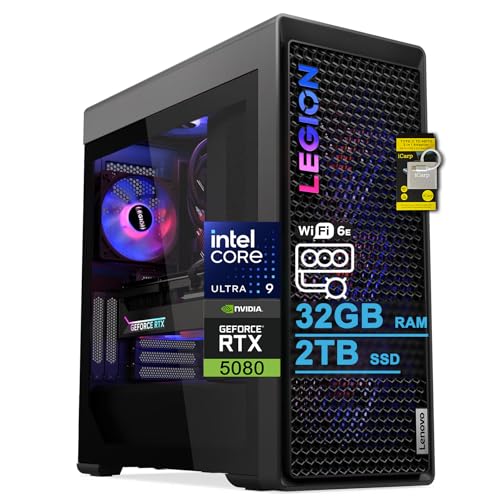
- Best overall for streaming: Lenovo Legion Tower 7i Gen 10, Core Ultra 9 285K, RTX 5080, 32GB, 2TB — Check on Amazon
- Alienware Aurora ACT1250, Core Ultra 9 285, RTX 5080, 32GB, 1TB — Check on Amazon
- CLX Set Gaming PC, Ryzen 7 9800X3D, RTX 5080, 32GB, 2TB — Check on Amazon
- iBUYPOWER Y40 PRO, Ryzen 9 7900X, RTX 5070 Ti, 32GB, 2TB — Check on Amazon
- Skytech King 95, Ryzen 7 9800X3D, RTX 5070 Ti, 32GB, 1TB — Check on Amazon
See 1 more Amazon option
- ZOTAC MEK Gaming PC, Ryzen 7 9700X, RTX 5070 Ti, 32GB, 1TB, Windows 11 Pro — Check on Amazon
Read the full guide ↓
Disclosure: As an Amazon Associate, reviewstook.com earns from qualifying purchases. Links to Amazon on this page are affiliate links; they cost you nothing extra. Listing details such as price and availability change often, so check the current Amazon listing before you buy.
Streaming changes what a PC purchase is actually for. A gaming-only machine has one job while you play; a streaming machine has four at once — it renders the game, encodes the video your viewers see, records a local copy, and runs the browser, chat and alerts sitting on your second monitor — and it has to do all four for hours without the stream, the game or your temper dropping frames. So this guide re-ranks the six verified systems from our Best Budget Gaming PC Under $3000 roundup by the hardware that decides a stream: the encoder first, the CPU’s spare cores second, storage for recordings third, and only then raw gaming power. The word “budget” still gets its honest treatment: $3,000 is a ceiling, not a spending target, and some picks sit much closer to that ceiling than others, so checking the current price on Amazon matters before you commit.
Here is the good news, stated before the caveats because it shapes everything below: every one of the six systems carries either an RTX 5080 or an RTX 5070 Ti, and both cards carry two ninth-generation NVENC encoder blocks with AV1 encode. That is the streaming configuration money cannot improve much beyond this tier — one encoder block runs your live stream while the second records a clean local copy at higher quality, and neither touches the cores your game is using. It also means the encoder itself stops being the deciding factor between these six, because they all have the same encoder hardware. What separates them for a streamer is everything around it: how many CPU cores are left over for OBS scenes, browser sources and chat; whether the drive can hold a month of recordings or a week; whether the wired network port is a fast one; and what the machine costs on the day you actually buy it. Those are the axes this guide grades on.
One limit no purchase in this guide removes, because it is not in the PC at all: the platforms. Twitch’s standard broadcast is 1080p60 at around 6,000 kbps CBR, and that ceiling applies to a tower at this ceiling exactly as it applies to a far cheaper one. YouTube is the more generous destination — it accepts higher bitrates, 1440p and 4K uploads of your stream, and AV1 live encoding, which is where these cards’ AV1 hardware earns its keep today; Twitch’s AV1 path runs through its Enhanced Broadcasting programme rather than the standard ingest. So when a listing or a friend implies you need a flagship PC “for 4K streaming,” the honest correction is that 4K streaming is platform-limited, not hardware-limited: the machines below can encode far more than Twitch will currently take from most broadcasters. Buy them for flawless 1080p60 and 1440p streaming with recording headroom to spare — that is the real, deliverable promise at this tier.
The tier’s other honesty notes carry over from the base guide unchanged. There is no RTX 5090 system anywhere near $3,000 — verified complete 5090 systems sit well above this ceiling — and the three RTX 5080 picks here sit at the top of this tier, so check the current price on Amazon before you buy. Prices in this tier move often, so no listing figure should be treated as fixed. If your streaming ambitions are more modest — a single encoder is plenty for a starting channel — the tiers covered in Best Budget Gaming PC For Streaming Under $1500 and Best Budget Gaming PC For Streaming Under $2500 deserve a look before this one does.
In this guide
Quick Picks
Short on time, or comparing several options at once? Each row below names a streamer type and the system that suits it, with a link to the listing.
| Streamer type | Pick | Why it stands out | Link |
|---|---|---|---|
| Best overall for streaming | Lenovo Legion Tower 7i Gen 10 | 24-core 285K for the multitasking load, dual-NVENC RTX 5080, 2TB for recordings, 2.5Gb Ethernet | Check on Amazon |
| Best brand-backed streamer | Alienware Aurora ACT1250 | RTX 5080’s dual NVENC and AV1, a 24-core Ultra 9 285, 1000W Platinum PSU and Dell support — check price on Amazon | Check on Amazon |
| Best for high-refresh game streams | CLX Set Gaming PC | 9800X3D keeps the game fluid while the 5080’s encoders work — check the current price on Amazon, because its value in this tier depends on where it sits when you buy | Check on Amazon |
| Best value streamer | iBUYPOWER Y40 PRO | Dual-NVENC 5070 Ti, a 12-core 7900X and 2TB, positioned at the value end of this tier so the stream kit budget survives — check price on Amazon | Check on Amazon |
| Best for competitive titles | Skytech King 95 | 9800X3D plus a 5070 Ti’s dual encoders, positioned below the flagship picks in this tier — check price on Amazon | Check on Amazon |
| Cleanest published spec sheet | ZOTAC MEK Gaming PC | Every streaming-relevant number printed — dual-NVENC 5070 Ti, 750W Gold PSU, Windows 11 Pro — check price on Amazon | Check on Amazon |
How These Picks Were Chosen
The starting set is the six verified systems from the base guide: real Amazon listings, each positioned at or under the $3,000 ceiling in the United States. Because prices in this tier move often, check the current price on Amazon for each pick before you buy. Nothing was added for this streaming edition and nothing was removed; what changed is the grading. We did not use these systems ourselves. We read the Amazon listings and the specification and deal reporting around them, and re-scored every machine on the four things that decide a one-PC stream.
First, the encoder, because it is the component your viewers actually experience. All six picks carry an RTX 5080 or RTX 5070 Ti, and both GPUs carry two ninth-generation NVENC blocks with AV1 encode — the strongest encoder configuration in consumer cards at the time of writing. Two blocks matter in a specific, practical way: OBS can send your live stream from one block while a local recording runs on the other at higher quality settings, so the archive you edit later is not limited to the compressed stream your viewers got. AV1 matters by destination: YouTube live accepts it now, and it delivers visibly cleaner detail at the same bitrate in high-motion scenes; on Twitch, AV1 arrives through Enhanced Broadcasting rather than the standard path, so H.264 over NVENC remains the Twitch default this guide assumes. Because all six picks tie on encoder hardware, no pick below wins or loses on NVENC — a deliberately honest outcome that pushes the ranking onto the remaining three axes.
Second, simultaneous-load headroom. While you stream, the CPU feeds the game, composites OBS scenes and browser sources, runs chat and alert software, and writes the recording — and the picks split into two camps here. The many-core machines (the Legion’s 24-core Ultra 9 285K, the Aurora’s 24-core Ultra 9 285, the Y40 PRO’s 12-core Ryzen 9 7900X) have cores to spare for that stack; the gaming-specialist 9800X3D machines (CLX, King 95) and the eight-core ZOTAC concentrate their power in the game itself, which is fine while NVENC does the encoding, and only becomes a limit if you ask the same machine to edit, render or run heavy production software alongside. Third, recording storage: a 1080p60 local recording at archival quality consumes tens of gigabytes per long session, so the three 2TB picks (Legion, CLX, Y40 PRO) hold roughly twice the footage of the three 1TB picks (Aurora, King 95, ZOTAC) before you start deleting — and for the 1TB machines, a second SSD is a planned cost of ownership, factored into the comparisons below rather than discovered mid-season. Fourth, the unglamorous connections: a wired Ethernet port you will actually use (the Legion’s is 2.5-gigabit), a power supply with a published wattage and rating, and a listing whose specifications agree with themselves — two picks below fail one of those tests each, and their reviews say exactly where.
The 6 Best Budget Gaming PCs for Streaming Under $3,000
Lenovo Legion Tower 7i Gen 10 — Core Ultra 9 285K, RTX 5080, 32GB DDR5, 2TB SSD
Who it suits: The one-PC streamer who also edits, clips and uploads from the same machine — the buyer whose broadcast stack, not just the game, needs hardware behind it.
For streaming specifically, this is the most complete machine in the guide, and the reason is the division of labour its parts allow. The RTX 5080’s two ninth-generation NVENC blocks split the video work between them — one carries the live stream, the other the local recording — while the Core Ultra 9 285K’s 24 cores absorb everything else a broadcast throws at a PC: the game itself, OBS scene compositing, the browser sources behind your overlays, chat, alerts and the recording write, all at once, for hours. The base guide’s framing holds: the efficiency cores take the background stack while the performance cores and the 5080 hold the game. Around that core pairing, the supporting specs read like a streamer’s checklist rather than a gamer’s: a 2TB SSD that holds a real footage library instead of a week’s worth, a 360mm liquid cooler for sustained multi-hour loads, an 850W power supply with its wattage printed, Wi-Fi 6E for everything except the stream itself, and a 2.5-gigabit Ethernet port for the wired connection this guide will insist on below. Keyboard and mouse are in the box. Check the current price on Amazon.
The caveats are the base guide’s, unchanged. Lenovo’s own store positions comparable 285K/5080 configurations higher in the market, so the Amazon listing’s exact configuration matters: match the exact configuration at checkout, because the Legion Tower line ships in lookalike variants that differ in precisely the parts you are paying for. The listing also states a 32GB memory maximum, so there is no documented road to 64GB inside this configuration’s published spec — ample for gaming and streaming today, but a creator planning heavy production growth should register the ceiling before spending flagship money. And the honest boundary of the pick: if the machine will only ever game and stream lightly, the 285K’s core count is more than the job requires, and the 5070 Ti picks below deliver the same encoders at a lower position in this tier.
- Dual ninth-generation NVENC with AV1: stream on one encoder block, record on the other.
- 24-core 285K — the most simultaneous-load headroom in this guide.
- 2TB storage, 2.5Gb Ethernet and an 850W PSU: the streaming support specs are all present and printed.
Honest limitation: The listing caps memory at 32GB, and its value depends on where its current price on Amazon sits in this tier — Lenovo’s own store positions the same class of configuration higher.
Choose it if one machine has to game, stream, record and edit, and you want the fullest headroom for all four at once. Skip it if your stream is a game plus a simple overlay and nothing more — the same encoder hardware sits in cheaper picks below.

Alienware Aurora ACT1250 — Core Ultra 9 285, RTX 5080, 32GB DDR5, 1TB SSD
Who it suits: The streamer who wants flagship encoder hardware from the brand with the deepest support network — and who can buy on a deal cycle rather than on impulse.
The Aurora brings the same streaming engine as the Legion — an RTX 5080 whose two NVENC blocks divide live encoding from local recording, with AV1 available for YouTube — behind a Core Ultra 9 285, Intel’s 24-core configuration of eight performance and sixteen efficiency cores, which gives the broadcast stack the same spare capacity. Its supporting hardware is in one respect the best in the guide: a 1000W Platinum-rated power supply, the strongest PSU specification here, is exactly what a machine under sustained game-plus-encode load for five-hour sessions wants underneath it, and 240mm liquid cooling is fitted. Check the current price on Amazon before you buy, and compare the exact configuration carefully, because this model’s position in the tier can move with deal cycles. For a streamer, the Dell warranty is not a footnote: a machine that earns its keep live, on a schedule your audience expects, is a machine whose repair path matters, and a national service network is the strongest one in this guide.
Two complications belong in this review, both carried from the base guide. The first is storage: the 1TB SSD is the joint-smallest here, and a streamer recording locally at archival quality will feel that within weeks — a second SSD belongs in the first month’s budget, as a planned cost rather than a surprise. The second is the listing itself: Amazon’s product information for this ASIN contradicts itself, describing the Ultra 9 285 as a 20-core processor in one section while Intel specifies 24 cores, and describing the liquid cooling as both fitted and “optional” in different places. Trust the chipmaker’s specification, and confirm the cooling configuration with the seller before ordering. Neither point dethrones it for streaming; both belong in your homework.
- RTX 5080 dual NVENC plus AV1, with a 24-core CPU behind the broadcast stack.
- 1000W Platinum PSU — the best power-supply specification in this guide, sized for sustained loads.
- Dell warranty and service network behind a machine a streaming schedule depends on.
Honest limitation: 1TB of storage is tight for a recording streamer, and Amazon’s listing contradicts itself on core count and cooling — verify both against Intel’s spec and the seller before ordering.
Choose it if you want the 5080’s encoder pair from a major brand and are willing to check the current price on Amazon before committing. Skip it if its current price pushes it out of step with the rest of this tier — at that point the Legion above, or patience, is the better buy.

CLX Set Gaming PC — Ryzen 7 9800X3D, RTX 5080, 32GB DDR5, 2TB NVMe SSD
Who it suits: The high-refresh gamer who streams the same sessions they play — competitive and fast-paced titles where the game’s fluidity is the content.
The CLX Set’s streaming case rests on a clean split of duties. Its Ryzen 7 9800X3D is the strongest gaming processor in this guide, a chip built around a large stacked cache that games reward more than core counts, and its job in a streaming build is to keep the game itself as fluid as it would be with no broadcast running. The broadcast, meanwhile, belongs to the RTX 5080: two ninth-generation NVENC blocks, one for the live stream and one for the local recording, with AV1 for YouTube — encoding that costs the game essentially nothing, which is precisely why a gaming-specialist CPU is a legitimate streaming choice here rather than a compromise. The 2TB NVMe SSD fixes the Aurora’s one real shortage, holding a proper recording library, and a 360mm liquid cooler handles the sustained load. Check the current price on Amazon for this configuration before you buy.
Now the condition, stated as plainly as the base guide states it: its position in this tier can move, and this machine is the guide’s volatility case study: the same CLX configuration has been positioned very differently at different points in the same market season as component costs shifted. The rule is simple: when its current price on Amazon keeps it comfortably inside this tier, this is arguably the strongest game-streaming purchase under the ceiling; when it pushes toward or beyond the top of the tier, close the tab. Two softer caveats complete the picture. The 9800X3D’s eight cores are a gaming instrument, not a production one — streaming plus gaming is comfortably within its remit because NVENC carries the encode, but editing, rendering and heavy multitasking on the same box are the Legion’s and Aurora’s territory, not this one’s. And CLX is a boutique builder: configurations are gaming-literate and bloatware-light, while support runs through a smaller operation than Dell’s or Lenovo’s networks.
- 9800X3D plus RTX 5080: the guide’s best gaming CPU paired with its joint-best encoder hardware.
- 2TB NVMe storage as standard — room for the recording archive the 1TB picks make you ration.
- 360mm liquid cooling for multi-hour game-and-stream sessions.
Honest limitation: Its place in this guide depends heavily on its current price — its position in this tier has varied widely for the same configuration — and its eight cores are for gaming first, production second.
Choose it if the stream is high-refresh gameplay, the current price on Amazon keeps it comfortably in this tier, and editing happens elsewhere or lightly. Skip it if the price has climbed, or if the same machine must carry a heavy editing and rendering workload — an out-of-deal CLX is the worst value in this guide.

iBUYPOWER Y40 PRO — Ryzen 9 7900X, RTX 5070 Ti, 32GB DDR5, 2TB NVMe SSD
Who it suits: The streamer building a whole setup, not just a tower — the buyer who understands that the microphone, light and monitor are part of the broadcast, and would like some budget left to buy them with.
Start with the fact that embarrasses this guide’s title in the most useful way: the Y40 PRO delivers the same encoder configuration as every other pick here — an RTX 5070 Ti with two ninth-generation NVENC blocks and AV1 encode — and it is positioned at the value end of this tier. Check the current price on Amazon before you buy. Behind the encoders sits a Ryzen 9 7900X, a twelve-core all-rounder with genuine multitasking capacity for the game-plus-OBS-plus-browser stack, plus 32GB of DDR5 and a 2TB NVMe SSD that removes recording storage from your worries entirely. Keyboard and mouse are included, the warranty is one year from the manufacturer, and the standard ATX layout on the AM5 platform makes it the most upgrade-friendly machine here. That lower position in the tier leaves meaningful headroom under the ceiling — which, spent on the microphone and lighting the kit section below insists on, will improve your viewers’ experience more than any remaining hardware upgrade in this guide.
The compromises are named in the base guide and stay named here. The 7900X is a previous-generation all-rounder: strong at everything, champion of nothing, and in pure gaming it stands behind the 9800X3D picks — a gap competitive players will feel more than anyone. More practically, the listing does not headline the power supply’s wattage anywhere in the material we could verify, and for a machine that will run at sustained load for hours at a time, that number is not a detail: confirm it on the live listing before ordering, and treat an unhelpful answer as a reason to pick the ZOTAC below, which prints everything. Note also that the Y40 PRO name covers a different 7800X3D configuration under another listing — this review covers only the 7900X model, Y40BA9N57T01, so match the model number at checkout. Its price can move within the tier, so check the current price on Amazon — but on streaming hardware for the money, this remains the strongest value case in the guide.
- The guide’s joint-best encoder hardware — dual NVENC plus AV1 — positioned at the value end of this tier; check price on Amazon.
- Twelve-core 7900X and 2TB storage: simultaneous-load headroom and recording room, both covered.
- Leaves meaningful headroom under the ceiling for the microphone, light and monitor the stream actually needs.
Honest limitation: No PSU wattage appears in the verified listing material, so confirming it is part of the purchase — and the 7900X gives back pure-gaming ground to the X3D machines.
Choose it if the budget covers a whole streaming setup, or you simply refuse to pay flagship tax for encoder hardware that is identical further up the page. Skip it if maximum gaming frame rates are the entire point and the budget is truly tower-only — the CLX above is your machine, when its current price keeps it in this tier.

Skytech King 95 — Ryzen 7 9800X3D, RTX 5070 Ti, 32GB DDR5, 1TB Gen4 NVMe SSD
Who it suits: The competitive player streaming high-refresh 1080p or 1440p play, who has done the diminishing-returns arithmetic and would rather keep meaningful headroom in the budget than step up a GPU tier their audience cannot see past the platform’s limits.
The King 95 is this guide’s control experiment, and for streaming the result is almost unfair to the picks above it: keep the best gaming CPU, step the graphics card down one tier to the RTX 5070 Ti — and the encoder hardware does not change at all. Two ninth-generation NVENC blocks, AV1 encode, one block for the stream and one for the recording, exactly as on the 5080 machines. What the 5070 Ti gives back versus the 5080 is gaming headroom at 4K and high settings — real, but invisible inside Twitch’s 1080p60 broadcast and modest even in a 1440p YouTube stream. The configuration around the card is properly specified: a Ryzen 7 9800X3D, 32GB of DDR5-5600 RGB memory, an 850W Gold ATX 3 power supply named in the listing, and a 360mm ARGB liquid cooler. Check the current price on Amazon before you buy. For a streamer whose content is competitive play, this is the point on the ladder where the money stops reaching the viewer.
The honest limitations are storage and specificity. The 1TB Gen4 drive is the joint-smallest in the guide, in a machine likely to record long sessions of exactly the footage worth keeping — budget for a second SSD from day one, as the how-to-choose section below instructs. Skytech’s listing states that the graphics card brand may vary; the contracted spec is the GPU model and its 16GB of memory, and since every 5070 Ti carries the same NVENC configuration, the encoder story holds whichever partner card arrives — but buyers who care about the specific card should know before the box does. Finally, the King 95 name covers several near-identical variants under different listings, differing in storage, memory speed and even CPU generation, so match the model number ST-KING95-1671-W-AM at checkout; this review covers that configuration and no other. As with the CLX, the eight-core gaming CPU is a deliberate specialist: streaming is fully covered by NVENC, heavy production work is not this machine’s brief.
- 9800X3D plus the same dual-NVENC, AV1-capable 5070 Ti encoder hardware as the flagship picks.
- An 850W Gold ATX 3 power supply whose wattage and rating the listing actually prints.
- Positioned below the flagship picks in this tier — the headroom helps cover the stream kit and the second SSD.
Honest limitation: 1TB of storage in a recording machine, the GPU brand may vary within the contracted model and memory spec, and the eight-core CPU is a gaming specialist rather than a production chip.
Choose it if you stream competitive or high-refresh play at 1080p or 1440p and prioritise value. Skip it if your stream is built around 4K gameplay or the same machine must edit and render heavily — that is the 5080 picks’ honest argument, and it belongs to them.

ZOTAC MEK Gaming PC — Ryzen 7 9700X, RTX 5070 Ti, 32GB DDR5-6000, 1TB NVMe SSD
Who it suits: The buyer who reads spec sheets before buying — who wants every streaming-relevant number published in advance, a professional operating system for the work side of the desk, and no surprises in either direction.
The MEK’s distinction is documentation, and for a streaming purchase that virtue is practical rather than pedantic. Where rivals leave fields blank, ZOTAC’s listing states them: a Ryzen 7 9700X (eight cores, up to 5.5 GHz), an RTX 5070 Ti 16GB GDDR7 from ZOTAC’s own graphics division — carrying the same two ninth-generation NVENC blocks and AV1 encode as every pick in this guide — 32GB of DDR5-6000, the fastest memory specification here, a 1TB NVMe SSD, a 750W 80+ Gold power supply with its wattage and rating printed, Wi-Fi 6E, Bluetooth 5.3, HDMI 2.1b and three DisplayPort 2.1b outputs for a multi-monitor broadcast desk, and Windows 11 Pro rather than Home. Check the current price on Amazon; it is positioned toward the lower end among the guide’s full-spec picks. The 9700X is an efficient modern eight-core: not the gaming specialist the 9800X3D is, nor the multitasker the 285K is, but a sensible middle that handles the game-plus-OBS stack comfortably while NVENC does the encoding — and for a streamer who also works from the machine, Windows 11 Pro’s extras, from BitLocker to Remote Desktop hosting, are a genuine if unglamorous part of the value.
The limitations mirror its strengths. Storage is 1TB, so the second-SSD plan applies here as it does to the Aurora and King 95 — for a recording streamer it is a when, not an if. ZOTAC’s own secondary documentation for this model has shown inconsistencies in places, with the Windows edition and output list differing between documents, so trust the Amazon listing’s headline specification — which is what this review cites — and verify at checkout as everywhere else in this guide. And ZOTAC’s support operation, while established in graphics cards, is a smaller presence in complete systems than Dell’s or Lenovo’s; a streamer whose schedule depends on the machine should weigh that honestly. What you get in exchange is the guide’s most checkable sheet of paper: a system whose every claim, including the ones that matter at hour four of a stream, can be verified before money moves.
- Complete published spec: dual-NVENC 5070 Ti, 750W Gold PSU, DDR5-6000, Windows 11 Pro — nothing left vague.
- Positioned toward the lower end of this tier among the fully specified machines here — check price on Amazon.
- Four display outputs (HDMI 2.1b plus three DisplayPort 2.1b) for a multi-monitor streaming desk.
Honest limitation: The 9700X splits the difference between the gaming and production chips rather than beating either, the drive is 1TB, and ZOTAC’s secondary documents disagree with each other in places — go by the Amazon listing’s headline spec.
Choose it if you want a fully documented 5070 Ti system for streaming and work, at a lower position in this tier among the fully specified picks. Skip it if you want the strongest gaming CPU, the biggest recording drive out of the box, or the largest brand’s service network — those picks are above.

Comparison Table
| Product | GPU / CPU | Best streaming use | Link |
|---|---|---|---|
| Lenovo Legion Tower 7i Gen 10 | RTX 5080 / Core Ultra 9 285K | One-PC game, stream, record and edit — 2TB storage, 2.5Gb Ethernet, check price on Amazon | Check on Amazon |
| Alienware Aurora ACT1250 | RTX 5080 / Core Ultra 9 285 | Flagship encoders with Dell’s warranty, check the current price on Amazon | Check on Amazon |
| CLX Set Gaming PC | RTX 5080 / Ryzen 7 9800X3D | High-refresh game streams — check the current price on Amazon, because its value depends on its position in the tier | Check on Amazon |
| iBUYPOWER Y40 PRO | RTX 5070 Ti / Ryzen 9 7900X | Best value — dual NVENC and 2TB positioned at the value end of the tier, with headroom left for the kit — check price on Amazon | Check on Amazon |
| Skytech King 95 | RTX 5070 Ti / Ryzen 7 9800X3D | Competitive high-refresh streams, check price on Amazon | Check on Amazon |
| ZOTAC MEK Gaming PC | RTX 5070 Ti / Ryzen 7 9700X | Fully documented spec and Windows 11 Pro, check price on Amazon | Check on Amazon |
How to Choose a Streaming PC When Your Ceiling Is $3,000
- Start with the platform, not the PC. Decide where you broadcast before you decide what to buy. Twitch’s standard path is 1080p60 at around 6,000 kbps; YouTube accepts higher bitrates, 1440p and AV1. Every pick in this guide exceeds both platforms’ current standard demands, so the destination — not the hardware — sets your stream’s ceiling. Readers earlier in their journey can compare the smaller budgets in Best Budget Gaming PC For Streaming Under $1200 before climbing to this tier.
- Count encoder blocks, not just encoder names. At this tier the meaningful specification is two NVENC blocks: one for the live stream, one for the local recording. All six picks have them, on both the RTX 5080 and the RTX 5070 Ti — which is why the cheaper 5070 Ti machines tie the flagships for streaming. Below this tier, verify the count before assuming it.
- Match the CPU to the stack around the game. If your broadcast is a game, an overlay and chat, a gaming-specialist 9800X3D is enough because NVENC carries the encode. If the same machine edits the VODs, renders clips and runs production software, the many-core picks — the 285K Legion, the 285 Aurora, the 7900X Y40 PRO — earn their premium in hours, not frames.
- Check the RTX 5080 picks’ current prices carefully. Every 5080 pick here sits at the top of this tier, and the same class of machine can move higher between deal cycles. Check the current price on Amazon and be willing to wait for a better position in the tier; the CLX’s wide movement for one configuration is the whole lesson in a single pick.
- Budget the second SSD on day one if you record. Half this guide ships with 1TB, and local recordings at archival quality consume it in weeks of regular streaming. A 2TB addition later is a normal, planned cost of the 1TB picks — factor it into comparisons against the 2TB machines rather than discovering it mid-season.
- Verify the exact configuration, not the family name. Legion Towers, King 95s and Y40 PROs all ship in lookalike variants. Model numbers — DACT1250-9575BLK-PUS, ST-KING95-1671-W-AM, Y40BA9N57T01 — are the product; the marketing name is the family. Match the model at checkout.
- Interrogate the power supply. A streaming PC runs at sustained load for hours, which is PSU work, not gaming work. 1000W Platinum, 850W Gold and 750W Gold all appear in this guide because their makers printed them. The one listing that does not headline a wattage is flagged in its review — confirm it before ordering, because a stream that dies at hour three is usually a power or heat story.
- Price the whole broadcast, not the tower. Spending the full ceiling on the tower and streaming through a headset microphone produces a worse stream than choosing a lower-positioned tower in this tier with a proper microphone and light. The Y40 PRO’s value position makes that split possible without leaving this guide, and the kit section below spends the difference in the right order.
- Dismiss any listing that hints at a 5090 for this money. Complete, verified RTX 5090 systems sit well above this ceiling, so a title pointing that way at $3,000 is describing another card, a barebones kit or an error — never the machine this search is after.
Set Up OBS Once, Correctly
Every pick in this guide uses the same encoder configuration, because every pick carries the same encoder hardware. In OBS, set the stream encoder to NVIDIA NVENC H.264 for Twitch, or NVENC AV1 for YouTube where your channel has it available; set the recording encoder separately to the second NVENC block, at a higher quality preset than the stream, so your archive is not limited to broadcast compression. Use CBR rate control for streaming — variable bitrate is for local files, not live ingest — at around 6,000 kbps for Twitch 1080p60, with a keyframe interval of 2 seconds, which Twitch’s ingest expects and which keeps viewers’ players in sync when they join mid-stream. Run the stream over the wired Ethernet connection, full stop: every pick here ships with Wi-Fi, and Wi-Fi is for everything in the room except the broadcast, because a single interference spike reads to your audience as your PC failing.
When a stream does stutter, OBS’s Stats window separates the three possible causes, and each has a different fix — learn to read them before you learn to blame the hardware. Rendering lag means the GPU is overloaded compositing the game and OBS’s scenes: the fix is on the game side — cap the frame rate, lower in-game settings a notch, or reduce OBS’s canvas work — not a new encoder. Encoding lag means the encoder itself cannot keep up: on these machines that should be rare, and the fix is a faster NVENC preset or a lower output resolution, never a switch to CPU encoding mid-diagnosis. Network lag, shown as dropped frames, is the connection: it is the one the wired-Ethernet rule exists to prevent, and its remaining fixes are a lower bitrate, a different ingest server, or a conversation with your internet provider. On hardware of this tier, in our judgement, dropped frames are almost never the PC’s fault — which is exactly why the cable matters more than a more expensive tower.
What the Stream Still Needs: The Kit $3,000 Does Not Include
No pick in this guide includes the equipment your audience actually hears and sees you through, and none should be read as a finished broadcast on its own. Buy the kit in this order, because the returns arrive in this order. The microphone first: audio quality is the single largest difference between an amateur stream and a professional one, viewers forgive ordinary video long before they forgive bad sound, and a decent dedicated microphone on a boom arm — kept close, kept off the desk that your keyboard is hammering — outperforms every other upgrade combined. Lighting second: a single soft key light transforms an ordinary webcam image more than a camera upgrade does, because webcams fail in dim rooms, not at their sensors. The webcam third, and only after the light: in a lit room, a modest camera is genuinely sufficient for a facecam inset. A capture card only if you stream console games — it has no role in a one-PC setup like every configuration in this guide, and buying one “for streaming” without a console in the chain is the classic wasted purchase. No prices are given for these items here; what this guide can tell you is that the Y40 PRO’s value position leaves meaningful headroom under the ceiling for exactly this list, which is the strongest argument in its review.
Common Buying Mistakes
- Buying a flagship PC “for 4K streaming” when the platform is the limit. Twitch’s standard broadcast is 1080p60; the bottleneck is the ingest, not your tower.
- Buying a deal-tier machine without checking its current price. The same CLX configuration has occupied very different positions in this tier at different times; when you buy decides whether the purchase was shrewd or a warning story.
- Streaming over Wi-Fi because the tower has it. Every pick here includes Wi-Fi; the broadcast still belongs on a cable.
- Recording locally to a 1TB drive with no plan, then deleting footage you meant to edit. The second SSD is a budget line, not an afterthought.
- Spending the full $3,000 on the tower and streaming through a headset microphone. The audience hears the microphone, not the spec sheet.
- Buying a capture card for a one-PC setup. It captures consoles; your PC is already the source.
- Ordering the family name instead of the model number, and receiving the variant with the smaller drive or the different CPU.
- Assuming “under $3,000” can include an RTX 5090. It cannot — verified complete systems sit well above this ceiling — and a listing that blurs that line is blurring something else as well.
Final Recommendation
- Streamers who also edit and produce: Lenovo Legion Tower 7i Gen 10 — check price on Amazon.
- Streamers who want the biggest brand behind the broadcast: Alienware Aurora ACT1250 — check the current price on Amazon.
- High-refresh game streamers: CLX Set, only when its current price on Amazon keeps it comfortably in this tier.
- Best value, and the pick that funds the kit: iBUYPOWER Y40 PRO.
- Competitive players streaming 1080p/1440p: Skytech King 95.
- Streamers who want every number published up front: ZOTAC MEK.
Our top two for streaming are the Legion and the Y40 PRO, and the distance between them is the whole argument of this guide. The Lenovo Legion Tower 7i Gen 10 is the complete one-PC broadcast station: dual NVENC with AV1, a 24-core processor for everything around the game, 2TB of recording room and a 2.5-gigabit wired port — check the current price on Amazon. The iBUYPOWER Y40 PRO is the guide’s conscience: the identical encoder hardware, a twelve-core CPU and the same 2TB, positioned at the value end of this tier — leaving headroom that helps buy the microphone and light your viewers will actually judge you by. Between them sit a brand-backed flagship, a purist’s high-refresh machine, an X3D value play and the most honestly documented spec sheet in the class. Readers whose streams are built around 1440p gameplay should also see Best Budget Gaming PC For 1440p Gaming Under $3000, those building a first setup from scratch should compare Best Budget Gaming PC For Beginners Under $3000, and everyone should check the current price on Amazon before money moves — at this ceiling, the homework matters.
Frequently Asked Questions
Do I need two NVENC encoders to stream and record at once?
Need is too strong a word — a single encoder can be shared — but two blocks are what let the stream and the recording run independently, at different quality settings, without either one compromising. Every pick in this guide has two, on both the RTX 5080 and the RTX 5070 Ti, which is why the cheaper picks tie the flagships for streaming duty.
Can these PCs stream in 4K?
The hardware can encode it; the platforms are the limit. Twitch’s standard broadcast is 1080p60 at around 6,000 kbps, and its AV1 path runs through Enhanced Broadcasting. YouTube accepts higher bitrates, 1440p and 4K streams, and AV1 live. So 4K streaming today is platform-limited, not hardware-limited — buy these machines for flawless 1080p60 and 1440p, and treat anything above that as a platform roadmap, not a purchase reason.
Is AV1 worth choosing a PC for?
At this tier it comes free — every pick carries AV1 encode — and its current value is concentrated on YouTube, where AV1 live delivers cleaner high-motion detail at the same bitrate. On Twitch, H.264 over NVENC remains the standard path. Do not pay a premium for AV1 alone; here, you do not have to.
Which is better for streaming, the 9800X3D or the 285K?
For the stream itself, neither — NVENC does the encoding on both. The difference is everything around the stream: the 285K’s 24 cores absorb editing, rendering and heavy multitasking that the 9800X3D’s eight gaming-tuned cores are not built for, while the 9800X3D keeps the game itself more fluid. Stream and play only: the X3D picks. Stream, play and produce on one box: the Legion or the Aurora.
How much storage does a streamer actually need?
More than feels reasonable. Local recordings at archival quality consume tens of gigabytes per long session, and VODs, clips and game installs compete for the same drive. The 2TB picks (Legion, CLX, Y40 PRO) hold roughly twice the footage of the 1TB picks; for the 1TB machines, treat a second SSD as a planned first-month cost, not an upgrade.
Is an RTX 5090 possible anywhere near this budget?
No — and it is not close. Complete 5090 systems verified on Amazon sit well above this ceiling. A listing that suggests a 5090 at $3,000 is describing something else entirely. The RTX 5080, positioned at the top of this tier, is as far as $3,000 honestly reaches.
How far do prices at this level actually swing?
By a wide margin, on a deal cycle. The CLX configuration in this guide has occupied very different positions in this tier at different times, and the Alienware’s position also moves with deal cycles. That is why this guide directs you to check the current price on Amazon for every pick, and to let where a machine sits in the tier on the day you buy — not a countdown timer — decide.


