Where to buy
Check the latest price, availability and delivery on Amazon. Orders are placed on Amazon. We may earn a commission from qualifying purchases.
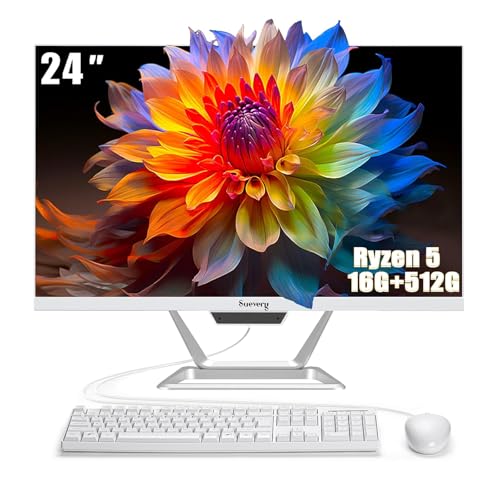
- Best overall value under $500: suevery All-in-One PC 24, Ryzen 5, 16GB RAM, 512GB SSD — Check on Amazon
- Lenovo IdeaCentre AIO 3 24, Ryzen 5 5500U, 16GB RAM, 512GB SSD — Check on Amazon
- HP ProOne 600 G4 All-in-One, Core i5-8500T, 8GB RAM, 256GB SSD (Renewed) — Check on Amazon
- Dell OptiPlex 5260 All-in-One, Core i5-8400, 8GB RAM, 256GB SSD (Renewed) — Check on Amazon
See 2 more Amazon options
- HP 22-inch FHD All-in-One, Intel N100, 8GB RAM, 128GB SSD — Check on Amazon
- Lenovo IdeaCentre AIO 3i 22, Core i3-1115G4 Touch, 8GB RAM, 256GB SSD — Check on Amazon
Read the full guide ↓
Disclosure: As an Amazon Associate, reviewstook.com earns from qualifying purchases. Links to Amazon on this page are affiliate links; they cost you nothing extra. Listing details such as price and availability change often, so check the current Amazon listing before you buy.
Five hundred dollars is the budget where an all-in-one PC stops being a compromise you apologize for and becomes a deliberate choice — but only if you understand what the money is actually buying. An all-in-one puts the whole computer inside the monitor: no tower under the desk, no cable nest, one power cord and a screen. At $500 that formula has a hard ceiling, and this guide will state it plainly before recommending anything: there is no discrete graphics card anywhere in this guide, and there is no all-in-one under $500 that plays modern AAA games properly, edits 4K video comfortably, or upgrades like a tower. What $500 genuinely buys is a clean, quiet, complete home and office computer — email, documents, dozens of browser tabs, video calls, streaming video, schoolwork, light photo touch-ups and older or very light games — in a package that takes ten minutes to set up and leaves your desk looking like a desk.
The second honesty note is about how this price band is built. Under $500, the all-in-one market splits into three families, and every pick below belongs to one of them. The first is new big-brand machines built around entry chips — Intel’s N100 or an older Core i3 — with modest RAM and, in the worst cases, storage figures inflated by external drives bundled in the box. The second is new white-box machines, mostly from smaller Amazon brands, which often put a genuinely stronger Ryzen 5 processor and 16GB of RAM behind the screen for less money, at the cost of thinner support and less certain long-term parts availability. The third is renewed business hardware: former office-fleet machines from HP and Dell with six-core desktop-class processors, proper serviceability and Windows 11 Pro, sold for substantially less than their original price because they are several years old. None of the three families is the “right” one. The right one depends on whether you value a factory warranty, raw everyday speed, or the lowest possible price — and the reviews below are organized to make that trade explicit for every single pick.
For most buyers we would start with the suevery 24-inch machine for its 16GB/512GB configuration — check price on Amazon — or the Lenovo IdeaCentre AIO 3 if a big brand name and a DVD drive matter more. Business buyers on a hard budget should look hard at the two renewed picks, whose six-core processors are, core for core, stronger than the new entry chips in this guide. Below are the quick picks, detailed reviews of all six products, a comparison table, a buying checklist written for this exact price band, the mistakes that waste money on all-in-ones, and the questions buyers ask before ordering.
In this guide
Quick Picks
Short on time, or comparing several options at once? Each row below names a buyer type and the product that suits it, with a link to the listing.
| Buyer type | Pick | Why it stands out | Link |
|---|---|---|---|
| Best overall value | suevery All-in-One PC 24, Ryzen 5, 16GB / 512GB | Strongest new spec sheet in this research — check price on Amazon | Check on Amazon |
| Best big-brand new buy | Lenovo IdeaCentre AIO 3 24, Ryzen 5 5500U | 6-core Ryzen, 16GB RAM, 512GB SSD and a DVD drive | Check on Amazon |
| Best renewed business value | HP ProOne 600 G4, i5-8500T (Renewed) | Six-core business AIO — check price on Amazon | Check on Amazon |
| Best renewed alternative | Dell OptiPlex 5260, i5-8400 (Renewed) | Six-core Dell fleet machine with USB-C and DisplayPort | Check on Amazon |
| Best brand-new on a strict budget | HP 22-inch All-in-One, Intel N100 | New HP with Wi-Fi 6 — but read the storage warning | Check on Amazon |
| Best touchscreen | Lenovo IdeaCentre AIO 3i 22, i3-1115G4 | FHD touch display and a DVD drive in a 21.5-inch body | Check on Amazon |
How These Picks Were Chosen
The budget was applied as a ceiling for the whole computer — screen, processor, memory, storage, keyboard path and Windows licence together — because that is the entire point of an all-in-one. Every product below is a real Amazon listing in the United States that fits this guide’s under-$500 budget — check price on Amazon for the current listing before you buy. Two renewed machines appear because at this budget they are not a footnote; they are a third of the realistic market, and excluding them would misrepresent what $500 can do.
We did not use these products ourselves. We read the maker listings and specification pages and compared processor class, core counts, memory size and type, internal storage — internal, a distinction this category abuses — display size, resolution and panel claims, included peripherals and operating system. Listings that reached the headline storage number by adding an external drive or a docking-station drive were not excluded, but the arithmetic is called out in the review wherever it happens, because a 128GB internal drive with a 256GB accessory is not a 384GB computer. We also weighted processor honesty: several listings in this band use the word “gaming” for machines with integrated graphics only, and where a pick’s own listing does that, the review says what the integrated graphics can and cannot actually run.
Two filters sat on top of the spec comparison. The first is the completeness filter: an all-in-one should arrive as a working desk — screen, computer, webcam for calls, Wi-Fi, and a keyboard and mouse either in the box or honestly absent — because a machine that needs extra peripherals on top is no longer the budget machine it looked like. The second is the exit filter: all-in-ones are the least upgradeable computers sold, so a pick earns its place only if its fixed configuration — its RAM ceiling, its storage, its processor — is one you can live with for the machine’s whole life, or, in the case of the renewed business models, if its panels actually open and its memory and storage can be replaced by a technician.
The 6 Best All-in-One PCs Under $500
suevery All-in-One PC 24 — Ryzen 5, 16GB RAM, 512GB SSD
Who it suits: Home and home-office buyers who want the strongest everyday specification available new under this budget, and who are comfortable buying from a smaller Amazon brand rather than a household name.
On paper, this is the configuration the big brands make you pay more for. Behind a 23.8-inch Full HD display sits an AMD Ryzen 5 processor — the Amazon listing records it at up to 3.7GHz — with 16GB of DDR4 memory and a 512GB SSD, and a keyboard and mouse are included. That memory and storage pairing is the real headline: 16GB is the difference between a browser that shrugs at thirty tabs and one that reloads them, and 512GB is the difference between a family photo library that lives on the machine and one that lives on a borrowed external drive. For the everyday workload this category exists for — documents, spreadsheets, video calls, streaming, school platforms, light photo sorting — this is the most complete new package our research found under $500, and it is not close.
Value is the second headline. Among new 24-inch machines with 16GB of RAM in this guide, this is a notably strong budget-tier package — check price on Amazon for the current listing. Prices on smaller-brand listings move more than big-brand ones, so check the live listing before ordering — but the value shape holds. Two honest cautions belong here. The listing markets this machine as a gaming PC; it has integrated graphics only, which means light and older games at modest settings, not modern AAA titles — buy it as the excellent office and family machine it is. And a smaller brand means a thinner support network: check the seller’s warranty terms and return window on the listing before ordering, and keep the box until the second week.
- 16GB DDR4 RAM and a 512GB SSD — the strongest memory/storage pairing seen new in this budget tier.
- Ryzen 5 processor behind a 23.8-inch Full HD display, keyboard and mouse included.
- Budget-tier value benchmark for this guide — check price on Amazon.
Honest limitation: Integrated graphics only despite “gaming” in the listing language, and support is a small-brand operation rather than a national service network.
Choose it if you want maximum everyday specification per dollar, new, with everything in one box. Skip it if a big-brand warranty and service network matter more to you than the spec sheet — that is the Lenovo below.

Lenovo IdeaCentre AIO 3 24 — Ryzen 5 5500U, 16GB RAM, 512GB SSD
Who it suits: Buyers who want the same 16GB/512GB class of configuration from a major brand, with a proper support network — and households that still use discs, because this machine unusually includes a DVD drive.
The processor is the story. The Ryzen 5 5500U is a six-core, twelve-thread chip (2.1GHz base, up to 4.0GHz boost, per Lenovo’s specifications) built for laptops and adopted here, which is standard practice in all-in-ones and no criticism: it is a genuinely capable everyday processor, stronger than the entry Intel chips elsewhere in this guide, with integrated Radeon graphics that handle video, casual games and light creative work without complaint. Around it Lenovo builds the configuration this guide keeps asking for: 16GB of DDR4 memory, a 512GB SSD, a 23.8-inch Full HD display, Windows 11, and a DVD RW drive — a feature that sounds antique until a school, a tax archive or a family’s disc collection makes it the most useful port on the machine.
The buying advice for this pick is about price discipline. This is an older model in Lenovo’s line, and on Amazon it is frequently sold by third-party sellers whose prices wander above and below this guide’s ceiling. Check price on Amazon before you decide: when a listing shows it at or under $500, it is arguably the best-balanced new all-in-one in this guide; when the only sellers are asking well above that, the suevery above or the step up to the $700 tier is the smarter money. Check the live price, check that the seller’s configuration really is the 16GB/512GB F0G1008MUS model — this family was sold in several configurations — and the rest of the decision makes itself.
- Six-core Ryzen 5 5500U — the strongest big-brand processor in this guide.
- 16GB RAM, 512GB SSD and a built-in DVD RW drive, a rarity in modern all-in-ones.
- Lenovo support and parts network behind a 23.8-inch Full HD screen.
Honest limitation: An older model sold through third-party sellers, so price and exact configuration vary by listing — and like every pick here, graphics are integrated only.
Choose it if you want big-brand backing with no spec compromise when it appears under the ceiling. Skip it if the live listing is priced well above $500 or shows a lesser configuration — do not pay a premium for the badge.
HP ProOne 600 G4 All-in-One — Core i5-8500T, 8GB RAM, 256GB SSD (Renewed)
Who it suits: Home-office workers, small businesses, schools and reception desks that want genuine business hardware and Windows 11 Pro at a budget-tier renewed price — check price on Amazon — and who accept that “renewed” means a previous life in an office.
This is the fleet-machine argument in its purest form. The ProOne 600 G4 was built for corporate desks, and its processor shows it: the Core i5-8500T is a six-core chip (2.1GHz base, up to 3.5GHz turbo) from Intel’s 8th generation, with Intel UHD Graphics 630, and six real cores still out-muscle the brand-new entry chips in this guide for everyday multitasking. The renewed configuration documented here pairs it with 8GB of DDR4 memory and a 256GB SSD behind a 21.5-inch Full HD display, ships with a keyboard and mouse, and runs Windows 11 Pro — the edition with BitLocker and remote-desktop hosting that home licences lack. That makes it a remarkable amount of verified computer for a budget-tier renewed buy — check price on Amazon for the current listing.
Now the renewed terms, stated plainly. The machine is several years old and professionally refurbished: inspected, tested and cleaned, with accessories that may be compatible replacements rather than original HP parts, and Wi-Fi and Bluetooth provided in some listings by USB adapters rather than internal cards. The 21.5-inch screen is smaller than the 23.8-inch panels elsewhere here, 8GB of RAM is adequate rather than generous, and the warranty is the refurbisher’s or Amazon Renewed’s, not a fresh factory warranty. Against that, business all-in-ones of this generation were designed to be serviced — memory and storage sit behind panels a technician can open — which makes this, paradoxically, one of the more upgradeable picks in a category famous for sealed boxes. Buy it from a listing with a clear return window, photograph its condition on arrival, and it is the budget pick we would hand to a small office without hesitation.
- Six-core i5-8500T and Windows 11 Pro — business substance no new budget-tier machine matches.
- Budget-tier renewed value, keyboard and mouse included — check price on Amazon.
- Serviceable business design: memory and storage are technician-replaceable.
Honest limitation: It is a renewed, previous-generation machine — smaller 21.5-inch screen, 8GB RAM, refurbisher warranty, and accessories that may not be original.
Choose it if value and processor strength per dollar top your list and renewed condition does not bother you. Skip it if you need a factory warranty, a larger screen, or a machine that must last a decade untouched.

Dell OptiPlex 5260 All-in-One — Core i5-8400, 8GB RAM, 256GB SSD (Renewed)
Who it suits: The same renewed-business buyer as the HP above, with a preference for Dell’s fleet hardware, a USB-C port, and DisplayPort for a second screen.
Dell’s OptiPlex line is the other great corporate fleet, and the 5260 is its 21.5-inch all-in-one of the same era. The Amazon renewed listing documents a Core i5-8400 processor — six cores, up to 4.0GHz, whatever the listing title’s stray “quad-core” wording suggests; the detailed specification is the six-core part — with 8GB of DDR4 memory, a 256GB SSD, a 21.5-inch Full HD display, and Windows 11 Pro. The connectivity is the differentiator against the HP: the listing includes Wi-Fi, Bluetooth, DisplayPort and a USB-C port alongside the keyboard and mouse, which makes this the better renewed pick for a desk that wants a second monitor for spreadsheets-plus-email work, the single most common real office upgrade.
The renewed cautions mirror the HP’s, because the deal is the same shape: a professionally inspected, tested and cleaned ex-business machine, sold by a third-party refurbisher through Amazon, with condition graded by the seller rather than by Dell. Check the listing’s stated condition grade, its return window and whether the Wi-Fi is internal or a USB dongle in the specific offer you are buying — renewed listings for the same model vary by seller in exactly these details, and two listings with the same title can be meaningfully different purchases. What does not vary is the underlying hardware: a six-core desktop-class processor and a serviceable chassis, at a renewed price that lives comfortably inside this budget. Between this and the ProOne, choose on the day: the better-graded unit with the clearer warranty wins, and this Dell’s port selection is its edge when the two are otherwise tied.
- Six-core i5-8400 with Windows 11 Pro, in Dell’s serviceable fleet chassis.
- USB-C and DisplayPort in the listing — the easiest second-monitor path among the renewed picks.
- Keyboard, mouse, Wi-Fi and Bluetooth included in the documented listing.
Honest limitation: Renewed and seller-dependent: condition grade, warranty and even the Wi-Fi arrangement vary between listings of the same model.
Choose it if you want renewed Dell hardware and dual-screen office work is on your desk’s future. Skip it if you cannot verify the specific seller’s grade and returns terms — with renewed, the seller is half the product.

HP 22-inch FHD All-in-One — Intel N100, 8GB RAM, 128GB SSD
Who it suits: Buyers who want a brand-new, big-brand machine for a kitchen counter, a child’s homework desk, a reception point or a relative’s first computer — light duties, new warranty, minimal fuss.
This is HP’s current entry all-in-one formula, and its virtues are real: a 21.5-inch Full HD display in a compact white body, a built-in webcam, Wi-Fi 6, HDMI and Ethernet ports, a wired keyboard and mouse in the box, and Windows 11 Home, all new with a manufacturer’s warranty behind it. It is sold through an Amazon storefront — check price on Amazon for the current listing. For video calls with family, webmail, homework platforms, streaming and light document work, it is a tidy, quiet, low-power machine that asks nothing of its owner.
The limitations are equally real, and this review exists to state them before the listing’s marketing does. The Intel N100 is a four-core, four-thread entry processor (up to 3.4GHz turbo) designed for efficiency, not speed; paired with 8GB of memory it handles light multitasking and slows visibly under heavy tab loads, big spreadsheets or photo work. The serious warning is storage: this configuration’s internal drive is 128GB, which Windows, its updates and a modest app collection will steadily erode. Worse, this corner of the market is where storage arithmetic gets creative — reporting on this very HP model family has documented Amazon bundles advertising “384GB” that combine a 128GB internal drive with 256GB in an external docking accessory. Read any listing for this machine until you find the internal drive’s size stated on its own. If your life fits in the cloud and the browser, this HP is a clean new answer; if you keep local files, the 512GB picks above are worth more than the new-machine smell.
- New HP with manufacturer warranty, Wi-Fi 6, webcam and peripherals included.
- Budget-tier new HP option — check price on Amazon.
- Compact 21.5-inch footprint suits counters, small desks and shared family spaces.
Honest limitation: The N100 and 8GB RAM cap it at light work, and the 128GB internal drive is this guide’s smallest — beware bundle listings that pad the storage number with external drives.
Choose it if new-with-warranty matters most and the workload is genuinely light and cloud-based. Skip it if you store media locally or multitask heavily — 128GB and an N100 will frustrate you within a year.

Lenovo IdeaCentre AIO 3i 22 — Core i3-1115G4 Touch, 8GB RAM, 256GB SSD
Who it suits: Families and shared-space buyers who specifically want a touchscreen — children doing schoolwork, a kitchen or hallway information point, anyone who reaches for the screen by instinct.
Touch is this machine’s reason to exist. Its 21.5-inch Full HD display is a touch panel, which changes how a shared family computer gets used: tapping through recipes, zooming homework, signing documents and driving media with a finger instead of hunting for the mouse. Behind it sits an Intel Core i3-1115G4 — a dual-core, four-thread chip up to 4.1GHz with strong single-core pace for everyday apps — with 8GB of memory, a 256GB SSD, Windows 11, and, like its larger Lenovo sibling above, a built-in DVD RW drive. As a complete, big-brand, touch-equipped package it occupies a niche none of the other five picks contest.
The trade-offs are the mirror image of its strengths. Two processor cores are the fewest in this guide: fine for the browsing, documents, calls and streaming this machine is aimed at, and the wrong tool for heavy multitasking or anything creative beyond touch-ups. The 256GB SSD is adequate rather than roomy. Seller pricing deserves a buyer’s attention: this is an older model sold by third-party sellers, so pricing varies — check price on Amazon, buy when a listing shows it at or under $500, and walk past when sellers are asking a nostalgia premium. Touch, in other words, is worth having at the right price and not worth overpaying for: if the live listing is over the ceiling, the non-touch Lenovo above is the better computer, and touch alone does not close the gap.
- Full HD touchscreen — the only touch display in this guide.
- Core i3-1115G4 pace for everyday apps, plus a DVD RW drive for disc households.
- Big-brand Lenovo build in a compact 21.5-inch body for shared spaces.
Honest limitation: A dual-core processor and 256GB SSD are modest, and its third-party pricing varies — check price on Amazon and buy only at or under the ceiling.
Choose it if touch is a genuine requirement and the live price respects the budget. Skip it if you would be paying a premium for the touchscreen while giving up cores, RAM and storage you will use daily.

Comparison Table
| Product | Display | Processor / RAM / Storage | Best use | Link |
|---|---|---|---|---|
| suevery All-in-One PC 24 | 23.8″ FHD | Ryzen 5 / 16GB / 512GB SSD | Strongest new everyday spec — check price on Amazon | Check on Amazon |
| Lenovo IdeaCentre AIO 3 24 | 23.8″ FHD | Ryzen 5 5500U / 16GB / 512GB SSD | Big-brand balance, DVD drive included | Check on Amazon |
| HP ProOne 600 G4 (Renewed) | 21.5″ FHD | i5-8500T 6-core / 8GB / 256GB SSD | Business value, Windows 11 Pro — check price on Amazon | Check on Amazon |
| Dell OptiPlex 5260 (Renewed) | 21.5″ FHD | i5-8400 6-core / 8GB / 256GB SSD | Renewed Dell with USB-C and DisplayPort | Check on Amazon |
| HP 22-inch All-in-One | 21.5″ FHD | Intel N100 / 8GB / 128GB SSD | Brand-new, light-duty, small spaces | Check on Amazon |
| Lenovo IdeaCentre AIO 3i 22 | 21.5″ FHD Touch | i3-1115G4 / 8GB / 256GB SSD | Touchscreen for family and shared use | Check on Amazon |
How to Choose an All-in-One PC Under $500
- Decide new versus renewed first — it is the real fork in this market. New buys you a factory warranty and current ports, paid for with an entry processor. Renewed business buys you a six-core processor and Windows 11 Pro for less, paid for with age and a refurbisher’s warranty. Neither is the budget option of the other; they are different products.
- Read the internal storage number, and only the internal number. Find the size of the drive inside the machine, stated alone. Listings in this band add external drives, dock drives and flash drives into headline totals. 128GB internal is tight, 256GB is workable, 512GB is comfortable — regardless of what accessories share the box.
- Treat 16GB of RAM as the longevity line. 8GB runs today’s everyday workload and ages in dog years as browsers and Windows grow. If you plan to keep the machine four years or more, the 16GB picks are the ones still feeling responsive at the end of it.
- Rank processors by class, not by brand loyalty. In this guide’s field: six-core Ryzen 5 5500U and the renewed six-core Core i5 chips are the strong tier; the Ryzen 5 white-box configuration sits with them on everyday work; the Core i3-1115G4 is a capable dual-core for light use; the N100 is an efficiency chip for genuinely light duties. A newer year on the box does not beat two extra cores.
- Ignore the word “gaming” unless a discrete GPU is named. Every pick here uses integrated graphics. That runs streaming video, casual and older games and esports titles at modest settings — and not modern AAA games. If gaming is a real requirement, this entire category at this price is the wrong shelf; see the gaming guides linked below instead.
- Check what is in the box. Keyboard, mouse and webcam are included in most picks here, but verify on the listing — and on renewed machines, whether Wi-Fi is internal or a USB dongle, because that decides whether a USB port is permanently occupied.
- Measure the desk, then choose the screen. 23.8 inches is the comfortable working size and the better choice for spreadsheets and split-screen work; 21.5 inches fits counters, dorm desks and reception points. Both are Full HD in this guide, so text is equally sharp — the difference is working room, not clarity.
- Plan for zero upgrades, except where stated. Most all-in-ones seal the processor and graphics forever and make even RAM awkward. The renewed business machines are the exception, with technician-serviceable memory and storage. Buy the configuration you need at the end of the machine’s life, not the start.
- On renewed, grade the seller as hard as the spec. Condition grade, return window, warranty length and what “included” means vary by refurbisher for the identical model. A well-graded unit from a clear seller beats a cheaper vague one every time.
- Keep the packaging until the second week. Run every port, the webcam, the speakers and a full Windows update cycle in the first days. All-in-ones are single units — a fault anywhere is a return of everything — so discover faults while returns are painless.
What $500 Actually Buys in an All-in-One — and What It Does Not
Shoppers reasonably ask whether the all-in-one premium is real: the same $500 buys a noticeably faster tower-and-monitor combination, so what does the integrated form cost you, exactly? Three things. It costs you graphics — towers at this price can carry a discrete card or at least the space for one, and no all-in-one here can. It costs you upgrade paths — a tower’s processor, memory, storage and screen all age on separate schedules, while an all-in-one’s screen, however good, is retired the day its computer is. And it costs you repair options, because a failed tower component is a single replaceable part and a failed all-in-one board is a service bill or a replacement.
What the premium buys is equally concrete. It buys a desk with one cable on it, a machine a non-technical relative can set up unassisted, a webcam and speakers and Wi-Fi integrated without a single dongle hunt, and a footprint small enough for counters and shared rooms where no tower belongs. For the workloads this category serves — the family computer, the home-office desk, the reception point, the student’s room — those are not cosmetic benefits; they are the reason the product exists. The mistake is not buying an all-in-one under $500. The mistake is buying one while expecting a tower’s performance story. Buy it as the complete, tidy, everyday appliance it is, with its configuration chosen for its whole life, and $500 is money honestly spent.
Display Quality at This Price: What to Expect
Every pick in this guide is Full HD — 1920×1080 — and at 21.5 to 23.8 inches that resolution is genuinely sharp for text, documents and video; nobody in this category needs more pixels for everyday work, and none are on offer anyway. The differences that matter are subtler. Panel type decides viewing angles: IPS-class panels, which the larger Lenovo and the class generally favour, stay accurate when you lean back or share the screen, while the cheapest panels shift colour off-axis — a real consideration for a family machine viewed from a sofa’s angle. Brightness decides room placement: entry all-in-ones are typically modest-brightness indoor screens, happiest away from direct sun on the glass, so a desk facing a bright window is a reason to favour the larger, better panels here or to budget for a curtain rather than a different computer.
Touch deserves its own sentence because it is the one display feature in this guide you cannot retrofit: exactly one pick has it. If the machine will serve children, a kitchen, or anyone who instinctively reaches for the screen, the Lenovo AIO 3i’s touch panel is a functional difference, not a luxury. If the machine will live at a desk with a keyboard, touch will be used twice and forgotten, and the same money buys cores and RAM elsewhere in this guide. Speakers and webcams follow the same pattern across the whole band — adequate for calls and video everywhere, impressive nowhere — so let processor, memory and storage make the decision, and let the display break ties.
Common Buying Mistakes
- Believing a headline storage total that includes external or dock drives. The internal drive is the computer’s storage; everything else is an accessory with a cable.
- Buying an N100 or dual-core machine for a household that multitasks like an office. Entry chips are honest tools for light work and a daily frustration beyond it.
- Paying a “gaming” premium for integrated graphics. If no discrete GPU is named in the specification, there is no gaming hardware in the box.
- Choosing 8GB of RAM and 128GB of storage to save a little money on a machine meant to serve five years. The savings are real for one month and the constraint is real for sixty.
- Assuming an all-in-one can be upgraded later like a tower. In most of these, it cannot — buy the end-state configuration now.
- Skipping the renewed business machines on reflex — or buying one without checking the seller’s grade, warranty and return window. Both reflexes cost money.
- Forgetting the peripherals audit: a missing keyboard, mouse or webcam, or a Wi-Fi dongle occupying a port, quietly moves the real price.
- Placing a modest-brightness screen opposite a sunny window and blaming the computer. Room placement is part of the purchase.
- Letting a touchscreen or a brand badge outrank processor cores and memory you will use every day, for a feature you will use twice a year.
Final Recommendation
- Most home and home-office buyers: suevery All-in-One PC 24.
- Big-brand buyers who catch it under the ceiling: Lenovo IdeaCentre AIO 3 24.
- Hard-budget business and office desks: HP ProOne 600 G4 (Renewed).
- Renewed buyers who want USB-C and a second screen: Dell OptiPlex 5260 (Renewed).
- Brand-new, light-duty, small-space desks: HP 22-inch All-in-One.
- Touchscreen for family and shared spaces: Lenovo IdeaCentre AIO 3i 22.
Our top two at this budget are the suevery 24, for the strongest new specification our research found under $500 — Ryzen 5 pace with the 16GB and 512GB that decide how a machine ages — and the HP ProOne 600 G4 renewed, for buyers whose priority is verified business substance at a budget-tier renewed price — check price on Amazon. Between them they cover the two honest shapes of this search: the most complete new machine, and the most computer per dollar outright. If a factory warranty is non-negotiable and the Lenovo IdeaCentre AIO 3 is listed at or under the ceiling, it splits the difference with the best processor of the new big-brand picks; if the workload is light, the space is small and new is non-negotiable, HP’s 22-inch machine does the job with its storage limit understood. Shoppers who can stretch should also see Best All In One PC Under $700, and those working the other direction can start with Best All In One PC Under $400. Read the internal storage figure on the live listing, confirm the configuration and the seller, and check the live price before you order — at $500, that homework is the whole difference between a tidy desk and a slow one.
Frequently Asked Questions
Can an all-in-one PC under $500 play games?
Light ones, honestly labelled. Every machine in this guide uses integrated graphics, which handles older titles, casual games and esports games at modest settings and resolutions. Modern AAA games are beyond all of them — no discrete GPU exists in an all-in-one at this price, whatever the listing language implies. If gaming is a primary use, a tower at this budget is the correct purchase instead.
Is a renewed business all-in-one a safe buy?
It is a calculated one. Renewed fleet machines are professionally inspected, tested and cleaned, carry a refurbisher or Amazon Renewed warranty rather than a factory one, and may ship with compatible rather than original accessories. The hardware underneath — six-core processors, serviceable chassis — is genuinely strong. Buy from a listing with a stated condition grade and a clear return window, test everything in the first week, and the calculation usually pays.
How much RAM and storage do I actually need?
For this category’s workload: 16GB of RAM and 512GB of internal SSD is the comfortable configuration that ages well; 8GB and 256GB is workable for browser-and-documents use; 8GB and 128GB suits only genuinely light, cloud-centred work. Always judge the internal drive’s size alone — bundle accessories do not count.
Can I upgrade an all-in-one later?
Usually, barely. Processors and graphics are fixed for life in every pick here, and most consumer all-in-ones make even memory access difficult. The renewed HP and Dell business machines are the exception, designed for technician service of memory and storage. The safe rule: buy the configuration your future self needs.
21.5-inch or 23.8-inch — which screen size is right?
Both are Full HD and equally sharp. Choose 23.8 inches for a main desk where split-screen work happens, and 21.5 inches for counters, dorms, reception points and shared family spots. The difference is working room and footprint, not clarity.
Why do some listings advertise storage the computer does not have?
Because bundle sellers add external drives, docking-station drives and flash drives into the headline number. A listing for this HP model family has been documented advertising 384GB built from a 128GB internal drive plus a 256GB accessory. The internal drive — the only storage Windows and your apps actually live on — is the number to find and compare.
All-in-one or a mini PC with a separate monitor?
An all-in-one wins on tidiness, setup and integrated webcam and speakers; a mini PC wins on flexibility, because the monitor survives the computer and the computer can be replaced alone. If the desk and the user value simplicity, choose the all-in-one; if you already own a good monitor, a mini PC under the same budget is often the stronger computer — see the related guides below.


