Where to buy
Check the latest price, availability and delivery on Amazon. Orders are placed on Amazon. We may earn a commission from qualifying purchases.
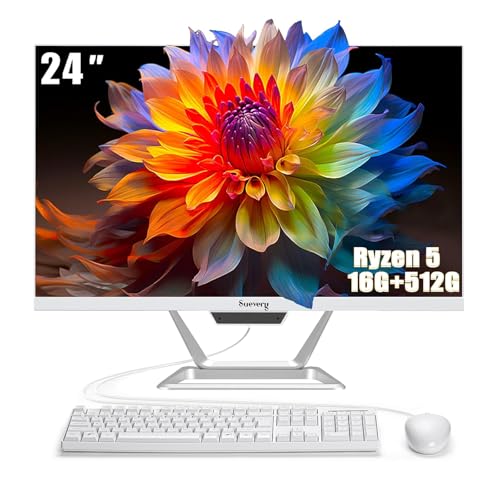
- Best streaming starter under $500: suevery All-in-One PC 24, Ryzen 5, 16GB RAM, 512GB SSD — Check on Amazon
- Lenovo IdeaCentre AIO 3 24, Ryzen 5 5500U, 16GB RAM, 512GB SSD — Check on Amazon
- HP ProOne 600 G4 All-in-One, Core i5-8500T, 8GB RAM, 256GB SSD (Renewed) — Check on Amazon
- Dell OptiPlex 5260 All-in-One, Core i5-8400, 8GB RAM, 256GB SSD (Renewed) — Check on Amazon
See 2 more Amazon options
- HP 22-inch FHD All-in-One, Intel N100, 8GB RAM, 128GB SSD — Check on Amazon
- Lenovo IdeaCentre AIO 3i 22, Core i3-1115G4 Touch, 8GB RAM, 256GB SSD — Check on Amazon
Read the full guide ↓
Disclosure: As an Amazon Associate, reviewstook.com earns from qualifying purchases. Links to Amazon on this page are affiliate links; they cost you nothing extra. Listing details such as price and availability change often, so check the current Amazon listing before you buy.
Streaming from an all-in-one PC under $500 is possible — people do it every day — but it is a different activity from streaming from a gaming tower, and this guide will draw that line before it recommends anything. There is no discrete graphics card in any machine below, which means there is no NVENC encoder, the dedicated NVIDIA hardware block that makes streaming from a gaming PC feel free. Every pick here encodes your broadcast one of two ways: with the small hardware encoder built into its integrated graphics — Intel Quick Sync on the Intel machines, AMD’s integrated encoder on the Ryzen machines — or with the processor itself, on cores that are also trying to run your game, your browser and your chat. That single fact decides what kind of stream each machine can honestly sustain, and it is the axis this whole guide grades on.
So here is the realistic workflow, stated up front. An all-in-one under $500 can run a genuine, watchable stream of light games, older and esports titles at modest settings, desktop and creative content, talking-head and just-chatting formats, and console gameplay fed in through a capture card — with OBS sending a 720p or 1080p picture to Twitch at up to roughly 6,000 kbps, the platform’s standard ceiling for most broadcasters. What it cannot do is play a demanding modern game and encode a high-quality broadcast of it at the same time; the game and the stream are two workloads sharing one small processor, one pool of memory and one modest drive, and something has to give. Streamers who buy one expecting a gaming tower in a monitor tend to be shopping again within a month — usually for one of the tower guides linked at the end of this page.
The six picks split into the same three families as the wider sub-$500 all-in-one market. Two are new machines with 16GB of memory and 512GB of storage — the suevery 24 and the Lenovo IdeaCentre AIO 3 24. Two are renewed business machines — the HP ProOne 600 G4 and the Dell OptiPlex 5260 — whose six-core Intel processors and Quick Sync encoders make them the budget encoder picks of this guide, with seller-dependent renewed pricing — check price on Amazon for each. And two are new entry machines — HP’s N100 22-inch and Lenovo’s touchscreen AIO 3i — which can carry a light stream on Quick Sync but have the least headroom here. Every review grades the same three streaming loads: the encoder, the simultaneous workload, and the camera-and-storage reality, because a stream is only as good as its weakest of the three.
In this guide
Quick Picks
Short on time, or comparing several options at once? Each row below names a streamer type and the product that suits it, with a link to the listing.
| Streamer type | Pick | Why it stands out | Link |
|---|---|---|---|
| Best streaming starter | suevery All-in-One PC 24, Ryzen 5, 16GB / 512GB | 16GB RAM and 512GB storage for the OBS-plus-game stack — check price on Amazon | Check on Amazon |
| Best big-brand streamer | Lenovo IdeaCentre AIO 3 24, Ryzen 5 5500U | Six cores and twelve threads — the best CPU-encoding fallback here | Check on Amazon |
| Best encoder value | HP ProOne 600 G4, i5-8500T (Renewed) | Quick Sync hardware encoding and six cores — check price on Amazon | Check on Amazon |
| Best for a second screen | Dell OptiPlex 5260, i5-8400 (Renewed) | Quick Sync plus DisplayPort for a chat-and-alerts monitor | Check on Amazon |
| Best ready-out-of-the-box | HP 22-inch All-in-One, Intel N100 | Built-in webcam and wired Ethernet — but the lightest workload only | Check on Amazon |
| Best for desktop and talk streams | Lenovo IdeaCentre AIO 3i 22, i3-1115G4 | Quick Sync carries the encode; touchscreen suits desk-based formats | Check on Amazon |
How These Picks Were Chosen
The starting point was the verified sub-$500 all-in-one field: real Amazon listings that sell at, or have been seen selling at, $500 or less in the United States, with the same six products as our general guide to this budget. What changed is the grading. A streaming machine is not chosen the way an office machine is chosen, so every pick was re-examined against the three loads a live broadcast actually imposes — and a pick that is excellent for documents can be mediocre for streaming, for reasons that never appear on a spec sheet’s headline.
The first load is the encoder. We identified, for each machine, which hardware actually compresses the video: Intel Quick Sync on the four Intel picks, the integrated AMD encoder on the two Ryzen picks, or the processor’s own cores through OBS’s x264 software encoder. No pick here has a discrete encoder, none encodes AV1, and no encoder capability beyond what each documented processor and its integrated graphics provide has been claimed. The second load is simultaneity: streaming is a game plus OBS compositing scenes, plus a browser running the dashboard, alerts and chat, plus recording if you keep local copies — so cores, threads and memory were graded as a shared budget, not as isolated numbers. The third load is the unglamorous one: whether the machine actually has a camera, whether its storage can hold recordings (a high-quality local record at 40–50 Mbps consumes roughly 20GB per hour), and whether it can reach the router with a wire.
Two disciplines from the general guide carry over unchanged. Prices change constantly — renewed and third-party listings drift fastest, so check price on Amazon before you buy. And completeness is costed honestly: a machine that still needs a webcam, a microphone and a capture card is not a complete streaming setup, it is a start on one, which is why the kit section near the end of this guide exists and no accessory cost is ever folded into a pick’s price.
The Encoder Is the Streaming Spec
On a gaming tower, streaming advice starts with the graphics card, because the card’s encoder does the broadcast work on dedicated hardware while the card’s rendering hardware plays the game. An all-in-one under $500 has no such division of labour, so the encoder question becomes the whole question. There are exactly three encoding paths available in this guide, and every review below names which ones its pick can use.
Intel Quick Sync is the strongest path here. It is the hardware video encoder built into Intel’s integrated graphics, and the four Intel picks — the two renewed six-core machines, the N100 HP and the dual-core Lenovo 3i — all carry it. Quick Sync compresses an H.264 broadcast without spending processor cores, which is what makes a budget renewed office machine a credible streamer: the encoder runs on the graphics block while all six cores stay available for the game and the apps. Its picture quality at Twitch’s roughly 6,000 kbps ceiling is honest rather than spectacular — a generation behind the best discrete encoders in fine detail — and for the light content these machines can play, it is not the bottleneck. The game is.
AMD’s integrated encoder, exposed in OBS as the AMF encoder, is the path on the two Ryzen picks. It is real hardware encoding and it works, but at Twitch bitrates its H.264 picture is visibly softer than Quick Sync’s on busy, high-motion scenes — a known trait of AMD’s encoder of this generation, and the reason the Ryzen reviews below steer gameplay streamers toward modest scenes and talk formats, or toward their processors instead. That fallback is the Ryzen picks’ compensating strength: the Lenovo’s six cores and twelve threads can run OBS’s x264 software encoder at its fastest presets for a light game or a desktop stream, a trick the dual-core and four-core Intel picks cannot copy — on those, Quick Sync is not the best option, it is the only sane one.
What none of these machines offers is AV1 encoding, and at this budget that absence costs you nothing today: Twitch’s standard broadcast path is H.264 at up to roughly 6,000 kbps with a two-second keyframe interval, and every encoder in this guide speaks that language. Set OBS to constant bitrate, respect that ceiling, send a clean 720p picture instead of a starved 1080p one when the game is heavy, and the encoder stops being your problem.
The 6 Best All-in-One PCs for Streaming Under $500
suevery All-in-One PC 24 — Ryzen 5, 16GB RAM, 512GB SSD
Who it suits: New streamers whose content is light games, esports titles, desktop and talk formats, and who want the most simultaneous-load headroom a new machine under this budget offers.
Streaming is a memory workload before it is anything else, and this is the only new pick in the guide that arrives dressed for it. Behind the 23.8-inch Full HD display sits a Ryzen 5 processor — the Amazon listing records it at up to 3.7GHz, and our research deliberately does not pin a more specific sub-model than the listing states — with 16GB of DDR4 memory and a 512GB SSD. Set that beside what a live session actually runs: the game, OBS compositing your scenes, a browser holding the streaming dashboard, alerts and chat, and Discord or a voice app underneath. On an 8GB machine that stack swaps and stutters; on this machine’s 16GB it simply runs. The 512GB drive matters almost as much — at roughly 20GB per hour of high-quality local recording, this is the one pick here that can keep a week of VODs on the machine without an immediate offload ritual.
Its encoding story is the honest weakness, and it is the same one the general guide flagged from the other direction: the listing markets this machine as a gaming PC, but its graphics are integrated only, and its encoder is AMD’s integrated AMF block. For talk formats, desktop content and lighter games that picture is perfectly watchable; for fast, detailed gameplay at Twitch’s 6,000 kbps it is the softest hardware path in this guide, and the correct response is a 720p output canvas rather than bitrate heroics. Two buying cautions complete the picture. Our research did not document a built-in webcam for this listing, so confirm the camera on the live listing before assuming one — if it is absent, the USB webcam costed in the kit section below is part of this pick’s real price. It comes from a smaller brand whose prices move, so check price on Amazon before you buy. Even allowing for that, the configuration is the streaming starter we would buy new at this budget.
- 16GB RAM and 512GB SSD — the only new pick specced for the full OBS-plus-game-plus-browser stack and local recording.
- Ryzen 5 pace behind a 23.8-inch Full HD screen, keyboard and mouse included.
- Check price on Amazon — a budget-tier new pick that can leave room in the budget for a microphone.
Honest limitation: Integrated graphics and AMD’s softer integrated encoder despite the listing’s “gaming” language, and a built-in webcam is not documented in our research — verify it on the live listing.
Choose it if you want a new machine whose memory and storage will not be the reason your stream struggles. Skip it if your content is fast, detailed gameplay where encoder sharpness is the product — that wants Quick Sync below, or a tower.

Lenovo IdeaCentre AIO 3 24 — Ryzen 5 5500U, 16GB RAM, 512GB SSD
Who it suits: Streamers who want the suevery’s memory-and-storage shape from a major brand — and the strongest processor fallback in this guide for software encoding.
The processor is why this machine streams better than its spec sheet suggests. The Ryzen 5 5500U is a six-core, twelve-thread chip (2.1GHz base, up to 4.0GHz boost, per Lenovo’s specifications), and twelve threads change the streaming maths: where the other picks must use their hardware encoder or nothing, this machine has a genuine second path. Run OBS’s x264 software encoder at a fast preset and the processor produces a cleaner picture at Twitch bitrates than its own integrated AMD encoder does, while still holding a light game or a desktop workload — the classic low-budget streamer arrangement, available here because the cores exist. Around the chip sits the configuration this guide keeps asking for: 16GB of DDR4 memory for the simultaneous stack, a 512GB SSD that treats local recording as a feature rather than a storage emergency, a 23.8-inch Full HD display, Windows 11, and a DVD RW drive that is useless for streaming and oddly useful for everything else in a household.
The discipline this pick demands is about the purchase, not the performance. It is an older model in Lenovo’s line, sold on Amazon largely by third-party sellers whose prices wander on both sides of this guide’s ceiling, so — exactly as in the general guide — we make no hard price claim for it: at or under $500 it is arguably the best-balanced streaming all-in-one here; well above it, it is not. Verify that the live listing is the 16GB/512GB F0G1008MUS configuration, because this family shipped in several. Our research also did not document a built-in webcam for this model, so check the listing’s camera line and price a USB webcam into the purchase if it is absent. Buy the right configuration at the right price and this is the pick for a streamer who expects to graduate from hardware encoding to software encoding without changing computers.
- Six cores and twelve threads — the only pick that can software-encode with x264 at fast presets as a real alternative.
- 16GB RAM and 512GB SSD: the simultaneous stack and a recording habit both fit.
- Lenovo support network behind a 23.8-inch Full HD screen, DVD drive included.
Honest limitation: Its integrated AMD encoder is the soft hardware path, third-party pricing drifts above the ceiling, and a built-in webcam is not documented in our research — verify the configuration and camera on the live listing.
Choose it if you want big-brand backing and the CPU headroom to grow into software encoding. Skip it if sellers are asking well over $500 for it, or the unit on offer is a lesser configuration wearing the same name — the badge alone is worth nothing on stream.
HP ProOne 600 G4 All-in-One — Core i5-8500T, 8GB RAM, 256GB SSD (Renewed)
Who it suits: Budget streamers who want the best encoder-per-dollar in this guide and are comfortable that “renewed” means a previous life on an office desk.
This is the streaming argument for renewed business hardware, and it is a strong one. The Core i5-8500T is a six-core processor (2.1GHz base, up to 3.5GHz turbo) from Intel’s 8th generation, and its integrated UHD Graphics 630 carries Quick Sync — a dedicated hardware encoder that compresses your broadcast without touching the cores your game and apps are using. That division of labour is exactly what the new entry machines in this guide cannot offer, and it is why this budget-tier renewed machine can carry a cleaner, steadier stream than brand-new hardware costing more — check price on Amazon. The renewed configuration documented here pairs the chip with 8GB of DDR4 memory and a 256GB SSD behind a 21.5-inch Full HD display, ships with a keyboard and mouse, and runs Windows 11 Pro. Its budget-tier renewed positioning deserves a streamer’s framing: it can leave real room in a $500 budget for the microphone and webcam that separate a watchable stream from a good one — no other pick here funds its own kit as readily.
The constraints are memory, storage and the renewed terms, in that order. Eight gigabytes is the ceiling on the simultaneous stack: OBS, the dashboard browser and a light game fit, and a heavy browser habit or a demanding title will push it into swapping, so this machine streams best with a disciplined app diet. The 256GB drive holds roughly a dozen hours of high-quality local recordings before offloading becomes mandatory. And the renewed terms from the general guide apply in full: a professionally inspected, tested and cleaned ex-fleet machine, accessories that may be compatible replacements, Wi-Fi and Bluetooth provided in some listings by USB adapters rather than internal cards — confirm the camera situation on the specific listing too, and cost a USB webcam if the offer lacks one. The compensation is that business all-in-ones of this generation were built to be serviced, so memory and storage are technician-replaceable — the only genuine upgrade path in this guide. Buy from a listing with a clear condition grade and return window, test everything in the first week, and it is the encoder value of this budget.
- Quick Sync hardware encoding frees all six cores for the game and the app stack.
- Check price on Amazon — a budget-tier renewed pick that can leave budget for streaming kit.
- Serviceable business design: memory and storage are technician-replaceable; Windows 11 Pro included.
Honest limitation: 8GB of RAM caps the simultaneous workload, 256GB fills quickly with recordings, and it is a renewed machine with a refurbisher’s warranty rather than a factory one.
Choose it if encoder quality per dollar and a funded microphone matter more than a new-machine warranty. Skip it if you run a heavy multitasking stack while you stream, or renewed condition is a deal-breaker.

Dell OptiPlex 5260 All-in-One — Core i5-8400, 8GB RAM, 256GB SSD (Renewed)
Who it suits: The same renewed-business streamer as the HP above, who also wants a second monitor for chat and alerts — and who understands this pick arrives without a camera.
Dell’s OptiPlex 5260 is the other great fleet all-in-one of its era, and its streaming core matches the HP’s: the renewed listing documents a Core i5-8400 — six cores, up to 4.0GHz, whatever the listing title’s stray “quad-core” wording suggests; the detailed specification is the six-core part — whose integrated graphics provide the same Quick Sync hardware encoding, freeing the processor for the game and the stack. Where the Dell pulls ahead for streaming specifically is connectivity. The listing includes Wi-Fi, Bluetooth, a USB-C port and DisplayPort alongside the keyboard and mouse, and DisplayPort is a streamer’s port: it drives a second screen for chat, alerts and the OBS preview, which is the single most useful desk upgrade a streamer can make and the one an all-in-one usually forbids. The configuration is otherwise the familiar renewed shape — 8GB of DDR4 memory, a 256GB SSD, a 21.5-inch Full HD display, Windows 11 Pro — with the same memory discipline and recording-storage arithmetic as the ProOne.
Two facts must be priced into this pick before the comparison is fair. The first is documented in this batch’s research on this exact listing: it has no built-in camera, so a USB webcam — costed in the kit section below — is a mandatory addition for any face-cam format, not an optional one. The second is that we make no hard price claim for it, exactly as the general guide did not: renewed pricing is seller-dependent, and the same model’s listings vary in condition grade, warranty and even whether the Wi-Fi is internal or a USB dongle occupying a port. Judge the specific offer in front of you, favour the better-graded unit with the clearer returns terms, and add the webcam to its price. On a day when the two renewed picks are otherwise tied, the Dell’s second-screen path is a genuine streaming edge; on a day when its seller is vague, the HP is the safer pair of hands.
- Six-core i5-8400 with Quick Sync hardware encoding and Windows 11 Pro.
- DisplayPort and USB-C in the listing — the easiest chat-and-alerts second monitor among these picks.
- Keyboard, mouse, Wi-Fi and Bluetooth all appear in the documented listing’s box contents.
Honest limitation: No built-in camera on the documented listing, so a USB webcam is a required extra; and as a renewed pick, condition, warranty and price all depend on the individual seller.
Choose it if a two-screen streaming desk is the plan and you will verify the seller’s grade and returns terms. Skip it if you want a camera in the box, or the live listings are priced like new machines.

HP 22-inch FHD All-in-One — Intel N100, 8GB RAM, 128GB SSD
Who it suits: Brand-new buyers whose stream is a face, a desktop and a conversation — talk formats, study and work streams, family broadcasting — rather than gameplay.
Judged as a streaming appliance rather than a streaming computer, this little HP has two virtues none of the picks above can match out of the box: a built-in webcam, documented in the listing, and a wired Ethernet port, in a category where both are routinely missing. Add Wi-Fi 6, HDMI, a wired keyboard and mouse, Windows 11 Home and a manufacturer’s warranty, — check price on Amazon — and it is the only pick here you could unbox at lunch and broadcast a tidy talking-head stream from by dinner without buying a single accessory beyond a microphone. Its encoder is Intel Quick Sync on the N100’s integrated graphics, which carries that broadcast competently: the hardware block does the compressing, and for desktop, camera and light content the picture at sensible bitrates is entirely respectable.
The workload ceiling, though, is the lowest in this guide, and a gameplay streamer will hit it immediately. The N100 is a four-core, four-thread efficiency processor (up to 3.4GHz turbo); paired with 8GB of memory it can run a light game or a modest app stack, but asking it to do both at broadcast quality is asking for the dropped frames this guide’s OBS section teaches you to diagnose. The storage warning from the general guide also bites harder for streamers than for anyone: the internal drive is 128GB, which Windows and a modest app collection already erode, leaving almost nothing for local recordings — and this model family is exactly where reporting has documented bundle listings advertising “384GB” built from a 128GB internal drive plus a 256GB external accessory. Read the listing until the internal figure stands alone. There is also a budget truth to state: this pick sits at the top end of this budget tier, leaving little room for the microphone that would improve its stream more than any setting. Buy it as the neat, warranted, camera-included talk-stream appliance it is, and it is a good purchase; buy it to stream games and it is the wrong machine at any price.
- Built-in webcam and an RJ-45 Ethernet port — the only pick that can broadcast wired, camera included, out of the box.
- Quick Sync hardware encoding keeps its light workload off the processor’s four cores.
- New HP with manufacturer warranty, Wi-Fi 6 and peripherals included — check price on Amazon.
Honest limitation: The N100 and 8GB RAM limit it to talk and desktop formats, the 128GB internal drive leaves almost no room for recordings, and its top-of-budget positioning leaves little room for a microphone.
Choose it if your format is camera-and-conversation and new-with-warranty matters most. Skip it if you intend to stream gameplay or keep local recordings — both are beyond this configuration.

Lenovo IdeaCentre AIO 3i 22 — Core i3-1115G4 Touch, 8GB RAM, 256GB SSD
Who it suits: Desk-based streamers — teaching, crafting, music practice, shared family broadcasts — who value the touchscreen and will let Quick Sync do all of the encoding work.
Every guide has a pick that survives on one honest arrangement, and this is it: the Core i3-1115G4 is a dual-core, four-thread processor (up to 4.1GHz, with strong single-core pace for everyday apps), which means its cores are fully employed running your content and cannot also encode it. Fortunately they do not have to. Its integrated graphics carry Intel Quick Sync, and a stream built the right way on this machine — Quick Sync encoding, a 720p output canvas, a lean scene collection — asks the processor only to run the desktop, the camera feed and your apps, which it does without complaint. The 21.5-inch Full HD touchscreen, this guide’s only touch panel, earns its place in desk formats: tapping through slides, recipes, sheet music or a drawing app on camera reads naturally in a way mouse-hunting does not. Around that sit 8GB of memory, a 256GB SSD with the usual recording arithmetic, Windows 11 and a built-in DVD RW drive.
The buying rule is the one the general guide set, and it is unchanged: this is an older model whose third-party pricing has historically drifted above this budget, so buy it when a listing shows it at or under $500 — check price on Amazon — and walk past it when sellers ask a premium. Our research did not document a built-in webcam for this model, so verify the camera on the live listing and cost a USB webcam if it is absent. Graded strictly as a streamer, it is the narrowest machine in this guide: no gameplay streaming beyond the lightest titles, no software-encoding fallback, no multitasking headroom. Graded as a touch-equipped desk broadcaster at the right price, it does a job none of the other five contest.
- Full HD touchscreen — genuinely useful for teaching, craft and desk formats on camera.
- Quick Sync hardware encoding carries the broadcast so the dual-core processor never has to.
- Big-brand Lenovo build with a DVD RW drive, in a compact 21.5-inch body.
Honest limitation: Two cores is the fewest here — Quick Sync is the only viable encoder, gameplay streaming is effectively out, and third-party pricing has historically drifted above $500.
Choose it if your format lives at a desk, touch serves the content, and the live price respects the ceiling. Skip it if you would be paying a premium for touch while giving up the cores and memory a growing stream will need.

Comparison Table
| Product | Encoder path | Processor / RAM / Storage | Best streaming use | Link |
|---|---|---|---|---|
| suevery All-in-One PC 24 | AMD integrated (AMF) | Ryzen 5 / 16GB / 512GB SSD | Light games and talk with the fullest app stack | Check on Amazon |
| Lenovo IdeaCentre AIO 3 24 | AMD integrated (AMF) or x264 | Ryzen 5 5500U 6-core / 16GB / 512GB SSD | Software-encoding fallback, big-brand build | Check on Amazon |
| HP ProOne 600 G4 (Renewed) | Intel Quick Sync | i5-8500T 6-core / 8GB / 256GB SSD | Encoder value, Windows 11 Pro — check price on Amazon | Check on Amazon |
| Dell OptiPlex 5260 (Renewed) | Intel Quick Sync | i5-8400 6-core / 8GB / 256GB SSD | Second monitor for chat via DisplayPort | Check on Amazon |
| HP 22-inch All-in-One | Intel Quick Sync | Intel N100 / 8GB / 128GB SSD | Talk formats, webcam and Ethernet included | Check on Amazon |
| Lenovo IdeaCentre AIO 3i 22 | Intel Quick Sync | i3-1115G4 / 8GB / 256GB SSD | Touchscreen desk broadcasts | Check on Amazon |
Set Up OBS Once, Correctly
Weak hardware rewards correct settings more than strong hardware does — a gaming tower forgives a bad encoder choice, and these machines do not. Work through this list once, in order, and most beginner streaming problems on an all-in-one never happen.
- Pick the hardware encoder first. In OBS output settings, choose Quick Sync (QSV) H.264 on the Intel picks or the AMF H.264 encoder on the Ryzen picks — never x264 by default. The one exception is the Lenovo IdeaCentre AIO 3 24, whose twelve threads can run x264 at the veryfast or ultrafast preset for a light game or desktop stream when you want its cleaner picture. On the dual-core Lenovo 3i and the four-core HP, software encoding is not a slower option; it is a broken stream.
- Set constant bitrate and a two-second keyframe interval. Twitch’s standard path expects CBR at up to roughly 6,000 kbps with keyframes every two seconds. Treat 6,000 as a ceiling, not a target: a clean 720p stream at 4,500–6,000 kbps looks better than a 1080p stream starved at the same bitrate, and on these machines 720p output also halves the encoder’s compositing work.
- Match the canvas to the machine, not the monitor. Every screen here is 1080p, but the output canvas is a separate choice. Gameplay on the 8GB and entry picks belongs at 720p output; talk and desktop formats can run 1080p output because the scene barely moves. Downscaling in OBS is cheap; rendering a game at full canvas and encoding it is not.
- Learn the three lag counters. OBS’s stats window separates your problems. Rendering lag means the graphics are saturated — cap the game’s frame rate and lower its settings until the counter clears. Encoding lag means the encoder is overloaded — drop the output resolution, or step the preset toward speed. Network lag and dropped frames mean the upload path — which brings us to the rule below.
- Run a wire to the router. Wi-Fi is for watching streams, not sending them. Use the Ethernet port where the listing documents one — the HP 22 has RJ-45 built in — and on any pick, test your actual upload speed before blaming the computer; a stream needs its bitrate in sustained upload with room to spare, and a USB-to-Ethernet adapter is a small, honourable purchase when a machine lacks the port.
- Record smart, or not at all. A separate high-quality local recording doubles the encoder’s work on hardware that has none to spare. On the Quick Sync picks, recording with the stream encoder’s settings costs little; on the rest, either record at stream quality or skip local recording and download the VOD.
What $500 Does Not Include
No pick in this guide is a complete streaming setup, and the honest price of starting is the machine plus the kit your format needs. None of the following is ever included in a pick’s price above — cost it separately, and notice that the renewed picks’ lower prices are partly valuable because they leave room for exactly this list.
- A USB microphone — buy this first. Viewers forgive a soft picture and abandon a bad-sounding stream. Every pick’s built-in microphone, where one exists at all, is a meeting microphone. A basic USB mic is the largest quality jump available to any machine in this guide.
- A USB webcam where the pick lacks a camera. Mandatory for the Dell OptiPlex 5260, whose documented listing has no camera; verify the camera line on the suevery, both Lenovos and the renewed HP before assuming one is built in. Only the HP 22 documents its webcam in our research.
- Lighting. A simple panel or ring light in front of you does more for a cheap camera’s picture than any encoder setting. Face a window for free and it still beats a ceiling bulb.
- A capture card for console streaming. Only needed if your gameplay lives on a console; it is also the one upgrade that lets the weakest machine here broadcast strong-looking gameplay, because the console renders the game and the all-in-one only encodes the feed.
- A second monitor — the price of a basic display. Chat, alerts and the dashboard on their own screen is the quality-of-life upgrade streamers feel most. Only the Dell’s DisplayPort makes it straightforward here.
Added up, a realistic stream-ready setup is the machine plus a microphone and light, plus a webcam where the pick needs one, plus the capture card only for console content — all costed separately. That is why a budget-tier renewed pick can be a more serious streaming purchase than a top-of-budget machine with nothing left in the envelope.
How to Choose an All-in-One for Streaming Under $500
- Name your format before your machine. Talk, desktop and teaching formats run on every pick here. Light gameplay narrows the field to the 16GB machines and the renewed six-cores. Demanding modern gameplay is not on this shelf at all — see Best Streaming PC Under $500 instead of compromising.
- Choose your encoder deliberately. Quick Sync picks encode without spending cores and are the safe default. The Ryzen picks offer a softer hardware encoder but, in the Lenovo’s case, a real software-encoding fallback. Never plan a stream around x264 on a dual-core or four-core entry chip.
- Treat 16GB of RAM as the streaming line. OBS, a dashboard browser, chat and a game are a permanent multitasking load. 8GB machines stream successfully with discipline; 16GB machines stream without thinking about it.
- Count recording storage, and only internal storage. At roughly 20GB per recorded hour, 512GB is a habit, 256GB is a routine of offloading, and 128GB is effectively no local recording. Judge the internal drive’s size alone — bundle accessories padded into a headline number are not storage your recordings live on.
- Audit the camera before you order. One pick here documents no camera at all and several do not document one. A missing webcam discovered on stream day is an avoidable extra cost; the same check on the listing is free.
- Plan the wire. Confirm an Ethernet port on the listing or budget a USB adapter, and confirm your internet upload can sustain your bitrate with headroom. More beginner streams die of Wi-Fi than of processors.
- On renewed machines, grade the seller as hard as the specification. Condition grade, return window, warranty length and what “included” means vary by refurbisher for the identical model — and on renewed listings, whether the camera and Wi-Fi are internal or USB add-ons varies too.
- Keep the packaging until the second week. Run a full test stream — encoder loaded, camera on, recording enabled, every port used — inside the return window. On an all-in-one, a fault anywhere is a return of everything.
Common Buying Mistakes
- Believing a “gaming PC” headline on an integrated-graphics machine. If no discrete GPU is named, there is no gaming hardware and no NVENC encoder in the box — the two facts that decide a gameplay stream.
- Setting OBS to x264 on an entry processor because a tutorial said software encoding looks better. It does — on processors with cores to spare. On a dual-core or an efficiency chip it produces a slideshow with excellent compression.
- Streaming over Wi-Fi from the far end of the house, then upgrading the computer to fix dropped frames that were never the computer’s fault.
- Sending a starved 1080p stream when a clean 720p one would look better at the same bitrate — and work the encoder half as hard.
- Recording everything locally on a 128GB or 256GB drive until Windows itself runs out of room mid-stream.
- Assuming a camera is built in because the machine is an all-in-one. In this guide that assumption is documented as wrong for at least one pick and unverified for several more.
- Spending the entire $500 on the machine and nothing on the microphone — the one purchase viewers actually notice.
- Buying an all-in-one to stream demanding games because the desk looks tidy. The form factor is the point for talk and light content; for gameplay-first streaming, a tower under the same budget — see Best Gaming PC Under $500 — is the correct tool.
Final Recommendation
- Most new streamers: suevery All-in-One PC 24 — the memory and storage the streaming stack actually consumes.
- Big-brand buyers who catch it under the ceiling: Lenovo IdeaCentre AIO 3 24 — the software-encoding fallback pick.
- Hard-budget encoder value: HP ProOne 600 G4 (Renewed) — Quick Sync in a budget-tier renewed pick, with budget left for a microphone — check price on Amazon.
- Two-screen streaming desks: Dell OptiPlex 5260 (Renewed) — Quick Sync plus DisplayPort, once the webcam is added.
- Talk formats, new with warranty: HP 22-inch All-in-One — camera and Ethernet in the box, workload understood.
- Touchscreen desk broadcasts: Lenovo IdeaCentre AIO 3i 22 — at or under the ceiling only.
Our top two for streaming at this budget are the HP ProOne 600 G4 renewed, because its Quick Sync encoder offers the best encoding value in this guide and it is the route most likely to leave room for its own microphone, and the suevery 24, because its 16GB of memory and 512GB of storage are what a new machine needs to run the whole streaming stack without discipline or apology. Between them they cover the two honest shapes of this search: the encoder value, and the complete new starter. If you want big-brand backing and a processor that can grow into software encoding, the Lenovo IdeaCentre AIO 3 at or under the ceiling splits the difference; if your format is a face and a conversation, HP’s 22-inch machine is ready out of the box. Streamers working with less should start from Best All In One PC For Streaming Under $400, and those who can stretch will find the headroom grows quickly at Best All In One PC Under $700. Set the hardware encoder, run the wire, buy the microphone before the second monitor — and check the live price, the configuration and the camera line on the listing before you order.
Frequently Asked Questions
Can you really stream from an all-in-one PC under $500?
Yes — within the formats this guide names. Talk and just-chatting streams, desktop, teaching and creative content, light and older games, and console gameplay through a capture card all broadcast perfectly well from these machines using their hardware encoders. What you cannot do is play a demanding modern game and encode a high-quality stream of it simultaneously; the game and the broadcast share one small processor, and no setting changes that arithmetic.
Which encoder should I use in OBS on these machines?
The hardware one. Choose Quick Sync H.264 on the Intel picks and the AMF H.264 encoder on the Ryzen picks, with constant bitrate and a two-second keyframe interval. The exception is the Lenovo IdeaCentre AIO 3 24: its six cores and twelve threads can run x264 at a fast preset for a cleaner picture on light content. On the dual-core and four-core entry machines, software encoding is not a quality option — it is an overload.
Is 720p or 1080p the right output for streaming from an all-in-one?
For gameplay, 720p. A clean 720p picture at 4,500–6,000 kbps looks better than a bitrate-starved 1080p one and asks far less of the encoder. Talk and desktop formats move so little that 1080p output is fine even on the entry picks. Your screen being 1080p does not oblige your broadcast to be.
Do these all-in-ones have webcams for streaming?
Only the HP 22-inch documents a built-in webcam in our research. The Dell OptiPlex 5260’s documented listing has no camera at all, and the camera is not documented either way for the suevery, the two Lenovos or the renewed HP — so check the live listing for the exact offer you are buying, and budget separately for a USB webcam wherever one is absent.
How much storage do stream recordings take?
Roughly 20GB per hour for a high-quality local record at 40–50 Mbps. That makes the 512GB picks comfortable, the 256GB renewed picks a routine of offloading to external storage, and the HP’s 128GB internal drive effectively record-free — on that machine, download the platform VOD instead. Always judge the internal drive alone; bundle drives in a headline total are accessories.
Is a renewed business all-in-one a safe streaming buy?
It is a calculated one, and for streaming the calculation is unusually good: the renewed HP and Dell carry six-core processors and Quick Sync encoders that new entry machines cannot match at the price. The terms are a refurbisher or Amazon Renewed warranty rather than a factory one, accessories that may be replacements, and details like cameras and Wi-Fi that vary by listing. Buy a clearly graded unit with a return window, run a full test stream in the first week, and the calculation usually pays.
Can I stream console games through one of these?
Yes — and it is the strongest gameplay route available to this category. A capture card (costed separately and never included in a pick’s price) feeds the console’s picture to the all-in-one, the console does the rendering, and the all-in-one only encodes, which even the entry picks can do. It is how a budget renewed machine ends up broadcasting better-looking gameplay than it could ever play.
All-in-one or a tower for streaming under $500?
For talk, desktop and light content at a tidy desk, the all-in-one is a legitimate and pleasant answer. For gameplay-first streaming, the tower is the correct purchase at this budget: it can hold a discrete graphics card with a dedicated encoder, which is the single component this entire category lacks. If gaming leads, start with the streaming and gaming tower guides below instead.


