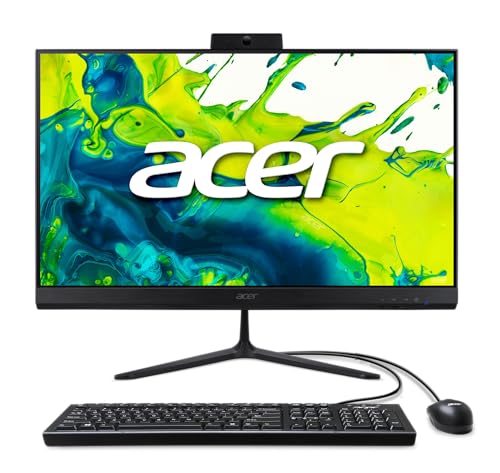
Where to buy
Check the latest price, availability and delivery on Amazon. Orders are placed on Amazon. We may earn a commission from qualifying purchases.
- Best screen, if your desk has the depth: Acer Aspire C27 All-in-One (Ryzen 5 7430U, 27″ 120Hz) — Check on Amazon
- Acer Aspire C24-1700-UA91 (Core i3-1215U, 23.8″) — Check on Amazon
- Lenovo IdeaCentre AIO 3 24 (Ryzen 5 5500U, 16GB) — Check on Amazon
- Lenovo IdeaCentre 24 A100 (Core i3-N305, 16GB) — Check on Amazon
See 2 more Amazon options
- Dell Inspiron 5400 24 Touch All-in-One (Core i5-1135G7) — Check on Amazon
- Acer Aspire C27-962-UA91 (27″, GeForce MX130) — Check on Amazon
Read the full guide ↓
Disclosure: As an Amazon Associate, reviewstook.com earns from qualifying purchases. Links to Amazon on this page are affiliate links; they cost you nothing extra. Listing details such as price and availability change often, so check the current Amazon listing before you buy.
Every all-in-one PC is already a small-space answer — that is the entire idea of the category. The tower that would have sat under the desk is gone. The separate monitor, its power brick and its display cable are gone. The speaker bar, the clip-on webcam and the nest of wires tying them together are gone. What remains is one screen on one stand and a single power cable, and for a shallow desk in a studio apartment, a kitchen counter, a dorm room or a spare-room corner, that subtraction is worth more than any benchmark. So this guide does not ask whether an all-in-one fits a small space. They all do. It asks the narrower, more useful question: once the tower is deleted, what still takes up room, and which of these six machines takes up the least of it while still being a computer worth owning?
What still takes up room turns out to be a short, concrete list. The screen itself: a 27-inch panel is not meaningfully wider on the desk than a 24-inch one, but it asks for more viewing distance, and on a shallow desk that distance comes out of your chair space, not the desktop. The stand: the diagonal printed on the box says nothing about how deep the foot reaches toward you, and stand depth is the number that decides whether your keyboard still fits. The cables: “one cable” is the marketing line, but a wired keyboard and mouse put two more lines across the desk, and the power brick needs a home on the floor or in a tray. And the boxes you might still add: an external drive, a separate webcam, speakers — every one of them a small defeat for the form factor. The picks below are graded on exactly those things, using only the figures the manufacturers and listings actually document. Where a listing does not publish a measurement, this guide says so and sends you to the product-information block of the live listing rather than inventing a number.
One honesty note before the picks, because it frames the whole category: none of these machines is a gaming PC. All six run integrated graphics, except one whose entry-level discrete chip performs at roughly integrated level, and that means esports titles at modest settings, older games and cloud gaming — not modern AAA games. If what your small space actually needs is gaming power in a small footprint, an all-in-one is the wrong tool and the right one is a mini or small-form-factor gaming PC under a separate monitor; this guide routes you to those options below and names the trade in both directions. Buy an all-in-one for the desk it gives you back. Just buy the one whose screen size, stand and cable count match the desk you actually have.
In this guide
Quick Picks
Short on time, or comparing several options at once? Each row below names a buyer type and the product that suits it, with a link to the listing.
| Buyer type | Pick | Why it stands out | Link |
|---|---|---|---|
| Best screen, desk depth permitting | Acer Aspire C27 (Ryzen 5 7430U) | 27″ 120Hz IPS in a slim slab — but it wants real viewing distance, and its keyboard and mouse are wired | Check on Amazon |
| Best true small-desk pick | Acer Aspire C24-1700-UA91 | The same Acer idea at 23.8 inches, with the newest platform in the guide and an NVMe SSD | Check on Amazon |
| Best value when priced right | Lenovo IdeaCentre AIO 3 24 (Ryzen 5 5500U) | 16GB RAM, a 512GB SSD and a built-in DVD drive that deletes one more external box | Check on Amazon |
| Best for light-duty tight desks | Lenovo IdeaCentre 24 A100 (i3-N305) | 16GB RAM in a budget-tier pick, with wireless peripherals in upgraded bundles | Check on Amazon |
| Best for counters and shared spaces | Dell Inspiron 5400 24 Touch | Touchscreen plus a webcam that hides in the body — but read the storage warning | Check on Amazon |
| Biggest screen per dollar | Acer Aspire C27-962-UA91 | 27 inches in a budget-tier pick — check price on Amazon for the most screen in this tier, and the most desk commitment | Check on Amazon |
How These Picks Were Chosen
The starting set is the same six verified listings as our main guide to all-in-ones under $800 — same ASINs — re-graded here through one lens: the small room. The budget was applied as a ceiling, not a target, so every machine below is a real Amazon listing in this budget tier in the United States — check price on Amazon for the current price of each pick. Prices move constantly, because several of these are previous-generation models sold through marketplace sellers, so confirm the live price sits within this budget before you buy. Two picks only make sense at a genuine deal price within this budget, and their reviews say so outright.
The small-space grading itself rests on documented facts, not impressions. Screen size is documented for every pick, and it drives the viewing-distance advice. Stand design, built-in webcams and speakers, bundled peripherals and whether they are wired or wireless are taken from the manufacturer and listing material behind each pick. One pick has a documented weight — Acer publishes roughly 11.45 lb for the Aspire C27 — and where a figure like that exists, we use it. Where it does not, we do not fill the gap: none of the six listings documents a VESA mount pattern or a noise rating in the material we verified, so this guide claims neither for any pick, and the checklist below tells you exactly where on the live listing to find the stand dimensions before you order. Heat and noise are handled the honest way, qualitatively: the low-power N-series chip in the Lenovo A100 runs on a fraction of a normal desktop processor’s power budget, the U-series chips in the other picks are modest laptop-class parts, and no all-in-one in this guide has a tower’s worth of fans to listen to. Beyond that, anyone who quotes you a decibel figure for these machines is making it up.
Two filters from the main guide carry over unchanged. The screen filter: an all-in-one’s display can never be replaced, so nothing below has less than a Full HD IPS-class panel at 23.8 inches or larger. And the storage filter: a mechanical hard drive makes a modern machine feel broken, so the one pick that ships with one is deal-priced and flagged in bold rather than quietly included. Integrated graphics were judged as integrated graphics throughout — nothing here is credited with gaming ability it does not have, and listing marketing that stretches the truth (an “8-core i3” that is really a low-power chip, a “lifetime Office” bundle that is really the free web apps) is translated in the reviews.
The 6 Best All-in-One PCs for Small Spaces Under $800
Acer Aspire C27 All-in-One — Ryzen 5 7430U, 27″ 120Hz (C27-2G)
Who it suits: Small-space buyers whose constraint is clutter rather than depth — a proper desk in a small room, where a 27-inch screen can sit at a comfortable distance and the goal is one elegant slab instead of a workstation’s worth of boxes.
The case for the big Acer in a small room starts with how little of it there is besides screen. The 27-inch Full HD IPS panel fills over 90% of the front face, so what you see from the chair is display, not computer, and Acer’s published weight for the unit is roughly 11.45 lb — light enough that repositioning it, sliding it aside to reclaim the desk, or carrying it to another room is a one-person, one-hand-afterthought rather than a furniture event. The panel also runs at 120Hz, double every other pick here, which buys nothing for gaming on integrated graphics but makes scrolling, window dragging and pointer movement feel smoother all day. Behind the glass, the specification is the strongest in this guide: a Ryzen 5 7430U (six cores, twelve threads), 16GB of DDR4 in standard SO-DIMM slots — socketed memory you can actually change later, a rarity in this category — a 512GB PCIe NVMe SSD, Wi-Fi 6E, Bluetooth 5.3, Windows 11 Home, and a 2MP webcam with a physical privacy shutter, so no camera box ever needs to perch on the bezel.
Now the two space asterisks, and they are the reason this pick is ranked for depth rather than for tightness. A 27-inch screen wants roughly two feet of viewing distance to sit comfortably; on a shallow desk that pushes the screen closer to your eyes than is pleasant, and no stand design fixes geometry. And on Acer’s standard configuration the keyboard and mouse in the box are wired — two cables crossing a desk you bought an all-in-one to keep clear. A wireless set is a cheap fix, but it is a fix you should count before ordering, not discover after. Check price on Amazon for the current listing: when the live price sits within this budget, it is the best specification in this guide wearing the joint-biggest screen. Buy it if your desk is deep enough to give 27 inches its distance; the next pick exists for desks that are not.
- 27-inch Full HD IPS at 120Hz with over 90% screen-to-body — nearly all screen, very little machine.
- Documented weight of roughly 11.45 lb: the easiest big screen here to move, slide or re-angle.
- 16GB DDR4 in SO-DIMM slots, a 512GB NVMe SSD, Wi-Fi 6E and a shuttered built-in webcam.
Honest limitation: Integrated graphics only, and two small-space debits: a 27-inch panel needs real viewing distance, and the bundled keyboard and mouse are wired on the standard configuration.
Choose it if your desk is at least moderately deep and you want the best screen this budget buys in a single slim unit. Skip it if your desk is shallow — the 23.8-inch picks below will sit more comfortably — or if gaming matters, because no all-in-one here is a gaming machine.

Acer Aspire C24-1700-UA91 — Core i3-1215U, 23.8″
Who it suits: The genuinely tight desk — a bedroom desk in a shared apartment, a dorm, a narrow home-office nook — where one person’s office, study and streaming setup has to live in the smallest honest footprint in this guide.
If the C27 above is the small-room pick, this is the small-desk pick, and the difference is the 23.8-inch screen. At that size the panel sits happily at the closer viewing distance a shallow desk imposes, text stays slightly sharper than on a 27-inch Full HD screen, and the whole unit simply asks less of the surface it stands on. Acer wraps it in the same slim design language as its bigger sibling, and the platform behind it is the newest in this guide: Intel’s Core i3-1215U, a six-core chip (two performance cores, four efficiency cores) from a newer generation than the i5s elsewhere here. Do not let the i3 badge undersell it — for documents, browsing, calls and streaming it is quick and responsive, and it is helped by storage done right, a 512GB NVMe SSD, so the machine boots and loads the way a modern computer should. Wi-Fi 6 is built in and Windows 11 Home is installed.
The compromises are about capacity, not space. The 8GB of DDR4 memory is the floor of comfortable in 2026: fine for one disciplined user’s workload, tight if forty tabs, a video call and a photo editor all stay open at once. The Intel UHD integrated graphics are the weakest here — video and casual use, nothing beyond. There is no touchscreen. Pricing needs the usual discipline with this category — check price on Amazon before you buy, because third-party listings can sit right at the ceiling of this budget. If the 27-inch C27 is available within the same budget at the same time and your desk can take it, the bigger machine is more computer for the money. The logic of this pick is purely spatial: when the desk is the constraint, this is the one that respects it, and a live price within this budget is a fair price for that.
- 23.8-inch Full HD IPS — the screen size that suits shallow desks and close viewing distances.
- Newest processor platform in this guide, with a 512GB NVMe SSD and Wi-Fi 6.
- The same slim Acer all-in-one design as the 27-inch pick, in a smaller unit.
Honest limitation: 8GB of RAM and entry-level Intel UHD graphics cap multitasking and rule out anything beyond casual gaming.
Choose it if desk depth is your binding constraint and the workload is one person’s office and media routine. Skip it if you multitask heavily — the 16GB picks will age better — or if your desk can take the 27-inch C27 at a similar price.

Lenovo IdeaCentre AIO 3 24 — Ryzen 5 5500U, 16GB (F0G1008MUS)
Who it suits: Value hunters with a small desk and a household’s worth of discs, photos and mixed work — buyers who will check the seller and the price before clicking, and who notice that a built-in DVD drive is one less box on the desk.
On specification, this Lenovo is the big Acer’s closest rival at the friendlier 23.8-inch size. The Ryzen 5 5500U is a proven six-core, twelve-thread processor that shrugs off office work, schoolwork, streaming and family photo libraries, backed by the configuration budget all-in-ones so often get wrong: a full 16GB of RAM and a 512GB SSD. The small-space headline, though, is the built-in DVD-RW drive. Almost no modern computer includes one, and on a small desk that matters in a way spec sheets never mention: the alternative is an external USB optical drive, which is one more box, one more cable and one more thing competing for the same crowded surface. If your household still reads installation discs, archived family videos or a shelf of media, this machine swallows that job into the unit itself. Windows 11 is installed, and the stand and chassis wear the tidy, fabric-trimmed design Lenovo used across this line — a softer look that sits less like office equipment in a living space.
The catch is the market, not the machine. This is a previous-generation model that now sits largely with third-party sellers, so its current price varies — check price on Amazon and confirm it sits within this budget before you consider it. The rule is therefore absolute: bought within this budget from a seller you trust, this is arguably the best value in this guide; priced above this budget, it is an old machine at a new machine’s price. Verify the seller, the return terms, and that the listing’s configuration really is 16GB and 512GB, because lesser configurations of this family circulate. Bought at the right price, it is the pick for small desks that still have one foot in the disc era.
- A six-core, twelve-thread Ryzen 5 5500U with 16GB of RAM and a 512GB SSD — the specification this category so often gets wrong, gotten right.
- Built-in DVD-RW drive: a whole external peripheral deleted from the desk.
- Strong value in this budget tier when the live price checks out within budget — check price on Amazon.
Honest limitation: Marketplace pricing can push this pick above this budget — it works only when the live price checks out within budget, from a seller you have checked, in the exact 16GB/512GB configuration.
Choose it if you find it within this budget from a reputable seller and want maximum specification for the money at 24 inches. Skip it if the only offers are marketplace listings priced above this budget — at that money the Acers are better buys.
Lenovo IdeaCentre 24 (A100) — Core i3-N305, 16GB
Who it suits: Genuinely light-duty tight spots — a kitchen family PC, a reception or check-in counter, a grandparent’s corner desk — where the workload is web, mail, documents and calls, and where every cable removed from the surface counts.
This listing needs translating before it can be recommended, so here is the translation. The headline says “Intel 8-Core i3-N305,” and the chip does have eight cores — but they are eight small efficiency cores from Intel’s low-power N-series, with a maximum turbo of 3.8GHz and a power budget a fraction of a normal desktop processor’s. For a small space, that low-power design has a genuine virtue that has nothing to do with speed: it is the coolest-running, quietest class of machine in this guide in qualitative terms, happy in a snug corner where a hotter box would stew. For browsing, email, documents, video calls and streaming it feels perfectly fine. For anything sustained or heavy, it is the slowest processor here, and no headline core count changes that. Around the chip, the configuration is generous: 16GB of DDR4 RAM, a 512GB PCIe NVMe SSD, a 23.8-inch Full HD IPS display, Wi-Fi 6, Bluetooth 5.2 and Windows 11 — and, in the upgraded bundles this listing is sold in, a wireless keyboard and mouse, which delete the last two cables from the desk entirely. Configured this way it sits at the budget end of this guide in A100 form — check price on Amazon for the current listing.
Two cautions travel with it. The listing is reseller-configured — marketplace sellers take Lenovo’s A100 and fit the memory and storage themselves — so the seller, the exact bundle contents and who honors the warranty vary between offers; buy from a seller with strong feedback and read what is actually in the box, including whether the peripherals in a given bundle are the wireless ones. And the “Lifetime Office 365 for Web” in the title is the free browser version of the Office apps, available to anyone with a Microsoft account — worth nothing extra in your valuation. With eyes open, the value is real: the cheapest route in this guide to a tidy, quiet 24-inch desk machine with 16GB of RAM and an SSD. Just do not ask it to grow into a busy household’s main computer; its ceiling is fixed, and it is low.
- 16GB RAM and a 512GB NVMe SSD at a budget-tier price in this guide, in upgraded form — check price on Amazon.
- Wireless keyboard and mouse in upgraded bundles — the cleanest cable story here.
- Low-power N-series chip: the coolest-running class of pick for snug, always-on corners.
Honest limitation: The i3-N305 stays a low-power chip however the “8-core” headline dresses it up — the slowest processor in this guide — and because sellers configure this listing themselves, bundle contents and warranty terms change from offer to offer; the “Office 365 for Web” bundle is the free web version.
Choose it if the workload is honestly light and you want 16GB of RAM and a cable-free desk at a budget-tier price. Skip it if a busy household will lean on it as its main computer — the Ryzen picks carry far more headroom.
Dell Inspiron 5400 24 Touch All-in-One — Core i5-1135G7
Who it suits: Shared and standing spaces — a kitchen counter, a family nook, a small business counter — where a touchscreen earns its keep and the keyboard spends half its life pushed aside, provided it is bought at its deal price with its one serious flaw understood.
The Dell’s small-space argument is about how a shared machine gets used. It is the only touchscreen in this guide: a 23.8-inch Full HD panel you can tap, swipe and pinch, which on a counter or in a family nook means half the interactions never need the keyboard at all — recipes, photos, music, a child’s homework page — and the keyboard can live pushed back or even in a drawer between sessions. Its webcam makes the same point in miniature: it pops up from inside the body when you press it and hides completely when you do not, so there is no camera box perched on the bezel and no privacy worry in a bedroom or living space. The Core i5-1135G7 with Iris Xe graphics is a capable, honest processor for office work, schoolwork and media — Iris Xe is among the stronger integrated graphics of its generation — and Dell’s service network is a real consideration in a category full of marketplace listings; this is model i5400-5876SLV-PUS with Windows 11 Home installed.
Now the flaw, in the open because it decides the purchase: this configuration’s 512GB of storage is a mechanical hard drive, not an SSD. In 2026 that is close to disqualifying at full price — Windows boots slowly, applications open reluctantly and updates take an age — and the 8GB of RAM is merely adequate. So the Dell is strictly a deal purchase — check price on Amazon and buy it only when the live price sits well within this budget. At a genuine deal price it becomes interesting — the touch panel and hideaway camera are genuinely well suited to shared tight spaces, and a confident owner can treat the drive as the known, fixable weakness it is. Priced at or above this budget, though, you are paying flagship money for a spinning disk with a pretty screen attached, and the correct response is to walk away. Judge it by the live price in front of you, not by any earlier price.
- The only touchscreen in this guide — made for counters and shared family spots.
- Pop-up webcam that physically disappears into the body when not in use.
- A deal-only pick in this budget tier — check price on Amazon and buy the deal, never a price at or above this budget.
Honest limitation: Storage is a 512GB mechanical hard drive rather than an SSD — by far the slowest storage in this guide — and memory is 8GB where the better picks carry 16GB.
Choose it if you want touch for a counter or shared nook and find it at a genuine deal price within this budget. Skip it if it is priced near or above the top of this budget, or if slow boot and load times will annoy you daily — they will be this machine’s personality.

Acer Aspire C27-962-UA91 — 27″, Core i5-1035G1, GeForce MX130
Who it suits: Buyers with a small room but a proper desk — the space is tight, the desk is not — who want the largest screen for the least money and understand they are buying a previous-generation machine at a clearance-style price.
This pick exists for one reason: a 27-inch all-in-one from a real brand at a budget-tier price — check price on Amazon for the current listing. For a small room with a real desk, that buys the large-format comfort the 24-inch picks cannot — split-screen documents, spreadsheets and streamed video with room to breathe — driven by a Core i5-1035G1, 12GB of DDR4 memory and a 512GB SSD, a combination that remains perfectly serviceable for office and family computing. Its GeForce MX130 is the only discrete GPU in this guide, and this is where expectations need care: it is an entry-level laptop chip of its era, roughly comparable to good integrated graphics rather than a step above them. It runs older and lighter games a little more happily than the integrated picks, and it is not a modern gaming GPU at any settings you would enjoy. Buy it for the panel and its budget-tier positioning; the graphics badge should have nothing to do with the decision.
Everything else about it is 2020, and in a small space the age shows in specific ways. The same 27-inch viewing-distance rule applies as with the newer C27 — a shallow desk will put this panel too close — and the older Wi-Fi 5 standard is the weakest wireless here if your router sits rooms away. It ships with Windows 10 Home: free support for Windows 10 ended in October 2025, but the i5-1035G1 is on Microsoft’s Windows 11 supported-CPU list, so a free upgrade should be available — verify that on the listing and plan to run the upgrade yourself, because a machine left on an unsupported Windows is a security problem, not a bargain. There is no touchscreen. Judged as what it is — the most screen per dollar in this guide, for rooms where the desk can hold 27 inches — it earns its place. Judged as a new machine, it is not one, and its budget-tier positioning is the only reason it is here.
- 27 inches of screen at a budget-tier price — check price on Amazon for more display for the money than anything else in this guide.
- A 512GB SSD and 12GB of RAM keep day-to-day performance respectable.
- The only discrete GPU in the guide (GeForce MX130) — a modest help for older, lighter games, and labeled as such.
Honest limitation: Everything underneath the screen dates from 2020: an older processor, Wi-Fi 5, no touch, and Windows 10 Home — budget for the free Windows 11 upgrade (the chip is on Microsoft’s supported list) instead of running an unsupported OS.
Choose it if your desk can give 27 inches its viewing distance and screen size per dollar is the priority. Skip it if your desk is shallow — the 23.8-inch picks exist precisely for you — or if you want the newest platform and longest support runway.

Comparison Table
| Pick | Display | Processor | RAM / Storage | Graphics | Price | Link |
|---|---|---|---|---|---|---|
| Acer Aspire C27 (Ryzen 5 7430U) | 27″ FHD IPS, 120Hz | Ryzen 5 7430U (6C/12T) | 16GB / 512GB NVMe SSD | Integrated Radeon | Check price on Amazon | Check on Amazon |
| Acer Aspire C24-1700-UA91 | 23.8″ FHD IPS | Core i3-1215U (6C/8T) | 8GB / 512GB NVMe SSD | Intel UHD | Check price on Amazon | Check on Amazon |
| Lenovo IdeaCentre AIO 3 24 | 23.8″ FHD | Ryzen 5 5500U (6C/12T) | 16GB / 512GB SSD | Integrated Radeon | Check price on Amazon | Check on Amazon |
| Lenovo IdeaCentre 24 (A100) | 23.8″ FHD IPS | Core i3-N305 (8C/8T, low-power) | 16GB / 512GB NVMe SSD | Intel UHD | Check price on Amazon | Check on Amazon |
| Dell Inspiron 5400 24 Touch | 23.8″ FHD touchscreen | Core i5-1135G7 (4C/8T) | 8GB / 512GB hard drive | Intel Iris Xe | Check price on Amazon | Check on Amazon |
| Acer Aspire C27-962-UA91 | 27″ FHD | Core i5-1035G1 (4C/8T) | 12GB / 512GB SSD | GeForce MX130 | Check price on Amazon | Check on Amazon |
The Space You Cannot See on the Spec Sheet
The power brick. All-in-ones in this class typically run from an external power brick rather than an internal supply, and the brick is the one piece of the “one clean unit” that still needs a home — on the floor, in a cable tray, behind the desk. None of the six listings we verified headlines its brick’s size, so plan generically: leave a brick-sized space in your cable plan and a drop for the cord, and check the live listing’s contents if the exact arrangement matters. A brick planned for is invisible; a brick discovered on delivery day ends up dangling.
The cable count, honestly counted. The all-in-one promise is one power cable, and four of these picks get close to it in practice — but read the bundle, not the slogan. The big Acer’s standard configuration ships wired keyboard and mouse: two more lines across the desk, every day. The Lenovo A100’s upgraded bundles ship wireless peripherals: zero lines, and batteries to think about instead. The Dell’s touchscreen quietly deletes keyboard time altogether in shared use. None of this is in the headline specifications, and all of it is visible on the live listing if you look at what is in the box.
The boxes that are not there. The flip side deserves equal weight. Every pick here folds the webcam and speakers into the unit — the Acer C27’s camera hides behind a shutter, the Dell’s hides inside the body — so the two peripherals that most often colonize a small desk never arrive. The Lenovo AIO 3 goes one further and folds in the DVD drive. When you compare an all-in-one against a mini PC on price, compare the whole desk: the mini PC’s monitor, webcam, speakers and possible optical drive are separate purchases with separate footprints, and on a small desk that difference is the argument.
Heat and noise, in plain terms. No decibel figures are published for these machines in the material we verified, so none are quoted. Qualitatively: the Lenovo A100’s N-series chip runs on a fraction of a normal processor’s power budget and is the natural choice for a snug, always-on corner; the U-series laptop chips in the other five picks are modest parts in large, quiet bodies. What matters practically is placement, not ratings — leave breathing room behind and above the unit rather than sealing it into a closed cabinet or a tight alcove, and a small room will never notice it is there.
How to Choose an All-in-One PC for a Small Space
Measure before you buy — five steps, in order. (1) Measure the desk depth, front edge to wall. This single number chooses your screen size: a shallow desk points to the 23.8-inch picks, which sit comfortably at close range; a deeper desk unlocks the 27-inch picks, which want roughly two feet of viewing distance. (2) Check the stand footprint on the live listing. Screen diagonal is not footprint — the stand’s depth is what competes with your keyboard. The listings’ product-information blocks carry the unit dimensions; none of the six picks’ stand dimensions are stated in this guide because the sources behind it do not publish them, so read them there and tape the rectangle on your desk to see what surface remains. (3) Walk the cable run. One power cable has to travel from the unit to an outlet, and the brick needs its home; then count the peripheral cables your chosen bundle actually ships — wired or wireless is a desk decision, not an accessory detail. (4) Count the boxes you are deleting and the ones you are not. Tower, monitor, speakers, webcam: gone. External drive, printer, a second screen someday: still desk claims, so leave them room in the plan rather than discovering them later. (5) Then order — with the configuration, seller and price checks below done first.
Start with the screen, because it is the one part you will never change. In a tower, a wrong monitor is a mistake you fix next month; in an all-in-one it is permanent, and in a small space it is also the largest single object on the desk. Insist on IPS with Full HD at 23.8 inches or more. At 27 inches Full HD text is slightly softer than at 24 — most people never notice; heavy readers of small text sometimes do. Refresh rate above 60Hz, like the big Acer’s 120Hz panel, is a genuine everyday luxury even outside gaming. Touch is a placement decision as much as a feature: it shines where the machine stands on a counter and the keyboard is a guest, and adds nothing where a mouse lives in your hand all day.
Two requirements admit no compromise: SSD storage, and the most RAM the budget reaches. A mechanical hard drive — one pick here ships with exactly that, deal-priced and flagged — makes even a good processor feel broken, and on a small desk you will feel it at close range every day. Storage should be an SSD at 512GB. For RAM, 16GB is the comfortable figure for Windows 11 and a browser-heavy life; 8GB serves a disciplined single user and tightens within a few years. Socketed memory, like the big Acer’s SO-DIMM slots, keeps a later rescue possible in a category that mostly forbids it.
Read processor names like a skeptic. Generation and class beat the i3/i5/i7 badge and any headline core count. A current i3 (the C24’s 1215U) outruns an i5 from five years ago at everyday work; an “8-core” N-series chip (the A100) is a low-power part for light work, whatever the listing implies; a six-core Ryzen 5 is the sweet spot this budget revolves around. If a listing leads with core counts instead of the exact chip name, it is telling you what the seller thinks of the chip.
Check the unglamorous details before you buy. Confirm the exact configuration in the listing title — marketplace listings in the same model family vary in RAM, storage and operating system. Confirm who the seller is and who honors the warranty, especially on reseller-configured machines like the A100. Note the Wi-Fi standard (Wi-Fi 6 or better is what you want in 2026, and it matters more when the router is not in the room), whether a keyboard and mouse are included and whether they are wired, and whether the machine ships with Windows 10 — if it does, confirm the processor is Windows 11-supported and plan the upgrade for day one.
When an All-in-One Is the Wrong Answer
There is one small-space brief an all-in-one cannot fill: real gaming power in a small footprint. Every pick here is an integrated-graphics machine for everyday work, and no placement advantage changes that. If the tight desk in question belongs to a gamer, the honest route is a compact gaming PC — a mini gaming PC, a small-form-factor build or a compact tower — driving a separate monitor: see Best Mini Gaming PC Under $800, Best Small Form Factor Gaming PC Under $800 and Best Compact Gaming PC Under $800, or the broader Best Mini PC Under $800 guide for the non-gaming version of the same idea. Name the trade in both directions before you choose. The gaming route gives you a discrete graphics card, upgradeable memory and storage, and a monitor that survives the computer — and takes back the desk to do it: two boxes instead of one, a power cable each, a display cable between them, and peripherals on top. The all-in-one gives you the cleanest desk computing sells and caps your graphics at integrated level for the life of the machine. Neither is the wrong answer; buying one while expecting the other is.
Common Mistakes When Buying an All-in-One for a Small Space
- Buying the 27-inch screen for a shallow desk. The panel fits; the viewing distance does not. Measure desk depth first and let it choose the size — that is what the 23.8-inch picks are for.
- Judging footprint by screen diagonal. The stand’s depth is the footprint that matters, and it is on the live listing’s product-information block, not in the headline. Tape it on the desk before ordering.
- Believing “one cable” without reading the bundle. A wired keyboard and mouse put two cables back on the desk; a wireless bundle or a touchscreen removes them. The box contents are a space specification.
- Forgetting the power brick. It needs a floor spot or a tray and a cable drop. Plan its home in advance or it will dangle behind the desk forever.
- Sealing the unit into a closed cabinet or tight alcove. All-in-ones breathe through their bodies; give the back and top breathing room instead of treating the machine like a picture frame.
- Missing a mechanical hard drive in the specification. It is the easiest way to make a machine in this budget feel like a much cheaper one; one pick here carries that warning in the open for a reason.
- Trusting headline core counts and “lifetime Office” bundles. Eight efficiency cores do not add up to a fast processor, and the bundled “Office 365 for Web” is simply the free browser version.
- A previous-generation pick at a high price is just an old computer; several machines here earn their place only at a genuine deal price within this budget, where a current model would otherwise beat them.
- Ignoring who the seller is. On a reseller-configured listing, the seller decides the configuration, the bundle and the warranty — check all three before paying.
Final Recommendation
- Best screen, desk depth permitting: Acer Aspire C27 (Ryzen 5 7430U).
- Tightest desks, one user: Acer Aspire C24-1700-UA91.
- Value, for buyers who check the seller first: Lenovo IdeaCentre AIO 3 24.
- Light-duty corners and counters: Lenovo IdeaCentre 24 (A100).
- Touch for shared spaces, at the deal price: Dell Inspiron 5400 24 Touch.
- Biggest screen per dollar: Acer Aspire C27-962-UA91.
The small-space version of this purchase really comes down to one measurement. If your desk gives a screen its distance, take the Acer Aspire C27 with the Ryzen 5 7430U: the best panel in the guide at 120Hz, a proper 16GB-and-SSD specification behind it, current wireless, and a documented weight light enough that the machine never becomes furniture. If your desk is shallow — and in the rooms this guide is for, it usually is — take its smaller sibling, the Aspire C24: the same tidy idea at 23.8 inches, on the newest platform here, at a fair price within this budget — check price on Amazon. Between those two Acers sits the Lenovo AIO 3 24, which matches the big Acer’s core specification at 24 inches and deletes an external DVD drive into the bargain, whenever a trustworthy seller prices it inside this budget. The A100 serves light-duty corners quietly and cheaply, the Dell serves counters and shared nooks with touch when its deal price appears, and the older C27-962 is purely screen size per dollar for desks that can hold it. If your budget is smaller, start with Best All In One PC Under $700; if you can stretch, the step up is covered in Best All In One PC Under $1200; first-time buyers should read Best All In One PC For Beginners Under $800, anyone hoping to broadcast from one of these should read Best All In One PC For Streaming Under $800, and anyone still hoping one of these is secretly a gaming machine should read Best All In One PC For 1440p Gaming Under $800 for an honest account of where the ceiling sits. Measure the desk, check the live price and the seller, and then order — in that order.
Frequently Asked Questions
Is an all-in-one really better than a mini PC for a small desk?
On desk footprint and cable count, yes: one unit, one stand, one power cable, webcam and speakers built in. On everything else, the mini PC fights back — it is faster per dollar, its memory and storage upgrade in minutes, and its monitor survives the computer. The all-in-one is the better small-space object; the mini PC is the better small-space computer. Decide which of those two sentences describes your problem, and the choice makes itself.
What screen size suits a shallow desk, 24 or 27 inches?
Desk depth decides. A 23.8-inch screen is comfortable at the close viewing distance a shallow desk imposes, and its text is slightly sharper at Full HD. A 27-inch screen wants roughly two feet of viewing distance; give it less and you will spend years sitting too close to a big, slightly soft picture. Measure from the desk’s front edge to the wall: if the number is small, buy the 24-inch class and do not let a deal on a 27-inch talk you out of the geometry.
How much desk footprint does an all-in-one actually take?
Less than any tower-and-monitor setup, but not zero, and the honest answer is that the footprint is the stand’s, not the screen’s. The sources behind this guide do not publish stand dimensions for these six models, so the number to use is the one in the product-information block of the live Amazon listing for the pick you are buying. Read it there, tape the rectangle on your desk, and confirm the keyboard still has a home before you order.
Can I mount an all-in-one on a wall or a monitor arm?
Only if the specific model supports it — and none of the six listings verified for this guide documents a VESA mount in its material, so do not buy any of them assuming one exists. If wall-mounting is the whole point of your small-space plan, check the live listing and the manufacturer’s specification for the exact model before ordering; if the mount is not stated, treat the answer as no and choose a mini PC plus a mountable monitor instead.
Do all-in-ones really only need one cable?
One power cable reaches the wall; what happens on the desk depends on the bundle. A wired keyboard and mouse — the big Acer’s standard configuration — add two cables across the surface. Wireless peripherals, like the Lenovo A100’s upgraded bundles, add none. The power brick still needs a floor spot or a tray either way. Count the cables in the specific listing you are buying, not in the category’s advertising.
Can an all-in-one under $800 play games?
Light ones, honestly framed. The integrated graphics in these machines handle esports titles at modest settings, older games, indie games and cloud gaming well. Modern AAA games at high settings are beyond all of them — including the one pick with a GeForce MX130, an entry-level chip comparable to integrated graphics. If gaming in a small footprint is the actual goal, a mini or small-form-factor gaming PC under a separate monitor is the right category, and the routing section above points to those guides.
Can you upgrade an all-in-one PC later?
Sometimes, partly — and in a small space the answer matters, because an upgrade is how a tight setup avoids a full replacement. RAM in SO-DIMM slots and M.2 SSDs can be changed on models that use them; the big Acer’s socketed memory is the example in this guide. Many all-in-ones solder their memory or seal the case, and the processor and display can never be upgraded on any of them. Buy the specification you need on day one, and treat any upgrade path as a verified bonus, never a given.


