Where to buy
Check the latest price, availability and delivery on Amazon. Orders are placed on Amazon. We may earn a commission from qualifying purchases.
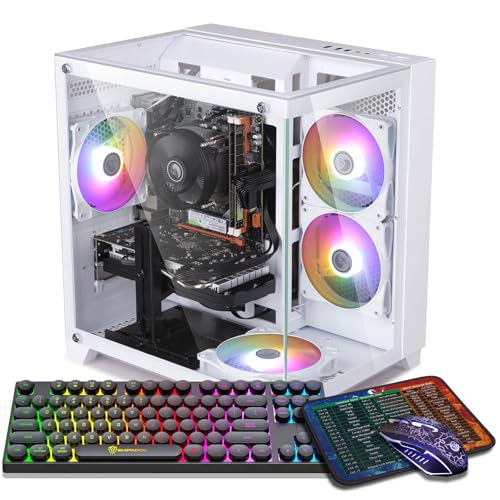
- Best tower if you have the floor space: ZER-LON Gaming PC, Ryzen 5 5500, RTX 4060 8GB — Check on Amazon
- STGAubron Gaming PC, Ryzen 5 5500, RTX 3060 12GB — Check on Amazon
- GMKtec K6 Mini PC, Ryzen 7 7840HS, Radeon 780M — Check on Amazon
- LXZ Gaming PC, Ryzen 5 5500, RTX 3050 8GB, 32GB RAM — Check on Amazon
See 2 more Amazon options
- STGAubron Gaming PC, Ryzen 5 5500, RTX 3050 6GB, White — Check on Amazon
- ZOTAC MEK Gaming PC, Ryzen 5 5500, RTX 3050, 650W Gold PSU — Check on Amazon
Read the full guide ↓
Disclosure: As an Amazon Associate, reviewstook.com earns from qualifying purchases. Links to Amazon on this page are affiliate links; they cost you nothing extra. Listing details such as price and availability change often, so check the current Amazon listing before you buy.
This search holds two honest disappointments, and a useful guide should hand you both immediately. The first: $700 does not buy a PC that renders modern games natively at 4K. A 4K frame holds 8,294,400 pixels — four times a 1080p frame — and native 4K at high settings is work for graphics cards costing close to this whole budget alone. What $700 buys is a strong 1440p or 1080p render upscaled to your 4K screen — most of the experience on a TV across the room. The second disappointment is the one this variant exists for: “small spaces” at $700 is mostly not a product category — it is a placement problem. Five of the six machines below are full-size towers; only one is genuinely small. If your room cannot physically host a tower, no listing wording will fix that, and the section near the end — When a Tower Is the Wrong Answer — routes you to the mini and small-form-factor guides instead. But if your room can host one tower, placed well, the real questions become where it sits, where its heat goes, and how far its fans are from your ears.
Why do towers dominate a small-spaces list at all? Because at $700 the discrete card is what makes a 4K output worth having — DLSS upscaling from a real 1440p-class render is the whole trick — and discrete cards at this budget live in towers. The one exception proves the rule in both directions: the GMKtec K6 mini PC is the only pick that truly disappears into a room, and it pays for disappearing with integrated graphics. Every tower below is therefore graded twice: once on the picture it puts on a 4K screen, and once on its footprint behaviour — form-factor class, cooling layout, the heat its GPU class dumps into a small room, and the placement freedom its wireless allows. One discipline runs through it: where a listing does not publish dimensions, weight or noise figures, this guide prints none. Exactly one set of real measurements appears in these reviews — the mini PC’s — because that is the only set the sources document. For every tower, the live listing’s product-information block is the dimension source.
How Placement Works in a Small Room
A tower in a small room makes three demands, worth separating because different picks fail different ones. The first is floor or desk area with breathing room: a mid-tower’s footprint is roughly a large shoebox stood on end, but the case also needs a hand’s width behind it for exhaust and cable bend, and open space at its intakes — a tower that “fits” with two inches to spare will run hot doing it. The second is heat disposal: every watt drawn becomes heat in the room, a comfort issue in a small closed room, in an order that follows graphics class — the RTX 3060 tower below runs warmest of this set, the RTX 4060 tower is the most efficient discrete pick, the RTX 3050 towers sit below both, and the mini PC heats the room least because it draws the least power. The third is noise at distance. No decibel figures are published for any of these machines, so this guide claims none; what can be said honestly is structural — fan noise falls off fast with distance, so the floor beside a desk is the cheapest noise treatment there is, and a tower a metre or two from your ears is a different acoustic object from the same tower beside your monitor. Small-room buying is mostly the art of spending distance instead of money.
In this guide
Quick Picks
Short on time, or comparing several options at once? Each row below names a room situation and the product that suits it, with a link to the listing.
| Room situation | Pick | Why it stands out | Link |
|---|---|---|---|
| Floor space beside a desk, best picture | ZER-LON Gaming PC, RTX 4060 8GB | Strongest upscaling toolkit here, and the coolest-running discrete tower | Check on Amazon |
| Best-ventilated corner, texture-heavy games | STGAubron Gaming PC, RTX 3060 12GB | 12GB of VRAM for 4K texture pools; the warmest runner, so give it air | Check on Amazon |
| No floor space at all — shelf or TV stand | GMKtec K6 Mini PC, Radeon 780M | Roughly four inches square; the only pick that truly disappears | Check on Amazon |
| Desk corner, heavy multitasking | LXZ Gaming PC, RTX 3050 8GB, 32GB RAM | 32GB of system RAM for game plus stream, browser and chat | Check on Amazon |
| Tightest budget, esports library | STGAubron Gaming PC, RTX 3050 6GB, White | Positioned at the lower end of this budget — the most accessible honest route onto a 4K screen; check price on Amazon | Check on Amazon |
| Small now, GPU upgrade later | ZOTAC MEK Gaming PC, RTX 3050 | 650W 80+ Gold PSU — an upgrade path that stays inside one case | Check on Amazon |
How These Picks Were Chosen
The set is the same six verified machines as this site’s main under-$700 4K guide — the same ASINs and specifications — re-graded through the placement lens. None was added because it photographed small, and none was dropped for being a tower; an honestly placed tower beats a dishonestly marketed “compact” one. The gaming filter ran first: could this machine produce a picture worth putting on a 4K display? That means a modern upscaling path — DLSS on the RTX towers, FSR on the integrated Radeon — because at a 4K output the internal render resolution is the picture. Quality upscaling at 4K renders internally at 2560×1440, Balanced at about 2227×1253 with DLSS (about 2259×1271 with FSR), Performance at 1920×1080 and Ultra Performance at 1280×720; every review states which rung its machine can hold, and none claims native 4K gaming.
The placement filter ran second, and it works only from documented facts: form-factor class; the cooling layout each listing states, including fan counts where published; the wireless standards on board, because WiFi 6 or 6E is placement freedom — a tower that needs no Ethernet run can live where the room wants it; and, for the one machine whose maker publishes them, real dimensions. That machine is the GMKtec K6, at roughly 4 × 4 × 2 inches. For the five towers, the listings publish no consistent set of dimensions, weights or noise ratings, so this guide prints none. Heat is graded qualitatively, by GPU class and power draw — the honest precision the sources support. The checklist below shows how to take a tower’s footprint from the live listing and tape-test it before the box arrives.
Budget discipline is inherited intact. This is a list framed around the under-$700 budget: check the current price on Amazon for every pick before you buy, because listings move in and out of this budget, and the 4060 and 3060 towers in particular often sit above it. Buy a pick only when its current price falls within the under-$700 budget; if it sits above the budget on the day you shop, wait or step up a tier. One platform note carries over: five of the six picks run AMD’s AM4 platform around the Ryzen 5 5500, a capable six-core chip, but a finished socket with no next-generation CPU path short of a new motherboard; the mini PC’s upgrades stop at RAM and storage. We did not use these PCs ourselves; the gradings rest on maker listings and specification pages.
The 6 Best PCs for a 4K Screen in a Small Space Under $700
ZER-LON Gaming PC, Ryzen 5 5500, RTX 4060 8GB, 16GB DDR4, 1TB NVMe SSD
Who it suits: The small-room buyer who has one honest patch of floor beside the desk and wants the best 4K picture this budget produces to come out of it — and who can wait until the current price falls within budget to buy.
On the gaming side this is the strongest machine in the guide, for a reason that is about software as much as silicon. The RTX 4060 is a genuine 1440p-class card, and at a 4K output that is the right starting point: DLSS Quality renders internally at 2560×1440 and reconstructs to 3840×2160 convincingly, Balanced (about 2227×1253 internally) covers heavier titles, and this card alone adds DLSS 3 Frame Generation, smoothing motion when the base rate is playable but modest. Frame generation adds a little latency and wants a decent base rate, but in this scenario — a 1440p render heading for a 4K screen — it earns its place. The ceiling is the 8GB of VRAM: games size texture pools against the 4K output even when the render is lower, and in the most texture-hungry releases you may need to drop textures from ultra to high. That compromise is why the 12GB machine below exists.
The placement case is better than a full tower has any right to be, and it rests on efficiency. The 4060’s generation is the most power-frugal discrete option here for the performance it returns, which makes this the coolest-running tower in the set — the one that warms a small room least, and whose fans have the least work to do. Four RGB fans are fitted, per the listing; the supporting platform is the sensible class standard: Ryzen 5 5500, 16GB of DDR4, a 1TB NVMe SSD and Windows 11 Home in a white tower. Two placement notes follow. Its wireless is WiFi 5 — adequate, but the oldest standard here, so if your router is far from the desk, budget a thought for cable routing. And the case is a standard tower class with no dimensions this guide can verify, so measure from the live listing before ordering. The budget rule is the strictest here: check the current price on Amazon, because this pick often sits above the under-$700 budget. Buy it only when the current price falls within budget — on those terms, or not at all.
- RTX 4060 8GB — the only card here with DLSS 3 Frame Generation on top of DLSS upscaling.
- The most efficient discrete pick: the least heat dumped into a small room per frame delivered.
- Ryzen 5 5500, 16GB DDR4 and a 1TB NVMe SSD under Windows 11 Home — the class-standard supporting cast.
Honest limitation: A full tower with no verified dimensions published here — the footprint must be confirmed from the live listing — and 8GB of VRAM caps texture settings in the heaviest games. Its current price frequently sits above this budget; check the current price on Amazon and treat it as a buy only when it falls within the under-$700 budget.
Choose it if you have a floor spot with real clearance, sit close to a 4K monitor where reconstruction quality matters, and can wait until the price falls within budget. Skip it if the current listing sits above the under-$700 budget, your only space is inside closed furniture, or texture-heavy games at maximum settings are the whole point — read the next review instead.

STGAubron Gaming PC, Ryzen 5 5500, RTX 3060 12GB, 16GB DDR4, 1TB SSD
Who it suits: The player of texture-heavy games — open worlds, big RPGs, modded titles — whose small room happens to have one well-ventilated corner, and who would rather flex render resolution than texture quality.
The gaming argument for this machine is a single number: 12GB. Every other discrete card here carries 8GB of VRAM or less, and at a 4K output that difference becomes the experience, because texture pools are sized against the output resolution. The classic symptom of running short is not a low frame rate — it is stutter, pop-in, and textures that arrive late or never resolve. The RTX 3060 12GB holds high textures in games where the 4060 above has to concede them, and in a still scene, high textures at a reconstructed 4K are most of what “looking 4K” actually means. The trade is generational: raw rendering a step behind the 4060, DLSS without Frame Generation, and ray tracing best treated as a garnish. The realistic recipe is DLSS Quality or Balanced from a 1440p-class internal render at medium-to-high settings with rasterized lighting — in most recent games, excellent on a 4K screen and smooth.
Placement is where this pick asks the most of your room, so plainly: The 3060’s generation draws more power for less work than the 4060, which makes this the warmest-running tower in the set: give it the best-ventilated corner you have, keep its exhaust path genuinely open, and do not shut it in furniture. Four RGB fans move its air. In exchange, its connectivity is the most placement-friendly of the towers — WiFi 6 and Bluetooth 5.2 mean no Ethernet run dictates the layout — and the box is complete in a way that matters where storage is scarce: an RGB keyboard and mouse are included, and the listing data states a one-year warranty. The platform is the class standard — Ryzen 5 5500, 16GB of DDR4, a full 1TB SSD — in a standard tower. On price, check the current price on Amazon: this pick belongs near the top of the under-$700 budget when it qualifies, and it often sits above that budget. When the current price falls within the under-$700 budget, with air around it, it is the texture buyer’s machine. Above the budget, or sealed in a cabinet, it is neither.
- 12GB of VRAM — half again the buffer of every other discrete pick, sized for 4K texture pools.
- DLSS upscaling fed by a true 1440p-class render.
- WiFi 6 and Bluetooth 5.2 for placement freedom; keyboard and mouse included in the box.
Honest limitation: The warmest-running tower here, so it needs the room’s best airflow rather than its leftover corner. No Frame Generation, weaker ray tracing than the 4060, and it only makes sense when its current price sits within the under-$700 budget — check price on Amazon.
Choose it if your library is open worlds and RPGs, you sit close enough to see texture detail, and your room offers one genuinely ventilated spot. Skip it if the only available home is enclosed furniture, you play competitive games where frames beat textures, or the current price is sitting above this budget.

GMKtec K6 Mini PC, Ryzen 7 7840HS, Radeon 780M, 32GB DDR5, 1TB SSD
Who it suits: The buyer with no floor to give — a shelf, a TV stand, a monitor’s shadow — who wants one tiny, quiet box for the desktop, streaming apps and upscaled gaming on a 4K TV.
Start with the only verified measurements in this guide: the K6’s listing puts the box at roughly 4 × 4 × 2 inches. That is not a smaller tower; it is a different category of object, one that sits on a media shelf or tucks beside a TV without negotiating for space. If you hope to mount it behind a monitor, confirm the mount on the live listing first — this guide does not claim one. Its space costs are honest in both directions: an external power brick needs hiding, a real if small footprint the internal-PSU towers do not impose; against that, it draws the least power in the set, heats a small room least, and its fan is a near-field sound — nothing across the room, present beside your keyboard.
The computing split must be stated exactly, because this pick is two machines in one box. As a display machine it is flawless for the keyword: the Radeon 780M drives a native 3840×2160 desktop, video and interface without effort, over HDMI, DisplayPort or USB-C, with triple-display support in the listing. As a gaming machine, honesty sets the terms: the 780M is the strongest integrated graphics here by a wide margin, and it is roughly a 1080p gaming solution. Esports and older games run at native 1080p with good settings; modern AAA at 1080p low-to-medium; FSR carries the result to the 4K output, with Balanced and Performance — renders around 1080p and below — as the working modes, since FSR Quality’s 1440p internal render is beyond this chip in heavy games. On a TV at couch distance that picture is far better than the specification suggests; on a close monitor it will look soft. As a computer it is arguably the best-specified pick here: an eight-core Ryzen 7 7840HS that outmuscles the towers’ Ryzen 5 5500, 32GB of dual-channel DDR5 — doubly important because the iGPU shares system memory and bandwidth — a 1TB PCIe 4.0 SSD with a second slot, dual 2.5GbE LAN, WiFi 6E, Bluetooth 5.2, USB4 and Windows 11 Pro. It sits comfortably within this budget tier — check the current price on Amazon to confirm the live listing for the exact configuration before ordering. The limits are the form’s nature: no discrete GPU now or ever inside this chassis. What you get is the only pick that disappears — and for the large library of games that are not this year’s heaviest releases, a genuinely enjoyable 4K TV picture with the least fuss here.
- Roughly 4 × 4 × 2 inches — the only verified footprint here, and the only true small-space pick.
- Radeon 780M: native 4K desktop and video, FSR-upscaled gaming from a 1080p-class render.
- The strongest processor and memory pairing here: eight 7840HS cores, 32GB of dual-channel DDR5, 1TB PCIe 4.0 SSD.
Honest limitation: Games render at 1080p or below and upscale — modern AAA at a close monitor will look soft — and there is no GPU upgrade path inside the box. An external power brick needs a home, too.
Choose it if the screen is a TV, the seat is a couch, floor space is genuinely zero, and your library leans esports, indies, older AAA and emulation-friendly titles. Skip it if you want high-settings modern games or sit close to a 4K monitor — the discrete towers above are the honest tools for that.

LXZ Gaming PC, Ryzen 5 5500, RTX 3050 8GB, 32GB DDR4, 1TB NVMe SSD, White
Who it suits: The multitasker in a desk-corner room — game on the 4K screen, browser, chat and a stream running alongside — who keeps hitting the walls of 16GB machines and wants memory headroom more than GPU tier.
The gaming terms first: the RTX 3050 is a 1080p-class card. Driving a 4K output with it means the internal render lives at 1080p, DLSS Performance or Balanced does the reconstruction, and modern games sit at low-to-medium settings. Within that envelope this tower is specified more thoughtfully than most of its tier. It carries the 8GB version of the 3050 rather than the cut-down 6GB — at 4K output, the extra buffer is the difference between holding medium textures through an upscaled frame and watching them thrash — and pairs the card with 32GB of DDR4, double every other tower here. That RAM adds no frames to the render, and this review will not claim otherwise. What it removes is the other stutter: the hitch when a game, a browser with twenty tabs, Discord and a recording tool together exceed 16GB and the system starts paging to disk. That smoothness is real, and it is this pick’s identity.
For a small room there is a second, quieter argument: total box count. A multitasking setup usually sprawls — a second machine for the stream, a laptop for chat. A tower with memory headroom consolidates that into one case in one corner: one power cable, one footprint. Provided the corner is real — this is a standard tower class, in white, with no dimensions this guide can verify; measure from the live listing and tape the footprint before ordering. Two cautions come with this listing specifically, both visible in its own listing family. First, pricing in the wider LXZ line varies by configuration, so a lower 6GB/16GB configuration must not be mistaken for this machine — check the current price on Amazon for this exact 32GB configuration, and do not accept the lower configuration in the cart. Second, this listing family’s pages mix variant information, so the cart check applies twice: confirm the style name reads RTX 3050 8GB and 32GB of RAM before you pay. Verified that way, this is the 3050 pick for people whose bottleneck is everything around the game.
- The 3050 in its 8GB form — the safer buffer when the output is 4K.
- 32GB of DDR4 — double the system memory of the other towers; one box replaces a sprawling setup.
- Real DLSS on board, a 1TB NVMe SSD, and a white case.
Honest limitation: The GPU is still a 1080p-class card — the memory smooths the system around the game, not the render inside it — and the listing’s variants must be checked carefully, with the current price checked on Amazon for the exact configuration.
Choose it if your desk time splits between a game and everything running beside it — stream, browser, chat — and you want the 3050 tier without the 6GB compromise. Skip it if the machine will only ever game: pointed at a 3060 or 4060 when one falls within budget, the same budget buys frames instead of headroom.

STGAubron Gaming PC, Ryzen 5 5500, RTX 3050 6GB, 16GB DDR4, 1TB SSD, White
Who it suits: The budget-first buyer in a small room whose 4K screen mostly plays esports, older games and lighter titles — and who would rather stay at the lower end of the budget than buy GPU tier they will never switch on.
This is the entry-level pick of the guide, positioned at the lower end of this budget — check the current price on Amazon. It is the one tower that sits most consistently within the under-$700 budget rather than only visiting it. The machine is complete and modern — Ryzen 5 5500, 16GB of DDR4, a 1TB SSD, WiFi 6, six RGB fans with remote-controlled lighting, and an RGB keyboard and mouse in the box, in white — built around the 6GB RTX 3050. What that card does on a 4K screen can be stated exactly. Its home territory is the games people log the most hours in: competitive and lighter titles render at 1080p, many at high settings, and DLSS or the game’s own scaler presents them at 4K, where at TV distance the result is clean. Older AAA titles at 1080p medium, upscaled, sit comfortably within its reach too. The boundary is modern heavy AAA, and it is hard: 6GB is the tightest VRAM buffer here, texture pressure arrives early at 4K, and the newest releases mean low textures, renders at or below 1080p, and ten honest minutes in the settings menu.
The small-room grading cuts both ways. In its favour: a 3050-class tower is a modest heat source by gaming-PC standards, its WiFi 6 frees it from the router’s corner, the included keyboard and mouse mean no extra boxes to store, and the remote-controlled fan lighting matters more in a bedroom than an office — the glow can be dimmed or switched off without software when the room is also where you sleep. Against it: six fans is the most openings to feed in the set, so it wants honest clearance, and it remains a full-size case — its entry-level positioning does not shrink the box. The buyer whose library is League, Valorant, Fortnite on performance settings, Rocket League, Minecraft, a backlog of pre-2022 AAA and indie games is buying exactly enough computer, in a real upgradeable tower, without stretching this budget. The buyer who wants this year’s flagship releases should step up to the 3060 or the 4060 when one falls within budget instead: the most expensive PC is the one bought twice, and this pick is a bargain only for the library it can actually serve.
- Positioned at the lower end of the budget — check price on Amazon; the tower most consistently within the under-$700 budget.
- Nothing else to buy to start: 1TB SSD, WiFi 6, six fans, and keyboard and mouse in the box.
- A true RTX card, so DLSS does the upscaling — esports and back-catalogue games present cleanly at 4K.
Honest limitation: 6GB of VRAM and a 1080p-class GPU: modern AAA means low textures and sub-1080p internal renders — the tightest ceiling in this guide — in a full-size case that still needs a measured home.
Choose it if most of your hours go to esports and older, lighter games, and the goal is the most accessible honest route onto a 4K screen — check the current price on Amazon. Skip it if launch-day AAA releases are your habit — of all six picks, this is the one that sends you shopping again within a year.

ZOTAC MEK Gaming PC, Ryzen 5 5500, RTX 3050, 16GB DDR4, 500GB NVMe SSD
Who it suits: The buyer in a small room who is thinking one purchase ahead — a sound tower from a known graphics brand today, in the one case here whose power supply lets a much stronger GPU move in later without a rebuild.
ZOTAC is a name this category does not usually offer at this budget: a long-established graphics-card maker selling a complete PC, and the specification shows a builder’s priorities where no-name towers rarely match — the power supply. This MEK carries a 650W 80+ Gold PSU, where rivals routinely ship unnamed units with no stated efficiency rating. At today’s RTX 3050 the difference is invisible. When the upgrade day comes — and a tower feeding a 4K screen will eventually ask for a 1440p-class card — the Gold-rated 650W unit turns it into a simple card swap instead of a GPU-plus-PSU-plus-rewire project. In a small room that doubles: a rebuild sprawls parts and cables across a space with nowhere to put them, while a card swap is an afternoon on one table.
For today, the terms are the 3050 terms stated above, not softened here: a 1080p-class render, DLSS upscaling to the 4K output, low-to-medium settings in modern games — with one figure missing from this review on purpose. ZOTAC’s listing leaves the card’s memory size less prominent than its rivals do, and material for the MEK line points to the 6GB version of the 3050; rather than print an unverified number, this guide leaves it blank — confirm it on the live page before buying, and set expectations for the tighter buffer if that is what you find. The rest of the specification is the leanest here in one respect: storage is 500GB rather than 1TB, against 16GB of DDR4, the Ryzen 5 5500 and WiFi 6E — the joint-fastest wireless in this guide, and a real placement asset, since this tower can live in the room’s best corner rather than the router’s. Five hundred gigabytes fills quickly, so plan for a second drive as part of the setup. The case is a standard tower class with no dimensions verified here; measure from the live listing before ordering. On price, check the current price on Amazon — and the familiar rule applies: when the current price sits within the under-$700 budget, with the VRAM confirmed, it is the upgrade-minded buyer’s pick; above the budget, it is not.
- A named 650W 80+ Gold power supply — headroom none of the other towers document.
- Built by ZOTAC, an established graphics brand, with WiFi 6E for placement freedom.
- Standard tower platform: the most direct, tidiest route from this guide to a future native-4K card.
Honest limitation: The GPU fitted today is the same 1080p-class 3050 class as the lower-tier picks, storage is only 500GB, and the card’s VRAM figure must be confirmed on the live listing.
Choose it if a GPU upgrade is already in your plans and you want the power supply and the brand standing behind it when the day comes. Skip it if the case will never be opened — the STGAubron above matches its gaming today and doubles the storage; check the current price on Amazon for both before deciding.

Comparison Table
| Product | GPU | VRAM | Footprint class | Best use on a 4K screen | Link |
|---|---|---|---|---|---|
| ZER-LON Gaming PC | RTX 4060 | 8GB | Full tower — coolest-running discrete pick | DLSS Quality from 1440p + Frame Generation | Check on Amazon |
| STGAubron Gaming PC (3060) | RTX 3060 | 12GB | Full tower — warmest runner, needs air | High textures, DLSS Quality/Balanced | Check on Amazon |
| GMKtec K6 Mini PC | Radeon 780M (integrated) | Shared DDR5 | Mini PC — about 4 × 4 × 2 in | Native 4K desktop, FSR from 1080p on a TV | Check on Amazon |
| LXZ Gaming PC | RTX 3050 | 8GB | Full tower — one-box multitasking corner | DLSS from 1080p, heavy multitasking (32GB RAM) | Check on Amazon |
| STGAubron Gaming PC (3050) | RTX 3050 | 6GB | Full tower — modest heat, glow you can switch off | Esports and older games, entry-level tier — check price on Amazon | Check on Amazon |
| ZOTAC MEK Gaming PC | RTX 3050 | Confirm on listing | Full tower — upgrade base, 650W Gold PSU | Upgrade base — today’s DLSS from 1080p | Check on Amazon |
Measure Before You Buy: The Five-Step Checklist
Because only one pick in this guide publishes its size, the measuring is yours to do — cheaper with a tape measure than with a returns label. Work through these five steps in order, for the tower you intend to order.
- Step 1 — Measure the spot. Decide the exact home first: the floor patch beside the desk, the desk corner, the shelf. Measure its width, depth and height, and write the numbers down. “Beside the desk somewhere” is not a spot.
- Step 2 — Add clearance. Subtract what the machine needs around it: a hand’s width behind for exhaust and cable bend, open space at the intakes, room above if the case vents from the top. If the spot only works with zero clearance, it does not work.
- Step 3 — Tape the footprint. Open the live Amazon listing for your pick and find its dimensions in the product-information block — the listing, not a roundup, is the source. Mark that footprint with painter’s tape, at real size, and live with it for a day — walk past it, sit at the desk, open the drawers.
- Step 4 — Walk the cable run. From the taped footprint, trace every cable: power to the nearest socket, display to the screen, Ethernet if you plan to wire it. Note crossings of walkways and door swings, and where the mini PC’s power brick would sit. A setup that fits but cannot be cabled without a trip hazard does not fit.
- Step 5 — Then order. If a tower passes all four steps, order with confidence. If it fails any step, the failure is information — the next section is written for exactly that result.
When a Tower Is the Wrong Answer
Some rooms fail the checklist honestly: the only furniture is a closed TV unit, the floor is deep carpet with no hard surface anywhere, or the “room” is a studio corner where a tower’s heat and noise would sit a metre from the bed. For those rooms the correct move is not a worse tower — it is a different form factor, and the GMKtec K6 above is the bridge: if its terms fit your library, it is already in this list. If you need more gaming power in a genuinely small case, start with Best Mini Gaming PC Under $700 for the smallest machines built around real graphics cards, Best Small Form Factor Gaming PC Under $700 for the SFF category proper, and Best Compact Gaming PC Under $700 for towers shrunk rather than rethought. If gaming is honestly secondary and the machine is mostly for desktop, media and light titles, Best Mini PC Under $700 covers the wider mini market. The trade runs both ways: small cases deliver less raw performance for the space they save, run warmer for their size, and limit GPU upgrades to cards that fit. A standard tower in a room that can host it is not a failure of imagination — it is the value option.
How to Choose a PC for a 4K Screen in a Small Space Under $700
- Run the checklist before the shortlist. Form factor first, GPU second: a tower that fails the tape test is no bargain at any specification, and a mini that passes it but cannot run your library is no solution either.
- Know your viewing distance. From a couch, an upscaled image on a 4K TV is effectively beyond reproach; at a desk, a 4K monitor exposes every softness in the reconstruction. Couch buyers can shop all six picks; desk buyers should begin with the two DLSS towers.
- Spend distance before money on noise. No noise ratings are published for these machines, so do not buy one on a decibel promise. Floor placement beside or under the desk — a metre or two of air between the fans and your ears — does more than any case marketing, and it is free.
- Budget the room’s heat, not just the PC’s. In a small closed room the GPU class is a climate decision: the 3060 tower runs warmest here, the 4060 tower is the efficient pick, the 3050 towers are modest, and the mini is in another league. If your room already runs hot, that ordering is a buying argument.
- Let wireless buy placement freedom. WiFi 6 and 6E picks can live in the room’s best corner; the WiFi 5 pick may tether you nearer the router. Where the best corner is scarce, that can decide the layout.
- Check the display connection, not just the panel. For a 4K TV, confirm the PC and the TV’s HDMI port agree on 4K at 60Hz at minimum, and enable the TV’s game mode and enhanced HDMI format — many “my PC looks blurry on my TV” problems are an input setting, not the PC.
- Check the current price before you choose. Listings move in and out of this budget, and the two leading towers in particular often sit above it. Check price on Amazon for each pick, and patience until a pick falls within the under-$700 budget beats chasing any single spec gap in this guide.
Common Buying Mistakes
- Shutting the tower inside a closed cabinet or TV unit. A case exhausting into a sealed box breathes its own hot air, throttles and roars — the most common small-space failure, and entirely self-inflicted. Open back, real vents, or a mini PC instead.
- Sitting the tower directly on carpet. Bottom intakes — the power supply’s especially — suffocate in pile. A board, a stand or hard flooring underneath is airflow, not tidiness.
- Ordering before measuring. The towers’ dimensions live in their listings’ product-information blocks, not in your imagination. Tape the footprint first; a return costs more than a tape measure.
- Reading “4K gaming PC” on a listing as a promise of native 4K rendering. At this price it certifies the output signal only — every machine here can send 4K to a screen; none renders modern games there.
- Condemning upscaling from a paused screenshot. Frozen, a Performance-mode frame is visibly soft; in motion, on a TV, the same mode is what makes the game playable at all.
- Choosing the 6GB card for this year’s big releases just to stay at the lower end of the budget. At a 4K output, memory runs out before raw speed does — and textures are what the screen is showing you.
- Misreading frame generation. It polishes a playable frame rate; it cannot rebuild a 25 fps slideshow, and its latency cost makes it a poor trade in competitive games.
- Leaving the TV’s HDMI port in its standard format, or game mode off, then blaming the PC for blur a menu setting caused.
- Buying a leading tower while its current price sits above this budget. The top two picks often sit above the under-$700 budget — check the current price on Amazon and buy only when it falls within budget, rather than stretching flagship-level spending on budget hardware.
- Trusting the tile you clicked. Variant pages swap RAM, VRAM and storage between near-identical tiles; the style name on the live listing is the contract — read it before paying, twice over on the LXZ family.
Final Recommendation
- Floor space beside the desk, best picture: ZER-LON Gaming PC, RTX 4060 — check price on Amazon and buy only when it sits within the under-$700 budget.
- Texture-heavy games, a ventilated corner: STGAubron Gaming PC, RTX 3060 12GB.
- No floor space at all: GMKtec K6 Mini PC, Radeon 780M.
- One-box multitasking corner: LXZ Gaming PC, RTX 3050 8GB, 32GB RAM.
- Tightest budget, esports library: STGAubron Gaming PC, RTX 3050 6GB.
- A GPU upgrade already planned: ZOTAC MEK Gaming PC.
If the checklist leaves you one honest floor spot, the ZER-LON’s RTX 4060 remains the pick — the best upscaling in the set and the coolest-running tower here — bought only when its current price sits within the under-$700 budget; check the current price on Amazon. If your games are texture-heavy and your room has one ventilated corner, the STGAubron’s 12GB 3060 earns that corner. If the checklist leaves you nothing, believe it: take the GMKtec K6 for a TV-and-couch library, or follow the small-form-factor links above. The LXZ is the consolidator’s pick; the white STGAubron is the esports entry-level pick; the ZOTAC is the stepping stone whose PSU keeps the next upgrade inside the same footprint. Buyers in a tighter version of the same room should also see Best 4K Gaming PC For Small Spaces Under $500, those with more room Best 4K Gaming PC For Small Spaces Under $800, and everyone should compare against the unfiltered field in Best 4K Gaming PC Under $700. Measure the spot, tape the footprint, walk the cables — and check the current price on Amazon before you order.
Frequently Asked Questions
Can a PC under $700 really play games at 4K?
Yes as an output, no as a render. All six picks drive a 4K display and upscale into it, and light or older games genuinely shine that way. Rendering modern games natively at 4K takes a graphics card costing most of this budget alone. What $700 buys is an intelligent upscale from a strong 1440p or 1080p render.
Will a gaming tower overheat a small room?
The room, noticeably; itself, only if you place it badly. Every watt drawn becomes heat in the space, and in a small closed room a long session is a comfort issue — hence this guide’s heat ordering: the 3060 tower warmest, the 4060 tower most efficient, the 3050 towers modest, the mini PC barely measurable. Hardware protects itself by throttling; failures happen when the case cannot breathe — closed cabinets, carpet, zero clearance.
How much clearance does a tower actually need?
As a working rule: a hand’s width behind the case for exhaust and cable bend, open air at the intakes, nothing on a top vent. Exact figures belong to each maker’s manual and each case’s live listing — the checklist here turns both into a tape test.
Is the mini PC powerful enough, or is it a toy?
It is two honest answers in one box. For the desktop, video and interface it displays native 4K perfectly, in roughly four inches square. For games it renders at 1080p or below and upscales with FSR: excellent for esports, indies and older games at couch distance, out of its depth in current AAA at close range. If your seat is a couch and your library is light, it is the appropriate pick — and the only one that asks nothing of your floor.
Can I put the tower on my desk instead of the floor?
You can, and on carpet it may breathe better up there — but you spend the two scarcest things in a small space: desk area, and distance from the fans, whose noise lands at ear level beside a monitor. Floor beside the desk, on a board if the floor is carpeted, is the default here; the desk is the fallback when the floor cannot take it.
Should I buy now or wait?
The two leaders reward patience: both often sit above this budget, so check the current price on Amazon and buy when the listing falls within the under-$700 budget. The K6 and the white STGAubron sit more consistently within this budget and can be bought when the current price confirms it. Whatever you choose, measure first and verify GPU, VRAM, RAM and storage on the live listing before paying.
Can I upgrade one of these later without changing its footprint?
That is precisely the tower advantage: a stronger graphics card moves into the same case, on the same floor patch. The ZOTAC MEK’s 650W 80+ Gold PSU makes it the only pick ready for a serious card without a PSU swap as well. The caveat is AM4 — a future CPU step means a new motherboard and memory too. The mini PC is the exception: upgrades stop at memory and storage, and its graphics are fixed at birth — the trade-off of its size.
- Best 4K Gaming PC For Small Spaces Under $500
- Best 4K Gaming PC For Small Spaces Under $800
- Best Mini Gaming PC Under $700
- Best Small Form Factor Gaming PC Under $700
- Best Compact Gaming PC Under $700
- Best Mini PC Under $700
- Best 4K Gaming PC Under $700
- Best 4K Gaming PC For Beginners Under $700
- Best 4K Gaming PC For Streaming Under $700
- Best Gaming PC Under $700
- Best Budget Gaming PC Under $700


