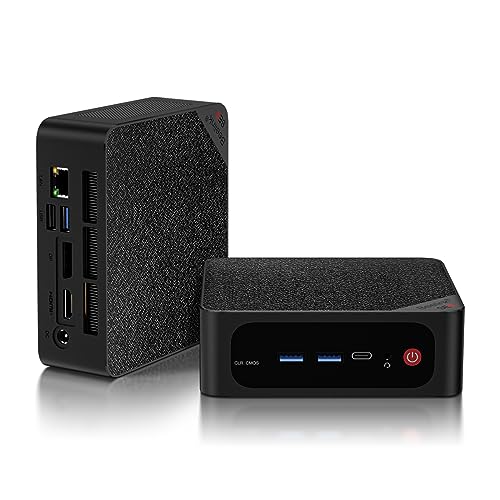
Where to buy
Check the latest price, availability and delivery on Amazon. Orders are placed on Amazon. We may earn a commission from qualifying purchases.
- Best overall workstation for a small space under $500: Beelink SER5 MAX, Ryzen 7 5800H, 32GB RAM, 1TB NVMe — Check on Amazon
- GMKtec NucBox K6, Ryzen 7 7840HS, 32GB DDR5, 1TB PCIe 4.0 SSD — Check on Amazon
- GMKtec M5 Plus, Ryzen 7 5825U, 32GB RAM, 1TB NVMe, Dual 2.5GbE — Check on Amazon
- BOSGAME P4, Ryzen 7 5700U, 32GB RAM, 1TB SSD, Triple 4K — Check on Amazon
See 2 more Amazon options
- KAMRUI E3B, Ryzen 5 7430U, 32GB RAM, 512GB SSD — Check on Amazon
- HP EliteDesk 800 G5 Mini, Core i5-9500T, 16GB RAM, 256GB NVMe (Renewed) — Check on Amazon
Read the full guide ↓
Disclosure: As an Amazon Associate, reviewstook.com earns from qualifying purchases. Links to Amazon on this page are affiliate links; they cost you nothing extra. Listing details such as price and availability change often, so check the current Amazon listing before you buy.
Here is the good news first, because this category does not always have any: at $500, the workstation tier is already small. There is no tower in this guide. Every machine below is a mini PC — a box built to sit behind a monitor, under a shelf or on the corner of a desk that is also doing duty as a dining table — and five of the six carry the specification that makes a machine a workstation in practice: serious cores, 32GB of memory fitted at the factory, fast NVMe storage and three independent monitor outputs. The sixth is a renewed business mini that reaches the same specification with one inexpensive memory upgrade. If your room is small, this is the rare guide where the budget and the floor plan point at the same products.
But small on the listing page is not the same as small in the room, and that gap is what this guide is for. A mini PC still has an installed footprint: the box itself, the air space its fans need on the intake and exhaust sides, the external power brick that has to live somewhere, and the cable drop — in a workstation’s case, up to three monitor cables, a network lead, power and peripherals all leaving one small box in roughly the same direction. It still makes heat, and in a small room the heat has nowhere to go: a hard-working mini under a compile or an export warms the air around your chair, not a whole office. Its noise also carries further in a bedsit or a shared flat than across an office floor. So this guide grades the installation as well as the specification: where each machine can honestly live, which ones can mount out of sight, which ones must never be sealed into furniture, and what to measure before any of them is ordered.
Two honesty lines frame everything below, and neither softens for the small-spaces angle. First: nothing at this price is a certified workstation. No pick has an ISV-certified professional GPU, none is sold with ECC memory, and if an employer or a client contract requires certified hardware, no amount of clever placement fixes that — spend real workstation money. Second: a mini PC must never be installed inside a sealed cabinet, a closed drawer or an unventilated media unit. Every pick here cools itself with room air; trap that air and the machine throttles, the fans run at full speed, and the hardware ages early. The genuinely invisible installation at this budget is the monitor mount, not the cupboard. Below are the quick picks, the footprint maths, a five-step measuring checklist, installation-graded reviews of all six machines, the mistakes, and the questions small-room buyers ask most.
In this guide
Quick Picks
Short on time? Each row below names a small-space situation and the machine that suits it, with a link to the listing.
| Buyer type | Pick | Why it stands out | Link |
|---|---|---|---|
| Best overall for a small space | Beelink SER5 MAX, Ryzen 7 5800H, 32GB/1TB | The complete workstation — cores, socketed memory, spare bay — with a VESA mount in the box for a zero-desk install | Check on Amazon |
| Best performance | GMKtec NucBox K6, Ryzen 7 7840HS, 32GB DDR5/1TB | The fastest chip and graphics here, with a documented Quiet power mode for small-room working, when its price is within budget — check price on Amazon | Check on Amazon |
| Best value and expandability | GMKtec M5 Plus, Ryzen 7 5825U, 32GB/1TB | 32GB and 1TB fitted, dual 2.5GbE for a corner-of-the-room server second career — check price on Amazon | Check on Amazon |
| Best storage per dollar | BOSGAME P4, Ryzen 7 5700U, 32GB/1TB | A terabyte and 32GB fitted, low in this tier — check price on Amazon — the pick that postpones external drives crowding the desk | Check on Amazon |
| Best budget 32GB machine | KAMRUI E3B, Ryzen 5 7430U, 32GB/512GB | Socketed 32GB, two drive slots and a VESA plate in the box, at the lower end of this tier — check price on Amazon | Check on Amazon |
| Best renewed business mini | HP EliteDesk 800 G5 Mini, i5-9500T, 16GB/256GB (Renewed) | Fleet serviceability and three DisplayPorts for multi-monitor desks, positioned well below the new machines in this tier — check price on Amazon | Check on Amazon |
How These Picks Were Chosen
Start with the workstation filters, because a small machine that cannot do the work is just clutter with a power light. Every product below is a real Amazon listing positioned at or regularly within the $500 budget in the United States, complete with Windows installed, and because prices change often, check the current price on Amazon. The GMKtec NucBox K6 is the exception that proves the rule: it qualifies only when its current price on Amazon falls within this budget, since it often sits above it — a condition the guide repeats wherever the pick appears. Three filters sat on top of the budget. The memory filter: 32GB fitted, or a documented socketed path to it, because memory is the resource real workloads exhaust first. The expansion filter: a second drive slot, a spare bay or a memory ceiling of 64GB. The display filter: three independent monitor outputs, verified from the physical port set, because a port that mirrors is not a second desktop. The one 16GB pick below survives because its sockets make the upgrade to 32GB a ten-minute job with inexpensive DDR4.
On top of those, this variant applied the installation filter, and it is stricter than it sounds. A pick had to be a mini — no towers, no small-form-factor desktops pretending — because the reader’s problem is space. Its cooling had to be honest: documented fan behaviour under sustained load is stated in every review, because a machine that is quiet in a reviewer’s studio can be the loudest thing in a one-room flat. Mounting claims were held to documentation: a VESA installation is promised only where the maker’s own material for that exact machine puts a mount in the box, and where the verified sources do not document a mount, the review says so and plans the machine onto a surface instead. Dimensions were held to the same rule — this guide prints no case measurements the base research did not verify, and routes your tape measure through the checklist below, not our guesswork.
We did not use these machines ourselves. We read the maker listings, specification pages and model databases behind the base guide, and compared the things that decide workstation work — core and thread counts, whether memory is socketed or soldered and how far it expands, how many displays the physical ports can drive, what storage is fitted and what can be added — against the things that decide a small-room install: form-factor class, documented mounting, documented noise and power behaviour, and how many cables the full setup sends in one direction. Where a specification matters and the verified sources do not establish it, the review leaves it unclaimed rather than guessing, and tells you how to check before the return window closes.
The Installed Footprint: What a Mini PC Actually Occupies
The product photograph lies by omission. It shows a small box on an empty desk, and the box is genuinely small — every pick here belongs to the mini class, machines designed to mount behind a display or disappear onto a shelf. What the photograph leaves out is everything the box needs around it once it is working. Budget for four things. The box itself, placed so its vents face open air. The air around it: these machines inhale and exhale through their sides and rear, and a mini pushed flush against a wall or a bookend is breathing its own exhaust. The power brick: mini PCs run on external adapters, and the brick is a second object — it needs a home on the desk edge, the floor or a cable tray, with its own air around it, not buried under papers. And the cable drop: a workstation’s rear panel is busy. Three monitor cables, Ethernet where you use it, power in, keyboard, mouse, perhaps an external drive — all of it leaves the back of one small box and needs slack, a route and somewhere to land. Planned, that drop is a tidy bundle down one desk leg; unplanned, it is why the desk still looks crowded after the tower is gone.
Heat is the second half of the footprint, and small rooms feel it honestly. A workstation mini under a compile, an export or a virtual-machine session is a small electric heater with a job: the faster picks below run their processors at documented settings in the 45W to 65W class, and every watt of that leaves the box as warm air into the room. In an office that is nothing. In a bedsit, a box room or a converted cupboard office, an afternoon of heavy work measurably warms the space — which argues for placing the machine where its exhaust is not aimed at you, and against sealing it inside furniture. Noise follows the same logic: three of the six picks carry reviewer-documented fan noise under sustained load, and at a desk two metres from your bed that is a fact of the installation, not a footnote.
Three placements cover nearly every small room, and this guide grades every pick against them. Floor-standing beside the desk is the honest default for a machine without a documented mount: cool air, room to breathe, cables dropping straight down — the machine disappears from the desk surface entirely, which is most of the point. On-desk is the knowing compromise: it costs the surface the box and its air margin occupy, and buys easy access to ports and the power button. The monitor mount is the one genuinely invisible install, available only where a VESA plate is documented in the box — two picks below qualify. What is refused, for all six picks without exception, is inside furniture: a sealed cabinet, a closed drawer, a media unit with the door shut. No pick here can cool itself in trapped air, and no tidy-room argument survives the throttling, the fan noise and the shortened hardware life that follow. If the only spot you have is inside furniture, change the spot, not the machine.
Measure Before You Buy: The Five-Step Checklist
- Measure the spot. Decide where the machine will live — desk corner, shelf, floor beside the desk, or behind the monitor — and measure it with a tape, including the depth behind it. Your machine’s exact dimensions are stated on its live listing; compare them against your measurement there, and remember the box is only the first of the four footprint items: the spot must also fit the air margin and the cable exit.
- Check the ventilation clearance. Stand at the spot and trace where the air goes. The machine needs open room on its vented sides and an exhaust path that does not end at a wall, a curtain or the side of a bookcase. If the spot is inside anything with a door or a lid, stop: that placement is refused for every pick in this guide. A shelf open at the front and back passes; a cabinet does not.
- Give the brick an address. Every mini here runs on an external power adapter. Decide now where it sits — a cable tray under the desk, the floor by the wall socket, the desk’s rear edge — ventilated and not buried under anything. A brick planned for is invisible; a brick unplanned for migrates to the middle of the floor.
- Plan the cable drop. Count what leaves the machine: power, your monitors (workstation buyers should plan for two or three — every pick here drives three), Ethernet if you wire it, keyboard, mouse, any external storage. Route them in your head from the machine’s spot to where each one lands, check the drop has slack rather than tension, and decide where the bundle runs so it is not draped across the room’s walking line or your foot space.
- Then order. Only now — spot measured, air traced, brick addressed, cables routed — place the order, and order the configuration the review names: the SER5 MAX’s 5800H build rather than its same-name soldered sibling, the E3B’s 32GB build rather than its 16GB one, the K6 only when its current price sits within this budget. Installation homework done in this order takes twenty minutes; done after the box arrives, it takes a return label.
The 6 Best Workstation PCs for Small Spaces Under $500
Beelink SER5 MAX, Ryzen 7 5800H, 32GB RAM, 1TB NVMe
Who it suits: Developers, analysts and power users in small rooms who want the complete workstation — compiles, a VM or two, three monitors — installed once, out of sight, with room to grow into 64GB later.
As a workstation this is the most complete machine in the guide, and its specification reads like the tier’s checklist. The Ryzen 7 5800H is an eight-core, sixteen-thread processor; the memory is 32GB of DDR4 in two SO-DIMM slots expandable to 64GB; storage is a 1TB NVMe drive swappable to 2TB, with a 2.5-inch SATA bay for a second drive — bulk storage for datasets, media or backups that keeps external drives off a small desk. HDMI 2.0, DisplayPort 1.4 and USB-C video give it three separate 4K at 60Hz displays, and with Windows 11 Pro, Wi-Fi 6, Bluetooth 5.2 and gigabit Ethernet fitted, the machine compiles across all sixteen threads, gives a guest VM 12GB without starving the host, and keeps a photo or 1080p video workflow on its own disk.
As an installation it earns the top grade on one documented fact: a VESA mount is included, so this is one of two picks that can genuinely vanish — bolted behind the main monitor, taking no desk surface at all, its cable drop falling down the monitor’s own route. The counterweight is cooling. Beelink runs this chip at a 54W setting with dual fans, and reviewers have flagged the noise as audible under sustained load; mounted behind a monitor the fans are not aimed at you, but the mount must leave the box’s vents facing open air behind the display, not pressed into the panel. Two specification notes complete the review: the fitted SSD in documented units is a Crucial P3 Plus, a QLC drive that slows noticeably on very long sustained writes, and Beelink sells a different machine under the same SER5 MAX name built on a Ryzen 7 6800U with soldered memory — the listing linked here is the 5800H/DDR4 configuration, so confirm the processor and the DDR4 slots before you order. Check the current price on Amazon for your configuration — positioned within this tier, it is remarkable value for a workstation that occupies no desk at all.
- An eight-core, sixteen-thread chip and socketed memory that grows to 64GB.
- VESA mount included — the zero-desk-surface installation, documented in the box.
- 1TB NVMe plus an internal 2.5-inch bay keeps external drives off the desk.
- Three separate 4K at 60Hz display outputs, with Windows 11 Pro already installed.
Honest limitation: Dual fans are audible under sustained load at the 54W chip setting, the fitted QLC SSD slows on very long writes, and a same-name soldered variant exists — verify the 5800H configuration at checkout.
Choose it if you want the balanced workstation mounted out of sight behind a monitor. Skip it if your room must stay silent through long renders and compiles, or your work needs a certified professional graphics driver — nothing at this price has one.

GMKtec NucBox K6, Ryzen 7 7840HS, 32GB DDR5, 1TB PCIe 4.0 SSD
Who it suits: Small-room buyers whose work leans on processor and integrated graphics together — heavier compiles, light video editing, data work — and who can time the purchase to this budget.
Nothing else in this guide is faster than the K6. The Ryzen 7 7840HS is a generation ahead of the other AMD chips here — eight cores, sixteen threads — and its Radeon 780M integrated graphics lead this roundup by a wide margin, which is what makes 1080p timeline editing comfortable and 4K proxy work practical without a discrete card. Around it: 32GB of DDR5-5600 in two SO-DIMM slots expandable to 64GB, a 1TB PCIe 4.0 SSD with a second M.2 2280 slot, triple 4K output through HDMI 2.0, DisplayPort 1.4 and USB4, dual 2.5-gigabit Ethernet, Wi-Fi 6E and Windows 11 Pro. For a small room, the dual fast LAN matters beyond speed: this is the pick best suited to a second career as a home-lab node or small file server, and a machine on network duty in a corner never has to come back onto the desk.
Its installation grade is set by two documented behaviours. The maker offers Quiet 45W and Performance 65W power modes, and in a small room that choice is an installation decision: Quiet mode is the sensible default for desk work a few feet from where you sit and sleep, with Performance reserved for the heavy sessions. Reviewers have flagged fan noise under load with no BIOS fan-profile control to tame it, so the mode switch and the placement — on a surface in open air, exhaust not aimed at the chair — are the tools you have; use both. No VESA mount is documented for this machine, so plan it onto a surface: desk corner or floor-standing beside the desk. Then the price, which the guide will not hide: this machine often sits above this budget, so check the current price on Amazon first. It earns its place only when the 32GB/1TB configuration’s current price falls within the $500 budget — and when it does, it is the best workstation under $500, full stop. When its price sits above the budget, it belongs in a higher-tier guide. One verified buyer reported a fitted SSD showing prior power-on hours in its SMART data; treat that as a first-week drive-health check on any pick here.
- The newest processor in the guide and its strongest integrated graphics — the editing pick.
- Documented Quiet 45W mode for small-room working; Performance 65W when the work demands it.
- DDR5 memory to 64GB, PCIe 4.0 storage plus a second M.2 slot, USB4.
- Dual 2.5GbE LAN makes it the best future corner-of-the-room server in the guide.
Honest limitation: It only fits this budget when its current price on Amazon falls within it, its fan is audible under load with no BIOS profile to soften it, and no VESA mount is documented — it lives on a surface.
Choose it if your work mixes CPU and graphics and you can wait until its current price falls within this budget. Skip it if you need the machine this week regardless of where its price is sitting, or a documented monitor mount is the whole point of the purchase.

GMKtec M5 Plus, Ryzen 7 5825U, 32GB RAM, 1TB NVMe, Dual 2.5GbE
Who it suits: Budget-serious builders of small-room workstations — virtual machines, containers, big spreadsheets — who value capacity, expandability and a future server career over raw speed.
If one machine here argues that capacity beats novelty, it is the M5 Plus. Check the current price on Amazon — positioned toward the lower end of this tier, it fits the two specifications that cost the most to retrofit: 32GB of DDR4 across two slots, growing to 64GB, and a 1TB M.2 NVMe drive in a dual-slot layout rated to 4TB in total. The Ryzen 7 5825U is an eight-core, sixteen-thread chip — a generation behind the SER5 MAX’s processor in graphics, with Vega-generation integrated graphics a clear class below the 680M and 780M machines here — but for CPU-bound work, compiling, running two or three virtual machines, crunching a spreadsheet that makes lesser machines beachball, core count and memory are what you feel, and this box has both. Dual 2.5-gigabit Ethernet, triple 4K output over DisplayPort, HDMI and USB-C, Wi-Fi 6E and Windows 11 Pro.
In a small room, frame it as the machine with two addresses. On the desk today it is the workstation: open-air placement on a surface — the verified sources do not document a VESA mount for it, so no behind-monitor promise is made — with its three monitor cables and network lead dropping together behind the desk. Tomorrow, when a faster desktop replaces it, the dual fast LAN ports and the memory ceiling make it the always-on box in the corner: firewall VM, Linux development VM and file duties on a shelf or the floor, out of the room’s living space entirely. What you give up against the SER5 MAX is graphics generation and a measure of single-core pace; what you keep is the entire workstation skeleton at a lower position in this tier. The graphics caveat is real: anyone whose daily work is video timelines or 3D viewports should take the K6 or the SER5 MAX instead, because no memory upgrade fixes an older integrated GPU.
- 32GB socketed to 64GB and 1TB in dual M.2 slots — the expandability pick.
- Two 2.5GbE ports and three 4K outputs — check price on Amazon.
- Eight cores aimed at compiles, VMs and data work — the best specification-per-dollar here.
- A documented second career as an always-on home server keeps it off the desk for good.
Honest limitation: Its Vega-generation integrated graphics are the weakest of the AMD picks here, and no monitor mount is documented — it installs on a surface, in open air.
Choose it if your work is CPU, memory and storage — building, virtualizing, analyzing — on a firm budget. Skip it if graphics do daily work for you, or the installation must hang behind a monitor.

BOSGAME P4, Ryzen 7 5700U, 32GB RAM, 1TB SSD, Triple 4K
Who it suits: Buyers who need the terabyte and the 32GB above all — media libraries, project archives, document-heavy work — with that combination positioned toward the lower end of this tier; check the current price on Amazon.
With the P4, the numbers do the talking: a Ryzen 7 5700U on eight cores and sixteen threads, 32GB of memory and a full 1TB SSD — check the current price on Amazon. No rival in this guide matches that pairing of fitted memory and fitted storage at this position in the tier. For workstation purposes the shape is right: the terabyte holds project files, a photo library and a couple of virtual machine images; the eight cores handle compiles and batch exports; and the port set is a work set — triple 4K at 60Hz across HDMI, DisplayPort and USB-C, dual 2.5-gigabit Ethernet, Wi-Fi 6E and Windows 11 Pro.
For a small room there is a second, quieter argument: fitted storage is desk space. The buyer whose projects live on two external drives and a hub has not saved the footprint this guide is about — they have moved it into a tangle of boxes and cables beside the machine. A terabyte inside the box postpones that day further than any other pick here. The installation is a surface install in open air: the sources we verified do not document a VESA mount for this model, so none is promised. What gives pause here is not anything measured — it is what is not documented. BOSGAME is a smaller brand than Beelink or GMKtec, with thinner documentation and support depth. The verified sources do not establish whether its memory is socketed or soldered, and this guide will not guess: if expandability to 64GB is part of your plan, check the listing’s specification table and the machine itself in the first week, and treat the answer as a condition of keeping it. The same listing family has also carried 5825U variants under near-identical titles, so confirm in the cart that what you are buying is the configuration tied to this listing: the 5700U with 32GB and 1TB. At its position in this tier, the homework is worth doing.
- 32GB and 1TB together, low in this tier — check price on Amazon.
- Fitted capacity keeps external drives and their cables off a small desk longest.
- Eight cores, triple 4K output and dual 2.5GbE — a complete work port set.
- Windows 11 Pro fitted, where rivals at this level ship 16GB machines.
Honest limitation: Smaller-brand support depth, its memory construction is not documented in the sources we verified, and no VESA mount is documented — confirm socketed or soldered before relying on an upgrade path.
Choose it if no pick’s fitted capacity per dollar beats it for your money and you are happy to verify the details when it arrives. Skip it if a guaranteed 64GB upgrade path, a big-brand support channel or a documented monitor mount is part of the requirement.

KAMRUI E3B, Ryzen 5 7430U, 32GB RAM, 512GB SSD
Who it suits: Buyers who want the 32GB workstation specification installed invisibly at a low position among new machines in this tier — students, junior developers, home analysts — and can live with half a terabyte.
The E3B’s bargain is struck in one place only: storage. It carries half the capacity of the machines above in exchange for a position at the lower end of this tier among new 32GB machines in this guide — check the current price on Amazon. Everything structural survives the trade. The memory is a pair of 16GB sticks running dual channel in sockets, with 64GB documented as the ceiling; the two M.2 2280 slots — one NVMe, one SATA-only — make a second drive a genuine upgrade rather than a hope; and the six-core, twelve-thread Ryzen 5 7430U, two cores behind the picks above, remains entirely adequate for development work, office-plus workloads, data analysis and light editing. The display set is a proper triple — HDMI 2.0, DisplayPort 1.4 and USB-C, each at 4K and 60Hz — the listing’s own product information confirms Windows 11 Pro, and a VESA plate is in the box.
That plate is the installation headline: alongside the SER5 MAX, this is one of two picks that can mount behind a monitor and take no desk surface whatsoever, at a low position in this tier. For the smallest desks — the hallway alcove, the bedroom corner, the shared-flat shelf that is also a desk — that combination of the full 32GB skeleton and a documented mount is the E3B’s whole case, and it is a strong one. Judge the rest as the entry point to the tier rather than a rival to its top. Six cores compile more slowly than eight; 512GB fills faster than a terabyte when virtual machines and media accumulate, and the second slot being SATA-only means the expansion drive will be slower than the primary — though an internal second drive is still footprint-free, which an external one is not. Reviewers have noted the fan becomes audible under sustained heavy load, the common tax of small, inexpensive cooling; mounted behind a display it is working behind a barrier, but a light sleeper’s studio flat should schedule heavy jobs accordingly. One configuration warning matters: the 16GB sibling of this machine is a separate listing, so confirm the 32GB build in the cart before you pay.
- 32GB in sockets with a documented 64GB ceiling — check price on Amazon.
- VESA plate in the box — a documented zero-desk install, low among new machines in this tier.
- A pair of M.2 slots and three genuine 4K outputs — expansion and displays both real.
- Windows 11 Pro, confirmed in the listing’s own product information.
Honest limitation: Six cores rather than eight, 512GB of storage, a second drive slot that is SATA-only, and a fan that is audible under sustained load.
Choose it if the budget is hard, the room is small and the 32GB specification is the point. Skip it if your storage will pass a terabyte within the first year — the BOSGAME above sits in a similar position in the tier with the space already fitted.
HP EliteDesk 800 G5 Mini, Core i5-9500T, 16GB RAM, 256GB NVMe (Renewed)
Who it suits: Practical buyers furnishing a small working desk cheaply — and anyone who values corporate serviceability, spare parts and three DisplayPorts over newness.
Workstation buyers have played the renewed game for decades: let a business pay full price, then buy the machine when the business is finished with it. The EliteDesk 800 G5 Mini is precisely the fleet desktop companies once deployed by the thousand, and what it offers is what fleets offer — serviceability, documentation and ports. Its Core i5-9500T is a six-core chip on Microsoft’s Windows 11 supported list, which is the dividing line between a renewed bargain and a renewed dead end. The fitted 16GB of DDR4 sits in sockets, so reaching the 32GB this guide treats as standard costs one inexpensive upgrade, not a new machine. Six USB-A ports and a USB-C cover peripherals, and three DisplayPort outputs — two 1.2 and one 1.4 — form the most business-like monitor arrangement in this guide. Its position in the tier argues the rest: as a renewed machine it sits well below the new picks — check the price on Amazon. At that position, this machine plus a memory stick is a 32GB, three-monitor workstation for a fraction of a new-machine budget.
Its installation grade needs one honest point first: the sources we verified for this listing do not document a VESA mount in the box, so this guide promises no behind-monitor install for it — plan it onto a surface — desk or floor beside it — in open air like every other pick. Then the renewed rules, which this pick carries in full. The internal configuration varies between units from refurbishers — analyses of this model note some units arriving with the advertised Wi-Fi missing or provided by a USB adaptor, and this listing’s own material is inconsistent about its Windows edition, the title saying Windows 11 Pro where a features block says Windows 10 Professional. Malware detections on pre-installed images for this model family have also been reported by review outlets, so the professional routine applies: wipe whatever arrives and install Windows cleanly from Microsoft’s own media before real work touches the machine. Cover is Amazon Renewed’s program floor — a 90-day guarantee, not an HP warranty — and that difference belongs in any comparison with the new machines above. Bought with eyes open, it is the budget pick with the longest service tail, because fleet hardware carries manuals, parts and documentation that no-name minis never will.
- A six-core CPU on Microsoft’s Windows 11 supported list, and socketed DDR4 for a cheap route to 32GB.
- Three DisplayPort outputs and a full business port set for multi-monitor desks.
- Well below the new machines in this tier — check price on Amazon — the cheapest way into this guide.
- Fleet serviceability — manuals, parts and documentation behind it.
Honest limitation: It ships with 16GB and 256GB, renewed units vary in configuration, no VESA mount is documented in the verified sources, cover is the Renewed program’s 90-day floor rather than a manufacturer warranty, and a clean Windows reinstall is part of the purchase.
Choose it if value and serviceability come first and the renewed routine does not put you off. Skip it if you want a warranty with a manufacturer’s name on it, 32GB fitted on day one without opening the case, or a documented monitor mount.

Comparison Table
| Product | Processor | Memory | Storage | Installation | Link |
|---|---|---|---|---|---|
| Beelink SER5 MAX (5800H) | Ryzen 7 5800H, 8 cores | 32GB DDR4, socketed to 64GB | 1TB NVMe + 2.5-inch bay | VESA mount included — behind the monitor; fans audible under load | Check on Amazon |
| GMKtec NucBox K6 | Ryzen 7 7840HS, 8 cores | 32GB DDR5, socketed to 64GB | 1TB PCIe 4.0 + second M.2 | Surface install; documented Quiet 45W mode for small rooms | Check on Amazon |
| GMKtec M5 Plus | Ryzen 7 5825U, 8 cores | 32GB DDR4, socketed to 64GB | 1TB NVMe, dual slot | Surface install; second career as a corner server | Check on Amazon |
| BOSGAME P4 | Ryzen 7 5700U, 8 cores | 32GB, construction unverified | 1TB SSD | Surface install; fitted storage keeps external drives away | Check on Amazon |
| KAMRUI E3B | Ryzen 5 7430U, 6 cores | 32GB DDR4, socketed to 64GB | 512GB + second M.2 (SATA) | VESA plate in the box — behind the monitor; fan audible under load | Check on Amazon |
| HP EliteDesk 800 G5 Mini (Renewed) | Core i5-9500T, 6 cores | 16GB DDR4, socketed | 256GB NVMe | Surface install; three DisplayPorts for multi-monitor desks | Check on Amazon |
How to Choose a Workstation PC for a Small Space Under $500
- Decide the placement before the product. Behind-monitor, on-desk and floor-standing are three different installations with three different shortlists. Only two picks here document a monitor mount; if invisibility is the requirement, that fact outranks every benchmark in the guide.
- Never plan a sealed install. No mini PC at any price cools itself in trapped air. A cabinet, drawer or closed media unit is not a placement option for any pick here — it is a way to buy throttling, fan noise and a shorter-lived machine. Open shelf, open desk, open floor: those are the options.
- Start with the workload, not the processor. Cores and memory feed compiles, VMs and data work; graphics and storage speed feed video timelines; CAD feeds on single-core pace and, in professional packages, on certified drivers this tier does not have. Identify your heaviest weekly task and buy against it.
- Treat 32GB as the floor, and check how it is fitted. A workstation’s memory sits in two sockets under a 64GB ceiling; 16GB soldered is a wall you will eventually walk into. Current memory pricing has raised the value of capacity fitted at the factory — check the current price of a retail 16GB DDR5 module on Amazon before assuming otherwise — so an empty slot is no longer the bargain it once was.
- Count the cable drop, not just the ports. Every pick here drives three monitors, which is three cables plus power, network and peripherals leaving one small box. Plan the route and the slack in the checklist above; a three-screen desk with an unplanned drop looks more crowded than a one-screen desk with a tower.
- Grade noise where you sleep. Three picks carry documented fan noise under sustained load, and the K6’s documented Quiet mode exists for this. In a studio flat, schedule heavy jobs for waking hours and keep the exhaust path pointed away from the chair and the bed.
- Plan storage in two tiers — inside the box. The fast NVMe carries the system, projects and VM images; bulk and backups belong in the second slot or the 2.5-inch bay. At small-space sizes, internal expansion is not just faster than external drives, it is the difference between a clear desk and a cabled one.
- Check the current price before you commit. Prices on several machines here move widely. Within this budget the K6 is a bargain; above it, the identical box belongs to a different guide. Set your walk-away budget — the $500 ceiling of this guide — before you start shopping.
- For renewed, check the CPU against Microsoft’s Windows 11 list. Roughly, Intel’s 8th generation is the floor, and the EliteDesk’s 9th-generation chip clears it. Listings happily ship Windows 11 on processors Microsoft does not support — it installs, and then the support ends.
- Do the first-week checks. Confirm the configuration matches the listing, read the SSD’s health data, verify every port with your actual monitors, and test the machine in its real spot under a real load — heat and noise are installation facts you can only judge in place. On a renewed machine, reinstall Windows from Microsoft media. Inside the return window all of it costs nothing; outside it, all of it costs.
Common Buying Mistakes
- Sealing the machine into furniture. The invisible install at this budget is the monitor mount on the two picks that document one. A closed cabinet gives you a slower, louder, shorter-lived PC.
- Assuming every mini comes with a VESA mount. Two picks here document one in the box; the other four are surface installs. A mount bought separately for a machine with no documented mounting pattern is a guess, not an accessory.
- Measuring only the box. The installed footprint is box plus air plus brick plus cable drop. Buyers who measure the first and forget the other three end up with a small PC and the same crowded desk.
- Pushing the machine flush against a wall or bookcase. Vents breathe sideways and backwards; a mini inhaling its own exhaust runs hot and loud in exactly the small room that can least absorb either.
- Buying 16GB because the processor looked faster. Workstation workloads run out of memory before they run out of processor; a slower chip holding 32GB beats a faster one swapping to disk.
- Assuming a professional GPU or ECC memory exists at this price. Neither does — no ISV-certified graphics, no error-correcting memory — and where the work requires either, it is the budget that has to change, not the guide.
- Counting mirrored outputs as monitors. A splitter on one port shows the same desktop twice. Count physical video connections before you count screens.
- Paying above this budget for the K6 and calling it a $500 workstation. Above the budget it is a perfectly good higher-tier machine; this guide’s claim stands only when its current price on Amazon falls within the $500 budget.
- Confusing the two SER5 MAX machines. A soldered-memory 6800U build sells under the same name as the socketed 5800H pick — verify the processor and memory type on the listing rather than trusting the badge.
- Skipping the clean reinstall on a renewed machine. Refurbisher images vary, and this model family has drawn malware reports; half an hour with Microsoft’s own installation media is part of the real price.
- Ignoring the desk around the box. No pick here includes a monitor, keyboard or mouse — and in a small room, the monitors you choose and where they stand are most of the installation.
Final Recommendation
- Most small-space workstation buyers: Beelink SER5 MAX (Ryzen 7 5800H, 32GB/1TB) — the complete workstation with a documented monitor mount.
- Heaviest CPU and graphics work: GMKtec NucBox K6 — when its price is within budget, in its Quiet mode, on an open surface.
- Virtual machines, home lab and firm budgets: GMKtec M5 Plus.
- Maximum fitted storage per dollar: BOSGAME P4.
- Lowest price for an invisible 32GB install: KAMRUI E3B.
- Renewed value with fleet serviceability: HP EliteDesk 800 G5 Mini (Renewed).
Our top two for small rooms are the Beelink SER5 MAX in its 5800H configuration — the most complete balance of cores, socketed memory, storage and displays, and one of only two picks that can mount behind a monitor and take no desk at all — and the KAMRUI E3B, which pairs the same documented-mount trick with the full 32GB skeleton at a low position among new machines in this tier. If performance outranks invisibility, the K6 is the fastest box here provided its price sits within this budget and its Quiet mode matches your room; the M5 Plus and the P4 deliver the 32GB-and-a-terabyte skeleton, positioned in the lower part of this tier, on open surfaces; and the renewed EliteDesk remains the connoisseur’s route — fleet hardware, three DisplayPorts and a memory upgrade away from the full specification. Buyers whose room is not the constraint should also see Best Workstation PC Under $500 for the same tier graded on work alone, first-time buyers have a gentler on-ramp in Best Workstation PC For Beginners Under $500, and those whose small machine doubles as the streaming rig can compare Best Workstation PC For Streaming Under $500. Measure the spot, trace the air, address the brick, plan the drop — then order.
Frequently Asked Questions
Can I put one of these mini PCs inside a cabinet or TV unit?
No — not any of them, and not any mini PC. These machines cool themselves with room air drawn through their vents; seal that air in a cabinet, drawer or closed media unit and the machine throttles under load, its fans run at full speed, and the hardware ages early. If it must be out of sight, the honest route is the monitor mount documented for the SER5 MAX and the E3B, or a floor-standing spot beside the desk — out of the eyeline, but breathing freely.
Which picks can actually mount behind a monitor?
Two, on the documentation we verified: the Beelink SER5 MAX, which includes a VESA mount, and the KAMRUI E3B, which includes a VESA plate. For the other four picks the verified sources do not document a mount, so this guide makes no mounting claim for them — plan them onto a desk, a shelf or the floor in open air, and treat any third-party bracket as an unverified accessory rather than a feature of the machine.
Is a $500 PC really a workstation?
In capability, yes; in certification, no. The cores, memory and storage here will do development, data, editing and light CAD work all day, but no pick carries an ISV-certified professional GPU or ECC memory, and no vendor guarantees a specific professional package on any of them. Where the work is your own, that is usually the right trade. Where a client or employer specifies certified hardware, it is not yours to make.
Can these machines run three monitors?
Yes — three outputs were a condition of inclusion. Every pick’s port set documents three physical video connections (HDMI, DisplayPort and USB-C video in combination), the AMD machines are documented for three 4K displays at 60Hz, and the renewed EliteDesk instead offers three DisplayPort outputs. Plan the cable drop for them: three monitor cables leaving one small box is the main reason the five-step checklist exists. None of them, though, drives three monitors from a single port — splitters mirror rather than extend.
Is the renewed HP a safe buy?
It is a risk, but a managed one. The processor sits on Microsoft’s Windows 11 supported list, the hardware is fleet-grade with documentation and parts behind it, and cover is Amazon Renewed’s 90-day program floor rather than a manufacturer warranty. The routine that makes it safe is set out in the review: verify the configuration on arrival, expect variation between units, and reinstall Windows cleanly from Microsoft media before real work, because refurbisher images for this model family have drawn malware reports.
What should I step up to if $500 is not enough?
The same approach, one tier up: the machines in Best Workstation PC Under $700 and Best Workstation PC Under $800 add newer platforms and stronger graphics, and Best Workstation PC Under $1200 is where discrete graphics start to enter the conversation. Buyers whose space problem is really about the whole desk can also compare Best Mini PC For Small Spaces Under $500, and those at the other end of the budget can see Best Workstation PC Under $400. The honest exception remains certified professional work — for that, the step is a true workstation line, at a true workstation price.


