Where to buy
Check the latest price, availability and delivery on Amazon. Orders are placed on Amazon. We may earn a commission from qualifying purchases.
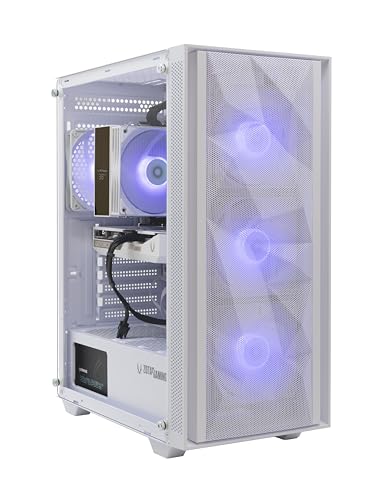
- Best white streaming build overall: ZOTAC MEK Gaming PC, Ryzen 5 9600X, RTX 5060 White Edition, 16GB DDR5, 1TB NVMe — Check on Amazon
- Skytech Archangel, i5-14400F, RTX 4060, 32GB DDR5 RGB, 2TB SSD, White — Check on Amazon
- Thermaltake LCGS Quartz i1460, i5-14400F, RTX 5060, RGB ToughRam, White — Check on Amazon
- Skytech Shiva, Ryzen 5 5600X, RTX 4060 Ti, White In Win 101 Case — Check on Amazon
See 2 more Amazon options
- ZER-LON Gaming PC, Ryzen 5 5500, RTX 4060, White, RGB Fan x4 — Check on Amazon
- STGAubron Gaming PC, Ryzen 5 5500, RTX 3050 6GB, White, RGB Fan x6 — Check on Amazon
Read the full guide ↓
Disclosure: As an Amazon Associate, reviewstook.com earns from qualifying purchases. Links to Amazon on this page are affiliate links; they cost you nothing extra. Listing details such as price and availability change often, so check the current Amazon listing before you buy.
A streaming PC has two jobs that never clock out at the same time. While you play, the machine renders the game; simultaneously, it compresses that gameplay into a video feed and pushes it to your platform, with OBS, a chat window, alerts and usually a local recording all running alongside. This guide is about doing both jobs on one machine that also happens to be white — because for a streamer the PC is not hidden under a desk. It sits in the camera frame for hours at a time, and a white build with lit fans is set design as much as hardware. So the six systems below are graded twice: once as streaming machines, on the encoder hardware that decides whether your broadcast holds together, and once as white builds, on how much of the machine the listing actually documents in white. The two grades are kept separate throughout, because a beautiful case cannot encode a frame and a strong encoder cannot make a black graphics card look white.
The workflow this guide grades against is the standard one-PC setup. On Twitch, a mainstream broadcast runs at roughly 6,000 kbps with constant bitrate (CBR) encoding and a two-second keyframe interval, in H.264. YouTube accepts higher bitrates, ingests 1440p, and carries AV1 live streams where the account and tooling support it — which is where the newer encoder hardware below earns its keep. A 4K live stream remains platform-limited rather than hardware-limited: ingest caps, transcoding queues and viewer bandwidth decide what your audience receives, so no pick here is sold as a 4K streaming machine. What $1,200 in white actually buys is a set of single-encoder systems — every graphics card in this guide carries one NVENC encoder block, not two — split by generation. The RTX 5060 and RTX 4060-family cards encode AV1 in hardware; the RTX 3050 at the bottom of the guide does not, and that single fact shapes its review more than its white fans do.
The honesty note that governs the white half of the grading: a white case proves nothing about the parts inside it. Several listings below carry the clause “GPU brand may vary,” which means the largest, most visible component in the window — the graphics card your camera will show your viewers — can arrive in whatever color the integrator had on the shelf. Every review separates what the listing documents as white from what it leaves undocumented, and grades each system a complete, partial or case-only white build. We also compared the color against equivalent plain systems in this tier: the white premium here runs from effectively zero to modest, and in one pick the premium is not color at all but doubled memory and storage. Below are the quick picks, the encoder map behind the streaming grades, detailed reviews of all six machines, a comparison table, a dedicated OBS section, the rest of the streaming kit in buying order, the mistakes white-PC streamers make, and the questions to settle before ordering.
In this guide
Quick Picks
Short on time, or comparing several options at once? Each row below names a streamer type and the system that suits it, with a link to the listing.
| Streamer type | Pick | Why it stands out | Link |
|---|---|---|---|
| Best white streaming build overall | ZOTAC MEK, Ryzen 5 9600X, RTX 5060 White Edition | Newest-generation NVENC with AV1, and the only graphics card here contracted as a white edition | Check on Amazon |
| Best for recording everything | Skytech Archangel, i5-14400F, RTX 4060 | 32GB of memory and a 2TB SSD for OBS, the game and a record-everything habit, in a white glass showpiece | Check on Amazon |
| Best current-generation value | Thermaltake LCGS Quartz i1460, RTX 5060 | Blackwell NVENC with AV1 and motherboard-synced lighting at the lower end of this tier — check price on Amazon | Check on Amazon |
| Best game performance for the stream | Skytech Shiva, Ryzen 5 5600X, RTX 4060 Ti | The strongest card in the guide feeding the encoder — native 1440p play to broadcast from | Check on Amazon |
| Best budget white streamer | ZER-LON AOV4060, Ryzen 5 5500, RTX 4060 | A full RTX 4060 with AV1 encoding in a white case at the budget end of this tier — check price on Amazon | Check on Amazon |
| Cheapest on-camera presentation | STGAubron White, Ryzen 5 5500, RTX 3050 6GB | Six RGB fans plus RGB keyboard and mouse for the camera frame at the lowest end of this tier — check price on Amazon — but no AV1 | Check on Amazon |
How These Picks Were Chosen
The budget was applied as a ceiling on the whole system: every pick is a real Amazon listing positioned at or regularly within the $1,200 budget in the United States — check the current price on Amazon before you buy, because listings move between sales. Two systems live close to the ceiling; their reviews say so plainly. Anything whose white claim collapsed under inspection — a “white” listing whose own spec block described a black system, or a white edition that turned out to be a different, weaker configuration — was excluded, however good the hardware looked.
We did not use these systems ourselves. We read the maker listings, specification pages and manuals, and recorded two separate layers for every pick. The streaming layer is the graphics card and its encoder generation, the processor, the memory and storage, and the power supply where the maker publishes it. The white layer is the case color and panel construction, whether the graphics card is a named white edition or an unspecified brand, whether the memory and cooler are documented as white or RGB, and how the lighting is controlled. Where a listing is silent on a component’s color, the review says “not documented” rather than guessing from a render — renders are routinely more coordinated than the machine that arrives, and on a streaming PC that gap is broadcast to your audience.
Three filters sat on top of that. The first is the encoder filter: streaming is graded on the encoder hardware the card actually carries, generation by generation, because that — not the case, not the core count — decides whether the broadcast and the game can run at full quality at the same time. The second is the completeness filter for the white grading: a pick earns credit for every major visible component the listing documents in white or RGB, and loses credit for every one it leaves unspecified. The third is the hardware floor: presentation never outranks the streaming hardware, so the weakest card in this guide is an RTX 3050 6GB, included only because it is the cheapest complete white presentation on Amazon, labeled a 1080p machine wherever it appears, and graded down in the streaming half for its missing AV1 encode — a limitation no amount of RGB fans offsets.
The Encoder Map: What Actually Streams in This Guide
Every streaming claim in the reviews below comes from this map, and the map comes only from the silicon these six listings document. NVIDIA’s NVENC is a dedicated encoder block on the graphics card: it compresses your gameplay into the broadcast feed without borrowing the part of the GPU that renders the game or the CPU cores the game is using. Generation matters in two ways — newer NVENC blocks produce a cleaner picture at the same bitrate, and only the newer generations encode AV1, the codec YouTube’s higher-quality live ingest and modern local recording are built around.
Applied to this set, the map is short. The two RTX 5060 systems (the ZOTAC MEK and the Thermaltake Quartz) carry Blackwell-generation NVENC with AV1 encode — the newest encoder hardware in this guide. The three RTX 4060-family systems (the Archangel, the Shiva’s 4060 Ti and the ZER-LON) carry Ada-generation NVENC, also with AV1 encode. The STGAubron’s RTX 3050 is Ampere-generation: its NVENC encodes H.264 and HEVC only, and AV1 encode is denied for it everywhere in this guide, permanently — no driver update adds an encoder block the silicon does not have. Just as important is what no pick has. Every card here carries a single NVENC block, so on all six machines the live stream and a simultaneous local recording share one encoder; the dual-encoder stream-plus-record arrangement belongs to higher card classes that do not appear in white at this budget. And there is no Intel Quick Sync reserve anywhere in the set: the two Intel systems use F-suffix processors (the i5-14400F), which have no integrated graphics and therefore no Quick Sync at all, and the AMD processors in the other four picks document no second encoder this guide will claim. One encoder per machine, honestly labeled — that is the streaming reality of this tier.
What that means in practice: on the five AV1-capable picks, OBS sends H.264 to Twitch at the platform’s ~6,000 kbps while the same block handles a local recording, and sends AV1 to YouTube where your account supports it. On the RTX 3050 pick, the broadcast is H.264 everywhere and the recording is H.264 or HEVC — entirely workable for Twitch, a generation behind for everything else.
The 6 Best White Gaming PCs for Streaming Under $1,200
ZOTAC MEK Gaming PC — Ryzen 5 9600X, GeForce RTX 5060 Twin Edge OC White Edition, 16GB DDR5, 1TB NVMe
Who it suits: Streamers who want the newest encoder hardware in the guide inside the only build whose white graphics card is a contracted part of the product — the machine that looks deliberate on camera because, on paper, it is.
Start with the streaming layer, because it leads the guide. The RTX 5060 carries Blackwell-generation NVENC with AV1 encode, the newest encoder block available in a white system at this budget: OBS sends H.264 to Twitch at the platform bitrate, AV1 to YouTube where your account takes it, and the encode costs the game almost nothing because it runs on dedicated silicon rather than on the rendering pipeline. The Ryzen 5 9600X on the AM5 platform is a strong gaming processor with cores to spare for OBS scenes, browser sources and chat tooling, and the supporting specification is published where it matters — a 650W 80 Plus Gold power supply, Wi-Fi 6E, Bluetooth 5.3 and Windows 11 Home. ZOTAC covers the system for one year and the graphics card for three, serviced through ZOTAC USA.
The white layer is why this pick, and not the cheaper Quartz with the same card, sits at the top. This is the only system in the guide whose graphics card is a named white edition in the listing’s own product information — a ZOTAC GAMING GeForce RTX 5060 Twin Edge OC White Edition with 8GB of GDDR7 — fitted in a white case with a seamless tempered-glass panel, a tower air cooler with a temperature display, 120mm fans and a built-in digital display. For a streamer, that documentation is not pedantry: the card is the largest object your camera shows, and here its color is in writing rather than left to a warehouse lottery. The honest limits are capacity and the edges of the documentation. Sixteen gigabytes of memory is the tier’s floor — workable for a game plus OBS, but the first upgrade a record-and-edit workflow will want — and the listing does not individually document the motherboard color or cable sleeving, so the contracted white is the case and the card, the two largest surfaces in the window. On price, check the current price on Amazon — this build sits near the top of the under-$1,200 tier, and its premium over a plain RTX 5060 system is close to zero, which is exactly when to buy it.
- Blackwell NVENC with AV1 encode — the newest streaming hardware in the guide.
- The graphics card’s white edition status is written into the listing’s own product information (RTX 5060 Twin Edge OC White Edition) — no brand-may-vary gamble.
- Current AM5 platform with a published 650W Gold power supply and Wi-Fi 6E; three-year GPU warranty.
Honest limitation: A single NVENC block, so the stream and a local recording share one encoder; 16GB of memory is the tier’s floor; motherboard color and cable sleeving are not documented.
Choose it if you want the most current streaming hardware and the white build to be real all the way through the glass. Skip it if you record everything and edit on the same machine from day one — the Archangel’s capacity serves that workflow better.

Skytech Archangel — Intel Core i5-14400F, GeForce RTX 4060, 32GB DDR5 RGB, 2TB SSD, White
Who it suits: Streamers whose PC is also the archive — who record every session at high bitrate, keep footage until the edit is done, and want the brightest white showpiece in the tier behind them on camera.
The streaming layer starts with an Ada-generation encoder: the RTX 4060’s NVENC block encodes AV1 as well as H.264, so this machine covers Twitch today and YouTube’s AV1 ingest without a hardware change. Around that encoder, the Archangel is the most generously specified system in the guide, and the specification is aimed squarely at the unglamorous half of streaming: 32GB of DDR5-5600 RGB memory, so the game, OBS with layered scenes, a browser full of dashboards and a chat client stop negotiating for RAM, and a 2TB NVMe SSD, so a record-everything habit holds weeks of footage instead of days. The i5-14400F is an F-suffix processor, which this guide states plainly: it has no integrated graphics and therefore no Quick Sync — the RTX 4060’s NVENC is the only encoder in the machine, with no reserve to fall back on. That is not a practical problem, since NVENC is the encoder you would choose anyway, but it removes a safety net the copy elsewhere in this market sometimes implies. Skytech publishes a 650W Gold power supply, assembles in the USA, and covers the machine with a one-year parts and labor warranty and lifetime free technical support.
The white grading is partial, and the reason is the guide’s recurring one. The documented white layer is generous — a white tempered-glass case with a mesh front on the current edition, four RGB ring fans and RGB memory — but the RTX 4060 itself is covered by Skytech’s “GPU brand may vary” clause, so its maker and color are not contracted. The largest object in your camera frame may arrive black. Streamers who would find that spoiling should buy the ZOTAC above; streamers who light the case brightly and sit the machine at frame’s edge may never care. On price, check the current price on Amazon — this build sits near the top of the tier, and compared with plain RTX 4060 systems in this tier, most of what you pay is the doubled memory and storage rather than the color. Color accounts for very little of the Archangel’s cost — you are paying for capacity, so judge it as a capacity purchase first.
- Ada NVENC with AV1 encode, backed by 32GB of memory and 2TB of storage — the record-everything specification.
- White glass case with four RGB ring fans, RGB memory and a mesh front on the current edition.
- Published 650W Gold power supply; built in the USA, with free technical support for the life of the machine.
Honest limitation: The RTX 4060’s brand — and therefore its color — may vary, so the biggest component in the window is not contracted white; the F-suffix processor means no Quick Sync reserve exists behind the single NVENC block.
Choose it if your workflow records everything and your camera framing forgives a possibly black graphics card. Skip it if the card’s color is the point of the purchase — that guarantee exists only on the ZOTAC.

Thermaltake LCGS Quartz i1460 — Intel Core i5-14400F, GeForce RTX 5060, 16GB RGB ToughRam, 1TB NVMe, White
Who it suits: Streamers who want current-generation encoding for the least money in the guide, with lighting that behaves like one system on camera instead of three remotes’ worth of presets.
The Quartz matches the ZOTAC’s streaming hardware — an RTX 5060 with Blackwell NVENC and AV1 encode, driven by the same i5-14400F — at a lower position in this tier — check the current price on Amazon. The encoder story is identical to the top pick’s, including the F-suffix caveat: no integrated graphics, no Quick Sync, one NVENC block carrying both the broadcast and any local recording. Where the Quartz argues its own case is lighting control. Thermaltake builds the system from its own catalog — white chassis with a 3mm tempered-glass side panel, full-length PSU cover, mesh front, ARGB tower air cooler and RGB ToughRam memory — and the lighting syncs through the motherboard’s software. For a streamer that matters more than it sounds: one ecosystem means the case, cooler and memory hold a single color temperature on camera and stay there, instead of drifting apart across three preset controllers every time something reboots.
Two honest notes carry over from the base research. The platform is DDR4 on an LGA1700 board: serviceable, and the memory is cheaper to expand than DDR5, but a finished generation with no processor upgrade path worth planning around, unlike the AM5 ZOTAC. And the white grading is partial in a specific way — chassis, cooler and memory are documented light-colored or RGB, but the listing material does not name the graphics card’s color, so the card should be assumed standard until the live listing says otherwise. Expansion deserves a check before ordering, too: configuration coverage of this system notes a single populated M.2 slot arrangement, so confirm the live listing’s storage expansion if a second SSD is in your plans — a recording habit makes that question arrive sooner than gamers expect. The published 600W Gold power supply completes a specification whose white tax, against comparable plain 5060 systems, is effectively nothing.
- Blackwell NVENC with AV1 encode at the lower end of this guide’s top class — check price on Amazon.
- White chassis, ARGB tower cooler and RGB ToughRam, all synced through motherboard software — one lighting ecosystem on camera.
- Published 600W Gold power supply, and a full-length shroud hiding the PSU bay for a tidy window.
Honest limitation: The DDR4/LGA1700 platform is a finished generation, the graphics card’s color is not documented, and the F-suffix processor leaves the single NVENC block with no Quick Sync reserve.
Choose it if you want the newest encoder and the tidiest lighting control for the least money here. Skip it if a long upgrade path matters more, or if the card’s color must be contracted — the ZOTAC answers both.

Skytech Shiva — AMD Ryzen 5 5600X, GeForce RTX 4060 Ti, 16GB DDR4, 1TB NVMe, White
Who it suits: Streamers whose channel is the gameplay — who play at 1440p, want the strongest source picture in the guide feeding their encoder, and are happy for that hardware to live in a genuinely white case.
A stream can only look as good as the game render behind it, and the Shiva owns that half of the equation. Its RTX 4060 Ti is the tier’s native-1440p card — the only one here that renders mainstream titles at the full 2560×1440 rather than upscaling toward it — so the picture OBS compresses starts sharper than any other pick’s. The encoder itself is the same Ada-generation NVENC with AV1 encode as the Archangel’s, a single block handling broadcast and recording together; the Ryzen 5 5600X is a capable gaming processor with no integrated graphics, so, as with the F-suffix Intel picks, NVENC is the only encoder in the machine. The presentation is a genuine white build at the case level: the In Win 101, a white mATX mid-tower with tempered glass that has been a small-form showpiece case for years, with three RGB fans and a high-performance ARGB air cooler. The rest of the specification is the previous generation done properly — 16GB of DDR4-3200, a 1TB NVMe SSD, a published 600W Gold power supply, Wi-Fi and Windows 11 Home — assembled in the USA under Skytech’s one-year parts and labor warranty with free technical support.
The trade-offs are platform and paperwork. AM4 and DDR4 are finished: there is no upgrade path here that does not start with a new motherboard and memory, so this machine is bought as a complete object rather than a starting point. The white grading is partial — the case is documented white and the fans are RGB, but Skytech reserves “GPU brand may vary,” so the 4060 Ti’s color is not contracted, and a black card in the white In Win case is a real possibility to accept before ordering. Price is where this pick demands the most attention of the six. Its strongest offers depend on a coupon applied at checkout, so the only figure that matters is the cart total with the coupon clipped — check the current price on Amazon before you pay. With a coupon applied it can be the best graphics-per-dollar white system in the tier; without one it is far less compelling, so only buy when the checkout total keeps it comfortably inside the under-$1,200 budget.
- RTX 4060 Ti 8GB — the only native-1440p card in this guide, feeding an Ada NVENC encoder with AV1.
- White In Win 101 case in tempered glass, three RGB fans and a high-performance ARGB air cooler.
- A 600W Gold power supply with its wattage published; assembled in the USA.
Honest limitation: AM4 and DDR4 leave no upgrade path worth the name, the card’s color sits outside the contract, and the strongest value only exists while a coupon is live at checkout.
Choose it if the sharpness of the gameplay itself is your channel’s selling point and the platform’s age does not matter because you buy systems whole. Skip it if a future processor upgrade is part of the plan, or if no coupon is available at checkout.

ZER-LON Gaming PC (AOV4060) — AMD Ryzen 5 5500, GeForce RTX 4060, 16GB DDR4, 1TB NVMe, White
Who it suits: Streamers on a real budget who refuse to compromise the encoder — who want a full RTX 4060 with AV1 in a white case at the budget end of this tier, and grade the white honestly as a case-and-fans treatment.
The ZER-LON’s streaming case is stronger than its price suggests. The RTX 4060’s Ada NVENC encodes AV1 alongside H.264, which puts this machine — positioned at the budget end of this tier; check price on Amazon — in the same encoder generation as considerably dearer systems in this guide. Against comparable plain black RTX 4060 systems, including CyberPowerPC systems in this tier, the white premium here is minimal: among the cheapest color upgrades in the guide, and the reason this machine earns its place over prettier systems with weaker encoders. The Ryzen 5 5500 has no integrated graphics, so the NVENC block is, once again, the only encoder in the machine — plan the stream and the recording around sharing it. The supporting specification is complete: 16GB of DDR4, a 1TB NVMe SSD, Wi-Fi 5 and Windows 11 Home, in a white case with four RGB fans.
What the lower price leaves out is paperwork and growth room. The white execution is case-only by this guide’s grading: the case and its four RGB fans are specified, and nothing behind the glass — card color, board, cabling — is documented at all, so expect a standard black interior on camera and be pleasantly surprised if it is otherwise. The platform is AM4 with DDR4, a finished generation, and Wi-Fi 5 is a generation behind the Wi-Fi 6 and 6E fitted to the dearer picks — which matters to a streamer only as a reminder that the broadcast should run on a cable regardless, and this listing documents no wired port speed to plan around, so confirm the Ethernet specification on the live listing before assuming it. The verified listing data never publishes the power supply, so any future GPU upgrade stays speculative until the label on the delivered unit can be read. None of that disqualifies the machine; it is simply the shape of the bargain. It is a white 4060 streaming system at a black-system price, sold by a smaller brand with a thinner paper trail.
- Full RTX 4060 with Ada NVENC and AV1 encode at the budget end of this tier, with a minimal white premium — check price on Amazon.
- A white case carrying four RGB fans, with a 1TB NVMe SSD already fitted.
- 16GB of memory and Windows 11 Home in the box — unbox, sign in, install OBS.
Honest limitation: Case-only white grading — no interior component color is documented — on a finished AM4/DDR4 platform with Wi-Fi 5, an unpublished power supply, and no documented wired-port speed.
Choose it if the budget is real and the encoder matters more than interior coordination. Skip it if the complete-white interior is what you are actually shopping for — scroll back up to the ZOTAC.

STGAubron Gaming PC, White — AMD Ryzen 5 5500, GeForce RTX 3050 6GB, 16GB DDR4, 1TB SSD, RGB Fan x6
Who it suits: Beginning streamers whose first purchase is really the room — the white, lit backdrop the camera sees — whose broadcast is honestly a 1080p Twitch stream of esports and lighter titles, and who understand exactly which generation of encoder they are buying.
As a piece of on-camera furniture, nothing in this guide competes at the money. The white case carries six RGB fans — the most here — and the box includes an RGB keyboard and mouse, so the desk reads as one white-and-lit setup the day it arrives. It is the least expensive way into this guide — check the current price on Amazon. Under it sits a Ryzen 5 5500, 16GB of DDR4, a 1TB SSD, Wi-Fi 6 and Bluetooth 5.0 under Windows 11 Home.
The streaming grading, though, is where this pick pays for its presentation, and this guide will not soften it. The RTX 3050’s NVENC is Ampere-generation: it encodes H.264 and HEVC, and it has no AV1 encode — not disabled, not unlockable, absent from the silicon. For a Twitch broadcast at ~6,000 kbps CBR, H.264 is what the platform takes anyway, and this machine will run that broadcast competently alongside 1080p gaming. What it cannot do is grow into YouTube’s AV1 live ingest or record in AV1, and its H.264 output at a given bitrate is a step softer than the Ada and Blackwell blocks above it in this guide. The 5500 has no integrated graphics, so there is no second encoder of any kind behind it. The white execution is case-and-peripherals — six lit fans and a white shell, with the card and board colors undocumented — the power supply is not published in the verified data for this brand, and the listing family’s own storage descriptions have contradicted themselves in sibling research for this batch, so the delivered configuration deserves a check on arrival against the order. Buy it as the cheapest complete white presentation with a competent Twitch encoder inside, while its current listing keeps it at the bottom of this tier, and it is a fair product. Buy it expecting the other picks’ streaming future and it will disappoint exactly as much as the spec sheet said it would.
- Six RGB fans plus RGB keyboard and mouse included — the fullest white presentation per dollar here, and it shows on camera.
- At the lowest end of this tier, nothing else in the guide comes in anywhere near this cheaply — check price on Amazon.
- Wi-Fi 6 and Bluetooth 5.0 are fitted — one wireless generation up on the ZER-LON above it.
Honest limitation: The Ampere NVENC has no AV1 encode and is the softest encoder in the guide; the card is a 1080p gaming card; interior colors are undocumented and the configuration should be verified on arrival.
Choose it if the white desk presentation is the purchase, your stream is Twitch-first, and your gaming is 1080p esports and back-catalog. Skip it if AV1, YouTube-first streaming or modern AAA titles are in your plans — every system above it in this guide exists for you.

Comparison Table
| Product | Encoder | White grade | Best use | Link |
|---|---|---|---|---|
| ZOTAC MEK, 9600X, RTX 5060 | Blackwell NVENC, AV1 encode | Complete (case + card documented) | Newest encoder in the only fully contracted white build | Check on Amazon |
| Skytech Archangel, 14400F, RTX 4060 | Ada NVENC, AV1 encode | Partial (case, fans, RGB memory) | Recording everything, with 32GB and 2TB capacity | Check on Amazon |
| Thermaltake Quartz i1460, RTX 5060 | Blackwell NVENC, AV1 encode | Partial (case, cooler, RGB memory) | Current-gen encoding with synced lighting, least money | Check on Amazon |
| Skytech Shiva, 5600X, RTX 4060 Ti | Ada NVENC, AV1 encode | Partial (white case, RGB fans) | Sharpest game picture feeding the stream, native 1440p | Check on Amazon |
| ZER-LON AOV4060, RTX 4060 | Ada NVENC, AV1 encode | Case-only | AV1 streaming in white at a black-system price | Check on Amazon |
| STGAubron White, RTX 3050 6GB | Ampere NVENC, no AV1 encode | Case-only (plus lit peripherals) | Cheapest on-camera white presentation, Twitch-first | Check on Amazon |
Streaming With These Machines: The OBS Section
Whichever pick you buy, the OBS configuration follows the same skeleton, because all six machines encode the same way: one NVENC block per system, chosen per pick below. In OBS, set the encoder to NVENC for both the streaming and recording tabs. For Twitch, use rate control CBR at roughly 6,000 kbps with a keyframe interval of two seconds — the shape the platform expects. For YouTube, the five AV1-capable picks can select AV1 where your account and OBS build offer it, at the higher bitrates YouTube accepts, including a 1440p ingest; the STGAubron stays on H.264 or HEVC at every destination, because its silicon offers nothing newer. Set the recording to a much higher bitrate than the stream — the recording is your edit source and your archive — and remember that on every machine in this guide the recording shares the single encoder block with the broadcast, so keep the recording’s resolution at or below the game’s render resolution rather than asking one block for two maximal jobs.
Per pick, the assignment is simple because the map is short. The ZOTAC MEK and the Thermaltake Quartz run the Blackwell encoder: NVENC AV1 for YouTube and recording, NVENC H.264 for Twitch. The Archangel, Shiva and ZER-LON run the Ada encoder with the same split, one generation older and, at Twitch’s bitrate, visually indistinguishable in practice. The STGAubron runs Ampere NVENC H.264 everywhere, with HEVC as its recording option. No pick in this guide uses a CPU encoder as its primary route, and none should: the processors here are busy running the game, and the two Intel systems’ F-suffix chips have no Quick Sync to offer as a backup — if an OBS wizard or a forum post suggests Quick Sync on an Archangel or a Quartz, that option does not exist on their hardware.
When a stream stutters, OBS’s stats window separates the failure into three counters, and each has a different fix. Rendering lag means the GPU is saturated compositing your scene — the game is taking the whole card. Cap the game’s frame rate, trim browser sources and heavy filters, and let the encoder’s dedicated silicon do its work instead of fighting the render queue. Encoding lag means the encoder block itself is overloaded — on these single-block machines the usual cause is a recording set as ambitiously as the stream; lower the recording’s resolution or bitrate first, and check you have not accidentally selected a CPU encoder. Network dropped frames are not the PC’s fault at all: they are your connection dropping the feed, and no setting in this guide fixes them. The fix is a cable. Run Ethernet from the router to the streaming desk — and note, because this guide claims nothing it cannot document, that none of the six base listings documents a wired port speed, so the wired rule here is about using the port at all rather than its rating; confirm the Ethernet specification on the live listing of whichever pick you buy, and treat the Wi-Fi figures these listings advertise (6E on the ZOTAC down to Wi-Fi 5 on the ZER-LON) as a fallback for everything except the broadcast itself.
The Rest of the Kit, in the Order to Buy It
The PC is the largest purchase in a streaming setup, not the only one, and this section deliberately names no prices — peripheral prices move as fast as PC prices do, and an invented figure would be stale before it helped you. Buy in this order, because it is the order your viewers will notice. Microphone first. Audiences forgive a soft picture and abandon bad audio in seconds; a decent microphone positioned close to your mouth will improve your stream more than any upgrade between the picks in this guide. A second monitor second — chat, OBS and alerts need somewhere to live that is not your game screen, and it can be an inexpensive panel, because nothing on it is being rendered or encoded. Lighting third, and here the white build quietly earns its keep: a white case with lit fans gives your camera a bright, even backdrop for free, which is part of why streamers buy these machines at all. A capture card last, and only for a specific job: bringing a console or a second PC into your stream. For a one-PC setup like every configuration in this guide, a capture card captures nothing — the game is already on the machine doing the encoding — so treat any bundle that insists you need one as upselling, and put the money toward the microphone instead.
How to Choose a White Gaming PC for Streaming Under $1,200
- Grade the encoder before the case. The streaming split in this guide is AV1 versus no AV1. Five picks encode AV1 in hardware; the STGAubron’s Ampere encoder never will. Decide whether YouTube AV1 or an AV1 recording workflow is in your future before the white fans make the decision for you.
- Accept the single-encoder reality. Every pick here carries one NVENC block, so the stream and the local recording share it. That is entirely workable — set the recording sensibly — but if your workflow demands two maximal encodes at once, that hardware lives above this budget and outside the white tier entirely.
- Grade the white from the spec block, not the photograph. Complete, partial or case-only: check which of the case, graphics card, memory and cooler the listing documents in white or RGB. On camera, the undocumented parts are the ones your viewers will see.
- Read “GPU brand may vary” as “GPU color unconfirmed.” Model and memory size are what the listing commits to; the card’s finish is left open. Only the ZOTAC’s named white-edition card removes the risk.
- Match capacity to your recording habit. Streaming’s hidden cost is footage. The Archangel’s 32GB and 2TB are the no-discipline specification; the 1TB picks demand a delete-after-edit routine or an archive drive.
- Check for a second encoder that is not there. The Intel picks are F-suffix (no Quick Sync) and the AMD picks document none. Any listing or review implying a backup encoder on these machines is describing hardware you are not buying.
- Wire the broadcast. Run Ethernet to the desk, and confirm the wired specification on the live listing — none of the six base listings documents a port speed, and the Wi-Fi generation varies from Wi-Fi 5 to 6E across the guide.
- Check the current price before you buy. Prices in this tier move between deal events, the Shiva’s best value needs a coupon clipped at checkout, and two picks sit close to the ceiling. Check the current price on Amazon, confirm any coupon is applied in the cart, and only order when the total keeps the system inside your under-$1,200 budget.
Common Buying Mistakes
- Buying the backdrop and forgetting the broadcast. A white PC on camera is set design, but your viewers stay for the stream’s stability and picture — which the encoder, not the case, decides.
- Assuming AV1 comes with the card class. The RTX 3050’s Ampere NVENC has no AV1 encode at all; check the generation, not the series number on the box.
- Believing the render. The photographs present interiors coordinated in white end to end; the configuration that ships is under no obligation to match them, so treat the spec block as the contract and the picture as a suggestion.
- Ignoring “GPU brand may vary” on the one purchase where color is the point — and where the card will be on camera for every stream.
- Planning a stream-plus-record setup as if a second encoder existed. On these single-block machines the two jobs share hardware; an over-ambitious recording setting is the most common cause of encoding lag.
- Streaming over Wi-Fi because the listing advertised a fast wireless generation. Wireless specifications describe the radio, not your upload stability; the cable is the cheapest stream-quality upgrade that exists.
- Counting a coupon price as the price. The Shiva’s strongest offer only exists with a coupon clipped at checkout — the headline is not the number; the cart total is.
- Skipping the delivery-day check. Configurations drift under a single model name as a matter of routine in this market — check the card, the memory and the storage against the listing while a return still costs nothing.
Final Recommendation
- Newest encoder, genuine white build: ZOTAC MEK with the RTX 5060 White Edition.
- Recording everything, on camera: Skytech Archangel.
- Current-generation encoding, least money: Thermaltake LCGS Quartz i1460.
- Sharpest gameplay picture: Skytech Shiva, when its coupon is live.
- AV1 streaming on a budget: ZER-LON AOV4060.
- Cheapest on-camera presentation: STGAubron White, Twitch-first.
Our top two are the ZOTAC MEK, because it pairs the guide’s newest encoder with the only graphics card whose white color is contracted in writing — the two things a streaming white PC is actually bought for — and the Skytech Archangel, because its 32GB of memory and 2TB of storage are the specification a recording workflow eventually demands, wrapped in the brightest documented white presentation here. Between them they cover the honest shapes of this search: streaming done current, and streaming done capacious. If the budget is the immovable object, the ZER-LON keeps the AV1 encoder and drops the interior coordination; if the presentation is the whole point and the stream is Twitch-first, the STGAubron is the cheapest way onto camera — bought with open eyes about its encoder. Streamers working to a tighter ceiling should also see Best White Gaming PC For Streaming Under $800, and those who want the streaming grading without the color constraint can compare Best Streaming PC Under $1200. Whatever you choose, grade the encoder by generation, grade the white from the spec block, wire the desk, and check the current price on Amazon before you order.
Frequently Asked Questions
Can one PC really game and stream at the same time at this budget?
Yes — that is precisely what NVENC exists for. The encoder is a dedicated block on the graphics card, separate from the silicon rendering your game, so the broadcast costs the game very little on any pick in this guide. The discipline is in the settings: CBR at your platform’s bitrate, a two-second keyframe interval, and a local recording sized sensibly, because on these machines the stream and the recording share a single encoder block.
Why does AV1 matter, and which of these PCs have it?
AV1 produces a cleaner picture at a given bitrate and is the codec YouTube’s higher-quality live ingest and modern recording workflows are built around. Five of the six picks encode it in hardware — the two RTX 5060 systems on Blackwell NVENC and the three RTX 4060-family systems on Ada NVENC. The STGAubron’s RTX 3050 is Ampere-generation and has no AV1 encode; that absence is in the silicon and cannot be fixed by software.
Is the RTX 3050 system good enough for Twitch?
For Twitch specifically, largely yes. Twitch’s mainstream broadcast is H.264 at roughly 6,000 kbps, and the 3050’s Ampere NVENC encodes H.264 competently alongside 1080p gaming. What you give up is everything beyond that brief: no AV1 for YouTube, a softer picture at the same bitrate than the newer encoder generations produce, and no second encoder of any kind behind it. It is a Twitch-first machine, and its review grades it as one.
Do any of these PCs have a backup encoder, like Quick Sync?
No, and it is worth knowing before you buy rather than after. The two Intel systems use F-suffix processors — the i5-14400F has no integrated graphics, which means no Quick Sync exists on those machines. The AMD processors in the other four picks document no second encoder this guide will claim. On all six systems, the graphics card’s single NVENC block is the whole encoding story.
Can I stream in 4K with one of these?
The honest answer is that the platforms decide, not the PC. Live 4K is constrained by ingest caps, transcoding and viewer bandwidth long before any encoder in this guide runs out of ability, and none of the six is a native 4K gaming machine in the first place. Buy for 1080p or 1440p play, the best broadcast your platform accepts, and a high-quality local recording — that recording, not a 4K live badge, is what these encoders are for.
What separates a complete white build from a white case with parts in it?
Paperwork, again. A build earns “complete” when its listing names the case, the graphics card and the memory or cooler in white or coordinated RGB. “Partial” means the case and some lit pieces are specified while the graphics card’s finish is left open. “Case-only” means the shell is the entire claim. In this guide only the ZOTAC MEK contracts a white-edition graphics card in its product information; the Skytech systems reserve “GPU brand may vary,” which leaves the largest component in your camera frame uncontracted.
What else do I need to buy besides the PC?
In the order your audience will notice: a microphone first, because viewers abandon bad audio faster than soft video; a second monitor for chat and OBS; lighting, where the white build’s bright backdrop already helps; and a capture card only if you intend to stream a console or a second PC — for a one-PC setup it captures nothing and the money belongs in the microphone.
- Best White Gaming PC Under $800
- Best White Gaming PC Under $1500
- Best White Gaming PC For Beginners Under $1200
- Best White Gaming PC For Streaming Under $1500
- Best White Gaming PC For Small Spaces Under $1200
- Best White Gaming PC For 1440p Gaming Under $1200
- Best Streaming PC Under $1200
- Best Streaming PC For Beginners Under $1200
- Best Prebuilt Gaming PC Under $1200


