Where to buy
Check the latest price, availability and delivery on Amazon. Orders are placed on Amazon. We may earn a commission from qualifying purchases.
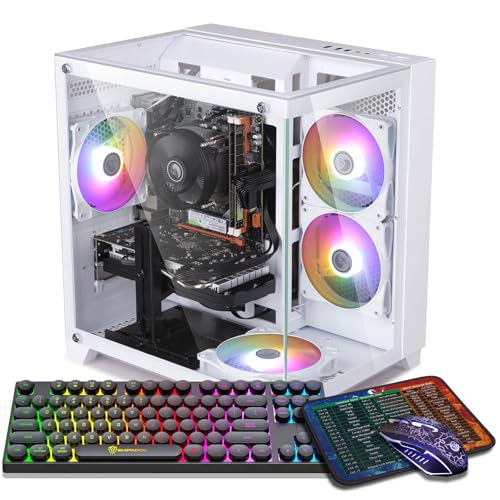
- Strongest graphics card of the six, in white: ZER-LON Gaming PC, Ryzen 5 5500, RTX 4060, White — Check on Amazon
- STGAubron Gaming PC, White, Ryzen 5 5500, RTX 3050 6GB, RGB Fan x6, RGB Keyboard & Mouse — Check on Amazon
- LXZ Gaming PC, White, Ryzen 5 5500, RTX 3050 8GB, 32GB DDR4, 1TB NVMe SSD — Check on Amazon
- LXZ Gaming PC, White, Ryzen 5 5500, RTX 3050 8GB, 16GB DDR4, 512GB NVMe SSD — Check on Amazon
- LXZ Gaming PC, Sea View White, Ryzen 5 5600GT, 16GB DDR4, 1TB NVMe SSD — Check on Amazon
See 1 more Amazon option
- STGAubron Gaming PC, White, Ryzen 7 5700X, RTX 3060 12GB — the white 3060, included honestly as a deal-watch pick — Check on Amazon
Read the full guide ↓
Disclosure: As an Amazon Associate, reviewstook.com earns from qualifying purchases. Links to Amazon on this page are affiliate links; they cost you nothing extra. Listing details such as price and availability change often, so check the current Amazon listing before you buy.
A first gaming PC is hard enough to buy in black. Insist the case be white and the market shrinks, the listings get stranger, and everything you need to know hides inside vocabulary nobody explains. So this guide starts with the vocabulary, then grades six real white PCs under $700 on what a beginner actually feels: does it work the evening it arrives, what else must you still buy, and which mistakes cost real money to undo.
Three warnings up front, each aimed at a specific disappointment. First, “white gaming PC” names the case and nothing more. All six listings verify a white case; not one publishes the color of the graphics card’s cover, the cables or the board, and budget machines are assembled from standard dark parts. Behind the glass you get a white room furnished in black — what most white setups you have admired online actually are. Buy it with your eyes open. Second, the color carries a surcharge, and the surcharge is erratic: it can be modest on one pick below and substantial on another, so check the live price on Amazon for both the white machine and its black equivalent before you decide. Third, two of the six picks earn their place only on sale days, and the white RTX 3060 machine most beginners would choose from a photograph generally sits above this guide’s budget. It appears anyway, clearly labeled — hiding it would only leave you to find it alone and wonder if its price was a scam. It is not; it is what the color costs on that card, today.
One reassurance, because the budget market makes this hard to tell: none of these six machines is renewed or refurbished, none is a barebones kit that shows up as a pile of parts, and none solders its memory in place the way gaming laptops and mini PCs do. Each is a complete, new, assembled tower with standard desktop DDR4 memory — unbox, plug in, set up. The single exception to “finished” is flagged every time it appears: one pick has no graphics card at all, bought on purpose as stage one of a two-stage plan.
In this guide
Quick Picks
Short on time, or comparing several options at once? Each row below names a first-time buyer type and the product that suits it, with a link to the listing.
| First-time buyer type | Pick | Why it stands out | Link |
|---|---|---|---|
| Best graphics card for a beginner | ZER-LON Gaming PC, Ryzen 5 5500, RTX 4060, White | The newest, strongest card in a verified white case — sale price only | Check on Amazon |
| Easiest first setup | STGAubron Gaming PC, White, RTX 3050 6GB | Keyboard and mouse in the box, six RGB fans — check price on Amazon | Check on Amazon |
| Best for lots of apps at once | LXZ Gaming PC, White, RTX 3050 8GB, 32GB DDR4 | Twice the memory of everything else here, with the longer-lived 8GB card | Check on Amazon |
| Best value with the 8GB card | LXZ Gaming PC, White, RTX 3050 8GB, 512GB SSD | The better version of the 3050 in white, without paying for 32GB of memory | Check on Amazon |
| Best start-now, upgrade-later plan | LXZ Gaming PC, Sea View White, Ryzen 5 5600GT | A finished white showcase PC with no graphics card — the card is stage two | Check on Amazon |
| The one you probably pictured — deal-watch | STGAubron Gaming PC, White, Ryzen 7 5700X, RTX 3060 12GB | The strongest all-round spec here, but generally priced above this budget — check price on Amazon | Check on Amazon |
A Beginner’s Glossary: Thirteen Words That Decide This Purchase
Every term below shows up in these six listings. Read this once and the reviews — and any product page you open afterwards — get far easier to judge.
- Graphics card (GPU). The component that draws your games, and the most important one in a gaming PC: its name — RTX 4060, RTX 3060, RTX 3050 — is the first thing to read in any listing. Five of the six picks have one; the platform pick does not.
- VRAM. The graphics card’s private memory, printed after its name: an “RTX 3050 6GB” and an “RTX 3050 8GB” are the same family carrying different amounts. VRAM stores the textures a game paints its world with. Extra VRAM rarely speeds a card up today; it decides how gracefully the card ages, because texture settings are the first thing a short-memory card makes you lower — and it can never be added later.
- Processor (CPU). The component that runs the game itself — the world, the physics, the other players — while the card draws the picture. Listings name it early: Ryzen 5 5500, Ryzen 5 5600GT, Ryzen 7 5700X. At 1080p every processor here is sufficient; the card is where your money works.
- Core. A processor is several processors on one chip, and the count is its core count. The Ryzen 5 chips here have six; the Ryzen 7 5700X has eight. Six is the comfortable gaming standard alongside chat and a browser; eight buys multitasking headroom, not a different class of gaming.
- RAM (system memory). The PC’s short-term workspace, separate from the card’s VRAM. Sixteen gigabytes is the working standard for gaming; 32GB is comfort for a game plus Discord, a browser and recording software open together. Unlike VRAM, desktop RAM is easy to add later — a 16GB pick is a postponement, not a trap.
- SSD and NVMe. Where Windows and your games live. An SSD is the fast modern drive (no spinning hard drives appear here) and NVMe the fastest common kind. Capacity is what you will feel: modern games routinely pass 100GB each, so the 512GB pick fills about twice as fast as the 1TB picks.
- 1080p. The screen resolution these PCs are built for — 1920 × 1080 pixels, also called Full HD. It is the sensible beginner target: sharp on typical desk monitors, and drivable by every card here. The next step up, 1440p, asks for a stronger card than white honestly offers at this budget.
- DLSS. An NVIDIA RTX feature that renders a game at a lower internal resolution and intelligently rebuilds it to fill your screen, so titles run faster at the same visible quality. It is how the RTX 3050 picks cope with demanding games at 1080p; the RTX 4060’s newer version adds Frame Generation, synthesizing extra frames to smooth motion. AMD’s equivalent is FSR, which only the platform pick leans on here.
- Integrated graphics. A modest graphics capability built into some processors instead of a separate card. Perfectly good for the desktop, video and light games; not a gaming card. One pick below, the Ryzen 5 5600GT machine, has nothing else — the entire logic of its two-stage plan.
- Power supply (PSU). The component feeding electricity to all the others. Beginners ignore it and veterans interrogate it, because an unknown unit caps every future upgrade. Two brands here never publish its wattage — the reviews flag each case, and the walkthrough includes reading the label on the unit inside your own case.
- RGB. Colored lighting, in fans, keyboards and mice. It changes performance not at all. It earns a place here only because a white case is bought to be looked at, and fan counts in the listings — four on some picks, six on another — tell you how much light show the listing includes.
- Wi-Fi 6 and Wi-Fi 5. The wireless standard built into the machine; 6 is the newer one, and one pick ships with 5. A cable to the router beats both for gaming whenever your desk allows it, but a PC far from the router will feel the difference, so the reviews note which is fitted.
How These Picks Were Chosen
Two filters built this list. The first is the budget, treated as a ceiling rather than a target. Each pick is a genuine Amazon listing, and where a pick qualifies only at a sale price, its review says so in plain words and tells you to check the price on Amazon before buying. Prices move weekly, so no hard figure is printed here — check the current price on Amazon for every pick. For every pick, staying under $700 is a condition you confirm on the live listing, not a promise anyone makes you.
The second filter is the color, verified rather than assumed. A machine appears here only if its own listing data states a white case. That sounds like a low bar until you shop this market: it is full of listings whose photographs show a pale render while the specification block says black, and machines like that were excluded during research — an exclusion that protects beginners most, since a first-time buyer is least likely to catch the swap before the box lands. What the filter cannot verify, the guide will not credit: no pick is described as having a white graphics card, white cables or a white motherboard, since none of the six listings publishes any of that. The graded layer is the documented one: case color, glass where stated, fan counts, and what rides in the box.
We did not use these machines ourselves. We read the maker listings and specification pages, compared cards, memory, storage, fan counts and connectivity, and favored listings that publish their numbers in full. Where a listing stays silent — and budget brands stay silent about a great deal — the review names the silence instead of guessing across it: an unpublished power supply is called unpublished, a family that parks different computers under one page is called out with cart-checking instructions, and the machine with no graphics card is labeled as having none in its buy-box line, quick-pick row, review and comparison row. A beginner does not need a guide that sounds confident; a beginner needs one that shows its working.
The 6 Best White Gaming PCs for Beginners Under $700
ZER-LON Gaming PC, Ryzen 5 5500, RTX 4060, White (Model AOV4060)
Who it suits: The first-time buyer who wants the strongest graphics card this budget can honestly reach in white — and can wait for the right day to buy it.
Begin with the component that matters most. The RTX 4060 is the newest and most capable card in this guide, a full generation clear of the RTX 3050 machines below: at home with modern games at 1080p on high settings, and the only card here offering DLSS 3 Frame Generation, which smooths motion by synthesizing additional frames. Around it sits the standard recipe for a first PC — a six-core Ryzen 5 5500, 16GB of memory, a full 1TB NVMe drive — inside a white case with four RGB fans and Windows 11 Home already installed. It is the same platform the black-case guides recommend, wearing your color. Judge the white as this guide judges all six: case and lighting are documented; the colors of the card’s cover and cables are not published, so expect ordinary dark components behind the glass.
The catch is the calendar, not the computer. This listing often sits above this guide’s budget, and it belongs in an under-$700 guide only when a sale brings it within that ceiling — so check the price on Amazon before you buy. Fix your walk-away line at the under-$700 budget, purchase on the dip, and refuse to be argued into paying more by a countdown timer. Two smaller notes. Its Wi-Fi is the older Wi-Fi 5, a generation behind the STGAubron below — minor, if you can run a cable, as a gaming desktop ideally does. And the 4060 carries 8GB of VRAM against the 12GB of the older RTX 3060 at the foot of this guide: at 1080p today the newer card’s speed and features win that trade, but texture-heavy games will age an 8GB card sooner.
- RTX 4060 — the sole current-generation card in a verified white case at this budget.
- DLSS 3 Frame Generation — a feature no 30-series pick in this guide can match.
- 1TB NVMe storage and 16GB of memory — the full standard specification.
Honest limitation: A sale-day purchase — check the price on Amazon and buy only when it falls within budget — with Wi-Fi 5 and 8GB of VRAM that both trail cheaper-named rivals on paper.
Choose it if the card matters more than buying this week, and you will hold the line at $700 or under. Skip it if you must order today regardless of price — when it sits above budget, the black-case guides deliver the same hardware with less waiting.

STGAubron Gaming PC, White, Ryzen 5 5500, RTX 3050 6GB, RGB Fan x6
Who it suits: The beginner who wants to open one box and have the entire desk — tower, lights, keyboard, mouse — finished that same evening.
This is the least stressful first purchase in the guide, and completeness is why: six RGB fans fill the white case — the most lighting hardware documented on any pick here — and an RGB keyboard and mouse ride in the same box, deleting the two peripherals first-time buyers most often forget to budget for. Underneath sits honest mid-range hardware: an RTX 3050 6GB, a Ryzen 5 5500, 16GB of memory, a 1TB drive, Wi-Fi 6 and Bluetooth 5.0, Windows 11 Home installed. In plain terms the 3050 is a genuine 1080p card — modern titles at medium-to-high settings, DLSS doing real work in the demanding ones — and its 6GB of VRAM is its ceiling, so textures are the first dial you will turn down as games grow.
Check the price on Amazon before you buy: this machine lives near this budget’s border and crosses to the right side of it often, so the instruction is simply to buy when it falls at or under the under-$700 ceiling. Set against the black version of the same machine, the white version carries only a modest color premium at sale prices — among the smallest white premiums in this entire guide. The brand’s standing cautions apply in full: the listing publishes neither the power supply’s wattage or brand, nor the memory speed, nor the drive’s interface — treat them as part of the purchase, not fine print. The walkthrough below therefore includes a first-week inspection — read the supply’s label, confirm the configuration inside Windows, keep the box — while your return window is still open.
- Six RGB fans plus an RGB keyboard and mouse in the box — the whole white setup in a single order.
- A budget-friendly option when its live price falls within the ceiling — check the price on Amazon.
- Wi-Fi 6 and Bluetooth 5.0 — the strongest connectivity sheet in this guide.
Honest limitation: The RTX 3050 6GB sits a class below the 4060 above and the 3060 below, and the unpublished power supply is this brand’s familiar unknown, handled by the first-week check.
Choose it if you want the finished white desk on day one and 1080p is your resolution. Skip it if you already know a stronger card will tempt you within a year — buy that card’s machine instead and let the case follow.

LXZ Gaming PC, White, Ryzen 5 5500, RTX 3050 8GB, 32GB DDR4, 1TB NVMe SSD
Who it suits: The beginner who does everything at once — a game on one screen, Discord and a browser on the other, recording experiments on the side — and wants headroom enough to never think about it.
Sixteen gigabytes of system memory is what the other five machines ship with; this one documents thirty-two, paired with the 8GB flavor of the RTX 3050 and a 1TB NVMe drive, in a white case. The 8GB card keeps texture settings the 6GB card above has to surrender, which is the difference between a card that ages gracefully and one that ages loudly. The doubled memory is the spec you feel daily — game, chat app, fifty browser tabs and recording software coexisting peacefully. Beneath it sits the same Ryzen 5 5500 six-core found across this guide, and at 1080p it is not the bottleneck; the 3050 is, in either flavor, a 1080p card that leans on DLSS in the heaviest releases.
Two cautions define this pick, and both concern the listing rather than the machine — precisely why a beginner needs them spelled out. First, this listing family blends its variants: data for a different configuration, an Intel i5-12400F with an RTX 4060, surfaces within the same listing family’s pages. Your defense is simple: before paying, compare the cart line by line against the headline — Ryzen 5 5500, RTX 3050 8GB, 32GB, 1TB, white — then repeat the check inside Windows when the machine arrives, using the verification step in the walkthrough. Second, no hard price is printed for this exact configuration, so check the price on Amazon before you buy. The live price becomes this pick’s condition: at or under $700, the specification earns it; above that line, the ZER-LON’s card is the wiser spend.
- 32GB of memory — double every rival in this guide, and the multitasker’s comfort.
- The 8GB RTX 3050 — the flavor of the card that keeps its settings as games grow.
- 1TB NVMe storage, matching the best in this guide.
Honest limitation: Its listing family blends variants, including another processor and card entirely — the cart check is compulsory, and you should check the price on Amazon for this exact build.
Choose it if your desktop is a busy place and the live price reads $700 or under with the headline configuration in the cart. Skip it if the cart shows anything other than that headline, or the price has wandered up toward the 4060’s ground.

LXZ Gaming PC, White, Ryzen 5 5500, RTX 3050 8GB, 16GB DDR4, 512GB NVMe SSD
Who it suits: The beginner on the tightest budget who has absorbed the one lesson that matters here — buy the 8GB version of the card — and is willing to manage a smaller drive.
The formula mirrors the pick above, trimmed to essentials: Ryzen 5 5500, the RTX 3050 8GB, 16GB of memory and a 512GB NVMe SSD, wearing the white case of LXZ’s R5go line. The logic is a lesson in where trimming is safe and where it is not. Between the card’s two flavors, the 8GB is the one to own, because VRAM is the single specification that can never be added to a card afterwards; its extra memory is headroom texture settings will spend across the next few years. Between the two LXZ builds, this one declines to charge you for system memory you may never miss: 16GB remains the working standard for gaming alone, and RAM, unlike VRAM, can be added later if your habits grow into it.
The trade sits in plain sight, and it arrives sooner than beginners expect: 512GB is half the room of this guide’s 1TB picks, and with modern installs routinely passing 100GB, a library of four or five large games becomes a juggling act from the first month. Consider it the way the spending section below frames every catch — as the machine plus its eventual fix, in this case a second drive bought when the first fills. Check the price on Amazon for this exact listing before you buy. LXZ’s 3050 systems anchor the budget end of the white market, and this pick earns its place if — and only if — the live price lands under $700 with the headline configuration sitting in the cart. Confirm the style on the live listing before ordering, because this brand’s families run wide and near-identically named machines differ in storage, power supply and graphics.
- The 8GB RTX 3050 — the correct flavor of the card — inside a verified white case.
- 16GB of memory on a Ryzen 5 5500 — the standard, sufficient gaming platform.
- The leanest path to the 8GB card in white, provided the live price cooperates.
Honest limitation: 512GB fills quickly at modern install sizes, and you need to check the price on Amazon for this exact listing — the under-$700 rule is a condition you verify, not a description anyone offers.
Choose it if gaming is the whole job, your library is modest or well-managed, and the live price is under $700. Skip it if you multitask heavily — the 32GB build above has your name on it — or the live price creeps up toward the ZER-LON’s territory.

LXZ Gaming PC, Sea View White, Ryzen 5 5600GT, 16GB DDR4, 1TB NVMe SSD
Who it suits: The beginner with a plan — happy to start with the case and a working computer now, and to add the graphics card as a second, deliberate purchase.
Read this specification the way its buy-box line labels it, because its most important feature is an absence: no graphics card lives in this machine. The Ryzen 5 5600GT draws its games through built-in integrated Radeon graphics, and independent analysis of this exact machine confirms it — a platform, not a finished gaming PC. What integrated graphics honestly delivers: a stutter-free everyday desktop, video, school and office work, and esports titles plus older games at 1080p on modest settings, all playable the day the box arrives. What it will not do is modern big-budget gaming, and no setting, driver or beginner’s optimism changes that.
Why does it belong in a beginner’s guide at all? Because the case is the point, and this case is the best-documented white showcase of the six: a white tempered-glass “sea view” design, the panoramic style wrapping its window around the front corner, on a budget-tier machine — check the price on Amazon. The rest of the platform is honestly specified for its second stage: 16GB of memory, a full 1TB NVMe drive, Wi-Fi, and the 5600GT’s six cores, strong enough not to hold back a mid-range card fitted later. The two-stage logic is the review. Because this platform sits in the budget tier, part of your under-$700 budget should remain available for the sale-priced or used card that completes the build — leaving you a white machine with a better card than any finished 3050 pick here, assembled in two calm stages. Check the price on Amazon and plan the card as a separate purchase. A beginner-specific caution rides along: this listing never publishes the power supply’s wattage, so before the stage-two card goes in, read the label on the unit inside the case and pick a card that supply can feed — the walkthrough’s first-week inspection covers how. Bought as a finished product, this pick disappoints. Bought as stage one, nothing else in the guide is smarter.
- White tempered-glass sea-view case — the standout white showcase of the six.
- A budget-tier platform — check the price on Amazon before planning stage two.
- 1TB NVMe storage and a six-core platform ready to accept a real card.
Honest limitation: No graphics card. Until you buy one, integrated graphics means esports and older titles — that purchase is not included with the machine, and the power supply’s capacity must be checked before it happens.
Choose it if the two-stage plan appeals and you want the case to be the keeper. Skip it if you need a single box, finished, playing everything on day one — that is the STGAubron 3050 above.

STGAubron Gaming PC, White, Ryzen 7 5700X, RTX 3060 12GB — the deal-watch exception
Who it suits: The beginner who did their homework, found the card this price tier is supposed to have — the RTX 3060 12GB — wearing a white case, and deserves the true price of that pairing before spending a cent.
On paper this is the best-balanced machine in the guide. The Ryzen 7 5700X is the strongest processor here, eight cores against everyone else’s six, and the RTX 3060 12GB is the card the black-case $700 guides are built around: proper 1080p at high settings, more VRAM than any other pick in this guide at 12GB, and a mature card that is its generation’s safe long-term hold. Four RGB fans light the white case; Wi-Fi 6 and Bluetooth 5.2, 16GB of memory and a 1TB drive complete a specification with nothing trimmed. Were this machine sold within this guide’s budget, it would headline this guide and reduce most of the others to footnotes.
It is generally not sold within this budget — check the price on Amazon. The white version carries a substantial premium over the black version of the same maker’s 3060 machine. That gap is the white surcharge in its purest form, and it is why this pick wears the label exception rather than recommendation. It is included because a guide that never mentioned the white 3060 would abandon you to find it alone and assume the price was an error or a scam; it is neither — merely what the color currently costs on this card. So the rule is absolute, and a beginner should hold it without embarrassment: buy only when the live price dips to $700 or under, or buy knowingly above budget with the surcharge chosen with open eyes. Everyone else should take the black machine’s deal, or the ZER-LON’s newer card on its sale days, and let the color go. The brand’s standing note applies here too: its power supply wattage goes unpublished, so the walkthrough’s label check is part of owning this one.
- RTX 3060 12GB — the guide’s largest VRAM pool and the tier’s resident card, in white.
- Ryzen 7 5700X — the only eight-core processor in the guide.
- Wi-Fi 6, Bluetooth 5.2, 1TB storage — a full specification with nothing trimmed.
Honest limitation: Generally over budget — check the price on Amazon. Treat it as a listing to watch, not an under-$700 pick having an expensive week.
Choose it if you catch it at $700 or under, or you have decided with open eyes that the color is worth a substantial premium over the black equivalent. Skip it if paying well above budget means stretching — at that level, the under-$800 and under-$1200 guides buy a faster PC.

Comparison Table
| Product | Graphics | Best use | Link |
|---|---|---|---|
| ZER-LON Gaming PC, Ryzen 5 5500, RTX 4060, White | RTX 4060 8GB | Strongest card in white — sale days only | Check on Amazon |
| STGAubron Gaming PC, White, RTX 3050 6GB | RTX 3050 6GB | Easiest first setup; keyboard and mouse included | Check on Amazon |
| LXZ Gaming PC, White, RTX 3050 8GB, 32GB | RTX 3050 8GB | Memory headroom for heavy multitaskers | Check on Amazon |
| LXZ Gaming PC, White, RTX 3050 8GB, 512GB | RTX 3050 8GB | The lean value route to the 8GB card | Check on Amazon |
| LXZ Gaming PC, Sea View White, Ryzen 5 5600GT | Integrated Radeon (no card) | A white platform to finish with your own card | Check on Amazon |
| STGAubron Gaming PC, White, RTX 3060 12GB | RTX 3060 12GB | The white 3060 — deal-watch, generally above budget; check price on Amazon | Check on Amazon |
Your First Evening: Setup, Step by Step
All six picks arrive assembled with Windows installed, so your first evening is an hour of unboxing and checking — not building. Work in this order, and do not skip the two steps beginners most often skip: the monitor-cable step, which decides how fast your games run, and the verification step, your only proof the machine in the box is the one you paid for.
- Unbox on a table and inspect before plugging anything in. Photograph the case from every side, check the glass for shipping cracks, and confirm the accessories match the listing — the STGAubron 3050 pick, above all, should have its RGB keyboard and mouse in the box. Keep the carton and packaging until the return window closes; budget brands are returned in original packaging or not at all.
- Give the PC moving air. On the desk or a hard surface beside it, with open space behind and above for the exhaust fans. Never inside a closed cabinet — these machines cool themselves with room air, and a sealed box of hot air defeats every fan here. White adds one rule: keep it out of sustained direct sun, which yellows pale finishes unevenly.
- Plug the monitor into the graphics card — never the motherboard. Study the back of the PC: two clusters of video ports — a vertical group belonging to the motherboard, and a horizontal group lower down belonging to the graphics card itself. Your cable belongs in the card’s group. Here is the trap, and it catches more first-time buyers than every other mistake in this guide combined: the motherboard ports are wired to the processor’s small built-in graphics. Plug in there and the PC still works — Windows appears, videos play, nothing looks broken — while your games are drawn by the weakest graphics in the machine and the real card idles: a silent slow-picture trap, with no error and no warning. One exception exists, and it is the platform pick: the Sea View LXZ has no card, so its cable correctly goes into the motherboard ports — its built-in graphics are the entire show until stage two.
- Connect keyboard and mouse. STGAubron 3050 owners are done — both ride in the box. Every other pick assumes yours; if you own none, any basic USB set serves your first months.
- Connect power, switch on, and run the Windows setup. Cable into the back of the PC and a wall outlet or surge protector; flip the power supply’s rear switch if your unit has one; then press the case button — fans should spin and the RGB lighting wake. Silence almost always means that rear switch is off. Then work through the Windows setup (language, network, account, privacy choices) and let Windows Update run fully, restarting as often as it asks: budget machines often ship with an older build, and twenty patient minutes here prevents a week of odd behavior.
- Verify that the delivered machine is the ordered machine. This step protects every buyer in this guide, and it is compulsory for the two LXZ picks, whose family parks different computers under one page. Open Settings, then System, then About, and compare the processor name and installed memory against your order. Then open Task Manager’s Performance tab and read the GPU line: it should name the exact card from the headline — RTX 4060, RTX 3050, RTX 3060 — with its memory size, 6GB, 8GB or 12GB. On the platform pick, expect the processor’s integrated Radeon graphics to be listed instead; that is correct for that machine. Any disagreement means you are still inside your return window, and the step-one photographs are your evidence.
- Update the graphics driver. The driver is the software letting Windows and your games talk to the card, and the factory-installed one is rarely current. On the five NVIDIA picks, install NVIDIA’s own app from NVIDIA’s website and let it fetch the latest driver; on the platform pick, Windows Update handles the integrated graphics. Ten minutes, and the single most effective cure for “my new PC runs games badly.” While you are in settings, also confirm the display resolution matches your screen’s native one — 1080p for the monitors these PCs are built for; a display left at a lower default makes a good PC look like a bad one.
- Within the first week, read the power supply’s label. Two brands here never publish the wattage of the unit inside the case. The label is printed on the supply itself, visible through the glass or by lifting the side panel. Write the number down: it governs which future graphics cards your machine can safely feed, and on the platform pick it decides which stage-two card you may buy. Learn it in week one, while a worrying answer is still a return.
What Else You Will Spend
No pick here includes a monitor, and the honest comparison considers each machine as itself plus the extras its own specification makes necessary — never by folding those extras silently into a pick’s price.
- A monitor — every pick needs one. The first and largest extra, and the one beginners most often forget until the tower is already sitting on the desk. These PCs are built for 1080p, so a 1080p screen is the natural partner; any display you already own with an HDMI or DisplayPort input, a TV included, will serve while you save for the right one.
- A graphics card — the platform pick only. The Sea View LXZ is a two-stage plan by design: it sits in the budget tier, so plan on keeping part of your under-$700 budget aside as the stage-two card fund. Consider this pick as machine plus card, always — check the price on Amazon — and read the power supply’s label (walkthrough step eight) before choosing which card.
- A second drive — the 512GB pick, later. The lean LXZ’s smaller SSD is a deferred cost rather than a hidden defect: when the library outgrows it, a second drive is the remedy. Consider the pick as machine plus a future drive and it still competes.
How to Choose a White Gaming PC Under $700
- Let the graphics card outrank the color. The card decides what this PC remains for years; the case decides how it looks on day one. The card order inside this guide runs 4060, then 3060 12GB, then 3050 8GB, then 3050 6GB — and white-market pricing will tempt you to reverse it constantly. Resist in proportion to how long you keep computers.
- Compare the color premium live. Whatever white machine catches your eye, locate its black twin and check the price on Amazon for both. Inside this guide’s own picks the premium tends to be modest at the RTX 3050 level and substantial at the RTX 3060 level. A surcharge you have checked live is a decision; one you have not is a leak.
- Treat a sale-only pick as a different product. Two picks qualify at sale prices rather than everyday prices, so the purchase includes the waiting: fix the walk-away figure, buy the dip, keep a second choice warm. A deal expiring is never a reason to pay more than you planned — check the price on Amazon before you buy.
Common Buying Mistakes
- Plugging the monitor into the motherboard. The PC works, a picture appears, and games render on the processor’s feeble built-in graphics while the real card idles — the most common beginner error with any gaming PC.
- Reading “white case” as “white computer.” The spec tables publish case color and stop; covers, cables and boards are standard parts, generally dark. Study the listing photographs for the interior before ordering, not after unboxing.
- Paying the white 3060’s well-above-budget price with a $700 budget’s expectations. The surcharge is explained in this guide; paying it deliberately is a choice, paying it by accident is the mistake.
- Saving a small gap by taking the 6GB 3050 over the 8GB. VRAM cannot be added to a card later; the saving evaporates the first time a texture setting demotes itself.
- Trusting the headline on a blended listing family. One family in this guide carries a different processor and graphics card inside its own pages; the headline is a claim, while the cart is the contract.
- Mistaking the platform pick for a finished PC. It contains no graphics card — a fact stated in its buy-box line, its quick-pick row, its review and its comparison row — and it remains the most reliable way this category disappoints a beginner.
- Judging the color by its launch-day photographs. White’s real cost is maintenance across years, because dust announces itself on pale surfaces in a way it never does on black. A buyer who will never dust a case should buy the black one and put the difference into the card.
Final Recommendation
- Best graphics card for a beginner: ZER-LON Gaming PC, RTX 4060 — at $700 or under, on its sale days.
- Easiest first purchase: STGAubron Gaming PC, White, RTX 3050 6GB — the finished package, peripherals included — check the price on Amazon.
- Heavy multitaskers: LXZ Gaming PC, White, RTX 3050 8GB, 32GB — provided the cart and the live price check out.
- Tightest budgets: LXZ Gaming PC, White, RTX 3050 8GB, 512GB — the right card, with a second drive as a planned future cost.
- Patient planners: LXZ Sea View White 5600GT — the showcase now, the card as stage two.
- The one you actually pictured: STGAubron White RTX 3060 12GB — buy the dip the record does not yet contain, or pay the surcharge knowingly.
Our top two for a first-time buyer are the STGAubron 3050 and the ZER-LON 4060, in that order — and the order is the beginners’ angle in one sentence. The STGAubron is the purchase with the fewest ways to go wrong: a purchase that can fall within budget — check the price on Amazon — with keyboard and mouse in the box, and nothing to add before your first evening beyond a monitor. The ZER-LON is the better computer and the worse errand, a current-generation card that asks you to watch for its sale and hold a walk-away line. If your budget is tighter than $700, Best White Gaming PC For Beginners Under $500 applies this same beginner grading to the smaller market; if it stretches, Best White Gaming PC For Beginners Under $800 shows what the next tier does to the white surcharge. And should the color prove negotiable after all, Best Gaming PC For Beginners Under $700 grades the wider beginner market, where the same money buys a stronger card ladder in black. Decide what the color is worth to you before opening a single listing.
Frequently Asked Questions
My games are running slowly and I do not know why. What should I check first?
The monitor cable. Trace it to the back of the PC: if it lands in the vertical cluster of ports on the motherboard’s panel instead of the horizontal cluster on the graphics card, your games are being drawn by the processor’s modest built-in graphics while the real card sits idle — with no error message to confess it. Move the cable to the card’s ports and relaunch. After that, update the graphics driver, the walkthrough’s seventh step; between them, those two fixes settle most “my new PC is slow” evenings. The one machine exempt is the Sea View platform pick, which owns no card and correctly uses the motherboard ports.
Why does a guide to gaming PCs include one with no graphics card?
Because in the white market the case is a product in its own right, and this one is the standout showcase in the budget tier — a working computer with a six-core processor and 1TB of storage; check the price on Amazon. Its integrated graphics carry esports and older games today, and once a mid-range card goes in, it becomes arguably the finest white build here. Every appearance of it is labeled a platform; buy it as stage one of two, or leave it alone.
Should I buy the black version instead and pocket the difference?
If the PC will live beneath a desk, honestly, yes — the black equivalents buy a stronger card ladder for identical money, and nobody admires a case under a desk. If it will live on the desk, inside a room styled around it, the surcharge at the 3050 level is genuinely small and the platform route genuinely clever. The only wrong answer left is paying the 3060-level surcharge by accident.
- Best White Gaming PC Under $700
- Best White Gaming PC Under $500
- Best White Gaming PC Under $800
- Best White Gaming PC For Beginners Under $500
- Best White Gaming PC For Beginners Under $800
- Best White Gaming PC For Streaming Under $700
- Best White Gaming PC For Small Spaces Under $700
- Best White Gaming PC For 1440p Gaming Under $700
- Best Gaming PC For Beginners Under $700
- Best Gaming PC Under $700
- Best Prebuilt Gaming PC Under $700
- Best Budget Gaming PC Under $700
- Best RGB Gaming PC Under $700
- Best 1080p Gaming PC Under $700


