Where to buy
Check the latest price, availability and delivery on Amazon. Orders are placed on Amazon. We may earn a commission from qualifying purchases.
- The only native-1440p card in a white case here: ZER-LON Gaming PC, Ryzen 5 5500, RTX 4060, White — Check on Amazon
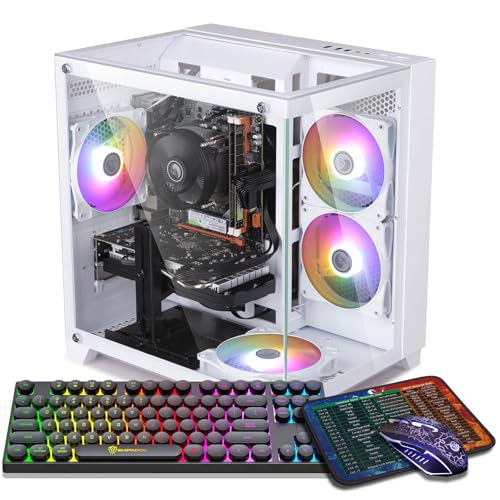
- STGAubron Gaming PC, White, Ryzen 5 5500, RTX 3050 6GB, RGB Fan x6, RGB Keyboard & Mouse — Check on Amazon
- LXZ Gaming PC, White, Ryzen 5 5500, RTX 3050 8GB, 32GB DDR4, 1TB NVMe SSD — Check on Amazon
- LXZ Gaming PC, White, Ryzen 5 5500, RTX 3050 8GB, 16GB DDR4, 512GB NVMe SSD — Check on Amazon
- LXZ Gaming PC, Sea View White, Ryzen 5 5600GT, 16GB DDR4, 1TB NVMe SSD — Check on Amazon
See 1 more Amazon option
- STGAubron Gaming PC, White, Ryzen 7 5700X, RTX 3060 12GB — the strongest renderer of the six, held as a deal-watch exception — Check on Amazon
Read the full guide ↓
Disclosure: As an Amazon Associate, reviewstook.com earns from qualifying purchases. Links to Amazon on this page are affiliate links; they cost you nothing extra. Listing details such as price and availability change often, so check the current Amazon listing before you buy.
Two separate premiums hide inside this search term, and untangling them is the whole job of this guide. Premium one is the finish. White is something a case wears, not something a specification guarantees, and under $700 the white market shrinks to a short list of Amazon-native brands whose graphics card ladder stops one rung short of what the same money buys in black. Premium two is the pixel count. A 1440p panel holds roughly 3.69 million pixels against 1080p’s roughly 2.07 million, so every frame asks the card for about 78 percent more work — and most cards that fit inside a $700 white tower were engineered as 1080p hardware. Stack the premiums and the honest summary writes itself: all six machines below will drive a 1440p monitor, yet only one renders demanding modern games natively at that resolution, and it qualifies only on its sale days. The rest render lower and upscale — a legitimate, often handsome way to use a 1440p screen — or, in one case, merely display the resolution while gaming happens far beneath it. Knowing which of those three things you are paying for is the difference between a smart purchase and an expensive misunderstanding.
That is why every pick carries a printed verdict, awarded from its documented silicon and from nothing else. Native means the card computes games at 2560×1440 as its ordinary working mode. Upscaled means the render happens at a lower internal resolution and a documented upscaler reconstructs the 1440p image from it. Display only means the machine lights a 1440p desktop and video happily but renders games at 1080p-class resolutions or below, whatever the panel claims. A monitor’s spec sheet describes glass; it has never described a graphics card, and no pick here borrows its verdict from the screen it is photographed beside. The color audit from the base guide to these same six machines stands unchanged alongside it: case color is credited only where the listing’s own data states it, glass only where documented, and no machine is credited with white internals, white cables or a white card shroud, because not one of the six listings publishes them. Expect a pale case wrapped around ordinary dark components, and you will be pleasantly unsurprised.
The audit’s findings, compressed: the RTX 4060 pick is the set’s one outright Native verdict. The white RTX 3060 12GB would share top honors — it is the strongest native renderer present — except that it sits above this budget, so it remains as a labeled exception — check the current price on Amazon before treating it as an in-budget option. The three RTX 3050 machines are Upscaled verdicts, honest 1080p engines whose DLSS output sits comfortably on a 1440p panel in lighter and older libraries, the 8GB versions holding textures the 6GB card cannot. The sea-view platform, having no graphics card at all, is Display only today and becomes whatever the card you later install honestly earns.
In this guide
Quick Picks
Short on time, or comparing several options at once? Each row below names a buyer type and the product that suits it, with its honest 1440p verdict printed rather than implied.
| Buyer type | Pick | Honest 1440p verdict | Link |
|---|---|---|---|
| Best 1440p card in white | ZER-LON Gaming PC, Ryzen 5 5500, RTX 4060, White | Native across many titles at moderate settings; DLSS handles the heavy end — sale days only | Check on Amazon |
| Best complete white package | STGAubron Gaming PC, White, RTX 3050 6GB | Upscaled — a 1080p render reconstructed for the panel; native only at the lightest end | Check on Amazon |
| Best memory and storage | LXZ Gaming PC, White, RTX 3050 8GB, 32GB DDR4 | Upscaled — the 8GB card keeps the textures; the render class stays 1080p | Check on Amazon |
| Best value RTX 3050 8GB | LXZ Gaming PC, White, RTX 3050 8GB, 512GB SSD | Upscaled — same class as the 32GB build, leaner everywhere else | Check on Amazon |
| Best white platform to upgrade | LXZ Gaming PC, Sea View White, Ryzen 5 5600GT | Display only — integrated graphics; real 1440p gaming waits for an added card | Check on Amazon |
| Strongest native renderer — deal-watch | STGAubron Gaming PC, White, Ryzen 7 5700X, RTX 3060 12GB | Native in lighter and older titles with DLSS as the working mode — but priced above this budget; check price on Amazon | Check on Amazon |
How These Picks Were Chosen
The six machines are the identical verified white listings from the base guide to white gaming PCs under $700, re-graded for this angle. Nothing has been added, and every walk-away rule and caveat from the base research carries across intact. The budget operated as a ceiling and the color as a fact to be verified: each product is a genuine Amazon listing whose own data declares a white case. Because listing prices change often, the reviews do not print a fixed figure for any pick — for linked picks, check the current price on Amazon, and judge each machine against the under-$700 budget at the moment you buy. Two picks qualify only when discounted into this budget and carry printed walk-away rules. Two LXZ picks are judged the same way: their reviews substitute an explicit under-$700 condition, so check price on Amazon and confirm the exact configuration before you commit. One pick, the white RTX 3060, sits above the $700 budget and appears as a plainly labeled exception.
This angle layers a rendering audit over that inherited discipline, and its rules are strict. The Native verdict is awarded only where documented silicon genuinely computes at 2560×1440 — never where a box, a bundled monitor or a headline says 1440p. Upscaling gets credited strictly as the actual hardware documents it: DLSS is discussed solely for picks carrying NVIDIA Tensor-core cards, always with the published internal resolution attached to the mode name, and it is refused outright for the integrated-graphics platform, which has no Tensor cores. FSR is credited generically as the cross-vendor fallback and no further, because the base research documents no FSR internal-resolution figures for any of these machines, so none appear. Monitor advice stays at class level for the same reason: the base research records no per-pick port counts or refresh ceilings for these six listings, so this guide asserts none and directs you to the live listing for the exact outputs of the exact machine before you commit to a high-refresh pairing.
We did not use these products ourselves. The base research worked from maker listings and specification pages, comparing graphics cards, memory, storage, fan counts and connectivity, and favoring listings that publish their numbers completely. Where a listing omits something — power supply wattage, RAM speed, SSD interface, the colors of the components inside the white case — the review names the omission rather than papering over it. That discipline counts double at this angle, because a resolution claim and a color claim fail identically: each is effortless to photograph and genuinely difficult to verify, and each is graded here exclusively on documentation.
Rendering at 1440p Is Not Displaying 1440p
Nearly every confusion in this market grows from a single equivocation, so it earns a section of its own. A panel’s resolution belongs to the glass: a 1440p display holds 2560×1440 pixels, about 3.69 million, and almost any modern graphics hardware — integrated chips included — will paint a desktop, a browser and a video across all of them. A game’s rendering resolution belongs to the workload: it is the pixel count the card actually computes before the image is scaled to fit the screen, and it alone decides how hard the card labors. At native 1440p the two numbers coincide, and the card computes roughly 78 percent more pixels per frame than it does at 1080p’s 2.07 million. That gap is not a nuance for spec-sheet pedants. It is the entire reason a card that cruises at 1080p can be humbled by nothing more exotic than a monitor upgrade.
Upscaling occupies the space between those two numbers, and at this budget it is no kind of cheat — it is the mechanism that makes 1440p panels rational purchases at all. The upscaler renders internally at a reduced resolution, then reconstructs a 1440p image. NVIDIA publishes DLSS’s geometry for its Tensor-core cards, and this guide prints it wherever DLSS is claimed: at 1440p output, Quality renders internally at roughly 1707×960, Balanced at roughly 1485×836, and Performance at roughly 1280×720. Read the ladder honestly. Quality delivers an excellent picture and a real performance lever, but its workload — a little over 1.6 million computed pixels — sits closer to 1080p than to native 1440p. Performance, at the same output, is in internal terms a 720p-class render wearing a very sophisticated reconstruction. NVIDIA hides none of this; the dishonesty arrives only when a headline renames any of it “native 1440p gaming,” or when a buyer mistakes the monitor’s specification for the card’s workload. Every DLSS claim in this article keeps its internal resolution attached, and DLSS is denied by name wherever the silicon cannot execute it.
Two corollaries shape the reviews below. First, texture memory: upscaling shrinks the shading workload but never rebuilds the texture budget. A game presented at 1440p wants textures stored at 1440p-appropriate detail, and that appetite lands on VRAM exactly as though the render were native — which is why the 6GB card is graded down at this angle despite competent upscaling, and why the exception pick’s 12GB retains an edge no upscaler can fabricate. Second, frame generation, offered by the RTX 4060 pick alone: it interpolates extra frames between rendered ones, raising the count the panel shows without raising the count the card computes.
One rung higher deserves the same treatment, because listings that blur 1440p will cheerfully sell you 4K next. Native 4K is refused for all six picks: none of these cards renders modern games at 3840×2160 as a working mode. Where DLSS enters the 4K conversation on the Tensor-core machines, its published geometry is Quality rendering internally at roughly 2560×1440 and Performance at roughly 1920×1080 — DLSS at 4K output is a 1440p-class or 1080p-class render reconstructed upward, at this budget a parlour trick for older titles rather than a gaming target. Documented 4K display outputs, where a listing offers them, prove only that a machine can illuminate a 4K panel, which was never in dispute. Purchase for the resolution the card renders, and match it to the panel that flatters that render.
The 6 Best White Gaming PCs for 1440p Gaming Under $700
ZER-LON Gaming PC, Ryzen 5 5500, RTX 4060, White (Model AOV4060)
Who it suits: The white-build shopper whose true priority is the resolution itself — the buyer who wants the one card here that computes at 1440p natively, and who can hold out for a sale to get it in white.
Honest 1440p verdict: Native — the only pick that earns the word outright. The RTX 4060 is current-generation silicon with Tensor cores, and at this resolution it behaves the way this angle wishes every card would: a broad range of modern games rendered natively at 2560×1440 under moderate settings, with DLSS absorbing the demanding end instead of a silent drop in render resolution. When DLSS does that absorbing, this guide names its terms — Quality reconstructs the 1440p frame from an internal render of roughly 1707×960, Balanced from roughly 1485×836, Performance from roughly 1280×720 — a ladder you descend deliberately as a title grows heavier, rather than a foggy promise of “1440p support.” DLSS 3 Frame Generation comes along as the set’s only frame-generation hardware; take it as display-side smoothness, never as rendering headroom, since it contributes presented frames rather than computed ones. Beneath the card sits the standard budget recipe — Ryzen 5 5500 six-core, 16GB of DDR4, a 1TB NVMe SSD — inside a white case with four RGB fans. Grade the finish as the base guide did: case and fans form the documented pale layer, while the listing publishes no shroud or cable colors, so dark standard internals behind the glass are the sensible expectation.
The price condition defines this pick. It usually sits above this budget and only qualifies for an under-$700 guide when discounted into it — check the current price on Amazon before assuming it fits. That converts the purchase into an exercise in discipline — fix the walk-away line at $700, purchase on the dip, and refuse to negotiate yourself above the budget. Two lesser caveats accompany it, one of which sharpens at this angle. The Wi-Fi is Wi-Fi 5, a generation behind the Wi-Fi 6 in the STGAubron package below; minor, for a desktop that ought to be wired regardless. The sharper caveat is memory: the 4060 carries 8GB of VRAM against the older 3060’s 12GB, and at 1440p output the texture budget gets spent at panel resolution even while shading is upscaled, so texture-hungry games will press this card’s memory sooner than the exception pick’s. At 1080p that exchange plainly favored the 4060’s pace and features; at 1440p it still favors them, though by a narrower margin.
- RTX 4060 — the sole current-generation card in a verified white case at this money, and the set’s only outright Native verdict.
- DLSS quoted with its internal resolutions attached (Quality ≈1707×960 at 1440p output), plus frame generation as a display-side bonus.
- 1TB NVMe SSD and 16GB DDR4 — the complete standard specification, nothing trimmed.
Honest limitation: A sale-only pick that usually sits above the budget — check price on Amazon; its 8GB VRAM is the first ceiling its 1440p ambitions will meet, and its Wi-Fi 5 trails cheaper-named rivals on paper.
Choose it if 1440p is the point, you want it rendered rather than reconstructed wherever the library allows, and you will transact only at $700 or under. Skip it if you must order today regardless of price — when it is not discounted into budget, the black-case guides serve you better.

STGAubron Gaming PC, White, Ryzen 5 5500, RTX 3050 6GB, RGB Fan x6
Who it suits: The buyer chasing the complete white-desk photograph on day one — case, lighting and peripherals in a single box — whose 1440p panel will mostly display esports, back-catalogue titles and a handsomely upscaled modern game.
Honest 1440p verdict: Upscaled — a 1080p renderer presented on the panel. The 6GB form of the RTX 3050 is a legitimate 1080p card, and this review refuses to grade it as anything taller: modern titles at medium-to-high settings at 1920×1080, with DLSS carrying genuine weight in the heavy ones. Fitted to a 1440p monitor, the working arrangement becomes a 1080p-class render reconstructed to fill the screen — DLSS Quality on this Tensor-core card means an internal render near 1707×960 at 1440p output, which yields a good picture and an accurate account of the labor involved. Native 1440p is credited solely at the library’s lightest end: esports and older games under low settings, where the full render is small enough for the card to compute unaided. Anything weightier advertised as “1440p” on this machine is the upscaler’s craftsmanship, and the 6GB of VRAM narrows the verdict further still, since textures are consumed at panel resolution while shading is not — texture settings will be your first concession as games grow. None of this condemns the purchase. It merely insists on the correct sentence in your head while making it: a finished white look wrapped around a competent 1080p engine, not a 1440p machine discovered at a 1080p price.
As the base guide established, this is also the most thoroughly white product of the six. Six RGB fans — the largest lighting count documented on any pick — fill the white case, and an RGB keyboard and mouse ride in the box, so the desk matches the tower without a second transaction. The hardware beneath comprises the Ryzen 5 5500, 16GB of DDR4, a 1TB SSD, Wi-Fi 6 and Bluetooth 5.0. Its pricing position is the friendliest in the guide: it hovers at the budget’s border and crosses to the correct side of it regularly — check the current price on Amazon. Bought at or under $700, its white tax — measured against the black edition of the same machine — is small at sale prices, the cheapest rate for the color anywhere in this article. The standing STGAubron warnings apply without abbreviation: the listing publishes neither the power supply’s wattage nor its brand, nor the RAM speed, nor the SSD’s interface, so the first-week inspection this brand demands — read the PSU label, confirm the configuration inside Windows, retain the box — belongs to the purchase rather than to optional diligence.
- Six RGB fans plus an RGB keyboard and mouse in the box — the white setup, complete, in one delivery.
- Check price on Amazon — this pick regularly falls inside the budget without coupon theatre.
- Wi-Fi 6 with Bluetooth 5.0 — the strongest connectivity sheet among the six.
Honest limitation: The 3050 6GB sits a class beneath the guide’s 4060 and its absent 3060, its 6GB is the tightest texture budget present, and the unpublished PSU is the customary STGAubron unknown.
Choose it if appearance leads and your library leans light — the white build as a finished product. Skip it if native 1440p in modern releases is a requirement instead of an aspiration; no upscaler preset promotes this card into that.

LXZ Gaming PC, White, Ryzen 5 5500, RTX 3050 8GB, 32GB DDR4, 1TB NVMe SSD
Who it suits: The multitasker — streamer-in-waiting, modder, keeper of fifty browser tabs — who plays on a 1440p panel and wants memory headroom no rival white pick at this money documents.
Honest 1440p verdict: Upscaled — carrying the healthiest texture budget of the three 3050 machines. Separate what the upgrades accomplish from what they cannot. This configuration pairs the 8GB edition of the RTX 3050 with 32GB of system memory, double every other machine here. The larger card matters precisely at this angle: textures are devoured at the panel’s resolution even when the shading beneath them is an upscaled 1080p-class render, so the 8GB card retains texture settings the 6GB card surrenders. The render class itself, though, does not budge — the 3050 remains a 1080p card leaning on DLSS in the heaviest current releases, DLSS Quality at 1440p output signifies an internal render near 1707×960, and native 1440p belongs to this pick only among lighter and older titles under reduced settings. The 32GB of RAM is the specification felt daily rather than benchmarked once — game, Discord, browser and recording software in simultaneous residence — and on a streaming-leaning desk it is the headroom that keeps the upscaled picture company. The Ryzen 5 5500 below is the same six-core encountered throughout this guide, and at these resolutions it is never the constraint; the 3050, in either memory size, is.
Two cautions define the pick, both concerning the listing rather than the machine. First, the listing family blends its variants: material for a different configuration — an Intel i5-12400F with an RTX 4060 — surfaces within the same family’s pages, so the cart must be audited line by line against the headline (Ryzen 5 5500, RTX 3050 8GB, 32GB, 1TB, white) before payment and again upon arrival. At this angle the caution doubles in an unusual direction, because the concealed variant is the stronger card: should a 4060 configuration arrive, your 1440p verdict improves — and you should still have received exactly what you paid for, decided about with the return window open. Second, no fixed price is printed for this configuration — check the current price on Amazon for the exact 32GB build, since the broader LXZ 5500/3050 family spans different configurations at different positions in the budget tier. Treat the live price as the pick’s condition: at or under $700 the specification defends itself; beyond that, the ZER-LON’s graphics card is the superior spend.
- 32GB of DDR4 — twice the system memory of every other pick in the guide.
- The 8GB RTX 3050 — the edition whose texture budget endures 1440p output.
- 1TB NVMe storage, equal to the guide’s best.
Honest limitation: The listing family blends variants, a different CPU and card among them — the cart audit is compulsory, and the exact configuration must be confirmed on the live listing — check price on Amazon.
Choose it if a heavy desktop runs beside your games, your panel is 1440p, and the live price lands at or under $700. Skip it if the cart displays any configuration besides the headline one, or the price has drifted into the 4060’s territory.

LXZ Gaming PC, White, Ryzen 5 5500, RTX 3050 8GB, 16GB DDR4, 512GB NVMe SSD
Who it suits: The value hunter who wants the 8GB edition of the 3050 in white, without funding the 32GB configuration above.
Honest 1440p verdict: Upscaled — its sibling’s render class in a leaner enclosure. The formula mirrors the pick above, trimmed to essentials: Ryzen 5 5500, the RTX 3050 in 8GB form, 16GB of DDR4 and a 512GB NVMe SSD, inside the white case of LXZ’s R5go line. The grading transfers whole. Between the card’s two memory sizes, the 8GB is the one to own at this angle — the additional VRAM is headroom that texture settings will spend at 1440p output across the coming years — while the render underneath stays a 1080p-class workload in modern titles, presented on the panel by DLSS (Quality at 1440p output rendering near 1707×960 internally) and attaining native 1440p only in lighter, older games under low settings. Sixteen gigabytes of system memory remains the serviceable standard for a gaming-only machine, and the sum saved against the 32GB build can migrate to the monitor this angle presumes you own, the desk, or the second drive this one’s smaller SSD will eventually request.
The compromise is printed in the specification: 512GB is half the storage of the guide’s 1TB picks, and with contemporary installs routinely exceeding 100GB it operates as a working constraint from the first month onward, not a distant one — plan a second drive or practice library discipline. Pricing discipline matches the sibling above: check the current price on Amazon for this precise listing, and judge it only against the rule itself. LXZ’s 3050 systems form the budget end of the white market, and this pick earns its place if — and only if — the live price settles under $700 with the headline configuration in the cart. As with its sibling, confirm the style on the live listing: this brand’s families run wide, and near-identically named machines diverge in storage, power supply and graphics.
- The 8GB RTX 3050 — the correct edition of the card — inside a verified white case.
- 16GB DDR4 with a Ryzen 5 5500 — the standard, adequate gaming platform.
- The leanest path to the 8GB card in white, should the live price cooperate.
Honest limitation: 512GB fills quickly at modern install sizes, and the exact listing must be confirmed live — check price on Amazon; the under-$700 rule is a condition, not a description.
Choose it if gaming is the entire job, your 1440p expectations are of the upscaled kind, and the live price sits under $700. Skip it if you multitask heavily — the 32GB build above is yours — or the price loiters near the ZER-LON’s sale figure.

LXZ Gaming PC, Sea View White, Ryzen 5 5600GT, 16GB DDR4, 1TB NVMe SSD
Who it suits: The patient builder at heart — someone content to take the white showcase case and the 1440p desk today, and the graphics card whenever the right deal or the right card materializes.
Honest 1440p verdict: Display only — this pick is the reason the category exists. Read the specification attentively, because its most consequential line is an absence: no discrete graphics card is fitted. The Ryzen 5 5600GT renders games through its integrated Radeon graphics — independent listing analysis of this exact machine confirms it — making this a platform rather than a finished gaming PC. At this angle that fact assumes a precise technical shape. The integrated chip drives a 1440p monitor’s desktop, browser and video at full native resolution without a murmur, which is exactly the half of “1440p” that spec sheets measure. For games it renders at 1080p under modest settings in esports and older titles, and lower as releases grow — and its upscaling route is FSR, credited here generically and without figures, the base research documenting none for this machine. DLSS is refused to this pick explicitly and permanently: integrated Radeon graphics contain no Tensor cores, and no setting, driver or firmware revision alters that. Modern AAA gaming is beyond it at any resolution, and at 1440p it is beyond it by a wider margin. The card-shaped vacancy in this build is a purchase still owed.
Why, then, is it here? Because the case is the product, and this case is the best-documented white showcase in the guide: a white tempered-glass “sea view” design — the panoramic style wrapping the view around the front corner — on a machine positioned in the lower part of this budget tier — check the current price on Amazon. The remaining platform is honestly specified: 16GB of DDR4, a full 1TB NVMe drive, Wi-Fi, and the 5600GT’s six Zen 3 cores, which will not bottleneck a mid-range card installed later. The two-stage logic is the review, and at this angle it carries a resolution clause: positioned low in the tier, the pick leaves meaningful budget headroom toward the used or sale-priced graphics card that completes it — whereupon you own a white build whose 1440p verdict is whatever the added card honestly earns, quite possibly superior to any finished 3050 machine here, assembled across two stages. Bought as a finished 1440p product, it disappoints on day one. Bought as stage one, it is the shrewdest white purchase in the guide.
- White tempered-glass sea-view case — the finest documented white showcase present.
- Positioned low in this budget tier — check price on Amazon; among the most affordable entry points in this guide.
- 1TB NVMe storage and a six-core Zen 3 platform prepared to receive a genuine card.
Honest limitation: No discrete graphics card. Integrated graphics deliver a 1440p desktop and 1080p-class gaming until you buy one — and that purchase is excluded from the price.
Choose it if adding a graphics card as stage two suits you and the case is the keeper. Skip it if you require one finished box playing everything on day one — the STGAubron package above is that box.

STGAubron Gaming PC, White, Ryzen 7 5700X, RTX 3060 12GB — the deal-watch exception
Who it suits: The reader this entire search truly serves — the one who wants the $700 tier’s resident card, the RTX 3060 12GB, rendering at 1440p inside a white case — and who merits the combination’s genuine price.
Honest 1440p verdict: Native in lighter and older titles, DLSS as the working mode — the strongest rendering specification in the guide, priced outside it. Begin with the machine itself, because on paper it is the best-balanced PC here for this angle. The Ryzen 7 5700X is the set’s strongest CPU — eight cores against six everywhere else — and the RTX 3060 12GB unites a genuinely 1440p-capable render with the most VRAM present. That memory is the pick’s quiet superpower at this resolution: 12GB retains 1440p texture sets that compel the 6GB and 8GB cards to compromise, and retains them whether shading runs native or upscaled, because upscaling never rebuilds a texture budget. Lighter and older titles render natively at 2560×1440; across the modern library DLSS becomes the working mode — Quality at 1440p output rendering near 1707×960 internally, Balanced near 1485×836, Performance near 1280×720 — with the 12GB cushion letting each mode age more gracefully than the identical modes on smaller cards. The white case carries four RGB fans alongside Wi-Fi 6, Bluetooth 5.2, 16GB of DDR4 and a 1TB SSD. Its finish grades as its sibling’s does: case and lighting documented, internals’ colors unpublished. Were this machine sold inside this budget, it would headline this guide and reduce most of the others to footnotes.
It is not an in-budget machine — check the current price on Amazon, and expect it to sit above the $700 budget, well above the black edition of STGAubron’s 3060 machine. That gap is the white tax in its purest documented form, and it is why the pick wears the label exception rather than recommendation: a guide to white 1440p PCs under $700 that never mentioned the white 3060 would abandon readers to discover it alone and presume the price a mistake or a scam. It is neither — it is simply the color’s current cost at this card. The rule is absolute: purchase only if it is ever discounted to $700 or under, or purchase knowingly above budget with the tax understood. Everyone else should take the black machine’s deal, or the ZER-LON’s newer card on its sale days, and release the color.
- RTX 3060 12GB — the guide’s largest VRAM and the tier’s resident card, in white.
- Ryzen 7 5700X — the only eight-core CPU among the six.
- Wi-Fi 6, Bluetooth 5.2, 1TB SSD — the complete specification, nothing trimmed.
Honest limitation: Over budget as listed — check price on Amazon. A deal-watch listing — not an under-$700 pick that happens to be expensive today.
Choose it if you catch it at $700 or under, or you have resolved that native-leaning 1440p in white justifies a substantial premium over the black equivalent. Skip it if stretching above budget means compromising elsewhere — at a higher budget the under-$800 and under-$1200 guides buy a faster PC.

Comparison Table
| Product | Graphics | Honest 1440p verdict | Link |
|---|---|---|---|
| ZER-LON Gaming PC, Ryzen 5 5500, RTX 4060, White | RTX 4060 8GB | Native across many titles; DLSS absorbs the heavy end — sale days only | Check on Amazon |
| STGAubron Gaming PC, White, RTX 3050 6GB | RTX 3050 6GB | Upscaled — 1080p render on the panel; native only at the lightest end | Check on Amazon |
| LXZ Gaming PC, White, RTX 3050 8GB, 32GB | RTX 3050 8GB | Upscaled — 8GB texture budget over a 1080p-class render | Check on Amazon |
| LXZ Gaming PC, White, RTX 3050 8GB, 512GB | RTX 3050 8GB | Upscaled — the same class in a leaner specification | Check on Amazon |
| LXZ Gaming PC, Sea View White, Ryzen 5 5600GT | Integrated Radeon (no card) | Display only — a white platform awaiting your own GPU | Check on Amazon |
| STGAubron Gaming PC, White, RTX 3060 12GB | RTX 3060 12GB | Native in lighter titles, DLSS working mode — deal-watch, priced above budget; check price on Amazon | Check on Amazon |
How to Choose a White Gaming PC for 1440p Gaming Under $700
- Grade the render, never the panel. Assign every candidate one of this guide’s three verdicts — Native, Upscaled, Display only — from its graphics hardware alone. A 1440p display is an inexpensive accessory; a native-1440p render is a graphics card class. The search term conflates them; your money must not.
- Purchase the graphics card first and the color second. The card determines what the PC renders across the next four years; the case determines its first-day appearance. The rendering order inside this guide runs 4060, then 3060 12GB, then 3050 8GB, then 3050 6GB — and white-market pricing will perpetually tempt you to invert it. Resist in proportion to how long you keep PCs.
- Read every DLSS claim with its internal resolution attached. Quality at 1440p output renders near 1707×960; Performance near 1280×720. Both can look superb; neither is native. When a listing promises “1440p gaming” of a Tensor-core card, ask which mode it means — and when it promises the same of hardware lacking Tensor cores, close the tab, because DLSS does not execute there at all.
- Treat sale-only picks as a distinct product. Two picks qualify when discounted into budget rather than at their everyday positioning, so the purchase includes the waiting: fix the walk-away number, buy the dip, keep a second choice ready. Never allow an expiring deal to usher you into paying above budget.
- Verify the configuration, not the headline. Budget families blend variants — one family here carries a different CPU and graphics card within its own pages, and at this angle the concealed variant is the stronger card, which makes the audit more tempting to skip and no less obligatory. Audit the cart line by line, then audit the delivered machine in Windows before the return window closes.
- Count VRAM as a resolution specification. At 1440p output, textures are consumed at panel resolution even while shading is upscaled. The 3050’s 6GB and 8GB forms differ in longevity rather than launch-day pace, and the 3060’s 12GB is the guide’s high-water mark. Prefer the larger memory where the price gap is small — here it frequently is.
- Pair the monitor with the render, and verify its inputs on the listing. A 1440p panel flatters every pick present, the upscaled ones included — that is the panel performing its job. But the base research documents no per-pick port counts or refresh ceilings for these six machines, so before counting on a high-refresh connection, confirm the exact outputs on the live listing of the exact machine. Class-level guidance is all an honest guide can offer here.
- Budget the second stage honestly. The platform pick is a two-purchase plan — case now, card later — and the card you add fixes the build’s eventual 1440p verdict. Price the entire plan, including the card you genuinely intend to install, before comparing it against finished machines. A platform plus a card never bought is this guide’s most expensive outcome.
The White Tax, Priced in Resolution Currency
The tax shows up in how the sibling guides position black equivalents of these same machines. At the RTX 3050 6GB level it nearly vanishes at sale prices: the white STGAubron sits only slightly above the black edition, the cheapest rate for the color anywhere in this guide, purchasing an identical Upscaled verdict in either finish — check price on Amazon for both before you buy. At the RTX 4060 level the tax is principally timing: the white ZER-LON sits close to comparable black 4060 towers when discounted, yet the white listing dips beneath $700 rarely while black 4060 machines do so more often. You pay in patience more than in money — and the patience purchases the guide’s only outright Native verdict, the best-spent waiting in this market.
At the RTX 3060 12GB level the tax hardens into a wall. The black STGAubron 3060 machine sits at the top of this budget tier; its white counterpart, carrying a stronger CPU, sits well above it — check the current price on Amazon. The color there costs a substantial premium, not a small surcharge. The guide’s structure is therefore the honest answer to the combined tax: take the 4060 on its sale days when native rendering leads, take the 3050s when the finished white look leads and upscaled output is an acceptable settlement, take the platform when you intend to build toward both, and recognize the white 3060 for what it presently is — an above-budget PC wearing a $700 search term.
Common Buying Mistakes
- Believing the monitor’s specification describes the PC’s workload. A 1440p panel turns every machine here into a “1440p system” in a headline and alters nothing any of them renders. Grade the card.
- Presuming a white case implies white internals. The spec tables publish case color and stop; shrouds, cables and boards are standard parts, generally dark. Study the listing photographs for the interior before ordering, not after unboxing.
- Paying the white 3060’s above-budget price with a $700 budget’s expectations. The tax is documented; paying it unknowingly is the error, not paying it at all.
- Purchasing a sale-only pick above budget because the deal ended. The ZER-LON above budget is a different acquisition from the ZER-LON discounted into budget, and the review’s walk-away rule is the product.
- Selecting the 6GB 3050 over the 8GB to save a narrow gap. At 1440p output the texture budget is spent at panel resolution, and VRAM is the one specification that cannot be upgraded later on the same card.
- Skipping the cart audit on a blended listing family. One family here carries a different CPU and graphics card within its own pages; the headline is a claim, the cart is the contract.
- Buying the platform pick as a finished 1440p PC. It has no graphics card, and its integrated graphics carry a display verdict rather than a rendering one — stated in its title block, its review and its comparison row, and still this category’s most frequent disappointment.
Final Recommendation
- Best native 1440p in white: ZER-LON Gaming PC, RTX 4060 — at $700 or under, on its sale days.
- Best finished white build: STGAubron Gaming PC, White, RTX 3050 6GB — the complete package, peripherals included, its Upscaled verdict understood.
- Heavy multitaskers: LXZ Gaming PC, White, RTX 3050 8GB, 32GB — provided the cart and price check out.
- Patient upgraders: LXZ Sea View White 5600GT — case and panel now, the card as stage two.
- The one you actually want: STGAubron White RTX 3060 12GB — buy the dip the record does not yet contain, or pay the tax knowingly.
Our top two are the ZER-LON and the STGAubron 3050 — the two honest settlements this combined search offers: rendering first, awaiting the sale that makes a current-generation, native-1440p card attainable in white; or the look first, in a finished package that can leave money in your pocket when discounted into budget and whose upscaled picture on a 1440p panel outperforms its spec sheet’s sound. If your budget genuinely flexes, the disciplined move is not the white 3060 above budget — it is to read Best White Gaming PC Under $800 and observe what the next tier does to the tax, or to step sideways to Best 1440p Gaming PC Under $700, where identical money buys more rendering in a black case. If the white build is a first PC destined for someone else, Best White Gaming PC For Beginners Under $700 grades these same machines on support and simplicity rather than specification. Decide what the color and the resolution are each worth to you — in budget and in verdicts — before opening a single listing. The listings are counting on you not to.
Frequently Asked Questions
Is DLSS Quality actually rendering at 1440p?
No — and the necessity of saying so is the entire problem this guide exists to solve. At 1440p output, DLSS Quality renders the game internally near 1707×960 and reconstructs the 2560×1440 frame from that render. The outcome is a genuinely fine picture, frequently hard to distinguish from native at desk distance, and the correct way to play demanding games on most cards in this guide. But the workload is a render of roughly 1.6 million pixels rather than 3.69 million, and any headline calling it native 1440p is describing the panel instead of the card.
Can you really play at 1440p on a white gaming PC for under $700?
Yes — with the verdicts kept precise. Natively, on one pick: the RTX 4060 machine, on its sale days, renders a broad range of modern games at 2560×1440. By upscaling, on three more: the RTX 3050 machines present a reconstructed 1440p picture from 1080p-class renders, an entirely respectable way to use a 1440p monitor across lighter and older libraries. As a desktop alone, on the platform pick, until its card arrives. Absent under $700: the white RTX 3060 12GB at an in-budget price, and any prebuilt documenting white internals.
Is the RTX 3050 enough for 1440p?
As an upscaled proposition, yes; as a native one, no. The 8GB card presents modern titles on a 1440p panel via DLSS from a 1080p-class render and preserves its textures as games expand; the 6GB card performs the same maneuver with texture settings as its first concession. Both attain native 1440p solely in lighter and older titles under low settings. Neither is a ray-tracing card in any meaningful sense, and both are outclassed at this angle by the 4060 — which is why the 4060 pick, when its sale arrives, is the performance answer and the 3050s are the finished-look answer.
Should I just buy the black version and save the money?
If the PC lives beneath a desk, yes — the black equivalents purchase a stronger card ladder for identical money, and nobody sees a case under a desk. If the PC lives atop the desk, in frame, in a room styled around it, the white premium at the 3050 level is genuinely small and the platform route genuinely shrewd. The only wrong answers are paying the 3060-level tax by accident, or paying any tax whatsoever for a “1440p” claim that was only ever about the monitor.
- Best White Gaming PC Under $700
- Best White Gaming PC Under $500
- Best White Gaming PC Under $800
- Best White Gaming PC For Beginners Under $700
- Best White Gaming PC For Streaming Under $700
- Best White Gaming PC For Small Spaces Under $700
- Best White Gaming PC For 1440p Gaming Under $500
- Best White Gaming PC For 1440p Gaming Under $800
- Best Gaming PC Under $700
- Best Prebuilt Gaming PC Under $700
- Best Budget Gaming PC Under $700
- Best 1440p Gaming PC Under $700


