Where to buy
Check the latest price, availability and delivery on Amazon. Orders are placed on Amazon. We may earn a commission from qualifying purchases.
- Best graphics card in a white case: ZER-LON Gaming PC, Ryzen 5 5500, RTX 4060, White — Check on Amazon
- STGAubron Gaming PC, White, Ryzen 5 5500, RTX 3050 6GB, RGB Fan x6, RGB Keyboard & Mouse — Check on Amazon
- LXZ Gaming PC, White, Ryzen 5 5500, RTX 3050 8GB, 32GB DDR4, 1TB NVMe SSD — Check on Amazon
- LXZ Gaming PC, White, Ryzen 5 5500, RTX 3050 8GB, 16GB DDR4, 512GB NVMe SSD — Check on Amazon
- LXZ Gaming PC, Sea View White, Ryzen 5 5600GT, 16GB DDR4, 1TB NVMe SSD — Check on Amazon
See 1 more Amazon option
- STGAubron Gaming PC, White, Ryzen 7 5700X, RTX 3060 12GB — the white 3060, currently a deal-watch pick — Check on Amazon
Read the full guide ↓
Disclosure: As an Amazon Associate, reviewstook.com earns from qualifying purchases. Links to Amazon on this page are affiliate links; they cost you nothing extra. Listing details such as price and availability change often, so check the current Amazon listing before you buy.
White is the hardest color to buy on a budget, and it helps to know why before you shop. A white gaming PC is not a specification — it is a finish — and finishes are where budget integrators cut choice first. At this budget the black-case market gives you a full ladder of graphics cards up to the RTX 3060 12GB, sold by a dozen brands and discounted in rotation. The white-case market at the same money is a handful of listings, mostly from a few Amazon-native brands, and the card ladder stops a rung lower: the RTX 4060 fits this budget only when its live price drops into this tier, the RTX 3050 does most of the work, and the white version of the RTX 3060 12GB machine that anchors the black guides sits in a higher tier altogether. That gap — what the color costs, in money and in graphics card — is the real subject of this guide, and we examine it openly in a section below rather than letting it hide inside the picks.
The second honesty note is about what “white” means in a listing. For every pick below, the case color is verified from the listing’s own data — not from a render. But a white case is not a white build. Graphics card shrouds, power supply cables, motherboard colors and fan frames on budget systems are whatever the integrator had, usually black, and the spec tables for these six machines do not publish shroud or cable colors at all. Through a glass side panel you will see a white room with mostly dark furniture in it. If your goal is the full snow-blind build — white board, white card, white cables — no verified listing at this budget promises it, and the reviews below grade exactly what is documented: case color, glass where the listing states it, fan counts, and the hardware inside.
What this budget in white genuinely buys, then: one current-generation graphics card when its live price fits this budget, two honest RTX 3050 machines with the full white treatment, one white platform with no graphics card at all that exists to receive one later, and one machine — the white RTX 3060 — that we include as a labeled exception because it is the PC most readers of this search actually want, even though it belongs to a higher tier — check price on Amazon before you plan around it. Below are the quick picks, detailed reviews of all six, a comparison table, the white premium examined in full, a maintenance section for keeping a white case white, the mistakes that waste money in this niche, and the questions white-build shoppers ask most.
In this guide
Quick Picks
Short on time, or comparing several options at once? Each row below names a buyer type and the product that suits it, with a link to the listing.
| Buyer type | Pick | Why it stands out | Link |
|---|---|---|---|
| Best graphics card in white | ZER-LON Gaming PC, Ryzen 5 5500, RTX 4060, White | The only current-generation card in a verified white case here — check price on Amazon | Check on Amazon |
| Best complete white package | STGAubron Gaming PC, White, RTX 3050 6GB | Six RGB fans plus an RGB keyboard and mouse in the box; check price on Amazon | Check on Amazon |
| Best memory and storage | LXZ Gaming PC, White, RTX 3050 8GB, 32GB DDR4 | Double the RAM of everything else here, with the 8GB version of the card | Check on Amazon |
| Best value RTX 3050 8GB | LXZ Gaming PC, White, RTX 3050 8GB, 512GB SSD | The 8GB card in white without paying for the 32GB configuration | Check on Amazon |
| Best white platform to upgrade | LXZ Gaming PC, Sea View White, Ryzen 5 5600GT | A finished white showcase case and 1TB drive, waiting for a graphics card | Check on Amazon |
| Best white RTX 3060 — deal-watch | STGAubron Gaming PC, White, Ryzen 7 5700X, RTX 3060 12GB | The card this tier deserves, in white — a higher-tier, deal-watch pick; check price on Amazon | Check on Amazon |
How These Picks Were Chosen
The budget was applied as a ceiling, and the color was applied as a verified fact. Every product below is a real Amazon listing whose own data states a white case, and prices change often, so check price on Amazon for the current figure before you buy. Two picks sit at the top of this tier and are worth buying only when their live price falls within this budget, and each carries a clear walk-away rule. One pick, the white RTX 3060, belongs to a higher tier; it is included as a clearly labeled exception, because a white-PC guide that pretends the 3060 does not exist in white would be less honest than one that shows it and positions it honestly.
We did not use these products ourselves. We read the maker listings and specification pages and compared graphics cards, memory, storage, fan counts and connectivity, favoring listings that publish their numbers in full. Where a listing leaves something out — and the budget brands leave out a great deal, from power supply wattage to the color of the parts inside the white case — the review says what is missing instead of filling the gap with a guess. That discipline matters most in this niche: the difference between a white build and a white box is exactly the set of details these listings do not publish, so the guide grades the documented layer (case, glass where stated, lighting hardware, included peripherals) and flags the undocumented layer (shrouds, cables, boards) as the thing to verify in listing photos before you order.
Two filters sat on top of all of that. The first is the performance floor: with one deliberate exception, every pick plays modern games at 1080p today, because a white PC that cannot game is furniture. The exception is the platform pick, sold with no discrete graphics card and labeled as such everywhere it appears — it earns its place because its case is the best-documented white showcase in this guide and its price leaves genuine room in the budget for the card it lacks. The second filter is the honesty filter on the color itself: no pick is credited with white internals, white cables or a white graphics card unless its listing documents them, and none of the six documents them. What you are buying at this budget is a white case with a glass view of standard parts. Bought knowingly, that is a good-looking PC. Bought assuming more, it is a disappointment with a return label.
The 6 Best White Gaming PCs Under $700
ZER-LON Gaming PC, Ryzen 5 5500, RTX 4060, White (Model AOV4060)
Who it suits: The white-build shopper who refuses to give up the current graphics generation — and who can wait until its live price fits this budget.
This is the strongest graphics card in this guide, and it is not close. The RTX 4060 brings a full generation’s advantage over the 3050s below: comfortable 1080p at high settings, entry 1440p through DLSS upscaling, and DLSS 3 Frame Generation, which no other card in this guide offers. The platform around it is the familiar budget recipe — a Ryzen 5 5500 six-core, 16GB of DDR4, a 1TB NVMe SSD — in a white case with four RGB fans. As a white build, grade it honestly: the case and fans are the documented white-and-light layer, and the listing does not publish the color of the card’s shroud or the cables, so expect the standard dark internals behind the glass.
The catch is the price, and it is a real one. This listing usually sits in a higher tier and belongs in this guide only for buyers who catch it when its live price falls within this budget. That makes this a discipline purchase: check price on Amazon, buy only when it fits this tier, and do not talk yourself into paying a higher-tier price for it. Two smaller caveats ride along. The Wi-Fi is Wi-Fi 5, a generation behind the Wi-Fi 6 fitted to the STGAubron below — a minor point for a desktop that should ideally be wired anyway. And the 4060’s 8GB of VRAM is less memory than the older 3060 12GB carries; at 1080p today that trade favors the 4060’s speed and features, but texture-heavy games will age the 8GB card sooner, a point the white 3060 exception at the bottom of this guide exists to make.
- RTX 4060 — the only current-generation card in a verified white case at this budget.
- DLSS 3 Frame Generation, which none of the 30-series picks can offer.
- 1TB NVMe SSD and 16GB DDR4 — the full standard specification, no cut corners.
Honest limitation: It is a buy-only-when-it-fits-this-budget pick — check price on Amazon first — and its Wi-Fi 5 and 8GB VRAM both trail cheaper-named rivals on paper.
Choose it if you want the best graphics card the white market offers at this money and you will buy only when the live price fits this budget. Skip it if you need to order today at whatever it costs — when it is priced as a higher-tier machine, the black-case guides serve you better.

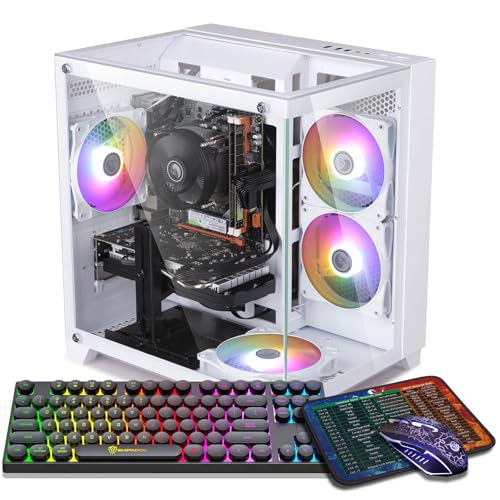
STGAubron Gaming PC, White, Ryzen 5 5500, RTX 3050 6GB, RGB Fan x6
Who it suits: The buyer who wants the whole white-desk photograph on day one — case, lights and peripherals — at a price that is documented, not hoped for.
If the ZER-LON is the performance pick, this is the presentation pick, and it is the most completely white product in the guide. The white case carries six RGB fans — the most lighting hardware documented on any pick here — and the box includes an RGB keyboard and mouse, so the setup on the desk matches the tower beside it without a second purchase. The hardware underneath is the RTX 3050 in its 6GB form on a Ryzen 5 5500, with 16GB of DDR4, a 1TB SSD, Wi-Fi 6 and Bluetooth 5.0. That card is a genuine 1080p card — medium-to-high settings in modern titles, with DLSS doing real work in the demanding ones — and the 6GB of VRAM is its ceiling: texture settings are the first thing you will turn down as games grow.
On positioning, this is a budget-tier pick and the most accessible route to the full white treatment in this guide. Check price on Amazon before you buy, and compare it with the black version of the same machine in the sibling guides: at this card level the white premium is generally small, which is why this is the easiest route to the color here. The standing STGAubron caveats apply in full — the listing does not publish the power supply’s wattage or brand, the RAM speed or the SSD’s interface, so the first-week inspection we recommend for this brand (check the PSU label, confirm the configuration in Windows, keep the box) is part of the purchase, not an optional extra.
- Six RGB fans and an RGB keyboard and mouse included — the complete white setup in one box.
- A budget-tier listing in this guide — check price on Amazon for the current figure.
- Wi-Fi 6 and Bluetooth 5.0 — the best connectivity sheet in this guide.
Honest limitation: The RTX 3050 6GB is a class below the guide’s 4060 and the absent 3060, and the unpublished PSU is the usual STGAubron unknown.
Choose it if the look is the point and 1080p is your resolution — this is the white build as a finished product. Skip it if you will outgrow the 3050 within a year; buy the card you need and let the case follow.

LXZ Gaming PC, White, Ryzen 5 5500, RTX 3050 8GB, 32GB DDR4, 1TB NVMe SSD
Who it suits: The multitasker — streamers-in-waiting, modders, fifty-browser-tabs players — who wants the memory headroom no other white pick at this money documents.
Every other machine in this guide ships with 16GB of system memory. This one documents 32GB, and pairs it with the 8GB version of the RTX 3050 and a 1TB NVMe drive, in a white case. Both upgrades are the quiet, durable kind. The 8GB card holds texture settings the 6GB card cannot, which is the difference between the 3050 aging gracefully and aging loudly; and 32GB of RAM is the specification you feel every day — game plus Discord plus browser plus recording software — rather than the one you benchmark once. The Ryzen 5 5500 underneath is the same six-core found across this guide, and at 1080p it is not the limiting factor; the 3050 is, in either of its forms, a 1080p card that wants DLSS help in the heaviest current releases.
Two cautions define this pick, and both are about the listing rather than the machine. First, this listing family mixes its variants: data for a different configuration — an Intel i5-12400F with an RTX 4060 — appears within the same listing family’s pages, so the configuration in your cart must be checked line by line against the headline (Ryzen 5 5500, RTX 3050 8GB, 32GB, 1TB, white) before you pay, and again on arrival. Second, prices for this exact configuration change often, so check price on Amazon before you plan around it. Treat the live price as the pick’s condition: when it falls within this budget, the specification justifies it; when it is priced in a higher tier, the ZER-LON’s graphics card is the better spend.
- 32GB of DDR4 — double the memory of every other pick in this guide.
- The 8GB RTX 3050 — the version of the card that ages better at 1080p.
- 1TB NVMe storage, matching the guide’s best.
Honest limitation: The listing family mixes variants, including a different CPU and card — the cart check is mandatory, so check price on Amazon for this exact configuration.
Choose it if you run a heavy desktop alongside your games and the live price — check price on Amazon — falls within this budget. Skip it if the cart shows any configuration other than the headline one, or the price has drifted toward the 4060’s territory.

LXZ Gaming PC, White, Ryzen 5 5500, RTX 3050 8GB, 16GB DDR4, 512GB NVMe SSD
Who it suits: The value hunter who wants the 8GB version of the 3050 in white, without paying for the 32GB configuration above.
This is the same white formula as the pick above it, trimmed to the essentials: Ryzen 5 5500, the RTX 3050 in its 8GB form, 16GB of DDR4 and a 512GB NVMe SSD, in the white case of LXZ’s R5go line. The grading logic is simple. Between the two memory sizes of the 3050, the 8GB card is the one to own — the extra VRAM is headroom that texture settings will spend over the next few years — and between the two LXZ configurations, this is the one that does not charge you for RAM you may not need. Sixteen gigabytes remains the working standard for a gaming-only machine, and the money saved against the 32GB build is money that can go to the monitor, the desk, or the second drive this one’s smaller SSD will eventually ask for.
The trade is printed in the specification: 512GB is half the storage of the guide’s 1TB picks, and with modern game installs routinely passing 100GB, it is a working constraint from the first month, not a distant one — budget for a second drive or be disciplined about the library. The pricing discipline matches the pick above: check price on Amazon for this exact listing before you buy. LXZ’s 3050 systems are the budget end of the white market, and this pick earns its place if — and only if — the live price falls within this budget with the headline configuration in the cart. As with its sibling, confirm the style on the live listing: this brand’s listing families are wide, and similarly named machines differ in storage, power supply and graphics.
- The 8GB RTX 3050 — the right version of the card — in a verified white case.
- 16GB DDR4 and a Ryzen 5 5500 — the standard, sufficient gaming platform.
- The leanest route to the 8GB card in white, if the live price cooperates.
Honest limitation: 512GB fills fast at modern install sizes, so check price on Amazon first — fitting this budget is a condition of the pick, not a given.
Choose it if gaming is the whole job and the live price falls within this budget — check price on Amazon. Skip it if you multitask heavily (the 32GB build above is yours) or it is priced like the ZER-LON above.

LXZ Gaming PC, Sea View White, Ryzen 5 5600GT, 16GB DDR4, 1TB NVMe SSD
Who it suits: The patient builder at heart — someone who wants the white showcase case now and the graphics card when the right deal or the right card arrives.
Read this pick’s specification carefully, because its most important line is the one that is not there: there is no discrete graphics card. The Ryzen 5 5600GT renders games on its integrated Radeon graphics, which independent listing analysis of this exact machine confirms — it is a platform, not a finished gaming PC. What the integrated chip does is real but bounded: esports titles and older games at 1080p on modest settings, the everyday desktop without a stutter, and a machine that is fully usable from the day it arrives. What it does not do is modern AAA gaming, and no setting changes that; the card-shaped hole in this build is the purchase you still have to make.
So why is it here? Because the case is the point, and this one’s case is the best-documented white showcase in the guide: a white tempered-glass “sea view” design — the panoramic style that wraps the view around the front corner — on a budget-tier platform machine — check price on Amazon before you buy. The rest of the platform is honestly specified: 16GB of DDR4, a full 1TB NVMe drive, Wi-Fi, and the 5600GT’s six Zen 3 cores, which will not bottleneck a mid-range card added later. The logic is the review: as the budget-tier platform in this guide, this pick leaves genuine room in the budget for the graphics card that completes it — at which point you own a white build with a better card than any finished 3050 machine here, assembled in two stages. Bought as a finished product, it disappoints. Bought as stage one, it is the smartest white purchase in the guide.
- White tempered-glass sea-view case — the best-documented white showcase here.
- A budget-tier platform — check price on Amazon for the current figure.
- 1TB NVMe and a six-core Zen 3 platform ready to receive a real card.
Honest limitation: No discrete graphics card. Integrated graphics means esports and older titles until you buy one — that purchase is a separate, second-stage cost.
Choose it if you are happy to add a graphics card as stage two and want the case to be the keeper. Skip it if you need one box, finished, that plays everything on day one — that is the STGAubron above.

STGAubron Gaming PC, White, Ryzen 7 5700X, RTX 3060 12GB — the deal-watch exception
Who it suits: The reader this whole search is really for — the one who wants the resident card of this tier, the RTX 3060 12GB, in a white case — and who deserves an honest account of where that combination sits.
Start with what this machine is, because on paper it is the best-balanced PC in the guide. The Ryzen 7 5700X is the strongest CPU here — eight cores against everyone else’s six — and the RTX 3060 12GB is the card the black-case guides at this tier are built around: proper 1080p at high settings, the most VRAM in this guide, and a maturity that makes it the safe long-term hold of the 30-series. The white case carries four RGB fans, with Wi-Fi 6 and Bluetooth 5.2, 16GB of DDR4 and a 1TB SSD. As a white build it grades the same way as its sibling below it in price: white case and lighting documented, internals’ colors unpublished. If this machine sat within this budget, it would be the first pick in this guide and most of the others would be footnotes.
It sits in a higher tier — check price on Amazon for the current figure. The white premium at this card level is large, and that is why this pick is labeled an exception rather than a recommendation: we include it because a guide to white PCs at this budget that never mentions the white 3060 would leave readers to find it alone and assume its positioning was a mistake. It is not — it is simply what the color currently costs at this card. The rule is absolute: buy it only if its live price falls within this budget, or buy it knowingly as a higher-tier purchase with the premium understood. Everyone else should take the black machine’s deal, or the ZER-LON’s newer card, and let the color go.
- RTX 3060 12GB — the most VRAM in this guide and the tier’s resident card, in white.
- Ryzen 7 5700X — the only eight-core CPU here.
- Wi-Fi 6, Bluetooth 5.2, 1TB SSD — the full specification, nothing trimmed.
Honest limitation: It is a higher-tier, deal-watch listing — check price on Amazon — not a pick that normally sits within this budget.
Choose it if its live price falls within this budget, or you have decided the color is worth a substantial premium over the black equivalent. Skip it if you are stretching into a higher tier — at that level, the higher-tier guides buy a faster PC.

Comparison Table
| Product | Graphics | Best use | Link |
|---|---|---|---|
| ZER-LON Gaming PC, Ryzen 5 5500, RTX 4060, White | RTX 4060 8GB | Best graphics card in white — check price on Amazon | Check on Amazon |
| STGAubron Gaming PC, White, RTX 3050 6GB | RTX 3050 6GB | The complete white package, peripherals included | Check on Amazon |
| LXZ Gaming PC, White, RTX 3050 8GB, 32GB | RTX 3050 8GB | Memory and storage headroom for multitaskers | Check on Amazon |
| LXZ Gaming PC, White, RTX 3050 8GB, 512GB | RTX 3050 8GB | The lean value route to the 8GB card | Check on Amazon |
| LXZ Gaming PC, Sea View White, Ryzen 5 5600GT | Integrated Radeon (no card) | A white platform to finish with your own GPU | Check on Amazon |
| STGAubron Gaming PC, White, RTX 3060 12GB | RTX 3060 12GB | The white 3060 — higher-tier deal-watch; check price on Amazon | Check on Amazon |
How to Choose a White Gaming PC Under $700
- Decide what “white” has to mean before you shop. At this budget the documented offer is a white case, in one pick a white glass showcase, with standard dark internals. If a white case over black parts satisfies the desk you are picturing, this guide is your market. If it has to be white all the way through — board, card, cables — that build does not exist as a verified prebuilt at this budget, and your honest options are a DIY build or a bigger budget.
- Buy the graphics card first and the color second. The card decides what the PC is for the next four years; the case decides what it looks like on day one. Within this guide the order is 4060, then 3060 12GB, then 3050 8GB, then 3050 6GB — and the white market’s prices will constantly tempt you to invert it. Resist in proportion to how long you keep PCs.
- Price the color explicitly. For any white machine you are considering, find its black equivalent and write down the difference. The section below does this for the guide’s own picks; the premium ranges from small at the entry cards to substantial at the RTX 3060 level, depending on the card. A tax you have priced is a choice; a tax you have not is a leak.
- Treat live-price-dependent picks as a different product. Some picks here fit this budget only when their live price drops into this tier. For those, the purchase includes the waiting: check price on Amazon, buy only when the live price fits the budget, and have a second choice ready. Never let an expiring deal talk you into paying a higher-tier price.
- Verify the configuration, not the headline. Budget listing families mix variants — this guide documents one family carrying a different CPU and graphics card inside the same listing pages. Check the cart line by line, and check the delivered machine in Windows before the return window closes.
- Interrogate the unpublished layer. Power supply wattage, RAM speed, SSD interface, and the colors of everything inside the case: if the spec table does not publish it, assume the budget version of it. The listings that publish more are worth more, and the reviews above tell you which is which.
- Count VRAM, not just card names. The 3050 exists in 6GB and 8GB forms and the difference is longevity, not launch-day speed. At 1080p the 8GB card holds textures the 6GB card will make you lower. Prefer the 8GB form when the price gap is small — in this guide it often is.
- Budget the second stage honestly. The platform pick is a two-purchase plan: case now, card later. Price the whole plan — including the card you actually intend to add — before comparing it with finished machines. A platform plus a card you never buy is the most expensive outcome in this guide.
The White Tax, Priced
Every niche has its premium, and this one follows a clear pattern because the sibling guides cover the black equivalents of these same machines. At the RTX 3050 6GB level, the premium is small: the white STGAubron and its black counterpart sit in the same budget tier, making this the easiest card level at which to buy the color. At the RTX 4060 level the premium is mostly timing: black 4060 towers fit this budget in rotation, while the white listing fits it far less often. You pay in patience more than in positioning.
At the RTX 3060 12GB level, the premium becomes a wall. The black STGAubron 3060 machine belongs to this tier; its white counterpart, with a stronger CPU, belongs to a higher tier — check price on Amazon for the current figure. There is no technique that avoids this — no variant or seller in the verified record positions the white 3060 alongside the black version’s tier. So the guide’s structure is the honest answer to the premium: take the 4060 when its live price fits this budget if graphics come first, take the 3050s if the finished white look comes first, take the platform if you want to build toward the look, and treat the white 3060 as what it currently is — a higher-tier PC, not a fit for this budget.
Keeping a White PC White
A white case is a maintenance commitment in a way a black one is not, and it is better to accept the terms before the box arrives. None of the six listings in this guide publishes a finish warranty or a white-specific care guide, so what follows is the general discipline of the color, stated as guidance rather than as any maker’s promise. Dust is the daily reality: it settles on fan blades, filters and the case floor, and on white surfaces it is visible in a way that grey-on-black never is — which is an argument for the color as much as against it, since a white build shows you the cleaning it needs instead of hiding it until the thermals complain. A soft brush and a can of air on a monthly rhythm, with filters washed or vacuumed as your case design allows, keeps a white interior looking new; let it go for a year and the build photographs like a smoker’s keyboard.
The slower enemy is light. White plastics and paints, as a general material behavior, can yellow gradually under years of ultraviolet exposure, and a case that lives in direct sun ages unevenly — the lit side first. Keep a white PC out of sustained direct sunlight and the finish holds; the glass that shows off the build also shows fingerprints and smudges that a steel panel hides, so expect the side panel to join the monitor in your screen-cloth routine. None of this is a reason to avoid the color — white builds that are kept look better at three years than black builds that are ignored — but it is a real, recurring cost in minutes, and at this budget it is the one part of the white tax that never goes on sale.
What $700 in White Does Not Buy
It does not buy 1440p as a native resolution. The 4060 pick reaches 1440p through DLSS upscaling in supported games, which is a good experience and a different claim; the 3050s are 1080p cards, and the platform pick plays esports and older titles on integrated graphics until it grows a card. It does not buy ray tracing as a headline feature — the 30-series cards trace rays the way a bicycle climbs hills, legally and slowly, and the 4060’s frame generation is the only modern display feature in the guide. It does not buy the all-white interior described in the introduction. And it does not buy the established brands: the white market at this price is Amazon-native integrators, whose support is a storefront and a return window rather than a national service network — which is why every review above treats the first-week inspection as part of the purchase. Buy any of these machines for what they verifiably are, and they are good value wearing a good color. Buy them for what the photographs imply, and the gap will find you.
Common Buying Mistakes
- Assuming a white case means white internals. The spec tables here publish case color only; shrouds, cables and boards are standard parts, usually dark. Check listing photos for the interior before you order, not after you unbox.
- Paying a higher-tier price for the white 3060 while expecting it to fit this budget. The tax is documented; paying it unknowingly is the mistake, not paying it at all.
- Buying a budget-dependent pick at a higher-tier price because a promotion ended. A ZER-LON priced above this tier is a different purchase from one that fits this budget, and the review’s walk-away rule is the product.
- Choosing the 6GB 3050 over the 8GB to save a small gap. VRAM is the one specification you cannot upgrade later on the same card; the saving evaporates the first time a texture setting forces itself down.
- Skipping the cart check on a mixed listing family. One family in this guide carries a different CPU and graphics card within its own pages; the headline is a claim, the cart is the contract.
- Buying the platform pick as a finished PC. It has no graphics card. That is stated in its title block, its review and its comparison row — and it is still the most common way this category disappoints.
- Judging white builds by launch-day photographs. The color’s cost is maintenance over years; a buyer who will not dust a case should buy the black one and spend the difference on the card.
- Ignoring the unpublished power supply. Two brands in this guide do not state wattage; a PSU you cannot identify is a ceiling on every future upgrade, and it should be priced into the decision.
Final Recommendation
- Best graphics card in white: ZER-LON Gaming PC, RTX 4060 — buy when its live price fits this budget; check price on Amazon.
- Best finished white build: STGAubron Gaming PC, White, RTX 3050 6GB — the complete package, peripherals included.
- Heavy multitaskers: LXZ Gaming PC, White, RTX 3050 8GB, 32GB — if the cart and price check out.
- Patient upgraders: LXZ Sea View White 5600GT — the case now, the card as stage two.
- The one you actually want: STGAubron White RTX 3060 12GB — buy it only if its live price fits this budget, or pay the premium knowingly.
Our top two are the ZER-LON and the STGAubron 3050, because they represent the two honest ways to spend this budget in this color: graphics first, waiting for the live price that makes a current-generation card possible in white; or the look first, in a finished package that sits comfortably within this tier. Between them they cover most readers of this search. If your budget is genuinely flexible, the disciplined move is not stretching to the higher-tier white 3060 — it is to read Best White Gaming PC Under $800 and see what the next tier does to the tax, or to step sideways to Best RGB Gaming PC Under $700, where the same money buys more card in a black case with better lighting. And if the white build is a first PC for someone else, Best White Gaming PC For Beginners Under $700 grades these same machines on support and simplicity instead of specification. Decide what the color is worth to you, in dollars, before you open a single listing — the listings are counting on you not to.
Frequently Asked Questions
Can you really buy a white gaming PC for under $700?
Yes — with the definition made precise. A white-cased gaming PC with a real graphics card exists within this budget: the RTX 3050 machines in this guide sit in this tier, and an RTX 4060 machine joins them when its live price falls into this tier — check price on Amazon. What does not sit in this tier in the verified record is the white RTX 3060 12GB, or any prebuilt that documents white internals. The case is buyable at this budget; the full snow build is not.
How much extra does white cost compared with the same PC in black?
It depends on the card. At the RTX 3050 6GB level, the premium is small — the white and black versions of the same STGAubron machine sit in the same budget tier. At the RTX 4060 level, it is mostly patience — black listings fit this budget far more often than the white one does. At the RTX 3060 12GB level, the premium is substantial, pushing the white machine into a higher tier. The premium is small on the cards you settle for and large on the card you want, which is the whole economics of this niche.
Are the insides of these PCs white too?
Not that any listing documents. The six spec tables publish the case color and stop there; graphics card shrouds, power supply cables and motherboards are not color-specified, and budget integrators build from standard — usually dark — parts. Through the glass, expect a white case around a conventional interior, lit by the fans. If interior color decides your purchase, study the listing photographs closely, because the photographs are the only place it is documented at all.
Is the RTX 3050 enough for modern games?
At 1080p, yes, with the version mattering. The 8GB card plays modern titles at medium-to-high settings with DLSS assistance and holds its textures as games grow; the 6GB card plays the same games today with texture settings as its first compromise. Neither is a 1440p-native or ray-tracing card, and both are outclassed by the 4060 in this guide — which is why the 4060 pick, when its live price fits this budget, is the performance answer and the 3050s are the finished-look answer.
Why is there a PC with no graphics card in a gaming PC guide?
Because in the white niche, the case is a product in its own right, and this one is the best-documented white showcase case among the budget-tier picks in this guide — a finished, working computer with a six-core processor and 1TB of storage. Check price on Amazon before you buy. It plays esports and older games on integrated graphics today, and it becomes the best white build here the day a mid-range card goes into it. It is labeled as a platform in every place it appears; buy it as stage one of two, or do not buy it.
Will a white case stay white?
With ordinary care, yes. Dust shows on white surfaces sooner than on black, so the cleaning rhythm matters — a monthly brush and air pass keeps the interior bright — and white plastics and paints can yellow slowly under years of direct ultraviolet light, so a desk away from sustained sun is the other half of the discipline. No listing in this guide publishes a finish warranty, so treat upkeep as your own contract with the color.
Should I just buy the black version and save the money?
If the PC lives under a desk, yes — the black equivalents in Best 1080p Gaming PC Under $700 buy you a stronger card ladder at the same money, and nobody sees a case under a desk. If the PC lives on the desk, in frame, in a room you have styled around it, the white premium at the 3050 level is genuinely small and the platform route is genuinely smart. The only wrong answer is paying the 3060-level tax by accident.
- Best White Gaming PC Under $700
- Best White Gaming PC Under $500
- Best White Gaming PC Under $800
- Best White Gaming PC For Beginners Under $700
- Best White Gaming PC For Streaming Under $700
- Best White Gaming PC For Small Spaces Under $700
- Best White Gaming PC For 1440p Gaming Under $700
- Best Gaming PC Under $700
- Best Prebuilt Gaming PC Under $700
- Best Budget Gaming PC Under $700


