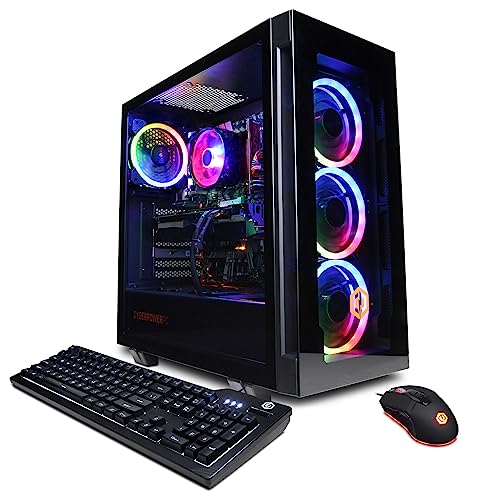
Where to buy
Check the latest price, availability and delivery on Amazon. Orders are placed on Amazon. We may earn a commission from qualifying purchases.
- Best first streaming PC if you catch the sale: CyberPowerPC Gamer Xtreme VR, Intel Core i7-13700F, GeForce RTX 4060 Ti 16GB — Check on Amazon
- iBUYPOWER Scale, AMD Ryzen 5 7600, GeForce RTX 4060 Ti 8GB — Check on Amazon
- CyberPowerPC Gamer Master, AMD Ryzen 7 8700F, GeForce RTX 4060 Ti 8GB — Check on Amazon
- Thermaltake LCGS Quartz i1460, Intel Core i5-14400F, GeForce RTX 5060 — Check on Amazon
See 2 more Amazon options
- Skytech Blaze4 Mini, AMD Ryzen 7 5700, GeForce RTX 4060 Ti 8GB — Check on Amazon
- Skytech Archangel, Intel Core i5-14400F, GeForce RTX 4060, 32GB DDR5, 2TB SSD — Check on Amazon
Read the full guide ↓
Disclosure: As an Amazon Associate, reviewstook.com earns from qualifying purchases. Links to Amazon on this page are affiliate links; they cost you nothing extra. Listing details such as price and availability change often, so check the current Amazon listing before you buy.
If this is your first streaming PC, here is the honest starting point: you do not need to build anything, you do not need two computers, and you do not need to understand most of the words on a spec sheet before you buy. Every machine here is a finished tower from a known maker: unbox it, plug in a monitor, a keyboard and an internet cable, and by the end of one evening you can be live. What streaming asks of a computer is simpler than the marketing makes it sound: play your game, and at the same time turn it into a smooth video feed for viewers. The trick that lets one modestly priced machine do both is a small piece of hardware inside the graphics card called an encoder — every pick below has a good one, and that single fact is most of what separates a streaming PC from an ordinary gaming PC at this price.
Two honest warnings belong up front. First, prices on ready-made PCs swing a lot — the strongest machine here only fits this guide when its current listing sits within the budget, so check the current price on Amazon before you decide. Second, no PC on this page comes with a camera, a microphone or a capture card; a section near the end lists what else a first stream needs, in buying order, starting with a monitor. Everything else is written for a true beginner: jargon translated in a glossary, setup as a numbered first-evening walkthrough, and every limitation stated in the open — including the one pick that needs a small extra part bought alongside it.
In this guide
Quick Picks
Short on time, or comparing several options at once? Each row below names a beginner situation and the PC that suits it, with a link to the listing.
| Your situation | Pick | Why it stands out | Link |
|---|---|---|---|
| Best first stream, bought on sale | CyberPowerPC Gamer Xtreme VR, Core i7-13700F, RTX 4060 Ti 16GB | The most graphics memory and the most processor cores here — check the current price on Amazon and buy only when it sits within this budget | Check on Amazon |
| Buy it today, no sale-watching | iBUYPOWER Scale, Ryzen 5 7600, RTX 4060 Ti 8GB | A straightforward pick within this guide’s budget; keyboard and mouse in the box — check price on Amazon | Check on Amazon |
| Lots of apps open while you stream | CyberPowerPC Gamer Master, Ryzen 7 8700F, RTX 4060 Ti 8GB | Eight modern cores to share between the game, OBS, chat and everything else | Check on Amazon |
| Newest parts, nothing to figure out | Thermaltake LCGS Quartz i1460, Core i5-14400F, RTX 5060 | The newest encoder generation, and the power supply size is printed in the open | Check on Amazon |
| Patient, and happy to wait for a dip | Skytech Blaze4 Mini, Ryzen 7 5700, RTX 4060 Ti 8GB | A full streaming rig that sits at the lower end of this band when it dips — check the current price on Amazon | Check on Amazon |
| You record everything you play | Skytech Archangel, Core i5-14400F, RTX 4060, 32GB DDR5, 2TB SSD | Double the memory and double the storage of the others, for recordings and big libraries | Check on Amazon |
How These Picks Were Chosen
One rule did most of the work: the graphics card had to contain NVIDIA’s NVENC encoder. That hardware block turns your gameplay into the stream, and because it sits on the graphics card doing its own job, it barely touches the parts your game is using. A PC without it must squeeze the stream out of the main processor at the same moment the game wants that processor — the fight that makes cheap first streams stutter. Every pick here — RTX 4060, 4060 Ti or 5060 inside — has NVENC, and all can also encode the newer AV1 format YouTube accepts today and Twitch is adding. Machines with stronger-sounding gaming specs but no proper encoder were left out on purpose: they answer a different question than the one you searched for.
After the encoder, we checked the supporting cast in beginner terms. The processor needed enough cores to run the game plus OBS, a chat window, a browser and your alerts without complaint — the picks here run from six cores to sixteen. Memory and storage were judged by what a new streamer actually does: 16GB of memory is the sensible floor, and the one machine with 32GB and a 2TB drive earned its place because recording eats space faster than anyone expects. We did not test these PCs ourselves; we read the makers’ listings and specification pages and compared published configurations. Where a listing keeps something quiet — the power supply size, whether the memory arrives as one stick or two — the review says so instead of guessing, and for every pick you should check the current price on Amazon on the day you shop.
The Words on the Box, in Plain English
Thirteen terms explain nearly every line of a streaming PC listing. Read this once and the reviews below will read like ordinary sentences.
- Streaming (going live). Sending live video of your gameplay over the internet while you play, so people watch as it happens instead of afterwards.
- OBS. The free program almost every streamer uses to broadcast: it mixes your game, camera, microphone and on-screen alerts into the single picture viewers see. It comes from the internet, not in the PC’s box.
- Encoder, and NVENC. The encoder squeezes your gameplay into a stream small enough to send. NVENC is NVIDIA’s encoder, a small dedicated block inside the graphics card; because it is separate hardware, your game keeps nearly all of the card’s power for itself. It is the single most important streaming feature in this guide.
- Bitrate. How much data your stream sends each second, measured in kbps. Twitch’s standard recommendation is 6,000 kbps, and the common rule is to keep your bitrate under about three-quarters of your measured upload speed — so a 6,000 kbps stream wants roughly 8 Mbps of reliable upload, on a cable, not Wi-Fi.
- Graphics card (GPU) and VRAM. The card draws your game on screen. VRAM is the card’s own private memory, in gigabytes; the game and the stream both draw from it. Eight gigabytes is workable for this guide’s job — playing at 1440p, streaming at 1080p — and the one 16GB card here exists for players who never want to think about it.
- Processor (CPU) and cores. The PC’s general-purpose brain. Cores are its parallel work lanes: more cores means the game, OBS, chat and a browser can all run at once without queueing. These picks have between six and sixteen.
- RAM (memory). The PC’s short-term workspace, separate from the graphics card’s VRAM. Sixteen gigabytes is the floor for streaming; memory often arrives as one stick or two, and two matching sticks (called dual-channel) run faster than one — one pick below ships with a single stick, and its review treats the second stick as part of the purchase.
- SSD (storage). Where games, Windows and your recordings live, measured in gigabytes or terabytes (1TB is about 1,000GB). All six picks use fast SSD storage, so games load quickly; the question is only how much room your recordings get.
- Refresh rate (Hz). How many times per second your monitor redraws the picture. Gaming monitors are usually 144Hz or more, but Windows often leaves a new PC at 60Hz until you change it — the walkthrough below includes that two-minute fix.
- Integrated graphics, and the letter F. Some processors include a tiny built-in graphics chip, so the sockets on the motherboard can show a picture. Intel and AMD processors with an F in the name — the 13700F, 8700F and 14400F in this guide — have no such chip. On those machines the motherboard’s video sockets are simply dead: the monitor cable must go into the graphics card, and there is no fallback if the card is ever removed. Four of the six picks work this way, and the walkthrough flags it at the right step.
- Prebuilt, renewed and barebone. A prebuilt is a complete, new PC assembled by a maker — what all six picks are. Renewed means second-hand and refurbished; barebone means a partial kit you finish with your own parts. To state it plainly: none of the six picks in this guide is renewed, and none is barebone. Every one arrives new, complete and ready to use.
- Soldered versus socketed. Soldered parts are fixed to the board at the factory and can never be changed; socketed parts sit in slots and can be swapped later. Laptop-style mini PCs often solder their memory. These six are full-size towers with socketed memory and storage — none of them has soldered memory or storage — which is why the upgrade notes below can talk about adding parts at all.
- Power supply (PSU). The box inside the PC that feeds electricity to everything else, rated in watts; its size decides whether a stronger graphics card can be fitted later. Three picks below publish their wattage. Where a maker does not, this guide will not promise a graphics upgrade — it will tell you to read the label on the unit when it arrives.
The 6 Best Streaming PCs for Beginners Under $1,200
CyberPowerPC Gamer Xtreme VR — Core i7-13700F, GeForce RTX 4060 Ti 16GB, 16GB DDR5, 1TB NVMe SSD (Model GXiVR8040A14)
Who it suits: A beginner who wants to buy once and stop thinking — the most headroom in the guide for both the game and the stream — and who can wait for the right moment instead of buying this week.
Beginners usually worry about the wrong number on a graphics card, so start with the one that matters here: this RTX 4060 Ti carries 16GB of VRAM, twice what the other cards in this guide hold. Your game uses that memory to hold its world, and your stream uses some of it too; with sixteen gigabytes the two never have to negotiate, and texture settings stay where the game puts them. The encoder is the same NVENC block as the other 4060 Ti picks, so the broadcast side is fully solved, and behind it sits a sixteen-core Core i7-13700F — the most cores here by a distance. OBS, the game, a browser of dashboards, a voice chat and a recording can all run together, and the processor treats the pile as light work. It is also the only pick whose listing documents its monitor sockets in full: one HDMI and two DisplayPort — a gaming monitor, a second screen for chat, and one to spare.
Now the condition, because there is one and it decides everything: this PC only belongs in this under-$1,200 guide when its current listing sits within that budget. Check price on Amazon, and if the listing sits outside this budget, do not buy it from this guide — wait, or choose a pick below that fits. Two smaller unknowns are worth knowing. The verified listing material does not confirm whether the 16GB of memory arrives as one stick or two; two sticks run faster, so check the listing, and if it ships with one, plan on a matching second stick. And CyberPowerPC does not headline the power supply wattage for this model, so no future graphics-swap promise is made for it here — the wattage is printed on a label on the unit itself, and any upgrade plan starts from that label. One setup note: the 13700F has no integrated graphics, so the monitor cable goes into the graphics card, never the motherboard — the walkthrough covers it.
- 16GB of VRAM — double the room for the game and the stream to share.
- Sixteen-core processor: the game, OBS, chat, browser and a recording all at once.
- Monitor sockets documented in the listing: one HDMI, two DisplayPort.
Honest limitation: It fits this budget only when its current listing sits within it — check the current price on Amazon — and its memory layout and power supply size are not confirmed in the verified listing material.
Choose it if you check price on Amazon and it sits within this guide’s budget, and you want the questions about power closed for years. Skip it if its current listing sits outside this budget when you shop — in that case the iBUYPOWER below is the sensible buy.

iBUYPOWER Scale — AMD Ryzen 5 7600, GeForce RTX 4060 Ti 8GB, 16GB DDR5, 1TB NVMe SSD (Model SCA5N46T01)
Who it suits: A beginner buying this week, without depending on catching a sale — and who does not mind one small, planned extra purchase.
If the CyberPowerPC above is a sale-hunt, the Scale is the opposite: it is a straightforward pick within this guide’s budget, so you can simply buy it — check the current price on Amazon first. What arrives is the streaming formula with nothing exotic about it: the same RTX 4060 Ti and NVENC encoder as the top pick, in its 8GB form, which handles this guide’s target — play at 1440p, stream at 1080p — with texture settings kept sensible. The Ryzen 5 7600 is a six-core processor on AMD’s current AM5 platform, and six modern cores are enough for a first stream precisely because the encoder is doing the heavy lifting elsewhere. The listing includes a keyboard and mouse and documents a one-year warranty, and the AM5 platform means newer processors can drop into this same motherboard years from now.
The one catch is printed in the listing itself: the 16GB of memory arrives as a single stick. One stick runs in slower single-channel mode, and CPU-sensitive games feel it. Treat the Scale as the machine plus a second matching stick of DDR5-5200 — the pair restores dual-channel mode and takes you to 32GB in the same move. Memory is a fast-moving part of the market right now, so check the stick’s current price on Amazon rather than trusting any printed figure. Even with the stick added as a planned second purchase, this remains a straightforward buy within this tier — and this one’s platform has years of upgrades ahead of it. Buy it as a pair of purchases and it is the most straightforward first streaming PC in this guide.
- Sits within this guide’s budget as a straightforward buy — check price on Amazon, no sale timing needed.
- Same NVENC encoder as the top pick, with AV1 for YouTube.
- Keyboard and mouse included; one-year warranty documented; AM5 platform upgrades later.
Honest limitation: The memory ships as one stick, so the honest purchase is the PC plus a matching second stick to unlock dual-channel speed.
Choose it if you want to buy today without watching for a sale. Skip it if you will never add the second stick — you would be leaving performance you paid for sitting on the table.

CyberPowerPC Gamer Master — AMD Ryzen 7 8700F, GeForce RTX 4060 Ti 8GB, 16GB DDR5, 1TB NVMe SSD (Model GMA2900A)
Who it suits: A beginner whose desk is already busy — lots of browser tabs, animated alerts, a recording running, friends in a voice call — and who wants extra processor room on a current platform.
The difference between this machine and the Scale is two extra cores, and for streaming they are not decoration. The Ryzen 7 8700F is an eight-core processor on a B650 motherboard — AMD’s current AM5 platform — and the extra lanes absorb everything a growing stream piles onto one PC while the game runs. The graphics side repeats the guide’s proven formula: an RTX 4060 Ti whose NVENC encoder builds the stream, 8GB of VRAM for 1440p play with sensible textures, fast PCIe Gen4 storage and DDR5 memory throughout. For this exact configuration, check the current price on Amazon — it is positioned in the middle of this guide’s band for eight cores and this card.
Two cautions, one small and one that matters. The small one: the 8700F, like the Intel F-models here, has no integrated graphics. For streaming that costs almost nothing — the RTX card runs every screen and does the encoding — but the motherboard’s video sockets are dead, and if the card ever comes out for repair, the PC shows no picture until it goes back in. The bigger caution is the name on the box: CyberPowerPC also sells Gamer Master machines with newer RTX 5060 Ti graphics under lookalike model numbers — GMA2900A2 and GMA2900A3 — positioned above this guide’s band. Those are different PCs, not this pick. Before buying, read the listing until you can see the contract in one line: Ryzen 7 8700F, RTX 4060 Ti 8GB, model GMA2900A. Prefer the Amazon-sold listing for this exact configuration, and check the current price on Amazon before you order. The verified material does not publish this model’s power supply wattage, so no graphics-upgrade promise is made for it here — check the label on the unit when it arrives.
- Eight cores on the current AM5 platform — the most multitasking room in this band here.
- The proven RTX 4060 Ti streaming formula, NVENC and AV1 included.
- Positioned in the middle of this guide’s band from Amazon itself — check price on Amazon.
Honest limitation: No integrated graphics (the F in 8700F), and the Gamer Master family now includes pricier 5060 Ti lookalikes — the model number on the listing has to match GMA2900A.
Choose it if your stream runs a busy desktop beside the game. Skip it if the listing in front of you names a different model number or sits well above this guide’s band — that is a different PC wearing a similar name.

Thermaltake LCGS Quartz i1460 — Intel Core i5-14400F, GeForce RTX 5060, 16GB DDR4, 1TB NVMe SSD (Model S2QT-B760-560-LCS)
Who it suits: A beginner who likes the idea of the newest version of the one part streaming depends on — the encoder — in a machine whose full specification is published, power supply included.
Every other pick in this guide encodes on NVIDIA’s previous-generation NVENC; this one’s RTX 5060 carries the newer Blackwell-generation encoder, with AV1 support and the refinements of the newer design. Since the encoder is the component a streaming PC is actually bought for, owning the current generation is the closest thing this category has to future-proofing. The rest of the machine is complete: a ten-core Core i5-14400F (six performance, four efficiency cores) splits the game-plus-OBS workload comfortably, and the card’s DLSS 4 multi frame generation can smooth the picture in supported games — with the caveat repeated wherever this guide mentions it: generated frames smooth motion but do not reduce the delay between your hands and the game, so competitive players will switch it off. Thermaltake also publishes what rivals leave blank: coverage of this configuration documents a 600W 80 Plus Gold power supply. That printed number is why this pick can carry a plain-terms upgrade promise below — a stronger graphics card later is a realistic plan here. For this pick, check the current price on Amazon — it sits in the middle of this guide’s band.
The trade-offs are about the platform, not the stream. This machine pairs its new card with DDR4 memory on a finished Intel socket, so there is no meaningful processor upgrade path — the two AMD picks above can accept new processors for years; this one cannot. For a streaming PC that is a reasonable bargain: by the time the platform feels old, you would be shopping for a new encoder generation anyway, which means a new machine either way. The RTX 5060 is also an 8GB card a step below the 4060 Ti picks in raw gaming power, so the heaviest games at 1440p ask for slightly more sensible settings; the stream it produces — what your audience actually watches — is the best-specified in the guide. And the F rule applies again: the 14400F has no integrated graphics, so the monitor plugs into the card, full stop.
- Newest-generation NVENC encoder with AV1 — the most current streaming hardware here.
- Power supply published: 600W 80 Plus Gold, so a later graphics upgrade is plannable.
- Positioned in the middle of this guide’s band — check the current price on Amazon.
Honest limitation: A finished DDR4 Intel platform with no real processor upgrade path, and a graphics card a step below the 4060 Ti picks for raw 1440p gaming.
Choose it if stream quality and a published spec sheet matter most, and you tend to replace PCs whole. Skip it if you upgrade piece by piece over years — the AMD picks are built for that life.

Skytech Blaze4 Mini — AMD Ryzen 7 5700, GeForce RTX 4060 Ti 8GB, 16GB DDR4, 1TB SSD (Model ST-BLAZE4MINI-1266-B-AM)
Who it suits: A patient beginner. This is the complete streaming formula at the lower end of this guide’s band — if you can wait for a dip, nothing else in the guide comes close on value.
The review really is about timing: this exact configuration is at its most compelling when its current listing dips toward the lower end of this band. In that position, you get an eight-core Ryzen 7 5700, the RTX 4060 Ti with NVENC and AV1, 16GB of memory, a terabyte of storage and a published 650W Gold power supply — every element of the streaming recipe. The streaming division of labor matches the Gamer Master’s: the encoder lives on the card, the eight cores share the game and your apps, and playing at 1440p while sending a 1080p stream is home territory. When its listing sits higher in the band, though, the honest recommendation flips: the Scale becomes the better buy, with a current platform. So this pick comes with a rule — it is the best buy in this guide when it dips, and merely fine when it sits higher in the band. Check the current price on Amazon, set a price alert and let it come to you.
What waiting for a dip asks in return is an older foundation. The Ryzen 7 5700 sits on AMD’s previous AM4 platform with DDR4 memory: capable, well matched to the card, and at the end of its line, with no processor upgrade that does not also mean a new motherboard and memory. For a streaming PC that matters less than it sounds: these machines are usually replaced whole when encoder generations turn. One listing habit to know: Skytech reserves that the graphics card’s brand may vary between units. That is normal for system builders — the model and its 8GB of memory are the contract, and those are what to check on delivery day against model ST-BLAZE4MINI-1266-B-AM.
- The full 4060 Ti streaming formula at the lower end of this guide’s band when it dips — check price on Amazon.
- Eight-core processor and a published 650W Gold power supply.
- Same NVENC and AV1 streaming capability as the other 4060 Ti picks in this band.
Honest limitation: A finished AM4/DDR4 platform, and the value case depends entirely on the dip — when it sits higher in the band, the Scale is the better buy.
Choose it if you can wait and pounce when it dips toward the lower end of the band. Skip it if you are buying this week regardless of where it sits in the band.

Skytech Archangel — Intel Core i5-14400F, GeForce RTX 4060, 32GB DDR5, 2TB SSD (Model ST-ARCH4-1247-W-AM)
Who it suits: A beginner who already knows they will record everything — sessions saved for clips and edits, a growing library of games and footage, and no appetite for upgrading parts later.
Every other pick here ships 16GB of memory and a 1TB drive; this one ships 32GB of DDR5-5600 and a 2TB SSD, and for a recording streamer that difference is the whole point. Recording your broadcasts at stream quality produces tens of gigabytes of footage a week; on a 1TB drive that also holds a modern game library, the two start evicting each other within months, and 2TB ends the argument. The doubled memory does the same quiet work for production: big OBS scene collections, a stack of browser sources, and a video editor open beside the game all stop being a juggling act. That extra memory and storage are a substantial part of what this pick offers in this band, especially while component pricing stays unsettled — check the current price on Amazon to judge the capacity it includes. The streaming core is unremarkable in the best way: the ten-core Core i5-14400F and an RTX 4060 whose NVENC encoder is the same generation, AV1 included, as the 4060 Ti picks. The published 650W Gold power supply earns it a graphics-upgrade promise below, too.
The trade is plain: the plain RTX 4060 is a step below the 4060 Ti, and it shows in the heaviest games at 1440p, where settings get managed rather than maxed — or you play at a fully comfortable 1080p. Your viewers cannot tell, because the stream leaving the encoder is identical either way; what they eventually notice is that your recordings exist and your drive never filled mid-session. The F rule applies here as well — the 14400F has no integrated graphics, so the monitor cable belongs in the graphics card. If your streaming life is play-first and recordings are an afterthought, the 4060 Ti picks spend the budget on frames you will feel; if the PC is a small studio that also plays games, this is the only pick specced like one, and when it dips in the band it can be the bargain of the list — check price on Amazon.
- 32GB of memory and a 2TB drive — double both, sized for recordings and libraries.
- Same NVENC/AV1 encoder as the 4060 Ti picks; ten-core processor behind it.
- Published 650W Gold power supply — check the current price on Amazon.
Honest limitation: The plain RTX 4060 is a step below the 4060 Ti picks for 1440p gaming — the money went to memory and storage instead.
Choose it if your plan is to record every session and edit on the same machine. Skip it if you stream and forget — the Ti picks spend the budget on gaming power instead.

Comparison Table
| Product | CPU | GPU & VRAM | RAM / Storage | Link |
|---|---|---|---|---|
| CyberPowerPC Gamer Xtreme VR (GXiVR8040A14) | Core i7-13700F, 16 cores | RTX 4060 Ti, 16GB | 16GB DDR5 / 1TB | Check on Amazon |
| iBUYPOWER Scale (SCA5N46T01) | Ryzen 5 7600, 6 cores | RTX 4060 Ti, 8GB | 16GB DDR5 (one stick) / 1TB | Check on Amazon |
| CyberPowerPC Gamer Master (GMA2900A) | Ryzen 7 8700F, 8 cores | RTX 4060 Ti, 8GB | 16GB DDR5 / 1TB | Check on Amazon |
| Thermaltake LCGS Quartz i1460 | Core i5-14400F, 10 cores | RTX 5060, 8GB | 16GB DDR4 / 1TB | Check on Amazon |
| Skytech Blaze4 Mini (ST-BLAZE4MINI-1266-B-AM) | Ryzen 7 5700, 8 cores | RTX 4060 Ti, 8GB | 16GB DDR4 / 1TB | Check on Amazon |
| Skytech Archangel (ST-ARCH4-1247-W-AM) | Core i5-14400F, 10 cores | RTX 4060, 8GB | 32GB DDR5 / 2TB | Check on Amazon |
Your First Evening: Setup, Step by Step
None of this needs tools or experience; work down the list in order, and by evening’s end the PC is ready for a first test stream.
- Pick the spot. Put the tower where air can move — on or under the desk, never inside a closed cabinet — and, if you can, within cable reach of your router; step 4 is much easier if the PC already lives near it.
- Power. Plug the power cable into a surge-protected outlet, then flip the small switch on the back of the power supply before pressing the case’s power button. First boots can take a few minutes and may restart once or twice while Windows finishes setting up; that is normal, not a fault.
- Monitor into the graphics card — not the motherboard. Your monitor cable plugs into the sockets on the graphics card, which sit lower on the back of the case in a horizontal row — not into the similar-looking sockets up near the motherboard’s other plugs. This matters doubly here: on four of these six picks (the Gamer Xtreme VR, Gamer Master, Quartz and Archangel), the processor has no integrated graphics at all, so the motherboard sockets are dead and will show a black screen, with no fallback. If you ever get no picture, this cable is the first thing to check. On the Gamer Xtreme VR, the card’s sockets are documented as one HDMI and two DisplayPort; on the other picks, check the card’s sockets in the live listing photo rather than assuming.
- Peripherals and wired internet. Plug in keyboard and mouse (included with the Scale; the others assume you have your own), then run an Ethernet cable from the router to the PC. Wi-Fi is fine for downloads during setup, but your stream should ride the cable: a 6,000 kbps Twitch stream wants roughly 8 Mbps of steady upload, and wired connections hold steady in a way Wi-Fi does not.
- Windows Update, then the graphics driver. Let Windows Update run until it stops finding things, restarting as often as it asks. Then install NVIDIA’s current driver for your card — it keeps the NVENC encoder and your games current, and an out-of-date driver is the most common cause of a first stream misbehaving.
- Set your monitor’s real refresh rate. New PCs usually wake up at 60Hz even when the monitor can do far more. In Windows: Settings, System, Display, Advanced display — choose the highest refresh rate listed. Two minutes, and games feel like the monitor you paid for.
- Check that what arrived is what you ordered. Open Settings → System → About and Task Manager’s Performance tab, and compare the processor, graphics card and memory against your order’s model number: GXiVR8040A14, SCA5N46T01, GMA2900A, S2QT-B760-560-LCS, ST-BLAZE4MINI-1266-B-AM or ST-ARCH4-1247-W-AM. The Gamer Master has pricier lookalike variants, so confirm yours is the 8700F with an RTX 4060 Ti; on the Scale, note the memory so you can order the matching second stick; on the Gamer Xtreme VR, see whether the memory arrived as one stick or two. Thirty seconds on day one beats an argument in month two.
- Install a game store and OBS. Install Steam (or whichever store your games live on) and download one game. Then install OBS and, in Settings under Output, set the encoder to NVENC — that one choice puts the stream on the graphics card’s dedicated block instead of your processor. Set the bitrate to 6,000 kbps for Twitch, and you are ready for a private test stream.
What Else You Will Spend
The PC is the biggest purchase, not the only one; nothing below is included with any pick unless stated, and the honest buying order is the order listed.
- A monitor, first. A PC with no screen is a paperweight, and this guide assumes you may need one. These cards are built to play at 1440p, so a 1440p monitor is the natural partner; a 1080p screen you already own works perfectly well, and the upgrade can wait. Either way, this is extra number one.
- A microphone, second. Viewers forgive a plain picture long before they forgive bad sound. A decent USB microphone improves a stream more than any setting inside OBS, and worthwhile options sit in the accessible part of the microphone range — check the current price on Amazon.
- A camera, third — and only if you appear on screen. A 1080p webcam is the usual choice for a first stream. If you already own a suitable phone or camera, you may spend nothing here.
- A capture card, only for console streaming. Streaming games played on the PC needs no capture card — OBS captures the game directly. Streaming a PlayStation, Xbox or Switch through the PC does, because the console’s picture needs a way in; a proven external card such as Elgato’s HD60 X is the usual bridge. If you only stream PC games, skip this line entirely.
- The Scale’s second memory stick. If you chose the iBUYPOWER Scale, plan it as machine plus fix: the PC plus one matching stick of DDR5-5200 memory. Memory pricing moves quickly, so check the stick’s current price on Amazon on the day you buy rather than budgeting from any number in print.
- Small things. An Ethernet cable long enough to reach the router, and surge protection if your outlets have none. The Scale includes a keyboard and mouse; with the other five, basic peripherals are yours to supply.
How to Choose, as a Beginner
- Start with the encoder. If a PC in this price range does not have an NVIDIA RTX card with NVENC, it is a gaming PC being sold to a streamer. All six picks here pass that test.
- Decide by your buying style. Buying today: the Scale. Buying on a sale: the Gamer Xtreme VR when its current listing sits within this guide’s under-$1,200 budget, or the Blaze4 Mini when it dips toward the lower end of the band. Check price on Amazon for each pick; a pick sitting outside its intended position in the band is a worse purchase wearing the same name.
- Do not pay for pixels the platform throws away. A standard Twitch stream tops out at 1080p60. These machines play at 1440p for your eyes and send 1080p60 to viewers, and that split is correct, not a compromise.
Upgrading Later, in Plain Terms
All six picks are ordinary towers with socketed parts — nothing soldered, nothing sealed — but a graphics-card swap is only promised where the research documents a named power supply in a standard case. That covers three picks: the Thermaltake Quartz (600W 80 Plus Gold, published), the Skytech Blaze4 Mini (650W Gold, published) and the Skytech Archangel (650W Gold, published). On those three, a stronger card later is a genuine plan, sized against the printed wattage. For the Gamer Xtreme VR, the Scale and the Gamer Master, the verified material does not publish a wattage, so no swap is promised here: when the PC arrives, read the label on the power supply inside, and let that number — not optimism — decide what card the machine can feed. Memory upgrades are simpler: the Scale’s second stick is upgrade number one in this guide, and any pick can take more storage by adding another SSD. The two AM5 picks (Scale and Gamer Master) can also accept newer AMD processors in the same motherboard later; the AM4 Blaze4 Mini and the two Intel picks sit on finished platforms, where the honest upgrade is a new machine when the encoder generation turns.
Common Beginner Mistakes
- Plugging the monitor into the motherboard. On four of these six PCs that socket is permanently dead — the processor has no graphics of its own. Card sockets, lower on the back, every time.
- Panicking at a black screen on first boot before checking that cable, and before giving Windows its few minutes to finish setting up.
- Streaming over Wi-Fi because it speed-tests well once. Streams need steady upload for hours, not a good second; run the cable.
- Leaving OBS on its default CPU encoder. Set the encoder to NVENC — offloading the stream to the graphics card is the entire reason these PCs work.
- Paying outside the budget for a sale-dependent pick. The Gamer Xtreme VR is this guide’s top recommendation when its current listing sits within this budget; outside it, it is a different, worse purchase. The Blaze4 Mini has the same rule when it sits higher in the band.
- Ordering the wrong Gamer Master. Lookalike 5060 Ti variants sell under near-identical model numbers and sit above this band. The pick is GMA2900A: Ryzen 7 8700F, RTX 4060 Ti.
- Leaving the Scale’s single memory stick as the final state, and a fast monitor set to 60Hz. Both are five-minute fixes beginners are rarely told about.
- Assuming the PC includes the stream. No camera, microphone or capture card is in any box here; the spending section above is part of the real budget.
Final Recommendation
- Buying today, no fuss: iBUYPOWER Scale — plus its second memory stick.
- Buying on the sale, maximum headroom: CyberPowerPC Gamer Xtreme VR, only when its current listing sits within this guide’s budget — check price on Amazon.
- Busy desktop, current platform: CyberPowerPC Gamer Master.
- Newest encoder, published spec sheet: Thermaltake LCGS Quartz i1460.
- Patient and price-watching: Skytech Blaze4 Mini, in its dip and not when it sits higher in the band.
- Recording everything: Skytech Archangel.
For most beginners the shortlist is two machines. The iBUYPOWER Scale is the one you can buy this week without watching for a sale: the right encoder, a current platform, peripherals in the box, and one clearly explained extra — the second memory stick. The CyberPowerPC Gamer Xtreme VR is the one you set an alert for: when its current listing sits within this budget it closes every question a first streamer could ask, with double the graphics memory and the strongest processor here — but only in that position. Streamers on a tighter ceiling should see Best Streaming PC Under $800; those ready to spend past this tier will find the next step in Best Streaming PC Under $1500. If your search began from gaming, Best Gaming PC For Beginners Under $1200 covers the same first-PC ground from that side. Whichever you choose: cable into the graphics card, Ethernet into the router, encoder set to NVENC, and check the current price on Amazon to confirm the pick sits within this guide’s budget before you order.
Frequently Asked Questions
I have never owned a gaming PC. Can I really set one of these up myself?
Yes. These are prebuilt towers, not kits — nothing inside needs assembling. The first-evening walkthrough above is the whole job: place it, power it, plug the monitor into the graphics card, connect the cable internet, let Windows update, set the refresh rate, check the parts against your order, and install Steam and OBS. An unhurried evening is plenty.
My monitor shows nothing. What did I do wrong?
Almost certainly the cable. On the Gamer Xtreme VR, Gamer Master, Quartz and Archangel, the processor has no integrated graphics, so the motherboard’s video sockets produce no picture at all — there is no fallback output. Move the cable to the graphics card’s sockets, lower on the back of the case, and the picture appears — the most common first-PC scare, and the easiest to fix.
Do I need a capture card to start streaming?
Only if you stream console games through the PC; games played on the PC itself are captured by OBS directly, with no extra hardware. For a PlayStation, Xbox or Switch, a capture card such as Elgato’s HD60 X is the bridge, and it is not included with any PC here.
How fast does my internet need to be?
For Twitch’s standard 6,000 kbps stream, plan on roughly 8 Mbps of reliable measured upload — the working rule is to keep your bitrate under about three-quarters of your upload speed — and run it over an Ethernet cable. Download speed barely matters for streaming; upload stability is the whole game.
Is 16GB of memory enough for a first streaming PC?
Yes, with one footnote: sixteen gigabytes runs the game, OBS and your chat tools comfortably, and five of these six picks ship exactly that. The footnote is the Scale — its 16GB arrives as a single stick, which runs slower than a pair, so its second stick is a planned part of the purchase. If you record and edit heavily, the Archangel’s 32GB removes the question.
Should I build my own PC instead of buying one of these?
Not in the current market. Component pricing is unsettled right now, and building a comparable parts list is rarely the straightforward saving it can be in calmer periods, as worked through in Best Gaming PC Build Under $1200. A prebuilt also gives you one warranty and one box to return if anything is wrong on day one.
Which pick should I choose if I never want to open the case?
The Archangel comes closest to never needing it: 32GB of memory and a 2TB drive are already fitted, and its power supply is published if a shop ever fits a card for you. The Scale is the opposite case — a fine machine whose one planned upgrade, the second memory stick, does mean opening the side panel once, a five-minute job on most towers.
- Best Streaming PC Under $1200
- Best Streaming PC For Beginners Under $1200
- Best Streaming PC For Beginners Under $800
- Best Streaming PC For Beginners Under $1500
- Best Streaming PC For 1440p Gaming Under $1200
- Best Streaming PC For Small Spaces Under $1200
- Best Prebuilt Gaming PC For Beginners Under $1200
- Best Prebuilt Gaming PC Under $1200
- Best Budget Gaming PC Under $1200
- Best Gaming PC Under $1200


