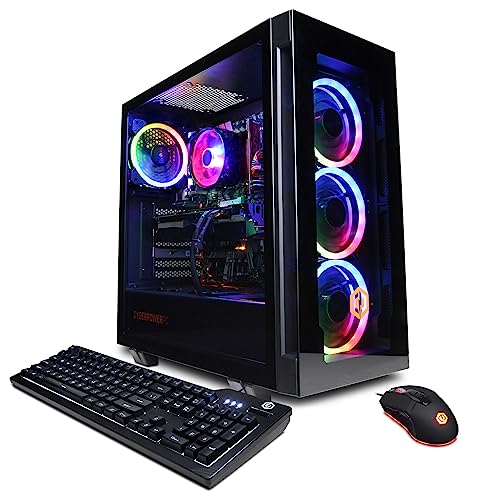
Where to buy
Check the latest price, availability and delivery on Amazon. Orders are placed on Amazon. We may earn a commission from qualifying purchases.
- Best overall for streaming: CyberPowerPC Gamer Xtreme VR, Intel Core i7-13700F, GeForce RTX 4060 Ti 16GB — Check on Amazon
- iBUYPOWER Scale, AMD Ryzen 5 7600, GeForce RTX 4060 Ti 8GB — Check on Amazon
- CyberPowerPC Gamer Master, AMD Ryzen 7 8700F, GeForce RTX 4060 Ti 8GB — Check on Amazon
- Thermaltake LCGS Quartz i1460, Intel Core i5-14400F, GeForce RTX 5060 — Check on Amazon
See 2 more Amazon options
- Skytech Blaze4 Mini, AMD Ryzen 7 5700, GeForce RTX 4060 Ti 8GB — Check on Amazon
- Skytech Archangel, Intel Core i5-14400F, GeForce RTX 4060, 32GB DDR5, 2TB SSD — Check on Amazon
Read the full guide ↓
Disclosure: As an Amazon Associate, reviewstook.com earns from qualifying purchases. Links to Amazon on this page are affiliate links; they cost you nothing extra. Listing details such as price and availability change often, so check the current Amazon listing before you buy.
Streaming from one PC is two jobs at once. The machine has to play your game at the resolution and settings you actually enjoy, and at the same moment it has to compress every frame into a clean broadcast feed, run OBS with its scenes and browser sources, keep chat and alerts alive, and do all of that for hours without a stutter your viewers can see. Below this budget, one of those jobs always pays for the other: the game drops settings so the encode holds up, or the stream turns to soup so the game stays smooth. Twelve hundred dollars is the first tier where that compromise genuinely ends. Every PC in this guide carries an NVIDIA RTX graphics card with a dedicated NVENC hardware encoder, so the work of building your stream moves off the processor and onto a part of the GPU built for exactly that — and the processors here run from six to sixteen cores, which is what lets OBS, a game, a browser full of dashboards and a chat client share one machine without fighting over it.
The target this guide is built around deserves a precise definition, because “streaming PC” gets used loosely. It is this: you play at native 1440p — the game rendered at a full 2560×1440 on your own monitor — while your viewers receive a 1080p60 stream, OBS downscaling the picture to 1920×1080 at sixty frames per second. That split is not a downgrade; it is how the platforms work. Twitch’s standard broadcasting guidelines top out at 1080p60 with a recommended 6,000 kbps bitrate, so a sharper outgoing feed buys a standard Twitch stream nothing, while the 1440p picture in front of you is yours to enjoy in full. YouTube accepts considerably more — higher bitrates at 1080p60 and 1440p streams — and the RTX 40- and 50-series cards in these machines can also encode AV1, the newer codec YouTube accepts and Twitch is rolling into its Enhanced Broadcasting feature. What this budget does not buy is equally clear, and this guide states it wherever it matters: no camera, no microphone and no capture card is included with any of these PCs, and streaming a console through one requires that capture card as a separate purchase, covered in its own section below.
In this guide
Quick Picks
Short on time, or comparing several options at once? Each row below names a streamer type and the PC that suits it, with a link to the listing.
| Streamer type | Pick | Why it stands out | Link |
|---|---|---|---|
| Best overall for streaming | CyberPowerPC Gamer Xtreme VR, Core i7-13700F, RTX 4060 Ti 16GB | Double VRAM for game-plus-encode headroom and a 16-core CPU — at its deal price | Check on Amazon |
| Best everyday price | iBUYPOWER Scale, Ryzen 5 7600, RTX 4060 Ti 8GB | Positioned as a dependable everyday option within this budget tier; AM5 platform with room to grow — check price on Amazon | Check on Amazon |
| Best eight-core AM5 | CyberPowerPC Gamer Master, Ryzen 7 8700F, RTX 4060 Ti 8GB | Eight Zen 4 cores for OBS, game and background apps on a current platform | Check on Amazon |
| Best current generation | Thermaltake LCGS Quartz i1460, Core i5-14400F, RTX 5060 | Newest NVENC encoder generation and DLSS 4, in a published-spec build | Check on Amazon |
| Best value on sale | Skytech Blaze4 Mini, Ryzen 7 5700, RTX 4060 Ti 8GB | A 4060 Ti streaming rig at the value end of this tier when the dip comes — check price on Amazon | Check on Amazon |
| Best for recording and clips | Skytech Archangel, Core i5-14400F, RTX 4060, 32GB DDR5, 2TB SSD | Double the RAM and storage for heavy OBS scenes and local recordings | Check on Amazon |
How These Picks Were Chosen
The budget was applied as a ceiling, and for streaming the spec sheet was read in a different order than a pure gaming guide reads it. The first line that mattered was the encoder. Every pick carries an NVIDIA RTX 4060, 4060 Ti or 5060, and all three include NVENC — a dedicated hardware encoding block that sits on the graphics card, separate from the cores rendering your game. Encoding through NVENC costs the game very little, which is the entire reason single-PC streaming works at this tier; a machine that encodes on its CPU instead is spending the same cores the game is trying to use. All of these cards also encode AV1 as well as H.264, which matters for YouTube today and for Twitch’s Enhanced Broadcasting as it widens. Machines built around older or encoder-poor graphics were excluded, however strong their gaming numbers looked, because they do not answer the search you actually made.
The second line was VRAM, because streaming spends it twice. The game at native 1440p fills the frame buffer with textures, and OBS compositing and the encode itself draw on the same pool. Eight gigabytes — five of these six picks — is workable at 1440p with sensible texture settings; the one 16GB card in the guide is there for readers who refuse to manage that budget by hand. The third line was the processor: core counts from six to sixteen, judged on what runs alongside the game — OBS scenes with browser sources, alert and chat applications, a voice client, recording to disk. Memory and storage came last but not trivially: local recording at stream quality eats disk steadily, and 32GB of RAM earns its place for creators running heavy scene collections. We did not use these PCs ourselves. We read the maker listings and specification pages and compared published configurations; where a listing leaves something unpublished — a power supply wattage, a RAM stick layout — the review says so instead of filling the gap with a guess, and you should check the current price on Amazon before you buy, because listing prices change often.
Native 1440p Gameplay, 1080p60 Stream: What That Actually Means
Two resolutions live inside every stream from these PCs, and confusing them causes most bad purchases in this category. The first is the resolution you play at. Set the game to 2560×1440 and it renders every frame at that full size on your monitor — that is native 1440p, and it is what the RTX 4060 Ti and RTX 5060 cards here are for. The second is the resolution your viewers receive. In OBS you set a base canvas of 2560×1440 to match your gameplay, then an output resolution of 1920×1080, and OBS downscales the finished picture — game, camera, overlays and all — to 1080p60 before encoding it. Your viewers get a clean, full 1080p60 broadcast; you keep the sharper screen. Nothing about the downscale is a compromise forced by the hardware: Twitch’s standard guidelines cap broadcasts at 1080p60 and recommend 6,000 kbps with constant bitrate and a two-second keyframe interval, so sending Twitch a 1440p picture on a standard stream is not even an option the platform offers. YouTube is the exception that proves the rule — it accepts 1440p streams and far higher bitrates, up to roughly 17 Mbps for 1080p60 in H.264 per its live encoder guidance — so a streamer whose audience lives on YouTube can raise the output resolution later without changing PCs. The machines below were judged on the Twitch-shaped target first, because it is the stricter one, and all six clear it.
The encoder choice inside OBS is the other half of the definition. Set the encoder to NVENC — Twitch’s own guidelines list the NVENC Quality preset with two B-frames — and the graphics card’s dedicated block does the compression while the game’s rendering cores stay on the game. Set it to x264 instead and the CPU does the compression, which on a six-core processor means the game and the encoder bid against each other for the same threads; the visible result is a stream that stutters exactly when the game gets busy. Every pick in this guide exists so that you never have to make that trade. AV1 deserves one honest paragraph of its own: the RTX 40- and 50-series NVENC blocks encode it, it delivers comparable quality at meaningfully lower bitrate than H.264, YouTube accepts AV1 live streams today, and Twitch supports AV1 and HEVC through Enhanced Broadcasting, which also unlocks 1440p broadcasting for Affiliates and Partners. It is a genuine future-proofing point for these cards — and still a secondary one, because a standard Twitch stream today is H.264 at 6,000 kbps, and that is what these PCs are bought to do flawlessly.
The 6 Best Streaming PCs Under $1,200
CyberPowerPC Gamer Xtreme VR — Core i7-13700F, GeForce RTX 4060 Ti 16GB, 16GB DDR5, 1TB NVMe SSD (Model GXiVR8040A14)
Who it suits: Streamers who want the no-compromise version of this tier — the most VRAM and the most CPU cores in the guide — and who are willing to buy on the deal cycle rather than on a Tuesday.
The specification reads like it was assembled from this guide’s own checklist. The RTX 4060 Ti here is the 16GB version, and for a streamer that number does real work: the game rendering at native 1440p and the OBS pipeline compositing and encoding on the same card both draw on that memory, and sixteen gigabytes means neither side ever has to ask the other to move over. Texture settings stay where you put them, the encode stays clean in busy scenes, and the whole game-versus-stream negotiation that defines cheaper tiers simply does not happen. Behind it sits Intel’s Core i7-13700F, a sixteen-core processor (eight performance cores, eight efficiency cores) that treats the streaming workload as a rounding error — OBS, the game, a browser of dashboards, a voice client and a local recording all run at once, and the efficiency cores absorb the background layer while the performance cores stay on the game. The listing documents one HDMI and two DisplayPort outputs, which is the full streamer desk in a single line: a 1440p gaming monitor, a second screen for OBS and chat, and a port to spare.
The condition attached to all of this is price, and it is not a small one. This configuration moves in and out of this guide’s budget depending on deal timing, so check the current price on Amazon before you buy — it belongs in this guide only while its live price sits within this budget tier, full stop. Two smaller notes belong in the open. The 16GB of system memory is the right amount for streaming, but the listing material we verified does not confirm whether it arrives as one stick or two, and dual-channel matters enough that you should check the live listing and budget for a matching stick if it ships single. And CyberPowerPC does not headline the power supply wattage for this model in the material we verified — read the label on the unit when it arrives, particularly before any future graphics upgrade. Neither note dents the conclusion: bought at its deal price, this is the strongest streaming PC under $1,200 we found, and the only one whose buyer never has to think about VRAM again.
- RTX 4060 Ti with 16GB VRAM — double the game-plus-encode headroom of the 8GB picks.
- Sixteen-core Core i7-13700F shrugs off OBS, game, browser sources and recording at once.
- Documented triple display outputs (1× HDMI, 2× DisplayPort) for a two-monitor desk plus a spare.
Honest limitation: It only fits this budget when on sale within this tier — check price on Amazon — and its RAM stick layout and PSU wattage are not confirmed in the verified listing material.
Choose it if you stream demanding games at native 1440p and want the VRAM question permanently closed. Skip it if check price on Amazon shows it above this guide’s budget when you shop — in that case the iBUYPOWER below is the rational buy.

iBUYPOWER Scale — AMD Ryzen 5 7600, GeForce RTX 4060 Ti 8GB, 16GB DDR5, 1TB NVMe SSD (Model SCA5N46T01)
Who it suits: Streamers who want a 4060 Ti machine at a price that does not require deal-hunting — and a platform they can upgrade for years.
The Scale’s headline virtue is boring, and boring is a compliment in a prebuilt: it is positioned as the dependable everyday option within this budget tier — check price on Amazon — without requiring deal timing. What that money buys is the streaming formula in its cleanest form. The RTX 4060 Ti carries the same NVENC encoder as the 16GB card above, AV1 included, so the broadcast side is fully solved; the Ryzen 5 7600 is a six-core Zen 4 processor on AMD’s current AM5 platform, and six modern cores are enough for the single-PC streaming job precisely because the encoder is not competing for them — the game gets the CPU, NVENC gets the stream, and OBS itself is a light passenger. The listing includes a keyboard and mouse and documents a one-year warranty, small print worth having in writing before you need it. For a first dedicated streaming PC, this is the configuration that asks the fewest questions.
One limitation is stated in the listing itself and this guide will not soften it: the 16GB of DDR5-5200 arrives as a single stick. A lone stick runs the memory in single-channel mode, which costs real performance in CPU-sensitive games and leaves the platform short of what it can do. The fix is neither hidden nor expensive by streaming-rig standards — a second matching stick restores dual-channel and doubles capacity in one move — but it is an additional purchase the headline price does not include, and it should be the first upgrade on your list, ahead of anything cosmetic. The 8GB of VRAM draws the same line as every 8GB pick here: entirely sufficient for 1080p60 output from 1440p gameplay with textures set sensibly, and the reason the 16GB CyberPowerPC exists at the top of the guide for readers who play the most texture-heavy games. Buy the Scale for its straightforward positioning in this tier and its upgrade path; plan for the second RAM stick and the microphone this guide covers below, and the result is a complete streaming desk within this guide’s budget.
- Positioned within this budget tier as an everyday buy, no deal timing required — check price on Amazon.
- RTX 4060 Ti NVENC with AV1 encode; AM5 platform leaves years of CPU upgrades open.
- Keyboard and mouse included, one-year warranty documented in the listing.
Honest limitation: The 16GB of RAM ships as a single stick, so dual-channel performance requires a second stick as a first upgrade.
Choose it if you want the dependable everyday buy and a platform worth upgrading. Skip it if you will never open the case — the single-stick compromise is designed to be fixed, not lived with.

CyberPowerPC Gamer Master — AMD Ryzen 7 8700F, GeForce RTX 4060 Ti 8GB, 16GB DDR5, 1TB NVMe SSD (Model GMA2900A)
Who it suits: Streamers who run a busy desktop alongside the game — multiple browser sources, production software, a recording — and want eight full cores on AMD’s current platform.
Where the Scale answers the streaming question with six cores and an encoder, the Gamer Master answers it with headroom. The Ryzen 7 8700F is an eight-core Zen 4 processor on a B650 motherboard, and those two extra cores are the ones that absorb everything a growing stream piles onto a PC: animated browser sources, a local recording encoding to disk, chat and moderation tools, a second application rendering clips between games. Paired with the same RTX 4060 Ti and its NVENC block, the division of labor is the best-balanced in the guide at an ordinary position within this tier — check the current price on Amazon, and treat marketplace offers around this model with the same suspicion as any in this category: buy the Amazon-sold configuration while it sits within this guide’s budget, and treat anything positioned far above that tier as a different, worse deal wearing the same name.
Two trade-offs are structural and should be chosen with open eyes. The 8700F has no integrated graphics — the F is the giveaway — which for a streaming PC is mostly trivia, since NVENC does the encoding and the RTX card drives every display; what you lose is only the fallback of a motherboard video output if the graphics card ever has to come out, and a second hardware encoder you were never going to use. The sharper caution is about the model family rather than this machine: CyberPowerPC now sells Gamer Master variants with newer RTX 5060 Ti graphics under closely related model numbers at higher prices, so the configuration on the live listing — Ryzen 7 8700F, RTX 4060 Ti 8GB, model GMA2900A — is the contract, and it is worth thirty seconds of reading before the buy button. Confirmed as specified, this is the pick for streamers whose OBS scenes have outgrown six cores, on the platform with the longest future in the guide.
- Eight Zen 4 cores on B650/AM5 — the most background-app headroom in this tier.
- RTX 4060 Ti NVENC with AV1 — check price on Amazon for the Amazon-sold configuration.
- PCIe Gen4 storage and DDR5 throughout — no last-generation compromises in the spec.
Honest limitation: The 8700F has no integrated graphics, and the Gamer Master family now includes pricier 5060 Ti variants — confirm the exact configuration on the live listing.
Choose it if your stream runs heavy scenes and background production on one machine. Skip it if the listing in front of you is a marketplace offer positioned well above this guide’s budget — that is the variant drift, not this PC.

Thermaltake LCGS Quartz i1460 — Intel Core i5-14400F, GeForce RTX 5060, 16GB DDR4, 1TB NVMe SSD (Model S2QT-B760-560-LCS)
Who it suits: Streamers who buy the encoder first — the newest NVENC generation and the newest feature set, in a build whose full specification, power supply included, is published.
Every other pick in this guide encodes on NVIDIA’s Ada-generation NVENC; the Quartz encodes on the generation after. Its GeForce RTX 5060 carries the Blackwell NVENC block, the most recent hardware encoder NVIDIA ships, with AV1 support and the quality refinements of the newer design — and for a purchase justified by encoding, buying the current encoder generation is the closest thing to a free future-proof. The rest of the streaming profile is complete: the Core i5-14400F is a ten-core processor (six performance, four efficiency) that handles the game-plus-OBS split the same way the other Intel pick does, and DLSS 4’s multi frame generation — available only on this 50-series card among our picks — can raise the frame rate your viewers watch in supported titles, with the honest caveat, stated wherever this guide mentions it, that generated frames are a presentation feature: they smooth the picture without reducing input latency, so competitive players will leave it off and story-game streamers may love it. Thermaltake also publishes what rivals leave blank: coverage of this configuration documents a 600W 80 Plus Gold power supply, which makes planning a future graphics upgrade a reading exercise instead of an archaeology dig. Check the current price on Amazon before you buy.
The compromises are generational rather than streaming-related. The platform pairs the current graphics card with DDR4 memory on a B760 board — a finished Intel socket with no processor upgrade path worth the name, where the two AM5 picks above can accept new CPUs for years. For a streaming PC that trade is defensible, because the encoder — the part this purchase is about — is the newest thing in the guide, and by the time the platform dates, the whole machine’s replacement will be an encoder decision again. The RTX 5060 is also an 8GB card and a step below the 4060 Ti picks in raw rendering, so its native 1440p gameplay asks for slightly more sensible settings in the heaviest games; the stream it produces, which is the product your audience actually consumes, is the best-specified here. Choose the Quartz when the broadcast is the point and the platform is a means to it.
- Newest-generation NVENC with AV1 — the most current encoder in this guide.
- DLSS 4 multi frame generation for supported titles (presentation frames, not lower latency).
- Published 600W 80 Plus Gold PSU — upgrade planning without guesswork.
Honest limitation: A finished DDR4 Intel platform with no real CPU upgrade path, and an 8GB card a step below the 4060 Ti for raw 1440p rendering.
Choose it if stream quality for this tier is your first criterion and you replace PCs whole. Skip it if you upgrade piece by piece — the AM5 picks are built for that life.

Skytech Blaze4 Mini — AMD Ryzen 7 5700, GeForce RTX 4060 Ti 8GB, 16GB DDR4, 1TB SSD (Model ST-BLAZE4MINI-1266-B-AM)
Who it suits: Patient streamers. This is a full 4060 Ti streaming rig that can sit at the value end of this tier when on sale — if you can wait for the dip, it is the best value in the guide by a wide margin.
Start with its positioning, because positioning is the review: this exact configuration is at its most compelling when on sale at the value end of this tier. At that point, there is nothing else to discuss — an eight-core Ryzen 7 5700, an RTX 4060 Ti with its NVENC encoder and AV1 support, 16GB of memory, a terabyte of storage and a published 650W Gold power supply is the complete single-PC streaming formula, in a position this guide’s other picks reach only in their own best weeks. The streaming math is identical to the Gamer Master’s: the encoder lives on the GPU, the eight cores divide between game and production, and 1080p60 output from native 1440p gameplay is the machine’s home territory. At a higher position in this tier the same machine is merely good — the iBUYPOWER Scale, with a current platform and a steadier position, is the better everyday recommendation — so this pick is explicitly a discipline test: it is the best buy in the guide when its sale positioning sits at the value end of the tier, and it is not the best buy when it sits near the top of the tier — check price on Amazon before you decide.
What the dip positioning asks you to accept is a finished platform. The Ryzen 7 5700 is an AM4 processor on DDR4 memory — capable, well-matched to the card, and at the end of its line, with no meaningful processor upgrade that does not also mean a new motherboard and memory. For a streamer this is a smaller sacrifice than it sounds: streaming PCs are usually replaced as units when the encoder generation turns, and the 4060 Ti’s NVENC will be the relevant component for years. Skytech’s listings also reserve that the graphics card brand may vary between units — normal practice for system integrators, and the model and 8GB specification are what is contracted — so judge the delivered card by its spec, not its badge. Set a price alert, buy the dip without hesitation when it comes — check price on Amazon to confirm its position — and prioritise the microphone and camera below in your overall budget: that combination is a better stream than any single PC in this guide bought alone.
- Value-end positioning on sale — the complete 4060 Ti streaming formula for this tier — check price on Amazon.
- Eight-core Ryzen 7 5700 and a published 650W Gold PSU.
- Same NVENC/AV1 streaming capability as the guide’s pricier 4060 Ti picks.
Honest limitation: A finished AM4/DDR4 platform, and the value case depends entirely on its sale positioning — this is a buy-the-dip pick only.
Choose it if you can wait for the price to come to you. Skip it if you are buying this week at whatever position it sits in — the Scale is the same idea at a steadier position in this tier.

Skytech Archangel — Intel Core i5-14400F, GeForce RTX 4060, 32GB DDR5, 2TB SSD (Model ST-ARCH4-1247-W-AM)
Who it suits: Creator-streamers — the ones who record every session locally, keep a library of VODs and clips on the machine, and run OBS scenes heavy enough to notice memory.
Every other pick in this guide ships 16GB of RAM and a 1TB drive; the Archangel ships 32GB of DDR5-5600 and a 2TB SSD, and for a certain kind of streamer that is not a luxury line, it is the spec. Local recording is the quiet storage killer of streaming: record your broadcasts at stream quality for editing and clips, as every serious creator is advised to do, and the footage accumulates in tens of gigabytes a week until a 1TB drive that also holds a modern game library starts rationing both. Two terabytes ends the rationing. The doubled memory serves the production side the same way — large scene collections, browser sources stacked deep, a video editor holding a project while the stream runs — and it is worth framing honestly in this market: 32GB DDR5 kits carry a significant cost on their own during the current component conditions, which reframes this PC — check price on Amazon — as a capacity purchase that happens to include a streaming PC. The Core i5-14400F’s ten cores and the RTX 4060’s NVENC encoder — the same Ada block, AV1 included, as the 4060 Ti picks — cover the broadcast side without qualification.
The trade is on the rendering side, and it should be named plainly: the plain RTX 4060 is a step below the 4060 Ti, and it shows exactly where the Ti picks are strongest, in native 1440p gameplay in demanding titles. The Archangel plays at 1440p with settings managed rather than maxed, or at a fully comfortable 1080p, and its stream output is identical either way — your viewers cannot tell which card rendered the game, because the encode is the same. What they can eventually tell is whether your VODs exist, your clips get made, and your drive never filled mid-session. If your streaming life is gameplay-first and recordings are an afterthought, the 4060 Ti picks serve you better; if the PC is a small production studio that also plays games, this is the only pick in the guide specced like one — and when on sale at the lower end of this tier, it can be the bargain of the entire list.
- 32GB DDR5 and 2TB SSD — double both, for recordings, VOD libraries and heavy OBS scenes.
- Same NVENC/AV1 encode as the 4060 Ti picks; ten-core i5-14400F behind it.
- Published 650W Gold PSU; sale positioning at the lower end of this tier can make the capacity especially good value when it dips — check price on Amazon.
Honest limitation: The plain RTX 4060 is a step below the 4060 Ti picks for native 1440p gameplay — the money went to memory and storage instead.
Choose it if you record everything and edit on the same machine. Skip it if you stream and forget — the Ti picks spend this budget on frames you will actually feel.

Comparison Table
| Product | CPU | GPU & VRAM | RAM / Storage | Link |
|---|---|---|---|---|
| CyberPowerPC Gamer Xtreme VR (GXiVR8040A14) | Core i7-13700F, 16 cores | RTX 4060 Ti, 16GB | 16GB DDR5 / 1TB | Check on Amazon |
| iBUYPOWER Scale (SCA5N46T01) | Ryzen 5 7600, 6 cores | RTX 4060 Ti, 8GB | 16GB DDR5 / 1TB | Check on Amazon |
| CyberPowerPC Gamer Master (GMA2900A) | Ryzen 7 8700F, 8 cores | RTX 4060 Ti, 8GB | 16GB DDR5 / 1TB | Check on Amazon |
| Thermaltake LCGS Quartz i1460 | Core i5-14400F, 10 cores | RTX 5060, 8GB | 16GB DDR4 / 1TB | Check on Amazon |
| Skytech Blaze4 Mini (ST-BLAZE4MINI-1266-B-AM) | Ryzen 7 5700, 8 cores | RTX 4060 Ti, 8GB | 16GB DDR4 / 1TB | Check on Amazon |
| Skytech Archangel (ST-ARCH4-1247-W-AM) | Core i5-14400F, 10 cores | RTX 4060, 8GB | 32GB DDR5 / 2TB | Check on Amazon |
How to Choose a Streaming PC Under $1,200
- Buy the encoder first. NVENC on an RTX 40- or 50-series card is what makes single-PC streaming at this tier a solved problem: the encode leaves the CPU and the game’s rendering cores alone. Every pick here has it, AV1 included. A machine with a stronger card and a weaker encoder story is a gaming PC, not this search.
- Decide your VRAM once. Eight gigabytes streams 1080p60 from native 1440p gameplay with texture settings set sensibly. If you play the most texture-heavy games and refuse to touch those settings, the 16GB pick at the top of this guide is the only one that ends the discussion — buy it at its deal price.
- Count cores for the whole desk, not the game. Six modern cores stream comfortably because NVENC carries the encode. Eight or more earn their money when browser sources, recording, chat tooling and production apps run beside the game. Sixteen, in the top pick, is abundance rather than necessity.
- Plan for two monitors from day one. Streaming on a single screen means alt-tabbing out of your game to read chat. Confirm at least two display outputs on the live listing — the top pick documents three (one HDMI, two DisplayPort); on other models the exact port mix follows the graphics card brand fitted, so read the listing rather than assuming.
- Wire the connection. A 6,000 kbps stream wants roughly 8 Mbps of reliable, measured upload once headroom is allowed for, and it wants it over Ethernet. No PC in this guide can fix a stream sent over congested Wi-Fi; run the cable.
- Size storage for recordings, not just games. If you record sessions locally for clips and VODs — and you should — a 1TB drive shared with a modern game library fills faster than you expect. The 2TB pick exists for exactly this arithmetic.
- Respect walk-away discipline. Prebuilt positioning in this tier swings noticeably between deal events, and several of these picks are only correct purchases while they sit within this guide’s budget. The reviews state that condition; a pick positioned above this budget is a different, worse purchase wearing the same name — check price on Amazon before you order.
- Budget the rest of the desk separately. No pick includes a camera, a microphone or a capture card. The next section covers those honestly; a streaming PC plus nothing to stream with is half a purchase.
- Match the platform to your habits. Upgraders should take the AM5 picks, whose motherboards accept newer processors for years. Buyers who replace PCs whole can take the finished platforms — including the newest encoder in the guide — without apology.
What Is Not in the Box: The Rest of a Streaming Setup
Every purchase in this guide buys the PC, and — on the iBUYPOWER Scale, per its listing — a keyboard and mouse. Nothing else a stream needs is in any of these boxes, and pretending otherwise is how a streaming budget quietly overruns. The honest extras are these. A microphone matters more than anything else on the list, because viewers forgive a soft picture long before they forgive bad audio: USB microphones worth using sit in the entry to mid tier of that market, and one of them improves a stream more than any setting in OBS. A camera comes second — a 1080p webcam is a modest mid-tier accessory purchase, and streamers who already own a phone or a mirrorless camera may spend nothing here at all. The capture card is the conditional item: streaming games played on the PC itself needs none, because OBS captures the game directly. Streaming a console — PlayStation, Xbox, Switch — through the PC absolutely does, because the console’s picture has to get into the machine somehow; a proven external card such as Elgato’s HD60 X sits in the mid tier of capture cards, and it is a separate line item, not an accessory to round up at checkout. Add a second monitor if your desk has only one — the streamers’ two-screen layout is not an affectation, it is how chat gets read — and the realistic all-in total for a complete, console-capable desk sits noticeably above the PC alone. None of that diminishes the PCs; it simply belongs in the budget before the buy button, not after.
Common Buying Mistakes
- Encoding with x264 on a mid-range CPU while gaming on the same cores. These PCs carry NVENC precisely so the encoder and the game stop fighting; use it — Twitch’s own guidelines list the NVENC Quality preset.
- Streaming over Wi-Fi. Upload stability, not headline speed, is what a broadcast eats; a wired connection is the cheapest stream-quality upgrade that exists.
- Buying an 8GB card, maxing textures at 1440p, and blaming the stream when VRAM runs out. The game and OBS share that memory; either manage the settings or buy the 16GB pick.
- Assuming the PC includes the streaming gear. No camera, microphone or capture card is in any box in this guide; console streaming without a capture card is not a setup, it is a plan.
- Paying a position above this budget for a deal-dependent pick. The top pick while it sits within this budget is a recommendation; the same machine positioned above this budget is a different purchase. That condition is stated in every review where it matters.
- Leaving the iBUYPOWER Scale’s single RAM stick as shipped. Single-channel memory leaves performance on the table in CPU-sensitive games; the matching second stick is the first upgrade, not an optional extra.
- Chasing a 1440p or 4K output for a standard Twitch stream. Twitch’s standard broadcasting tops out at 1080p60; spend on the encode quality and the game in front of you, not on pixels the platform discards.
- Judging the Gamer Master by its family name. Newer 5060 Ti variants sell under closely related model numbers at higher prices — confirm the listing in front of you is the 8700F and RTX 4060 Ti configuration reviewed here.
Final Recommendation
- Most streamers, bought on the deal: CyberPowerPC Gamer Xtreme VR with RTX 4060 Ti 16GB.
- Buying today at a fair, steady price: iBUYPOWER Scale.
- Heavy scenes and background production: CyberPowerPC Gamer Master.
- Newest encoder generation: Thermaltake LCGS Quartz i1460.
- Patient value hunters: Skytech Blaze4 Mini, at its dip while it sits at the value end of this tier.
- Record-everything creators: Skytech Archangel.
Our top two for streamers at this budget are the CyberPowerPC Gamer Xtreme VR, whose 16GB of VRAM and sixteen cores close every game-versus-stream argument at once — when on sale within this budget, and only there — and the iBUYPOWER Scale, the same 4060 Ti streaming formula at a steadier position within this budget, on the platform with the longest upgrade future. Between them they cover the two honest shapes of this purchase: maximum headroom bought patiently, and the complete formula bought today. Streamers working to a tighter ceiling should also see Best Streaming PC Under $800, and those with room to spend past this tier will find the next encoder and graphics step in Best Streaming PC Under $1500. If your search started from gaming rather than broadcasting, Best Gaming PC For Streaming Under $1200 approaches the same machines from the other direction. Set OBS to NVENC, wire the Ethernet cable, keep the bitrate at 6,000 kbps for Twitch, and check the current price on Amazon and confirm it sits within this guide’s budget before you order — at this tier, that discipline is the whole difference between a streaming PC and a gaming PC with ambitions.
Frequently Asked Questions
Can one PC really game and stream at the same time under $1,200?
Yes — this is the first tier where the answer stops having an asterisk. The mechanism is NVENC: the RTX 4060, 4060 Ti and 5060 cards in these PCs encode the stream on a dedicated hardware block, so the game keeps the rendering cores and the CPU keeps its headroom for OBS and your other apps. Play at native 1440p, output 1080p60, and neither side of the job is the compromised one.
Why output 1080p60 if the PC can play at 1440p?
Because the platforms set the shape of the broadcast. Twitch’s standard broadcasting guidelines cap streams at 1080p60 and recommend 6,000 kbps — a 1440p feed is not something a standard Twitch stream can send. YouTube accepts 1440p and much higher bitrates, and Twitch’s Enhanced Broadcasting opens 1440p to Affiliates and Partners, so the headroom in these machines is usable — just not on a standard Twitch stream today.
Is 8GB of VRAM enough for streaming, or do I need the 16GB pick?
Eight gigabytes is enough for the guide’s target — native 1440p gameplay with textures set sensibly, OBS compositing, and a 1080p60 encode — and five of the six picks are built that way. The 16GB card earns its premium in the most texture-heavy games at maximum settings, where the game alone can press against 8GB and leave the streaming pipeline competing for what remains. It is a headroom purchase, not a requirement.
Do I need a capture card to stream?
Only for console streaming. Games played on the PC are captured by OBS directly from the machine — no card involved. If you want to stream a PlayStation, Xbox or Switch through the PC, the console’s HDMI signal needs a capture device to enter the computer; a card like Elgato’s HD60 X sits in the mid tier of capture cards, and it is not included with any PC in this guide.
What else do I need besides the PC?
A microphone first — viewers judge audio before video, and usable USB mics sit in the entry to mid tier of that market. A 1080p webcam in the mid tier of that market if you appear on camera, a second monitor so chat and OBS stay visible while you play, and a wired Ethernet connection with roughly 8 Mbps of reliable measured upload for a 6,000 kbps Twitch stream. None of it is in the PC’s box; the guide covers the full list in its own section above.
Should I use NVENC or x264 in OBS?
NVENC, on every machine in this guide. x264 encodes on the CPU, which puts the encoder in direct competition with your game for cores — the exact failure this tier exists to end. Twitch’s own broadcasting guidelines list the NVENC Quality preset with two B-frames; follow them. x264 survives as a reasonable choice only on a dedicated second encoding PC, which is a different purchase entirely.
Could I build a streaming PC for less than these prebuilts?
In a normal parts market, sometimes. In the current one, the comparison is hostile: comparable parts lists assembled from current Amazon listings — with 32GB DDR5 kits carrying a significant cost on their own and mid-range cards positioned well above their launch positioning — have often totaled above these machines, as detailed in Best Gaming PC Build Under $1200. The prebuilts in this guide are, while they sit within this budget, often the cheaper way to own this specification right now — check price on Amazon to confirm.
- Best Streaming PC Under $1200
- Best Streaming PC Under $800
- Best Streaming PC Under $1500
- Best Streaming PC For Beginners Under $1200
- Best Streaming PC For 1440p Gaming Under $1200
- Best Streaming PC For Small Spaces Under $1200
- Best Budget Gaming PC Under $1200
- Best Prebuilt Gaming PC Under $1200
- Best 1440p Gaming PC Under $1200
- Best Gaming PC Under $1200


