Where to buy
Check the latest price, availability and delivery on Amazon. Orders are placed on Amazon. We may earn a commission from qualifying purchases.
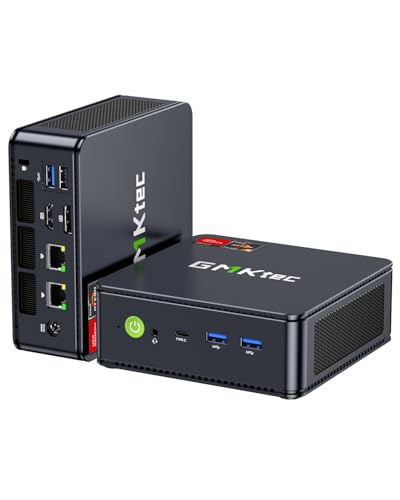
- Easiest install in the guide: GMKtec NucBox M6 Mini PC, Ryzen 5 6600H, Radeon 660M — Check on Amazon
- Quietest all-round mini: Beelink SER5 MAX, Ryzen 7 7735HS, Radeon 680M — Check on Amazon
- Best mini for a multi-screen desk: ACEMAGIC Mini PC, Ryzen 7 7735HS, Radeon 680M — Check on Amazon
- Best streaming tower, if the room allows it: abytespark Gaming PC, GTX 1660 Super, 16GB RAM, 1TB NVMe SSD — Check on Amazon
See 2 more Amazon options
- Upgradeable tower, bought on a dip: STGAubron Gaming PC, Ryzen 5 5500, RX 580 8GB — Check on Amazon
- Cheapest full-size tower: STGAubron Gaming PC, Core i7, RX 580 8GB — Check on Amazon
Read the full guide ↓
Disclosure: As an Amazon Associate, reviewstook.com earns from qualifying purchases. Links to Amazon on this page are affiliate links; they cost you nothing extra. Listing details such as price and availability change often, so check the current Amazon listing before you buy.
A small streaming setup fails in a specific way: not on stream quality, but on furniture. The PC arrives, the desk is shallower than the product photo suggested, the power adapter has nowhere sensible to live, and the box ends up exhaling hot air into a corner it shares with a wall. This guide is written for that reality. It takes the six streaming PCs under $500 worth considering and grades them the way a small room grades them — by what they demand from the space around them, not just by what they do on screen.
Here is the honest shape of the tier before any products appear. Half of this guide is genuinely small: three mini PCs, each a single small box that can sit on a shelf or a desk corner, draw little power and make little noise. The other half is three full-size towers. A tower is not a small-spaces product no matter how the listing photographs it; it is a piece of furniture you place on the floor or a wide desk and then arrange the room around. Both halves can stream well — the best pure streaming machine in this guide is, awkwardly, one of the towers — so the ranking below is an installation ranking, not a performance ranking, and each review says plainly which job the machine is good at and what it costs your room. One rule applies to all six picks without exception: none of them goes inside a sealed cabinet, a closed TV stand or any other airless box. Every PC here cools itself with the room’s air, and a closed door turns that arrangement into slow cooking. If your only available spot is behind a cabinet door, the correct purchase is an open shelf, not a different PC.
A second honesty note, because small-spaces guides are where invented numbers breed. The research behind this guide documents no manufacturer dimension sheet and no mounting standard for any of these six machines, so this article prints no measurements and claims no wall-mount or monitor-mount compatibility for any pick. Where a mini is described as small, that is a form-factor statement — a mini PC is a small box by design — and the five-step checklist further down exists precisely so you can measure your own spot against the live listing’s stated size before money moves. Below: the quick picks, how installation grading worked, what an installed footprint really consists of, the checklist, detailed reviews of all six machines, a comparison table, the common mistakes, and the questions small-room streamers actually ask.
In this guide
Quick Picks
Short on time, or comparing several options at once? Each row below names a space situation and the machine that suits it, with a link to the listing.
| Your space | Pick | Why it stands out | Link |
|---|---|---|---|
| A shelf or desk corner for a stream box | GMKtec NucBox M6 Mini PC | A dedicated encoder box that sips power, stays near-silent and asks for one small flat spot | Check on Amazon |
| One small box that does everything quietly | Beelink SER5 MAX | Eight-core mini that can live on a shelf behind the monitor and barely be heard | Check on Amazon |
| A small desk running two or three screens | ACEMAGIC Mini PC, Ryzen 7 7735HS | Triple display support from one mini box — the screens are big, the PC is not | Check on Amazon |
| Floor space beside the desk is free | abytespark Gaming PC, GTX 1660 Super | The guide’s best one-PC streamer — a full-size tower that earns its floor space | Check on Amazon |
| A corner for a tower you will upgrade later | STGAubron, Ryzen 5 5500, RX 580 | A modern, upgradeable platform — buy it on a dip and check price on Amazon | Check on Amazon |
| The cheapest tower footprint | STGAubron, Core i7, RX 580 | A full-size tower — check price on Amazon and verify the CPU the day it arrives | Check on Amazon |
How These Picks Were Chosen
The starting pool was the same as any streaming guide’s: real Amazon listings at or regularly dipping within $500 in the United States, judged first on the hardware that decides a broadcast — the encoder and its generation, CPU cores for software encoding, memory, storage, display outputs for a second screen, and networking. That filter matters because a streaming PC is really two machines wearing one case: it renders a game and compresses it into a video feed at the same time, and the encoder is the half that decides what viewers see. Only one pick below carries the encoder streamers most want — NVIDIA’s Turing-generation NVENC, in the GTX 1660 Super tower — while the rest encode with AMD’s VCN hardware or with the CPU itself through OBS’s x264 encoder. No machine in this guide can encode AV1; H.264 is the working format at this price.
On top of that, every pick was re-graded on installation, and that second grading is what reordered this guide. Four things counted. First, form-factor class: a mini PC and a full-size tower are different furniture commitments, and no specification makes a tower small. Second, the installed footprint rather than the box alone — the power adapter a mini runs from, the cables that leave the back, and the warm air that has to go somewhere all occupy your room too. Third, noise and heat in a shared small space: a streaming PC works in the room you broadcast from, usually a bedroom or a living-room corner, so a box that is near-silent while encoding earns real credit here. Fourth, honesty about what is not documented. The underlying research records no dimension sheet, no weight and no mounting pattern for any of these six machines, so no pick below is credited with a measurement or a mount it was never verified to have; any bracket or footprint claim belongs to the live listing, to be confirmed before you order.
Price discipline carried over unchanged: check price on Amazon for the current figure, and one tower below stays in the guide under an explicit buy-only-on-a-dip rule rather than as an everyday recommendation. Streaming roles are stated per pick, because they change the installation answer — a dedicated encoder box can be the smallest, quietest machine here, while a machine bought to game and stream alone needs stronger hardware and, in this tier, usually a tower.
The Installed Footprint Is Bigger Than the Box
Product pages photograph a PC alone on an infinite white desk. Your room contains the rest of the installation, and in a small space the rest is usually the problem. Four things besides the box need a home.
The power adapter. The three minis run from external power adapters, as mini PCs do: the box on your shelf is only the visible half of the machine, and a second object — the adapter — has to sit somewhere along the cable run between the wall socket and the PC, with air around it rather than baked inside a cable tidy. No adapter wattage is claimed for any pick here, because the underlying research documents none; what matters for placement is that the adapter exists and needs an address. The three towers carry their power supplies inside the case, which makes their footprint honest in a different way: the box you measure is the whole machine, but it is a full-size box.
The cable drop. Every streaming PC here drives at least two screens — the game on one, OBS, chat and alerts on another — because streaming from a single display, alt-tabbing between the game and the broadcast software, is a workflow nobody should accept. Two displays mean at least two display cables leaving the back of the machine, plus power, plus a wired Ethernet run, plus whatever your microphone and camera add. Where those cables fall is an installation decision: behind a desk is fine, across a walkway is a trip hazard, and pinched behind a PC pushed flush against a wall they become a heat and damage problem. The ACEMAGIC mini below is the extreme case — it can feed three screens from one small box, which is wonderful for the desk surface and means three cables to route from a very small starting point.
The air. A PC does not consume air; it borrows it, heats it, and hands it back. In a large room that exchange is invisible. In a small bedroom it is the room’s climate: a tower streaming for three hours is a modest space heater, and a mini tucked behind a monitor recycles its own exhaust if the gap behind it is tight. None of the six picks here is a sealed-cabinet candidate — not the towers, which move the most air, and not the near-silent minis either, whose small fans work within a narrow thermal margin. Open air on the sides and back, a hand’s breadth of clearance, and exhaust that is not blowing straight into a wall or a curtain: that is the whole requirement, and it is not negotiable per pick.
The second machine problem. Two of the minis below earn their place as dedicated encoder boxes — a second PC that receives a feed from your gaming machine or console through a capture card and does nothing but broadcast it. In a small room that arrangement cuts both ways: the encoder box itself is the smallest, quietest thing here, but the setup as a whole is two machines, two power connections and a capture card (budgeted separately everywhere in this guide — allow for a separate budget-tier purchase for a serviceable 1080p60 USB model, with a free network-based alternative in OBS’s NDI tools for PC-to-PC feeds). If your space has exactly one free surface, a one-PC arrangement may install more simply even though its box is bigger.
Before You Buy: The Five-Step Small-Space Checklist
- Measure the spot. Width, depth and height of the exact shelf, desk corner or floor area — then compare against the dimensions on the live listing for the machine you are buying, since this guide deliberately prints no measurements of its own. For a tower, also check the door swing and chair path around the spot; a tower that fits its rectangle but blocks the room does not fit.
- Check the ventilation clearance. Confirm the spot gives the machine open air on its sides and back, with room for exhaust to escape. If the spot is a cabinet, a closed TV stand or any compartment with a door, stop here — no pick in this guide belongs in one, and the fix is a different spot, not a different PC.
- Give the power adapter an address. For the minis, trace the run from wall socket to PC and decide where the external adapter will rest — desk, floor or shelf — with air around it and no strain on either cable end. For a tower, confirm its socket is reachable without the case pushed flush to the wall.
- Plan the cable drop. Count the cables that will leave the machine: power, two or more displays, Ethernet, microphone, camera. Decide where each one falls before the box arrives, and if the Ethernet run is the obstacle, solve it now — a streaming PC on Wi-Fi because cabling felt hard is a stream that drops frames for a furniture reason.
- Then order — and verify on arrival. Only now does money move. When the machine arrives, confirm the delivered configuration matches the listing exactly (several picks below carry configuration warnings that matter), run a full game-plus-encode stress test inside the return window, and check the installation with your hands: adapter not trapped, exhaust not recirculating, cables not pinched.
The 6 Best Streaming PCs for Small Spaces Under $500
GMKtec NucBox M6 Mini PC — Ryzen 5 6600H, Radeon 660M, 16GB DDR5, 512GB SSD
Who it suits: The streamer who already has something to play games on — a gaming PC, a laptop, a console — and needs a broadcast box that disappears into a small room: this is the guide’s dedicated encoder PC, and on an installation brief it is the easiest machine here to live with.
Grade it as an appliance, not a gaming rig, and everything about it makes sense. A dedicated streaming PC does not render your game; a capture card hands it a finished video feed, and its whole job is to compress that feed, composite your camera and overlays, and push the result to the platform. The NucBox M6 is properly equipped for exactly that job: a six-core, twelve-thread Ryzen 5 6600H with headroom for OBS and x264 veryfast software encoding, or the modern-generation AMD VCN hardware encoder in its Radeon 660M for a low-effort 1080p60 encode. In installation terms it asks for the least of any pick: one small flat spot — a shelf end, a desk corner, the top of a media unit — an address for its external power adapter, and open air around a box that sips power and makes almost no noise while it works. The purchase arithmetic helps too: check price on Amazon — as the budget-tier pick here, it is the one most likely to leave room in the $500 budget to cover the capture card its role assumes. Unusually for a mini, it is serviceable — the 16GB of DDR5 sits in slots rather than solder, and there are two SSD slots, so a dedicated recording drive can be added later.
The limits are real and should be bought with eyes open. As a single, only PC it is the most limited gaming machine in this guide: the 660M is a step below the 680M minis below, which are themselves esports-and-older-titles hardware, so gaming and streaming from this box alone means light titles at modest settings. And the usual family warning applies: related listings include barebones variants, so confirm you are buying the configured 16GB/512GB machine, not an empty shell at a tempting price. No mounting hardware is documented for it in the research behind this guide, so plan on it sitting flat, not hanging behind a monitor.
- The smallest installation ask in the guide: one flat spot, one adapter address, almost no noise or heat while encoding.
- Both encoding routes for a captured feed — x264 on six cores, or modern VCN hardware encoding.
- Slotted RAM and dual SSD slots: rare serviceability in a mini, and a clean path to a dedicated recording drive.
Honest limitation: The weakest gaming graphics in the guide — it earns its place as a second machine, and the capture card that role assumes is a separate purchase included in no price here.
Choose it if you already game on something else and your small room needs a broadcast box, not another furniture decision. Skip it if this will be your only PC and your games are demanding — the tower further down is the honest one-PC answer.

Beelink SER5 MAX Mini PC — Ryzen 7 7735HS, Radeon 680M, 24GB LPDDR5, 500GB SSD
Who it suits: Streamers who want one small, quiet box that can stream lighter games by itself or serve as the encoder PC beside a main rig or console — the most flexible installation in this guide.
The processor is why this mini ranks above its twin below. The Ryzen 7 7735HS is an eight-core, sixteen-thread chip, and that headroom opens every streaming arrangement at once: as a single PC, its Radeon 680M integrated graphics plays esports and lighter games at 1080p while the stream is encoded either by the chip’s modern VCN hardware — a far better encoder than the RX 580’s in the towers, clean at 1080p60 and Twitch bitrates — or by x264 veryfast on the CPU where cores are spare. As a second PC it is close to ideal: fed by a capture card, it has nothing to do but encode, run OBS scenes, chat and alerts, in near-silence. The installation story matches: a small box that can live on a shelf behind a monitor, drawing little power and adding almost no heat or noise to a small room. Check price on Amazon — it sits at this budget’s premium end, so you are paying for the miniaturization and the CPU, and for a box that asks so little of the room, that trade is defensible.
What you cannot do is change it later. The 24GB of memory is LPDDR5 soldered to the board — a healthy amount, and all the machine will ever have. There is no graphics card slot and no path to a better encoder, ever: if your channel grows into games this box cannot play, its future is the second-PC role, full stop. The 500GB SSD is also among the smallest storage here, and local recordings kept for clips eat several gigabytes an hour, so plan an archiving routine to external storage. On mounting: no bracket or mounting pattern is documented for this machine in the underlying research, so the shelf placement described above is a sitting placement — verify any mount claim on the live listing before building a plan around one.
- Eight-core Ryzen 7: the most CPU headroom of the minis, for x264 or a busy OBS scene stack.
- Near-silent and small: a stream box that can sit on a shelf without joining the broadcast as fan noise.
- Modern AMD VCN encoding, visibly cleaner than the RX 580 towers at the same bitrate.
Honest limitation: Soldered RAM, integrated graphics and no expansion: the machine you install is the machine you keep, and as a gaming PC it tops out at lighter titles.
Choose it if one small box should start as your streaming PC and later retire into the dedicated-encoder role. Skip it if you want a gaming rig that grows — that is what the towers further down are for.

ACEMAGIC Mini PC — Ryzen 7 7735HS, Radeon 680M, 24GB RAM, 512GB SSD
Who it suits: The streamer whose small desk runs multiple screens — game on one, OBS and chat on another, a third for alerts or a browser — and who wants the PC itself to take up almost none of that desk.
Under the shell this is the SER5 MAX’s twin: the same Ryzen 7 7735HS, the same Radeon 680M graphics, the same 24GB of memory and a 512GB SSD, so the streaming story is identical — modern VCN hardware encoding that handles 1080p60 at Twitch bitrates cleanly, eight CPU cores that can run x264 veryfast alongside lighter games, and integrated graphics that cap the gaming side at esports and older titles. What this listing adds is the desk around the stream: triple 4K display support, so the game screen and two utility screens all run from the one small box with no dock, and a 2.5-gigabit Ethernet port — wired networking being the right way to connect a streaming PC, fast enough to carry both your broadcast upload and, in a two-PC arrangement, a network video feed from your gaming rig. It also ships with Windows 11 Pro rather than Home. Check price on Amazon — it is positioned as a mid-range mini while adding the ports its twin lacks.
Grade its installation with the cables counted, because that is where this pick is quietly demanding. Three displays from one mini means three display cables, power, Ethernet and peripherals all leaving a very small box in a very small area; the footprint on the desk is tiny and the cable drop behind it is the largest of the three minis. Route it deliberately — down, together, with slack. The structural cautions match its twin: the memory is soldered, so 24GB is the permanent ceiling; there is no slot for a graphics card; and listings like this commonly carry several configurations under one page, so confirm on the live listing that the variant in your cart is the 7735HS with 24GB. No mounting standard is documented for it in the research behind this guide, so treat it as a sit-flat box.
- Triple display support: game, OBS and chat each get a screen, driven by one small box.
- 2.5G Ethernet for a wired broadcast connection — the cheapest stream-quality upgrade there is.
- The same eight-core 7735HS and modern VCN encoder as the guide’s other top mini, with the extra display and networking ports.
Honest limitation: The same permanent ceiling as its twin — soldered memory, integrated graphics, no expansion — plus the heaviest cable drop of the minis, and a multi-configuration listing that makes cart-checking essential.
Choose it if your streaming desk is a multi-monitor workstation and you want the PC itself to nearly vanish. Skip it if a single screen and the lowest spend describe you — the NucBox M6 at the top does the encoder job as the budget-tier option.

abytespark Gaming PC — Core i7, GTX 1660 Super 6GB, 16GB RAM, 1TB NVMe SSD
Who it suits: The new streamer who will game and broadcast from one machine, has a genuine floor or desk spot for a full-size tower, and wants the broadcast half of the job handled by the best encoder at this price.
On streaming merit alone this would be the first machine in the guide, and its review should say so before the installation grading demotes it. The GTX 1660 Super is a capable 1080p gaming card of its generation, but its streaming credential is the headline: it carries NVIDIA’s Turing-generation NVENC encoder, the same encoder generation as the RTX 20-series, on dedicated silicon that does not compete with the game for anything. Set OBS to NVENC at 1080p60 and around 6,000 kbps, and the encode simply happens, at a quality in the same league as a mid-effort software encode, while the game keeps the frame rate it would have had with no stream running. No other machine under $500 offers that division of labor. The supporting cast helps too: 16GB of RAM covers a game plus OBS, a browser and chat tools, and the 1TB NVMe drive is the largest storage in this guide, which matters because local recordings kept for clips eat several gigabytes an hour. There is also room inside the case for a capture card later, the natural growth path to two-PC streaming.
The installation grade is the honest counterweight: this is a full-size tower, and it installs like one. It needs a floor spot beside the desk or a genuinely deep desk surface, open air around a case that exhausts a gaming PC’s heat into your room, and a cable drop for two displays, power, Ethernet and peripherals from a box you cannot tuck behind anything. The hardware honesty paragraph also survives the re-grading: the listing’s processor field documents a Core i7-7700, a quad-core chip from 2017 — workable precisely because NVENC removes encoding from its duties, but the oldest CPU in this guide, on a platform with no meaningful upgrade path short of replacing motherboard, CPU and RAM together. Check price on Amazon, and confirm the exact configuration on the live listing before ordering: small-brand towers drift in spec under a single listing, and the 1660 Super is the component the whole recommendation rests on.
- Turing NVENC hardware encoding: the 1080p60 stream costs the game almost nothing.
- 1TB NVMe SSD — the most recording and game-library room in this guide.
- Internal power supply and room inside for a capture card later — the footprint is large but self-contained.
Honest limitation: A full-size tower with a 2017 quad-core on a dead-end platform: the encoder hides the CPU’s age for streaming, but the machine demands real floor space and offers no cheap upgrade out.
Choose it if you have the spot for a tower and want one machine that games and streams today with the least technical fuss. Skip it if your room genuinely has no tower spot — no encoder advantage survives a machine that does not fit your life, and the minis above exist for exactly that room.
STGAubron Gaming PC — Ryzen 5 5500, Radeon RX 580 8GB, 16GB DDR4, 512GB SSD
Who it suits: Streamers with a corner for a tower who value a modern, upgradeable platform over day-one convenience — the guide’s software-encoding pick and its best long-term foundation, bought patiently.
Read this machine as a processor with a graphics card attached, because for streaming that is the correct order. The Ryzen 5 5500 is a six-core, twelve-thread Zen 3 processor — genuinely modern silicon — strong enough to run OBS’s x264 encoder at the veryfast preset, 1080p60 output, while an esports or lighter game runs on the RX 580. That recipe matters because the card’s own encoder is this machine’s weak organ: the Polaris-era VCN in the RX 580 is the oldest encoder in this guide, and in fast-motion scenes at Twitch bitrates it smears detail that a veryfast software encode keeps. So the streaming plan here is deliberate: the CPU encodes, the card just plays. The platform is the real prize — the AM4 socket can later accept a much stronger processor, and the card can be swapped for an NVIDIA card with NVENC when budget allows, growing this into a properly specified rig in stages. It even includes an RGB keyboard and mouse in the box, one less purchase cluttering a first setup.
As an installation it is the same furniture decision as the tower above: full-size case, floor or deep-desk placement, the most heat of any pick here to give to a small room, and a cable drop to match. The price behavior is the other catch, and it is not small: this listing’s price moves a lot, with long stretches above this guide’s budget. It belongs in this guide only as a dip purchase — when its live price dips into budget, check price on Amazon, it is arguably the smartest tower here; when it sits well above budget, walk past it, because that money buys a different class of PC entirely. Set a price alert and be patient. One more honest note carried from the research: AMD has moved the RX 500 series to a legacy driver cadence, so the card works fine today but its game support is in maintenance mode rather than active development.
- Ryzen 5 5500: six modern cores that can honestly carry x264 veryfast alongside lighter games.
- An AM4 platform that can take a stronger CPU later and an NVENC card after that.
- Keyboard and mouse in the box; 8GB of VRAM leaves older games comfortable texture headroom.
Honest limitation: The RX 580’s own hardware encoder is the weakest in this guide, the streaming plan depends on CPU encoding, and the listing only justifies itself on a dip into budget — which it is not, for much of the year.
Choose it if you catch it on a dip, have a real tower spot, and want a platform that grows with your channel. Skip it if the live price is above this guide’s budget, or your room is the constraint — a mini solves the room problem today instead of eventually.

STGAubron Gaming PC — Core i7, Radeon RX 580 8GB, 16GB RAM, 512GB SSD
Who it suits: The bargain hunter with floor space for a full-size tower who wants a discrete graphics card within this guide’s budget — and who is willing to verify what actually arrives in the box.
On paper this is the same streaming proposition as the Ryzen tower above, one shelf down: an RX 580 8GB for 1080p gaming in esports and older titles, VCN hardware encoding usable for slower content at 1080p60, and a tower case with room to add a capture card or a better graphics card later — a real path, for a console streamer, to a dedicated stream PC at a total still near this budget’s ceiling. Check price on Amazon — unlike its sibling, this one is positioned as a value-tier tower rather than a dip you have to wait for. The installation grading needs no invention: it is a full-size tower, needing the same floor placement, open air and cable management as the other two — and producing, with the RX 580 under load, a full share of heat and fan presence in a small room.
The reason it ranks last in this guide is the same reason it ranked third among the base guide’s towers: a single missing word — generation. The listing says “Core i7,” gives an up-to clock speed, and never names which Core i7. That is not pedantry. A recent i7 and a decade-old i7 share a badge and nothing else, and for a streamer the difference decides whether software encoding is even on the menu: an old quad-core cannot x264-encode a modern game feed, leaving the RX 580’s VCN as your only encoder, while a newer six- or eight-core part could. Coverage of this listing family has also noted mixed reliability reports. That is survivable if you behave accordingly: the day it arrives, confirm the exact CPU in system settings, run a long game-and-encode stress test inside the return window, and treat the first fortnight as an audition the machine has to pass. Skip the audition and you are gambling rather than saving.
- A full-size tower and an 8GB discrete card positioned as a budget-tier option — check price on Amazon.
- Case room for a capture card or a future NVENC card — the two upgrades streaming PCs eventually want.
- Wi-Fi 6 and Bluetooth built in, per the listing — one less adapter in a desk setup.
Honest limitation: With the CPU generation unspecified, its software-encoding ability is a lottery; plan on the RX 580’s hardware encoder, verify the processor on arrival, and be ready to return it.
Choose it if the budget is firm, the room has a tower spot, and you will run the arrival checks. Skip it if you need certainty before anything ships — the Ryzen 5 5500 tower above names its silicon, and that certainty is worth money.
Comparison Table
| Product | Installation class | Encoder story | Best use | Link |
|---|---|---|---|---|
| GMKtec NucBox M6, Ryzen 5 6600H | Mini — one flat spot, external adapter, near-silent | Modern VCN, or x264 veryfast | Dedicated encoder box beside a rig or console | Check on Amazon |
| Beelink SER5 MAX, Ryzen 7 7735HS | Mini — shelf placement, near-silent | Modern VCN, or x264 on eight cores | Quiet all-rounder; light games alone, or stream box | Check on Amazon |
| ACEMAGIC Mini PC, Ryzen 7 7735HS | Mini — tiny box, heaviest cable drop of the minis | Modern VCN, or x264 on eight cores | Multi-monitor streaming desk in one small box | Check on Amazon |
| abytespark Gaming PC, GTX 1660 Super | Full-size tower — floor or deep desk, internal PSU | Turing NVENC hardware encode | One-PC game-and-stream rig | Check on Amazon |
| STGAubron, Ryzen 5 5500, RX 580 | Full-size tower — floor or deep desk, internal PSU | x264 on six Zen 3 cores; VCN backup | Upgradeable platform, streamed on a price dip | Check on Amazon |
| STGAubron, Core i7, RX 580 | Full-size tower — floor or deep desk, internal PSU | RX 580 VCN; CPU generation unverified | Value tower; console stream box with a capture card | Check on Amazon |
How to Choose a Streaming PC for a Small Space
- Start with the room, not the spec sheet. Measure the spot first (the checklist above), and let its dimensions and airflow choose your form factor. A tower that fits is a fine purchase; a tower that almost fits is a daily irritation with a graphics card.
- Decide the architecture before the hardware. One machine that games and streams, or two that split the jobs? In a small room the answer has a furniture dimension: the two-PC split uses the smallest, quietest box here but adds a second machine and a capture card to the room; the one-PC route is one box, but at this budget the good one is a tower.
- Shop the encoder, then the graphics card. For streaming, encoder generation is a headline spec, not a footnote. Turing-or-newer NVENC is the gold standard at this price; the modern AMD VCN in Ryzen 6000/7000 mobile chips is the respectable alternative; the RX 580’s Polaris-era VCN is the budget option, soft in fast motion at Twitch bitrates.
- Count the cables, not just the box. Two screens minimum for a sane streaming workflow, three if you can. Every display is a cable leaving the back of the machine; a mini driving three screens has a bigger installed footprint than its box suggests.
- Give heat somewhere to go. Open air on the sides and back, exhaust that does not blow into a wall or curtain, and never — for any pick in this guide — a sealed cabinet or closed TV stand. In a small room, also think seasonally: a tower streaming through a summer evening is a heater you did not budget for.
- Wire the stream box. Run the broadcast on Ethernet, not Wi-Fi, whenever the room allows it. Upload stability matters more than headline speed, and a cable is the cheapest quality upgrade in streaming — plan its route as part of the installation, not as an afterthought.
- Budget the capture card separately. A two-PC or console setup needs one, and that cost is included in none of the picks here — budget separately for a serviceable 1080p60 USB model, with a free alternative in OBS’s NDI tools over a wired network.
- Do not plan around a mount you have not verified. No pick in this guide has a documented mounting pattern in the underlying research. If behind-monitor mounting is your plan, confirm it on the live listing for the exact configuration — or choose a shelf placement, which every mini here handles happily.
- Mind the recording habit. Record locally for clips — you should, it is how channels grow — and an hour of 1080p60 footage takes several gigabytes. The 1TB tower and the dual-slot mini plan for this; the 500GB minis need an archiving routine, and the external drive needs a home too.
- Buy the dip, verify the box. Prices in this tier swing hard, and some picks only make sense at specific prices. Whatever you buy, confirm the delivered configuration matches the listing and run a full game-plus-encode stress test inside the return window.
Common Buying Mistakes
- Measuring the PC and forgetting the installation — the adapter, the cables and the exhaust all need room too, and in a small space they are usually what does not fit.
- Putting any of these machines inside a sealed cabinet or closed TV stand. Every pick here cools with room air; a closed door is a slow oven, and “the mini is small enough to fit the cabinet” is exactly the reasoning that cooks it.
- Pushing a PC flush against the wall to save an inch, pinching its cables and feeding its exhaust straight back into its intakes.
- Assuming a mini PC can hang behind your monitor because other minis can. No mounting pattern is documented for any pick in this guide — verify on the live listing or plan a shelf.
- Shopping by graphics card alone and never asking which encoder — or which encoder generation — the machine carries.
- Assuming every GTX 16-series card carries the same encoder. The base GTX 1650’s encoder sits a generation behind the 1660 Super’s; the badge will not tell you that, the spec sheet will.
- Asking a mid-range CPU to run a demanding game and software-encode it at the same time, then blaming OBS for the dropped frames.
- Streaming over Wi-Fi because the router is “fast.” Broadcasts fail on jitter and dropped packets, not on headline speed; run a cable, and route it as part of the install.
- Leaving the capture card out of a two-PC or console budget, then discovering the stream PC has nothing to encode.
- Paying over budget for a listing that only belongs in this guide on a price dip — set the alert, wait, or buy something else.
- Buying a tower whose listing will not name its CPU, then never checking the processor while returning it is still free.
Final Recommendation
- Smallest, quietest install — a dedicated encoder box: GMKtec NucBox M6.
- One small box that streams lighter games alone: Beelink SER5 MAX.
- Multi-monitor desk, minimal PC: ACEMAGIC 7735HS Mini PC.
- Best one-PC streamer, if the room takes a tower: abytespark Gaming PC with GTX 1660 Super.
- Best platform to grow over time: STGAubron Ryzen 5 5500 tower — on a dip into budget, only.
- Lowest-priced full-size tower: STGAubron Core i7 / RX 580, arrival checks mandatory.
Our top two are the NucBox M6, because most streamers in small rooms already own a way to play games and lack only a quiet box that broadcasts them — and this one asks for the least space, power and money of anything here — and the Beelink SER5 MAX, because it is the strongest streaming machine that still installs like a mini. The abytespark tower remains the best pure streaming purchase in the guide; it simply has to be bought as the furniture it is. Whichever shape fits your room, spend a little of the remainder on the unglamorous parts of the installation: an Ethernet cable routed properly, a shelf that gives the box air, and disk space for recordings. Streamers with an even smaller budget for the same small room should see Best Streaming PC For Small Spaces Under $400; those who want the broader landscape first can compare Best Streaming PC Under $500 and Best Streaming PC For Beginners Under $500.
Frequently Asked Questions
Can I put one of these PCs inside my TV stand or cabinet?
No — not any of them, and not with the door “mostly closed” either. Every machine in this guide cools itself with the room’s air, and a sealed compartment recirculates the same warming air until the PC throttles, gets loud, or shuts down; the small minis are not exempt, because their small fans work within a narrow thermal margin. If the only spot in your room is inside furniture, the honest fixes are an open-backed compartment with the door removed, or a shelf.
Can I mount one of the mini PCs behind my monitor?
Not on the evidence in this guide. The research behind these picks documents no mounting pattern or included bracket for any of the six machines, so this article claims monitor-mounting for none of them — however common the feature is on other minis. If behind-monitor mounting is the plan that makes your room work, confirm it on the live listing for the exact configuration you are buying before ordering, and if it is not documented there, choose a shelf or desk-corner placement instead; all three minis here install happily sitting flat. For mount-first alternatives, see Best Mini PC For Small Spaces Under $500.
Mini PC or tower for a small streaming room?
It depends on which purchase you are making. As a dedicated broadcast box beside a gaming PC or console, the mini wins on every axis that matters in a small room — price, noise, heat, desk space — and its modest gaming graphics are irrelevant to that job. As your only machine, the honest answer under $500 is the tower: discrete graphics, storage, an upgrade path, and in the abytespark’s case the encoder. The mistake is buying a mini as an only-PC for demanding games, or surrendering floor space to a tower a budget-tier mini would have replaced.
How much space does a streaming PC actually need around it?
More than its box, less than a bookshelf. Plan for the machine’s own footprint, a hand’s breadth of open air on the sides and back, room for warm air to escape, a resting place for the power adapter if it is a mini, and a cable route that does not cross a walkway. Then verify the machine’s own dimensions on the live listing against your measured spot — this guide prints no measurements of its own, deliberately, because none were documented in its research. If any element has to be fudged, choose a different spot before you choose a different PC.
NVENC, VCN or x264 — which encoder should I choose?
Choose by what else the machine must do. If one PC plays your games, NVENC is the answer at this price, because it costs the game almost nothing. The modern VCN in the 680M/660M minis is a good second, clean at 1080p60; the RX 580’s older VCN is the budget option, and fast motion at Twitch bitrates shows it. x264 software encoding looks excellent and is the right choice when the CPU has spare cores — lighter games on the six- and eight-core picks — or when encoding a captured feed is the machine’s only job. Note that nothing under $500 encodes AV1; H.264 is the working codec at this tier.
Do I need a capture card in a small setup?
Only for the two-machine and console arrangements. If you game and stream on one PC, no capture card is involved at all — OBS captures the game directly. If you play on a console or a separate gaming PC, the stream PC needs a capture card to receive the feed; budget separately for a serviceable 1080p60 USB model — that cost is included in none of the picks in this guide. A free alternative for PC-to-PC setups is sending the feed over a wired home network using OBS’s NDI tools — it costs an evening of setup instead of money.
What should I check in the first two weeks?
Treat the return window as a test bench, for the installation as much as the machine. Confirm the delivered configuration matches the listing exactly — the precise graphics card model in the towers, the exact CPU in the i7 STGAubron, the 24GB/7735HS variant in the minis, the configured (not barebones) NucBox M6. Then run your real workload in the real spot: your actual game, your actual OBS scene, a full-length test stream or local recording, while watching OBS’s dropped-frame counters — and afterwards check the installation with your hands: adapter not trapped, exhaust not recirculating, cables not pinched. A setup that passes two honest weeks of that will pass the year.
- Best Streaming PC Under $500
- Best Streaming PC Under $400
- Best Streaming PC Under $700
- Best Streaming PC For Beginners Under $500
- Best Streaming PC For Small Spaces Under $400
- Best Streaming PC For Streaming Under $500
- Best Mini PC For Small Spaces Under $500
- Best Small Form Factor Gaming PC For Small Spaces Under $500
- Best 1080p Gaming PC Under $500
- Best Prebuilt Gaming PC Under $500


