Where to buy
Check the latest price, availability and delivery on Amazon. Orders are placed on Amazon. We may earn a commission from qualifying purchases.
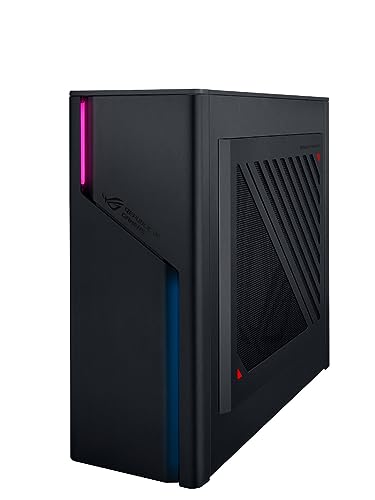
- Best small form factor gaming PC for streaming: ASUS ROG G22CH DB779, Core i7-13700KF, desktop RTX 4070 with dual NVENC encoders, 32GB, 1TB, ~10.7L — Check on Amazon
- ASUS ROG NUC (2025), Core Ultra 9 275HX, RTX 5070 Ti Mobile, Blackwell NVENC with AV1, 16GB, 1TB, ~3.0L — Check on Amazon
- Minisforum AtomMan G1 Pro, Ryzen 9 8945HX, desktop RTX 5060, Blackwell NVENC with AV1, 5GbE, 32GB, 1TB, ~3.8L — Check on Amazon
- Minisforum AtomMan G7 Pro, Core i9-14900HX, RTX 5070 Laptop GPU, Blackwell NVENC with AV1, 32GB, 1TB, slim slab — Check on Amazon
- ASUS ROG NUC 970, Core Ultra 9 185H, RTX 4070 Laptop GPU, Ada NVENC with AV1, 32GB, 1TB, 2.5L — Check on Amazon
- GMKtec EVO-X2, Ryzen AI Max+ 395, Radeon 8060S with AV1-capable VCN encoder, 64GB unified memory, 1TB, ~2.8L — Check on Amazon
Read the full guide ↓
Disclosure: As an Amazon Associate, reviewstook.com earns from qualifying purchases. Links to Amazon on this page are affiliate links; they cost you nothing extra. Listing details such as price and availability change often, so check the current Amazon listing before you buy.
Streaming from one small PC means asking that PC to do three jobs at once: run the game, encode the broadcast in OBS, and carry the streamer’s working clutter — chat, a browser, Discord, alerts, maybe a second monitor full of tabs. This guide grades six genuinely small machines (roughly 20 liters or less by their published dimensions; these six land between about 2.5 and 11 liters) on how well they do that combined job under $2,500, and it grades them encoder-first, because the encoder is the component a streaming guide should be built around. The workflow assumed throughout is the standard one-PC setup: Twitch at around 6,000 kbps with constant bitrate (CBR) encoding, which is that platform’s practical ceiling, and YouTube where the platform allows — higher bitrates, 1440p uploads that earn better transcoding, and AV1 encoding on hardware that supports it.
Here is the good news that most size-focused roundups miss: encoding is done by a small fixed-function block on the graphics silicon, not by the game’s rendering cores, so a three-liter box with the right GPU encodes exactly as well as a forty-liter tower with the same GPU. Smallness does not tax your stream’s picture. What smallness does tax is everything around the encoder: memory headroom for the game-plus-OBS-plus-browser pile, fan noise a meter from your microphone, and thermal stamina across a four-hour session. Those are the axes this guide grades on, alongside the encoder itself. One honesty item up front, carried over from the base guide: there is no RTX 5080 small form factor PC under $2,500 — the one genuine sub-4-liter RTX 5080 machine sits in a premium tier above this budget — so every pick below tops out at RTX 5070 Ti Mobile, desktop 4070/5060, or laptop-class silicon, named precisely as such everywhere it appears. If your space problem is mild and you would rather have a full tower’s encoder and cooling headroom, the Best Streaming PC Under $2500 guide covers those machines; this one is for streamers whose PC has to be small.
In this guide
Quick Picks
Short on time, or comparing several options at once? Each row below names a streamer type and the machine that suits it, with a link to the listing.
| Streamer type | Pick | Why it stands out for streaming | Link |
|---|---|---|---|
| Best for streaming | ASUS ROG G22CH DB779 | Desktop RTX 4070 with two NVENC encoders — stream and record at once | Check on Amazon |
| Strongest GPU in 3 liters | ASUS ROG NUC (2025) | RTX 5070 Ti Mobile, Blackwell NVENC with AV1 — check price on Amazon | Check on Amazon |
| Best wired networking | Minisforum AtomMan G1 Pro | Desktop RTX 5060 encoder plus 5GbE Ethernet and a swappable card slot | Check on Amazon |
| Most accessible entry point | Minisforum AtomMan G7 Pro | RTX 5070 Laptop GPU with AV1 encode and 32GB included | Check on Amazon |
| Smallest streaming box | ASUS ROG NUC 970 | 2.5 liters, RTX 4070 Laptop GPU at full 140W, Ada NVENC with AV1 | Check on Amazon |
| Heaviest multitasker | GMKtec EVO-X2 (64GB) | 64GB of unified memory for game + OBS + everything, AV1-capable encoder | Check on Amazon |
How These Picks Were Chosen
The base version of this guide applied a tape measure first — published dimensions computing to roughly 20 liters or less — and honest GPU naming second, and both filters stand here: four of these six machines run laptop GPUs and are called laptop GPUs everywhere, one runs integrated graphics and says so. This streaming variant adds a third filter on top: every pick had to carry a modern hardware encoder with AV1 encode support, because a machine bought for streaming in late 2026 should not be locked out of the codec YouTube already accepts and every platform is moving toward. That filter is why this list is drawn entirely from Blackwell and Ada generation NVIDIA silicon plus one RDNA 3.5 AMD machine — and why older small boxes built around Ampere or RDNA2 graphics, whose encoders have no AV1 encode at all, are not here however cheap they have become.
Within that filter, the grading order was: encoder capability first (generation, AV1, and whether there are two encoder blocks or one), then the memory the machine gives the combined workload, then wired networking, then the unglamorous streaming realities of fan noise and sustained thermals. Two encoder facts shape the whole list and are worth stating once, plainly. First, Twitch’s standard ingest is H.264 at around 6,000 kbps, so on Twitch every pick below is judged on its H.264 hardware encoding; AV1 earns its keep on YouTube, on local recordings, and as future-proofing. Second, only one pick — the G22CH, with a desktop RTX 4070 — carries two NVENC encoder blocks, which is what lets a single PC stream one encode and record another at full quality simultaneously; every other NVIDIA pick here has a single encoder block that time-shares between tasks, and the EVO-X2’s AMD encoder is a single block too. We did not use these machines ourselves; the encoder grading derives from the silicon each base-guide pick is documented to contain, and the configuration warnings are the base guide’s, carried over intact.
What Streaming Actually Asks of a Small PC
A game on its own mostly asks for GPU rendering power and enough CPU to feed it. Streaming adds a second, parallel workload with its own rules. OBS composites your scene — game capture, camera, overlays, alerts — and hands the finished frames to an encoder. If that encoder is the hardware block on your GPU (NVENC on NVIDIA silicon, the VCN block on AMD silicon, Quick Sync on Intel integrated graphics), the game barely notices it; if you fall back to software x264 encoding on the CPU, the game notices a great deal. Every pick in this guide is here because it can stay on hardware encoding permanently. The settings that matter on Twitch are settled practice: CBR rate control at around 6,000 kbps, a two-second keyframe interval (the platform requires it), and an output resolution your encoder and your viewers’ connections can both sustain. YouTube is the more permissive platform — it accepts substantially higher bitrates, rewards a 1440p upload with better transcoding even if your viewers watch at 1080p, and accepts AV1 encodes from hardware that can produce them, which in this guide is all six picks.
The encoder map of this specific set, derived from the silicon the base guide documents, is as follows. The G22CH’s desktop RTX 4070 carries two eighth-generation (Ada) NVENC blocks with AV1 encode — the strongest streaming arrangement here for a Twitch-first creator, because one block can carry the live H.264 stream while the second records a high-bitrate local copy in AV1 or HEVC for editing and upload. The two Blackwell laptop machines (ROG NUC 2025’s RTX 5070 Ti Mobile, G7 Pro’s RTX 5070 Laptop GPU) and the G1 Pro’s desktop RTX 5060 carry the newer Blackwell-generation NVENC with AV1 encode; the G1 Pro’s desktop 5060 has a single encoder block, and no block count is claimed for the two laptop parts. The NUC 970’s RTX 4070 Laptop GPU carries Ada-generation NVENC with AV1 encode. The EVO-X2’s Radeon 8060S uses AMD’s VCN encoder block in its RDNA 3.5 graphics, which encodes H.264, HEVC and AV1 — the only non-NVIDIA encoder in the set. Quick Sync appears only as a supporting player: the Intel processors in the ROG NUC 2025, G7 Pro and NUC 970 carry integrated graphics with Quick Sync, usable as a secondary encoder for a recording or a second platform. The G22CH’s Core i7-13700KF is an F-suffix chip with no integrated graphics at all, so it has no Quick Sync — its dual NVENC is the whole story, and fortunately it is a good one. The G1 Pro’s Ryzen processor likewise leaves encoding entirely to its NVIDIA card.
The 6 Best Small Form Factor Gaming PCs for Streaming Under $2,500
ASUS ROG G22CH DB779 — Core i7-13700KF, Desktop RTX 4070, 32GB, 1TB (~10.7L)
Who it suits: The streamer who records everything — the creator whose live Twitch broadcast is only half the product, and who wants a clean, high-bitrate local recording of every session for edits, clips and uploads, from one small machine.
For streaming, this is the most capable box in the guide, and the reason is a number most listings never print: two. The G22CH’s desktop RTX 4070 — a full desktop card with 12GB of GDDR6X, not a laptop part — carries two Ada-generation NVENC encoder blocks, each with AV1 encode support. In OBS terms that means the jobs a streamer actually runs in parallel stop competing: block one sends the live H.264 stream to Twitch at 6,000 kbps CBR, block two simultaneously records a high-bitrate AV1 or HEVC master to the SSD, and neither encode touches the game’s rendering or the other’s quality. On every single-encoder machine in this guide, a stream plus a recording means the one block time-shares; here it does not. The rest of the machine supports the role: a Core i7-13700KF, 32GB of DDR5, a 1TB PCIe 4.0 SSD, an internal 600W 80+ Gold power supply (no brick), Wi-Fi 6E for everything except the stream itself — streaming runs on a cable, per the rule in the OBS section below — and a wired keyboard and mouse in the box. At ~10.7 liters computed from its published dimensions (11.50 × 32.30 × 28.69 cm), it is also the roomiest chassis here, which is the closest thing small form factor offers to thermal stamina over long sessions.
Two honest limitations. The 13700KF is an F-suffix processor: it has no integrated graphics, so there is no Quick Sync fallback encoder and no picture at all from the motherboard’s display outputs — the monitor and any capture chain belong in the graphics card’s ports, full stop. And the 32GB of memory it ships with is also ASUS’s rated maximum for the machine, so the multitasking headroom you buy is the headroom you keep. For pricing, check price on Amazon — this remains one of the strongest streaming values in the guide. Match the DB779 model number exactly; a lesser G22CH variant with a 13700F and 16GB is also offered by third-party importers, so verify the exact configuration before you order.
- Dual Ada NVENC with AV1 — stream to Twitch and record a local master simultaneously, at full quality each.
- A real desktop RTX 4070 12GB and 32GB of RAM for the game-plus-OBS-plus-browser pile.
- Internal 600W Gold PSU and the largest chassis here — the long-session pick.
Honest limitation: No integrated graphics and no Quick Sync (F-suffix CPU), and the 32GB memory ceiling is also the shipping configuration.
Choose it if you stream and record at the same time, or plan to. Skip it if ~10.7 liters is too big for the space — the encoder story below 4 liters is single-block everywhere.

ASUS ROG NUC (2025) — Core Ultra 9 275HX, RTX 5070 Ti Mobile, 16GB, 1TB (~3.0L)
Who it suits: The streamer who wants the strongest graphics silicon that fits in three liters — the most game performance and the newest encoder generation — and who is willing to buy memory as part of the streaming upgrade.
The graphics chip is the RTX 5070 Ti Mobile — the laptop version with 12GB of GDDR7, named as such everywhere in this guide — and it is the strongest GPU here. Its encoder is the Blackwell-generation NVENC with AV1 encode: on Twitch that means a high-quality H.264 encode at 6,000 kbps with rendering headroom to spare, and on YouTube it unlocks the modern path — a 1440p AV1 upload at a generous bitrate, transcoded kindly by the platform. The Core Ultra 9 275HX also carries integrated graphics with Quick Sync, which OBS can use as a secondary encoder for a local recording while NVENC carries the live stream — the closest any of the small picks comes to the G22CH’s two-encoder trick. The chassis is the most polished here: 282.4 × 187.7 × 56.5 mm, almost exactly 3.0 liters, with triple-fan dual-vapor-chamber cooling and Thunderbolt 4 for docks and peripherals.
The streaming-specific catch is memory. This machine ships with 16GB, and a streamer’s working set — a modern game, OBS with a browser-source-heavy scene collection, chat, Discord, a dozen tabs — is exactly the workload that makes 16GB feel small, with stutters that viewers see as stream problems rather than RAM problems. The fix is straightforward: the machine has two SO-DIMM slots, so treat a second 16GB DDR5 SO-DIMM as part of this pick’s real streaming setup and check price on Amazon for the current total. Pricing for this configuration varies, so confirm it still fits the under-$2,500 budget on the live listing before you buy — and note that the RTX 5080 configuration of the same chassis sits in a premium tier above this budget entirely.
- Blackwell NVENC with AV1 encode on the strongest GPU in the guide, in ~3.0 liters.
- Quick Sync on the processor’s integrated graphics as a genuine second-encoder option.
- Thunderbolt 4 and the most refined cooling of the NUC-class picks.
Honest limitation: Ships with 16GB of RAM — tight for game + OBS + browser multitasking — and pricing varies, so check price on Amazon to confirm it fits your budget.
Choose it if the live listing fits your budget and you will add the second memory stick. Skip it if the live price on Amazon sits above your budget, or you want 32GB in the box on day one.

Minisforum AtomMan G1 Pro — Ryzen 9 8945HX, Desktop RTX 5060, 32GB, 1TB (~3.8L)
Who it suits: The streamer whose upload is only as good as their network discipline — and who values the best wired connection in this guide, plus the only graphics card here that can be replaced when encoder generations move on.
Streaming failures are more often network failures than computer failures, and the G1 Pro is built like it knows that: its 5GbE wired Ethernet is the fastest networking on any pick here, and a stream run on a wired connection at a steady 6,000 kbps is the single largest reliability upgrade in this entire guide. The encoder story is current-generation: its desktop RTX 5060 — a real low-profile desktop card, 145W, mounted in a genuine PCIe x16 slot — carries a single Blackwell-generation NVENC block with AV1 encode. Single means stream-plus-record shares one block (the OBS section explains how to budget for that), but for the Twitch stream itself it is fully modern: clean H.264 at platform bitrates, AV1 ready for YouTube. The slot matters to streamers specifically, because encoder generations are the one part of a streaming PC that ages on a schedule: when a future card’s encoder is worth having, this is the only sub-4-liter pick that can take it. Around it: a 16-core Ryzen 9 8945HX, 32GB of DDR5 upgradable to 96GB, a second M.2 slot, an internal 350W PSU, Wi-Fi 7 for everything except the stream — check price on Amazon and at Minisforum direct before you buy.
The review findings from the base guide matter more to streamers than to anyone. The machine ships in an 80W “Gaming Mode” that holds back roughly a fifth of its performance behind a software toggle — find it on day one, or both your game and your stream run on a machine you did not pay for. Reviewers also found it loud under heavy load, and on a streamer’s desk, a meter from the microphone, that is not a footnote: fan noise is the tax your audience hears. Placement (off the desk’s reflective surface, behind the monitor) and a close microphone with sensible gain are part of this pick’s setup, and Minisforum’s control utility has shipped with a driver component that Windows Defender flags — documented in review coverage, worth knowing before you install the maker’s software to reach that power toggle.
- 5GbE wired Ethernet — the best streaming network connection in the guide.
- Desktop RTX 5060 with Blackwell NVENC and AV1 encode, in a swappable PCIe slot.
- 32GB included, upgradable to 96GB; internal PSU, no brick.
Honest limitation: A single encoder block, documented loudness under load near your microphone, and a shipping power mode you must switch off manually.
Choose it if wired reliability and a future encoder upgrade path top your list. Skip it if your stream room is quiet, your mic is sensitive, and the box must sit beside it.
Minisforum AtomMan G7 Pro — Core i9-14900HX, RTX 5070 Laptop GPU, 32GB, 1TB (slim slab, ~3.0L body)
Who it suits: The streamer starting out who wants a current-generation encoder and a complete 32GB machine at the most accessible entry point in this guide, in a slab thin enough to stand beside the monitor it feeds.
The GPU is the RTX 5070 Laptop GPU — 8GB of GDDR7, 4,608 CUDA cores against the desktop 5070’s 6,144 and 12GB, named precisely — and its encoder is the current Blackwell-generation NVENC with AV1 encode, so the streaming essentials are fully modern: H.264 for Twitch at 6,000 kbps CBR, AV1 available for YouTube and local recording, from a single encoder block. The Core i9-14900HX adds a streamer’s second string: its integrated graphics carry Quick Sync, which can take a local recording or a low-stakes second encode off the NVENC block entirely. The configured machine is complete in the ways streaming cares about — 32GB of DDR5 across two SO-DIMM slots (upgradable to 96GB), 1TB with a second M.2 slot, USB4, Wi-Fi 7 for the non-stream traffic — in a body measuring 385 × 237 × 33 mm, about three liters of 33mm-thin slab at 2.62 kg. For pricing, check price on Amazon — the configured 32GB/1TB version is the mid-range option here, while the barebone version is the lower-tier option because it ships without the parts that make it a complete PC, and Minisforum’s own store is the other place to compare before you buy.
Two checks, both documented, both streaming-relevant. The Amazon listing is a style family that also sells the barebone under the same page: a barebone G7 Pro with no RAM, no SSD and no Windows is not a streaming PC at all, so confirm the configured style is what is in your cart. And some review units shipped with a single 32GB memory stick, which runs memory in single-channel mode — a configuration that costs game performance and multitasking smoothness exactly where a game-plus-OBS workload feels it. Confirm the stick count on arrival; adding a second stick later is easy but not free.
- Blackwell NVENC with AV1 encode at the most accessible configured entry point here.
- Quick Sync on the 14900HX as a secondary encoder for recordings.
- 32GB included and upgradable to 96GB; 33mm slab takes almost no desk.
Honest limitation: The GPU is the 8GB laptop part despite the “RTX 5070” headline, the listing mixes barebone and configured styles, and some units ship with a single memory stick.
Choose it if you want the newest encoder generation here for the least money. Skip it if 8GB of VRAM worries you for the games you stream — the G22CH carries a 12GB desktop card.

ASUS ROG NUC 970 — Core Ultra 9 185H, RTX 4070 Laptop GPU, 32GB, 1TB (2.5L)
Who it suits: The streamer whose PC has to vanish — behind the TV, under the monitor, into the carry-on for a travel setup — without giving up a modern encoder.
Two and a half liters (270 × 180 × 50 mm) is the smallest chassis in this guide, and the streaming-relevant fact is what ASUS did with the GPU inside it: the RTX 4070 Laptop GPU runs at its full 140W, the highest power limit that chip gets, so the game side of the game-plus-stream workload is not strangled. The encoder is Ada-generation NVENC with AV1 encode — one generation behind the Blackwell picks, and for streaming purposes the difference is refinement rather than capability: Twitch’s H.264 at 6,000 kbps and YouTube’s AV1 path are both fully supported. The Core Ultra 9 185H’s integrated graphics add Quick Sync as a secondary encoder for recordings, the same supporting role it plays in the 2025 NUC above. The rest is complete and friendly: 32GB of DDR5 (slots to 64GB), 1TB SSD, Thunderbolt 4, an SD card reader that content creators will actually use, and a vertical stand in the box. For pricing, check price on Amazon — it sits comfortably inside the budget tier without deal-hunting.
The honest costs are generational and thermal. This is the previous NUC with a previous-generation laptop GPU — 4,608 cores and 8GB, a class reviewers place around the desktop RTX 4060 Ti — so the newest titles at high settings will ask more of the game side while OBS takes its share of everything else. And 2.5 liters concentrates heat and fan noise into the smallest space here; under a sustained combined load it will be audible in a quiet room, which on a streamer’s desk means microphone placement and gain discipline are part of the purchase. Buyers who want DLSS 4-era silicon and the newest encoder should look at the 2025 NUC or the G7 Pro above.
- 2.5 liters — the smallest streaming box here — with its laptop GPU at full 140W.
- Ada NVENC with AV1 encode, plus Quick Sync as a secondary encoder.
- Complete 32GB/1TB configuration — check price on Amazon.
Honest limitation: Previous-generation laptop GPU with 8GB of VRAM, and the least thermal and acoustic headroom in the guide for long sessions.
Choose it if minimum volume outranks everything else. Skip it if you want current-generation graphics or record-and-stream headroom — that is the G22CH’s job.

GMKtec EVO-X2 (64GB) — Ryzen AI Max+ 395, Radeon 8060S, 64GB, 1TB (~2.8L)
Who it suits: The multitasking streamer — the one whose second monitor is a wall of browser tabs, chat bots, music, Discord and a local AI tool or two — whose streams die by a thousand small stutters rather than one big one.
This is the only pick with no discrete graphics card and the only non-NVIDIA encoder, and it earns its place on memory. The Radeon 8060S graphics are integrated into AMD’s Ryzen AI Max+ 395, fed by 64GB of LPDDR5X unified memory on a 256 GB/s bus that CPU and GPU share — in a box of 193 × 185.8 × 77 mm, about 2.8 liters. For the streaming workload, that memory pool is the story: game, OBS, browser, chat and everything else draw from 64GB that no other pick can match, and the multitasking ceiling simply stops being a streaming problem. The encoder is AMD’s VCN block in RDNA 3.5 trim, and it encodes H.264, HEVC and AV1 — so the YouTube AV1 path is open here too. For gaming, Notebookcheck places the 8060S roughly on par with the RTX 4070 Laptop GPU. This 64GB/1TB configuration is a premium-tier option among Ryzen AI Max+ 395 machines on Amazon — check price on Amazon for the current listing.
Honesty requires two qualifications. At Twitch’s H.264 and 6,000 kbps, independent reviewers have consistently found AMD’s hardware H.264 encoding a step softer in fine detail than NVIDIA’s NVENC at the same bitrate — at platform bitrates the gap is visible in fast motion and foliage-heavy scenes, and it is the main reason this pick ranks last for a Twitch-first streamer despite its memory crown; on YouTube, where AV1 and higher bitrates are available, the gap narrows considerably. And the architecture cuts both ways: game rendering and encoding share one chip and one memory bus, so the heaviest games tax the same silicon that feeds your stream, with none of the separation a discrete card provides. The 64GB is also soldered — generous today, fixed forever — and the external 230W power adapter needs a home on or under the desk even though the 2.8-liter box does not count it.
- 64GB of unified memory — the game + OBS + browser workload never runs out of room.
- VCN encoder with H.264, HEVC and AV1 encode; the only AV1-capable non-NVIDIA pick.
- ~2.8 liters with Windows 11 Pro — check price on Amazon.
Honest limitation: AMD’s H.264 encoding at Twitch bitrates trails NVENC in fine detail, and game and stream share one chip and one memory bus.
Choose it if your stream’s supporting software pile is huge, or you stream to YouTube where AV1 plays. Skip it if Twitch picture quality per bitrate is the whole game — every NVIDIA pick above encodes it better.

Comparison Table
| Product | Volume | Encoder (streaming) | Memory / Storage | Price | Link |
|---|---|---|---|---|---|
| ASUS ROG G22CH DB779 | ~10.7L | Desktop RTX 4070 — dual Ada NVENC, AV1 encode; no Quick Sync (F-suffix CPU) | 32GB / 1TB | Check price on Amazon | Check on Amazon |
| ASUS ROG NUC (2025) | ~3.0L | RTX 5070 Ti Mobile — Blackwell NVENC, AV1 encode; Quick Sync secondary | 16GB / 1TB | Check price on Amazon | Check on Amazon |
| Minisforum AtomMan G1 Pro | ~3.8L | Desktop RTX 5060 — single Blackwell NVENC, AV1 encode; 5GbE wired | 32GB / 1TB | Check price on Amazon | Check on Amazon |
| Minisforum AtomMan G7 Pro | ~3.0L slab | RTX 5070 Laptop GPU — Blackwell NVENC, AV1 encode; Quick Sync secondary | 32GB / 1TB | Check price on Amazon | Check on Amazon |
| ASUS ROG NUC 970 | 2.5L | RTX 4070 Laptop GPU — Ada NVENC, AV1 encode; Quick Sync secondary | 32GB / 1TB | Check price on Amazon | Check on Amazon |
| GMKtec EVO-X2 (64GB) | ~2.8L | Radeon 8060S — AMD VCN, H.264/HEVC/AV1 encode | 64GB unified, soldered / 1TB | Check price on Amazon | Check on Amazon |
Setting Up OBS on These Machines
Whichever pick you buy, the OBS configuration follows the same skeleton, and the encoder choice is the first decision. On the five NVIDIA picks, select the NVENC encoder — on the EVO-X2, select the AMD hardware encoder — and never let a one-PC streaming setup fall back to software x264 encoding on the CPU, which taxes the same processor your game needs. For Twitch, set rate control to CBR at around 6,000 kbps with a two-second keyframe interval; those are platform expectations, not preferences. For YouTube, you have room to breathe: raise the bitrate well beyond Twitch’s ceiling, consider streaming at 1440p so the platform’s transcoding treats you better, and on all six picks AV1 encoding is available for the cleanest result per bit. If you record locally — and you should, because clips and edits are how small streams grow — the dual-NVENC G22CH records on its second encoder block without touching the stream; on the Intel NUC and G7 Pro picks, point the recording at Quick Sync instead; on the single-NVENC G1 Pro and NUC 970 and on the EVO-X2, the recording shares the one encoder block, so keep its settings modest (a sensible resolution and bitrate, not a second maximum-quality encode).
When a stream stutters, OBS’s stats window tells you which of three different failures you are looking at, and each has a different fix — confusing them wastes evenings. Frames missed due to rendering lag means the GPU was too busy drawing the game to composite your scene on time: cap the game’s frame rate (an uncapped game will eat the whole GPU and starve OBS), lower the game’s heaviest settings, and keep OBS’s preview modest. Frames missed due to encoding lag means the encoder block itself is overloaded: drop to a faster encoder preset, reduce the output resolution, and on single-encoder machines make sure a local recording is not asking the same block for a second heavy encode. Dropped frames are the network, full stop — the encoder and the game are innocent. The fix hierarchy is: stream over a wired Ethernet connection (the rule with no exceptions in this guide — every pick here has wired networking, and the G1 Pro’s 5GbE is the best of it), then lower the bitrate until the connection sustains it, then suspect the route to the platform’s ingest server. Wi-Fi is for chat, music and everything else in the room; the broadcast itself travels on a cable.
Costing the Rest of the Streaming Desk — Without Inventing Prices
The PC is the largest single purchase in a streaming setup, but it is not the whole purchase, and this section deliberately names no prices for the rest — peripheral prices swing too much to print responsibly, and the order you buy them in matters more than their totals. Buy in impact order. A microphone comes first: viewers forgive ordinary video far sooner than bad audio, and a modest microphone placed close to your mouth beats an expensive one across the room — closeness also matters doubly with these small PCs, because a close mic can run at lower gain and picks up less of the fan noise a compact chassis makes under load. Headphones come second, so game audio never leaks from speakers into the microphone. Lighting comes third, before any camera upgrade: an ordinary camera in decent light looks better than a premium camera in the dark, and lighting is the cheapest-looking upgrade on this list. A camera comes fourth — the webcam or camera you already own is the right starting point. And the item to not buy for this setup: a capture card. Capture cards exist to bring an external source — a console, a camera used as one, or a second PC — into the streaming machine. For the one-PC workflow this guide is built around, where the game and OBS live on the same box, a capture card does literally nothing. It becomes a real purchase only the day a console joins the desk, and not before. Buyers researching the wider desk should also know the Best Mini PC For Streaming Under $2500 guide covers even smaller streaming boxes, and the Best Gaming PC For Streaming Under $2500 guide covers this same workflow without the size constraint.
How to Choose a Small Form Factor Streaming PC Under $2,500
- Count your encoder jobs before you count anything else. Stream only, and any pick here works. Stream plus a high-quality local recording, and the answer narrows to the dual-NVENC G22CH, or an Intel pick whose Quick Sync can carry the recording.
- Match the encoder to your platform. Twitch-first means H.264 at ~6,000 kbps, where NVENC’s per-bitrate quality leads and the EVO-X2’s AMD encoder trails slightly in fine detail. YouTube-first opens AV1 and higher bitrates, where all six picks are on modern footing.
- Weigh memory as a streaming spec, not a gaming spec. The game alone is fine with 16GB; the game plus OBS plus a browser full of stream tools is not. Five picks ship 32GB or 64GB; the ROG NUC (2025)’s 16GB should be budgeted with its second stick from day one.
- Stream on a wire. Every pick has Ethernet; the G1 Pro’s 5GbE is the best. If your desk cannot reach a cable run, fix that before you fix anything else — dropped frames are a network diagnosis, not a PC one.
- Place the box for your microphone, not just your eyes. Small PCs sit on desks, near mics, and their fans work hard per liter. The documented-loud G1 Pro and the tiny NUC 970 need placement thought; a close microphone at low gain is the universal mitigation.
- Read the GPU’s whole name. Four of six picks run laptop GPUs — capable encoders and honest gaming parts, a class below their desktop namesakes. The comparison that matters is against the encoder and the card a class down, not the name on the box.
- Confirm the configuration in the cart. Style-family listings (the G7 Pro’s barebone trap above all) and drifting model lines (the G22CH’s lesser variant) are this category’s standing hazards. CPU, GPU, RAM and storage, checked line by line, every time.
- Decide whether the GPU must be replaceable. Encoder generations age on a schedule. Only the G1 Pro’s PCIe slot lets a small machine follow that schedule; every other pick’s encoder is the one it retires with.
Common Buying Mistakes
- Streaming over Wi-Fi because the desk is far from the router. Dropped frames are the predictable result, and no PC upgrade fixes a network problem — run the cable.
- Letting OBS encode on the CPU (x264) when a hardware encoder is sitting in the machine. On a one-PC setup that choice taxes the game directly; NVENC, VCN or Quick Sync should always be the selected encoder.
- Buying a capture card for a single-PC setup. It captures external sources; with the game and OBS on the same machine there is nothing external to capture. Console streamers need one; you, yet, do not.
- Buying the ROG NUC (2025) without checking whether the live listing still fits a $2,500 plan. If the current price on Amazon sits above the budget, the shortlist should restart.
- Streaming on the ROG NUC (2025)’s stock 16GB and blaming the encoder for stutters. The game-plus-OBS-plus-browser pile is a memory workload; the second SO-DIMM is part of the streaming build.
- Leaving the G1 Pro in its shipping 80W mode. It hides about a fifth of the machine’s performance behind a software toggle, and both the game and the stream run on the reduced machine until you find it.
- Buying the G7 Pro’s barebone style by accident. Same listing page, no RAM, no SSD, no Windows — a different product from the configured machine.
- Matching the wrong G22CH. The lesser 13700F/16GB variant is a different configuration from the DB779; the model number is the product.
- Ignoring the G7 Pro’s memory-stick lottery. A single 32GB stick runs single-channel and costs smoothness exactly where a streaming workload feels it; check on arrival, while returns are easy.
Final Recommendation
- Stream and record at once: ASUS ROG G22CH DB779 — the only dual-encoder pick.
- Strongest GPU and newest encoder in 3 liters: ASUS ROG NUC (2025) — check price on Amazon, with a second memory stick budgeted.
- Wired reliability and an upgrade path: Minisforum AtomMan G1 Pro.
- Newest encoder at the most accessible entry point: Minisforum AtomMan G7 Pro.
- Smallest possible streaming box: ASUS ROG NUC 970.
- The heaviest multitasking desk: GMKtec EVO-X2 (64GB).
Our top two are the G22CH and the ROG NUC (2025), for opposite streaming philosophies. The G22CH is the workflow answer: two NVENC blocks mean the broadcast and the archive never compete, its desktop 4070 and 32GB carry the combined workload without strain — check price on Amazon for the current listing — Check on Amazon. The NUC (2025) is the performance answer: the strongest GPU and a Blackwell encoder in three liters, with Quick Sync as a genuine second encoder, bought only when the live listing fits the budget and with the second memory stick treated as part of the purchase — Check on Amazon. Streamers whose space problem is the same but whose budget is smaller should start from the Best Small Form Factor Gaming PC For Streaming Under $1500 guide; those who have settled the small question and want the unconstrained version of this search will find it in the Best Small Form Factor Gaming PC Under $2500 base guide and the wider Best Gaming PC Under $2500 roundup. Whichever you choose: pick the hardware encoder in OBS, stream on a cable, and check the live price and the exact configuration before you order.
Frequently Asked Questions
Can a PC this small really stream and play at the same time?
Yes — because the encoding is done by a dedicated hardware block on the graphics silicon, not by the cores rendering your game. A three-liter machine with an RTX 5070-class GPU encodes with the same NVENC block as a tower with the same silicon. What smallness actually taxes is memory headroom, cooling over long sessions, and fan noise near your microphone, which is why this guide grades those alongside the encoder.
What bitrate and settings should I use on Twitch and YouTube?
On Twitch, the settled standard is CBR at around 6,000 kbps with a two-second keyframe interval — that is the platform’s practical ceiling, and every pick here sustains it on its hardware encoder. YouTube allows substantially higher bitrates, treats 1440p uploads more kindly in transcoding, and accepts AV1 encodes, which all six of these machines can produce. The full settings walkthrough, including what to do when OBS reports dropped or lagged frames, is in the OBS section above.
Why does only one pick get recommended for streaming and recording simultaneously?
Because simultaneous jobs need encoder capacity, and only the G22CH’s desktop RTX 4070 carries two NVENC blocks — one for the live stream, one for the local recording, neither compromising the other. The Intel-based NUC and G7 Pro picks approximate the trick by recording on Quick Sync. On the single-NVENC G1 Pro and NUC 970, and on the EVO-X2’s single VCN block, a stream and a recording share one block, so the recording’s settings have to stay modest.
Is AV1 encoding worth caring about for streaming yet?
On YouTube, yes — it accepts AV1 now and delivers more picture per bit, which matters at any bitrate. On Twitch, the standard ingest remains H.264, so AV1 there is future-proofing rather than a present benefit. Either way, every pick in this guide encodes AV1 in hardware; machines built on older Ampere or RDNA2 silicon cannot, which is one reason none of them are in this list.
Do I need a capture card with one of these PCs?
Not for streaming games played on the PC itself — the game and OBS are already on the same machine, and there is nothing external to capture. A capture card enters the picture when a console (or a second PC, or a camera) becomes a source. Buy the microphone, headphones and lighting first; the kit-costing section above gives the full order.
Can I get an RTX 5080 small form factor streaming PC under $2,500?
No. The only genuine sub-4-liter RTX 5080 machine, the top configuration of the ROG NUC (2025) line, sits in a premium tier above this budget. Under $2,500, the strongest small-box streaming silicon is the RTX 5070 Ti Mobile in pick two — with the same Blackwell encoder generation, which for streaming purposes is most of what the 5080 would have bought you anyway.
What if my space problem is a living-room TV rather than a desk?
Then the smallest picks lead — the 2.5-liter NUC 970 or the 3-liter ROG NUC (2025) — with one streaming-specific adjustment: a PC behind a TV usually means a wireless controller and a longer cable run, and the stream still travels on wired Ethernet, so measure that run before you buy. The Best Small Form Factor Gaming PC For Small Spaces Under $2500 guide is written for exactly that room.


