Where to buy
Check the latest price, availability and delivery on Amazon. Orders are placed on Amazon. We may earn a commission from qualifying purchases.
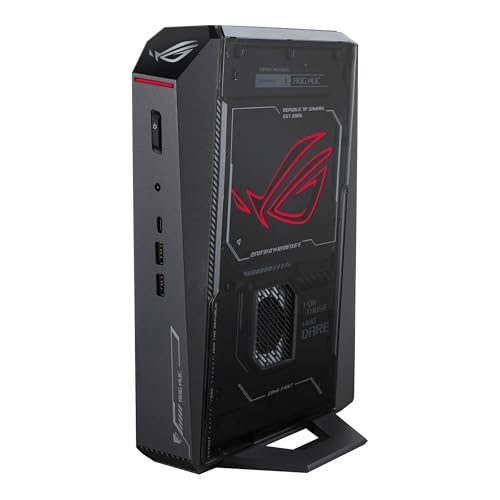
- Best overall small form factor gaming PC: ASUS ROG NUC (2025), Core Ultra 9 275HX, RTX 5070 Ti Mobile, 16GB, 1TB, ~3.0L — Check on Amazon
- GMKtec EVO-X2, Ryzen AI Max+ 395, Radeon 8060S, 64GB, 1TB, ~2.8L — Check on Amazon
- Minisforum AtomMan G7 Pro, Core i9-14900HX, RTX 5070 Laptop GPU, 32GB, 1TB, slim slab — Check on Amazon
- ASUS ROG G22CH DB779, Core i7-13700KF, desktop RTX 4070, 32GB, 1TB, ~10.7L — Check on Amazon
- ASUS ROG NUC 970, Core Ultra 9 185H, RTX 4070 Laptop GPU, 32GB, 1TB, 2.5L — Check on Amazon
- Minisforum AtomMan G1 Pro, Ryzen 9 8945HX, desktop RTX 5060, 32GB, 1TB, ~3.8L — Check on Amazon
Read the full guide ↓
Disclosure: As an Amazon Associate, reviewstook.com earns from qualifying purchases. Links to Amazon on this page are affiliate links; they cost you nothing extra. Listing details such as price and availability change often, so check the current Amazon listing before you buy.
“Small form factor” is the most abused phrase in PC gaming. Type it into Amazon and most of what comes back is an ordinary 35-to-45-liter mid-tower wearing the words in its title, because nothing stops a seller from calling a big box small. This guide applies the definition the SFF community actually uses: a gaming PC whose volume, computed from the manufacturer’s own published dimensions, comes in at roughly 20 liters or less — and every machine below is far under that line, between about 2.5 and 11 liters. At a $2,500 budget that filter changes everything, because the honest headline of this tier is one most roundups bury: there is no RTX 5080 small form factor PC under $2,500. The one genuine sub-4-liter RTX 5080 machine, the top configuration of ASUS’s ROG NUC (2025), sits firmly in a premium tier well above this guide’s ceiling. What $2,500 actually buys in a small box is laptop-class GPUs in 2.5-to-4-liter NUC-style chassis, one integrated-graphics flagship with an enormous pool of unified memory, and exactly one design that squeezes a real desktop graphics card into about 11 liters.
That trade — size for silicon — is priced openly in this guide. A dedicated section below, The Liter Tax, takes each pick and sets it against a verified full-size tower with comparable graphics hardware, so you can see what the smallness costs before you pay it. If the tax turns out to be more than your desk is worth, the same money buys a desktop RTX 5070 Ti tower with change to spare, and our guide to the Best Gaming PC Under $2500 covers those machines. If the small box is the point — a PC that lives on the desk instead of under it, travels in a backpack, or disappears behind a living-room TV — then read on. Below are the quick picks, detailed reviews of all six machines with their volumes computed from published dimensions, a comparison table, the liter trade-off worked through pick by pick, a buying checklist, the mistakes that waste money in this category, and the questions SFF buyers ask most.
In this guide
Quick Picks
Short on time, or comparing several options at once? Each row below names a buyer type and the machine that suits it, with a link to the listing.
| Buyer type | Pick | Why it stands out | Link |
|---|---|---|---|
| Best overall | ASUS ROG NUC (2025), RTX 5070 Ti Mobile | The strongest GPU that fits in ~3 liters | Check on Amazon |
| Best for memory-heavy work and play | GMKtec EVO-X2, 64GB | 64GB of unified memory in ~2.8 liters; nothing else here holds as much | Check on Amazon |
| Best value current-generation GPU | Minisforum AtomMan G7 Pro | RTX 5070 Laptop GPU in a 33mm-thin slab | Check on Amazon |
| Best real desktop graphics card | ASUS ROG G22CH DB779 | A full desktop RTX 4070 12GB in a ~10.7L case — no laptop silicon | Check on Amazon |
| Best truly tiny | ASUS ROG NUC 970 | 2.5 liters, RTX 4070 Laptop GPU at its full 140W | Check on Amazon |
| Best upgrade path | Minisforum AtomMan G1 Pro | A desktop RTX 5060 in a real PCIe slot you can swap later, in ~3.8 liters | Check on Amazon |
How These Picks Were Chosen
Three filters decided this list, and the first was a tape measure. Every pick had to publish real dimensions, and its volume had to compute to roughly 20 liters or less; the six survivors land between about 2.5 and 11 liters. That single rule excluded every RTX 5070 Ti and RTX 5080 desktop prebuilt in the wider $2,500 market — fine machines, several of them cheaper than these picks, but 35-to-45-liter towers that answer a different search (they are covered in the Best 1440p Gaming PC Under $2500 guide). The second filter was verification: every ASIN and specification in this guide traces to a real Amazon listing or to the maker’s own specification pages for that exact model. Where a machine sits near the top of this budget tier, the review says so plainly. Prices in this category move quickly, so this guide does not print a fixed figure for any pick — check price on Amazon for the current listing before you decide.
The third filter was honest naming. Four of the six picks run laptop GPUs, and they are called laptop GPUs everywhere in this guide — in the buy box, the quick picks, the reviews and the comparison table — because an RTX 5070 Laptop GPU is not a desktop RTX 5070: NVIDIA’s own published figures give the desktop card 6,144 CUDA cores and 12GB of memory, the laptop part 4,608 cores and 8GB. The same applies to the RTX 4070 generation: 5,888 cores and 12GB on the desktop card, 4,608 cores and 8GB in the laptop part, which independent reviewers consistently place around desktop RTX 4060 Ti class. One pick has no discrete GPU at all — its graphics are integrated into its processor — and it is here for its memory, not its frame rates, with that stated up front. We did not use these machines ourselves; we read the maker listings, specification pages and independent reviews, and compared volumes, GPU silicon, memory ceilings, power supplies and prices. Check price on Amazon for every pick before you order, because in this category listings move weekly.
The 6 Best Small Form Factor Gaming PCs Under $2,500
ASUS ROG NUC (2025) — Core Ultra 9 275HX, RTX 5070 Ti Mobile, 16GB, 1TB (~3.0L)
Who it suits: The buyer who wants the most graphics power that physically fits in a three-liter box, and who wants maximum performance in minimum volume.
Start with the honesty item, because it is printed in this review’s heading and it matters: the graphics chip is the RTX 5070 Ti Mobile — the laptop version, with 12GB of GDDR7 — not the desktop RTX 5070 Ti. Even so, it is the strongest GPU in this guide, and it lives in a chassis measuring 282.4 × 187.7 × 56.5 mm, which computes to almost exactly 3.0 liters: a flat slab that stands vertically on a desk or slides behind a monitor. Around it ASUS builds the most polished small machine here — a Core Ultra 9 275HX processor, a triple-fan cooling system with dual vapor chambers, Thunderbolt 4, and two SO-DIMM slots. Positioning needs care: this is a premium-tier machine at the very top of this guide’s budget band, so check price on Amazon before you commit. When the live listing sits inside the budget it is the pick to beat; when it pushes into the tier above, the reviews below become better buys.
Two limitations are structural. The machine ships with 16GB of memory in a market where 32GB is the comfortable gaming standard, and upgrading means buying SO-DIMM sticks separately, so budget the second stick into the real cost. And the family’s ceiling is priced out of reach: the RTX 5080 configuration of this same chassis sits in a premium tier well above this guide, which is the clearest proof in this guide that no RTX 5080 small form factor PC exists under $2,500.
- RTX 5070 Ti Mobile with 12GB GDDR7 — the most GPU silicon in this guide, in ~3.0 liters.
- Triple-fan, dual-vapor-chamber cooling and Thunderbolt 4; the most refined chassis here.
- Two SO-DIMM slots, so the 16GB it ships with is a starting point, not a ceiling.
Honest limitation: It sits at the very top of this budget tier, so the live listing decides whether it belongs here at all — and it ships with 16GB of RAM where rivals here include 32GB or 64GB.
Choose it if the live listing sits inside your budget and you want maximum frames per liter. Skip it if the live listing sits above your budget, or you want 32GB included without a further purchase.

GMKtec EVO-X2 (64GB) — Ryzen AI Max+ 395, Radeon 8060S, 64GB, 1TB (~2.8L)
Who it suits: The buyer whose workload is memory first and gaming second — local AI models, big creative projects, heavy multitasking — who also wants a genuinely capable gaming box in under three liters.
This is the odd one out, and the guide is better for it. There is no discrete graphics card inside the EVO-X2: its Radeon 8060S graphics are integrated into AMD’s Ryzen AI Max+ 395 processor. What that processor brings is memory architecture no other pick can touch — 64GB of LPDDR5X unified memory on a 256 GB/s bus, shared between CPU and GPU, in a box measuring 193 × 185.8 × 77 mm, about 2.8 liters. For gaming, Notebookcheck places the 8060S roughly on par with the RTX 4070 Laptop GPU, which makes this a credible 1080p-and-1440p gaming machine by integrated-graphics standards that would have been absurd a few years ago. For memory-hungry work it is in a class of one in this tier: this 64GB/1TB configuration pairs the largest unified-memory pool here with premium positioning — check price on Amazon for the current listing.
The limitation is the mirror image of the strength: the memory is soldered. Sixty-four gigabytes is generous today and fixed forever — the 128GB configurations of this same machine exist precisely because buyers outgrow it, and they sit in a premium tier far outside this budget. The external 230W power adapter also belongs in your desk math: the 2.8-liter figure is the box, and the brick has to live somewhere too. Buy this machine for what its memory does, with gaming as a strong second talent, and it earns its place; buy it as a pure gaming PC and the tower comparison in the liter tax section below will sting.
- 64GB of unified LPDDR5X memory — more than the other five picks’ gaming needs and AI workloads combined.
- Radeon 8060S integrated graphics placed by reviewers around RTX 4070 Laptop class.
- ~2.8 liters with Windows 11 Pro — check price on Amazon.
Honest limitation: The 64GB is soldered and can never be upgraded, and the graphics are integrated — excellent integrated, but a class below a desktop RTX 4070.
Choose it if local AI, large projects or extreme multitasking share the desk with your games. Skip it if gaming is the whole job — the same money buys more frames elsewhere in this guide.

Minisforum AtomMan G7 Pro — Core i9-14900HX, RTX 5070 Laptop GPU, 32GB, 1TB (slim slab, ~3.0L body)
Who it suits: The buyer who wants current-generation discrete graphics and a full 32GB/1TB configuration in a complete configured package, in a machine thin enough to stand beside a monitor like a book.
The G7 Pro’s shape is its argument: the body measures 385 × 237 × 33 mm — about three liters of slab, 33mm thin — rising to 398 × 260 × 80 mm on its stand, at 2.62 kg. Inside are a 24-core Core i9-14900HX and the RTX 5070 Laptop GPU with 8GB of GDDR7, cooled by six heat pipes and dual fans. Name the GPU precisely, as this guide does everywhere: it is the laptop part, 4,608 CUDA cores against the desktop RTX 5070’s 6,144, and 8GB of memory against the desktop card’s 12GB. It is still a current-generation discrete GPU with DLSS 4 support, and the configured machine around it is complete: 32GB of DDR5 across two SO-DIMM slots (upgradable to 96GB), 1TB of storage with a second M.2 slot, Wi-Fi 7, USB4 and Windows 11 Pro. The configured 32GB/1TB version is the one to buy — the same listing family also sells a barebone — and it positions as a more accessible entry point in this guide’s premium band. Check price on Amazon for the configured style, since marketplace pricing for this family varies by seller and style.
Two things to check on arrival, both documented in review coverage: some review units shipped with a single 32GB memory stick, which runs the memory in single-channel mode and leaves performance on the table — confirm your unit’s stick count, because the fix (a second stick) is easy but not free. And the Amazon listing is a style family: the same page sells the barebone, so make sure the configured 32GB/1TB style is the one in your cart before you pay.
- Current-generation RTX 5070 Laptop GPU with a complete 32GB/1TB configuration included.
- 33mm-thin slab body (~3.0L) that stands vertically and takes almost no desk.
- Memory upgradable to 96GB and a second M.2 slot — rare headroom in this class.
Honest limitation: The GPU is the 8GB laptop part despite the “RTX 5070” headline, and the listing mixes barebone and configured styles under one page.
Choose it if you want the newest GPU generation here in a complete configured package. Skip it if 8GB of VRAM worries you for the games you play — the G22CH below carries a 12GB desktop card.

ASUS ROG G22CH DB779 — Core i7-13700KF, Desktop RTX 4070, 32GB, 1TB (~10.7L)
Who it suits: The SFF buyer who refuses laptop silicon: this is the one machine in the guide with a full desktop graphics card, for the desk that has room for eleven liters but not forty.
Every other discrete-GPU pick in this guide makes a laptop compromise. The G22CH does not. Its chassis measures 11.50 × 32.30 × 28.69 cm — about 10.7 liters computed, in the 10L class ASUS markets — and inside it sits a desktop RTX 4070 DUAL with 12GB of GDDR6X: all 5,888 CUDA cores at desktop power, fed by a proper internal 600W 80+ Gold power supply. Around the card: a Core i7-13700KF, 32GB of DDR5, a 1TB PCIe 4.0 SSD, Wi-Fi 6E, Windows 11 Home, and a wired keyboard and mouse in the box. It positions in the mid-range of this guide’s band — check price on Amazon — and it is, hardware for hardware, among the most honest gaming hardware in this guide: a real desktop card, a real PSU, and the smallest liter tax of any pick (the trade-off is in the section below).
The cautions are about configuration discipline. The memory is SO-DIMM and ASUS rates the machine’s maximum at 32GB — the amount it ships with — so there is no memory upgrade path beyond what is in the box. And the G22CH name covers lesser variants: a version with a Core i7-13700F and 16GB has been offered by third-party importers at premium pricing. The model number to match, every time, is DB779 — check it on the listing and on the box, and buy from a seller whose return policy you trust.
- Desktop RTX 4070 12GB — the only full desktop GPU in the guide, no laptop asterisk.
- Internal 600W 80+ Gold PSU; no power brick to hide.
- Desktop card and internal PSU with the guide’s lowest liter tax — check price on Amazon.
Honest limitation: At ~10.7 liters it is three to four times the volume of the NUC-class picks, and its 32GB memory ceiling is also its shipping configuration.
Choose it if desktop-class graphics matter more than minimum volume. Skip it if the machine has to travel or vanish behind a monitor — that is what the 2.5-to-3-liter picks are for.

ASUS ROG NUC 970 — Core Ultra 9 185H, RTX 4070 Laptop GPU, 32GB, 1TB (2.5L)
Who it suits: The buyer for whom volume is the first specification: the smallest machine in this guide, and the one that disappears — behind a TV, under a monitor, into a carry-on.
Two and a half liters is the whole pitch, and the NUC 970 makes it without giving up discrete graphics. The chassis measures 270 × 180 × 50 mm — 2.5 liters — and inside it the RTX 4070 Laptop GPU runs at its full 140W, the highest power limit that chip gets, which matters: a laptop GPU’s performance is set as much by its wattage as its name, and ASUS did not strangle this one. It is still the laptop part — 4,608 cores and 8GB against the desktop card’s 5,888 and 12GB, a class reviewers place around the desktop RTX 4060 Ti — and this guide names it that way everywhere. The rest of the machine is complete and current: Core Ultra 9 185H, 32GB of DDR5 (slots support up to 64GB), 1TB SSD, Thunderbolt 4, an SD card reader, and a vertical stand in the box. Positioning is friendly for this tier: it sits comfortably inside this budget band as a previous-generation premium mini — check price on Amazon for the current listing.
What you give up is the current generation. This is the previous NUC, and its GPU is a generation behind the 2025 model at the top of this guide; buyers who want DLSS 4 and the newer silicon should look there or at the G7 Pro. The 2.5-liter class also concentrates heat and fan noise into a small space under sustained load — the physics of small boxes is covered in the buying checklist below, and it applies to every pick here, this one most of all.
- 2.5 liters — the smallest chassis in the guide — with a discrete GPU at full 140W.
- Complete 32GB/1TB configuration — check price on Amazon.
- Thunderbolt 4 and an SD reader make it a credible living-room and travel machine.
Honest limitation: Previous-generation laptop GPU with 8GB of VRAM, and the smallest box here has the least thermal headroom.
Choose it if minimum volume outranks everything else. Skip it if you want current-generation graphics or a GPU upgrade path — this class of machine has neither.

Minisforum AtomMan G1 Pro — Ryzen 9 8945HX, Desktop RTX 5060, 32GB, 1TB (~3.8L)
Who it suits: The upgrader: the only sub-4-liter machine here whose graphics card is a real, swappable desktop card in a real slot.
The G1 Pro breaks the rule every other tiny pick follows. Its RTX 5060 is a desktop card — a low-profile Gigabyte OC model running at 145W — mounted in a genuine PCIe x16 slot inside a 3.8-liter chassis (Minisforum’s figure; reviewers measuring the box got 12.4 × 8.5 × 2.25 inches). When a faster low-profile card exists in a few years, this machine can take it; no other pick in this guide can take any graphics upgrade at all. The platform around the slot is serious: a 16-core Ryzen 9 8945HX, 32GB of DDR5 SO-DIMM upgradable to 96GB, a 1TB PCIe 4.0 SSD with a second M.2 slot, an internal 350W power supply (no brick), 5GbE networking, Wi-Fi 7 and Windows 11 Pro. It positions in the mid-range of this guide’s band on Amazon, with Minisforum’s own US store as the direct alternative — check price on Amazon for the current listing.
The review findings deserve the same prominence as the specs. The machine ships in an 80W “Gaming Mode” that holds back roughly a fifth of its performance behind a software toggle — find the performance setting on day one, or you will benchmark a machine you did not pay for. Reviewers also found it loud under heavy load, and Minisforum’s control utility has shipped with a driver component that Windows Defender flags — documented in review coverage, worth knowing before you install the maker’s software. None of that cancels the slot: for a buyer who keeps machines for years and upgrades in place, this is the only pick whose graphics story can change.
- Desktop RTX 5060 in a real PCIe x16 slot — the guide’s only GPU upgrade path under 4 liters.
- Internal 350W PSU, 5GbE, memory to 96GB and a second M.2 slot.
- Mid-range positioning in this tier — check price on Amazon.
Honest limitation: Ships in a power-limited mode you must switch off manually, runs loud under load, and the low-profile card format limits future upgrades to low-profile cards.
Choose it if you upgrade machines rather than replace them. Skip it if you want quiet, set-and-forget operation — the NUC picks are calmer housemates.
Comparison Table
| Product | Volume (from published dimensions) | Graphics | Memory / Storage | Price | Link |
|---|---|---|---|---|---|
| ASUS ROG NUC (2025) | ~3.0L (282.4 × 187.7 × 56.5 mm) | RTX 5070 Ti Mobile, 12GB | 16GB / 1TB | Check price on Amazon | Check on Amazon |
| GMKtec EVO-X2 (64GB) | ~2.8L (193 × 185.8 × 77 mm) | Radeon 8060S integrated | 64GB unified, soldered / 1TB | Check price on Amazon | Check on Amazon |
| Minisforum AtomMan G7 Pro | ~3.0L slab (385 × 237 × 33 mm body) | RTX 5070 Laptop GPU, 8GB | 32GB / 1TB | Check price on Amazon | Check on Amazon |
| ASUS ROG G22CH DB779 | ~10.7L (11.50 × 32.30 × 28.69 cm) | Desktop RTX 4070, 12GB | 32GB / 1TB | Check price on Amazon | Check on Amazon |
| ASUS ROG NUC 970 | 2.5L (270 × 180 × 50 mm) | RTX 4070 Laptop GPU, 8GB, 140W | 32GB / 1TB | Check price on Amazon | Check on Amazon |
| Minisforum AtomMan G1 Pro | ~3.8L (maker figure) | Desktop RTX 5060 low-profile, 8GB, in PCIe slot | 32GB / 1TB | Check price on Amazon | Check on Amazon |
The Liter Tax, Priced
Every small PC is a trade: you give up graphics silicon, memory or money, and you receive liters. Most guides leave that trade vague. Here it is pick by pick, against verified full-size towers from the wider $2,500 market — principally the Skytech King 95, a desktop RTX 5070 Ti tower with 32GB of memory, the Skytech Omega, a desktop RTX 4070 SUPER tower, and the Thermaltake LCGS Quartz i1460, a desktop RTX 5060 tower. (The tower versions of this search live in the Best Compact Gaming PC Under $2500 guide’s sibling coverage and the general $2,500 guide; the comparisons below are about hardware class and volume — check price on Amazon for any machine you are cross-shopping.)
- ROG NUC (2025) — the tax is paid in silicon. It competes in the same premium band as the King 95 tower — and in that tier the tower gives you a desktop RTX 5070 Ti with 16GB of memory and 32GB of system RAM, while the NUC gives you the Mobile 5070 Ti with 12GB and 16GB of RAM in 3.0 liters instead of forty-some. Same tier, less hardware, one-thirteenth the volume. Whether that is a tax or a bargain depends entirely on your desk.
- EVO-X2 — a clear premium over a stronger gaming tower, buying memory instead. It sits noticeably above the Omega tower’s tier, and the Omega’s desktop RTX 4070 SUPER is the stronger gaming card. What the premium buys is 64GB of unified memory and a 2.8-liter box. For a pure gamer that is a bad trade; for anyone running memory-hungry local workloads, the tower simply cannot match it.
- G7 Pro — a clear premium against a desktop RTX 5060 tower. The Quartz i1460 tower with a desktop RTX 5060 sits in a lower tier. The G7 Pro’s RTX 5070 Laptop GPU is newer silicon than the tower’s desktop 5060, but with 8GB and laptop power limits the real-world gap is far smaller than the name gap — you are paying a clear premium for the 33mm slab.
- G22CH — the most modest premium in the guide. It sits only modestly above the Omega tower’s tier, and the Omega’s 4070 SUPER is a slightly stronger card than the G22CH’s desktop 4070. In exchange for that modest premium and a small performance step down, forty-plus liters become 10.7. If your space problem is real but not extreme, this is the rational end of the SFF market.
- NUC 970 — the steepest premium, for the last liter. It carries a steep premium over a desktop RTX 4060 Ti tower — the class its 140W RTX 4070 Laptop GPU performs in. Shrinking from 10 liters to 2.5 is where the tax curve goes vertical; the first liters are the easiest, the last ones cost the most in hardware terms.
- G1 Pro — a steep premium, with an upgrade slot as the rebate. Against the Quartz tower for the same desktop RTX 5060 class, the premium is steep — but uniquely here, part of it is recoverable: the card sits in a slot, and a future low-profile upgrade extends the machine instead of replacing it.
The pattern is the lesson. Between about 10 and 20 liters, smallness is nearly free — the G22CH proves it. Between 3 and 4 liters it costs a clear premium per machine. Below 3 liters, you pay in GPU class as well. Decide which liter band your life actually requires before you decide which machine to buy, because the band chooses the budget more than the budget chooses the band. And if no band justifies the tax — if the PC will sit under a desk with room to spare — the honest recommendation is a tower: the Best Prebuilt Gaming PC Under $2500 options put a desktop RTX 5070 Ti in your hands in this tier with none of these compromises.
How to Choose a Small Form Factor Gaming PC Under $2,500
- Compute the liters yourself. Multiply the published dimensions and divide by a million (for millimeters) to get liters. If a listing will not publish dimensions, it is not a small form factor PC — it is a tower with good marketing. Every pick in this guide publishes its numbers.
- Read the GPU’s full name, including the word “Laptop” or “Mobile.” A laptop GPU shares a name with a desktop card and little else: fewer cores, less memory, lower wattage. Check the VRAM figure and the core count against the desktop card you think you are getting.
- Ask where the GPU upgrade path is. In almost every sub-4-liter machine the graphics are soldered or fixed for life; the G1 Pro’s PCIe slot is the exception that proves the rule. If the GPU can never change, you are buying the whole machine’s lifespan in one decision.
- Count memory twice: how much, and whether it can grow. Soldered memory (the EVO-X2’s 64GB, generous but final) and slotted memory (the NUCs, the AtomMans) are different ownership experiences. A machine that ships with 16GB in slots is a plan; a machine with 16GB soldered would be a trap — none here is, and that was a selection criterion.
- Budget the power brick. Most sub-4-liter machines use an external adapter — the EVO-X2’s is 230W — that adds desk or floor volume the liter figure excludes. Internal-PSU machines (G22CH, G1 Pro) count their whole selves in their volume.
- Expect heat and noise to scale with smallness. The same wattage in a tenth of the air volume means faster fans. If the machine will sit a meter from your ears, weight the reviews’ noise findings as heavily as the specs; if it lives behind a TV across the room, care less.
- Match the configuration, not the headline. This category sells barebone and configured versions, and multiple memory sizes, under single listing pages. The price that caught your eye may belong to a different style. Confirm CPU, GPU, RAM and storage in the cart, every time.
- Decide your liter band before your model. Under 3 liters for travel and TV duty; 3–4 liters for a desk machine that can still move; around 10 liters if a desktop GPU matters and the desk can take it. The band decision eliminates most of the market honestly.
Common Buying Mistakes
- Believing the words “small form factor” in a listing title. Sellers apply them to 40-liter towers. If the dimensions are not published and small, the box is not small.
- Reading “RTX 5070” and assuming the desktop card. In this class it is usually the Laptop GPU — 4,608 cores and 8GB where the desktop card has 6,144 and 12GB. The name is the same; the silicon is not.
- Assuming the ROG NUC (2025) always fits a $2,500 plan. It sits at the top of this tier, so if the live listing pushes it above your budget the comparison should restart — check price on Amazon before you commit.
- Buying a barebone by accident. Style-family listings put the barebone and the configured machine on one page; a barebone G7 Pro with no RAM, no SSD and no Windows is not a deal, it is a different product.
- Forgetting the memory upgrade bill on a 16GB machine. The second stick is a real line item in the total cost — price the upgrade before you buy, not as an afterthought.
- Leaving the G1 Pro in its shipping power mode. It arrives limited to an 80W gaming mode that hides about a fifth of its performance; the toggle is in the maker’s software, and finding it is part of unboxing.
- Assuming small means silent. Small means the fans are closer to the heat and to you. Check the noise findings before a 2.5-liter box moves onto your desk.
- Matching the wrong variant of a drifting model line. The G22CH’s lesser 13700F/16GB variant has been offered at premium pricing. Model numbers — DB779, RNUC14SRKU9189AUI — are the product; the family name is not.
Final Recommendation
- Most SFF buyers: ASUS ROG NUC (2025) — when the live listing fits the budget.
- Memory-heavy work plus gaming: GMKtec EVO-X2 (64GB).
- Newest GPU in a complete configured package: Minisforum AtomMan G7 Pro.
- Desktop GPU, honest PSU, modest tax: ASUS ROG G22CH DB779.
- Smallest possible box: ASUS ROG NUC 970.
- Upgraders: Minisforum AtomMan G1 Pro.
Our top two are the ROG NUC (2025) and the EVO-X2, for opposite reasons. The NUC is the performance answer: the strongest GPU that fits in three liters, bought when the live listing sits inside this budget — Check on Amazon. The EVO-X2 is the capability answer: 64GB of unified memory that no tower in this tier can match, in 2.8 liters, with gaming performance around the RTX 4070 Laptop class as a bonus rather than the headline — Check on Amazon. Buyers whose budget is smaller but whose space problem is the same should start from the Best Small Form Factor Gaming PC Under $1500 guide, and buyers who have decided the tax is worth paying at any level can see what the ceiling looks like in the Best Small Form Factor Gaming PC Under $3000 guide. Whichever band you choose: compute the liters, read the GPU’s whole name, confirm the configuration in the cart, and check the live price before you order.
Frequently Asked Questions
What counts as a small form factor gaming PC?
By the definition this guide enforces, a gaming PC of roughly 20 liters or less, computed from the manufacturer’s published dimensions — and every pick here is between about 2.5 and 11 liters. The label in a listing title means nothing on its own: mid-towers of 35–45 liters are routinely sold as “small form factor,” which is why the first step of any SFF purchase is multiplying the dimensions yourself.
Can I get an RTX 5080 small form factor PC under $2,500?
No — and any listing implying otherwise deserves a slow read. The only genuine sub-4-liter RTX 5080 machine, the top configuration of the ROG NUC (2025), sits in a premium tier well above this guide. Desktop RTX 5080 cards exist in towers at this budget’s edge, but in a true small form factor chassis the 5080 starts well above this guide’s ceiling.
Is a laptop GPU in a desktop box a bad deal?
Not inherently — it is how almost every sub-4-liter gaming PC exists. The laptop parts are efficient, and at their full power limits (140W for the NUC 970’s RTX 4070 Laptop GPU) they deliver honest 1080p and 1440p gaming. It becomes a bad deal only when the naming tricks you: an RTX 5070 Laptop GPU has 4,608 cores and 8GB where the desktop RTX 5070 has 6,144 cores and 12GB, so compare it against desktop cards a class down, not against its namesake.
How much performance do I lose versus a tower at the same price?
Typically one GPU class, plus memory. At $2,500 a tower buys a desktop RTX 5070 Ti with 16GB and 32GB of system memory; the three-liter machines in this guide answer with a Mobile 5070 Ti with 12GB or laptop parts a class lower. The liter tax section above works through the gap pick by pick — from the most modest premium for the 10.7-liter G22CH to the steepest premium at the 2.5-liter extreme.
Can I upgrade a small form factor gaming PC later?
Memory and storage, usually yes — five of these six machines use SO-DIMM slots and standard M.2 drives, and the EVO-X2’s memory is the soldered exception. Graphics, almost never: the GPUs in the NUC-class machines are part of the board. The exception is the AtomMan G1 Pro, whose desktop RTX 5060 sits in a real PCIe x16 slot and can be swapped for a future low-profile card. If GPU upgrades are part of your plan, that slot — or a bigger case — is the whole decision.
Are small gaming PCs loud?
They work harder per liter: the same heat in a tenth of the air volume means smaller fans spinning faster. Reviewers found the G1 Pro loud under heavy load, and the physics applies across this guide — a 2.5-to-3-liter box on your desk will be audible in a quiet room at full tilt. Placement helps (behind a monitor, across the room, behind the TV), and the NUC-class machines are the most polished here, but silence is a tower feature; do not buy 2.5 liters expecting it.
What if my space problem is a living-room TV rather than a desk?
Then the smallest picks are the shortlist — the 2.5-liter NUC 970 or the 3-liter ROG NUC (2025) — and the Best Small Form Factor Gaming PC For Small Spaces Under $2500 guide is written for exactly that room. Check the basics before you buy: the machine’s height against your media unit’s shelf, an HDMI run your TV supports at the resolution you want, and a wireless controller plan, because a PC behind a TV is a console only once the input problem is solved.


