Where to buy
Check the latest price, availability and delivery on Amazon. Orders are placed on Amazon. We may earn a commission from qualifying purchases.
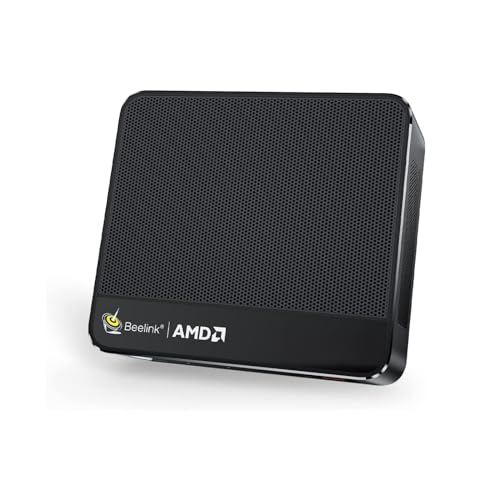
- Best small form factor gaming PC under $500 overall: Beelink SER5 MAX Mini PC, Ryzen 7 7735HS, Radeon 680M, 24GB RAM, 500GB SSD — Check on Amazon
- Best graphics in the guide, on deal: GMKtec NucBox K6, Ryzen 7 7840HS, Radeon 780M, 32GB DDR5, 1TB SSD — Check on Amazon
- ACEMAGIC Mini Gaming PC, Ryzen 7 7735HS, Radeon 680M, 24GB RAM, 512GB SSD — Check on Amazon
- GMKtec NucBox M6 Ultra, Ryzen 5 7640HS, Radeon 760M, 16GB DDR5, 512GB SSD — Check on Amazon
See 2 more Amazon options
- GMKtec NucBox M6, Ryzen 5 6600H, Radeon 660M, 16GB DDR5, 512GB SSD — Check on Amazon
- GMKtec M5 Plus, Ryzen 7 5825U, 32GB RAM, 1TB SSD — Check on Amazon
Read the full guide ↓
Disclosure: As an Amazon Associate, reviewstook.com earns from qualifying purchases. Links to Amazon on this page are affiliate links; they cost you nothing extra. Listing details such as price and availability change often, so check the current Amazon listing before you buy.
Small form factor is the one phrase in PC shopping that should be measurable, so this guide measures it. Every pick below is a complete, ready-to-run gaming PC whose case volume is computed from the maker’s published dimensions, and every one of them comes in under a single litre — roughly the size of a thick paperback book, small enough to disappear behind a monitor, mount to the back of a TV, or ride in a carry-on. That is a deliberate line. A lot of machines sold as “compact” or “small form factor” are ordinary towers with a few inches trimmed off, and at the other extreme there are mini PCs so weak they are office appliances wearing a gaming label. Under $500, the honest small form factor category is a specific thing: a sub-litre box built around a laptop-class AMD processor whose integrated graphics do all the gaming work, because at this budget there is no other way to make a genuinely small machine that genuinely plays games.
That sentence carries the honesty note for the whole guide, better said now than discovered later: no new small form factor PC under $500 has a discrete graphics card. Not one pick here has a GPU you can point to, swap or upgrade — the graphics live inside the processor, and the class that lives at this budget is AMD’s Radeon 680M. The stronger Radeon 780M appears exactly once, in the GMKtec NucBox K6, and only as a deal: it earns its place only when its live price checks within this budget on Amazon — inside the budget when the deal is live, out of this guide’s promise when it is not. Check price on Amazon before you buy. Everything else here is a 680M machine at a real sub-$500 price, a step-down 760M or 660M machine bought for its price or its upgrade slots, or a capacity pick whose graphics are the weakest in the guide and are labelled as such. What $500 buys in small form factor is a particular trade, stated plainly throughout: you give up raw frames and any future graphics upgrade, and in exchange you get a book-sized PC that sips laptop-class power and can live anywhere. If that trade sounds wrong, the tower comparison below will tell you what the same money buys in a big case — more frames. If it sounds right, start with the Beelink SER5 MAX for the full 680M experience at the smallest size here, or the K6 on deal for the strongest integrated graphics in this class.
In this guide
Quick Picks
Short on time, or comparing several options at once? Each row below names a buyer type and the product that suits it, with a link to the listing. Volumes are computed from the makers’ published dimensions.
| Buyer type | Pick | Why it stands out | Link |
|---|---|---|---|
| Best overall | Beelink SER5 MAX, Ryzen 7 7735HS, Radeon 680M | The full 680M class in the smallest box here — about 0.6 litres | Check on Amazon |
| Best graphics, on deal | GMKtec NucBox K6, Ryzen 7 7840HS, Radeon 780M | The strongest integrated graphics in the guide — buy only when it checks within budget on Amazon | Check on Amazon |
| Best 680M alternative | ACEMAGIC Mini Gaming PC, Ryzen 7 7735HS, Radeon 680M | Same graphics class, triple 4K displays, check price on Amazon | Check on Amazon |
| Best current platform | GMKtec NucBox M6 Ultra, Ryzen 5 7640HS, Radeon 760M | Newest chip generation and USB4 at an everyday positioning inside the budget | Check on Amazon |
| Best for upgraders | GMKtec NucBox M6, Ryzen 5 6600H, Radeon 660M | Socketed RAM and two SSD slots — the machine that grows with you | Check on Amazon |
| Best capacity per dollar | GMKtec M5 Plus, Ryzen 7 5825U, 32GB RAM, 1TB SSD | Double the memory and storage of rivals, for second careers as much as games | Check on Amazon |
How These Picks Were Chosen
The budget was applied as a ceiling for a complete machine: every product below is a real Amazon listing that sells at or regularly within $500 in the United States, ships with memory, storage and Windows installed, and can be unboxed and played on the same evening. Barebones kits — cases with a processor and nothing else — were excluded however attractive their sticker prices look, because a barebones price is not a PC price; the memory and SSD it still needs are exactly the parts whose prices have climbed hardest lately. Where a pick’s price drifts, the review directs you to check the live price on Amazon rather than printing a hard number you should hold us to, and the one pick that only fits the budget on deal is fenced with an explicit walk-away rule.
Size was applied as a measurement, not a vibe. Each pick’s volume was computed from the dimensions the maker publishes — in a manual, a specification page or the listing itself — and the arithmetic is shown in each review so you can check it. Every pick here is under one litre. That excluded the entire “compact tower” shelf: perfectly decent machines of ten, fifteen or twenty litres that wear small-form-factor language in their titles while taking up as much desk as the tower you were trying to escape. It also excluded the discrete-GPU mini PCs that exist above this budget, because honesty about the category starts with admitting where its ceiling is: under $500, small and discrete do not currently meet in a new machine.
We did not use these products ourselves. We read the maker listings, manuals and specification pages, and compared processors, integrated graphics, memory, storage, ports and published dimensions, favoring listings that print their numbers in full. Two judgements ran through all of that. The first is the graphics ladder, because in an integrated-graphics machine the processor choice is the graphics choice: the 780M is the strongest integrated graphics in this class, the 680M a clear step below it and the resident class at this budget, the 760M a half-step behind the 680M, the 660M roughly two-thirds of the idea of a 680M, and the M5 Plus’s older Vega graphics the weakest here. The second is memory construction — soldered or socketed — because in a machine whose graphics can never be upgraded, the memory is the machine’s whole future: socketed SO-DIMM memory can be doubled years from now, while soldered memory is the final specification you will ever own. Both judgements are applied pick by pick below, including where they count against a product we otherwise recommend.
The 6 Best Small Form Factor Gaming PCs Under $500
Beelink SER5 MAX Mini PC — Ryzen 7 7735HS, Radeon 680M, 24GB RAM, 500GB SSD
Who it suits: The buyer this keyword was written for — someone who wants the strongest honest gaming performance that fits in the smallest possible box, for a desk, a dorm or the shelf under a TV.
Start with the measurement, because it is the best in this guide. Beelink’s own manual and model listings put the SER5 MAX at 126 × 113 × 42 mm — about 0.6 litres, the smallest case here, at under two pounds with a VESA mount in the box. This is a PC that can be screwed to the back of a monitor and forgotten, yet nothing about its specification is a toy’s. The Ryzen 7 7735HS is an eight-core processor, and its integrated Radeon 680M is the resident graphics class of this entire budget: the strongest integrated graphics you can buy at a genuine sub-$500 price without waiting for a deal. In game terms — described by class, because that is the honest way to describe integrated graphics — esports and indie titles are its home ground, older AAA games run well at 1080p on medium settings, and the newest AAA releases ask for low settings and upscaling to stay smooth. It will not ray-trace a modern showcase title or run demanding games natively at 1440p; no machine in this guide will, and the ones that pretend otherwise in their headlines are describing the monitor they can connect to, not the games they can run.
The configuration around the chip is sensible rather than generous: 24GB of memory is more than the 16GB floor this class usually ships, and 500GB of storage is the guide’s smaller allotment — enough for an operating system and a rotating handful of games, tight for anyone whose library is a permanent collection. The cooling is a dual-fan design fed by mesh sides, and the practical consequence of the small case is the one this whole category shares: a sub-litre box has laptop-class fans, and under a sustained gaming load you will hear them working in a quiet room, though at living-room distance or through headphones it fades into the furniture. Check price on Amazon for this listing — it tends to live right at the ceiling of this budget, so checking the live price before you buy is worth the moment it takes.
- Smallest case in the guide: about 0.6 litres from published dimensions of 126 × 113 × 42 mm.
- Radeon 680M graphics — the strongest integrated class available at a true sub-$500 price.
- VESA mount included, so the PC can vanish behind a monitor entirely.
Honest limitation: The 24GB of memory is LPDDR5 soldered to the board — it can never be upgraded, so this specification is the machine’s final one; and 500GB of storage fills faster than game libraries shrink.
Choose it if size is the priority and you want the full 680M class without deal-hunting. Skip it if you plan to keep the machine for many years and grow it — the socketed picks below have longer futures.

GMKtec NucBox K6 — Ryzen 7 7840HS, Radeon 780M, 32GB DDR5, 1TB SSD
Who it suits: The patient buyer — someone who wants the strongest integrated graphics AMD puts in this class, and is willing to let a price alert, not a shopping impulse, decide the day they buy.
The K6 is the performance ceiling of this guide, and its review has to begin with price discipline rather than specification. This is normally a premium-tier machine above this budget. When a deal brings it within budget — check price on Amazon to confirm for exactly this 32GB/1TB configuration — it is the best graphics-per-dollar in the guide. At its everyday premium pricing, it does not belong in a guide with $500 in the title: buy it only when the live price checks within budget, or do not buy it from this guide at all. The rule is not a technicality — the entire case for the K6 is that a deal briefly puts a premium-tier machine in this budget guide; pay the premium price and you have simply bought a more expensive PC whose proper comparison is a higher tier.
What the deal buys is the Radeon 780M, the strongest integrated graphics in this class and a clear step above the 680M machines around it — the difference shows up exactly where integrated graphics are weakest, in newer and heavier games at 1080p, where the 780M holds settings and smoothness that ask the 680M to compromise. Around it sits the most complete specification here: the Ryzen 7 7840HS, 32GB of DDR5 in two socketed sticks — memory you can replace or expand to 64GB, which makes this the rare performance pick that is also a longevity pick — a 1TB PCIe 4.0 SSD, USB4, and dual 2.5-gigabit Ethernet. The case measures 128.8 × 127 × 47.8 mm by the maker’s figures, about 0.78 litres: fractionally larger than the Beelink above, still far under a litre, still a machine that hides behind a monitor. The honest cost of the stronger chip in a small box is thermal: the K6 asks more of its cooling than the 680M machines ask of theirs, and under sustained load its fans are a presence in a quiet room. That is physics, not a defect — more performance in the same litre is paid for in airflow — but a buyer choosing this for a silent bedroom desk should know the trade is real.
- Radeon 780M graphics — a clear class above everything else in this guide.
- 32GB of socketed DDR5 and a 1TB SSD: the fullest specification here, and an upgradeable one.
- About 0.78 litres from published dimensions of 128.8 × 127 × 47.8 mm.
Honest limitation: It is a deal-only pick — check price on Amazon — and at any live price above this budget this guide’s recommendation lapses; its stronger chip also makes it the hardest-working, most audible cooling here under sustained load.
Choose it if the live Amazon price checks within budget on the day you buy and you want the most graphics this budget can honestly hold. Skip it if you are buying today at whatever it costs — at full price, the SER5 MAX above is this guide’s answer.

ACEMAGIC Mini Gaming PC — Ryzen 7 7735HS, Radeon 680M, 24GB RAM, 512GB SSD
Who it suits: Living-room and multi-screen buyers who want the same 680M graphics class as the Beelink, in a slightly larger box with a display setup aimed at a TV and monitors at once.
Two machines in a guide can share a processor and still be different purchases, and this is the proof. The ACEMAGIC runs the same Ryzen 7 7735HS and Radeon 680M as the SER5 MAX, so the gaming story is the same story told honestly: esports and indie games are home ground, older AAA plays well at 1080p medium, the newest releases want low settings and upscaling, and ray tracing and native 1440p are not on the menu at this budget in any box this size. Where the ACEMAGIC differs is in the details around the chip. Its case measures 5.04 × 5.04 × 1.61 inches — about 0.67 litres — a touch larger than the Beelink’s, and it leans into display flexibility: triple 4K display support, a 2.5-gigabit LAN port and Wi-Fi 6, with Windows 11 Pro installed. For a machine destined to live under a television and double as the household’s media and light-gaming hub, that port and display mix is the argument; for a pure desk machine, the Beelink’s smaller case is.
Check price on Amazon for this listing: it is positioned as a real sub-$500 option for the full 680M class, no deal-hunting required. Two cautions ride along, and both are about configuration discipline rather than the machine. Listings in this family carry several variants under one title, so the 7735HS with 24GB and 512GB is the configuration to confirm in the cart before paying; a cheaper variant in the same listing is a different, weaker PC. And where the sibling sources for this machine do not establish whether its 24GB of memory is soldered or socketed, this guide makes no claim either way — if memory upgradeability decides your purchase, the picks in this guide whose construction is documented are the GMKtec machines below. Judged on what is verified — chip, graphics, displays, price — it is the most straightforward way to buy the 680M class today without waiting for the K6’s deal.
- Same Ryzen 7 7735HS and Radeon 680M as the guide’s top pick — the full resident graphics class.
- Triple 4K display support and 2.5-gigabit Ethernet suit a TV-shelf, multi-screen life.
- About 0.67 litres from published dimensions of 5.04 × 5.04 × 1.61 inches; check price on Amazon.
Honest limitation: Its memory construction is not established in the verified sources, so no upgrade promise can be made for it; and like every pick here, its graphics are integrated and final.
Choose it if you want 680M performance wired to a TV and monitors, at a price that is inside the budget today. Skip it if documented memory upgradeability matters to you — that evidence exists for the GMKtec picks, not this one.

GMKtec NucBox M6 Ultra — Ryzen 5 7640HS, Radeon 760M, 16GB DDR5, 512GB SSD
Who it suits: Buyers who value the newest platform over the strongest graphics — a current-generation chip, modern ports and an everyday positioning that sits inside the budget without any deal.
The M6 Ultra is this guide’s study in what a step down the graphics ladder buys. Its Ryzen 5 7640HS is a newer-generation processor than the 7735HS in the picks above, but its Radeon 760M graphics sit a half-step behind the 680M: six graphics cores doing the work of the 680M’s twelve’s smaller sibling — in game terms, the same classes apply with the settings nudged down a notch, esports and indie titles still comfortable, older AAA at 1080p medium-to-low, and the newest games firmly in low-plus-upscaling territory. What you get in exchange is currency and price honesty. This configuration sits inside the budget at its ordinary pricing — check price on Amazon — no deal, no coupon, no patience required — and the platform around the chip is the most modern here: USB4, dual M.2 slots so storage can grow, dual 2.5-gigabit Ethernet and Wi-Fi 6E. The case is the same published 128.8 × 127 × 47.8 mm as its K6 sibling, about 0.78 litres and barely over a pound, with a VESA bracket in the box per the maker’s model pages.
One configuration warning matters more than anything else in this review. This listing family also sells a 32GB variant, positioned in a premium tier far outside this budget. The under-$500 claim in this guide belongs to the 16GB/512GB configuration only, and the variant in the cart is the purchase: check it before you pay, because the product title will not check it for you. Sixteen gigabytes is also the honest floor for a gaming machine in this class rather than a comfortable allotment, and it is the first thing a buyer of this machine should plan around — the second M.2 slot makes storage the easy growth path, while memory expectations should be set at purchase. Judged as what it is — the current-generation, no-deal-needed way into small form factor gaming, with graphics a half-step behind the class leaders — it earns its place; judged as a 680M rival, it is not one, and this guide will not pretend otherwise.
- Newest processor generation in the guide, with USB4 and two M.2 slots.
- Positioned inside the budget for this configuration — check price on Amazon without waiting for a sale.
- About 0.78 litres from published dimensions of 128.8 × 127 × 47.8 mm, VESA bracket included.
Honest limitation: The Radeon 760M is a half-step behind the 680M picks, 16GB of memory is the floor rather than a comfort, and the same listing’s 32GB variant sits in a premium tier above this budget — confirm the configuration in the cart.
Choose it if you want a current platform at an honest everyday price and your games are esports, indie and older titles. Skip it if you play newer AAA games — the 680M picks above are worth their premium to you.

GMKtec NucBox M6 — Ryzen 5 6600H, Radeon 660M, 16GB DDR5, 512GB SSD
Who it suits: The upgrader — a buyer who thinks in years, wants the cheapest honest entry into this category, and values slots and sockets over this season’s graphics ranking.
Every guide needs one pick whose argument is the future, and the M6 is this one’s. Its present-day specification is the modest part: a Ryzen 5 6600H with Radeon 660M graphics, roughly two-thirds of the idea of the 680M — a machine for esports, indie games and the back catalogue, at 1080p with settings chosen sensibly, and not a machine for this year’s heaviest releases at any setting that flatters them. Its pricing matches that modesty: it is positioned as a budget-tier option for the 16GB configuration — check price on Amazon — which makes it the most affordable complete entry here by a wide margin. The case is about 5 by 5 by 2 inches — the maker’s manual gives 12.8 × 12.7 × 4.8 cm, roughly 0.78 litres — and a secondary fan helps its cooling at the cost of making it, on the evidence of the maker’s own model documentation, the most audible mini PC in this guide under heavy load.
The future argument is written in its construction. The 16GB of DDR5 sits in SO-DIMM sockets — it can be replaced and doubled. There are two SSD slots, so storage grows by addition rather than replacement. USB4 opens the door, years from now, to external graphics docks and fast storage that the sealed machines in this guide can also use but cannot match internally. In a category where the graphics are soldered fate, the M6 is the one machine whose memory and storage story is unfinished on the day it arrives, and for a buyer whose budget will grow after the purchase does, that is worth more than a half-step of integrated graphics. Two disciplines apply. First, this model is also sold in barebones form on related listings — the price that looks too good is usually the kit with no memory, no SSD and no Windows, and the complete 16GB configuration is the one this guide is describing. Second, buy it as the platform it is: if your games are new and heavy today, its graphics will disappoint you today, and no future memory upgrade changes that.
- Socketed DDR5 memory and dual SSD slots — the most upgradeable machine in the guide.
- Most affordable complete entry here — check price on Amazon.
- About 0.78 litres from the maker’s published 12.8 × 12.7 × 4.8 cm.
Honest limitation: The Radeon 660M is the second-weakest graphics here — a back-catalogue and esports machine — and its secondary fan makes it the most audible pick under load; barebones versions of this model circulate on related listings, so confirm you are buying the complete PC.
Choose it if your budget is firm, your games are light, and you want memory and storage you can grow into. Skip it if you want the strongest gaming you can get today — that is the SER5 MAX or the K6 on deal.

GMKtec M5 Plus — Ryzen 7 5825U, 32GB RAM, 1TB SSD
Who it suits: The capacity buyer — someone whose small PC will work as hard at everything else as it games, and who would rather have double the memory and storage than the newest graphics.
The M5 Plus is the easiest pick in this guide to misunderstand, so its review leads with the limitation and works back to the case for it. Its Ryzen 7 5825U carries older Vega-class integrated graphics — eight compute units of a previous generation — which makes it the weakest gaming graphics in this guide by a clear margin: esports and older games at sensible settings, yes; anything recent and demanding, only with settings and expectations lowered together. If gaming is the whole purpose of the purchase, stop reading here and buy the SER5 MAX. But gaming is not the whole purpose of every small PC, and judged as a small computer that also games, the M5 Plus’s arithmetic is hard to argue with: 32GB of memory and a 1TB SSD at a budget-tier positioning — double the memory and storage of machines in this guide that cost more — check price on Amazon.
The construction suits the second-career life the specification implies. The 32GB of DDR4 sits in sockets and can grow to 64GB; a second M.2 slot waits for more storage; dual 2.5-gigabit Ethernet ports make it a natural home server or media box when its gaming years wind down; and it drives three 4K displays. Its case is the largest here and still small: published dimensions of 128 × 127 × 52 mm work out to about 0.85 litres. What it is not is a gaming machine first, and the ranking reflects that: it closes the list because it answers a different search than the one in the title — “a lot of small computer, some games, under $500” — a search it answers better than anything else here.
- 32GB of socketed memory and a 1TB SSD at a budget-tier positioning — the capacity bargain of the guide; check price on Amazon.
- Dual 2.5-gigabit Ethernet and a second SSD slot give it a real second career as a home server.
- About 0.85 litres from published dimensions of 128 × 127 × 52 mm.
Honest limitation: The weakest graphics in this guide — older Vega-class integrated graphics that cap it at esports, older titles and lowered settings in anything newer.
Choose it if the PC’s day job matters as much as its gaming and your library is light. Skip it if gaming is the point — every pick above it games better.

Comparison Table
| Product | Size (published dims) | Graphics | Memory | Best use | Link |
|---|---|---|---|---|---|
| Beelink SER5 MAX | 126 × 113 × 42 mm ≈ 0.6 L | Radeon 680M | 24GB, soldered | Smallest full-strength 680M machine | Check on Amazon |
| GMKtec NucBox K6 | 128.8 × 127 × 47.8 mm ≈ 0.78 L | Radeon 780M | 32GB DDR5, socketed | Strongest graphics here — on deal only | Check on Amazon |
| ACEMAGIC Mini Gaming PC | 5.04 × 5.04 × 1.61 in ≈ 0.67 L | Radeon 680M | 24GB | Living-room and triple-display setups | Check on Amazon |
| GMKtec NucBox M6 Ultra | 128.8 × 127 × 47.8 mm ≈ 0.78 L | Radeon 760M | 16GB DDR5 | Newest platform at an everyday price | Check on Amazon |
| GMKtec NucBox M6 | 12.8 × 12.7 × 4.8 cm ≈ 0.78 L | Radeon 660M | 16GB DDR5, socketed | Cheapest entry, built to be upgraded | Check on Amazon |
| GMKtec M5 Plus | 128 × 127 × 52 mm ≈ 0.85 L | Radeon Vega-class | 32GB DDR4, socketed | Capacity and second careers | Check on Amazon |
What “Small Form Factor” Actually Means in Litres
The phrase covers a tenfold range of machines, and the litre scale is the only honest map of it. At the bottom sit the sub-litre mini PCs in this guide — 0.6 to 0.85 litres — built like laptops without screens: a mobile processor, integrated graphics, an external power brick, a case that mounts behind a monitor. Between roughly 3 and 10 litres sits the classic small form factor desktop: a mini-ITX build with a real, replaceable graphics card in a shoebox-sized case — a genuinely different, more capable category that does not exist new under $500, because the graphics card alone consumes too much of the budget before the case, board and power supply are paid for. Above that, the 10-to-20-litre “compact towers” are ordinary desktops with better marketing. When a listing says small form factor, the dimensions are the definition: multiply the three numbers, divide by a thousand, and you have the litres. Everything in this guide survives that arithmetic at under one litre — and pays for it with integrated graphics, the trade the next section prices honestly.
Two practical consequences deserve planning rather than discovery. The first is the power brick: these machines run from external laptop-style adapters, so the PC on the desk is 0.6 litres but the brick on the floor is part of the installation — behind a monitor or under a TV it disappears; on a minimal desk it needs a home. The second is noise physics: a sub-litre case moves air with small, fast fans, and under sustained load every pick here is audible in a silent room in a way a big tower is not. At living-room distance or through headphones it is a non-issue; in a bedroom at midnight, it is the format’s main compromise, better chosen knowingly than discovered at 1 a.m.
The Honest Tower Comparison: What $500 Buys in a Big Case
This section exists because the most useful thing a small form factor guide can tell some readers is not to buy one. The same $500, spent on a full-size tower, buys a discrete graphics card — and a discrete card changes the category of gaming entirely. Towers built around previous-generation cards of the GTX 1660 Super class are available within this budget on Amazon — check price on Amazon: machines with several times the graphics power of any integrated chip in this guide, which play modern AAA games at 1080p properly rather than apologetically, and — the advantage that compounds — which can be upgraded later by swapping the card, the single most valuable upgrade path in PC gaming. Against that, every pick in this guide loses on raw frames, and loses permanently: no integrated-graphics machine can be upgraded into a discrete-graphics machine, short of an external GPU dock over USB4 that costs more than the tower would have. If your priority is the most gaming per dollar and you have the space, the tower is the correct purchase and this guide says so without reservation — see Best Gaming PC Under $500 for that shelf of the store.
What the small machines win is everything except frames. They win the desk: 0.6 litres against twenty-plus. They win the power bill and the heat: laptop-class draw in tens of watts in ordinary use against a tower’s several hundred under load, which matters in dorms and small rooms in summer. They win the living room, where a book-sized box under the TV is an appliance and a glowing tower is a negotiation. And they win the second career: a retired mini becomes a media box, home server or spare-room machine without rearranging furniture, while a tower becomes a large object in a closet. Neither victory is fake. The question this keyword really asks is which victory is yours — frames and upgradeability, or size, silence and versatility — and it is worth answering before the money moves, because the two answers lead to different stores.
Soldered or Socketed: The Longevity Divider
In a discrete-graphics PC, the upgrade story is the graphics card. In an integrated-graphics mini PC there is no card — so the upgrade story is memory and storage, and it splits this guide in two. The Beelink SER5 MAX’s 24GB of LPDDR5 is soldered: fast, efficient, and final. The specification you unbox is the specification you retire, and since integrated graphics borrow memory from the system RAM, that ceiling touches gaming as well as multitasking. The GMKtec machines — the K6, the M6 and the M5 Plus — carry memory in SO-DIMM sockets that can be doubled years later, and second M.2 slots that let storage grow by addition. Neither construction is a trick; soldered memory is part of how the smallest machines get built, and 24GB is a workable lifetime allotment for this class of gaming. But a buyer choosing between similar machines should know which future they are buying: the sealed machine is finished, the socketed machine is a platform. For a two-to-three-year horizon the difference barely matters; for the five-year keeper, it is close to the whole decision.
How to Choose a Small Form Factor Gaming PC Under $500
- Do the litre arithmetic yourself. Multiply the published dimensions and divide by a thousand. Under a litre is a mini PC; 3–10 litres is true small form factor with a graphics card; above that is a tower with marketing. Buy the category you meant to.
- Choose the graphics class first, because it cannot change. 780M on deal, 680M at list, then 760M, 660M and Vega in descending order. In an integrated machine the processor choice is the graphics choice, permanently — it outranks every other line of the specification.
- Apply the walk-away rule to deal picks. The K6 belongs in this guide only when its live price checks within budget. Set a price alert, and if the deal is not live, buy the SER5 MAX instead of overpaying for the K6 at its premium tier.
- Decide soldered versus socketed by your horizon. Two or three years of play: the sealed SER5 MAX is fine and smallest. Five years: socketed memory and a spare SSD slot — the K6, M6 or M5 Plus — are worth real money.
- Budget storage honestly. Modern games are enormous and 500GB fills quickly. Either choose a 1TB pick, or choose a machine with a second M.2 slot and treat the future SSD as part of the purchase price.
- Plan the installation, not just the PC. The power brick needs a home, the VESA mount needs a monitor with mounting holes, and a sub-litre case needs its vents unobstructed — do not seal it in a cabinet or stack it under other warm electronics.
- Match the machine to the room. Small fans are audible under load in a silent bedroom; at living-room distance the same machine disappears. Where it will live is a specification too.
- Confirm the exact variant in the cart. These listing families sell several configurations — and barebones kits — under one title. The processor, memory and storage in the cart are the PC you are buying; the title is not.
Common Buying Mistakes
- Believing a “compact” or “small form factor” title without checking dimensions — ten-to-twenty-litre towers wear the same words as the sub-litre machines in this guide.
- Expecting a discrete graphics card under $500 in a small case. It does not exist new at this budget; every honest pick here is integrated graphics, and any listing implying otherwise deserves a slow read of its specification table.
- Reading “4K gaming” in a mini PC title as gaming performance. These machines output a 4K desktop and video happily; demanding games run at 1080p with settings matched to integrated graphics.
- Paying the K6’s premium price because a guide listed it — its place here is deal-only with a walk-away rule, and above this budget it belongs to a different guide.
- Buying a barebones kit by mistake. A price far below the field usually means no memory, no SSD and no Windows; the completion cost lands on you, in the parts market least friendly to buyers right now.
- Choosing the cheaper variant inside a listing family without noticing — the 16GB version of a machine reviewed at 32GB is a different PC wearing the same title.
- Ignoring memory construction. Soldered RAM in a machine you plan to keep five years is a ceiling you agreed to on day one; know which construction you bought.
- Sealing a sub-litre PC in a closed cabinet or under a stack of gear. Small cases live on airflow; give the vents room or the fans will announce the mistake.
- Skipping the tower question entirely. If frames per dollar is your actual priority and you have the space, a $500 tower out-games everything here — buy the right category, not the fashionable one.
Final Recommendation
- Most small form factor buyers: Beelink SER5 MAX — the full 680M class in the smallest case here.
- Best graphics, if the deal is live: GMKtec NucBox K6 — buy only when it checks within budget on Amazon, walk away above it.
- Living-room and multi-screen setups: ACEMAGIC Mini Gaming PC.
- Newest platform, no deal needed: GMKtec NucBox M6 Ultra.
- Tightest budget, longest future: GMKtec NucBox M6.
- Capacity and second careers: GMKtec M5 Plus.
Our top two for this search are the Beelink SER5 MAX, for putting the strongest honest graphics class at this budget into 0.6 litres with no deal-hunting required, and the GMKtec NucBox K6, which on deal is simply the most graphics this budget has ever held in a box this size — provided the live price on the day checks within budget. Between them they cover the two shapes this search takes: buy it now, smallest and complete; or wait for the deal and buy the ceiling. Readers whose rooms are the real constraint should also see Best Small Form Factor Gaming PC For Small Spaces Under $500, first-time buyers have a dedicated guide in Best Small Form Factor Gaming PC For Beginners Under $500, and anyone whose budget stretches further will find the discrete-graphics door opens at Best Small Form Factor Gaming PC Under $700. Measure your space, pick your graphics class, confirm the variant in the cart, and check the live price before you order — in a category defined by a measurement, the homework is the purchase.
Frequently Asked Questions
Can a small form factor PC under $500 really play games?
Yes — a specific kind of games, honestly described. The integrated Radeon 680M machines in this guide play esports and indie titles beautifully, older AAA games well at 1080p on medium settings, and the newest AAA releases at low settings with upscaling. What they cannot do is ray-traced showcases or native 1440p in demanding games. That is the real capability of the strongest integrated graphics at this budget, in a case under a litre — impressive for the size, and not a substitute for a discrete graphics card.
Why is there no graphics card in any of these PCs?
Arithmetic. A new discrete graphics card, plus the larger case, power supply and cooling it requires, consumes most of a $500 budget before the rest of the computer is paid for — and the result would not be small. Under $500, small and discrete do not meet in a new machine. They meet in towers at this price, and in small form factor machines at higher budgets, which is why this guide points each reader to the category that matches their priority.
What size is a small form factor PC, actually?
Judge by litres, computed from the published dimensions. The picks in this guide run from about 0.6 to 0.85 litres — book-sized, VESA-mountable machines. Classic small form factor desktops with replaceable graphics cards run roughly 3 to 10 litres, console-to-shoebox sized. Anything above that calling itself compact is a small tower. The dimensions are printed on every serious listing; the multiplication takes ten seconds and settles the question.
Is the Radeon 780M worth waiting for a deal over the 680M?
If your games are newer and heavier, yes — the 780M is a clear class above the 680M exactly where integrated graphics struggle, in demanding 1080p titles. The discipline is the price: the K6 earns its place here only on deal, when the live price checks within budget, not at its premium everyday tier. Wait for a deal within budget, or buy the 680M machine today and play this weekend; both are defensible, and overpaying for the K6 at its premium price is the only wrong answer.
Can I upgrade one of these machines later?
Memory and storage, on the socketed picks — the K6, M6 and M5 Plus take replacement SO-DIMM memory and carry second SSD slots. Graphics, never: the GPU is part of the processor in every machine here. The one partial exception is USB4, which several picks carry and which can connect an external graphics dock later — a real path, but one whose dock and card together cost more than a gaming tower, so treat it as a possibility rather than a plan.
Will one of these work as a living-room PC under a TV?
That is arguably their best job. They are book-sized, quiet at viewing distance, sip power, drive 4K displays for video and interfaces, and play exactly the controller-friendly, couch-distance games — indie, esports, older AAA — that living rooms favor. The ACEMAGIC and SER5 MAX are this guide’s living-room picks; see also Best Mini Gaming PC Under $500 and Best Compact Gaming PC Under $500 for neighboring shelves, and Best Small Form Factor Gaming PC For Streaming Under $500 if the box will double as a stream source.
Small form factor or a $500 tower — which should I buy?
Buy the tower if frames per dollar and future graphics upgrades are the priority and you have the space: a tower with a previous-generation discrete card out-games every pick here, permanently. Buy small form factor if the PC must disappear — behind a monitor, under a TV, in a dorm or a small room — and if low power, low heat and a second career as a media or server box matter to you. The wrong purchase is the one made without asking the question; both answers are good ones when they are chosen on purpose.
- Best Small Form Factor Gaming PC Under $500
- Best Small Form Factor Gaming PC Under $400
- Best Small Form Factor Gaming PC Under $700
- Best Small Form Factor Gaming PC For Small Spaces Under $500
- Best Small Form Factor Gaming PC For Beginners Under $500
- Best Small Form Factor Gaming PC For Streaming Under $500
- Best Small Form Factor Gaming PC For 1440p Gaming Under $500
- Best Mini Gaming PC Under $500
- Best Mini PC Under $500
- Best Budget Gaming PC Under $500


