Where to buy
Check the latest price, availability and delivery on Amazon. Orders are placed on Amazon. We may earn a commission from qualifying purchases.
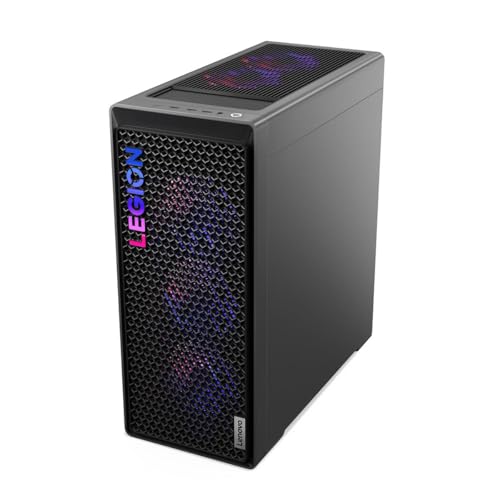
- Best fit for a tight corner: Lenovo Legion Tower 7i, Core Ultra 7 265KF, RTX 5080, Mesh Front — Check on Amazon
- iBUYPOWER Y40 PRO, Ryzen 9 7900X, RTX 5070 Ti, HYTE Y40 Panoramic Case — Check on Amazon
- Skytech King 95, Ryzen 7 9800X3D, RTX 5070 Ti, Panoramic Glass — Check on Amazon
- ZOTAC MEK Hero A7748S, Ryzen 7 7700X, RTX 4080 Super — Check on Amazon
See 2 more Amazon options
- CyberPowerPC Gamer Supreme Liquid Cool, Ryzen 7 7800X3D, RTX 4070 Ti Super — Check on Amazon
- CyberPowerPC Gamer Supreme, Ryzen 7 9800X3D, RTX 5070 Ti (Model SLC8480A9) — Check on Amazon
Read the full guide ↓
Disclosure: As an Amazon Associate, reviewstook.com earns from qualifying purchases. Links to Amazon on this page are affiliate links; they cost you nothing extra. Listing details such as price and availability change often, so check the current Amazon listing before you buy.
Start with the sentence most guides in this category will not print: not one of the six systems below is small. Every pick in this guide is a full-size tower with a liquid cooler and a glass panel. No version of this specification — flagship processor, RTX 5070 Ti or RTX 5080, 32GB of memory, a radiator full of lit fans — fits behind a monitor or disappears into a TV stand. If that is the machine you actually need, stop here and go to the mini PC guides instead: Best Mini PC For Small Spaces Under $2500 and Best Mini Gaming PC For Small Spaces Under $2500 cover computers built for the back of a display, and Best Compact Gaming PC For Small Spaces Under $2500 the step up from there. Nothing below competes with them on footprint.
What “for small spaces” can honestly mean at this tier is narrower and, for the right buyer, still useful. It means a tower that has to earn its place in a room that notices it: a studio desk, a bedroom corner, a living-room setup where the PC sits in the open because there is no office to hide it in. For that buyer the questions change — not “how fast is it,” since at $2,500 everything here is fast, but which breathes through its front and can sit with its sides near furniture; which exhausts upward, so the heat leaves over the desk; which publishes its dimensions, so the gap can be measured before the box arrives; and which arrives with its storage already fitted, so no second drive colonizes the desk later. Every one of them refuses to be shut inside a cabinet, and this guide will keep saying so. One more absence: none of the six is VESA-mountable, none hangs on a wall bracket, and none is designed to lie on its side in a media console. They stand on a floor or a desk, upright, in the open air.
In this guide
Quick Picks
Short on time, or comparing several options at once? Each row below names a placement situation and the system that handles it best, with a link to the listing.
| Placement situation | Pick | Why it stands out | Link |
|---|---|---|---|
| Tight corner, sides near furniture | Lenovo Legion Tower 7i (Ultra 7 265KF, RTX 5080) | The only mesh front here — it breathes through its face, not its flanks, so it tolerates a corner the glass boxes cannot — check price on Amazon | Check on Amazon |
| You want to measure before you order | iBUYPOWER Y40 PRO (7900X, RTX 5070 Ti) | The only published dimensions in the guide — and 2TB fitted means no storage clutter joins the desk later | Check on Amazon |
| Open desk, room to breathe | Skytech King 95 (9800X3D, RTX 5070 Ti) | The benchmark showpiece: dual-chamber glass, 360mm top exhaust, the tier’s fastest gaming processor — check price on Amazon | Check on Amazon |
| Conventional tower spot, modest exhaust | ZOTAC MEK Hero A7748S (7700X, RTX 4080 Super) | A plain, well-ventilated tower with a smaller 240mm radiator — with a planned memory upgrade as the catch | Check on Amazon |
| The previous-generation show | CyberPowerPC Gamer Supreme Liquid Cool (7800X3D, RTX 4070 Ti Super) | Liquid cooling, glass and RGB from the previous generation — check price on Amazon before you judge it against the newer picks | Check on Amazon |
| Strongest silicon, homework accepted | CyberPowerPC Gamer Supreme SLC8480A9 (9800X3D, RTX 5070 Ti) | 9800X3D and 2TB fitted — but nothing about its installation is published, so it ranks last here until the listing answers | Check on Amazon |
How These Picks Were Chosen
The performance floor was applied first, exactly as in the main guide to this tier: 16GB of graphics memory and 32GB of system memory are the standard under $2,500, and no static prices are printed here — check price on Amazon for the live figure on every pick. Whether a pick belongs here depends on its current Amazon price falling within the under-$2,500 budget: the Legion Tower 7i and the King 95 sit above this tier at their regular positioning, so each belongs here only while its current price on Amazon falls inside the budget, and the SLC8480A9 is judged by the same rule — worth considering at or under $2,500, and not above it. One pick fails the memory floor openly — the ZOTAC, with 16GB of DDR5-4800 — and its review treats it as a machine plus a 32GB kit. The full performance treatment of all six lives in Best RGB Gaming PC Under $2500; this guide re-grades the same six on a second axis.
That second axis is installation, and it has rules of its own. First: only documented facts earn a grade. Where a maker publishes dimensions, the review prints them — exactly one pick in this guide does. Where dimensions, fan layouts or vent positions are not published for the exact model, the review says so and grades the pick down for the uncertainty, because in a small room an unmeasurable tower is a gamble, not a specification. No dimension or volume figure has been borrowed from a sibling model or another guide’s research. Second: every pick is graded by form-factor class and by where its air goes. Intake path matters most — a case that breathes through its front can stand in a corner; one that breathes through its sides and bottom cannot. Exhaust path matters next: the radiator size documented for each pick is used strictly as an exhaust-placement fact, because a top-mounted radiator decides how much clear headroom the spot needs. Third: the desk around the machine is part of the installation. Storage fitted at the factory counts for a pick; a second drive or an external enclosure counts against it.
Two refusals apply to all six picks without exception. None of these towers goes inside a sealed or closed cabinet, a closed TV-stand compartment, or any enclosure that traps its own exhaust — a cabinet turns a liquid-cooled tower’s airflow into an oven within the hour. And none of them mounts to anything — no VESA pattern, wall bracket or under-desk cradle is documented for any pick — so the plan starts from a floor or desktop with open air on the vented sides. We did not use these systems ourselves; the grades rest on the listings, the manufacturers’ published material — Lenovo’s datasheet, iBUYPOWER’s manual for the exact Y40 PRO model — and independent coverage, and where a claim could not be verified for the exact model, the review names the gap.
One Class of Machine, Six Different Installations
Be precise about what varies here, because it is not size. All six picks belong to a single form-factor class — the full-size upright tower — and within that class the differences that decide a small-space installation are architectural, not dimensional. The first split is how the case breathes. The Legion Tower 7i is the conservative design: a transparent side panel for the view, but a 3D mesh front bezel. It is the only design here whose intake does not depend on the space beside or beneath it, which is why it leads this guide despite being nobody’s idea of small. The panoramic designs — the King 95’s dual-chamber curved glass and the Y40’s two-piece glass — seal the front entirely and feed their components from low and side intakes instead. Done well, as both are, the layout cools properly, but only when those intakes have open air to draw from: a panoramic tower pushed flank-first against a bookcase is being starved in a way a mesh-front tower is not. The remaining three wear glass side panels over conventional tower layouts.
The second split is where the heat leaves. Four of the six picks have a documented radiator size, an installation fact before it is a cooling one: the King 95 and the Legion carry 360mm radiators, the Y40 PRO and the ZOTAC carry 240mm radiators, and in each case the radiator sits at the top of the case and exhausts upward. A top exhaust is good news for a small room, provided the spot has clear headroom: a tower slid under a low shelf has its exhaust pressed against a ceiling of wood, and the plume pools there. For the two CyberPowerPC systems the verified material publishes no radiator size, so this guide claims none for them. The third split is certainty: exactly one pick, the Y40 PRO, arrives with manufacturer-published dimensions — the only machine here you can truly measure a gap for in advance. Every other pick must be planned by class: allow a full-size tower’s worth of room, keep the vented sides clear, and confirm the live listing’s measurements before the order, not after the delivery.
Finally, the power question: there is no external power brick to place for any pick in this guide. All six towers carry internal power supplies — named outright on several listings, including the King 95’s 850W Gold ATX 3 unit, the ZOTAC’s 800W 80+ Gold unit and the 850W supply in the Legion’s published specification — so the checklist’s “brick address” step becomes a question of the wall socket and the cord’s reach. What the tower takes back is the footprint itself.
The 6 Best RGB Gaming PCs for Small Spaces Under $2,500
Lenovo Legion Tower 7i — Core Ultra 7 265KF, RTX 5080 (Model 90Y6003KUS)
Who it suits: The buyer whose only available spot is a corner, and who checks the current price on Amazon before ordering.
On this angle the Legion leads the guide for one architectural reason: it is the only pick that breathes through its front. Lenovo’s published specification for the Tower 7i line gives the machine a transparent side panel for the view and a 3D mesh front bezel for the air. A tower in a corner has one flank compromised by definition; a panoramic glass case draws its intake from precisely those flanks and the floor beneath it, while the Legion’s intakes face the room. Its exhaust is the documented 360mm ARGB liquid cooler at the top of the case, so the heat plume leaves vertically, and the placement rule reduces to one line: keep the front unobstructed and the top clear, and the corner can be as tight on the sides as furniture requires. The lighting, for a machine that will live in the open, is the most disciplined in the guide: Legion Spectrum, inside Lenovo’s Legion Space software, conducts the cooler and the addressable fans from one application, so the tower reads as one composed object in the room. The specification needs no apology either — Core Ultra 7 265KF, RTX 5080 16GB, 32GB of DDR5-5600, an 850W power supply in the model’s published specification, and Windows 11 Pro.
The conditions are the main guide’s, and a small room does not dilute them. This pick belongs in this guide only while it sits inside the budget: check the current price on Amazon, because at its regular positioning above this tier the pick expires and the King 95 below becomes the recommendation, exactly as it does in Best RGB Gaming PC Under $2500. Match model 90Y6003KUS and the 265KF/RTX 5080 pairing at checkout, not a similar-looking Legion. Lenovo’s published material documents Wi-Fi; if your spot allows the wired run this guide recommends, confirm the network port on the live listing before ordering. The 1TB drive is the joint-smallest in the guide: budget for a second internal drive before an external drive and its cable join the desk. And the placement rule has a hard edge — the mesh front must face open room. A Legion pushed nose-first into an alcove, bezel against a wall, has given away the one advantage it was bought for.
- Mesh front bezel: the only front-breathing design here, and the only intake that survives a corner placement.
- 360mm top radiator exhausts vertically — keep headroom above it and the heat leaves over the desk, not across it.
- Legion Spectrum syncs every lit zone from one app — the composed look a machine living in the open needs.
Honest limitation: The pick belongs here only while its current price on Amazon falls within this guide’s budget — above that budget it is an under-$3,000 system — and its dimensions are not among the facts this guide could verify, so the corner must be planned by class and confirmed on the live listing.
Choose it if its current price on Amazon is within the budget and your spot is tight on the sides but open at the front and top. Skip it if its current price on Amazon has moved above the budget, or your only placement buries the front bezel — its advantage dies there.

iBUYPOWER Y40 PRO — Ryzen 9 7900X, RTX 5070 Ti (Model Y40BA9N57T01)
Who it suits: The measurer — the buyer with one specific gap, on one specific desk, who wants to know a tower fits before it ships, and who would rather not add storage hardware to the room afterward.
This is the only review in the guide that can begin with numbers, because iBUYPOWER’s manual for this exact model publishes them: the Y40 PRO measures 17.28 × 9.44 × 18.58 inches. In a guide where every other pick must be planned by class, that fact is worth a ranking place on its own — measure the desk gap and the shelf height today, and know. The case those dimensions describe is HYTE’s Y40: two-piece panoramic glass, a vertical graphics card mount that displays the RTX 5070 Ti upright, and a 240mm AW4 liquid cooler. The installation reading runs in this pick’s favor twice. The 240mm radiator is the smaller exhaust in this guide’s top half — top-mounted, still needing clear headroom, but moving less air and asking less of the space above the tower than the 360mm picks. And the 2TB of fitted NVMe storage is the guide’s joint-largest, which in a small room is a placement feature, not a spec-sheet boast: no second drive to install this year, no external enclosure squatting on the desk with its own cable. The box also includes an RGB keyboard and mouse, settling the desk’s peripheral count on day one. One clarification the photographs will not give you: the Y40 case itself has no lighting of its own — every photon comes from the components, the RGB fans, cooler and the 32GB of DDR5 RGB memory at 5200MHz — which makes for a unified show under the pre-installed software.
The cautions are documented ones. The vertical mount places the graphics card nearer the glass than a horizontal mount would; HYTE engineered airflow clearance around a four-slot card, but the mount is an aesthetic decision with a thermal term, and in a tight spot it argues for keeping the tower’s vented side genuinely clear rather than approximately clear. The panoramic front is sealed glass, so this tower breathes from its low and side intakes: do not push its flank against a bookcase and call the corner equivalent to the Legion’s. The Ryzen 9 7900X is a twelve-core creator-leaning processor behind the 9800X3D systems for pure gaming, the DDR5-5200 is a step behind the tier’s 5600 kits, and the listing material does not publish a power supply wattage for this model, so none is claimed here. Match the model number — Y40BA9N57T01 is the 2TB configuration in the manual; a 1TB sibling circulates under a near-identical name. For the live figure, check price on Amazon — and whatever it shows on the day, the only measurable pick remains the one you can plan around.
- Manufacturer-published dimensions — 17.28 × 9.44 × 18.58 in — the only pick you can measure a gap for before ordering.
- 240mm top radiator: the smaller, less demanding exhaust of the guide’s leading picks.
- 2TB fitted and a keyboard and mouse in the box — the desk stays as it was; nothing else needs a home.
Honest limitation: The sealed panoramic front means it breathes from its sides and base — it needs open flanks the Legion does not — and the vertical card mount trades a margin of airflow for the display.
Choose it if your spot is measurable, open-sided and benefits from storage that is already inside the machine. Skip it if the tower must sit flank-to-wall, or pure gaming frame rates outrank everything — the King 95’s processor exists for that buyer.

Skytech King 95 — Ryzen 7 9800X3D, RTX 5070 Ti (Model ST-KING95-1671-W-AM)
Who it suits: The buyer with a genuinely open placement — air on both sides — who wants the tier’s benchmark machine and its full showpiece presentation.
Nothing about this pick’s installation is small, and the review will not pretend otherwise: it is here because it is the machine the rest of the tier is benchmarked against, and a small-space buyer with an honest open spot deserves it ranked on its placement facts. The case is Montech’s King 95 dual-chamber chassis, and the layout is itself the installation fact: the power supply and the cable mass live in a rear chamber behind the motherboard tray, so the chamber the glass displays holds the board, the card, the RGB DDR5-5600 memory and the 360mm ARGB liquid cooler — and nothing else. That hidden second chamber is the tidiest cable story in this guide: the drop behind the desk is power cord, display cable and network cable, with no internal clutter visible through the curved glass. The cooling layout is the showcase layout — intake fans low in the chassis feed the graphics card directly, the 360mm radiator exhausts through the top — which places two firm conditions on the spot: open air at the low intakes, so the flanks and base cannot be hemmed in by furniture, and clear headroom above the radiator. Meet both and the glass costs no thermals at all.
The budget discipline is the main guide’s, unchanged: this configuration sits above this guide’s ceiling at its regular positioning, so it belongs here only while its current price on Amazon falls at or under $2,500 — check the current price on Amazon before you plan around it. King 95 is a case family, not a configuration: other processors, other cards and a 2TB/DDR5-6000 variant circulate under the same name in higher tiers, and the listing notes the graphics card brand may vary, so match model ST-KING95-1671-W-AM at checkout. Third-party roundup coverage has collected owner reports of units arriving with cooler fan leads unplugged and the ARGB hub loosely mounted; in a small room, where the tower may be moved exactly once into its spot, that inspection matters more, not less — do the five-minute first-boot check, every fan spinning and every zone lit, before the machine goes into its corner and while the return window is wide open. The specification is the tier’s reference build, with one storage caveat that has a placement consequence: the 1TB drive is the guide’s joint-smallest, so expect a second internal NVMe sooner than you think, and prefer that internal upgrade over an external drive on the desk.
- Dual-chamber case hides the power supply and every cable — the cleanest desk story in the guide.
- Low intakes feeding the card and a 360mm top exhaust: a sound layout when the flanks and headroom are kept clear.
- The tier’s reference specification — 9800X3D, RTX 5070 Ti, named 850W Gold ATX 3 supply — check price on Amazon.
Honest limitation: It qualifies only while its current price on Amazon falls within the budget, not at its regular positioning above the ceiling; its dimensions are not published in the material verified for this guide, and its low side intakes make it the wrong tower for a flank-tight spot.
Choose it if your placement is open on both sides with clear headroom and its current price on Amazon is within the budget. Skip it if its current price on Amazon sits above the budget, or the tower must live against a wall — buy the Legion’s mesh front instead.

ZOTAC MEK Hero A7748S — Ryzen 7 7700X, RTX 4080 Super
Who it suits: The buyer with a conventional tower spot who wants previous-generation flagship graphics and a specification sheet with no blanks in it.
After three glass showcases, the ZOTAC is the guide’s conventional machine, and conventional is an installation virtue. Independent review of the MEK Hero line describes a plain, well-ventilated case with a glass side panel, RGB from the liquid-cooling block and the case fans, and the components doing the decorating — which translates, in a small room, to a tower that makes no architectural demands beyond the ordinary ones: stand it upright, keep its vents clear, let the 240mm AIO exhaust upward into open headroom. The supporting specification is published in full by ZOTAC itself — a named 800W 80+ Gold internal power supply, Wi-Fi 6E and 2.5Gb Ethernet both documented, so the wired run this guide recommends is a confirmed port rather than a listing question. The graphics card is ZOTAC’s own RTX 4080 Super Trinity Black Edition, 16GB, trading blows with the 5070 Ti systems above it, covered by a 3-year GPU warranty, in a machine hand-assembled in the USA with no bloatware. The lighting honesty item is control: ZOTAC ships no unified lighting application with the MEK Hero line — its Firestorm utility addresses the graphics card — so the fans, cooler block and card are lit, but conducting them as one show is a third-party project, and there is no single off switch for the glow.
The catch is printed on ZOTAC’s own launch sheet and it has a desk consequence: 16GB of DDR5-4800, half this tier’s memory standard at its slowest speed. The correct way to buy this PC is with a 32GB DDR5 kit in the same cart and the upgrade counted as part of the purchase — which means one panel-off installation session before the tower takes its place, and a spare pair of memory sticks to store in a room already short of storage. Judge it as a package anyway: check price on Amazon for the machine, and judge the total with the memory kit included rather than the machine alone against the King 95 benchmark. Two cautions close the review. This is a model from an earlier launch window, so the live listing must be checked rather than assumed, and a previous-generation model means finite stock. And the 7700X is a generation behind the X3D systems. What you are buying is the card and the conventional case, in that order.
- A plain, well-ventilated tower with a glass panel — no placement demands beyond clear vents and headroom.
- Fully published specification: named 800W Gold supply, 240mm AIO, Wi-Fi 6E and 2.5Gb Ethernet documented.
- RTX 4080 Super 16GB — check price on Amazon — with a 3-year warranty on the card.
Honest limitation: It ships with 16GB of DDR5-4800 — half the tier’s standard — so a 32GB kit is a planned second purchase and a pre-installation job, and its dimensions are not published in the verified material.
Choose it if your spot is a conventional tower spot and you will do the memory upgrade before the machine settles in. Skip it if you want 32GB fitted and one-app lighting control from day one.

CyberPowerPC Gamer Supreme Liquid Cool — Ryzen 7 7800X3D, RTX 4070 Ti Super (Model SLC8480A3)
Who it suits: The buyer who wants the liquid-cooled glass showcase and the X3D processor, would rather leave part of the budget for the room around the PC, and will verify two facts on a listing first.
The installation facts that can be verified are these: a previous-generation Gamer Supreme in CyberPowerPC’s tempered-glass case with the line’s custom RGB case lighting, liquid cooling for the Ryzen 7 7800X3D, 32GB of DDR5 memory and 2TB of PCIe Gen4 storage fitted at the factory. The 2TB drive earns its mention for the same reason it did in the Y40 PRO’s review — storage that arrives inside the machine never needs a home on the desk — and the memory meets the tier standard outright, so unlike the ZOTAC this pick asks for no pre-installation errand. What the verified material does not publish must be stated with equal clarity: the radiator’s size and position are not documented for this exact model in the research behind this guide, so this review claims neither — plan the spot for a liquid-cooled tower whose exhaust you confirm on the live listing. The power supply wattage is likewise unpublished and deserves the same check. Neither gap is disqualifying; they simply move two installation answers from this page to the listing, where they belong.
The value argument is the main guide’s and survives the change of angle intact: this is the previous generation of the full show — glass, liquid, RGB, a 7800X3D that remains one of the finest gaming processors ever sold — positioned below the newer King 95 benchmark in the tier, so check the current price on Amazon and judge it against that benchmark on the day. The caveats are about time, not quality. This is a previous-generation configuration, so availability must be confirmed live: check price on Amazon, treat a listing that no longer matches this exact configuration as a different offer, and walk away without regret if the model has sold through. Judged on installation alone it ranks below the picks whose placement facts are documented; judged on the whole purchase, it is the guide’s clearest proof that the showpiece experience follows the card generation, not the glass.
- 7800X3D and RTX 4070 Ti Super 16GB, with the tier’s full 32GB memory and 2TB storage fitted — no errands before it takes its place.
- Liquid cooling, tempered glass and the line’s custom RGB lighting — check price on Amazon.
- A previous-generation alternative to the benchmark — the room keeps the show without the newest silicon.
Honest limitation: The verified material does not publish this model’s radiator size or position, its power supply wattage or its dimensions, and it is a previous-generation model with finite stock — all of it must be confirmed on the live listing.
Choose it if its current price on Amazon falls within the budget and the listing confirms the cooling layout your spot needs. Skip it if only listings that no longer match this configuration remain, or your placement is too tight to gamble on undocumented vents.

CyberPowerPC Gamer Supreme — Ryzen 7 9800X3D, RTX 5070 Ti (Model SLC8480A9)
Who it suits: The performance-first buyer with an open placement, and the patience to extract four answers from a live listing before any money moves.
Begin with the silicon, because it is genuinely the joint-strongest in this guide: Ryzen 7 9800X3D, RTX 5070 Ti 16GB, 32GB of DDR5 memory and 2TB of PCIe 4.0 storage — the King 95’s processor and card with its storage weakness fixed at the factory. CyberPowerPC sells the Gamer Supreme line as its glass showcase tier, with tempered-glass panels and custom RGB case lighting documented as line features. On a performance angle, that ranks it near the top. On this angle it ranks last, for the guide’s whole thesis in one pick: for the exact model being sold, the verified material does not publish the fan count or lighting control method, the power supply wattage, the memory speed, the radiator arrangement — or the dimensions. Every installation question this guide exists to answer is, for this pick, a blank. In a large room a blank is an inconvenience; in a small space it is the one thing you cannot afford, because the tower that arrives has to fit, breathe and drop its cables in the only spot you have.
The budget discipline matches: check the current price on Amazon and apply the rule — worth considering at or under $2,500, and above that line the King 95 makes the argument unwinnable. This review is not a dismissal: CyberPowerPC’s configurator heritage means its machines are built from standard, replaceable parts, and if the live listing answers the checklist — wattage, memory speed, fan and lighting setup, dimensions, price under the ceiling — it stands level with the best in this guide and can be placed with the same confidence. Until those answers exist, it is the guide’s due-diligence pick: the strongest silicon, an unverified installation, and a checklist where a review should be. Buyers whose spot is tight should not start here.
- 9800X3D and RTX 5070 Ti with 2TB fitted — the benchmark specification with its storage weakness already fixed.
- Gamer Supreme line presentation: tempered glass and custom RGB case lighting are what the family documents.
- Standard, replaceable parts from a configurator builder — serviceable long after the warranty.
Honest limitation: Nothing about this model’s installation is published in the verified material — not its dimensions, wattage, memory speed or cooling layout — so all of it, price included, must be confirmed on the live listing before it can be recommended outright.
Choose it if the live listing answers the checklist well at or under $2,500 and your placement is open enough to absorb a full-size tower sight unseen. Skip it if any key fact is unpublished when you look, or your spot is measured in single spare inches — the Y40 PRO publishes its dimensions.

Comparison Table
| System | GPU / CPU | Installation facts | Best use | Link |
|---|---|---|---|---|
| Lenovo Legion Tower 7i (90Y6003KUS) | RTX 5080 / Ultra 7 265KF | Mesh front intake; 360mm top exhaust; dimensions not published in verified material | The corner placement — check price on Amazon | Check on Amazon |
| iBUYPOWER Y40 PRO (Y40BA9N57T01) | RTX 5070 Ti / Ryzen 9 7900X | Dimensions published: 17.28 × 9.44 × 18.58 in; 240mm top radiator; 2TB fitted | The measurable spot, storage already inside | Check on Amazon |
| Skytech King 95 (ST-KING95-1671-W-AM) | RTX 5070 Ti / 9800X3D | Dual-chamber panoramic glass; low intakes; 360mm top exhaust; cables hidden in rear chamber | The open desk or floor spot, full show | Check on Amazon |
| ZOTAC MEK Hero A7748S | RTX 4080 Super / Ryzen 7 7700X | Conventional vented tower; 240mm top radiator; 2.5Gb Ethernet documented; 16GB memory catch | The conventional tower spot, planned upgrade | Check on Amazon |
| CyberPowerPC Gamer Supreme Liquid Cool (SLC8480A3) | RTX 4070 Ti Super / 7800X3D | Glass case, liquid cooling; radiator size and dimensions not published in verified material | The full show, previous generation | Check on Amazon |
| CyberPowerPC Gamer Supreme (SLC8480A9) | RTX 5070 Ti / 9800X3D | Tempered glass (line feature); dimensions, wattage and cooling layout not published for this model | Strongest silicon, pending listing homework | Check on Amazon |
Measure Before You Buy: The Five-Step Checklist
Every return in this category begins with a tape measure that came out too late. Work through these five steps in order, before the order, and the tower that arrives is the tower you planned for.
- Step 1 — Measure the spot. Width, depth and height of the exact place the tower will live, plus door, drawer and chair swing. If you are buying the Y40 PRO, measure against its published 17.28 × 9.44 × 18.58 inches. For every other pick, the listing’s own dimensions are part of the purchase: find them, write them down, and if a listing will not state them, treat that silence as a fact about the pick, not a detail to wave through.
- Step 2 — Check the ventilation clearance. Identify which faces of your chosen pick breathe: the Legion’s mesh front, the panoramic cases’ low and side intakes, every pick’s top exhaust. Vented faces need open room air; the top needs clear headroom with nothing — no shelf, no hutch — pressing the exhaust plume back down. And the absolute version: if the spot is inside a cabinet, a closed TV stand or any enclosure with a door, stop here. No pick in this guide goes in one, whatever its dimensions say.
- Step 3 — Give the power supply an address. All six picks carry internal power supplies, so there is no external brick to house — the question becomes the wall socket. The tower’s cord must reach a socket without an extension lead draped across the room. If the nearest socket is behind the furniture the tower stands beside, solve that before delivery day, not with the tower in your arms.
- Step 4 — Plan the cable drop. Three cables define the back of every setup here: power in, display out to the monitor, and a network cable if you take this guide’s standing advice and wire the connection — a wired run is the one cable a small room cannot improvise later, so an undocumented network port is a listing check worth making. Route all three from the tower’s rear panel to their destinations: a clean vertical drop behind the desk, no cable crossing a walkway, no display cable at full stretch deciding where the monitor may live.
- Step 5 — Only then, order. With the spot measured, the clearance honest, the socket real and the drop planned, finish with the purchase discipline the rest of this batch runs on: match the exact model number, check the current price on Amazon against the budget rules in the reviews — the Legion and the King 95 only while their current prices fall within the budget, the SLC8480A9 only at or under the ceiling — and keep the first-boot inspection for delivery day, while the return window is open.
How to Choose an RGB Gaming PC for a Small Space
- Decide which machine you actually need first. If the honest requirement is a computer behind the monitor or inside the TV stand, that machine exists — it is a mini PC, and Best Small Form Factor Gaming PC For Small Spaces Under $2500 is the closest this category comes. Choosing honestly between the two, once, is cheaper than compromising twice.
- Match the intake to the spot, not the photograph. A mesh front breathes from the room and tolerates a corner; panoramic glass breathes from the sides and base and needs those faces open.
- Buy the exhaust you have headroom for. The documented 360mm radiators are the stronger coolers and the more demanding tenants; the 240mm picks ask less of the space above the tower. Under a shelf, that difference is the decision.
- Pay for published dimensions with your ranking. A maker who prints the measurements respects the buyer’s room; a listing that hides them transfers the risk to you. Where two systems tie on silicon, the measurable one wins in a small space — and a listing that publishes nothing at all has told you something.
- Keep the budget rules welded to the placement plan. Check the current price on Amazon for every pick: the Legion belongs in this guide only while its current price falls within the budget, otherwise it is an under-$3,000 system; the King 95 likewise belongs here only within the budget, otherwise it sits above the ceiling; and the previous-generation picks stand or fall on whether the live listing still matches the exact configuration described.
- Plan the glow for the room it will light. One-app ecosystems — Legion Spectrum above all — let the tower run a single calm color at night; piecemeal lighting, like the ZOTAC’s, is a third-party project; and no pick here has an LCD display, so the show is LEDs, not a screen. Buy the control system that matches how the room will actually use the light.
Common Buying Mistakes
- Believing any tower in this tier is “compact.” All six picks are full-size machines. The compact category is real and lives elsewhere — see Best Mini PC For Small Spaces Under $2500.
- Shutting the tower in a cabinet or a closed TV stand. Liquid-cooled towers move serious air; an enclosure traps the exhaust, temperatures climb, and the fans answer with noise. Open air is not a preference at this tier; it is the cooling design.
- Pushing a panoramic case against a wall. The King 95 and Y40 PRO breathe through their low and side intakes. Flank-tight placement starves exactly the faces that feed the graphics card — the mesh-front Legion exists for that spot.
- Sliding the tower under a shelf and forgetting the exhaust. Every documented radiator here exhausts through the top of the case. Press the plume against a hutch and the heat pools instead of leaving the room.
- Ordering first and measuring on delivery day. Five of the six picks do not publish dimensions in the material verified for this guide; the Step 1 listing check takes minutes and prevents the most expensive sentence in this category — “it doesn’t fit.”
- Breaking the budget rules for a placement deadline. Check price on Amazon before you commit: a Legion whose current price sits above the budget is an under-$3,000 system whatever your room looks like, and a King 95 priced above the ceiling is above the ceiling however perfectly it would fit. The full guide is in Best RGB Gaming PC Under $2500.
- Skipping the first-boot inspection before the tower goes into its spot. Roundup coverage has collected owner reports of King 95 units arriving with cooler fan leads unplugged and the ARGB hub loosely mounted; check every fan and zone while the machine is still on the open floor, not after it has been threaded into a corner.
Final Recommendation
- Tight corners and side-compromised spots: Lenovo Legion Tower 7i — the only intake here that does not care about its flanks, bought only while its current price on Amazon falls within the budget.
- Measured gaps and tidy desks: iBUYPOWER Y40 PRO — the only published dimensions in the guide, 2TB already inside — check price on Amazon.
- Open placements, full show: Skytech King 95 — the benchmark showpiece, dual-chamber cable discipline, while its current price on Amazon falls within the budget.
- Conventional tower spots: ZOTAC MEK Hero A7748S with a 32GB memory kit in the same cart — the plain vented case and the flagship-class card.
- Budget realists: CyberPowerPC Gamer Supreme Liquid Cool SLC8480A3 with its current price on Amazon checked against the budget, cooling layout confirmed on the listing.
- Performance-first, homework accepted: CyberPowerPC Gamer Supreme SLC8480A9, conditional on the live listing answering for its dimensions, wattage, memory speed, lighting and price.
Our top two are the Legion and the Y40 PRO, because between them they answer the two honest versions of this keyword. The Legion answers the placement version: the one machine here that can take a corner as it finds it, bought only while its current price on Amazon is within the budget, or not at all. The Y40 PRO answers the certainty version: the only pick that tells you its size before it ships, with its storage already fitted — check the current price on Amazon before you commit. The King 95 remains the machine this tier is benchmarked against, and for an open spot it remains the recommendation it is in Best RGB Gaming PC Under $2500; the ZOTAC and the two CyberPowerPC systems serve buyers whose spots are undemanding and whose homework comes back clean. Buyers earlier in their research should see Best RGB Gaming PC For Beginners Under $2500, and anyone whose room vetoes a tower outright should take the honest exit to Best Mini Gaming PC For Small Spaces Under $2500 rather than force the fit. Measure the spot, keep the front breathing and the top clear, match the model number, check the live price.
Frequently Asked Questions
Can any of these PCs mount behind a monitor or on a wall?
No. None of the six picks is VESA-mountable, none ships with a wall bracket, and none is documented for under-desk mounting — they are full-size towers designed to stand upright on a floor or a desk. That is a property of the tier: a 360mm radiator, a full-length graphics card and an internal power supply do not hang off the back of a display. Computers that do are in Best Mini PC For Small Spaces Under $2500.
Can I put one of these towers inside a cabinet or TV stand?
No — this is the guide’s one absolute. Every pick here is a liquid-cooled tower that exhausts through its top and draws air through its front, sides or base; a closed cabinet or TV-stand compartment traps that exhaust, and the machine ends up breathing its own heated air. If the furniture is non-negotiable, the machine has to change category, not the other way round: start from Best RGB Gaming PC For Small Spaces Under $1500 for what the smaller budgets allow, and the mini PC guides for what actually fits enclosed furniture.
Which pick is actually the smallest?
Only one pick can be measured at all from verified material: the Y40 PRO, at 17.28 × 9.44 × 18.58 inches from iBUYPOWER’s manual for the exact model. For the other five, dimensions were not published in the material this guide could verify, All six are full-size towers of one class; treat each as needing a full-size tower’s spot, and confirm the live listing’s measurements before ordering.
Do any of these PCs need an external power brick?
None of them. All six carry internal power supplies — several listings name them outright, including 850W Gold units in the King 95 and the Legion’s published specification and an 800W Gold unit in the ZOTAC — so the floor keeps no brick and the cable plan is a single power cord to a wall socket. Step 3 of the checklist covers the socket-and-reach version, which is the only version this tier asks.
How much clear space does a glass tower actually need?
Enough that its vented faces meet open room air: the front on the Legion, the low and side intakes on the panoramic cases, clear headroom above every top radiator. There is no honest universal number — it depends on the case’s intake map, which is why this guide grades the map rather than printing a clearance figure — but the failure modes are consistent: a flank against a wall, a shelf over the exhaust, or a door in front of any of it. If your spot cannot offer that, a different pick — or a different category — is the answer.
Is the RTX 5080 Legion worth waiting for in a small room?
The room changes nothing about the budget logic. Check the current price on Amazon: while it falls within this guide’s budget it is this guide’s top pick for a tight corner, and above the budget it belongs to Best RGB Gaming PC Under $3000. Set the discipline in advance — exact model 90Y6003KUS, walk-away line $2,500 — and if its current price is above the budget when you buy, the Y40 PRO and King 95 are the standing recommendations.
Should streamers in small rooms buy differently here?
Slightly: a streaming setup adds a camera’s eye to the placement problem, and the tower becomes set dressing — one-app lighting ecosystems read best on camera, and the Y40 PRO’s twelve-core processor is this set’s natural fit for gaming and encoding on one machine. The dedicated treatment is in Best RGB Gaming PC For Streaming Under $2500; this guide’s placement rules apply unchanged to whichever pick it sends you back to.


