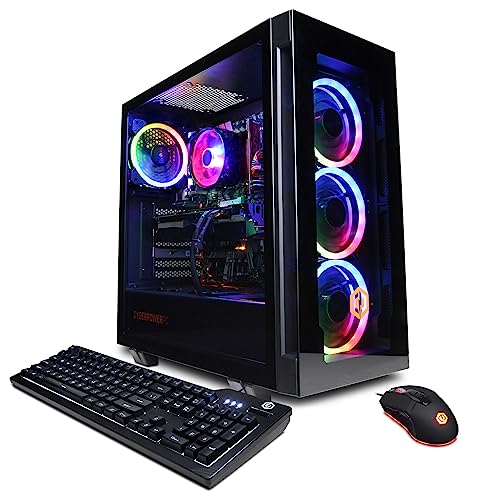
Where to buy
Check the latest price, availability and delivery on Amazon. Orders are placed on Amazon. We may earn a commission from qualifying purchases.
- Best streaming machine on deal days: CyberPowerPC Gamer Xtreme VR, Intel Core i7-13700F, RTX 4060 Ti 16GB — Check on Amazon
- Thermaltake LCGS Quartz i1460, Intel Core i5-14400F, RTX 5060 — Check on Amazon
- Skytech Blaze4 Mini, AMD Ryzen 7 5700, RTX 4060 Ti 8GB — Check on Amazon
- iBUYPOWER Scale, AMD Ryzen 5 7600, RTX 4060 Ti 8GB — Check on Amazon
See 2 more Amazon options
- Skytech Archangel, Intel Core i5-14400F, RTX 4060, 32GB DDR5 RGB, 2TB SSD — Check on Amazon
- Skytech Nebula, AMD Ryzen 5 5600X, RTX 4060 Ti 8GB — Check on Amazon
Read the full guide ↓
Disclosure: As an Amazon Associate, reviewstook.com earns from qualifying purchases. Links to Amazon on this page are affiliate links; they cost you nothing extra. Listing details such as price and availability change often, so check the current Amazon listing before you buy.
A streaming PC does two jobs at once, and only one of them is the game. While you play, the same machine composites your scenes, encodes every frame into a broadcast feed and pushes that feed up your internet connection — so the specification your audience experiences is not the frame rate on your monitor, it is the encoder compressing the picture and whatever headroom is left after the game takes its share. This guide therefore grades the six RGB systems below encoder-first. The workflow being graded is the real one: Twitch broadcasting at around 6,000 kbps with constant bitrate, YouTube live at the higher bitrates it accepts — including its 1440p ingest and AV1 support — and 4K treated as what it is, a platform-limited extra rather than a plan. Layered over that is the reason this is an RGB guide at all: a streamer’s tower sits in the camera shot. The glass case behind you is set dressing your viewers see for hours, which makes lighting you can control — and dim, and turn off — a genuine streaming feature rather than a vanity.
The headline finding can be stated plainly. Every machine in this guide encodes through NVIDIA’s NVENC hardware, five of the six share the same encoder generation, and all six can encode AV1 — the modern codec YouTube’s live pipeline rewards. So the encoder itself rarely separates these picks; what separates them is everything around it. Video memory decides whether the game and the broadcast fight over the same pool. CPU threads decide whether chat software, dashboards and a local recording can run beside the game without stealing from it. Memory configuration decides whether the machine multitasks like a workstation or stumbles like a console. And the deal rules decide what you actually pay, because two listings only make sense inside their sale windows. Our short version: the CyberPowerPC is the strongest simultaneous-load machine here when its deal price is live, the Thermaltake carries the newest encoder silicon and never threatens the ceiling, and the Skytech Archangel — the weakest gaming card in the guide — turns out to be a more interesting streaming machine than its game performance suggests.
In this guide
Quick Picks
Short on time, or comparing several options at once? Each row below names a streamer type and the system that suits it, with a link to the listing.
| Streamer type | Pick | Why it stands out | Link |
|---|---|---|---|
| Best simultaneous-load machine, on deal days | CyberPowerPC Gamer Xtreme VR (i7-13700F, RTX 4060 Ti 16GB) | Double VRAM and the guide’s strongest CPU — game, stream and recording without the fight | Check on Amazon |
| Newest encoder, steadiest ceiling manners | Thermaltake LCGS Quartz i1460 (i5-14400F, RTX 5060) | The only current-generation NVENC here, with AV1, in a tidy glass case that lives under budget | Check on Amazon |
| Eight cores in a camera-friendly footprint | Skytech Blaze4 Mini (Ryzen 7 5700, RTX 4060 Ti 8GB) | Multitasking headroom and the standard strong encoder in the guide’s smallest tower | Check on Amazon |
| Platform that grows with the channel | iBUYPOWER Scale (Ryzen 5 7600, RTX 4060 Ti 8GB) | AM5 and DDR5 under the glass — budget one extra memory stick and it is complete | Check on Amazon |
| Capacity for VODs, clips and multitasking | Skytech Archangel (i5-14400F, RTX 4060, 32GB DDR5 RGB, 2TB) | Same-generation encoder as the Ti picks, with double the memory and storage around it | Check on Amazon |
| Cheapest route to the strong encoder, on the dip | Skytech Nebula (Ryzen 5 5600X, RTX 4060 Ti 8GB) | The same NVENC as picks three and four, at the set’s lowest entry point — buy the dip only | Check on Amazon |
How These Picks Were Chosen
The budget was applied as a ceiling for the whole machine: every system below is a real Amazon listing positioned at or regularly within this guide’s $1,200 ceiling in the United States. Two of the six drift above the ceiling between sales; their reviews flag that drift plainly rather than hide it, so check price on Amazon before you buy. Anything whose graphics card dissolved into vagueness about the model itself, or whose streaming claim rested on integrated graphics alone, was excluded.
Within that filter, the ranking order is a streaming order. First, the encoder: which hardware block compresses the broadcast, which generation it belongs to, and whether it encodes AV1 as well as the H.264 every platform still runs on. Second, simultaneous load: a single-PC stream runs the game, OBS compositing, the encode, chat, dashboards and often a local recording at once, and the picks are graded on how much of that pile each absorbs — video memory, CPU threads and memory configuration, all graded from the documented hardware, not from vibes. Third, the platform around the stream: memory fitted as one stick or two, storage room for recordings, and whether the machine can grow if the channel does. The RGB layer is graded last and honestly: these cases sit in camera shots, so glass, fan lighting and how the lighting is controlled are real criteria — but no pick here bought its rank with its light show.
We did not use these systems ourselves. We read the maker listings and specification pages, compared graphics cards, processors, memory configurations, storage and power supplies, and derived every encoder claim from the documented silicon — the graphics card and processor models printed in each listing — rather than from marketing language about streaming readiness. Performance is described qualitatively throughout; no frame-rate figures are claimed anywhere, since no systems were tested for this article.
The 6 Best RGB Gaming PCs for Streaming Under $1,200
CyberPowerPC Gamer Xtreme VR — Intel Core i7-13700F, RTX 4060 Ti 16GB, 16GB DDR5, 1TB SSD
Who it suits: Single-PC streamers who play demanding games while streaming and recording at the same time, and who can time the purchase to this listing’s deal cycle.
Streaming on one machine is a resource negotiation, and this is the pick with the most to negotiate with. Start with the video memory: the RTX 4060 Ti here carries 16GB, double every other card in the guide. On a gaming-only machine that headroom mostly buys texture quality; on a streaming machine it buys peace, because the game, OBS’s scene compositing and a simultaneous local recording all draw on the same pool, and 8GB cards in heavy titles are where that pool runs dry first. Behind the card sits the Intel Core i7-13700F — eight performance cores plus eight efficiency cores — the strongest processor here for the background pile a stream actually runs: chat clients, dashboards, alerts, a recording encoding alongside the broadcast. The encoder itself is NVIDIA’s Ada-generation NVENC, a single hardware block encoding H.264 for Twitch today and AV1 for YouTube, on dedicated silicon that does its work without meaningfully taxing the game’s rendering.
One honesty note belongs to the processor’s suffix. The F in 13700F means no integrated graphics, so there is no Intel Quick Sync encoder hiding in reserve — NVENC is the only hardware encoder in the box. That is no practical loss, since NVENC is the encoder you would choose anyway, but the fallback for a second simultaneous encode is the CPU itself. Here, unusually, that fallback is real: with this many threads, a software-encoded recording alongside the broadcast is reasonable rather than a desperation move, which cannot be said of the six-core picks below.
The condition attached to the whole pick is price: ordinary listings sit above this guide’s ceiling, while on deal days it drops inside the budget — the point at which it becomes the strongest streaming machine here by a clear margin. The rule is to buy it only while it sits inside the budget — check price on Amazon — or leave it to a larger budget’s guide. The ownership notes are the documented ones: the stock CPU cooler is the build’s modest part, adequate for gaming loads and the first upgrade owners of this family tend to make; the tempered-glass case gives the card less intake help than the mesh-front picks; lighting is CyberPowerPC’s custom RGB case lighting, run through preinstalled software or a dedicated remote where included, with a bundled gaming keyboard and RGB mouse extending the glow onto the desk. The warranty is one year parts and labor, with lifetime technical support.
- RTX 4060 Ti 16GB — double the video memory, so game, compositing and recording stop competing for the same pool.
- i7-13700F’s sixteen cores are the guide’s deepest bench for stream-day background work.
- Ada NVENC with AV1 encode — the modern encoder, Twitch-ready today and YouTube-ready for AV1.
Honest limitation: It crosses above the ceiling between deals, the F-suffix CPU leaves no Quick Sync reserve behind the NVENC block, and the stock cooler is the build’s weak point.
Choose it if you stream demanding games from one PC and can buy inside the deal window. Skip it if you are purchasing today at the ordinary price — the Quartz below is the resident under-ceiling pick.

Thermaltake LCGS Quartz i1460 — Intel Core i5-14400F, RTX 5060, 16GB DDR4 RGB, 1TB SSD
Who it suits: Streamers who want the newest encoder generation and the guide’s most coherent on-camera presentation, without living on a deal calendar.
The Quartz’s streaming argument is generational. Its RTX 5060 carries NVIDIA’s Blackwell-generation NVENC — one generation newer than the encoder in every other pick here — still a single hardware block, still encoding H.264 for Twitch, and encoding AV1 with the newest silicon in the guide for the platform that uses it, YouTube live. Encoder generations are not marketing garnish: each NVENC revision improves the picture produced at a fixed bitrate, and a broadcast lives or dies at a fixed bitrate — around 6,000 kbps on Twitch — so the newest block squeezes the most clarity from the exact constraint streamers face. The Intel Core i5-14400F behind it is a ten-core chip with a proven gaming record, adequate for the game-plus-broadcast pile, and like the CyberPowerPC above it is an F-suffix part: no integrated graphics, no Quick Sync, NVENC or nothing. Here that is a clean arrangement, because the NVENC block is the best encoder in the guide.
The card’s other current-generation feature deserves this guide’s honest framing. DLSS 4’s multi frame generation raises the smoothness of the picture on your own monitor by inserting synthesized frames — a presentation feature for the player. It adds nothing to your broadcast, which is encoded at the output frame rate you set in OBS regardless, and it does not reduce input latency the way genuinely rendered frames do. Buy this pick for its encoder, not its frame generator.
As a camera backdrop this is the tidiest machine here: a white chassis with a proper 3mm tempered-glass side panel over a full-length power-supply cover, a mesh front, an ARGB tower cooler and 16GB of RGB ToughRam, the lighting hung off the motherboard’s addressable headers and run through standard motherboard software sync — the ecosystem that lets the tower sit in one scene with the rest of a growing setup. Pricing has been the other kindness: it is the only pick that lives comfortably under the ceiling at all times — check price on Amazon. The limitations are the memory platform and expansion room: DDR4 performs fine today but closes the cheap upgrade path the DDR5 picks keep open, and coverage of this configuration notes a single populated M.2 slot with expansion falling back to a 2.5-inch drive — check the live listing if a second NVMe for recordings is in your plans.
- Blackwell-generation NVENC — the newest encoder silicon in the guide, with AV1 for YouTube live.
- One coherent ARGB ecosystem: lit ToughRam, ARGB cooler and glass case synced through the motherboard.
- Lives comfortably under the ceiling — the budget is never in danger, deal calendar not required.
Honest limitation: DDR4 memory is the value platform rather than the future one, and storage expansion beyond the fitted SSD is limited on this configuration.
Choose it if you want the best encoder per dollar at a price that is simply there when you shop. Skip it if your stream leans on heavy simultaneous recording in demanding games — the 16GB card above absorbs that pile better.

Skytech Blaze4 Mini — AMD Ryzen 7 5700, RTX 4060 Ti 8GB, 16GB DDR4, 1TB SSD
Who it suits: Streamers whose desk is in the shot and whose sessions come with an entourage — chat, dashboards, recording, a dozen tabs — running beside the game.
The Blaze4 Mini’s streaming case rests on the quietest specification in its listing: eight CPU cores. The Ryzen 7 5700 gives the game-plus-broadcast pile more threads to spread across than any six-core pick here, and that headroom is exactly what a working stream consumes — OBS compositing, alert software, a browser’s worth of dashboards, a local recording — while the encode itself sits on the RTX 4060 Ti’s Ada NVENC block, the same encoder generation as the CyberPowerPC at the top of this guide, AV1 included. The 5700 has no integrated graphics, so NVENC is again the only hardware encoder in the machine; with eight cores behind it, a CPU-encoded recording is at least plausible, though NVENC remains the right home for the broadcast itself.
The presentation is scaled for a streamer’s desk. The case is a compact tower with a mesh front and ARGB fans, so the light show reads at camera distance rather than room distance — the right proportion when the machine appears in a facecam’s background rather than anchoring a room. The mesh front also keeps the intake path honest, which matters in long sessions. Its pricing has the Skytech shape: it dips well inside this guide’s budget at its best and stays inside the budget typically, so the discipline is softer than the Nebula’s below but the direction is the same — on a dip, this is arguably the best all-round streaming value here, so check price on Amazon. Skytech’s standard package applies: assembled in the USA, one-year parts and labor warranty, lifetime free support, GPU brand may vary.
The caveats are the name and the platform. “Mini” flatters it — this is a compact tower, not a small-form-factor machine, so measure your space against the listing’s dimensions rather than the badge. A smaller case also means tighter working room when service day comes, and the AM4/DDR4 platform underneath has no road left: its growth story is storage and eventually replacement, not a chip swap. Bought at a deal price as a complete streaming appliance for this desk, it fills both of its roles — the eight-core workhorse and the backdrop — without apology.
- Eight-core Ryzen 7 5700 — the multitasking headroom a working stream actually consumes.
- The same Ada NVENC with AV1 as the guide’s top pick, in the smallest footprint here.
- Dip pricing that keeps it inside this guide’s budget — check price on Amazon.
Honest limitation: The badge promises more shrink than the case delivers, tight cases make service day fiddly, and AM4/DDR4 has no road left.
Choose it if your stream runs an entourage of apps and your desk space is real. Skip it if you plan to upgrade this exact machine for years — the Scale below is the platform pick.

iBUYPOWER Scale — AMD Ryzen 5 7600, RTX 4060 Ti 8GB, 16GB DDR5, 1TB SSD
Who it suits: Streamers building for the channel they intend to have in two years — the platform purchase — who will budget one small completion buy alongside the machine.
Under the glass, the Scale is the only pick here standing on a platform with a future. The Ryzen 5 7600 sits on AMD’s AM5 socket, the one current desktop platform with a published multi-generation road ahead, and its memory is DDR5 — so when the channel outgrows this configuration, the upgrade is a chip swap inside the same glowing case rather than a new machine. The streaming hardware is the tier’s standard strong arrangement: an RTX 4060 Ti 8GB whose Ada NVENC encodes H.264 for Twitch and AV1 for YouTube, with the six-core 7600 carrying the game and the stream-day software pile competently. The 7600 is also the only processor here with any integrated graphics at all — a basic Radeon block that encodes H.264 and HEVC but not AV1. Treat it as a reserve, useful at most for a light local recording, never as the broadcast encoder; NVENC is this machine’s streaming engine, full stop.
The pricing is the steadiest in the guide: this listing holds a stable position inside the budget, without the wide swings the deal-driven picks show — check price on Amazon. The case is iBUYPOWER’s tempered-glass RGB chassis — the listing’s own feature text promises 16-color RGB case lighting and RGB fans — with a bundled iBUYPOWER gaming keyboard and RGB mouse, so the desk joins the backdrop out of the box. That lighting is preset-style, cycled through the case’s control rather than composed per device in software; it will hold a color that suits the room happily for years, and it will never react to a follow or an alert, because no streaming software can address it. Buy the look as a backdrop, not as a reactive light show.
The honest limitation is visible through the glass and matters more to a streamer than to a gamer: the 16GB of DDR5-5200 arrives as a single non-RGB stick. Single-channel memory leaves measurable performance on the table in CPU-sensitive games, and streaming is precisely the workload that piles a game, OBS, chat and browsers onto memory at once — so on this pick the second matching stick is not a cosmetic completion, it is part of the streaming specification, and this guide treats the machine as machine plus that fix from day one. The same purchase also cures the picture, since the one dark stick is the aesthetic flaw in an otherwise lit interior. Ownership otherwise is standard: WiFi ready, Windows 11 Home, a one-year warranty, and a conventional tower that takes standard parts.
- AM5 platform and DDR5: the only pick whose streaming future is a chip swap, not a replacement.
- Steady in-budget pricing — the one pick here you never have to time; check price on Amazon.
- Standard strong encoder: RTX 4060 Ti NVENC with AV1, plus a basic integrated-graphics reserve.
Honest limitation: The single non-RGB 16GB stick is a single-channel compromise a streaming workload feels first; budget the second stick as part of the purchase.
Choose it if you upgrade machines rather than replace them, and you will fit the second stick on day one. Skip it if the machine must be finished the evening it arrives — the Quartz above needs nothing.

Skytech Archangel — Intel Core i5-14400F, RTX 4060, 32GB DDR5 RGB, 2TB SSD
Who it suits: Streamers whose bottleneck is everything except the game — multitasking, recordings, clip archives — and whose titles sit comfortably at 1080p.
Judged as a gaming machine, this is the guide’s presentation purchase. Judged as a streaming machine, the specification reads differently, and two numbers lead. The first is 32GB of DDR5 memory — double every other pick — because a working stream is a multitasking workload: game, OBS, chat, dashboards, a recording and the browser tabs every streamer accumulates, all resident at once. The second is the 2TB NVMe SSD, double the storage of everything else here, because recordings and VOD archives silently eat a streaming PC alive; a 1TB drive fills with footage faster than any new streamer expects. Around those numbers sits the guide’s most finished presentation: a white tempered-glass case with ARGB fans, RGB memory glowing in the same scene, and a front mesh on the current white edition keeping the intake path real — in a white-themed setup that is also a streaming backdrop, this is the machine that looks designed rather than assembled.
The encoder deserves a precise statement. The RTX 4060’s NVENC block is the same Ada generation as the one in the 4060 Ti picks above it, AV1 encode included — the broadcast silicon is not the downgrade here. What the plain 4060 gives up is game-side: it is a native-1080p card that visits 1440p through DLSS upscaling, and its 8GB of video memory is the pool the CyberPowerPC’s 16GB doubles. For a streamer whose games live at 1080p — also the resolution Twitch’s 6,000 kbps serves best — that trade is barely a trade at all. The i5-14400F is the same ten-core chip as the Quartz’s, F-suffix and all: no Quick Sync reserve — NVENC carries the stream alone, and it is enough.
Price is where discipline returns: this listing ranges from dips well inside the budget up to the ceiling itself. On a dip it is an easy recommendation; at the ceiling, know you are paying for capacity and presentation rather than rendering power — check price on Amazon. Skytech assembles in the USA, backs it with a one-year parts and labor warranty and lifetime free technical support, and notes the GPU brand itself may vary between units.
- 32GB of memory and 2TB of storage — the streaming workload’s two hungriest resources, doubled.
- Same-generation NVENC with AV1 as the Ti picks; the encoder is not the compromise.
- The complete light show: ARGB fans and lit memory in a white glass case with a mesh front.
Honest limitation: The RTX 4060 is the weakest gaming card in this guide — a native-1080p renderer — and the ceiling price buys capacity and presentation, not rendering headroom.
Choose it if your games are 1080p fare and your stream’s real weight is multitasking and footage. Skip it if demanding 1440p titles are the show — the CyberPowerPC’s 16GB card is the correct spend.

Skytech Nebula — AMD Ryzen 5 5600X, RTX 4060 Ti 8GB, 16GB DDR4, 1TB SSD
Who it suits: Deal hunters who want the guide’s standard strong encoder behind glass at the lowest possible entry price, and who let the calendar choose their purchase day.
The Nebula’s streaming proposition can be said in one sentence: it carries exactly the same encoder as the Blaze4 Mini and the Scale — an RTX 4060 Ti’s Ada NVENC, H.264 for Twitch and AV1 for YouTube — and on the right week it is the cheapest route to that encoder. The machine around that encoder is the classic Skytech formula: a tempered-glass case with a mesh front, four RGB fans doing the lighting and the intake work at once, a Ryzen 5 5600X, 16GB of DDR4-3200 and a 1TB NVMe SSD behind a named 600W Gold power supply. The 5600X is a six-core chip with no integrated graphics, so NVENC is the only hardware encoder and the CPU’s whole job is the game plus the stream-day software — a division of labor it handles well at 1080p, which is where this machine’s streaming life is honestly lived.
Everything else about this pick is the price graph. On a dip this is the cheapest way in this guide to put the strong encoder behind glass, but its pricing swings widely and can sail above the ceiling. The same machine is a bargain, a fair buy and a bad buy depending on the week, so the rule is absolute: on a clear dip well inside the budget, buy without a second thought — check price on Amazon; at its typical level, the Scale and the Quartz are steadier value; near its highs, close the tab. The maker’s package is the standard Skytech one — assembled in the USA, a one-year parts and labor warranty, lifetime free technical support — and the “GPU brand may vary” note in its listing applies here as it does across the brand’s range.
The platform is the standing caveat, with a streamer-specific edge: AM4 and DDR4 are finished technology, so when the channel grows into heavier loads, this machine’s answer is a bigger SSD and eventually a new PC, not a new chip. For a buyer who replaces rather than upgrades — and who buys the dip — that is no caveat at all. On the right day the Nebula delivers this guide’s whole streaming thesis, the modern encoder in a glass case that photographs like a set, for plain-box money.
- The same Ada NVENC with AV1 as picks three and four — the encoder does not know what you paid.
- Four RGB fans behind a mesh front panel, so the hardware making the picture is also moving the air.
- The cheapest strong-encoder showpiece here when the deal is live — check price on Amazon.
Honest limitation: The most timing-dependent pick in the guide — its recorded highs sail past the ceiling — on a finished AM4/DDR4 platform with the guide’s lightest CPU bench.
Choose it if your purchase can wait for a dip well inside the budget. Skip it if you are buying this week at the listing’s current mood, or a CPU upgrade path matters to you.

Comparison Table
| Product | Encoder | Simultaneous-load strength | Best use | Link |
|---|---|---|---|---|
| CyberPowerPC Gamer Xtreme VR (i7-13700F) | Ada NVENC, AV1, 16GB VRAM | Deepest bench: 24 threads and double video memory | Demanding games streamed and recorded from one PC, bought on the deal | Check on Amazon |
| Thermaltake LCGS Quartz i1460 (i5-14400F) | Blackwell NVENC, AV1 — newest generation | Balanced: ten cores, tidy thermals, DDR4 ceiling | The best encoder per dollar at a price that is simply there | Check on Amazon |
| Skytech Blaze4 Mini (Ryzen 7 5700) | Ada NVENC, AV1 | Eight cores for the stream-day entourage | Multitasking streamers with a desk in the shot | Check on Amazon |
| iBUYPOWER Scale (Ryzen 5 7600) | Ada NVENC, AV1, basic iGPU reserve | Six cores; single-stick memory until the fix is fitted | The platform that grows with the channel | Check on Amazon |
| Skytech Archangel (i5-14400F) | Ada NVENC, AV1 | 32GB memory and 2TB storage carry the pile | 1080p streamers drowning in footage and tabs | Check on Amazon |
| Skytech Nebula (Ryzen 5 5600X) | Ada NVENC, AV1 | Lightest bench: six cores, finished platform | The strong encoder at the lowest price, on the dip | Check on Amazon |
Every Encoder in This Guide, Mapped
Streaming guides usually print a graphics card table and call it a day. This one prints the encoder map, because the encoder is what your audience watches. The honest headline is uniformity: all six machines encode through NVIDIA’s NVENC hardware block, and all six can encode AV1. Five of the six — every RTX 4060 and RTX 4060 Ti in the guide — share the Ada-generation NVENC, the generation that brought AV1 encoding to NVIDIA’s mainstream cards. The sixth, the Thermaltake’s RTX 5060, carries the Blackwell generation, one revision newer, with the incremental picture-quality gains at fixed bitrate that each NVENC revision brings. No pick here uses an older Ampere encoder — the RTX 30-series generation encoded H.264 only, with no AV1 encode — and none is missed.
What is also absent — everywhere — is a second hardware encoder worth planning around. Both Intel processors here are F-suffix parts, the i7-13700F and the i5-14400F, and the F means no integrated graphics: there is no Intel Quick Sync encoder in the CyberPowerPC, the Archangel or the Quartz. The Ryzen 5 5600X and Ryzen 7 5700 likewise ship with no integrated graphics at all. The single exception is the Scale’s Ryzen 5 7600, which carries a basic integrated Radeon block able to encode H.264 and HEVC — but not AV1 — graded here as a reserve for a light local recording, not a broadcast engine. The consequence is a simplification, not a weakness: on every pick the setup is the same one decision — NVENC carries the broadcast — and the CPU’s job is everything else. Where a second simultaneous encode genuinely matters, the honest routes are the CyberPowerPC’s sixteen threads running a software-encoded recording, or accepting that a single-PC stream at this budget produces one hardware-encoded output at a time.
The codec map needs its platform half, because AV1 hardware is only worth what the services accept. Twitch’s standard ingest remains H.264 at around 6,000 kbps; its AV1 support exists only inside a limited enhanced-broadcasting program most channels cannot simply switch on, so for Twitch today every pick here broadcasts H.264 through NVENC, and does it well. YouTube live rewards the newer silicon: higher accepted bitrates, a 1440p ingest tier that earns visibly better transcoding, and AV1 acceptance — where the AV1 blocks stop being a future feature and start being tonight’s picture quality. And 4K is platform-limited in both directions: YouTube will take a 4K live feed, Twitch generally will not, and no machine here should be bought to render demanding games and encode them at 4K simultaneously. This tier’s realistic ceiling is a strong 1080p broadcast everywhere, with a 1440p YouTube stream for the picks with headroom — the 16GB CyberPowerPC first, the Quartz behind it.
One Machine, Two Jobs: The Simultaneous-Load Test
A gaming review asks what a machine does with a game. A streaming review asks what it does with a game, a broadcast, a recording, a chat client, two dashboards and the browser tabs a streamer accumulates like weather — all at once, for hours. Graded on that pile, the guide separates cleanly. Video memory is the first wall: the game and OBS’s scene compositing draw on the same pool, and in texture-heavy titles an 8GB card is where the negotiation gets tense once a local recording joins. The CyberPowerPC’s 16GB card is the only pick that simply does not have that conversation, which is half of why it tops a streaming ranking it would also top for gaming. CPU threads are the second wall: the 13700F’s sixteen cores and the Blaze4 Mini’s eight give the background pile somewhere to live, while the six-core picks — the Scale’s 7600, the Nebula’s 5600X — run the pile competently at 1080p and feel their limits soonest when a software-encoded recording joins, which is why this guide routes their recordings to NVENC rather than the CPU.
Memory and storage are the quieter walls, and they are where the Archangel earns its streaming rank. Thirty-two gigabytes means the pile never swaps; sixteen — the rest of the guide — is adequate for game and stream and tightens exactly when the dashboards multiply, and the Scale’s single-stick sixteen is the one configuration this guide treats as unfinished, counted throughout as machine plus its second stick. Storage is the slow wall: recordings accumulate at gigabytes per hour, and the Archangel’s 2TB drive doubles every other pick’s runway. None of this changes which encoder you use — it changes how much else the machine can be while it encodes.
Setting Up OBS on These Machines
Whatever you buy, the setup discipline is the same, and on this hardware the famous encoder dropdown is the easiest part: every pick streams through NVENC. In OBS, set the output mode to advanced and choose the NVIDIA hardware encoder — on the Scale, leave its integrated Radeon encoder alone for the broadcast; it is the reserve, not the engine. Set rate control to CBR and the bitrate to 6,000 kbps for Twitch. YouTube accepts considerably more, and its 1440p ingest earns better transcoding if your machine has the headroom — the CyberPowerPC and the Quartz are the picks that can honestly offer it, while the rest of the guide will usually serve viewers better with a clean 1080p feed than a struggling 1440p one. Set the keyframe interval to 2 seconds — both platforms expect it, and it costs nothing. Then run a wired Ethernet cable from the PC to the router: a rule, not a preference. Every pick’s Wi-Fi is fine for downloads and inadequate as a streaming foundation, because a broadcast upload is sustained and unforgiving in a way downloads are not.
Test with a private or unlisted stream before your first public one, and learn OBS’s three lag counters, because each accuses a different suspect with a different fix. Dropped frames are the network: the connection could not carry the bitrate — check the cable first, then lower the bitrate; no encoder setting fixes a network counter. Skipped frames are rendering lag: OBS could not composite your scene in time, usually because the game is consuming the whole GPU — cap the game’s frame rate or drop it a settings notch and the counter clears; this is the counter the 8GB picks in heavy titles meet first, and the 16GB CyberPowerPC meets last. Missed frames due to encoding lag are the encoder block saturating: lower the output resolution or frame rate, or move the quality preset a step toward performance. Read the counter before touching a setting, and change one thing at a time — streamers who change five settings at once learn only that something worked. Finally, run one full hour at your real settings inside the first week, while every return and warranty route is still open.
The Rest of the Kit, Costed in Priorities
The PC is the largest single purchase in a streaming setup, but it is not the whole setup, and the order in which the rest is bought matters more than the amounts — so this section costs the kit in priorities, deliberately without prices, because the right sequence is the same at any budget. First, a microphone. Viewers forgive soft video and leave over bad audio; a stream is, most of the time, a voice with pictures. A modest microphone close to your mouth beats an expensive one across the room — placement is free, and it is most of the sound. Second, light on your face. This is where an RGB guide earns its honesty: the glow that improves a stream most is not in the tower, it is on the streamer. One light in front of you does more for how professional a channel looks than four fans behind you — these cases are the backdrop that finishes the shot, and a backdrop is not a key light. Third, a webcam, or a camera you already own pressed into service: at the small size a facecam occupies on screen, adequacy arrives early; buy it after the microphone and the light that make it look good. Fourth, and only for console players, a capture card. If you game on the PC in front of you, a capture card does nothing — OBS captures the game directly — and buying one for a PC-only stream is the classic beginner’s wasted purchase. Its one job is bringing a console’s picture into the streaming PC. Buy the kit in that order, and the tower’s own lights slot in where they belong: behind you, on camera, looking like a set.
How to Choose an RGB Gaming PC for Streaming Under $1,200
- Choose the encoder before the graphics card. Your audience sees the encoder’s output, not your frame rate. In this guide that means NVENC everywhere — so the real questions are its generation and what surrounds it, and the Quartz’s Blackwell block is the newest answer.
- Count the whole pile, not just the game. Game, compositing, encode, recording, chat and dashboards run at once. Video memory, CPU threads and memory configuration are streaming specifications; the 16GB card and the eight-core picks exist for buyers whose pile is heavy.
- Check the suffix before assuming a second encoder. An F-suffix Intel chip has no integrated graphics and no Quick Sync. On three of these picks NVENC is the only hardware encoder — a fine arrangement, as long as you know it before you plan a two-encode workflow around a reserve that is not there.
- Match the output resolution to the headroom, not the monitor. A sharp 1080p60 broadcast at 6,000 kbps looks more professional than a starved 1440p one. Reserve YouTube 1440p for the picks with video memory and threads to spare, and set the output deliberately in OBS rather than accepting a default.
- Ask how the lighting is controlled — and what it cannot do. Motherboard-synced ARGB can join a wider setup’s scenes; preset and remote systems hold a color and hold it well. No case lighting in this guide reacts to follows or alerts through streaming software, so buy the look as a backdrop, not as a reactive light show.
- Budget the completion purchases. A second memory stick for the single-stick pick, a better cooler for the stock-cooler pick, and the microphone and face light every channel needs — the listing price is the start of the setup’s cost, and the honest total is the one to compare against the ceiling.
- Set a walk-away price for every candidate. Prices at this tier move sharply between deal events. The CyberPowerPC is a strong pick inside the ceiling and a different, worse purchase above it; the Nebula is a bargain on a dip and a mistake near its highs. Check price on Amazon for each candidate before you order.
Common Buying Mistakes
- Shopping by graphics card alone and never asking which encoder compresses the stream — the one specification your audience actually watches.
- Assuming an F-suffix Intel machine has Quick Sync waiting in reserve. It does not; the F means the integrated graphics — and its encoder — were never fitted.
- Believing AV1 hardware transforms a Twitch stream today. Twitch’s standard ingest is H.264; AV1 pays on YouTube and in the future tense.
- Streaming at 1440p on a pick without the headroom because the monitor supports it — resolution is a budget the bitrate and the GPU have to pay for together.
- Running the broadcast over Wi-Fi because the listing printed a fast wireless standard, then blaming the encoder for dropped frames that were the network’s fault.
- Buying a capture card for a PC-only stream. OBS captures PC games directly; the card is console-only equipment.
- Buying a timing-dependent listing at its ordinary price because a guide called it a great pick — at its low. The walk-away price is part of the recommendation.
- Letting recordings pile onto a nearly full 1TB drive until the archive eats the game library — footage is a storage budget.
Final Recommendation
- Heaviest simultaneous load, bought on the deal: CyberPowerPC Gamer Xtreme VR — 16GB of video memory and sixteen threads, when its deal window opens — check price on Amazon.
- Best encoder per dollar, no calendar required: Thermaltake LCGS Quartz i1460.
- Multitasking streamers on a desk in the shot: Skytech Blaze4 Mini.
- Channels planning to grow: iBUYPOWER Scale, with the second memory stick budgeted.
- 1080p streamers buried in footage and tabs: Skytech Archangel.
- Deal hunters: Skytech Nebula, bought on a dip — check price on Amazon.
Our top two at this budget are the CyberPowerPC, for streamers whose single PC must play, encode and record demanding games at once and who can buy inside its deal window, and the Quartz, for streamers who want the newest encoder in the guide at a price that is simply there when they shop. Between them they cover this search’s two honest shapes: maximum simultaneous-load headroom, and maximum encoder modernity per dollar. The Blaze4 Mini is the multitasker’s middle; the Scale is the five-year answer. If your budget stretches, the next tier up is covered in Best RGB Gaming PC Under $1500; if it tightens, Best RGB Gaming PC Under $800 applies the same discipline lower down, and the wider streaming field at this price lives in Best Gaming PC For Streaming Under $1200. Choose the encoder, count the pile, set the walk-away number, and check the live listing before you order.
Frequently Asked Questions
Do I need a second PC to stream at this budget?
No. Every pick here carries a dedicated NVENC block that compresses the broadcast without meaningfully taxing the game’s rendering — the hardware that made the single-PC stream the default arrangement. A second PC still buys isolation, since a game crash cannot take the broadcast with it, but at a $1,200 budget it buys that isolation at the price of the entire streaming machine. Spend on the microphone and the face light first; the two-PC setup is a later luxury, and a capture card only enters the picture when a console does.
Can these PCs stream at 1440p?
On YouTube, the strongest of them can: its 1440p ingest accepts the higher bitrate and rewards it with better transcoding, and the CyberPowerPC’s 16GB card and deep thread count — with the Quartz’s newest encoder behind it — have the headroom to render a game and encode a 1440p feed at once. On Twitch the question mostly dissolves, because its standard broadcast runs at 1080p and around 6,000 kbps regardless of what your monitor shows. What no pick here should be asked to do is game and stream at 4K; that workload belongs to a higher budget, and the render-side definitions are set out in Best RGB Gaming PC For 1440p Gaming Under $1200.
Does RGB lighting interfere with streaming?
Not electrically or computationally — the fans and lights draw a few watts and no encoder cycles. The interactions are practical. A glass tower in the camera shot is a backdrop, and a backdrop you cannot dim becomes a distraction in a dark room, so the control route matters: software-synced systems can be set to a calm scene or dark from an app; preset systems cycle from their remote. The subtler point runs the other way — the light that most improves a stream is on your face, not in the case, which is why the kit section buys a face light second and treats every tower here as scenery.
Which encoder should I select in OBS?
The NVIDIA hardware encoder — NVENC — on every pick in this guide, at CBR with a 2-second keyframe interval and 6,000 kbps for Twitch. The one machine with a second option is the iBUYPOWER Scale, whose Ryzen 5 7600 carries a basic integrated Radeon encoder; leave it as a reserve for a light local recording and keep the broadcast on NVENC, which is newer, faster and the only block here that encodes AV1. If OBS reports encoding lag afterward, the setup section above has the fix: lower the output resolution or move the preset toward performance before blaming the hardware.
Is AV1 worth paying for in a streaming PC?
In this guide you do not pay for it separately — every pick’s NVENC block encodes AV1, because the Ada and Blackwell generations include it as standard. Where it earns its keep today is YouTube live, which accepts AV1 and pairs it with higher bitrates and a 1440p tier; on Twitch, whose standard ingest remains H.264 outside a limited enhanced-broadcasting program, the same hardware broadcasts H.264 and the AV1 block waits for the platform to catch up. Buy it as future-proofing that already pays out on one platform, at the zero extra it costs here.
What should I upgrade first on a $1,200 streaming prebuilt?
Whichever honest limitation your pick shipped with. On the Scale, the second matching memory stick — it completes the multitasking specification and the view through the glass in one purchase. On the CyberPowerPC, a competent CPU cooler, which also quiets the machine your microphone sits beside. On all of them, storage is the painless later addition as the archive grows — and the microphone and face light outrank every internal upgrade until both are bought.
- Best RGB Gaming PC Under $1200
- Best RGB Gaming PC Under $800
- Best RGB Gaming PC Under $1500
- Best RGB Gaming PC For Beginners Under $1200
- Best RGB Gaming PC For Small Spaces Under $1200
- Best Gaming PC For Streaming Under $1200
- Best Prebuilt Gaming PC For Streaming Under $1200
- Best Streaming PC Under $1200
- Best Budget Gaming PC Under $1200


