Where to buy
Check the latest price, availability and delivery on Amazon. Orders are placed on Amazon. We may earn a commission from qualifying purchases.
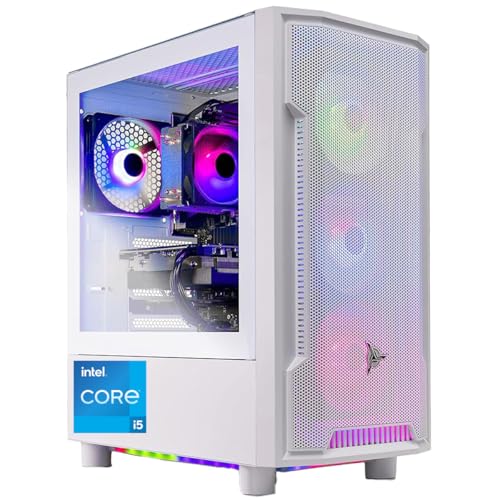
- Best overall showpiece: Skytech Archangel, Intel Core i5-14400F, RTX 4060, 32GB DDR5 RGB, 2TB SSD — Check on Amazon
- CyberPowerPC Gamer Xtreme VR, Intel Core i7-13700F, RTX 4060 Ti 16GB — Check on Amazon
- Thermaltake LCGS Quartz i1460, Intel Core i5-14400F, RTX 5060 — Check on Amazon
- iBUYPOWER Scale, AMD Ryzen 5 7600, RTX 4060 Ti 8GB — Check on Amazon
See 2 more Amazon options
- Skytech Nebula, AMD Ryzen 5 5600X, RTX 4060 Ti 8GB — Check on Amazon
- Skytech Blaze4 Mini, AMD Ryzen 7 5700, RTX 4060 Ti 8GB — Check on Amazon
Read the full guide ↓
Disclosure: As an Amazon Associate, reviewstook.com earns from qualifying purchases. Links to Amazon on this page are affiliate links; they cost you nothing extra. Listing details such as price and availability change often, so check the current Amazon listing before you buy.
An RGB gaming PC is the one purchase in this category where the box itself is part of the product. At $1,200 the silicon story is settled — this is RTX 4060 Ti and RTX 5060 territory, with the RTX 4060 appearing where a builder spends the difference on presentation instead — so what separates the listings is everything wrapped around the card: panoramic and tempered glass that turns the build into furniture, ARGB fan sets that light the room as well as the case, liquid-cooling aesthetics, RGB memory glowing through the panel, and a lighting ecosystem you will either enjoy controlling or fight with for years. This guide judges the showpiece on both halves of that bargain. Every pick below had to earn its place as a gaming PC first — real graphics card, honest memory and storage, a power supply with a name and a rating — and then as a display piece: glass worth looking through, lighting you can actually control, and a case that does not cook its own components for the sake of the view.
The honesty note for this tier is about what the money buys. Glass and light add no frames. The same RTX 4060 Ti that appears here in panoramic cases also appears in plain mesh boxes, so part of every showcase listing is a presentation premium we will name honestly rather than pretend away. In exchange, the premium is not pure waste: the better showcase cases in this guide keep mesh intake paths, standard parts and real airflow, and a machine you enjoy looking at on the desk is a machine that stays on the desk instead of being hidden and forgotten. Our short version: start with the Skytech Archangel if you want the most complete light show with the most memory and storage attached, take the CyberPowerPC for the strongest card in the guide when its live price on Amazon fits the budget, and read the section on the RGB tax before paying for any of them. Below are the quick picks, detailed reviews of all six systems, a comparison table, a precise definition of native 1440p, the presentation premium explained, a buying checklist, the mistakes that waste money at this tier, and the questions RGB buyers ask most.
In this guide
Quick Picks
Short on time, or comparing several options at once? Each row below names a buyer type and the system that suits it, with a link to the listing.
| Buyer type | Pick | Why it stands out | Link |
|---|---|---|---|
| Best overall showpiece | Skytech Archangel (i5-14400F, RTX 4060, 32GB DDR5 RGB, 2TB) | White glass case, ARGB fans and lit memory — the fullest presentation, with double RAM and storage | Check on Amazon |
| Best performance per dollar on deal days | CyberPowerPC Gamer Xtreme VR (i7-13700F, RTX 4060 Ti 16GB) | The tier’s strongest card and double VRAM, in a glass case with custom RGB lighting | Check on Amazon |
| Best current-generation card | Thermaltake LCGS Quartz i1460 (i5-14400F, RTX 5060) | RTX 5060 with DLSS 4, RGB memory and an ARGB cooler inside a clean glass Thermaltake case | Check on Amazon |
| Best upgrade path | iBUYPOWER Scale (Ryzen 5 7600, RTX 4060 Ti 8GB) | AM5 platform in a tempered-glass RGB case, with a long upgrade runway | Check on Amazon |
| Best RGB value on sale | Skytech Nebula (Ryzen 5 5600X, RTX 4060 Ti 8GB) | Four RGB fans and glass in a mid-range showcase — check the price on Amazon and buy when the live price fits the budget comfortably | Check on Amazon |
| Best compact showpiece | Skytech Blaze4 Mini (Ryzen 7 5700, RTX 4060 Ti 8GB) | ARGB fans and mesh front in a smaller tower, with an eight-core CPU | Check on Amazon |
How These Picks Were Chosen
The budget was applied as a ceiling for the whole machine: every system below is a real Amazon listing positioned for this Under $1,200 tier in the United States. Live prices change often and can move above or below the ceiling, so check the price on Amazon for each pick before you buy, and treat the ceiling as your own check at checkout rather than a fixed figure in this guide. Two picks can sit above the ceiling between sales, and their reviews say so in plain terms. Anything calling itself an RGB gaming PC that turned out to be a office tower with a light strip, an integrated-graphics box with glowing fans, or a listing whose graphics card dissolved into “brand may vary” vagueness about the model itself was excluded, however pretty the photos.
We did not use these systems ourselves. We read the maker listings and specification pages and compared graphics cards, memory configurations, storage, power supplies, case construction and — the part most guides skip — the lighting hardware itself: how many fans are addressable, whether the memory is lit, and how the lighting is controlled. That last point decided several rankings. There are three control ecosystems in this guide, and they are not equal. Software-synced ARGB, where fans, cooler and memory hang off the motherboard’s addressable headers and one app runs the whole show, is the grown-up option. Remote- or button-cycled presets are simpler and fine for a set-and-forget color, but they cannot sync with your keyboard or react to anything. And on some configurations individual elements — a CPU cooler is the usual suspect — run a fixed rainbow loop that answers to nothing; where a listing leaves that ambiguous, the review tells you to confirm it before ordering rather than discover it after.
Two showcase filters sat on top of all of that. The first is the airflow filter: a glass case earns its place only if the air still has a way in — a mesh front, side intake vents or a fan layout that is not sealed behind a decorative panel. A panoramic box that suffocates its card is a display case for a slow PC, and listings that hid their intake path entirely did not make the cut. The second is the serviceability filter: standard ATX parts, a power supply you can replace, memory and storage you can reach without dismantling the light show. A showpiece you cannot service becomes e-waste with good lighting, and this guide’s picks are all conventional towers underneath the glass.
The 6 Best RGB Gaming PCs Under $1,200
Skytech Archangel — Intel Core i5-14400F, RTX 4060, 32GB DDR5 RGB, 2TB SSD
Who it suits: Buyers who want the complete showpiece — white glass case, lit memory, ARGB fans — and want the machine under the glass to be generously specified rather than merely adequate.
This is the most finished presentation in the guide, and unusually, the specification underneath it is the most generous too. The Archangel pairs an Intel Core i5-14400F with an RTX 4060 8GB, then spends where the other picks economize: 32GB of DDR5 RGB memory — lit sticks are a line item most builders quietly drop — and a 2TB NVMe SSD, double the storage of everything else here, behind a 650W Gold power supply. The white Archangel case is tempered glass with ARGB fans rated by the maker for maximum airflow, and the current white edition pairs the glass side with a front mesh, which matters more than it sounds: the intake air has a real path in, so the display case is not sealed against its own cooling. In a white-themed setup — white desk, white peripherals, a room that is also a streaming backdrop — this is the machine that looks designed rather than assembled.
The lighting story is the full one. ARGB fans plus RGB memory means the two largest light surfaces in any build — the fan array and the memory row — are both addressable and can be run as one scene, which is the difference between a coordinated showpiece and a box of unrelated colors. Skytech assembles in the USA and backs the system with a one-year parts and labor warranty and lifetime free technical support. Price is where discipline comes in: check the price on Amazon before you buy. When the live price fits comfortably inside this tier it is an easy recommendation in this guide; when it sits at the top of the tier it is a presentation purchase and should be made as one, eyes open.
The honest trade is the graphics card, and this guide will not dress it up: the RTX 4060 is a step below the RTX 4060 Ti and RTX 5060 in the picks below it. What the Archangel’s money buys instead is the case, the lighting, the doubled memory and the doubled storage. For 1080p gaming — this card’s native home, defined properly in the 1440p section below — none of that is a compromise at all. For a buyer whose heart is set on native 1440p in demanding titles, the CyberPowerPC below is the correct spend and this is the pretty one. Know which buyer you are before the price decides for you.
- The complete light show: ARGB fans and 32GB of RGB DDR5 memory in a white tempered-glass case.
- 2TB of NVMe storage — double every other pick — behind a named 650W Gold PSU.
- Front mesh on the current white edition keeps the showcase breathing.
Honest limitation: The RTX 4060 is the weakest card in this guide; the spend buys presentation, memory and storage, not the fastest GPU, and Skytech notes the GPU brand itself may vary between units.
Choose it if the look is a genuine priority and your gaming is 1080p-first. Skip it if native 1440p performance matters more than the presentation — the same money buys a stronger card below.

CyberPowerPC Gamer Xtreme VR — Intel Core i7-13700F, RTX 4060 Ti 16GB, 16GB DDR5, 1TB SSD
Who it suits: Performance-first buyers who still want the glass and the glow — and who are willing to buy on the deal cycle rather than on the day they happen to shop.
Start with the silicon, because it is the strongest in this guide: an Intel Core i7-13700F — eight performance cores plus eight efficiency cores — driving an RTX 4060 Ti with 16GB of VRAM, double the memory of every other card here. That VRAM is not a spec-sheet vanity. At 1440p, texture-heavy modern titles are exactly where 8GB cards start trading texture quality for smoothness, and the 16GB card simply does not have that conversation; it is also the tier’s most honest native-1440p card, in the precise sense defined below. The case is CyberPowerPC’s tempered-glass tower with what the listing itself calls custom RGB case lighting, RGB fans behind the glass, and a bundled gaming keyboard and RGB mouse, so the light show extends onto the desk without a second purchase.
Lighting control here is the middle ecosystem: CyberPowerPC’s documentation describes control through preinstalled software or a dedicated remote where included, and buyer reports on this listing describe remote control of the lighting sequence — presets and colors cycled from the couch rather than per-LED scenes composed in an app. For most owners that is honestly enough, and it has one real advantage: it works with zero software maintenance. Price is the condition attached to the whole pick, so check the price on Amazon before you buy. This system can sit above this guide’s ceiling between promotions; when the live price is inside the ceiling it is the strongest performance pick in the guide, and when it sits above the ceiling it belongs to a higher-budget guide.
Two ownership notes belong in this review. The stock CPU cooler is the modest part of the build — adequate for the 13700F’s gaming loads, but the first thing owners of this family of systems tend to upgrade, and the case’s glass-forward design gives the card less intake help than the mesh-front picks here. And CyberPowerPC’s one-year parts and labor warranty with lifetime technical support is the standard integrator package: fine, and worth registering properly in the first week. Buy this machine when the live price fits the budget and it is the strongest pick in the guide; the showcase is a bonus on top of the card, which is the healthiest order of priorities at this budget.
- RTX 4060 Ti 16GB — the only double-VRAM card here, and the tier’s truest native-1440p performer.
- Sixteen-thread i7-13700F is the strongest CPU in the guide for gaming-plus-streaming loads.
- Tempered glass with custom RGB case lighting, plus a bundled RGB keyboard and mouse.
Honest limitation: Its live price can cross above this guide’s ceiling between deals, the stock CPU cooler is the build’s weak point, and preset-style lighting control is a step below full software ARGB sync.
Choose it if you can time the purchase to a deal and performance outranks presentation polish. Skip it if the live price on Amazon is above the ceiling today, or you want one app choreographing every light you own.

Thermaltake LCGS Quartz i1460 — Intel Core i5-14400F, RTX 5060, 16GB DDR4 RGB, 1TB SSD
Who it suits: Buyers who want the current-generation card and the cleanest, most coherent lighting ecosystem in the guide — and who like money left over.
Thermaltake is a case and cooling company that also builds PCs, and the Quartz shows it. The white chassis uses a proper 3mm tempered-glass side panel over a full-length power-supply cover, so the interior on display is cables-hidden and tidy in a way most integrator builds are not; the front is mesh, the CPU sits under an ARGB tower cooler, and the 16GB of ToughRam DDR4-3600 is RGB memory, so cooler, memory and case fans present as one lit interior rather than a card and some fans. Because Thermaltake makes the parts, the lighting hangs off the motherboard’s addressable headers and runs through standard motherboard software sync — the grown-up ecosystem, where the PC’s lights can match a growing collection of ARGB gear instead of living on their own remote. For a buyer building a setup over time, that coherence compounds.
The card is the other half of the argument: the RTX 5060 8GB is the only current-generation GPU in this guide, bringing DLSS 4 with multi frame generation to supported titles. That feature deserves the honest framing this guide gives it everywhere: multi frame generation improves motion smoothness and presentation in the games that support it, and it does not reduce input latency the way genuinely rendered frames do, so competitive players will run this card on its real rendering — which at 1080p is strong, and at 1440p is capable in lighter titles with upscaling for the heavy ones. The i5-14400F behind it is the same ten-core chip as the Archangel’s, a thoroughly proven gaming CPU. On price, check the price on Amazon before you buy: this pick is positioned comfortably inside this tier, leaving room in the overall setup budget for the monitor this tier deserves.
The limitations are the memory platform and the expansion room. DDR4 at this point is the value choice rather than the future one: it performs fine today, but the next platform move means replacing memory along with board and CPU, where the DDR5 picks below amortize better. And coverage of this configuration notes a single populated M.2 slot with storage expansion falling back to a 2.5-inch drive — check the live listing if a second NVMe is in your plans. Neither point dents the central case: this is the guide’s best-balanced machine, current silicon in the tidiest glass box, at a price that refuses to touch the ceiling.
- RTX 5060 with DLSS 4 — the only current-generation card in the guide.
- One coherent ARGB ecosystem: lit ToughRam, ARGB tower cooler and glass case synced through the motherboard.
- Positioned comfortably inside the tier — check the price on Amazon to confirm it still fits before you buy.
Honest limitation: DDR4 memory closes the cheap upgrade path the DDR5 picks keep open, and storage expansion beyond the fitted SSD is limited on this configuration.
Choose it if you want current-gen features and a setup that can grow a single lighting ecosystem. Skip it if you plan to upgrade this exact machine for five years — start on DDR5 instead.

iBUYPOWER Scale — AMD Ryzen 5 7600, RTX 4060 Ti 8GB, 16GB DDR5, 1TB SSD
Who it suits: Buyers thinking past this purchase — the showpiece that is also a platform, bought once and upgraded in place for years.
The Scale’s argument starts under the glass. The Ryzen 5 7600 sits on AMD’s AM5 socket, the one current desktop platform with a published multi-generation future, so a CPU upgrade years from now is a chip swap rather than a rebuild. The RTX 4060 Ti 8GB is the tier’s standard strong card — native 1440p in lighter titles, DLSS-assisted in heavy ones — and it is positioned as a mid-range option inside this tier — check the price on Amazon before you buy. The case is iBUYPOWER’s tempered-glass RGB chassis — the listing’s own feature text promises a tempered glass RGB gaming case with 16-color RGB lighting — with RGB fans inside and a bundled iBUYPOWER gaming keyboard and RGB mouse, so the desk joins the light show out of the box.
That lighting is preset-style: sixteen colors and effects cycled through the case’s control rather than per-device scenes in software. Set a color that suits the room and it will hold it happily for years; ask it to ripple in sync with a stream overlay and you are in the wrong ecosystem — the Thermaltake above is the sync pick. The Scale’s honest limitation is visible through its own glass: the 16GB of DDR5-5200 arrives as a single non-RGB stick. Single-channel memory leaves measurable performance on the table in CPU-sensitive games, and in a showcase case the one dark, unmatched stick is also the aesthetic flaw. The good news is that this is the cheapest flaw in the guide to fix, and the fix — a second matching stick — cures the performance and the picture in the same purchase, which is why the how-to-choose section budgets for it from day one.
Ownership otherwise follows the standard integrator pattern: WiFi ready, Windows 11 Home, a one-year warranty, and a conventional tower that takes standard parts when upgrade day comes. Judged purely as a photograph, the Scale is mid-pack here. Judged as a five-year object — AM5 socket, DDR5, steady price, serviceable everything — it is the pick that ages best, and the glass means you get to watch it age.
- AM5 platform and DDR5: the only pick whose CPU upgrade path is a chip swap.
- Mid-range positioning inside this tier — check the price on Amazon before you buy.
- Tempered-glass RGB case with bundled RGB keyboard and mouse.
Honest limitation: The single non-RGB 16GB memory stick is both a single-channel performance compromise and the one unlit component in a glass case; budget the second stick.
Choose it if you upgrade machines rather than replace them. Skip it if you want the finished light show on day one with no follow-up purchase.

Skytech Nebula — AMD Ryzen 5 5600X, RTX 4060 Ti 8GB, 16GB DDR4, 1TB SSD
Who it suits: Deal hunters who want the full glass-and-fans presentation and a 4060 Ti, and who are happy to let the calendar choose their purchase day.
The Nebula is the classic Skytech formula done well: a tempered-glass case with a mesh front, four RGB fans doing the lighting and the intake work at once, and honest midrange silicon behind it — a Ryzen 5 5600X and an RTX 4060 Ti 8GB, with 16GB of DDR4-3200 and a 1TB NVMe SSD, behind a 600W Gold power supply. Nothing in that specification is exotic, and that is the point: the 5600X and 4060 Ti pairing has been the default recommendation at this tier for a long time because it simply works, delivering high-refresh 1080p and negotiated 1440p with DLSS in the titles that need it. The mesh front deserves its sentence — of the showcase cases here, the Nebula’s intake path is the most straightforward, and the fans that make the light show are the same fans keeping the card fed with air.
Everything about this pick is timing. Its live price moves a lot, so check the price on Amazon before you buy. When the live price fits comfortably inside the budget it is a strong value way in this guide to put a 4060 Ti behind glass; when it sits near the top of the tier, the Scale and the Quartz above are steadier value; when it sits above the ceiling, close the tab. Skytech’s package is the familiar one — assembled in the USA, one-year parts and labor warranty, lifetime free technical support — and the listing’s “GPU brand may vary” note applies here as on all Skytech systems.
The platform is the standing caveat: AM4 and DDR4 are finished technology, so this machine’s upgrade story is a bigger SSD and eventually a new PC, not a new chip. For a buyer who replaces rather than upgrades — and who buys the dip — that is no caveat at all, which is why the Nebula keeps its place: on the right day it delivers this guide’s whole thesis, glass and light and a real card, for the price of a plain box.
- Four RGB fans behind a mesh front — the light show and the airflow are the same hardware.
- A value 4060 Ti showpiece here when the live price fits the budget — check the price on Amazon.
- Proven 5600X / 4060 Ti pairing with a named 600W Gold PSU.
Honest limitation: The most timing-dependent pick in the guide — its live price can sail past the ceiling — on a finished AM4/DDR4 platform.
Choose it if you can wait and buy when the live price fits comfortably inside the budget. Skip it if you are buying this week at whatever the listing says, or you want an upgrade path.

Skytech Blaze4 Mini — AMD Ryzen 7 5700, RTX 4060 Ti 8GB, 16GB DDR4, 1TB SSD
Who it suits: Desk-space realists who want the showpiece in a smaller footprint — and streamers who will use the eight-core CPU the compact case is hiding.
The Blaze4 Mini shrinks the formula without gutting it. The case is a compact tower with a mesh front and ARGB fans, so the lighting reads at desk scale rather than room scale — the right proportion for a bedroom desk, a dorm or a shared living room where a full-size glowing tower is a negotiation. Inside, the Ryzen 7 5700 brings eight cores to the same RTX 4060 Ti 8GB the Nebula carries, with 16GB of DDR4-3200, a 1TB Gen4 NVMe SSD and a 650W Gold power supply. The extra cores are the quiet differentiator: for a gamer who also streams, records or keeps a dozen browser tabs of guides open mid-session, the 5700’s headroom is real, and it costs nothing in gaming performance at this card tier.
Its live price moves like the Nebula’s, so the same discipline applies: check the price on Amazon before you buy. When the live price fits comfortably inside this guide’s budget, it is arguably the best all-round value here: eight cores, the tier’s standard card, a Gold PSU and the full ARGB presentation in the smallest box. Skytech’s standard package applies — assembled in the USA, one-year parts and labor, lifetime free support, GPU brand may vary.
The limitations are written into the name and the platform. “Mini” is generous: this is a compact tower, not a small-form-factor machine, so measure your space against the listing’s dimensions rather than the badge. A smaller case also means tighter working room when service day comes — everything is standard and reachable, but you will move cables and fans to reach it, and the glass presentation makes every shortcut visible. And like the Nebula, it sits on finished AM4/DDR4 technology. Buy it as a complete, good-looking appliance for this desk and this card generation, when the live price fits the budget, and it will not disappoint either role.
- Eight-core Ryzen 7 5700 — the streamer-friendly CPU of the guide — behind the standard 4060 Ti.
- ARGB fans and mesh front in the guide’s smallest footprint.
- Value positioning when the live price fits the budget — check the price on Amazon.
Honest limitation: “Mini” overstates the shrink, compact cases are fiddlier to service, and the AM4/DDR4 platform is finished.
Choose it if desk space is tight or streaming is on the agenda. Skip it if you want room to grow into bigger cards and coolers later.

Comparison Table
| Product | Graphics card | Showcase & lighting | Best use | Link |
|---|---|---|---|---|
| Skytech Archangel (i5-14400F) | RTX 4060 8GB | White tempered glass, ARGB fans, 32GB RGB DDR5 memory | The complete showpiece with double RAM and storage | Check on Amazon |
| CyberPowerPC Gamer Xtreme VR (i7-13700F) | RTX 4060 Ti 16GB | Tempered glass, custom RGB case lighting, bundled RGB peripherals | Most performance and VRAM, bought on deal days | Check on Amazon |
| Thermaltake LCGS Quartz i1460 (i5-14400F) | RTX 5060 8GB | White glass case, ARGB tower cooler, RGB ToughRam, motherboard sync | Current-gen card in the tidiest, most coherent ecosystem | Check on Amazon |
| iBUYPOWER Scale (Ryzen 5 7600) | RTX 4060 Ti 8GB | Tempered-glass RGB case, 16-color case lighting, RGB fans | AM5 upgrade path with mid-range positioning | Check on Amazon |
| Skytech Nebula (Ryzen 5 5600X) | RTX 4060 Ti 8GB | Tempered glass, mesh front, four RGB fans | Glass-and-light 4060 Ti value when the live price fits | Check on Amazon |
| Skytech Blaze4 Mini (Ryzen 7 5700) | RTX 4060 Ti 8GB | Compact mesh-front case, ARGB fans | Small-footprint showpiece with eight cores for streaming | Check on Amazon |
Native 1440p, Defined Properly
Every listing in this category claims 1440p, so this guide uses the term precisely. Native 1440p means the game renders each frame internally at the full 2560×1440 — about 3.7 million pixels — and the monitor displays that render as-is. The alternatives are not fraud, but they are different products. DLSS and FSR upscaling render the frame at a lower internal resolution and reconstruct the 1440p image: DLSS Quality at 1440p output renders at roughly 1707×960, Balanced at roughly 1485×835, and Performance at 1280×720 — half the width and height of native in that last case, which is a quarter of the pixels. The reconstructed image can look excellent, sometimes better than native with poor anti-aliasing, but it is not the same workload, and a card that “does 1440p” only with Performance upscaling and frame generation is doing a different, lighter job than the headline implies. Frame generation, including DLSS 4’s multi frame generation on the RTX 5060, goes further still: it inserts synthesized frames between rendered ones, raising the displayed frame rate without the GPU rendering more of the game, and without reducing input latency.
Applied to this guide’s hardware, the honest map is this. The RTX 4060 Ti 16GB in the CyberPowerPC is the tier’s native-1440p card: it renders demanding titles at full resolution with settings discipline, and its 16GB of VRAM keeps high-resolution textures from becoming the bottleneck. The RTX 4060 Ti 8GB and RTX 5060 are native-1440p cards in esports and lighter titles, and upscaling cards in the heaviest releases — a genuinely good experience, described accurately. The RTX 4060 in the Archangel is a native-1080p card that visits 1440p through DLSS. None of this makes the Archangel a bad buy; it makes it a 1080p buy, and the buyer who knows that will be delighted while the buyer who believed a headline will not. Whichever pick you choose, set the render resolution deliberately in each game’s settings rather than accepting a preset’s quiet upscaling, and you will always know which product you actually bought.
The RGB Tax, Priced Honestly
Glass and light are not free, and at this tier the same silicon keeps appearing in plainer boxes, which makes the presentation premium easy to understand even without a fixed figure. A plain-case system built on the same class of card skips the showcase hardware, while the Archangel in this guide carries that class of card inside a white glass showcase with ARGB fans and lit memory — and, to be fair, double the RAM and storage. Allowing for the capacity difference, part of what a showcase listing charges for is the presentation itself: the panoramic or tempered glass, the addressable fan set, the RGB memory, and the liquid-look cooler aesthetics where fitted. That is the RGB tax, and this guide’s position is that it is a legitimate purchase and a terrible accident. Bought deliberately — you want the desk to look like that, the machine is furniture in a room you live in — it is money spent on something you will see every day. Paid unknowingly, by a buyer who thought the budget meant a faster card, it is graphics performance handed to a fan set. Compare the live price on Amazon for a showcase pick against a plain-box system with the same card on the day you buy, and you will see the current premium for yourself.
The tax also has a timing loophole, and it is the most useful paragraph in this section. Showcase machines with the tier’s standard RTX 4060 Ti — the Nebula and the Blaze4 Mini are the examples in this guide — can move in price far more than plain boxes, so the presentation premium can shrink a lot on a good day. The practical strategy writes itself: decide your card first, decide your presentation second, check the price on Amazon for each candidate, and let the deal cycle pay the tax for you. The buyer who does that ends up with the same photograph as the buyer who paid at the top of the tier, with budget left over for a monitor worthy of the machine.
How to Choose an RGB Gaming PC Under $1,200
- Choose the graphics card before the case. The card decides your resolution for the machine’s whole life; the case decides how it looks doing it. At this budget the honest ladder is RTX 4060 Ti 16GB, then 4060 Ti 8GB / RTX 5060, then RTX 4060 — pick your rung first, then find the prettiest box on it.
- Define your 1440p before you shop. If you mean native rendering in demanding titles, only the 16GB card here fully qualifies. If DLSS upscaling is acceptable — and visually it often is — the 8GB cards qualify too, at lower prices. The listings will not make this distinction for you.
- Ask how the lighting is controlled, in writing. Motherboard-synced ARGB grows with your setup; remote and button presets are simple and static; and on some configurations a cooler’s lighting runs a fixed rainbow that answers to nothing. The listing’s feature text and manual answer this — check before ordering, not after unboxing.
- Count the lit surfaces, not the LEDs. A coordinated showpiece lights the fans, the memory and the cooler as one scene. A single RGB strip in a dark box photographs well and glows poorly. Lit memory is the line item most often quietly dropped — its presence is a good proxy for a builder who finished the job.
- Follow the air through the glass. Mesh front, side intake or bottom intake — the air needs a named path in. A sealed glass front with fans pressed against it is a light show bolted to a thermal problem, and no lighting ecosystem compensates for a throttling card.
- Budget the completion purchases. A second memory stick for the single-stick pick, a better CPU cooler for the stock-cooler pick, a monitor that does the card justice — the live price is the start of the setup’s cost, and the honest total is the one to compare against the ceiling.
- Check the live price for every candidate. This tier’s live prices change often between deal events. A machine when its live price fits comfortably inside the budget and the same machine when it sits above the ceiling are different purchases wearing one name, so check the price on Amazon before you decide.
- Check what “brand may vary” covers. On integrator listings it normally means the GPU’s board partner, with model and VRAM guaranteed — acceptable. If a listing is vague about the GPU model itself, that is not the same clause, and it is a reason to walk.
- Plan the service day now. Standard ATX parts, a reachable PSU, memory and SSD slots you can get to without dismantling the light show — a showpiece gets opened eventually, and the glass shows every shortcut you took putting it back together.
Common Buying Mistakes
- Paying the ceiling for presentation while believing you paid for performance — the $1,200 showcase and the $1,200 plain box do not contain the same graphics card, and the difference is the tax section above.
- Believing a “1440p” headline without asking whether it means native rendering, DLSS upscaling or frame generation — three different workloads.
- Buying a sealed-glass case for the photograph and discovering the thermal reality in the first long session.
- Assuming all RGB is controllable RGB — discovering at unboxing that one element runs a fixed rainbow loop that no software can reach.
- Ignoring the memory configuration: a single 16GB stick in a glass case is a performance compromise you can also see.
- Buying a timing-dependent listing without checking its live price because the guide said it was a great pick when the price fits. Checking the price on Amazon is part of the recommendation.
- Spending the whole budget on the tower and driving a current-generation card into an old 1080p office monitor — or, symmetrically, a 4K panel no card in this guide can feed natively.
- Skipping the warranty registration and the first-week burn-in because the machine looks finished. Glass shows the outside; only use reveals the inside.
Final Recommendation
- Most RGB buyers: Skytech Archangel — the complete light show with the most memory and storage; check the price on Amazon.
- Performance first, bought on the deal: CyberPowerPC Gamer Xtreme VR with the RTX 4060 Ti 16GB.
- Current-gen card, cleanest ecosystem: Thermaltake LCGS Quartz i1460.
- Upgraders: iBUYPOWER Scale.
- Deal hunters: Skytech Nebula when the live price fits comfortably inside the budget.
- Small desks and streamers: Skytech Blaze4 Mini.
Our top two at this budget are the Archangel, for buyers who know the presentation is what they are purchasing and want it done completely, and the CyberPowerPC, for buyers who catch its deal and get the tier’s strongest card with the glass thrown in. Between them they cover the two honest shapes this search takes: the showpiece bought as a showpiece, and the performance machine that happens to glow. The Quartz is the balanced middle — current silicon, coherent lighting, money left over — and the Scale is the five-year answer. If your budget stretches, the next tier up is covered in Best RGB Gaming PC Under $1500; if it tightens, Best RGB Gaming PC Under $800 applies the same discipline lower down, and the plain-box alternatives live in Best Gaming PC Under $1200. Decide the card, understand the presentation premium, and check the price on Amazon before you order.
Frequently Asked Questions
Does RGB lighting affect gaming performance?
Not in any way you could measure on the graphics card’s rendering: the fans and lights draw a few watts and add no computational load. The performance cost of a showcase PC is indirect and paid at purchase, not in play — the presentation premium in the listing price is money that did not go to a faster GPU. Inside the case, the one real interaction is thermal: a glass design that restricts intake can cost a card its boost clocks, which is why this guide filtered for mesh and intake paths before it admired any lighting.
Can these PCs really game at 1440p?
Yes, with the definitions kept straight. The RTX 4060 Ti 16GB renders demanding games natively at 2560×1440 with sensible settings. The 4060 Ti 8GB and RTX 5060 play natively at 1440p in esports and lighter titles and use DLSS upscaling in the heaviest ones — a good experience, honestly labeled. The RTX 4060 is a native-1080p card that reaches 1440p through upscaling. What no card in this guide does is native 4K in demanding titles; that is a higher budget’s product, and the dedicated angle is covered in Best RGB Gaming PC For 1440p Gaming Under $1200.
What is the difference between RGB and ARGB control?
Classic RGB lighting sets one color for a whole device or zone at a time; ARGB — addressable RGB — controls individual LEDs, which is what makes gradients, waves and per-fan scenes possible. The control route matters as much as the diode type: lighting wired to the motherboard’s addressable headers syncs through one piece of software with everything else you add later, while remote- and button-controlled systems cycle presets independently. Neither is wrong — but they are different products, and the listing’s feature text tells you which one you are buying.
Is it cheaper to build a showcase PC myself?
Sometimes, and this is the worst tier to assume it. Component prices swing hard enough that integrator systems can undercut the parts list for identical hardware. The honest comparison is a full parts list, including the case, the ARGB fan set, the RGB memory kit and a Windows license, compared against the prebuilt’s live price on Amazon the same week. Build when the arithmetic favors it and you enjoy the work; buy when the live prebuilt price already looks strong.
Can I turn the lighting off?
On every system here, effectively yes — software-synced systems can be set to dark in the app, and preset systems cycle to an off state from their remote or case button. Two cautions: a fixed-pattern element on some configurations may only go dark by being unplugged, which is one more reason to confirm the control route before ordering; and a glass case in a bedroom is a nightlight whether you planned it or not, so the off switch’s location is a genuine buying detail for light sleepers.
What should I upgrade first on a $1,200 RGB prebuilt?
Whichever honest limitation your pick shipped with. On a single-stick memory configuration, the second matching stick — it fixes performance and the view through the glass at once. On a stock-cooler build, a competent tower cooler or 240mm liquid cooler, which also upgrades the light show. On all of them, storage is the painless later addition, and the graphics card is the upgrade that turns this machine into the next tier’s — at which point the platform question, AM5 versus the finished sockets, decides whether that upgrade is a swap or a rebuild.
- Best RGB Gaming PC Under $1200
- Best RGB Gaming PC Under $800
- Best RGB Gaming PC Under $1500
- Best RGB Gaming PC For Beginners Under $1200
- Best RGB Gaming PC For Streaming Under $1200
- Best RGB Gaming PC For Small Spaces Under $1200
- Best Gaming PC Under $1200
- Best Prebuilt Gaming PC Under $1200
- Best Budget Gaming PC Under $1200


