Where to buy
Check the latest price, availability and delivery on Amazon. Orders are placed on Amazon. We may earn a commission from qualifying purchases.
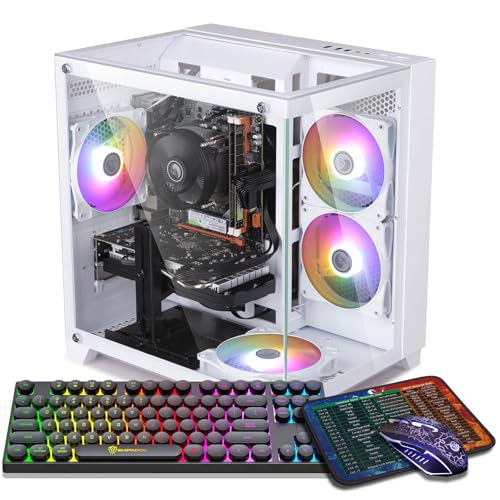
- Best streaming encoder under $700: ZER-LON Gaming PC, Ryzen 5 5500, RTX 4060 8GB, 16GB DDR4, 1TB NVMe, RGB Fan x4, White — Check on Amazon
- STGAubron Gaming PC, Ryzen 5 5500, RTX 3060 12GB, 16GB DDR4, 1TB SSD, RGB Fan x4 — Check on Amazon
- IPASON Gaming PC Desktop, Ryzen 5 5600, RTX 3060 12GB, 16GB DDR4-3200, 1TB NVMe — Check on Amazon
- Skytech Blaze 3.0 Gaming PC, i5-10400F, RTX 3060 12GB, 3 x RGB Dual Ring Fans, 600W Gold — Check on Amazon
See 2 more Amazon options
- STGAubron Gaming PC, Ryzen 5 5500, RTX 3050 6GB, 16GB DDR4, 1TB SSD, RGB Fan x6, White — Check on Amazon
- Skytech Shadow Gaming PC, Ryzen 5 3600, GTX 1660 Super, 16GB DDR4, RGB Fans — Check on Amazon
Read the full guide ↓
Disclosure: As an Amazon Associate, reviewstook.com earns from qualifying purchases. Links to Amazon on this page are affiliate links; they cost you nothing extra. Listing details such as price and availability change often, so check the current Amazon listing before you buy.
Streaming asks a PC to do two jobs at once, and this guide grades both. The first job is the game itself, played at settings your viewers would accept. The second is the encode: turning that gameplay into a compressed video feed, in real time, without stealing the frames the first job needs. On Twitch, that feed is an H.264 stream at roughly 6,000 kbps with constant bitrate for most partners and affiliates — a demanding, quality-starved pipe where the encoder’s skill matters more than its spec sheet. On YouTube you may push higher bitrates, send a 1440p feed, and use AV1 where your hardware supports it. Streaming in 4K remains limited by the platforms rather than by any machine in this guide, so nothing here is graded on it. The reason a streaming guide can be written honestly at $700 at all is NVENC: every machine below carries a discrete NVIDIA card with a dedicated hardware encoder, a separate block of silicon that compresses the stream while the rest of the card plays the game. That is the whole ballgame at this budget, and it is why the picks are ranked encoder-first.
Two facts about this set should be on the table before any ranking. First, AV1 encoding — the newest codec, the one YouTube rewards — exists on exactly one pick: the RTX 4060 machine, whose Ada-generation encoder is the only one here that can produce an AV1 stream. The RTX 3060 and RTX 3050 cards below are Ampere silicon; their NVENC encoders are excellent at H.264 and cannot encode AV1 at all, whatever a listing’s bullet points imply. The GTX 1660 Super is older Turing silicon with the same AV1 answer: no. Second, no machine in this guide has a second encoder to fall back on. The one Intel processor here is an F-suffix chip with no integrated graphics, and none of the Ryzen processors carries integrated graphics either, so there is no Quick Sync reserve hiding in any of these CPUs. Every stream in this guide runs on the graphics card’s NVENC, full stop — which is precisely why the card’s encoder generation, not its fan count, leads the ranking. The RGB layer still matters here, more than in most guides: a streamer’s PC sits on camera, inside the frame, for hours. But lights are graded as what they are — set dressing — and the encoder is graded as what it is: the product.
Prices on these listings move often, so no static price is printed for any pick in this guide: check the live price on Amazon before you buy, and let the current listing — not any earlier figure — decide whether a machine still fits this guide’s budget today. The pick with the best encoder ranks first on silicon, and this guide will not pretend the encoder question settles the budget question: confirm its live listing still sits inside the budget before ordering.
In this guide
Quick Picks
Short on time, or comparing several options at once? Each row below names a streaming buyer type and the product that suits it, with a link to the listing.
| Buyer type | Pick | Why it stands out | Link |
|---|---|---|---|
| Best encoder | ZER-LON Gaming PC, Ryzen 5 5500 / RTX 4060 8GB | The set’s only AV1-capable encoder (Ada NVENC) in a white four-fan case — check price on Amazon | Check on Amazon |
| Best complete streaming package | STGAubron Gaming PC, Ryzen 5 5500 / RTX 3060 12GB | Ampere NVENC, four RGB fans and lit peripherals in one box — check price on Amazon | Check on Amazon |
| Best simultaneous-load value | IPASON Gaming PC Desktop, Ryzen 5 5600 / RTX 3060 12GB | The same Ampere encoder plus the strongest CPU here for game-plus-OBS duty — check price on Amazon | Check on Amazon |
| Best documented on-camera lighting | Skytech Blaze 3.0, i5-10400F / RTX 3060 12GB | Ampere NVENC, dual-ring fans with manual-documented control, mesh front, named 600W Gold PSU | Check on Amazon |
| Most lights for the camera | STGAubron Gaming PC White, Ryzen 5 5500 / RTX 3050 6GB | Six RGB fans in white and the same Ampere NVENC generation — check price on Amazon | Check on Amazon |
| Starter stream on a real budget | Skytech Shadow, Ryzen 5 3600 / GTX 1660 Super | Turing NVENC that still encodes Twitch respectably — check price on Amazon | Check on Amazon |
How These Picks Were Chosen
The six machines are the base guide’s six, carried over with their verified listings intact — what changes is the grading. A streaming rank is earned in this order: first the encoder (which NVENC generation the documented card carries, and whether it can encode AV1), then simultaneous-load headroom (the processor and memory left over for OBS, a browser full of dashboards, chat and everything else a live session runs), then the game side (the card still has to play something worth watching), and only then the lighting, judged on what the listing documents rather than what its photographs suggest. Where two machines share an encoder — three picks here run the same Ampere NVENC — the tie breaks on CPU strength, overall value and documented control of the lights your audience will actually see.
Every encoder claim in this guide is derived from the documented graphics card in each listing, and from nothing else. No encoder is credited to a processor whose listing does not document integrated graphics, no card is credited with a codec its silicon generation does not support, and no machine is described as having dual encoders, because none does. We did not use these PCs ourselves; performance characterizations are class-level, drawn from what each card and encoder generation does as a class of hardware, and no per-game frame rates are quoted for machines we have not benchmarked. No static prices are printed here: check the live price on Amazon for each pick, and treat the current listing — not any earlier figure — as the price that decides whether a machine fits this guide’s budget.
One filter from the base guide survives intact, because streamers feel it first: the hardware floor. Sixteen gigabytes of RAM and solid-state storage are non-negotiable for a machine that must run a game, an encoder session, a browser and chat at once, and every pick clears that bar. A prettier machine that failed it would be a backdrop, not a streaming PC, and it would not be in this guide no matter how it photographed.
The Encoder Map: What Each Card in This Set Can Actually Encode
Read this section before the reviews, because it is the ranking. A hardware encoder is a fixed-function block on the graphics card: it compresses video without asking the card’s game-playing cores for help, which is why a modest card with a good encoder can out-stream a stronger card with a weak one. NVIDIA’s encoder is called NVENC, and its ability changes by silicon generation — and the generation is set by the card in the listing, not by the price of the machine around it.
- Ada NVENC (RTX 4060 — the ZER-LON pick): the newest encoder in this set and the only one that encodes AV1, alongside H.264 and HEVC. AV1 is the codec YouTube’s live ingest rewards with visibly cleaner results at a given bitrate, and it is the future-facing option for anyone archiving VODs. For Twitch’s H.264 pipe it is also the sharpest H.264 encoder here. One encoder block, three codecs, no compromises — on the silicon question alone, this is the best streaming card under $700.
- Ampere NVENC (RTX 3060 12GB — three picks; RTX 3050 6GB — one pick): the workhorse. Ampere NVENC produces H.264 quality at Twitch’s 6,000 kbps that viewers experience as clean, and it encodes HEVC for local recording. It does not encode AV1 — the Ampere generation decodes AV1 video, which is a playback feature, and decoding is not encoding. Any listing or review that puts “AV1” next to a 3060 or 3050 without that distinction is describing the wrong direction of travel. Four of the six picks run this encoder, and for a Twitch-first streamer it is genuinely sufficient: the platform’s H.264 ceiling, not the encoder, is the bottleneck.
- Turing NVENC (GTX 1660 Super — the Skytech Shadow): the generation that made one-PC streaming mainstream, and still a respectable H.264 encoder — far better than software encoding on a six-core CPU. It has no AV1 encode and no path to one, and the card around it has no DLSS and a fixed performance ceiling, so the stream it produces is capped by the games it can play more than by the encoder itself.
- What is not in this set: Intel Quick Sync. The Blaze’s i5-10400F is an F-suffix processor — the F means no integrated graphics, hence no Quick Sync encoder — and the Ryzen 5 5500, 5600 and 3600 in the other picks carry no integrated graphics at all. There is no second encoder in any machine here to offload a recording or a second stream onto. Plan on one NVENC doing the work, because one NVENC is what you are buying.
The practical translation: if you stream to Twitch, every pick in this guide can encode your stream properly, and the ranking differences are about headroom, polish and price. If you stream to YouTube and care about AV1, exactly one pick qualifies, and it is the ZER-LON at the top of this guide — a fact this guide states plainly rather than smoothing over, because a buyer who purchases an Ampere machine expecting AV1 has been mis-sold by someone, and it will not be by us.
The 6 Best RGB Gaming PCs for Streaming Under $700
ZER-LON Gaming PC — Ryzen 5 5500, RTX 4060 8GB, RGB Fan x4, White
Who it suits: The streamer who streams to YouTube, or who wants the longest-lived encoder this budget can buy — and who checks the live listing price on Amazon carefully before buying anything.
Ranked on the encoder, this machine wins the guide, and the margin is a codec. Its RTX 4060 carries the Ada generation of NVENC, the only encoder in this set that can produce an AV1 stream. On YouTube, where AV1 live ingest is supported and rewarded, that means a cleaner picture at the same bitrate and a VOD archive encoded in the codec the platform prefers. On Twitch, where the feed is H.264 regardless, the Ada encoder is still the sharpest H.264 block here. The card also brings DLSS 3 Frame Generation to the game side, which matters to a streamer in a specific way: frame generation raises the frame rate your viewers see without asking the CPU for more, and the CPU is exactly the resource your OBS session is sharing. Around the card, the listing specifies a Ryzen 5 5500, 16GB of DDR4 and a 1TB NVMe SSD — enough simultaneous-load headroom for a game, OBS, a browser and chat, with the NVENC block doing the encode on dedicated silicon rather than on the processor. The presentation is specified as plainly as the silicon: four RGB fans in a white case, and white is the on-camera choice — it reflects its own light into the room and reads as a deliberate set piece behind a streamer rather than a dark box with a glow.
The buying discipline is simple, and it is stated here rather than in a footnote: check the live price on Amazon before you order, and buy this machine only while its current listing sits inside this guide’s budget. If the live price has moved above that line, the honest comparison is the tier above, not this guide. Two smaller notes. Its Wi-Fi is Wi-Fi 5, a generation behind; the OBS section below will tell you to stream on a cable anyway, which demotes this from a flaw to a footnote for anyone who follows the advice. And the 4060’s 8GB of VRAM is the counterweight to its newer encoder: at 1080p, game plus stream is comfortable, but texture-heavy new releases will ask for settings discipline sooner than the 12GB cards below would. Newer encoder now, less memory later — that is the trade, stated once, plainly.
- Ada NVENC with AV1 encode — the only AV1-capable encoder under $700, and the set’s best H.264 block besides.
- DLSS 3 Frame Generation lifts the on-screen frame rate without taxing the shared CPU.
- Four RGB fans in a white case, specified in the listing — the strongest on-camera look here.
Honest limitation: This listing’s price moves often, so check the live price on Amazon and buy only while it sits inside this guide’s budget; Wi-Fi is the older Wi-Fi 5 standard.
Choose it if you stream anywhere AV1 matters and its live price sits inside this guide’s budget. Skip it if its live listing sits above this guide’s budget when you check — the STGAubron below is the alternative to look at first.

STGAubron Gaming PC — Ryzen 5 5500, RTX 3060 12GB, RGB Fan x4
Who it suits: The Twitch-first streamer who wants the complete, coordinated package — encoder, card, lights and lit peripherals — in one order.
For the platform most readers stream to, this is the pragmatic top pick. The RTX 3060’s Ampere NVENC is the encoder Twitch’s H.264 pipe was effectively built around: at 6,000 kbps CBR it produces a clean, stable feed while the card’s game-playing silicon runs the game, and the 12GB version of the card — the version in this listing — is the right one for streaming duty, because a game that is also feeding an encoder session appreciates the extra texture memory at 1080p. The supporting cast suits simultaneous work: a six-core Ryzen 5 5500, 16GB of DDR4 and a 1TB SSD, with Wi-Fi 6 in the listing data for everything except the stream itself, which belongs on a cable. The presentation is documented rather than implied: four RGB fans and an RGB keyboard and mouse in the box, so the desk your viewers see is lit as one purchase. The listing states a one-year warranty. As a one-checkout streaming station for Twitch, nothing in the guide is more direct.
The honesty notes are the base guide’s, unchanged. There is no AV1 encode on this card — Ampere decodes AV1 and does not encode it — so a YouTube AV1 workflow is not available here at any setting. Check the live price on Amazon before ordering: while its current listing sits inside this guide’s budget it is the best complete streaming package here; if the live price has moved above the line, it is competing with the tier above on this tier’s parts, and the correct move is to wait or compare upward. The listing does not publish the power supply’s wattage or brand, which caps GPU upgrade planning until you open the case. And STGAubron is a value integrator: expect competent assembly and a stated warranty rather than a deep support organization, and spend the first week — including a full-load test stream — checking everything while the return window is open.
- RTX 3060 12GB with Ampere NVENC — the proven Twitch combination, in the card’s correct full-memory form.
- Four RGB fans plus an RGB keyboard and mouse: the on-camera desk lights from one box.
- 16GB DDR4 and 1TB SSD — the simultaneous-load floor cleared without sacrifice.
Honest limitation: No AV1 encoding, at any setting, ever — and check the live price on Amazon before buying, as this listing’s price moves; the power supply is unpublished in the listing data.
Choose it if Twitch is your platform and its live price sits inside this guide’s budget. Skip it if AV1 is the point of the purchase — that is the ZER-LON above — or if the live price is above the line.

IPASON Gaming PC Desktop — Ryzen 5 5600, RTX 3060 12GB, 1TB NVMe
Who it suits: The streamer whose sessions are heavy — game, OBS with layered scenes, browser dashboards, chat, voice — and who wants the most simultaneous-load headroom in the guide.
This machine shares the STGAubron’s encoder and card exactly: an RTX 3060 12GB and its Ampere NVENC, with the same H.264 strengths and the same AV1 answer. What it adds is the processor. The Ryzen 5 5600 is the strongest CPU in this guide, and in a streaming machine the CPU is the shared resource everything except the encode draws on — OBS scene rendering, browser sources, overlays, chat bots, Discord, the game itself. NVENC keeps the encode off that budget; the 5600 makes the budget bigger. Check its live price on Amazon; on value it is one of the most attractive routes here to this encoder-and-card pairing with the best CPU attached, backed by 16GB of DDR4-3200, a 1TB NVMe SSD and a 550W power supply, running Windows 11 Home. For a streamer who measures a PC by how much can be open at once, this is the value pick of the guide.
Its caveat is the base guide’s, and it matters more in a streaming guide than anywhere: the verified listing data for this machine specifies the hardware in detail and does not specify a lighting system. IPASON’s gaming line ships in lit cases as a matter of course and the live listing’s photos will show the current case — but a streamer is the one buyer for whom “the photos look lit” is not good enough, because the case is in the frame for every hour of every stream. Treat the lighting as unverified until you have checked the live listing, and treat this machine as what it demonstrably is: the tier’s best simultaneous-load hardware, with whatever its current case provides as a bonus rather than a promise. The listing family has also shown configuration drift over time, with style names shifting between card configurations — confirm the style in your cart reads Ryzen 5 5600 and RTX 3060 before paying, and verify the machine against the listing on arrival. The listing notes the graphics card brand may vary, which is standard at this price.
- Ryzen 5 5600 — the strongest CPU here — sharing the load everything except the encode creates.
- The same Ampere NVENC and 12GB card as the pick above — check price on Amazon.
- 1TB NVMe SSD and DDR4-3200 — room for the game library and the VOD folder alike.
Honest limitation: The verified listing data does not specify its lighting — a real gap for a machine that will sit on camera — and the listing family has shown configuration drift, so verify the style in the cart and on arrival.
Choose it if your sessions run heavy and you will verify the case lighting on the live listing before buying. Skip it if specified, countable on-camera lighting is a requirement — the picks above and below document theirs.

Skytech Blaze 3.0 Gaming PC — Intel Core i5-10400F, RTX 3060 12GB, 3 x RGB Dual Ring Fans
Who it suits: The streamer who treats the PC as part of the set — and who wants the lighting’s control method documented, the power supply named, and an established US builder behind the glass.
The streaming hardware matches the two picks above it: an RTX 3060 the listing specifies at 12GB GDDR6, carrying the same Ampere NVENC, the same Twitch-grade H.264, the same absence of AV1 encode. The i5-10400F is a capable six-core for game-plus-OBS duty, with one streaming-specific fact stated plainly: the F in its name means no integrated graphics, so there is no Quick Sync encoder in this machine — the NVENC block does all the encoding, as it does in every pick here. Where the Blaze separates itself is documentation, and for a streamer documentation is a feature. Skytech’s listing names three RGB dual-ring fans in a Phanteks Metallic Gear Neo Air case — mesh at the front where air enters, glass on the side where the camera looks — and Skytech’s own manual for the line documents how the lighting is controlled, typically a dedicated button on the case or pre-installed software. That puts this pick in the small group at this tier whose on-camera look can be adjusted on purpose rather than hoped for. The 600W 80 Plus Gold power supply is named in the listing, a gaming keyboard and mouse are included, the listing promises no bloatware, and Skytech states a one-year parts-and-labor warranty with lifetime free technical support, assembled in the USA. Check the live price on Amazon before you buy.
The compromises are platform compromises. The i5-10400F sits on Intel’s finished LGA1200 platform: no meaningful CPU upgrade path, so the machine’s future is a GPU swap into that documented power supply. The listing ships Windows 10 Home; the processor is on Microsoft’s Windows 11 supported list, so make confirming the free upgrade a first-evening task rather than an assumption. Skytech also notes the graphics card brand may vary — the spec is guaranteed, the card maker is not. None of that dents the proposition for the buyer it suits: this is the pick for the streamer who reads spec sheets, because its spec sheet answers the questions — including the lighting ones your audience will see answered every stream.
- Three dual-ring RGB fans in a named mesh-front case — display glass where the camera looks, airflow where it matters.
- How the lighting is controlled is documented in Skytech’s own manual — a case button, or software the builder pre-installs.
- 600W 80 Plus Gold PSU, named in the listing — documented headroom for a future card.
Honest limitation: No Quick Sync — the F-suffix CPU has no integrated graphics — and no AV1 encode on the card; the platform is finished and the listing ships Windows 10 Home.
Choose it if documented lighting control, a named PSU and builder support matter as much as the encode. Skip it if you plan to upgrade the processor later — the Ryzen picks sit on the longer-lived AM4 path.

STGAubron Gaming PC, White — Ryzen 5 5500, RTX 3050 6GB, RGB Fan x6
Who it suits: The streamer whose channel’s look is the brand — maximum documented lighting, in white — playing games a 3050-class card genuinely handles, in categories where the game is the backdrop and the personality is the content.
Start with the encoder, because it is this pick’s quiet strength: the RTX 3050’s NVENC is the same Ampere generation as the 3060 picks above. The stream it produces at Twitch’s 6,000 kbps is therefore much closer to the top of this guide than the game picture is — the encode is not where this machine compromises. Where it spends is the show: the listing specifies six RGB fans, the highest documented count in the guide, plus an RGB keyboard and mouse, in a white case that bounces the light around the room and photographs like a set. For a just-chatting, variety or esports streamer, that is a rational allocation: the audience watches the streamer and the room far more than they audit texture settings. The supporting specs hold the floor — Ryzen 5 5500, 16GB of DDR4, a 1TB SSD, Wi-Fi 6 and Bluetooth 5.0 in the listing data — and check its live price on Amazon — the most illuminated machine here is also among the more affordable in the guide.
The trade is on the game side, and it is real. The RTX 3050 in 6GB form plays modern games at 1080p on medium-to-high settings with DLSS doing genuine work, and its 6GB of memory is the tightest in the guide once a game and an encoder session share the card — texture discipline in new releases is part of the deal. There is no AV1 encode, as with every Ampere pick. Check the live price on Amazon before ordering, as this listing’s price moves — buy it while the current listing sits comfortably inside this guide’s budget. The listing shares the STGAubron notes from above — an unpublished power supply in the verified data, and a value brand’s support depth — so the first-week inspection, including a full-load rehearsal stream, is part of the purchase.
- Same Ampere NVENC generation as the 3060 picks — the Twitch encode barely compromises at all.
- Six RGB fans — the highest documented count here — in a light-multiplying white case.
- Strong value for the show: the biggest on-camera presentation in the guide at a budget-friendly position in the set — check price on Amazon.
Honest limitation: The RTX 3050 6GB is a class below the 3060 picks on the game side — 1080p medium-to-high with DLSS and the tightest memory headroom here — so check the live price on Amazon before ordering.
Choose it if the look leads, your categories suit a 3050, and its live listing sits inside this guide’s budget. Skip it if you stream new AAA releases at high settings — the encoder survives that ambition, but the game side does not.

Skytech Shadow Gaming PC — Ryzen 5 3600, GTX 1660 Super, RGB Fans
Who it suits: The beginning streamer testing whether streaming is for them — a lit, glass-sided machine from a known builder at the lowest documented price in the guide, with an encoder that still does the job.
The Shadow’s streaming case rests on one underappreciated fact: the GTX 1660 Super’s Turing NVENC is a genuinely good H.264 encoder, the generation that proved a single modest PC could play and stream at once. At Twitch’s 6,000 kbps it produces a feed viewers experience as perfectly watchable, and it does so on dedicated silicon, leaving the six-core Ryzen 5 3600 to the game and the session. The machine around it is honestly specified for a starter: 16GB of DDR4-3000, a 1TB SSD — storage is not strangled, which matters once VODs accumulate — RGB fans per the listing, and the same Skytech proposition as the Blaze: an established integrator, a stated warranty, support that exists after checkout. Check the live price on Amazon — it sits at the budget end of this guide, which for a first stream is the right shape of purchase: budget left over for the microphone the kit section below will tell you to buy first.
The limitations are generational and absolute. No AV1 encode, now or ever — Turing predates it. No DLSS and no usable ray tracing on the game side, so the card’s ceiling is fixed: it will play the esports-and-back-catalog tier properly and fall behind new releases at its own pace. The Ryzen 5 3600 is a generation older than the other CPUs here, which shows up as the least simultaneous-load headroom in the guide — keep the browser tabs honest. The listing ships Windows 10 Home, with the same confirm-the-upgrade note as its sibling. Read the Shadow as the guide’s floor, deliberately: it exists so that a buyer on a tight budget, or whose streaming career is still a hypothesis, finds a machine whose encoder is honestly up to Twitch instead of a newer badge on weaker silicon.
- Turing NVENC — a real hardware encoder that handles Twitch’s H.264 properly — check price on Amazon.
- 1TB SSD and 16GB of RAM — the streaming floor cleared, unusually for a starter-tier machine.
- An established builder’s warranty behind the cheapest seat in the guide.
Honest limitation: No AV1 encode and no DLSS, a generation-old CPU with the least session headroom here, and Windows 10 in the listing — a fixed ceiling, bought knowingly or not at all.
Choose it if you are starting out, your library is esports and back catalog, and the savings fund the rest of the kit. Skip it if streaming is already your job — every pick above is the correct spend.

Comparison Table
| Product | Graphics | Encoder, as documented | Link |
|---|---|---|---|
| ZER-LON Gaming PC, White | RTX 4060 8GB | Ada NVENC — H.264, HEVC, AV1 encode (the set’s only AV1) | Check on Amazon |
| STGAubron Gaming PC (B0FCYPWLSN) | RTX 3060 12GB | Ampere NVENC — H.264, HEVC; no AV1 encode | Check on Amazon |
| IPASON Gaming PC Desktop | RTX 3060 12GB | Ampere NVENC — H.264, HEVC; no AV1 encode | Check on Amazon |
| Skytech Blaze 3.0 | RTX 3060 12GB | Ampere NVENC — H.264, HEVC; no AV1 encode; no Quick Sync (F-suffix CPU) | Check on Amazon |
| STGAubron Gaming PC, White | RTX 3050 6GB | Ampere NVENC — H.264, HEVC; no AV1 encode | Check on Amazon |
| Skytech Shadow | GTX 1660 Super 6GB | Turing NVENC — H.264, HEVC; no AV1 encode | Check on Amazon |
Setting Up OBS on Any of These Machines
The encoder decision is made in one OBS settings screen, and it is the same decision on all six picks: use the card, not the processor. In OBS, set the encoder to NVENC H.264 for a Twitch stream — software x264 encoding on these six-core CPUs would spend exactly the headroom your game and session need, and buy nothing in return. Rate control is CBR (constant bitrate), at 6,000 kbps for Twitch, with a keyframe interval of 2 seconds; those three settings are the platform’s expected shape and the ones its ingest handles best. On YouTube you have room to breathe: higher bitrates are accepted, a 1440p feed is worthwhile because YouTube’s processing treats higher-resolution ingests more generously, and on the ZER-LON — only on the ZER-LON — you may select NVENC AV1 as the encoder. On every other pick, YouTube gets NVENC H.264 or HEVC, and any AV1 menu envy should be settled by the encoder map above: the option is absent because the silicon is.
When a stream stutters, OBS’s stats panel tells you which of three different problems you have, and they have three different fixes. Frames missed due to rendering lag means the game is saturating the graphics card and OBS cannot composite its scene — the fix is on the game side: cap the in-game frame rate, lower the heaviest settings, and let the encoder’s card breathe. Skipped frames due to encoding lag means the encoder itself is overloaded — rare with NVENC at 1080p, and the fix is to drop the output resolution or ease the encoder preset rather than touching the game. Dropped frames are the network: the connection could not carry the bitrate, and no setting inside the PC fixes a connection — lower the bitrate, change nothing else, and read the next paragraph. Confusing the three is the most common beginner error in streaming; the stats panel exists so you never have to guess.
The network rule is absolute and admits no exceptions in this guide: stream on a wired Ethernet connection. Not on the STGAubron’s Wi-Fi 6, not on anyone’s Wi-Fi anything — Wi-Fi throughput varies with walls, neighbors and microwave ovens, and a stream is a constant-bitrate promise made for hours at a time. Run the cable, or use a powerline or MoCA bridge to get wired-equivalent stability to the desk. Then rehearse: before your first public stream, run a private test at full load — game, scenes, alerts, browser sources, everything — for the length of a real session. A machine that streams beautifully for ten minutes and throttles at minute forty is a machine you want to learn about inside its return window, and every pick in this guide deserves that rehearsal in its first week.
Costing the Rest of the Kit — Without Prices
The PC is the largest purchase in a streaming setup and not the only one, and this section deliberately names no prices for any of it — accessory pricing moves too fast for print, and the order matters more than the amounts. Buy in this order. First, a microphone. Viewers forgive a soft picture for hours and a bad microphone for about ninety seconds; audio is the stream’s actual product, and a modest USB microphone, positioned close, transforms a broadcast more than any other single purchase. Second, light for your face. Here the RGB honesty of this guide pays off: the fans light the case, and the case is not your face. A simple key light aimed at you does more for the camera image than any webcam upgrade, and it is why the documented, controllable case lighting in the picks above is a complement to a lit face, never a substitute for one. Third, a webcam, once the light exists for it to see by — cameras are sensors starved of light, and the order of these two purchases is the difference between a sharp image and an expensive grainy one. Last, and only for some, a capture card: it exists to bring an external source — a console, or a second PC — into your stream. For games played on the same PC that is streaming them, a capture card does nothing at all; it is the most commonly wasted purchase in starter streaming, and the only buyers in this guide’s audience who need one are console streamers, for whom it is essential and correctly bought after the microphone.
How to Choose a Streaming RGB Gaming PC Under $700
- Name your platform before your pick. Twitch means H.264 at 6,000 kbps, which every machine here encodes properly — choose on price, CPU headroom and documented lighting. YouTube with an AV1 workflow means exactly one machine here — check its live price on Amazon.
- Grade the encoder generation, not the card’s badge. Ada NVENC encodes AV1; Ampere NVENC does not; Turing NVENC is older and H.264-only. The card model in the listing tells you the generation — learn to read it there rather than in a headline.
- Never pay for a second encoder that is not in the machine. No pick here has Quick Sync or any integrated-graphics encoder. If a listing implies a fallback encoder, ask which silicon provides it; in this set, the honest answer is none.
- Count simultaneous load, not just the game. OBS, browser dashboards, chat and voice all draw on the CPU and RAM the game does not use. The strongest processor in the guide is in its third-ranked pick for exactly this reason.
- Buy the documented light, because it is on camera. Fan counts and control methods stated in the listing or the maker’s manual are what your audience will see. Unspecified lighting is an unverified claim, whatever the gallery shows.
- Check the live price on every candidate. Prices on these listings move often, so set alerts, confirm each pick still sits inside this guide’s budget on its live Amazon listing, and let a live price above the line be a reason to wait or compare the tier above.
- Budget the kit in order. Microphone, face light, webcam, capture card only if a console is involved — and the Ethernet cable before all of them. A well-budgeted streaming PC on Wi-Fi with a headset mic is still a compromised stream.
- Rehearse inside the return window. A full-length private test stream in the first week is the only benchmark of a streaming PC that matters, and it is free. Machines that fail it go back while going back is easy.
Common Buying Mistakes
- Believing an RTX 3060 or 3050 can encode AV1 because the listing mentions AV1 somewhere. Ampere cards decode AV1; they do not encode it. The distinction is the difference between watching a stream and sending one.
- Encoding in software. Choosing x264 in OBS “for quality” on a six-core streaming PC spends the CPU your game and session need; NVENC exists on every card here precisely so you never have to.
- Streaming on Wi-Fi because the listing advertises a fast wireless standard. The standard is not the connection; walls and neighbors are. Dropped frames are a cable problem with a cable solution.
- Diagnosing every stutter as “the encoder.” Rendering lag, encoding lag and network drops are three faults with three fixes, and OBS’s stats panel names which one you have. Guessing wastes streams.
- Buying a capture card to stream PC games from the same PC. It captures external sources only; for same-PC play it is an expensive ornament.
- Lighting the case and not the face. Six RGB fans behind glass will not rescue a webcam image of an unlit streamer; the light budget belongs on you first.
- Paying above the line without checking. These listings’ prices move often; ordering without confirming the live price on Amazon still sits inside this guide’s budget is the tier’s most common own goal.
Final Recommendation
- Best encoder, patient buyers: ZER-LON Gaming PC — the set’s only AV1 encode; check its live price on Amazon and buy only while it sits inside this guide’s budget.
- Most streamers, complete package: STGAubron Gaming PC with the RTX 3060 12GB — check price on Amazon.
- Heavy sessions, best value: IPASON Gaming PC Desktop.
- Documented on-camera lighting and support: Skytech Blaze 3.0.
- The look is the channel: STGAubron White with six RGB fans.
- Starting out: Skytech Shadow.
Our top two at this budget split on platform. For YouTube and the future, the ZER-LON’s Ada encoder is the only AV1 in the room, and a streamer who will own the machine for years should seriously consider waiting until its live price sits inside this guide’s budget — the encoder is the one component in a streaming PC that cannot be upgraded by settings. For Twitch today, the STGAubron’s Ampere machine is the complete answer when checked at its live price on Amazon: the proven encoder, the full-memory card, the lit desk in one box. Between them they cover the two honest shapes of this search — the encoder bought patiently, and the station bought whole. Streamers whose needs run past one machine’s encoder should compare Best Streaming PC Under $700 and Best Gaming PC For Streaming Under $700, and those whose real constraint is the room rather than the codec will find the compact version of this search at Best RGB Gaming PC For Small Spaces Under $700. Check the live price, confirm the style in the cart, run the cable, and rehearse before you go live — at $700, the difference between a stream that holds and one that drops is rarely the badge on the case.
Frequently Asked Questions
Can a $700 PC really stream and play at the same time?
Yes, and the reason is architectural rather than generous: every card in this guide carries NVENC, a dedicated encoder block that compresses the stream without consuming the silicon the game runs on. What the budget actually limits is everything around that arrangement — the CPU headroom for OBS and browser sources, the game’s settings at 1080p, and the memory shared between game and session. Within those limits, a one-PC stream at Twitch’s standard 6,000 kbps is a normal workload for every pick here, including the guide’s starter-tier floor pick.
Do I need AV1 encoding to stream?
Not today, and the answer splits by platform. Twitch’s standard ingest is H.264, which all six picks encode well — AV1 there is confined to limited enhanced-broadcasting arrangements rather than the standard pipe. YouTube accepts and rewards AV1, and it is the codec the industry is moving toward, which is why the one AV1-capable pick leads this guide for buyers keeping a machine for years. But a streamer who buys an Ampere machine for Twitch has given up nothing their audience can see; AV1 is a future-proofing argument, not a present-tense requirement.
Why does this guide keep saying the RTX 3060 cannot encode AV1?
Because the confusion is common and expensive. The RTX 30-series’ Ampere silicon includes an AV1 decoder — it can play AV1 video, which is why listings mention the codec — but AV1 encoding hardware arrived with the RTX 40-series’ Ada generation. Streaming is encoding. A buyer who purchases a 3060 machine for an AV1 workflow discovers the truth in an OBS menu, which is the worst place to learn it, so this guide repeats the distinction wherever the card appears.
Is there any machine here with two encoders, so I can stream and record separately?
No. Each pick has exactly one encoder — its card’s NVENC. The Intel machine’s processor is an F-suffix chip without integrated graphics, and the Ryzen processors here carry no integrated graphics either, so there is no Quick Sync or second block to assign a recording to. In practice NVENC can handle a stream and a local recording of the same content comfortably; what you cannot do is run two independent high-quality encodes on separate hardware, because the separate hardware is not in these machines.
Does the RGB lighting affect the stream?
Only visually, and in both directions. The LEDs draw negligible power and add no meaningful load or heat to the encode. What they do is appear on camera: a lit case is set dressing your audience sees for hours, which is why this guide grades documented fan counts and documented control — a streamer who cannot adjust the case’s effects owns a backdrop they cannot direct. The one real interaction is negative space: case light is not face light, and no fan array substitutes for lighting the streamer.
What if every price I check today is above $700?
Then the market is having one of its weeks, and the guide is working as designed: wait, set alerts on the listings you actually want, and check the live price on Amazon again before ordering, and compare honestly against the tier above — Best RGB Gaming PC Under $800 makes the 4060 class an everyday proposition rather than an event, and Best Prebuilt Gaming PC For Streaming Under $700 covers the same streaming job without the lighting filter. Resist the temptation to pay well above the line for a machine built from this guide’s parts and call the difference close enough — it is not a premium, it is a markup on the same silicon.


