Where to buy
Check the latest price, availability and delivery on Amazon. Orders are placed on Amazon. We may earn a commission from qualifying purchases.
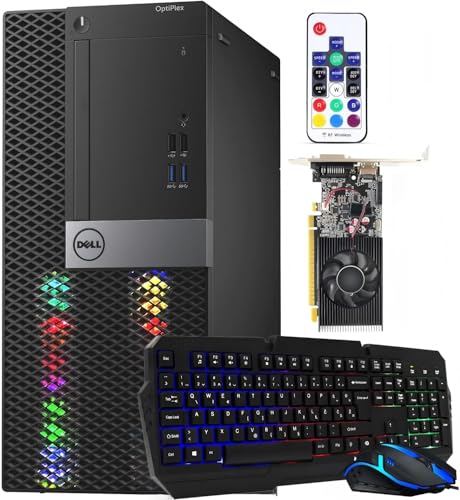
- Best overall RGB gaming PC under $400: Dell RGB Gaming Tower Computer, Core i7 6th Gen, GTX 1050 Ti 4GB (Renewed) — Check on Amazon
- Dell RGB Gaming Desktop PC, Core i5, Radeon RX 550 4G, Custom RGB Case Lighting (Renewed) — Check on Amazon
- STGAubron Gaming PC Desktop, Core i5, RX 550 4G, ARGB Fans, New — Check on Amazon
- Dell OptiPlex Desktop (SFF) Bundle with 24 Inch Monitor and RGB Front Panel (Renewed) — Check on Amazon
See 2 more Amazon options
- Dell Gaming OptiPlex Desktop RGB Computer PC, Core i7-4770, GT 1030, 24 Inch Monitor Bundle (Renewed) — Check on Amazon
- Dell OptiPlex 3050 SFF with Flash Black Film RGB Panel, Core i5-6600 (Renewed) — Check on Amazon
Read the full guide ↓
Disclosure: As an Amazon Associate, reviewstook.com earns from qualifying purchases. Links to Amazon on this page are affiliate links; they cost you nothing extra. Listing details such as price and availability change often, so check the current Amazon listing before you buy.
Start with the sentence nobody selling these machines will put in their headline: at $400, RGB lighting is decoration, and it buys exactly zero frames per second. Every dollar of this budget that goes to glowing fans, light panels and backlit keyboards is a dollar that did not go to the graphics card, and at this tier the graphics card is already the weakest part of the machine. What $400 actually buys in the “RGB gaming PC” category is one of three things: a renewed business tower that a refurbisher has fitted with case lighting and a real but elderly discrete graphics card, a new budget tower from a value brand whose fans light up in a fixed rainbow pattern, or a small-form-factor office PC wearing a remote-controlled LED front panel and a gaming keyboard. There is no fourth thing. No new tower with a modern graphics card and addressable, software-controlled RGB exists anywhere near $400, and any listing that seems to promise one is describing the lights accurately and the performance generously.
That does not make the search pointless — it makes it specific. Plenty of buyers genuinely want the look first: a first gaming setup for a teenager’s desk, a streaming corner that reads well on camera, a bedroom PC that feels like a gaming machine rather than a beige office hand-me-down. The look is a legitimate thing to buy. The job of this guide is to make sure you buy it with your eyes open: each pick below is graded on what its lighting actually is — addressable ARGB you can program, fixed rainbow fans you cannot, a case light strip, a front panel with a remote, or lights that live only in the bundled keyboard and mouse — and on the hardware underneath, stated plainly. Two of the six picks carry the strongest graphics cards this budget can touch, a GTX 1050 Ti and an RX 550. Two carry entry cards or listings that name no discrete card at all, and we say so in their names and reviews rather than letting the glow imply otherwise. Prices at this tier move weekly, so check price on Amazon before you buy, and hold the under-$400 line on any pick whose live price sits above this budget.
In this guide
Quick Picks
Short on time, or comparing several options at once? Each row below names a buyer type and the product that suits it, with a link to the listing.
| Buyer type | Pick | Why it stands out | Link |
|---|---|---|---|
| Best overall under $400 | Dell RGB Gaming Tower, Core i7 6th Gen, GTX 1050 Ti (Renewed) | The strongest graphics card in this guide, in a tower with an RGB set fitted | Check on Amazon |
| Best value with a real card | Dell RGB Gaming Desktop, Core i5, RX 550 4G (Renewed) | Custom RGB case lighting and a discrete card, positioned comfortably in this budget tier — check price on Amazon | Check on Amazon |
| Best new machine | STGAubron Gaming PC Desktop, Core i5, RX 550 4G | The only new tower here: lit fans, WiFi 6 and a maker’s warranty instead of a refurbisher’s | Check on Amazon |
| Best complete setup | Dell OptiPlex (SFF) Bundle, 24 Inch Monitor (Renewed) | Monitor, RGB front panel, keyboard, mouse and headset in one box | Check on Amazon |
| Best bundle with a discrete card | Dell Gaming OptiPlex RGB, Core i7-4770, GT 1030 (Renewed) | 24 inch monitor bundle with a real, if modest, graphics card — buy only on a dip | Check on Amazon |
| Cheapest way to the look | Dell OptiPlex 3050 SFF Flash Black Film (Renewed) | Remote-controlled RGB front panel for the least money in this guide | Check on Amazon |
How These Picks Were Chosen
The budget was applied as a ceiling: each pick is presented as an under-$400 option, with an explicit instruction in its review to check price on Amazon and buy only when the live price sits at or under $400. Anything clearly positioned in a higher tier was excluded, however good its lights looked.
Because this keyword is about lighting, the lighting itself was verified from listing text, not from photos. Listing photos at this tier are renders and showroom shots, and they routinely show effects the shipped hardware cannot produce. So each pick’s review states what the listing actually documents: how many lit fans and whether they are described as addressable or fixed-pattern, whether there is a glass or acrylic side panel to see them through, whether any lighting control software is named, or whether the “RGB” in the product name refers to a front-panel LED strip with a remote and a backlit keyboard. Where a listing’s own sections disagree — one of the picks below calls its fans “ARGB” in the title and plain “RGB Fan” in its specification block — the review reports both statements and treats the weaker one as the safer assumption. That is the single most useful habit this guide can teach: at this price, the headline is advertising and the specification block is the product.
We did not use these products ourselves. We read the maker and refurbisher listings, their specification blocks and Amazon-linked price records, and compared graphics cards, processors, memory type and capacity, storage, included peripherals and warranty routes. Renewed machines are named as renewed in every heading, table row and recommendation in this guide, because a renewed tower with a 90-day guarantee is a different purchase from a new tower with a maker’s warranty even when the specifications match — and at this tier, five of the six honest ways to buy the RGB look are renewed.
The 6 Best RGB Gaming PCs Under $400
Dell RGB Gaming Tower Computer, Core i7 6th Gen, GTX 1050 Ti 4GB, 16GB RAM, 512GB SSD, Windows 11 Pro (Renewed)
Who it suits: Buyers who want the look but refuse to give up the strongest graphics card this budget can honestly touch — the pick for anyone whose games matter at least as much as the glow.
The hardware leads, because here it can. A GeForce GTX 1050 Ti with 4GB of GDDR5 is the most capable graphics card in this guide by a clear margin: a generation and a class above the RX 550 and GT 1030 cards in the other picks, and the only card here we would describe as a genuine 1080p gaming card for esports titles and older AAA games at sensible settings. Around it sits a 6th-generation Core i7 at 3.4GHz, 16GB of DDR4 memory and a 512GB SSD, running Windows 11 Pro — an old platform, honestly labeled as one, but a balanced one, with no single part embarrassing the others. The machine is sold by STG USA as Amazon Renewed, Refurbished – Excellent, with the 90-day refund-or-replacement guarantee that renewed status carries.
The lighting is where the honesty has to work. The listing describes this tower as an RGB model with an RGB set fitted — case lighting added by the refurbisher to a business tower — and that is the correct mental picture: a competent renewed tower that has been given the gaming treatment, lights included, rather than a factory RGB showcase with addressable fans and software control. Judge it as the best-performing machine in this guide that also lights up, not as the best light show that also performs. On price, the rule is strict and it is printed here rather than buried: check price on Amazon before you buy, and buy it only on a day it sits at or under $400. Pass without regret on the days it sits above this budget.
- GTX 1050 Ti 4GB — the strongest graphics card in this guide, and the only one we call a real 1080p gaming card.
- Balanced platform: 6th-gen Core i7, 16GB DDR4 and a 512GB SSD under Windows 11 Pro.
- RGB set fitted by the refurbisher, with built-in WiFi, in a full-size tower you can open and upgrade.
Honest limitation: Its price can drift above $400, so it only belongs in this guide under the buy-at-or-under-$400 rule — check price on Amazon before ordering — and it is a renewed machine on a decade-old platform with a 90-day guarantee, not a warranty.
Choose it if gaming performance comes first and you are willing to watch the price for a few days. Skip it if you need to order today at whatever it costs, or you want lighting you can program per-fan — none of that exists at this budget, and this tower does not pretend otherwise for long.

Dell RGB Gaming Desktop PC, Core i5, Radeon RX 550 4G, 16GB RAM, 512GB SSD, Windows 10 Pro (Renewed)
Who it suits: The value buyer who wants case lighting that is actually in the case, a real discrete graphics card, and a price that sits inside the budget without any waiting or rule-following.
This is the STG-refurbished Dell tower whose listing leads with its lighting: the special-feature line documents “Custom RGB Case Lighting” alongside an RGB gaming mouse and keyboard, which makes it one of only two picks in this guide where the case itself is lit as a designed feature rather than a panel added to an office box. The graphics are a Radeon RX 550 with 4GB of GDDR5 — an entry-level card, and the review will not inflate it: it plays esports titles and older games at 1080p low-to-medium settings, it is a clear step above integrated graphics, and it is a clear step below the GTX 1050 Ti at the top of this guide. The processor is a quad-core Core i5 running up to 3.6GHz, with 16GB of memory and a 512GB SSD, HDMI, DisplayPort and DVI outputs, and connectivity by USB WiFi and Bluetooth dongles rather than built-in radios.
Two details deserve plain statements. The memory is DDR3, per the listing’s own specification data — a generation older than the DDR4 in the tower above — which caps any upgrade path and is part of why this machine costs less. And it ships with Windows 10 Pro: Microsoft’s mainstream support for Windows 10 has ended, so budget a plan for that — an upgrade path check, or acceptance that this is a games-and-browsing box rather than a long-term main PC. Against those, its positioning in this budget tier is the argument: check price on Amazon — it is positioned inside this budget tier, from the same refurbisher family as the top pick, with a stated one-year parts-and-labor cover in the listing copy — read that cover’s terms on the live page, since refurbisher warranties vary, but it is a stronger promise than the renewed minimum.
- Custom RGB case lighting documented in the listing, plus RGB keyboard and mouse in the box.
- Radeon RX 550 4GB discrete graphics — real card, honest entry-level performance.
- Budget-tier value among this guide’s discrete-card towers — check price on Amazon.
Honest limitation: DDR3 memory and Windows 10 Pro date the platform twice over, and WiFi arrives on a USB dongle rather than built in.
Choose it if you want the lit-case look and a real graphics card, in budget, today. Skip it if the Windows 10 installation or the older memory generation bothers you — the STGAubron below is new, runs Windows 11 and answers both objections at a higher, watch-the-price cost.
STGAubron Gaming PC Desktop, Core i5, RX 550 4G, 16GB RAM, 512GB SSD, WiFi 6, Windows 11 Home (New)
Who it suits: Buyers who want a new machine with a maker’s warranty — and the most complete fan lighting in this guide — and who accept entry-level graphics as the price of both.
This is the only new computer in the guide, and the difference shows in the details the renewed towers cannot offer: WiFi 6 and Bluetooth 5.0 built in, Windows 11 Home installed as a genuine new-machine license, an RGB keyboard and mouse in the box, and a warranty relationship with the maker rather than a refurbisher’s guarantee. The lighting is also the most substantial here. The listing documents RGB fans in the chassis — two in its specification block — behind the case’s viewing panel, and this is the one pick that genuinely resembles the glowing towers in the advertisements. The graphics, however, are the same Radeon RX 550 4GB as the Dell above, behind a Core i5 that runs up to 3.6GHz, with 16GB of memory and a 512GB SSD. Newness buys you support, connectivity and presentation. It does not buy you a faster graphics card, and on frame rates this machine and the cheaper renewed Dell beside it are peers.
Now the correction this pick exists to teach. The listing’s title calls its fans “ARGB Fan” — addressable RGB, the kind each LED can be programmed individually, usually through motherboard software. Its own specification block describes the cooling as “RGB Fan,” and nothing in the listing names lighting-control software, a motherboard sync system or a controller hub. Those two statements do not agree, and when a listing disagrees with itself, believe the plainer one: plan on fixed or simply-cycling rainbow fans that light the case beautifully and take no instructions from you. That is not a reason to skip the machine — at this budget it is the normal, expected implementation — but it is the difference between buying a look you saw and buying a capability that was never there. On price, patience is again the deal: check price on Amazon and hold the under-$400 line. At or under $400 it is a fair buy; above it, you are paying new-machine money for renewed-machine graphics.
- The only new pick: maker warranty, genuine Windows 11 Home, WiFi 6 and Bluetooth 5.0 built in.
- Multiple lit case fans and an RGB keyboard and mouse — the fullest lighting package here.
- RX 550 4GB graphics with 16GB of RAM and a 512GB SSD: honest entry-level hardware.
Honest limitation: The “ARGB” in the title is not backed by any named control software in the listing — treat the fans as fixed-pattern RGB — and its price can sit above $400, so check price on Amazon and treat this as a buy-on-a-dip pick in this budget tier.
Choose it if new-with-warranty matters more than raw value and you can wait for the price to touch the line. Skip it if you need addressable, software-synced lighting as an actual feature — that starts in a higher budget class entirely, and no $400 listing’s headline changes it.

Dell OptiPlex Desktop Computer (SFF) Bundle, Core i5, 16GB RAM, 512GB SSD, 24 Inch Monitor, Windows 11 Pro (Renewed)
Who it suits: A buyer starting from nothing — no monitor, no keyboard, no headset — who wants one box to contain the whole glowing setup, and whose games are the light kind.
Read this listing for what it verifiably is, because it is the clearest example in the guide of the RGB label doing marketing work. The computer is a renewed small-form-factor Dell OptiPlex with a quad-core Core i5 at 3.20GHz, 16GB of RAM and a 512GB SSD under Windows 11 Pro. Its RGB is a front-panel LED light: the listing documents an RGB LED light on the front panel whose color patterns, speed and mode are changed with a remote controller. Around that panel, the bundle adds the rest of the glow — a gaming keyboard with three backlight colors, a backlit mouse and a gaming headset — plus the genuinely valuable part of the package, a 24 inch monitor. Nothing in the listing’s description names a discrete graphics card, and that absence is the review: graphics are the processor’s integrated class, which means esports at low settings, older and lighter games, and no modern AAA. What you are buying is a complete, presentable, light-up desk setup for a light gamer, a student, or a kid’s first PC — and, with a monitor included, it is honestly positioned in this budget tier for exactly that — check price on Amazon.
The renewed terms are the standard ones for this refurbisher family: professionally inspected and tested, a minimum 90-day guarantee, possibly a generic box. The small-form-factor case also closes doors the towers leave open — there is no realistic path to a full-size graphics card inside an SFF OptiPlex with its low-profile slots and modest power supply, so the machine you buy is the machine you keep. Buy it as a finished setup, not a starting point.
- Everything in one box: 24 inch monitor, RGB-panel PC, backlit keyboard, mouse and headset.
- Remote-controlled front-panel lighting with multiple color patterns — simple, and it works from the couch.
- Complete setup in this budget tier with Windows 11 Pro — check price on Amazon: a complete setup positioned below many towers alone.
Honest limitation: No discrete graphics card is named in the listing, so gaming means integrated-graphics class — light titles only — and the SFF case leaves no real upgrade path.
Choose it if you are furnishing a whole desk at once for light gaming and everyday use. Skip it if your game library includes anything demanding, or you plan to upgrade the graphics later — choose one of the towers above instead.

Dell Gaming OptiPlex Desktop RGB Computer PC, Core i7-4770, GT 1030 2GB, 16GB RAM, 512GB SSD, 24 Inch Monitor, Windows 11 Pro (Renewed)
Who it suits: Bundle buyers who want a monitor included and a discrete graphics card in the box — the middle path between the two Dell bundles in this guide — provided the price cooperates.
The specification mixes genuine strengths with genuine age. The graphics card is a GeForce GT 1030 with 2GB of GDDR5: a real discrete card, a step above integrated graphics for esports and older titles at 1080p low settings, and a step below the RX 550 picks, let alone the GTX 1050 Ti. The processor is a Core i7-4770 — a 3.40GHz quad-core that was respectable in its day, which was more than a decade ago — and the 16GB of memory is DDR3, with a 512GB SSD doing what it can to make the platform feel current. The bundle is generous: a 24 inch HDMI monitor, keyboard, mouse and headset, WiFi, and Windows 11 Pro, renewed to Refurbished – Excellent condition. The RGB follows the refurbisher pattern documented across this family: an RGB LED light treatment on the front panel, changed by remote, plus backlit peripherals. It looks the part on a desk. It is not addressable, and it is not in the case fans, because an SFF OptiPlex has no case fans to speak of.
Check price on Amazon before considering this pick, because its pricing can sit above this budget tier, which is why it carries the guide’s second warning label. We include it because it is the bundle configuration readers most often compare against the picks above, and because renewed bundle prices do move; but the instruction is the same as the top pick’s, only stricter: at or under $400, on a dip, it is a reasonable complete setup with a real card. Above that line, the monitor-less towers above it in this guide give you more graphics for your budget, and you should let them.
- Monitor, headset, keyboard and mouse included, with a discrete GT 1030 card rather than integrated graphics.
- RGB front-panel treatment with remote control, per this refurbisher family’s documented pattern.
- Windows 11 Pro and a 512GB SSD soften the platform’s age in daily use.
Honest limitation: Its price can sit above $400 — check price on Amazon — and the i7-4770 with DDR3 memory is the oldest platform in this guide — this is a buy-only-on-a-dip pick, full stop.
Choose it if it dips to the line and you need screen, peripherals and a discrete card in a single order. Skip it if it is sitting above this budget tier — then it is out of this guide’s budget and out of its value argument.

Dell OptiPlex 3050 SFF with Flash Black Film, Core i5-6600, 16GB DDR4, 512GB SSD, Windows 11 Pro (Renewed)
Who it suits: The buyer who already owns a monitor and peripherals and simply wants the cheapest honest route to a PC that lights up — a bedroom, dorm or streaming-corner machine for light games and everyday work.
Strip the bundles away and this is what the RGB look costs at its floor. The machine is a renewed OptiPlex 3050 small-form-factor PC whose front wears the refurbisher’s “Flash Black Film” treatment with an RGB LED light panel: remote-controlled, with adjustable speed and several color-changing patterns, documented in the listing in the same terms as its bundle siblings. Underneath, the specification is a fair one for the money — a 6th-generation Core i5-6600 running up to 3.9GHz, 16GB of DDR4 (a generation newer than the DDR3 in two picks above), a 512GB SSD, keyboard and mouse in the box, WiFi and Bluetooth, and Windows 11 Pro. What it does not have is any named discrete graphics card, so the gaming story is the integrated one: Minecraft, Roblox, League of Legends and their weight class at modest settings, older games, and cloud streaming, which frankly suits a small quiet SFF box well.
Its positioning is the headline the marketing should have used: this is the budget-tier option in this guide, comfortably inside the under-$400 tier — check price on Amazon — leaving room in a tight overall setup budget for a game library or a better keyboard. The renewed cautions apply as they do to every refurbished pick here — inspected and tested, cosmetic surprises possible, guarantee measured in days rather than years — and the SFF case again means no meaningful graphics upgrade later. But judged as what it is, a light-up everyday PC that handles light gaming and looks like it belongs in a gaming setup, it is the tier’s honest floor.
- Budget-tier route to the RGB look in this guide — check price on Amazon.
- DDR4 memory and Windows 11 Pro: newer fundamentals than the DDR3 bundle picks.
- Remote-controlled RGB front panel, keyboard and mouse included, WiFi and Bluetooth fitted.
Honest limitation: No discrete graphics card is named in the listing, so performance is integrated class, and the small-form-factor case forecloses upgrading it later.
Choose it if the look, the desk footprint and light gaming are the brief, and you already have a screen. Skip it if you want a graphics card now or later — that money belongs in the towers at the top of this guide.

Comparison Table
| Product | Graphics | What the RGB actually is | Link |
|---|---|---|---|
| Dell RGB Gaming Tower, i7 6th Gen (Renewed) | GTX 1050 Ti 4GB | RGB set fitted in a full tower by the refurbisher | Check on Amazon |
| Dell RGB Gaming Desktop, Core i5 (Renewed) | RX 550 4GB | Custom RGB case lighting, plus RGB keyboard and mouse | Check on Amazon |
| STGAubron Gaming PC Desktop (New) | RX 550 4GB | Lit case fans (titled ARGB, specified as RGB) plus RGB peripherals | Check on Amazon |
| Dell OptiPlex SFF Bundle, 24″ Monitor (Renewed) | None named in listing — integrated class | RGB front panel with remote, backlit keyboard, mouse and headset | Check on Amazon |
| Dell Gaming OptiPlex RGB, i7-4770 (Renewed) | GT 1030 2GB | RGB front-panel treatment with remote, backlit peripherals | Check on Amazon |
| Dell OptiPlex 3050 SFF Flash Black Film (Renewed) | None named in listing — integrated class | RGB front panel with remote, on a film-treated SFF case | Check on Amazon |
How to Choose an RGB Gaming PC Under $400
- Read the specification block, not the title. Titles at this tier say “ARGB” and “gaming” freely. The spec block is where the same listing admits the fans are plain RGB, the memory is DDR3, or no graphics card is named at all. When the two disagree, the spec block is the product you will receive.
- Learn the three kinds of “RGB” at this price. Addressable ARGB (5V, per-LED, software-controlled) is effectively absent under $400. Fixed-pattern RGB fans cycle rainbow colors and take no instructions. And panel RGB — a light strip on a refurbished office case, run by a remote — is what most renewed “RGB gaming PCs” actually are. All three glow. Only your expectations need adjusting.
- Ask where the lights live. In the case fans, in a case strip, on the front panel, or only in the keyboard and mouse? Listings count peripheral backlighting as a headline feature; a “RGB gaming PC” whose only lights are in the bundled keyboard is an office PC with a colorful accessory.
- Check for a glass or acrylic side panel before valuing lit fans. Fans you cannot see are just fans. A solid steel side panel turns the best fan kit in this guide into a faint glow at the vents.
- Grade the graphics card before the glow. At this tier the honest ladder is GTX 1050 Ti, then RX 550, then GT 1030, then integrated. Each step down is a real step down in what plays at 1080p, and no lighting effect on any listing compensates for one.
- Treat “no graphics card named” as integrated graphics. If a listing wanted you to know about a discrete card, it would say so in the title. Silence in the spec block means the processor’s built-in graphics, with the light-gaming limits that implies.
- Price the bundle pieces honestly. A renewed 24 inch monitor, a backlit keyboard and a headset have real value if you need them — and none if they duplicate what is already on your desk. The same bundle is a bargain for a from-scratch setup and a poor buy beside an existing screen.
- Know the renewed terms before the price tempts you. Amazon Renewed machines carry a minimum 90-day refund-or-replacement guarantee; some refurbisher listings state longer parts-and-labor cover. Read which one your listing actually offers, and factor cosmetic condition into the price — these were office machines first.
- Check the Windows version and the memory generation. Windows 11 and DDR4 are the current fundamentals. A Windows 10 Pro or DDR3 machine can still be the right buy — two picks in this guide are exactly that — but it should be cheaper for it, and here it is.
- Use the walk-away rule. Several listings at this tier swing above and below the budget line. Decide your line before you shop, set the rule the way this guide does — at or under $400, buy; above it, wait — check price on Amazon before ordering, and the market’s mood stops being your problem.
ARGB, RGB and Panel Lights: What the Words Mean at This Price
Three different technologies share one word in these listings, and separating them is most of what shopping this tier well means. Addressable RGB — ARGB — connects each LED to a controller that can set its color individually, which is what makes waves, gradients and per-fan patterns possible, usually synced through motherboard software with names like Aura Sync or Mystic Light. It needs a 5V addressable header, compatible fans and software, and in a complete PC it lives at higher budgets than this one. When a $400 listing’s title says ARGB but its specification block names no software, no header and no controller, you are looking at the word being used as decoration — the same decoration, ironically, that the fans provide.
Fixed RGB is the honest middle: fans and strips that light in preset rainbow patterns, sometimes switchable between a few modes by a case button or a small remote, never programmable per-LED. It looks genuinely good through a side panel, it is what the new tower in this guide most plausibly ships, and it costs a maker very little — which is precisely why it is the lighting of this entire price tier. The third kind, panel lighting, is the refurbisher’s invention: an LED strip fitted behind or beneath the front panel of a retired office PC, run by an infrared remote, turning a Dell OptiPlex into something that photographs like a gaming machine. It is the simplest technology here and, on a desk at night, surprisingly effective. What none of the three does — the sentence this guide opened with, repeated because listings work hard to obscure it — is change performance by a single frame. The graphics card does that, and at $400 the graphics card needs every dollar the lights did not take.
One more physical detail separates the picks more than any specification: what you look through. The new tower’s lit fans sit behind a viewing panel, so the light is the product, visible from across the room. The refurbished towers wear their lighting on the front and in strips, visible from the front and above. The small-form-factor bundles glow from the front panel only — a light bar effect on a desk, strongest in a dark room, invisible from the side. None of these is the wrong answer, but they are different decorations sold under one word, and the buyer picturing a glass showcase should not be shipped a light bar. Decide which view you are buying — side, front or strip — and check the listing’s panel and lighting description against it before the price decides for you.
Common Buying Mistakes
- Believing a title that says “ARGB” when the same listing’s spec block says “RGB Fan” and names no control software. You will receive the spec block’s version.
- Counting the keyboard’s backlight as case lighting, then discovering the tower itself is a plain black office box.
- Assuming a discrete graphics card from the words “gaming PC” and a glowing product photo. If the card is not named, it is not there.
- Paying above $400 for a listing in this budget tier without checking the live price on Amazon first — wait for it to sit within the under-$400 tier instead.
- Comparing a monitor bundle’s price against a bare tower’s price as if they were the same purchase, in either direction.
- Buying a small-form-factor renewed PC as a “starter rig” for later upgrades. SFF cases, low-profile slots and small power supplies close that road; buy towers for upgrading.
- Ignoring the operating system line. A Windows 10 machine bought in late 2026 needs a plan, because mainstream support has ended — it is a fine games box and a questionable five-year main PC.
- Expecting the product photos’ light show. Listing images at this tier are renders and studio shots; the shipped effect is simpler, and the reviews above grade what the text documents, not what the pictures promise.
Final Recommendation
- Best overall: Dell RGB Gaming Tower, GTX 1050 Ti (Renewed).
- Best value in budget: Dell RGB Gaming Desktop, RX 550 (Renewed).
- Best new machine: STGAubron Gaming PC Desktop, RX 550.
- Best complete setup: Dell OptiPlex SFF Bundle with 24 Inch Monitor (Renewed).
- Best bundle with a card, on a dip: Dell Gaming OptiPlex RGB, GT 1030 (Renewed).
- Cheapest RGB look: Dell OptiPlex 3050 SFF Flash Black Film (Renewed).
Our top two are the two renewed Dell towers with real graphics cards: the GTX 1050 Ti tower at the top of this guide when its price sits at or under the line, and the RX 550 tower with custom case lighting at its listing — check price on Amazon when you would rather not wait. Between them they state this tier’s whole truth: the look is available, the lights are simple, and the money that matters is the money spent on the card. If your budget can stretch on a different day, the same search at the next tier is covered in Best RGB Gaming PC Under $500, and buyers who decide the lights were never the point should compare the plain machines in Best Gaming PC Under $400 and Best Prebuilt Gaming PC Under $400 before ordering. Decide which kind of RGB you are actually buying, confirm the graphics card by name, hold the $400 line on the listings that straddle it, and the setup on your desk will look exactly as glowing as you hoped — with no surprises left inside the case.
Frequently Asked Questions
Can you really buy an RGB gaming PC for under $400?
Yes — with the definition this guide uses: a PC with real case or panel lighting and honest, entry-level gaming hardware. What $400 cannot buy is a new tower with a modern graphics card and addressable, software-controlled RGB. At this price the machines are renewed business towers with lighting fitted by refurbishers, one new value-brand tower with fixed-pattern fans, and small-form-factor bundles whose RGB is a remote-controlled front panel. The look is real. The performance class is esports and older games at 1080p, and any listing implying more is selling the lights.
What is the difference between RGB and ARGB, and does it matter here?
ARGB (addressable RGB) lets software set each LED’s color individually, enabling waves, gradients and synced effects across fans and strips. Plain RGB lights everything in fixed patterns or a single color at a time. It matters here mainly as a truth-in-labeling issue: at under $400, even listings titled “ARGB” document no control software in their own spec blocks, so plan on fixed patterns from every pick in this guide and treat per-LED control as a feature of higher budgets.
Do RGB lights affect gaming performance?
No. Lighting draws a small amount of power and adds nothing to frame rates; its only performance-adjacent effect is that lit fans are still fans, moving air like unlit ones. At a fixed $400 budget the trade runs the other way: money spent on lighting packages is money not spent on the graphics card, which is why this guide grades the card first and the glow second in every review.
Are renewed “RGB gaming PCs” a safe buy?
They are a defined-risk buy. Amazon Renewed machines are inspected and tested and carry a minimum 90-day refund-or-replacement guarantee, and the refurbishers behind these listings build their businesses on office-fleet Dells that were designed to run for years. The risks are cosmetic condition, older platforms — DDR3 memory and decade-old processors appear in this guide, labeled — and shorter cover than a new machine’s warranty. Price those risks in, as the picks here do, and renewed is the only way this budget reaches a discrete graphics card at all.
Which graphics card should I insist on at $400?
The GTX 1050 Ti is the strongest card this budget touches, and the RX 550 is the realistic in-budget standard; the GT 1030 is a step below both, and a listing that names no card is offering integrated graphics. For esports titles and older AAA games at 1080p low-to-medium settings, the 1050 Ti and RX 550 are genuinely playable. For modern AAA releases, no card at this tier suffices — that is a $500-to-$700 conversation, and the honest move is to save toward it rather than let a light show close the sale.
Why do so many of these listings include a monitor and headset?
Because the refurbishers’ customers are often furnishing a first setup, and a complete bundle is their competitive weapon against bare towers. The bundles can be good value — a 24 inch monitor and working peripherals are worth real money if you need them. Just compare like with like: subtract what the screen and peripherals are worth to you before deciding a bundle beats a stronger bare tower, and remember the bundle PCs in this guide carry the weakest graphics of the six.


