Where to buy
Check the latest price, availability and delivery on Amazon. Orders are placed on Amazon. We may earn a commission from qualifying purchases.
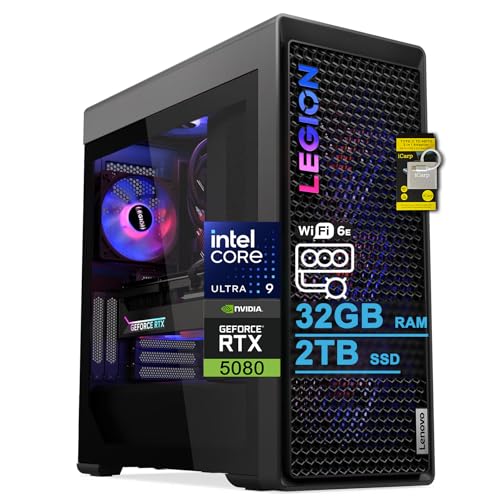
- Best prebuilt for a small room under $3,000: Lenovo Legion Tower 7i Gen 10, Core Ultra 9 285K, RTX 5080, 32GB DDR5, 2TB SSD — Check on Amazon
- Skytech King 95, Ryzen 7 9800X3D, RTX 5070 Ti, 32GB DDR5, 850W Gold PSU — Check on Amazon
- ZOTAC MEK Gaming PC, Ryzen 7 9700X, RTX 5070 Ti, 32GB DDR5-6000, Windows 11 Pro — Check on Amazon
- CLX Set Gaming PC, Ryzen 7 9800X3D, RTX 5080, 32GB DDR5, 2TB NVMe — Check on Amazon
- Alienware Aurora ACT1250, Core Ultra 9 285, RTX 5080, 32GB DDR5, 1TB SSD — Check on Amazon
- iBUYPOWER Y40 PRO, Ryzen 9 7900X, RTX 5070 Ti, 32GB DDR5, 2TB NVMe — Check on Amazon
Read the full guide ↓
Disclosure: As an Amazon Associate, reviewstook.com earns from qualifying purchases. Links to Amazon on this page are affiliate links; they cost you nothing extra. Listing details such as price and availability change often, so check the current Amazon listing before you buy.
Start with the sentence most guides in this category avoid: at $3,000, there is no small prebuilt gaming PC. Every machine in this guide is a full-size tower. None of them is a mini PC, none of them mounts behind a monitor, and none of them disappears into a media console. If your space problem is a desk that fits a keyboard and nothing else, the honest answer lives in a different guide — a mini PC from our Best Mini PC Under $3000 roundup — not in this one. What this guide does instead is answer the question that $3,000 buyers in small rooms actually face: given that the tower will be big, which one installs the cleanest into a small space, and what do you have to plan before it arrives?
That reframing changes how the six machines are judged. In a large room, a tower’s footprint is a non-event; in a small one, the tower is furniture, a heat source and a cable origin all at once. So this guide grades installation first: where the tower can honestly live (floor beside the desk, floor under it, or on the desk itself), where its hot air goes, how many cables have to cross the room and how long they must be, whether the storage fitted is enough to keep external drives off a small desk, and whether anything about the machine forces you to open the case on delivery day just to finish planning the install. Performance still matters — these are RTX 5080 and RTX 5070 Ti machines — but at this budget every pick is fast, so the ranking below is decided by the install.
One discipline note before the picks. The verified research behind this guide documents no physical dimensions, weights or noise figures for any of these six towers, so this article prints none — and it does not borrow figures documented for other machines in other guides. Where size matters, each review grades by form-factor class and tells you exactly what to measure on the live listing before ordering. The five-step checklist further down turns that into a routine: measure the spot, check ventilation clearance, give the power supply its address, plan the cable drop, and only then order. Check the current price on Amazon for every pick before you order: the RTX 5080 machines belong in this guide only when their current price falls within the $3,000 budget, and there is no RTX 5090 prebuilt anywhere near this budget — verified complete 5090 systems sit in a clearly higher tier.
In this guide
Quick Picks
Short on time, or comparing several options at once? Each row below names a small-space situation and the prebuilt that handles it best, with a link to the listing.
| Your situation | Pick | Why it installs best | Link |
|---|---|---|---|
| Tidiest small-desk setup | Lenovo Legion Tower 7i Gen 10 | Thunderbolt 4 allows a one-cable desk run; 2TB fitted keeps external drives off the desk; keyboard and mouse included | Check on Amazon |
| Floor tower, no sale-watching | Skytech King 95 | Positioned in the middle of this tier — check price on Amazon; published 850W Gold PSU, standard parts any shop can service later | Check on Amazon |
| Most predictable cable plan | ZOTAC MEK Gaming PC | Display outputs enumerated in the listing (HDMI 2.1b plus three DisplayPort 2.1b); every key spec published, so no delivery-day surprises | Check on Amazon |
| Might re-house the parts later | CLX Set Gaming PC | Standard retail-class components — the only pick whose internals could move into a smaller case down the line | Check on Amazon |
| Strongest card, support network | Alienware Aurora ACT1250 | RTX 5080 — check the current price on Amazon — and Dell’s service network — but a clear side panel and proprietary format to plan around | Check on Amazon |
| Lower tier position, homework accepted | iBUYPOWER Y40 PRO | 5070 Ti and 2TB positioned at the lower end of this tier — check price on Amazon — but the unpublished PSU means a case opening before the install is fully planned | Check on Amazon |
How These Picks Were Chosen
The starting set is identical to our main Best Prebuilt Gaming PC Under $3000 guide: six real Amazon listings that belong in this guide when you check the current price on Amazon and it falls within the $3,000 budget, with the same deal rules — the three RTX 5080 machines are recommendations only when their current price falls within that budget, and anything advertising RTX 5090 performance at this money was excluded, because verified 5090 systems sit well above this budget. What changes here is the grading. Each machine was re-scored on the five installation questions a small room asks.
First, placement class. All six are full-size towers, so the realistic homes are the floor beside the desk, the floor beneath it, or — only if your desk is deep and strong — the desk surface itself. None of the six is documented with a VESA mount or any wall or behind-monitor bracket, and this guide claims mounting for none of them; if a listing photo seems to suggest otherwise, treat the live listing’s specification section, not the photo, as the truth. Second, exhaust. Three picks (the Legion, the CLX and the King 95) are documented with 360mm liquid coolers and the Alienware with a 240mm unit; a radiator does not delete heat, it relocates it to wherever the radiator sits, so those figures are used here only as exhaust-placement facts — the top or front of the case is where the room receives the warmth, and that side needs open air. Third, cable drop: how far the monitor, keyboard and network cables must travel from the tower’s one honest position, and whether the machine offers anything — the Legion’s Thunderbolt 4 is the standout — that shortens the run. Fourth, desk discipline: storage fitted (2TB machines keep a game library internal; 1TB machines make an external drive or a second internal drive a likely future purchase, and on a small desk that difference is physical, not abstract) and peripherals in the box. Fifth, delivery-day certainty: whether the listing publishes everything the install plan depends on, or whether — the Y40 PRO is the case in point — an unpublished power supply schedules a case opening before you can even confirm the machine’s upgrade headroom.
Two refusals apply to all six picks equally, and they are stated here so the reviews do not have to whisper them. No tower in this guide goes inside a sealed cabinet, a closed TV stand or a cupboard with the door shut: a sealed box recirculates its own exhaust until the machine throttles or worse, and liquid cooling does not exempt a pick, because the radiator still has to dump its heat into the air around it. And no pick in this guide is graded on a dimension, weight or noise figure, because the verified research documents none for these machines; makers’ listings carry the measurements, and the checklist below tells you which ones to take. We did not use these machines ourselves; performance is described by class, never by invented benchmark figures.
Measure Before You Buy: The Five-Step Checklist
Run these five steps in order before ordering any tower in this guide. They take twenty minutes with a tape measure and the live listing open, and they are the difference between a tower that lands in a prepared home and a tower that spends its first month being moved around a small room.
- Measure the spot. Decide the tower’s one honest position first — floor beside the desk, floor under it, or the desk surface — and measure that space: width, depth and, under a desk, the height to the underside. Then open the live listing for the machine you are buying and compare its published dimensions against your measurements. The research behind this guide documents no dimensions for these six towers, so the listing’s specification section is the only source we will point you to; if a listing does not publish dimensions, that is itself a reason to favour a pick whose maker documents more.
- Check ventilation clearance. Whatever spot you measured needs open air on the sides the case breathes through, and clear space above or in front of the radiator exhaust — on the 360mm machines (Legion, CLX, King 95) and the Alienware’s 240mm unit alike, that exhaust face is where the room’s heat arrives. If the only available spot is an enclosed cabinet or a closed stand, stop here: no pick in this guide is sealed-cabinet safe, and the correct purchase is a smaller class of machine entirely, not a tower with the door left open as a compromise.
- Give the power supply its address. None of the six towers uses an external power brick — every one has an internal power supply — so there is no brick to house, hide or ventilate. What needs an address instead is the wall socket: the tower’s position is fixed within one power cord’s reach of it, and in a small room that constraint often chooses the spot for you. Mark the socket, confirm the cord reaches without crossing a walkway, and treat a power strip buried behind the tower’s exhaust as a planning failure, not a detail.
- Plan the cable drop. From the tower’s position, measure the run to the monitor, and to the router if you will use wired networking — which, for a machine of this class, you should. A floor tower beside the desk usually means the monitor cable drops behind the desk and the network cable crosses a wall; count the cables, measure the longest run, and check you own cables that reach before the machine arrives. The Legion’s Thunderbolt 4 is the one documented shortcut in this guide: a single cable can carry the desk’s display and peripherals back to the tower, which is why it leads this ranking. The ZOTAC MEK is the other planning-friendly pick, because its listing enumerates its display outputs (HDMI 2.1b plus three DisplayPort 2.1b), so you know exactly which cables the drop consists of.
- Then order — with the budget rule and the model number in hand. Only now does price enter, and it enters as a check, not a number printed here: check the current price on Amazon for the exact configuration you are buying. The Alienware, the CLX and the Legion are deal-dependent picks — buy them only when their current price falls within the $3,000 budget, and walk away when it sits above that budget. Match the exact model number at checkout — ACT1250, ST-KING95-1671-W-AM for the King 95, Y40BA9N57T01 for the Y40 PRO — because several of these names cover whole families of machines, and the configuration in the cart is the machine that arrives.
The 6 Best Prebuilt Gaming PCs for Small Spaces Under $3,000
Lenovo Legion Tower 7i Gen 10 — Core Ultra 9 285K, RTX 5080, 32GB DDR5, 2TB SSD
Who it suits: Small-room buyers whose real problem is desk clutter and cable sprawl as much as floor space — and who want premium-brand backing behind the fix.
The Legion leads this guide for one documented reason no rival here matches: Thunderbolt 4. In a small room the tower usually has to live on the floor, off to one side, while the monitor, keyboard and mouse live on a desk that may be against another wall. Thunderbolt lets a single cable make that trip, carrying the desk’s display and peripherals back to the tower, so the installation is one deliberate run instead of a bundle of cables each finding its own route. It is the closest thing in this guide to a tidy-install feature, and Lenovo pairs it with the rest of the tidy package: a 2TB SSD, double the storage of the 1TB picks, which keeps a full game library inside the machine instead of on an external drive occupying the small desk; Wi-Fi 6E and 2.5-gigabit Ethernet for whichever network run your room allows; and a keyboard and mouse in the box, so nothing extra competes for desk space on day one. Check the current price on Amazon before you order, and compare it with Lenovo’s own store for the same configuration — channel positioning for this family can differ substantially, which is why matching the exact configuration at checkout matters, since the Legion Tower name covers many machines.
The physical install is conventional tower work. The documented 360mm liquid cooler puts the exhaust at the radiator, so the top or front face of the case — wherever the radiator sits in the delivered configuration — is the side that must face open room air, not a wall or the underside of a desk pressed close. The power supply is internal and published at 850W, so there is no brick to place and the only address to plan is the wall socket within cord reach. Lenovo’s listing does not document a VESA mount or dimensions we can print, so measure from the live listing at checklist Step 1. The honest limitation carried over from the main guide is structural: the listing states a maximum memory capacity of 32GB, so the fitted memory is also the ceiling — irrelevant to installation, but a real limit for creators, and the reason this machine is not the automatic pick for everyone. Lenovo’s warranty and service network remains the conservative premium ownership route.
- Thunderbolt 4: one cable from tower to desk — the tidiest documented install in this guide.
- 2TB fitted and keyboard/mouse included: nothing extra has to live on a small desk.
- 850W PSU and 360mm liquid cooling, both published up front by Lenovo.
Honest limitation: It is still a full-size tower with no documented mounting option, and the listing’s stated 32GB memory maximum makes the fitted memory the permanent ceiling. Channel positioning can differ substantially, so the configuration must be matched carefully and the current price checked on Amazon.
Choose it if cable discipline and a clean desk are your small-space problem. Skip it if a 64GB upgrade features in your future plans, or the current price on Amazon has drifted above this guide’s budget.

Skytech King 95 — Ryzen 7 9800X3D, RTX 5070 Ti, 32GB DDR5-5600, 850W Gold PSU
Who it suits: Buyers with a straightforward floor spot beside the desk who want the install to be a one-afternoon job — no deal window to chase, no delivery-day investigation.
The King 95 is the low-drama floor tower. Skytech pairs the Ryzen 7 9800X3D with an RTX 5070 Ti 16GB, 32GB of DDR5-5600 and a 360mm liquid cooler, and publishes the power supply — an 850W Gold ATX 3 unit — which on the installation axis matters more than it sounds: everything the install plan depends on is documented before the box arrives, so the checklist above runs cleanly and nothing waits on opening the case. Check the current price on Amazon — this pick is positioned in the middle of this tier rather than as a deal-dependent listing, which suits small-room buyers fine: you can measure, plan and order in one week without a countdown timer arguing with your tape measure. As a boutique standard-parts build, it can also be serviced by any competent shop later, which in a small home without a workbench is a practical virtue: repairs are a drop-off, not a furniture rearrangement.
Placement grading is honest tower grading. The 360mm radiator’s exhaust face needs open air, so under-desk placement means clearance above the case, and a sealed cabinet is refused outright, as for every pick here. The one spatial catch is storage: 1TB is fitted where the Legion and CLX offer 2TB, and a growing library makes a second drive a likely planned purchase — planned as a separate addition alongside the machine, not assumed as included. Fitted internally, that drive costs no desk space at all; left external, it costs a corner of a small desk forever, so plan the internal route. Two listing disciplines carry over: the graphics card brand may vary by batch (the GPU itself does not), and near-identical King 95 variants exist under other listings, so match model number ST-KING95-1671-W-AM when you order. No dimensions or mounting are documented for this machine in the verified research, so Step 1’s measurement comes from the live listing.
- Everything the install depends on is published, including the 850W Gold ATX 3 PSU.
- Positioned in the middle of this tier — check price on Amazon and plan and buy without sale-watching.
- Standard-parts boutique build: any shop can service it later.
Honest limitation: 1TB of storage makes a second drive a likely planned addition, the card brand may vary, and lookalike variants mean the model number has to be matched. No mounting option is documented.
Choose it if you have a clean floor spot and want the plan to survive contact with delivery day. Skip it if you want 2TB fitted from the start, or 4K is your primary resolution and the 5080’s extra tier is worth deal-hunting for.

ZOTAC MEK Gaming PC — Ryzen 7 9700X, RTX 5070 Ti, 32GB DDR5-6000, Windows 11 Pro
Who it suits: Planners. Buyers who want to know exactly which cables the install needs and exactly what is inside the case before anything is delivered.
The MEK’s small-space virtue is documentation. ZOTAC’s listing enumerates its display outputs — HDMI 2.1b plus three DisplayPort 2.1b — which sounds like a spec-sheet nicety until you are the person measuring a cable drop: with the outputs named, Step 4 of the checklist is arithmetic instead of guesswork, and a multi-monitor desk can be planned down to the last cable. The rest of the sheet is published with the same discipline: a ZOTAC GAMING RTX 5070 Ti 16GB, a Ryzen 7 9700X, 32GB of DDR5-6000 (the fastest memory in this guide), a 1TB NVMe SSD, a 750W 80+ Gold power supply with its rating stated, Wi-Fi 6E and Bluetooth 5.3. Nothing about the install waits on delivery day. It is also the only machine here shipping Windows 11 Pro rather than Home — a small, real difference for buyers who need its remote-desktop hosting or drive-encryption management, and remote access has a quiet small-space benefit of its own: the tower can live in its one good spot and still be reached from another room. Check the current price on Amazon before you order.
The trade-offs are role, not quality. The 9700X is an excellent all-round processor but trails the 9800X3D for pure gaming, so refresh-rate chasers at 1440p get more from the King 95. Storage is 1TB, with the same planned-second-drive logic as the King 95 — fit it internally and it costs no desk space. No cooling size, dimension, weight or mounting figure is documented for this machine in the verified research, so it is graded here by form-factor class — a full-size tower for a floor or deep-desk spot — and its radiator and intake faces, wherever the delivered configuration puts them, need the same open-air clearance as every pick; a sealed cabinet is refused. One editorial caution carries over from the main guide: a secondary source flagged inconsistencies in ZOTAC’s own secondary documentation around the Windows edition and outputs, so treat the Amazon listing’s headline specification — the one this review cites — as the document of record and confirm it in the cart.
- Display outputs enumerated in the listing: the cable drop can be planned exactly.
- Every key specification published, including the 750W Gold PSU — no delivery-day surprises.
- Windows 11 Pro and DDR5-6000 memory — check the current price on Amazon.
Honest limitation: The 9700X trails the 9800X3D for pure gaming, storage is 1TB, and ZOTAC’s secondary documentation has contradicted the listing on details — buy against the listing’s headline spec, verified at checkout.
Choose it if a planned-to-the-cable install and Windows Pro matter to you. Skip it if peak gaming frame rates are the entire point — the King 95 exists for that.

CLX Set Gaming PC — Ryzen 7 9800X3D, RTX 5080, 32GB DDR5, 2TB NVMe
Who it suits: Buyers whose small room might change — a move, a reconfigured desk, a future smaller case — and who want the strongest gaming specification here in the meantime, bought only when the current price fits this guide’s budget.
On specification this is the best gaming machine in the guide: the Ryzen 7 9800X3D paired with an RTX 5080, 32GB of DDR5, a 2TB NVMe SSD and a documented 360mm liquid cooler. Its small-space argument is different from the picks above it, and it is the only one of its kind here: CLX assembles from standard retail-class components — a conventional motherboard, a conventional power supply, a graphics card you could buy separately — so if the tower’s home ever stops working, the internals are the only ones in this guide that could realistically be re-housed into a smaller standard case later. That is a future purchase and a project, not a feature of the delivered machine, and this guide does not pretend otherwise; but for a buyer in a rented room or a first flat, it is a genuine form of insurance the proprietary picks cannot offer. The 2TB fitted also keeps the desk clear from day one.
The install itself is full-tower work with no documented shortcuts: the 360mm radiator’s exhaust needs open air, no mounting is documented, no dimensions are documented in the verified research, and the power supply’s wattage is not headlined in the verified listing material — the comparison table records that honestly rather than inventing a figure, and it means one install question (upgrade headroom) waits for the delivered machine’s documentation. Then there is the price condition, stated as plainly as the specification: this configuration’s pricing has been notably volatile, moving between in-budget and well-over-budget territory. Check the current price on Amazon before you order. When its current price falls within the $3,000 budget, it earns its place here; when it sits well above that budget, it is not a $3,000-guide product at all, and no amount of installation convenience changes that. Set your walk-away point — this guide’s budget — before you open the listing. CLX’s support operation is established but a boutique’s — smaller than Dell’s or Lenovo’s networks.
- The 9800X3D and RTX 5080 together — the strongest pure-gaming pairing here.
- Standard parts: the only pick whose internals could move to a smaller case later.
- 2TB of storage and a 360mm liquid cooler, fitted as standard.
Honest limitation: Its pricing is volatile — a recommendation only when the current price on Amazon falls within this guide’s budget. The PSU wattage is not headlined, and no dimensions or mounting are documented.
Choose it if the current price on Amazon falls within this guide’s budget and the re-housing insurance appeals. Skip it if the current price sits above that budget — the King 95 delivers most of the experience without the drama.

Alienware Aurora ACT1250 — Core Ultra 9 285, RTX 5080, 32GB DDR5, 1TB SSD
Who it suits: Buyers who catch it when its current price fits this guide’s budget and want the strongest card in the guide backed by the largest support operation in the industry — and whose room can give a sculpted tower a proper home.
The Aurora’s hardware case is unchanged from the main guide: a Core Ultra 9 285 with an RTX 5080 16GB, 32GB of DDR5-5200, a 1TB SSD, liquid cooling and — rare discipline from a big brand — a published 1000W Platinum-rated power supply. Check the current price on Amazon before you order, and compare it with Dell’s own store for the same configuration, where positioning can differ substantially. Judged purely as an installation, though, it asks more of a small room than the picks above it. The verified listing material describes a clear side panel: a transparent panel is a display feature, and in a small room that cuts both ways — the machine wants to be visible, which usually means desk or eye-level placement competing for the scarcest surface you own, and a glass panel wants clearance and care that a floor corner does not naturally give it. The documented 240mm liquid cooler puts the exhaust at the radiator as usual, so whichever face carries it needs open air. And the Aurora is built with Dell-format components in places, so the case is a permanent commitment in a way the CLX’s is not: there is no re-housing route if the spot stops working.
None of that makes it a bad small-room purchase; it makes it a deliberate one. On the floor beside a desk with its panel facing the room, it installs like any tower here, and Dell’s support network — the largest in the industry, with real parts logistics — is the ownership case for buyers who will never open a case. Storage is 1TB, so the planned-second-drive logic from the King 95 review applies, with the proprietary-format caveat that the work goes through Dell’s ecosystem. Two listing warnings carry over at full size: Amazon’s product information describes the Ultra 9 285 as a 20-core processor while Intel specifies 24 cores (trust Intel), and the same listing describes the liquid cooling as fitted in one place and optional in another — confirm both against the configuration in your cart. No dimensions, weight or mounting are documented for this machine in the verified research, so measure from the live listing at Step 1.
- An RTX 5080 in this guide’s tier — check the current price on Amazon.
- A published 1000W Platinum PSU — disclosure discipline few big brands match.
- The whole system backed by Dell’s support network and parts logistics.
Honest limitation: It belongs here only when its current price on Amazon falls within this guide’s budget — when it sits above that budget, it is a different purchase — and the clear panel plus Dell-format parts make it the least flexible install in the guide. The listing contradicts itself on core count and cooling, so verify at checkout.
Choose it if you catch it when its current price on Amazon falls within this guide’s budget and its spot in the room is settled. Skip it if the current price has drifted above this guide’s budget, or your space is likely to be rearranged around it.

iBUYPOWER Y40 PRO — Ryzen 9 7900X, RTX 5070 Ti, 32GB DDR5, 2TB NVMe
Who it suits: Value hunters with a workable floor spot who will do one piece of homework before ordering — and who understand that the homework is part of the install.
The specification keeps this guide honest: a Ryzen 9 7900X, an RTX 5070 Ti 16GB, 32GB of DDR5-5200, a 2TB NVMe SSD and Windows 11 Home, with keyboard and mouse included, positioned at the lower end of this tier — check the current price on Amazon. The 2TB fitted and the bundled peripherals are genuinely good small-space news — nothing extra lives on the desk. iBUYPOWER states a one-year manufacturer warranty on the listing, and its support operation is one of the largest among integrator brands. So why does this machine rank last in a small-spaces guide? Because installation grading punishes unknowns, and this machine carries the guide’s biggest one.
In the verified listing material, iBUYPOWER does not headline the power supply’s wattage for this machine. In the main guide that is an upgrade-path question; here it is an installation question too, because you cannot finish planning around a machine whose documented headroom is unknown until the case is opened on delivery day — in a small room, where the tower’s spot was chosen in advance and the furniture arranged around it, a delivery-day investigation is exactly what the checklist exists to prevent. The recommendation therefore keeps its condition: confirm the wattage and rating with the seller or on the live listing before ordering, and treat an unanswered question as a reason to choose the King 95, which publishes its 850W Gold unit outright. One more caution: a different 7800X3D configuration is sold under the Y40 PRO name on a separate listing; only the 7900X machine, model Y40BA9N57T01, is reviewed here. No dimensions, cooling size or mounting are documented for this pick in the verified research, so it is graded by form-factor class — full-size tower, floor placement, radiator and intake faces to open air, sealed cabinet refused — with measurements taken from the live listing.
- 5070 Ti performance positioned at the lower end of this tier — check price on Amazon — below most of its rivals in this guide.
- 2TB storage and 32GB memory fitted, keyboard and mouse included: a clear desk.
- One-year manufacturer warranty stated on the listing.
Honest limitation: The power supply’s wattage is not published in the verified listing material — it must be confirmed before purchase, which makes this the one install in the guide that cannot be fully planned in advance. The name is shared with a different configuration under another listing.
Choose it if the current price on Amazon remains at the lower end of this tier and the PSU checks out before you order. Skip it if the PSU specification cannot be confirmed — the King 95’s positioning in this tier buys published numbers instead.

Comparison Table
| Prebuilt | Processor / GPU | Installation notes | Storage fitted | PSU published? | Price | Link |
|---|---|---|---|---|---|---|
| Lenovo Legion Tower 7i Gen 10 | Core Ultra 9 285K / RTX 5080 | Thunderbolt 4 one-cable desk run; 360mm radiator exhaust; keyboard/mouse included | 2TB | Yes — 850W | Check price on Amazon | Check on Amazon |
| Skytech King 95 | Ryzen 7 9800X3D / RTX 5070 Ti | 360mm radiator exhaust; standard parts, shop-serviceable | 1TB | Yes — 850W Gold ATX 3 | Check price on Amazon | Check on Amazon |
| ZOTAC MEK | Ryzen 7 9700X / RTX 5070 Ti | Outputs enumerated (HDMI 2.1b + 3× DP 2.1b): exact cable plan | 1TB | Yes — 750W Gold | Check price on Amazon | Check on Amazon |
| CLX Set | Ryzen 7 9800X3D / RTX 5080 | 360mm radiator exhaust; standard parts — re-housing possible later | 2TB | Not headlined | Check price on Amazon | Check on Amazon |
| Alienware Aurora ACT1250 | Core Ultra 9 285 / RTX 5080 | Clear side panel wants visibility and care; 240mm radiator exhaust; proprietary format | 1TB | Yes — 1000W Platinum | Check price on Amazon | Check on Amazon |
| iBUYPOWER Y40 PRO | Ryzen 9 7900X / RTX 5070 Ti | Keyboard/mouse included; PSU unknown until confirmed — plan accordingly | 2TB | No — confirm before buying | Check price on Amazon | Check on Amazon |
How to Choose a Prebuilt Gaming PC for a Small Space
- Accept the form factor first. Every pick here is a full-size tower. If your space cannot give a tower a floor spot with open air around it, the correct purchase is a smaller class of machine — start with our Best Small Form Factor Gaming PC Under $3000 or Best Compact Gaming PC Under $3000 guides rather than forcing a tower into furniture it will suffocate in.
- Run the five-step checklist before the deal, not after. Measure the spot, check ventilation clearance, fix the socket address, measure the cable drop — then shop. Deal windows are short, and a tower bought in a hurry is a tower that gets moved three times.
- Grade the cable plan, not just the footprint. In small rooms the cables are the installation. The Legion’s Thunderbolt 4 collapses the desk run to one cable; the MEK’s enumerated outputs let you plan the drop exactly. For the rest, measure the longest run and own the cable before delivery day.
- Count storage as desk space. A 2TB machine keeps its library internal. A 1TB machine makes a second drive a likely planned purchase — fit it internally, arranged in advance, and it costs no desk; leave it external and it costs desk forever.
- Refuse the sealed cabinet, for every pick. Liquid cooling relocates heat to the radiator; it does not remove it. A closed cabinet or TV stand recirculates exhaust until performance and hardware suffer. If enclosed furniture is the only option, change the class of machine, not the laws of airflow.
- Prefer published specifications when the room is planned tightly. An unpublished PSU (the Y40 PRO) or unheadlined one (the CLX) is not proof of a bad machine — but it is an unanswered installation question, and small rooms punish unanswered questions. The King 95, Legion and MEK publish everything the plan depends on.
- Keep the deal rules welded to the picks. The Aurora and the CLX when their current prices on Amazon sit above this guide’s budget are different purchases from the ones this guide recommends, whatever your room looks like. Installation quality never rescues an over-budget price.
- Verify the exact configuration in the cart. Several of these names — Legion Tower, King 95, Y40 PRO — cover families of machines rather than single builds, and the Alienware’s listing even contradicts itself on core count and cooling. Model numbers — ACT1250, ST-KING95-1671-W-AM, Y40BA9N57T01 — are the ground truth, and in a planned install the wrong configuration is a furniture problem as well as a spec problem.
Common Buying Mistakes
- Ordering the tower first and measuring afterwards. At this size class the tape measure is a buying tool; the five-step checklist exists because returns of full-size towers are nobody’s idea of a small-space solution.
- Putting a liquid-cooled tower in a closed cabinet because “it runs cool.” The radiator moves the heat to the case’s exhaust face; a sealed box hands it straight back. This is the single most expensive small-space mistake at this tier.
- Assuming a $3,000 listing can contain an RTX 5090. It cannot; verified 5090 systems sit well above this budget, and believing otherwise is expensive.
- Planning the desk around an external drive you have not bought yet. The 1TB picks are good machines; just plan the second drive as part of the purchase instead of discovering the library does not fit.
- Ignoring the power supply because the GPU headline is exciting — doubly so in a small room, where the Y40 PRO’s unpublished wattage turns into a delivery-day case opening in a space you already arranged.
- Paying an over-budget price for a deal-dependent machine. The recommendation depends on the current price as much as the PC: the Aurora and the CLX only when their current price on Amazon falls within this guide’s budget, or not at all.
- Buying a proprietary machine while planning to re-house it later — or a standard-parts machine while expecting a national service depot. The CLX is the only pick here with a re-housing route; the Alienware and Legion are the picks with the depot networks. Match the machine to the plan.
- Trusting a listing photo over a specification section. If a photo seems to show a mount, a dimension or a configuration the spec text does not state, the text governs — and where the text contradicts itself, as the Aurora’s does on cores and cooling, verify in the cart.
Final Recommendation
- Tidiest install: Lenovo Legion Tower 7i Gen 10.
- Best no-drama floor tower: Skytech King 95.
- Most predictable cable plan: ZOTAC MEK.
- Best future flexibility: CLX Set — only when its current price falls within this guide’s budget.
- Strongest card with a support network: Alienware Aurora ACT1250 — only when its current price falls within this guide’s budget.
- Best value, homework accepted: iBUYPOWER Y40 PRO — once the PSU is confirmed.
Our top two for a small room are the Legion and the King 95: the Lenovo Legion Tower 7i if cables and desk clutter are your real problem — Thunderbolt 4, 2TB fitted and peripherals in the box make it the one tower here that actively tidies a setup — and the Skytech King 95 if you simply have a good floor spot and want a fully published, shop-serviceable machine positioned in the middle of this tier — check price on Amazon. If your room cannot take a full-size tower at all, that is a legitimate conclusion, not a failure: the same budget buys a very strong small machine from our Best Small Form Factor Gaming PC Under $3000 guide. Streamers working in tight rooms should also read the Best Prebuilt Gaming PC For Streaming Under $3000 guide, and first-time buyers will find the hand-holding version in Best Prebuilt Gaming PC For Beginners Under $3000. Measure the spot, respect the exhaust, match the model number — and the tower you unbox will fit the room you planned for it.
Frequently Asked Questions
Is any prebuilt under $3,000 actually small?
No — not in this guide, and not honestly anywhere at this performance level. All six picks are full-size towers carrying RTX 5080 or RTX 5070 Ti cards. Genuinely small gaming machines exist at this budget, but they are mini PCs and small-form-factor builds with different hardware trade-offs; our Best Compact Gaming PC Under $3000 guide covers that class. This guide exists for buyers who want the tower-class hardware and need it to live well in a small room.
Can I put one of these towers inside a TV stand or cabinet?
Not with the door closed, no. Every pick here exhausts serious heat — the liquid-cooled machines through their radiators (360mm on the Legion, CLX and King 95; 240mm on the Aurora) — and an enclosed space recirculates that exhaust until the machine throttles. An open-backed, well-ventilated stand with clearance on the breathing sides is a different matter; a sealed cabinet is refused for all six picks, without exception.
Can any of these mount behind a monitor or on a wall?
None of the six is documented with a VESA mount or any wall or behind-monitor bracket, and this guide claims mounting for none of them. These are floor or desk-surface towers. If behind-monitor mounting is the requirement, the machine you want is a mini PC — see the Best Mini Gaming PC Under $3000 guide — not a $3,000 tower.
Do I need to house an external power brick for any pick?
No. All six towers have internal power supplies, so there is no brick to place, hide or ventilate. What you must plan instead is the wall socket: the tower’s spot is fixed within one power cord’s reach of it, which is why the checklist gives the supply an “address” step even though the supply itself lives inside the case.
How do I know whether a tower fits my spot if this guide prints no dimensions?
Because the verified research behind this guide documents no dimensions for these six machines, we print none rather than invent or borrow them. The live Amazon listing’s specification section is the source of record: measure your spot first (checklist Step 1), then compare the listing’s published dimensions before ordering. If a listing does not publish dimensions at all, treat that as one more mark in favour of the picks whose makers document everything — the King 95, Legion and MEK.
Which pick is best if my desk is against a different wall from the tower?
The Legion Tower 7i, and it is not close: its Thunderbolt 4 connection lets one cable carry the desk’s display and peripherals back to a floor tower across the room, where the other picks need a bundle of separate runs. The ZOTAC MEK is the runner-up for planned cable work, because its listing enumerates its display outputs (HDMI 2.1b plus three DisplayPort 2.1b), so every run can be measured in advance.
What should I actually pay?
Check the current price on Amazon for the exact configuration in your cart, and judge it against this guide’s budget. The Aurora is a buy when its current price falls within the $3,000 budget and a walk-away when it sits above that budget; the CLX only when its current price falls within that budget, never when it sits well above it; the Legion when you check price on Amazon for the exact configuration rather than assuming another channel’s positioning applies; the King 95 and MEK are positioned in the middle of this tier — check price on Amazon; and the Y40 PRO is positioned at the lower end of this tier, once its power supply is confirmed. If none of those current prices falls within the budget, the Best Prebuilt Gaming PC Under $2500 tier is the honest fallback — not a stretched budget.


