Where to buy
Check the latest price, availability and delivery on Amazon. Orders are placed on Amazon. We may earn a commission from qualifying purchases.
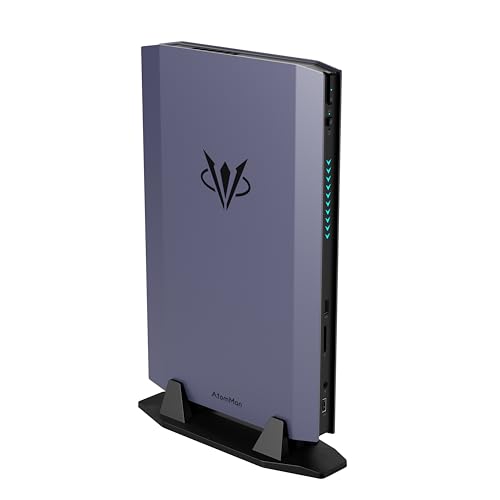
- Best mini gaming PC for streaming: AtomMan G7 Ti Mini PC, Core i9-14900HX, RTX 4070 Laptop, 32GB DDR5, 1TB SSD — Check on Amazon
- AtomMan G1 Pro Mini PC, Ryzen 9 8945HX, Desktop RTX 5060, 32GB DDR5, 1TB SSD — Check on Amazon
- AtomMan G7 Pt Mini PC, Ryzen 9 7945HX, RX 7600M XT, 32GB DDR5, 1TB SSD — Check on Amazon
- GMKtec EVO-X1 Mini PC, Ryzen AI 9 HX 370, Radeon 890M, 32GB LPDDR5X, 1TB SSD, OCuLink — Check on Amazon
- Beelink SER9 Pro Mini PC, Ryzen AI 9 HX 370, Radeon 890M, 32GB LPDDR5X, 1TB SSD — Check on Amazon
See 1 more Amazon option
- ASUS NUC 14 Performance Barebone Kit, Core Ultra 7 155H, RTX 4060 Laptop, No RAM/SSD/OS — Check on Amazon
Read the full guide ↓
Disclosure: As an Amazon Associate, reviewstook.com earns from qualifying purchases. Links to Amazon on this page are affiliate links; they cost you nothing extra. Listing details such as price and availability change often, so check the current Amazon listing before you buy.
Streaming asks a small computer to do two jobs at once: render your game, and compress that game into a clean broadcast feed sixty times a second. On a tower those jobs spread across a big graphics card, a roomy case and a power supply with headroom to spare. In a mini PC they share one small chassis, one cooling system and — on the integrated-graphics machines — one chip and one pool of memory. That is why this guide grades encoder-first. Before CPU core counts or game performance, each pick below is judged on the hardware that actually builds your stream: the encoder block inside its graphics silicon, the codec it can produce, and how much simultaneous load is left over for the game, OBS, your chat tools and your browser once encoding is running.
The workflow being graded is the real one. On Twitch, the working standard is a constant-bitrate feed of about 6,000 kbps at 1080p60 with two-second keyframes; push past that and the platform, not your PC, becomes the ceiling. YouTube is more generous — it accepts higher bitrates, carries 1440p streams, and takes AV1 live ingest. Twitch’s AV1 path exists through its Enhanced Broadcasting programme, but it is limited and rolling out rather than universal, so for most streamers AV1 today means YouTube headroom and cleaner local recordings, while H.264 at Twitch bitrates is still the feed your viewers actually watch. Streaming in 4K is platform-limited on both services rather than hardware-limited, and no pick here is bought for it. One encoder fact shapes the whole ranking: AV1 encoding exists only on RTX 40-series silicon and newer, and on AMD’s RDNA 3 generation and newer. Older NVIDIA generations — Ampere, Turing, Pascal — encode H.264 and HEVC only, whatever a listing implies. Every pick in this guide happens to carry AV1-capable silicon, but they differ sharply in encoder generation, in whether the encoder shares its chip with the game, and in what else is competing for the same silicon while you are live.
The honesty note from the base guide stands, because streamers feel it twice: the same $1,500 in a tower buys a desktop RTX 4070 SUPER system — a Skytech Omega with that card, 32GB of DDR5 and a 1TB SSD — with encoder headroom no mini matches. What the minis sell is a stream station that mounts behind a monitor, travels to events, and stays quiet enough to share a room with your microphone. If that trade is yours, the six machines below are graded for it. Check price on Amazon for the current listing, and note that two picks are conditional in ways their reviews state plainly.
In this guide
Quick Picks
Short on time, or comparing several options at once? Each row below names a streamer type and the machine that suits it, with a link to the listing.
| Streamer type | Pick | Why it stands out | Link |
|---|---|---|---|
| Best one-box stream station | AtomMan G7 Ti | Full-power RTX 4070 Laptop NVENC with AV1, 24-core CPU — check price on Amazon | Check on Amazon |
| Newest encoder, desktop card | AtomMan G1 Pro | A real desktop RTX 5060 in 3.8 liters; buy only at $1,500 or less | Check on Amazon |
| Best value discrete encoder | AtomMan G7 Pt | 16-core Ryzen 9 and RDNA 3 AV1 encoding — check price on Amazon | Check on Amazon |
| Best encoder upgrade path | GMKtec EVO-X1 | Radeon 890M AV1 encoding today, an OCuLink port for a desktop encoder later | Check on Amazon |
| Best compact second PC | Beelink SER9 Pro | 890M encoding in 0.82 liters — a dedicated stream box that hides behind a monitor | Check on Amazon |
| Best for parts owners | ASUS NUC 14 Performance Barebone | RTX 4060 Laptop NVENC kit from a major brand; you supply RAM, SSD and OS | Check on Amazon |
How These Picks Were Chosen
The budget was applied the way a buyer experiences it: the price of a machine you can actually stream on. Configured machines needed to fit at or under $1,500 for the configuration named — check price on Amazon to confirm the current listing still qualifies. The one barebone kit is labelled a kit everywhere it appears, its completion cost is stated openly, and it earns its place only for buyers who already own the parts it lacks — completing it with new parts at current memory prices takes the total over this budget, and its review shows the arithmetic. One configured machine is conditional wherever it is mentioned: the G1 Pro, whose everyday Amazon pricing sits above $1,500 and which qualifies only on promotional pricing.
On top of the budget sat the streaming filters. The first is encoder provenance: every encoder claim in this guide is derived from the graphics silicon the base research documents for each pick — its generation and codec support — and from nothing else. No encoder is credited to a chip whose generation cannot produce it, and no machine is credited with a second encoder block its silicon does not have. The second filter is simultaneous load: a stream PC is graded on what is left while everything runs at once — game, OBS, chat, browser, alerts — not on empty-desktop benchmarks. That is why memory capacity and channel configuration matter here, why the integrated machines are graded harder than their game performance alone would suggest, and why storage earns a mention in every review: recordings and VODs land on the same drive the game is reading. The third filter is the naming honesty the category demands: laptop GPUs are called laptop GPUs, power limits are stated where makers publish them, and performance is described by class rather than by frame-rate figures, which this guide does not claim for any machine.
Two tempting inclusions failed on price, exactly as they did in the base guide. The AtomMan G7 Pro, with an RTX 5070 Laptop, is the category’s flagship, but both its barebone and configured versions sit in a premium tier above this budget — no honest place for it here. The Strix Halo machines built on AMD’s Ryzen AI Max+ 395 and its Radeon 8060S graphics fail the same way: after the memory shortage repriced the category, even the most accessible in-stock 64GB configuration sits well above this budget.
The Encoder Map: What Actually Builds Your Stream
Read this section before the reviews, because it is the ranking in miniature. The G7 Ti’s RTX 4070 Laptop is Ada-generation silicon, so its NVENC hardware encoder produces H.264, HEVC and AV1 from a single encoder block. The G1 Pro’s desktop RTX 5060 carries the newest NVENC generation in this guide, likewise a single encoder block with AV1. The ASUS kit’s RTX 4060 Laptop is the same Ada generation as the G7 Ti’s card — one NVENC block, AV1 included — and the finished kit also has the Core Ultra 7 155H’s integrated Quick Sync available as a separate, independent encoder for a second feed such as a local recording. The G7 Pt’s RX 7600M XT is RDNA 3, so its VCN encoder produces AV1 as well; its H.264 output at Twitch bitrates is visibly softer than NVENC’s, which is the honest AMD tax at 6,000 kbps, while its AV1 output for YouTube and recordings is a genuine strength. The two Radeon 890M machines — the SER9 Pro and the EVO-X1 — encode AV1 from RDNA 3.5 integrated graphics, but with a structural catch the discrete machines do not have: the same silicon, fed by the same soldered memory, is also rendering your game.
Two clarifications keep this map honest. First, no pick in this guide has a dual-encoder setup on its main graphics silicon — every discrete and integrated GPU here works through a single encoder block — so grading turns on encoder generation, simultaneous-load headroom and price conditions, not on encoder count. Second, frame generation is not an encoder feature: DLSS or FSR frame generation smooths what you see on your own monitor, but it is display-side processing, and the encoder builds your broadcast from the rendered frames it is given. A card’s frame-generation badge does nothing for your viewers. Judge these machines by the encoder map above and the headroom in each review, and the ranking below will make sense.
The 6 Best Mini Gaming PCs for Streaming Under $1,500
AtomMan G7 Ti Mini PC — Core i9-14900HX, RTX 4070 Laptop, 32GB DDR5, 1TB SSD
Who it suits: Streamers who want one small box to do everything — game, encode, record and run the supporting cast of chat and alerts — with the strongest simultaneous-load headroom in this guide.
The G7 Ti tops this ranking for the same reason it topped the base guide, translated into streaming terms. Its RTX 4070 Laptop runs at up to its full 140W power limit, and its Ada-generation NVENC encoder handles your broadcast on dedicated hardware while the card renders the game — the arrangement every one-box streamer wants, in about 2.55 liters. AV1 encoding is there for YouTube streams and high-quality local recordings; H.264 NVENC, still the feed Twitch viewers actually receive, is the mature, sharp implementation AMD’s encoders are graded against. Behind the encoder sits the guide’s deepest bench: a 24-core Core i9-14900HX absorbs OBS’s supporting workload — browser sources, chat bots, Discord, a DAW or voice chain — without touching the game’s cores, and 32GB of socketed DDR5 (growable to 96GB) plus two M.2 slots mean memory and recording storage are not the ceilings they are on the soldered machines below. Configured with 32GB and 1TB, it is a premium pick within this budget — check price on Amazon before you buy; a barebone version is also offered; switchable silent and performance modes let the same box run quieter for a talk segment and harder for a game block.
The honest limitation is in the GPU’s full name, and streaming does not repeal it. This is the RTX 4070 Laptop: 4,608 CUDA cores and 8GB of GDDR6 on NVIDIA’s published specification, against the desktop card’s 5,888 cores and 12GB. Eight gigabytes of VRAM is shared between the game and everything the streaming stack asks of the GPU — capture, compositing, preview — so at 1440p in heavy titles the game itself is where you will compromise first: render at 1080p and let the stream carry a clean 1080p feed rather than starving both jobs. The graphics are soldered for life, the power supply is an external brick, and pricing moves often, so check price on Amazon before you buy. None of that changes the verdict for a streamer: this is the most complete one-box streaming mini at the budget, graded first on exactly the silicon that builds the broadcast.
- Ada NVENC with AV1 encode, at the GPU’s full 140W power limit — no cut-down encoder or card.
- 24-core Core i9 and socketed memory to 96GB: the guide’s best simultaneous-load headroom.
- Two M.2 slots keep recordings and VODs off the game’s drive when you add a second SSD.
Honest limitation: The GPU is the laptop part — 8GB of VRAM shared by game and streaming stack — and it can never be upgraded.
Choose it if you stream and game from one machine and want the strongest encoder-plus-headroom combination here. Skip it if your stream is mostly talk or console capture — the smaller, cheaper picks below encode that just as well — or if you do not actually need the small size.

AtomMan G1 Pro Mini PC — Ryzen 9 8945HX, Desktop RTX 5060, 32GB DDR5, 1TB SSD
Who it suits: Streamers who want the newest encoder generation and a genuine desktop graphics card in a mini — and who are disciplined enough to buy only when the price behaves.
The G1 Pro is the one machine here whose graphics card is the same silicon you would buy off a shelf for a tower: a desktop RTX 5060 — a low-profile Gigabyte card drawing 145W in a real PCIe slot — inside a 3.8-liter chassis with a 350W internal power supply instead of a brick. For streaming, that buys the newest NVENC generation in this guide, with AV1 encoding for YouTube and recordings and the most refined H.264 output of any pick here, driven by a Ryzen 9 8945HX with 32GB of DDR5 and a 1TB SSD. Desktop-driver familiarity comes with it, along with 5GbE networking — the fastest wired connection in the guide, and wired is the only connection this guide accepts for streaming — and Windows 11 Pro. If your stream leans on YouTube’s AV1 ingest or you record AV1 masters locally, this is the cleanest encoder story in the set.
With this pick, the condition is not fine print — the condition is the whole pick. Everyday Amazon pricing for this configuration usually sits above this budget, and it only qualifies on promotional pricing. At the price you will most often see, this is not an under-$1,500 product at all — buy it at $1,500 or less and the newest encoder in the guide is a legitimate, distinctive choice; buy it above that and you have overpaid for it while the G7 Ti offers a full-power 4070 Laptop and deeper CPU headroom for less — check price on Amazon before you commit. Two further notes from hands-on coverage matter on day one: the machine ships in an 80W gaming mode that holds back roughly a fifth of its performance until you change a setting — change it before your first stream, not after a bad one — and while the card sits in a standard slot, its low-profile form means a future swap is not realistic the way a tower swap is. Treat this as the newest encoder you cannot upgrade, bought only on sale.
- A genuine desktop RTX 5060 — the newest NVENC generation here, with AV1 encode.
- Internal 350W power supply, 5GbE wired networking, Wi-Fi 7, Windows 11 Pro.
- Ryzen 9 8945HX and 32GB of DDR5 keep simultaneous load in class.
Honest limitation: Everyday pricing is above this budget, and the low-profile card is not a practical upgrade path.
Choose it if the listing in front of you says $1,500 or less and encoder generation is your priority. Skip it if the price has drifted back up — at that point the G7 Ti is the better one-box streamer and the G7 Pt is far cheaper.

AtomMan G7 Pt Mini PC — Ryzen 9 7945HX, RX 7600M XT, 32GB DDR5, 1TB SSD
Who it suits: Value-first streamers who want a real discrete encoder and a flagship-class CPU for the least money in a mini, and whose audience watches on YouTube as much as Twitch.
The G7 Pt is the value argument of this guide, and streaming strengthens it. Its Ryzen 9 7945HX is a 16-core desktop-class processor in a mobile package — simultaneous-load headroom second only to the G7 Ti — and its Radeon RX 7600M XT, running at 120W, encodes through AMD’s RDNA 3 VCN block, which means genuine AV1 encoding at a price no NVIDIA pick here approaches. The machine around them mirrors the G7 Ti’s formula: 32GB of socketed DDR5 up to 96GB, PCIe 5.0 storage support, switchable power modes and a chassis of about two and a half liters. Its configured 32GB/1TB version sits in a mid-range tier well within this budget and noticeably below the G7 Ti — check price on Amazon for the current listing. For a streamer building toward YouTube, recording AV1 masters, or streaming lighter titles where the encoder is not the bottleneck, this is the most streaming hardware per dollar in the guide.
Now the two honest qualifications, because both matter on a live feed. First, the name: the RX 7600M XT is a mobile GPU — an 8GB laptop chip, not the desktop RX 7600 XT, which is a different card with twice the memory — and the graphics are soldered for life. Second, the encoder split: AMD’s VCN produces excellent AV1, but its H.264 output at Twitch’s roughly 6,000 kbps is visibly softer than NVENC’s — edges and fine detail in fast motion are where your Twitch viewers will see the difference. If your channel is Twitch-first and your games are fast and detailed, that softness is the real trade-off behind the saving, and the G7 Ti is the honest recommendation. The power supply is a 300W external brick, the largest in this guide — the physical price of feeding a 16-core CPU and a 120W GPU in a small box. None of that dents the value case; it defines it precisely.
- RDNA 3 VCN encoder with AV1 — the cheapest genuine AV1 encoding in this guide.
- Ryzen 9 7945HX: 16 full-performance cores for game-plus-stream simultaneous load.
- Socketed DDR5 to 96GB and PCIe 5.0 storage support; check price on Amazon for the configured version.
Honest limitation: H.264 at Twitch bitrates is visibly softer than NVENC, and the GPU is the 8GB mobile 7600M XT, not the 16GB desktop card its name echoes.
Choose it if you stream to YouTube, record AV1, or want discrete encoding for the least money. Skip it if your channel is Twitch-first with fast, detailed games — NVENC’s H.264 is worth the premium there.

GMKtec EVO-X1 Mini PC — Ryzen AI 9 HX 370, Radeon 890M, 32GB LPDDR5X, 1TB SSD, OCuLink
Who it suits: Planners — streamers who want AV1 encoding today from integrated graphics and a genuine, wired path to a desktop encoder tomorrow, without replacing the computer.
Specification for specification, the EVO-X1 mirrors the SER9 Pro below: identical Ryzen AI 9 HX 370, identical Radeon 890M, the same soldered 32GB of LPDDR5X and a 1TB SSD. Its encoder story starts identically — RDNA 3.5 VCN with AV1 encode, produced by the same silicon that renders your game — and for talk streams, desktop content, console capture and lighter game streams that is a complete, modern encoding setup. What justifies its separate, higher place in this guide is a single port. The EVO-X1 has OCuLink, a direct PCIe connection that lets an external dock turn a desktop graphics card into this machine’s GPU — and therefore into its encoder — with far less performance lost than USB4 connections allow. Bought on its own, this is a top-class integrated mini in a mid-range tier — check price on Amazon for the current listing — with dual 2.5GbE for a wired stream connection and a second machine on the network. Bought as a platform, it is the first half of a two-stage stream station: encode on the 890M now, add a dock and a desktop NVIDIA card when your channel outgrows it, and the small box never gets replaced.
Two honest costs attach, and this guide counts both. The memory is soldered here too — the eGPU path upgrades your encoder, never your RAM, so the 32GB ceiling is permanent, and on an integrated machine that memory is shared between game, graphics and stream stack alike. And the eGPU invoice is real: a dock of the DEG1 type is sold without a power supply, so a PSU joins the list, along with a new desktop RTX 4060 — add those to the EVO-X1 and the two-stage station becomes tower money spent deliberately on keeping the computer small. OCuLink is also a raw PCIe link, not a friendly hot-plug connector: the dock is a desk fixture you connect and leave. Decide now whether future-you will actually buy it, because an OCuLink port you never use is just a spec-sheet line — the machine below is smaller and encodes the same today.
- OCuLink port — the only credible route here from integrated encoding to a desktop NVENC card.
- Radeon 890M AV1 encoding today, with dual 2.5GbE and two M.2 slots.
- Mid-range positioning within this budget — check price on Amazon.
Honest limitation: Memory is soldered and shared with the encoder’s chip, and the desktop-encoder future costs substantially more when you actually buy it.
Choose it if you want AV1 encoding now and a real encoder upgrade later. Skip it if you know you will never buy a dock — the SER9 Pro is smaller, and the G7 Pt has a discrete encoder already.

Beelink SER9 Pro Mini PC — Ryzen AI 9 HX 370, Radeon 890M, 32GB LPDDR5X, 1TB SSD
Who it suits: Streamers who split the work — a gaming PC or console plays, and this 0.82-liter box does nothing but encode — or whose one-box streams are talk, desktop and lighter titles where silence beside the microphone matters.
The SER9 Pro is the smallest machine in this guide by a wide margin: 0.82 liters, a metal slab that mounts behind a display and is forgotten — which is precisely the shape of a dedicated stream box. Hand it a captured feed instead of a game to render and its Radeon 890M becomes a pure encoder: RDNA 3.5 VCN producing AV1 for YouTube and recordings, or H.264 for Twitch, with none of the shared-silicon strain described below. As a one-box machine it still streams honestly — esports titles, indies and the back catalogue at 1080p, encoded by the same chip — and it runs quietly enough to share a desk with a microphone, which is a streaming specification no benchmark prints. For the 32GB/1TB configuration it sits in a mid-range tier within this budget — check price on Amazon — though pricing during the memory shortage has run higher than usual. Before ordering, confirm the listing in front of you is the HX 370 / 890M configuration: lower-priced listings under this model name use a different, weaker processor, and the encoder story above belongs to the chip named here.
The limitations are structural. The 32GB of memory is soldered, and on an integrated-graphics machine that matters twice, because the 890M has no memory of its own — it shares the system RAM — so one-box streaming grades this machine hardest of all: game rendering, graphics memory, OBS and chat all draw on the same pool and the same silicon. Keep one-box expectations at lighter titles and 1080p, and let the capture-card arrangement carry anything heavier. Second, there is no OCuLink port, so the dock upgrade described in the EVO-X1’s review is not open here; what the SER9 Pro is on delivery day is what it will always be. Beelink sells a 64GB version, and for a one-box streamer who keeps machines for years, it is the one to hunt for. As a dedicated encoder in a two-box setup, though, none of this binds — the box is small, quiet, wired at 2.5GbE and modern in every codec that matters.
- Radeon 890M AV1 encoding in a 0.82-liter box that mounts behind a monitor.
- Quiet enough to share a room with a microphone — a real streaming specification.
- Mid-range 32GB/1TB configuration — check price on Amazon; 2.5GbE wired networking.
Honest limitation: Memory is soldered at 32GB and shared with the iGPU, and there is no OCuLink port — as a one-box streamer it is a lighter-titles machine.
Choose it if you want a dedicated stream box, a console-capture station, or the quietest one-box setup for lighter games. Skip it if one-box streaming of current AAA titles is the plan — that work belongs to the discrete picks above.
ASUS NUC 14 Performance Barebone Kit — Core Ultra 7 155H, RTX 4060 Laptop, No RAM/SSD/OS
Who it suits: Parts owners — buyers who already own DDR5 SO-DIMM memory and an NVMe SSD — who want a major brand’s warranty behind a compact machine whose encoder, once the kit is completed, is a full-power Ada NVENC.
This pick is a kit, and it is labelled one everywhere in this guide: the box contains the chassis, the Core Ultra 7 155H processor and an RTX 4060 Laptop that ASUS’s specification runs at up to the full 140W, in about two and a half liters. There is no memory, no storage and no operating system — nothing about the listing pretends otherwise — so on delivery day this machine encodes nothing at all. Complete it, and the streaming story is genuinely strong: the 4060 Laptop’s Ada NVENC is the same encoder generation as the G7 Ti’s card, with AV1 for YouTube and recordings, and the 155H’s integrated Quick Sync sits alongside it as a second, independent encoder — a natural division of labour, with NVENC carrying the broadcast while Quick Sync records a high-quality local copy. What the kit offers beyond that is the one thing the mini specialists cannot: ASUS’s ROG NUC line, with a global brand’s warranty, documentation and resale value. The kit sits in a mid-range tier on its own — check price on Amazon — which is why this pick speaks to parts owners. If the memory and SSD are already on your shelf, the kit on its own is a comparatively affordable way into a complete RTX 4060 Laptop streaming mini.
The limitation is the completion arithmetic, and at current memory prices that arithmetic is brutal. A 32GB DDR5-5600 SO-DIMM kit is notably expensive during the shortage; add an SSD and a Windows licence and a kit bought on its own completes well over this guide’s budget, for a machine whose 4060 Laptop is a clear step below the G7 Ti’s 4070 Laptop as a game renderer, though its encoder generation is the same. The sums only work if the kit is caught on a strong promotion and completed modestly, or if the parts cost you nothing because they are already yours. Read this pick as a warning wearing a recommendation’s clothes if your parts shelf is empty: during a memory shortage, a barebone kit rewards only the people who already bought the costly parts. Every configured machine above this one serves everyone else better.
- RTX 4060 Laptop at up to 140W — Ada NVENC with AV1, plus Quick Sync as a second encoder once completed.
- Comparatively inexpensive exactly when your parts shelf is already stocked — check price on Amazon.
- A global brand’s warranty, documentation and support — things the mini specialists cannot match.
Honest limitation: It is not a computer — let alone a stream station — until you add memory, storage and an OS, and at current DDR5 prices that completion takes the total well past $1,500 with new parts.
Choose it if DDR5 SO-DIMMs and an SSD are already on your shelf, or the kit is on a strong promotion when you look. Skip it if you are starting from zero parts — a configured G7 Pt costs less, streams today, and needs nothing added.

Comparison Table
| Product | Encoder | Best streaming use | Link |
|---|---|---|---|
| AtomMan G7 Ti | RTX 4070 Laptop NVENC — H.264/HEVC/AV1 | One-box game streaming with the most headroom | Check on Amazon |
| AtomMan G1 Pro | Desktop RTX 5060 NVENC — newest generation, AV1 | AV1-first streaming, bought at $1,500 or less | Check on Amazon |
| AtomMan G7 Pt | RX 7600M XT VCN — AV1; H.264 softer than NVENC | Discrete encoding and 16 cores for the least money | Check on Amazon |
| GMKtec EVO-X1 | Radeon 890M VCN — AV1, shared with rendering | AV1 today, desktop encoder by OCuLink dock later | Check on Amazon |
| Beelink SER9 Pro | Radeon 890M VCN — AV1, shared with rendering | Dedicated stream box or console-capture station | Check on Amazon |
| ASUS NUC 14 Performance Kit | RTX 4060 Laptop NVENC — AV1, once completed | Parts owners who want a major brand’s kit | Check on Amazon |
Setting Up OBS on a Mini Stream PC
Encoder choice, per pick. On the three NVIDIA machines — the G7 Ti, the G1 Pro and the completed ASUS kit — select the NVENC encoder in OBS and let the dedicated hardware carry the broadcast; on the finished ASUS kit you additionally have Quick Sync available, which is best spent on a separate high-quality local recording rather than the live feed. On the G7 Pt, SER9 Pro and EVO-X1, select the AMD hardware encoder. For Twitch, set constant bitrate around 6,000 kbps with a two-second keyframe interval on every pick in this guide — those are platform terms, not preferences. For YouTube you can raise the bitrate substantially, stream at 1440p, and choose AV1 on any pick here, since every encoder in this guide produces it. Record locally in AV1 or HEVC at a quality-based rate while you stream H.264 to Twitch; the recording is your VOD and your clips source, and it costs the encoder little.
The three lag counters, and what fixes each. OBS reports three separate failure counters, and on a mini PC reading them correctly is the difference between a fix and a shopping trip. Rendering lag means the graphics silicon could not composite your scene in time — on the integrated machines this is the game and OBS fighting over one chip; the fix is to cap the game’s frame rate, lower its settings, and render the game at 1080p even if your monitor is sharper. Encoding lag means the encoder itself is overloaded — drop to a faster encoder preset before you touch anything else, and do not ask a shared iGPU encoder for a slow preset at 1440p. Dropped frames are the network: no setting in OBS fixes them. Plug in an Ethernet cable — every pick in this guide has a wired port, and this guide’s rule is absolute: never stream over Wi-Fi when a cable exists — and if drops persist on cable, lower the bitrate rather than the resolution. Finally, rehearse: run the full stack — game, OBS, chat, alerts, recording — at full load for an hour inside the return window. A mini that throttles or stutters in hour one will do it on your biggest night, and the rehearsal is the only test that tells you.
One Box or Two: Arranging a Mini Stream Setup
The discrete machines — G7 Ti, G1 Pro, G7 Pt — are one-box streamers by design: the encoder is dedicated hardware, the CPU headroom is real, and the game and the broadcast coexist. The integrated machines ask for a decision. As one-box streamers they are honest for talk, desktop content, esports and lighter titles at 1080p, with the encoder and the game sharing one chip and one memory pool — the Best Mini Gaming PC For 1440p Gaming Under $1500 guide works through what that silicon does when a sharper screen is the goal. As dedicated second PCs they are arguably the smartest shapes in this guide: a console or a gaming tower plays, a capture card carries the picture, and the mini does nothing but encode, record and run chat — the SER9 Pro behind a monitor, the EVO-X1 with its dock future still open. If your gaming already lives on a tower that lacks a modern encoder, a mini as the stream box keeps that tower’s full power for the game. Choose the arrangement before the machine: it decides whether simultaneous-load headroom or small-and-quiet is the specification that matters.
What Else a Stream Setup Costs
The PC is the largest line in a stream budget, not the only one. Cost the rest of the kit in this order, and keep it out of the machine’s price — none of it is included with any pick here. First, the microphone: your voice is the channel, and a decent USB or XLR microphone with a boom arm to place it close matters more than any encoder generation in this guide; in a small room, a quiet PC — the integrated picks especially — is itself a microphone feature. Second, lighting: a key light makes an inexpensive camera look deliberate and an expensive one look honest. Third, the webcam or camera, which only needs to be as good as your lighting lets it be. Last, and only for a specific job, a capture card: it exists to bring a console — or a second PC’s picture — into your stream machine. It does nothing for games played on the same PC, and buying one for a one-box setup is money spent on a cable with no source. None of these items changes which PC above is right; they change whether the right PC sounds and looks like it.
How to Choose a Mini Gaming PC for Streaming
- Grade the encoder before the game performance. Your viewers receive the encoder’s output, not the GPU’s benchmark. Establish which block builds your feed — NVENC, VCN or Quick Sync — and which codecs it produces, before you compare anything else.
- Match the encoder to your platform. Twitch today is H.264 at about 6,000 kbps, where NVENC is sharpest and AMD’s VCN is visibly softer. YouTube rewards AV1 and higher bitrates, where every pick in this guide is equipped. A Twitch-first channel and a YouTube-first channel should not buy the same machine.
- Count simultaneous load, not specifications. Game, OBS, chat, browser and alerts run together. Core counts and memory headroom — and, on integrated machines, the shared memory pool — decide whether the stream survives your busiest scene.
- Read the GPU’s full name, including the suffix. In a mini, “RTX 4070” names the Laptop GPU — 4,608 cores and 8GB, where the desktop card carries 5,888 cores and 12GB. And the “7600M XT” is a mobile chip, a different product from the 16GB desktop card that shares its name. The encoder generation survives the naming; the rendering power does not.
- Decide one box or two before you buy. A discrete mini does both jobs. An integrated mini does both jobs for lighter titles, and becomes an excellent dedicated stream box for everything else — but only if a capture source exists for it to encode.
- Price the whole purchase, not the headline. Kits need memory, storage and an OS added; eGPU plans need a dock, a power supply and a card added; deal-only machines need patience added. Only the honest total can be tested against a budget.
- Wire it, and rehearse it. Ethernet is a streaming specification, not an accessory — and an hour at full load inside the return window is worth more than a week of reviews, this one included. If desk space is the binding constraint rather than streaming, the Best Mini Gaming PC For Small Spaces Under $1500 guide grades the same tier by size alone.
Common Streaming Buying Mistakes
- Assuming any RTX card encodes AV1. AV1 encode begins with the RTX 40-series; an Ampere RTX 3060 or 3050 encodes H.264 and HEVC only, whatever a listing’s graphics imply. Every pick here is AV1-capable — verify the generation before buying anything outside this guide.
- Streaming over Wi-Fi because the desk is far from the router. Dropped frames are a network failure no encoder setting repairs. Run the cable; every pick here has the port.
- Leaving the G1 Pro in its shipping 80W mode. It withholds roughly a fifth of the machine’s performance until you change the setting — change it on day one, before the first stream, not after a bad one.
- Paying the G1 Pro’s everyday price. Above $1,500 it stops being this guide’s pick. The newest encoder is only a bargain on promotion.
- Asking one integrated chip to do everything at once in a heavy game. On the 890M machines the game, the graphics memory and the encoder are one silicon pool — heavy one-box streaming is the discrete picks’ job; integrated minis shine as lighter-title streamers or dedicated stream boxes.
- Buying a capture card for a one-box PC setup. It captures external sources only. For same-PC games it is an expensive cable to nowhere.
- Completing a barebone kit from scratch during a memory shortage. Expensive DDR5 SO-DIMM kits turn the ASUS kit into a far pricier computer that still has not streamed a frame.
- Treating an eGPU dock as the entire upgrade. The dock is one line; power supply and card follow, and together they rival the mini’s own price — budget the invoice, not the port.
Final Recommendation
- Most one-box streamers: AtomMan G7 Ti.
- Newest encoder, bought on promotion only: AtomMan G1 Pro.
- Best value discrete encoder: AtomMan G7 Pt.
- AV1 now, desktop encoder later: GMKtec EVO-X1.
- Dedicated stream box or console station: Beelink SER9 Pro.
- Parts owners who want a big brand behind the kit: ASUS NUC 14 Performance Barebone.
Our top two are the G7 Ti, for the strongest combination of encoder and simultaneous-load headroom in a mini at this budget, and the G1 Pro, whose desktop RTX 5060 carries the newest encoder generation here — bought strictly at $1,500 or less. Between them they cover the two honest shapes of this search: the most complete stream station, and the most modern encoder. If your streaming is a side-purpose on a general gaming mini, the base Best Mini Gaming PC Under $1500 guide grades this tier on gaming alone, the Best Mini Gaming PC For Beginners Under $1500 guide covers first-PC setup in plain terms, and if the size constraint is softer than a true mini, Best Streaming PC Under $1500 and Best Compact Gaming PC Under $1500 cover the larger shapes the same money buys. Decide your platform, grade the encoder, wire the connection, and check the live price and configuration before you order.
Frequently Asked Questions
Can a mini PC really handle gaming and streaming at the same time?
The discrete machines in this guide can: their encoders are dedicated hardware, so the broadcast does not consume the silicon rendering your game, and their 16- and 24-core processors absorb the supporting workload. The integrated machines can for lighter titles at 1080p, with the honest caveat that game, graphics memory and encoder share one chip and one memory pool — which is why they also shine as dedicated stream boxes fed by a capture card.
Do I need AV1 encoding to stream?
Not today for Twitch, where the working feed is H.264 at about 6,000 kbps and Twitch’s AV1 path runs through its limited Enhanced Broadcasting programme. AV1 matters for YouTube, which accepts AV1 live ingest at higher bitrates and 1440p, and for efficient, high-quality local recordings. Every pick in this guide encodes AV1; on any machine outside it, check the silicon generation — AV1 encode exists only on RTX 40-series and newer, and RDNA 3 and newer.
Why does AMD’s encoder look softer on Twitch?
At Twitch’s roughly 6,000 kbps ceiling, AMD’s VCN H.264 implementation preserves less fine detail in fast motion than NVIDIA’s NVENC. It is a bitrate-specific weakness, not a general one: the same VCN block produces excellent AV1, which is why the G7 Pt is graded as a YouTube-leaning and recording-leaning pick, and why Twitch-first streamers are steered to the NVENC machines.
Is frame generation useful for streaming?
No. DLSS and FSR frame generation smooth what appears on your own monitor; the encoder builds the broadcast from the frames it is given, and generated frames are a display-side feature, not something your viewers receive as extra quality. Buy for the encoder and the headroom, not the frame-generation badge.
Can I stream in 4K from one of these minis?
The constraint is the platforms, not these machines: neither Twitch nor YouTube treats 4K as a standard live ingest tier the way they do 1080p and 1440p. Stream at 1080p60 for Twitch or up to 1440p for YouTube, and spend the saved headroom on bitrate and a cleaner encode.
Why is no Ryzen AI Max+ 395 (Radeon 8060S) mini in this guide?
Price, not merit. The 8060S is AMD’s strongest integrated graphics, but its machines were repriced by the memory shortage — the most accessible in-stock 64GB AI Max+ 395 mini sits in a premium tier well above this budget. At $1,500 the strongest integrated streaming option actually available is the Radeon 890M in the SER9 Pro and EVO-X1. Stretch the budget well beyond this tier and the Strix Halo machines become the comparison worth making.
Is the barebone ROG NUC a cheaper way to get a streaming mini?
Only when the parts it lacks are already yours. Check price on Amazon for the kit on its own, but a 32GB DDR5 SO-DIMM kit alone is notably expensive in the current shortage, so a from-scratch completion lands well over this budget — more than the configured G7 Pt, which streams out of the box. For parts owners it is a genuinely good buy with a strong encoder; for everyone else it is the most expensive route in this guide.
- Best Mini Gaming PC Under $1500
- Best Mini Gaming PC Under $1200
- Best Mini Gaming PC Under $2500
- Best Mini Gaming PC For Small Spaces Under $1500
- Best Mini Gaming PC For Beginners Under $1500
- Best Mini Gaming PC For 1440p Gaming Under $1500
- Best Compact Gaming PC Under $1500
- Best Small Form Factor Gaming PC Under $1500
- Best Mini PC Under $1500
- Best Barebones Mini PC Under $1500
- Best Prebuilt Gaming PC Under $1500
- Best Gaming PC Under $1500


