Where to buy
Check the latest price, availability and delivery on Amazon. Orders are placed on Amazon. We may earn a commission from qualifying purchases.
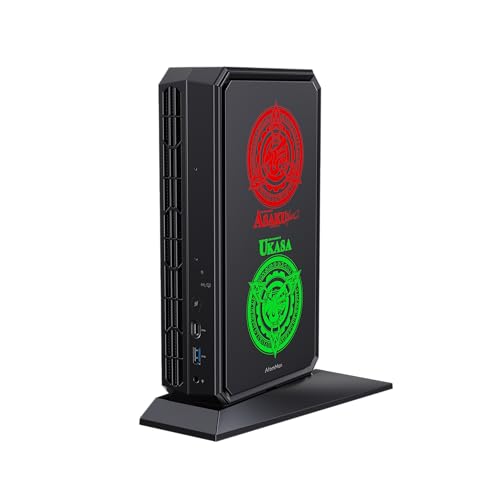
- Best overall mini gaming PC: Minisforum AtomMan G7 Pt, Ryzen 9 7945HX, Radeon RX 7600M XT, 32GB, 1TB — Check on Amazon
- Beelink SER9 Pro, Ryzen AI 9 HX 370, Radeon 890M, 32GB, 1TB — Check on Amazon
- Minisforum UM890 Pro, Ryzen 9 8945HS, Radeon 780M, 32GB, 1TB, OCuLink — Check on Amazon
- GMKtec NucBox K8 Plus, Ryzen 7 8845HS, Radeon 780M, 32GB, 1TB, OCuLink — Check on Amazon
See 2 more Amazon options
- Minisforum UM880 Plus Barebone, Ryzen 7 8845HS, no RAM/SSD/OS — Check on Amazon
- The tower benchmark (not a mini PC): CyberPowerPC Gamer Xtreme VR, i7-13700F, RTX 4060 Ti 16GB — Check on Amazon
Read the full guide ↓
Disclosure: As an Amazon Associate, reviewstook.com earns from qualifying purchases. Links to Amazon on this page are affiliate links; they cost you nothing extra. Listing details such as price and availability change often, so check the current Amazon listing before you buy.
Twelve hundred dollars is the budget where “mini gaming PC” stops being a euphemism. Below it, mini gaming means integrated graphics and honest compromises; at $1,200, exactly one machine in this guide carries a real discrete graphics processor — the Minisforum AtomMan G7 Pt, built around AMD’s Radeon RX 7600M XT. Read that name carefully, because this guide will keep repeating the point: the 7600M XT is a mobile GPU, a laptop-class chip with 8GB of memory running at 120 watts in this machine. It is not the desktop card its name resembles, and it does not perform like one. What it does do is lift the G7 Pt clear of every integrated-graphics mini PC here — strong 1080p gaming and selective 1440p — inside a body of roughly 2.7 litres. Everything else in this guide plays on integrated graphics, and the best of those, AMD’s Radeon 890M and 780M, are genuinely good at 1080p with sensible settings and upscaling. They are not discrete GPUs, and no honest guide should let you buy one believing otherwise.
The second honesty note is the tower standing at the end of the list. The CyberPowerPC Gamer Xtreme VR is not a mini PC at all — it is a full mid-tower with a desktop RTX 4060 Ti with 16GB of video memory — check price on Amazon for the current listing. It is in this guide as the benchmark, and the benchmark’s verdict is blunt: on raw gaming performance per dollar, the tower wins. It wins on frames, it wins on VRAM, and it wins on upgradeability, because in three years you can unbolt its graphics card and bolt in a faster one. Every mini PC below asks you to pay for the litres you save — in money, in graphics headroom, or in a fixed performance ceiling. That trade is often worth it: a 0.82-litre Beelink SER9 Pro disappears behind a monitor in a way no tower can, and a Minisforum UM890 Pro can grow a desktop graphics card later through its OCuLink port, at a total cost this guide itemizes rather than hides. But you should make the trade with the numbers in front of you, which is what the rest of this page is for.
In this guide
Quick Picks
Short on time, or comparing several options at once? Each row below names a buyer type and the product that suits it, with a link to the listing. Volumes are computed from the makers’ published dimensions, not from marketing names.
| Buyer type | Pick | Why it stands out | Link |
|---|---|---|---|
| Best overall | Minisforum AtomMan G7 Pt | The only discrete GPU here — a mobile RX 7600M XT at 120W in a ~2.7L body | Check on Amazon |
| Best pure mini | Beelink SER9 Pro | Radeon 890M integrated graphics in the smallest box here, ~0.82L | Check on Amazon |
| Best upgrade path | Minisforum UM890 Pro | Native OCuLink for a future desktop GPU, in a ~1.1L, reviewer-praised quiet case | Check on Amazon |
| Best value complete mini | GMKtec NucBox K8 Plus (32GB/1TB) | 780M performance with OCuLink, positioned as a value-oriented complete mini — check price on Amazon | Check on Amazon |
| Best for builders | Minisforum UM880 Plus Barebone | A barebone kit that only makes sense with parts you already own — the reasoning is inside | Check on Amazon |
| The benchmark (not a mini) | CyberPowerPC Gamer Xtreme VR | Desktop RTX 4060 Ti 16GB in a mid-tower — the raw-performance winner at this money | Check on Amazon |
How These Picks Were Chosen
The budget was applied as a ceiling on the machine as you would actually use it. Complete systems had to fit within the $1,200 budget in the United States. Mini PC prices move often in the current memory shortage, so check price on Amazon for the current listing rather than relying on any fixed figure. The one barebone kit in the guide is assessed the honest way: its review counts the memory, storage and operating system it does not include, and considers the finished machine before asking you to admire the kit on its own. The one tower is labelled as a tower every time it appears. Nothing here was allowed to borrow credibility from a form factor it does not have.
We did not use these products ourselves. We read the maker listings and specification pages and the independent reviews that measured them, and compared graphics hardware, memory type, storage, ports and published dimensions. Two filters did most of the work. The first is the graphics filter, applied in descending order of honesty: a discrete GPU beats integrated graphics; the strongest integrated graphics (Radeon 890M, then 780M) beat weaker ones; and a mobile GPU is named as a mobile GPU, with its wattage stated, because a 120W laptop chip and a desktop card are different products that happen to share most of a name. The second filter is the exit filter: what happens in two years? Machines with socketed memory and a spare SSD slot can grow; machines with an OCuLink port can borrow a desktop graphics card; machines with soldered memory and no OCuLink — one excellent pick below is exactly that — have a graphics ceiling fixed on the day you buy them, and the review says so in those words.
Size was measured, not marketed. Every volume in this guide is computed from published dimensions — width × depth × height — and where sources disagree by a few millimetres the review gives the range rather than picking the flattering number. External power bricks are counted as part of the system you have to house, because they are: the G7 Pt’s 300W brick weighs 874 grams on its own, and a “mini” setup that hides a brick the size of a paperback behind the desk is still a setup you have to place somewhere. Finally, a note on what is not here: Minisforum’s AtomMan G7 Ti, with an RTX 4070 Laptop GPU, is the mini gaming machine many readers actually want, and it is excluded on price alone — above this budget in both its barebone and configured forms. It anchors the under-$1,500 guides instead, and readers whose budget can stretch will find it discussed there and in Best Mini Gaming PC Under $1500.
The 6 Best Mini Gaming PCs Under $1,200
Minisforum AtomMan G7 Pt — Ryzen 9 7945HX, Radeon RX 7600M XT, 32GB, 1TB
Who it suits: The mini gaming buyer who actually games first — someone who wants discrete-GPU performance from a box that still fits on a shelf, and who understands exactly which GPU they are getting.
Start with the name, because the name is the trap this whole category sets. The graphics processor is a Radeon RX 7600M XT: the M means mobile. It is a laptop-class GPU with 8GB of graphics memory, run here at 120 watts, and it should be compared with other laptop GPUs, not with the desktop cards its name echoes. Judged on those honest terms it is a strong chip — the strongest graphics in this guide by a clear margin — and reviewers who measured the G7 Pt place it at strong 1080p gaming with selective 1440p in less demanding titles. Around it, Minisforum builds what is effectively a desktop-replacement laptop without the screen: a 16-core Ryzen 9 7945HX processor, 32GB of DDR5 memory in sockets (upgradable to 96GB), a 1TB SSD with both PCIe 5.0 and PCIe 4.0 slots in the chassis, and switchable 65W and 85W performance modes for the CPU. For this 32GB/1TB configuration, check price on Amazon — it is the only pick here that answers the search “mini gaming PC” without an asterisk on the graphics.
The size needs the same honesty. Notebookcheck measured the body at 269 × 155 × 64 mm without its stand — about 2.7 litres, two to three times the volume of the integrated-graphics minis below — and Minisforum markets a 3.8-litre vertical body; either way, this is the big machine of the guide, closer to a games console than to the palm-sized boxes under it, though still smaller in every dimension than a PS5 Slim. It also drinks from a 300W external power brick weighing 874 grams, which lives on the floor or behind the desk as part of the installation. None of that disqualifies it — it is the price of a discrete GPU and a 16-core CPU in this form factor — but buyers picturing a machine that vanishes behind a monitor should picture this one accurately: a small console-sized unit with a substantial brick, audible under full gaming load in a way the quietest picks here are not.
- A real discrete GPU — the only one in this guide — at a full 120W for its class.
- Desktop-class 16-core CPU, socketed DDR5 to 96GB, and both PCIe 5.0 and 4.0 storage slots.
- Premium-tier configured mini — check price on Amazon, and leave room in the overall setup budget for a monitor arm or a second SSD if you need them.
Honest limitation: The GPU is a mobile chip with 8GB of memory — do not buy it expecting desktop-card performance or desktop-card longevity at 1440p, and budget space for the large external power brick.
Choose it if gaming performance is the priority and the box just needs to be small, not invisible. Skip it if you want the smallest or quietest machine here, or if a tower fits your room — the benchmark at the end of this guide is faster for similar money.

Beelink SER9 Pro — Ryzen AI 9 HX 370, Radeon 890M, 32GB, 1TB
Who it suits: Buyers who want the smallest serious gaming mini — a machine that mounts behind a monitor, sips power, and still plays a modern library at 1080p.
The SER9 Pro is what integrated graphics looks like at its best. Its Radeon 890M is the strongest iGPU in this guide, a step above the 780M machines below it, fed by 32GB of fast LPDDR5X memory and a Ryzen AI 9 HX 370 processor, and the consensus of reviewers who tested it is consistent: this is a 1080p machine, comfortable in esports and older AAA titles and playable in modern ones at low-to-medium settings with upscaling doing honest work. All of it sits in a case measuring 135.5 × 135.5 × 44.7 mm — about 0.82 litres, the smallest volume in this guide — and it is relatively quiet under load by mini PC standards. For this 32GB/1TB configuration, check price on Amazon. Pricing for this class moves with the current memory market, so the rule is simple: buy it only when the live listing fits this budget, and treat a listing above the budget as a reason to wait.
Now the structural warning, which is the most important sentence in this review: the SER9 Pro’s graphics ceiling is fixed forever. The memory is soldered LPDDR5X — fast, but never upgradable — and the machine has no OCuLink port, so the eGPU escape route the Minisforum picks below enjoy does not exist here. When the 890M stops being enough for the games you want, the upgrade is a new computer. There is also a documentation wrinkle worth knowing before you order: Beelink’s listing copy has claimed dual M.2 storage slots while at least one detailed review lists a single M.2 2280 slot, so if a second SSD is part of your plan, confirm the slot count on the live listing rather than trusting either source — including this one. Buy the SER9 Pro as a finished, sealed answer and it is a superb one; buy it as a platform and you have bought the wrong machine.
- Radeon 890M — the strongest integrated graphics in this guide — in the smallest case, ~0.82L.
- 32GB of fast LPDDR5X and a 1TB SSD as the standard configuration, with Windows 11 Pro.
- Relatively quiet under load, and VESA-friendly dimensions for behind-monitor mounting.
Honest limitation: Soldered memory and no OCuLink mean the graphics performance you buy is the graphics performance you keep; storage-slot documentation conflicts between the listing and reviews.
Choose it if you want maximum mini — tiny, quiet, capable at 1080p — and your gaming tastes fit integrated graphics. Skip it if you plan to chase newer AAA titles for years, or you want any upgrade path beyond storage.
Minisforum UM890 Pro — Ryzen 9 8945HS, Radeon 780M, 32GB, 1TB
Who it suits: The patient gamer: happy with strong integrated graphics today, who wants the one mini here that can borrow a full desktop graphics card tomorrow.
The UM890 Pro’s own graphics are the Radeon 780M — a step below the SER9 Pro’s 890M, and this guide will not pretend otherwise. At 1080p with sensible settings and upscaling, the 780M is a proven, capable gaming iGPU, and around it Minisforum builds the most expandable small machine in this guide: a Ryzen 9 8945HS, 32GB of DDR5 in two sockets (upgradable to 96GB), two M.2 PCIe 4.0 slots, dual 2.5GbE networking, two USB4 ports — and a native OCuLink port, the feature that defines this pick. The case measures 130 × 127 × 66.6 mm, about 1.1 litres, and Notebookcheck’s reviewers measured the bare unit at 709 grams and praised its whisper-quiet cooling, which matters more in a small room than any specification on the box. Pricing for this 32GB/1TB configuration has moved hard in the memory shortage, so check price on Amazon and confirm the live listing still fits inside the budget before you order.
The OCuLink port is the reason to choose this machine, so here is its invoice, itemized the way the sales pages do not. The port itself is only a connector. To use it you add an OCuLink dock — Minisforum’s DEG1 is available on Amazon; check price on Amazon for the dock — and the DEG1 includes no power supply, so add an ATX or SFX PSU of your own. Then add the graphics card, such as a new desktop RTX 4060 — check price on Amazon for the card as well. Dock, PSU and card together add a substantial premium-tier cost on top of the machine, putting the complete docked system well above what the tower benchmark in this guide costs outright. What that money buys is not value; it is the arrangement. The mini stays on the desk, silent and small, for work and light gaming, and the dock comes out when a demanding title does. If that arrangement is not specifically what you want, the maths says buy the tower, and the UM890 Pro’s review is the wrong place to hide that from you.
- Native OCuLink — the cleanest eGPU path in this guide — plus socketed RAM to 96GB and dual M.2 slots.
- Whisper-quiet cooling in reviewer testing, in a ~1.1L case that VESA-mounts.
- Dual 2.5GbE and dual USB4 make it the best-connected pick here.
Honest limitation: Its own 780M graphics trail the SER9 Pro’s 890M, and the OCuLink upgrade costs tower money by the time the dock, PSU and card are counted.
Choose it if you want a quiet mini now with a genuine graphics future, and you value the two-mode desk setup. Skip it if you will never buy the dock — the SER9 Pro is the better sealed machine — or if you want the frames today, which is the tower’s job.

GMKtec NucBox K8 Plus — Ryzen 7 8845HS, Radeon 780M, 32GB, 1TB
Who it suits: Value hunters who want 780M gaming and an OCuLink port in a value-tier complete mini — and who are willing to check price on Amazon and buy on value rather than on impulse.
The K8 Plus is the UM890 Pro’s formula in a value-oriented GMKtec package: a Ryzen 7 8845HS with Radeon 780M graphics, 32GB of DDR5 across two sockets (upgradable to 96GB), two M.2 PCIe 4.0 slots, dual USB4, dual 2.5GbE networking with Intel controllers, and a native OCuLink port running at PCIe 4.0 x4 — with the maker’s own caveat that OCuLink here is not hot-pluggable, so the dock connects before boot, not mid-session. The case is about 132 × 127 × 58 mm by the maker’s stated dimensions, roughly 1.0 litre, and the gaming story is the familiar honest one for the 780M: a strong 1080p integrated GPU with upscaling in modern titles, a clear step behind the SER9 Pro’s 890M and in a different league entirely from the G7 Pt’s discrete chip. What makes this pick interesting is its positioning. The complete 32GB/1TB version sits in the value tier for this class, though live pricing is pushed around by the same memory shortage affecting every machine in this guide — check price on Amazon before you judge its value.
That positioning is the review. When its live listing sits in its usual value tier, the K8 Plus is the best-value complete mini in this guide by a wide margin, undercutting the UM890 Pro while matching its graphics and its OCuLink path. When its live price climbs close to the Minisforum, the gap narrows to the point where the UM890 Pro’s quieter cooling and finish deserve the difference. So the advice is mechanical: this is a buy-at-the-right-price pick — check price on Amazon, compare it directly with the UM890 Pro, and treat a shortage-driven spike as a reason to wait rather than as the machine’s normal tier. The same OCuLink considerations from the UM890 Pro review apply here unchanged: a dock with no power supply included, a PSU of your own, and a desktop card such as an RTX 4060, for an all-in docked total that should be compared against a tower before it is admired. GMKtec also sells this machine as a barebone kit, which the next-but-one section of this guide discusses through its Minisforum rival; the complete version reviewed here is the one most gamers should buy.
- 780M graphics, native OCuLink and socketed memory to 96GB — the full expansion formula.
- Dual 2.5GbE with Intel controllers and dual USB4, in a ~1.0L case.
- Positioned in the value tier for a complete mini — the value pick of the guide when its live listing reflects that tier; check price on Amazon.
Honest limitation: Shortage-driven live pricing can erase its value argument — check price on Amazon and compare with the UM890 Pro — and its OCuLink port is not hot-pluggable.
Choose it if you can catch it when its live listing sits in its usual value tier — at that positioning nothing else here competes. Skip it if the live price is at the top of its range and you need a machine this week; the UM890 Pro and SER9 Pro price their premiums more predictably.

Minisforum UM880 Plus Barebone — Ryzen 7 8845HS, No RAM, No SSD, No OS
Who it suits: Builders with a drawer of DDR5 and a spare NVMe drive — the one buyer for whom a barebone kit is a discount rather than a trap.
Read the listing title the way a contract lawyer would: “Without RAM / SSD / OS.” This barebone kit — check price on Amazon — buys a Ryzen 7 8845HS motherboard with Radeon 780M graphics in a case of about 130 × 127 × 50 to 55 mm (published dimensions differ by a few millimetres between sources; call it roughly 0.85 litres), with two DDR5 SO-DIMM sockets, two M.2 slots, and OCuLink provided through an adapter board rather than a native port — a real distinction, since the adapter route trades internal expansion flexibility for the connector. It does not buy a computer. The documented experience for this exact model, from surveys of Amazon listings, is the cautionary tale of the whole barebone category: a kit completed with a new 32GB DDR5 kit and a 1TB NVMe drive ended up costing more in total than buying the complete version of the same machine. Building from new parts can cost more than buying the finished machine, especially in a market where DDR5 memory carries a premium.
So this pick has exactly one honest use case, and it is a good one: you already own the parts. A DDR5 kit left from a laptop upgrade, an NVMe drive pulled from a retired machine, a Windows licence you can transfer — with those on the shelf, the UM880 Plus becomes a 780M gaming mini for the cost of the kit alone, well below the positioning of every complete machine in this guide, with an OCuLink path (via the adapter board) for later. Without them, the same purchase is the most expensive route to a 780M mini here, dressed in the cheapest headline. The review’s job is to make sure you know which of those two buyers you are before the box arrives. If you are pricing parts new, stop, add them honestly, and compare the total against the K8 Plus complete above and the SER9 Pro — then buy whichever finished machine wins, with no regrets and no second order for the memory you forgot.
- The cheapest route to a 780M mini in this guide — if the RAM and SSD are already on your shelf.
- Two SO-DIMM sockets and two M.2 slots: you choose the capacity, not the configurator.
- OCuLink available via adapter board, for a later eGPU dock.
Honest limitation: Completed with new parts it has been documented as costing more than the complete version — the kit price is not a computer price, and its OCuLink is an adapter-board arrangement, not a native port.
Choose it if you own compatible DDR5 and storage already, or you specifically want to spec the machine yourself. Skip it if you are buying every part new — the complete machines above are cheaper finished, and this guide has shown its working.

The Benchmark: CyberPowerPC Gamer Xtreme VR — i7-13700F, RTX 4060 Ti 16GB (Not a Mini PC)
Who it suits: The honest control group. If your room fits a mid-tower, this is what your $1,200 buys without the mini tax — read it before deciding the tax is worth paying.
Everything the minis compromise on, this machine does not. Its RTX 4060 Ti is a desktop graphics card with 16GB of video memory — double the G7 Pt’s mobile chip, in a card that can be unbolted and replaced when it ages. Its Core i7-13700F sits in a standard tower with standard parts, a real power supply, and room for more storage and memory than any mini here offers. On raw gaming performance it is the winner of this guide, and it is not close: the 4060 Ti 16GB is a genuine 1440p card, where the best mini in this list is a selective-1440p machine and the rest are 1080p systems. The positioning makes the point sharper. Check price on Amazon for this configuration — the rule is to consider it for this guide only when the live listing fits at or under the $1,200 budget, and when it does, it competes directly with every complete mini in this guide while out-performing all of them.
Why include a tower in a mini PC guide at all? Because “mini” is a feature with a price, and a buyer deserves to see the invoice. The minis above charge you in one of three currencies: graphics (the 780M and 890M machines give up the discrete GPU), permanence (the SER9 Pro’s ceiling is fixed; the G7 Pt’s mobile GPU can never be swapped), or money (the OCuLink route to tower-class graphics costs tower money plus a dock). What you receive in exchange is real: a machine that mounts behind a monitor, a desk that stays clear, a PC you can carry to another room or another home in one hand, and in the UM890 Pro’s case near-silence while doing it. For a small flat, a shared room, a living-room TV setup or a desk that is also a dining table, that exchange is frequently the right one — it is simply not a free one. Buy the mini with your eyes open, or buy this tower with a clear conscience; the only wrong purchase at $1,200 is the one made believing the two are the same product.
- Desktop RTX 4060 Ti with 16GB VRAM — the raw-performance winner of this guide, a true 1440p card.
- Standard, replaceable parts throughout: the GPU, PSU, storage and memory all upgrade on your schedule.
- A mid-tower alternative in the same overall budget tier when its live listing fits the budget — check price on Amazon — without the mini compromises.
Honest limitation: It is a full mid-tower. It will not mount behind a monitor, disappear into a TV stand, or travel in a backpack, and it only belongs in this budget guide when its live listing fits the budget — check price on Amazon before you order.
Choose it if performance per dollar is the priority and the space exists. Skip it if the space genuinely does not — that is what the five minis above are for, and you now know exactly what each of them costs you.

Comparison Table
| Product | Graphics | Volume | Best use | Link |
|---|---|---|---|---|
| Minisforum AtomMan G7 Pt | RX 7600M XT (mobile, 8GB, 120W) | ~2.7L body | Real discrete-GPU gaming, small footprint | Check on Amazon |
| Beelink SER9 Pro | Radeon 890M (integrated) | ~0.82L | Smallest serious 1080p mini, sealed and quiet | Check on Amazon |
| Minisforum UM890 Pro | Radeon 780M (integrated) + OCuLink | ~1.1L | Quiet mini now, desktop GPU later | Check on Amazon |
| GMKtec NucBox K8 Plus | Radeon 780M (integrated) + OCuLink | ~1.0L | 780M value when its live listing sits in the value tier | Check on Amazon |
| Minisforum UM880 Plus Barebone | Radeon 780M (integrated) + OCuLink via adapter | ~0.85L | Builders with DDR5 and an SSD already owned | Check on Amazon |
| CyberPowerPC Gamer Xtreme VR | RTX 4060 Ti (desktop, 16GB) | Full mid-tower | The benchmark: maximum frames per dollar | Check on Amazon |
How to Choose a Mini Gaming PC Under $1,200
- Read the GPU name like a lawyer. An “M” or the word “Laptop” in a graphics name means a mobile chip: lower wattage, less memory, a different performance class from the desktop card it resembles. The G7 Pt’s RX 7600M XT is a good mobile GPU — buy it as one, not as the desktop card the name suggests.
- Decide your resolution before your machine. At 1080p, the 890M and 780M machines in this guide are legitimate gaming PCs. At 1440p, only the G7 Pt plays selectively and the tower plays properly. A mini bought for a 1440p high-refresh monitor it cannot feed is the most common regret at this budget.
- Price the exit, not just the entrance. Ask what happens when the graphics stop being enough. Socketed RAM and a spare M.2 slot buy time; an OCuLink port buys a second life via an external dock setup; soldered memory with no OCuLink buys neither. The SER9 Pro is an excellent machine precisely because its buyers do not need an exit.
- Do the OCuLink invoice in full. Dock (the DEG1 — check price on Amazon), a power supply the dock does not include, and the desktop card itself (such as a new RTX 4060 — check price on Amazon) — then compare the total with a tower. OCuLink is a layout decision, not a savings plan.
- Compute the volume yourself. Width × depth × height from the published dimensions, and remember the external power brick is part of the installation — the G7 Pt’s 300W brick weighs 874g. Marketing litres and measured litres are different numbers; this guide uses measured ones.
- Never price a barebone as a computer. Add memory, storage and an operating system at live prices before comparing. In the current memory market, documented completions of a barebone kit have ended up costing more than the same machine sold complete.
- Buy mini PCs on their positioning, not on a single day’s listing. This category’s prices swing widely with the memory market, and the K8 Plus and SER9 Pro have both moved across tiers within this budget. Check price on Amazon, compare the live listings side by side, and treat a pick that has climbed well above its usual tier as a pick to wait on.
- Check the configuration under the ASIN. Mini PC listings run several memory and storage configurations under one page, and documentation occasionally disagrees with itself — the SER9 Pro’s storage-slot count differs between its listing copy and reviews. Confirm the exact configuration, slot count and port selection on the live listing before ordering.
- Count the noise, not just the size. A mini PC sits closer to your ears than a tower under a desk. Reviewer-measured quiet — the UM890 Pro’s whisper-quiet cooling, the SER9 Pro’s relatively hushed load noise — is a specification; an unreviewed fan curve is a gamble.
- Be honest about the room. If a mid-tower fits and nobody needs the desk space, the benchmark in this guide is simply the better gaming PC for the money. Mini is worth its price when the space is real — a small flat, a shared room, a TV stand, a desk that doubles as something else.
The Mobile GPU Naming Trap
One section of this guide deserves to stand alone, because it is where mini gaming marketing does its quietest work. Graphics names travel between product categories: the same letters and numbers appear on desktop cards, laptop chips and mini PC processors, and the performance does not travel with them. A mobile GPU runs at a fraction of a desktop card’s power budget, often with less memory, inside a thermal envelope the size of a paperback book. The RX 7600M XT in the G7 Pt is specified honestly in this guide — mobile, 8GB, 120W — and it earns its place as the strongest graphics here. But a reader skimming listings will meet machines whose names invite them to assume desktop performance, and the assumption is always in the seller’s favour.
The defence is mechanical. Find the wattage: a GPU’s power figure tells you more about its performance class than its name does, and any listing that will not state one is telling you something. Find the memory: 8GB in a mobile chip and 16GB in the desktop 4060 Ti benchmark are different gaming futures, especially as modern titles grow heavier. And find the comparison class: judge a mobile GPU against other mobile GPUs and against the integrated graphics it replaces — where the G7 Pt wins clearly — and never against the desktop card whose name it borrows. Do that, and the naming trap closes; skip it, and it is the most expensive paragraph you did not read.
What the Litres Actually Buy
It is worth stating plainly what the space saving is for, because “smaller” is not a virtue in the abstract — it is a solution to specific rooms. A mini PC VESA-mounts behind a monitor and turns a desk into a surface again. It sits in a TV stand and becomes a living-room gaming machine that a tower cannot be. It travels — to a dorm, a second home, a LAN at a friend’s flat — in one hand, where the tower is a car trip with a seatbelt around it. And the quiet ones, the UM890 Pro above all, can run in a bedroom or a shared space at hours when a gaming tower’s fans would be a negotiation. If two or three of those sentences describe your life, the mini premium documented in this guide is money spent on something real.
If none of them do — if the PC will live under a desk in a room of its own, driving a monitor it never moves from — then the honest recommendation of a mini PC guide is the tower at the end of it. You will get the stronger graphics card, the replaceable parts, the quieter cooling per frame, and change left over for the monitor. Guides that will not say this are selling a category; this one would rather sell you the right machine, and the right machine is the one that fits the room you actually have.
Common Buying Mistakes
- Reading a mobile GPU’s name as a desktop card’s promise — the single most expensive misunderstanding in this category.
- Buying an integrated-graphics mini for a 1440p monitor and discovering the resolution ceiling after the return window.
- Treating a barebone kit price as a computer price, then paying shortage prices for the RAM and SSD that complete it.
- Budgeting for OCuLink as a dock price and forgetting the power supply the dock excludes and the desktop card itself.
- Paying a memory-shortage spike price — several picks here have swung widely within the year — instead of waiting for a live listing that returns to their usual tier.
- Assuming a mini PC’s graphics can be upgraded later when the machine has soldered memory and no OCuLink: the ceiling was fixed at checkout.
- Forgetting the power brick in the space calculation; a 300W brick is furniture, wherever it hides.
- Skipping the configuration check on a multi-variant listing and receiving the 16GB version of the machine the review praised at 32GB.
Final Recommendation
- Most mini gaming buyers: Minisforum AtomMan G7 Pt — the only discrete GPU here, honestly labelled.
- Smallest and quietest serious gaming: Beelink SER9 Pro.
- Buy now, upgrade graphics later: Minisforum UM890 Pro.
- Best value, bought at the right price: GMKtec NucBox K8 Plus complete.
- Builders with parts on the shelf: Minisforum UM880 Plus Barebone.
- Performance first, space available: CyberPowerPC Gamer Xtreme VR — the benchmark tower.
Our top two for this search are the AtomMan G7 Pt, because it is the one machine here that answers “gaming PC” without an asterisk, and the Beelink SER9 Pro, because it is the purest expression of what a mini PC is for — 0.82 litres, quiet, and genuinely capable at 1080p. Between them they frame the choice honestly: discrete graphics at console size, or integrated graphics at palm size. The UM890 Pro is the thinking buyer’s middle path, the K8 Plus the price-watcher’s, and the UM880 Plus barebone the builder’s — each excellent for its buyer and wrong for the others, which is what the detailed reviews are for. Readers speccing a machine purely for a small room should also see Best Mini Gaming PC For Small Spaces Under $1200; first-time buyers will find the hand-holding in Best Mini Gaming PC For Beginners Under $1200; and anyone whose real target is a smaller desk footprint without the gaming-first brief can compare Best Compact Gaming PC Under $1200. Measure your space, name your resolution, read the GPU’s full name including its wattage, and check price on Amazon before you order.
Frequently Asked Questions
Can a mini PC under $1,200 really play modern games?
Yes — with the expectations set by the graphics hardware, not the marketing. The AtomMan G7 Pt’s discrete mobile GPU plays modern titles strongly at 1080p and selectively at 1440p. The Radeon 890M and 780M integrated machines play esports and older titles well at 1080p and modern titles at reduced settings with upscaling. What no mini at this price does is match a desktop graphics card — the tower benchmark in this guide exists to show the gap honestly.
Is the RX 7600M XT the same as a desktop RX 7600 XT?
No. The M marks a mobile chip: it runs at 120W in the G7 Pt, carries 8GB of memory, and belongs to the laptop performance class. It is the strongest graphics in this guide and a genuine step above integrated graphics — but it should be judged against laptop GPUs, not against the desktop cards its name resembles.
What is OCuLink, and is it worth it?
OCuLink is a port that lets a mini PC drive a full desktop graphics card in an external dock. It works, and on the UM890 Pro and K8 Plus it is a real upgrade path. It is not a cheap one: a dock (check price on Amazon), a power supply the dock does not include, and the card itself (such as a desktop RTX 4060 — check price on Amazon) put the all-in total in tower territory. It is worth it when the two-mode setup — small silent mini daily, docked power for big titles — is specifically what you want.
Why is there no mini PC here with an RTX graphics card?
Because at the time of research, the RTX-equipped mini we would recommend — Minisforum’s AtomMan G7 Ti, with an RTX 4070 Laptop GPU — sat above this budget in both its barebone and configured forms. Rather than pad the guide with an over-budget machine, we excluded it and said so; it is covered in the under-$1,500 guides, starting with Best Mini Gaming PC Under $1500.
Can I upgrade these machines later?
Partly, and it varies by pick — which is why each review names its ceiling. The Minisforum and GMKtec machines take socketed DDR5 to 96GB and have two M.2 slots; the UM890 Pro and K8 Plus add OCuLink for graphics. The Beelink SER9 Pro’s memory is soldered and it has no OCuLink, so its graphics are fixed for life. The tower benchmark upgrades everything, on standard parts, indefinitely.
Are mini PCs loud when gaming?
They sit closer to you than a tower does, so the question matters. Reviewer testing praised the UM890 Pro’s cooling as whisper-quiet and found the SER9 Pro relatively quiet under load; the G7 Pt, pushing a discrete GPU and a 16-core CPU through a console-sized case, is the most audible machine here under full gaming load. No mini in this guide is silent under load — for genuinely fanless machines, which trade gaming performance away entirely, see Best Fanless Mini PC Under $1200.
Should I just buy the tower?
If it fits your room and your life, yes — the benchmark’s desktop RTX 4060 Ti 16GB is the strongest gaming hardware in this guide, on replaceable parts, when its live listing fits inside the same budget — check price on Amazon. The minis earn their premium in specific rooms: small desks, TV stands, shared spaces, dorms and second homes. Buy the machine that fits the room you have, not the room in the listing photos.
- Best Mini Gaming PC Under $1200
- Best Mini Gaming PC Under $800
- Best Mini Gaming PC Under $700
- Best Mini Gaming PC For 1440p Gaming Under $1200
- Best Mini Gaming PC For Streaming Under $1200
- Best Barebones Mini PC Under $1200
- Best Mini PC Under $1200
- Best Small Form Factor Gaming PC Under $1200
- Best Prebuilt Gaming PC Under $1200
- Best Gaming PC Under $1200


