Where to buy
Check the latest price, availability and delivery on Amazon. Orders are placed on Amazon. We may earn a commission from qualifying purchases.
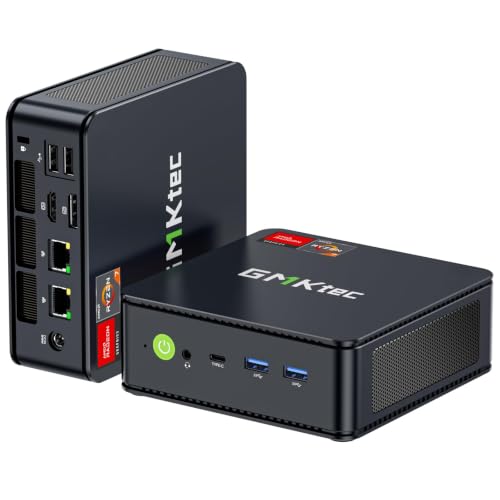
- Best overall: GMKtec M5 Plus Gaming Mini PC, Ryzen 7 5825U, 32GB RAM, 1TB SSD — Check on Amazon
- Beelink SER5 MAX Mini PC, Ryzen 7 5800H, 16GB RAM, 500GB SSD — Check on Amazon
- GMKtec NucBox M6 Mini PC, Ryzen 5 6600H, 16GB DDR5, 512GB SSD — Check on Amazon
- BOSGAME P4 Light Gaming Mini PC, Ryzen 7 5700U, 32GB RAM, 1TB SSD — Check on Amazon
See 2 more Amazon options
- ACEMAGICIAN AM06 Pro Mini PC, Ryzen 7 5800U, 16GB RAM, 512GB SSD — Check on Amazon
- KAMRUI E3B Mini Gaming PC, Ryzen 5 7430U, 32GB RAM, 512GB SSD — Check on Amazon
Read the full guide ↓
Disclosure: As an Amazon Associate, reviewstook.com earns from qualifying purchases. Links to Amazon on this page are affiliate links; they cost you nothing extra. Listing details such as price and availability change often, so check the current Amazon listing before you buy.
Start with the three sentences most streaming-PC guides at this price would rather you did not read. First: no mini PC under $400 has a discrete graphics card, so there is no NVENC encoder anywhere in this guide — the hardware encoder streamers are usually told to insist on simply does not exist at this budget in this size. Second: no pick here can encode AV1. Every machine below is an AMD APU box whose encoder is an older Vega-generation VCN block or, in one case, an RDNA 2 VCN block, and neither generation encodes AV1 — that capability starts with RDNA 3 and RTX 40-series silicon, which live in more expensive guides on this site. Third: what these little boxes honestly do well is a specific and genuinely useful set of streaming jobs — talk and desktop streams, console streams fed through a capture card, a dedicated second PC that encodes while a main machine plays, and light same-box streaming of esports-class games. Demanding modern games played and encoded on one $400 mini PC is not on that list, and this guide will not pretend otherwise.
Because the encoder is the whole question here, the workflow needs defining before the picks. A standard Twitch broadcast runs at roughly 6,000 kbps with constant bitrate (CBR) and a two-second keyframe interval, at 1080p60 or below. YouTube accepts higher bitrates, carries 1440p streams, and takes AV1 ingest; Twitch’s AV1 path runs through its Enhanced Broadcasting programme rather than as a standard option. Streaming in 4K is limited by the platforms, not by your hardware — no encoder purchase changes that. Inside those boundaries, the encoder that matters for almost every reader of this guide is H.264 at Twitch bitrates, and on that measure AMD’s VCN encoders are honestly graded in this guide as visibly softer than NVIDIA’s NVENC at the same bitrate: fast motion and fine detail — grass, rain, confetti, a busy firefight — break up sooner. That is a quality gap, not a capability gap. A VCN-encoded talk stream, desktop stream or console feed looks entirely respectable; a VCN-encoded fast-action game stream looks acceptable with softer edges. The picks below are graded encoder-first, then on the load a stream places on the rest of the machine, then on the storage your recordings will eat.
In this guide
Quick Picks
Short on time, or comparing several options at once? Each row below names a streaming job and the mini PC that suits it, with a link to the listing.
| Streaming job | Pick | Why it stands out | Link |
|---|---|---|---|
| Best overall stream station | GMKtec M5 Plus, Ryzen 7 5825U | 32GB dual-channel, 1TB plus a free slot, dual 2.5GbE wired networking | Check on Amazon |
| Best same-box light game streaming | Beelink SER5 MAX, Ryzen 7 5800H | 54W chip — the only real simultaneous-load headroom in the set | Check on Amazon |
| Newest encoder, future path | GMKtec NucBox M6, Ryzen 5 6600H | RDNA 2 VCN is the set’s newest encoder; USB4 opens a future discrete-encoder route | Check on Amazon |
| Most storage fitted | BOSGAME P4, Ryzen 7 5700U | 32GB and 1TB fitted — room for a recording archive | Check on Amazon |
| Recording archive flexibility | ACEMAGICIAN AM06 Pro, Ryzen 7 5800U | A 2.5-inch drive bay for cheap bulk recording storage, plus dual LAN | Check on Amazon |
| Budget dedicated stream box | KAMRUI E3B, Ryzen 5 7430U | 32GB dual-channel and a VESA plate — mounts behind a monitor as a second PC | Check on Amazon |
How These Picks Were Chosen
The budget was applied the same way as in the base guide for this tier: every pick is a real Amazon listing, sold new and complete with RAM, storage and Windows fitted, within this guide’s under-$400 budget in the United States. Prices change often, so check price on Amazon for the current figure on each listing before you buy. Barebones versions of the same models, which arrive without memory, storage or an operating system, were excluded as picks; a barebones kit is not a complete computer. The six machines and their verified listings are the same six as in Best Mini Gaming PC Under $400; what changes in this guide is the grading, which is rebuilt around streaming.
The first grading axis is the encoder, because for a streamer it is the specification. All six picks encode through the video block built into their AMD processor — there is no separate encoder chip in any of them. Five carry Vega-generation graphics (Vega 8 in four, Vega 7 in one) whose VCN encoder handles H.264 and HEVC and belongs to an older, softer generation than the NVENC blocks streamers usually compare against. The sixth, the NucBox M6, carries a Radeon 660M whose RDNA 2 VCN encoder is a generation newer — still H.264 and HEVC for encoding, still no AV1 encode. No pick has Intel silicon, so no Quick Sync is claimed for any of them, and software x264 encoding on the processor cores is treated throughout as an emergency fallback rather than a plan, for reasons the encoder section explains. The second axis is simultaneous load: a stream is never just an encoder. OBS composites scenes, a browser holds chat and dashboards, a voice application runs, and if the game is on the same box it renders on the same chip, through the same memory, inside the same thermal envelope as the encoder. Memory capacity and channel configuration therefore grade as streaming specifications here — the integrated graphics borrow system RAM, and 32GB in dual channel is worth more to a streamer than the spec sheet suggests. The third axis is storage treated as recording space: a local recording habit consumes a drive faster than a game library does, so fitted capacity and spare slots are graded as streaming features, and every shortfall is flagged honestly as a separate drive purchase to plan for.
The Encoder Map: What These Chips Can Actually Send
Everything in this guide descends from one short table of facts, so it is worth stating in one place. The five Vega machines — the Beelink SER5 MAX (5800H), GMKtec M5 Plus (5825U), BOSGAME P4 (5700U), ACEMAGICIAN AM06 Pro (5800U) and KAMRUI E3B (7430U) — encode H.264 and HEVC through AMD’s VCN block of the Vega generation. That encoder is entirely serviceable and visibly softer than NVENC at Twitch’s roughly 6,000 kbps: on a talk camera, a desktop, slides or a console feed the difference is minor; on fast game motion it is the difference between crisp and slightly watercolour. It does not encode AV1, in either direction of wishful thinking — no driver update changes silicon. The NucBox M6’s Radeon 660M uses the RDNA 2 generation of VCN: a newer block, a somewhat cleaner H.264 picture, HEVC encode, and AV1 decode — it can play AV1 video, which is useful for previewing and media work, but it cannot encode an AV1 stream. AV1 encoding requires RDNA 3 or RTX 40-series hardware, and the honest consequence for this guide is that YouTube’s AV1 ingest and Twitch’s Enhanced Broadcasting AV1 path are closed to every pick here; these machines send H.264, which both platforms accept as their standard input.
Two absences deserve the same clarity. There is no NVENC in this set because there is no NVIDIA hardware in this set — if a listing for any of these models implies otherwise, it is describing the same AMD encoder in louder words. And there is no Quick Sync, because Quick Sync is Intel’s encoder and no pick uses an Intel processor. What remains is the fallback: x264 software encoding on the CPU cores. On the eight-core chips here it can physically be done, and the OBS section gives it a narrow, honest job — an emergency setting for a low-motion stream when the hardware encoder is unavailable. As a plan it fails on arithmetic: the same cores and the same memory bandwidth are already rendering your game, compositing your scenes and running your browser, and x264’s quality presets spend exactly the resource a one-box streamer does not have spare. The graded answer at this budget is always the hardware VCN block, with the game’s settings adjusted to leave it room.
The 6 Best Mini Gaming PCs for Streaming Under $400
GMKtec M5 Plus Gaming Mini PC, Ryzen 7 5825U, 32GB RAM, 1TB SSD
Who it suits: The streamer who wants one small box to run the whole show — OBS, chat, browser, voice and a light game or a capture feed — without anything needing an upgrade first.
The M5 Plus takes the top spot in this guide not because its encoder is special — its Vega-generation VCN block is the same class as four rivals here — but because streaming is a whole-machine workload and this is the most complete whole machine in the set. It arrives with 32GB of DDR4-3200 in two slots, feeding both the system and the integrated graphics in dual channel, a 1TB NVMe SSD with a second slot standing empty for the recording archive you will eventually need, and dual 2.5GbE LAN ports, which matter more to a streamer than to any other buyer: the wired-Ethernet rule in the OBS section below is easiest to obey when the machine was built for wired networking in the first place. Its Ryzen 7 5825U carries Vega 8 graphics with the encoder described in the map above — H.264 and HEVC, no AV1 encode — and for the jobs this tier honestly covers, that encoder plus this supporting cast is the strongest arrangement under $400: a talk or desktop stream with a browser full of dashboards beside it, a console feed arriving by capture card, or an esports title rendered and encoded on the one chip with memory headroom to spare.
The honest trade is the one the base guide identified: the 5825U is a U-series chip in a low power envelope, so in a long same-box gaming stream its sustained clocks sit below the Beelink’s 54W part, and the most demanding scenes you can stream from one box belong to the pick below. What you give up in peak headroom you recover everywhere a stream actually stresses a machine over three hours — memory, storage, networking, and nothing to buy before your first broadcast. Value strengthens the case too: this is a finished stream station in a single purchase — check price on Amazon for the current figure.
- 32GB dual-channel memory and 1TB fitted, with a second SSD slot for the recording archive.
- Dual 2.5GbE LAN: the wired connection streaming demands, built in twice over.
- Memory still socketed to 64GB — the stream’s supporting cast can grow.
Honest limitation: The U-series power envelope caps sustained same-box game streaming below the SER5 MAX, and its Vega-generation encoder is visibly softer than NVENC at Twitch bitrates.
Choose it if your stream is talk, desktop, console-fed or esports, and you want the complete station in one purchase. Skip it if your whole point is squeezing the hardest same-box game stream from one chip — that is the Beelink below.

Beelink SER5 MAX Mini PC, Ryzen 7 5800H, 16GB RAM, 500GB SSD
Who it suits: The one-box streamer playing light games on the same machine that encodes them, who is willing to fix two known shortfalls as planned purchases.
Simultaneous load is where streams on integrated graphics live or die, and the SER5 MAX owns the one specification that governs it in this set: its Ryzen 7 5800H is set to a 54W TDP, where most rivals run at 15 to 25 watts. The Vega 8 graphics, their VCN encoder and the processor cores all draw from that single budget, and a chip allowed to sustain its clocks is a chip whose game does not sag — and whose encoder does not starve — twenty minutes into a match. In streaming terms this is the strongest same-box arrangement here for esports and older titles at 1080p: render and encode on one chip, with the thermal headroom to keep both fed. The encoder itself is the same Vega-generation VCN as the GMKtec above — H.264 and HEVC, no AV1 encode — so picture quality at Twitch bitrates grades the same; what the 54W buys is not a better encoder but a steadier one under load.
The catches are real and are flagged the way this guide always flags them: as separate planned purchases, never hidden. Sixteen gigabytes of memory is the working floor for a game plus OBS plus a chat browser, and 500GB is the joint-smallest storage here — a local recording habit will fill it quickly. Both fixes are genuinely available, which is why this pick ranks second rather than fifth: the memory sits in slots and goes to 64GB, and the M.2 SSD swaps to 2TB. Plan them as purchases and the machine’s streaming ceiling rises to match its chip. One naming caution carried from the base guide: Beelink also sells a 7735HS machine under the SER5 MAX name with different memory, so confirm the listing says 5800H and DDR4 before ordering. For the current figure, check price on Amazon before you buy.
- 54W TDP — sustained clocks for game and encoder together, the set’s real headroom.
- Socketed memory to 64GB and a swappable SSD: both streaming catches are fixable.
- Triple display output (HDMI, DisplayPort, USB-C) for a game screen plus a chat screen.
Honest limitation: As shipped, 16GB of memory and 500GB of storage are the two tightest streaming specifications in this guide — budget the upgrades as part of the plan.
Choose it if you will play and stream from the same box and your library is esports and older titles. Skip it if you want the finished specification on day one; the GMKtec above arrives complete.

GMKtec NucBox M6 Mini PC, Ryzen 5 6600H, 16GB DDR5, 512GB SSD
Who it suits: The streamer buying a trajectory: the newest encoder generation available under $400 today, and the only documented route in this set to a genuinely better encoder tomorrow.
The M6’s streaming case starts with its Radeon 660M, whose RDNA 2 VCN encoder is the newest in this guide — a generation ahead of the Vega blocks in the other five picks, with a somewhat cleaner H.264 picture at a given bitrate. The discipline matters more than the praise, so it is stated plainly: RDNA 2 does not encode AV1. This machine decodes AV1 and encodes H.264 and HEVC, full stop, and any copy implying an AV1 stream from this box is wrong. What lifts the M6 to third is the port on its side: USB4. A full-feature USB4 connection can carry an external graphics dock, which is the one way any machine in this guide can later gain a discrete GPU — and with it, a modern NVENC or RDNA 3 encoder — without replacing the computer. No other pick here documents that route. Add socketed DDR5 memory, whose bandwidth the integrated graphics share, dual 2.5GbE wired networking and a second M.2 slot standing empty, and the M6 is the platform pick for a streamer whose channel will outgrow this tier.
Today’s accounting is less flattering, and it is owed. The 660M has six compute units — the weakest rendering hardware in this guide — so as a same-box game streamer this is the wrong end of the list: its honest streaming jobs are talk, desktop, capture-fed console streams and the lightest esports titles, with the game preferably living on another machine or a console. Sixteen gigabytes of memory and 512GB of storage repeat the Beelink’s catches in a machine with less headroom to excuse them, though both are fixable — memory is socketed, and the spare slot takes the archive drive. One ordering caution from the listing family: GMKtec also sells this model barebones, without memory, storage or Windows, so confirm the cart holds the complete 16GB/512GB machine. Check price on Amazon for the current figure on the complete configuration.
- RDNA 2 VCN — the set’s newest encoder (H.264/HEVC; AV1 decode only, no AV1 encode).
- USB4: the only documented path here to a future discrete encoder via a graphics dock.
- Socketed DDR5, dual 2.5GbE and a spare SSD slot for the archive.
Honest limitation: The six-unit 660M is the weakest game renderer here, so same-box game streaming is limited to the lightest titles — its strength is the desk-side and capture-fed roles.
Choose it if your stream is talk, desktop or console-fed and you want the upgrade path to a real encoder later. Skip it if playing and streaming demanding games from one box is the plan; no pick here does that, and the Beelink comes closest for light ones.

BOSGAME P4 Light Gaming Mini PC, Ryzen 7 5700U, 32GB RAM, 1TB SSD
Who it suits: The value-first streamer whose show is talk, desktop or console-fed — the jobs where fitted memory and storage matter more than processor generation.
On the specifications a stream actually consumes, the P4 matches the guide’s leader: 32GB of RAM for the game-plus-OBS-plus-browser pile, a 1TB SSD with room for a recording archive, dual 2.5GbE LAN for the wired rule, and triple 4K display output — a strong value proposition in this budget tier; check price on Amazon for the current figure. Its encoder is the Vega-generation VCN of its 5700U: H.264 and HEVC, no AV1 encode, the same softer-than-NVENC picture at Twitch bitrates as its Vega siblings. For a talk stream, a desktop show or a console feed, that encoder behind 32GB and a terabyte is a genuinely sensible station, and the word “Light” in BOSGAME’s own product name remains the most honest branding in this tier.
The compromise is the processor’s age, and for streaming it bites in a specific place: simultaneous load. The 5700U is a Zen 2-generation chip in a 15W-class envelope — the oldest cores in this guide. Encoding rides the hardware block and is unaffected, but everything around the encode — game rendering, scene compositing, browser dashboards — shares those older cores, so a same-box game stream runs out of margin here sooner than on any other 32GB pick. Keep the game light, or put it on a console and let the P4 do what it is good at. One buying caution specific to this listing family: the P4 name has also been sold with a 5825U under near-identical titles, so read the processor line on the live listing and make sure the configuration you pay for is the one you intended — either chip can be a fair buy in this budget tier, but they are not the same machine.
- 32GB and 1TB fitted — the archive and the supporting cast, sorted.
- Dual 2.5GbE LAN and triple display output match the guide’s best networking.
- Vega 8 graphics: the stronger of the two Vega classes in this guide.
Honest limitation: The Zen 2-generation processor is the oldest here, so simultaneous-load margin for same-box game streaming is the thinnest of the 32GB picks.
Choose it if fitted specification rules and your stream is talk, desktop or console-fed. Skip it if you will render a game and a stream on the same chip for hours; the two picks above carry that load better.

ACEMAGICIAN AM06 Pro Mini PC, Ryzen 7 5800U, 16GB RAM, 512GB SSD
Who it suits: The streamer who records everything — VODs, clips, a media library beside them — and wants cheap bulk storage inside the same small box.
The AM06 Pro’s streaming distinction is a feature no other pick in this guide offers: alongside its 512GB NVMe SSD sits a 2.5-inch drive bay, so an inexpensive SATA drive can hold the recording archive inside the machine instead of dangling from it on a cable. Recordings are the silent storage emergency of small streaming setups — a single long session’s local copy can outweigh a game install — and this is the only box here that answers it structurally. The rest of the station is sound: a Ryzen 7 5800U with Vega 8 graphics and its Vega-generation VCN encoder (H.264 and HEVC, no AV1 encode), dual LAN ports for the wired rule with a spare for a home network, triple 4K output for game and chat screens, and 16GB of dual-channel DDR4. On value it sits in the budget tier of this guide — check price on Amazon for the current figure.
Two honest notes, both carried from the base guide. Sixteen gigabytes is this guide’s floor rather than its comfort zone for a game plus OBS plus browser on one chip; the memory is standard DDR4, so a 32GB kit is a legitimate planned upgrade, but it is a plan, not a given. And ACEMAGICIAN is a value brand with seller-led support; the standard hygiene for any budget mini PC applies with a little extra force — run a security scan, and consider a clean Windows install from Microsoft’s own image, before the machine holds your streaming accounts. For a dedicated stream-and-record box — particularly a second PC, where its own game rendering stops mattering — the bay, the ports and the overall value make a coherent package.
- The only pick with a 2.5-inch bay — the recording archive lives inside the box.
- Dual LAN and triple 4K output suit a stream box that doubles as a media server.
- Vega 8 encoder class in a budget-tier package.
Honest limitation: 16GB of memory is the streaming floor here, and support is value-brand and seller-led; plan the memory upgrade and the clean-install hygiene.
Choose it if recording storage and double-duty flexibility lead your list. Skip it if 32GB fitted from the start is the requirement — that is what the GMKtec and the BOSGAME above are for.

KAMRUI E3B Mini Gaming PC, Ryzen 5 7430U, 32GB RAM, 512GB SSD
Who it suits: The two-machine streamer on a hard budget: a main PC or console plays the game, and this box — mounted out of sight — runs OBS and nothing else.
Framed as a dedicated stream box, the E3B’s specification rearranges itself into sense. Its Vega 7 graphics carry the weakest encoder-and-render combination in this guide — seven compute units and a Vega-generation VCN block — which disqualifies it from serious same-box game streaming, but a dedicated encoder box barely renders at all: it receives a capture feed or a network stream, composites scenes, and encodes. For that job its 32GB of dual-channel memory is generous, its six-core processor is adequate, and the VESA mounting plate in the box lets the whole station disappear behind the streaming monitor, taking no desk and adding no visible clutter to the setup your camera shows. In this guide it is positioned as a budget-tier route to a second machine that exists only to stream — check price on Amazon for the current figure.
The limits belong in the same paragraph as the praise. Vega 7’s encoder is the softest picture in the guide at Twitch bitrates, so a fast-action console feed will look a notch gentler through this box than through its Vega 8 siblings; for talk, desktop and slower games the difference fades. The 512GB SSD is a recording constraint on a box whose whole job includes recording — memory can grow to 64GB and storage to 2TB per coverage of the listing, and the storage upgrade should be treated as a planned purchase on top of the machine itself. KAMRUI is a value brand with seller-level support, the normal trade at this tier. One ordering caution: this model is also sold in a 16GB configuration under a separate listing, so check the cart holds the 32GB configuration this review describes — getting the wrong configuration is exactly the trap this tier sets.
- 32GB dual-channel memory in a budget-tier package, aimed at the OBS workload.
- VESA plate included: the stream box mounts behind the monitor and vanishes.
- Memory can grow to 64GB and storage to 2TB per coverage of the listing.
Honest limitation: Vega 7 is the weakest encoder and renderer here — this is a second-PC or console-fed pick, not a one-box game streamer.
Choose it if a console or main PC supplies the game and this box only has to encode it. Skip it if one machine must do everything; start at the top of this guide instead.
Comparison Table
| Product | Encoder | Best streaming use | Link |
|---|---|---|---|
| GMKtec M5 Plus, 5825U | Vega VCN, H.264/HEVC | Complete station: 32GB, 1TB + free slot, dual 2.5GbE | Check on Amazon |
| Beelink SER5 MAX, 5800H | Vega VCN, H.264/HEVC | Same-box light game streaming — 54W headroom | Check on Amazon |
| GMKtec NucBox M6, 6600H | RDNA 2 VCN, H.264/HEVC (no AV1 encode) | Newest encoder; USB4 path to a discrete encoder later | Check on Amazon |
| BOSGAME P4, 5700U | Vega VCN, H.264/HEVC | Talk/desktop/console-fed with generous fitted storage | Check on Amazon |
| ACEMAGICIAN AM06 Pro, 5800U | Vega VCN, H.264/HEVC | Recording-heavy setups — 2.5-inch archive bay, dual LAN | Check on Amazon |
| KAMRUI E3B, 7430U | Vega VCN, H.264/HEVC | Dedicated second stream box, VESA-mounted | Check on Amazon |
Setting Up OBS on an Integrated-Graphics Mini PC
The settings below are the difference between a stream that holds and a stream that dissolves, and on this hardware class they matter more than on a desktop with an encoder to spare. Begin with the encoder choice itself: in OBS, select the AMD hardware encoder (H.264) for every pick in this guide — the Vega VCN block on five of them, the RDNA 2 VCN block on the NucBox M6. Set constant bitrate (CBR) at roughly 6,000 kbps for Twitch, with a two-second keyframe interval; YouTube accepts the same settings and higher bitrates if your upload allows. Software x264 encoding is the emergency setting only — if the hardware encoder is unavailable after a driver problem, x264 at a very fast preset will keep a low-motion stream alive while you fix it, but it spends the same processor cores your game and OBS are already using, and on a one-box setup it is the first thing to abandon, not a configuration to keep.
When a stream misbehaves, OBS tells you which of three counters is failing, and each has its own fix. Rendering lag means the graphics chip could not composite your scenes in time — on integrated graphics that share memory with the game, the fix is to lighten the load the chip carries: cap the game’s frame rate, lower its resolution or settings, reduce browser sources in your scenes, and on the 16GB picks, close everything that is not the stream. Encoding lag means the encoder block itself is saturated — the fix is to lower the output resolution (a 720p stream encoded cleanly looks better than a 1080p stream dropping frames), confirm you are on the hardware encoder rather than x264, and check the chip is not thermally throttling in a sealed cabinet or a stacked pile of hardware. Network lag — dropped frames with both other counters clean — is almost never the encoder at all: it is the connection. That produces this guide’s non-negotiable rule: stream over wired Ethernet, never Wi-Fi. Every pick here has a wired port, four of them have two, and a cable removes the single most common cause of ruined streams on small PCs. Finally, rehearse: run a full-load test stream — game, scenes, alerts, recording — for a full hour inside the return window, at the settings you intend to broadcast. A configuration that survives the rehearsal will survive the broadcast, and one that fails has failed while returning the machine is still free.
How to Choose a Mini PC for Streaming Under $400
- Decide which streaming job you are buying. Talk and desktop streams, console feeds through a capture card, a dedicated second box, and light same-box game streaming are four different purchases wearing one keyword. The first three are well served here; the fourth is served narrowly, by the top two picks, for light games only.
- Read the encoder, not the adjective. Every pick here encodes H.264 and HEVC through an AMD VCN block — Vega generation on five, RDNA 2 on the NucBox M6 — and none encodes AV1 or offers NVENC. A listing implying a stronger encoder for one of these models is decorating the same silicon.
- Grade memory as a streaming specification. OBS, a chat browser, a voice app and the game all live in the same RAM the graphics borrow. 32GB in dual channel is the comfort zone; 16GB works with discipline and is upgradeable on the socketed picks — but plan the upgrade as a separate purchase, not as a footnote.
- Count storage as recording space. Local recordings accumulate faster than game installs shrink. A terabyte fitted, a free second slot, or the AM06 Pro’s drive bay are streaming features; a lone 512GB drive is a scheduled purchase.
- Insist on the wired port — then use it. All six picks have Ethernet; the dual-2.5GbE machines double down on it. Whatever you buy, the cable is part of the streaming specification, not an accessory.
- Check the power class for one-box plans. If the game and the stream share one chip, sustained watts are the margin: the SER5 MAX’s 54W tuning is the only real headroom in this set, and U-series machines ask for lighter games or a second box.
- Confirm the configuration in the cart, twice. Sixteen-versus-32GB versions, same-name processor swaps and barebones kits are this tier’s standing traps, and a streaming setup built on the wrong configuration fails in ways that look like encoder problems.
- Know what the next tier buys a streamer. The step above this budget adds stronger integrated graphics (the 680M class starts above this budget tier), and further up sit the RDNA 3 and RTX 40-series encoders that unlock AV1. Readers whose first priority is a game-streaming picture should compare Best Mini Gaming PC For Streaming Under $500 and Best Streaming PC Under $400 before settling here.
What Else the Stream Costs: The Kit, In the Right Order
The computer is not the whole purchase, and this section exists so the rest is budgeted in the order it actually improves a stream. Microphone first. Viewers forgive a soft picture long before they forgive bad audio; a decent microphone, positioned close, is the single largest quality jump a new streamer can buy, and every pick here has the ports and the quiet footprint to sit near one. Lighting second. A simple light aimed at your face does more for a camera image than a camera upgrade does, because small sensors starve in dim rooms. Webcam third — only once it is lit does a better camera show what it can do. Capture card last, and console-only: a capture card earns its place when a console (or a second gaming PC) supplies the game and this box encodes it — the arrangement that makes the KAMRUI and the NucBox M6 sensible streaming purchases. For games played on the same mini PC, a capture card adds nothing at all; the machine already has the picture. None of these accessories is included with any pick above, so plan for them separately as part of the wider setup.
Common Buying Mistakes
- Expecting NVENC or AV1 from an AMD APU. Neither exists in this set: the encoders are VCN blocks (H.264/HEVC), and AV1 encoding requires RDNA 3 or RTX 40-series hardware found in higher guides.
- Reading “AV1 support” on the NucBox M6 as AV1 streaming. Its RDNA 2 block decodes AV1; it does not encode it. The stream it sends is H.264.
- Streaming over Wi-Fi because the desk is tidier. Dropped frames from a wireless link are the most common and most preventable failure in small-PC streaming. Run the cable.
- Choosing x264 “for quality” on a one-box setup. The software encoder spends the same cores the game needs; on integrated graphics it converts an encoder question into a whole-machine shortage.
- Buying 16GB for a game-plus-stream workload without a plan. It works for talk and capture-fed streams; for same-box gaming it is the floor, and the upgrade should be planned from the start.
- Letting recordings fill the only drive. A 500GB machine that records every session will evict either the archive or a game within weeks. Fit the second drive, use the bay, or stream without local recording.
- Ordering the wrong configuration of the right model. The 16GB KAMRUI sibling, the BOSGAME processor variant, the SER5 MAX namesake and the barebones NucBox M6 are all live traps in this set’s listing families.
- Demanding a modern AAA one-box stream from this tier. No wording changes the physics: play those games on a console or a bigger machine and let the mini PC encode the feed — or step up a tier.
Final Recommendation
- Most streamers: GMKtec M5 Plus.
- Playing and streaming on one box, light games: Beelink SER5 MAX.
- Newest encoder and a future discrete-encoder path: GMKtec NucBox M6.
- Talk, desktop or console-fed on a value budget: BOSGAME P4.
- Recording everything, archive inside the box: ACEMAGICIAN AM06 Pro.
- A dedicated second stream box: KAMRUI E3B.
Our top two for streaming at this budget are the GMKtec M5 Plus, because a stream is a whole-machine workload and it is the only pick that arrives with the memory, storage and wired networking already at streaming specification, and the Beelink SER5 MAX, because its 54W chip is the one real pool of simultaneous-load headroom here for buyers who will play light games on the same box that encodes them. The NucBox M6 is the patient choice — the newest encoder today and the only documented route to a discrete encoder tomorrow. Buyers whose ambitions are a fast-action game stream with the sharpest picture should read Best Streaming PC Under $500 before ordering anything in this guide, and those still deciding whether a mini PC is the right shape at all can compare Best Mini Gaming PC Under $400. Confirm the exact configuration on the live listing, run the cable, rehearse for an hour inside the return window — and a $400 mini PC will hold a stream honestly within the limits this guide has stated.
Frequently Asked Questions
Can a mini PC under $400 really stream?
Yes — the right streams. Talk and desktop shows, console games fed through a capture card, and a second-PC arrangement where this box only encodes are all genuinely well served. Light esports titles played and streamed on the same box work on the stronger picks. Demanding modern games played and encoded on one of these machines is the boundary this tier does not cross.
Do any of these mini PCs have NVENC or AV1 encoding?
No to both. NVENC is NVIDIA’s encoder and there is no NVIDIA hardware in this set; every pick encodes through AMD’s VCN block in H.264 and HEVC. AV1 encoding requires RDNA 3 or RTX 40-series silicon — the NucBox M6’s RDNA 2 encoder is a generation too early, though it does decode AV1. Both platforms accept the H.264 these machines send as their standard input.
Is AMD’s VCN encoder good enough for Twitch?
For most content, yes, with a known character: at Twitch’s roughly 6,000 kbps it is visibly softer than NVENC on fast motion and fine detail, and broadly comparable on talk, desktop and slower-paced content. Stream at a clean 1080p — or 720p for fast games, where a lower resolution at the same bitrate often looks better — and the result is respectable. It is a quality difference, not a capability failure.
Should I use x264 instead of the hardware encoder?
Not as a plan. x264 encodes on the processor cores, and on a one-box setup those cores are already rendering the game, compositing OBS and running your browser. Keep it as the emergency setting that keeps a low-motion stream alive during a driver problem, and return to the hardware VCN encoder as the configuration.
How much upload bandwidth and storage does streaming need?
The broadcast itself is modest: a 6,000 kbps Twitch stream needs a stable upload comfortably above that figure, delivered over wired Ethernet — stability matters more than headline speed. Storage is the quieter demand: local recordings of long sessions accumulate quickly, which is why this guide grades fitted capacity, spare slots and the AM06 Pro’s drive bay as streaming specifications.
Can one of these be a dedicated stream PC for my main setup?
That is one of the best uses of this tier. A console or main PC plays the game; the mini PC receives the feed — by capture card, which is the console route — and handles OBS and the encode. The KAMRUI E3B is framed for exactly that job, VESA plate and all, and the NucBox M6 suits it too, with the bonus of a future encoder upgrade path over USB4.
Mini PC or a small tower for streaming at $400?
Different trades. A renewed small tower at this price can carry an old discrete graphics card — with an older-generation NVENC that still out-encodes VCN at Twitch bitrates — at the cost of size, age and renewed-condition caveats; the streaming-PC guides on this site cover that route. A mini PC wins on size, silence, power draw and a new-machine warranty path. If the box must disappear behind a monitor, buy the mini; if encoder picture quality is the only metric and renewed hardware is acceptable, compare the tower options before deciding.
- Best Mini Gaming PC Under $400
- Best Mini Gaming PC Under $500
- Best Mini Gaming PC Under $700
- Best Mini Gaming PC For Beginners Under $400
- Best Mini Gaming PC For Small Spaces Under $400
- Best Mini Gaming PC For 1440p Gaming Under $400
- Best Mini PC Under $400
- Best Compact Gaming PC Under $400
- Best 1080p Gaming PC Under $400


