Where to buy
Check the latest price, availability and delivery on Amazon. Orders are placed on Amazon. We may earn a commission from qualifying purchases.
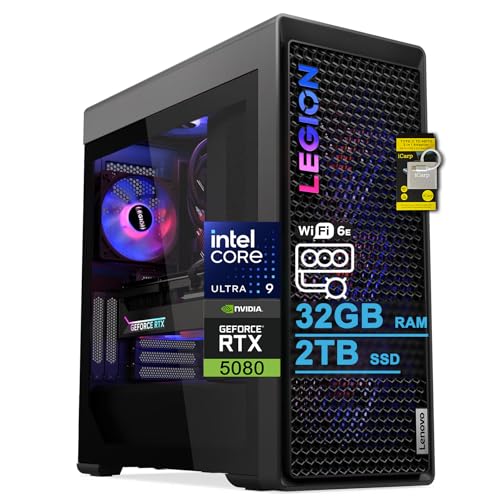
- Best overall for a working office: Lenovo Legion Tower 7i Gen 10, Core Ultra 9 285K, RTX 5080, 32GB RAM, 2TB SSD — Check on Amazon
- Alienware Aurora ACT1250, Core Ultra 9 285, RTX 5080, 32GB RAM, 1TB SSD — Check on Amazon
- iBUYPOWER Y40 PRO, Ryzen 9 7900X, RTX 5070 Ti, 32GB RAM, 2TB SSD — Check on Amazon
- ZOTAC MEK Gaming PC, Ryzen 7 9700X, RTX 5070 Ti, 32GB RAM, Windows 11 Pro — Check on Amazon
See 2 more Amazon options
- CLX Set, Ryzen 7 9800X3D, RTX 5080, 32GB RAM expandable to 256GB, 2TB SSD — Check on Amazon
- Skytech King 95, Ryzen 7 9800X3D, RTX 5070 Ti, 32GB RAM, 1TB SSD — Check on Amazon
Read the full guide ↓
Disclosure: As an Amazon Associate, reviewstook.com earns from qualifying purchases. Links to Amazon on this page are affiliate links; they cost you nothing extra. Listing details such as price and availability change often, so check the current Amazon listing before you buy.
Let us say the quiet part in the first paragraph: three thousand dollars is not home office money. It is flagship creator and workstation money — the budget of video editors who bill by the project, developers who compile all day, analysts whose models run for hours, and 3D artists whose renders are the product. A home office, in the ordinary sense of documents, email, spreadsheets, browser tabs and video calls, was fully served two price tiers ago. Every machine in this guide is therefore judged against an uncomfortable question: not “is it fast?” — at this price everything is fast — but “does your work convert that speed into money, time or a decade of not thinking about your computer?” If it does not, the correct purchase is a machine from our $800 guide and a bank account substantially heavier, and this guide will keep telling you so.
The arithmetic deserves thirty seconds, because it is the whole story of this tier. A good $800 home office PC — the class covered in Best Home Office PC Under $800 — already opens every document instantly, holds a hundred browser tabs without complaint, drives a multi-monitor desk and never makes you wait on a video call. Office work reached “instant” a long time ago, and you cannot open a spreadsheet faster than instant. What the extra money buys is a different category of capability: a discrete graphics card for video export, 3D work and local AI; a 24-core processor for compiles, renders and batch jobs; storage and memory headroom measured in years. Spread over a decade of service, a machine at this ceiling has to earn its keep for years, while an $800 machine replaced sooner still costs far less over its life. The $3,000 machine wins that comparison only when the hours it saves are worth more than the difference — which is true for professionals whose computer is a production tool, and false for everyone else. Below: six verified machines, what each is genuinely for, the step-down comparison in full, and the mistakes that turn a flagship budget into an expensive desk ornament.
In this guide
Quick Picks
Short on time, or comparing several options at once? Each row below names a buyer type and the machine that suits it, with a link to the listing.
| Buyer type | Pick | Why it stands out | Link |
|---|---|---|---|
| Best overall for a working office | Lenovo Legion Tower 7i Gen 10 | 24-core Ultra 9 285K, RTX 5080, 2TB SSD and Thunderbolt 4 in one businesslike tower | Check on Amazon |
| Best premium brand and support | Alienware Aurora ACT1250 | Ultra 9 285 and RTX 5080 with a 1000W Platinum power supply — check price on Amazon | Check on Amazon |
| Best value — keep the difference | iBUYPOWER Y40 PRO | 12-core Ryzen 9 and RTX 5070 Ti with 2TB storage, positioned lower in this band — check price on Amazon | Check on Amazon |
| Best actual office specification | ZOTAC MEK Gaming PC | The only pick here shipping Windows 11 Pro, with the fastest memory in the guide | Check on Amazon |
| Best memory expandability | CLX Set | Four RAM slots rated to 256GB and an RTX 5080 — check price on Amazon; buy only within budget | Check on Amazon |
| Best office by day, gaming by night | Skytech King 95 | 9800X3D and RTX 5070 Ti with an 850W Gold ATX 3 power supply | Check on Amazon |
How These Picks Were Chosen
The budget was applied as a ceiling, not a target: every machine below is a real Amazon listing in the United States that belongs in this guide only when its live price is at or under $3,000, and where that depends on the current listing price the review says so — check the current price on Amazon before you buy. Several of these machines also appear in our gaming guides, because at this price the same towers serve both crowds — but they were re-judged here on office and creation criteria: processor cores for real workloads, memory and its upgrade path, storage, connectivity, the Windows edition in the box, and how serviceable the machine is over a ten-year working life. Gaming ability is treated as what it is at this tier — a bonus, not the brief.
We did not use these machines ourselves. We read the maker listings and specification pages and compared what is published: core counts, memory configurations and stated maximums, storage, power supply wattage and rating, and port selections where the listing documents them. Where a listing contradicts itself — one pick below describes its processor two different ways on the same page — the review flags it rather than laundering it into a clean spec. Prices are not printed in this guide because prices in this category move weekly, and several picks here are in budget only when their live price falls within the ceiling; the review for each one tells you to check price on Amazon and to walk away if the live price sits above this guide’s ceiling. Anything that could not be verified from listing or maker material — a power supply wattage one maker does not publish, a monitor count a listing does not document — is not claimed, and the gap is named in the review instead.
Two filters specific to this keyword sat on top of everything. The first is the honesty filter: a pick earns its place only if there is a plausible home-office professional whose work justifies it — an editor, a developer, a data worker, a designer — not merely a shopper with a large budget. The second is the decade filter: a $3,000 office machine is a buy-once decision, so standard parts, published power supplies and a memory upgrade path were weighted heavily, and proprietary designs were marked down for it, however polished they are.
The $800 Question: What the Extra Money Actually Buys
Every buyer of this guide should run one comparison before anything else in it: this tier against the $800 tier. An $800 home office PC in late 2026 is typically a strong mini PC or compact desktop with 32GB of memory, a terabyte of storage and integrated graphics that handle office work, photo touch-ups and multi-monitor desks without strain. It is, for the work most home offices actually do, a finished answer. So what does the extra money — the gap between that tier and the ones below — purchase?
Four things, and only four. First, a discrete graphics card: an RTX 5070 Ti or 5080 is a different species from integrated graphics, and it is what turns video export, 3D modeling, CAD, GPU-accelerated effects and local AI work from overnight jobs into coffee-break jobs. Second, processor cores: the 24-core Intel flagships and 12-core Ryzen 9 in this guide chew through compiles, renders, virtual machines and batch exports that a six- or eight-core office chip queues up and works through slowly. Third, headroom as insurance: 2TB of fast storage, memory ceilings of 64GB or more, and power supplies with room for the next graphics card — the things that make a machine a ten-year purchase instead of a five-year one. Fourth, build and support: liquid cooling that stays quiet under sustained load, and in one case a global brand’s support network behind the desk.
And what does it not buy? It does not buy a better email experience, a faster spreadsheet, a crisper video call or a browser that opens sooner — those were instant at $800 and remain instant. It does not buy a better monitor, keyboard or chair, which is where money actually improves a home office day. And it does not buy status that survives contact with your accountant: a $3,000 tower running documents is paying flagship money for specifications you never load. The professionals this tier serves know who they are, because their current machine makes them wait — on exports, on builds, on renders — in ways they can count in hours per week. If you cannot name the wait, you are not the buyer; buy the $800 machine, or step to the middle ground in Best Home Office PC Under $1500, and keep the difference.
The 6 Best Home Office PCs Under $3,000
Lenovo Legion Tower 7i Gen 10 — Core Ultra 9 285K, RTX 5080, 32GB RAM, 2TB SSD
Who it suits: The professional this whole guide is really for — video editors, developers, data workers and designers who need one tower that does heavy creation work all day and still behaves like a business machine on the desk.
The processor is the argument. The Core Ultra 9 285K is a 24-core chip (the listing quotes up to 5.6 GHz), and cores are the currency of real office-plus-creation work: timeline exports, code compiles, virtual machines, large data jobs and the general pile-up of a dozen demanding applications at once. Around it, Lenovo has specified the machine like a workstation that happens to game: an RTX 5080 with 16GB of graphics memory for GPU-accelerated editing, effects and local AI work; 2TB of SSD storage, so project libraries live on the fast disk rather than an external drive; a 360mm liquid cooler, which is what lets a 24-core chip sustain heavy loads through a long export without turning the office into a wind tunnel; and an 850W power supply. The connectivity is the most office-serious in this guide: Thunderbolt 4 for docks and fast external storage, 2.5-gigabit Ethernet for moving large files to a NAS, and Wi-Fi 6E. Keyboard and mouse are in the box. Check the current price on Amazon — the Amazon listing is the channel to watch for this configuration.
Two limitations belong in bold. The listing states the memory maximum as 32GB — the machine ships with 32GB and, per Lenovo’s own listing text, that is the ceiling. For most professionals 32GB is years of headroom, but a buyer whose decade plan includes 64GB for virtual machines or very large datasets should treat this as the guide’s one genuine specification conflict and verify it on the live listing before ordering. And it ships with Windows 11 Home; professionals who need BitLocker drive encryption, Remote Desktop hosting or domain features will budget for a Pro upgrade. Neither flaw is hidden in the listing — but at this level, both deserve to be read before the purchase rather than after.
- 24-core Ultra 9 285K — the strongest productivity processor in this guide.
- RTX 5080, 2TB SSD and 360mm liquid cooling: specified for sustained creation work, not just peaks.
- Thunderbolt 4, 2.5Gb Ethernet and Wi-Fi 6E — the best office connectivity here.
Honest limitation: The listing caps memory at the 32GB it ships with, and Windows 11 Home — not Pro — is in the box.
Choose it if your work is genuinely CPU- and GPU-heavy and you want the complete, businesslike flagship. Skip it if 64GB of memory is in your future plans, or your workload is ordinary office work — in which case it is several times more machine than the job.

Alienware Aurora ACT1250 — Core Ultra 9 285, RTX 5080, 32GB RAM, 1TB SSD
Who it suits: Buyers who want flagship creation performance wrapped in the one genuinely premium package in this guide — a global brand, a polished case, a Platinum-rated power supply — and who value a support network over parts-bin flexibility.
The specification is flagship throughout: a Core Ultra 9 285 (a 24-core processor by Intel’s specification), an RTX 5080, 32GB of DDR5 memory and a 1000W Platinum-rated power supply — the strongest and most efficient PSU in this guide, and real headroom for whatever graphics card replaces the 5080 in five years. A 240mm liquid cooler handles the processor, and the whole machine carries the fit and finish that is Alienware’s actual product: this is the pick for a client-facing office where the tower is visible and the brand on it says something. Check price on Amazon — that defines the buying rule: when its live price falls within this guide’s ceiling it is competitive with everything here; when its live price sits above $3,000, the guide’s ceiling excludes it.
The trade-offs are the standing Alienware ones, and a decade-minded buyer should weigh them honestly. The motherboard and power supply use Dell’s proprietary formats, so when something fails in year six you are buying Dell parts, not standard ones — the opposite of the serviceability this guide prizes. Storage is 1TB, the thinnest in the guide at this price, on a machine aimed at people with large project libraries. And the Amazon listing contradicts itself in places — the processor is described with two different core counts in different sections, and the liquid cooling is described both as fitted and as an option — so verify the exact configuration on the live page before ordering, and keep screenshots of what you bought. None of this makes it a bad machine; it makes it a machine you buy for the brand, the finish and the support, with your eyes open about the format lock-in.
- Ultra 9 285 and RTX 5080 with a 1000W Platinum power supply — the most flagship hardware pairing here.
- Premium case, finish and a global support brand behind it.
- Competitive when you check price on Amazon and the live price falls within this guide’s ceiling.
Honest limitation: Proprietary Dell motherboard and PSU formats limit long-term self-service, storage is only 1TB, and its live price can sit over this guide’s ceiling, so check the current price on Amazon before ordering.
Choose it if brand, finish and support matter and, when you check price on Amazon, its live price falls within budget. Skip it if you plan to service and upgrade the machine yourself for a decade — standard-parts towers below serve that plan better.

iBUYPOWER Y40 PRO — Ryzen 9 7900X, RTX 5070 Ti, 32GB RAM, 2TB SSD
Who it suits: The professional who ran the $800 math, decided they do need a serious machine — and would still like to keep a meaningful part of the budget for the monitor, desk and chair that make the office.
This is the value flagship of the guide, and its specification is aimed squarely at work: a 12-core Ryzen 9 7900X, a processor built for sustained multi-threaded loads like exports, compiles and batch processing; an RTX 5070 Ti with 16GB of graphics memory, which covers GPU-accelerated editing, 3D and AI work at a level only one step below the 5080 machines; 32GB of DDR5 memory; and 2TB of NVMe storage — matching the Legion’s capacity while positioned lower in this band. Keyboard and mouse are included, and the warranty is a published one-year manufacturer term. Its position in the band is the headline: check price on Amazon, and you will find it positioned well below the flagships in this guide. On that basis this machine delivers most of what the flagship RTX 5080 machines deliver for office-plus-creation work — the honest difference is the 5080’s extra graphics tier and the Intel chips’ extra cores — and returns enough change to fund the rest of the office. For a professional equipping a whole workspace rather than feeding a single tower, that arithmetic usually wins.
The limitation is a documentation gap, and the guide refuses to paper over it: the power supply wattage is not published in the verified listing material for this machine. On a tower you intend to keep for a decade, the PSU is the part that decides whether a future graphics card is a drop-in or a rebuild, so confirm the wattage and rating on the live listing — or with iBUYPOWER — before buying, and treat an unhelpfully vague answer as a reason to choose the ZOTAC or Skytech below, whose power supplies are published. One more caution: the Y40 PRO name also covers a different configuration built around a 7800X3D under a separate listing, so match the Ryzen 9 7900X specification, not just the name, when you order.
- 12-core Ryzen 9, RTX 5070 Ti and 2TB storage — near-flagship work specification.
- Positioned lower in this band — check price on Amazon: the pick most likely to fund the rest of your office too.
- Published one-year manufacturer warranty; keyboard and mouse included.
Honest limitation: The power supply wattage is not published in the verified listing material — confirm it before buying a machine you plan to keep for a decade.
Choose it if you want flagship-class creation work and a rational total budget. Skip it if the unpublished PSU is a deal-breaker and you cannot get the figure confirmed — the picks below publish theirs.

ZOTAC MEK Gaming PC — Ryzen 7 9700X, RTX 5070 Ti, 32GB RAM, Windows 11 Pro
Who it suits: The buyer who read this guide’s title literally — someone speccing an office machine first, who needs the professional Windows features the other five picks leave in the box they didn’t ship.
Start with the detail that makes this the most office-correct specification in the guide: it ships with Windows 11 Pro. Every other pick here runs Windows 11 Home. For a working office that difference is not cosmetic — Pro brings BitLocker drive encryption for a machine holding client data, the ability to host Remote Desktop sessions into your own desk, and the management features small businesses and IT departments expect. On top of that, the hardware is thoroughly grown-up: a Ryzen 7 9700X, 32GB of DDR5-6000 — the fastest memory speed published in this guide — a 1TB NVMe SSD, a 750W 80+ Gold power supply with its wattage and rating stated plainly, Wi-Fi 6E and Bluetooth 5.3. The graphics card’s outputs are documented in the specification: one HDMI 2.1b and three DisplayPort 2.1b, which is a four-monitor desk driven from the card — the only pick in the guide whose multi-monitor claim we can make from published outputs rather than assumption. Check the current price on Amazon: it puts a complete, published, Pro-licensed work machine in the middle of this guide’s band.
The honest limitations are about ceilings rather than flaws. The 9700X is an eight-core processor — an excellent, efficient chip, but in a guide where rivals field 12 and 24 cores, heavy compile queues, render batches and many-virtual-machine workloads will finish sooner elsewhere. And the 750W power supply, while correct and honestly published for the fitted 5070 Ti, leaves the least headroom for a future flagship graphics card of any pick here. Neither matters to the buyer this machine is for: a professional whose work is serious but not render-farm serious, who wants the office-correct operating system and a specification with nothing hidden. If your workload is documents-plus-creation rather than creation-as-the-business, this is arguably the most rational $3,000-tier purchase in the guide — and, positioned in the middle of the band, it does not need the full ceiling to make its case.
- Windows 11 Pro — the only pick here with the professional Windows edition in the box.
- Fully published specification: DDR5-6000 memory, 750W Gold PSU, Wi-Fi 6E.
- Documented graphics outputs (HDMI 2.1b + 3× DisplayPort 2.1b) for a four-monitor desk.
Honest limitation: Eight processor cores is the fewest among the guide’s serious picks, and 750W leaves the least room for a future flagship graphics card.
Choose it if you need Windows 11 Pro features and a transparent, work-first specification. Skip it if your income depends on render or compile throughput — the 24-core Legion and 12-core Y40 PRO exist for that.

CLX Set — Ryzen 7 9800X3D, RTX 5080, 32GB RAM (Expandable to 256GB), 2TB SSD
Who it suits: The buyer whose memory needs will grow into the machine — data work, virtual machines, huge projects — and who is disciplined enough to buy only when, on checking the current price on Amazon, the live price falls within this guide’s ceiling.
One published figure separates this machine from everything else in the guide: its motherboard carries four memory slots rated to 256GB. It ships with 32GB of DDR5-5600, but the ceiling is the story — this is the only pick here that can grow from an office machine into a genuine memory-heavy workstation without replacing the platform, and for data analysts, VM-heavy developers and researchers, that ceiling is worth more than any single component. The rest of the specification is flagship class: an RTX 5080, 2TB of NVMe storage, an 850W Gold power supply (confirmed in the manufacturer’s specification material), and a 360mm liquid cooler. CLX is a boutique builder, and the standard-parts construction means the machine can be serviced and upgraded like a self-build — the decade filter applied in this guide’s favor.
Now the two cautions, and they are substantial. First, the price: check the current price on Amazon before anything else, because this listing’s price can swing widely. It is only a pick in this guide when its live price falls within the ceiling. Above $3,000 it is simply not eligible, however good the hardware is. Second, the processor: the Ryzen 7 9800X3D is a gaming-specialist chip whose extra cache is engineered for games. Creative and office applications use it as a strong eight-core processor — which it is — but the X3D premium buys creation work almost nothing over the 9700X in the ZOTAC, and far less than the Legion’s 24 cores. Buy this machine for its memory ceiling and its 5080, when its live price falls within budget, and it is a shrewd decade purchase; buy it when its live price sits well above the ceiling for the gaming chip, and it is the guide’s easiest mistake.
- Four RAM slots rated to 256GB — the only true memory growth path in this guide.
- RTX 5080, 2TB storage, published 850W Gold PSU and 360mm liquid cooling.
- Standard-parts boutique build: serviceable like a self-built machine.
Honest limitation: The listing’s price can swing widely — it is a pick only when you check price on Amazon and the live price falls within this guide’s ceiling — and the gaming-specialist processor’s premium buys creation work little.
Choose it if memory growth is your decade plan and, when you check the current price on Amazon, the live price falls within this guide’s ceiling. Skip it if the live price sits above that ceiling, or your memory needs will never pass 64GB — the Legion serves you better today.

Skytech King 95 — Ryzen 7 9800X3D, RTX 5070 Ti, 32GB RAM, 1TB SSD
Who it suits: The hybrid worker this keyword quietly describes more often than any other: a serious machine on the desk from nine to five, and the household’s gaming rig after hours — with the budget justified by both jobs.
Judged as a purchase rather than a spec sheet, the King 95 is the easiest flagship here to live with. Its power supply is published and properly specified — 850W Gold, ATX 3 standard — which is the detail that decides whether a graphics card upgrade in year five is an afternoon or an ordeal. A 360mm liquid cooler keeps the processor quiet under sustained load, memory is 32GB of DDR5-5600, and the RTX 5070 Ti is more graphics card than any office workload in this guide requires, with the gaming performance after hours to match the processor’s reputation. Check price on Amazon — it is positioned below the flagships in this band while giving up nothing in build fundamentals. For the buyer whose evenings genuinely include demanding games, this is the machine where the $3,000-tier spend is easiest to defend: one tower, two jobs, no compromises that either job will notice.
The office-side honesty is this: the Ryzen 7 9800X3D’s fame rests on a cache design that accelerates games, and office and creation software mostly cannot use it. As a work processor it is a strong eight-core chip — but the Legion’s 24-core 285K will clear heavy export and compile queues in a different league, and the Y40 PRO’s 12-core Ryzen 9 costs less. If your evenings are email rather than games, the X3D premium in this machine is money spent on a capability your workload never touches. Two listing cautions complete the picture: the graphics card brand may vary, as the listing itself states, and near-identical King 95 variants exist under other listings at other prices — so match the model number (ST-KING95-1671-W-AM) and check the current price on Amazon before ordering.
- Published 850W Gold ATX 3 power supply and 360mm cooling — the upgrade-friendly fundamentals done right.
- RTX 5070 Ti plus the 9800X3D: full flagship gaming after hours, serious work machine by day.
- Positioned below the guide’s flagships in this band — check price on Amazon.
Honest limitation: The gaming-specialist processor’s premium buys pure office and creation work little, and the graphics card brand may vary by listing.
Choose it if one tower must do a professional day job and flagship gaming at night. Skip it if the machine will never game — the same money buys more work cores in the Legion or Y40 PRO.

Comparison Table
| Product | Processor / Graphics | Best use | Link |
|---|---|---|---|
| Lenovo Legion Tower 7i Gen 10 | Ultra 9 285K (24-core) / RTX 5080 | The complete creator’s office flagship | Check on Amazon |
| Alienware Aurora ACT1250 | Ultra 9 285 (24-core) / RTX 5080 | Premium brand, finish and support when its live price is within budget | Check on Amazon |
| iBUYPOWER Y40 PRO | Ryzen 9 7900X (12-core) / RTX 5070 Ti | Near-flagship work power that funds the rest of the office | Check on Amazon |
| ZOTAC MEK Gaming PC | Ryzen 7 9700X / RTX 5070 Ti | Windows 11 Pro and a fully published work specification | Check on Amazon |
| CLX Set | Ryzen 7 9800X3D / RTX 5080 | Memory growth to 256GB — check price on Amazon; within budget only | Check on Amazon |
| Skytech King 95 | Ryzen 7 9800X3D / RTX 5070 Ti | Professional days, flagship gaming nights | Check on Amazon |
How to Choose a Home Office PC Under $3,000
- Name the wait first. This tier exists to delete specific, countable delays: exports, compiles, renders, model runs. If you cannot name the task your current machine makes you wait on, the $800 tier is your answer and this guide is a pleasant read, not a shopping list.
- Buy cores for work, cache for games. For creation and productivity, core count is the honest currency — 24 cores in the Intel flagships, 12 in the Y40 PRO. The X3D chips in the CLX and Skytech are superb processors whose famous feature serves games; buy them for hybrid use, not for spreadsheets.
- Check the memory ceiling, not just the memory. Every pick ships with 32GB, which is years of headroom for most professionals. The difference is the ceiling: the CLX’s four slots reach 256GB, while the Legion’s listing states 32GB as its maximum. A decade purchase is bought on ceilings.
- Read the Windows edition. Five of these six machines ship Windows 11 Home. If you need BitLocker, Remote Desktop hosting or business management features, either choose the ZOTAC with Pro in the box or budget for the upgrade — and know it before checkout, not during setup.
- Demand a published power supply. Wattage and efficiency rating decide your upgrade future. Most picks here publish theirs (850W Gold, 1000W Platinum, 750W Gold); the one that does not — the Y40 PRO — is worth considering only once you have confirmed the figure yourself.
- Price the whole office, not the tower. A lower-positioned pick in this band plus a great monitor, ergonomic chair and proper lighting beats a top-of-band machine in front of a tired screen, every working day of the decade. The Y40 PRO’s position in this band exists to make exactly this trade available.
- Check the live price before you shop. The Alienware and the CLX are picks in this guide only when, as you check price on Amazon, their live prices fall within the $3,000 ceiling; above that ceiling they are over budget. Set that ceiling before you shop, and let a listing above it be a listing you walk away from.
- Verify monitors from outputs, not adjectives. Listings love the phrase “multi-monitor ready.” Count documented outputs instead — the ZOTAC’s HDMI plus three DisplayPorts is a claim you can check; where a listing does not document its outputs, assume nothing and ask.
- Weigh proprietary formats against your decade. The Alienware’s Dell-format motherboard and power supply are fine if you will use Dell’s support; they are a liability if you planned to service the machine yourself in year seven. Decide which owner you are before the format decides for you.
- Match the model number, not the name. The King 95 and Y40 PRO names both cover multiple configurations at different prices. The model number in the review is the machine the research verified; a familiar name on a different configuration is a different purchase.
Who Should Keep the Difference
It is worth stating the negative space of this guide plainly, because it describes most of the people who will ever search its keyword. If your home office runs documents, email, web applications, spreadsheets and video calls — even heavily, even all day, even across three monitors — a machine from the $800 tier will do that work indistinguishably from anything on this page, and the money you keep will buy the monitor, chair, lighting and backup drive that genuinely change a working day. If your work adds photo editing, light video, or one demanding application among office tasks, the middle tiers — see Best Home Office PC Under $1500 and Best Home Office PC Under $2500 — are where your money stops being wasted. The $3,000 tier is for the narrower group whose computer is a production asset: editors and colorists, 3D and CAD professionals, developers running local builds and virtual machines, data workers with models that take hours, and anyone whose invoice total is connected to how fast the machine finishes. For them, the math inverts — a machine that returns an hour a week pays its premium over time and then keeps paying for a decade.
There is one more legitimate buyer: the deliberate buy-once shopper who hates replacing computers and will pay for a decade of silence on the subject. That buyer should choose on the decade criteria — standard parts, published power supply, memory ceiling, storage room — which in this guide points at the Legion for its completeness, the CLX for its memory ceiling when its live price falls within budget, or the Y40 PRO for reaching the same decade while positioned lower in this band. What that buyer should not do is pay flagship prices for proprietary formats and thin storage and call it longevity; the label is not the thing.
Common Buying Mistakes
- Spending $3,000 to make email feel premium. Office applications were instant two tiers ago; the premium buys nothing the work can detect.
- Buying a gaming-specialist X3D processor for pure creation work, where its defining feature sits idle and a 12- or 24-core chip would finish queues sooner for the same or less money.
- Paying the CLX’s high live price because a lower price was mentioned in a guide. This listing can swing widely; check the current price on Amazon — the live price is the only price that counts.
- Ignoring the Windows edition until setup day, then discovering the machine holding client data runs Home and the Pro features the office needs are an upgrade away.
- Judging a decade purchase by its shipping specification instead of its ceilings — memory maximums, power supply headroom and storage room are the specs that decide year eight.
- Accepting an unpublished power supply on a machine you intend to upgrade. If the maker will not state the wattage, get it in writing or choose a pick that publishes it.
- Starving the rest of the office to feed the tower: a flagship PC in front of an old monitor, on a wobbly desk, is a worse workplace than a mid-tier PC in a properly funded room.
- Assuming “workstation money” means workstation certification. These are powerful consumer towers; buyers whose software vendors require certified professional graphics should be reading our Best Workstation PC Under $3000 guide instead.
Final Recommendation
- Most professionals who genuinely need this tier: Lenovo Legion Tower 7i Gen 10.
- Premium brand, finish and support: Alienware Aurora ACT1250, when you check price on Amazon and its live price falls within budget.
- Best value and the whole-office budget: iBUYPOWER Y40 PRO.
- Windows 11 Pro and a work-first spec: ZOTAC MEK Gaming PC.
- Memory growth to 256GB: CLX Set, when its live price falls within budget only — check the current price on Amazon.
- Work by day, flagship gaming by night: Skytech King 95.
Our top two for a home office at this budget are the Legion Tower 7i, because its 24-core processor, RTX 5080, 2TB of storage and Thunderbolt 4 make it the most complete professional machine here, and the iBUYPOWER Y40 PRO, because it delivers most of that working capability while positioned lower in this band, leaving the rest of the office funded. The ZOTAC is the quiet rational choice for anyone who needs Windows 11 Pro; the CLX is a specialist purchase for memory growth, strictly when its live price falls within budget; the King 95 is the honest hybrid; and the Alienware is the premium object, bought for brand and support with open eyes about its proprietary formats. Everyone else — and this guide has argued it from the first paragraph — should take the same research one tier down: see Best Home Office PC Under $2500 if your work is creation-adjacent, or Best Home Office PC Under $800 if it is office work, full stop. Check the current price on Amazon against this guide’s $3,000 ceiling, confirm the model number and the memory ceiling, and then buy once.
Frequently Asked Questions
Is a $3,000 PC overkill for a home office?
For office work itself, yes — unambiguously. Documents, email, spreadsheets, web apps and video calls were fully served at the $800 tier, and no pick in this guide will make them feel faster. The $3,000 tier is justified only when the machine also does production work — video, 3D, development, data — where its cores and graphics card convert directly into hours saved, or when it is a deliberate ten-year buy-once purchase chosen on upgrade ceilings.
What does $3,000 buy over an $800 home office PC?
Four things: a discrete RTX 5070 Ti or 5080 graphics card for GPU-accelerated creation and local AI work; a 12- to 24-core processor for compiles, renders and batch jobs; headroom — 2TB storage, memory ceilings up to 256GB, high-wattage power supplies; and liquid-cooled builds that sustain heavy loads quietly. It buys nothing for the office applications themselves, which is why this guide keeps sending pure office users to the cheaper tiers.
Which of these is best for video editing and creative work?
The Legion Tower 7i pairs the guide’s strongest productivity processor (the 24-core Ultra 9 285K) with an RTX 5080 and 2TB of storage — the most complete editing specification here. The Y40 PRO is the value route to nearly the same work, with a 12-core Ryzen 9 and RTX 5070 Ti, positioned lower in this band — check price on Amazon. If your projects will grow into very large memory footprints, the CLX’s 256GB ceiling is the specialist answer, when its live price falls within budget.
Do I need Windows 11 Pro for a home office?
Only for specific features: BitLocker drive encryption, hosting Remote Desktop connections to your own machine, and business device management. If you need any of them, note that five of these six machines ship Windows 11 Home — the ZOTAC MEK is the exception with Pro in the box — and budget for an upgrade on the others. If you need none of them, Home is not a compromise.
Can these machines run multiple monitors?
Where outputs are documented, yes, concretely: the ZOTAC’s graphics card publishes one HDMI 2.1b and three DisplayPort 2.1b outputs, which is a four-display desk from the card, and the Legion documents Thunderbolt 4 for dock-driven setups. For the other picks, the listings we verified do not publish a full output count, so check the live listing’s port photographs and specification before assuming a three- or four-monitor setup will connect the way you plan.
Should I buy one of these, or a cheaper PC plus better peripherals?
For most home offices, the cheaper PC plus peripherals is the better workplace: a strong $800–$1,500 machine, a good monitor or two, an ergonomic chair and proper lighting will improve more working hours than any specification in this guide. Choose the $3,000 tower only when the workload itself — the exports, builds and renders — is what needs the money. Our Best Home Office PC For Small Spaces Under $3000 guide covers compact alternatives if the desk, rather than the budget, is the constraint.
- Best Home Office PC Under $3000
- Best Home Office PC Under $2500
- Best Home Office PC Under $1500
- Best Home Office PC Under $800
- Best Workstation PC Under $3000
- Best Gaming PC Under $3000
- Best Home Office PC For Beginners Under $3000
- Best Home Office PC For Streaming Under $3000
- Best Home Office PC For Small Spaces Under $3000
- Best Mini PC Under $3000


