Where to buy
Check the latest price, availability and delivery on Amazon. Orders are placed on Amazon. We may earn a commission from qualifying purchases.
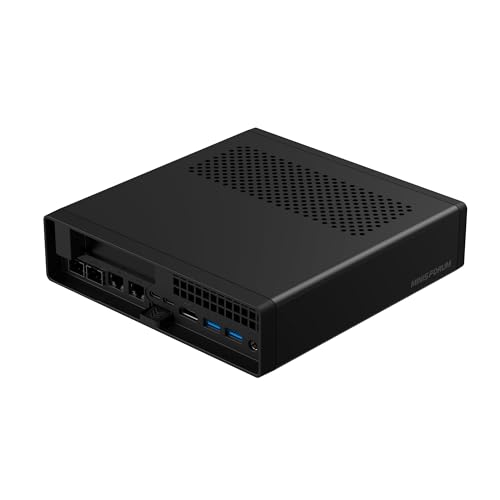
- Smallest verified footprint in this guide: Minisforum MS-A2 Mini Workstation, Ryzen 9 HX, PCIe x16 Slot, Dual 10G SFP+ — Check on Amazon
- AtomMan G7 Ti Mini PC, Core i9-14900HX, RTX 4070 Laptop GPU, 32GB DDR5, 1TB SSD — Check on Amazon
- Dell 27 All-in-One EC27250, Core 7 150U, MX570A, 32GB DDR5, 1TB SSD, Windows 11 Pro — Check on Amazon
- Skytech Omega Gaming PC, Ryzen 7 7700X, RTX 4070 Super, 32GB DDR5, 1TB NVMe, White — Check on Amazon
See 2 more Amazon options
- MSI Codex Z2 Gaming Desktop, Ryzen 7 8700F, RTX 5070, 32GB DDR5, 2TB SSD — Check on Amazon
- Thermaltake LCGS View i4770 Gaming Desktop, i7-14700KF, RTX 4070, 32GB DDR5 5600, Liquid-Cooled — Check on Amazon
Read the full guide ↓
Disclosure: As an Amazon Associate, reviewstook.com earns from qualifying purchases. Links to Amazon on this page are affiliate links; they cost you nothing extra. Listing details such as price and availability change often, so check the current Amazon listing before you buy.
A small home office changes what a good PC purchase means. In a spare bedroom, a studio corner or a desk wedged between a wardrobe and a wall, the machine’s speed matters less than where it physically lives: whether it eats the work surface, whether its cables can reach, whether its heat has anywhere to go, and whether you will still be able to open it in five years without moving furniture. This guide takes the six verified $1,500-class home office machines from our main guide and re-grades every one of them as an installation — footprint first, specifications second.
One honesty note before the rankings, because it shapes everything below. Fifteen hundred dollars is workstation money, and if your work is documents, email, browser tabs and video calls, a good $800 home office PC already does all of it; shrinking the room does not change that arithmetic. What the extra money buys — and what this guide grades — is creation capability in a constrained space: a discrete graphics card, 32GB of memory with a road upward, and fast storage, packaged either as a mini PC that disappears, an all-in-one that replaces a monitor, or a tower that has to be exiled to the floor. A second honesty note concerns measurements. Only one machine in this set has a verified volume in the research behind this guide — the MS-A2, at 1.78 liters — so that is the only numeric size printed here. Everything else is graded by form-factor class, and where a listing’s dimensions or a mounting option would decide your purchase, the reviews tell you to take the figure from the live listing rather than trusting a number we could not verify. Measure your space against the seller’s own specification, not against our prose.
In this guide
Quick Picks
In a hurry, or weighing several options side by side? Each row below names a small-space situation and the machine that suits it, with a link to the listing.
| Your situation | Pick | Why it stands out | Link |
|---|---|---|---|
| Least desk space, most machine | Minisforum MS-A2 Mini Workstation | The only verified volume here — 1.78 liters — with a PCIe slot and memory to 96GB inside | Check on Amazon |
| Small desk, real graphics card | AtomMan G7 Ti Mini PC, i9-14900HX, RTX 4070 Laptop | A slim upright slab with a discrete GPU that stands at the desk’s edge or behind a monitor | Check on Amazon |
| No separate box at all | Dell 27 All-in-One EC27250, 32GB, 1TB, Windows 11 Pro | The computer is inside the 27-inch screen — one object, one power cable; check price on Amazon | Check on Amazon |
| Room for one floor tower | Skytech Omega, Ryzen 7 7700X, RTX 4070 Super, 32GB, 1TB | The strongest creation tower here, with a published 750W Gold PSU; check price on Amazon | Check on Amazon |
| Floor tower, newest GPU, most storage | MSI Codex Z2, Ryzen 7 8700F, RTX 5070, 32GB, 2TB | RTX 5070 and a 2TB drive — but the price swings hard; check price on Amazon | Check on Amazon |
| Small room that must stay quiet | Thermaltake LCGS View i4770, i7-14700KF, RTX 4070 | Liquid cooling moves tower heat with less fan noise; buy only when the price on Amazon checks within budget | Check on Amazon |
How These Picks Were Chosen
The six machines are the same verified set as our main $1,500 home office guide — same ASINs, same specifications — re-ranked on installation criteria instead of raw capability. Every machine is a real Amazon listing positioned in this budget class in the United States; check price on Amazon for the current figure, because where a listing spends much of the year above budget, two picks remain explicitly deal-only, labeled that way everywhere they appear. Nothing here was invented to fill a size category: if a small machine did not belong in this tier, it does not appear.
The grading itself works through five installation questions, in the order a small room asks them. First, form-factor class and footprint: what shape is the machine, and how much desk, shelf or floor does that shape honestly consume? Second, placement freedom: can it live behind a monitor, stand at a desk edge, sit on a shelf — or does it demand floor space beside the desk? Third, the power supply’s address: a mini PC’s external adapter is a second object that needs a home of its own, while a tower’s internal supply trades that problem for a thicker power cable and a fixed position near a socket. Fourth, the cable drop: how many cables run from the machine to the desk, how far do they fall, and does the machine’s position make that run tidy or a permanent snag? Fifth, heat and air: every machine here exhales warm air, small rooms warm up faster than large ones, and no pick in this guide — mini, all-in-one or tower — belongs inside a sealed cabinet, a closed cupboard or a drawer, however neatly it fits. A cabinet with a door is a storage solution for books, not for a working computer.
On measurements, the discipline is strict. The MS-A2’s 1.78-liter volume is documented in the research behind this guide, so it is printed. No other pick has a verified dimension, volume, weight or noise figure in that research, so none is printed — the G7 Ti is described as the slim vertical slab its listing shows, the towers as standard towers, the Dell as a 27-inch screen, and readers are routed to the live listings for exact figures before ordering. The same discipline applies to mounting: no VESA or wall-mount claim is made for any pick here, because none is documented for these listings in the underlying research. If mounting a mini behind your monitor is the plan, confirm the bracket on the live listing first — and if it is not offered, a small shelf behind the monitor achieves the same disappearance without a drill.
Measure Before You Buy: The Five-Step Checklist
Work through these five steps with a tape measure before ordering anything in this guide. They take ten minutes and they prevent the single most common small-space failure: a machine that performs beautifully and fits nowhere.
Step 1 — Measure the spot. Decide where the machine will actually live — desk corner, shelf, floor beside the desk, behind the monitor — and measure that space in all three dimensions, including the depth most people forget. For a tower, measure the floor patch and the clearance above it, not the desk. For the Dell all-in-one, measure for a 27-inch screen: the screen is the footprint, and it also needs viewing distance, so a shallow desk can fail this pick even though it has no separate box at all.
Step 2 — Confirm ventilation clearance. Whatever spot you measured needs open air around the machine’s vents — a hand’s width of breathing room on the intake and exhaust sides is the working rule, and more for the towers under sustained creation loads. If the only spot that fits is an enclosed cabinet, a lidded box or a drawer, stop here: no pick in this guide is cleared for sealed placement, and the honest small-space answer is a mini on an open shelf, not a tower in a cupboard slowly cooking itself.
Step 3 — Give the power supply an address. The two minis draw power through external adapters, and an adapter is a brick-sized second object that will live on your floor or desk whether you plan for it or not — decide now whether it sits behind the monitor, under the desk or in a cable tray, and confirm the arrangement on the live listing before ordering. The towers and the all-in-one carry their supplies internally, which removes the brick but fixes the machine within power-cable reach of a socket. Either way, the supply’s location is part of the installation, not an afterthought.
Step 4 — Walk the cable drop. Count what must run between the machine and your hands: display cables, keyboard, mouse, webcam, network. A mini behind the monitor makes most of those runs a few inches; a tower on the floor makes every one of them a drop of a meter or more, which means longer cables, a route that does not cross your foot space, and slack for the day you pull the machine out to open it. If you run multiple monitors, check the pick’s verified outputs in its review below — and for the towers, check the live listing’s photos, because the fitted graphics card brand varies by batch and the port mix varies with it.
Step 5 — Only then, order. With the spot measured, the air confirmed, the brick addressed and the cable run walked, check the live listing one final time: the exact model number (two picks in this guide have sibling listings that are different machines), the current price on Amazon against this guide’s budget, and the listing’s own dimension line against your Step 1 numbers. Then order. Every return caused by a machine that did not fit was preventable at this step, for free.
The 6 Best Home Office PCs for Small Spaces Under $1,500
Minisforum MS-A2 Mini Workstation — Ryzen 9 HX, PCIe x16 Slot, Dual 10G SFP+
Who it suits: Technical home workers in genuinely tight rooms — developers, homelab and network people, data and VM users — who want a workstation that can vanish behind a monitor yet still be opened, upgraded and expanded years later.
On installation, this is the easiest machine in the guide to place and the only one whose size can be stated as a verified number: 1.78 liters. A box that small does not need a desk allocation so much as a decision — behind the monitor, on a shelf, at the back of the desk — and any of those leaves the entire work surface free for the work itself. The cable story matches the footprint: its display outputs are verified from the listing itself, HDMI plus two USB-C outputs rated 8K@60Hz, so a multi-monitor desk runs from the box’s own ports with short, direct drops and no dock adding a second object to the arrangement. Networking is the one place the installation grows teeth: dual 10-gigabit SFP+ ports on an Intel X710 controller plus dual 2.5-gigabit LAN make this the pick that can anchor a small room’s whole network — a NAS, a switch, fast storage — which concentrates cabling in one place instead of spreading it across the room. Plan that cable bundle’s route when you place the box, because it will be the thickest drop in the setup.
Inside, the specification is why the smallness is not a compromise: a 16-core Ryzen 9 HX processor (the family spans the 8945HX and the newer 9955HX, a Zen 5 part boosting to 5.4GHz), two DDR5 SO-DIMM slots taking memory to 96GB, three M.2/U.2 storage positions, and a PCIe x16 slot (PCIe 4.0, x8 electrical) that accepts a low-profile graphics card or another expansion card later — a combination no other machine here offers at any size. Pricing comes in two shapes, and the distinction matters: the barebone version, with no memory, storage or operating system, is the lower-cost entry point — check price on Amazon — while the configured 32GB/1TB version sits higher in the tier as a premium, ready-to-run option; check price on Amazon for both before comparing them. The barebone is the bargain only if DDR5 SO-DIMMs and an NVMe drive already sit on your shelf; memory and storage prices have been inflated by an ongoing shortage, and completing the kit with new parts can erase the saving entirely. Heat and noise are the honest costs of the density: reviewers have noted audible fan noise under sustained load and relatively high idle power draw, with limited airflow around the PCIe area — so give it open air on a shelf rather than a closed nook, and do not buy it as a silent appliance for a room where a microphone sits a meter away.
- Verified 1.78-liter volume — the only documented footprint in this guide, and the smallest.
- HDMI plus two USB-C display outputs verified from the listing: short cable drops, no dock required.
- A PCIe x16 slot, memory to 96GB and three storage positions inside a mini PC.
Honest limitation: Integrated graphics only as shipped — GPU creation work requires a further low-profile card purchase — and it is audible under sustained load, with a barebone price that only wins if you already own the parts to complete it.
Choose it if your desk space is the scarcest resource you own and your work is CPU-led. Skip it if you need discrete graphics on day one in a small box (that is the G7 Ti below) or the room doubles as a recording space.

AtomMan G7 Ti Mini PC — Core i9-14900HX, RTX 4070 Laptop GPU, 32GB DDR5, 1TB SSD
Who it suits: Desk-space minimalists whose work still needs a real discrete GPU — the editor, 3D hobbyist or AI tinkerer whose small office has no floor patch and no desk corner to surrender to a tower.
The installation idea is different from the MS-A2’s: not a cube that hides, but a slim vertical slab that stands — at the desk’s edge, beside the monitor, behind it — occupying a strip of depth rather than a block of surface. No verified volume is documented for this listing in the research behind this guide, so none is printed; judge the shape from the listing and measure your intended slot against the seller’s dimension line, per Step 1 of the checklist. What the shape carries is remarkable: a Core i9-14900HX with 24 cores boosting to 5.8GHz, an NVIDIA RTX 4070 laptop GPU running at up to 140W, 32GB of DDR5-5600 in two SO-DIMM slots with a road to 96GB, a 1TB SSD with a second slot waiting, and Wi-Fi 7. Display outputs are verified from the listing — HDMI 2.1 plus USB4 — so two external monitors run from its own ports with short drops, and the power adapter, as with any mini, needs its planned address behind or beneath the desk rather than a permanent residence on top of it. The configured 32GB/1TB machine sits above the barebone version in pricing, with both positioned inside this budget class — check price on Amazon for the current figure on each.
One misunderstanding has to be cleared away first, because the product name invites it: the RTX 4070 inside this machine is the laptop part, not the desktop card. It carries 8GB of memory against the desktop card’s 12GB, and even at a healthy 140W it sits a clear step below the desktop part in sustained work — the towers below are faster creation machines, full stop. What the difference buys is the shape, and in a small room that can be the right trade. The thermal reality of the shape deserves equal plainness: the cooling runs through laptop-style fans that will be audible in a quiet room under render loads, and a slim slab standing in still air needs its vents unobstructed — do not slot it between books or push it flush against a wall and expect the specification to survive. Serviceability is the middle path: memory and both SSD slots are user-accessible, which is more than most minis allow, but the CPU and GPU are fixed for the machine’s life.
- A real discrete GPU in a slim upright mini — the least desk surrendered for this graphics class.
- HDMI 2.1 plus USB4 display outputs verified from the listing; Wi-Fi 7 fitted.
- Memory to 96GB and a second SSD slot, both user-accessible.
Honest limitation: The GPU is the 8GB laptop part, a step below the desktop 4070 in the towers below, and neither it nor the CPU can ever be replaced; sustained loads are audible in a quiet room.
Choose it if the desk is small, the work is GPU-led, and you have measured the standing slot it needs. Skip it if you have floor room for a tower — the same money buys the faster desktop card and a genuine upgrade path.

Dell 27 All-in-One EC27250 — Core 7 150U, GeForce MX570A, 32GB DDR5, 1TB SSD, Windows 11 Pro
Who it suits: The tidy-desk professional in a small room whose work is communication-heavy — calls, documents, browser, light photo work — and who would rather install one elegant object than a box, a monitor and the cables between them.
As an installation, this is the simplest machine in the guide: there is no box. The computer lives inside a 27-inch Full HD touch screen, so the footprint question collapses into a screen question — desk depth for the panel, viewing distance for your eyes, one power cable, and whatever peripherals you add. In a room where every surface is spoken for, deleting the separate PC entirely is a legitimate spatial strategy, and the cable drop shrinks to almost nothing. The configuration documented here (model DEC27250-7277WHT-PUS) runs a Core 7 150U with 32GB of DDR5 memory and a 1TB SSD, ships Windows 11 Pro, and carries Dell Onsite Service in the listing — the only pick here whose support story is a technician at your door rather than a box in the mail, which matters more in a small home office than anywhere, since there is no IT cupboard to borrow a spare from. Check price on Amazon for this configuration — its pricing has tended to be steadier than anything else in this guide.
Two cautions, one about the format and one about this listing family. The format caution: the screen, computer and power supply age as a single object, serviceability is limited compared with any tower, and when a major part fails out of warranty the whole unit is the repair — buy it as a five-year appliance with a service contract, not as a platform. Its graphics need the same clarity: the NVIDIA GeForce MX570A with 2GB of GDDR6 is entry-level acceleration that smooths photo editing, video-call effects and light creative work; it is not a creation engine in the class of the RTX cards elsewhere in this guide, and no placement elegance changes that. The listing caution matters more: Dell sells sibling configurations of this same EC27250 family under different listings at higher, premium positioning with different specifications — match the full model number DEC27250-7277WHT-PUS and the 32GB/1TB/Windows 11 Pro specification before paying, because the family name alone identifies neither this machine nor its price.
- No separate box at all — the tidiest possible installation for a small room.
- Ships with 32GB of memory, a 1TB SSD and Windows 11 Pro, backed by Dell Onsite Service.
- Comfortably positioned inside this budget tier without a deal-day exception — check price on Amazon.
Honest limitation: The MX570A is entry-level acceleration, not a creation GPU; the all-in-one ages as one sealed unit with limited serviceability; and sibling configurations share the family name at higher prices, so the model number must be matched exactly.
Choose it if your work is calls, documents and light creative tasks and the desk itself is the priority. Skip it if you render, edit video seriously or want parts you can replace — every other pick in this guide serves that better.

Skytech Omega Gaming PC — Ryzen 7 7700X, RTX 4070 Super, 32GB DDR5, 1TB NVMe (White)
Who it suits: Home workers in small rooms whose “office” work has quietly become creation work — video editing, photo batches, 3D or CAD on the side, local AI tools — and who have exactly one floor patch to give a machine, in exchange for a standard tower they can repair and upgrade for years.
Grade this one as a relocation, not a footprint: a standard tower does not belong on a small desk, and this guide will not pretend otherwise. It belongs on the floor beside or beneath the desk, which in a small room is a genuine spatial bargain — the work surface stays entirely clear, and what the machine asks in return is a floor patch with open air around it, a longer cable drop to the desk, and the discipline never to push it against a wall or into the corner where the room’s heat collects. Under sustained creation loads a desktop RTX 4070 Super tower exhales a meaningful amount of warm air, and in a small room you will feel the room warm with it; place it where that air can leave — not inside a desk’s enclosed pedestal, not behind a curtain of cables — and the arrangement works for years. The parts justify the floor patch: a Ryzen 7 7700X eight-core desktop CPU, a desktop RTX 4070 Super with 12GB of GDDR6X memory, 32GB of DDR5 and a 1TB Gen4 NVMe drive. One detail this guide weights heavily: Skytech publishes the power supply, 750W Gold. A published wattage from a named tier is what separates a tower you can grow — a bigger graphics card in four years asks first about the power supply — from a tower you can only replace.
The price is the condition, and it is stated at full size. The configuration is model ST-OMEGA2-1124-W-AM — check price on Amazon before buying. When it checks within budget, nothing else here matches it for creation value: the complete desktop 4070 Super class in a tower at this tier. Its pricing also spends long stretches far above budget, so the recommendation is explicitly price-conditional: when the live price on Amazon is at or under the $1,500 budget it earns its floor patch; above that, wait, or take one of the minis above and keep the floor. Two working notes. The exact graphics card brand fitted can vary between build batches, which means the rear port mix can vary too — if your desk runs multiple monitors, walk the cable drop against the listing photos before ordering, per Step 4. And it ships Windows 11 Home; if your employer requires Pro features such as domain join or BitLocker management, budget for the upgrade path rather than discovering it on day one.
- Desktop RTX 4070 Super 12GB — the strongest creation graphics in this guide.
- A 750W Gold power supply with its wattage published — headroom you can plan an upgrade around.
- Standard tower parts throughout, in exchange for one floor patch instead of desk space.
Honest limitation: The recommendation lives and dies by the sale price — at its regular positioning it sits well over budget — and the fitted GPU brand, and therefore its exact port mix, varies by batch.
Choose it if you do GPU-accelerated work, you have the floor patch with open air, and you can buy when the price on Amazon checks at or under the $1,500 budget. Skip it if your work is documents and calls only, the only available spot is enclosed, or the listing is sitting well over budget today.

MSI Codex Z2 Gaming Desktop — Ryzen 7 8700F, RTX 5070, 32GB DDR5, 2TB SSD
Who it suits: Buyers who want the newest graphics generation and the most storage in the box — the video editor with a growing footage library, the designer whose project folders eat drives — and who have a floor spot for a mainstream tower from a mainstream brand.
The installation grading matches the Skytech’s class: a standard tower, graded as a floor relocation. It asks for the same things — a floor patch with breathing room, a cable drop of a meter or more to the desk, open air for the exhaust under sustained loads — and it gives back the same thing, a work surface with nothing on it but the monitors. Where it differs from the Skytech is what the floor patch holds. The configuration documented here — model A8NVP-436US — pairs a Ryzen 7 8700F (eight cores, sixteen threads, boost to 5.0GHz) with an RTX 5070, the current Blackwell generation, plus 32GB of DDR5 and a 2TB SSD: double the storage of the Skytech, which is the specification that decides real working life once a year of 4K footage, photo libraries or game-sized design assets lands on the drive — and in a small room, storage inside the box is worth more than storage in an external enclosure competing for the same scarce shelf. For creation work the 5070 brings the newest media engines and AI acceleration NVIDIA sells at this class, and the tower format keeps the standard-parts promise: memory, storage and graphics all remain replaceable down the line.
The caution deserves the same prominence as the specification: no listing in this guide swings like this one. When it checks within budget on Amazon, it is strong value for an RTX 5070 tower — yet it also spends long stretches far above the line. Buy it the way volatile listings have to be bought: set a price alert tied to the $1,500 budget, order the day it triggers, and refuse the over-budget version of the same machine no matter how persuasive the specification looks. Two verification notes belong with it. MSI sells several Codex Z2 configurations under the same name, so match the model number A8NVP-436US and the RTX 5070 / 2TB specification in the listing before paying — sibling configurations are different machines at different prices, and in a small room a wrong tower is a heavier mistake than a wrong mini. And one specification is simply absent: the available listing material publishes no power supply wattage, so this guide claims none. If a graphics upgrade is part of your plan, get that figure from the live listing or from MSI before ordering — the whole upgrade path hangs on it.
- An RTX 5070 — the current Blackwell generation, with its up-to-date media and AI acceleration.
- 2TB SSD as shipped: the most internal storage here, which spares small-room shelf space.
- A mainstream-brand tower in the standard format, replaceable part by part.
Honest limitation: The price is a moving target — it swings between within-budget and well over budget — and with the power supply wattage unpublished, the listing alone cannot tell you how much upgrade headroom the tower has.
Choose it if you want the newest GPU and 2TB in the box, your floor spot has open air, and you are willing to buy on a price alert. Skip it if the purchase cannot wait for an alert to fire, or you are unwilling to buy a tower whose PSU the listing does not document.

Thermaltake LCGS View i4770 — Core i7-14700KF, RTX 4070, 32GB DDR5 5600, Liquid-Cooled
Who it suits: Noise-sensitive professionals in small rooms — recordists, call-heavy consultants, anyone whose microphone shares a few square meters with the PC — who want desktop RTX 4070 power without fan noise intruding on calls and recordings.
In a small room, acoustics are an installation property: there is no far corner to banish a loud machine to, because every corner is near the desk. That is the case for this tower’s floor patch. The specification is a strong mainstream creation build — a Core i7-14700KF with twenty cores, an RTX 4070 desktop card with 12GB, 32GB of DDR5-5600 (the fastest published memory speed in this guide) and a 1TB NVMe drive — wrapped in Thermaltake’s LCGS build with liquid cooling. The cooling is the reason it is here. Under the sustained, hours-long loads creation work applies — an export grinding away during a client call, a render queue running through the afternoon — a liquid-cooled tower holds its speed with less fan noise than an air-cooled box working at the same output. Placement still matters: a radiator moves heat rather than deleting it, so the tower needs its exhaust path open to the room, not sealed into a desk pedestal or a cupboard — the sealed-cabinet refusal applies to this pick exactly as it does to the minis, and a liquid loop suffocating in a closed box is worse than an air cooler in the open. Give it the floor patch, the open air and the cable drop every tower here needs, and it is the quietest way to keep desktop-class power in a room that is also a studio.
No pick in this guide carries a stricter condition. Its regular positioning sits over budget as a matter of routine — check price on Amazon — and its claim to a place here rests on those times when it does check within budget, sold and shipped by Amazon. The rule therefore admits no exceptions: when the price on Amazon is at or below the $1,500 budget it is a legitimate, distinctive purchase; above that, it stops being a $1,500 PC, and the Skytech Omega — same GPU class, a published PSU — becomes the right answer. One long-term note that liquid cooling asks of any owner: an all-in-one liquid loop is a sealed maintenance item with a finite service life measured in years, where an air cooler is effectively permanent; budget a replacement cooler into a seven-year ownership plan, and this machine’s quiet years are a fair trade.
- Liquid cooling keeps sustained work quiet — the guide’s pick for rooms that double as studios.
- A 20-core i7-14700KF beside a desktop RTX 4070 12GB for creation workloads.
- 32GB of DDR5-5600 — no other pick here publishes a faster memory speed.
Honest limitation: Deal-only without qualification — its typical positioning is over budget, so the recommendation exists only when the price on Amazon checks within budget — and a liquid loop is a finite-life component in a way an air cooler never is.
Choose it if silence under load is a working requirement in your small room and you can catch it when the price on Amazon checks within budget. Skip it if the live price is well over budget, or you would rather have air cooling’s set-and-forget permanence.

Comparison Table
| Product | Form | Installation verdict | Link |
|---|---|---|---|
| Minisforum MS-A2 Mini Workstation | Mini PC | Verified 1.78L; disappears behind a monitor or onto a shelf; plan the network cable bundle | Check on Amazon |
| AtomMan G7 Ti Mini PC | Mini PC | Slim upright slab at the desk’s edge; vents must stay unobstructed; adapter needs an address | Check on Amazon |
| Dell 27 All-in-One EC27250 | All-in-one | No box at all; the 27-inch screen is the footprint; one power cable | Check on Amazon |
| Skytech Omega, 7700X, RTX 4070 Super | Tower | Floor relocation with open air; longest cable drop; strongest creation power in the guide | Check on Amazon |
| MSI Codex Z2, 8700F, RTX 5070 | Tower | Floor relocation; 2TB inside spares shelf space; buy on a price alert | Check on Amazon |
| Thermaltake LCGS View i4770 | Tower | Floor relocation with the radiator’s exhaust path open; quietest under sustained load | Check on Amazon |
How to Choose a Home Office PC for a Small Space Under $1,500
- Start by firing the budget, if your work allows it. Documents, email, browser work, spreadsheets and calls are fully served by the $800 tier — see Best Home Office PC Under $800 — and a smaller room does not change that. What justifies $1,500 is a second job running alongside the office work — creation, computation, virtualization. If you cannot name yours, spend the difference on the monitor and chair instead.
- Decide what the machine replaces. In a small room every pick here deletes something: the minis delete the tower, the all-in-one deletes the separate monitor as well, and the towers delete nothing — they move to the floor. Choose by what your room can actually surrender, then compare shapes with Best Mini PC Under $1500 and Best All In One PC Under $1500.
- Trust only documented dimensions — including ours. The MS-A2’s 1.78 liters is the one verified volume in this guide. For every other pick, take the dimension line from the live listing and set it against your Step 1 measurements; a form-factor description, however vivid, is not a measurement.
- Grade the placement, not the product photo. Listing photos float machines in empty white space. Your room has skirting boards, radiators, door swings and exactly one good socket. Walk the five-step checklist for the specific pick you intend to buy, in the specific spot you intend to use.
- Never solve a space problem with a sealed cabinet. Every machine here needs open air, the towers most of all under sustained loads. If the spot is enclosed, the answer is a different spot — a shelf, a stand, behind the monitor — never a door closed on a working computer.
- Match the GPU to the second job, honestly. Discrete graphics with real memory is what video editing, 3D, CAD and local AI actually consume: the towers carry the desktop RTX 4070 class with 12GB, the G7 Ti carries the 8GB laptop 4070, and the MS-A2 carries none until a card goes into its slot. Readers whose second job is heavier than office-plus should also weigh Best Workstation PC Under $1500.
- Count storage positions, not just terabytes. A 2TB drive in the box (the MSI) is convenient; a spare slot (the G7 Ti) or three storage positions (the MS-A2) is freedom — and in a small room, internal growth beats an external enclosure competing for shelf space.
- Price the barebone honestly, if you go that way. A barebone kit is a bargain only when the parts to complete it are already on your shelf. Add up memory, drive and operating system at current prices — check price on Amazon for the parts — in a shortage market that has inflated all three, before concluding the kit beats the configured machine.
- Check which Windows you are actually getting. Five of these machines ship Windows 11 Home and one — the Dell — ships Pro. When an employer’s VPN or compliance rules demand Pro features, that single listing line is worth real money and a saved afternoon.
- Check the price on Amazon for every pick and obey the budget. Prices at this tier move often between one month and the next. Check the live price on Amazon before ordering — and a recommended machine at the wrong price is simply the wrong machine, whatever room it was destined for.
Common Buying Mistakes
- Measuring the desk and forgetting the floor, the depth and the door swing. The spot is three-dimensional; measure all of it, including the clearance above a floor tower.
- Closing a cabinet door on a working PC. It fits, it looks tidy, and it slowly cooks — every pick in this guide needs open air, without exception.
- Trusting a rendered product photo for size. Only documented dimensions bind a purchase; in this guide that is exactly one number, the MS-A2’s 1.78 liters, and everything else comes from the live listing.
- Reading a laptop GPU as a desktop GPU. Inside the G7 Ti sits the 8GB laptop RTX 4070; inside the towers sit 12GB desktop cards. The shared name conceals two different machines.
- Forgetting the power adapter is furniture too. A mini PC’s brick needs an address of its own; discovering that on delivery day is how bricks end up living permanently on the desk they were bought to clear.
- Paying a volatile listing’s typical over-budget price. Some picks here sit well above budget for long stretches; each of those is a recommendation only when the price on Amazon checks within budget, never at its typical over-budget positioning.
- Buying the family name instead of the model number. The EC27250 and Codex Z2 names each cover sibling machines with different specifications at different prices; the model number is the only identity that counts.
- Assuming a barebone saves money. Price a full completion of the MS-A2 barebone kit with new memory and storage at current shortage-era prices first — check price on Amazon for the parts — owners of spare parts win that arithmetic; buyers of new parts frequently lose it.
Final Recommendation
- Least space, most machine: Minisforum MS-A2 Mini Workstation.
- Tiny desk, genuine graphics card: AtomMan G7 Ti Mini PC.
- No box at all, tidy desk: Dell 27 All-in-One EC27250.
- One floor patch, strongest creation tower: Skytech Omega (check price on Amazon — buy only within the $1,500 budget).
- Current-generation GPU and 2TB, for patient buyers: MSI Codex Z2 (on a price alert).
- Small room that must stay quiet: Thermaltake LCGS View i4770 (check price on Amazon — only when within budget).
Our top two for a small room are the Minisforum MS-A2, because it is the only machine here with a verified footprint — 1.78 liters — that also behaves like a platform, with 96GB of memory headroom, three storage positions, a PCIe slot and networking no tower in this guide matches, and the AtomMan G7 Ti, because it is the only way to keep a genuine discrete GPU in a room with no floor patch and no desk corner to spare. Between them they frame the small-space decision: CPU-led work in a box that disappears, or GPU-led work in a slab that stands aside. The towers remain the right answer when one floor patch exists and the work is serious creation — the Skytech when its price on Amazon checks within budget first among them. If your small office leans toward presenting and streaming, see Best Home Office PC For Streaming Under $1500; first-time buyers at this level should start with Best Home Office PC For Beginners Under $1500; and anyone whose creation work is really gaming in disguise will find the same towers ranked for play in Best Gaming PC Under $1500. Measure the spot, confirm the air, address the brick, walk the cables — then order.
Frequently Asked Questions
How small is the smallest PC in this guide, really?
The MS-A2 is documented at 1.78 liters — the only verified volume in the research behind this guide, and the only numeric size printed here. The G7 Ti is a slim vertical slab by form-factor class, and the towers are standard towers; for those picks, take exact dimensions from the live listings and set them against your own measurements rather than trusting any guide’s adjectives, ours included.
Can I put one of these PCs inside a cabinet or media unit?
No — not any of them, and this is the guide’s firmest installation rule. Every machine here exhausts warm air and draws cool air in; a sealed cabinet defeats both, and the towers under sustained creation loads suffer first and worst. An open-backed unit with generous clearance is a different matter from a closed door, but if the spot has a door that shuts, choose a different spot.
Can I mount one of the mini PCs behind my monitor?
Possibly — but this guide makes no mounting claim for either mini, because no VESA or bracket provision is documented for these listings in the underlying research. Check the live listing for a mount or bracket before building the plan around it. If none is offered, a small shelf or stand behind the monitor achieves the same disappearance with no drilling and better airflow.
Is a $1,500 PC overkill for a small home office?
For documents, email, browsing and calls: yes, completely — an $800 machine performs those identically, in exactly the same small room. The budget becomes rational when a second job appears beside the office work: video or photo production, 3D or CAD, software development with virtual machines, local AI tools, or a render queue that should run while you work. Buy the second job and the placement, not the number. Readers whose second job is real but smaller should also weigh Best Home Office PC Under $1200.
How many monitors can these machines run?
Only verified counts are stated in this guide. The MS-A2’s listing specifies HDMI and two USB-C display outputs, which is three external monitors driven from the box itself. The G7 Ti specifies HDMI 2.1 and USB4 — two monitors. With the Dell, the display question answers itself: the 27-inch panel is the monitor, and the computer lives behind it. On the towers, the graphics card’s outputs decide the count and the fitted card brand varies by batch, so verify against the live listing’s photos and specification before ordering.
Where does the heat go in a small room?
Into the room — there is nowhere else. A tower under a sustained render will warm a small room noticeably, and liquid cooling relocates that heat to a radiator rather than reducing it. Placement is the mitigation: exhaust paths open to the room, never into an enclosed pedestal, and the machine positioned so its warm air is not rising straight into your seating position. If the room already runs hot, the minis’ smaller thermal output is a genuine, if unquantified, advantage.
Why are two picks labeled deal-only?
Because most of the year, their listings live above this budget, at premium over-budget positioning. Against that, each does at times check inside the budget line on Amazon — and the recommendation attaches to those within-budget moments alone. Check price on Amazon, set an alert, buy when it fires, or choose a different pick.


