Where to buy
Check the latest price, availability and delivery on Amazon. Orders are placed on Amazon. We may earn a commission from qualifying purchases.
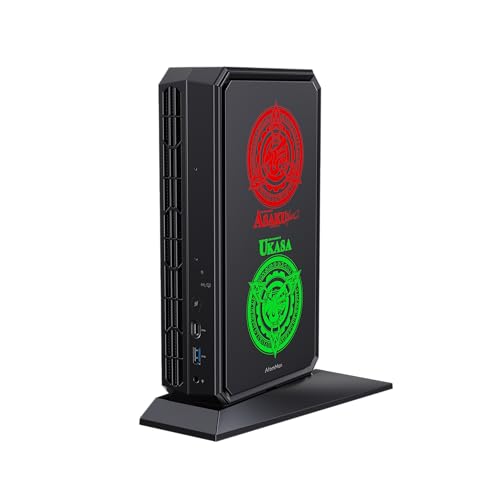
- Best for 1440p gaming in this guide: Minisforum AtomMan G7 Pt Mini PC, Ryzen 9 7945HX, RX 7600M XT, 32GB RAM, 1TB SSD — Check on Amazon
- Beelink SER9 Pro Mini PC, Ryzen AI 9 HX 370, 32GB RAM, 1TB SSD — Check on Amazon
- Minisforum UM890 Pro Mini PC, Ryzen 9 8945HS, 32GB RAM, 1TB SSD — Check on Amazon
- Apple Mac mini Desktop Computer with M4 chip, 24GB Unified Memory, 512GB SSD — Check on Amazon
See 2 more Amazon options
- Minisforum MS-01 Mini Workstation, Core i9-13900H, 32GB RAM, 1TB SSD — Check on Amazon
- Beelink SER8 Mini PC, Ryzen 7 8745HS, 32GB RAM, 1TB SSD — Check on Amazon
Read the full guide ↓
Disclosure: As an Amazon Associate, reviewstook.com earns from qualifying purchases. Links to Amazon on this page are affiliate links; they cost you nothing extra. Listing details such as price and availability change often, so check the current Amazon listing before you buy.
This keyword is really two searches wearing one coat: a home office PC, and 1440p gaming. Being honest about how those two halves fit together matters more here than in most guides, because the machines that dominate the home-office category — compact mini PCs built for documents, calls and browser work — were not designed with 1440p gaming in mind, and only some of them can honestly do it. So here is the whole verdict up front. Of the six machines below, exactly one has a discrete graphics card, and it is the only pick that renders modern games at native 1440p as a matter of course. One more, with the strongest integrated graphics in the group, renders lighter and older titles natively at 1440p and upscales the rest. Three are 1080p-render machines: they drive a 1440p monitor beautifully for work, and they fill that same screen with games rendered at 1080p and upscaled — a good-looking result that is not the same thing as 1440p gaming, and this guide will not call it that. The sixth is a workstation that should not be bought for gaming at all. If your evenings matter as much as your workdays, read the ranking below as a gaming ranking laid over an office shortlist, because that is what it is.
One distinction runs through every review and is worth learning before you spend anything: the difference between the resolution a game is rendered at and the resolution your monitor displays. Every pick here can display a 1440p desktop — crisp text, roomy spreadsheets, sharp video. Rendering is the expensive part, and it is where these machines separate. Where a pick relies on upscaling, the guide says which upscaler it actually has: the Radeon-based picks use AMD’s FSR, the Mac uses whatever upscaling a given game provides on Apple silicon, and — to head off the most common wrong assumption in this category — none of the six machines has an NVIDIA RTX graphics processor, so none of them offers DLSS. Prices change often, so check the current price on Amazon for each pick before you buy. Below: the quick picks re-ranked for the gaming half of the keyword, six detailed reviews, a comparison table, monitor-pairing guidance, the mistakes this keyword invites, and the questions buyers actually ask.
In this guide
Quick Picks
Short on time, or comparing several options at once? Each row below names a buyer type and the machine that suits it, with a link to the listing. The order here is the 1440p-gaming order, which is not the order an office-only buyer should use.
| Buyer type | Pick | Why it stands out | Link |
|---|---|---|---|
| Best for 1440p gaming | Minisforum AtomMan G7 Pt, Ryzen 9 7945HX, RX 7600M XT | The only discrete GPU here — native 1440p rendering in lighter titles, FSR upscaling for the rest | Check on Amazon |
| Best integrated graphics | Beelink SER9 Pro, Ryzen AI 9 HX 370, 32GB, 1TB | Radeon 890M: native 1440p in esports and older games, upscaled 1440p beyond that | Check on Amazon |
| Best upgrade path | Minisforum UM890 Pro, Ryzen 9 8945HS, 32GB, 1TB | 780M today, an OCuLink port for an external GPU later; memory to 96GB | Check on Amazon |
| Best for Mac users | Apple Mac mini, M4 chip, 24GB, 512GB | Excellent 1440p desktop and light gaming from the Mac catalogue; the quietest box here | Check on Amazon |
| Best value | Beelink SER8, Ryzen 7 8745HS, 32GB, 1TB | 780M gaming at 1080p-render level, positioned lower in this tier — room in the budget for the 1440p monitor | Check on Amazon |
| Best workstation, not a gaming pick | Minisforum MS-01, Core i9-13900H, 32GB, 1TB | Dual 10GbE and vPro for home-lab work; its Iris Xe graphics are not a 1440p gaming route | Check on Amazon |
How These Picks Were Chosen
The six machines are the verified set from this site’s home-office guide at this budget: real Amazon listings, specifications checked against maker pages and independent reviews. Nothing has been added for the gaming angle: no new product, no new specification. What changes is the grading. Each machine is judged first on the resolution it can honestly render games at, second on the upscaling it genuinely offers, and only then on the office virtues — quiet, ports, upgrade paths — that put it in the home-office set to begin with.
The upscaling discipline deserves its own paragraph, because this is where 1440p guides most often mislead. Upscaling figures are credited only where the hardware that produces them is actually present. DLSS is NVIDIA RTX technology; there is no RTX silicon anywhere in this set — the one discrete GPU is AMD, and the rest are integrated AMD or Intel graphics and Apple silicon — so DLSS is not merely absent from the reviews, it is explicitly not available on any pick here, and any buying decision that assumes it is a decision based on a feature you will not have. The four Radeon-based picks are credited with FSR, AMD’s upscaler, in general terms: it is the route they use to present a 1080p-class render on a 1440p screen, and it works well for exactly that job. The Mac mini is credited only with the upscaling individual games build in for Apple silicon, which varies title by title. Frame-generation features, where a game or driver offers them on this hardware, are treated throughout as what they are — a way of smoothing motion on the display — and never as a way of raising the resolution a game is rendered at. A pick described below as a 1080p-render machine stays one no matter how smooth its output looks.
The office filters from the base guide still apply, because the machine has to earn its desk space from nine to five. Noise counted: a home office PC sits a meter from your ears on calls all day, and the loudest machines here are labeled as such. Longevity counted: memory ceilings, storage slots and whether a configuration is fixed forever are stated in every review. And display outputs were counted physically, from documented ports — HDMI, DisplayPort, USB4 or Thunderbolt — because the monitor-pairing advice later in this guide is only as good as the ports actually fitted. Where sources disagreed about a specification, the disagreement is carried into the review openly rather than resolved by assertion.
The 6 Best Home Office PCs for 1440p Gaming Under $1,200
Minisforum AtomMan G7 Pt Mini PC — Ryzen 9 7945HX, Radeon RX 7600M XT, 32GB RAM, 1TB SSD
Who it suits: The buyer for whom the gaming half of this keyword is not decorative — someone who works at the desk all day and plays modern games on the same screen at night, and wants those games rendered at 1440p rather than merely shown on a 1440p monitor.
The G7 Pt leads this ranking for one structural reason: it is the only machine here with a discrete graphics card. The Radeon RX 7600M XT carries 8GB of its own GDDR6 memory and runs at up to 140 watts, which changes the machine’s relationship with 1440p completely. Where every other pick borrows memory and thermal headroom from its processor, this card renders on its own silicon — and at 1440p it is honestly capable: esports titles and older games render natively at the full resolution, and demanding modern games reach the panel through a mix of reduced settings and FSR upscaling from a lower render resolution. That mixture is the truthful shape of 1440p gaming at this budget, and the G7 Pt is the only pick that delivers all of it. Behind the card sits the strongest sustained multi-core CPU in the guide, the sixteen-core Ryzen 9 7945HX boosting to 5.4GHz, with 32GB of DDR5 memory upgradeable to 96GB, a 1TB SSD and a second M.2 slot, and HDMI, DisplayPort and USB4 outputs for the desk.
The caveats are the ones this pick has always carried, and the gaming angle sharpens rather than softens them. The RX 7600M XT is a laptop-class GPU in a desktop-shaped box — a genuinely capable 1440p part, but not a desktop card and not a 4K gaming route, and it should never be bought on the borrowed reputation of desktop hardware with similar names. There is no DLSS here: this is AMD silicon, so FSR is the upscaler, full stop. The power supply is a 300-watt external brick that needs a home in your cable management, and fan noise under sustained GPU load is real — acceptable in most home offices, worth weighing if you record audio in the same room. For pricing, check the current price on Amazon for the 32GB/1TB configuration, and confirm you are ordering the configured system rather than the barebone style sold in the same family.
- The only discrete GPU in the guide — 8GB of dedicated GDDR6 that renders rather than borrows.
- Native 1440p in esports and older titles; FSR upscaling carries demanding games to the same panel.
- Sixteen-core CPU, memory to 96GB and a second SSD slot — an office machine with real headroom.
Honest limitation: The GPU is laptop-class despite the desktop shape, the 300-watt brick is bulky, and it is among the louder picks under sustained load — and if your gaming is light, everything that makes it first here is money spent on a job you do not have.
Choose it if 1440p gaming is a nightly reality and you want the one machine in this set built to render it. Skip it if your play is occasional or firmly in older titles — the SER9 Pro below covers that ground more quietly and at a lower position in this tier.

Beelink SER9 Pro Mini PC — Ryzen AI 9 HX 370, 32GB RAM, 1TB SSD
Who it suits: The office-first buyer whose gaming is real but lighter — esports, strategy, older and indie titles — and who wants the strongest integrated graphics available in a quiet, sealed mini PC.
The SER9 Pro’s Radeon 890M is the most capable integrated graphics in this guide, a clear step above the 780M class that powers two other picks, and its 1440p verdict is a split one that the review will state plainly. In esports titles, older games and lighter modern releases, the 890M renders natively at 1440p — genuinely, not as a marketing stretch — and the twelve-core Ryzen AI 9 HX 370 behind it keeps the rest of the system unhurried while it does. In demanding modern games, the honest route is a 1080p render presented on the 1440p panel with FSR upscaling: visibly good, clearly labeled here as upscaled, and not native. Buyers who understand that split will be happy with this machine for years; buyers who expect the first sentence to cover every game will not, and no integrated graphics at any price in this guide changes that. Around the graphics sit 32GB of memory, a 1TB PCIe 4.0 SSD, Windows 11 Pro, and HDMI, DisplayPort and USB4 outputs driving up to three displays, all in a chassis of roughly 0.8 liters that reviewers place among the quieter machines in its class under load.
This pick sits toward the top of this budget tier, so check the current price on Amazon before you buy and confirm the live listing still fits the tier; if it has drifted above the tier, wait or take the UM890 Pro. Two specification notes travel with it. The 32GB of LPDDR5X memory is soldered — permanent for the life of the machine — and since integrated graphics share system memory, that fixed pool is also the graphics budget; a 64GB configuration exists in the range for buyers who want the extra headroom. And the maker’s material describes two M.2 storage slots while at least one detailed review lists a single slot, so confirm the layout on the live listing if a second SSD is part of the plan. There is no DLSS on this machine — it is AMD silicon throughout — and FSR is the only upscaling route its games will offer.
- Radeon 890M integrated graphics — the strongest in this guide, native 1440p in lighter titles.
- 32GB of memory and 1TB of storage fitted, Windows 11 Pro, three display outputs.
- Roughly 0.8-liter chassis with a quiet reputation under load — a proper desk citizen.
Honest limitation: Demanding games are a 1080p render upscaled to the panel, not native 1440p; the memory is soldered forever, and its live price can drift above this budget tier during market spikes, making it a check-the-live-price-first pick at the top of the tier.
Choose it if your gaming is esports-and-older at native 1440p, or upscaled beyond that, and you value quiet and compactness over a graphics card. Skip it if native 1440p in demanding new releases is the requirement — that job belongs to the G7 Pt above, or to a dedicated gaming PC.
Minisforum UM890 Pro Mini PC — Ryzen 9 8945HS, 32GB RAM, 1TB SSD
Who it suits: The heavy multitasker — three or four monitors, dozens of tabs, calls all day — who games in the evening and is willing to let the machine grow into the gaming job over time.
Graded purely on the graphics it ships with, the UM890 Pro is a 1080p-render machine: its Radeon 780M integrated graphics play modern games rendered at 1080p and present them on a 1440p screen through FSR upscaling, with esports and older titles able to run at reduced settings closer to the panel’s native resolution. That is a respectable evening workload, and it is not this pick’s whole story. What no other machine in the guide offers is a documented way out of the integrated-graphics ceiling: an OCuLink port that accepts an external GPU dock later, turning today’s office purchase into tomorrow’s genuinely 1440p-capable system without replacing the computer. Add the rest of the headroom package — memory in SO-DIMM slots upgradeable to 96GB, a second M.2 slot alongside the fitted 1TB SSD, four display outputs via HDMI, DisplayPort and two USB4 ports, dual 2.5 gigabit Ethernet — and this is the pick for a buyer whose desk and whose ambitions both expand. Independent reviewers noted the chip is allowed to draw up to 70 watts, and described the cooling in whisper-quiet terms.
Its position in this tier makes the patience strategy work: the UM890 Pro typically sits comfortably within this budget — check the current price on Amazon for the configured 32GB/1TB listing. For a gaming-leaning buyer, the sensible approach is to buy the configured system now and treat the external GPU dock as a separate, later decision if the hobby deepens; if it never does, that second purchase was never made. One caution from the category: Minisforum sells a barebone version under the same model name, without memory, storage or Windows — confirm the listing you order is the complete 32GB/1TB system. And the standing note for the whole set applies here too: the 780M is AMD silicon, FSR is its upscaler, and DLSS is not part of this machine’s future either, since an external dock’s card choice is a separate purchase decision for another day.
- OCuLink port — the only documented route in this guide from integrated graphics to a real external GPU.
- Memory upgradeable to 96GB, two M.2 slots, and four display outputs for genuine multi-monitor desks.
- Typically sits well within this budget tier, leaving the upgrade fund unspent rather than borrowed.
Honest limitation: As delivered, it renders demanding games at 1080p and upscales — the native-1440p future depends on an external GPU purchase that is a second decision at a second price, and the same model name covers a barebone version you must not order by mistake.
Choose it if your office load is the heavy one today and your gaming may grow into the OCuLink path later. Skip it if you want native 1440p out of the box with no second purchase — the G7 Pt is that machine.

Apple Mac mini Desktop Computer — M4 Chip, 24GB Unified Memory, 512GB SSD
Who it suits: The home worker in Apple’s ecosystem whose gaming comes from the Mac catalogue — and who understands that this machine’s 1440p story is about an excellent display experience and a smaller, different library of games.
The Mac mini’s relationship with 1440p splits cleanly along the render-versus-display line this guide keeps drawing. As a display machine it is arguably the best here: the M4 chip drives up to three displays through three Thunderbolt 4 ports and HDMI, the desktop at 1440p is crisp and effortless, and the five-inch-square chassis is, by reviewer consensus, the quietest and most finished-feeling box in the guide. As a rendering machine, it plays the games that exist for Apple silicon — a real and growing catalogue, but a different and smaller one than Windows offers — and those titles typically render at or below 1440p and reach the panel through whatever upscaling the individual game builds in for the platform. There is no universal upscaler to credit here the way FSR serves the Radeon picks, and there is certainly no DLSS; what a given Mac game does is a per-title question, and this guide grades the machine on that honest basis. The configuration specified is the one that makes sense at this budget: 24GB of unified memory and a 512GB SSD — check the current price on Amazon; it sits in the middle of this budget tier, leaving room in the budget for the 1440p monitor this keyword requires.
The structural limitations are the ones this pick always carries, and the gaming angle adds one more. Memory and storage are fixed at purchase, forever: 24GB and 512GB are what this machine will die with, which is why the guide specifies this configuration rather than the 16GB base model. The 512GB of internal storage is the pinch point for a game library as much as for photo archives, and the standard fix — a fast external SSD on a Thunderbolt port — is one more box on the desk. And it runs macOS: if the games you actually play are Windows titles, or your employer’s software is Windows-only, no amount of polish compensates, and the SER9 Pro or G7 Pt is the correct answer to this keyword instead. Buyers whose work and play both live comfortably in Apple’s world will find this the most pleasant machine here to sit in front of — and the one least likely to be replaced in five years for any reason other than wanting the newer one.
- The quietest, most polished desktop in this guide, in a five-inch-square chassis.
- Three Thunderbolt 4 ports plus HDMI drive up to three displays; a superb 1440p desktop.
- 24GB/512GB configuration sits in the middle of this budget tier — room in the budget left over for the monitor.
Honest limitation: The game library is the Mac catalogue, not the Windows one; upscaling is whatever each title provides rather than a platform feature; and memory and storage can never be upgraded, with 512GB tight for a game library.
Choose it if your work is Apple-centered and your gaming happily lives in the Mac catalogue. Skip it if the specific games you play are Windows titles — check their Mac availability before this machine’s polish talks you into it.

Beelink SER8 Mini PC — Ryzen 7 8745HS, 32GB RAM, 1TB SSD
Who it suits: The value buyer — office-first, gaming in the evenings at a level integrated graphics honestly serve — who would rather split the budget between a good machine and the 1440p monitor the keyword demands.
The SER8’s gaming grade is the same as the UM890 Pro’s, because the graphics are the same: a Radeon 780M that renders modern games at 1080p and presents them on a 1440p panel through FSR upscaling, with esports and older titles running at reduced settings nearer the panel’s native resolution. What separates this pick is everything around that verdict. It is the quietest Windows machine in the guide by measurement — independent lab testing recorded around 34.6 dB(A) under full load, among the quietest figures in its class — which matters in a room that hosts calls all day and gaming all evening. Its 32GB of memory sits in upgradeable SO-DIMM slots with a ceiling of 64GB, its 1TB SSD is fitted rather than promised, and its three display outputs (HDMI, DisplayPort, USB4) cover a two-or-three-monitor desk with the 1440p panel as its centerpiece. For office work the specification is years of headroom; for gaming it is a clearly-labeled 1080p-render machine, and this guide would rather sell it as exactly that than dress it up.
Its position in this tier is the argument. The SER8 sits in the lower part of this budget tier — check the current price on Amazon for the 32GB/1TB configuration. For this keyword that gap is not a footnote, it is the strategy: a 1440p monitor is a required second purchase, and the buyer who takes the SER8 can fund a good high-refresh 1440p panel from the same overall budget and end with a better total setup than the buyer who spends the whole budget on a marginally stronger mini PC and keeps an old 1080p screen. What you give up is equally clear: a generation of graphics performance against the SER9 Pro, and the UM890 Pro’s OCuLink port — there is no external-GPU route here beyond what USB4 offers, so the 780M’s ceiling is the machine’s ceiling. Buy it knowing both halves of that sentence.
- Measured around 34.6 dB(A) under full load — the quietest Windows pick in its class.
- Same 780M gaming grade as the UM890 Pro, at a lower position in this tier.
- Upgradeable memory to 64GB and a fitted 1TB SSD: office headroom with nothing soldered shut.
Honest limitation: A 1080p-render machine for demanding games, presented at 1440p by upscaling rather than rendered there — and with no OCuLink port, that graphics ceiling is permanent for the life of the machine.
Choose it if the monitor upgrade is part of the same budget and your gaming fits the 780M’s honest envelope. Skip it if you already own a good 1440p panel and the whole budget can go to the machine — the SER9 Pro or G7 Pt spends it better.

Minisforum MS-01 Mini Workstation — Core i9-13900H, 32GB RAM, 1TB SSD
Who it suits: Developers, IT professionals and home-lab workers whose desk machine is also a virtualization host — and who have arrived at this keyword from the office side, not the gaming side.
This review exists to draw a line the rest of the guide only implies. The MS-01 is a superb home-office machine and, for the gaming half of this keyword, it is not a contender: its Iris Xe integrated graphics are the weakest rendering hardware in this set by a wide margin, suited to driving displays — three of them, via two USB4 ports and HDMI, at 1440p for work without any difficulty — and to the lightest of games at low settings and reduced resolutions. There is no honest path from this pick to 1440p gaming, upscaled or otherwise, and a buyer whose evenings include modern games should take any of the five machines above instead. What the MS-01 does better than anything else here is the infrastructure job: a fourteen-core Core i9-13900H, 32GB of memory with an official ceiling of 64GB, three M.2 slots plus U.2 support, a half-height PCIe slot wired at x8, and networking nothing else in the guide approaches — two 10 gigabit SFP+ ports on an Intel X710 controller and two 2.5 gigabit ports, one carrying Intel vPro remote management.
It also carries the strictest buying caution in the guide: its live listing can drift above this entire budget tier, so check the current price on Amazon and buy only when the live price fits this tier — the wait is part of the recommendation. Two further cautions from independent testing complete the picture: fan noise measured at 42 to 45 dB(A) under full CPU load makes it the loudest machine here, a closet server rather than a desk companion for anyone on calls, and reviewers who plug-tested the PCIe slot found some expansion cards that never initialized — treat the slot as a bonus for known-compatible low-profile cards, not as a plan to add a gaming GPU later, because a half-height, x8-wired slot in a workstation chassis is not the upgrade path the UM890 Pro’s OCuLink port is. Bought when its live price sits inside this tier, by the right person, it is a small server that happens to run a desktop. Bought for 1440p gaming, it is the most expensive wrong answer in the guide.
- Dual 10 gigabit SFP+ networking on an Intel X710, plus dual 2.5 gigabit ports — one with vPro.
- Three M.2 slots, U.2 support and a PCIe slot: a virtualization host in a mini-PC chassis.
- Drives a 1440p desktop across three displays without effort — its 1440p strength is work, not games.
Honest limitation: Iris Xe graphics are not a 1440p gaming route in any configuration; its live Amazon price can drift above this budget tier; and at 42–45 dB(A) under load it is the loudest pick here.
Choose it if virtual machines, fast networking or remote management are the actual job and gaming is not. Skip it if gaming brought you to this keyword at all — every other pick serves that half better.

Comparison Table
| Product | Processor / Graphics | Memory / Storage | 1440p gaming verdict | Link |
|---|---|---|---|---|
| Minisforum AtomMan G7 Pt | Ryzen 9 7945HX / RX 7600M XT 8GB | 32GB to 96GB / 1TB, 2 slots | Native 1440p in lighter titles; FSR upscaling for demanding games | Check on Amazon |
| Beelink SER9 Pro | Ryzen AI 9 HX 370 / Radeon 890M | 32GB soldered / 1TB | Native 1440p in esports and older games; 1080p render + FSR beyond that | Check on Amazon |
| Minisforum UM890 Pro | Ryzen 9 8945HS / Radeon 780M | 32GB to 96GB / 1TB, 2 slots | 1080p render + FSR upscaling; OCuLink port is the route to more later | Check on Amazon |
| Apple Mac mini M4 | Apple M4 / 10-core GPU | 24GB fixed / 512GB fixed | Mac-catalogue games at or below 1440p; per-title upscaling | Check on Amazon |
| Beelink SER8 | Ryzen 7 8745HS / Radeon 780M | 32GB to 64GB / 1TB | 1080p render + FSR upscaling; the value route to a 1440p desk | Check on Amazon |
| Minisforum MS-01 | Core i9-13900H / Iris Xe | 32GB to 64GB / 1TB, 3 slots | Not a gaming pick — 1440p desktop for work only | Check on Amazon |
How to Choose a Home Office PC for 1440p Gaming Under $1,200
- Decide which half of the keyword leads. If gaming is the primary job and the office work is the side job, stop here and start from a gaming-first guide — Best Gaming PC For 1440p Gaming Under $1200 or Best 1440p Gaming PC Under $1200 — because a purpose-built gaming PC spends this budget on graphics first. This guide is for the reverse buyer: office machine first, gaming honestly graded second.
- Grade the render class, not the processor. The strongest CPU in this set sits in the weakest gaming machine. What decides your 1440p experience is the graphics hardware: a discrete card (one pick), a top-tier integrated GPU (one pick), the previous integrated generation (two picks), Apple silicon (one pick), or workstation integrated graphics (one pick, not for gaming).
- Learn the native-versus-upscaled split for your games. Esports and older titles are native-1440p territory for the top two picks. Demanding modern games are native only on the G7 Pt with settings discipline, and upscaled everywhere else. If a specific new release is the reason for the purchase, grade the pick against that title’s demands, not against the category’s averages.
- Do not assume DLSS. No machine in this guide has an NVIDIA RTX GPU, so DLSS does not exist here. The Radeon picks upscale with FSR; the Mac uses per-title upscaling; frame-generation features, where offered, smooth motion on the display and do not raise the render resolution. Budget and judge on the upscaler you will actually have.
- Remember that integrated graphics eat system memory. On the 890M and 780M picks, the graphics share the memory pool with everything else — one more reason the 32GB fitted across this guide matters, and a reason to consider the SER9 Pro’s 64GB configuration if your office load is already memory-hungry.
- Count display outputs before you count on a desk layout. Every claim in this guide traces to physical ports. A 1440p gaming panel plus an office side monitor needs two independent outputs; a four-monitor desk is served by exactly one pick here, the UM890 Pro. Match the machine’s HDMI, DisplayPort and USB4 or Thunderbolt outputs to your monitors’ inputs before ordering.
- Check the live price before you buy. Listings in this category drift, and the MS-01 and the SER9 Pro are the picks most likely to sit above this budget tier at any given moment. Check the current price on Amazon for both before ordering; patience is worth more than any single specification in this guide.
Pairing a 1440p Monitor With These Machines
The monitor is this keyword’s hidden second purchase, and pairing it well is worth as much as the choice of PC. Start with the panel itself: 27 inches is the size at which 1440p’s pixel density and a desk’s viewing distance meet most comfortably, and every pick in this guide will drive that panel’s desktop without effort. Refresh rate is where the render-versus-display distinction returns. A high-refresh 1440p panel earns its premium only if your games can feed it — the G7 Pt in esports titles, the SER9 Pro in lighter games — while for office work and 1080p-render gaming, a standard-refresh panel shows exactly the same upscaled picture for less money. Buy the refresh rate your pick’s render class can use, not the largest number on the monitor’s box.
Connect it properly. For a high-refresh 1440p panel, prefer DisplayPort or a USB4/Thunderbolt connection with display output — the AMD picks here offer both, the Mac mini offers Thunderbolt and HDMI, the MS-01 offers USB4 and HDMI — and treat HDMI as the connection to check twice, since the refresh a given HDMI input accepts at 1440p depends on the monitor’s implementation. Use a cable rated for the connection you are making, and after everything is plugged in, open the operating system’s display settings and set the panel’s refresh rate explicitly: monitors routinely default to 60Hz on a new connection, and a high-refresh panel left at its default is the most common silent disappointment in this entire category. Finally, plan the desk as a system: game on the 1440p panel, let the machine’s remaining outputs carry a side monitor for calls, documents and chat, and remember that a second display costs the rendering pick nothing while it is showing a spreadsheet.
Common Buying Mistakes
- Expecting native 1440p in demanding games from any pick. Only the G7 Pt renders there with settings discipline, and only the SER9 Pro joins it in lighter titles; the rest of the set upscales, and one pick should not be bought for gaming at all.
- Assuming DLSS is included. There is no RTX GPU anywhere in this guide. Buyers who choose settings, and games, around DLSS will find FSR or per-title upscaling waiting for them instead.
- Confusing a 1440p display signal with 1440p rendering. Every pick shows a beautiful 1440p desktop; that fact says nothing about the resolution its games are rendered at, which is the number that decides how they look and run.
- Paying above this budget tier for a drifting listing. The MS-01 and the SER9 Pro are the standing examples; check the current price on Amazon before ordering either.
- Ordering the barebone twin. The UM890 Pro and G7 Pt families both include barebone versions that ship without memory, storage or Windows; some listings under the same family name are kits, not complete computers — check what the listing actually includes.
- Choosing the MS-01 because its CPU looks strongest. Fourteen cores do not render games; its Iris Xe graphics are the weakest here, and its genuine virtues — networking, vPro, virtualization — belong to a different keyword.
- Spending the whole budget on the PC and keeping a 1080p monitor. This keyword names a resolution your screen must also support. The SER8 plus a good 1440p panel is a better total purchase than a stronger mini PC behind an old display.
- Leaving the new monitor at 60Hz. Panels default to it on first connection; set the real refresh rate in display settings before judging any of these machines by how smooth they feel.
Final Recommendation
- For 1440p gaming first: Minisforum AtomMan G7 Pt — the only discrete GPU; check price on Amazon.
- For lighter gaming and a quiet desk: Beelink SER9 Pro — native 1440p in esports and older titles; check price on Amazon.
- For heavy multitaskers who may upgrade: Minisforum UM890 Pro — 1080p render today, OCuLink tomorrow.
- For Mac users: Apple Mac mini M4, 24GB/512GB configuration — with the catalogue caveat understood.
- For value: Beelink SER8, positioned lower in the tier, leaving room in the budget for the 1440p monitor.
- For home-lab work, not gaming: Minisforum MS-01 — check price on Amazon and confirm it fits this tier before buying.
Our top two for this keyword are the Minisforum AtomMan G7 Pt, because it is the only machine here that treats 1440p as a render resolution rather than a display setting, and the Beelink SER9 Pro, because its 890M graphics carry lighter gaming natively in the quietest complete package in the set. Between them they mark the honest frontier of what a home office PC under $1,200 does at 1440p: one real graphics card, one exceptional integrated GPU, and below them a clear-eyed group of 1080p-render machines that serve office buyers well and gamers adequately. If your gaming turns out to be the main event after all, the gaming-first guides — Best Gaming PC For 1440p Gaming Under $1200 — are the better starting point; readers still settling their tier should also compare Best Home Office PC For 1440p Gaming Under $800 and Best Home Office PC For 1440p Gaming Under $1500 before spending. Check the current price on Amazon for each pick, and set the monitor’s refresh rate the day everything arrives.
Frequently Asked Questions
Can a home office PC really game at 1440p?
Some of these can, with the pick deciding the answer. The G7 Pt renders native 1440p in esports and older games and in demanding titles with reduced settings and FSR; the SER9 Pro renders lighter titles natively and upscales the rest. The UM890 Pro and SER8 render at 1080p and upscale to the panel, the Mac mini plays its own catalogue at or below 1440p, and the MS-01 should not be bought for gaming. “Home office PC” describes the shape and the day job of these machines — the graphics hardware decides the evening.
Does any of these PCs have DLSS?
No. DLSS requires an NVIDIA RTX graphics processor, and there is no RTX silicon in this set — the one discrete GPU is AMD, and the remaining picks use AMD or Intel integrated graphics or Apple silicon. The Radeon picks upscale with AMD’s FSR, and the Mac mini relies on whatever upscaling each game provides. Any buying decision that assumes DLSS should be remade on that basis.
What is the difference between rendered and displayed 1440p?
Displayed 1440p is the signal your monitor shows: every pick here produces a crisp 1440p desktop for work. Rendered 1440p is the resolution the game itself is drawn at before it reaches the screen, and it is far more expensive. A game rendered at 1080p and upscaled to a 1440p panel looks good and runs within these machines’ means, but it is not native 1440p — fine detail is reconstructed rather than drawn. This guide grades every pick on the rendered number and says so in each review.
Which 1440p monitor should I pair with these PCs?
A 27-inch 1440p panel is the natural fit. Choose its refresh rate by your pick’s render class — high-refresh for the G7 Pt and SER9 Pro’s lighter titles, standard-refresh if your pick renders at 1080p — connect it by DisplayPort or USB4/Thunderbolt where you can, and set the refresh rate explicitly in the operating system’s display settings, because panels default to 60Hz on a new connection.
Is the MS-01 a bad PC?
No — it is an excellent workstation and the wrong answer to this keyword’s gaming half. Its dual 10 gigabit networking, vPro management and storage layout make it the best home-lab pick in the set. Its Iris Xe graphics are simply not gaming hardware, and its live listing can drift above this budget tier, so check the current price on Amazon before buying. Buy it for infrastructure; do not buy it for 1440p games.
Should I just buy a dedicated gaming PC instead?
If gaming is the primary job, yes — a gaming-first machine at this budget puts a stronger graphics card at the center and treats office work as the easy part. Start with Best 1440p Gaming PC Under $1200. If the office work is primary and gaming is an evening use you are willing to grade honestly — native where these picks manage it, upscaled where they do not — the machines above are the right compromise, and they will be quieter on tomorrow’s calls than any gaming tower.
Do I need more than 32GB of RAM for 1440p gaming?
No — the limiting factor at 1440p in this set is graphics hardware, not system memory, and 32GB is the comfortable standard every pick here meets. Memory matters at the margins for the integrated-graphics picks, whose GPUs share the system pool, and for office multitasking alongside a game; the socketed picks (UM890 Pro, G7 Pt, SER8, MS-01) can grow later, while the SER9 Pro and Mac mini must be bought at the capacity you intend to keep.
- Best Home Office PC For 1440p Gaming Under $1200
- Best Home Office PC Under $1200
- Best Home Office PC For 1440p Gaming Under $800
- Best Home Office PC For 1440p Gaming Under $1500
- Best Home Office PC For Beginners Under $1200
- Best Home Office PC For Small Spaces Under $1200
- Best Home Office PC For Streaming Under $1200
- Best Gaming PC For 1440p Gaming Under $1200
- Best 1440p Gaming PC Under $1200
- Best Mini Gaming PC Under $1200


