Where to buy
Check the latest price, availability and delivery on Amazon. Orders are placed on Amazon. We may earn a commission from qualifying purchases.
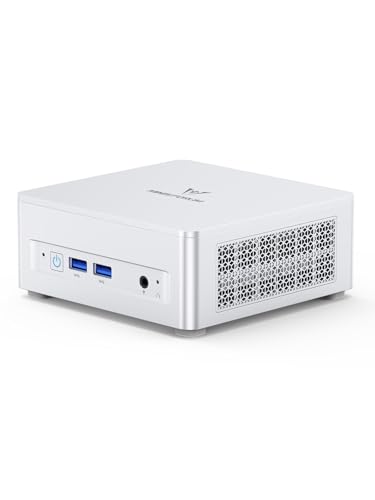
- Best overall for streaming from a home office: Minisforum UM870 Slim, Ryzen 7 8745H, 32GB RAM, 1TB SSD — Check on Amazon
- GMKtec NucBox K8 Plus, Ryzen 7 8845HS, 32GB RAM, 1TB SSD — Check on Amazon
- Beelink SER8, Ryzen 7 8745HS, 32GB RAM, 1TB SSD — Check on Amazon
- GMKtec NucBox M6 Ultra, Ryzen 5 7640HS, 32GB RAM, 512GB SSD — Check on Amazon
See 2 more Amazon options
- Apple Mac mini, M4 Chip, 16GB Memory, 256GB SSD — Check on Amazon
- Acer Aspire C27 All-in-One, 27 Inch, Ryzen 5 7430U, 16GB RAM, 512GB SSD — Check on Amazon
Read the full guide ↓
Disclosure: As an Amazon Associate, reviewstook.com earns from qualifying purchases. Links to Amazon on this page are affiliate links; they cost you nothing extra. Listing details such as price and availability change often, so check the current Amazon listing before you buy.
Start with the honest version of this search, because it decides everything below. Not one machine in this guide has a discrete graphics card, so not one of them is a gaming-PC-style streaming rig, and no review here will pretend otherwise. What these six home office PCs can genuinely stream is the workload most home-office streamers actually run: talk and desktop streams — webinars, tutorials, screen-share presentations, podcast-style shows — plus console games fed in through a capture card, plus light PC games streamed from the same box on the stronger picks. Demanding modern PC games played and encoded on one of these machines at once is the one arrangement we will not sell you. Within that honest frame, though, this tier is better equipped than its office label suggests: the four Ryzen mini PCs carry AMD’s RDNA 3 integrated graphics, whose media engine encodes H.264, HEVC and AV1 in hardware, and that changes what an $800 desk can broadcast.
The workflow this guide grades against is the real one. On Twitch, the working standard is a 1080p60 stream at roughly 6,000 kbps with constant bitrate (CBR) and a two-second keyframe interval; Twitch’s AV1 support arrives through its Enhanced Broadcasting programme rather than as a simple settings toggle. YouTube is the more generous platform: it accepts higher bitrates, carries 1440p streams, and takes AV1 live today, which is where the AV1 encoders in this guide actually get used. Streaming in 4K is limited by the platforms, not by any PC in this guide — no pick below is bought or graded as a 4K streaming machine. Every pick is therefore graded encoder-first: which hardware encoder it carries, how much simultaneous load — game or desktop workload plus OBS plus chat, alerts and a browser — it can hold while encoding, and how quietly it does it a metre from your microphone. Prices in this category move often as memory and SSD costs swing, so check the live price on Amazon for each pick before you buy.
In this guide
Quick Picks
Short on time, or comparing several options at once? Each row below names a streaming situation and the machine that suits it, with a link to the listing.
| Streamer type | Pick | Why it stands out | Link |
|---|---|---|---|
| Best overall streaming office PC | Minisforum UM870 Slim, Ryzen 7 8745H | RDNA 3 hardware AV1 encoding, eight cores, 32GB of memory and near-silent cooling — check price on Amazon | Check on Amazon |
| Best for streamers who may grow | GMKtec NucBox K8 Plus, Ryzen 7 8845HS | The strongest chip here, dual 2.5GbE, and an OCuLink port — the only future route to a desktop graphics card and its encoder | Check on Amazon |
| Best for a quiet broadcast room | Beelink SER8, Ryzen 7 8745HS | The same RDNA 3 encoder as the top pick, in the quietest chassis here — silence your microphone will appreciate | Check on Amazon |
| Best value streaming desk | GMKtec NucBox M6 Ultra, Ryzen 5 7640HS | RDNA 3 AV1 encoding and 32GB of memory at a mid-range price — the encoder story of the tier for less | Check on Amazon |
| Best for Mac-based streamers | Apple Mac mini, M4 Chip | Silent, with hardware H.264/HEVC encoding through macOS — but no AV1 encode and only 256GB for recordings | Check on Amazon |
| Best one-box stream corner | Acer Aspire C27 All-in-One, 27 Inch | Screen, webcam and speakers built in — a talk-stream desk in a single box, with the oldest encoder here | Check on Amazon |
How These Picks Were Chosen
The budget was applied the way a careful buyer would apply it: every machine below is a real Amazon listing in this under-$800 tier in the United States. Because prices in this category change often, check the live price on Amazon before you buy — a listing that sits above the budget when you shop is not an under-$800 PC, however good its encoder might be. Anything that lives permanently above this tier was excluded.
On top of that budget filter, this variant applied a streaming filter, in a fixed order. The first question was the encoder: what hardware sits in the machine to turn your screen into a stream without spending CPU cores on it? The four Ryzen minis answer best — their Radeon 780M and 760M graphics are RDNA 3 parts with a hardware media engine covering H.264, HEVC and AV1 encode. The Mac mini answers with Apple’s media engine, exposed to OBS through macOS VideoToolbox for H.264 and HEVC. The Acer answers with an older generation of AMD integrated graphics whose encoder covers H.264 and HEVC only. No pick in this guide has an NVIDIA card, so there is no NVENC anywhere in this set — and no Intel chip either, so Quick Sync is not on this table at all. Software x264 encoding is treated throughout as an emergency fallback, not a plan: on laptop-class processors it competes directly with the workload you are streaming.
The second question was simultaneous load. A stream is never just an encoder: it is OBS compositing scenes, a browser full of chat and dashboards, alerts, a voice app, and the game or desktop workload itself, all at once. That is why core count, memory capacity and memory configuration are graded as streaming specifications here — the eight-core, 32GB dual-channel Ryzen picks hold a stream together in a way the six-core and 16GB picks cannot match, and why integrated graphics get extra scrutiny: on these machines the same chip renders and encodes, sharing one memory pool and one thermal budget. The third question was the room: a home-office stream is recorded where the machine sits, so cooling noise is graded as an audio specification, and every pick was checked for a wired Ethernet port, because the wired rule in the OBS section below admits no exceptions.
One more route was researched and appears here as a judgement rather than as linked picks: renewed business desktops. Off-lease ThinkCentre, OptiPlex and EliteDesk minis sell with Windows 11 Pro at budget-tier pricing depending on configuration, and as second machines dedicated to encoding a feed captured elsewhere, they are a legitimate budget answer. They are not linked because no single renewed listing could be pinned reliably enough to recommend, and their older integrated encoders belong a generation behind everything below. Buy that route only where the refurbisher states warranty and returns in writing.
The Encoder Map: What Each Pick Can Actually Broadcast
Streaming guides for gaming PCs usually begin and end with NVENC. This one cannot, and the map below is the honest replacement — it is the section to read before any review, because the encoder decides your ceiling on each platform.
- Radeon 780M and 760M (the four GMKtec and Minisforum and Beelink picks): RDNA 3 integrated graphics with a hardware media engine that encodes H.264, HEVC and AV1. AV1 encode is real on these chips — it is what makes a YouTube 1440p or AV1 stream possible from a mini PC at all. The honest debit is H.264 quality: at Twitch’s roughly 6,000 kbps, AMD’s hardware H.264 output is visibly softer than NVIDIA’s NVENC on fine detail and fast motion. For talk, desktop and console-capture content that gap barely shows; for fast PC gameplay it does.
- Apple M4 media engine (Mac mini): hardware H.264 and HEVC encoding, which OBS on macOS reaches through VideoToolbox. The M4 decodes AV1 but does not encode it — no AV1 stream leaves this machine. Within H.264 and HEVC it is a clean, efficient encoder, and the M4’s ten cores leave genuine headroom for the rest of the broadcast.
- The Acer’s integrated Radeon graphics: an older generation of AMD integrated encoder covering H.264 and HEVC, with no AV1. It is the softest and oldest encoder in this guide, graded accordingly: adequate for talk and desktop content at Twitch bitrates, not the tool for gameplay.
- What is not here: no NVENC (no NVIDIA silicon), no Quick Sync (no Intel silicon), and no dual-encoder arrangement of any kind. Every pick encodes on a single hardware block, and on the integrated-graphics picks that block shares the chip with whatever is being rendered — the fact that shapes the OBS settings below.
The 6 Best Home Office PCs for Streaming Under $800
Minisforum UM870 Slim (Ryzen 7 8745H, 32GB RAM, 1TB SSD)
Who it suits: Home-office streamers who want the strongest all-round broadcast desk this budget builds — talk, desktop, console capture and light same-box games — in a box quiet enough to sit beside the microphone.
The UM870 Slim leads this guide because it is the only pick that wins on every streaming axis at once. Its Ryzen 7 8745H brings eight cores and sixteen threads to the simultaneous-load problem — OBS, chat, a browser of dashboards and the workload itself — while its Radeon 780M graphics carry the RDNA 3 media engine: hardware H.264, HEVC and AV1 encode, so the stream is compressed by a dedicated block instead of by the cores your applications are using. The 32GB of DDR5-5600 sits in two SO-DIMM slots in dual channel, which matters twice over on an integrated-graphics machine: the encoder and the renderer draw on the same memory pool, and dual-channel bandwidth is what keeps both fed. Storage is a 1TB PCIe 4.0 SSD with a second M.2 slot free — local recordings have somewhere to live, and somewhere to grow. Networking is 2.5-gigabit Ethernet for the wired connection this guide insists on, and the whole machine measures 130 × 127 × 50mm, small enough to VESA-mount behind a monitor and out of the shot entirely.
Its second streaming asset is acoustic. Minisforum cools the chip with a phase-change layer, three heat pipes and a large, slow fan, and rates the machine below 35dB in its performance mode; reviewers consistently describe it as near-silent in normal use. On a talk or desktop stream, that is not a luxury — it is the difference between a fan your microphone ignores and one your noise suppression has to fight for three hours. The honest debits carry over from the base guide: the chassis is plastic, the single USB-C port is on the rear, two rear USB ports are still USB 2.0, and the fitted MediaTek Wi-Fi card has poor Linux driver support — irrelevant to the wired streaming rule, but Linux users should budget for an Intel replacement card. On price, check the live price on Amazon before you buy — third-party sellers on the same listing can ask well above the usual level. Bought within this budget tier, it is the best streaming desk in this guide.
- RDNA 3 hardware encoding — H.264, HEVC and AV1 — on the Radeon 780M, with eight cores behind the rest of the broadcast.
- 32GB of socketed dual-channel DDR5 (to 96GB) and two M.2 slots with 1TB fitted: memory bandwidth and recording space both covered.
- Maker-rated below 35dB in performance mode, 2.5GbE wired networking, and a two-year warranty.
Honest limitation: A plastic chassis with one rear USB-C port, a MediaTek Wi-Fi card Linux users will want to replace, and pricing that can sit above the budget from some sellers — check the live price on Amazon, and do not pay a spike.
Choose it if you want one small, quiet machine that streams every home-office workload honestly and can be upgraded for years. Skip it if the listing is sitting at a spike when you shop — at that point the SER8 below is the better purchase.

GMKtec NucBox K8 Plus (Ryzen 7 8845HS, 32GB RAM, 1TB SSD)
Who it suits: Streamers whose show may outgrow integrated graphics — the one pick with a documented road to a desktop graphics card, and its encoder, later.
The K8 Plus carries the same encoder story as the top pick — its Radeon 780M is the same RDNA 3 silicon with hardware H.264, HEVC and AV1 encode — wrapped around the strongest processor in this guide, a Ryzen 7 8845HS with eight cores boosting to 5.1GHz. For simultaneous load that is the deepest headroom here: the game or desktop workload, the OBS composite and everything around the broadcast all draw on those cores while the media engine handles compression. Its networking is the best in the guide for a streaming desk — dual 2.5-gigabit Ethernet means the wired stream connection never has to share a port with home-server or NAS duty — and its dual USB4 ports, HDMI 2.1 and DisplayPort drive up to four displays, so the stream desk of monitors, chat screens and dashboards is fully served. Memory is 32GB of dual-channel DDR5 in two slots, storage a 1TB PCIe 4.0 SSD with a second slot free.
What lifts it to second place for this angle is a port no other pick has: OCuLink. That connector can carry a desktop graphics card in an external dock, which makes the K8 Plus the only machine here that can grow into a discrete-GPU streaming rig — with a desktop card’s encoder — without replacing the PC. The dock and card are separate future purchases, costed nowhere in this pick’s price, and the base guide’s warning stands: buy it for its ports today, not for that promise. The catch, also carried over at full size, is the wildest pricing swings in this guide — this listing can sit well above the budget, which is not an under-$800 PC by any honest reading. Check the live price on Amazon, buy only when it sits within this budget tier, and walk away from a spike.
- The same RDNA 3 AV1-capable encoder as the top pick, behind the strongest CPU here — the deepest simultaneous-load headroom in the guide.
- OCuLink: the only documented route in this set to a desktop graphics card and its encoder later.
- Dual 2.5GbE, dual USB4 and four-display output — a streaming desk’s ports, all present.
Honest limitation: Its price swings harder than any other pick. This pick is a price as much as a product: excellent within this budget tier, and not an under-$800 PC at all above that.
Choose it if your stream is growing — more scenes, more screens, a graphics card someday. Skip it if the listing is at a spike, or your show is a settled talk-and-desktop format the more affordable picks serve identically.

Beelink SER8 (Ryzen 7 8745HS, 32GB RAM, 1TB SSD)
Who it suits: Streamers broadcasting from a bedroom, studio flat or shared room — anyone whose microphone shares air with the PC all day.
The SER8’s encoder is identical to the two picks above it: a Ryzen 7 8745HS with Radeon 780M graphics, RDNA 3 media engine, hardware H.264, HEVC and AV1 encode, 32GB of DDR5 in two slots upgradeable to 64GB, and a 1TB PCIe 4.0 SSD with a second M.2 slot free. What you are buying here, explicitly, is the room it broadcasts from. Beelink’s vapor-chamber-style cooling has earned the SER8 its reputation as one of the quietest mini PCs in its class under sustained load, and sustained load is exactly what a stream is: two or three hours of encode, composite and workload without a break. A fan that stays civilised through hour three is an audio feature no microphone setting can substitute for, and it is why this machine outranks the cheaper M6 Ultra for this angle despite the same encoder family. Display output runs over HDMI 2.1, DisplayPort 1.4 and USB4 for a three-screen stream desk, with 2.5-gigabit Ethernet for the wired rule and Windows 11 Pro fitted.
The honest notes are the base guide’s, unchanged. On price: check the live price on Amazon — this listing can sit above this guide’s budget, so it belongs here only as a disciplined purchase: buy when it sits within the under-$800 tier, and wait out a spike. And on value: its advantages over the UM870 Slim are refinement — acoustics, build, a cleaner port layout — not a better encoder or a faster stream, so if your broadcast room is a separate office where fan noise never reaches a microphone, the top pick does the same work for less.
- The quietest machine here under sustained load — made for streams recorded in living spaces.
- The same RDNA 3 encoder and full specification as the top pick: 8745HS, 32GB upgradeable memory, 1TB plus a free slot.
- Triple-display output over HDMI 2.1, DisplayPort 1.4 and USB4, with 2.5GbE wired networking.
Honest limitation: Its listing can sit just over the budget line, so buying it well can mean waiting for a better price — check price on Amazon — and what the extra money buys is quiet and finish, not a better stream.
Choose it if your stream is recorded where you live and fan noise is a real cost. Skip it if you need to buy today at whatever the listing says, or your desk is in a room of its own — the UM870 Slim streams identically for less.

GMKtec NucBox M6 Ultra (Ryzen 5 7640HS, 32GB RAM, 512GB SSD)
Who it suits: Streamers who want this tier’s encoder — real AV1 hardware encoding — and 32GB of memory, without spending the whole $800 to get them.
The M6 Ultra is the value pick of this guide because its streaming-relevant specification is the tier’s specification: its Radeon 760M graphics are RDNA 3, with the same generation of media engine as the 780M picks — hardware H.264, HEVC and AV1 encode — and its 32GB of DDR5 sits in two SO-DIMM slots in dual channel, feeding the shared render-and-encode pool properly. Its Ryzen 5 7640HS has six cores to 5.0GHz: two fewer than the Ryzen 7 machines, a difference a talk, desktop or console-capture stream will never show you, and one that only appears when a demanding game and the broadcast compete on the same box — the arrangement this guide steers you away from anyway. Around that core it keeps the desk features that matter: USB4, triple 4K display output across USB4, HDMI 2.0 and DisplayPort, and dual 2.5-gigabit Ethernet, so the wired rule and a second network are both covered. Check the live price on Amazon — at its mid-range positioning, this plus a capture card is a complete console-streaming desk.
The savings show in two places, stated here so you hear them from us first. The fitted SSD is a 512GB drive of the older, slower PCIe 3.0 kind — half the room of the 1TB picks, and the first thing a recording-heavy streamer will fill; further storage slots, including a faster PCIe 4.0 one, make the fix a second drive fitted later, priced as machine plus drive and never inside this pick’s price. And GMKtec’s warranty on the Amazon listing is one year, the shortest in this guide, against the UM870 Slim’s two. Neither touches the encoder, which is the point of the pick: at Twitch bitrates its H.264 carries the same AMD softness as its dearer siblings, and on YouTube its AV1 is the genuine article.
- RDNA 3 AV1 hardware encoding and 32GB of dual-channel socketed memory at a mid-range price — check price on Amazon.
- Triple 4K display output and dual 2.5GbE networking — the stream desk’s connections, complete.
- Spare storage slots turn its one small compromise into an easy future upgrade.
Honest limitation: The bundled 512GB SSD is the older, slower kind and fills fast under local recording, the six-core chip has the least same-box gaming headroom of the Ryzen picks, and the listing’s warranty is one year — the shortest here.
Choose it if your show is talk, desktop or console capture and you would rather spend the savings on the kit around the stream. Skip it if you regularly stream PC games from the same box — that is what the eight-core picks above charge extra for.

Apple Mac mini (M4 Chip, 16GB Memory, 256GB SSD)
Who it suits: Streamers already living in Apple’s world — iPhone in pocket, audience on talk and desktop content — who want the quietest, simplest broadcast box here and never intend to open it.
The Mac mini streams differently from the Ryzen picks, and its review grades it on its own terms. OBS on macOS encodes through Apple’s VideoToolbox framework on the M4’s media engine: hardware H.264 and HEVC, produced cleanly and efficiently, with the chip’s ten cores leaving real headroom for scenes, chat and the workload. The M4 decodes AV1 happily but does not encode it, so the AV1 route to YouTube that the Ryzen picks offer is closed here — your YouTube stream rides HEVC or H.264 instead, which YouTube accepts without complaint. Around the encoder, the machine is the broadcaster’s friend in the ways the base guide documented: effectively silent in the room, tiny on the desk, and verified by Apple’s own specifications to drive up to three external displays — two at up to 6K over Thunderbolt plus a third at up to 5K over Thunderbolt or 4K over HDMI — through three rear Thunderbolt 4 ports and HDMI, with Gigabit Ethernet for the wired rule, Wi-Fi 6E and Bluetooth 5.3. Check the live price on Amazon before you buy — third-party sellers on the same listing sometimes ask far more than Amazon’s own offer, so buy from a fairly priced listing and never pay an inflated ask.
Its limitations are built in, permanent, and land exactly where streamers keep things. Nothing inside a Mac mini can be upgraded: the 16GB of unified memory and the 256GB of storage are soldered in place, and 256GB is the smallest recording archive in this guide by a wide margin — a few long local recordings and the drive is full, so plan on an external SSD from day one and treat the real cost as machine plus drive. The 16GB also caps simultaneous load below the 32GB Ryzen picks when the broadcast gets busy. And it runs macOS and nothing else: if your employer’s or your channel’s tools are Windows-only, no amount of silence rescues it as a choice. For the Apple-ecosystem talk streamer, though, it is the machine here least likely to be thought about between purchase and replacement.
- Runs in near-total silence, sips power, and encodes H.264/HEVC in hardware through VideoToolbox.
- Verified three-monitor support over Thunderbolt and HDMI, straight from Apple’s specifications.
- A premium mini at a mid-range tier position — check price on Amazon, and never pay an inflated third-party ask.
Honest limitation: No AV1 encode, and memory and storage fixed forever at 16GB and 256GB — the smallest recording space in this guide — on a machine that runs macOS only.
Choose it if your stream is talk or desktop content in Apple’s ecosystem and the idea of never opening the case sounds like a feature. Skip it if you want AV1 encoding, record long local copies, or need Windows software.

Acer Aspire C27 All-in-One (27 Inch, Ryzen 5 7430U, 16GB RAM, 512GB SSD)
Who it suits: Streamers starting from an empty desk — no monitor, no webcam, no speakers — whose show is talk and presentation, and who want the entire broadcast corner to arrive in one box.
Every other pick in this guide is a box that still needs a monitor and a webcam before it can stream anything. The Aspire C27 already is the stream corner. Its 27-inch Full HD IPS screen runs at 120Hz behind slim bezels, and built into the same unit are a Ryzen 5 7430U, 16GB of memory, a 512GB SSD, Wi-Fi 6E, speakers, and a 2-megapixel webcam with a physical privacy shutter — the one pick here whose camera is already bought, positioned and plugged in, which for a talk or webinar streamer is a genuine head start. Acer includes a wired keyboard and mouse, so the box it arrives in is the whole purchase. Check the live price on Amazon before you buy, and buy only when it sits within this budget tier.
The trade is the encoder and the headroom, and a streamer should understand both before buying. The 7430U is a six-core laptop-class processor a clear tier below the eight-core Ryzen 7 machines above, and its integrated Radeon graphics carry an older generation of AMD encoder — H.264 and HEVC only, no AV1 — and the softest H.264 output in this guide at Twitch bitrates. Sixteen gigabytes of memory likewise caps the simultaneous load: a talk stream with slides, chat and a browser is comfortably within it; a game, a busy OBS scene collection and recording at once is not a promise this machine makes. An all-in-one also ties the screen’s life to the computer’s: when the PC side ages out, a perfectly good 27-inch display goes with it, and internal upgrades are far more limited than in any mini here. Bought within this budget tier for the talk-stream desk it creates, it keeps its promises exactly. Buy it expecting the Ryzen picks’ encoding because the price looks similar, and it will disappoint you — the minis above are where the streaming performance lives.
- One box holds the lot: a 27-inch 120Hz screen, a webcam with a privacy shutter, speakers, and the keyboard and mouse.
- A whole talk-stream workstation for mini-PC money — check price on Amazon.
- Wi-Fi 6E and a modern SSD keep the basics current.
Honest limitation: The oldest encoder in this guide — no AV1, the softest H.264 at Twitch bitrates — on a laptop-class processor with 16GB of memory, and when the computer ages out, the screen goes with it.
Choose it if your show is talk and presentation and you need the screen and camera anyway. Skip it if you already own good monitors, stream gameplay of any kind, or want AV1 encoding.

Comparison Table
| Product | Encoder | Best streaming use | Link |
|---|---|---|---|
| Minisforum UM870 Slim | Radeon 780M (RDNA 3): H.264, HEVC, AV1 | Every home-office stream, quietly — check price on Amazon | Check on Amazon |
| GMKtec NucBox K8 Plus | Radeon 780M (RDNA 3): H.264, HEVC, AV1 | Growing shows — strongest CPU, and OCuLink towards a discrete encoder later | Check on Amazon |
| Beelink SER8 | Radeon 780M (RDNA 3): H.264, HEVC, AV1 | Streams recorded in living spaces — check price on Amazon | Check on Amazon |
| GMKtec NucBox M6 Ultra | Radeon 760M (RDNA 3): H.264, HEVC, AV1 | The tier’s encoder at a mid-range price — talk, desktop and console capture | Check on Amazon |
| Apple Mac mini | Apple media engine: H.264, HEVC (no AV1 encode) | Silent macOS talk streams — with an external drive for recordings | Check on Amazon |
| Acer Aspire C27 All-in-One | Older AMD integrated: H.264, HEVC (no AV1) | One-box talk and webinar desk with the camera built in | Check on Amazon |
Setting Up OBS on These Machines
Whichever pick you buy, the same setup discipline turns its encoder into a reliable stream. Work through it once, in this order, before your first broadcast.
- Choose the hardware encoder, never x264. In OBS, set the encoder to the AMD hardware option on the four Ryzen picks (H.264 for Twitch; AV1 or HEVC for YouTube), and to the Apple VideoToolbox hardware encoder on the Mac mini. Software x264 encoding spends the same cores your workload needs and is an emergency fallback on these processors, not a setting.
- Lock the Twitch shape. For Twitch: 1080p60 output, constant bitrate (CBR) at roughly 6,000 kbps, and a keyframe interval of two seconds. On the Ryzen picks, accept that AMD’s H.264 at this bitrate runs visibly softer than NVENC on fast motion — favour talk, desktop and capture-card content, keep game scenes’ motion modest, and do not chase the softness with bitrate you do not have.
- Use YouTube for the picture-quality shows. YouTube accepts higher bitrates, 1440p and AV1. On the four Ryzen picks, an AV1 or high-bitrate HEVC stream to YouTube is where these encoders look their best; on the Mac mini and Acer, use HEVC or H.264 at a generous bitrate instead. Remember that 4K streaming is limited by the platforms, not solved by any setting here.
- Wire the connection. Every pick in this guide has an Ethernet port — use it. Plug the machine into the router with a cable for every broadcast, including the Wi-Fi-equipped picks and the all-in-one. A stream is a sustained upload, and a wired connection is the single cheapest reliability upgrade in this entire guide; there are no exceptions to this rule.
- Read the three lag counters. OBS reports dropped frames in three families, and each has its own fix. Rendering lag means the graphics are saturated — on these integrated GPUs, lower the game’s settings or resolution, or move the game to a console and capture card, because the same chip is encoding. Encoding lag means the encoder is overloaded — drop the output to 720p60 or 1080p30, and confirm you are on the hardware encoder, not x264. Network lag means the upload path is failing — check the cable first, then lower the bitrate; no encoder setting fixes a bad connection.
- Mind the shared chip. On the integrated-graphics picks, rendering and encoding share one processor, one memory pool and one cooling system. Keep the memory in dual channel (as all the Ryzen picks ship), leave thermal headroom by keeping vents clear, and if you record locally at the same time as streaming, record at the stream’s settings rather than asking the encoder for a second, heavier job.
- Rehearse for one hour. Before your first real broadcast, run a private or unlisted stream for a full hour at your exact show settings — workload, scenes, alerts, recording and all — and watch the three counters. Every problem in the list above announces itself in rehearsal, inside the machine’s return window, instead of in front of an audience.
What the Rest of the Stream Costs
The computer is the centre of the stream, not the whole of it. The items below complete a home-office broadcast, in the order to buy them. None of them is priced here, and none of their costs hides inside any pick’s price above — treat each as a separate purchase, made when the stream earns it.
- A microphone comes first. Audiences forgive a soft picture and abandon bad audio. A proper USB or XLR microphone, positioned close, does more for a talk or desktop stream than any encoder in this guide — and it is why the quiet picks above matter: the less fan noise in the room, the less work the microphone chain has to do.
- Lighting comes second. A single soft light facing you lifts any camera, including the Acer’s built-in webcam, further than a camera upgrade does. Buy light before lenses.
- A webcam comes third — unless you bought the Acer. The five box-style picks have no camera; a dedicated webcam is the standard answer for talk and desktop formats. The Aspire C27’s built-in 2-megapixel camera with its privacy shutter covers the talk-stream case out of the box, which is part of its price.
- A capture card is for console streaming only. If your show is console gameplay, a capture card feeds the console’s picture into any pick here and turns even the Acer into a competent broadcast box, because the console does the rendering. If your games are on the PC itself, a capture card does nothing for a one-machine setup — skip it entirely.
How to Choose a Home Office PC for Streaming Under $800
- Name your format before your machine. Talk, desktop and console-capture streaming is honestly served by every pick here. Light PC games from the same box point you to the eight-core Ryzen picks. Demanding PC games played and streamed on one machine point you out of this guide entirely, towards a discrete-GPU streaming PC — see Best Streaming PC Under $800.
- Grade the encoder, not the headline. The four Ryzen picks encode AV1 in hardware; the Mac mini and Acer do not. If your platform is YouTube and AV1 or 1440p is part of the plan, that single fact shortlists the Ryzen machines. If your platform is Twitch at 1080p, every pick encodes H.264 in hardware and the differences move to headroom and noise.
- Count simultaneous load, not just cores. OBS, chat, dashboards, alerts and the workload run together. Thirty-two gigabytes of dual-channel memory (the four Ryzen picks) is the comfortable specification; 16GB (Mac mini, Acer) suits a settled talk format and no more.
- Budget recording space like a streamer. Local recordings accumulate fast. The 1TB picks absorb them; the M6 Ultra’s 512GB needs its spare slot used sooner; the Mac mini’s 256GB needs an external drive from day one — costed as machine plus drive, never inside the machine’s own price.
- Buy the noise level your room needs. A stream is recorded where the PC sits. The SER8 and UM870 Slim are designed and reviewed as near-silent, and the Mac mini is effectively inaudible; in a bedroom or shared room, that is a broadcast specification, not a comfort feature.
- Check the wired port and use it. Every pick here has Ethernet — 2.5-gigabit on the Ryzen minis, Gigabit on the Mac mini, both far beyond streaming bitrates. What matters is that the port exists and the cable gets plugged in.
- Check the live price and keep to the tier. Prices in this category swing widely as memory costs move. Check the price on Amazon for every pick before you shop, buy only when a listing sits within this budget tier, and let spikes pass.
- Match the operating system to the broadcast. The Mac mini is superb and entirely wrong if your channel’s tools are Windows-only; conversely, if your work lives in Apple’s ecosystem, a Windows mini’s extra ports may be worth less than the mini’s silence.
- Start smaller if the show is simple. A documents-and-talk desk with a webcam does not need this tier — begin with Best Home Office PC Under $500 or Best Home Office PC For Beginners Under $800 and spend the difference on the microphone.
Common Buying Mistakes
- Buying an office mini to stream demanding PC games from the same box. Integrated graphics render and encode on one shared chip; the honest routes are lighter games, a console and capture card, or a discrete-GPU machine.
- Encoding with x264 because a forum recommended it. On these processors the software encoder steals the cores your workload is using — the hardware encoder exists precisely so it does not have to.
- Streaming over Wi-Fi because the cable is inconvenient. Every pick here has an Ethernet port. The wired rule has no exceptions, and most “encoder problems” traced in rehearsal turn out to be network problems.
- Paying a spike price. Listings here swing widely. Buying a K8 Plus at an inflated price because a guide listed it “under $800” — without checking the live price on Amazon first — is the easiest way to waste money in this category.
- Assuming AV1 because the platform supports it. AV1 encode needs the hardware: the Ryzen picks have it, the Mac mini and Acer do not, and no setting adds it.
- Forgetting recording space. A 256GB machine that streams beautifully fills its drive within weeks of local recording; plan the external drive or the second SSD as part of the purchase.
- Spending on a capture card for a one-PC setup. It only earns its place between a console and the PC; for PC-native content it captures nothing.
- Buying the microphone last. The kit order in this guide is deliberate — audio first, light second, camera third — and reversing it is the most common way new streamers overspend.
Final Recommendation
- Most home-office streamers: Minisforum UM870 Slim — check price on Amazon.
- A show that will grow: GMKtec NucBox K8 Plus, bought within this budget tier — never at a spike.
- A broadcast room you live in: Beelink SER8, bought within this budget tier.
- The encoder for less: GMKtec NucBox M6 Ultra.
- Apple households: Apple Mac mini M4 — check price on Amazon — plus an external drive.
- An empty desk, talk format: Acer Aspire C27 All-in-One, bought within this budget tier.
Our top two for streaming from a home office at this budget are the Minisforum UM870 Slim — the complete package of AV1-capable encoding, eight-core headroom, 32GB of dual-channel memory, recording space and near-silent cooling — and the GMKtec NucBox K8 Plus, for streamers whose show is headed somewhere bigger: the strongest chip here, the same encoder, and the only port in the guide that leads to a desktop graphics card later.
Between them they cover the two shapes this search usually takes: the settled home-office broadcast, and the channel with plans. If your budget is firm and today is buying day, the M6 Ultra delivers the same generation of encoder at a mid-range price and leaves room in the budget for the microphone; if your desk needs a screen and a camera anyway and your format is talk, the Acer C27 covers the whole corner in one purchase. Streamers setting up in a corner of another room should also see Best Home Office PC For Small Spaces Under $800, and anyone whose show is really a gaming broadcast should start with Best Streaming PC Under $800 instead. Whichever you choose: check the live price on Amazon before you shop, plug in the Ethernet cable, set the hardware encoder, and run the one-hour rehearsal before an audience ever sees you.
Frequently Asked Questions
Can a home office PC really stream, or do I need a gaming PC?
For talk, desktop, webinar and console-capture streaming, a home office PC genuinely streams — every pick here encodes in hardware. What it cannot honestly do is play a demanding PC game and encode it on the same integrated chip at once. If that is your format, you need a discrete-GPU machine; if it is not, this tier is the right money.
Which of these can stream AV1?
The four Ryzen picks — UM870 Slim, K8 Plus, SER8 and M6 Ultra — whose RDNA 3 graphics encode AV1 in hardware, usable today on YouTube and through Twitch’s Enhanced Broadcasting. The Mac mini decodes AV1 but cannot encode it, and the Acer’s older integrated encoder has no AV1 at all.
Is AMD’s encoder good enough for Twitch?
For talk, desktop and capture-card content, yes — at Twitch’s roughly 6,000 kbps it looks clean on the content home-office streamers make. The honest caveat is fast-motion gameplay, where AMD’s hardware H.264 is visibly softer than NVIDIA’s NVENC. There is no NVIDIA card in this guide, so if fast PC gameplay on Twitch is your core format, that difference is the reason to shop the streaming-PC guides instead.
Why does this guide insist on a wired connection?
Because a stream is a sustained upload held for hours, and Wi-Fi’s dips land directly in the network-lag counter as dropped frames. Every pick here includes an Ethernet port — 2.5-gigabit on the minis, Gigabit on the Mac mini — and either is far beyond what a broadcast needs. The cable is the cheapest reliability in the whole setup.
Can these PCs run three monitors for a stream desk?
Yes — most of them, from their own ports. The UM870 Slim (HDMI 2.1, DisplayPort 1.4, USB4), the SER8 (the same trio) and the M6 Ultra (USB4, HDMI 2.0, DisplayPort) each drive three displays; the K8 Plus goes to four with its dual USB4 ports; and the Mac mini supports three per Apple’s own specifications. The Acer C27 is the exception by design: it is a screen, with its display built in.
How much storage does a streamer need?
More than an office worker, because local recordings accumulate. The 1TB picks (UM870 Slim, K8 Plus, SER8) absorb months of them; the M6 Ultra’s 512GB fills sooner and has spare slots for the fix; the Mac mini’s 256GB should be paired with an external SSD from day one — treated as machine plus drive, since the internal storage can never be enlarged.
Should I buy a renewed business desktop as a stream box instead?
Sometimes — as a dedicated second machine encoding a feed captured elsewhere, a renewed ThinkCentre, OptiPlex or EliteDesk mini at budget-tier pricing is a legitimate budget route. Its integrated encoder is a generation older than everything here, and the protection is whatever the refurbisher states, so buy only where warranty and returns are written down. As your only machine and main encoder, the picks above are the better answer.
Why does this guide not print fixed prices?
Because in this category, prices move too much for a printed number to stay honest. Memory and SSD costs have risen sharply, and the same listing can swing widely in weeks. A hard price would be wrong by the time you read it, so check the live price on Amazon for each pick and buy only when the listing sits within this budget tier.


