Where to buy
Check the latest price, availability and delivery on Amazon. Orders are placed on Amazon. We may earn a commission from qualifying purchases.
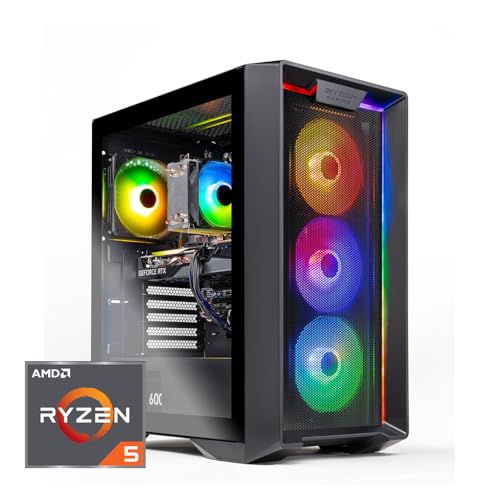
- Easiest install in a tight spot: Skytech Nebula (ST-NEBULA-1344-B-AM) — Ryzen 5 5600, RTX 3050 6GB, 16GB, 1TB SSD, 650W Gold PSU — Check on Amazon
- Strongest machine, nothing to add on day one: CyberPowerPC Gamer Xtreme VR (GXiVR8060A24) — Core i5-13400F, RTX 4060, 16GB DDR5, 1TB SSD — Check on Amazon
- Lowest price with a published power supply: ZOTAC MEK (Ryzen 5 5500, RTX 3050, 16GB, 500GB SSD, 650W Gold) — Check on Amazon
- The platform pick, one planned upgrade: iBUYPOWER SlateMesh (Ryzen 5 7600, RTX 4060, 16GB DDR5, 500GB SSD) — Check on Amazon
- Lowest typical spend, verify storage on arrival: STGAubron ABR1722 (Ryzen 5 5500, RTX 3050 6GB, 16GB, 512GB SSD) — Check on Amazon
See 1 more Amazon option
- Sale-watch only, widest airflow needs: MXZ Gaming PC (Ryzen 5 5500, RTX 4060, 16GB, 1TB SSD) — only buy when the live price falls within budget — check price on Amazon — Check on Amazon
Read the full guide ↓
Disclosure: As an Amazon Associate, reviewstook.com earns from qualifying purchases. Links to Amazon on this page are affiliate links; they cost you nothing extra. Listing details such as price and availability change often, so check the current Amazon listing before you buy.
Start with the sentence most guides in this category will not print: at this budget, there is no small gaming PC. Every machine in this guide is a standard desktop tower. None of them mounts behind a monitor, none of them disappears into a media console, and none of them is the mini-PC the phrase “small spaces” might have led you to hope for. If a PC that bolts to the back of a screen is the actual requirement, that product lives at lower budgets and in a different shape entirely — and this guide will point you to it honestly rather than pretend a tower is something it is not.
What “small spaces” legitimately means at this budget is an installation problem, and it is a real one. A tower’s footprint on a spec sheet is the smallest part of the space it occupies. The installed machine also claims the air around it — an intake path in front, an exhaust path behind — the depth of the cables dropping off its rear panel, the reach of its power cord, and the room you need beside it the day you open the case to add a drive or read a power supply label. In a large room those claims are free. In a studio apartment, a dorm or the corner of a bedroom, they are the whole decision. So this guide grades the installation, not just the spec sheet: how much air each tower demands, how much work each one schedules for the day it arrives, and how finished each machine is when it lands — because in a tight spot, the best PC is usually the one you never have to pull back out.
One discipline note before the picks. The listing material reviewed for these six machines does not publish a dimension table we could verify, so this guide prints no centimetres and no litres for any of them, and invents none. The towers are graded by form-factor class — all six are standard towers with internal power supplies — and by what is documented: storage fitted, power supplies published or unpublished, fan counts where a maker states them. When you reach the measuring step below, the live listing’s own specification table is your tape measure, and the arrival check inside the return window is your safety net.
In this guide
Quick Picks
Short on time, or comparing several options at once? Each row below names a small-space situation and the machine that handles it best, with a link to the listing.
| Your situation | Pick | Why it stands out for a tight install | Link |
|---|---|---|---|
| You want it installed once and never reopened | Skytech Nebula (ST-NEBULA-1344-B-AM) | 1TB fitted and a published 650W Gold PSU — nothing to add, nothing to open and check | Check on Amazon |
| You want the strongest machine and a finished install | CyberPowerPC Gamer Xtreme VR (GXiVR8060A24) | RTX 4060, DDR5 and 1TB Gen4 fitted; one arrival-day opening to read the unpublished PSU label | Check on Amazon |
| Your budget for the whole corner is tight | ZOTAC MEK (MEK3050A5500BG0V1) | Cheapest pick with a published 650W Gold PSU; the 500GB drive is one planned reopening, not a surprise | Check on Amazon |
| You are building a corner you will upgrade for years | iBUYPOWER SlateMesh (SlateMeshA5N4601) | AM5 platform and RTX 4060; a second SSD is a planned opening, so leave it side-panel access from day one | Check on Amazon |
| Every dollar counts and you will verify on arrival | STGAubron ABR1722 | Lowest typical spend; the listing contradicts itself on storage, so the arrival check is part of the install | Check on Amazon |
| You can give a tower real air and can wait for a dip | MXZ Gaming PC (R5 5500 / RTX 4060) | Six documented fans make the widest air jacket in this guide; sale-watch pick — check price on Amazon and buy only when it dips within budget | Check on Amazon |
How These Picks Were Chosen
The budget rule is the same one a careful shopper would apply: a machine qualifies if it fits this guide’s budget in the United States — check price on Amazon for the current figure, since prices move — and where a machine fits the budget only on sale, the review says so in those words. Two picks here are sale-dependent and one is sale-watch only; that is an accurate map of this tier, not a flaw in it. Excluded outright: anything that reached the budget only through a coupon stack, a refurbished listing dressed as new, or a price no tracker could corroborate.
On top of that, each machine was graded as an installation. Four questions decided the order. How much air does it need — what do its intake and exhaust paths demand of the spot it will live in? How finished is it on arrival — is the storage fitted and adequate, or is a case opening already scheduled? What must be verified — does the listing publish its power supply wattage, or does the label have to be read through an opened side panel, and does the listing contradict itself anywhere? And where does its power supply live — all six machines here carry internal supplies, which removes the external brick a mini-PC would ask you to house, and turns the question into socket reach and rear-exhaust clearance instead.
We did not use these PCs ourselves. We read the maker listings and specification pages and compared graphics cards, processors, memory, storage, power supply publication and platform, and then re-read the same material with a tape measure in mind. Performance language is class-level and deliberately so: an RTX 4060 is described as a strong 1080p card because that is what the card class does across the market, and no per-game frame rates are quoted for any specific machine. Where a listing leaves a number out — a wattage, a VRAM figure, a memory stick configuration — the review names the gap instead of filling it with a guess, and tells you how to check it on the live listing or on arrival.
The Space a Tower Really Occupies
Before the individual reviews, the four hidden footprints that decide whether a tower works in a small room. None of them appears on a spec sheet, and together they are larger than the case.
The air jacket. A gaming tower breathes. Air comes in through the front or bottom, picks up the heat of the graphics card and processor, and leaves through the rear and top. Push the case flush against a wall and the exhaust has nowhere to go; box it into a cubby and it begins re-breathing its own warmed air, running hotter and louder the longer a session lasts. Every pick in this guide needs open paths in front of its intakes and behind its exhaust, and that requirement is graded per machine below — it is lightest for the towers you will never need to open and widest for the MXZ, whose six documented fans move air through more faces of the case than any other pick here. The standing rule of this guide, stated once and applied everywhere: a sealed cabinet is refused for all six machines. A closed TV-stand cupboard with a gaming tower inside is not a tidy install; it is an oven with a door.
The power supply’s address. Small PCs usually ask you to house an external power brick — a second object that needs a ventilated home of its own. These six towers ask for no such thing: every one carries its supply inside the case. That simplifies the install and changes the question. The supply’s address becomes the wall socket. The cord must reach it without an extension lead buried behind furniture, the surge protector needs a home that is not wedged against the case’s rear exhaust, and the same rear gap that the cables need is the gap the hot air leaves through. Two picks publish their supplies — the Skytech and the ZOTAC both name a 650W Gold unit — which also settles the upgrade question from your chair. The other four do not publish a wattage in the material reviewed, so for those machines the supply’s specification is a label inside the case, and reading it is an arrival-day task that needs side-panel room. Plan the spot so that task is possible.
The cable drop. The depth a tower really installs at is not the depth of the case. It is the case plus everything hanging off the back of it: the power cord, the display cable, an Ethernet run if you wire it, and the peripheral cables routing behind the desk. Connectors do not bend at right angles at the panel; each one needs its curve. Measure your spot and budget the drop into it, or the tower will sit proud of where you planned, pushed forward by its own cables. This is also where the picks quietly differ: the iBUYPOWER bundles a keyboard and mouse — a genuine saving, and two more cables arriving in the drop on day one — while the ZOTAC’s Wi-Fi 6E gives its owner the most credible option here to skip the Ethernet run across a small room entirely.
Heat and service access. A gaming tower under load is a small space heater with a screen attached, and in a small room the heat does not leave — it accumulates around the desk and around you. A spot with a path for warm air to rise and disperse beats a corner pocket even when both measure the same. And leave yourself the service gap: several picks below carry an arrival check or a planned upgrade that means removing a side panel — a second SSD for the two 500GB machines, a label to read on the unpublished supplies, a storage figure to verify on the STGAubron. A tower wedged so tightly that the panel cannot come off has turned a ten-minute task into a full unplugging.
The 6 Best Gaming PCs for Small Spaces Under $800
Skytech Nebula Gaming PC (ST-NEBULA-1344-B-AM)
Who it suits: The small-space buyer who wants the install finished the evening the box arrives — tower placed, cables dropped, panel never opened — and values that completeness over a newer graphics card they would have to catch on sale.
On the installation grading this guide uses, the Nebula is the most considerate machine here, and it earns the top spot on that basis rather than on raw speed. Start with what is fitted: a full 1TB NVMe SSD, tied for the largest in this guide, which means no second drive is pencilled into its future and no case opening is scheduled the week it arrives. Then the power supply: a 650W Gold unit whose wattage and efficiency rating are printed in the specification, which settles from your chair the two questions an unpublished supply forces you to answer with a screwdriver — what is in there, and can it support a stronger graphics card later. For a machine destined for a tight corner, that published label is a spatial feature, not a paperwork one: it is the difference between placing the tower once and placing it, pulling it out, opening it, and placing it again.
The rest of the configuration is sensible, buy-any-day fare. The Ryzen 5 5600 is a proven six-core gaming processor. The RTX 3050 6GB is an entry-class card — this guide does not dress it up — capable of 1080p at medium settings in demanding titles and higher settings in lighter ones, with DLSS support as a tool. Skytech notes the graphics card brand may vary, which is normal practice for a system builder at this price; the GPU model, not its badge, is what performs. Check price on Amazon for the current figure — this is a buy-any-day pick in this tier, with no sale to time and no alert to set, which also means the install can be planned for a specific weekend rather than a hypothetical one. As a standard tower its air needs are the ordinary ones: an open front intake path, a rear gap shared between the exhaust and the cable drop, and no sealed furniture.
The trade is the platform, and it is a real one. The Ryzen 5 5600 sits on AM4 with DDR4 memory — a combination that performs well today and is finished growing, so this machine’s upgrade story is a graphics card on that published 650W supply and nothing at the processor. In a small space that finality cuts both ways: there is no CPU swap in its future to leave panel access for, which makes the Nebula the most place-it-and-forget-it machine in this guide, bought as a complete answer rather than a first draft.
- Arrives finished: 1TB fitted, so no drive upgrade and no scheduled case opening.
- Published 650W Gold PSU — the upgrade question answered without opening the case.
- Sits within this tier at ordinary pricing — check price on Amazon.
Honest limitation: An entry-class RTX 3050 — medium settings with DLSS in heavy modern titles — on a finished AM4/DDR4 platform with no CPU upgrade path. And it is still a full-size tower; its footprint is a tower’s footprint.
Choose it if your spot is tight, your patience for reopening cases is tighter, and you want the install done in one evening. Skip it if you are willing to time a sale for an RTX 4060 — that card is a full class above this one.

CyberPowerPC Gamer Xtreme VR Gaming PC (GXiVR8060A24)
Who it suits: The buyer with a measured tower spot and a normal amount of surrounding air, who wants the strongest machine in this guide to arrive needing nothing — and can time the purchase to a sale.
As an installation, the CyberPower’s virtue is completeness. The 1TB PCIe Gen4 SSD is the fastest storage interface in this guide and large enough for a real game library, so — like the Nebula — it schedules no drive upgrade and no early case opening. The 16GB of memory is DDR5 rather than DDR4, and the Core i5-13400F is a ten-core processor with more multi-threaded headroom than any other CPU here, useful the moment a game shares the machine with chat, a browser and a recording app. The RTX 4060 8GB is the current-generation card this tier revolves around: a high-settings 1080p card and a genuinely fast esports card, with DLSS upscaling and frame generation in supported titles — features this guide counts as features, not as native performance. Windows 11 Home comes installed, and Wi-Fi is ready from the first boot. Placed in a tower spot with an open intake path and a proper rear gap for its exhaust and cable drop, it is the most capable machine in this guide asking for the least ongoing attention.
Two pieces of arrival homework keep it from the top spot on this angle. The listing material does not publish the power supply’s wattage, so if a future graphics card upgrade is part of your plan, the label has to be read through an opened side panel before that plan means anything — one scheduled opening, best done on arrival day while the machine is still out of its corner, and a reason to leave panel access in your placement from the start. And CyberPower reuses model numbers across configurations, so the machine in the cart must be checked as the i5-13400F / RTX 4060 / DDR5 configuration described here, and checked again in Windows on arrival. Neither task is hard; both are simply part of this machine’s install in a way they are not for the Nebula.
The price discipline is the same story told in the base guide, because it is the truth of this tier: this machine’s place here rests on catching it on sale — check price on Amazon before you buy. Set an alert, buy the sale, and if the live price sits above this guide’s budget on the day you are ready, wait or consider the iBUYPOWER below at its own sale pricing — do not pay over budget and tell yourself you bought a PC in this tier.
- The RTX 4060 8GB: this tier’s current-generation card.
- 1TB Gen4 SSD and DDR5 fitted: no storage or memory fix scheduled.
- Ten-core i5-13400F — more threads than any other processor here.
Honest limitation: It fits this budget only on sale days — check price on Amazon — and the unpublished PSU wattage schedules one arrival-day case opening to read the label.
Choose it if you want the best-balanced machine here, your spot gives a tower ordinary air, and you can time the purchase. Skip it if you must buy today regardless of price and the live price is above budget.
ZOTAC MEK AI-Enhanced Gaming PC (MEK3050A5500BG0V1)
Who it suits: The value hunter furnishing a small corner on a total budget — the buyer who notices this machine publishes a proper power supply at the lowest price in the guide, and who can plan one case opening instead of fearing it.
ZOTAC is a graphics-card manufacturer that also builds whole PCs, and the unglamorous specifications here are done properly. The 650W 80+ Gold power supply matches the Skytech for the best-documented supply in this guide, which — on this guide’s grading — means the upgrade question is settled from the listing and the only opening this machine schedules is a planned one: the 500GB NVMe SSD is small, and a second drive belongs in its future budget from the start. Planned is the operative word. A reopening you know about on purchase day can be designed into the install — leave the side panel its clearance, route the cable drop so the tower slides rather than unplugs — and then it costs ten minutes once, instead of an afternoon of furniture archaeology later.
The pricing reframes everything else: this is among the most affordable machines in the guide — check price on Amazon. In a small-space purchase that matters beyond the PC itself, because the corner has other claims on the money — the desk, the monitor, the chair — and a machine that leaves room in the budget against the Nebula’s typical pricing funds the furniture that makes a tight install comfortable. Wi-Fi 6E, the best wireless standard on any pick here, offers the small-room bonus described earlier: the most credible route in this guide to skipping a cross-room Ethernet cable. The Ryzen 5 5500 and RTX 3050 pairing is entry class, a step behind the Nebula’s processor, and its air needs are a standard tower’s — open intake, rear exhaust gap, no sealed furniture.
One verification note, stated the way this guide states all of them: the listing material reviewed does not headline the RTX 3050’s VRAM figure, so this guide does not assert one. RTX 3050 cards exist in more than one memory configuration and they are not equal; confirm the figure on the live listing before you order. It is a thirty-second check on a web page — notably, not a case opening — and this machine’s low price makes it worth doing rather than a reason to walk away.
- Among the guide’s lowest-priced picks — check price on Amazon.
- 650W 80+ Gold PSU published — real headroom for a future GPU upgrade.
- Wi-Fi 6E: the strongest case here for skipping a cross-room Ethernet run.
Honest limitation: The 500GB SSD schedules one planned case opening for a second drive, the Ryzen 5 5500 trails the 5600, and the GPU’s VRAM is not headlined — verify it on the live listing.
Choose it if you want the lowest entry price from a maker that specifies its power supply, and you will leave panel access for the drive it will eventually need. Skip it if the tower is going somewhere it can never be reopened and you need a terabyte on day one — that machine is the Nebula.

iBUYPOWER SlateMesh Gaming PC (SlateMeshA5N4601)
Who it suits: The buyer setting up a corner for the long term — willing to leave a tower proper service access because this machine, uniquely here, is built to be opened and improved over years.
The headline is the platform. The Ryzen 5 7600 sits on AMD’s AM5 socket, the one platform in this guide with announced years of new processors ahead of it; every other machine here is built on a socket at or near the end of its road. That converts the installation logic. A finished-platform tower can be wedged into its spot semi-permanently, because nothing inside it will ever change. This one should be placed like furniture you intend to service: side panel reachable, cable drop slack enough to slide the case out, because its whole value proposition is that a substantially faster CPU can drop into the same motherboard and DDR5 memory years from now. The rest of the configuration is honest current-generation fare — RTX 4060 8GB, 16GB of DDR5 at 5200MHz, Windows 11 Home — and an RGB keyboard and mouse are bundled, a genuine saving for a first PC that also means two more cables arriving in the drop behind the desk on day one. Plan their run with the rest.
The scheduled work is storage, plus one check. The 500GB NVMe SSD is the smallest in this guide: the operating system takes its share, modern game installs commonly run 70 to 150GB each, and three or four large titles fill it. A second SSD is this machine’s planned opening — easy in a standard case, and part of its true price. The check is memory: the sources reviewed did not confirm whether the 16GB is one stick or two, and dual-channel memory (two sticks) performs measurably better for gaming, so confirm on the live listing and verify again on arrival; if it is a single stick, adding its twin is the cheapest performance upgrade this machine will ever be offered, and a second reason its panel should stay reachable.
Price discipline matches the CyberPower’s: this machine fits the budget on sale rather than at its everyday pricing — check price on Amazon. Buy the sale, and use the waiting time to measure the spot properly with the checklist below.
- A Ryzen 5 7600 on AM5, the socket with years of CPUs still to come.
- RTX 4060 8GB with DDR5 — current-generation in the places that matter.
- Keyboard and mouse bundled — a genuine saving, and two cables to plan for.
Honest limitation: The 500GB SSD fills fast and schedules a second-drive opening; the memory stick configuration is unconfirmed until you check; it fits this budget on sale rather than at its everyday price — check price on Amazon.
Choose it if you will keep and upgrade this machine for years and can place it with real service access. Skip it if your only available spot entombs a tower permanently — a machine you cannot open wastes this one’s entire point.

STGAubron Gaming PC (ABR1722)
Who it suits: The budget-first buyer whose small space is also a small budget — and who accepts that with the deepest-discount sellers, the arrival check is not a precaution but part of the installation itself.
STGAubron sells more gaming PCs at the budget end of Amazon than almost anyone, and this is its representative at the tier: a Ryzen 5 5500, an RTX 3050 6GB with the VRAM figure stated outright — which makes comparison against the Nebula direct — 16GB of DDR4, Wi-Fi 6 and Bluetooth 5.2, running Windows 11 Home. The attraction is its positioning at the affordable, budget end of this tier — check price on Amazon. On an ordinary week this is a budget-tier machine appearing in this guide because it earns the comparison, and in a small room the money it leaves behind is spatial as much as financial — it buys the monitor arm, the narrower desk, the cable channel, the unglamorous hardware that decides whether a tight corner feels arranged or merely crammed. Its air needs are a standard tower’s: open intake path, rear gap for exhaust and drop, no sealed cabinet.
The installation caveat is verification. The headline specification for this listing says 512GB of storage, while text quoted from the same listing elsewhere describes a 1TB drive — the listing contradicts itself, and this guide follows the headline figure and assumes the smaller one. So the routine is: check the live listing before ordering, then check the drive in Windows on the day the machine arrives, while returning it is still free, before the tower is pushed into its final spot and cabled. If it arrives with the larger drive, you have won a small lottery; if it arrives with 512GB, you have exactly what this guide told you to expect, and the second-drive question joins the ZOTAC’s planned-opening category. The power supply wattage is likewise not published in the material reviewed, so any future graphics card plan starts with the same label-reading opening the CyberPower asks for. None of this is hidden by the seller’s price; it is simply the standing bargain at this end of Amazon — the price is real, and so is the homework.
- Budget-tier pricing — leaves real room in the budget for the corner itself — check price on Amazon.
- Its RTX 3050’s 6GB is stated outright — not every rival here does that.
- Wi-Fi 6 and Bluetooth 5.2, at a budget-tier price — check price on Amazon.
Honest limitation: The listing contradicts itself on storage (512GB headline, 1TB mentioned in listing text) — verify on the live listing and on arrival, before final placement. PSU wattage unpublished.
Choose it if minimizing spend matters more than minimizing homework. Skip it if you want a single unambiguous spec sheet and an install with no verification step.

MXZ Gaming PC (Ryzen 5 5500 / RTX 4060)
Who it suits: Exactly one buyer: the patient one, with a price alert set and a spot that can give a tower the most generous air jacket in this guide — who understands this section is instructions for catching a price, not a recommendation to buy at the price shown most of the year.
The warning comes first, because here the warning is the substance. This machine often sits above this guide’s budget. Pay an above-budget price and you have left this guide’s territory entirely. What earns its place is that it does dip within budget on sale — at which point an RTX 4060, 16GB of DDR4 and a 1TB NVMe SSD become the best hardware-per-dollar proposition in this entire guide, with the terabyte fitted meaning no drive opening is scheduled. Machines like this dip during the big sale events and surface in deal posts between them; the whole game is being ready when one does, and walking away without regret the other 350 days of the year. Windows 11 Pro is a small genuine bonus over the Home edition in the other picks, relevant if the machine will double as a work PC.
Its placement in this guide’s order is about air. The listing documents six RGB fans — the most of any pick here — and fans are only useful on faces of the case that can breathe. A tower moving air through that many faces wants clearance on more sides than its rivals: not a cubby, not a corner pocket with a wall at its shoulder, and above all not a sealed cabinet. Give it the open floor position or the end of the desk with air on multiple sides and it will run as intended; deny it that and you have bought the guide’s widest airflow obligation and then refused to pay it. If your room cannot offer that, the honest move is up this list to a tower whose demands match your walls, not a fan-heavy machine suffocating picturesquely behind RGB glass.
One technical footnote before the price hypnotizes you. Its Ryzen 5 5500 speaks PCIe 3.0, and the RTX 4060 uses eight lanes of it; together they surrender a few percent in some games next to the same card on a PCIe 4.0 platform like the two picks at the top of this guide. It does not change the card’s class, and when the machine dips within budget it does not change the verdict. Catch the dip, check the configuration when it lands, and treat any above-budget price as one to walk away from.
- Sale-watch value when it dips within budget — check price on Amazon — for RTX 4060 power and a terabyte of storage.
- 1TB fitted: no storage opening scheduled.
- Windows 11 Pro rather than the Home edition fitted elsewhere in this guide.
Honest limitation: It often sits above this entire guide’s budget, so it is a sale-watch pick only — check price on Amazon. Six documented fans make the widest air-jacket obligation in the guide, and the Ryzen 5 5500’s PCIe 3.0 costs the 4060 a few percent in some games.
Choose it if the live price falls within budget when you read this — check price on Amazon and your spot offers open air on several sides. Skip it if either of those is not true. There is no third option with this machine.

Comparison Table
| Product | CPU / GPU | What the install demands | Link |
|---|---|---|---|
| Skytech Nebula (ST-NEBULA-1344-B-AM) | Ryzen 5 5600 / RTX 3050 6GB, 1TB, 650W Gold | Nothing scheduled — 1TB fitted, PSU published; ordinary tower air | Check on Amazon |
| CyberPowerPC Gamer Xtreme VR (GXiVR8060A24) | i5-13400F / RTX 4060, DDR5, 1TB Gen4 | One arrival opening to read the unpublished PSU label; verify configuration | Check on Amazon |
| ZOTAC MEK (MEK3050A5500BG0V1) | Ryzen 5 5500 / RTX 3050, 500GB, 650W Gold | One planned opening for a second SSD; PSU published | Check on Amazon |
| iBUYPOWER SlateMesh (SlateMeshA5N4601) | Ryzen 5 7600 / RTX 4060, DDR5, 500GB | Planned second SSD; keep panel access for years of AM5 upgrades | Check on Amazon |
| STGAubron ABR1722 | Ryzen 5 5500 / RTX 3050 6GB, 512GB headline | Verify storage on arrival before final placement; PSU unpublished | Check on Amazon |
| MXZ Gaming PC | Ryzen 5 5500 / RTX 4060, 1TB | Widest air jacket (six documented fans); sale-watch only — buy only within budget | Check on Amazon |
How to Choose: The Five-Step Measure-Before-You-Buy Checklist
Do these five steps in order, before any money moves. They take an evening at most, and every regret in this category is a skipped step.
Step 1: Measure the spot
Measure the actual place the tower will live — width, height and depth of the floor position, the desk end, or the shelf — and then measure the route it travels to get there: the doorway, the gap between desk and wall, the turn it has to make. Then take the case’s own measurements from the live listing’s specification table. The listing material reviewed for this guide publishes no dimension table we could verify, so no figure in this article substitutes for that check — and any guide that prints dimensions it cannot source is guessing with your room. If the listing’s numbers and your tape disagree with the plan, believe the tape. Note also what shares the spot: the monitor’s stand, your knees under the desk, the door that swings past. A tower that fits the shelf but blocks the door has not fit.
Step 2: Reserve ventilation clearance
Whatever the spot measured in Step 1, subtract the air. The tower needs an open path in front of its intakes and an unobstructed gap behind its rear exhaust, and warm air needs somewhere to rise to. Apply the refusals plainly: no sealed cabinet, no closed TV-stand cupboard, no cubby whose door shuts on a running machine — for every pick in this guide, without exception. Grade your shortlist by this step: the MXZ’s six documented fans widen its obligation to more faces of the case, so a spot with air on only one side suits it worst; the other five ask for a standard tower’s front-and-rear paths. If the only available spot is genuinely enclosed, stop here — the honest answer for that spot is a different shape of PC entirely, and the links at the end of this guide point to the mini and small-form-factor categories that exist for exactly it.
Step 3: Give the power supply an address
All six machines carry internal power supplies, so there is no external brick to house — the supply’s address is the wall socket, and this step is about reaching it honestly. The cord must run from the case’s rear to a socket or surge protector without an extension lead buried behind furniture, and the protector needs a ventilated home that is not wedged into the tower’s exhaust stream. Decide in this step, too, whether you will read a label: the CyberPowerPC, iBUYPOWER, STGAubron and MXZ do not publish a wattage in the material reviewed, so if upgrade plans depend on the supply, the spot must let a side panel come off on arrival day. The Skytech and ZOTAC publish 650W Gold units and exempt you from that errand.
Step 4: Walk the cable drop
Stand where the tower will stand and walk every cable to its destination, in your head or with a tape: power cord to the socket from Step 3; display cable to the monitor, remembering it leaves the graphics card’s ports on the rear panel; Ethernet to the router, or a deliberate decision to run wireless — the ZOTAC’s Wi-Fi 6E makes that decision most credibly here, and the iBUYPOWER’s bundled keyboard and mouse add two cables to this walk on day one. Now re-measure the depth as the tower will actually install: case depth plus the drop behind it, since connectors leave the panel straight before they curve. If the total pushes the tower past the front edge of its spot, the spot is shallower than the machine, and Steps 1–3 were measuring a PC that does not exist. Desk grommets, a cable channel, or simply rotating the plan to a floor position beside the desk are all cheaper discovered now than after delivery.
Step 5: Then order — and verify on arrival
Order only now, and treat arrival day as the second half of the installation. Before the tower goes into its measured spot, run the checks each machine carries: the configuration against the listing (CyberPower reuses model numbers across configurations, so confirm the i5-13400F / RTX 4060 / DDR5 build in Windows); the storage size (the STGAubron’s listing contradicts itself — 512GB headline, 1TB in listing text — so check the drive before you believe either); the memory layout (the iBUYPOWER’s 16GB may be one stick or two; two is measurably better, and the listing does not settle it); the VRAM line (the ZOTAC’s listing material does not headline its RTX 3050’s memory — confirm it on the live listing before ordering and against the machine on arrival); and the PSU label on any pick whose wattage is unpublished, while the case is already open for the other checks. Then run your most demanding game, watch temperatures in the actual spot, and keep the packaging until the second week. Every correction in this tier is free inside the return window and permanent outside it — and in a small space, a return discovered after the furniture is arranged around the tower is a weekend you do not get back.
Common Buying Mistakes
- Measuring the case and forgetting the drop. The installed depth is the tower plus the cables hanging off its rear panel. Rooms are lost to the unmeasured ten centimetres behind the box.
- Putting a gaming tower in a sealed cabinet. Closed doors and running GPUs do not mix; the machine re-breathes its own exhaust, runs hot and loud, and ages early. Open-backed and open-fronted, or not at all.
- Pushing the tower flush to the wall. That single shove strangles the rear exhaust and bends every connector in the drop at once. The gap behind the case is load-bearing.
- Wedging a machine you will need to open. The 500GB picks will want a second SSD; the unpublished-PSU picks want a label read. A spot with no side-panel access converts ten-minute tasks into full unpluggings.
- Paying the shelf price for a sale machine. The CyberPowerPC and the iBUYPOWER qualify in this tier on sale; at their everyday above-budget pricing those recommendations do not transfer — check price on Amazon. Wait for the sale, or switch to a machine recommended at its everyday price.
- Buying the MXZ above budget. It often sits above this entire budget. It is a sale-watch machine; above budget it is simply not this guide’s pick, however the listing sparkles.
- Believing “1440p ready” at this budget. Every machine here is a 1080p machine; DLSS upscaling to a 1440p monitor is a feature, not a tier. In a small room that matters doubly — there is no space budget for a monitor the PC cannot feed.
- Forgetting the monitor’s own footprint. The PC is only half the desk. A tower squeezed beside a stand that was never measured produces a corner where neither fits properly.
- Skipping the arrival check until after final placement. Storage that contradicts the listing, a single memory stick, a different configuration under a reused model name — all are free to fix inside the return window, and miserable to fix once the room is arranged around the machine.
Final Recommendation
- Easiest install in a tight spot: Skytech Nebula (ST-NEBULA-1344-B-AM).
- Strongest machine, nothing to add: CyberPowerPC Gamer Xtreme VR (GXiVR8060A24).
- Lowest price with a published PSU: ZOTAC MEK (MEK3050A5500BG0V1).
- The long-term corner: iBUYPOWER SlateMesh (SlateMeshA5N4601).
- Lowest typical spend: STGAubron ABR1722.
- Best hardware per dollar, on the right day and in the right air only: MXZ Gaming PC.
Our top two for most small-space readers are the Skytech Nebula, because it is the only machine here whose installation is genuinely finished on arrival — a terabyte fitted, a power supply published, a price that needs no timing — and the CyberPowerPC Gamer Xtreme VR, for the buyer whose spot gives a tower ordinary air and whose calendar can wait for its sale: RTX 4060, DDR5 and a terabyte of Gen4 storage is the complete version of what this budget promises, at the cost of one label-reading opening on arrival day. Readers furnishing a whole corner on a tight total budget should start with the ZOTAC and spend what it saves on the desk and screen; readers building for years should give the iBUYPOWER the service access its platform deserves. If your budget is genuinely firm below this tier, see Best Gaming PC For Small Spaces Under $700; if it stretches, Best Gaming PC For Small Spaces Under $1200 covers the tier where towers grow stronger without growing kinder to small rooms. And if the five steps above have convinced you that no tower belongs in your spot at all, that is a finding, not a failure — the shape you actually need is in Best Small Form Factor Gaming PC Under $800 and Best Mini Gaming PC Under $800.
Frequently Asked Questions
Can any of these PCs go inside a TV stand or media cabinet?
Not inside a sealed one — that refusal applies to all six picks in this guide. A gaming tower exhausts hot air continuously under load, and a closed cupboard traps it until the machine is breathing its own exhaust. An open-backed shelf position with a clear front intake path and a rear gap for the exhaust and cable drop is the most enclosed placement any of these towers should get. If the furniture is genuinely closed, the honest answer is a mini-PC shape from a different category, not a tower behind a door.
Which pick is easiest to install in a small space?
The Skytech Nebula, and the reason is subtraction: it is the only pick that schedules no work. Its 1TB drive is fitted and adequate, its 650W Gold power supply is published so no label needs reading, and its price is an ordinary price rather than a sale to time. Place it with a standard tower’s air — open front, gapped rear — drop the cables, and the installation is done. Every other pick here carries at least one planned opening, verification or price condition.
Do any of these mount behind a monitor?
No. All six are standard desktop towers with internal power supplies; none is a mini-PC and none offers the behind-the-monitor mounting that shape allows. If VESA-style mounting is the requirement, look at Best Mini Gaming PC Under $800 and the smaller tiers of this category — and accept the trade honestly: the machines that mount behind screens give up the discrete graphics cards and published power supplies that fill this guide.
Floor or desk for a tower in a small room?
Both work; they spend different space. A hard floor position beside the desk keeps the desktop clear and lengthens the display and peripheral runs slightly; it asks for an intake path that is not carpet — a tower drawing air from its base should not sit on pile — and it collects dust faster, which is a cleaning schedule, not a verdict. On the desk, the cable drop shortens and the case stays cleaner, but the tower’s footprint comes out of your working surface and its exhaust warms the air at face level. Measure both against the five steps above; the room usually answers the question itself.
How do I get a pick’s real dimensions before ordering?
From the live listing’s specification table — deliberately the only source this guide sends you to. The listing material reviewed for these six machines does not publish a dimension table we could verify, so this article prints none rather than guess. Measure the listing’s figures against your Step 1 numbers, and use the return window as the second measurement: if the tower that arrives does not match the space the listing promised, that is a return, not a renovation project.
Is $800 enough for a good gaming PC in a small space?
For 1080p, yes — it is the budget where “good” stops needing an asterisk. On sale days it buys a current-generation RTX 4060 tower; on ordinary days, an RTX 3050 tower at a buy-any-day price. What it does not buy at any price in this guide is smallness itself: every pick is a full tower, and the small-space work at this budget is installation work — measuring, air, cables and verification — which is exactly the work the checklist above exists to organize.
- Best Gaming PC Under $700
- Best Gaming PC Under $1200
- Best Gaming PC Under $500
- Best Gaming PC For Beginners Under $800
- Best Gaming PC For Streaming Under $800
- Best Gaming PC For 1440p Gaming Under $800
- Best 1080p Gaming PC Under $800
- Best 1440p Gaming PC Under $800
- Best Budget Gaming PC Under $800
- Best Prebuilt Gaming PC Under $800
- Best Small Form Factor Gaming PC Under $800
- Best Mini Gaming PC Under $800
- Best Gaming PC For Small Spaces Under $700
- Best Gaming PC For Small Spaces Under $1200


