Where to buy
Check the latest price, availability and delivery on Amazon. Orders are placed on Amazon. We may earn a commission from qualifying purchases.
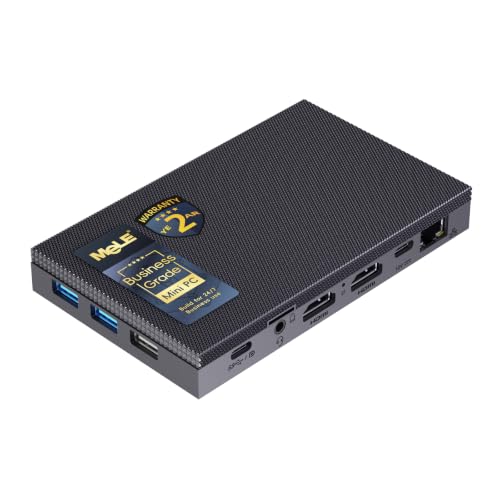
- Best fanless mini PC for a small space: MeLE Quieter 4C (Intel N150, Business Grade), 8GB RAM, 256GB Storage — Check on Amazon
- MINIX NEO Z300-0dB, Intel Core i3-N300, 16GB RAM, 512GB SSD — Check on Amazon
- MeLE Quieter 4C (Intel N100, Business Grade), 8GB RAM, 128GB Storage — Check on Amazon
- ZOTAC ZBOX CI337 Nano Fanless Mini PC, Intel N100, Barebone (No RAM / SSD / OS) — Check on Amazon
- CWWK N100 Fanless Firewall Mini PC, 4 x 2.5GbE LAN, 8GB DDR5, 128GB NVMe — Check on Amazon
- Protectli Vault FW4C, 4 Port 2.5GbE Firewall Appliance, 4GB RAM, 32GB Storage — Check on Amazon
Read the full guide ↓
Disclosure: As an Amazon Associate, reviewstook.com earns from qualifying purchases. Links to Amazon on this page are affiliate links; they cost you nothing extra. Listing details such as price and availability change often, so check the current Amazon listing before you buy.
A small room changes what a good computer is. When the desk is a shelf, the office is a corner of the bedroom, or the PC has to live in the same few square metres where you sleep, two problems arrive together: there is nowhere to put a big box, and there is nowhere for its noise to go. A fanless mini PC answers the second problem completely — there is no fan, so there is no fan noise, ever — and it appears to answer the first one just as completely, because the machines themselves are tiny. This guide exists because that second answer is only half true, and the half that is false is the half that decides whether the installation works.
Here is the catch that separates a fanless mini PC from every fanned mini PC in our other guides. A fanned box moves its heat with air it pulls through itself, so you can tuck it into a media cabinet, slide it between books, or stand it flush against a wall and it will mostly cope. A fanless box has no fan. Its entire metal case is the heatsink: heat soaks into finned panels and the room’s air carries it away from the case’s outer surface. That means the space around a fanless PC is part of the machine. Seal it in a closed cabinet, bury it under a stack of books, wedge it behind a curtain of cables or push its fins flat against a wall, and you have not tidied the computer away — you have switched its cooling off. Every pick in this guide is therefore graded as an installation, not as a spec sheet: where it can honestly live, what its power brick does to the footprint, how its cables change the real depth, and how much breathing room its fins need before physics starts slowing it down.
The honest performance frame, before any product names: every machine here runs an Intel N-series processor — the quad-core N100 or N150, or the eight-core Core i3-N300 — because chips in the 6-to-15-watt class are the only ones a passive case can cool. These are genuinely good at the work small spaces usually ask for: office and study work, browsing, media playback, video calls, home automation, a small always-on server, firewall duty, and light gaming — older titles, indie games, esports at modest settings, retro emulation, and games streamed from a bigger machine or a cloud service. They are not gaming towers and no placement trick makes them one. Under a long, sustained load they also slow themselves down on purpose: independent testing of the fastest pick here measured its processor at 98°C under continuous load, within specification but a clear sign the case had reached what it could shed. Bursty everyday work barely notices. Placement decides how often you meet the limit, which is why this guide treats placement as a specification.
One more thing this angle changes: the best small-space fanless PC is not automatically the smallest box. It is the box whose whole installed footprint — case, clearance, brick, cables — fits the spot you actually have, and three of the six picks below can reduce their desk footprint to nearly nothing by mounting behind a monitor, because their makers document a VESA mount. The other three are graded by class: a compact desktop slab with the only fully documented dimensions in the set, and two finned network appliances whose natural home is not a desk at all but the corner where your router already lives. Prices in this category change often, so this guide prints no fixed prices: check the current price on Amazon for each pick before you buy, and compare the two MeLE configurations live, because which one makes sense for the same spot depends on their prices on the day you shop.
In this guide
Quick Picks
Short on time, or comparing several options at once? Each row below names the small-space situation and the machine that suits it, with a link to the listing. Check the current price on Amazon from each row’s link before you buy, because prices in this category change often.
| Small-space situation | Pick | Why it stands out | Link |
|---|---|---|---|
| Best for a small space overall | MeLE Quieter 4C, Intel N150, 8GB / 256GB | Documented VESA mount puts it behind the monitor — a desk footprint of nearly zero — check price on Amazon | Check on Amazon |
| Most capable in a small slab | MINIX NEO Z300-0dB, Core i3-N300, 16GB / 512GB | Eight cores and the set’s only documented dimensions — 135 x 122 x 44.6mm — check price on Amazon | Check on Amazon |
| Same disappearing act, lighter specification | MeLE Quieter 4C, Intel N100, 8GB / 128GB | The identical VESA-mountable chassis with the previous-generation chip and lighter storage — check price on Amazon | Check on Amazon |
| Mounted install you build yourself | ZOTAC ZBOX CI337 Nano, Intel N100 barebone | A VESA-mountable fanless kit you complete yourself — the kit price is before parts, so check price on Amazon | Check on Amazon |
| Best for the network corner | CWWK N100, 4 x 2.5GbE, 8GB DDR5 / 128GB | Four Intel 2.5GbE ports in a finned case that lives by the router — check price on Amazon | Check on Amazon |
| Supported network-corner pick | Protectli Vault FW4C, 4GB / 32GB | coreboot option, US support and a two-year warranty in a finned appliance — check price on Amazon | Check on Amazon |
How These Picks Were Chosen
The first filter was the word “fanless” itself, applied strictly. A machine belongs here only if its passive cooling is verified — stated in the manufacturer’s own specifications or product materials, or confirmed by an independent review that opened the case or documented the absence of a fan. Plenty of mini PCs market themselves as “silent” or “whisper-quiet” while hiding a small fan inside; those are excluded, however good they are, because in a small room a small fan is still the loudest thing in it. Machines whose fanless status could not be verified either way were left out rather than guessed in. Silence is the product, so the standard of proof is the product.
The second filter was the processor ceiling that passive cooling imposes. A fanless case of this size can shed roughly 15 watts of sustained heat, which in practice limits the menu to Intel’s Alder Lake-N and Twin Lake chips: the quad-core N100 and N150 and the eight-core Core i3-N300. Anything stronger needs a fan. Every pick below sits inside that ceiling, and the expectations in this guide are calibrated to it honestly.
The third filter was price and availability: a verified Amazon listing within this guide’s under-$500 budget, in one specific configuration with its own ASIN. Where a model is sold in several configurations, we linked and described exactly one, because on Amazon the configuration is the product — and in a small-space guide the configuration matters twice over, because memory and storage decide how much external clutter the machine drags with it.
The fourth filter is the one this angle adds: installability. Each pick was graded on its form-factor class, on whether its maker documents a way to get it off the desk entirely, on the external power brick every machine here uses, and on the clearance its finned case needs to keep breathing. A discipline note, stated once and applied throughout: dimensions, weights, mounts and noise figures are printed in this guide only where the underlying research documents them for that exact machine. One pick below has fully documented dimensions. Three have documented monitor mounts. The rest are graded by class, and where a figure is not documented the guide says so and tells you to take it from the live listing’s specification table rather than from anyone’s guess — including ours.
Finally, we did not use these machines ourselves. We read manufacturer specification pages, listing copy, manuals and independent reviews and teardowns, and compared processors, memory, storage, port selections, mounting options, firmware and warranty terms. Where sources disagreed, the review says what is confirmed, what is claimed, and what to check on the live listing before you order.
The Space a Fanless PC Really Occupies
Product photographs measure a fanless mini PC the way estate agents measure a room: the box alone, in empty space, looking smaller than life will make it. The installed machine occupies four spaces the photograph never shows, and in a small room all four are scarce. Work through them before the reviews, because they are the grading system the reviews use.
First, the air around the case is part of the machine. A fanless case cools by surface area: heat spreads into finned panels and the room’s air carries it away. Anything that covers the fins — a book stack, a games console parked on top, a curtain, the side of a cabinet — removes that part of the heatsink, and anything that traps the air around them, like a closed media cabinet or a sealed cubby, turns the machine’s own exhaust into its intake. The rule for this whole category is stricter than for any fanned PC: open air on every side, fins unobstructed, nothing resting on the case, and no sealed furniture, full stop. An open-backed shelf is fine. A cabinet with a door is refused outright for all six picks — not discouraged, refused — because the outcome is not a slightly warmer PC but a PC that throttles through every sustained task and cooks slowly in its own heat. If the only spot you have is enclosed, the honest answer is a fanned machine from our Best Mini PC Under $500 guide, placed where its fan can breathe, or a different spot.
Second, the power brick needs an address. Every machine in this guide is powered by an external brick, and the brick is a second object competing for the same small room. It has a footprint of its own, it warms up in use, and it wants ventilation of its own — buried under a rug, wedged behind a sofa or sealed inside a cable-management box, it becomes a small heater with no airflow, which is bad for the brick and worse for everything touching it. Plan its home when you plan the PC’s: on the floor beside the desk leg, on the shelf behind the monitor, anywhere with air around it and a cable run that does not cross the room. Two picks soften this problem in a documented way — the MeLE desktops can be powered over USB-C, including from a suitable monitor, which can retire the separate brick from the desk entirely; check the live listing’s power specification before counting on it. For the rest, the brick is part of the footprint, and this guide grades it that way.
Third, the cable drop sets the real depth. A mini PC’s depth on paper is the case. Its depth in your room is the case plus the bend radius of everything plugged into its back: display cable, Ethernet, power. Stiff cables need several centimetres behind the box before they can turn, and a machine pushed flush to a wall to “save space” usually ends up with its connectors strained and its rear fins — part of the heatsink — pressed into the one place air cannot reach. Measure installed depth, not case depth: leave room behind for the cables to fall naturally, and prefer a spot where the drop runs straight down a desk’s back edge or a wall channel rather than splaying across the surface you work on. The two firewall picks multiply this problem by four Ethernet cables; their cable drop is the dominant part of their footprint, which is one more reason they belong in the network corner and not on a desk.
Fourth, the heat has to go somewhere, and in a small room that somewhere is your air. These are low-power machines — the chips sip between 6 and 15 watts — so none of them will heat a room the way a gaming tower does. But the case itself runs hot to the touch by design, and surfaces that would alarm a laptop user are normal here. Keep the fins away from paper stacks, soft furnishings and anything meltable, and remember that a bedroom PC idling warm beside the bed is shedding its heat into the smallest air volume in the home. It is a reason to give the machine an honest spot — open, still, and out of the way — which is the entire discipline this guide is asking for.
One installation deserves its own paragraph because it solves the first three problems at once: the monitor mount. Three picks — both MeLE Quieter 4C configurations and the ZOTAC kit — document a VESA mount, which puts the PC on the back of the display, off the desk entirely. The desk footprint falls to the monitor’s own stand; the brick can live on the floor or the monitor shelf; the cables drop behind the screen where they were going anyway. Two cautions keep it honest. The mount holds the case off the panel with air around it — that airflow is the cooling, so the mounted machine still needs an open-backed setup, not a monitor pushed into an alcove. And the monitor’s own rear panel warms up in use, so a mounted fanless PC lives in slightly warmer air than a desk one; for the bursty work these machines do, that trade is worth making — but it is a trade, and worth stating.
Detailed Reviews
1. MeLE Quieter 4C (N150, 8GB / 256GB) — the fanless PC that leaves the desk empty
Who it suits: anyone whose small space is a desk — a bedroom desk, a study corner, a kitchen counter — and who wants the computer to disappear from it: students, home workers, and anyone whose monitor already owns the only surface available.
The MeLE Quieter 4C in this configuration pairs Intel’s N150 — the current refresh of the quad-core N100, with slightly higher clocks — with 8GB of memory and 256GB of storage, and Windows 11 Pro preinstalled. Its specification is ordinary for this guide. Its installation is not. The Quieter line is fanless by design: a low-profile finned chassis with no fan anywhere, verified across the maker’s materials and years of independent reviews, and the chassis carries a documented VESA mount, so the whole computer bolts to the back of a monitor and the desk returns to being a desk. Dual HDMI outputs drive two 4K displays, Wi-Fi 6 and Bluetooth 5.2 handle wireless, gigabit Ethernet is there when you want a wire, and USB-C power delivery means it can run from a suitable monitor — the one documented route in this guide to a small-space install with no separate power brick on the desk at all. Check the current price on Amazon for this business-grade configuration before you buy.
- Zero-footprint install: the documented VESA mount puts the PC behind the monitor, off the desk entirely
- Brick-optional power: USB-C power delivery can run it from a suitable monitor, deleting the brick from the desk
- Verified fanless: the Quieter series is a passively cooled design, confirmed by the maker and independent reviews
- Current-generation chip: the N150 is the newest quad-core in this guide, in the same low-watt class as the N100
Honest limitation: the memory is soldered LPDDR5 — 8GB is what you get forever, adequate rather than generous for Windows 11 multitasking — and storage expansion leans on a microSD slot rather than a second internal drive. Which MeLE configuration makes sense also depends on live pricing, so check the current price on Amazon for both this model and the N100 configuration below before deciding — the installation is identical, and the choice turns on the chip and storage you need. Mounted behind a monitor it also lives in the panel’s warm air, which shortens the road to throttling on sustained loads — placement physics again, stated rather than hidden.
Choose this if your desk space is the problem and your monitor has a VESA mount — it is the most complete disappearing act in this guide. Skip it if you need 16GB of memory, since soldered memory makes that a different pick entirely — and before buying, compare its current price on Amazon with the N100 configuration below, which offers the same chassis and mount for the same spot. Check on Amazon
2. MINIX NEO Z300-0dB — the most computer that fits on a shelf corner
Who it suits: buyers with a small but real surface — a shelf end, a desk corner, the top of a low cabinet — who want the most capable fanless PC under $500 to sit on it: heavier multitasking, a media PC, or a small always-on server with genuine headroom.
The MINIX NEO Z300-0dB is the strongest machine in this guide and the only one whose size you can plan around to the millimetre, because it is the only pick whose research documents full dimensions: 135 x 122 x 44.6mm — a slab roughly the footprint of a paperback, tall enough to clear most shelf clutter. Inside the all-metal, verified-fanless chassis sits the Intel Core i3-N300, the eight-core flagship of the Alder Lake-N family and the only eight-core chip here, with 16GB of DDR4 memory in a real slot — upgradeable to 32GB, almost unheard of in this category — and a 512GB PCIe SSD in an M.2 slot accepting drives up to 4TB. Windows 11 Pro is preinstalled. Connectivity leads the desktop picks: dual HDMI at 4K, a 2.5-gigabit Ethernet port, Wi-Fi 6, Bluetooth 5.2 and USB-C with power delivery and display output. It sits at the top of this guide’s budget band, so check the current price on Amazon and confirm it still fits the under-$500 budget before you order.
- Documented dimensions: 135 x 122 x 44.6mm — the one pick you can measure your spot against exactly
- The strongest chip in the guide: eight N300 cores for multitasking and server headroom the quad-core picks cannot match
- Upgradeable memory: a real SO-DIMM slot, 16GB fitted and 32GB supported, plus an M.2 slot taking up to 4TB
- Genuinely fanless: an all-metal chassis with no fan anywhere, verified from the maker’s specifications and independent reviews
Honest limitation: it is a desk-and-shelf machine, not a disappearing one — no monitor mount is documented for it in the research behind this guide, so it keeps its small but real footprint, and its fins need the same open air as every pick here. Its extra cores also reach the thermal wall sooner in relative terms: independent measurement put this processor at 98°C under sustained load, and long all-core jobs throttle. And it sits at the very top of this guide’s budget band, so check the current price on Amazon before ordering and walk away if the live listing has moved it beyond the under-$500 budget.
Choose this if you have a shelf corner that fits its documented footprint and you want one silent desktop that does everything in this category well. Skip it if your work is light and bursty — the quad-core picks feel identical for that use and sit lower in the budget band — or if your only spot is a monitor’s back, which points at the pick above. Check on Amazon
3. MeLE Quieter 4C (N100, 8GB / 128GB) — the same disappearing act, previous-generation chip
Who it suits: buyers who want the pick-one installation — a silent desktop mounted out of sight behind the monitor — with the previous-generation chip and lighter storage, and who will check the current price on Amazon and compare it with the N150 configuration before choosing.
This Quieter 4C configuration is the previous chip generation of the guide’s top pick: the quad-core N100 instead of the N150, 8GB of soldered memory, and 128GB of storage instead of 256GB, in the identical fanless chassis with the same documented VESA mount, the same dual 4K HDMI outputs, the same USB-C power delivery and Windows 11 Pro. Installed, it is indistinguishable from pick one: bolted behind the display, brick retired to the floor or deleted via monitor power, cables dropping behind the screen. In use it is nearly indistinguishable too — the N150’s edge is a small clock bump, and in the bursty everyday work these machines exist for, most people would not feel the difference. What they would feel is the storage: 128GB fills quickly, and this configuration suits a machine that works from cloud storage, network drives or a microSD card. Check the current price on Amazon before choosing between this configuration and the N150 model above.
- The proven chassis: identical fanless case, documented mount and ports to the N150 configuration
- Near-identical experience: the N100 trails the N150 by a small margin in the light work these PCs do
- Compare before you buy: check the current price on Amazon against the N150 configuration above, because the two share a chassis and differ mainly in chip and storage
- Business-grade build: the same 24/7-oriented configuration line as pick one
Honest limitation: its appeal depends entirely on live pricing: 128GB of storage with soldered 8GB memory is the least future-proof specification here, so this configuration only makes sense when the current price on Amazon sits clearly below the better N150 model above — if the two live prices are close, the newer chip and larger storage are the rational choice for the same spot, and the review would be dishonest if it pretended otherwise.
Choose this if checking the current price on Amazon shows it clearly below the N150 configuration and your files live on the network or in the cloud anyway. Skip it if its live price is close to the N150 model’s — at that point the N150 configuration above is the rational purchase for the same spot. Check on Amazon
4. ZOTAC ZBOX CI337 Nano — the mounted install you build yourself
Who it suits: tinkerers with a spare memory stick and SSD on the shelf who want a verified-fanless route onto the back of a monitor from the lower end of this budget band — and who understand the word “barebone” before they click buy.
The ZOTAC ZBOX CI337 Nano is a kit: an Intel N100 in Zotac’s long-running fanless CI-series chassis — the listing itself leads with “Fanless Silent,” and the line’s passive design is well documented — with empty slots where your memory, storage and operating system go. The box holds no RAM, no SSD and no operating system. What the kit does give the small-space buyer is the installation hardware: a documented VESA mount, so the finished machine bolts behind a monitor like the MeLE picks, plus HDMI and DisplayPort outputs and a card reader. You add a SO-DIMM and an M.2 SSD — confirm the exact memory type and slot specification on Zotac’s product page before ordering parts — install the OS of your choice, Linux being free and ideal, and the result is a silent N100 desktop that occupies no desk at all. Check the current price on Amazon for the kit, and check the prices of the parts you still need — a build finished with a 16GB memory stick and a 512GB SSD, for example — before assuming the completed machine stays comfortably under budget.
- Lower-band mounted install: a verified-fanless, VESA-mountable kit from an established brand at the lower end of this budget band — check price on Amazon
- Your parts, your spec: choose your own memory and storage sizes instead of accepting a fixed configuration
- A documented design: Zotac’s CI series has been the mainstream fanless mini PC line for years
- Linux-friendly: the natural home for a free OS, which keeps the completion cost down
Honest limitation: the kit price is not a computer — it is most of a computer — and the small-space maths only flatters the kit if your parts are already owned or sourced carefully. Memory and storage prices are volatile, and a completion built entirely from new retail parts can drift toward the complete Quieter 4C picks once you check the current prices on Amazon for everything, while adding assembly and an OS install; there is also no Windows licence in the maths unless you add one. Buy the kit for the parts-bin economics and the pleasure of the build, not as a guaranteed saving.
Choose this if you have compatible parts waiting and a VESA mount going spare. Skip it if you want a machine that works ten minutes after the box opens — the MeLE picks above are complete. If the kit route appeals beyond this budget’s shape, our Best Barebones Mini PC Under $500 guide covers the wider barebones market in the same price band. Check on Amazon
5. CWWK N100 Firewall Mini PC (4 x 2.5GbE, 8GB / 128GB) — the small box for the network corner
Who it suits: home-lab builders and network enthusiasts whose small-space problem is not the desk but the corner where the internet enters the home — and who want silent, serious routing hardware to live there.
The CWWK N100 four-port is a finned aluminium appliance, verified fanless, built around the quad-core N100 with 8GB of DDR5 memory in a SO-DIMM slot and a 128GB NVMe SSD. Its reason to exist faces backwards: four Intel i226-V 2.5-gigabit Ethernet ports, the controllers the firewall community specifically looks for, enough for a WAN feed, a LAN, and separate IoT and guest networks without VLAN gymnastics on a managed switch. Two HDMI outputs, USB 3.0 and 2.0 ports and USB-C round out a box that doubles as a small Proxmox, Home Assistant or Docker host when it is not routing. As an installation, grade it where it belongs: not on a desk, where four Ethernet cables would own the surface, but on the shelf or wall-adjacent spot beside the router and modem, where its cable drop falls a short distance and its fins get the open air a 24/7 box needs. Check the current price on Amazon for this configuration before ordering, and check carefully which configuration a live price belongs to, because this listing family spans several variants.
- Four Intel 2.5GbE ports: i226-V controllers, the ones pfSense and OPNsense users actually want
- DDR5 in a slot: socketed memory rather than soldered, unusual in this class and welcome for upgrades
- Verified fanless: a finned aluminium case with no fan, designed for 24/7 routing duty
- Doubles as a server: firewall, home automation and container hosts run happily on the same silent box
Honest limitation: support is a marketplace seller rather than a US support desk, documentation and BIOS polish lag the Protectli below, and the maker also sells this hardware through its own channel — check the current price on Amazon before ordering. The N100’s firewall limits deserve the same honesty: raw routing across several gigabit links is easy for it, but deep inspection workloads are not, and anyone planning Suricata or Zenarmor on a full gigabit feed should check the firewall forums’ experience with this chip before ordering. Check the live listing’s configuration carefully, because this listing family spans several memory and storage variants — in a corner installation, the wrong variant is a return you have to re-cable.
Choose this if the network corner needs four fast ports at the best hardware value here and self-support holds no fear. Skip it if you would rather pay for documentation, firmware choice and a human support desk — that purchase is the next pick. Check on Amazon
6. Protectli Vault FW4C (4GB / 32GB) — the supported appliance for the same corner
Who it suits: buyers who want the network corner to be an appliance in the fullest sense — documented, supported, warrantied and flashable with open firmware — and who value those things over raw specifications.
The Protectli Vault FW4C takes the same corner job and wraps it in everything the CWWK leaves out: a finned, fanless case, four Intel i226-V 2.5-gigabit Ethernet ports, and a US company behind it that publishes proper documentation, maintains a knowledge base, answers support tickets and warrants the box for two years. Its signature feature is firmware choice: a coreboot option, the open-source firmware security-conscious buyers specifically seek, alongside the standard AMI BIOS. The installation story mirrors the CWWK’s — this is a machine for the shelf by the router, where its four cables fall short distances and its finned case sits in open air doing a job that must never stop — with one small-space advantage of its own: an appliance bought for support is an appliance you will not be pulling out of its corner to troubleshoot, and in a tight installation that permanence matters a great deal. This Amazon configuration carries 4GB of memory and 32GB of storage, sized for a firewall distribution, which is all it is meant to run. Check the current price on Amazon before ordering. Because Protectli sells this model in several memory and storage combinations and through more than one channel, verify the exact configuration on the live listing before ordering.
- coreboot available: open firmware is a genuine differentiator no other pick here offers
- Real support: US-based company, published documentation and a two-year warranty
- Four 2.5GbE Intel ports: the same i226-V controllers as the CWWK, in a fully supported package
- Verified fanless: a finned metal case built for silent 24/7 service in a fixed spot
Honest limitation: judged purely as a computer, this is the weakest specification in the guide — its Celeron J3710 platform is a generation older than the N100 boxes, with DDR3 memory and mSATA storage, and it is not close. The premium buys support, firmware and trust rather than silicon, and as a general-purpose server the CWWK above is simply the stronger machine. Judged as a firewall, with a firewall’s modest appetite, the FW4C makes sense; judged as a mini PC, it does not.
Choose this if the corner deserves a supported appliance and coreboot is on your list. Skip it if one box must route and serve together — the CWWK’s newer platform does that double duty better. Check on Amazon
Comparison Table
Every machine in this guide side by side, graded the way this angle grades: by the installation it makes. Check the current price on Amazon on the live listing before you buy, because prices in this category change often. Dimensions and mounts are printed only where the research documents them; take any other measurement from the live listing’s specification table.
| Machine | Processor | Memory | Storage | Installation | Price | Best for |
|---|---|---|---|---|---|---|
| MeLE Quieter 4C (N150) | Intel N150, 4 cores | 8GB LPDDR5, soldered | 256GB | Documented VESA mount — behind the monitor | Check price on Amazon | Zero-footprint silent desktop |
| MINIX NEO Z300-0dB | Core i3-N300, 8 cores | 16GB DDR4, upgradeable to 32GB | 512GB PCIe SSD | Desk/shelf slab, 135 x 122 x 44.6mm documented | Check price on Amazon | Most capable small install |
| MeLE Quieter 4C (N100) | Intel N100, 4 cores | 8GB LPDDR5, soldered | 128GB | Documented VESA mount — behind the monitor | Check price on Amazon | Same mount, lighter storage |
| ZOTAC ZBOX CI337 Nano | Intel N100, 4 cores | None fitted — add your own | None fitted — add your own | Documented VESA mount — kit you complete | Check price on Amazon | Mounted kit you complete |
| CWWK N100 4-Port | Intel N100, 4 cores | 8GB DDR5, socketed | 128GB NVMe | Network corner — four-cable drop | Check price on Amazon | pfSense / OPNsense router |
| Protectli Vault FW4C | Celeron J3710, 4 cores | 4GB DDR3L | 32GB mSATA | Network corner — supported appliance | Check price on Amazon | Supported coreboot firewall |
How to Choose: Measure Before You Buy
In a big room, a mini PC can be placed wherever it lands and the details forgiven. In a small one, the order of operations matters, and it is the same five steps for every pick in this guide. Do them in order, before you order.
Step 1 — Measure the spot, not the product photo. Decide where the machine will actually live — desk corner, shelf, monitor’s back, network corner — and measure that space: width, depth, and the height of anything above it. Then compare against documented figures only. The MINIX in this guide documents 135 x 122 x 44.6mm, so its fit can be checked exactly; the MeLE and ZOTAC picks document a monitor mount instead, which replaces the measurement with a different question — does your monitor have VESA holes, and is there open space behind it? For any figure a guide does not document, take it from the live listing’s specification table at this step, never from a roundup or a sibling model.
Step 2 — Reserve the ventilation clearance. Whatever spot you measured, now shrink it honestly. A fanless case needs open air around its fins on every side, so the usable spot is the measured spot minus breathing room on all faces — and if what remains is inside a closed cabinet, a sealed cubby or a drawer, stop: that spot is refused for this entire category, and no pick in this guide will run well there. An open shelf, a desk corner, the back of a monitor on an open-backed stand, a ventilated network shelf — those are the honest spots. If your room genuinely offers none of them, the Best Compact Gaming PC Under $500 and wider mini PC guides cover fanned machines that tolerate tighter placement.
Step 3 — Give the power brick an address. Every pick here runs from an external brick, and the brick needs its own measured home: a spot with air around it, off soft furnishings, with a cable run to the machine that does not cross walkways or heat sources. Floor beside the desk leg and the shelf behind the monitor are the usual answers. If you are choosing between the MeLE configurations and everything else, weigh the documented exception: their USB-C power delivery can run the machine from a suitable monitor, which is the only route here to no brick at all — verify the live listing’s power specification before planning around it.
Step 4 — Walk the cable drop. Stand at the spot and trace every cable to where it ends: display, Ethernet, power, peripherals. Count the bend room behind the case — stiff cables need centimetres to turn, and installed depth is case depth plus that bend, not the case alone. Prefer drops that fall straight down a desk’s back edge or a short run to the router. Firewall buyers, count four Ethernet cables and be honest about where they fall; that drop, not the little finned box, is the real size of a network-corner install, and it is why the Best Fanless Mini PC For Streaming Under $500 companion guide grades these machines by their wiring as much as their cases.
Step 5 — Then order, and verify on arrival. Only now does the purchase happen, and it ends with checks, because Amazon configurations drift. Confirm the delivered machine matches the model number and configuration you ordered — the CWWK’s listing family spans several variants, Protectli sells the FW4C in several memory and storage combinations, and the ZOTAC kit needs its memory type and slot specification confirmed on Zotac’s page before parts are ordered. Then install it in the spot you measured, with the clearance you reserved, and let it run a sustained task while you watch whether it throttles sooner than your room promised. If the spot fails the machine, the return window is when to learn it — not the first hot evening of summer.
Common Mistakes
- Sealing the box in furniture. The defining mistake of this category. A fanless PC in a closed cabinet is a PC with its heatsink wrapped in a blanket: it will throttle, and it will do so forever. Open air is not a preference; it is the cooling system.
- Measuring the case and forgetting the installation. The box is the smallest part of what you are placing. Brick, cable bend and clearance are the rest, and in a small room they are usually the parts that do not fit.
- Resting things on the fins. A router, a book, an external drive parked on top of a fanless case removes that face from the heatsink. The top of the case is not a shelf, however flat it looks.
- Believing “silent” marketing. Many mini PCs with fans describe themselves as silent. If silence is the requirement, verify the absence of a fan from the manufacturer’s specifications — as this guide did for every pick — rather than trusting the adjective; buyers who need a general small desktop rather than a silent one should compare the Best Home Office PC Under $500 options too.
- Buying soldered 8GB for a five-year desktop. Both MeLE configurations fix their memory forever. Bought for a light, cloud-first machine that is a fair trade; bought as a five-year main desktop it is the decision you will regret at year three. The MINIX’s slotted 16GB exists for that buyer.
- Comparing a barebone kit price to complete-PC prices. For a parts owner the ZOTAC kit is excellent value; for everyone else it turns into a false economy once memory, storage and an OS are added at current retail prices — check the current price on Amazon for the kit and every part before comparing. Always compare finished cost to finished cost — and finished footprint to finished footprint.
- Putting the firewall on the desk. Four Ethernet cables own any surface they land on. The network picks belong in the network corner, where the drop is short and the desk stays a desk.
Final Recommendation
For most small spaces, the answer is the machine that leaves the room: the MeLE Quieter 4C in its N150 configuration, mounted behind the monitor on its documented VESA bracket, powered over USB-C where the monitor allows — a silent desktop whose desk footprint is the monitor’s own; check the current price on Amazon before buying. Buyers with a shelf corner to spare and heavier work to do should take the MINIX NEO Z300-0dB, checking its current price on Amazon against the under-$500 budget first: the only pick whose fit can be verified to the millimetre before ordering, and the most capable silent PC here. Buyers who can accept the previous-generation chip get the same disappearing act from the N100 Quieter 4C; parts owners get their mounted install from the ZOTAC kit at the lower end of the band; and the network corner splits by temperament, CWWK for hardware value, Protectli for support. Whichever you choose, choose the spot first — in this category, the installation is the product. First-time silent-PC buyers may also want our Best Fanless Mini PC For Beginners Under $500 walkthrough, and anyone whose real budget is smaller should start from the Best Fanless Mini PC Under $400 guide, where the same installation logic applies for less.
FAQ
Can I put a fanless mini PC inside my TV cabinet? Not with the door closed — and that answer is firmer for fanless machines than for any other kind. The case is the heatsink, so a sealed cabinet traps the machine in its own exhaust and guarantees throttling under any sustained load. An open-backed cabinet or shelf with air moving around the fins is fine; a closed one is refused for every pick in this guide. If the cabinet is non-negotiable, buy a fanned machine and give its vents the same honesty.
Which of these can actually mount behind a monitor? The ones whose makers document it: both MeLE Quieter 4C configurations and the ZOTAC CI337 kit carry a documented VESA mount. No mount is documented for the MINIX or the two firewall appliances in the research behind this guide, so none is claimed for them — if a live listing shows a mount option for one of those machines, treat it as a listing detail to verify, not a given. Mounted machines still need open air behind the panel; the mount removes the footprint, not the physics.
How much space do I need to leave around a fanless PC? Enough that air can move past every finned surface and nothing touches the case: an open shelf or desk corner, clearance on all sides, nothing stacked on top, and room behind for cables to bend without pressing the machine into a wall. There is no honest universal centimetre figure — it depends on the room and the load — but the test is simple: if the spot still works with the machine running a sustained task on a warm evening, it works.
Can a fanless mini PC play games in a small room? Light ones, honestly framed: esports titles and older games at low settings, indie games, retro emulation, and streamed games from a gaming PC or cloud service all work well — and silence genuinely improves a small room for all of them, since there is no fan competing with the game’s audio. Modern AAA games at native settings do not work, and if gaming is the primary job, the Best Streaming PC Under $500 and Best Mini Gaming PC Under $500 guides cover machines with fans and real graphics hardware; a fanless box is a streaming endpoint for games, not a games machine. Our Best Fanless Mini PC For 1440p Gaming Under $500 companion guide grades exactly what these chips can drive on a 1440p display.
Which pick is the smallest? By the only measurement this guide can honestly print, the MINIX is the smallest fully documented desktop here at 135 x 122 x 44.6mm. But the honest small-space answer is that the mounted picks are smaller where it counts: a MeLE or the ZOTAC behind a monitor occupies no desk at all, which beats any millimetre figure a desk machine can offer. Smallest box and smallest installation are different questions — this guide grades the second one.
Why do fanless PCs get so hot to the touch? Because the case is the heatsink: warmth on the surface is the cooling system doing its job, not failing at it. Surface temperatures that would worry a laptop owner are ordinary operating conditions for these designs, and the processors are rated for the temperatures reviewers record under sustained load. It does shape placement: keep fins clear of paper, soft furnishings and anything that should not sit against a warm surface, and never rest things on top of the case.


