Where to buy
Check the latest price, availability and delivery on Amazon. Orders are placed on Amazon. We may earn a commission from qualifying purchases.
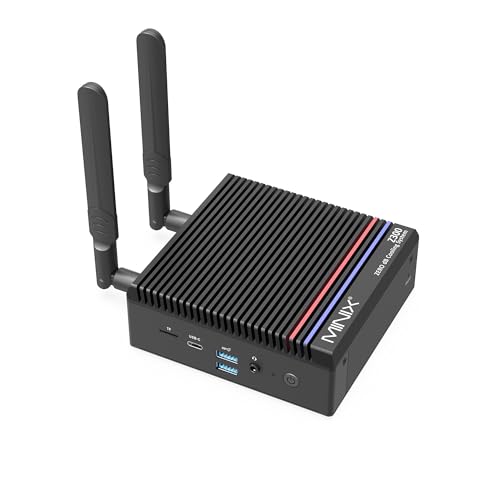
- Best overall fanless mini PC: MINIX NEO Z300-0dB, Intel Core i3-N300, 16GB RAM, 512GB SSD — Check on Amazon
- MeLE Quieter 4C (Intel N150, Business Grade), 8GB RAM, 256GB Storage — Check on Amazon
- CWWK N100 Fanless Firewall Mini PC, 4 x 2.5GbE LAN, 8GB DDR5, 128GB NVMe — Check on Amazon
- Protectli Vault FW4C, 4 Port 2.5GbE Firewall Appliance, 4GB RAM, 32GB Storage — Check on Amazon
- MeLE Quieter 4C (Intel N100, Business Grade), 8GB RAM, 128GB Storage — Check on Amazon
- ZOTAC ZBOX CI337 Nano Fanless Mini PC, Intel N100, Barebone (No RAM / SSD / OS) — Check on Amazon
Read the full guide ↓
Disclosure: As an Amazon Associate, reviewstook.com earns from qualifying purchases. Links to Amazon on this page are affiliate links; they cost you nothing extra. Listing details such as price and availability change often, so check the current Amazon listing before you buy.
If this is your first mini PC, start with the one fact that explains everything else in this guide: a fanless mini PC has no fan at all. Most computers cool their processor with a spinning fan. These machines cool theirs with the metal case itself: heat from the chip soaks into the aluminium shell and its fins, and the room air quietly carries it away. No fan means no fan noise, no whirring under load, no dust sucked through the box, and no fan to wear out. The silence is total — not “quiet for a PC,” but the same silence as a book sitting on your desk.
Now the honest half of the bargain, because a first-time buyer deserves it up front. Silence is bought with speed. The only processors that can be cooled by a metal box with no fan are small, low-power chips — in this guide, Intel’s N100, N150 and the eight-core Core i3-N300 — because they use very little electricity and therefore make very little heat. Every machine below is built on one of those chips and integrated graphics, the small graphics helper built into the processor rather than a separate gaming graphics card. That makes these PCs genuinely good at everyday computing, media playback, home office work, always-on home-server jobs and, in two cases here, guarding a home network. It also means light gaming only: older games, indie titles, esports games at modest settings, retro emulation, and games streamed from a bigger machine or a cloud service. A fanless mini PC is not a small gaming tower, and no pick in this guide will run modern big-budget games the way a gaming PC with a graphics card does. If games are the main reason you are shopping, this is the wrong category — read this guide for a silent second machine or a family PC, and look at a fanned mini gaming PC for the games themselves.
One more thing a beginner should know: in this category, spending more money mostly does not buy a faster processor — the chip menu barely changes between $250 and $500. What the extra money buys is the stuff around the chip: more memory and storage fitted at the factory, extra network ports, a manufacturer who answers support tickets, or a kit you finish yourself for less. Two of the six picks below are straightforward silent desktops, one is the same desktop in a cheaper configuration, two are network firewall appliances (a different job entirely, and this guide says so plainly when we get to them), and one is a barebone kit with no memory, storage or operating system inside. The glossary after this introduction translates every term used later.
New to Mini PCs? The Words in This Guide, in Plain English
Fanless / passive cooling. The computer has no fan. Its metal case is the cooling system: heat travels from the processor into the shell and fins, then into the room air. It only works because the processor is small and frugal, and it is why placement matters — a fanless case buried in a drawer or sealed in a cabinet cannot shed heat and will slow itself down.
CPU (the processor). The chip that does the computer’s thinking. More cores means it can juggle more separate jobs at once. The chips in this guide are Intel’s low-power N-series: the quad-core (four-core) N100 and N150, the eight-core Core i3-N300, and one older quad-core Celeron. They are laptop-class economy chips — perfect for everyday work, not heavy lifting.
Integrated graphics and shared memory. A gaming PC has a separate graphics card with its own fast memory. These mini PCs do not. Their graphics are integrated — a small graphics unit built into the processor — and it shares the computer’s normal memory instead of having its own. That is fine for screens, video and light games, and it is the biggest reason these machines are light-gaming devices rather than gaming PCs.
RAM (memory) — and soldered versus socketed. RAM is the computer’s short-term working space; more of it means more apps and browser tabs open at once without slowdowns. The crucial distinction: socketed RAM sits in a slot and can be swapped or upgraded later, while soldered RAM is fixed to the board at the factory and can never change. In this guide the MINIX and the CWWK use socketed memory in a slot; both MeLE desktops use soldered memory, so the 8GB they ship with is the 8GB they retire with; the ZOTAC kit has empty slots waiting for memory you supply.
SSD (storage). Where your files, apps and Windows itself live permanently. Bigger is simply more room: 128GB fills quickly under Windows, 256GB is a workable desktop minimum, and 512GB is comfortable. An SSD in a standard M.2 slot can be replaced with a bigger one later.
Resolution. How many pixels your screen shows, written like 1920 × 1080 (“1080p”) or 3840 × 2160 (“4K”). More pixels means a sharper picture and more work for the graphics. Every pick here can display a crisp 4K desktop and play 4K video; playing demanding games at high resolution is a much harder job, and not what these chips are for.
Refresh rate. How many times per second the screen redraws, measured in hertz (Hz). A standard office monitor is 60Hz; a gaming monitor might be 144Hz — but only if you switch it on in Windows settings, because monitors often arrive set to 60Hz. The setup walkthrough below includes that step.
Upscaling. A trick games use to look sharper than they are: the game draws itself at a lower resolution, then software stretches and sharpens the picture to fill your screen. These Intel chips have no access to NVIDIA’s DLSS (that belongs to NVIDIA graphics cards, which none of these machines has), so on a fanless mini PC the honest version is simply running games at 720p or 1080p on your bigger screen, plus whatever resolution-scaling options an individual game offers.
Power brick. Mini PCs do not have a big power supply inside the case like a desktop tower. They use an external plug-and-transformer brick, like a laptop charger — one pick below can even run from USB-C power. The brick needs a home on or under your desk and a little air around it; it is part of the machine’s footprint even though listings never photograph it that way.
Barebone versus complete. A complete PC works out of the box: memory, storage and Windows are inside. A barebone kit is a partial computer — case, processor and motherboard only — and you buy and fit the memory and storage yourself, then install an operating system. One pick below is a barebone, so its sticker price is not the price of a working computer.
New versus renewed. Renewed or refurbished means second-hand equipment that has been tested and resold, usually cheaper and with a shorter warranty. All six picks in this guide are sold new — none is a renewed unit. The ZOTAC kit is new but incomplete (barebone), a different thing from used, and the Protectli pick needs its exact configuration checked on the live listing, which its review explains.
Throttling. When a processor gets too hot, it deliberately slows down to protect itself. In a fanless PC this is normal, expected behaviour under long, heavy jobs — a big video export, a full-disk scan — because the case can only shed so much heat per minute. Everyday work comes in short bursts and barely notices.
In this guide
Quick Picks
Short on time? Each row below names a buyer type and the machine that suits it, with a link to the listing. Check the current price on Amazon for each pick before you buy, because mini PC prices move constantly.
| Buyer type | Pick | Why it stands out | Link |
|---|---|---|---|
| Best overall fanless mini PC | MINIX NEO Z300-0dB, Core i3-N300, 16GB / 512GB | The fastest chip that can be passively cooled, in an all-metal case, at the top of the budget | Check on Amazon |
| Best silent desktop | MeLE Quieter 4C, Intel N150, 8GB / 256GB | The current chip refresh in the proven Quieter chassis, in the middle of the budget | Check on Amazon |
| Best firewall and router box | CWWK N100, 4 x 2.5GbE, 8GB DDR5 / 128GB | Four Intel 2.5GbE ports and DDR5 in a finned case, in the upper part of the budget | Check on Amazon |
| Best supported firewall | Protectli Vault FW4C, 4GB / 32GB | coreboot option, US support and a two-year warranty, in the middle of the budget | Check on Amazon |
| Best value configuration | MeLE Quieter 4C, Intel N100, 8GB / 128GB | The same silent desktop in a lower-priced configuration whose pricing dips regularly | Check on Amazon |
| Best barebone starter | ZOTAC ZBOX CI337 Nano, Intel N100 | A fanless kit you complete with your own RAM and SSD, at the lowest starting point in this guide | Check on Amazon |
How These Picks Were Chosen
The first test was the word “fanless” itself, and most of the mini PC market failed it. A machine only earned a place here if its lack of a fan was verified — stated in the manufacturer’s own specifications, or confirmed by an independent review that documented the design. Plenty of mini PCs call themselves “silent” in their marketing while hiding a small fan inside; those were left out. If silence is the reason you are buying, “trust us, it’s quiet” is not good enough.
The second test was the processor, because physics sets the menu. A case with no fan can only shed a limited amount of heat, which caps these machines at Intel’s low-power N-series chips. Anything stronger would overheat and throttle constantly, so any listing promising a fanless box around a big processor should make you suspicious. Every pick below uses an N-series chip (plus one older Celeron in the supported firewall), and the expectations in this guide are set to that class honestly: capable everyday computers, light gaming on the side, no pretending otherwise.
The third test was price and availability: each machine needed a verified Amazon listing within the under-$500 budget. Prices move, so this guide does not print them — check the current price on Amazon instead — and where a pick is price-sensitive, its review says so and explains when waiting is worthwhile. Where one product is sold in several configurations, we linked one specific configuration and described exactly that one, because on Amazon the configuration is the product.
Finally, a note on method and on fit. We did not use these machines ourselves; we compared manufacturer specifications, listing details, manuals and independent reviews and teardowns, and where sources disagreed the review says what to check on the live listing. Because this is the beginners’ version of the guide, each pick is also graded on how forgiving it is for a first-time owner — which is why two fine network appliances sit in the lower half of this list: excellent at their job, but their job is not “first desktop PC,” and a beginner deserves to be told that before spending money, not after.
Detailed Reviews
1. MINIX NEO Z300-0dB — the most capable silent PC a beginner can buy under $500
Who it suits: a first-time buyer who wants the strongest fanless desktop in the budget and does not want to think about upgrades for years — a silent home office machine, a family PC, a media PC never heard over a film, or a small always-on home server with room to grow.
The MINIX NEO Z300-0dB is built around the Intel Core i3-N300, an eight-core processor — double the cores of every other desktop pick here — from the same low-power family, which is what allows it to live in a case with no fan. The all-metal chassis, roughly 135 × 122 × 45mm, is the heatsink, and the fanless design is verified from the maker’s own specifications and independent coverage. What makes this the beginner-proof top pick is everything fitted around that chip: 16GB of memory sitting in a real slot (it can be upgraded to 32GB later — almost unheard of in this category), a roomy 512GB SSD in a standard slot that accepts far larger drives, and Windows 11 Pro already installed, so the first evening is setup, not assembly. Its connections are the best of any desktop pick here too: two HDMI outputs that can each drive a 4K screen, a fast 2.5-gigabit Ethernet port, Wi-Fi 6, Bluetooth 5.2 and a USB-C port that carries power and display. Check the current price on Amazon before you buy — it sits at the top of this guide’s budget, and for once that top-tier positioning buys the complete package.
- Genuinely fanless: an all-metal case with no fan anywhere, verified from the manufacturer’s specifications and independent reviews
- The strongest chip in the guide: eight cores give it multitasking headroom the quad-core picks cannot match
- Memory you can upgrade: 16GB fitted in a slot, 32GB supported, plus storage that can grow to a much larger SSD
- Nothing to finish: Windows 11 Pro preinstalled and the biggest storage in the guide — unbox, plug in, set up
Honest limitation: the extra cores run into the same physics as everything else here. Independent testing measured this processor at 98°C under a sustained heavy load, and on long all-core jobs the chip throttles — slows down — to what the case can cool. The eight cores buy responsiveness and parallel light work, not workstation speed, and a beginner planning heavy multitasking marathons should understand that before paying top-of-budget money. It is also the most expensive pick here, sitting at the top of the budget; check the current price on Amazon and make sure it still fits the under-$500 budget.
Choose this if you want one silent desktop that does everything this category can do, with an upgrade path if your needs grow. Skip it if your computing is light and bursty — web, documents, media — because the cheaper picks below feel the same doing that and cost far less. Check on Amazon
2. MeLE Quieter 4C (N150, 8GB / 256GB) — the silent desktop most beginners should buy
Who it suits: anyone buying a first silent PC for ordinary life — browsing, email, documents, homework, streaming video, a kitchen or bedroom computer — who wants it to vanish behind the monitor and never make a sound.
The MeLE Quieter 4C in this configuration pairs Intel’s N150, the newest quad-core chip in this guide and a mild refresh of the popular N100, with 8GB of memory and 256GB of storage, and Windows 11 Pro preinstalled. MeLE has specialised in fanless mini PCs longer than anyone else on this list, and the Quieter line is fanless by design: the slim case cools through its shell, with no fan to hear, and it mounts on a VESA bracket behind a monitor, the easiest pick here to make disappear completely. Two HDMI outputs drive two 4K displays, it can be powered over USB-C from a suitable monitor or power bank, and Wi-Fi 6, Bluetooth 5.2 and wired Ethernet cover connections. Check the current price on Amazon for this business-grade configuration — it sits in the middle of the budget, and its pricing moves enough to reward checking carefully, and sometimes a short wait, before you buy.
- Verified fanless: a passively cooled design confirmed by the maker and by years of independent reviews of the Quieter line
- Current-generation chip: the N150 is the newest processor in this guide, with the same frugal power draw as the N100
- Desk-invisible: mounts behind a monitor on its VESA bracket and can run from USB-C power
- Business-grade build: this configuration comes from MeLE’s line aimed at running all day, every day
Honest limitation: the memory is soldered, so the 8GB it ships with is the 8GB it will always have. Eight gigabytes is adequate for everyday Windows use rather than generous, and storage expansion leans on a microSD card slot rather than a second internal drive. Combined with pricing that can climb well above its usual mid-tier positioning, the honest advice is: buy it when it dips, or look at the cheaper configuration of the same box further down this list.
Choose this if you want the current chip in the proven silent-desktop case and the current price on Amazon sits in line with its usual mid-tier positioning. Skip it if you want 16GB of memory — that requirement points back to the MINIX — or if its current price has climbed toward the top of the budget when you shop. Check on Amazon
3. CWWK N100 Firewall Mini PC (4 × 2.5GbE, 8GB / 128GB) — a network appliance, not a first desktop
Who it suits: beginners to home networking rather than beginners to PCs — someone who has read about running their own router with pfSense or OPNsense and wants the right silent hardware for it, or a small home server with serious network connections.
The CWWK N100 four-port is a finned aluminium box with no fan, built around the quad-core N100 with 8GB of memory — in a slot, so it can be changed — and a 128GB SSD. Its reason to exist is on the back: four Intel 2.5-gigabit Ethernet ports, the exact network controllers the firewall community looks for, enough to connect your internet line, your home network, and separate guest or smart-home networks without extra hardware. Two HDMI outputs and USB ports mean it can also serve as a small home server running things like Home Assistant. Check the current price on Amazon — this configuration sits in the upper part of the budget, and its pricing moves within that band. Understand what it is, though: it arrives as network hardware for software you install and configure yourself, not as a Windows desktop, and that learning curve is the real price of admission.
- Four Intel 2.5GbE ports: the i226-V controllers that pfSense and OPNsense users specifically want
- Memory in a slot: DDR5 in a SO-DIMM slot rather than soldered — unusual in this class and welcome
- Verified fanless: a finned aluminium case with no fan, designed to run around the clock
Honest limitation: support is a marketplace seller, not a help desk — documentation and polish trail the Protectli below, and beginners should expect community forums when stuck. You also pay an Amazon premium over the maker’s direct price. Two practical cautions: this listing family spans several memory and storage variants, so check the exact configuration on the live listing before ordering; and while the N100 routes fast home internet easily, heavy security-inspection software on a full gigabit connection can tax it, so read the firewall forums for this chip if that is your plan.
Choose this if your project is a silent home router or network server and you are comfortable learning as you go. Skip it if you want a desktop PC — picks one and two are that — or if you want a support desk behind your firewall, which is the next pick’s whole reason to exist. Check on Amazon
4. Protectli Vault FW4C (4GB / 32GB) — the firewall with a help desk
Who it suits: a beginner who likes the firewall idea but wants it appliance-style: documented, supported and warrantied, with real people to ask when the manual stops making sense.
The Protectli Vault FW4C is a finned, fanless four-port appliance with Intel 2.5-gigabit Ethernet throughout, sold by a US company that publishes proper documentation, maintains a knowledge base, answers support tickets and backs the box with a two-year warranty — the only pick here with that kind of safety net. Its signature feature is a choice of firmware: it is offered with coreboot, the open-source alternative to a standard BIOS, which security-minded buyers specifically seek out. This Amazon configuration carries 4GB of memory and 32GB of storage, which sounds tiny because it is — deliberately. A firewall program needs very little, and that is all this box is meant to run. Check the current price on Amazon — it sits in the middle of the budget. One caution before ordering: one reviewer described the Amazon unit as “barebone” while the listing title includes the 4GB and 32GB, and Protectli sells this model in several configurations and channels — so check the live listing’s exact configuration carefully and make sure the memory and storage are included in what you are buying.
- Real support: a US-based company, published documentation and a two-year warranty — the beginner safety net
- coreboot available: an open-firmware option no other pick here offers
- Four 2.5GbE Intel ports: the same well-regarded network controllers as the CWWK, in a supported package
- Verified fanless: a finned metal case built for silent, continuous service
Honest limitation: as a computer, this is the weakest specification in the guide and it is not close — its Celeron J3710 platform is a generation older than the N100 boxes, with older memory and storage types to match. You are paying for support, firmware and trust, not speed. Bought as a firewall, it makes complete sense; bought as a general mini PC, it makes none, and its 4GB/32GB configuration should never be mistaken for a desktop specification.
Choose this if your network deserves a supported appliance and you want help available while you learn. Skip it if you want one box that routes and does desktop or server duty — the CWWK above is the stronger all-rounder for similar money. Check on Amazon
5. MeLE Quieter 4C (N100, 8GB / 128GB) — the same silent desktop, bought at the right price
Who it suits: a patient first-time buyer who wants the Quieter 4C experience for the least money — and who is willing to watch the price instead of buying today, because timing is this pick’s entire trick.
This Quieter 4C configuration is the previous chip generation of pick two: the quad-core N100 instead of the N150, the same 8GB of memory, and 128GB of storage instead of 256GB, in the identical fanless, monitor-mountable case with the same dual 4K HDMI outputs, USB-C power option and Windows 11 Pro. Yes, this guide lists the same product line twice, on purpose and openly: they are separate Amazon listings at separate prices, and the cheaper one is the honest budget route into this chassis. The two chips are close relatives — the N150 clocks slightly higher — and in the bursty everyday work these PCs exist for, most beginners would not feel the difference. What you would feel is the storage: 128GB fills quickly under Windows, so this configuration suits someone whose files live in cloud storage, on a network drive or on a microSD card. Check the current price on Amazon — it sits in the lower-middle part of the budget when its pricing dips, which makes it the clearest “wait for the dip” pick in this guide.
- The proven chassis: the same fanless case, mounting and ports as the N150 configuration
- A near-identical experience: the N100 trails its refresh by a small margin in the light work these PCs do
- A genuine dip target: its pricing shows it selling well below its higher points on a regular basis
- Business-grade build: the same always-on-oriented configuration line as pick two
Honest limitation: when its current price climbs close to the better N150 model, this configuration is poor value, full stop, while offering the least future-proof specification in the guide: soldered 8GB memory you can never upgrade and 128GB of storage. This is a price-watch recommendation, not a buy-it-today one: when it dips well below the N150 configuration it is a bargain; when it sits close to that model, it is not.
Choose this if you spot it priced well below the N150 configuration and your files live in the cloud or on a network drive. Skip it if its current price has climbed close to the N150 configuration on the day you shop — that model above is the smarter buy at that point. Check on Amazon
6. ZOTAC ZBOX CI337 Nano — the barebone kit, explained honestly
Who it suits: a beginner who is comfortable with a screwdriver and likes the idea of assembling their first PC from a gentle starting point — or anyone with a spare memory stick and SSD already on the shelf.
The ZOTAC ZBOX CI337 Nano is a kit, and the word matters: inside the box are the fanless case, the quad-core N100 processor and the motherboard — and empty slots. There is no memory, no storage and no operating system included, so its kit price — check the current price on Amazon — is not the price of a working computer. You add a memory stick and an M.2 SSD — check the exact memory type and slot specification on Zotac’s product page before ordering parts — then install an operating system; Linux is free and ideal for a first build, while a Windows licence costs extra if you need one. Completed with a 16GB memory stick and a 512GB SSD, the finished machine can still land comfortably under budget depending on what those parts cost, and it is a genuinely satisfying first project. The payoff is a silent N100 desktop from Zotac’s long-running CI series — the listing itself leads with “Fanless Silent,” and the passive design is well documented — with HDMI and DisplayPort outputs, a card reader and VESA mounting. If the kit route appeals beyond this one model, our Best Barebones Mini PC Under $500 guide covers the wider barebones market in this price band.
- Cheapest way in: a verified-fanless kit from an established brand at the lowest starting point in this guide
- Your parts, your sizes: you choose the memory and storage instead of accepting a fixed configuration
- A documented design: Zotac’s CI series has been the mainstream fanless mini PC line for years
- A gentle first build: two parts and an OS install is the simplest assembly a PC offers
Honest limitation: the comparison only flatters the kit if your parts are cheap or already owned. Memory and storage prices in late 2026 are volatile, and a completion built entirely from new parts can drift toward the price of the complete MeLE above — while adding assembly time, an OS install, and the risk of ordering a part that does not fit. Buy the kit for the learning and the parts-bin economics, not as a guaranteed saving.
Choose this if you have compatible parts waiting or you would enjoy the build. Skip it if you want a computer that works ten minutes after the box opens — every other pick here is complete. Check on Amazon
Comparison Table
Every machine in this guide side by side. Check the current price on Amazon for each machine before you buy, because several move weekly.
| Machine | Processor | Memory | Storage | Networking | Price | Best for |
|---|---|---|---|---|---|---|
| MINIX NEO Z300-0dB | Core i3-N300, 8 cores | 16GB DDR4, upgradeable to 32GB | 512GB PCIe SSD | 1 x 2.5GbE, Wi-Fi 6 | Check price on Amazon | Most capable silent desktop |
| MeLE Quieter 4C (N150) | Intel N150, 4 cores | 8GB LPDDR5, soldered | 256GB | 1 x GbE, Wi-Fi 6 | Check price on Amazon | Silent everyday desktop |
| CWWK N100 4-Port | Intel N100, 4 cores | 8GB DDR5 | 128GB NVMe | 4 x 2.5GbE Intel i226-V | Check price on Amazon | pfSense / OPNsense router |
| Protectli Vault FW4C | Celeron J3710, 4 cores | 4GB DDR3L | 32GB mSATA | 4 x 2.5GbE Intel i226-V | Check price on Amazon | Supported coreboot firewall |
| MeLE Quieter 4C (N100) | Intel N100, 4 cores | 8GB LPDDR5, soldered | 128GB | 1 x GbE, Wi-Fi 6 | Check price on Amazon | Value pick — buy on a dip |
| ZOTAC ZBOX CI337 Nano | Intel N100, 4 cores | None fitted — add your own | None fitted — add your own | Gigabit Ethernet | Check price on Amazon | Cheapest fanless kit |
Your First Evening: Setting Up a Fanless Mini PC, Step by Step
This walkthrough assumes one of the complete desktop picks — the MINIX or either MeLE. If you bought the ZOTAC kit, your evening starts one step earlier: fit the memory stick and SSD into their slots first (the manual shows how; it is a few screws), then install your operating system from a USB stick before joining at step 1. The two firewall picks follow their own software guides instead — pfSense and OPNsense have their own installers and excellent documentation.
- Choose the spot, and respect the fins. A fanless case is not a box that happens to get warm — it is the heatsink, cooling your PC by giving its heat to the room air. So place it in open air: on the desk, on an open shelf, or mounted behind the monitor where air still circulates. Never bury it in a drawer, seal it in a closed TV cabinet, stack books on it, or wedge it against a radiator. Leave a hand’s width of air around the finned surfaces. This single decision decides whether your PC runs at full speed or throttles on a warm evening.
- Give the power brick a home. These PCs run from an external power brick, like a laptop charger. Plug it into a reachable socket or power strip, rest it somewhere air can move around it rather than in a cable tangle on carpet, and route its cable so nothing tugs on the PC’s connector.
- Connect the monitor to the machine’s display outputs. Use the HDMI (or DisplayPort, on the ZOTAC) sockets on the mini PC itself. Push the cable fully home at both ends, and note which input the monitor is set to — “no signal” on a first evening is almost always the monitor listening to the wrong input, not a broken PC.
- Add keyboard, mouse and wired internet. Plug in a keyboard and mouse (or their wireless receiver). Then, even if you plan to live on Wi-Fi, run an Ethernet cable from your router for this first evening if you can: the updates in the next step are large, and a wired connection makes them faster and removes Wi-Fi setup from the list of things that can go sideways on day one.
- Let Windows Update and the drivers finish. On first boot, Windows will want to install updates — on a new machine this can take a while and restart the PC more than once. Let it. Do not judge the machine’s speed, and do not install your software, until updates report themselves complete; a PC mid-update feels slow and strange, and it is not the machine’s fault. If anything still looks wrong afterwards, the maker’s support page for your model is where fresh drivers live.
- Set your monitor’s real refresh rate. Windows often leaves a new monitor at 60Hz even when the screen can do more. Go to Settings, then System, then Display, then Advanced display, and choose the highest refresh rate your monitor offers. On anything faster than a basic office screen, the mouse and scrolling will suddenly feel the way the box promised.
- Verify you received the configuration you paid for. Open Settings, then System, then About, and check the processor name, installed memory and storage size against your order and the model number on the box. This takes two minutes and it matters: marketplace listings sell the same product line in several configurations — this guide lists two MeLE configurations of one chassis, and the firewall listings span variants too — and the day the box arrives is the easiest day to fix a mix-up.
- Install a game store, and calibrate your expectations kindly. Install Steam (or your store of choice), sign in, and start with the games these machines genuinely enjoy: indie titles, older favourites, esports games at modest settings, and retro emulation. If you own a gaming PC elsewhere in the house, the same store can stream games from it to this silent box — the fanless PC decodes the video while the big machine does the work, the best gaming trick this category has. Buyers weighing a fanned machine for exactly that streaming role will find the candidates in our Best Streaming PC Under $500 guide.
How to Choose a Fanless Mini PC
Start with the job, not the chip. These machines earn their keep in four roles: the silent desktop, the media or streaming endpoint, the always-on home server, and the firewall or router. The job decides the ports and configuration before the processor matters at all. A router needs multiple Intel Ethernet ports; a desktop needs display outputs and storage; a server needs memory headroom. And be honest about gaming: if real gaming is on your list, the machines in our Best Mini PC Under $500 and Best Mini Gaming PC Under $500 guides trade silence for graphics hardware, the right trade for a games-first buyer. Readers arriving from our cheaper coverage in the Best Fanless Mini PC Under $400 guide should know the step up to $500 buys configuration, ports and support — not a faster class of processor.
Understand the three chips. The N100 is the default: quad-core, frugal, and fast enough for every job above. The N150 is its refresh — same design, slightly higher speeds, worth a small premium and no more. The Core i3-N300 doubles the cores to eight and suits a small server running several services at once or a desktop that multitasks heavily. None of them is a gaming, video-editing or workstation chip, and no fanless case can make them one.
Treat memory and storage as lifetime decisions. Most fanless desktops solder their memory, so the configuration you buy is the configuration you retire with. For Windows 11, treat 8GB as the floor that works and 16GB as the level that feels comfortable — that comfort is the main reason the MINIX leads this guide. For storage, 128GB suits a firewall or a cloud-first desktop, 256GB is the sensible desktop minimum, and a machine with a real SSD slot can grow later.
Match the purchase to the support you need. A desktop that misbehaves is an annoyance; a firewall that misbehaves is an internet outage. That is why the supported Protectli earns its premium for network duty while the marketplace CWWK wins on hardware value. If space is part of the decision, our Best Fanless Mini PC For Small Spaces Under $500 companion guide grades these same machines purely as furniture.
Upgrades, in Plain Terms: What You Can and Cannot Change Later
Beginners often buy a first PC hoping to upgrade it into a better PC later. Here is the honest map for this category. The processor can never be upgraded in any pick in this guide — it is part of the board. There is no graphics-card upgrade, for any of them, ever: there is no slot, no room and no cooling for one. If a future you wants real gaming graphics, the honest path is a different machine — the compact fanned options in our Best Compact Gaming PC Under $500 guide are where that road starts — while this silent box keeps the desk, media or server job it is good at.
What can change is memory and storage, and only where the design provides slots. The MINIX is the upgradeable desktop: its memory can grow from 16GB to 32GB and its SSD can be swapped for a much larger drive, a real part of what its price buys. The CWWK’s memory sits in a slot and can likewise be changed. The ZOTAC kit starts empty by design, so your first “upgrade” is simply completing it with the sizes you chose. Both MeLE desktops are the opposite deal: their memory is soldered and permanent — 8GB forever — and storage grows only by a microSD card or external drive. The Protectli’s small fitted configuration is sized for firewall software, full stop. Buy the soldered machines for what they are on day one, because day one thousand looks exactly the same inside.
What Else You Will Spend
The prices in this guide are for the computer alone, and a first-time buyer should budget the rest of the desk honestly. A monitor comes first — none of these machines includes a screen, and the monitor is a separate purchase that is never inside any pick’s price. A keyboard and mouse are likewise assumed to be yours already or bought separately; this guide states no prices for them, because the base research for these picks documents none.
Then judge each pick as machine + fix wherever a catch exists, rather than comparing kit prices alone. The ZOTAC is the clearest case: the kit plus the memory and storage it cannot run without has to be counted as the finished cost, and a Windows licence, if you need one instead of free Linux, adds more on top. The Protectli’s “fix” is a two-minute check, not a purchase: confirm on the live listing that the configuration you are buying really includes its 4GB of memory and 32GB of storage, since one reviewer described the Amazon unit as barebone. The two MeLE configurations have no fix to buy — their soldered 8GB is permanent — so their honest comparison is against each other and how their current pricing sits within the budget. And the MINIX, unusually for this category, has no catch to price in: its 16GB and 512GB are the finished specification. Buyers whose real need is a desk machine for work first might also compare the stronger small desktops in our Best Home Office PC Under $500 guide before deciding that silence outranks speed.
Common Mistakes
- Believing “silent” marketing. Plenty of mini PCs with fans still call themselves silent or whisper-quiet in their marketing. When silence is the whole point of the purchase, confirm there is no fan in the manufacturer’s own specifications — the test every pick in this guide had to pass — instead of believing the adjective.
- Expecting the $500 tier to be faster. The extra money buys ports, capacity, support and thermal headroom. Spend $500 expecting a faster class of machine than the $300 tier and you will be let down: the processors are largely the same.
- Buying a firewall appliance as a first desktop. The CWWK and Protectli are excellent at guarding a network and genuinely poor answers to “I need a computer for the spare room.” They run firewall software you install yourself, and the Protectli’s 4GB/32GB configuration is sized for exactly that and nothing more.
- Ignoring throttling until it bites. Rendering, compiling, transcoding and full-disk scans are sustained loads, and sustained loads are exactly what fanless cases cannot feed indefinitely. If your weekly routine includes them, buy a cooled machine.
- Buying soldered 8GB for a five-year desktop. Soldered memory has to be chosen for the whole life of the machine, not just its first year. For a main desktop you plan to keep, 16GB is the honest floor.
- Comparing a barebone sticker to complete prices. For someone with parts on the shelf the ZOTAC kit is a bargain; for everyone else, adding memory, storage and an OS at current parts prices can erase the saving entirely. Compare finished cost with finished cost, never sticker with finished cost.
- Sealing the box in furniture. Shut a fanless PC inside furniture and you have built it an oven. Placement is cooling; treat it that way from the first evening.
Final Recommendation
For most beginners, the MINIX NEO Z300-0dB is the fanless mini PC to buy under $500: the only eight-core chip in the class, 16GB of upgradeable memory, a 512GB SSD and the best connections here, in a verified all-metal fanless case, with nothing left to finish — provided the current price on Amazon still fits the under-$500 budget. Beginners who mainly want a silent desk companion should save the difference and take the MeLE Quieter 4C, ideally when its current price sits in line with its usual mid-tier positioning — or watch the N100 configuration of the same box for one of its regular dips. Network beginners split by temperament: the CWWK is the hardware value for the self-taught, the Protectli the supported appliance for everyone else, and the ZOTAC kit rewards a first-timer who wants to assemble something. Whichever you choose, choose it for the silence — the one thing these machines do that nothing with a fan ever will. If silence matters less than the streaming and media angle, the companion Best Fanless Mini PC For Streaming Under $500 guide grades the category from that side.
FAQ
I have never owned a mini PC. Which pick is the safest first buy? The MINIX if the budget stretches, because it is complete, roomy and upgradeable; the MeLE Quieter 4C (N150) if it does not, because it is complete, proven and disappears behind a monitor. Both work out of the box with Windows installed. The picks that ask something of you — parts for the ZOTAC, firewall software for the CWWK and Protectli, patience for the N100 MeLE’s price — say so in their reviews.
Are fanless mini PCs reliable enough to run 24/7? Few small computers are better suited to it: the fan, the part that fails first in most mini PCs, simply is not there, and with no vents dragging dust across the board there is little else to wear out. Several picks here come from business-grade lines designed for continuous operation.
Can a fanless mini PC play games? The light end of the library, played honestly: esports and older titles at low settings, indie games, retro emulation, and anything streamed from a gaming PC or a cloud service. Modern big-budget games at native settings do not. If gaming is the primary job, a fanless box is a streaming endpoint for games, not a games machine.
Why do fanless PCs get so hot to the touch? Because the shell is the cooling system: warmth on the case means heat is leaving the chip exactly as intended. Surface temperatures that would alarm a laptop user are normal for these designs, and the processors are rated for the temperatures reviewers measure under sustained load. Expect the warmth and ignore it; the genuine price of the design is throttling under long, heavy loads, and every recommendation in this guide already accounts for it.
N100, N150 or i3-N300 — which chip should a beginner choose? The N100 for a firewall, a media endpoint or a light desktop; the N150 for the same jobs with a small speed bump, if the premium is small; the i3-N300 if the box will run several services at once or multitask heavily all day. Expect a modest step between each, not a transformation — all three buy you the same category of machine.
What does “barebone” actually mean, and should a beginner buy one? It means the box arrives without memory, storage or an operating system — a partial computer. A beginner can complete the ZOTAC in this guide: fitting a memory stick and an SSD is a few screws, and installing Linux from a USB stick is well documented. Just budget the finished cost — the kit plus sensibly sized memory and storage, and any operating-system licence you need — rather than the kit price alone, and confirm the exact memory type on Zotac’s page before ordering.
Is a fanless PC good for a home server? It is close to the ideal shape for one: no noise, a power draw that idles in single-digit watts, and no fan to fail at 3 a.m. two years from now. Home Assistant, a small media server and similar light services all suit the class, and the MINIX’s eight cores and upgradeable memory give it the most server headroom here.


